🎯 Learning Path:
- Complete REL-ID Complete Activation & Login Flow Codelab
- Complete REL-ID Additional Device Activation Flow Codelab
- Complete REL-ID Forgot Password Flow Codelab
- You are here → Password Expiry Flow Implementation
Welcome to the REL-ID Password Expiry codelab! This tutorial builds upon your existing MFA implementation to add secure expired password update capabilities using REL-ID SDK's updatePassword API.
What You'll Build
In this codelab, you'll enhance your existing MFA application with:
- 🔐 Password Expiry Detection: getPassword event with
challengeMode = 4(RDNA_OP_UPDATE_ON_EXPIRY) - 📝 Three-Field Password Form: Current password, new password, and confirm password validation
- 📋 Password Policy Display: Extract and display
RELID_PASSWORD_POLICYrequirements - 🔄 Password Reuse Detection: Handle statusCode 164 with automatic field clearing
- 🛡️ Security Best Practices: Secure password update with comprehensive validation
What You'll Learn
By completing this codelab, you'll master:
- Password Expiry Detection: Identifying when password has expired and routing to update flow
- UpdatePassword API Integration: Implementing
updatePassword(current, new, 4)with proper handling - Password Policy Extraction: Parsing
RELID_PASSWORD_POLICYfrom challenge data - Password Reuse Handling: Detecting and recovering from password reuse errors (statusCode 164)
- Three-Field Validation: Validating current, new, and confirm passwords with proper error messages
- Production Security Patterns: Implement secure password expiry with comprehensive error handling
Prerequisites
Before starting this codelab, ensure you have:
- ✅ Completed REL-ID MFA Complete Activation & Login Flow Codelab - All MFA screens and flows must be fully implemented
- ✅ Cordova Development Environment - Android Studio, Xcode, and Cordova CLI configured
- ✅ REL-ID SDK Integration - Latest SDK with password expiry usecase
- ✅ JavaScript Knowledge - Understanding of JavaScript patterns and DOM manipulation
- ✅ Server Configuration - REL-ID server with password expiry time/policies configured
Get the Code from GitHub
The code to get started can be found in a GitHub repository.
You can clone the repository using the following command:
git clone https://github.com/uniken-public/codelab-cordova.git
Navigate to the relid-MFA-password-expiry folder in the repository you cloned earlier
Codelab Architecture Overview
This codelab extends your MFA application with three core password expiry components:
- UpdateExpiryPasswordScreen: Three-field password form with policy display and validation
- UpdatePassword API Integration: Service layer implementation following established SDK patterns
- getPassword Event Routing Enhancement: SDKEventProvider routing for challengeMode 4 detection
Before implementing password expiry functionality, let's understand the key SDK events and APIs that power the expired password update workflow.
Password Expiry Event Flow
The password expiry process follows this event-driven pattern:
Login with Expired Password with challengeMode=0(RDNA_CHALLENGE_OP_VERIFY) → Server Detects Expiry (statusCode 118) →
SDK Triggers getPassword Event with challengeMode=4(RDNA_OP_UPDATE_ON_EXPIRY) → UpdateExpiryPasswordScreen Displays →
User Updates Password → updatePassword(current, new, 4) API → onUserLoggedIn Event → Dashboard
Password Expiry Trigger Mechanism
When a user's password expires, the login flow changes:
Step | Event | Description |
1. User Login | VerifyPasswordScreen with | User enters credentials for standard login |
2. Password Expired | Server returns | Server detects password has expired |
3. SDK Re-triggers |
| SDK automatically requests password update |
4. User Shows Screen | UpdateExpiryPasswordScreen displays | Show UpdateExpiryPasswordScreen with current, new, and confirm password fields |
5. User Update Password | updatePassword API | User must provide current and new password |
Challenge Mode 4 - RDNA_OP_UPDATE_ON_EXPIRY
Challenge Mode 4 is specifically for expired password updates:
Challenge Mode | Purpose | User Action Required | Screen |
| Verify existing password | Enter password to login | VerifyPasswordScreen |
| Set new password | Create password during activation | SetPasswordScreen |
| Update expired password | Provide current + new password | UpdateExpiryPasswordScreen |
Core Password Expiry Event Types
The REL-ID SDK triggers these main events during password expiry flow:
Event Type | Description | User Action Required |
Password expiry detected, update required | User provides current and new passwords | |
Automatic login after successful password update | System navigates to dashboard automatically |
Password Policy Extraction
Password expiry flow uses the same default policy key as password creation:
Flow | Policy Key | Description |
Password Creation (challengeMode=1) |
| Policy for new password creation |
Password Expiry (challengeMode=4) |
| Policy for expired password update |
Password Reuse Detection
The server maintains password history and detects reuse:
Status Code | Meaning | Action |
| Password has expired | Initial trigger for password update |
| Password reuse detected | Clear fields and prompt for different password |
UpdatePassword API Pattern
Add these JSDoc type definitions to understand the updatePassword API structure:
// www/src/uniken/services/rdnaService.js (password expiry addition)

/**
 * Updates password when expired (Password Expiry Flow)
 * @param {string} currentPassword - The user's current password
 * @param {string} newPassword - The new password to set
 * @param {number} challengeMode - Challenge mode (should be 4 for RDNA_OP_UPDATE_ON_EXPIRY)
 * @returns {Promise<RDNASyncResponse>} Promise that resolves with sync response structure
 *
 * @typedef {Object} RDNASyncResponse
 * @property {Object} error
 * @property {number} error.longErrorCode - 0 = success, > 0 = error
 * @property {number} error.shortErrorCode
 * @property {string} error.errorString
 */
async updatePassword(currentPassword, newPassword, challengeMode = 4) {
  return new Promise((resolve, reject) => {
    com.uniken.rdnaplugin.RdnaClient.updatePassword(
      (response) => {
        const result = JSON.parse(response);
        if (result.error && result.error.longErrorCode === 0) {
          resolve(result);
        } else {
          reject(result);
        }
      },
      (error) => {
        const result = JSON.parse(error);
        reject(result);
      },
      [currentPassword, newPassword, challengeMode]
    );
  });
}
Let's implement the updatePassword API in your service layer following established REL-ID SDK patterns.
Enhance rdnaService.js with UpdatePassword
Add the updatePassword method to your existing service implementation:
// www/src/uniken/services/rdnaService.js (addition to existing class)

/**
 * Updates password when expired (Password Expiry Flow)
 *
 * This method is specifically used for updating expired passwords during the MFA flow.
 * When a password is expired during login (challengeMode=0), the SDK automatically
 * re-triggers getPassword() with challengeMode=4 (RDNA_OP_UPDATE_ON_EXPIRY).
 * The app should then call this method with both current and new passwords.
 *
 * @see https://developer.uniken.com/docs/password-expiry
 *
 * Workflow:
 * 1. User logs in with expired password (challengeMode = 0)
 * 2. SDK re-triggers getPassword with challengeMode = 4
 * 3. App calls updatePassword(currentPassword, newPassword, 4)
 * 4. On success, SDK triggers onUserLoggedIn event
 * 5. User is automatically logged in with new password
 *
 * Response Validation Logic:
 * 1. Check error.longErrorCode: 0 = success, > 0 = error
 * 2. On success, triggers onUserLoggedIn event immediately
 * 3. Status Code 164 = Password reuse error (new password same as old passwords)
 * 4. Status Code 153 = Attempts exhausted
 * 5. Async events will be handled by event listeners
 *
 * @param {string} currentPassword - The user's current password
 * @param {string} newPassword - The new password to set
 * @param {number} challengeMode - Challenge mode (should be 4 for RDNA_OP_UPDATE_ON_EXPIRY)
 * @returns {Promise<RDNASyncResponse>} Promise that resolves with sync response structure
 */
async updatePassword(currentPassword, newPassword, challengeMode = 4) {
  return new Promise((resolve, reject) => {
    console.log('RdnaService - Updating expired password with challengeMode:', challengeMode);

    com.uniken.rdnaplugin.RdnaClient.updatePassword(
      (response) => {
        console.log('RdnaService - UpdatePassword sync callback received');

        const result = JSON.parse(response);
        console.log('RdnaService - updatePassword sync response:', JSON.stringify({
          longErrorCode: result.error?.longErrorCode,
          shortErrorCode: result.error?.shortErrorCode,
          errorString: result.error?.errorString
        }, null, 2));

        // Success callback - always errorCode 0 (plugin routes by error code)
        console.log('RdnaService - UpdatePassword sync response success, waiting for onUserLoggedIn event');
        resolve(result);
      },
      (error) => {
        console.error('RdnaService - updatePassword error callback:', error);
        const result = JSON.parse(error);
        console.error('RdnaService - updatePassword sync error:', JSON.stringify({
          longErrorCode: result.error?.longErrorCode,
          shortErrorCode: result.error?.shortErrorCode,
          errorString: result.error?.errorString
        }, null, 2));
        reject(result);
      },
      [currentPassword, newPassword, challengeMode] // [CURRENT_PASSWORD, NEW_PASSWORD, CHALLENGE_MODE]
    );
  });
}
Service Pattern Consistency
Notice how this implementation follows the Cordova plugin pattern:
Pattern Element | Implementation Detail |
Promise Wrapper | Wraps native plugin callback in Promise for async/await usage |
JSON Parsing | All plugin responses are JSON strings that must be parsed |
Error Checking | Validates |
Logging Strategy | Comprehensive console logging for debugging (without exposing passwords) |
Error Handling | Proper reject/resolve based on sync response |
Challenge Mode | Defaults to 4 (RDNA_OP_UPDATE_ON_EXPIRY) but accepts as parameter |
Parameters Array | Plugin parameters passed as array [currentPassword, newPassword, challengeMode] |
Now let's enhance your SDKEventProvider to detect and route challengeMode 4 to the UpdateExpiryPasswordScreen.
Add Challenge Mode 4 Detection
Update your existing handleGetPassword callback in SDKEventProvider:
// www/src/uniken/providers/SDKEventProvider.js (enhancement to existing handler)

/**
 * Handle get password event for MFA authentication
 * @param {Object} data - Get password data from SDK
 */
handleGetPassword(data) {
  console.log('SDKEventProvider - Get password event received, challengeMode:', data.challengeMode);

  if (data.challengeMode === 0) {
    // challengeMode = 0: Verify existing password
    NavigationService.navigate('VerifyPassword', {
      eventData: data,
      responseData: data,
      title: 'Verify Password',
      subtitle: 'Enter your password to continue',
      userID: data.userID,
      challengeMode: data.challengeMode,
      attemptsLeft: data.attemptsLeft
    });
  } else if (data.challengeMode === 4) {
    // challengeMode = 4: Update expired password (RDNA_OP_UPDATE_ON_EXPIRY)
    // Extract status message from response (e.g., "Password has expired. Please contact the admin.")
    const statusMessage = data.challengeResponse?.status?.statusMessage ||
                         'Your password has expired. Please update it to continue.';

    console.log('SDKEventProvider - Password expired, navigating to UpdateExpiryPassword screen');
    NavigationService.navigate('UpdateExpiryPassword', {
      eventData: data,
      responseData: data,
      title: 'Update Expired Password',
      subtitle: statusMessage,
      userID: data.userID,
      challengeMode: data.challengeMode,
      attemptsLeft: data.attemptsLeft
    });
  } else {
    // challengeMode = 1: Set new password
    NavigationService.navigate('SetPassword', {
      eventData: data,
      responseData: data,
      title: 'Set Password',
      subtitle: `Create a secure password for user: ${data.userID}`,
      userID: data.userID,
      challengeMode: data.challengeMode,
      attemptsLeft: data.attemptsLeft
    });
  }
}
Challenge Mode Routing Logic
The enhanced routing logic handles three password scenarios:
Challenge Mode | Screen | Purpose |
| VerifyPasswordScreen | Verify existing password for login |
| SetPasswordScreen | Set new password during activation |
| UpdateExpiryPasswordScreen | Update expired password |
Status Message Extraction
Extract the server's status message for better user experience:
// Extract dynamic status message from server response
const statusMessage = data.challengeResponse?.status?.statusMessage ||
                     'Your password has expired. Please update it to continue.';
Status Code | Typical Status Message |
| "Password has expired. Please contact the admin." |
| "Please enter a new password as your entered password has been used by you previously. You are not allowed to use last N passwords." |
Now let's create the UpdateExpiryPasswordScreen component with three password fields, comprehensive validation, and DOM manipulation.
Create the Screen Module
Create a new file for the password expiry screen:
// www/src/tutorial/screens/mfa/UpdateExpiryPasswordScreen.js

/**
 * Update Expiry Password Screen (Password Expiry Flow)
 *
 * This screen is specifically designed for updating expired passwords during authentication flows.
 * It handles the challengeMode = 4 (RDNA_OP_UPDATE_ON_EXPIRY) scenario where users need to update
 * their expired password by providing both current and new passwords.
 *
 * Key Features:
 * - Current password, new password, and confirm password inputs with validation
 * - Password policy parsing and validation
 * - Real-time error handling and loading states
 * - Success/error feedback
 * - Password policy display
 * - Challenge mode 4 handling for password expiry
 *
 * Usage:
 * NavigationService.navigate('UpdateExpiryPassword', {
 *   eventData: data,
 *   title: 'Update Expired Password',
 *   subtitle: 'Your password has expired. Please update it to continue.',
 *   responseData: data
 * });
 */

const UpdateExpiryPasswordScreen = {
  state: {
    currentPassword: '',
    newPassword: '',
    confirmPassword: '',
    error: '',
    isSubmitting: false,
    challengeMode: 4,
    userID: '',
    attemptsLeft: 3,
    passwordPolicyMessage: ''
  },

  /**
   * Called when screen content is loaded into #app-content
   * Replaces React's componentDidMount / useEffect
   *
   * @param {Object} params - Navigation parameters
   */
  onContentLoaded(params) {
    console.log('UpdateExpiryPasswordScreen - Content loaded', JSON.stringify(params, null, 2));

    // Initialize state
    this.state = {
      currentPassword: '',
      newPassword: '',
      confirmPassword: '',
      error: '',
      isSubmitting: false,
      challengeMode: params.challengeMode || 4,
      userID: params.userID || '',
      attemptsLeft: params.attemptsLeft || 3,
      passwordPolicyMessage: ''
    };

    // Setup DOM event listeners
    this.setupEventListeners();

    // Update UI with params
    this.updateUIWithParams(params);

    // Process response data
    if (params.responseData) {
      this.processResponseData(params.responseData);
    }

    // Focus on first input
    this.focusFirstInput();
  },

  /**
   * Setup DOM event listeners
   */
  setupEventListeners() {
    const currentPasswordInput = document.getElementById('update-expiry-current-password');
    const newPasswordInput = document.getElementById('update-expiry-new-password');
    const confirmPasswordInput = document.getElementById('update-expiry-confirm-password');
    const updateBtn = document.getElementById('update-expiry-password-btn');
    const closeBtn = document.getElementById('update-expiry-close-btn');

    // Password toggle buttons
    const toggleCurrentBtn = document.getElementById('toggle-current-password-btn');
    const toggleNewBtn = document.getElementById('toggle-new-password-btn');
    const toggleConfirmBtn = document.getElementById('toggle-confirm-password-btn');

    if (currentPasswordInput) {
      currentPasswordInput.oninput = () => {
        this.state.currentPassword = currentPasswordInput.value;
        this.hideError();
      };
      currentPasswordInput.onkeypress = (e) => {
        if (e.key === 'Enter') {
          e.preventDefault();
          if (newPasswordInput) newPasswordInput.focus();
        }
      };
    }

    if (newPasswordInput) {
      newPasswordInput.oninput = () => {
        this.state.newPassword = newPasswordInput.value;
        this.hideError();
      };
      newPasswordInput.onkeypress = (e) => {
        if (e.key === 'Enter') {
          e.preventDefault();
          if (confirmPasswordInput) confirmPasswordInput.focus();
        }
      };
    }

    if (confirmPasswordInput) {
      confirmPasswordInput.oninput = () => {
        this.state.confirmPassword = confirmPasswordInput.value;
        this.hideError();
      };
      confirmPasswordInput.onkeypress = (e) => {
        if (e.key === 'Enter') {
          e.preventDefault();
          this.handleUpdatePassword();
        }
      };
    }

    // Password toggle functionality
    if (toggleCurrentBtn && currentPasswordInput) {
      toggleCurrentBtn.onclick = () => {
        const isPassword = currentPasswordInput.type === 'password';
        currentPasswordInput.type = isPassword ? 'text' : 'password';
        toggleCurrentBtn.textContent = isPassword ? '🙈' : '👁';
      };
    }

    if (toggleNewBtn && newPasswordInput) {
      toggleNewBtn.onclick = () => {
        const isPassword = newPasswordInput.type === 'password';
        newPasswordInput.type = isPassword ? 'text' : 'password';
        toggleNewBtn.textContent = isPassword ? '🙈' : '👁';
      };
    }

    if (toggleConfirmBtn && confirmPasswordInput) {
      toggleConfirmBtn.onclick = () => {
        const isPassword = confirmPasswordInput.type === 'password';
        confirmPasswordInput.type = isPassword ? 'text' : 'password';
        toggleConfirmBtn.textContent = isPassword ? '🙈' : '👁';
      };
    }

    if (updateBtn) {
      updateBtn.onclick = () => this.handleUpdatePassword();
    }

    if (closeBtn) {
      closeBtn.onclick = () => this.handleClose();
    }
  },

  // ... (Continue with remaining handler functions - see full implementation in reference app)
};

// Expose to global scope for NavigationService
window.UpdateExpiryPasswordScreen = UpdateExpiryPasswordScreen;
Key Implementation Features
Feature | Implementation Detail |
Object Pattern | Screen is a JavaScript object with state and methods, not a class |
State Management | Simple object properties for state, updated via |
DOM Event Listeners | Direct event binding with |
Lifecycle Method |
|
Keyboard Navigation | Enter key press moves focus between fields (current → new → confirm → submit) |
Policy Extraction | Extracts from |
Error Handling | Automatic field clearing on API and status errors |
Loading States | Proper isSubmitting state management with UI updates |
Let's implement comprehensive password validation for the three-field form.
Add Response Data Processing
Implement handler to process SDK event data:
// www/src/tutorial/screens/mfa/UpdateExpiryPasswordScreen.js (additions)

/**
 * Process response data from SDK event
 */
processResponseData(data) {
  console.log('UpdateExpiryPasswordScreen - Processing response data');

  // Extract user ID
  if (data.userID) {
    this.state.userID = data.userID;
    const userNameEl = document.getElementById('update-expiry-username');
    const welcomeBanner = document.getElementById('update-expiry-welcome-banner');
    if (userNameEl && welcomeBanner) {
      userNameEl.textContent = data.userID;
      welcomeBanner.style.display = 'block';
    }
  }

  // Extract challenge mode
  if (data.challengeMode !== undefined) {
    this.state.challengeMode = data.challengeMode;
  }

  // Extract attempts left
  if (data.attemptsLeft !== undefined) {
    this.state.attemptsLeft = data.attemptsLeft;
    this.updateAttemptsDisplay();
  }

  // Extract password policy
  this.extractPasswordPolicy(data);

  // Check for API errors FIRST (error.longErrorCode !== 0)
  if (data.error && data.error.longErrorCode !== 0) {
    const errorMessage = data.error.errorString || 'An error occurred';
    console.error('UpdateExpiryPasswordScreen - API error:', errorMessage);
    this.showStatusBanner(errorMessage, 'error');
    this.clearPasswordFields();
    return;
  }

  // THEN check for status codes and display appropriate banners
  if (data.challengeResponse?.status) {
    const statusCode = data.challengeResponse.status.statusCode;
    const statusMessage = data.challengeResponse.status.statusMessage;

    // StatusCode 118 = Password expired (informational banner)
    if (statusCode === 118) {
      console.log('UpdateExpiryPasswordScreen - Password expired (statusCode 118), ready for password update');
      this.showStatusBanner(statusMessage || 'Your password has expired. Please update it to continue.', 'warning');
      return;
    }

    // StatusCode 100 or 0 = Success (no banner needed)
    // Other codes = Errors (e.g., 164 = password reuse)
    if (statusCode !== 100 && statusCode !== 0) {
      console.error('UpdateExpiryPasswordScreen - Status error:', statusCode, statusMessage);
      this.showStatusBanner(statusMessage || `Error: Status code ${statusCode}`, 'error');
      this.clearPasswordFields();
      return;
    }
  }
}

/**
 * Extract and display password policy
 */
extractPasswordPolicy(responseData) {
  if (!responseData.challengeResponse || !responseData.challengeResponse.challengeInfo) {
    console.log('UpdateExpiryPasswordScreen - No challenge info available');
    return;
  }

  // Find RELID_PASSWORD_POLICY in challengeInfo array
  const policyInfo = responseData.challengeResponse.challengeInfo.find(
    info => info.key === 'RELID_PASSWORD_POLICY'
  );

  if (policyInfo && policyInfo.value) {
    console.log('UpdateExpiryPasswordScreen - Password policy found, parsing...');

    // Parse and generate user-friendly message
    const policyMessage = parseAndGeneratePolicyMessage(policyInfo.value);
    this.state.passwordPolicyMessage = policyMessage;

    // Display policy
    const policyCard = document.getElementById('update-expiry-policy-container');
    const policyText = document.getElementById('update-expiry-policy-text');

    if (policyCard && policyText) {
      policyText.textContent = policyMessage;
      policyCard.style.display = 'block';
    }

    console.log('UpdateExpiryPasswordScreen - Password policy:', policyMessage);
  } else {
    console.log('UpdateExpiryPasswordScreen - No password policy in challenge info');
  }
}
Implement Update Password Logic
Add the main validation and update logic:
// www/src/tutorial/screens/mfa/UpdateExpiryPasswordScreen.js (additions)

/**
 * Handle password update submission
 */
async handleUpdatePassword() {
  if (this.state.isSubmitting) return;

  const currentPassword = this.state.currentPassword.trim();
  const newPassword = this.state.newPassword.trim();
  const confirmPassword = this.state.confirmPassword.trim();

  // Validation with field-specific inline errors
  if (!currentPassword) {
    this.showError('Please enter your current password', 'update-expiry-current-password');
    this.focusField('update-expiry-current-password');
    return;
  }

  if (!newPassword) {
    this.showError('Please enter a new password', 'update-expiry-new-password');
    this.focusField('update-expiry-new-password');
    return;
  }

  if (!confirmPassword) {
    this.showError('Please confirm your new password', 'update-expiry-confirm-password');
    this.focusField('update-expiry-confirm-password');
    return;
  }

  // Check password match
  if (newPassword !== confirmPassword) {
    this.showError('New password and confirm password do not match', 'update-expiry-confirm-password');
    this.clearFields(['update-expiry-new-password', 'update-expiry-confirm-password']);
    this.focusField('update-expiry-new-password');
    return;
  }

  // Check if new password is same as current
  if (currentPassword === newPassword) {
    this.showError('New password must be different from current password', 'update-expiry-new-password');
    this.clearFields(['update-expiry-new-password', 'update-expiry-confirm-password']);
    this.focusField('update-expiry-new-password');
    return;
  }

  this.setSubmitting(true);
  this.hideError();

  try {
    console.log('UpdateExpiryPasswordScreen - Updating password with challengeMode:', this.state.challengeMode);

    const syncResponse = await rdnaService.updatePassword(
      currentPassword,
      newPassword,
      this.state.challengeMode
    );

    console.log('UpdateExpiryPasswordScreen - UpdatePassword sync response successful, waiting for async events');
    console.log('UpdateExpiryPasswordScreen - Sync response received:', JSON.stringify({
      longErrorCode: syncResponse.error?.longErrorCode,
      shortErrorCode: syncResponse.error?.shortErrorCode,
      errorString: syncResponse.error?.errorString
    }, null, 2));

    // Success - wait for onUserLoggedIn event
    // SDKEventProvider will handle navigation to Dashboard
  } catch (error) {
    // This catch block handles sync response errors (rejected promises)
    console.error('UpdateExpiryPasswordScreen - UpdatePassword sync error:', error);

    const errorMessage = error.error?.errorString || 'Failed to update password';
    this.showStatusBanner(errorMessage, 'error');
    this.clearPasswordFields();
    this.setSubmitting(false);
  }
}

/**
 * Handle close button
 */
async handleClose() {
  try {
    console.log('UpdateExpiryPasswordScreen - Calling resetAuthState');
    await rdnaService.resetAuthState();
    console.log('UpdateExpiryPasswordScreen - ResetAuthState successful');
  } catch (error) {
    console.error('UpdateExpiryPasswordScreen - ResetAuthState error:', error);
  }
}
Validation Rules Summary
Validation Rule | Error Message | Action |
Current password empty | "Please enter your current password" | Focus current password field |
New password empty | "Please enter a new password" | Focus new password field |
Confirm password empty | "Please confirm your new password" | Focus confirm password field |
Passwords don't match | "New password and confirm password do not match" | Clear new and confirm fields |
New = Current password | "New password must be different from current password" | Clear new and confirm fields |
Cordova applications use HTML for structure and JavaScript for dynamic updates. Let's implement the UI update methods.
Add DOM Update Methods
Complete the component with DOM manipulation methods:
// www/src/tutorial/screens/mfa/UpdateExpiryPasswordScreen.js (UI methods)

/**
 * Update UI elements with navigation params
 */
updateUIWithParams(params) {
  // Update title
  const titleEl = document.getElementById('update-expiry-title');
  if (titleEl && params.title) {
    titleEl.textContent = params.title;
  }

  // Update subtitle
  const subtitleEl = document.getElementById('update-expiry-subtitle');
  if (subtitleEl && params.subtitle) {
    subtitleEl.textContent = params.subtitle;
  }

  // Update welcome banner
  const userNameEl = document.getElementById('update-expiry-username');
  const welcomeBanner = document.getElementById('update-expiry-welcome-banner');
  if (userNameEl && welcomeBanner && this.state.userID) {
    userNameEl.textContent = this.state.userID;
    welcomeBanner.style.display = 'block';
  } else if (welcomeBanner) {
    welcomeBanner.style.display = 'none';
  }

  // Update attempts counter
  this.updateAttemptsDisplay();
}

/**
 * Update attempts counter display
 */
updateAttemptsDisplay() {
  const attemptsEl = document.getElementById('update-expiry-attempts-left');
  const attemptsContainer = document.getElementById('update-expiry-attempts-container');

  if (attemptsEl) {
    attemptsEl.textContent = this.state.attemptsLeft.toString();
  }

  // Color code based on attempts
  if (attemptsContainer) {
    if (this.state.attemptsLeft <= 1) {
      attemptsContainer.style.color = '#e74c3c'; // Red
    } else if (this.state.attemptsLeft <= 2) {
      attemptsContainer.style.color = '#f39c12'; // Orange
    } else {
      attemptsContainer.style.color = '#27ae60'; // Green
    }
  }
}

/**
 * Set submitting state
 */
setSubmitting(isSubmitting) {
  this.state.isSubmitting = isSubmitting;

  const btn = document.getElementById('update-expiry-password-btn');
  const btnText = document.getElementById('update-expiry-password-btn-text');
  const btnLoader = document.getElementById('update-expiry-password-btn-loader');
  const currentPasswordInput = document.getElementById('update-expiry-current-password');
  const newPasswordInput = document.getElementById('update-expiry-new-password');
  const confirmPasswordInput = document.getElementById('update-expiry-confirm-password');

  if (btn) btn.disabled = isSubmitting;
  if (btnText) btnText.style.display = isSubmitting ? 'none' : 'inline';
  if (btnLoader) btnLoader.style.display = isSubmitting ? 'inline-flex' : 'none';
  if (currentPasswordInput) currentPasswordInput.disabled = isSubmitting;
  if (newPasswordInput) newPasswordInput.disabled = isSubmitting;
  if (confirmPasswordInput) confirmPasswordInput.disabled = isSubmitting;
}

/**
 * Show status banner (for API/status errors)
 */
showStatusBanner(message, type = 'error') {
  const banner = document.getElementById('update-expiry-status-banner');
  if (banner) {
    banner.textContent = message;
    banner.className = `status-banner status-${type}`;
    banner.style.display = 'block';
  }
}

/**
 * Clear all password fields
 */
clearPasswordFields() {
  this.clearFields([
    'update-expiry-current-password',
    'update-expiry-new-password',
    'update-expiry-confirm-password'
  ]);
  this.state.currentPassword = '';
  this.state.newPassword = '';
  this.state.confirmPassword = '';
}

/**
 * Focus on first input
 */
focusFirstInput() {
  const firstInput = document.getElementById('update-expiry-current-password');
  if (firstInput) {
    firstInput.focus();
  }
}
Cordova UI Architecture
Cordova applications use standard web technologies for UI:
- HTML files define the structure and layout
- JavaScript modules contain logic and state management
- CSS files handle styling and presentation
- State is managed using object properties
- Lifecycle is handled with
onContentLoaded()andcleanup()methods - DOM updates are performed manually when state changes
- Navigation is handled by custom NavigationService
- Events are managed with standard DOM event listeners
UI Component Breakdown
Component | Purpose | Key Methods |
onContentLoaded | Initialize screen when loaded | Setup listeners, process params, focus first field |
setupEventListeners | Bind DOM event handlers | Input change handlers, button clicks, Enter key navigation |
updateUIWithParams | Update DOM with navigation data | Set title, subtitle, username display |
processResponseData | Handle SDK event data | Extract user, policy, attempts, display errors |
setSubmitting | Toggle loading state | Disable inputs, show spinner, update button text |
showStatusBanner | Display banner messages | Show errors, warnings, info messages |
clearPasswordFields | Reset form inputs | Clear values, reset state, focus first field |
The following images showcase screens from the sample application:
|
|
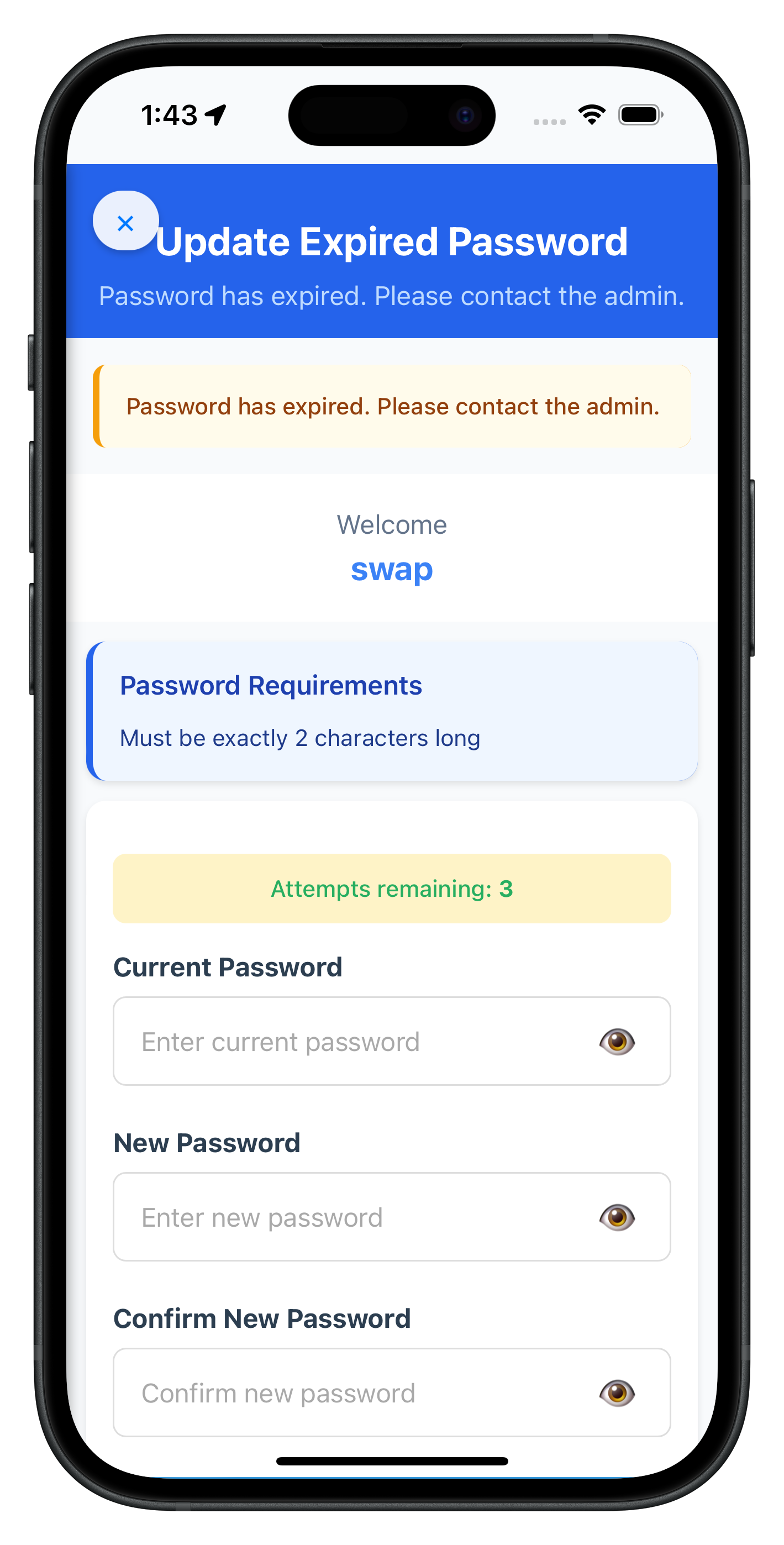
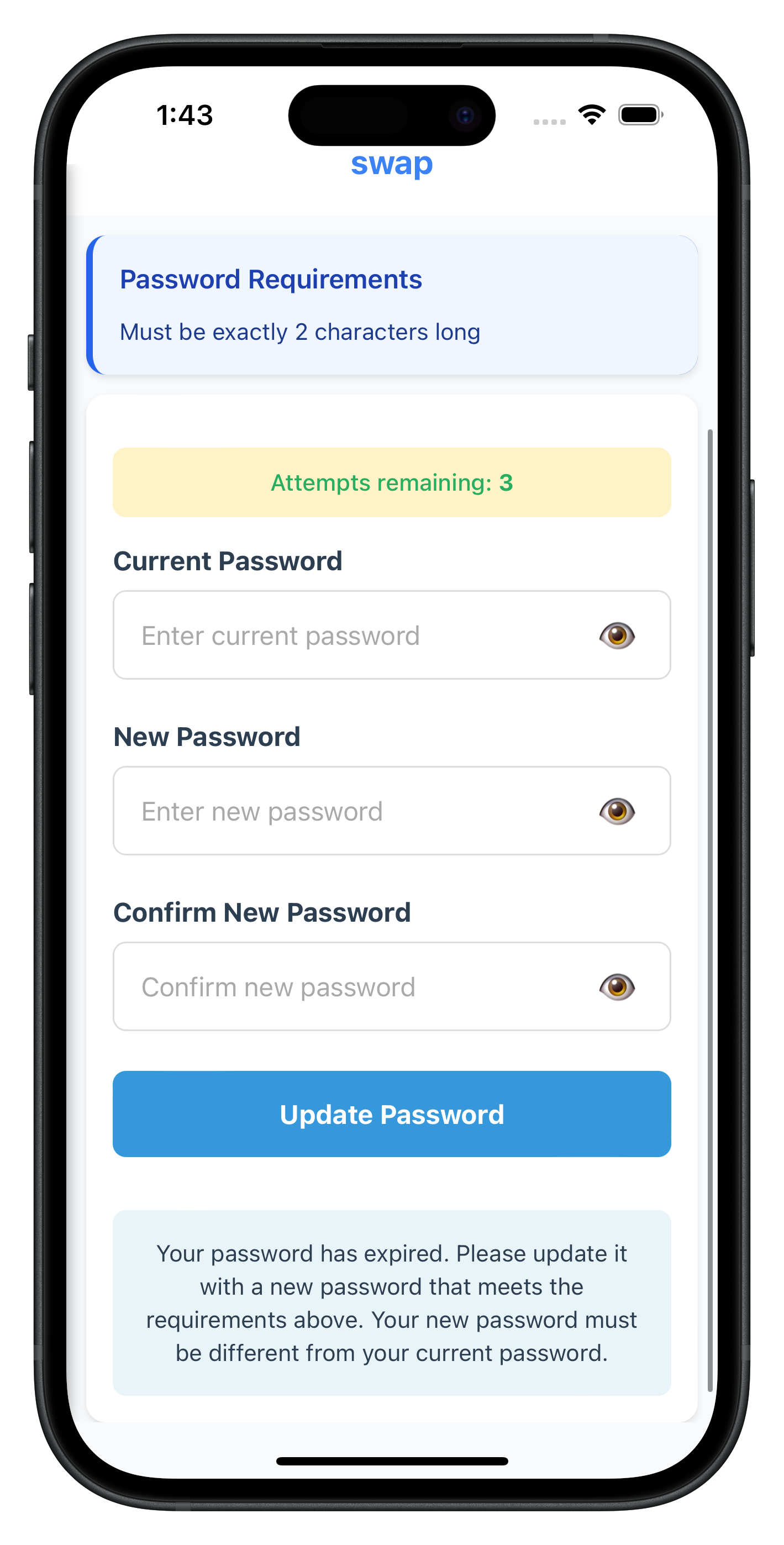
Let's register the UpdateExpiryPasswordScreen in your navigation configuration.
Register Screen in NavigationService
Add the screen to your navigation routes:
// www/src/tutorial/navigation/NavigationService.js (screen registration)

// Import the screen module
// (In Cordova, screens are loaded via script tags in index.html)

// Register route in your routes object
const routes = {
  // ... other routes
  UpdateExpiryPassword: {
    template: 'UpdateExpiryPasswordScreen', // Screen object name
    title: 'Update Expired Password'
  }
};
Ensure Script Loading in index.html
Add the screen script to your HTML file:
<!-- www/index.html (script loading) -->

<!-- Load screens -->
<script src="src/tutorial/screens/mfa/CheckUserScreen.js"></script>
<script src="src/tutorial/screens/mfa/ActivationCodeScreen.js"></script>
<script src="src/tutorial/screens/mfa/UserLDAConsentScreen.js"></script>
<script src="src/tutorial/screens/mfa/SetPasswordScreen.js"></script>
<script src="src/tutorial/screens/mfa/VerifyPasswordScreen.js"></script>
<script src="src/tutorial/screens/mfa/UpdateExpiryPasswordScreen.js"></script>
<script src="src/tutorial/screens/mfa/VerifyAuthScreen.js"></script>
<script src="src/tutorial/screens/mfa/DashboardScreen.js"></script>
Script Loading Order
In Cordova applications, maintain this script loading order in index.html:
<!-- 1. Cordova core -->
<script src="cordova.js"></script>

<!-- 2. Utilities -->
<script src="src/uniken/utils/connectionProfileParser.js"></script>
<script src="src/uniken/utils/passwordPolicy.js"></script>

<!-- 3. Services -->
<script src="src/uniken/services/rdnaEventManager.js"></script>
<script src="src/uniken/services/rdnaService.js"></script>

<!-- 4. Providers -->
<script src="src/uniken/providers/SDKEventProvider.js"></script>

<!-- 5. Navigation -->
<script src="src/tutorial/navigation/NavigationService.js"></script>

<!-- 6. Screens -->
<script src="src/tutorial/screens/mfa/*.js"></script>

<!-- 7. Application -->
<script src="js/app.js"></script>
Navigation Flow Verification
Verify your navigation flow is complete:
Step | Navigation Event | Screen |
1. User Login |
| VerifyPasswordScreen |
2. Password Expired |
| UpdateExpiryPasswordScreen |
3. Password Updated |
| DashboardScreen |
Now let's test the complete password expiry implementation with various scenarios.
Test Scenario 1: Standard Password Expiry Flow
Follow these steps to test standard password expiry:
- Login with expired password
- Use VerifyPasswordScreen (challengeMode = 0)
- Enter credentials for user with expired password
- Verify automatic navigation
- SDK should detect expiry (statusCode 118)
- SDK triggers getPassword with challengeMode = 4
- App navigates to UpdateExpiryPasswordScreen
- Check password policy display
- Verify "Password Requirements" section appears
- Confirm policy is extracted from RELID_PASSWORD_POLICY
- Check policy message is user-friendly
- Update password
- Enter current password
- Enter new password (meeting policy requirements)
- Enter confirm password (matching new password)
- Tap "Update Password"
- Verify automatic login
- SDK should trigger onUserLoggedIn event
- App should navigate to Dashboard automatically
Test Scenario 2: Password Reuse Detection
Test password reuse error handling:
- Navigate to UpdateExpiryPasswordScreen (following Scenario 1 steps 1-3)
- Enter recently used password
- Current password: [user's current password]
- New password: [password used in last N passwords]
- Confirm password: [same as new password]
- Tap "Update Password"
- Verify reuse detection
- SDK returns statusCode 164
- SDK re-triggers getPassword with challengeMode = 4
- Error message displayed: "Please enter a new password as your entered password has been used by you previously..."
- Verify automatic field clearing
- All three password fields should clear automatically
- User can retry with different password
- Error message remains visible
- Retry with valid password
- Enter current password again
- Enter new password (not in history)
- Enter confirm password
- Verify successful update and login
Test Scenario 3: Validation Errors
Test all validation rules:
Test Case | Expected Error | Expected Behavior |
Empty current password | "Please enter your current password" | Focus current password field |
Empty new password | "Please enter a new password" | Focus new password field |
Empty confirm password | "Please confirm your new password" | Focus confirm password field |
Passwords don't match | "New password and confirm password do not match" | Clear new/confirm fields |
New = Current password | "New password must be different from current password" | Clear new/confirm fields |
Debugging Tips
If you encounter issues, check these areas:
Issue | Possible Cause | Solution |
Policy not displaying | Using wrong policy key | Update extraction key to RELID_PASSWORD_POLICY |
Fields not clearing | Missing field clear logic | Add clearPasswordFields() in error handling |
Navigation not working | challengeMode 4 not routed in SDKEventProvider | Add if (data.challengeMode === 4) routing |
API not called | Form validation failing | Check validation logic |
Screen not loading | Script not loaded in index.html | Add script tag in correct order |
Plugin not found | cordova prepare not run | Run cordova prepare after changes |
Before deploying password expiry functionality to production, review these important considerations.
Security Best Practices
Practice | Implementation | Importance |
Never log passwords | Remove all console.log statements that might expose passwords | Critical |
Password history | Respect server-configured history limits | High |
Policy enforcement | Always display and enforce RELID_PASSWORD_POLICY | High |
Error handling | Clear fields on all errors to prevent data exposure | High |
Logging level | Use | Critical |
User Experience Optimization
Enhance user experience with these patterns:
// 1. Clear, specific error messages
if (newPassword === currentPassword) {
  this.showError('New password must be different from current password', 'update-expiry-new-password');
}

// 2. Automatic field clearing on errors
if (data.error && data.error.longErrorCode !== 0) {
  this.showStatusBanner(errorMessage, 'error');
  this.clearPasswordFields();
}

// 3. Keyboard navigation
currentPasswordInput.onkeypress = (e) => {
  if (e.key === 'Enter') {
    e.preventDefault();
    if (newPasswordInput) newPasswordInput.focus();
  }
};

// 4. Loading state feedback
this.setSubmitting(true);
// Disables inputs, shows spinner, updates button text
Performance Considerations
Consideration | Implementation |
DOM queries | Cache DOM element references when possible |
Event cleanup | Remove event listeners in cleanup() method |
Memory management | Clear state when screen unmounts |
Error recovery | Implement retry logic with proper state cleanup |
Testing Checklist
Before production deployment, verify:
- [ ] Password expiry detection works (challengeMode 4 routing)
- [ ] Password policy extracted from RELID_PASSWORD_POLICY
- [ ] Password reuse detection (statusCode 164) with field clearing
- [ ] All validation rules working (empty fields, mismatch, same password)
- [ ] Keyboard navigation between fields (Enter key)
- [ ] Loading states during API calls
- [ ] Error messages clear and actionable
- [ ] Automatic login after successful update
- [ ] Close button resets auth state properly
- [ ] No passwords logged to console
- [ ] Script loading order correct in index.html
- [ ] Plugin installed:
cordova plugin lsshows rdna plugin - [ ] Platforms prepared:
cordova preparerun after changes - [ ] UI matches design system
What You've Accomplished
Congratulations! You've successfully implemented REL-ID Password Expiry functionality in your Cordova application.
You now have:
✅ Password Expiry Detection: Automatic detection and routing of challengeMode 4
✅ UpdatePassword API: Full integration with proper error handling
✅ Three-Field Validation: Current, new, and confirm password validation
✅ Password Policy Display: Extraction and display of RELID_PASSWORD_POLICY
✅ Password Reuse Handling: StatusCode 164 detection with automatic field clearing
✅ Production-Ready: Secure, user-friendly password expiry flow
Additional Resources
- REL-ID Password Expiry Documentation - Complete API reference
- REL-ID Challenge Modes - Understanding challenge modes
- Cordova Platform Guide - Platform-specific setup
Thank you for completing the REL-ID Password Expiry Flow Codelab!
You're now equipped to build secure, production-ready password expiry workflows that provide excellent user experience while maintaining strong security standards.