Welcome to the REL-ID Additional Device Activation codelab! This tutorial builds upon the foundational MFA implementation to add sophisticated device onboarding capabilities using REL-ID Verify's push notification system.
What You'll Build
In this codelab, you'll enhance your existing MFA application with:
- 🔐 REL-ID Verify Integration: Automatic push notification-based device activation
- 📱 Device-to-Device Communication: Seamless approval workflows between registered and new devices
- 🔄 Fallback Activation Methods: Alternative activation when registered devices aren't accessible
- 📬 Notification Management: Server notification retrieval and interactive action processing
- ⚡ Real-time Status Updates: Live processing indicators during activation workflows
- 🎛️ Enhanced Dashboard: Drawer navigation with notification access
What You'll Learn
By completing this codelab, you'll master:
- Advanced SDK Event Handling: Managing
addNewDeviceOptionsevents and device activation flows - REL-ID Verify Workflows: Implementing automatic push notification-based device approval
- Fallback Strategies: Building robust alternative activation methods for various user scenarios
- Notification Systems: Creating comprehensive server notification management with user interactions
- Enhanced Navigation: Integrating drawer navigation with notification access points
- Production Patterns: Implementing error handling, status management, and user experience optimizations
Prerequisites
Before starting this codelab, ensure you have:
- ✅ Completed REL-ID MFA Codelab - All MFA screens and flows must be fully implemented
- ✅ Completed REL-ID MFA Session Management Codelab - All MFA screens and flows must be fully implemented
- ✅ Cordova Development Environment - Android Studio, Xcode, and Cordova CLI configured
- ✅ Multiple Physical Devices - REL-ID Verify requires real device-to-device push notification testing
- ✅ cordova-plugin-rdna Plugin - Latest SDK with device activation support
- ✅ JavaScript Knowledge - Understanding of JavaScript ES6+ and asynchronous programming
Get the Code from GitHub
The code to get started is stored in a GitHub repository.
You can clone the repository using the following command:
git clone https://github.com/uniken-public/codelab-cordova.git
Navigate to the relid-MFA-additional-device-activation folder in the repository you cloned earlier
Codelab Architecture Overview
This codelab extends your MFA application with three core device activation components:
- VerifyAuthScreen: Automatic REL-ID Verify activation with real-time status updates
- GetNotificationsScreen: Server notification management with interactive action modals
- Enhanced Event Handling:
addNewDeviceOptionsevent processing and navigation coordination
Before implementing device activation screens, let's understand the key plugin events and APIs that power the additional device activation workflow.
Device Activation Event Flow
The device activation process follows this event-driven pattern:
User Completes MFA on Primary Device → SDK Detects New Device On Secondary Device → addNewDeviceOptions Event → VerifyAuthScreen →
Push Notifications Sent → User Approves the Notification On Primary Device → Continue MFA Flow → Device Activated
Core Device Activation Types
Add these JSDoc type definitions to understand device activation data structures:
// src/uniken/types/rdnaEvents.js (device activation additions)

/**
 * Device activation options data structure
 * Triggered when SDK detects unregistered device during authentication
 *
 * @typedef {Object} RDNAAddNewDeviceOptionsData
 * @property {string} userID - User identifier
 * @property {string[]} newDeviceOptions - Array of available activation method IDs
 * @property {RDNAChallengeInfo[]} challengeInfo - Challenge information for activation methods
 */

/**
 * RDNA Notification Body
 * Localized content for notification
 *
 * @typedef {Object} RDNANotificationBody
 * @property {string} lng - Language code
 * @property {string} subject - Notification subject
 * @property {string} message - Notification message content
 * @property {Object.<string, string>} label - Label translations
 */

/**
 * RDNA Notification Action
 * Available actions for notification
 *
 * @typedef {Object} RDNANotificationAction
 * @property {string} label - Action label
 * @property {string} action - Action identifier
 * @property {string} authlevel - Required authentication level
 */

/**
 * RDNA Notification Item
 * Individual notification structure from API response
 *
 * @typedef {Object} RDNANotificationItem
 * @property {string} notification_uuid - Unique notification identifier
 * @property {string} create_ts - Creation timestamp
 * @property {string} expiry_timestamp - Expiration timestamp
 * @property {number} create_ts_epoch - Creation timestamp in epoch milliseconds
 * @property {number} expiry_timestamp_epoch - Expiration timestamp in epoch milliseconds
 * @property {RDNANotificationBody[]} body - Notification content in multiple languages
 * @property {RDNANotificationAction[]} actions - Available actions
 * @property {string} action_performed - Action already performed (if any)
 * @property {boolean} ds_required - Digital signature required flag
 */

/**
 * RDNA Notification Response Data
 * Response structure for notifications API
 *
 * @typedef {Object} RDNANotificationResponseData
 * @property {RDNANotificationItem[]} notifications - Array of notifications
 * @property {string} start - Start index
 * @property {string} count - Count of notifications returned
 * @property {string} total - Total available notifications
 */

/**
 * RDNA Get Notifications Data
 * Unified notification response structure for onGetNotifications event
 *
 * @typedef {Object} RDNAGetNotificationsData
 * @property {number} [errCode] - Error code
 * @property {RDNAError} [error] - Error details
 * @property {number} [eMethId] - Method identifier
 * @property {string} [userID] - User identifier
 * @property {number} [challengeMode] - Challenge mode
 * @property {number} [authenticationType] - Authentication type
 * @property {RDNAChallengeResponse} [challengeResponse] - Challenge response
 * @property {Object} [pArgs] - Response payload arguments
 * @property {Object} pArgs.service_details - Service details
 * @property {Object} pArgs.response - Response data
 * @property {RDNANotificationResponseData} pArgs.response.ResponseData - Notification data
 * @property {number} pArgs.response.ResponseDataLen - Response data length
 * @property {string} pArgs.response.StatusMsg - Status message
 * @property {number} pArgs.response.StatusCode - Status code
 * @property {number} pArgs.response.CredOpMode - Credential operation mode
 * @property {Object} pArgs.pxyDetails - Proxy details
 */

/**
 * RDNA Update Notification Response Data
 * Response data structure for notification update
 *
 * @typedef {Object} RDNAUpdateNotificationResponseData
 * @property {number} status_code - Status code
 * @property {string} message - Response message
 * @property {string} notification_uuid - Notification UUID
 * @property {boolean} is_ds_verified - Digital signature verification status
 */

/**
 * RDNA Update Notification Data
 * Complete response structure for onUpdateNotification event
 *
 * @typedef {Object} RDNAUpdateNotificationData
 * @property {number} errCode - Error code
 * @property {RDNAError} error - Error details
 * @property {number} eMethId - Method identifier
 * @property {Object} pArgs - Response payload arguments
 * @property {Object} pArgs.service_details - Service details
 * @property {Object} pArgs.response - Response data
 * @property {RDNAUpdateNotificationResponseData} pArgs.response.ResponseData - Update response data
 * @property {number} pArgs.response.ResponseDataLen - Response data length
 * @property {string} pArgs.response.StatusMsg - Status message
 * @property {number} pArgs.response.StatusCode - Status code
 * @property {number} pArgs.response.CredOpMode - Credential operation mode
 * @property {Object} pArgs.pxyDetails - Proxy details
 */
Understanding addNewDeviceOptions Event
The addNewDeviceOptions event is the cornerstone of device activation:
When It Triggers
- During MFA Authentication: After successful username validation on secondary device
- New Device Detection: When SDK detects device isn't registered for the user
- Automatic Invocation: No manual API call needed - SDK triggers automatically
REL-ID Verify Workflow
REL-ID Verify enables secure device-to-device approval:
- Push Notification Sent: SDK sends approval request to user's registered devices
- User Receives Notification: Registered device shows activation approval request
- User Approves/Rejects: User makes decision on registered device
- Response Processed: New device receives approval status
- Activation Completed: Device registration finalized, MFA flow continues
Enhance your existing RdnaService with device activation APIs. These methods handle REL-ID Verify workflows and notification management.
Adding Device Activation APIs
Extend your RdnaService class with these device activation methods:
// src/uniken/services/rdnaService.js (device activation additions)

/**
 * Performs REL-ID Verify authentication for device activation
 * Sends push notifications to registered devices for approval
 * @param {boolean} verifyAuthStatus - User's decision (true = proceed with verification, false = cancel)
 * @returns {Promise<Object>} Promise resolving to sync response
 */
async performVerifyAuth(verifyAuthStatus) {
  return new Promise((resolve, reject) => {
    console.log('RdnaService - Performing verify auth with status:', verifyAuthStatus);

    com.uniken.rdnaplugin.RdnaClient.performVerifyAuth(
      (response) => {
        console.log('RdnaService - PerformVerifyAuth sync callback received');

        // CRITICAL: Plugin returns JSON string - must parse
        const result = JSON.parse(response);
        console.log('RdnaService - performVerifyAuth sync response:', JSON.stringify({
          longErrorCode: result.error?.longErrorCode,
          shortErrorCode: result.error?.shortErrorCode,
          errorString: result.error?.errorString
        }, null, 2));

        if (result.error && result.error.longErrorCode === 0) {
          console.log('RdnaService - PerformVerifyAuth sync response success, waiting for async events');
          resolve(result);
        } else {
          console.error('RdnaService - PerformVerifyAuth sync response error:', result);
          reject(result);
        }
      },
      (error) => {
        console.error('RdnaService - performVerifyAuth error callback:', error);
        const result = JSON.parse(error);
        reject(result);
      },
      [verifyAuthStatus, false] // [Verify Auth, Enterprise Registration]
    );
  });
}

/**
 * Initiates fallback device activation flow
 * Alternative method when REL-ID Verify is not available/accessible
 * @returns {Promise<Object>} Promise resolving to sync response
 */
async fallbackNewDeviceActivationFlow() {
  return new Promise((resolve, reject) => {
    console.log('RdnaService - Initiating fallback new device activation flow');

    com.uniken.rdnaplugin.RdnaClient.fallbackNewDeviceActivationFlow(
      (response) => {
        console.log('RdnaService - FallbackNewDeviceActivationFlow sync callback received');

        const result = JSON.parse(response);
        console.log('RdnaService - fallbackNewDeviceActivationFlow sync response:', JSON.stringify({
          longErrorCode: result.error?.longErrorCode,
          shortErrorCode: result.error?.shortErrorCode,
          errorString: result.error?.errorString
        }, null, 2));

        if (result.error && result.error.longErrorCode === 0) {
          console.log('RdnaService - FallbackNewDeviceActivationFlow sync response success, alternative activation started');
          resolve(result);
        } else {
          console.error('RdnaService - FallbackNewDeviceActivationFlow sync response error:', result);
          reject(result);
        }
      },
      (error) => {
        console.error('RdnaService - fallbackNewDeviceActivationFlow error callback:', error);
        const result = JSON.parse(error);
        reject(result);
      }
    );
  });
}

/**
 * Retrieves server notifications for the current user
 * Loads all pending notifications with actions
 * @param {number} recordCount - Number of records to fetch (0 = all active notifications)
 * @param {number} startIndex - Index to begin fetching from (must be >= 1)
 * @param {string} startDate - Start date filter (optional)
 * @param {string} endDate - End date filter (optional)
 * @returns {Promise<Object>} Promise resolving to sync response
 */
async getNotifications(recordCount = 0, startIndex = 1, startDate = '', endDate = '') {
  return new Promise((resolve, reject) => {
    console.log('RdnaService - Fetching notifications with recordCount:', recordCount, 'startIndex:', startIndex);

    com.uniken.rdnaplugin.RdnaClient.getNotifications(
      (response) => {
        console.log('RdnaService - GetNotifications sync callback received');

        const result = JSON.parse(response);
        console.log('RdnaService - getNotifications sync response:', JSON.stringify({
          longErrorCode: result.error?.longErrorCode,
          shortErrorCode: result.error?.shortErrorCode,
          errorString: result.error?.errorString
        }, null, 2));

        if (result.error && result.error.longErrorCode === 0) {
          console.log('RdnaService - GetNotifications sync response success, waiting for onGetNotifications event');
          resolve(result);
        } else {
          console.error('RdnaService - GetNotifications sync response error:', result);
          reject(result);
        }
      },
      (error) => {
        console.error('RdnaService - getNotifications error callback:', error);
        const result = JSON.parse(error);
        reject(result);
      },
      [recordCount, '', startIndex, startDate, endDate]
    );
  });
}

/**
 * Updates a notification with user action
 * Processes user decision on notification actions
 * @param {string} notificationId - Notification identifier (UUID)
 * @param {string} actionResponse - Action response value selected by user
 * @returns {Promise<Object>} Promise resolving to sync response
 */
async updateNotification(notificationId, actionResponse) {
  return new Promise((resolve, reject) => {
    console.log('RdnaService - Updating notification:', notificationId, 'with response:', actionResponse);

    com.uniken.rdnaplugin.RdnaClient.updateNotification(
      (response) => {
        console.log('RdnaService - UpdateNotification sync callback received');

        const result = JSON.parse(response);
        console.log('RdnaService - updateNotification sync response:', JSON.stringify({
          longErrorCode: result.error?.longErrorCode,
          shortErrorCode: result.error?.shortErrorCode,
          errorString: result.error?.errorString
        }, null, 2));

        if (result.error && result.error.longErrorCode === 0) {
          console.log('RdnaService - UpdateNotification sync response success, waiting for onUpdateNotification event');
          resolve(result);
        } else {
          console.error('RdnaService - UpdateNotification sync response error:', result);
          reject(result);
        }
      },
      (error) => {
        console.error('RdnaService - updateNotification error callback:', error);
        const result = JSON.parse(error);
        reject(result);
      },
      [notificationId, actionResponse]
    );
  });
}
Understanding Device Activation APIs
performVerifyAuth API
- Purpose: Initiates REL-ID Verify process with push notifications
- Parameters:
verifyAuthStatus(boolean) - automatically start verification - Behavior: Sends approval requests to all registered devices
- Response: Immediate sync response, then async processing via push notifications
fallbackNewDeviceActivationFlow API
- Purpose: Provides alternative activation method
- Use Case: When registered devices are not accessible/available
- Behavior: Triggers server-configured alternative verification process like activation code/otp
- Integration: Works with existing MFA flow without disruption
getNotifications API
- Purpose: Retrieves all server notifications for current user
- Response: Returns notification list with actions and metadata
- Usage Pattern: Called automatically when GetNotificationsScreen loads
- Data Structure: Returns RDNAGetNotificationsData via async event
updateNotification API
- Purpose: Processes user actions on notifications
- Parameters: notificationId and actionResponse
- Behavior: Updates notification status and processes user decision
- Response: Returns success/failure status via RDNAUpdateNotificationData event
API Response Pattern
All device activation APIs follow the established REL-ID SDK pattern:
- Immediate Sync Response: Indicates if API call was accepted by SDK
- Success Check:
longErrorCode === 0means API call succeeded - Async Event Processing: Actual results delivered via SDK events
- Error Handling: Sync errors rejected as Promise failures
Enhance your existing event manager to handle device activation events. Add support for addNewDeviceOptions, notification retrieval, and notification updates.
Adding Device Activation Event Handlers
Extend your RdnaEventManager class with device activation event handling:
// src/uniken/services/rdnaEventManager.js (device activation additions)

/**
 * Register native event listeners
 * Called ONCE during app initialization
 */
registerEventListeners() {
  console.log('RdnaEventManager - Registering native event listeners');

  // ... existing MFA and MTD listeners ...

  // Bind device activation handlers
  const addNewDeviceOptionsListener = this.onAddNewDeviceOptions.bind(this);
  const getNotificationsListener = this.onGetNotifications.bind(this);
  const updateNotificationListener = this.onUpdateNotification.bind(this);

  // Device Activation event registrations
  document.addEventListener('addNewDeviceOptions', addNewDeviceOptionsListener, false);

  // Notification Management event registrations
  document.addEventListener('onGetNotifications', getNotificationsListener, false);
  document.addEventListener('onUpdateNotification', updateNotificationListener, false);

  // Store listeners for cleanup
  this.listeners.push(
    { name: 'addNewDeviceOptions', handler: addNewDeviceOptionsListener },
    { name: 'onGetNotifications', handler: getNotificationsListener },
    { name: 'onUpdateNotification', handler: updateNotificationListener }
  );

  console.log('RdnaEventManager - Native event listeners registered');
}
Device Activation Event Implementations
Add these event handler methods to your event manager:
/**
 * Handle addNewDeviceOptions event (device activation trigger)
 */
onAddNewDeviceOptions(event) {
  console.log("RdnaEventManager - Add new device options event received");

  try {
    // Handle both string and object responses
    let deviceOptionsData;
    if (typeof event.response === 'string') {
      deviceOptionsData = JSON.parse(event.response);
    } else {
      deviceOptionsData = event.response;
    }

    console.log("RdnaEventManager - Device activation options:", JSON.stringify({
      optionsCount: deviceOptionsData.newDeviceOptions?.length || deviceOptionsData.options?.length,
      challengeMode: deviceOptionsData.challengeMode
    }, null, 2));

    if (this.addNewDeviceOptionsHandler) {
      this.addNewDeviceOptionsHandler(deviceOptionsData);
    }
  } catch (error) {
    console.error("RdnaEventManager - Failed to parse device options:", error);
  }
}

/**
 * Handle onGetNotifications event (notification list response)
 */
onGetNotifications(event) {
  console.log("RdnaEventManager - Get notifications response event received");

  try {
    // Handle both string and object responses
    let notificationsData;
    if (typeof event.response === 'string') {
      notificationsData = JSON.parse(event.response);
    } else {
      notificationsData = event.response;
    }

    console.log("RdnaEventManager - Notifications response:", JSON.stringify({
      statusCode: notificationsData.status?.statusCode,
      notificationsCount: notificationsData.notificationsList?.length,
      errorCode: notificationsData.error?.longErrorCode
    }, null, 2));

    if (this.getNotificationsHandler) {
      this.getNotificationsHandler(notificationsData);
    }
  } catch (error) {
    console.error("RdnaEventManager - Failed to parse notifications response:", error);
  }
}

/**
 * Handle onUpdateNotification event (notification action response)
 */
onUpdateNotification(event) {
  console.log("RdnaEventManager - Update notification response event received");

  try {
    // Handle both string and object responses
    let updateNotificationData;
    if (typeof event.response === 'string') {
      updateNotificationData = JSON.parse(event.response);
    } else {
      updateNotificationData = event.response;
    }

    console.log("RdnaEventManager - Update notification response:", JSON.stringify({
      statusCode: updateNotificationData.status?.statusCode,
      statusMessage: updateNotificationData.status?.statusMessage,
      errorCode: updateNotificationData.error?.longErrorCode,
      errorString: updateNotificationData.error?.errorString
    }, null, 2));

    if (this.updateNotificationHandler) {
      this.updateNotificationHandler(updateNotificationData);
    }
  } catch (error) {
    console.error("RdnaEventManager - Failed to parse update notification response:", error);
  }
}
Event Handler Registration Methods
Add public methods for setting device activation event handlers:
/**
 * Event handler setters (single handler per event)
 */
setAddNewDeviceOptionsHandler(callback) {
  this.addNewDeviceOptionsHandler = callback;
}

setGetNotificationsHandler(callback) {
  this.getNotificationsHandler = callback;
}

setUpdateNotificationHandler(callback) {
  this.updateNotificationHandler = callback;
}

/**
 * Event listener cleanup (called on app termination)
 */
cleanup() {
  console.log('RdnaEventManager - Cleaning up event listeners and handlers');

  // Remove native event listeners
  this.listeners.forEach(listener => {
    document.removeEventListener(listener.name, listener.handler, false);
  });
  this.listeners = [];

  // Clear all event handlers
  this.addNewDeviceOptionsHandler = null;
  this.getNotificationsHandler = null;
  this.updateNotificationHandler = null;

  console.log('RdnaEventManager - Cleanup completed');
}
Understanding Device Activation Events
addNewDeviceOptions Event
- Trigger Condition: Automatically fired when SDK detects unregistered device during MFA
- Timing: Occurs after successful username validation
- Navigation Response: Should navigate to VerifyAuthScreen with device options
- Key Data: UserID, available activation options, default method selection
getNotifications Event
- Trigger Condition: Response to
getNotifications()API call - Timing: Fired when GetNotificationsScreen loads or refreshes notifications
- Data Processing: Contains notification array with actions and metadata
- Sorting: Notifications typically ordered by timestamp (most recent first)
updateNotification Event
- Trigger Condition: Response to
updateNotification()API call - Timing: Fired after user selects action on notification
- Success Handling: Contains success flag and result message
- UI Updates: Used to update notification status and provide user feedback
Event Manager Integration Pattern
The device activation events integrate with existing event management:
// Example of comprehensive event setup in SDKEventProvider
document.addEventListener('deviceready', () => {
  const eventManager = rdnaService.getEventManager();

  // Existing MFA event handlers
  eventManager.setGetUserHandler(handleGetUser);
  eventManager.setGetPasswordHandler(handleGetPassword);
  // ... other MFA handlers ...

  // Device activation event handlers
  eventManager.setAddNewDeviceOptionsHandler(handleAddNewDeviceOptions);
  eventManager.setGetNotificationsHandler(handleGetNotifications);
  eventManager.setUpdateNotificationHandler(handleUpdateNotification);
}, false);
Create the VerifyAuthScreen that handles REL-ID Verify device activation with automatic push notification processing and fallback options.
VerifyAuthScreen HTML Template
First, add the HTML template to your index.html:
<!-- Verify Auth Screen Template (Device Activation) -->
<template id="VerifyAuth-template">
  <div class="screen-container">
    <!-- Close Button -->
    <button id="verify-auth-close-btn" class="close-button">✕</button>

    <div class="content">
      <!-- Title and Subtitle -->
      <h1 id="verify-auth-title" class="title">Additional Device Activation</h1>
      <p id="verify-auth-subtitle" class="subtitle">Activate this device for secure access</p>

      <!-- Error Display (conditional) -->
      <div id="verify-auth-error" class="error-banner" style="display: none;"></div>

      <!-- Processing Status (conditional) -->
      <div id="verify-auth-processing" class="info-banner" style="display: none;">
        <p class="banner-text">Processing device activation...</p>
      </div>

      <!-- Activation Information -->
      <div id="verify-auth-content">
        <!-- REL-ID Verify Message -->
        <div class="message-container">
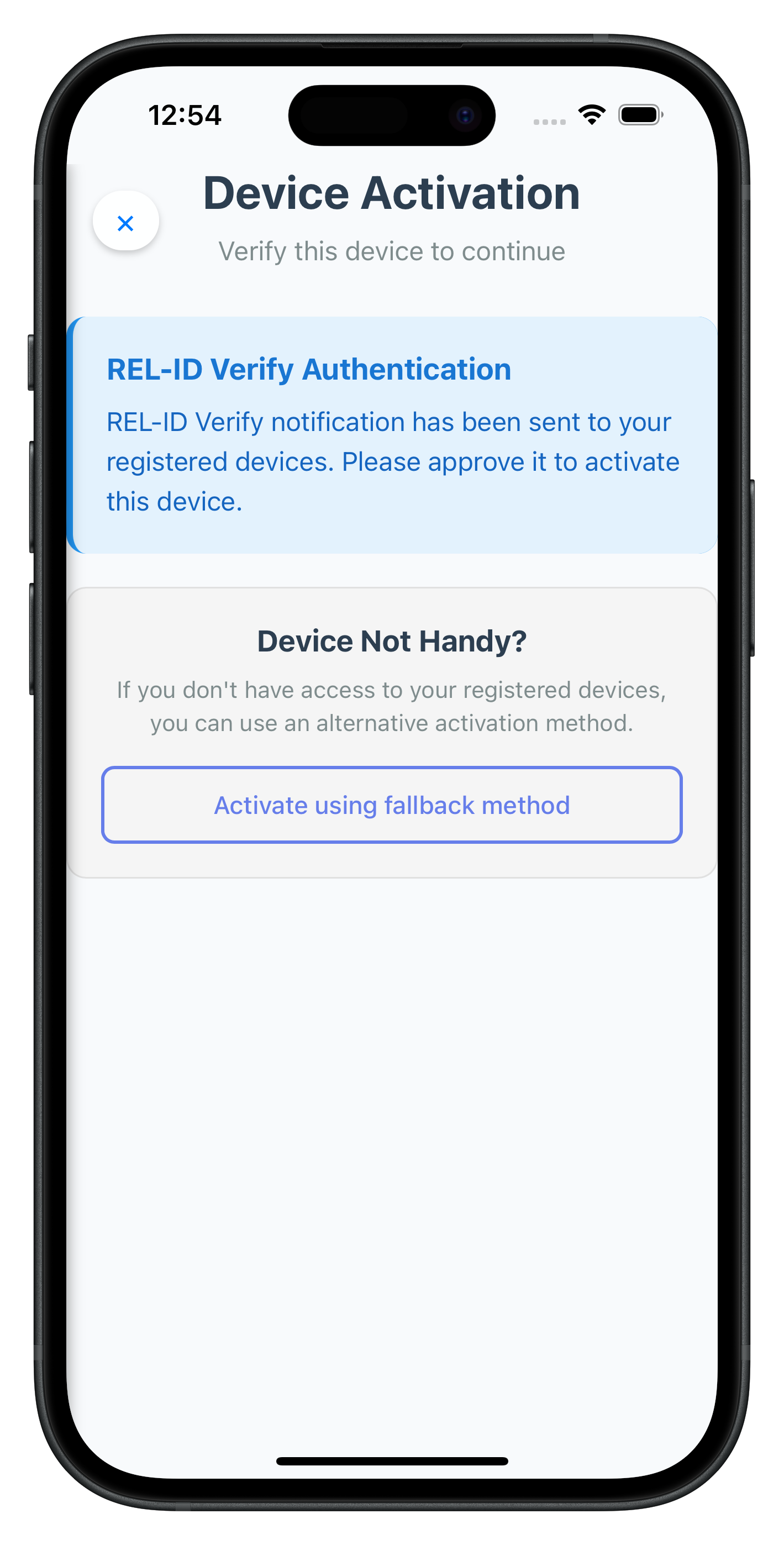
          <h3 class="message-title">REL-ID Verify Authentication</h3>
          <p class="message-text">
            REL-ID Verify notification has been sent to your registered devices. Please approve it to activate this device.
          </p>
        </div>

        <!-- Fallback Option -->
        <div class="fallback-container">
          <h3 class="fallback-title">Device Not Handy?</h3>
          <p class="fallback-description">
            If you don't have access to your registered devices, you can use an alternative activation method.
          </p>
          <button id="fallback-activation-btn" class="outline-button">
            Activate using fallback method
          </button>
        </div>
      </div>
    </div>
  </div>
</template>
VerifyAuthScreen JavaScript Module
Create the screen's JavaScript module:
// src/tutorial/screens/mfa/VerifyAuthScreen.js

/**
 * Verify Auth Screen - Device Activation with REL-ID Verify
 *
 * This screen handles additional device activation using REL-ID Verify push notifications.
 * User Flow:
 * 1. User enters username/password on unregistered device
 * 2. SDK triggers addNewDeviceOptions event
 * 3. SDKEventProvider auto-navigates to this screen
 * 4. Screen auto-calls performVerifyAuth(true)
 * 5. REL-ID server sends push notifications to user's registered devices
 * 6. User approves on registered device
 * 7. SDK continues to LDA consent or password flow
 */

const VerifyAuthScreen = {
  /**
   * Screen state
   */
  isProcessing: false,
  deviceOptions: [],

  /**
   * Called when screen content is loaded (SPA lifecycle)
   *
   * @param {Object} params - Navigation parameters from SDKEventProvider
   */
  onContentLoaded(params) {
    console.log('VerifyAuthScreen - Content loaded with params:', JSON.stringify(params, null, 2));

    // Store device options from SDK event
    this.deviceOptions = params.deviceOptions || [];

    // Setup UI
    this.setupEventListeners();
    this.updateUI(params);

    // Auto-start device activation with REL-ID Verify
    this.startDeviceActivation();
  },

  /**
   * Setup event listeners for buttons
   */
  setupEventListeners() {
    const closeBtn = document.getElementById('verify-auth-close-btn');
    const fallbackBtn = document.getElementById('fallback-activation-btn');

    if (closeBtn) {
      closeBtn.onclick = this.handleClose.bind(this);
    }

    if (fallbackBtn) {
      fallbackBtn.onclick = this.handleFallbackPress.bind(this);
    }

    console.log('VerifyAuthScreen - Event listeners attached');
  },

  /**
   * Update UI with navigation parameters
   */
  updateUI(params) {
    const titleEl = document.getElementById('verify-auth-title');
    const subtitleEl = document.getElementById('verify-auth-subtitle');

    if (titleEl && params.title) {
      titleEl.textContent = params.title;
    }

    if (subtitleEl && params.subtitle) {
      subtitleEl.textContent = params.subtitle;
    }
  },

  /**
   * Handle close button - resets auth state
   */
  handleClose() {
    console.log('VerifyAuthScreen - Close button pressed, calling resetAuthState');

    rdnaService.resetAuthState()
      .then(() => {
        console.log('VerifyAuthScreen - ResetAuthState successful');
      })
      .catch((error) => {
        console.error('VerifyAuthScreen - ResetAuthState error:', error);
      });
  },

  /**
   * Start device activation with REL-ID Verify (auto-triggered)
   */
  startDeviceActivation() {
    if (this.isProcessing) {
      console.log('VerifyAuthScreen - Already processing, skipping');
      return;
    }

    this.isProcessing = true;
    this.showProcessing(true);
    this.updateButtonState(true);
    this.updateCloseButtonState(true);
    console.log('VerifyAuthScreen - Starting REL-ID Verify activation (automatic)');

    // Call SDK performVerifyAuth API with true (send notifications)
    rdnaService.performVerifyAuth(true)
      .then((syncResponse) => {
        console.log('VerifyAuthScreen - PerformVerifyAuth sync response:', JSON.stringify(syncResponse, null, 2));

        // Success - reset processing state
        this.isProcessing = false;
        this.showProcessing(false);
        this.updateButtonState(false);
        this.updateCloseButtonState(false);

        console.log('VerifyAuthScreen - Verification notification sent successfully');
        console.log('VerifyAuthScreen - Waiting for user approval on registered device');
      })
      .catch((error) => {
        console.error('VerifyAuthScreen - PerformVerifyAuth error:', JSON.stringify(error, null, 2));

        this.isProcessing = false;
        this.showProcessing(false);
        this.updateButtonState(false);
        this.updateCloseButtonState(false);

        const errorMessage = error.error?.errorString || 'Device activation failed';
        this.showError(errorMessage);
      });
  },

  /**
   * Handle fallback activation button press
   */
  handleFallbackPress() {
    if (this.isProcessing) {
      console.log('VerifyAuthScreen - Already processing, ignoring fallback press');
      return;
    }

    console.log('VerifyAuthScreen - Fallback activation requested');

    this.isProcessing = true;
    this.updateButtonState(true);
    this.showStatus('Starting alternative activation method...');

    // Call SDK fallback API
    rdnaService.fallbackNewDeviceActivationFlow()
      .then((syncResponse) => {
        console.log('VerifyAuthScreen - Fallback activation sync response:', JSON.stringify(syncResponse, null, 2));

        // Reset processing state (SDK will handle the rest via events)
        this.isProcessing = false;
        this.updateButtonState(false);
        this.showProcessing(false);

        this.showStatus('Alternative activation initiated. Please complete the verification.');
        console.log('VerifyAuthScreen - Waiting for SDK to trigger fallback challenge event');
      })
      .catch((error) => {
        console.error('VerifyAuthScreen - Fallback activation error:', JSON.stringify(error, null, 2));

        this.isProcessing = false;
        this.updateButtonState(false);
        this.showProcessing(false);

        const errorMessage = error.error?.errorString || 'Fallback activation failed';
        this.showError(errorMessage);
        alert('Fallback Activation Error\n\n' + errorMessage + '\n\nPlease try again.');
      });
  },

  /**
   * Update button states (loading/enabled)
   */
  updateButtonState(isLoading) {
    const fallbackBtn = document.getElementById('fallback-activation-btn');

    if (fallbackBtn) {
      fallbackBtn.disabled = isLoading;
      fallbackBtn.textContent = isLoading ? 'Processing...' : 'Activate using fallback method';
    }
  },

  /**
   * Update close button state
   */
  updateCloseButtonState(isDisabled) {
    const closeBtn = document.getElementById('verify-auth-close-btn');
    if (closeBtn) {
      closeBtn.disabled = isDisabled;
    }
  },

  /**
   * Show/hide processing status banner
   */
  showProcessing(show) {
    const processingEl = document.getElementById('verify-auth-processing');
    if (processingEl) {
      processingEl.style.display = show ? 'block' : 'none';
    }
  },

  /**
   * Show status message
   */
  showStatus(message) {
    const processingEl = document.getElementById('verify-auth-processing');
    if (processingEl) {
      const textEl = processingEl.querySelector('.banner-text');
      if (textEl) {
        textEl.textContent = message;
      }
      processingEl.style.display = 'block';
    }
  },

  /**
   * Show error message
   */
  showError(message) {
    const errorEl = document.getElementById('verify-auth-error');
    if (errorEl) {
      errorEl.textContent = message;
      errorEl.style.display = 'block';
    }
    console.error('VerifyAuthScreen - Error:', message);
  }
};

// Expose globally for NavigationService
window.VerifyAuthScreen = VerifyAuthScreen;
Key VerifyAuthScreen Features
Automatic Activation Flow
- Auto-start REL-ID Verify: Automatically calls
performVerifyAuth(true)when screen loads - Progressive Status Updates: Shows real-time progress and status messages
- Smart Progress Simulation: Provides visual feedback during push notification processing
Fallback Integration
- Alternative Method Button: Provides fallback option when verify isn't accessible
- Seamless Switching: Users can switch between verify and fallback methods
- Clear Option Descriptions: Uses SDK-provided option descriptions for user guidance
User Experience Enhancements
- Hardware Back Button Control: Prevents accidental cancellation during processing
- Progress Indicators: Visual progress bars and status messages
- Error Handling: Comprehensive error display with retry options
- Processing Prevention: Prevents multiple simultaneous activation attempts
The following image showcases screen from the sample application:
Create the GetNotificationsScreen that automatically loads server notifications and provides interactive action modals for user responses.
GetNotificationsScreen HTML Template
Add the HTML template to your index.html:
<!-- Get Notifications Screen Template -->
<template id="GetNotifications-template">
  <div class="screen-container">
    <!-- Header with Menu and Refresh -->
    <div class="notifications-header">
      <button id="notifications-menu-btn" class="header-icon-btn">☰</button>
      <h1 class="header-title">Notifications</h1>
      <button id="notifications-back-btn" class="header-icon-btn refresh-btn">🔄</button>
    </div>

    <div id="notifications-error" class="error-message" style="display: none;"></div>
    <div id="notifications-loading" class="loading-indicator" style="display: none;">Loading notifications...</div>

    <div class="content">
      <p class="subtitle">Manage your REL-ID notifications</p>
      <p id="notifications-user-info" class="user-info"></p>

      <div id="notifications-list" class="notifications-list">
        <!-- Notifications rendered here -->
      </div>
    </div>
  </div>

  <!-- Notification Action Modal -->
  <div id="notification-action-modal" class="modal-overlay" style="display: none;">
    <div class="modal-container">
      <div class="modal-header">
        <h2 id="notification-modal-title" class="modal-title">Notification Actions</h2>
        <button id="notification-modal-close" class="modal-close-btn">✕</button>
      </div>

      <div id="notification-modal-body" class="modal-body">
        <!-- Notification details and action buttons rendered here -->
      </div>
    </div>
  </div>
</template>
GetNotificationsScreen JavaScript Module
Create the screen's JavaScript module:
// src/tutorial/screens/notification/GetNotificationsScreen.js

/**
 * Get Notifications Screen - Server Notification Management
 *
 * This screen displays pending notifications from the REL-ID server and allows users
 * to view and respond to notification actions.
 */

const GetNotificationsScreen = {
  /**
   * Screen state
   */
  notifications: [],
  isLoading: false,
  currentNotification: null,
  selectedAction: null,
  userParams: null,

  /**
   * Called when screen content is loaded (SPA lifecycle)
   *
   * @param {Object} params - Navigation parameters
   */
  onContentLoaded(params) {
    console.log('GetNotificationsScreen - Content loaded with params:', JSON.stringify(params, null, 2));

    // Store user parameters
    this.userParams = params;

    // Setup UI
    this.setupEventListeners();
    this.registerSDKEventHandlers();
    this.updateUserInfo(params.userID || 'Unknown User');

    // Auto-load notifications
    this.loadNotifications();
  },

  /**
   * Setup event listeners
   */
  setupEventListeners() {
    // Navigation controls
    const refreshBtn = document.getElementById('notifications-back-btn');
    const menuBtn = document.getElementById('notifications-menu-btn');

    if (refreshBtn) {
      refreshBtn.onclick = () => {
        console.log('GetNotificationsScreen - Refresh requested');
        this.loadNotifications();
      };
    }

    if (menuBtn) {
      menuBtn.onclick = () => {
        console.log('GetNotificationsScreen - Opening drawer');
        NavigationService.openDrawer();
      };
    }

    // Modal close button
    const modalCloseBtn = document.getElementById('notification-modal-close');
    if (modalCloseBtn) {
      modalCloseBtn.onclick = this.closeActionModal.bind(this);
    }

    console.log('GetNotificationsScreen - Event listeners attached');
  },

  /**
   * Register SDK event handlers for notifications
   */
  registerSDKEventHandlers() {
    const eventManager = rdnaService.getEventManager();

    // Handle getNotifications response
    eventManager.setGetNotificationsHandler((data) => {
      console.log('GetNotificationsScreen - onGetNotifications event received');
      this.handleGetNotificationsResponse(data);
    });

    // Handle updateNotification response
    eventManager.setUpdateNotificationHandler((data) => {
      console.log('GetNotificationsScreen - onUpdateNotification event received');
      this.handleUpdateNotificationResponse(data);
    });

    console.log('GetNotificationsScreen - SDK event handlers registered');
  },

  /**
   * Update user info display
   */
  updateUserInfo(userID) {
    const userInfoEl = document.getElementById('notifications-user-info');
    if (userInfoEl) {
      userInfoEl.textContent = 'User: ' + userID;
    }
  },

  /**
   * Load notifications from server (auto-triggered on screen load)
   */
  loadNotifications() {
    if (this.isLoading) {
      console.log('GetNotificationsScreen - Already loading notifications');
      return;
    }

    this.isLoading = true;
    this.showLoading(true);
    this.hideError();
    console.log('GetNotificationsScreen - Loading notifications from server');

    // Call SDK getNotifications API
    rdnaService.getNotifications(0, 1, '', '')
      .then((syncResponse) => {
        console.log('GetNotificationsScreen - GetNotifications sync response:', JSON.stringify(syncResponse, null, 2));
        // Waiting for onGetNotifications event with notification list
      })
      .catch((error) => {
        console.error('GetNotificationsScreen - GetNotifications error:', JSON.stringify(error, null, 2));
        this.isLoading = false;
        this.showLoading(false);
        this.showError('Failed to load notifications. Please try again.');
      });
  },

  /**
   * Handle notifications received from onGetNotifications event
   */
  handleGetNotificationsResponse(data) {
    console.log('GetNotificationsScreen - Processing notifications response');

    this.isLoading = false;
    this.showLoading(false);

    // Layer 1: Check API-level error (error.longErrorCode)
    if (data.error && data.error.longErrorCode !== 0) {
      const errorMsg = data.error.errorString || 'API error occurred';
      console.error('GetNotificationsScreen - API error:', errorMsg, 'Code:', data.error.longErrorCode);
      this.showError(errorMsg);
      return;
    }

    // Layer 2: Check status code (pArgs.response.StatusCode)
    const statusCode = data.pArgs?.response?.StatusCode;
    if (statusCode !== 100) {
      const statusMsg = data.pArgs?.response?.StatusMsg || 'Failed to retrieve notifications';
      console.error('GetNotificationsScreen - Status error:', statusCode, 'Message:', statusMsg);
      this.showError(statusMsg);
      return;
    }

    // Success: Process notifications data
    this.notifications = data.pArgs?.response?.ResponseData?.notifications || [];
    console.log('GetNotificationsScreen - Received', this.notifications.length, 'notifications');

    // Sort by timestamp (newest first)
    this.notifications.sort((a, b) => {
      const timeA = new Date(a.body?.[0]?.timestamp || a.create_ts || 0);
      const timeB = new Date(b.body?.[0]?.timestamp || b.create_ts || 0);
      return new Date(timeB).getTime() - new Date(timeA).getTime();
    });

    // Display notifications
    this.renderNotifications();
  },

  /**
   * Render notifications list
   */
  renderNotifications() {
    const listContainer = document.getElementById('notifications-list');
    if (!listContainer) return;

    listContainer.innerHTML = '';

    if (this.notifications.length === 0) {
      listContainer.innerHTML = `
        <div class="empty-state">
          <h3>No Notifications</h3>
          <p>You don't have any notifications at the moment.</p>
          <button class="outline-button" onclick="GetNotificationsScreen.loadNotifications()">Refresh</button>
        </div>
      `;
      return;
    }

    // Render each notification
    this.notifications.forEach((notification, index) => {
      const primaryBody = notification.body[0] || {};
      const { subject = 'No Subject', message = 'No Message' } = primaryBody;

      const notificationEl = document.createElement('div');
      notificationEl.className = 'notification-item';
      notificationEl.innerHTML = `
        <div class="notification-header">
          <h3 class="notification-title">${this.escapeHtml(subject)}</h3>
          <span class="notification-time">${this.formatTimestamp(notification.create_ts)}</span>
        </div>
        <p class="notification-message">${this.escapeHtml(message)}</p>
        <div class="notification-footer">
          <span class="notification-category">${notification.actions.length} action(s) available</span>
          <span class="notification-type">${notification.action_performed || 'Pending'}</span>
        </div>
        ${notification.expiry_timestamp ? `
          <p class="notification-expiry">Expires: ${this.formatTimestamp(notification.expiry_timestamp)}</p>
        ` : ''}
      `;

      notificationEl.onclick = () => this.openActionModal(notification);
      listContainer.appendChild(notificationEl);
    });
  },

  /**
   * Open action modal for notification
   */
  openActionModal(notification) {
    if (!notification.actions || notification.actions.length === 0) {
      alert('No Actions\n\nThis notification has no available actions.');
      return;
    }

    this.currentNotification = notification;
    this.selectedAction = null;

    const modal = document.getElementById('notification-action-modal');
    const modalBody = document.getElementById('notification-modal-body');

    if (!modal || !modalBody) return;

    const primaryBody = notification.body[0] || {};
    const { subject = 'No Subject', message = 'No Message' } = primaryBody;

    // Render modal content
    modalBody.innerHTML = `
      <div class="modal-notification-info">
        <h3 class="modal-notification-title">${this.escapeHtml(subject)}</h3>
        <p class="modal-notification-message">${this.escapeHtml(message)}</p>
      </div>
      <p class="actions-label">Select an action:</p>
      <div id="modal-actions-list" class="actions-list">
        ${notification.actions.map(action => `
          <div class="action-option" data-action="${this.escapeHtml(action.action)}">
            <div class="radio-button"></div>
            <div class="action-content">
              <span class="action-name">${this.escapeHtml(action.label)}</span>
              <span class="action-type">Level: ${this.escapeHtml(action.authlevel)}</span>
            </div>
          </div>
        `).join('')}
      </div>
      <div class="modal-actions">
        <button id="modal-submit-btn" class="primary-button" disabled>Submit Action</button>
        <button id="modal-cancel-btn" class="outline-button">Cancel</button>
      </div>
    `;

    // Setup action selection
    const actionOptions = modalBody.querySelectorAll('.action-option');
    const submitBtn = document.getElementById('modal-submit-btn');
    const cancelBtn = document.getElementById('modal-cancel-btn');

    actionOptions.forEach(option => {
      option.onclick = () => {
        // Clear previous selection
        actionOptions.forEach(opt => opt.classList.remove('selected'));
        // Select current
        option.classList.add('selected');
        this.selectedAction = option.getAttribute('data-action');
        if (submitBtn) submitBtn.disabled = false;
      };
    });

    if (submitBtn) {
      submitBtn.onclick = () => this.submitNotificationAction();
    }

    if (cancelBtn) {
      cancelBtn.onclick = () => this.closeActionModal();
    }

    modal.style.display = 'flex';
  },

  /**
   * Close action modal
   */
  closeActionModal() {
    const modal = document.getElementById('notification-action-modal');
    if (modal) {
      modal.style.display = 'none';
    }
    this.currentNotification = null;
    this.selectedAction = null;
  },

  /**
   * Submit notification action
   */
  submitNotificationAction() {
    if (!this.currentNotification || !this.selectedAction) {
      alert('Error\n\nPlease select an action to proceed.');
      return;
    }

    console.log('GetNotificationsScreen - Submitting action:', this.selectedAction);

    const submitBtn = document.getElementById('modal-submit-btn');
    if (submitBtn) {
      submitBtn.disabled = true;
      submitBtn.textContent = 'Processing...';
    }

    rdnaService.updateNotification(this.currentNotification.notification_uuid, this.selectedAction)
      .then((syncResponse) => {
        console.log('GetNotificationsScreen - UpdateNotification sync response:', JSON.stringify(syncResponse, null, 2));
        // Waiting for onUpdateNotification event
      })
      .catch((error) => {
        console.error('GetNotificationsScreen - UpdateNotification error:', JSON.stringify(error, null, 2));

        if (submitBtn) {
          submitBtn.disabled = false;
          submitBtn.textContent = 'Submit Action';
        }

        const errorMessage = error.error?.errorString || 'Failed to process action';
        alert('Error\n\n' + errorMessage);
      });
  },

  /**
   * Handle update notification response
   */
  handleUpdateNotificationResponse(data) {
    console.log('GetNotificationsScreen - Processing update notification response');

    const submitBtn = document.getElementById('modal-submit-btn');
    if (submitBtn) {
      submitBtn.disabled = false;
      submitBtn.textContent = 'Submit Action';
    }

    // Layer 1: Check API-level error (error.longErrorCode)
    if (data.error && data.error.longErrorCode !== 0) {
      const errorMsg = data.error.errorString || 'API error occurred';
      console.error('GetNotificationsScreen - API error:', errorMsg, 'Code:', data.error.longErrorCode);
      alert('Update Failed\n\n' + errorMsg);
      return;
    }

    // Layer 2: Check status code (pArgs.response.StatusCode)
    const statusCode = data.pArgs?.response?.StatusCode;
    const statusMsg = data.pArgs?.response?.StatusMsg || 'Unknown error';

    if (statusCode === 100) {
      // Success case
      console.log('GetNotificationsScreen - Notification updated successfully:', statusMsg);
      this.closeActionModal();
      this.loadNotifications(); // Refresh list
      alert('Success\n\n' + statusMsg);
    } else {
      // Error case
      console.error('GetNotificationsScreen - Status error:', statusCode, 'Message:', statusMsg);
      alert('Update Failed\n\n' + statusMsg);
    }
  },

  /**
   * Show/hide loading indicator
   */
  showLoading(show) {
    const loadingEl = document.getElementById('notifications-loading');
    if (loadingEl) {
      loadingEl.style.display = show ? 'block' : 'none';
    }
  },

  /**
   * Show error message
   */
  showError(message) {
    const errorEl = document.getElementById('notifications-error');
    if (errorEl) {
      errorEl.textContent = message;
      errorEl.style.display = 'block';
    }
  },

  /**
   * Hide error message
   */
  hideError() {
    const errorEl = document.getElementById('notifications-error');
    if (errorEl) {
      errorEl.style.display = 'none';
    }
  },

  /**
   * Format timestamp for display
   */
  formatTimestamp(timestamp) {
    if (!timestamp) return 'N/A';
    const date = new Date(timestamp.replace('UTC', 'Z'));
    return date.toLocaleString();
  },

  /**
   * Escape HTML to prevent XSS
   */
  escapeHtml(text) {
    const div = document.createElement('div');
    div.textContent = text;
    return div.innerHTML;
  }
};

// Expose globally for NavigationService
window.GetNotificationsScreen = GetNotificationsScreen;
Key GetNotificationsScreen Features
Automatic Notification Loading
- Auto-load on Mount: Automatically calls
getNotifications()when screen loads - Event-driven Updates: Handles
getNotificationsandupdateNotificationevents - Real-time Sorting: Sorts notifications by timestamp (most recent first)
Interactive Action Modals
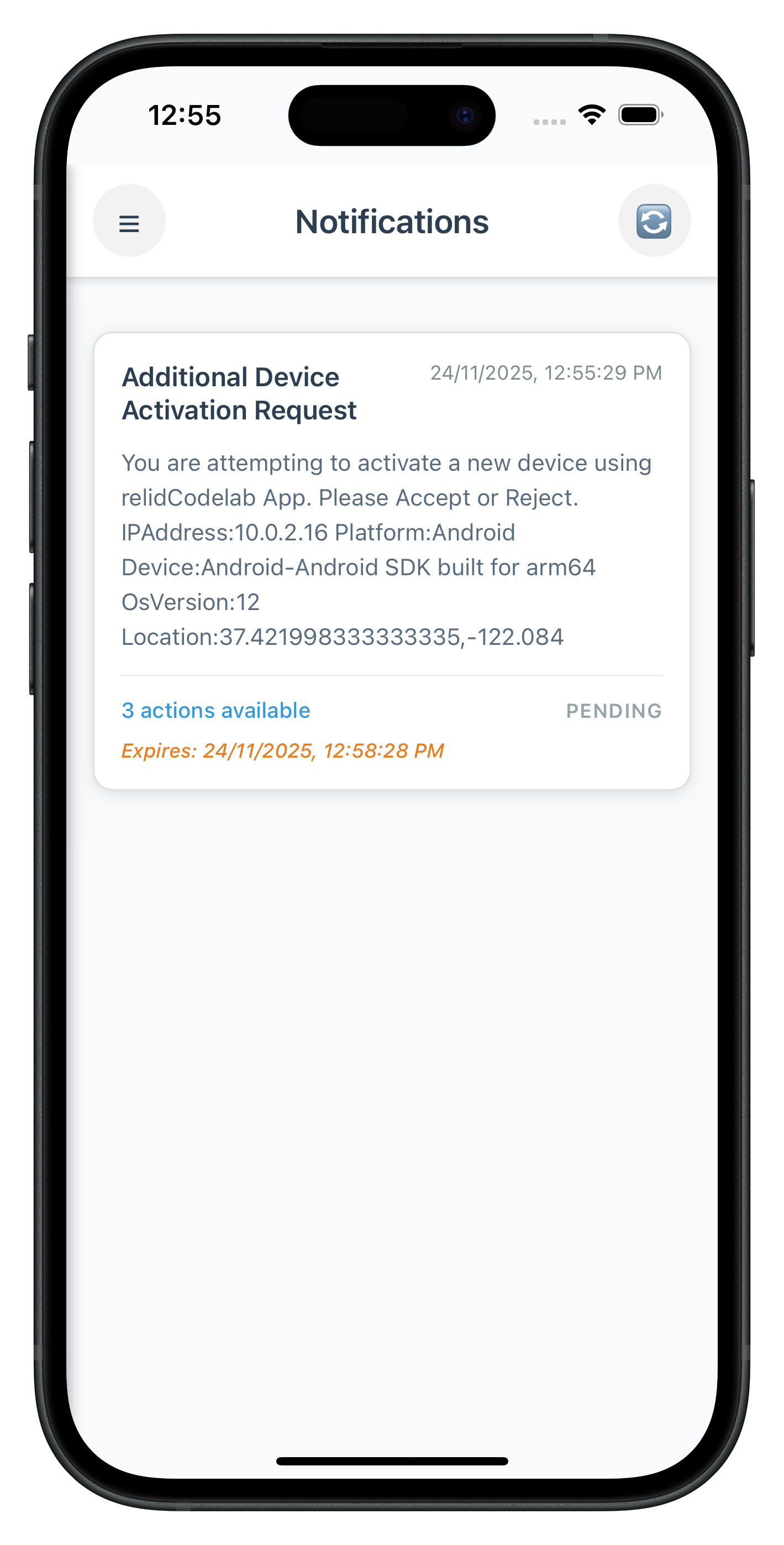
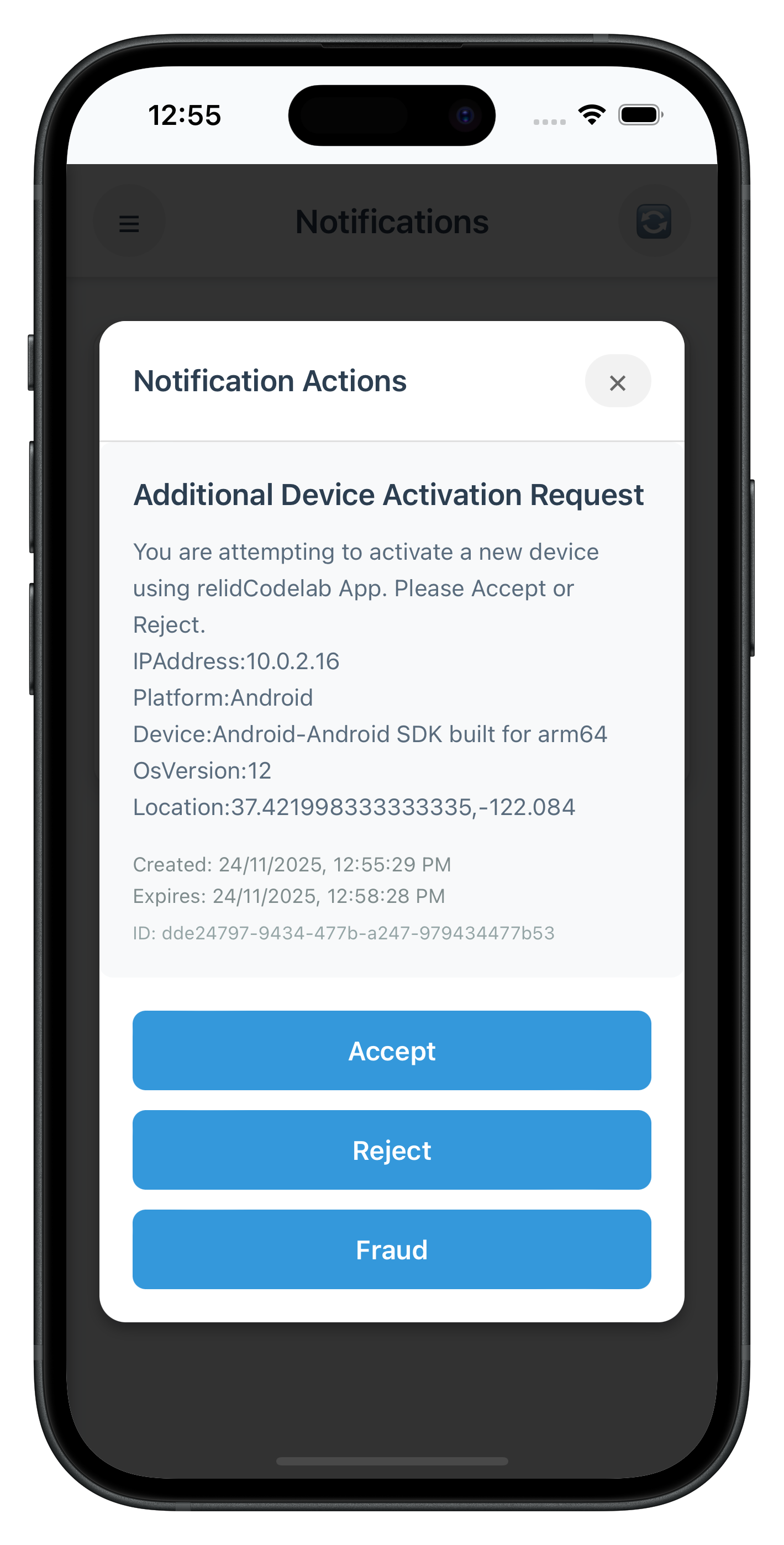
- Action Selection: Radio button interface for selecting notification actions
- Confirmation Dialogs: Shows confirmation for actions requiring verification
- Processing States: Visual feedback during action processing
- Success/Error Handling: Comprehensive response handling with user feedback
Enhanced User Experience
- Pull-to-Refresh: Click refresh button to reload notifications
- Status Indicators: Color-coded status and priority indicators
- Empty State: Helpful empty state with refresh option
- Modal Prevention: Prevents accidental dismissal during action processing
Production Features
- Comprehensive Error Handling: Network and server error management
- Loading States: Progressive loading and processing indicators
- XSS Prevention: HTML escaping for user-generated content
- Performance Optimization: Efficient list rendering and state management
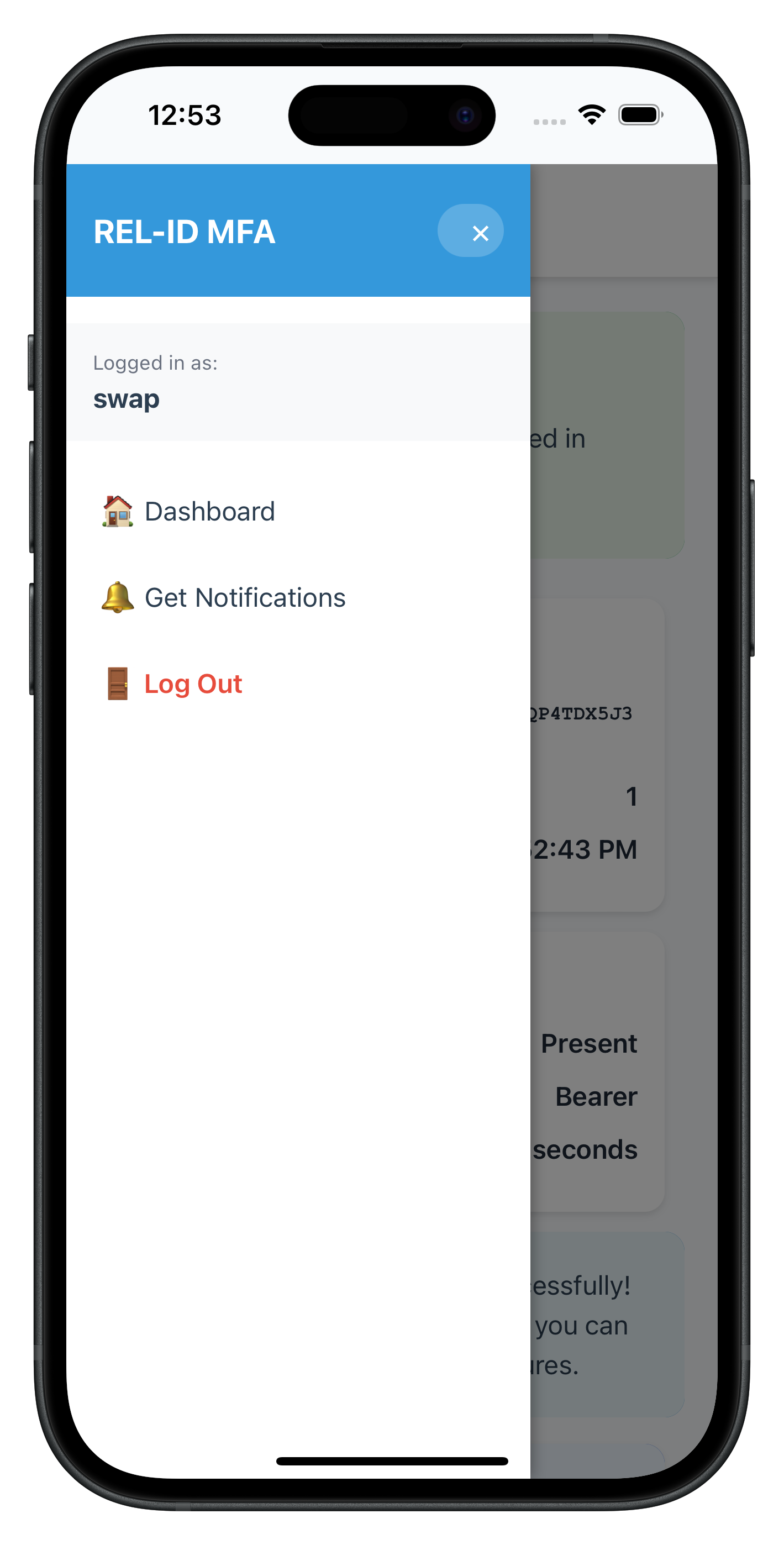
The following images showcase screens from the sample application:
|
|
|
Extend your existing SDKEventProvider to handle device activation events and coordinate navigation for the additional device activation workflow.
Adding Device Activation Event Handlers
Enhance your SDKEventProvider with device activation event handling:
// src/uniken/providers/SDKEventProvider.js (device activation additions)

/**
 * SDK Event Provider - Route SDK events to correct screens
 *
 * Centralized provider for REL-ID SDK event handling.
 * Manages all SDK events, screen state, and navigation logic in one place.
 */

const SDKEventProvider = {
  _initialized: false,

  /**
   * Initialize the provider - register global event handlers
   * Idempotent - safe to call multiple times (SPA pattern)
   */
  initialize() {
    if (this._initialized) {
      console.log('SDKEventProvider - Already initialized, skipping');
      return;
    }

    console.log('SDKEventProvider - Initializing global event handlers');

    // Get event manager instance
    const eventManager = rdnaService.getEventManager();

    // ... existing MFA event handlers ...

    // Set up Device Activation event handler
    eventManager.setAddNewDeviceOptionsHandler(this.handleAddNewDeviceOptions.bind(this));

    this._initialized = true;
    console.log('SDKEventProvider - Global event handlers registered');
  },

  /**
   * Handle add new device options event (device activation trigger)
   * @param {Object} data - Device activation data from SDK
   */
  handleAddNewDeviceOptions(data) {
    console.log('SDKEventProvider - Add new device options event received');
    console.log('SDKEventProvider - Available options:', data.newDeviceOptions);

    // Navigate to VerifyAuth screen
    NavigationService.navigate('VerifyAuth', {
      eventData: data,
      deviceOptions: data.newDeviceOptions || data.options || [],
      title: 'Additional Device Activation',
      subtitle: 'Activate this device for user: ' + data.userID
    });
  },

  /**
   * Enhanced handleUserLoggedIn for device activation support
   * Updated to handle drawer navigation with GetNotifications
   */
  handleUserLoggedIn(data) {
    console.log('SDKEventProvider - User logged in event received for user:', data.userID);
    console.log('SDKEventProvider - Session ID:', data.challengeResponse.session.sessionID);

    // Extract session and JWT information
    const sessionID = data.challengeResponse.session.sessionID;
    const sessionType = data.challengeResponse.session.sessionType;
    const additionalInfo = data.challengeResponse.additionalInfo;
    const jwtToken = additionalInfo.jwtJsonTokenInfo;
    const userRole = additionalInfo.idvUserRole;
    const currentWorkFlow = additionalInfo.currentWorkFlow;

    // Navigate to DrawerNavigator with all session data
    // This now includes access to GetNotifications screen
    NavigationService.navigate('Dashboard', {
      userID: data.userID,
      sessionID: sessionID,
      sessionType: sessionType,
      jwtToken: jwtToken,
      loginTime: new Date().toLocaleString(),
      userRole: userRole,
      currentWorkFlow: currentWorkFlow
    });
  }
};

// Initialize on deviceready
document.addEventListener('deviceready', () => {
  SDKEventProvider.initialize();
}, false);
Navigation Service Enhancements
Update your navigation to support the new device activation screens:
// src/tutorial/navigation/NavigationService.js

const NavigationService = {
  /**
   * Navigate to a screen with optional parameters
   * @param {string} routeName - Route name (e.g., 'VerifyAuth', 'GetNotifications')
   * @param {Object} params - Navigation parameters
   */
  navigate(routeName, params) {
    console.log('NavigationService - Navigating to:', routeName);

    // Load screen content via template swapping
    this.loadScreenContent(routeName, params || {});
  },

  /**
   * Load screen content from template (SPA pattern)
   */
  loadScreenContent(routeName, params) {
    const templateId = routeName + '-template';
    const template = document.getElementById(templateId);

    if (!template) {
      console.error('NavigationService - Template not found:', templateId);
      return;
    }

    // Clone and replace content
    const content = template.content.cloneNode(true);
    const container = document.getElementById('app-content');

    if (!container) {
      console.error('NavigationService - App content container not found');
      return;
    }

    container.innerHTML = '';
    container.appendChild(content);

    // Initialize screen with params
    const screenObjName = routeName + 'Screen';
    const screenObj = window[screenObjName];

    if (screenObj && typeof screenObj.onContentLoaded === 'function') {
      screenObj.onContentLoaded(params);
    }
  }
};
Key SDKEventProvider Enhancements
Device Activation Event Integration
- handleAddNewDeviceOptions: Automatically navigates to VerifyAuthScreen with activation options
- Smart Navigation: Uses template-based SPA navigation to prevent page reloads
- Option Logging: Comprehensive logging of device activation options for debugging
Notification Event Handling
- Screen-Level Handling: Notification events are primarily handled by GetNotificationsScreen for better encapsulation
- Event Coordination: Multiple event types coordinated without conflicts or duplicated handling
Enhanced MFA Integration
- Seamless Flow: Device activation integrates seamlessly into existing MFA authentication flow
- Session Preservation: User session data properly passed through drawer navigation
- Event Coordination: Multiple event types coordinated without conflicts
Event Flow Coordination
The enhanced SDKEventProvider coordinates these device activation flows:
- MFA Authentication Flow: User completes username/password → MFA validation
- Device Detection: SDK detects unregistered device → triggers
addNewDeviceOptions - Automatic Navigation: SDKEventProvider navigates to VerifyAuthScreen with options
- Device Activation: User completes REL-ID Verify or fallback activation
- MFA Continuation: Flow continues to LDA consent or final authentication
- Dashboard Access: User reaches dashboard with drawer navigation including GetNotifications
Test your device activation implementation to ensure REL-ID Verify workflows, fallback methods, and notification management work correctly across different scenarios.
Device Activation Test Scenarios
Scenario 1: Automatic REL-ID Verify Activation
Test the complete automatic device activation flow:
- Prepare Test Environment:
# Ensure you have multiple physical devices # Device A: Already registered with REL-ID # Device B: New device for activation testing # Build and deploy to both devices cordova run ios --device cordova run android --device - Execute Test Flow:
- On Device B (New Device): Complete MFA username
- Verify Event Trigger: Check console for
addNewDeviceOptionsevent - Automatic Navigation: Confirm VerifyAuthScreen loads automatically
- REL-ID Verify Start: Verify
performVerifyAuth(true)called automatically - Push Notification: Check Device A receives activation approval request
- User Approval: On Device A, approve the device activation request
- Activation Success: Verify Device B completes activation and continues MFA
- Expected Console Output:
SDKEventProvider - Add new device options event received
SDKEventProvider - Available options: 2
VerifyAuthScreen - Auto-starting REL-ID Verify
VerifyAuthScreen - PerformVerifyAuth sync response successful
Scenario 2: Fallback Activation Method
Test the fallback activation when REL-ID Verify is not accessible:
- Test Setup:
- Use Device B (new device) without accessible registered devices
- Or simulate scenario where Device A is offline/unreachable
- Execute Fallback Test:
- Start REL-ID Verify: Allow automatic verification to start
- Use Fallback: Tap "Activate using fallback method" button
- Fallback Processing: Verify
fallbackNewDeviceActivationFlow()called - Alternative Method: Complete server-configured alternative activation
- Expected Behavior:
VerifyAuthScreen - Starting fallback activation
VerifyAuthScreen - FallbackNewDeviceActivationFlow sync response successful
Scenario 3: Notification Management Testing
Test the GetNotificationsScreen functionality:
- Access Notifications:
- Complete device activation and reach dashboard
- Open drawer navigation menu
- Tap "🔔 Get Notifications" menu item
- Verify automatic navigation to GetNotificationsScreen
- Test Notification Loading:
- Auto-load: Verify notifications load automatically on screen entry
- Loading State: Check loading indicator displays during API call
- Data Display: Confirm notifications appear in chronological order
- Test Notification Actions:
- Select Notification: Tap on notification with available actions
- Action Modal: Verify modal opens with radio button options
- Action Selection: Select an action and submit
- Processing State: Check processing indicator during update
- Success Feedback: Verify success message and notification status update
- Test Refresh:
- Click refresh button in header
- Verify refresh indicator appears
- Confirm
getNotifications()API called again
Debug and Troubleshooting
Common Device Activation Issues
- addNewDeviceOptions Event Not Triggered:
// Check if device is already registered // Verify MFA flow completion before device detection // Ensure proper connection profile configuration - REL-ID Verify Push Notifications Not Received:
- Verify registered device has push notifications enabled
- Check network connectivity on both devices
- Confirm REL-ID Verify service configuration
- Fallback Activation Fails:
- Check server configuration for fallback methods
- Verify network connectivity and SDK configuration
- Review error logs for specific failure reasons
- Notification Loading Issues:
// Check GetNotificationsScreen event handler setup
eventManager.setGetNotificationsHandler(handleGetNotificationsResponse);

// Verify API call execution
await rdnaService.getNotifications();
Testing Best Practices
- Use Physical Devices: REL-ID Verify requires real device-to-device communication
- Test Network Conditions: Test with different network conditions and connectivity
- Error Scenarios: Test error conditions like network failures and server timeouts
- User Experience: Test complete user flows from start to finish
- Performance: Monitor performance impact on existing MFA flows
Validation Checklist
- [ ] Automatic Device Detection:
addNewDeviceOptionsevent triggers during MFA - [ ] VerifyAuthScreen Navigation: Automatic navigation with proper parameters
- [ ] REL-ID Verify Process:
performVerifyAuth(true)executes automatically - [ ] Push Notifications: Registered devices receive activation requests
- [ ] Device Approval: User can approve/reject on registered devices
- [ ] Activation Completion: New device successfully activated and MFA continues
- [ ] Fallback Method: Alternative activation works when verify fails
- [ ] Drawer Navigation: GetNotifications accessible from dashboard drawer
- [ ] Notification Loading: Auto-loading of notifications on screen entry
- [ ] Action Processing: Interactive action modals with real-time updates
- [ ] Error Handling: Comprehensive error handling throughout all flows
- [ ] State Management: Proper loading states and user feedback
Production Deployment Considerations
Security Validation
- Ensure push notification payloads are digitally signed
- Verify device activation approval requires proper authentication
- Test notification action security and authorization
User Experience
- Test flows with real users for usability validation
- Ensure clear messaging and guidance throughout activation
- Provide helpful error messages and recovery options
Congratulations! You've successfully implemented a comprehensive Additional Device Activation system with REL-ID Verify push notifications, fallback methods, and notification management.
What You've Accomplished
Core Device Activation Features
✅ REL-ID Verify Integration: Automatic push notification-based device activation
✅ VerifyAuthScreen Implementation: Auto-starting activation with real-time status updates
✅ Fallback Activation Methods: Alternative activation when registered devices aren't accessible
✅ GetNotificationsScreen: Server notification management with interactive action processing
✅ Enhanced Drawer Navigation: Seamless access to notifications via enhanced navigation
Key Architectural Patterns Mastered
- Event-Driven Device Activation: Seamless integration with existing MFA workflows
- Push Notification Workflows: Real device-to-device communication and approval systems
- Fallback Strategy Implementation: Robust alternative activation methods for various scenarios
- Interactive Notification Management: Server notification retrieval with action processing
- Enhanced Navigation Patterns: Drawer navigation with notification access integration
Advanced Device Activation Scenarios
Your implementation now handles these production scenarios:
Seamless MFA Integration
- Device activation triggers automatically during MFA authentication
- No disruption to existing authentication workflows
- Smooth continuation after device activation completion
Multi-Device Management
- Support for users with multiple registered devices
- Push notification distribution to all registered devices
- First-response wins approval mechanism
Network Resilience
- Graceful handling of network interruptions
- Retry mechanisms with exponential backoff
- Offline capability where appropriate
Next Steps and Advanced Features
Potential Enhancements
- Advanced Notification Features: Push notification content customization
- Biometric Integration: Enhanced biometric authentication during device activation
- Admin Dashboard: Administrative interface for managing device activations
- Advanced Analytics: Machine learning-based fraud detection during activation
- Multi-Tenant Support: Enterprise-grade multi-organization support
Resources for Continued Learning
REL-ID Documentation
- REL-ID Verify Guide: Advanced push notification features
- Notification API Reference: SDK details
Congratulations! 🎉
You've mastered Advanced Device Activation with REL-ID Verify and built a production-ready system that provides:
- Seamless Device Onboarding: Automatic device activation with minimal user friction
- Robust Security: Multi-factor device approval with push notification security
- Excellent User Experience: Clear guidance, fallback options, and comprehensive error handling
- Production Reliability: Performance optimization, monitoring, and deployment best practices
Your application now provides enterprise-grade device activation capabilities that enhance security while maintaining user convenience. You're ready to deploy this solution in production environments and scale to support thousands of users across multiple devices.
🚀 You're now equipped to build sophisticated device activation workflows that combine security, usability, and reliability!