This codelab demonstrates how to implement Session Management flow using the cordova-plugin-rdna Cordova plugin. Session management provides critical security features including automatic session timeout handling, idle session warnings with extension capabilities, and seamless session lifecycle management to prevent unexpected user logouts.
What You'll Learn
- How to handle session timeout events and notifications
- Implementing countdown timers with session extension functionality
- Creating session management UI components with background/foreground handling
- Managing different session timeout types (hard vs idle timeouts)
- Understanding session extension API patterns
- Building accurate session timers that work across app state changes
Get the Code from GitHub
The code to get started is stored in a GitHub repository.
You can clone the repository using the following command:
git clone https://github.com/uniken-public/codelab-cordova.git
Navigate to the relid-MFA-session-management folder in the repository you cloned earlier
What You'll Need
- Completed RELID Initialization codelab
cordova-plugin-rdnaplugin installed and configured- Basic understanding of JavaScript singleton patterns
- Understanding of DOM events and timers
- Access to the sample app source code for reference
The sample app provides a complete session management implementation. Let's examine the key components:
Component | Purpose | Sample App Reference |
Session Manager | Global session state management |
|
Session Modal | UI with countdown and extension |
|
Event Handling | Extended event manager |
|
Service API | Session extension API |
|
Session Management Event Types
The RELID SDK triggers three main session management events:
Event Type | Description | User Action Required |
Hard session timeout - session already expired | User must acknowledge and app navigates to home | |
Idle session warning - session will expire soon | User can extend session or let it expire | |
Response from session extension API call | Handle success/failure of extension attempt |
Session Management Flow Architecture
The session management flow follows this pattern:
- SDK monitors session activity based on gateway configuration
- Idle Warning:
onSessionTimeOutNotificationtriggers with countdown and extension option - Extension Request: User can call
extendSessionIdleTimeout()API - Extension Response:
onSessionExtensionResponseprovides success/failure result - Hard Timeout:
onSessionTimeoutforces app navigation when session expires
Project Structure
This project includes a local Cordova plugin. Ensure the plugin directory exists in your project root:
# Verify plugin directory exists
ls -la ./RdnaClient
Add the SDK Plugin (Local)
The SDK plugin is included as a local plugin in the project. Install it from the local directory:
cordova plugin add ./RdnaClient
Add File Plugin
For loading local JSON files, install cordova-plugin-file:
cordova plugin add cordova-plugin-file
Platform Setup
# Add platforms
cordova platform add ios
cordova platform add android

# Prepare platforms
cordova prepare
Follow the Cordova platform setup guide for platform-specific configuration.
Define JSDoc type definitions for comprehensive session timeout handling:
// www/src/uniken/services/rdnaEventManager.js (additions)

/**
 * RDNA Session Timeout Data
 * Event triggered when session times out (hard timeout)
 *
 * @typedef {Object} RDNASessionTimeoutData
 * @property {string} message - Timeout message from SDK
 * @property {string|null} userID - User identifier (may be null)
 */

/**
 * RDNA Session Timeout Notification Data
 * Event triggered before session timeout with extension option
 *
 * @typedef {Object} RDNASessionTimeoutNotificationData
 * @property {string} userID - User identifier
 * @property {string} message - Timeout notification message
 * @property {number} timeLeftInSeconds - Remaining time before expiry
 * @property {number} sessionCanBeExtended - 0 = cannot extend, 1 = can extend
 * @property {Object} info - Additional session information
 * @property {number} info.sessionType - Type of session
 * @property {string} info.currentWorkFlow - Current workflow identifier
 */

/**
 * RDNA Session Extension Response Data
 * Response received after attempting to extend session timeout
 *
 * @typedef {Object} RDNASessionExtensionResponseData
 * @property {RDNAStatus} status - Status information
 * @property {RDNAError} error - Error information
 */

/**
 * Session timeout callback
 * @callback RDNASessionTimeoutCallback
 * @param {RDNASessionTimeoutData} data - Session timeout data
 */

/**
 * Session timeout notification callback
 * @callback RDNASessionTimeoutNotificationCallback
 * @param {RDNASessionTimeoutNotificationData} data - Session notification data
 */

/**
 * Session extension response callback
 * @callback RDNASessionExtensionResponseCallback
 * @param {RDNASessionExtensionResponseData} data - Session extension response
 */
Understanding Session Timeout Types
Session management handles two distinct scenarios:
Session Type | Trigger | User Options | Implementation |
Hard Timeout | Session already expired | Close button only | Navigate to home screen |
Idle Warning | Session expiring soon | Extend or Close | API call or natural expiry |
Extend your existing event manager to handle session management events:
// www/src/uniken/services/rdnaEventManager.js (additions)
class RdnaEventManager {
  constructor() {
    // ... existing properties ...

    // Add session management handler properties
    this.sessionTimeoutHandler = null;
    this.sessionTimeoutNotificationHandler = null;
    this.sessionExtensionResponseHandler = null;
  }

  /**
   * Initializes event listeners for SDK events
   * Called once when app starts (deviceready event)
   */
  initialize() {
    console.log("RdnaEventManager - Initializing event listeners");

    // ... existing event listeners ...

    // Add session management event listeners
    document.addEventListener('onSessionTimeout',
      (event) => this.onSessionTimeout(event), false);

    document.addEventListener('onSessionTimeOutNotification',
      (event) => this.onSessionTimeOutNotification(event), false);

    document.addEventListener('onSessionExtensionResponse',
      (event) => this.onSessionExtensionResponse(event), false);

    console.log("RdnaEventManager - Event listeners initialized");
  }

  /**
   * Handles session timeout events for mandatory sessions
   * This event contains a plain string message (not JSON)
   *
   * @param {CustomEvent} event - Event from native SDK
   */
  onSessionTimeout(event) {
    console.log("RdnaEventManager - Session timeout event received (hard timeout)");

    try {
      // NOTE: event.response is a PLAIN STRING, not JSON
      const message = event.response || 'Your session has timed out.';

      const sessionTimeoutData = {
        message: message,
        userID: null
      };

      console.log("RdnaEventManager - Session timeout message:", sessionTimeoutData.message);

      if (this.sessionTimeoutHandler) {
        this.sessionTimeoutHandler(sessionTimeoutData);
      }
    } catch (error) {
      console.error("RdnaEventManager - Failed to handle session timeout:", error);
    }
  }

  /**
   * Handles session timeout notification events for idle sessions
   * This event contains JSON data with countdown and extension info
   *
   * @param {CustomEvent} event - Event from native SDK
   */
  onSessionTimeOutNotification(event) {
    console.log("RdnaEventManager - Session timeout notification event received");

    try {
      const sessionNotificationData = JSON.parse(event.response);
      console.log("RdnaEventManager - Session timeout notification:", JSON.stringify({
        userID: sessionNotificationData.userID,
        timeLeft: sessionNotificationData.timeLeftInSeconds,
        canExtend: sessionNotificationData.sessionCanBeExtended === 1
      }, null, 2));

      if (this.sessionTimeoutNotificationHandler) {
        this.sessionTimeoutNotificationHandler(sessionNotificationData);
      }
    } catch (error) {
      console.error("RdnaEventManager - Failed to parse session timeout notification:", error);
    }
  }

  /**
   * Handles session extension response events
   * Called after extendSessionIdleTimeout() API is invoked
   *
   * @param {CustomEvent} event - Event from native SDK
   */
  onSessionExtensionResponse(event) {
    console.log("RdnaEventManager - Session extension response event received");

    try {
      const sessionExtensionData = JSON.parse(event.response);
      console.log("RdnaEventManager - Session extension response:", JSON.stringify({
        statusCode: sessionExtensionData.status?.statusCode,
        statusMessage: sessionExtensionData.status?.statusMessage,
        errorCode: sessionExtensionData.error?.longErrorCode
      }, null, 2));

      if (this.sessionExtensionResponseHandler) {
        this.sessionExtensionResponseHandler(sessionExtensionData);
      }
    } catch (error) {
      console.error("RdnaEventManager - Failed to parse session extension response:", error);
    }
  }

  // Handler setter methods

  /**
   * Sets handler for hard session timeout events
   * @param {RDNASessionTimeoutCallback} callback
   */
  setSessionTimeoutHandler(callback) {
    this.sessionTimeoutHandler = callback;
  }

  /**
   * Sets handler for idle session timeout notification events
   * @param {RDNASessionTimeoutNotificationCallback} callback
   */
  setSessionTimeoutNotificationHandler(callback) {
    this.sessionTimeoutNotificationHandler = callback;
  }

  /**
   * Sets handler for session extension response events
   * @param {RDNASessionExtensionResponseCallback} callback
   */
  setSessionExtensionResponseHandler(callback) {
    this.sessionExtensionResponseHandler = callback;
  }
}
Key features of session event handling:
- DOM event listeners: Uses
document.addEventListener()for SDK events - Flexible parsing: Handles different response formats (plain string vs JSON)
- Comprehensive logging: Tracks session events for debugging
- Callback management: Clean API for registering session handlers
- Error resilience: Graceful error handling when parsing fails
Add session extension capability to your RELID service:
// www/src/uniken/services/rdnaService.js (addition)
class RdnaService {
  /**
   * Extends the idle session timeout
   *
   * This method extends the current idle session timeout when the session is eligible for extension.
   * Should be called in response to onSessionTimeOutNotification events when sessionCanBeExtended = 1.
   * After calling this method, the SDK will trigger an onSessionExtensionResponse event with the result.
   *
   * @see https://developer.uniken.com/docs/extend-session-timeout
   *
   * Response Validation Logic:
   * 1. Check error.longErrorCode: 0 = success, > 0 = error
   * 2. An onSessionExtensionResponse event will be triggered with detailed response
   * 3. The extension success/failure will be determined by the async event response
   *
   * @returns {Promise<Object>} Promise that resolves with sync response structure
   */
  async extendSessionIdleTimeout() {
    return new Promise((resolve, reject) => {
      console.log('RdnaService - Extending session idle timeout');

      com.uniken.rdnaplugin.RdnaClient.extendSessionIdleTimeout(
        (response) => {
          console.log('RdnaService - ExtendSessionIdleTimeout sync callback received');

          const result = JSON.parse(response);
          console.log('RdnaService - ExtendSessionIdleTimeout sync response:', JSON.stringify({
            longErrorCode: result.error?.longErrorCode,
            shortErrorCode: result.error?.shortErrorCode,
            errorString: result.error?.errorString
          }, null, 2));

          // Success callback - always errorCode 0
          console.log('RdnaService - ExtendSessionIdleTimeout sync response success, waiting for onSessionExtensionResponse event');
          resolve(result);
        },
        (error) => {
          console.error('RdnaService - extendSessionIdleTimeout error callback:', error);
          const result = JSON.parse(error);
          reject(result);
        },
        [] // No parameters required
      );
    });
  }
}
Important Session Extension Logic
When handling session extension, two response layers must be considered:
Response Layer | Purpose | Success Criteria | Failure Handling |
Sync Response | API call validation |
| Immediate rejection |
Async Event | Extension result |
| Display error message |
Note: The sync response only indicates the API call was accepted. The actual extension success/failure is communicated through the onSessionExtensionResponse event.
Create a singleton manager to handle session state across your application:
// www/src/uniken/SessionContext/SessionManager.js
/**
 * Session Manager
 *
 * Manages session timeout state and handles SDK session events in Cordova.
 * Provides a singleton pattern for global session management across the application.
 *
 * This is the Cordova equivalent of React Native's SessionContext.
 * Converted from React Context Provider to Singleton with initialize() pattern.
 */
class SessionManager {
  constructor() {
    if (SessionManager.instance) {
      return SessionManager.instance;
    }

    this._initialized = false;

    // Session state
    this.isSessionModalVisible = false;
    this.sessionTimeoutData = null;
    this.sessionTimeoutNotificationData = null;
    this.isProcessing = false;

    // Track current operation to avoid conflicts
    this.currentOperation = 'none'; // 'none' | 'extend'

    SessionManager.instance = this;
  }

  /**
   * Gets the singleton instance
   * @returns {SessionManager}
   */
  static getInstance() {
    if (!SessionManager.instance) {
      SessionManager.instance = new SessionManager();
    }
    return SessionManager.instance;
  }

  /**
   * Initializes session event handlers (idempotent - safe to call multiple times)
   * In SPA architecture, this is called ONCE in AppInitializer
   */
  initialize() {
    if (this._initialized) {
      console.log('SessionManager - Already initialized, skipping');
      return;
    }

    console.log('SessionManager - Initializing session event handlers');

    const eventManager = rdnaService.getEventManager();

    // Register session event handlers
    eventManager.setSessionTimeoutHandler((data) => {
      console.log('SessionManager - Session timeout received:', JSON.stringify(data, null, 2));
      this.showSessionTimeout(data);
    });

    eventManager.setSessionTimeoutNotificationHandler((data) => {
      console.log('SessionManager - Session timeout notification received:', JSON.stringify({
        userID: data.userID,
        timeLeft: data.timeLeftInSeconds,
        canExtend: data.sessionCanBeExtended === 1
      }, null, 2));
      this.showSessionTimeoutNotification(data);
    });

    eventManager.setSessionExtensionResponseHandler((data) => {
      console.log('SessionManager - Session extension response received:', JSON.stringify({
        statusCode: data.status?.statusCode,
        statusMessage: data.status?.statusMessage,
        errorCode: data.error?.longErrorCode,
        errorString: data.error?.errorString
      }, null, 2));
      this.handleSessionExtensionResponse(data);
    });

    this._initialized = true;
    console.log('SessionManager - Session event handlers successfully initialized');
  }

  /**
   * Shows session timeout modal (hard timeout - mandatory)
   */
  showSessionTimeout(data) {
    console.log('SessionManager - Session timed out, showing modal');

    this.sessionTimeoutData = data;
    this.sessionTimeoutNotificationData = null;
    this.isSessionModalVisible = true;
    this.isProcessing = false;
    this.currentOperation = 'none';

    SessionModal.show({
      type: 'hard-timeout',
      data: data,
      onDismiss: () => this.handleDismiss()
    });
  }

  /**
   * Shows session timeout notification modal (idle timeout warning)
   */
  showSessionTimeoutNotification(data) {
    console.log('SessionManager - Showing session timeout notification modal');

    this.sessionTimeoutNotificationData = data;
    this.sessionTimeoutData = null;
    this.isSessionModalVisible = true;
    this.isProcessing = false;
    this.currentOperation = 'none';

    SessionModal.show({
      type: 'idle-timeout',
      data: data,
      onExtendSession: () => this.handleExtendSession(),
      onDismiss: () => this.handleDismiss()
    });
  }

  /**
   * Hides the session modal and resets state
   */
  hideSessionModal() {
    console.log('SessionManager - Hiding session modal');

    this.isSessionModalVisible = false;
    this.sessionTimeoutData = null;
    this.sessionTimeoutNotificationData = null;
    this.isProcessing = false;
    this.currentOperation = 'none';

    SessionModal.hide();
  }

  /**
   * Handles user choosing to extend session
   */
  async handleExtendSession() {
    console.log('SessionManager - User chose to extend session');

    if (this.currentOperation !== 'none') {
      console.log('SessionManager - Operation already in progress, ignoring extend request');
      return;
    }

    this.isProcessing = true;
    this.currentOperation = 'extend';
    SessionModal.setProcessing(true);

    try {
      await rdnaService.extendSessionIdleTimeout();
      console.log('SessionManager - Session extension API called successfully');

      // Note: We don't hide the modal immediately as we're waiting for onSessionExtensionResponse
    } catch (error) {
      console.error('SessionManager - Session extension failed:', error);

      this.isProcessing = false;
      this.currentOperation = 'none';
      SessionModal.setProcessing(false);

      const result = error;
      alert(
        `Extension Failed\n\nFailed to extend session:\n${result.error.errorString}\n\nError Code: ${result.error.longErrorCode}`
      );
    }
  }

  /**
   * Handles user dismissing session modal
   */
  handleDismiss() {
    console.log('SessionManager - User dismissed session modal');

    // Check timeout type BEFORE hiding (hideSessionModal clears the data)
    const isHardTimeout = this.sessionTimeoutData !== null;
    const isIdleTimeout = this.sessionTimeoutNotificationData !== null;

    // Always hide modal
    this.hideSessionModal();

    // For hard session timeout (mandatory), navigate to home screen
    if (isHardTimeout) {
      console.log('SessionManager - Hard session timeout - navigating to home screen');
      NavigationService.reset('TutorialHome');
    }

    // For session timeout notification, just dismiss
    if (isIdleTimeout) {
      console.log('SessionManager - User chose to let idle session expire');
    }
  }

  /**
   * Handles session extension response from SDK
   */
  handleSessionExtensionResponse(data) {
    console.log('SessionManager - Processing session extension response');

    // Only process if we're currently extending
    if (this.currentOperation !== 'extend') {
      console.log('SessionManager - Extension response received but no extend operation in progress, ignoring');
      return;
    }

    const isSuccess = data.error.longErrorCode === 0 && data.status.statusCode === 100;

    if (isSuccess) {
      console.log('SessionManager - Session extension successful');
      this.hideSessionModal();
    } else {
      console.log('SessionManager - Session extension failed');

      this.isProcessing = false;
      this.currentOperation = 'none';
      SessionModal.setProcessing(false);

      const errorMessage = data.error.longErrorCode !== 0
        ? data.error.errorString
        : data.status.statusMessage;

      alert(`Extension Failed\n\nFailed to extend session:\n${errorMessage}`);
    }
  }
}

// Export singleton instance
const sessionManager = SessionManager.getInstance();
Key features of the session manager:
- Singleton pattern: Global state management across the app
- Event integration: Automatic registration with event manager
- Extension flow handling: Complete API call and response processing
- Operation tracking: Prevents duplicate extension requests
- Error handling: Comprehensive error messaging and recovery
- Idempotent initialization: Safe to call initialize() multiple times
Create a modal component to display session information and handle user interactions:
// www/src/uniken/components/modals/SessionModal.js
/**
 * Session Modal Component
 *
 * Manages session timeout modal UI in Cordova.
 * The modal is a persistent div in index.html, shown/hidden via CSS display property.
 */
const SessionModal = {
  // Modal state
  visible: false,
  type: null, // 'hard-timeout' | 'idle-timeout'
  data: null,
  isProcessing: false,

  // Countdown state
  countdown: 0,
  countdownTimer: null,

  // Background tracking
  backgroundTime: null,

  // Callbacks
  onExtendSession: null,
  onDismiss: null,

  /**
   * Initializes the modal (sets up event listeners)
   * Called once when app loads
   */
  initialize() {
    console.log('SessionModal - Initializing');

    // Set up visibility change listener for background/foreground tracking
    document.addEventListener('visibilitychange', () => {
      this.handleVisibilityChange();
    });

    console.log('SessionModal - Initialized');
  },

  /**
   * Shows the modal with the specified configuration
   */
  show(config) {
    console.log('SessionModal - Showing modal:', config.type);

    this.visible = true;
    this.type = config.type;
    this.data = config.data;
    this.onExtendSession = config.onExtendSession || null;
    this.onDismiss = config.onDismiss;
    this.isProcessing = false;

    // Initialize countdown for idle timeout
    if (this.type === 'idle-timeout' && config.data.timeLeftInSeconds) {
      this.countdown = config.data.timeLeftInSeconds;
      this.startCountdown();
    }

    // Render modal content
    this.render();

    // Show modal
    const modalElement = document.getElementById('session-modal');
    if (modalElement) {
      modalElement.style.display = 'flex';
    }
  },

  /**
   * Hides the modal and cleans up
   */
  hide() {
    console.log('SessionModal - Hiding modal');

    this.visible = false;
    this.type = null;
    this.data = null;
    this.isProcessing = false;
    this.onExtendSession = null;
    this.onDismiss = null;

    // Stop countdown
    this.stopCountdown();

    // Hide modal
    const modalElement = document.getElementById('session-modal');
    if (modalElement) {
      modalElement.style.display = 'none';
    }
  },

  /**
   * Sets processing state (for extend session button)
   */
  setProcessing(processing) {
    console.log('SessionModal - Set processing:', processing);
    this.isProcessing = processing;

    const extendButton = document.getElementById('session-modal-extend-btn');
    if (extendButton) {
      extendButton.disabled = processing;
      extendButton.innerHTML = processing
        ? '<span class="spinner"></span> Extending...'
        : 'Extend Session';
    }

    const closeButton = document.getElementById('session-modal-close-btn');
    if (closeButton) {
      closeButton.disabled = processing;
    }
  },

  /**
   * Renders the modal content based on current state
   */
  render() {
    const modalContent = document.getElementById('session-modal-content');
    if (!modalContent) {
      console.error('SessionModal - Modal content element not found');
      return;
    }

    const config = this.getModalConfig();

    modalContent.innerHTML = `
      <div class="session-modal-container">
        <!-- Header -->
        <div class="session-modal-header" style="background-color: ${config.headerColor};">
          <h2 class="session-modal-title">${config.title}</h2>
          <p class="session-modal-subtitle">${config.subtitle}</p>
        </div>

        <!-- Content -->
        <div class="session-modal-body">
          <div class="session-modal-message">
            <div class="session-modal-icon">${config.icon}</div>
            <p class="session-modal-text">${this.getMessage()}</p>
          </div>

          ${this.type === 'idle-timeout' && this.countdown > 0 ? `
            <div class="session-modal-countdown">
              <p class="session-modal-countdown-label">Time Remaining:</p>
              <p class="session-modal-countdown-text" id="session-modal-countdown">${this.formatCountdown()}</p>
            </div>
          ` : ''}
        </div>

        <!-- Action Buttons -->
        <div class="session-modal-buttons">
          ${this.type === 'hard-timeout' ? `
            <button
              id="session-modal-close-btn"
              class="session-modal-btn session-modal-btn-secondary"
              onclick="SessionModal.handleCloseClick()"
            >
              Close
            </button>
          ` : ''}

          ${this.type === 'idle-timeout' ? `
            ${this.data.sessionCanBeExtended === 1 ? `
              <button
                id="session-modal-extend-btn"
                class="session-modal-btn session-modal-btn-primary"
                onclick="SessionModal.handleExtendClick()"
                ${this.isProcessing ? 'disabled' : ''}
              >
                ${this.isProcessing ? '<span class="spinner"></span> Extending...' : 'Extend Session'}
              </button>
            ` : ''}
            <button
              id="session-modal-close-btn"
              class="session-modal-btn session-modal-btn-secondary"
              onclick="SessionModal.handleCloseClick()"
              ${this.isProcessing ? 'disabled' : ''}
            >
              Close
            </button>
          ` : ''}
        </div>
      </div>
    `;
  },

  /**
   * Formats countdown as MM:SS
   */
  formatCountdown() {
    const minutes = Math.floor(this.countdown / 60);
    const seconds = this.countdown % 60;
    return `${minutes}:${seconds.toString().padStart(2, '0')}`;
  },

  /**
   * Starts countdown timer
   */
  startCountdown() {
    this.stopCountdown();
    console.log('SessionModal - Starting countdown:', this.countdown);

    this.countdownTimer = setInterval(() => {
      if (this.countdown > 0) {
        this.countdown--;
        this.updateCountdownDisplay();
      } else {
        this.stopCountdown();
      }
    }, 1000);
  },

  /**
   * Stops countdown timer
   */
  stopCountdown() {
    if (this.countdownTimer) {
      clearInterval(this.countdownTimer);
      this.countdownTimer = null;
    }
  },

  /**
   * Updates countdown display in DOM
   */
  updateCountdownDisplay() {
    const countdownElement = document.getElementById('session-modal-countdown');
    if (countdownElement) {
      countdownElement.textContent = this.formatCountdown();
    }
  },

  /**
   * Handles visibility change for background/foreground tracking
   */
  handleVisibilityChange() {
    if (!this.visible) return;

    if (document.hidden) {
      // App going to background - record time
      this.backgroundTime = Date.now();
      console.log('SessionModal - App going to background, recording time');
    } else {
      // App returning to foreground - calculate elapsed time
      if (this.backgroundTime) {
        const elapsedSeconds = Math.floor((Date.now() - this.backgroundTime) / 1000);
        console.log(`SessionModal - App returning to foreground, elapsed: ${elapsedSeconds}s`);

        // Update countdown based on actual elapsed time
        this.countdown = Math.max(0, this.countdown - elapsedSeconds);
        console.log(`SessionModal - Countdown updated to: ${this.countdown}s`);

        this.updateCountdownDisplay();
        this.backgroundTime = null;
      }
    }
  },

  /**
   * Handles extend button click
   */
  handleExtendClick() {
    console.log('SessionModal - Extend button clicked');
    if (this.onExtendSession && !this.isProcessing) {
      this.onExtendSession();
    }
  },

  /**
   * Handles close button click
   */
  handleCloseClick() {
    console.log('SessionModal - Close button clicked');
    if (this.onDismiss && !this.isProcessing) {
      this.onDismiss();
    }
  },

  // Helper methods
  getModalConfig() {
    if (this.type === 'hard-timeout') {
      return {
        title: '🔐 Session Expired',
        subtitle: 'Your session has expired. You will be redirected to the home screen.',
        headerColor: '#dc2626', // Red
        icon: '🔐',
      };
    }

    if (this.type === 'idle-timeout') {
      return {
        title: '⚠️ Session Timeout Warning',
        subtitle: this.data.sessionCanBeExtended === 1
          ? 'Your session will expire soon. You can extend it or let it timeout.'
          : 'Your session will expire soon.',
        headerColor: '#f59e0b', // Orange
        icon: '⏱️',
      };
    }

    return {
      title: '⏰ Session Management',
      subtitle: 'Session timeout notification',
      headerColor: '#6b7280', // Gray
      icon: '🔐',
    };
  },

  getMessage() {
    if (!this.data) {
      return 'Session timeout occurred.';
    }
    return this.data.message || 'Session timeout occurred.';
  }
};

// Initialize when script loads
if (document.readyState === 'loading') {
  document.addEventListener('DOMContentLoaded', () => {
    SessionModal.initialize();
  });
} else {
  SessionModal.initialize();
}
Background/Foreground Timer Handling
Critical feature for accurate countdown when app goes to background:
Cordova Pattern: Use visibilitychange event instead of React Native's AppState
// Background/foreground tracking in Cordova
document.addEventListener('visibilitychange', () => {
  if (document.hidden) {
    // App going to background - record time
    backgroundTime = Date.now();
  } else if (backgroundTime) {
    // App returning to foreground - adjust countdown
    const elapsedSeconds = Math.floor((Date.now() - backgroundTime) / 1000);
    countdown = Math.max(0, countdown - elapsedSeconds);
    backgroundTime = null;
  }
});
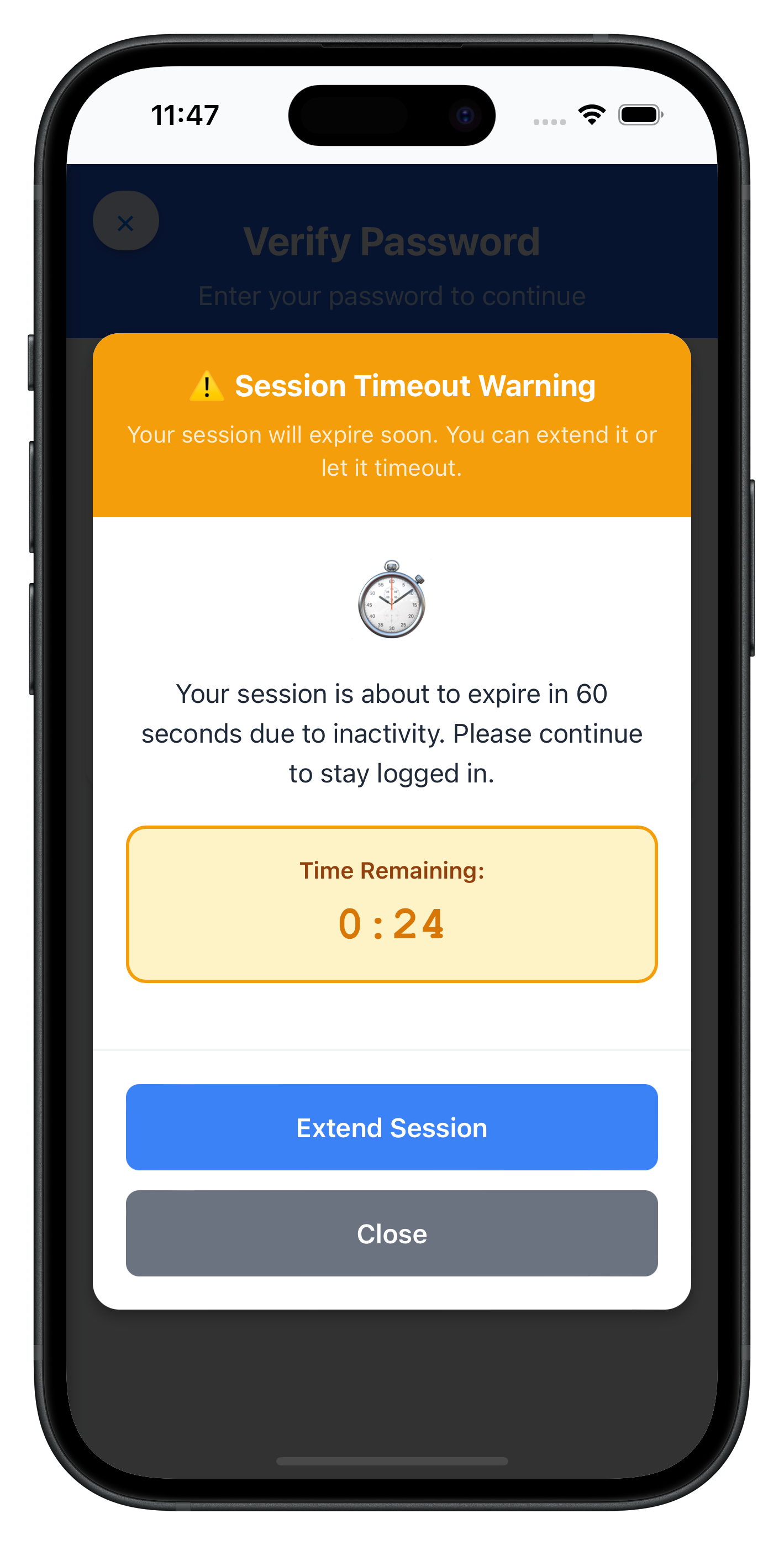
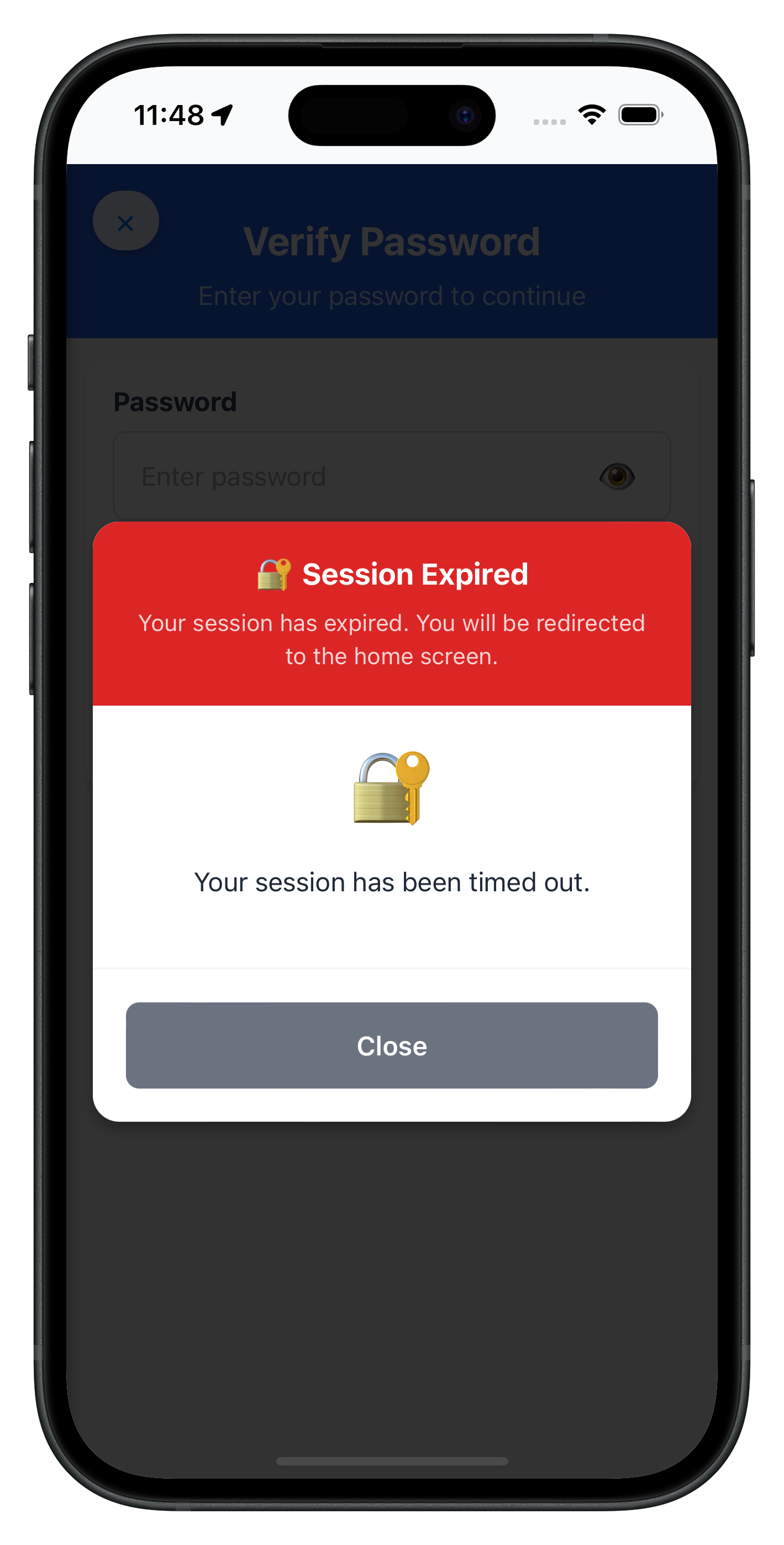
Key features of the session modal:
- Countdown display: Real-time countdown for idle session warnings
- Background/foreground accuracy: Timer continues accurately when app is backgrounded using
visibilitychangeevent - Color-coded headers: Visual distinction between hard timeout (red) and idle warning (orange)
- Conditional buttons: Different actions based on session type and extension capability
- Loading states: Processing indicators during API calls
- DOM manipulation: Direct DOM updates for state changes
The following images showcase screens from the sample application:
|
|
Add the session modal to your HTML and initialize the session manager:
Step 1: Add Session Modal to HTML
<!-- www/index.html -->
<!DOCTYPE html>
<html>
<head>
  <!-- ... existing head content ... -->
</head>
<body>
  <!-- Main content area -->
  <div id="app">
    <!-- Your app content loads here via NavigationService -->
  </div>

  <!-- Session Modal Overlay (persistent div, visibility toggled) -->
  <div id="session-modal" class="session-modal-overlay" style="display: none;">
    <div id="session-modal-content">
      <!-- Session modal content rendered dynamically by SessionModal.js -->
    </div>
  </div>

  <!-- Scripts in correct order -->
  <script src="cordova.js"></script>

  <!-- Utilities -->
  <script src="src/uniken/utils/connectionProfileParser.js"></script>

  <!-- Services -->
  <script src="src/uniken/services/rdnaEventManager.js"></script>
  <script src="src/uniken/services/rdnaService.js"></script>

  <!-- Navigation -->
  <script src="src/tutorial/navigation/NavigationService.js"></script>

  <!-- Session Management -->
  <script src="src/uniken/components/modals/SessionModal.js"></script>
  <script src="src/uniken/SessionContext/SessionManager.js"></script>

  <!-- App initialization -->
  <script src="src/uniken/AppInitializer.js"></script>
  <script src="js/app.js"></script>
</body>
</html>
Step 2: Initialize Session Manager
// www/src/uniken/AppInitializer.js
const AppInitializer = {
  async initialize() {
    console.log('AppInitializer - Starting initialization');

    try {
      // Step 1: Initialize event manager
      rdnaService.getEventManager().initialize();

      // Step 2: Initialize MTD threat manager (if applicable)
      MTDThreatManager.getInstance().initialize();

      // Step 3: Initialize session manager
      SessionManager.getInstance().initialize();

      console.log('AppInitializer - All managers initialized successfully');

      // Step 4: Load connection profile and initialize SDK
      // ... existing initialization code ...

    } catch (error) {
      console.error('AppInitializer - Initialization failed:', error);
    }
  }
};
Integration Benefits
The singleton pattern approach offers several advantages:
- Global state management: Session state accessible throughout the app
- Automatic event handling: Callbacks registered once at app level
- Consistent UI: Single modal component handles all session scenarios
- Memory efficiency: Singleton pattern prevents memory leaks
- Navigation integration: Automatic navigation on session timeout
- Platform compatibility: Works seamlessly across iOS and Android
- No framework dependencies: Pure JavaScript implementation
Test Scenarios
- Hard Session Timeout: Test mandatory session expiration
- Idle Session Timeout with Extension: Test warning with successful extension
- Extension Failure: Test extension API failure handling
- Background/Foreground Timer: Test countdown accuracy across app states
- Multiple Session Events: Test handling of rapid session events
Build and Run
# Prepare platforms
cordova prepare

# Run on iOS
cordova run ios

# Run on Android
cordova run android
Debugging
iOS: Safari → Develop → Simulator → [Your App] Android: Chrome → chrome://inspect → Inspect
Common Session Management Test Scenarios
Session Type | Test Case | Expected Behavior | Validation Points |
Hard Timeout | Session expires | Modal with Close button only | Navigate to home screen |
Idle Warning | Session expiring soon | Modal with countdown and Extend button | Extension API call works |
Extension Success | Extend session API succeeds | Modal dismisses, session continues | No navigation occurs |
Extension Failure | Extend session API fails | Error alert, modal remains | User can retry or close |
Background Timer | App goes to background during countdown | Timer accurately reflects elapsed time | Countdown resumes correctly |
Testing Background/Foreground Accuracy
Critical test for production reliability:
// Test background/foreground timer accuracy in browser console
const testBackgroundTimer = () => {
  console.log('Testing visibilitychange event');

  // 1. Trigger idle session timeout notification with 60 seconds
  // 2. Note the countdown time
  // 3. Switch tabs (triggers visibilitychange with document.hidden = true)
  // 4. Wait 30 seconds
  // 5. Switch back to tab (triggers visibilitychange with document.hidden = false)
  // 6. Verify countdown shows ~30 seconds remaining

  console.log('Countdown should reflect actual time elapsed in background');
};
Debugging Session Events
Use these debugging techniques to verify session functionality:
// Verify callback registration in browser console
console.log('Session callbacks:', {
  timeout: !!rdnaService.getEventManager().sessionTimeoutHandler,
  notification: !!rdnaService.getEventManager().sessionTimeoutNotificationHandler,
  extension: !!rdnaService.getEventManager().sessionExtensionResponseHandler
});

// Verify SessionManager initialization
console.log('SessionManager initialized:', SessionManager.getInstance()._initialized);

// Verify SessionModal initialization
console.log('SessionModal methods:', Object.keys(SessionModal));
Modal Not Appearing
Cause: Session callbacks not properly registered Solution: Verify SessionManager.initialize() is called in AppInitializer
// Check initialization in browser console
console.log('SessionManager initialized:', SessionManager.getInstance()._initialized);
console.log('Event handlers registered:', {
  timeout: !!rdnaService.getEventManager().sessionTimeoutHandler,
  notification: !!rdnaService.getEventManager().sessionTimeoutNotificationHandler,
  extension: !!rdnaService.getEventManager().sessionExtensionResponseHandler
});
Cause: Event listeners not attached Solution: Check that document.addEventListener calls are successful
// Verify event listeners in rdnaEventManager.js
console.log('RdnaEventManager - Event listeners attached');
Timer Accuracy Issues
Cause: Countdown doesn't account for background time Solution: Implement visibilitychange handling
// Correct background/foreground handling in Cordova
document.addEventListener('visibilitychange', () => {
  if (document.hidden) {
    // App going to background - record time
    backgroundTime = Date.now();
    console.log('App backgrounded at:', backgroundTime);
  } else if (backgroundTime) {
    // App returning to foreground - calculate elapsed time
    const elapsedSeconds = Math.floor((Date.now() - backgroundTime) / 1000);
    console.log('Elapsed time in background:', elapsedSeconds);
    countdown = Math.max(0, countdown - elapsedSeconds);
    backgroundTime = null;
  }
});
Extension API Failures
Cause: Calling extension API when sessionCanBeExtended is false Solution: Check extension eligibility before API call
const handleExtendSession = async () => {
  if (this.sessionTimeoutNotificationData?.sessionCanBeExtended !== 1) {
    alert('Extension Not Available\n\nThis session cannot be extended.');
    return;
  }

  // Proceed with extension API call
  await rdnaService.extendSessionIdleTimeout();
};
Cause: Multiple concurrent extension requests Solution: Use operation tracking to prevent duplicates
const currentOperation = 'none'; // 'none' | 'extend'

const handleExtendSession = async () => {
  if (currentOperation !== 'none') {
    console.log('Extension already in progress');
    return;
  }

  currentOperation = 'extend';
  // ... perform extension
  currentOperation = 'none';
};
Cordova-Specific Issues
"Can't find variable: SessionManager"Cause: Script not loaded or loaded in wrong order Solution: Verify script loading order in index.html
<!-- SessionModal.js must load before SessionManager.js -->
<script src="src/uniken/components/modals/SessionModal.js"></script>
<script src="src/uniken/SessionContext/SessionManager.js"></script>
"Can't find variable: com"Cause: Plugin not loaded Solution: Run cordova prepare and rebuild
# Verify plugin is installed
cordova plugin ls

# For local plugins
cordova plugin remove cordova-plugin-rdna
cordova plugin add ./RdnaClient
cordova prepare
Modal div not foundCause: HTML structure missing Solution: Ensure session-modal div exists in index.html
<div id="session-modal" class="session-modal-overlay" style="display: none;">
  <div id="session-modal-content"></div>
</div>
Changes not reflectingCause: www/ files not synced to platforms Solution: Run cordova prepare after changes
cordova prepare
Best Practice: Test session management behavior on both iOS and Android devices with different timeout scenarios.
Important Security Guidelines
- Never bypass session timeouts - Always respect hard timeout requirements
- Limit extension attempts - Implement reasonable limits on extension requests
- Log session events securely - Track session management for security analysis
- Keep SDK updated - Regular updates include latest session security features
- Test thoroughly - Verify session behavior across different usage patterns
Session Extension Guidelines
Extension Scenario | Recommended Action | Implementation |
Frequent Extensions | Set reasonable limits | Track extension count per session |
Critical Operations | Allow extensions during important tasks | Context-aware extension logic |
Inactive Sessions | Enforce timeouts | Don't extend completely idle sessions |
Memory and Performance
- Clean up timers and listeners properly
- Handle
visibilitychangeevents efficiently - Implement proper error boundaries
- Test on various device configurations
- Monitor for memory leaks in session handling
// Proper cleanup in SessionManager
initialize() {
  if (this._initialized) return;

  const eventManager = rdnaService.getEventManager();

  // Set handlers
  eventManager.setSessionTimeoutHandler(this.showSessionTimeout.bind(this));
  eventManager.setSessionTimeoutNotificationHandler(this.showSessionTimeoutNotification.bind(this));
  eventManager.setSessionExtensionResponseHandler(this.handleSessionExtensionResponse.bind(this));

  this._initialized = true;
}

// SessionModal cleanup
hide() {
  this.stopCountdown(); // Clear interval timer
  this.visible = false;
  this.data = null;
  // ... reset all state
}
Session Data Protection
- Never log sensitive session information
- Encrypt session data in storage if needed
- Use secure communication for session APIs
- Implement session validation on critical operations
Congratulations! You've successfully learned how to implement comprehensive session management functionality with:
- ✅ Real-time session timeout detection and handling
- ✅ User-friendly countdown timers with extension capabilities
- ✅ Background/foreground timer accuracy for reliable user experience
- ✅ Global state management using singleton pattern
- ✅ Proper session lifecycle management with automatic navigation
- ✅ Platform-specific handling using Cordova patterns
Key Cordova Patterns Learned
Your session management implementation demonstrates:
- Global plugin API access - No imports needed, direct namespace usage
- DOM event-based architecture -
document.addEventListener()for SDK callbacks - visibilitychange event - Background/foreground tracking for timers
- Singleton pattern - SessionManager for global state
- Object literal pattern - SessionModal for component behavior
- Manual DOM updates - Direct element manipulation for state changes
- Script loading order - Dependencies load before dependent code
Key Security Benefits
Your session management implementation now provides:
- Proactive timeout warnings before session expiration
- User-controlled session extension for active users
- Automatic session termination for security compliance
- Comprehensive session monitoring for security analysis
- Seamless user experience during session transitions
Next Steps
- Implement additional RELID SDK features such as MFA flows
- Configure gateway session policies for your organization
- Integrate with existing authentication and navigation systems
- Implement session analytics and monitoring