This codelab demonstrates how to implement the REL-ID Initialization flow using the cordova-plugin-rdna Cordova plugin. The REL-ID SDK provides secure identity verification and session management for mobile applications.
What You'll Learn
- How to initialize the REL-ID SDK in a Cordova application using SPA architecture
- Event-driven architecture for handling initialization callbacks with document.addEventListener()
- Connection profile management using cordova-plugin-file
- Single Page Application (SPA) patterns for better performance
- Error handling and user feedback implementation
What You'll Need
- Cordova development environment set up
cordova-plugin-rdnaplugin (local)cordova-plugin-filefor loading configuration files- Basic understanding of JavaScript and DOM events
- Connection profile JSON file from your Uniken Admin or Uniken gateway manager
- Access to the sample app source code for reference
Get the Code from GitHub
The code to get started is stored in a GitHub repository.
You can clone the repository using the following command:
git clone https://github.com/uniken-public/codelab-cordova.git
Navigate to the relid-initialize folder in the repository you cloned earlier
This codelab uses Single Page Application (SPA) architecture for optimal performance and user experience.
Why SPA?
SPA Benefits:
- ✅ One-time SDK initialization - Event handlers registered once, persist forever
- ✅ No page reloads - Template-based navigation (no white flash between screens)
- ✅ Persistent event handlers - SDK handlers work across all screens
- ✅ Faster navigation - Content swapping instead of full page loads
- ✅ Better UX - Smooth transitions between screens
SPA Key Components
Component | Purpose | Location |
index.html | Single HTML with templates |
|
NavigationService | Template swapping |
|
AppInitializer | One-time SDK init |
|
Screen modules | onContentLoaded() lifecycle |
|
SPA Flow
deviceready → AppInitializer.initialize() → NavigationService.navigate('TutorialHome')
  ↓
Template swapped → TutorialHomeScreen.onContentLoaded() → User clicks Initialize
  ↓
SDK initialized → onInitialized event → Navigate to TutorialSuccess
  ↓
Template swapped → TutorialSuccessScreen.onContentLoaded(sessionData)
Before implementing your own REL-ID initialization, let's examine the sample app structure to understand the recommended SPA architecture:
Component | Purpose | Sample App Reference |
Connection Profile | Configuration data |
|
Profile Parser | Utility to parse connection data |
|
Event Manager | Handles SDK callbacks |
|
REL-ID Service | Main SDK interface |
|
Event Provider | Global event handling |
|
App Initializer | One-time SDK handler registration |
|
Navigation Service | SPA template swapping |
|
UI Screens | User interface screens |
|
Recommended Directory Structure
Create the following directory structure in your Cordova project:
www/
├── index.html                          # Single HTML with templates
├── css/
│   └── index.css                       # All styles
├── js/
│   └── app.js                          # deviceready bootstrap
└── src/
    ├── uniken/
    │   ├── cp/
    │   │   └── agent_info.json
    │   ├── services/
    │   │   ├── rdnaEventManager.js
    │   │   └── rdnaService.js
    │   ├── utils/
    │   │   ├── connectionProfileParser.js
    │   │   └── progressHelper.js
    │   ├── providers/
    │   │   └── SDKEventProvider.js
    │   └── AppInitializer.js           # SPA initializer
    └── tutorial/
        ├── navigation/
        │   └── NavigationService.js    # SPA navigation
        └── screens/
            ├── TutorialHomeScreen.js
            ├── TutorialSuccessScreen.js
            └── TutorialErrorScreen.js
Project Structure
This project includes a local Cordova plugin. Ensure the plugin directory exists in your project root:
# Verify plugin directory exists
ls -la ./RdnaClient
Add the REL-ID Plugin (Local)
The SDK plugin is included as a local plugin in the project. Install it from the local directory:
cordova plugin add ./RdnaClient
Add File Plugin
For loading local JSON files, install cordova-plugin-file:
cordova plugin add cordova-plugin-file
Platform Setup
# Add platforms
cordova platform add ios
cordova platform add android

# Prepare platforms
cordova prepare
Follow the Cordova platform setup guide for platform-specific configuration.
agent_info.json
Create your connection profile JSON file in www/src/uniken/cp/agent_info.json:
{
  "RelIds": [
    {
      "Name": "YourRELIDAgentName",
      "RelId": "your-rel-id-string-here"
    }
  ],
  "Profiles": [
    {
      "Name": "YourRELIDAgentName",
      "Host": "your-gateway-host.com",
      "Port": "443"
    }
  ]
}
Security Considerations
- Never print RelId values to console
- Use environment-specific configuration files
The connection profile parser loads and validates the agent_info.json file using cordova-plugin-file.
Create www/src/uniken/utils/connectionProfileParser.js:
/**
 * Parses agent info data and extracts connection profile
 * @param {Object} profileData - Raw agent info data
 * @returns {Object} Parsed connection profile
 */
function parseAgentInfo(profileData) {
  if (!profileData.RelIds || profileData.RelIds.length === 0) {
    throw new Error('No RelIds found in agent info');
  }

  if (!profileData.Profiles || profileData.Profiles.length === 0) {
    throw new Error('No Profiles found in agent info');
  }

  // Always pick the first array objects
  const firstRelId = profileData.RelIds[0];

  if (!firstRelId.Name || !firstRelId.RelId) {
    throw new Error('Invalid RelId object - missing Name or RelId');
  }

  // Find matching profile by Name (1-1 mapping)
  const matchingProfile = profileData.Profiles.find(
    profile => profile.Name === firstRelId.Name
  );

  if (!matchingProfile) {
    throw new Error(`No matching profile found for RelId name: ${firstRelId.Name}`);
  }

  if (!matchingProfile.Host || !matchingProfile.Port) {
    throw new Error('Invalid Profile object - missing Host or Port');
  }

  // Convert port to number if it's a string
  const port = typeof matchingProfile.Port === 'string'
    ? parseInt(matchingProfile.Port, 10)
    : matchingProfile.Port;

  if (isNaN(port)) {
    throw new Error(`Invalid port value: ${matchingProfile.Port}`);
  }

  return {
    relId: firstRelId.RelId,
    host: matchingProfile.Host,
    port: port
  };
}

/**
 * Loads agent info from file using cordova-plugin-file
 */
async function loadAgentInfo() {
  return new Promise((resolve, reject) => {
    try {
      const basePath = cordova.file.applicationDirectory + 'www/';
      const filePath = basePath + 'src/uniken/cp/agent_info.json';

      console.log('ConnectionProfileParser - Loading file from:', filePath);

      // Resolve file path and read with FileReader
      window.resolveLocalFileSystemURL(
        filePath,
        (fileEntry) => {
          fileEntry.file(
            (file) => {
              const reader = new FileReader();

              reader.onloadend = function() {
                try {
                  const profileData = JSON.parse(this.result);
                  const parsed = parseAgentInfo(profileData);
                  resolve(parsed);
                } catch (error) {
                  reject(new Error(`Failed to parse: ${error.message}`));
                }
              };

              reader.onerror = (error) => reject(error);
              reader.readAsText(file);
            },
            (error) => reject(error)
          );
        },
        (error) => reject(error)
      );
    } catch (error) {
      reject(new Error(`Failed to load agent info: ${error.message}`));
    }
  });
}
The parser performs several critical functions:
- Validates JSON structure
- Matches RelIds with Profiles by name
- Converts port values to numbers
- Provides comprehensive error handling
- Uses cordova-plugin-file for reliable file loading
The event manager handles all REL-ID SDK callbacks using DOM events and a singleton pattern.
Create www/src/uniken/services/rdnaEventManager.js:
/**
 * REL-ID SDK Event Manager
 * Manages all SDK events using document.addEventListener()
 */
class RdnaEventManager {
  constructor() {
    if (RdnaEventManager.instance) {
      return RdnaEventManager.instance;
    }

    this._initialized = false;
    this.listeners = [];
    this.initializeProgressHandler = null;
    this.initializeErrorHandler = null;
    this.initializedHandler = null;

    RdnaEventManager.instance = this;
  }

  static getInstance() {
    if (!RdnaEventManager.instance) {
      RdnaEventManager.instance = new RdnaEventManager();
    }
    return RdnaEventManager.instance;
  }

  /**
   * Initialize event listeners (idempotent - safe to call multiple times)
   * In SPA architecture, this is called ONCE in AppInitializer
   */
  initialize() {
    if (this._initialized) {
      console.log('RdnaEventManager - Already initialized, skipping');
      return;
    }

    console.log('RdnaEventManager - Initializing event listeners');
    this.registerEventListeners();
    this._initialized = true;
  }

  registerEventListeners() {
    console.log('RdnaEventManager - Registering native event listeners');

    const progressListener = this.onInitializeProgress.bind(this);
    const errorListener = this.onInitializeError.bind(this);
    const initializedListener = this.onInitialized.bind(this);

    document.addEventListener('onInitializeProgress', progressListener, false);
    document.addEventListener('onInitializeError', errorListener, false);
    document.addEventListener('onInitialized', initializedListener, false);

    this.listeners.push(
      { name: 'onInitializeProgress', handler: progressListener },
      { name: 'onInitializeError', handler: errorListener },
      { name: 'onInitialized', handler: initializedListener }
    );

    console.log('RdnaEventManager - Native event listeners registered');
  }

  onInitializeProgress(event) {
    console.log("RdnaEventManager - Initialize progress event received");

    try {
      const progressData = JSON.parse(event.response);
      console.log("RdnaEventManager - Progress:", progressData.initializeStatus);

      if (this.initializeProgressHandler) {
        this.initializeProgressHandler(progressData);
      }
    } catch (error) {
      console.error("RdnaEventManager - Failed to parse progress:", error);
    }
  }

  onInitializeError(event) {
    console.log("RdnaEventManager - Initialize error event received");

    try {
      const errorData = JSON.parse(event.response);
      console.error("RdnaEventManager - Initialize error:", errorData.errorString);

      if (this.initializeErrorHandler) {
        this.initializeErrorHandler(errorData);
      }
    } catch (error) {
      console.error("RdnaEventManager - Failed to parse error:", error);
    }
  }

  onInitialized(event) {
    console.log("RdnaEventManager - Initialize success event received");

    try {
      const initializedData = JSON.parse(event.response);
      console.log("RdnaEventManager - Successfully initialized, Session ID:", initializedData.session.sessionID);

      if (this.initializedHandler) {
        this.initializedHandler(initializedData);
      }
    } catch (error) {
      console.error("RdnaEventManager - Failed to parse success:", error);
    }
  }

  setInitializeProgressHandler(callback) {
    this.initializeProgressHandler = callback;
  }

  setInitializeErrorHandler(callback) {
    this.initializeErrorHandler = callback;
  }

  setInitializedHandler(callback) {
    this.initializedHandler = callback;
  }

  cleanup() {
    console.log('RdnaEventManager - Cleaning up event listeners');

    this.listeners.forEach(listener => {
      document.removeEventListener(listener.name, listener.handler, false);
    });
    this.listeners = [];

    this.initializeProgressHandler = null;
    this.initializeErrorHandler = null;
    this.initializedHandler = null;

    console.log('RdnaEventManager - Cleanup completed');
  }
}
Key features of the event manager:
- onInitializeProgress: Tracks initialization progress through various stages
- onInitializeError: Reports initialization errors with specific error codes
- onInitialized: Confirms successful initialization with session data
- Setter Methods: Use
setInitializeProgressHandler(),setInitializeErrorHandler(), etc. to register callbacks - Cleanup: Proper cleanup of event listeners with
removeEventListener() - Idempotent: Safe to call initialize() multiple times (SPA pattern)
The REL-ID service provides the main interface for SDK operations using the Cordova plugin API.
Create www/src/uniken/services/rdnaService.js:
class RdnaService {
  constructor() {
    if (RdnaService.instance) {
      return RdnaService.instance;
    }

    this.eventManager = null;
    RdnaService.instance = this;
  }

  static getInstance() {
    if (!RdnaService.instance) {
      RdnaService.instance = new RdnaService();
    }
    return RdnaService.instance;
  }

  getEventManager() {
    if (!this.eventManager) {
      this.eventManager = RdnaEventManager.getInstance();
    }
    return this.eventManager;
  }

  async getSDKVersion() {
    return new Promise((resolve, reject) => {
      com.uniken.rdnaplugin.RdnaClient.getSDKVersion(
        (response) => {
          try {
            const parsed = JSON.parse(response);
            const version = parsed?.response || 'Unknown';
            console.log('RdnaService - SDK Version:', version);
            resolve(version);
          } catch (error) {
            reject(new Error('Failed to parse SDK version response'));
          }
        },
        (error) => reject(error),
        []
      );
    });
  }

  async initialize() {
    const profile = await loadAgentInfo();
    console.log('RdnaService - Loaded connection profile:', JSON.stringify({
      host: profile.host,
      port: profile.port,
      relId: profile.relId.substring(0, 10) + '...',
    }, null, 2));

    return new Promise((resolve, reject) => {
      com.uniken.rdnaplugin.RdnaClient.initialize(
        (response) => {
          try {
            const result = JSON.parse(response);

            if (result.error && result.error.longErrorCode === 0) {
              console.log('RdnaService - Sync response success');
              resolve(result);
            } else {
              reject(result);
            }
          } catch (error) {
            reject(new Error('Failed to parse initialize response'));
          }
        },
        (error) => reject(error),
        [
          profile.relId,    // 0: agentInfo
          profile.host,     // 1: gatewayHost
          profile.port,     // 2: gatewayPort
          '',               // 3: cipherSpecs
          '',               // 4: cipherSalt
          '',               // 5: proxySettings
          '',               // 6: sslCertificate
          com.uniken.rdnaplugin.RdnaClient.RDNALoggingLevel.RDNA_NO_LOGS  // 7: logLevel
        ]
      );
    });
  }
}

const rdnaService = RdnaService.getInstance();
Important API Parameters
The com.uniken.rdnaplugin.RdnaClient.initialize() call requires specific parameter ordering:
Parameter | Purpose | Example |
| RelId | From connection profile |
| Server hostname | From connection profile |
| Server port | From connection profile |
| Logging setting |
|
How Cordova Plugins Work
Cordova plugins are loaded automatically - no imports needed.
Loading Flow (Local Plugin):
- Install:
cordova plugin add ./RdnaClient - Build: Plugin registers JavaScript interface
- Access: Use global namespace
com.uniken.rdnaplugin.RdnaClient
// ❌ NOT NEEDED (no imports for local plugins)
import RdnaClient from './RdnaClient';

// ✅ CORRECT - Direct global access (same for local and remote plugins)
com.uniken.rdnaplugin.RdnaClient.getSDKVersion(successCallback, errorCallback, []);
Script Loading Order
In your HTML files, maintain this order:
<!-- 1. Cordova core -->
<script src="cordova.js"></script>

<!-- 2. Utilities -->
<script src="src/uniken/utils/connectionProfileParser.js"></script>
<script src="src/uniken/utils/progressHelper.js"></script>

<!-- 3. Services -->
<script src="src/uniken/services/rdnaEventManager.js"></script>
<script src="src/uniken/services/rdnaService.js"></script>

<!-- 4. Providers -->
<script src="src/uniken/providers/SDKEventProvider.js"></script>

<!-- 5. App Initializer -->
<script src="src/uniken/AppInitializer.js"></script>

<!-- 6. Navigation -->
<script src="src/tutorial/navigation/NavigationService.js"></script>

<!-- 7. Screens -->
<script src="src/tutorial/screens/TutorialHomeScreen.js"></script>

<!-- 8. Bootstrap -->
<script src="js/app.js"></script>
The App Initializer is the cornerstone of SPA architecture - it registers all SDK handlers ONCE.
Create www/src/uniken/AppInitializer.js:
const AppInitializer = {
  _initialized: false,

  /**
   * Initialize all SDK event handlers (call ONCE in app.js)
   * Safe to call multiple times - will skip if already initialized
   */
  initialize() {
    if (this._initialized) {
      console.log('AppInitializer - Already initialized, skipping');
      return;
    }

    console.log('AppInitializer - Initializing SDK handlers');

    try {
      // Step 1: Initialize event manager
      const eventManager = rdnaService.getEventManager();
      eventManager.initialize();

      // Step 2: Initialize SDK event provider
      SDKEventProvider.initialize();

      this._initialized = true;
      console.log('AppInitializer - SDK handlers successfully initialized');
      console.log('AppInitializer - Handlers will persist for entire app lifecycle');
    } catch (error) {
      console.error('AppInitializer - Failed to initialize:', error);
      throw error;
    }
  }
};
SPA Architecture Benefits:
- ✅ Called ONCE in app.js deviceready handler
- ✅ Handlers persist for entire app lifecycle
- ✅ No re-initialization needed on navigation
- ✅ Idempotent (safe to call multiple times)
The Navigation Service handles screen transitions using template swapping instead of page reloads.
Create www/src/tutorial/navigation/NavigationService.js:
const NavigationService = {
  currentRoute: null,

  /**
   * Navigate to a screen with optional parameters
   */
  navigate(routeName, params) {
    console.log('NavigationService - Navigating to:', routeName);
    this.currentRoute = routeName;
    this.loadScreenContent(routeName, params || {});
  },

  /**
   * Load screen content from template (SPA pattern)
   */
  loadScreenContent(routeName, params) {
    // Get template element (ID format: "TutorialHome-template")
    const templateId = `${routeName}-template`;
    const template = document.getElementById(templateId);

    if (!template) {
      console.error('NavigationService - Template not found:', templateId);
      return;
    }

    // Clone template content
    const content = template.content.cloneNode(true);

    // Get app content container
    const container = document.getElementById('app-content');
    if (!container) {
      console.error('NavigationService - App content container not found');
      return;
    }

    // Replace container content (SPA magic - no page reload!)
    container.innerHTML = '';
    container.appendChild(content);

    // Initialize screen with params
    const screenObj = window[`${routeName}Screen`];
    if (screenObj && typeof screenObj.onContentLoaded === 'function') {
      screenObj.onContentLoaded(params);
    }
  }
};
SPA Pattern Explanation:
- Uses
templateelements in index.html - Clones template content with
cloneNode(true) - Swaps content in
#app-contentcontainer - Calls screen's
onContentLoaded(params)method - No
window.location.href- no page reload!
In SPA architecture, each screen consists of:
- HTML template in index.html
- JavaScript module with onContentLoaded() lifecycle
index.html Structure
Create www/index.html with SPA structure:
<!DOCTYPE html>
<html>
<head>
    <meta charset="utf-8">
    <title>REL-ID Integration Tutorial</title>
    <link rel="stylesheet" href="css/index.css">
</head>
<body>
    <!-- SPA Content Container -->
    <div id="app-content"></div>

    <!-- Template: Tutorial Home Screen -->
    <template id="TutorialHome-template">
        <div class="container">
            <div class="header">
                <h1>REL-ID Integration Tutorial</h1>
                <p>Learn cordova-plugin-rdna Integration</p>
            </div>

            <div class="card">
                <h2>SDK Information</h2>
                <span>SDK Version: </span>
                <span id="sdk-version">Loading...</span>
            </div>

            <button id="initialize-btn">Initialize</button>

            <div id="progress-container" style="display: none;">
                <p id="progress-text">Initializing...</p>
            </div>
        </div>
    </template>

    <!-- All Scripts (loaded once) -->
    <script src="cordova.js"></script>
    <script src="src/uniken/utils/connectionProfileParser.js"></script>
    <script src="src/uniken/utils/progressHelper.js"></script>
    <script src="src/uniken/services/rdnaEventManager.js"></script>
    <script src="src/uniken/services/rdnaService.js"></script>
    <script src="src/uniken/providers/SDKEventProvider.js"></script>
    <script src="src/uniken/AppInitializer.js"></script>
    <script src="src/tutorial/navigation/NavigationService.js"></script>
    <script src="src/tutorial/screens/TutorialHomeScreen.js"></script>
    <script src="src/tutorial/screens/TutorialSuccessScreen.js"></script>
    <script src="src/tutorial/screens/TutorialErrorScreen.js"></script>
    <script src="js/app.js"></script>
</body>
</html>
Screen JavaScript Module
Create www/src/tutorial/screens/TutorialHomeScreen.js:
const TutorialHomeScreen = {
  isInitializing: false,

  /**
   * Called when screen content is loaded into DOM (SPA lifecycle)
   */
  onContentLoaded(params) {
    console.log('TutorialHomeScreen - Content loaded');

    this.isInitializing = false;
    this.loadSDKVersion();
    this.setupEventListeners();
    this.registerSDKEventHandlers();
  },

  setupEventListeners() {
    const initButton = document.getElementById('initialize-btn');
    if (initButton) {
      initButton.onclick = this.handleInitializePress.bind(this);
    }
  },

  registerSDKEventHandlers() {
    const eventManager = rdnaService.getEventManager();

    eventManager.setInitializeProgressHandler((data) => {
      const message = getProgressMessage(data);
      this.updateProgress(message);
    });

    eventManager.setInitializeErrorHandler((errorData) => {
      this.isInitializing = false;
      this.updateButtonState(false);
      this.hideProgress();

      NavigationService.navigate('TutorialError', {
        shortErrorCode: errorData.shortErrorCode,
        longErrorCode: errorData.longErrorCode,
        errorString: errorData.errorString
      });
    });
  },

  async loadSDKVersion() {
    const versionElement = document.getElementById('sdk-version');
    if (!versionElement) return;

    try {
      versionElement.textContent = 'Loading...';
      const version = await rdnaService.getSDKVersion();
      versionElement.textContent = version;
    } catch (error) {
      versionElement.textContent = 'Unknown';
    }
  },

  handleInitializePress() {
    if (this.isInitializing) return;

    this.isInitializing = true;
    this.updateButtonState(true);
    this.showProgress('Starting REL-ID initialization...');

    rdnaService.initialize()
      .then((syncResponse) => {
        console.log('Sync response success - waiting for async events');
      })
      .catch((error) => {
        this.isInitializing = false;
        this.updateButtonState(false);
        this.hideProgress();
        alert(`Initialization Failed\n\n${error.error?.errorString}`);
      });
  },

  updateButtonState(isLoading) {
    const button = document.getElementById('initialize-btn');
    if (button) {
      button.disabled = isLoading;
      button.textContent = isLoading ? 'Initializing...' : 'Initialize';
    }
  },

  showProgress(message) {
    const container = document.getElementById('progress-container');
    const textElement = document.getElementById('progress-text');
    if (container && textElement) {
      textElement.textContent = message;
      container.style.display = 'block';
    }
  },

  hideProgress() {
    const container = document.getElementById('progress-container');
    if (container) {
      container.style.display = 'none';
    }
  }
};

// Expose to global scope for NavigationService
window.TutorialHomeScreen = TutorialHomeScreen;
App Bootstrap
Create www/js/app.js:
const App = {
  initialize() {
    document.addEventListener('deviceready', this.onDeviceReady.bind(this), false);
  },

  onDeviceReady() {
    console.log('App - Device ready');

    // Initialize SDK handlers ONCE (SPA magic!)
    AppInitializer.initialize();

    // Navigate to home screen
    NavigationService.navigate('TutorialHome');

    console.log('App - SDK handlers will persist for entire app lifecycle');
  }
};

App.initialize();
Key Implementation Features
SPA Lifecycle:
onContentLoaded(params)replaces React's useEffect- Direct DOM manipulation replaces useState
- Event listeners for button clicks
- Screen objects exposed to global scope
State Management:
- Object properties instead of React state
- Manual DOM updates when state changes
- No framework required
Event-Driven Architecture:
- Success navigation handled by SDKEventProvider's onInitialized handler
- Progress updates delivered through event manager
- Screen-specific handlers for progress and errors
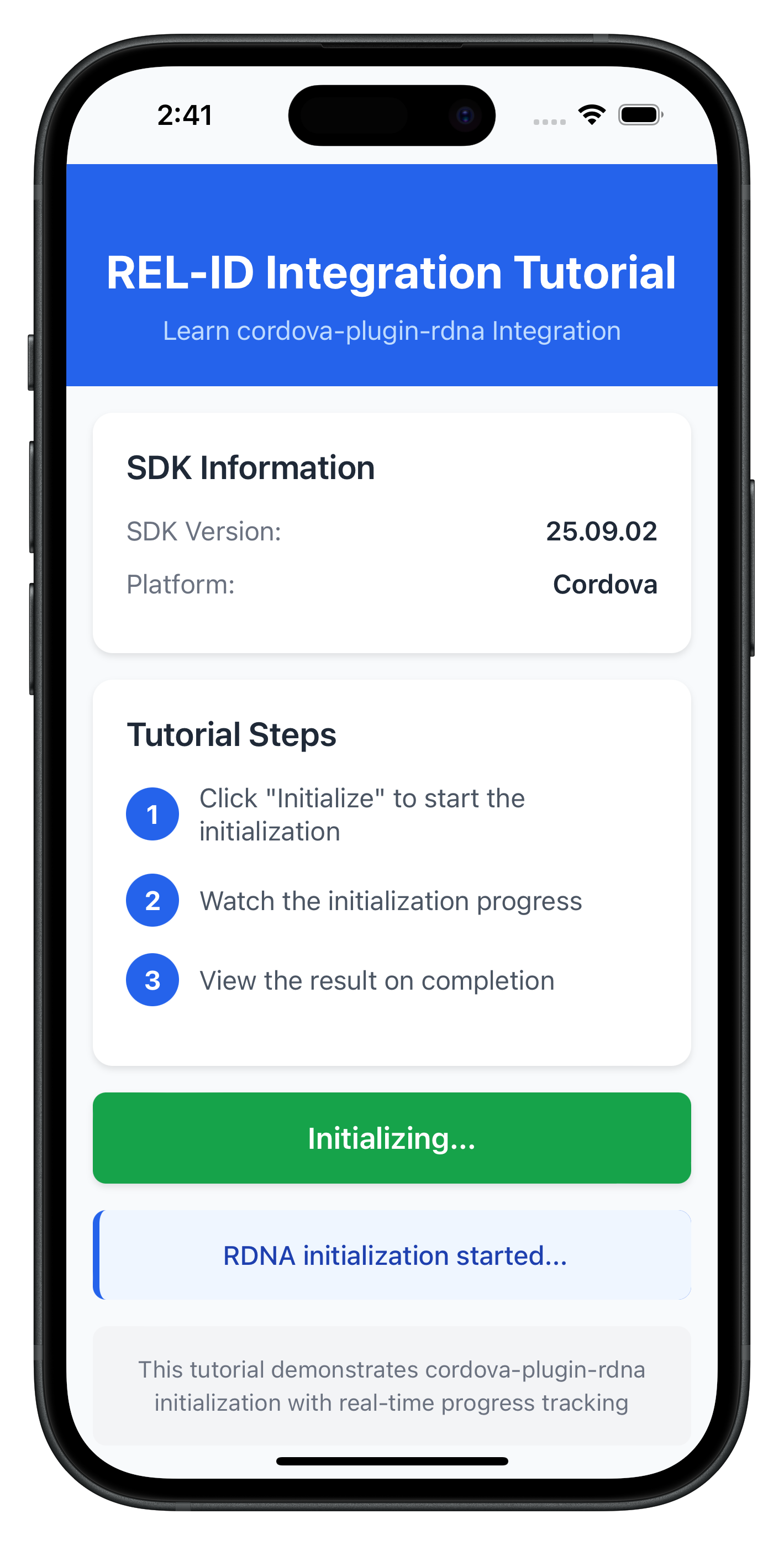
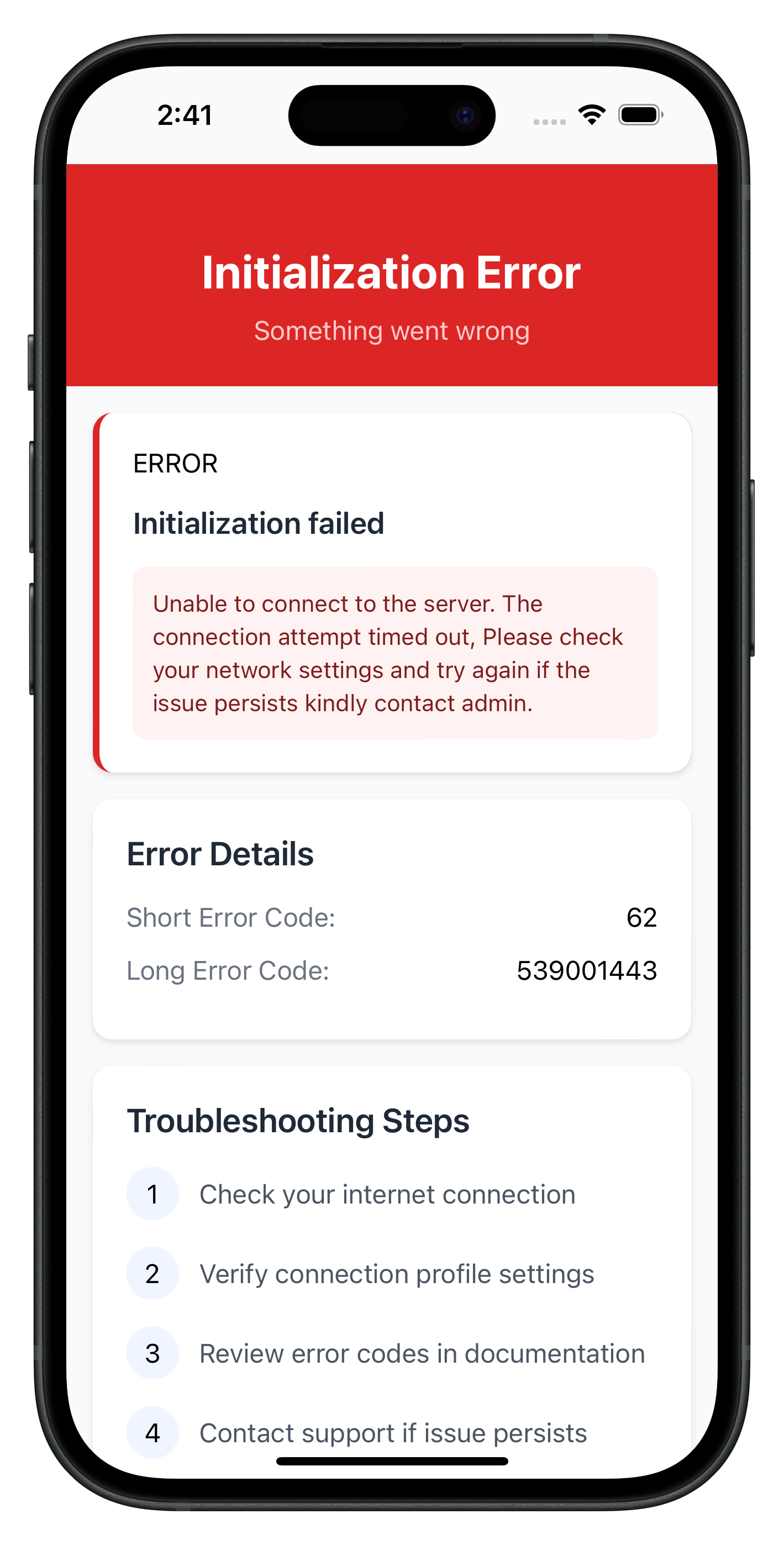
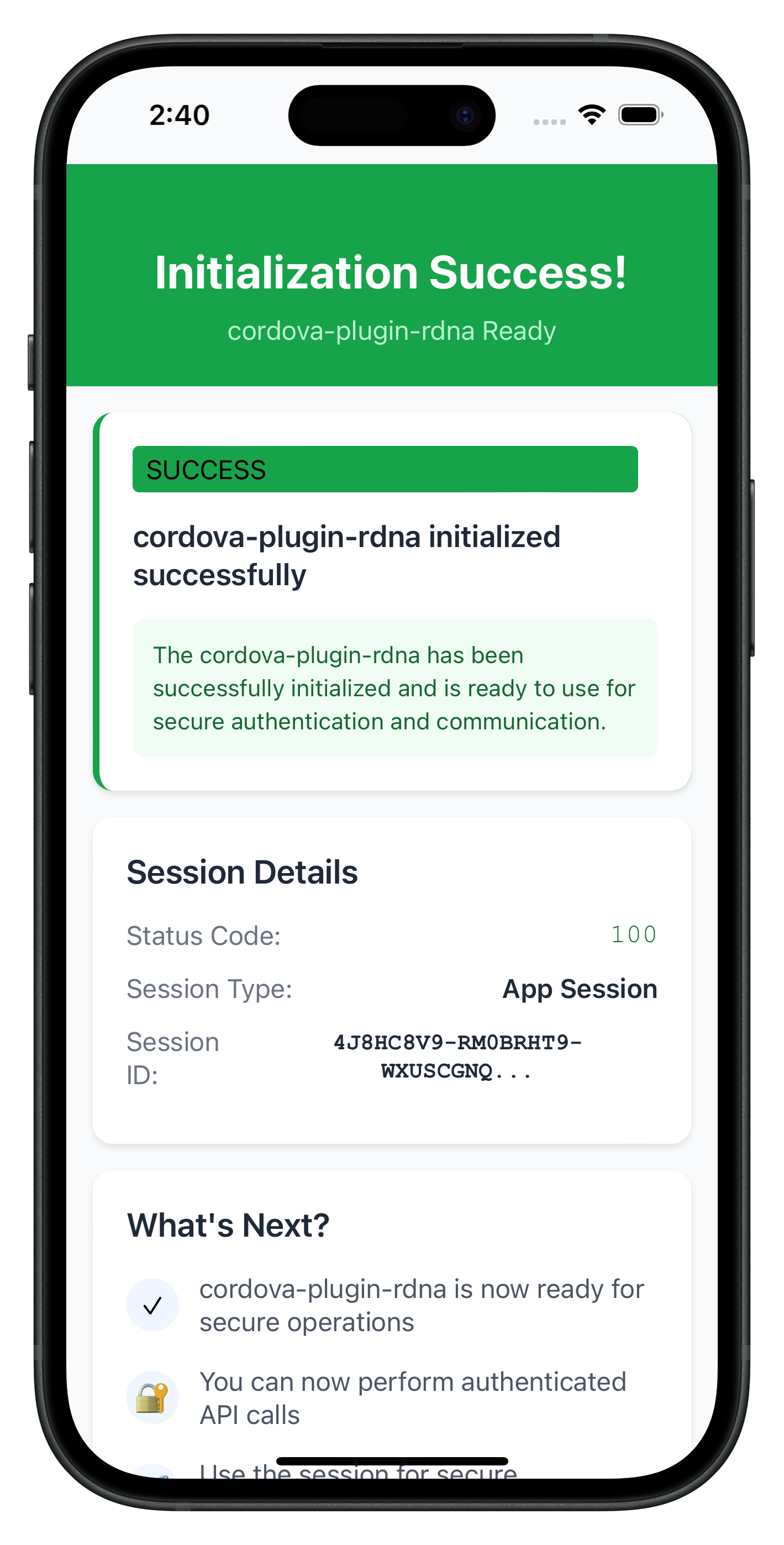
The following images showcase screens from the sample application:
|
|
|
Build and Run
# Prepare platforms
cordova prepare

# Run on iOS
cordova run ios

# Run on Android
cordova run android
Debugging
iOS: Safari → Develop → Simulator → [Your App] Android: Chrome → chrome://inspect → Inspect
Key Test Scenarios
- Successful Initialization: Verify the complete flow works end-to-end
- Network Errors: Test with invalid host/port configurations
- Invalid Credentials: Test with incorrect RelId values
- Progress Tracking: Verify progress events are properly displayed
Verification Steps
Test your implementation with console logging:
// Test SDK version retrieval
rdnaService.getSDKVersion()
  .then((version) => console.log('SDK Version:', version))
  .catch((error) => console.error('Version failed:', error));

// Test initialization
rdnaService.initialize()
  .then((syncResponse) => console.log('Initialization successful:', JSON.stringify(syncResponse, null, 2)))
  .catch((error) => console.error('Initialization failed:', error));
Connection Profile Issues
Error: "No RelIds found in agent info" Solution: Verify your JSON structure matches the sample in www/src/uniken/cp/agent_info.json
Error: "No matching profile found for RelId name" Solution: Ensure the Name field in RelIds matches the Name field in Profiles
Cordova-Specific Issues
"Can't find variable: com"
- Plugin not loaded
- Solution: Run
cordova prepareand rebuild - Verify plugin installed:
cordova plugin ls
"Plugin not found"
- Plugin not installed correctly
- Solution: For local plugin:
cordova plugin add ./RdnaClient - Verify RdnaClient directory exists:
ls -la ./RdnaClient
Local plugin installation fails
- Plugin directory not found
- Solution: Verify
./RdnaClientdirectory exists in project root - Check plugin.xml exists:
test -f ./RdnaClient/plugin.xml
File loading fails on iOS
- Missing cordova-plugin-file
- Solution:
cordova plugin add cordova-plugin-file - Verify installed:
cordova plugin ls | grep file
Events not firing
- Event names don't match exactly
- Listeners not registered before SDK calls
- Solution: Verify event names match: ‘onInitializeProgress', ‘onInitializeError', ‘onInitialized'
- Register handlers in AppInitializer BEFORE calling initialize()
Changes not reflecting
- www/ files not synced to platforms/
- Solution: Run
cordova prepareafter any www/ changes
Screen not loading (SPA)
- Template ID mismatch
- Screen object not exposed to window
- Solution: Verify template ID matches:
${routeName}-template - Add:
window.TutorialHomeScreen = TutorialHomeScreen;
Network Connectivity
Error: Network connection failures Solution: Check host/port values and network accessibility
Error: REL-ID connection issues Solution: Verify the REL-ID server is set up and running
SDK Initialization
Error Code 88: SDK already initialized Solution: Terminate the SDK
Error Code 288: SDK detected dynamic attack performed on the app Solution: Terminate the app
Error Code 179: Initialization in progress Solution: Wait for current initialization to complete before retrying
Security Considerations
- Use
com.uniken.rdnaplugin.RdnaClient.RDNALoggingLevel.RDNA_NO_LOGSin production - Never log full RelId values (use partial logging:
relId.substring(0, 10) + '...') - Store session data securely
- Validate all connection profile data before use
- Configure Content Security Policy in index.html
Memory Management
- Clean up event listeners with
removeEventListener() - Use singleton pattern for services to avoid memory leaks
- Properly clean up handlers when screens unmount
- In SPA: AppInitializer ensures handlers registered only once
Performance Optimization
- Load all scripts once in index.html (SPA benefit)
- Minimize DOM manipulation
- Use event delegation where possible
- Template cloning is efficient
User Experience
- Provide clear progress indicators during initialization
- Display meaningful error messages to users
- Implement retry mechanisms for network failures
- Use SPA for smooth screen transitions
Congratulations! You've successfully learned how to implement REL-ID SDK initialization in Cordova with:
- ✅ SPA (Single Page Application) architecture
- ✅ Proper project structure and organization
- ✅ Connection profile management using cordova-plugin-file
- ✅ Event-driven initialization handling with DOM events
- ✅ AppInitializer pattern for one-time handler registration
- ✅ Template-based navigation for smooth UX
- ✅ Comprehensive error handling and user feedback
- ✅ Security best practices and memory management
Key Cordova Patterns Learned
- Global plugin API access via
com.uniken.rdnaplugin.RdnaClient(no imports) - DOM events for SDK callbacks with
document.addEventListener() - cordova-plugin-file + FileReader API for loading local files
- JSON.parse() for all plugin responses
- SPA architecture with template swapping
- onContentLoaded() lifecycle pattern
- AppInitializer for one-time initialization
- Script loading order is important
- deviceready event for app bootstrap
Next Steps
- Explore the sample app's MTD (Mobile Threat Detection) implementation
- Explore MFA (Multi-Factor Authentication) flows