🎯 Learning Path:
- Complete REL-ID Complete Activation & Login Flow Codelab
- Complete REL-ID Additional Device Activation Flow Codelab
- Complete REL-ID Forgot Password Flow Codelab
- You are here → LDA Toggling Implementation
Welcome to the REL-ID LDA Toggling codelab! This tutorial builds upon your existing MFA implementation to add seamless authentication mode switching capabilities, allowing users to toggle between password and Local Device Authentication (LDA).
What You'll Build
In this codelab, you'll enhance your existing MFA application with:
- 🔐 LDA Management Screen: Interactive list of available authentication methods with toggle switches
- 🔄 Two-Way Authentication Switching: Enable switching from Password to LDA and LDA to Password
- 📱 Device Capability Detection: Automatic detection and display of supported authentication types
- 🎛️ Real-time Status Updates: Live feedback on authentication mode changes
- 🛡️ Secure Revalidation Flow: Password verification or consent prompts during mode switching
What You'll Learn
By completing this codelab, you'll master:
- Device Authentication Details API: Retrieving supported LDA types using
getDeviceAuthenticationDetails() - Authentication Mode Management: Implementing
manageDeviceAuthenticationModes()for toggling - Event-Driven Status Updates: Handling
onDeviceAuthManagementStatusfor real-time feedback - Challenge Mode Routing: Managing password verification and consent flows during toggling
- Single Page Application (SPA) Pattern: Building Cordova screens with vanilla JavaScript
- Production UI Patterns: Creating intuitive toggle interfaces with loading and error states
Prerequisites
Before starting this codelab, ensure you have:
- ✅ Completed REL-ID MFA Codelab - All MFA screens and flows must be fully implemented
- ✅ Cordova Development Environment - Android Studio, Xcode, and Cordova CLI configured
- ✅ REL-ID SDK Integration - Latest local plugin with LDA toggling support
- ✅ JavaScript Knowledge - Understanding of vanilla JavaScript, DOM manipulation, and SPA patterns
- ✅ Device with Biometrics - Physical device or emulator with biometric authentication enrolled
Get the Code from GitHub
The code to get started can be found in a GitHub repository.
You can clone the repository using the following command:
git clone https://github.com/uniken-public/codelab-cordova.git
Navigate to the relid-MFA-lda-toggling folder in the repository you cloned earlier
Codelab Architecture Overview
This codelab extends your MFA application with four core LDA toggling components:
- Service Layer Integration: API methods for retrieving and managing authentication modes
- Event Management: Event handlers for
onDeviceAuthManagementStatuscallback - LDA Toggling Screen: Interactive SPA screen for displaying and toggling authentication methods
- Unified Auth Dialog: Modal dialog handling password verification and LDA consent flows
Before implementing LDA toggling functionality, let's understand the key SDK events, APIs, and workflows that power authentication mode switching.
LDA Toggling Overview
LDA Toggling enables users to seamlessly switch between authentication methods:
Toggling Type | Description | User Action |
Password → LDA | Switch from password to LDA | User enables LDA such as biometric authentication |
LDA → Password | Switch from LDA to password | User disables LDA |
Core LDA Toggling APIs
The REL-ID SDK provides these essential APIs for LDA management:
API Method | Purpose | Response Type |
Retrieve available LDA types and their configuration status | Sync callback with authentication capabilities | |
Enable or disable specific LDA type | Sync callback + async event | |
Receive status update after mode change | Async event callback |
LDA Toggling Event Flow
The authentication mode switching process follows this event-driven pattern:
LDA Toggling Screen → getDeviceAuthenticationDetails() API → Display Available LDA Types →
User Toggles Switch → manageDeviceAuthenticationModes() API →
[getPassword or getUserConsentForLDA Event] →
onDeviceAuthManagementStatus Event → UI Update with Status
Authentication Type Mappings
The SDK uses numeric identifiers for different authentication types:
Authentication Type | Value | Platform | Description |
| 1 | iOS/Android | Touch ID / Fingerprint |
| 2 | iOS/Android | Face ID / Face Recognition |
| 3 | Android | Pattern Authentication |
| 4 | Android | Biometric Authentication |
| 9 | iOS/Android | Biometric Authentication |
Challenge Modes in LDA Toggling
During LDA toggling, the SDK may trigger revalidation events with specific challenge modes:
Challenge Mode | Event Triggered | Purpose | User Action Required |
0 or 5 or 15 |
| Verify existing password before toggling | User enters current password |
14 |
| Set new password when disabling LDA | User creates new password |
16 |
| Get consent for LDA enrollment | User approves or denies the consent to setup LDA |
Response Structure Examples
getDeviceAuthenticationDetails Response:
{
  "authenticationCapabilities": [
    {
      "authenticationType": 4,
      "isConfigured": 1
    },
    {
      "authenticationType": 9,
      "isConfigured": 0
    }
  ],
  "error": {
    "longErrorCode": 0,
    "shortErrorCode": 0,
    "errorString": "Success"
  }
}
onDeviceAuthManagementStatus Response:
{
  "userID": "john.doe@example.com",
  "OpMode": 1,
  "ldaType": 4,
  "status": {
    "statusCode": 100,
    "statusMessage": "Success"
  },
  "error": {
    "longErrorCode": 0,
    "shortErrorCode": 0,
    "errorString": "Success"
  }
}
Project Structure
This project includes a local Cordova plugin. Ensure the plugin directory exists in your project root:
# Verify plugin directory exists
ls -la ./RdnaClient
Add the SDK Plugin (Local)
The SDK plugin is included as a local plugin in the project. Install it from the local directory:
cordova plugin add ./RdnaClient
Prepare the Platform
After adding plugins, prepare the Cordova platform files:
cordova prepare
This command copies web assets to platform directories and sets up the native project files.
Verify Installation
Check that the plugin is properly installed:
cordova plugin list
You should see com.uniken.rdnaplugin in the list of installed plugins.
Now let's implement the LDA toggling APIs in your service layer following established REL-ID SDK patterns.
Add getDeviceAuthenticationDetails Method
Add this method to your rdnaService.js:
// www/src/uniken/services/rdnaService.js (addition after setUserConsentForLDA)

/**
 * Gets device authentication details (LDA Toggling)
 *
 * Retrieves the list of authentication capabilities supported by the device.
 * This method returns data synchronously in the callback - there is NO async event.
 * Used by LDA Toggling screen to display available authentication types.
 *
 * @see https://developer.uniken.com/docs/lda-toggling
 *
 * Workflow:
 * 1. User navigates to LDA Toggling screen
 * 2. Screen calls getDeviceAuthenticationDetails()
 * 3. Sync callback returns { error, authenticationCapabilities: [...] }
 * 4. Screen displays authentication types with toggle switches
 *
 * Response Structure:
 * {
 *   error: { longErrorCode, shortErrorCode, errorString },
 *   authenticationCapabilities: [
 *     {
 *       authenticationType: number,  // 0=None, 1=Biometric, 2=Face, 3=Pattern, 4=SSKB, 9=DeviceLDA
 *       isAuthenticationEnabled: boolean,
 *       isDualAuthEnabled: boolean
 *     }
 *   ]
 * }
 *
 * Response Validation Logic:
 * 1. Check error.longErrorCode: 0 = success, > 0 = error
 * 2. Parse authenticationCapabilities array from response
 * 3. No async events - all data returned in sync callback
 *
 * @returns {Promise<Object>} Promise that resolves with authentication details
 */
async getDeviceAuthenticationDetails() {
  return new Promise((resolve, reject) => {
    console.log('RdnaService - Getting device authentication details');

    com.uniken.rdnaplugin.RdnaClient.getDeviceAuthenticationDetails(
      (response) => {
        console.log('RdnaService - GetDeviceAuthenticationDetails sync callback received');

        const result = JSON.parse(response);
        console.log('RdnaService - getDeviceAuthenticationDetails sync response:', JSON.stringify({
          longErrorCode: result.error?.longErrorCode,
          shortErrorCode: result.error?.shortErrorCode,
          errorString: result.error?.errorString,
          capabilitiesCount: result.authenticationCapabilities?.length || 0
        }, null, 2));

        // Always resolve with result (let caller check error.longErrorCode)
        resolve(result);
      },
      (error) => {
        console.error('RdnaService - getDeviceAuthenticationDetails error callback:', error);
        const result = JSON.parse(error);
        console.error('RdnaService - getDeviceAuthenticationDetails sync error:', JSON.stringify({
          longErrorCode: result.error?.longErrorCode,
          shortErrorCode: result.error?.shortErrorCode,
          errorString: result.error?.errorString
        }, null, 2));
        reject(result);
      },
      [] // No parameters
    );
  });
}
Add manageDeviceAuthenticationModes Method
Add this method after getDeviceAuthenticationDetails:
// www/src/uniken/services/rdnaService.js (continued addition)

/**
 * Manages device authentication modes (LDA Toggling)
 *
 * Enables or disables a specific authentication mode.
 * This method has both sync callback AND async event (onDeviceAuthManagementStatus).
 * May also trigger getPassword (challengeMode 5, 14, 15) or getUserConsentForLDA (challengeMode 16).
 *
 * @see https://developer.uniken.com/docs/lda-toggling
 *
 * Workflow:
 * 1. User toggles authentication switch
 * 2. Screen calls manageDeviceAuthenticationModes(isEnabled, authType)
 * 3. SDK may trigger password verification or LDA consent challenge
 * 4. After challenge completion, SDK triggers onDeviceAuthManagementStatus event
 * 5. Event contains success/failure status
 *
 * Challenge Modes Triggered:
 * - Disabling LDA → getPassword with challengeMode 5, 14, or 15 (password verification)
 * - Enabling LDA → getUserConsentForLDA with challengeMode 16 (biometric consent)
 *
 * Response Structure (Sync):
 * {
 *   error: { longErrorCode, shortErrorCode, errorString }
 * }
 *
 * Event Structure (Async - onDeviceAuthManagementStatus):
 * {
 *   authMode: number,
 *   statusCode: number,
 *   statusMessage: string,
 *   error: { longErrorCode, shortErrorCode, errorString }
 * }
 *
 * Response Validation Logic:
 * 1. Check error.longErrorCode: 0 = success, > 0 = error
 * 2. Wait for onDeviceAuthManagementStatus event for final result
 * 3. Handle intermediate getPassword or getUserConsentForLDA events
 *
 * @param {boolean} isEnabled - True to enable, false to disable
 * @param {number} authType - Authentication type number (1=Biometric, 2=Face, etc.)
 * @returns {Promise<Object>} Promise that resolves with sync response
 */
async manageDeviceAuthenticationModes(isEnabled, authType) {
  return new Promise((resolve, reject) => {
    console.log('RdnaService - Managing device authentication modes:', JSON.stringify({
      isEnabled,
      authType
    }, null, 2));

    com.uniken.rdnaplugin.RdnaClient.manageDeviceAuthenticationModes(
      (response) => {
        console.log('RdnaService - ManageDeviceAuthenticationModes sync callback received');

        const result = JSON.parse(response);
        console.log('RdnaService - manageDeviceAuthenticationModes sync response:', JSON.stringify({
          longErrorCode: result.error?.longErrorCode,
          shortErrorCode: result.error?.shortErrorCode,
          errorString: result.error?.errorString
        }, null, 2));

        // Always resolve with result (let caller check error.longErrorCode)
        // Async event (onDeviceAuthManagementStatus) will follow
        console.log('RdnaService - ManageDeviceAuthenticationModes sync response, waiting for onDeviceAuthManagementStatus event');
        resolve(result);
      },
      (error) => {
        console.error('RdnaService - manageDeviceAuthenticationModes error callback:', error);
        const result = JSON.parse(error);
        console.error('RdnaService - manageDeviceAuthenticationModes sync error:', JSON.stringify({
          longErrorCode: result.error?.longErrorCode,
          shortErrorCode: result.error?.shortErrorCode,
          errorString: result.error?.errorString
        }, null, 2));
        reject(result);
      },
      [isEnabled, authType] // [IS_ENABLED, AUTH_TYPE]
    );
  });
}
Service Implementation Pattern
Both methods follow the established REL-ID SDK service pattern:
Pattern Element | Implementation Detail |
Promise Wrapper | Wraps Cordova plugin callback for async/await usage |
JSON Parsing | Parses JSON string responses from native SDK |
Error Validation | Checks |
Logging Strategy | Comprehensive console logging for debugging |
Callback Pattern | Success and error callbacks with proper error handling |
Now let's enhance your event manager to handle the onDeviceAuthManagementStatus async event.
Register Event Listener
Add the event listener registration in rdnaEventManager.js:
// www/src/uniken/services/rdnaEventManager.js (additions)

// Add to handler properties in constructor
this.deviceAuthManagementStatusHandler = null;

// Add to registerEventListeners() method
registerEventListeners() {
  console.log('RdnaEventManager - Registering event listeners');

  // ... existing event listeners

  // LDA management event listener
  document.addEventListener('onDeviceAuthManagementStatus', this.onDeviceAuthManagementStatus.bind(this), false);
}
Implement Event Handler
Add the event handler method:
// www/src/uniken/services/rdnaEventManager.js (continued additions)

/**
 * Handles device authentication management status events (LDA Toggling)
 * This event is triggered after calling manageDeviceAuthenticationModes().
 * Contains the result of enabling/disabling authentication mode operation.
 *
 * Event is triggered AFTER user completes any required challenges:
 * - Password verification (challengeMode 5, 14, 15) for disabling LDA
 * - LDA consent (challengeMode 16) for enabling LDA
 *
 * @param {Object} event - Event from native SDK containing status data
 */
onDeviceAuthManagementStatus(event) {
  console.log("RdnaEventManager - Device auth management status event received");

  try {
    // Handle both string and object responses
    let statusData;
    if (typeof event.response === 'string') {
      statusData = JSON.parse(event.response);
    } else {
      statusData = event.response;
    }

    console.log("RdnaEventManager - Device auth management status:", JSON.stringify({
      authMode: statusData.authMode,
      statusCode: statusData.statusCode,
      statusMessage: statusData.statusMessage,
      errorCode: statusData.error?.longErrorCode,
      errorString: statusData.error?.errorString
    }, null, 2));

    if (this.deviceAuthManagementStatusHandler) {
      this.deviceAuthManagementStatusHandler(statusData);
    }
  } catch (error) {
    console.error("RdnaEventManager - Failed to parse device auth management status response:", error);
  }
}
Add Handler Setter and Cleanup
Add the setter method and cleanup logic:
// www/src/uniken/services/rdnaEventManager.js (continued additions)

// Add setter method
setDeviceAuthManagementStatusHandler(callback) {
  console.log('RdnaEventManager - Setting device auth management status handler:', typeof callback);
  this.deviceAuthManagementStatusHandler = callback;
}

// Add to cleanup() method
cleanup() {
  console.log('RdnaEventManager - Cleaning up event handlers');

  // ... existing cleanup code

  // Clear LDA management handlers
  this.deviceAuthManagementStatusHandler = null;
}
Event Flow Architecture
The event management follows this pattern:
Native SDK → Cordova Event → onDeviceAuthManagementStatus → deviceAuthManagementStatusHandler → LDA Screen
During LDA toggling, the SDK may trigger password verification or consent events. Let's enhance your event provider to handle these challenge modes.
Update SDKEventProvider for LDA Toggling Modes
Enhance your SDKEventProvider.js to route LDA toggling challenge modes:
// www/src/uniken/providers/SDKEventProvider.js (enhancements)

/**
 * Handle password request events
 * Challenge modes for LDA toggling:
 * - Mode 0, 5, 15: Verify existing password
 * - Mode 14: Set new password
 */
handleGetPassword(data) {
  console.log('SDKEventProvider - onGetPassword event received:', {
    userID: data.userID,
    challengeMode: data.challengeMode,
    attemptsLeft: data.attemptsLeft
  });

  if (data.challengeMode === 0) {
    // challengeMode = 0: Verify existing password (standard login)
    NavigationService.navigate('VerifyPassword', {
      eventData: data,
      title: 'Verify Password',
      subtitle: 'Enter your password to continue',
      userID: data.userID,
      challengeMode: data.challengeMode,
      attemptsLeft: data.attemptsLeft,
      responseData: data,
    });
  } else if (data.challengeMode === 1) {
    // challengeMode = 1: Set new password (standard flow)
    NavigationService.navigate('SetPassword', {
      eventData: data,
      title: 'Create New Password',
      subtitle: 'Create a secure password for your account',
      responseData: data,
    });
  } else if (data.challengeMode === 5 || data.challengeMode === 14 || data.challengeMode === 15) {
    // challengeMode = 5, 14, 15: Password verification for LDA toggling
    console.log('SDKEventProvider - LDA toggling password verification required, showing dialog');

    // Show unified LDA toggle auth dialog
    if (typeof LDAToggleAuthDialog !== 'undefined') {
      // Check if dialog already visible with same challengeMode (re-trigger scenario)
      if (LDAToggleAuthDialog.visible && LDAToggleAuthDialog.challengeMode === data.challengeMode) {
        // SDK re-triggered getPassword - process errors
        const errorResult = LDAToggleAuthDialog.processResponseData(data);

        // Update existing dialog with error message from SDK response
        LDAToggleAuthDialog.update({
          attemptsLeft: data.attemptsLeft,
          errorMessage: errorResult.hasError ? errorResult.errorMessage : 'Incorrect password. Please try again.'
        });
      } else {
        // Show new dialog
        LDAToggleAuthDialog.show(data);
      }
    } else {
      console.error('SDKEventProvider - LDAToggleAuthDialog not found');
    }
  } else {
    console.warn('SDKEventProvider - Unknown challengeMode for getPassword:', data.challengeMode);
  }
},

/**
 * Handle user consent for LDA request events
 * Challenge mode 16: LDA consent for enabling biometric authentication
 */
handleGetUserConsentForLDA(data) {
  console.log('SDKEventProvider - Get user consent for LDA event received, userID:', data.userID, 'challengeMode:', data.challengeMode);

  if (data.challengeMode === 16) {
    // challengeMode = 16: LDA consent for LDA toggling (enabling LDA)
    console.log('SDKEventProvider - LDA toggling consent required, showing dialog');

    // Show unified LDA toggle auth dialog
    if (typeof LDAToggleAuthDialog !== 'undefined') {
      LDAToggleAuthDialog.show(data);
    } else {
      console.error('SDKEventProvider - LDAToggleAuthDialog not found');
    }
  } else {
    // Normal LDA consent flow (initial login)
    NavigationService.navigate('UserLDAConsent', {
      eventData: data,
      responseData: data,
      title: 'Enable Biometric Authentication',
      subtitle: 'Grant permission for biometric authentication on this device'
    });
  }
}
Challenge Mode Flow Chart
The challenge mode routing follows this decision tree:
manageDeviceAuthenticationModes() Called
│
├─ Enable LDA (isEnabled = true)
│  ├─ challengeMode = 5 → Verify Password → challengeMode = 16 → User Consent → Success
│  └─ challengeMode = 16 → User Consent → Success
│
└─ Disable LDA (isEnabled = false)
   ├─ challengeMode = 15 → Verify Password → challengeMode = 14 → Set Password → Success
   └─ challengeMode = 14 → Set Password → Success
Let's create the unified authentication dialog that handles all LDA toggling authentication challenges in one place.
Create LDAToggleAuthDialog Component
Create a new file LDAToggleAuthDialog.js:
// www/src/tutorial/screens/lda-toggling/LDAToggleAuthDialog.js (new file)

/**
 * LDA Toggle Auth Dialog - Unified Component
 *
 * Single modal dialog handling ALL authentication challenges during LDA toggling:
 * - ChallengeMode 5: Password verification (single field - to disable LDA)
 * - ChallengeMode 14: Password creation (two fields + policy - to enable LDA)
 * - ChallengeMode 15: Password verification (single field - to disable LDA)
 * - ChallengeMode 16: LDA consent (to enable LDA with biometric)
 *
 * This unified approach keeps all LDA toggling authentication in one place,
 * making it simpler to understand and maintain.
 *
 * Features:
 * - Dynamic UI based on challengeMode
 * - Password verification with single input (modes 5, 15)
 * - Password creation with two inputs and policy display (mode 14)
 * - LDA consent interface (mode 16)
 * - Attempts counter with color coding (modes 5, 15)
 * - Error message display
 * - Loading states
 * - Auto-focus and keyboard handling
 * - Password policy parsing using parseAndGeneratePolicyMessage utility
 * - Two-layer error handling:
 *   1. FIRST: Check API errors (error.longErrorCode !== 0)
 *   2. THEN: Check status errors (statusCode !== 100 and !== 0)
 */

window.LDAToggleAuthDialog = {
  // Modal state
  visible: false,
  mode: 'password', // 'password', 'password-create', or 'consent'
  challengeMode: null,
  userID: '',
  attemptsLeft: 3,
  errorMessage: '',
  isSubmitting: false,

  // Password creation specific data (challengeMode 14)
  passwordPolicy: null,
  passwordPolicyMessage: '',

  // LDA consent specific data
  ldaAuthType: null,
  ldaAuthTypeName: '',
  customMessage: '',

  /**
   * Shows the dialog with appropriate UI based on challengeMode
   *
   * @param {Object} data - Event data from SDK
   */
  show(data) {
    console.log('LDAToggleAuthDialog - Showing dialog for challengeMode:', data.challengeMode);

    this.visible = true;
    this.challengeMode = data.challengeMode;
    this.userID = data.userID || '';
    this.errorMessage = '';
    this.isSubmitting = false;

    // Process response data for errors
    const errorResult = this.processResponseData(data);
    if (errorResult.hasError) {
      this.errorMessage = errorResult.errorMessage;
    }

    // Determine mode based on challengeMode
    if (data.challengeMode === 16) {
      // LDA Consent mode
      this.mode = 'consent';
      this.ldaAuthType = data.authenticationType || 1;
      this.ldaAuthTypeName = this.getAuthTypeName(this.ldaAuthType);
      this.customMessage = data.customMessage || '';
      this.attemptsLeft = 1;
    } else if (data.challengeMode === 14) {
      // Password creation mode
      this.mode = 'password-create';
      this.attemptsLeft = data.attemptsLeft || 3;
      this.parsePasswordPolicy(data);
    } else {
      // Password verification mode (5, 15)
      this.mode = 'password';
      this.attemptsLeft = data.attemptsLeft || 3;
    }

    // Render appropriate UI
    this.render();

    // Show modal
    const modalElement = document.getElementById('lda-toggle-auth-modal');
    if (modalElement) {
      modalElement.style.display = 'flex';
    }

    // Auto-focus appropriate input
    setTimeout(() => {
      if (this.mode === 'password' || this.mode === 'password-create') {
        const passwordInput = document.getElementById('lda-auth-password-input');
        if (passwordInput) {
          passwordInput.value = '';
          passwordInput.focus();
        }

        if (this.mode === 'password-create') {
          const confirmPasswordInput = document.getElementById('lda-auth-confirm-password-input');
          if (confirmPasswordInput) {
            confirmPasswordInput.value = '';
          }
        }
      }
    }, 300);
  },

  /**
   * Updates dialog state (used when SDK re-triggers with error)
   */
  update(updates) {
    console.log('LDAToggleAuthDialog - Updating state:', JSON.stringify(updates, null, 2));

    if (updates.attemptsLeft !== undefined) {
      this.attemptsLeft = updates.attemptsLeft;
    }

    if (updates.errorMessage !== undefined) {
      this.errorMessage = updates.errorMessage;
      this.isSubmitting = false;
    }

    if (updates.isSubmitting !== undefined) {
      this.isSubmitting = updates.isSubmitting;
    }

    // Re-render
    this.render();

    // Clear and refocus password inputs
    if (this.mode === 'password') {
      const passwordInput = document.getElementById('lda-auth-password-input');
      if (passwordInput) {
        passwordInput.value = '';
        passwordInput.focus();
      }
    }

    if (this.mode === 'password-create') {
      const passwordInput = document.getElementById('lda-auth-password-input');
      const confirmPasswordInput = document.getElementById('lda-auth-confirm-password-input');
      if (passwordInput) {
        passwordInput.value = '';
        passwordInput.focus();
      }
      if (confirmPasswordInput) {
        confirmPasswordInput.value = '';
      }
    }
  },

  /**
   * Hides the dialog and cleans up
   */
  hide() {
    console.log('LDAToggleAuthDialog - Hiding dialog');

    this.visible = false;
    this.mode = 'password';
    this.challengeMode = null;
    this.userID = '';
    this.attemptsLeft = 3;
    this.errorMessage = '';
    this.isSubmitting = false;
    this.passwordPolicy = null;
    this.passwordPolicyMessage = '';
    this.ldaAuthType = null;
    this.ldaAuthTypeName = '';
    this.customMessage = '';

    const modalElement = document.getElementById('lda-toggle-auth-modal');
    if (modalElement) {
      modalElement.style.display = 'none';
    }
  },

  /**
   * Renders modal content dynamically based on mode
   */
  render() {
    const container = document.getElementById('lda-toggle-auth-content');
    if (!container) {
      console.error('LDAToggleAuthDialog - Modal content container not found');
      return;
    }

    if (this.mode === 'password') {
      this.renderPasswordMode(container);
    } else if (this.mode === 'password-create') {
      this.renderPasswordCreateMode(container);
    } else {
      this.renderConsentMode(container);
    }

    this.attachEventListeners();
  },

  /**
   * Renders password verification UI (challengeMode 5, 15)
   */
  renderPasswordMode(container) {
    let attemptsColor = '#27ae60';
    if (this.attemptsLeft <= 2) attemptsColor = '#f39c12';
    if (this.attemptsLeft <= 1) attemptsColor = '#e74c3c';

    container.innerHTML = `
      <div class="lda-auth-header">
        <h2 class="lda-auth-title">Verify Your Password</h2>
        <p class="lda-auth-subtitle">Enter your password to disable LDA authentication</p>
      </div>

      <div class="lda-auth-user-info">
        <span class="lda-auth-label">User:</span>
        <span class="lda-auth-value">${this.userID}</span>
      </div>

      <div class="lda-auth-attempts">
        <span class="lda-auth-label">Attempts remaining:</span>
        <strong class="lda-auth-attempts-count" style="color: ${attemptsColor};">${this.attemptsLeft}</strong>
      </div>

      ${this.errorMessage ? `
        <div class="lda-auth-error">
          <p class="lda-auth-error-text">${this.errorMessage}</p>
        </div>
      ` : ''}

      <div class="lda-auth-input-group">
        <label class="lda-auth-input-label">Password</label>
        <div class="lda-auth-password-wrapper">
          <input
            id="lda-auth-password-input"
            type="password"
            class="lda-auth-input"
            placeholder="Enter your password"
            autocomplete="current-password"
            ${this.isSubmitting ? 'disabled' : ''}
          />
          <button id="lda-auth-toggle-btn" class="lda-auth-toggle-btn" type="button" ${this.isSubmitting ? 'disabled' : ''}>
            👁
          </button>
        </div>
      </div>

      <div class="lda-auth-buttons">
        <button id="lda-auth-cancel-btn" class="lda-auth-btn lda-auth-btn-cancel" ${this.isSubmitting ? 'disabled' : ''}>
          Cancel
        </button>
        <button id="lda-auth-submit-btn" class="lda-auth-btn lda-auth-btn-primary" ${this.isSubmitting ? 'disabled' : ''}>
          ${this.isSubmitting ? '<span class="spinner-tiny"></span> Verifying...' : 'Verify'}
        </button>
      </div>
    `;
  },

  /**
   * Renders password creation UI (challengeMode 14)
   */
  renderPasswordCreateMode(container) {
    container.innerHTML = `
      <div class="lda-auth-header">
        <h2 class="lda-auth-title">Create Password</h2>
        <p class="lda-auth-subtitle">Set a password to enable LDA authentication</p>
      </div>

      <div class="lda-auth-user-info">
        <span class="lda-auth-label">User:</span>
        <span class="lda-auth-value">${this.userID}</span>
      </div>

      ${this.passwordPolicyMessage ? `
        <div class="lda-auth-info-box">
          <div class="lda-auth-info-icon">ℹ️</div>
          <p class="lda-auth-info-text">${this.passwordPolicyMessage}</p>
        </div>
      ` : ''}

      ${this.errorMessage ? `
        <div class="lda-auth-error">
          <p class="lda-auth-error-text">${this.errorMessage}</p>
        </div>
      ` : ''}

      <div class="lda-auth-input-group">
        <label class="lda-auth-input-label">Password</label>
        <div class="lda-auth-password-wrapper">
          <input
            id="lda-auth-password-input"
            type="password"
            class="lda-auth-input"
            placeholder="Enter password"
            autocomplete="new-password"
            ${this.isSubmitting ? 'disabled' : ''}
          />
          <button id="lda-auth-toggle-btn" class="lda-auth-toggle-btn" type="button" ${this.isSubmitting ? 'disabled' : ''}>
            👁
          </button>
        </div>
      </div>

      <div class="lda-auth-input-group">
        <label class="lda-auth-input-label">Confirm Password</label>
        <div class="lda-auth-password-wrapper">
          <input
            id="lda-auth-confirm-password-input"
            type="password"
            class="lda-auth-input"
            placeholder="Re-enter password"
            autocomplete="new-password"
            ${this.isSubmitting ? 'disabled' : ''}
          />
          <button id="lda-auth-confirm-toggle-btn" class="lda-auth-toggle-btn" type="button" ${this.isSubmitting ? 'disabled' : ''}>
            👁
          </button>
        </div>
      </div>

      <div class="lda-auth-buttons">
        <button id="lda-auth-cancel-btn" class="lda-auth-btn lda-auth-btn-cancel" ${this.isSubmitting ? 'disabled' : ''}>
          Cancel
        </button>
        <button id="lda-auth-submit-btn" class="lda-auth-btn lda-auth-btn-primary" ${this.isSubmitting ? 'disabled' : ''}>
          ${this.isSubmitting ? '<span class="spinner-tiny"></span> Creating...' : 'Create Password'}
        </button>
      </div>
    `;
  },

  /**
   * Renders LDA consent UI (challengeMode 16)
   */
  renderConsentMode(container) {
    container.innerHTML = `
      <div class="lda-auth-header">
        <h2 class="lda-auth-title">Enable LDA Authentication</h2>
        <p class="lda-auth-subtitle">Use biometric authentication for faster and more secure login</p>
      </div>

      <div class="lda-auth-type-card">
        <div class="lda-auth-type-icon">🔐</div>
        <div class="lda-auth-type-info">
          <h3 class="lda-auth-type-name">${this.ldaAuthTypeName}</h3>
          <p class="lda-auth-type-desc">Device authentication method</p>
        </div>
      </div>

      ${this.customMessage ? `
        <div class="lda-auth-info-box">
          <div class="lda-auth-info-icon">ℹ️</div>
          <p class="lda-auth-info-text">${this.customMessage}</p>
        </div>
      ` : ''}

      ${this.errorMessage ? `
        <div class="lda-auth-error">
          <p class="lda-auth-error-text">${this.errorMessage}</p>
        </div>
      ` : ''}

      <div class="lda-auth-info-box">
        <div class="lda-auth-info-icon">💡</div>
        <p class="lda-auth-info-text">
          Once enabled, you'll be able to use ${this.ldaAuthTypeName.toLowerCase()} to authenticate instead of your password.
        </p>
      </div>

      <div class="lda-auth-buttons">
        <button id="lda-auth-cancel-btn" class="lda-auth-btn lda-auth-btn-cancel" ${this.isSubmitting ? 'disabled' : ''}>
          Cancel
        </button>
        <button id="lda-auth-submit-btn" class="lda-auth-btn lda-auth-btn-primary" ${this.isSubmitting ? 'disabled' : ''}>
          ${this.isSubmitting ? '<span class="spinner-tiny"></span> Enabling...' : 'Enable LDA'}
        </button>
      </div>
    `;
  },

  /**
   * Parses password policy from challenge data
   */
  parsePasswordPolicy(data) {
    try {
      if (data.challengeResponse && data.challengeResponse.challengeInfo) {
        const policyItem = data.challengeResponse.challengeInfo.find(
          item => item.key === 'RELID_PASSWORD_POLICY'
        );

        if (policyItem && policyItem.value) {
          this.passwordPolicyMessage = parseAndGeneratePolicyMessage(policyItem.value);
          this.passwordPolicy = JSON.parse(policyItem.value);
        } else {
          this.passwordPolicy = null;
          this.passwordPolicyMessage = 'Please create a strong password';
        }
      }
    } catch (error) {
      console.error('LDAToggleAuthDialog - Error parsing password policy:', error);
      this.passwordPolicy = null;
      this.passwordPolicyMessage = 'Please create a strong password';
    }
  },

  /**
   * Process SDK response data and extract errors if any
   */
  processResponseData(data) {
    // Check for API errors FIRST
    if (data.error && data.error.longErrorCode !== 0) {
      const errorMessage = data.error.errorString || 'An error occurred';
      return { hasError: true, errorMessage };
    }

    // THEN check for status errors
    if (data.challengeResponse &&
        data.challengeResponse.status &&
        data.challengeResponse.status.statusCode !== 100 &&
        data.challengeResponse.status.statusCode !== 0) {
      const errorMessage = data.challengeResponse.status.statusMessage || 'Verification failed';
      return { hasError: true, errorMessage };
    }

    return { hasError: false, errorMessage: '' };
  },

  /**
   * Attaches event listeners to modal elements
   */
  attachEventListeners() {
    const submitBtn = document.getElementById('lda-auth-submit-btn');
    if (submitBtn) {
      submitBtn.onclick = () => this.handleSubmit();
    }

    const cancelBtn = document.getElementById('lda-auth-cancel-btn');
    if (cancelBtn) {
      cancelBtn.onclick = () => this.handleCancel();
    }

    if (this.mode === 'password') {
      const toggleBtn = document.getElementById('lda-auth-toggle-btn');
      if (toggleBtn) {
        toggleBtn.onclick = () => this.togglePasswordVisibility();
      }

      const passwordInput = document.getElementById('lda-auth-password-input');
      if (passwordInput) {
        passwordInput.onkeypress = (e) => {
          if (e.key === 'Enter' && !this.isSubmitting) {
            this.handleSubmit();
          }
        };
      }
    }

    if (this.mode === 'password-create') {
      const toggleBtn = document.getElementById('lda-auth-toggle-btn');
      if (toggleBtn) {
        toggleBtn.onclick = () => this.togglePasswordVisibility();
      }

      const confirmToggleBtn = document.getElementById('lda-auth-confirm-toggle-btn');
      if (confirmToggleBtn) {
        confirmToggleBtn.onclick = () => this.toggleConfirmPasswordVisibility();
      }
    }

    const modalOverlay = document.getElementById('lda-toggle-auth-modal');
    if (modalOverlay) {
      modalOverlay.onclick = (e) => {
        if (e.target === modalOverlay) {
          this.handleCancel();
        }
      };
    }
  },

  /**
   * Handles form submission
   */
  async handleSubmit() {
    if (this.mode === 'password') {
      await this.handlePasswordSubmit();
    } else if (this.mode === 'password-create') {
      await this.handlePasswordCreateSubmit();
    } else {
      await this.handleConsentSubmit();
    }
  },

  /**
   * Handles password verification submission
   */
  async handlePasswordSubmit() {
    const passwordInput = document.getElementById('lda-auth-password-input');
    const password = passwordInput ? passwordInput.value : '';

    if (!password) {
      this.errorMessage = 'Please enter your password';
      this.render();
      return;
    }

    this.isSubmitting = true;
    this.errorMessage = '';
    this.render();

    try {
      await rdnaService.setPassword(password, this.challengeMode);
    } catch (error) {
      console.error('LDAToggleAuthDialog - Password submission error:', error);
      this.isSubmitting = false;
      this.errorMessage = error?.error?.errorString || 'Failed to verify password';
      this.render();
    }
  },

  /**
   * Handles password creation submission
   */
  async handlePasswordCreateSubmit() {
    const passwordInput = document.getElementById('lda-auth-password-input');
    const confirmPasswordInput = document.getElementById('lda-auth-confirm-password-input');
    const password = passwordInput ? passwordInput.value : '';
    const confirmPassword = confirmPasswordInput ? confirmPasswordInput.value : '';

    if (!password) {
      this.errorMessage = 'Please enter a password';
      this.render();
      return;
    }

    if (!confirmPassword) {
      this.errorMessage = 'Please confirm your password';
      this.render();
      return;
    }

    if (password !== confirmPassword) {
      this.errorMessage = 'Passwords do not match';
      this.render();
      return;
    }

    this.isSubmitting = true;
    this.errorMessage = '';
    this.render();

    try {
      await rdnaService.setPassword(password, this.challengeMode);
    } catch (error) {
      console.error('LDAToggleAuthDialog - Password creation error:', error);
      this.isSubmitting = false;
      this.errorMessage = error?.error?.errorString || 'Failed to create password';
      this.render();
    }
  },

  /**
   * Handles LDA consent submission
   */
  async handleConsentSubmit() {
    this.isSubmitting = true;
    this.errorMessage = '';
    this.render();

    try {
      await rdnaService.setUserConsentForLDA(true, this.challengeMode, this.ldaAuthType);
    } catch (error) {
      console.error('LDAToggleAuthDialog - LDA consent submission error:', error);
      this.isSubmitting = false;
      this.errorMessage = error?.error?.errorString || 'Failed to enable LDA';
      this.render();
    }
  },

  /**
   * Handles cancel button click
   */
  async handleCancel() {
    console.log('LDAToggleAuthDialog - User cancelled');

    if (this.mode === 'consent') {
      try {
        await rdnaService.setUserConsentForLDA(false, this.challengeMode, this.ldaAuthType);
      } catch (error) {
        console.error('LDAToggleAuthDialog - LDA consent rejection error:', error);
      }
    }

    this.hide();

    if (typeof window.LDATogglingScreen !== 'undefined') {
      if (window.LDATogglingScreen.resetProcessingState) {
        window.LDATogglingScreen.resetProcessingState();
      }
      if (window.LDATogglingScreen.loadAuthenticationDetails) {
        window.LDATogglingScreen.loadAuthenticationDetails();
      }
    }
  },

  /**
   * Toggles password visibility
   */
  togglePasswordVisibility() {
    const passwordInput = document.getElementById('lda-auth-password-input');
    const toggleBtn = document.getElementById('lda-auth-toggle-btn');

    if (passwordInput && toggleBtn) {
      if (passwordInput.type === 'password') {
        passwordInput.type = 'text';
        toggleBtn.textContent = '🙈';
      } else {
        passwordInput.type = 'password';
        toggleBtn.textContent = '👁';
      }
    }
  },

  /**
   * Toggles confirm password visibility
   */
  toggleConfirmPasswordVisibility() {
    const confirmPasswordInput = document.getElementById('lda-auth-confirm-password-input');
    const confirmToggleBtn = document.getElementById('lda-auth-confirm-toggle-btn');

    if (confirmPasswordInput && confirmToggleBtn) {
      if (confirmPasswordInput.type === 'password') {
        confirmPasswordInput.type = 'text';
        confirmToggleBtn.textContent = '🙈';
      } else {
        confirmPasswordInput.type = 'password';
        confirmToggleBtn.textContent = '👁';
      }
    }
  },

  /**
   * Maps authentication type number to human-readable name
   */
  getAuthTypeName(authType) {
    const names = {
      0: 'None',
      1: 'Biometric Authentication',
      2: 'Face ID',
      3: 'Pattern Authentication',
      4: 'Biometric Authentication',
      9: 'Device Biometric'
    };
    return names[authType] || 'Biometric Authentication';
  }
};
This unified dialog component provides a complete authentication interface for all LDA toggling challenge modes. It handles password verification, password creation, and LDA consent in one place.
The following image showcases the unified dialog screen with authentication interface for all LDA toggling challenge modes from the sample application:
|
|
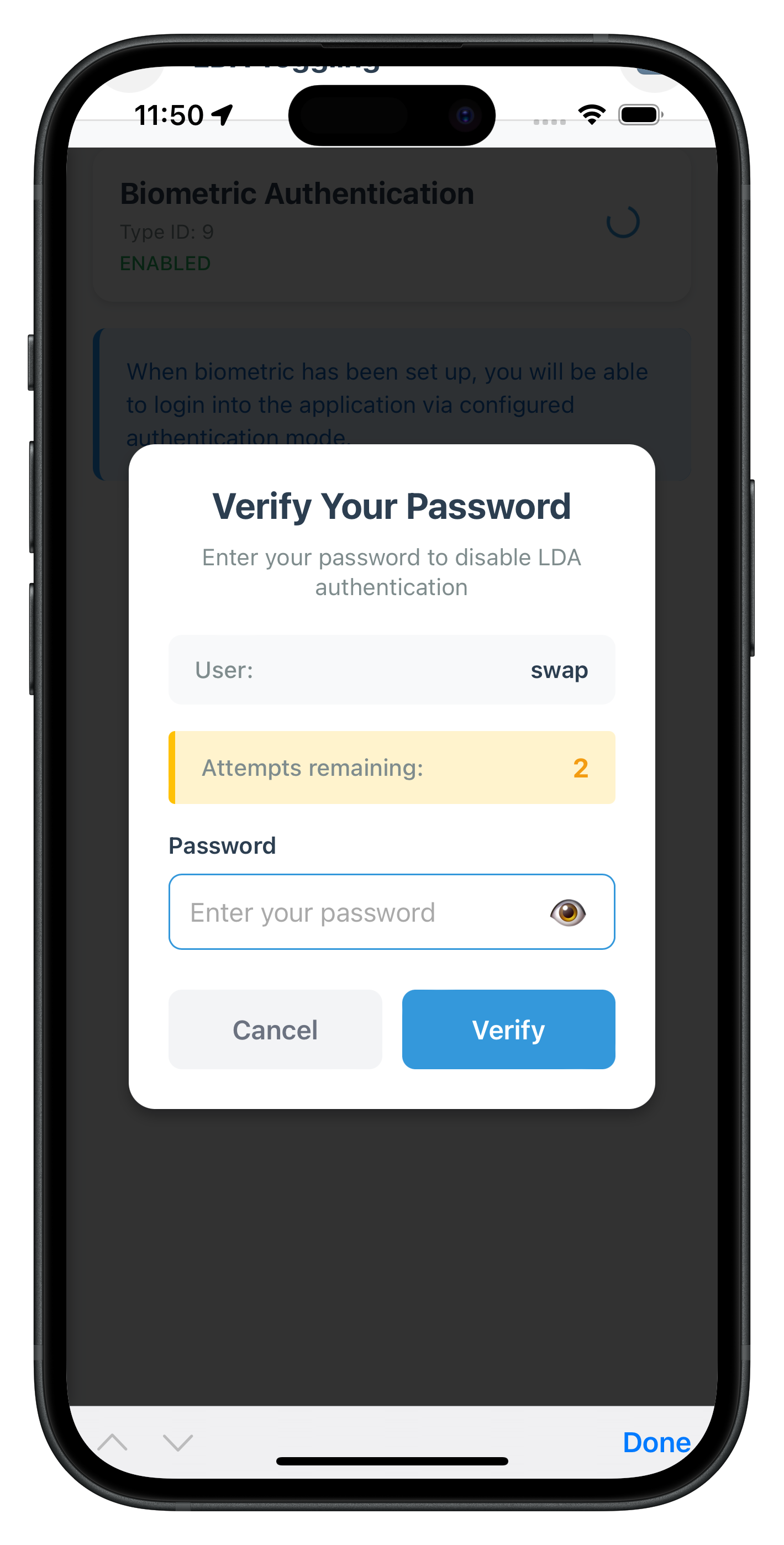
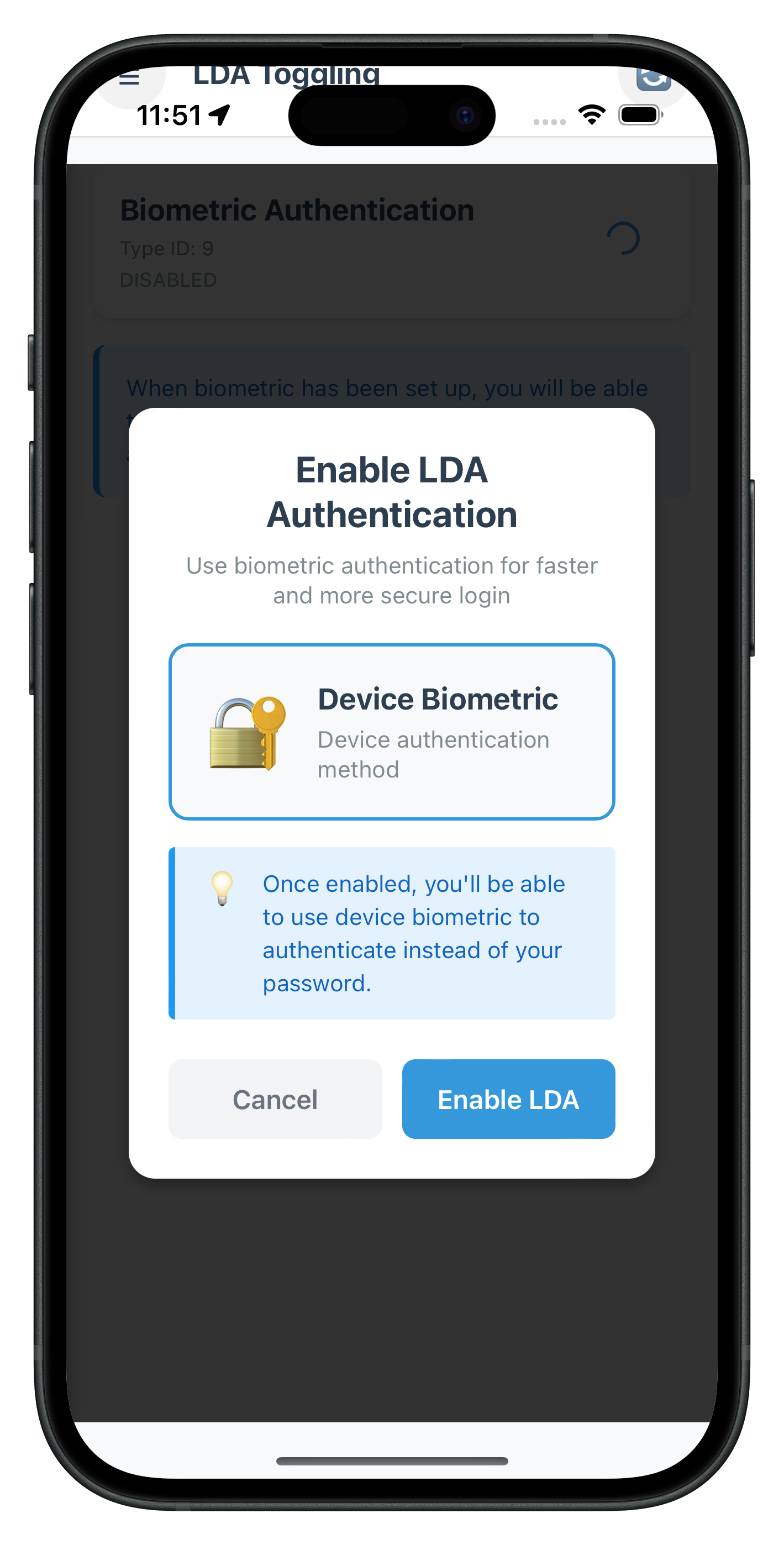
Now let's create the main LDA Toggling screen with interactive toggle switches using the Cordova SPA pattern.
Create LDATogglingScreen Component
Create a new file LDATogglingScreen.js:
// www/src/tutorial/screens/lda-toggling/LDATogglingScreen.js (new file - first part)

/**
 * LDA Toggling Screen (Cordova SPA)
 *
 * Displays authentication capabilities retrieved from the REL-ID SDK.
 * Key Features:
 * - Automatic getDeviceAuthenticationDetails API call on screen load
 * - Real-time event handling for onDeviceAuthManagementStatus
 * - Toggle switches for enabling/disabling authentication types
 * - Authentication type name mapping for user-friendly display
 * - Error handling and loading states
 *
 * SPA Pattern:
 * - Uses onContentLoaded(params) instead of React useEffect
 * - DOM manipulation instead of React state
 * - Manual event listener cleanup when navigating away
 * - Dynamic HTML generation for authentication list
 */

/**
 * Authentication Type Mapping
 */
const AUTH_TYPE_NAMES = {
  0: 'None',
  1: 'Biometric Authentication',
  2: 'Face ID',
  3: 'Pattern Authentication',
  4: 'Biometric Authentication',
  9: 'Biometric Authentication',
};

/**
 * LDA Toggling Screen Object
 */
window.LDATogglingScreen = {
  // State management via object properties
  authCapabilities: [],
  processingAuthType: null,
  userID: '',
  sessionID: '',

  /**
   * Called when screen content is loaded into DOM
   */
  onContentLoaded(params) {
    console.log('LDATogglingScreen - Content loaded');

    this.userID = params.userID || '';
    this.sessionID = params.sessionID || '';

    this.setupEventListeners();
    this.loadAuthenticationDetails();

    // Set up event handler for auth management status
    const eventManager = rdnaService.getEventManager();
    eventManager.setDeviceAuthManagementStatusHandler(this.handleAuthManagementStatusReceived.bind(this));
  },

  /**
   * Attach event listeners to DOM elements
   */
  setupEventListeners() {
    const refreshButton = document.getElementById('lda-refresh-button');
    if (refreshButton) {
      refreshButton.onclick = () => this.loadAuthenticationDetails();
    }

    const menuButton = document.getElementById('lda-menu-button');
    if (menuButton) {
      menuButton.onclick = () => NavigationService.toggleDrawer();
    }

    // Drawer navigation links
    const drawerDashboardLink = document.getElementById('drawer-dashboard-link');
    const drawerNotificationsLink = document.getElementById('drawer-notifications-link');
    const drawerLdaTogglingLink = document.getElementById('drawer-lda-toggling-link');
    const drawerLogoutLink = document.getElementById('drawer-logout-link');

    if (drawerDashboardLink) {
      drawerDashboardLink.onclick = (e) => {
        e.preventDefault();
        NavigationService.closeDrawer();
        NavigationService.navigate('Dashboard', {
          userID: this.userID,
          sessionID: this.sessionID
        });
      };
    }

    if (drawerNotificationsLink) {
      drawerNotificationsLink.onclick = (e) => {
        e.preventDefault();
        NavigationService.closeDrawer();
        NavigationService.navigate('GetNotifications', {
          userID: this.userID,
          sessionID: this.sessionID
        });
      };
    }

    if (drawerLdaTogglingLink) {
      drawerLdaTogglingLink.onclick = (e) => {
        e.preventDefault();
        NavigationService.closeDrawer();
      };
    }

    if (drawerLogoutLink) {
      drawerLogoutLink.onclick = (e) => {
        e.preventDefault();
        NavigationService.closeDrawer();
        this.handleLogout();
      };
    }
  },

  /**
   * Handle logout from drawer
   */
  async handleLogout() {
    console.log('LDATogglingScreen - Logging out user:', this.userID);

    try {
      const syncResponse = await rdnaService.logOff(this.userID);
      console.log('LDATogglingScreen - LogOff successful, waiting for SDK events');
    } catch (error) {
      console.error('LDATogglingScreen - logOff error:', error);
      const errorMessage = error.error?.errorString || 'Failed to log out';
      alert('Logout Error\n\n' + errorMessage);
    }
  },

  /**
   * Load authentication details from the SDK
   */
  async loadAuthenticationDetails() {
    this.showLoading();
    this.hideError();

    try {
      console.log('LDATogglingScreen - Calling getDeviceAuthenticationDetails API');
      const data = await rdnaService.getDeviceAuthenticationDetails();
      console.log('LDATogglingScreen - getDeviceAuthenticationDetails API call successful');

      if (data.error.longErrorCode !== 0) {
        const errorMessage = data.error.errorString || 'Failed to load authentication details';
        console.error('LDATogglingScreen - Authentication details error:', data.error);
        this.showError(errorMessage);
        return;
      }

      const capabilities = data.response.authenticationCapabilities || [];
      console.log('LDATogglingScreen - Received capabilities:', capabilities.length);

      this.authCapabilities = capabilities;
      this.hideLoading();
      this.renderAuthCapabilities();
    } catch (error) {
      console.error('LDATogglingScreen - getDeviceAuthenticationDetails error:', error);
      const errorMessage = error?.error?.errorString || 'Failed to load authentication details';
      this.showError(errorMessage);
    }
  },

  /**
   * Handle auth management status received from event
   */
  handleAuthManagementStatusReceived(data) {
    console.log('LDATogglingScreen - Received auth management status event');
    this.processingAuthType = null;

    // Hide LDA auth dialog if visible
    if (typeof LDAToggleAuthDialog !== 'undefined' && LDAToggleAuthDialog.visible) {
      LDAToggleAuthDialog.hide();
    }

    if (data.error.longErrorCode !== 0) {
      const errorMessage = data.error.errorString || 'Failed to update authentication mode';
      console.error('LDATogglingScreen - Auth management status error:', data.error);
      alert('Update Failed: ' + errorMessage);
      this.loadAuthenticationDetails();
      return;
    }

    if (data.status.statusCode === 100) {
      const opMode = data.OpMode === 1 ? 'enabled' : 'disabled';
      const authTypeName = AUTH_TYPE_NAMES[data.ldaType] || `Authentication Type ${data.ldaType}`;

      alert('Success: ' + authTypeName + ' has been ' + opMode + ' successfully.');
      this.loadAuthenticationDetails();
    } else {
      const statusMessage = data.status.statusMessage || 'Unknown error occurred';
      alert('Update Failed: ' + statusMessage);
      this.loadAuthenticationDetails();
    }
  },

  /**
   * Handle toggle switch change
   */
  async handleToggleChange(capability, newValue) {
    const authTypeName = AUTH_TYPE_NAMES[capability.authenticationType] || `Authentication Type ${capability.authenticationType}`;

    console.log('LDATogglingScreen - Toggle change:', {
      authenticationType: capability.authenticationType,
      authTypeName,
      currentValue: capability.isConfigured,
      newValue
    });

    if (this.processingAuthType !== null) {
      console.log('LDATogglingScreen - Another operation is in progress, ignoring toggle');
      return;
    }

    this.processingAuthType = capability.authenticationType;
    this.showProcessingForAuthType(capability.authenticationType);

    try {
      console.log('LDATogglingScreen - Calling manageDeviceAuthenticationModes API');
      await rdnaService.manageDeviceAuthenticationModes(newValue, capability.authenticationType);
      console.log('LDATogglingScreen - manageDeviceAuthenticationModes API call successful');
    } catch (error) {
      console.error('LDATogglingScreen - manageDeviceAuthenticationModes API error:', error);
      this.processingAuthType = null;
      this.hideProcessingForAuthType(capability.authenticationType);
      alert('Update Failed: Failed to update authentication mode. Please try again.');
    }
  },

  /**
   * Show loading state
   */
  showLoading() {
    const contentContainer = document.getElementById('lda-content-container');
    if (contentContainer) {
      contentContainer.innerHTML = `
        <div class="lda-loading-container">
          <div class="spinner"></div>
          <p class="lda-loading-text">Loading authentication details...</p>
        </div>
      `;
    }
  },

  /**
   * Hide loading state
   */
  hideLoading() {
    // Loading will be replaced by renderAuthCapabilities() or showError()
  },

  /**
   * Show error state
   */
  showError(message) {
    const contentContainer = document.getElementById('lda-content-container');
    if (contentContainer) {
      contentContainer.innerHTML = `
        <div class="lda-error-container">
          <p class="lda-error-text">${message}</p>
          <button class="lda-retry-button" id="lda-retry-button">Retry</button>
        </div>
      `;

      const retryButton = document.getElementById('lda-retry-button');
      if (retryButton) {
        retryButton.onclick = () => this.loadAuthenticationDetails();
      }
    }
  },

  /**
   * Hide error state
   */
  hideError() {
    // Error will be replaced by showLoading() or renderAuthCapabilities()
  },

  /**
   * Render authentication capabilities list
   */
  renderAuthCapabilities() {
    const contentContainer = document.getElementById('lda-content-container');
    if (!contentContainer) return;

    if (this.authCapabilities.length === 0) {
      contentContainer.innerHTML = `
        <div class="lda-empty-container">
          <div class="lda-empty-icon">🔐</div>
          <div class="lda-empty-title">No LDA Available</div>
          <div class="lda-empty-message">
            No Local Device Authentication (LDA) capabilities are available for this device.
          </div>
          <button class="lda-refresh-button" id="lda-empty-refresh-button">🔄 Refresh</button>
        </div>
      `;

      const refreshButton = document.getElementById('lda-empty-refresh-button');
      if (refreshButton) {
        refreshButton.onclick = () => this.loadAuthenticationDetails();
      }
      return;
    }

    let capabilitiesHtml = '';
    this.authCapabilities.forEach(capability => {
      const authTypeName = AUTH_TYPE_NAMES[capability.authenticationType] || `Authentication Type ${capability.authenticationType}`;
      const isEnabled = capability.isConfigured === 1;
      const statusClass = isEnabled ? 'lda-status-enabled' : 'lda-status-disabled';
      const statusText = isEnabled ? 'Enabled' : 'Disabled';

      capabilitiesHtml += `
        <div class="lda-auth-item">
          <div class="lda-auth-info">
            <div class="lda-auth-type-name">${authTypeName}</div>
            <div class="lda-auth-type-id">Type ID: ${capability.authenticationType}</div>
            <div class="lda-auth-status ${statusClass}">${statusText}</div>
          </div>
          <div class="lda-toggle-container">
            <div class="lda-toggle-spinner" id="lda-spinner-${capability.authenticationType}" style="display: none;">
              <div class="spinner-small"></div>
            </div>
            <label class="lda-toggle-switch" id="lda-toggle-container-${capability.authenticationType}">
              <input
                type="checkbox"
                id="lda-toggle-${capability.authenticationType}"
                ${isEnabled ? 'checked' : ''}
                data-auth-type="${capability.authenticationType}"
                data-auth-type-name="${authTypeName}"
              >
              <span class="lda-toggle-slider"></span>
            </label>
          </div>
        </div>
      `;
    });

    const footerInfoHtml = `
      <div class="lda-footer-info-container">
        <div class="lda-footer-info-text">
          When biometric has been set up, you will be able to login into the application via configured authentication mode.
        </div>
      </div>
    `;

    contentContainer.innerHTML = `
      <div class="lda-list-container">
        ${capabilitiesHtml}
        ${footerInfoHtml}
      </div>
    `;

    // Attach toggle event listeners
    this.authCapabilities.forEach(capability => {
      const toggle = document.getElementById(`lda-toggle-${capability.authenticationType}`);
      if (toggle) {
        toggle.onchange = (e) => {
          const newValue = e.target.checked;
          this.handleToggleChange(capability, newValue);
        };
      }
    });
  },

  /**
   * Show processing spinner for specific auth type
   */
  showProcessingForAuthType(authType) {
    const spinner = document.getElementById(`lda-spinner-${authType}`);
    const toggleContainer = document.getElementById(`lda-toggle-container-${authType}`);
    const toggle = document.getElementById(`lda-toggle-${authType}`);

    if (spinner) spinner.style.display = 'block';
    if (toggleContainer) toggleContainer.style.display = 'none';
    if (toggle) toggle.disabled = true;

    this.authCapabilities.forEach(cap => {
      const t = document.getElementById(`lda-toggle-${cap.authenticationType}`);
      if (t) t.disabled = true;
    });
  },

  /**
   * Hide processing spinner for specific auth type
   */
  hideProcessingForAuthType(authType) {
    const spinner = document.getElementById(`lda-spinner-${authType}`);
    const toggleContainer = document.getElementById(`lda-toggle-container-${authType}`);
    const toggle = document.getElementById(`lda-toggle-${authType}`);

    if (spinner) spinner.style.display = 'none';
    if (toggleContainer) toggleContainer.style.display = 'block';
    if (toggle) toggle.disabled = false;

    this.authCapabilities.forEach(cap => {
      const t = document.getElementById(`lda-toggle-${cap.authenticationType}`);
      if (t) t.disabled = false;
    });
  },

  /**
   * Reset processing state when operation is cancelled
   */
  resetProcessingState() {
    console.log('LDATogglingScreen - Resetting processing state');
    this.processingAuthType = null;

    this.authCapabilities.forEach(cap => {
      const spinner = document.getElementById(`lda-spinner-${cap.authenticationType}`);
      const toggleContainer = document.getElementById(`lda-toggle-container-${cap.authenticationType}`);
      const toggle = document.getElementById(`lda-toggle-${cap.authenticationType}`);

      if (spinner) spinner.style.display = 'none';
      if (toggleContainer) toggleContainer.style.display = 'block';
      if (toggle) toggle.disabled = false;
    });
  },

  /**
   * Cleanup when navigating away from screen
   */
  cleanup() {
    console.log('LDATogglingScreen - Cleaning up event handlers');

    const eventManager = rdnaService.getEventManager();
    eventManager.setDeviceAuthManagementStatusHandler(null);

    this.authCapabilities = [];
    this.processingAuthType = null;
  }
};
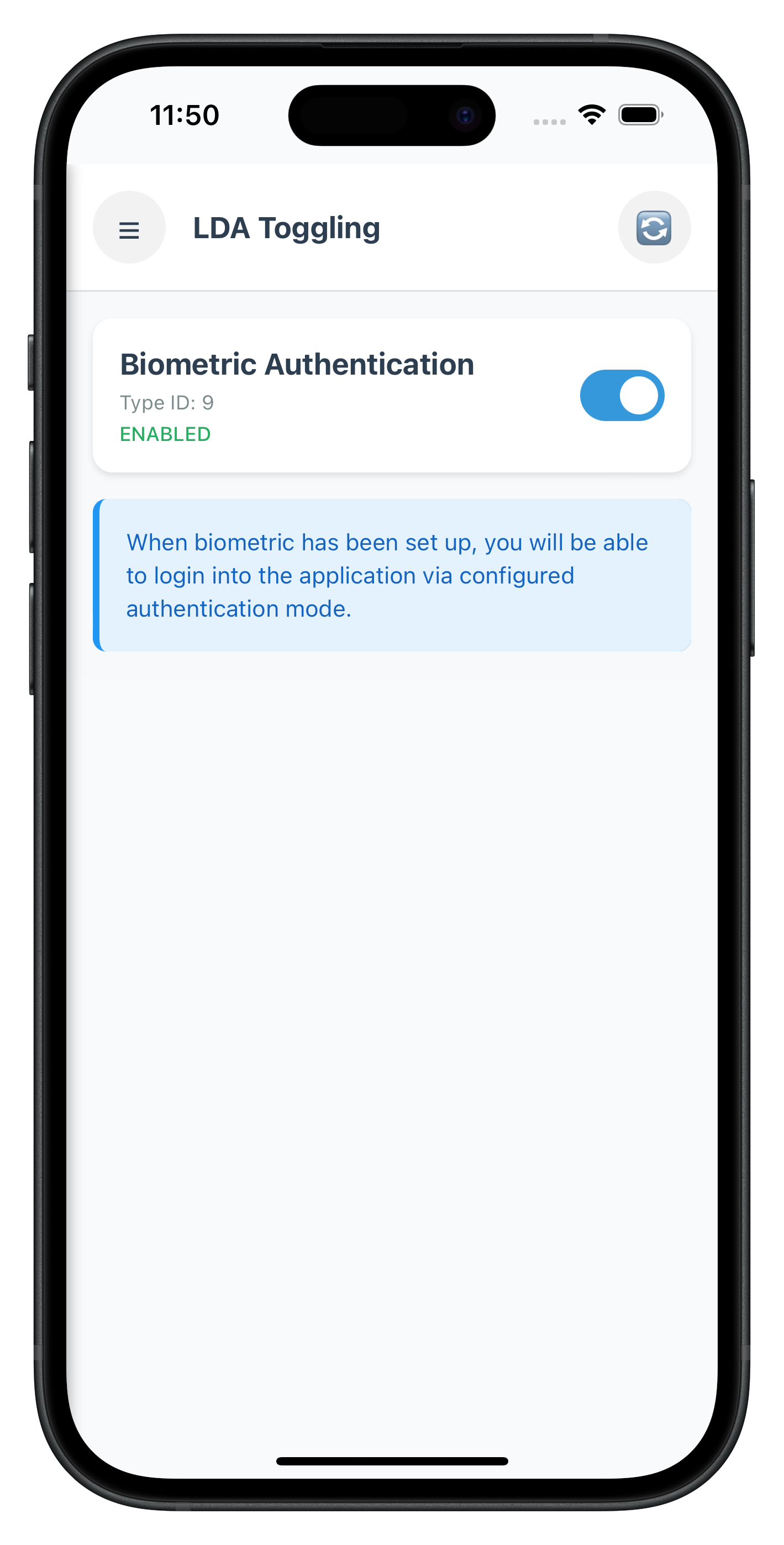
This screen follows the Cordova SPA pattern with DOM manipulation instead of React state management.
The following image showcases the LDA Toggling screen from the sample application:
Let's test your LDA toggling implementation with comprehensive scenarios.
Test Scenario 1: Enable Biometric Authentication
Setup Requirements:
- User logged in with password authentication
- Device has biometric authentication enrolled
- Navigate to LDA Toggling screen
Test Steps:
- Launch app and login with password
- Navigate to LDA Toggling from drawer menu
- Verify list displays available authentication types
- Toggle ON an authentication type (e.g., "Biometric Authentication")
- Complete password verification when dialog appears
- Approve consent when LDA consent dialog appears
- Verify success alert: "Biometric Authentication has been enabled successfully"
- Confirm toggle switch shows ON state after refresh
Expected Results:
- ✅ Authentication types load correctly
- ✅ Toggle triggers password verification
- ✅ Consent flow completes successfully
- ✅ Status updates reflect enabled state
- ✅ User returns to LDA Toggling screen
- ✅ User can now login with LDA
Test Scenario 2: Disable Biometric Authentication
Setup Requirements:
- User logged in with biometric authentication enabled
- Navigate to LDA Toggling screen
Test Steps:
- Navigate to LDA Toggling screen
- Toggle OFF the enabled authentication type
- Create new password when password dialog appears
- Complete password verification when prompted
- Verify success alert: "Biometric Authentication has been disabled successfully"
- Confirm toggle switch shows OFF state after refresh
Expected Results:
- ✅ Toggle triggers password verification
- ✅ Password creation flow completes successfully
- ✅ Status updates reflect disabled state
- ✅ User can now login with new password
Test Scenario 3: No LDA Available
Setup Requirements:
- Device without biometric authentication enrolled
- Navigate to LDA Toggling screen
Test Steps:
- Navigate to LDA Toggling screen
- Wait for authentication details to load
- Verify empty state displays
- Confirm message: "No Local Device Authentication (LDA) capabilities are available"
Expected Results:
- ✅ Empty state displays correctly
- ✅ Refresh button is available
- ✅ No toggle switches are shown
Test Scenario 4: Network Error Handling
Setup Requirements:
- Simulate network error or server unavailability
Test Steps:
- Navigate to LDA Toggling screen with poor network
- Attempt to load authentication details
- Verify error message displays
- Tap retry button
- Confirm error handling works correctly
Expected Results:
- ✅ Error message displays user-friendly text
- ✅ Retry button is functional
- ✅ Loading states work correctly
Debugging
iOS: Safari → Develop → Simulator → [Your App] Android: Chrome → chrome://inspect → Inspect
Prepare your LDA toggling implementation for production deployment with these essential considerations.
Security Validation Checklist
- [ ] No Sensitive Data Logging: Verify no authentication tokens or credentials are logged
- [ ] Proper State Management: Handle authentication state changes across app lifecycle
- [ ] Error Recovery: Graceful handling of SDK errors and network failures
- [ ] Challenge Mode Validation: Verify all challenge modes route to correct screens/dialogs
User Experience Optimization
- [ ] Clear Status Feedback: Visual indicators for enabled/disabled states
- [ ] Loading States: Show progress during all async operations
- [ ] Error Messages: User-friendly errors for all failure scenarios
- [ ] Accessibility Support: Screen reader compatibility and proper labeling
- [ ] Performance: Minimize unnecessary API calls and re-renders
Code Quality Standards
- [ ] Code Organization: Logical file structure and component separation
- [ ] Documentation: Comprehensive comments for complex logic
- [ ] Testing: Manual testing on real devices with different biometric capabilities
Production Deployment Checklist
- [ ] Platform Testing: Verify on both iOS and Android devices
- [ ] Device Variety: Test on devices with different biometric capabilities
- [ ] Edge Cases: Handle devices without biometric enrollment
- [ ] Version Compatibility: Ensure SDK version compatibility
- [ ] Analytics Integration: Track toggling usage and success rates
Congratulations! You've successfully implemented LDA toggling functionality with the REL-ID SDK.
🚀 What You've Accomplished
- ✅ Device Authentication Detection - Automatic retrieval of supported LDA types
- ✅ Interactive Toggle Interface - User-friendly switches for enabling/disabling authentication
- ✅ Event-Driven Status Updates - Real-time feedback via
onDeviceAuthManagementStatus - ✅ Challenge Mode Routing - Proper handling of password verification and consent flows
- ✅ Production-Ready Code - Comprehensive error handling, loading states, and Cordova SPA pattern
- ✅ Seamless User Experience - Modal dialogs and clear status feedback
🔄 LDA Toggling Flow Summary
Your implementation handles two main toggling scenarios:
Password → LDA (Enable Biometric):
User toggles ON → Password Verification (mode 5) →
User Consent (mode 16) → Status Update → Biometric Enabled
LDA → Password (Disable Biometric):
User toggles OFF → Password Verification (mode 15) →
Set Password (mode 14) → Status Update → Password Enabled
📚 Additional Resources
- REL-ID LDA Toggling Documentation - Complete feature guide
- getDeviceAuthenticationDetails API - Retrieve authentication capabilities
- manageDeviceAuthenticationModes API - Toggle authentication modes
- onDeviceAuthManagementStatus Event - Status callback reference
- Password to LDA Flow - Enable biometric workflow
- LDA to Password Flow - Disable biometric workflow
🎯 Next Steps
Consider enhancing your implementation with:
- Custom UI Themes: Match your app's design system
- Biometric Enrollment Check: Detect and prompt users to enroll biometrics
🔐 You've mastered authentication mode switching with REL-ID SDK!
Your implementation provides users with flexible authentication options while maintaining the highest security standards. Use this foundation to build adaptive authentication experiences that users can customize to their preferences.