🎯 Learning Path:
- Complete REL-ID Complete Activation & Login Flow Codelab
- Complete REL-ID Additional Device Activation Flow Codelab
- Complete REL-ID Forgot Password Flow Codelab
- You are here → Password Expiry Flow Implementation
Welcome to the REL-ID Password Expiry codelab! This tutorial builds upon your existing MFA implementation to add secure expired password update capabilities using REL-ID SDK's updatePassword API.
What You'll Build
In this codelab, you'll enhance your existing MFA application with:
- 🔐 Password Expiry Detection: getPassword event with
challengeMode = 4(RDNA_OP_UPDATE_CREDENTIALS) - 📝 Three-Field Password Form: Current password, new password, and confirm password validation
- 📋 Password Policy Display: Extract and display
RELID_PASSWORD_POLICYrequirements - 🔄 Password Reuse Detection: Handle statusCode 164 with automatic field clearing
- 🛡️ Security Best Practices: Secure password update with comprehensive validation
What You'll Learn
By completing this codelab, you'll master:
- Password Expiry Detection: Identifying when password has expired and routing to update flow
- UpdatePassword API Integration: Implementing
updatePassword(current, new, 4)with proper handling - Password Policy Extraction: Parsing
RELID_PASSWORD_POLICYfrom challenge data - Password Reuse Handling: Detecting and recovering from password reuse errors (statusCode 164)
- Three-Field Validation: Validating current, new, and confirm passwords with proper error messages
- Production Security Patterns: Implement secure password expiry with comprehensive error handling
Prerequisites
Before starting this codelab, ensure you have:
- ✅ Completed REL-ID MFA Complete Activation & Login Flow Codelab - All MFA screens and flows must be fully implemented
- ✅ Android Development Environment - Android Studio Hedgehog (2023.1.1) or later
- ✅ REL-ID SDK Integration - Latest SDK with password expiry usecase
- ✅ Kotlin Knowledge - Understanding of Kotlin coroutines, StateFlow, and Jetpack Compose
- ✅ Server Configuration - REL-ID server with password expiry time/policies configured
Get the Code from GitHub
The code to get started can be found in a GitHub repository.
You can clone the repository using the following command:
git clone https://github.com/uniken-public/codelab-android.git
Navigate to the relid-MFA-password-expiry folder in the repository you cloned earlier
Codelab Architecture Overview
This codelab extends your MFA application with three core password expiry components:
- UpdateExpiryPasswordScreen: Three-field password form with policy display and validation (Composable)
- UpdatePassword API Integration: Service layer implementation following established SDK patterns
- getPassword Event Routing Enhancement: SDKEventProvider routing for challengeMode 4 detection
Before implementing password expiry functionality, let's understand the key SDK events and APIs that power the expired password update workflow.
Password Expiry Event Flow
The password expiry process follows this event-driven pattern:
Login with Expired Password with challengeMode=0(RDNA_CHALLENGE_OP_VERIFY) → Server Detects Expiry (statusCode 118) →
SDK Triggers getPassword Event with challengeMode=4(RDNA_OP_UPDATE_CREDENTIALS) → UpdateExpiryPasswordScreen Displays →
User Updates Password → updatePassword(current, new, 4) API → onUserLoggedIn Event → Dashboard
Password Expiry Trigger Mechanism
When a user's password expires, the login flow changes:
Step | Event | Description |
1. User Login | VerifyPasswordScreen with | User enters credentials for standard login |
2. Password Expired | Server returns | Server detects password has expired |
3. SDK Re-triggers |
| SDK automatically requests password update |
4. User Shows Screen | UpdateExpiryPasswordScreen displays | Show UpdateExpiryPasswordScreen with current, new, and confirm password fields |
5. User Update Password | updatePassword API | User must provide current and new password |
Challenge Mode 4 - RDNA_OP_UPDATE_CREDENTIALS
Challenge Mode 4 is specifically for expired password updates:
Challenge Mode | Purpose | User Action Required | Screen |
| Verify existing password | Enter password to login | VerifyPasswordScreen |
| Set new password | Create password during activation | SetPasswordScreen |
| Update expired password | Provide current + new password | UpdateExpiryPasswordScreen |
Core Password Expiry Event Types
The REL-ID SDK triggers these main events during password expiry flow:
Event Type | Description | User Action Required |
Password expiry detected, update required | User provides current and new passwords | |
Automatic login after successful password update | System navigates to dashboard automatically |
Password Policy Extraction
Password expiry flow uses the same default policy key as password creation:
Flow | Policy Key | Description |
Password Creation (challengeMode=1) |
| Policy for new password creation |
Password Expiry (challengeMode=4) |
| Policy for expired password update |
Password Reuse Detection
The server maintains password history and detects reuse:
Status Code | Meaning | Action |
| Password has expired | Initial trigger for password update |
| Password reuse detected | Clear fields and prompt for different password |
UpdatePassword API Pattern
Here's the Kotlin implementation of the updatePassword API:
// app/src/main/java/com/relidcodelab/uniken/services/RDNAService.kt (password expiry addition)

/**
 * Update expired password (Password Expiry Flow)
 *
 * This method is specifically used for updating expired passwords during MFA authentication.
 * When password is expired during login (challengeMode=0), SDK automatically
 * re-triggers getPassword() event with challengeMode=4.
 *
 * @param currentPassword The user's current password
 * @param newPassword The new password to set
 * @param challengeMode Challenge mode (should be 4 for RDNA_OP_UPDATE_CREDENTIALS)
 * @return RDNAError that indicates sync response (longErrorCode == 0 for success)
 */
fun updatePassword(currentPassword: String?, newPassword: String?, challengeMode: Int): RDNAError {
    Log.d(TAG, "updatePassword() called with challengeMode: $challengeMode")

    val mode = when (challengeMode) {
        4 -> RDNAChallengeOpMode.RDNA_OP_UPDATE_CREDENTIALS
        else -> RDNAChallengeOpMode.RDNA_OP_UPDATE_CREDENTIALS
    }

    // IMPORTANT: Pass mode.intValue, not enum!
    val error = rdna.updatePassword(currentPassword, newPassword, mode.intValue)

    if (error.longErrorCode != 0) {
        Log.e(TAG, "updatePassword sync error: ${error.errorString} (code: ${error.longErrorCode})")
    } else {
        Log.d(TAG, "updatePassword sync success, waiting for async events")
    }

    return error
}
Let's implement the updatePassword API in your service layer following established REL-ID SDK patterns.
Enhance RDNAService with UpdatePassword
Add the updatePassword method to your existing service implementation:
// app/src/main/java/com/relidcodelab/uniken/services/RDNAService.kt (addition to existing object)

/**
 * Update expired password (Password Expiry Flow)
 *
 * This method is specifically used for updating expired passwords during MFA authentication.
 * When password is expired during login (challengeMode=0), SDK automatically
 * re-triggers getPassword() event with challengeMode=4 (RDNA_OP_UPDATE_CREDENTIALS).
 * The app should then call this method with both current and new passwords.
 *
 * @see https://developer.uniken.com/docs/password-expiry
 *
 * Workflow:
 * 1. User logs in with expired password (challengeMode=0)
 * 2. Server detects expiry (statusCode=118)
 * 3. SDK triggers getPassword with challengeMode=4
 * 4. App displays UpdateExpiryPasswordScreen
 * 5. User provides current and new passwords
 * 6. App calls updatePassword(current, new, 4)
 * 7. SDK validates and updates password
 * 8. SDK logs user in automatically (onUserLoggedIn event)
 *
 * Response Validation Logic:
 * 1. Check error.longErrorCode: 0 = success, > 0 = error
 * 2. On success, triggers onUserLoggedIn event immediately
 * 3. On failure, may trigger getPassword again with error status
 * 4. StatusCode 164 = Password reuse error (used in last N passwords)
 * 5. Async events will be handled by event listeners
 *
 * @param currentPassword The user's current password
 * @param newPassword The new password to set
 * @param challengeMode Challenge mode (should be 4 for RDNA_OP_UPDATE_CREDENTIALS)
 * @return RDNAError that indicates sync response
 */
fun updatePassword(currentPassword: String?, newPassword: String?, challengeMode: Int): RDNAError {
    Log.d(TAG, "updatePassword() called with challengeMode: $challengeMode")

    val mode = when (challengeMode) {
        4 -> RDNAChallengeOpMode.RDNA_OP_UPDATE_CREDENTIALS
        else -> RDNAChallengeOpMode.RDNA_OP_UPDATE_CREDENTIALS
    }

    // IMPORTANT: Pass mode.intValue, not enum directly
    val error = rdna.updatePassword(currentPassword, newPassword, mode.intValue)

    if (error.longErrorCode != 0) {
        Log.e(TAG, "updatePassword sync error: ${error.errorString} (code: ${error.longErrorCode})")
    } else {
        Log.d(TAG, "updatePassword sync success, waiting for onUserLoggedIn event")
    }

    return error
}
Service Pattern Consistency
Notice how this implementation follows the exact pattern established by other service methods:
Pattern Element | Implementation Detail |
Direct SDK Call | Direct call to |
Error Checking | Validates |
Logging Strategy | Comprehensive logging for debugging (without exposing passwords) |
Challenge Mode Mapping | Maps integer to |
Sync Response | Returns |
Now let's enhance your SDKEventProvider to detect and route challengeMode 4 to the UpdateExpiryPasswordScreen.
Add Challenge Mode 4 Detection
Update your existing handleGetPasswordEvents function in SDKEventProvider:
// app/src/main/java/com/relidcodelab/uniken/providers/SDKEventProvider.kt (enhancement)

private suspend fun handleGetPasswordEvents(
    rdnaService: RDNAService,
    callbackManager: RDNACallbackManager,
    navController: NavController
) {
    callbackManager.getPasswordEvent.collect { eventData ->
        Log.d(TAG, "getPassword event received:")
        Log.d(TAG, "  - userId: ${eventData.userId}")
        Log.d(TAG, "  - mode: ${eventData.mode?.intValue}")  // 0, 1, 2, or 4

        val challengeMode = eventData.mode?.intValue ?: 1

        when (challengeMode) {
            0 -> {
                // challengeMode = 0: Verify existing password
                Log.d(TAG, "getPassword (VERIFY mode) - navigating to VerifyPasswordScreen")

                verifyPasswordViewModel = VerifyPasswordViewModel(
                    rdnaService = rdnaService,
                    callbackManager = callbackManager,
                    initialEventData = eventData
                )

                navController.navigate(Routes.VERIFY_PASSWORD) {
                    popUpTo(Routes.CHECK_USER) { inclusive = false }
                }
            }
            4 -> {
                // challengeMode = 4: Update expired password (RDNA_OP_UPDATE_CREDENTIALS)
                Log.d(TAG, "getPassword (UPDATE_CREDENTIALS mode=4) - navigating to UpdateExpiryPasswordScreen")

                updateExpiryPasswordViewModel = UpdateExpiryPasswordViewModel(
                    rdnaService = rdnaService,
                    callbackManager = callbackManager,
                    initialEventData = eventData
                )

                navController.navigate(Routes.UPDATE_EXPIRY_PASSWORD) {
                    popUpTo(Routes.CHECK_USER) { inclusive = false }
                }
            }
            else -> {
                // challengeMode = 1: Set new password
                Log.d(TAG, "getPassword (SET mode) - navigating to SetPasswordScreen")

                setPasswordViewModel = SetPasswordViewModel(
                    rdnaService = rdnaService,
                    callbackManager = callbackManager,
                    initialEventData = eventData
                )

                navController.navigate(Routes.SET_PASSWORD) {
                    popUpTo(Routes.CHECK_USER) { inclusive = false }
                }
            }
        }
    }
}
Challenge Mode Routing Logic
The enhanced routing logic handles three password scenarios:
Challenge Mode | Screen | Purpose |
| VerifyPasswordScreen | Verify existing password for login |
| SetPasswordScreen | Set new password during activation |
| UpdateExpiryPasswordScreen | Update expired password |
Add ViewModel Accessor Method
Add a method to retrieve the UpdateExpiryPasswordViewModel:
// app/src/main/java/com/relidcodelab/uniken/providers/SDKEventProvider.kt (addition)

object SDKEventProvider {
    // Shared ViewModels
    private var updateExpiryPasswordViewModel: UpdateExpiryPasswordViewModel? = null
    private var verifyPasswordViewModel: VerifyPasswordViewModel? = null
    private var setPasswordViewModel: SetPasswordViewModel? = null

    // Accessor methods for Navigation composables
    fun getUpdateExpiryPasswordViewModel(): UpdateExpiryPasswordViewModel? = updateExpiryPasswordViewModel
    fun getVerifyPasswordViewModel(): VerifyPasswordViewModel? = verifyPasswordViewModel
    fun getSetPasswordViewModel(): SetPasswordViewModel? = setPasswordViewModel
}
Now let's create the ViewModel that manages state and business logic for the password expiry screen.
Create the ViewModel Class
Create a new ViewModel file:
// app/src/main/java/com/relidcodelab/tutorial/viewmodels/UpdateExpiryPasswordViewModel.kt

package com.relidcodelab.tutorial.viewmodels

import android.util.Log
import androidx.lifecycle.ViewModel
import androidx.lifecycle.viewModelScope
import com.relidcodelab.uniken.services.RDNACallbackManager
import com.relidcodelab.uniken.services.RDNAService
import com.relidcodelab.uniken.services.GetPasswordEventData
import com.relidcodelab.uniken.utils.RDNAEventUtils
import com.relidcodelab.uniken.utils.PasswordPolicyUtils
import kotlinx.coroutines.flow.MutableStateFlow
import kotlinx.coroutines.flow.StateFlow
import kotlinx.coroutines.flow.asStateFlow
import kotlinx.coroutines.flow.update
import kotlinx.coroutines.launch

data class UpdateExpiryPasswordUiState(
    val currentPassword: String = "",
    val newPassword: String = "",
    val confirmPassword: String = "",
    val error: String = "",
    val isSubmitting: Boolean = false,
    val challengeMode: Int = 4,
    val userName: String = "",
    val passwordPolicyMessage: String = ""
)

class UpdateExpiryPasswordViewModel(
    private val rdnaService: RDNAService,
    private val callbackManager: RDNACallbackManager,
    private val initialEventData: GetPasswordEventData?
) : ViewModel() {

    companion object {
        private const val TAG = "UpdateExpiryPasswordVM"
    }

    private val _uiState = MutableStateFlow(UpdateExpiryPasswordUiState())
    val uiState: StateFlow<UpdateExpiryPasswordUiState> = _uiState.asStateFlow()

    init {
        Log.d(TAG, "ViewModel created")
        processInitialEventData()
        observeGetPasswordEvents()
    }

    /**
     * Process initial event data from route params
     */
    private fun processInitialEventData() {
        initialEventData?.let { data ->
            Log.d(TAG, "Processing initial event data for password expiry")

            // 1. Extract username
            val userID = data.userId ?: ""

            // 2. Extract challenge mode (should be 4)
            val mode = data.mode?.intValue ?: 4

            // 3. Extract password policy FIRST (even if error present)
            val policyJsonString = RDNAEventUtils.getChallengeValue(
                data.response,
                "RELID_PASSWORD_POLICY"  // KEY: Always extract this
            )

            val policyMessage = if (policyJsonString != null) {
                val message = PasswordPolicyUtils.parseAndGeneratePolicyMessage(policyJsonString)
                Log.d(TAG, "Parsed policy message: $message")
                message
            } else {
                Log.w(TAG, "No password policy found in challenge info")
                ""
            }

            // 4. Check for errors AFTER policy extraction
            val errorMessage = when {
                RDNAEventUtils.hasApiError(data.error) -> {
                    val msg = RDNAEventUtils.getErrorMessage(data.error)
                    Log.e(TAG, "Initial event has API error: $msg")
                    msg
                }
                RDNAEventUtils.hasStatusError(data.response) -> {
                    val msg = RDNAEventUtils.getErrorMessage(data.error, data.response)
                    Log.e(TAG, "Initial event has status error: $msg")
                    msg
                }
                else -> ""
            }

            // 5. Update UI state with BOTH policy and error
            _uiState.update {
                it.copy(
                    userName = userID,
                    challengeMode = mode,
                    passwordPolicyMessage = policyMessage,  // Show policy requirements
                    error = errorMessage,  // Show any errors
                    currentPassword = "",  // Clear fields on error
                    newPassword = "",
                    confirmPassword = ""
                )
            }
        }
    }

    /**
     * Observe ongoing getPassword events (for password reuse errors)
     */
    private fun observeGetPasswordEvents() {
        viewModelScope.launch {
            callbackManager.getPasswordEvent.collect { eventData ->
                val mode = eventData.mode?.intValue ?: 0

                // Only process events for this challengeMode (4)
                if (mode == 4) {
                    Log.d(TAG, "Received getPassword event with mode 4")

                    // Extract password policy again (always present)
                    val policyJsonString = RDNAEventUtils.getChallengeValue(
                        eventData.response,
                        "RELID_PASSWORD_POLICY"
                    )

                    val policyMessage = if (policyJsonString != null) {
                        PasswordPolicyUtils.parseAndGeneratePolicyMessage(policyJsonString)
                    } else {
                        ""
                    }

                    // Check for status errors (e.g., password reuse - statusCode 164)
                    if (RDNAEventUtils.hasStatusError(eventData.response)) {
                        val errorMessage = RDNAEventUtils.getErrorMessage(eventData.error, eventData.response)
                        Log.e(TAG, "Status error detected: $errorMessage")

                        _uiState.update {
                            it.copy(
                                error = errorMessage,
                                isSubmitting = false,
                                currentPassword = "",  // Clear all fields on error
                                newPassword = "",
                                confirmPassword = "",
                                passwordPolicyMessage = policyMessage  // Keep policy visible
                            )
                        }
                    }
                }
            }
        }
    }

    // Input change handlers
    fun updateCurrentPassword(value: String) {
        _uiState.update { it.copy(currentPassword = value, error = "") }
    }

    fun updateNewPassword(value: String) {
        _uiState.update { it.copy(newPassword = value, error = "") }
    }

    fun updateConfirmPassword(value: String) {
        _uiState.update { it.copy(confirmPassword = value, error = "") }
    }

    /**
     * Check if form is valid for submission
     */
    fun isFormValid(): Boolean {
        val state = _uiState.value
        return state.currentPassword.trim().isNotEmpty() &&
               state.newPassword.trim().isNotEmpty() &&
               state.confirmPassword.trim().isNotEmpty() &&
               state.error.isEmpty()
    }

    /**
     * Handle password update submission
     */
    fun handleUpdatePassword() {
        val currentState = _uiState.value

        if (currentState.isSubmitting) {
            Log.w(TAG, "Already submitting, ignoring duplicate call")
            return
        }

        val trimmedCurrentPassword = currentState.currentPassword.trim()
        val trimmedNewPassword = currentState.newPassword.trim()
        val trimmedConfirmPassword = currentState.confirmPassword.trim()

        // Validation Step 1: Non-empty fields
        if (trimmedCurrentPassword.isEmpty()) {
            _uiState.update { it.copy(error = "Please enter your current password") }
            return
        }

        if (trimmedNewPassword.isEmpty()) {
            _uiState.update { it.copy(error = "Please enter a new password") }
            return
        }

        if (trimmedConfirmPassword.isEmpty()) {
            _uiState.update { it.copy(error = "Please confirm your new password") }
            return
        }

        // Validation Step 2: Passwords match
        if (trimmedNewPassword != trimmedConfirmPassword) {
            _uiState.update {
                it.copy(
                    error = "New password and confirm password do not match",
                    newPassword = "",  // Clear fields
                    confirmPassword = ""
                )
            }
            return
        }

        // Validation Step 3: New password differs from current
        if (trimmedCurrentPassword == trimmedNewPassword) {
            _uiState.update {
                it.copy(
                    error = "New password must be different from current password",
                    newPassword = "",
                    confirmPassword = ""
                )
            }
            return
        }

        // All validations passed
        _uiState.update { it.copy(isSubmitting = true, error = "") }

        viewModelScope.launch {
            Log.d(TAG, "Calling updatePassword with challengeMode: ${currentState.challengeMode}")

            // CRITICAL: Call updatePassword with mode 4
            val error = rdnaService.updatePassword(
                trimmedCurrentPassword,
                trimmedNewPassword,
                currentState.challengeMode  // Should be 4
            )

            Log.d(TAG, "UpdatePassword sync response - Error code: ${error.longErrorCode}")

            if (error.longErrorCode == 0) {
                // Sync success - wait for async events
                Log.d(TAG, "UpdatePassword sync success, waiting for onUserLoggedIn event")
                // SDK will trigger onUserLoggedIn event automatically
                // SDKEventProvider will handle navigation to Dashboard
            } else {
                // Sync error
                val errorMessage = error.errorString ?: "Failed to update password"
                _uiState.update {
                    it.copy(
                        error = errorMessage,
                        isSubmitting = false,
                        currentPassword = "",  // Clear all fields on error
                        newPassword = "",
                        confirmPassword = ""
                    )
                }
                Log.e(TAG, "UpdatePassword sync error: $errorMessage")
            }
        }
    }

    /**
     * Handle close button - reset auth state
     */
    fun handleClose() {
        viewModelScope.launch {
            try {
                Log.d(TAG, "Calling resetAuthState")
                val error = rdnaService.resetAuthState()
                if (error.longErrorCode != 0) {
                    Log.e(TAG, "ResetAuthState error: ${error.errorString}")
                } else {
                    Log.d(TAG, "ResetAuthState successful")
                }
            } catch (e: Exception) {
                Log.e(TAG, "ResetAuthState exception", e)
            }
        }
    }

    override fun onCleared() {
        super.onCleared()
        Log.d(TAG, "ViewModel cleared")
    }
}
Key ViewModel Features
Feature | Implementation Detail |
StateFlow UI State | Single source of truth for UI with |
Policy Extraction First | Extracts |
Event Observation | Observes |
Comprehensive Validation | Empty fields, password mismatch, new vs current check |
Automatic Field Clearing | Clears all fields on API and status errors |
Loading States | Proper |
Now let's build the complete Composable UI with three password fields, policy display, and keyboard management.
Create the Screen Composable
Create a new file for the password expiry screen:
// app/src/main/java/com/relidcodelab/tutorial/screens/mfa/UpdateExpiryPasswordScreen.kt

package com.relidcodelab.tutorial.screens.mfa

import androidx.activity.compose.BackHandler
import androidx.compose.foundation.background
import androidx.compose.foundation.layout.*
import androidx.compose.foundation.rememberScrollState
import androidx.compose.foundation.shape.RoundedCornerShape
import androidx.compose.foundation.text.KeyboardActions
import androidx.compose.foundation.text.KeyboardOptions
import androidx.compose.foundation.verticalScroll
import androidx.compose.material3.*
import androidx.compose.runtime.Composable
import androidx.compose.runtime.getValue
import androidx.compose.runtime.remember
import androidx.compose.ui.Alignment
import androidx.compose.ui.Modifier
import androidx.compose.ui.draw.clip
import androidx.compose.ui.focus.FocusRequester
import androidx.compose.ui.focus.focusRequester
import androidx.compose.ui.graphics.Color
import androidx.compose.ui.platform.LocalFocusManager
import androidx.compose.ui.text.font.FontWeight
import androidx.compose.ui.text.input.ImeAction
import androidx.compose.ui.text.input.KeyboardType
import androidx.compose.ui.text.input.PasswordVisualTransformation
import androidx.compose.ui.text.style.TextAlign
import androidx.compose.ui.unit.dp
import androidx.compose.ui.unit.sp
import androidx.lifecycle.compose.collectAsStateWithLifecycle
import com.relidcodelab.tutorial.components.CloseButton
import com.relidcodelab.tutorial.components.StatusBanner
import com.relidcodelab.tutorial.components.StatusBannerType
import com.relidcodelab.tutorial.viewmodels.UpdateExpiryPasswordViewModel
import com.relidcodelab.ui.theme.*

@Composable
fun UpdateExpiryPasswordScreen(
    viewModel: UpdateExpiryPasswordViewModel,
    onClose: () -> Unit,
    title: String = "Update Expired Password",
    subtitle: String = "Your password has expired. Please update it to continue."
) {
    val uiState by viewModel.uiState.collectAsStateWithLifecycle()
    val focusManager = LocalFocusManager.current
    val newPasswordFocusRequester = remember { FocusRequester() }
    val confirmPasswordFocusRequester = remember { FocusRequester() }

    // Disable back button during password expiry
    BackHandler(enabled = true) {
        // Do nothing - prevent back navigation
    }

    Box(modifier = Modifier.fillMaxSize()) {
        Scaffold(containerColor = PageBackground) { padding ->
            Column(
                modifier = Modifier
                    .fillMaxSize()
                    .padding(padding)
                    .imePadding()
                    .verticalScroll(rememberScrollState())
                    .padding(horizontal = 20.dp)
                    .padding(top = 80.dp, bottom = 20.dp),
                horizontalAlignment = Alignment.CenterHorizontally
            ) {
                // Title
                Text(
                    text = title,
                    fontSize = 28.sp,
                    fontWeight = FontWeight.Bold,
                    color = TextPrimary,
                    textAlign = TextAlign.Center,
                    modifier = Modifier.padding(bottom = 8.dp)
                )

                // Subtitle
                Text(
                    text = subtitle,
                    fontSize = 16.sp,
                    color = TextSecondary,
                    textAlign = TextAlign.Center,
                    modifier = Modifier.padding(bottom = 30.dp)
                )

                // User welcome (conditional)
                if (uiState.userName.isNotEmpty()) {
                    Column(
                        horizontalAlignment = Alignment.CenterHorizontally,
                        modifier = Modifier.padding(bottom = 20.dp)
                    ) {
                        Text(
                            text = "Welcome",
                            fontSize = 18.sp,
                            color = TextPrimary
                        )
                        Text(
                            text = uiState.userName,
                            fontSize = 20.sp,
                            fontWeight = FontWeight.Bold,
                            color = PrimaryBlue,
                            modifier = Modifier.padding(top = 4.dp)
                        )
                    }
                }

                // Password policy container (with left border)
                if (uiState.passwordPolicyMessage.isNotEmpty()) {
                    Row(
                        modifier = Modifier
                            .fillMaxWidth()
                            .padding(bottom = 20.dp)
                            .clip(RoundedCornerShape(8.dp))
                            .background(PolicyBackground)
                    ) {
                        // Left border
                        Box(
                            modifier = Modifier
                                .width(4.dp)
                                .fillMaxHeight()
                                .background(PolicyBorder)
                        )

                        // Content area
                        Column(modifier = Modifier.padding(16.dp)) {
                            Text(
                                text = "Password Requirements",
                                fontSize = 16.sp,
                                fontWeight = FontWeight.Bold,
                                color = TextPrimary,
                                modifier = Modifier.padding(bottom = 8.dp)
                            )
                            Text(
                                text = uiState.passwordPolicyMessage,
                                fontSize = 14.sp,
                                color = TextPrimary,
                                lineHeight = 20.sp
                            )
                        }
                    }
                }

                // Error banner (conditional)
                if (uiState.error.isNotEmpty()) {
                    StatusBanner(
                        type = StatusBannerType.ERROR,
                        message = uiState.error,
                        modifier = Modifier.padding(bottom = 20.dp)
                    )
                }

                // Current Password Input
                OutlinedTextField(
                    value = uiState.currentPassword,
                    onValueChange = { viewModel.updateCurrentPassword(it) },
                    label = { Text("Current Password") },
                    placeholder = { Text("Enter current password") },
                    visualTransformation = PasswordVisualTransformation(),
                    keyboardOptions = KeyboardOptions(
                        keyboardType = KeyboardType.Password,
                        imeAction = ImeAction.Next
                    ),
                    keyboardActions = KeyboardActions(
                        onNext = { newPasswordFocusRequester.requestFocus() }
                    ),
                    enabled = !uiState.isSubmitting,
                    singleLine = true,
                    colors = OutlinedTextFieldDefaults.colors(
                        focusedBorderColor = PrimaryBlue,
                        unfocusedBorderColor = BorderColor
                    ),
                    modifier = Modifier
                        .fillMaxWidth()
                        .padding(bottom = 20.dp)
                )

                // New Password Input
                OutlinedTextField(
                    value = uiState.newPassword,
                    onValueChange = { viewModel.updateNewPassword(it) },
                    label = { Text("New Password") },
                    placeholder = { Text("Enter new password") },
                    visualTransformation = PasswordVisualTransformation(),
                    keyboardOptions = KeyboardOptions(
                        keyboardType = KeyboardType.Password,
                        imeAction = ImeAction.Next
                    ),
                    keyboardActions = KeyboardActions(
                        onNext = { confirmPasswordFocusRequester.requestFocus() }
                    ),
                    enabled = !uiState.isSubmitting,
                    singleLine = true,
                    colors = OutlinedTextFieldDefaults.colors(
                        focusedBorderColor = PrimaryBlue,
                        unfocusedBorderColor = BorderColor
                    ),
                    modifier = Modifier
                        .fillMaxWidth()
                        .padding(bottom = 20.dp)
                        .focusRequester(newPasswordFocusRequester)
                )

                // Confirm New Password Input
                OutlinedTextField(
                    value = uiState.confirmPassword,
                    onValueChange = { viewModel.updateConfirmPassword(it) },
                    label = { Text("Confirm New Password") },
                    placeholder = { Text("Confirm new password") },
                    visualTransformation = PasswordVisualTransformation(),
                    keyboardOptions = KeyboardOptions(
                        keyboardType = KeyboardType.Password,
                        imeAction = ImeAction.Done
                    ),
                    keyboardActions = KeyboardActions(
                        onDone = {
                            focusManager.clearFocus()
                            if (viewModel.isFormValid()) {
                                viewModel.handleUpdatePassword()
                            }
                        }
                    ),
                    enabled = !uiState.isSubmitting,
                    singleLine = true,
                    colors = OutlinedTextFieldDefaults.colors(
                        focusedBorderColor = PrimaryBlue,
                        unfocusedBorderColor = BorderColor
                    ),
                    modifier = Modifier
                        .fillMaxWidth()
                        .padding(bottom = 20.dp)
                        .focusRequester(confirmPasswordFocusRequester)
                )

                // Submit Button with Loading State
                Button(
                    onClick = { viewModel.handleUpdatePassword() },
                    enabled = viewModel.isFormValid() && !uiState.isSubmitting,
                    colors = ButtonDefaults.buttonColors(
                        containerColor = PrimaryBlue,
                        disabledContainerColor = Color.Gray
                    ),
                    modifier = Modifier
                        .fillMaxWidth()
                        .height(50.dp)
                ) {
                    if (uiState.isSubmitting) {
                        CircularProgressIndicator(
                            modifier = Modifier.size(24.dp),
                            color = Color.White,
                            strokeWidth = 2.dp
                        )
                        Spacer(modifier = Modifier.width(8.dp))
                        Text("Updating Password...", fontSize = 16.sp)
                    } else {
                        Text("Update Password", fontSize = 16.sp)
                    }
                }

                // Help container
                Row(
                    modifier = Modifier
                        .fillMaxWidth()
                        .padding(top = 20.dp)
                        .clip(RoundedCornerShape(8.dp))
                        .background(InfoBackground)
                        .padding(16.dp)
                ) {
                    Text(
                        text = "Update your password. Your new password must be different from your current password.",
                        fontSize = 14.sp,
                        color = TextPrimary,
                        textAlign = TextAlign.Center
                    )
                }
            }
        }

        // Close Button (absolute positioned)
        CloseButton(
            onPress = {
                viewModel.handleClose()
                onClose()
            },
            enabled = !uiState.isSubmitting
        )
    }
}
UI Component Breakdown
Component | Purpose | Key Props |
imePadding() | Manages keyboard visibility for input fields | Automatically adjusts padding when keyboard appears |
verticalScroll() | Scrollable container | Allows scrolling when content exceeds screen height |
BackHandler | Prevent back navigation during password expiry |
|
Policy Container | Display password requirements with left border | Shows parsed RELID_PASSWORD_POLICY |
Three OutlinedTextField | Current, new, confirm passwords | Each with |
StatusBanner | Display errors (including statusCode 164) | Conditional rendering based on error state |
Button with Loading | Trigger password update with loading indicator | Disabled until form valid, shows CircularProgressIndicator |
CloseButton | Allow user to cancel and reset auth | Absolute positioned, calls |
Keyboard Management Explanation
Jetpack Compose provides built-in keyboard management:
Modifier/Function | Purpose | Description |
imePadding() | Automatic padding | Adds padding to shift content above keyboard |
KeyboardOptions | Keyboard type and action | Configures keyboard appearance (Password type, Next/Done action) |
KeyboardActions | Action handlers | Defines what happens when keyboard actions are triggered |
FocusRequester | Programmatic focus | Allows focusing next field when "Next" is pressed |
The KeyboardActions configuration creates a seamless user experience where pressing the keyboard's "Next" button automatically advances to the next field, and "Done" on the final field submits the form.
The following images showcase screens from the sample application:
|
|
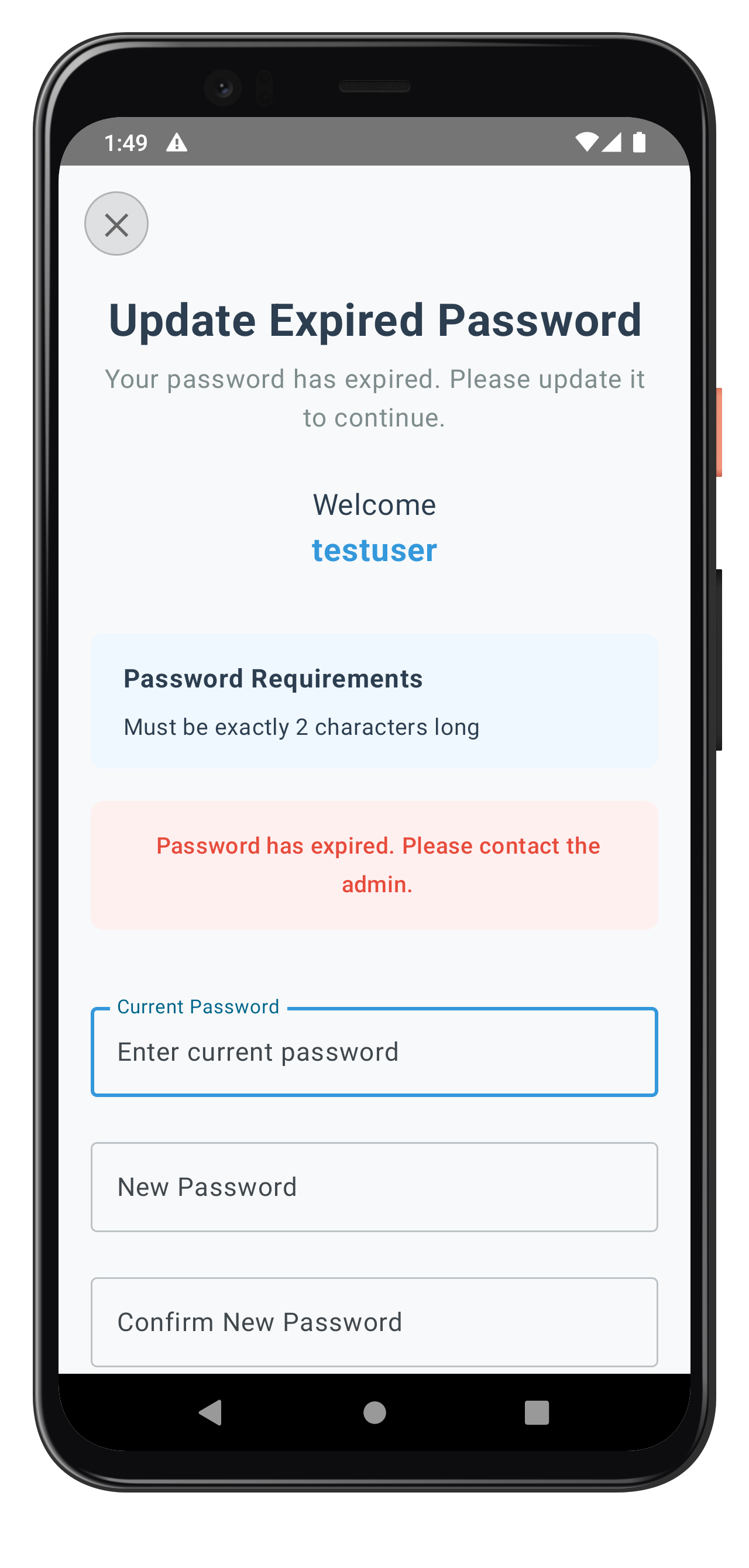
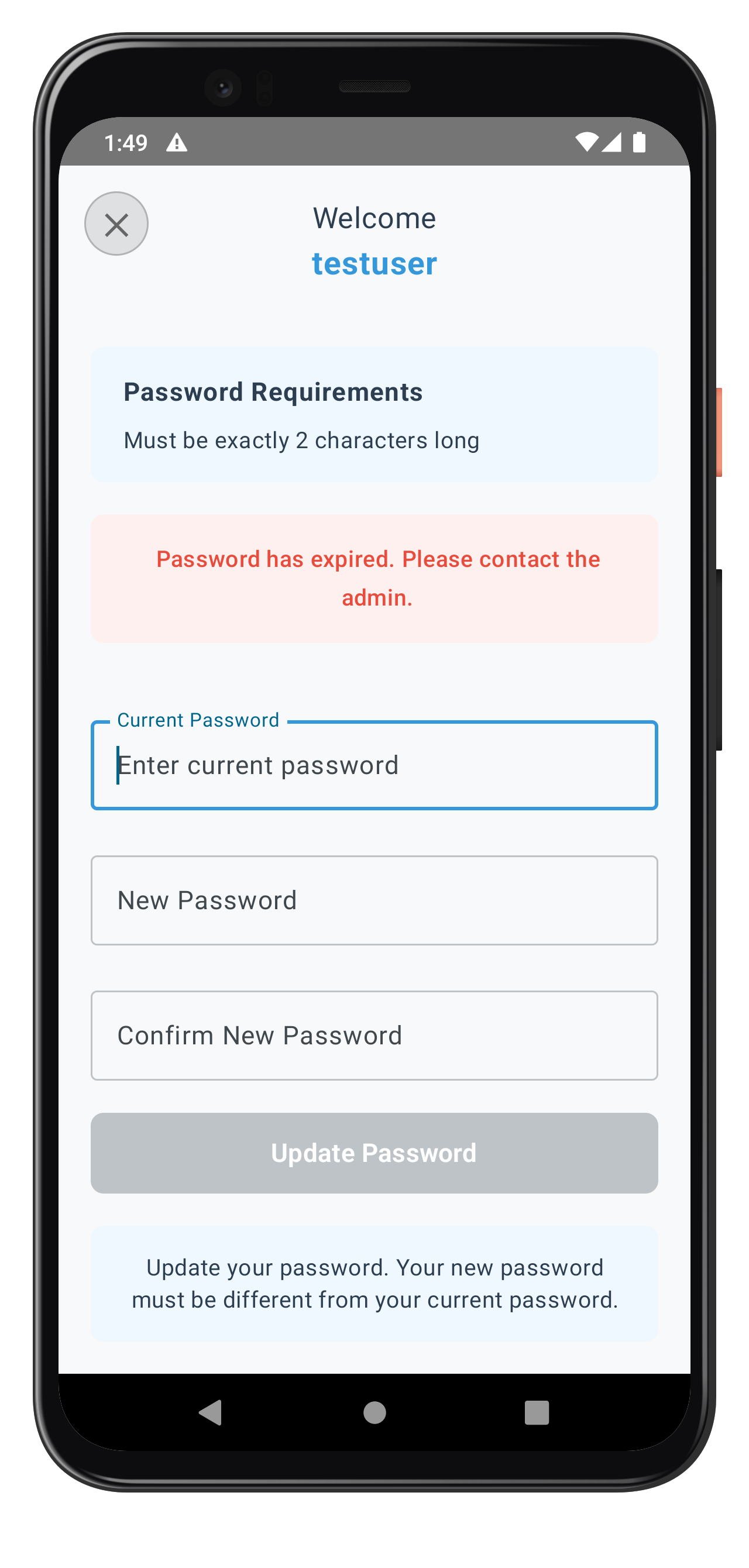
Let's register the UpdateExpiryPasswordScreen in your navigation configuration.
Update Routes Object
Add the route constant:
// app/src/main/java/com/relidcodelab/tutorial/navigation/AppNavigation.kt (route addition)

object Routes {
    // Tutorial Screens
    const val TUTORIAL_HOME = "TutorialHome"
    const val TUTORIAL_SUCCESS = "TutorialSuccess"

    // MFA Flow Screens (Event-driven)
    const val CHECK_USER = "CheckUser"
    const val ACTIVATION_CODE = "ActivationCode"
    const val SET_PASSWORD = "SetPassword"
    const val VERIFY_PASSWORD = "VerifyPassword"
    const val UPDATE_EXPIRY_PASSWORD = "UpdateExpiryPassword"  // NEW for Password Expiry
    const val USER_LDA_CONSENT = "UserLDAConsent"
    const val DASHBOARD = "Dashboard"
}
Register the Screen in NavHost
Add the screen to your navigation stack:
// app/src/main/java/com/relidcodelab/tutorial/navigation/AppNavigation.kt (screen registration)

@Composable
fun AppNavigation(
    currentActivity: Activity?,
    rdnaService: RDNAService,
    callbackManager: RDNACallbackManager,
    navController: NavHostController = rememberNavController()
): NavHostController {

    NavHost(
        navController = navController,
        startDestination = Routes.TUTORIAL_HOME
    ) {
        composable(Routes.TUTORIAL_HOME) { /* ... */ }

        // ... other screens ...

        // NEW: UpdateExpiryPasswordScreen - Update expired password (challengeMode=4)
        composable(Routes.UPDATE_EXPIRY_PASSWORD) {
            val viewModel = SDKEventProvider.getUpdateExpiryPasswordViewModel()
            if (viewModel != null) {
                UpdateExpiryPasswordScreen(
                    viewModel = viewModel,
                    onClose = {
                        navController.popBackStack()
                    }
                )
            } else {
                // Fallback UI while ViewModel is being created
                Box(
                    modifier = Modifier.fillMaxSize(),
                    contentAlignment = Alignment.Center
                ) {
                    CircularProgressIndicator()
                }
            }
        }

        // ... other screens ...
    }

    return navController
}
Navigation Flow Verification
Verify your navigation flow is complete:
Step | Navigation Event | Screen |
1. User Login |
| VerifyPasswordScreen |
2. Password Expired |
| UpdateExpiryPasswordScreen |
3. Password Updated |
| DashboardScreen |
Now let's test the complete password expiry implementation with various scenarios.
Test Scenario 1: Standard Password Expiry Flow
Follow these steps to test standard password expiry:
- Login with expired password
- Use VerifyPasswordScreen (challengeMode = 0)
- Enter credentials for user with expired password
- Verify automatic navigation
- SDK should detect expiry (statusCode 118)
- SDK triggers getPassword with challengeMode = 4
- App navigates to UpdateExpiryPasswordScreen
- Check password policy display
- Verify "Password Requirements" section appears
- Confirm policy is extracted from RELID_PASSWORD_POLICY
- Check policy message is user-friendly
- Update password
- Enter current password
- Enter new password (meeting policy requirements)
- Enter confirm password (matching new password)
- Tap "Update Password"
- Verify automatic login
- SDK should trigger onUserLoggedIn event
- App should navigate to Dashboard automatically
Test Scenario 2: Password Reuse Detection
Test password reuse error handling:
- Navigate to UpdateExpiryPasswordScreen (following Scenario 1 steps 1-3)
- Enter recently used password
- Current password: [user's current password]
- New password: [password used in last N passwords]
- Confirm password: [same as new password]
- Tap "Update Password"
- Verify reuse detection
- SDK returns statusCode 164
- SDK re-triggers getPassword with challengeMode = 4
- Error message displayed: "Please enter a new password as your entered password has been used by you previously..."
- Verify automatic field clearing
- All three password fields should clear automatically
- User can retry with different password
- Error message remains visible
- Retry with valid password
- Enter current password again
- Enter new password (not in history)
- Enter confirm password
- Verify successful update and login
Test Scenario 3: Validation Errors
Test all validation rules:
Test Case | Expected Error | Expected Behavior |
Empty current password | "Please enter your current password" | Error banner displays |
Empty new password | "Please enter a new password" | Error banner displays |
Empty confirm password | "Please confirm your new password" | Error banner displays |
Passwords don't match | "New password and confirm password do not match" | New/confirm fields cleared |
New = Current password | "New password must be different from current password" | New/confirm fields cleared |
Test Scenario 4: Password Policy Violations
Test password policy enforcement:
- Navigate to UpdateExpiryPasswordScreen
- Check displayed policy requirements
- Note minimum length, character requirements
- Note any special restrictions
- Enter policy-violating password
- Example: Too short, missing uppercase, etc.
- Tap "Update Password"
- Verify server-side validation
- Server should return policy violation error
- SDK re-triggers getPassword with error
- Fields should clear automatically
- Error message should display policy violation
Debugging with Logcat
Use Android Logcat for debugging:
# View logs for password expiry
adb logcat | grep -E "(UpdateExpiryPasswordVM|SDKEventProvider|RDNAService)"

# View all RDNA-related logs
adb logcat | grep RDNA

# View specific log level
adb logcat *:E  # Errors only
Debugging Tips
If you encounter issues, check these areas:
Issue | Possible Cause | Solution |
Policy not displaying | Using wrong policy key | Verify extracting |
Fields not clearing | Missing field clear logic in error handling | Add field clearing in |
Navigation not working | challengeMode 4 not routed in SDKEventProvider | Add |
API not called | Form validation failing | Check |
Keyboard covering inputs | Missing imePadding | Add |
ViewModel null | Not created in SDKEventProvider | Ensure ViewModel created before navigation |
Before deploying password expiry functionality to production, review these important considerations.
Security Best Practices
Practice | Implementation | Importance |
Never log passwords | Remove all Log statements that might expose passwords | Critical |
Password history | Respect server-configured history limits | High |
Policy enforcement | Always display and enforce RELID_PASSWORD_POLICY | High |
Error handling | Clear fields on all errors to prevent data exposure | High |
ProGuard Rules | Add keep rules for SDK classes in proguard-rules.pro | Critical |
User Experience Optimization
Enhance user experience with these patterns:
// 1. Clear, specific error messages
if (trimmedNewPassword == trimmedCurrentPassword) {
    _uiState.update {
        it.copy(
            error = "New password must be different from current password",
            newPassword = "",
            confirmPassword = ""
        )
    }
}

// 2. Automatic field clearing on errors
if (RDNAEventUtils.hasStatusError(eventData.response)) {
    _uiState.update {
        it.copy(
            error = errorMessage,
            currentPassword = "",
            newPassword = "",
            confirmPassword = ""
        )
    }
}

// 3. Keyboard navigation with FocusRequester
val newPasswordFocusRequester = remember { FocusRequester() }
OutlinedTextField(
    keyboardActions = KeyboardActions(
        onNext = { newPasswordFocusRequester.requestFocus() }
    ),
    // ...
)

// 4. IME padding for keyboard management
Column(
    modifier = Modifier
        .imePadding()  // Automatic keyboard handling
        .verticalScroll(rememberScrollState())
)
Performance Considerations
Consideration | Implementation |
StateFlow efficiency | Use |
Lifecycle awareness | Use |
ViewModel scope | Use |
Focus management | Use |
Testing Checklist
Before production deployment, verify:
- [ ] Password expiry detection works (challengeMode 4 routing)
- [ ] Password policy extracted from RELID_PASSWORD_POLICY
- [ ] Password reuse detection (statusCode 164) with field clearing
- [ ] All validation rules working (empty fields, mismatch, same password)
- [ ] Keyboard navigation between fields
- [ ] IME padding works correctly for keyboard
- [ ] Input fields remain visible when keyboard appears
- [ ] Loading states during API calls
- [ ] Error messages clear and actionable
- [ ] Automatic login after successful update
- [ ] Close button resets auth state properly
- [ ] No passwords logged to console or Logcat
- [ ] ProGuard rules configured for release builds
- [ ] UI matches design system and theme colors
What You've Accomplished
Congratulations! You've successfully implemented REL-ID Password Expiry functionality in your Android application.
You now have:
✅ Password Expiry Detection: Automatic detection and routing of challengeMode 4
✅ UpdatePassword API: Full integration with proper error handling
✅ Three-Field Validation: Current, new, and confirm password validation with Jetpack Compose
✅ Password Policy Display: Extraction and display of RELID_PASSWORD_POLICY
✅ Password Reuse Handling: StatusCode 164 detection with automatic field clearing
✅ Production-Ready: Secure, user-friendly password expiry flow with modern Android architecture
Additional Resources
- REL-ID Password Expiry Documentation - Complete API reference
- REL-ID Challenge Modes - Understanding challenge modes
- Jetpack Compose Documentation - Android modern UI toolkit
- Kotlin Coroutines Guide - Asynchronous programming in Kotlin
Thank you for completing the REL-ID Password Expiry Flow Codelab!
You're now equipped to build secure, production-ready password expiry workflows that provide excellent user experience while maintaining strong security standards using Kotlin, Jetpack Compose, and modern Android architecture patterns.