Welcome to the REL-ID Additional Device Activation codelab! This tutorial builds upon the foundational MFA implementation to add sophisticated device onboarding capabilities using REL-ID Verify's push notification system.
What You'll Build
In this codelab, you'll enhance your existing MFA application with:
- 🔐 REL-ID Verify Integration: Automatic push notification-based device activation
- 📱 Device-to-Device Communication: Seamless approval workflows between registered and new devices
- 🔄 Fallback Activation Methods: Alternative activation when registered devices aren't accessible
- 📬 Notification Management: Server notification retrieval and interactive action processing
- ⚡ Real-time Status Updates: Live processing indicators during activation workflows
- 🎛️ Enhanced Drawer Navigation: Drawer navigation with notification access
What You'll Learn
By completing this codelab, you'll master:
- Advanced SDK Event Handling: Managing
addNewDeviceOptionsevents and device activation flows - REL-ID Verify Workflows: Implementing automatic push notification-based device approval
- Fallback Strategies: Building robust alternative activation methods for various user scenarios
- Notification Systems: Creating comprehensive server notification management with user interactions
- Enhanced Navigation: Integrating drawer navigation with notification access points
- Production Patterns: Implementing error handling, status management, and user experience optimizations
Prerequisites
Before starting this codelab, ensure you have:
- ✅ Completed REL-ID MFA Codelab - All MFA screens and flows must be fully implemented
- ✅ Completed REL-ID MFA Session Management Codelab - All session management flows must be fully implemented
- ✅ Android Development Environment - Android Studio Hedgehog (2023.1.1) or later
- ✅ Multiple Physical Devices - REL-ID Verify requires real device-to-device push notification testing
- ✅ REL-ID Android SDK - Latest SDK with device activation support (AAR + Maven)
- ✅ Kotlin Knowledge - Understanding of Kotlin coroutines, Flow, and Jetpack Compose
Get the Code from GitHub
The code to get started is stored in a GitHub repository.
You can clone the repository using the following command:
git clone https://github.com/uniken-public/codelab-android.git
Navigate to the relid-MFA-additional-device-activation folder in the repository you cloned earlier
Codelab Architecture Overview
This codelab extends your MFA application with three core device activation components:
- VerifyAuthScreen: Automatic REL-ID Verify activation with real-time status updates
- GetNotificationsScreen: Server notification management with interactive action modals
- Enhanced Event Handling:
addNewDeviceOptionsevent processing and navigation coordination
Before implementing device activation screens, let's understand the key SDK callbacks and APIs that power the additional device activation workflow.
Device Activation Event Flow
The device activation process follows this event-driven pattern:
User Completes MFA on Primary Device → SDK Detects New Device On Secondary Device → addNewDeviceOptions Event → VerifyAuthScreen →
Push Notifications Sent → User Approves the Notification On Primary Device → Continue MFA Flow → Device Activated
Core Device Activation Data Classes
Add these Kotlin data classes to understand device activation data structures:
// app/src/main/java/com/relidcodelab/uniken/models/RDNAModels.kt (device activation additions)

/**
 * Device activation options event data
 * Triggered when SDK detects unregistered device during authentication
 */
data class AddNewDeviceOptionsEventData(
    val userId: String?,
    val newDeviceOptions: Array<out String>?,
    val response: RDNA.RDNAChallengeResponse?,
    val error: RDNA.RDNAError?
) {
    override fun equals(other: Any?): Boolean {
        if (this === other) return true
        if (javaClass != other?.javaClass) return false

        other as AddNewDeviceOptionsEventData

        if (userId != other.userId) return false
        if (newDeviceOptions != null) {
            if (other.newDeviceOptions == null) return false
            if (!newDeviceOptions.contentEquals(other.newDeviceOptions)) return false
        } else if (other.newDeviceOptions != null) return false
        if (response != other.response) return false
        if (error != other.error) return false

        return true
    }

    override fun hashCode(): Int {
        var result = userId?.hashCode() ?: 0
        result = 31 * result + (newDeviceOptions?.contentHashCode() ?: 0)
        result = 31 * result + (response?.hashCode() ?: 0)
        result = 31 * result + (error?.hashCode() ?: 0)
        return result
    }
}

/**
 * Notification body with localized content
 */
data class NotificationBody(
    val lng: String,
    val subject: String,
    val message: String,
    val label: Map<String, String>
)

/**
 * Notification action available to the user
 */
data class NotificationAction(
    val label: String,
    val action: String,
    val authlevel: String
)

/**
 * Individual notification item from server
 */
data class NotificationItem(
    val notification_uuid: String,
    val create_ts: String,
    val expiry_timestamp: String,
    val create_ts_epoch: Long,
    val expiry_timestamp_epoch: Long,
    val body: List<NotificationBody>,
    val actions: List<NotificationAction>,
    val action_performed: String,
    val ds_required: Boolean
)
Understanding addNewDeviceOptions Callback
The addNewDeviceOptions callback is the cornerstone of device activation:
When It Triggers
- During MFA Authentication: After successful username validation on secondary device
- New Device Detection: When SDK detects device isn't registered for the user
- Automatic Invocation: No manual API call needed - SDK triggers automatically
The callback signature from RDNA.RDNACallbacks interface:
override fun addNewDeviceOptions(
    userId: String?,
    newDeviceOptions: Array<out String>?,
    challengeInfo: HashMap<String, String>?
)
REL-ID Verify Workflow
REL-ID Verify enables secure device-to-device approval:
- Push Notification Sent: SDK sends approval request to user's registered devices
- User Receives Notification: Registered device shows activation approval request
- User Approves/Rejects: User makes decision on registered device
- Response Processed: New device receives approval status
- Activation Completed: Device registration finalized, MFA flow continues
Enhance your existing RDNAService with device activation APIs. These methods handle REL-ID Verify workflows and notification management.
Adding Device Activation APIs
Extend your RDNAService object with these device activation methods:
// app/src/main/java/com/relidcodelab/uniken/services/RDNAService.kt (device activation additions)

object RDNAService {
    // ... existing methods ...

    /**
     * Performs REL-ID Verify authentication for device activation
     * Sends push notifications to registered devices for approval
     * @param verifyAuthStatus User's decision (true = proceed with verification, false = cancel)
     * @return RDNA.RDNAError
     */
    fun performVerifyAuth(verifyAuthStatus: Boolean): RDNA.RDNAError {
        Log.d(TAG, "Performing verify auth with status: $verifyAuthStatus")

        val error = rdna.PerformVerifyAuth(verifyAuthStatus)

        if (error.longErrorCode == 0) {
            Log.d(TAG, "PerformVerifyAuth sync response success, waiting for async events")
        } else {
            Log.e(TAG, "PerformVerifyAuth sync response error: ${error.errorString}")
        }

        return error
    }

    /**
     * Initiates fallback device activation flow
     * Alternative method when REL-ID Verify is not available/accessible
     * @return RDNA.RDNAError
     */
    fun fallbackNewDeviceActivationFlow(): RDNA.RDNAError {
        Log.d(TAG, "Starting fallback new device activation flow")

        val error = rdna.FallbackNewDeviceActivationFlow()

        if (error.longErrorCode == 0) {
            Log.d(TAG, "FallbackNewDeviceActivationFlow sync response success, alternative activation started")
        } else {
            Log.e(TAG, "FallbackNewDeviceActivationFlow sync response error: ${error.errorString}")
        }

        return error
    }

    /**
     * Retrieves server notifications for the current user
     * Loads all pending notifications with actions
     * @param recordCount Number of records to fetch (0 = all active notifications)
     * @param startIndex Index to begin fetching from (must be >= 1)
     * @return RDNA.RDNAError
     */
    fun getNotifications(
        recordCount: Int = 0,
        startIndex: Int = 1
    ): RDNA.RDNAError {
        Log.d(TAG, "Fetching notifications with recordCount: $recordCount, startIndex: $startIndex")

        val error = rdna.GetNotifications(
            recordCount,    // recordCount
            "",            // enterpriseID (optional)
            startIndex,    // startIndex
            "",           // startDate (optional)
            ""            // endDate (optional)
        )

        if (error.longErrorCode == 0) {
            Log.d(TAG, "GetNotifications sync response success, waiting for onGetNotifications event")
        } else {
            Log.e(TAG, "GetNotifications sync response error: ${error.errorString}")
        }

        return error
    }

    /**
     * Updates a notification with user action
     * Processes user decision on notification actions
     * @param notificationId Notification identifier (UUID)
     * @param response Action response value selected by user
     * @return RDNA.RDNAError
     */
    fun updateNotification(notificationId: String, response: String): RDNA.RDNAError {
        Log.d(TAG, "Updating notification: $notificationId with response: $response")

        val error = rdna.UpdateNotification(notificationId, response)

        if (error.longErrorCode == 0) {
            Log.d(TAG, "UpdateNotification sync response success, waiting for onUpdateNotification event")
        } else {
            Log.e(TAG, "UpdateNotification sync response error: ${error.errorString}")
        }

        return error
    }
}
Understanding Device Activation APIs
performVerifyAuth API
- Purpose: Initiates REL-ID Verify process with push notifications
- Parameters:
verifyAuthStatus(Boolean) - automatically start verification - Behavior: Sends approval requests to all registered devices
- Response: Immediate sync response, then async processing via push notifications
fallbackNewDeviceActivationFlow API
- Purpose: Provides alternative activation method
- Use Case: When registered devices are not accessible/available
- Behavior: Triggers server-configured alternative verification process like activation code/OTP
- Integration: Works with existing MFA flow without disruption
getNotifications API
- Purpose: Retrieves all server notifications for current user
- Response: Returns notification list with actions and metadata via
onGetNotificationscallback - Usage Pattern: Called automatically when GetNotificationsScreen loads
- Data Structure: Returns notification data via
RDNA.RDNAStatusGetNotifications
updateNotification API
- Purpose: Processes user actions on notifications
- Parameters: notificationId and actionId
- Behavior: Updates notification status and processes user decision
- Response: Returns success/failure status via
onUpdateNotificationcallback
API Response Pattern
All device activation APIs follow the established REL-ID SDK pattern:
- Immediate Sync Response: Indicates if API call was accepted by SDK
- Success Check:
longErrorCode == 0means API call succeeded - Async Event Processing: Actual results delivered via SDK callbacks
- Error Handling: Sync errors handled in UI immediately
Enhance your existing callback manager to handle device activation events. Add support for addNewDeviceOptions, notification retrieval, and notification updates.
Adding Device Activation Event Handlers
Extend your RDNACallbackManager class with device activation event handling:
// app/src/main/java/com/relidcodelab/uniken/services/RDNACallbackManager.kt (device activation additions)

class RDNACallbackManager(
    private val context: Context,
    private val currentActivity: Activity?
) : RDNA.RDNACallbacks {

    private val scope = CoroutineScope(SupervisorJob() + Dispatchers.Main)

    // ... existing event flows ...

    // Device activation event flows
    private val _addNewDeviceOptionsEvent = MutableSharedFlow<AddNewDeviceOptionsEventData>()
    val addNewDeviceOptionsEvent: SharedFlow<AddNewDeviceOptionsEventData> = _addNewDeviceOptionsEvent.asSharedFlow()

    private val _getNotificationsEvent = MutableSharedFlow<RDNA.RDNAStatusGetNotifications>()
    val getNotificationsEvent: SharedFlow<RDNA.RDNAStatusGetNotifications> = _getNotificationsEvent.asSharedFlow()

    private val _updateNotificationEvent = MutableSharedFlow<RDNA.RDNAStatusUpdateNotification>()
    val updateNotificationEvent: SharedFlow<RDNA.RDNAStatusUpdateNotification> = _updateNotificationEvent.asSharedFlow()

    /**
     * Handles device activation options event
     * Triggered when SDK detects unregistered device during authentication
     */
    override fun addNewDeviceOptions(
        userId: String?,
        newDeviceOptions: Array<out String>?,
        challengeInfo: HashMap<String, String>?
    ) {
        Log.d(TAG, "Add new device options event received")
        Log.d(TAG, "UserID: $userId")
        Log.d(TAG, "Available options: ${newDeviceOptions?.size ?: 0}")

        // Log each activation option for debugging
        newDeviceOptions?.forEachIndexed { index, option ->
            Log.d(TAG, "Option ${index + 1}: $option")
        }

        scope.launch {
            _addNewDeviceOptionsEvent.emit(
                AddNewDeviceOptionsEventData(
                    userId = userId,
                    newDeviceOptions = newDeviceOptions,
                    response = null,
                    error = null
                )
            )
        }
    }

    /**
     * Handles get notifications response
     * Triggered after getNotifications API call completes
     */
    override fun onGetNotifications(status: RDNA.RDNAStatusGetNotifications): Int {
        Log.d(TAG, "Get notifications event received")

        val notificationCount = status.responseData?.notifications?.size ?: 0
        Log.d(TAG, "Notification count: $notificationCount")

        scope.launch {
            _getNotificationsEvent.emit(status)
        }

        return 0
    }

    /**
     * Handles update notification response
     * Triggered after updateNotification API call completes
     */
    override fun onUpdateNotification(status: RDNA.RDNAStatusUpdateNotification): Int {
        Log.d(TAG, "Update notification event received")
        Log.d(TAG, "Status code: ${status.statusCode}")
        Log.d(TAG, "Status message: ${status.statusMsg}")

        scope.launch {
            _updateNotificationEvent.emit(status)
        }

        return 0
    }
}
Understanding Device Activation Events
addNewDeviceOptions Event
- Trigger Condition: Automatically fired when SDK detects unregistered device during MFA
- Timing: Occurs after successful username validation
- Navigation Response: Should navigate to VerifyAuthScreen with device options
- Key Data: UserID, available activation options, default method selection
onGetNotifications Event
- Trigger Condition: Response to
getNotifications()API call - Timing: Fired when GetNotificationsScreen loads or refreshes notifications
- Data Processing: Contains notification array with actions and metadata
- Sorting: Notifications typically ordered by timestamp (most recent first)
onUpdateNotification Event
- Trigger Condition: Response to
updateNotification()API call - Timing: Fired after user selects action on notification
- Success Handling: Contains success flag and result message
- UI Updates: Used to update notification status and provide user feedback
Callback Manager Integration Pattern
The device activation events integrate with existing event management using SharedFlow:
// Example of comprehensive event collection in SDKEventProvider
lifecycleOwner.lifecycleScope.launch {
    lifecycleOwner.repeatOnLifecycle(Lifecycle.State.STARTED) {
        // Existing MFA event handlers
        launch { handleGetUserEvents(...) }
        launch { handleGetPasswordEvents(...) }
        // ... other MFA handlers ...

        // Device activation event handlers
        launch { handleAddNewDeviceOptionsEvents(...) }
        launch { handleGetNotificationsEvents(...) }
        launch { handleUpdateNotificationEvents(...) }
    }
}
Create the VerifyAuthScreen that handles REL-ID Verify device activation with automatic push notification processing and fallback options.
VerifyAuthViewModel Implementation
// app/src/main/java/com/relidcodelab/tutorial/viewmodels/VerifyAuthViewModel.kt

data class VerifyAuthUiState(
    val isProcessing: Boolean = false,
    val error: String = "",
    val userId: String? = null,
    val options: Array<out String>? = null
) {
    override fun equals(other: Any?): Boolean {
        if (this === other) return true
        if (javaClass != other?.javaClass) return false

        other as VerifyAuthUiState

        if (isProcessing != other.isProcessing) return false
        if (error != other.error) return false
        if (userId != other.userId) return false
        if (options != null) {
            if (other.options == null) return false
            if (!options.contentEquals(other.options)) return false
        } else if (other.options != null) return false

        return true
    }

    override fun hashCode(): Int {
        var result = isProcessing.hashCode()
        result = 31 * result + error.hashCode()
        result = 31 * result + (userId?.hashCode() ?: 0)
        result = 31 * result + (options?.contentHashCode() ?: 0)
        return result
    }
}

class VerifyAuthViewModel(
    private val rdnaService: RDNAService,
    private val callbackManager: RDNACallbackManager,
    private val initialEventData: AddNewDeviceOptionsEventData?
) : ViewModel() {

    private val _uiState = MutableStateFlow(VerifyAuthUiState())
    val uiState: StateFlow<VerifyAuthUiState> = _uiState.asStateFlow()

    companion object {
        private const val TAG = "VerifyAuthViewModel"
    }

    init {
        processActivationData()
    }

    private fun processActivationData() {
        initialEventData?.let { data ->
            Log.d(TAG, "Processing activation data for user: ${data.userId}")

            _uiState.update {
                it.copy(
                    userId = data.userId,
                    options = data.newDeviceOptions
                )
            }

            // Automatically call performVerifyAuth(true) when data is processed
            performVerifyAuth(true)
        }
    }

    fun performVerifyAuth(status: Boolean) {
        if (_uiState.value.isProcessing) return

        viewModelScope.launch {
            _uiState.update { it.copy(isProcessing = true, error = "") }

            try {
                Log.d(TAG, "Performing verify auth: $status")

                val error = rdnaService.performVerifyAuth(status)

                if (error.longErrorCode != 0) {
                    _uiState.update {
                        it.copy(
                            isProcessing = false,
                            error = error.errorString ?: "Unknown error"
                        )
                    }
                } else {
                    _uiState.update { it.copy(isProcessing = false) }
                    if (status) {
                        Log.d(TAG, "REL-ID Verify notification has been sent to registered devices")
                    }
                }
            } catch (e: Exception) {
                Log.e(TAG, "PerformVerifyAuth error", e)
                _uiState.update {
                    it.copy(
                        isProcessing = false,
                        error = e.message ?: "Unknown error"
                    )
                }
            }
        }
    }

    fun fallbackNewDeviceActivationFlow() {
        if (_uiState.value.isProcessing) return

        viewModelScope.launch {
            _uiState.update { it.copy(isProcessing = true, error = "") }

            try {
                Log.d(TAG, "Initiating fallback new device activation flow")

                val error = rdnaService.fallbackNewDeviceActivationFlow()

                if (error.longErrorCode != 0) {
                    _uiState.update {
                        it.copy(
                            isProcessing = false,
                            error = error.errorString ?: "Unknown error"
                        )
                    }
                } else {
                    _uiState.update { it.copy(isProcessing = false) }
                    Log.d(TAG, "Alternative device activation process has been initiated")
                }
            } catch (e: Exception) {
                Log.e(TAG, "FallbackNewDeviceActivationFlow error", e)
                _uiState.update {
                    it.copy(
                        isProcessing = false,
                        error = e.message ?: "Unknown error"
                    )
                }
            }
        }
    }

    fun resetAuthState() {
        viewModelScope.launch {
            try {
                Log.d(TAG, "Calling resetAuthState")
                val error = rdnaService.resetAuthState()
                if (error.longErrorCode == 0) {
                    Log.d(TAG, "ResetAuthState successful")
                } else {
                    Log.e(TAG, "ResetAuthState error: ${error.errorString}")
                }
            } catch (e: Exception) {
                Log.e(TAG, "ResetAuthState exception", e)
            }
        }
    }
}
VerifyAuthScreen Composable
// app/src/main/java/com/relidcodelab/tutorial/screens/mfa/VerifyAuthScreen.kt

@Composable
fun VerifyAuthScreen(
    viewModel: VerifyAuthViewModel,
    title: String = "Additional Device Activation",
    subtitle: String = "Activate this device for secure access"
) {
    val uiState by viewModel.uiState.collectAsStateWithLifecycle()

    BackHandler(enabled = true) {
        // Disable back button during processing
    }

    Scaffold(
        containerColor = PageBackground
    ) { padding ->
        Column(
            modifier = Modifier
                .fillMaxSize()
                .padding(padding)
                .imePadding()
                .verticalScroll(rememberScrollState())
                .padding(20.dp)
        ) {
            // Close Button
            Box(
                modifier = Modifier.fillMaxWidth(),
                contentAlignment = Alignment.TopEnd
            ) {
                IconButton(
                    onClick = { viewModel.resetAuthState() },
                    enabled = !uiState.isProcessing
                ) {
                    Icon(
                        imageVector = Icons.Default.Close,
                        contentDescription = "Close"
                    )
                }
            }

            Spacer(modifier = Modifier.height(40.dp))

            // Title
            Text(
                text = title,
                style = MaterialTheme.typography.headlineMedium,
                fontWeight = FontWeight.Bold,
                textAlign = TextAlign.Center,
                modifier = Modifier.fillMaxWidth()
            )

            Spacer(modifier = Modifier.height(8.dp))

            // Subtitle
            Text(
                text = subtitle,
                style = MaterialTheme.typography.bodyLarge,
                color = MaterialTheme.colorScheme.onSurfaceVariant,
                textAlign = TextAlign.Center,
                modifier = Modifier.fillMaxWidth()
            )

            Spacer(modifier = Modifier.height(30.dp))

            // Error Display
            if (uiState.error.isNotEmpty()) {
                Card(
                    colors = CardDefaults.cardColors(
                        containerColor = ErrorBackground
                    ),
                    modifier = Modifier.fillMaxWidth()
                ) {
                    Text(
                        text = uiState.error,
                        color = ErrorText,
                        modifier = Modifier.padding(16.dp)
                    )
                }

                Spacer(modifier = Modifier.height(20.dp))
            }

            // Processing Status
            if (uiState.isProcessing) {
                Card(
                    colors = CardDefaults.cardColors(
                        containerColor = InfoBackground
                    ),
                    modifier = Modifier.fillMaxWidth()
                ) {
                    Row(
                        modifier = Modifier.padding(16.dp),
                        verticalAlignment = Alignment.CenterVertically
                    ) {
                        CircularProgressIndicator(
                            modifier = Modifier.size(20.dp),
                            strokeWidth = 2.dp
                        )
                        Spacer(modifier = Modifier.width(12.dp))
                        Text(
                            text = "Processing device activation...",
                            color = InfoText
                        )
                    }
                }

                Spacer(modifier = Modifier.height(20.dp))
            }

            // Activation Information
            if (uiState.userId != null) {
                // Processing Message
                Card(
                    colors = CardDefaults.cardColors(
                        containerColor = Color(0xFFE3F2FD)
                    ),
                    modifier = Modifier.fillMaxWidth()
                ) {
                    Column(
                        modifier = Modifier.padding(20.dp)
                    ) {
                        Text(
                            text = "REL-ID Verify Authentication",
                            style = MaterialTheme.typography.titleMedium,
                            fontWeight = FontWeight.Bold,
                            color = Color(0xFF1976D2)
                        )

                        Spacer(modifier = Modifier.height(8.dp))

                        Text(
                            text = "REL-ID Verify notification has been sent to your registered devices. Please approve it to activate this device.",
                            style = MaterialTheme.typography.bodyMedium,
                            color = Color(0xFF1565C0),
                            lineHeight = 24.sp
                        )
                    }
                }

                Spacer(modifier = Modifier.height(20.dp))

                // Fallback Option
                Card(
                    colors = CardDefaults.cardColors(
                        containerColor = Color(0xFFF5F5F5)
                    ),
                    border = BorderStroke(1.dp, Color(0xFFE0E0E0)),
                    modifier = Modifier.fillMaxWidth()
                ) {
                    Column(
                        modifier = Modifier.padding(20.dp),
                        horizontalAlignment = Alignment.CenterHorizontally
                    ) {
                        Text(
                            text = "Device Not Handy?",
                            style = MaterialTheme.typography.titleMedium,
                            fontWeight = FontWeight.Bold,
                            color = Color(0xFF2C3E50)
                        )

                        Spacer(modifier = Modifier.height(8.dp))

                        Text(
                            text = "If you don't have access to your registered devices, you can use an alternative activation method.",
                            style = MaterialTheme.typography.bodySmall,
                            color = Color(0xFF7F8C8D),
                            textAlign = TextAlign.Center,
                            lineHeight = 20.sp
                        )

                        Spacer(modifier = Modifier.height(16.dp))

                        OutlinedButton(
                            onClick = { viewModel.fallbackNewDeviceActivationFlow() },
                            enabled = !uiState.isProcessing
                        ) {
                            Text("Activate using fallback method")
                        }
                    }
                }
            }
        }
    }
}
Key VerifyAuthScreen Features
Automatic Activation Flow
- Auto-start REL-ID Verify: Automatically calls
performVerifyAuth(true)when screen loads - Progressive Status Updates: Shows real-time progress and status messages
- Smart Progress Indication: Provides visual feedback during push notification processing
Fallback Integration
- Alternative Method Button: Provides fallback option when verify isn't accessible
- Seamless Switching: Users can switch between verify and fallback methods
- Clear Option Descriptions: Uses SDK-provided option descriptions for user guidance
User Experience Enhancements
- Back Button Control: Prevents accidental cancellation during processing with BackHandler
- Progress Indicators: Visual progress with CircularProgressIndicator and status messages
- Error Handling: Comprehensive error display with retry options
- Processing Prevention: Prevents multiple simultaneous activation attempts
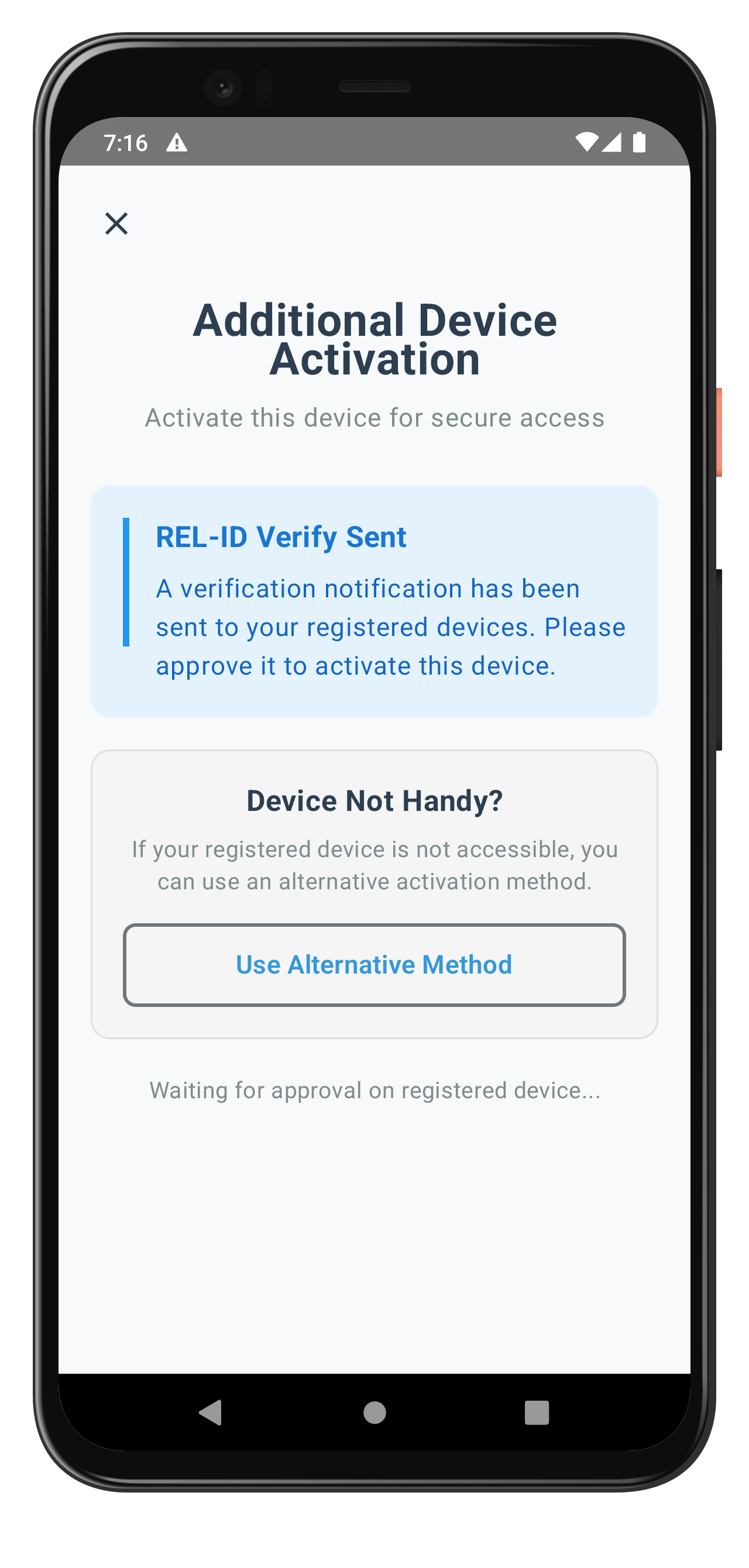
The following image showcases screen from the sample application:
Create the GetNotificationsScreen that automatically loads server notifications and provides interactive action modals for user responses.
GetNotificationsViewModel Implementation
// app/src/main/java/com/relidcodelab/tutorial/viewmodels/GetNotificationsViewModel.kt

data class GetNotificationsUiState(
    val isLoading: Boolean = true,
    val isRefreshing: Boolean = false,
    val error: String = "",
    val notifications: List<NotificationItem> = emptyList(),
    val selectedNotification: NotificationItem? = null,
    val selectedAction: String = "",
    val isProcessingAction: Boolean = false,
    val showActionModal: Boolean = false
)

class GetNotificationsViewModel(
    private val rdnaService: RDNAService,
    private val callbackManager: RDNACallbackManager,
    private val userID: String
) : ViewModel() {

    private val _uiState = MutableStateFlow(GetNotificationsUiState())
    val uiState: StateFlow<GetNotificationsUiState> = _uiState.asStateFlow()

    companion object {
        private const val TAG = "GetNotificationsViewModel"
    }

    init {
        setupEventHandlers()
        loadNotifications()
    }

    private fun setupEventHandlers() {
        viewModelScope.launch {
            // Get notifications event handler
            callbackManager.getNotificationsEvent.collect { status ->
                handleGetNotificationsResponse(status)
            }
        }

        viewModelScope.launch {
            // Update notification event handler
            callbackManager.updateNotificationEvent.collect { status ->
                handleUpdateNotificationResponse(status)
            }
        }
    }

    private fun handleGetNotificationsResponse(status: RDNA.RDNAStatusGetNotifications) {
        Log.d(TAG, "Received notifications event")

        val notificationList = status.responseData?.notifications?.map { item ->
            NotificationItem(
                notification_uuid = item.notification_uuid,
                create_ts = item.create_ts,
                expiry_timestamp = item.expiry_timestamp,
                create_ts_epoch = item.create_ts_epoch,
                expiry_timestamp_epoch = item.expiry_timestamp_epoch,
                body = item.body.map { body ->
                    NotificationBody(
                        lng = body.lng,
                        subject = body.subject,
                        message = body.message,
                        label = body.label
                    )
                },
                actions = item.actions.map { action ->
                    NotificationAction(
                        label = action.label,
                        action = action.action,
                        authlevel = action.authlevel
                    )
                },
                action_performed = item.action_performed,
                ds_required = item.ds_required
            )
        } ?: emptyList()

        Log.d(TAG, "Received ${notificationList.size} notifications")

        _uiState.update {
            it.copy(
                notifications = notificationList,
                isLoading = false,
                isRefreshing = false
            )
        }
    }

    private fun handleUpdateNotificationResponse(status: RDNA.RDNAStatusUpdateNotification) {
        Log.d(TAG, "Received update notification event")

        _uiState.update { it.copy(isProcessingAction = false) }

        if (status.statusCode == 100) {
            Log.d(TAG, "Update notification success: ${status.statusMsg}")
            _uiState.update { it.copy(showActionModal = false) }
            loadNotifications()
        } else {
            Log.e(TAG, "Update notification error: ${status.statusMsg}")
            _uiState.update {
                it.copy(
                    error = status.statusMsg ?: "Failed to update notification",
                    showActionModal = false
                )
            }
        }
    }

    fun loadNotifications() {
        viewModelScope.launch {
            try {
                _uiState.update { it.copy(error = "") }
                Log.d(TAG, "Loading notifications for user: $userID")

                val error = rdnaService.getNotifications()

                if (error.longErrorCode != 0) {
                    _uiState.update {
                        it.copy(
                            isLoading = false,
                            isRefreshing = false,
                            error = error.errorString ?: "Failed to load notifications"
                        )
                    }
                }
            } catch (e: Exception) {
                Log.e(TAG, "Error loading notifications", e)
                _uiState.update {
                    it.copy(
                        isLoading = false,
                        isRefreshing = false,
                        error = e.message ?: "Failed to load notifications"
                    )
                }
            }
        }
    }

    fun refresh() {
        _uiState.update { it.copy(isRefreshing = true) }
        loadNotifications()
    }

    fun selectNotification(notification: NotificationItem) {
        if (notification.actions.isEmpty()) {
            _uiState.update { it.copy(error = "This notification has no available actions") }
            return
        }

        if (notification.action_performed.isNotEmpty() && notification.action_performed != "PENDING") {
            _uiState.update { it.copy(error = "This notification has already been processed") }
            return
        }

        _uiState.update {
            it.copy(
                selectedNotification = notification,
                selectedAction = "",
                showActionModal = true,
                error = ""
            )
        }
    }

    fun selectAction(actionId: String) {
        _uiState.update { it.copy(selectedAction = actionId) }
    }

    fun dismissActionModal() {
        if (!_uiState.value.isProcessingAction) {
            _uiState.update {
                it.copy(
                    showActionModal = false,
                    selectedNotification = null,
                    selectedAction = ""
                )
            }
        }
    }

    fun processNotificationAction() {
        val notification = _uiState.value.selectedNotification ?: return
        val actionId = _uiState.value.selectedAction

        if (actionId.isEmpty()) {
            _uiState.update { it.copy(error = "Please select an action to proceed") }
            return
        }

        viewModelScope.launch {
            _uiState.update { it.copy(isProcessingAction = true, error = "") }

            try {
                Log.d(TAG, "Processing notification action: notificationId=${notification.notification_uuid}, actionId=$actionId")

                val error = rdnaService.updateNotification(notification.notification_uuid, actionId)

                if (error.longErrorCode != 0) {
                    _uiState.update {
                        it.copy(
                            isProcessingAction = false,
                            error = error.errorString ?: "Failed to process action"
                        )
                    }
                }
            } catch (e: Exception) {
                Log.e(TAG, "Error processing action", e)
                _uiState.update {
                    it.copy(
                        isProcessingAction = false,
                        error = e.message ?: "Failed to process action"
                    )
                }
            }
        }
    }
}
GetNotificationsScreen Composable
// app/src/main/java/com/relidcodelab/tutorial/screens/notification/GetNotificationsScreen.kt

@Composable
fun GetNotificationsScreen(
    viewModel: GetNotificationsViewModel
) {
    val uiState by viewModel.uiState.collectAsStateWithLifecycle()

    Scaffold(
        topBar = {
            Column(
                modifier = Modifier
                    .fillMaxWidth()
                    .background(Color.White)
                    .shadow(3.dp)
                    .padding(horizontal = 20.dp, vertical = 16.dp)
                    .padding(top = 44.dp)
            ) {
                Text(
                    text = "Notifications",
                    style = MaterialTheme.typography.headlineMedium,
                    fontWeight = FontWeight.Bold,
                    color = Color(0xFF333333)
                )

                Spacer(modifier = Modifier.height(8.dp))

                Text(
                    text = "Manage your REL-ID notifications",
                    style = MaterialTheme.typography.bodyMedium,
                    color = Color(0xFF666666)
                )
            }
        },
        containerColor = Color(0xFFF5F5F5)
    ) { padding ->
        Column(
            modifier = Modifier
                .fillMaxSize()
                .padding(padding)
                .padding(20.dp)
        ) {
            // Error Display
            if (uiState.error.isNotEmpty()) {
                Card(
                    colors = CardDefaults.cardColors(
                        containerColor = ErrorBackground
                    ),
                    modifier = Modifier.fillMaxWidth()
                ) {
                    Text(
                        text = uiState.error,
                        color = ErrorText,
                        modifier = Modifier.padding(16.dp)
                    )
                }

                Spacer(modifier = Modifier.height(16.dp))
            }

            // Loading State
            if (uiState.isLoading && !uiState.isRefreshing) {
                Card(
                    colors = CardDefaults.cardColors(
                        containerColor = InfoBackground
                    ),
                    modifier = Modifier.fillMaxWidth()
                ) {
                    Row(
                        modifier = Modifier.padding(16.dp),
                        verticalAlignment = Alignment.CenterVertically
                    ) {
                        CircularProgressIndicator(
                            modifier = Modifier.size(20.dp),
                            strokeWidth = 2.dp
                        )
                        Spacer(modifier = Modifier.width(12.dp))
                        Text(
                            text = "Loading notifications...",
                            color = InfoText
                        )
                    }
                }
            } else {
                // Notification List
                if (uiState.notifications.isEmpty()) {
                    // Empty State
                    Column(
                        modifier = Modifier
                            .fillMaxSize()
                            .padding(vertical = 60.dp),
                        horizontalAlignment = Alignment.CenterHorizontally,
                        verticalArrangement = Arrangement.Center
                    ) {
                        Text(
                            text = "No Notifications",
                            style = MaterialTheme.typography.titleMedium,
                            fontWeight = FontWeight.SemiBold,
                            color = Color(0xFF333333)
                        )

                        Spacer(modifier = Modifier.height(8.dp))

                        Text(
                            text = "You don't have any notifications at the moment.",
                            style = MaterialTheme.typography.bodyMedium,
                            color = Color(0xFF666666),
                            textAlign = TextAlign.Center
                        )

                        Spacer(modifier = Modifier.height(20.dp))

                        OutlinedButton(onClick = { viewModel.refresh() }) {
                            Text("Refresh")
                        }
                    }
                } else {
                    LazyColumn(
                        modifier = Modifier.fillMaxSize(),
                        verticalArrangement = Arrangement.spacedBy(12.dp)
                    ) {
                        items(
                            items = uiState.notifications,
                            key = { it.notification_uuid }
                        ) { notification ->
                            NotificationItemCard(
                                notification = notification,
                                onClick = { viewModel.selectNotification(notification) }
                            )
                        }
                    }
                }
            }
        }
    }

    // Action Modal
    if (uiState.showActionModal && uiState.selectedNotification != null) {
        NotificationActionModal(
            notification = uiState.selectedNotification!!,
            selectedAction = uiState.selectedAction,
            isProcessing = uiState.isProcessingAction,
            onActionSelect = { viewModel.selectAction(it) },
            onSubmit = { viewModel.processNotificationAction() },
            onDismiss = { viewModel.dismissActionModal() }
        )
    }
}

@Composable
private fun NotificationItemCard(
    notification: NotificationItem,
    onClick: () -> Unit
) {
    val primaryBody = notification.body.firstOrNull()
    val subject = primaryBody?.subject ?: "No Subject"
    val message = primaryBody?.message ?: "No Message"

    Card(
        onClick = onClick,
        colors = CardDefaults.cardColors(
            containerColor = Color.White
        ),
        elevation = CardDefaults.cardElevation(defaultElevation = 2.dp),
        modifier = Modifier.fillMaxWidth()
    ) {
        Column(
            modifier = Modifier.padding(16.dp)
        ) {
            // Header
            Row(
                modifier = Modifier.fillMaxWidth(),
                horizontalArrangement = Arrangement.SpaceBetween,
                verticalAlignment = Alignment.CenterVertically
            ) {
                Text(
                    text = subject,
                    style = MaterialTheme.typography.titleMedium,
                    fontWeight = FontWeight.SemiBold,
                    color = Color(0xFF333333),
                    modifier = Modifier.weight(1f)
                )

                Spacer(modifier = Modifier.width(12.dp))

                Text(
                    text = formatTimestamp(notification.create_ts),
                    style = MaterialTheme.typography.bodySmall,
                    color = Color(0xFF8E8E93)
                )
            }

            Spacer(modifier = Modifier.height(8.dp))

            // Message
            Text(
                text = message,
                style = MaterialTheme.typography.bodyMedium,
                color = Color(0xFF666666),
                maxLines = 3,
                overflow = TextOverflow.Ellipsis,
                lineHeight = 20.sp
            )

            Spacer(modifier = Modifier.height(12.dp))

            // Footer
            Row(
                modifier = Modifier.fillMaxWidth(),
                horizontalArrangement = Arrangement.SpaceBetween,
                verticalAlignment = Alignment.CenterVertically
            ) {
                Text(
                    text = "${notification.actions.size} action${if (notification.actions.size != 1) "s" else ""} available",
                    style = MaterialTheme.typography.bodySmall,
                    color = Color(0xFF8E8E93)
                )

                Text(
                    text = notification.action_performed.ifEmpty { "Pending" },
                    style = MaterialTheme.typography.bodySmall,
                    color = Color(0xFF8E8E93)
                )
            }

            if (notification.expiry_timestamp.isNotEmpty()) {
                Spacer(modifier = Modifier.height(8.dp))

                Text(
                    text = "Expires: ${formatTimestamp(notification.expiry_timestamp)}",
                    style = MaterialTheme.typography.bodySmall,
                    color = Color(0xFF8E8E93)
                )
            }
        }
    }
}

private fun formatTimestamp(timestamp: String): String {
    return try {
        val instant = Instant.parse(timestamp.replace("UTC", "Z"))
        val localDateTime = LocalDateTime.ofInstant(instant, ZoneId.systemDefault())
        val formatter = DateTimeFormatter.ofPattern("MMM dd, yyyy hh:mm a")
        localDateTime.format(formatter)
    } catch (e: Exception) {
        timestamp
    }
}
Key GetNotificationsScreen Features
Automatic Notification Loading
- Auto-load on Mount: Automatically calls
getNotifications()when screen loads in ViewModel init - Event-driven Updates: Handles
onGetNotificationsandonUpdateNotificationcallbacks - Real-time Sorting: Notifications displayed in chronological order
Interactive Action Modals
- Action Selection: Radio button interface for selecting notification actions
- Processing States: Visual feedback during action processing
- Success/Error Handling: Comprehensive response handling with user feedback
Enhanced User Experience
- Pull-to-Refresh: Swipe down to refresh notifications (via refresh button)
- Empty State: Helpful empty state with refresh option
- Modal Prevention: Prevents accidental dismissal during action processing with enabled state
Production Features
- Comprehensive Error Handling: Network and server error management
- Loading States: Progressive loading and processing indicators
- Performance Optimization: Efficient list rendering with LazyColumn and key-based items
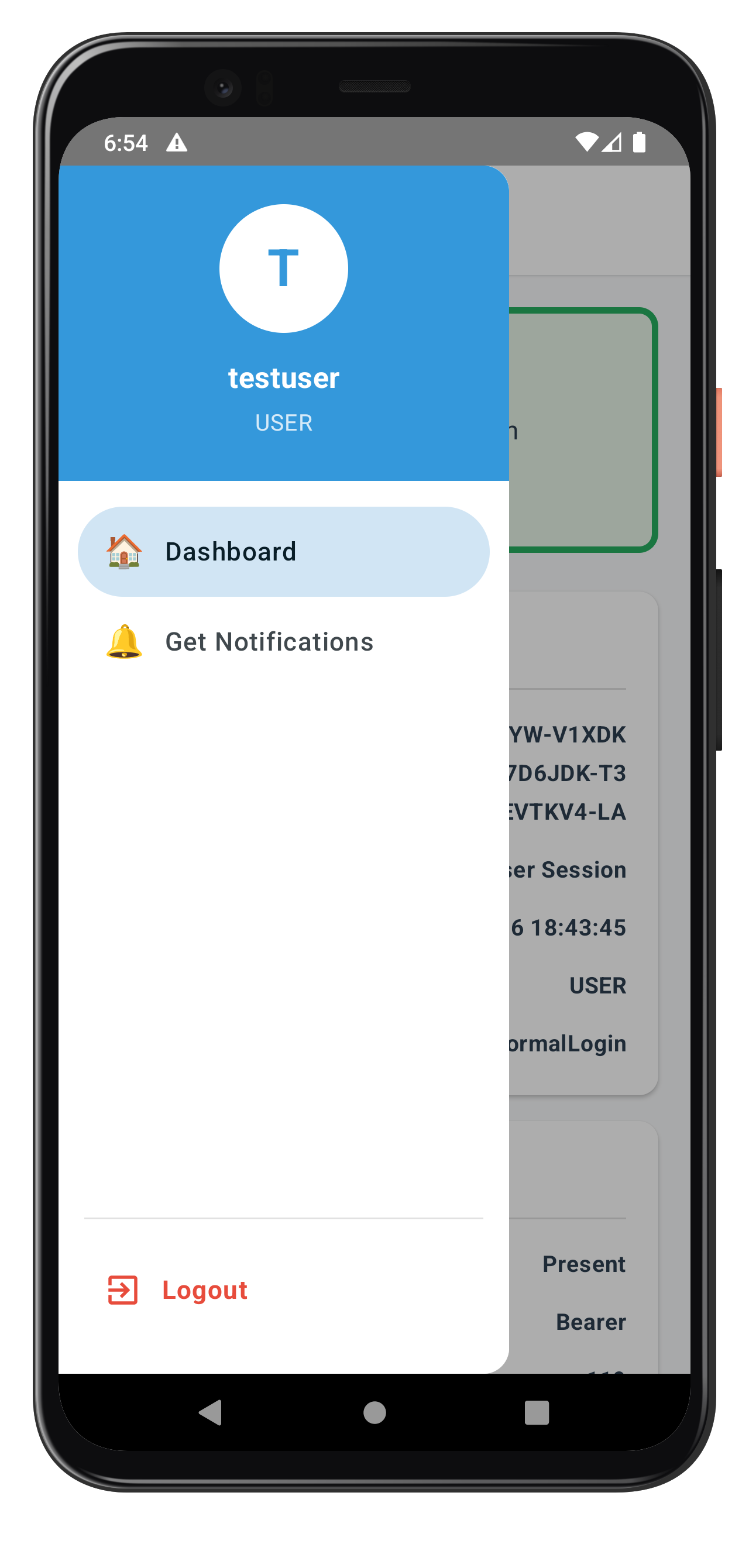
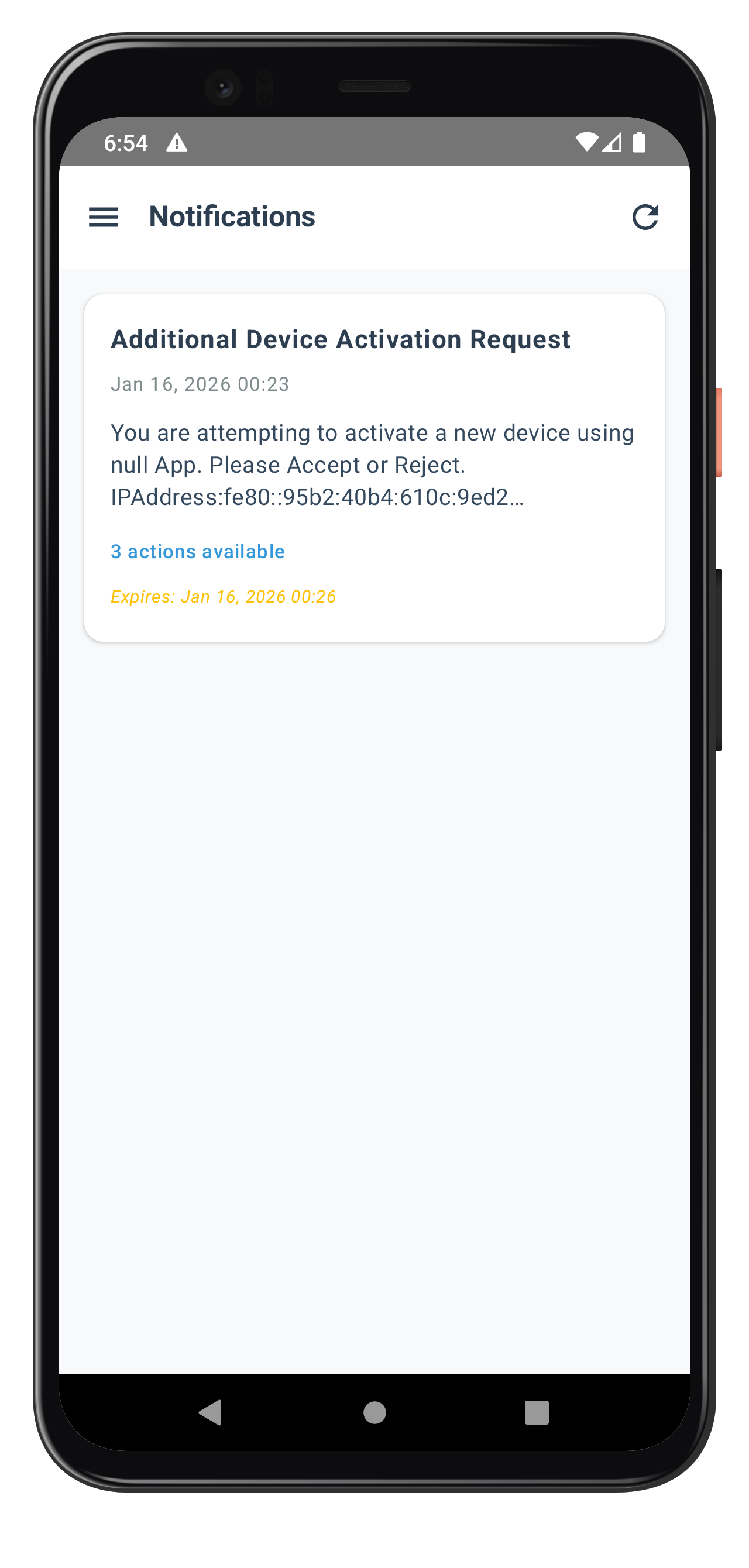
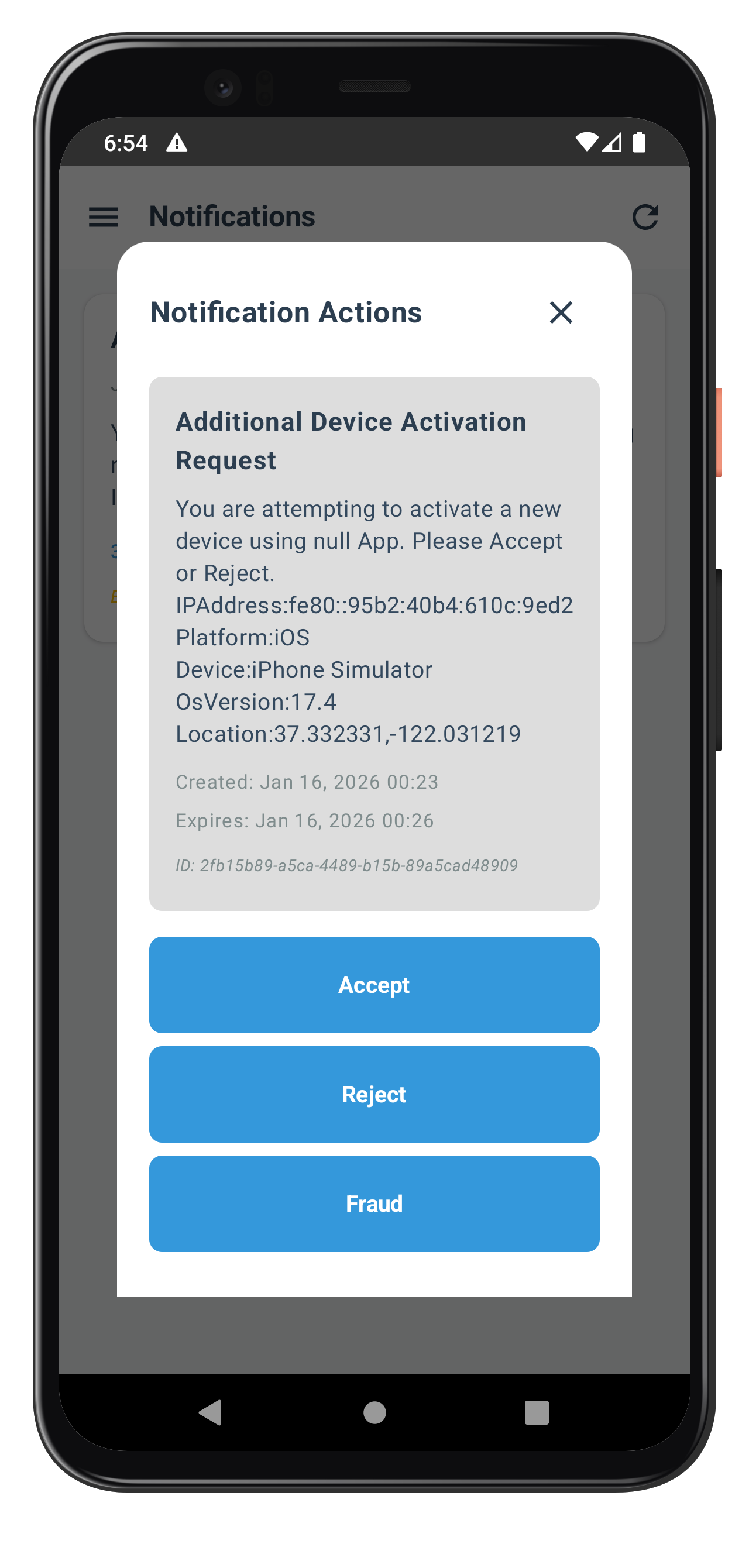
The following images showcase screens from the sample application:
|
|
|
Extend your existing SDKEventProvider to handle device activation events and coordinate navigation for the additional device activation workflow.
Adding Device Activation Event Handlers
Enhance your SDKEventProvider with device activation event handling:
// app/src/main/java/com/relidcodelab/uniken/providers/SDKEventProvider.kt (device activation additions)

object SDKEventProvider {
    private var checkUserViewModel: CheckUserViewModel? = null
    private var verifyAuthViewModel: VerifyAuthViewModel? = null
    private var getNotificationsViewModel: GetNotificationsViewModel? = null

    fun initialize(
        lifecycleOwner: LifecycleOwner,
        rdnaService: RDNAService,
        callbackManager: RDNACallbackManager,
        navController: NavController
    ) {
        lifecycleOwner.lifecycleScope.launch {
            lifecycleOwner.repeatOnLifecycle(Lifecycle.State.STARTED) {
                // Existing MFA event handlers
                launch { handleGetUserEvents(rdnaService, callbackManager, navController) }
                launch { handleGetPasswordEvents(rdnaService, callbackManager, navController) }
                launch { handleUserLoggedInEvents(rdnaService, callbackManager, navController) }
                // ... other MFA handlers ...

                // Device activation event handlers
                launch { handleAddNewDeviceOptionsEvents(rdnaService, callbackManager, navController) }
            }
        }
    }

    private suspend fun handleAddNewDeviceOptionsEvents(
        rdnaService: RDNAService,
        callbackManager: RDNACallbackManager,
        navController: NavController
    ) {
        callbackManager.addNewDeviceOptionsEvent.collect { eventData ->
            Log.d(TAG, "Add new device options event received for user: ${eventData.userId}")
            Log.d(TAG, "Available options: ${eventData.newDeviceOptions?.size ?: 0}")

            // Create ViewModel with event data if it doesn't exist
            if (verifyAuthViewModel == null) {
                verifyAuthViewModel = VerifyAuthViewModel(
                    rdnaService = rdnaService,
                    callbackManager = callbackManager,
                    initialEventData = eventData
                )

                // Navigate to VerifyAuthScreen
                navController.navigate(Routes.VERIFY_AUTH_SCREEN)
            } else {
                // ViewModel already exists, update it with new event data
                Log.d(TAG, "VerifyAuthViewModel already exists, updating with new event data")
            }
        }
    }

    private suspend fun handleUserLoggedInEvents(
        rdnaService: RDNAService,
        callbackManager: RDNACallbackManager,
        navController: NavController
    ) {
        callbackManager.userLoggedInEvent.collect { eventData ->
            Log.d(TAG, "User logged in event received for user: ${eventData.userId}")

            val sessionID = eventData.response?.session?.sessionID ?: ""
            val sessionType = eventData.response?.session?.sessionType ?: 0
            val userRole = eventData.response?.additionalInfo?.idvUserRole ?: ""
            val currentWorkFlow = eventData.response?.additionalInfo?.currentWorkFlow ?: ""

            // Navigate to Dashboard (part of DrawerNavigator)
            // DrawerNavigator includes GetNotifications screen
            navController.navigate(Routes.DASHBOARD)

            // Note: GetNotifications is accessible via drawer menu
            // Users can manually navigate to it from Dashboard
        }
    }

    fun getVerifyAuthViewModel(): VerifyAuthViewModel? = verifyAuthViewModel

    fun getGetNotificationsViewModel(): GetNotificationsViewModel? = getNotificationsViewModel

    fun createGetNotificationsViewModel(
        rdnaService: RDNAService,
        callbackManager: RDNACallbackManager,
        userID: String
    ): GetNotificationsViewModel {
        if (getNotificationsViewModel == null) {
            getNotificationsViewModel = GetNotificationsViewModel(
                rdnaService = rdnaService,
                callbackManager = callbackManager,
                userID = userID
            )
        }
        return getNotificationsViewModel!!
    }

    fun clearViewModels() {
        checkUserViewModel = null
        verifyAuthViewModel = null
        getNotificationsViewModel = null
    }
}
Navigation Configuration
Update your navigation types to support the new device activation screens:
// app/src/main/java/com/relidcodelab/tutorial/navigation/Routes.kt

object Routes {
    const val TUTORIAL_HOME = "TutorialHome"
    const val CHECK_USER = "CheckUser"
    const val VERIFY_AUTH_SCREEN = "VerifyAuthScreen"
    const val DASHBOARD = "Dashboard"
    const val GET_NOTIFICATIONS = "GetNotifications"
    // ... other routes ...
}
Enhanced Navigation Integration
Update your AppNavigation to include the device activation screens:
// app/src/main/java/com/relidcodelab/tutorial/navigation/AppNavigation.kt

@Composable
fun AppNavigation(
    lifecycleOwner: LifecycleOwner,
    rdnaService: RDNAService,
    callbackManager: RDNACallbackManager,
    navController: NavHostController = rememberNavController()
): NavHostController {

    NavHost(
        navController = navController,
        startDestination = Routes.TUTORIAL_HOME
    ) {
        // ... existing screens ...

        // Device Activation Screen
        composable(Routes.VERIFY_AUTH_SCREEN) {
            val viewModel = SDKEventProvider.getVerifyAuthViewModel()
            if (viewModel != null) {
                VerifyAuthScreen(viewModel = viewModel)
            } else {
                // Fallback UI
                Box(
                    modifier = Modifier.fillMaxSize(),
                    contentAlignment = Alignment.Center
                ) {
                    Text("Loading...")
                }
            }
        }

        // Dashboard with Drawer (includes GetNotifications)
        composable(Routes.DASHBOARD) {
            // DrawerNavigator provides access to GetNotifications
            DrawerNavigator(
                rdnaService = rdnaService,
                callbackManager = callbackManager,
                navController = navController
            )
        }

        // GetNotifications Screen (accessible via drawer)
        composable(Routes.GET_NOTIFICATIONS) {
            // Extract userID from saved state or navigation arguments
            val userID = "user@example.com" // In practice, get from session or arguments

            val viewModel = SDKEventProvider.createGetNotificationsViewModel(
                rdnaService = rdnaService,
                callbackManager = callbackManager,
                userID = userID
            )

            GetNotificationsScreen(viewModel = viewModel)
        }
    }

    return navController
}
Key SDKEventProvider Enhancements
Device Activation Event Integration
- handleAddNewDeviceOptionsEvents: Automatically navigates to VerifyAuthScreen with activation options
- ViewModel Creation: Creates VerifyAuthViewModel with event data on-demand
- Option Logging: Comprehensive logging of device activation options for debugging
Notification Event Handling
- GetNotifications Access: Available via drawer navigation from Dashboard
- ViewModel Management: Creates GetNotificationsViewModel on-demand when screen is accessed
- Screen-Level Handling: Notification events handled by GetNotificationsViewModel for better encapsulation
Enhanced MFA Integration
- Seamless Flow: Device activation integrates seamlessly into existing MFA authentication flow
- Session Preservation: User session data properly passed through navigation
- Event Coordination: Multiple event types coordinated without conflicts or duplicated handling
Event Flow Coordination
The enhanced SDKEventProvider coordinates these device activation flows:
- MFA Authentication Flow: User completes username/password → MFA validation
- Device Detection: SDK detects unregistered device → triggers
addNewDeviceOptions - Automatic Navigation: SDKEventProvider navigates to VerifyAuthScreen with options
- Device Activation: User completes REL-ID Verify or fallback activation
- MFA Continuation: Flow continues to LDA consent or final authentication
- Dashboard Access: User reaches dashboard with drawer navigation including GetNotifications
Event Handler Coordination
The provider uses a layered event handling approach:
- Global Events (handled by SDKEventProvider): Navigation-triggering events like
addNewDeviceOptions - Screen Events (handled by ViewModels): Data processing events like
getNotifications - Parallel Collection: Multiple event streams collected in parallel using launch
Test your device activation implementation to ensure REL-ID Verify workflows, fallback methods, and notification management work correctly across different scenarios.
Device Activation Test Scenarios
Scenario 1: Automatic REL-ID Verify Activation
Test the complete automatic device activation flow:
- Prepare Test Environment:
# Ensure you have multiple physical devices # Device A: Already registered with REL-ID # Device B: New device for activation testing # Build and deploy to both devices ./gradlew installDebug # Or use Android Studio Run on each device - Execute Test Flow:
- On Device B (New Device): Complete MFA username entry
- Verify Event Trigger: Check Logcat for
addNewDeviceOptionsevent - Automatic Navigation: Confirm VerifyAuthScreen loads automatically
- REL-ID Verify Start: Verify
performVerifyAuth(true)called automatically in logs - Push Notification: Check Device A receives activation approval request
- User Approval: On Device A, approve the device activation request
- Activation Success: Verify Device B completes activation and continues MFA
Scenario 2: Fallback Activation Method
Test the fallback activation when REL-ID Verify is not accessible:
- Test Setup:
- Use Device B (new device) without accessible registered devices
- Or simulate scenario where Device A is offline/unreachable
- Execute Fallback Test:
- Start REL-ID Verify: Allow automatic verification to start
- Use Fallback: Tap "Activate using fallback method" button
- Fallback Processing: Verify
fallbackNewDeviceActivationFlow()called in logs - Alternative Method: Complete server-configured alternative activation
- Expected Behavior:
D/VerifyAuthViewModel: Initiating fallback new device activation flow
D/RDNAService: FallbackNewDeviceActivationFlow sync response success, alternative activation started
Scenario 3: Notification Management Testing
Test the GetNotificationsScreen functionality:
- Access Notifications:
- Complete device activation and reach dashboard
- Open drawer navigation menu (swipe from left or tap menu icon)
- Tap "Get Notifications" menu item
- Verify navigation to GetNotificationsScreen
- Test Notification Loading:
- Auto-load: Verify notifications load automatically on screen entry
- Loading State: Check loading indicator displays during API call
- Data Display: Confirm notifications appear in chronological order
- Test Notification Actions:
- Select Notification: Tap on notification with available actions
- Action Modal: Verify modal opens with radio button options
- Action Selection: Select an action and tap submit
- Processing State: Check processing indicator during update
- Success Feedback: Verify notification list refreshes after successful action
- Test Refresh:
- Tap refresh button in empty state
- Verify
getNotifications()API called again
Debug and Troubleshooting
Common Device Activation Issues
- addNewDeviceOptions Event Not Triggered:
// Check if device is already registered // Verify MFA flow completion before device detection // Ensure proper connection profile configuration // Check Logcat for SDK callback logs - REL-ID Verify Push Notifications Not Received:
- Verify registered device has push notifications enabled
- Check network connectivity on both devices
- Confirm REL-ID Verify service configuration
- Review Firebase Cloud Messaging (FCM) setup if applicable
- Fallback Activation Fails:
- Check server configuration for fallback methods
- Verify network connectivity and SDK configuration
- Review Logcat for specific error messages
- Notification Loading Issues:
// Check event handler setup in ViewModel
viewModelScope.launch {
    callbackManager.getNotificationsEvent.collect { status ->
        // Handle notifications
    }
}

// Verify API call execution
val error = rdnaService.getNotifications()
Testing Best Practices
- Use Physical Devices: REL-ID Verify requires real device-to-device communication
- Test Network Conditions: Test with different network conditions and connectivity
- Error Scenarios: Test error conditions like network failures and server timeouts
- User Experience: Test complete user flows from start to finish
- Performance: Monitor performance impact using Android Profiler
Validation Checklist
- [ ] Automatic Device Detection:
addNewDeviceOptionscallback triggers during MFA - [ ] VerifyAuthScreen Navigation: Automatic navigation with proper parameters
- [ ] REL-ID Verify Process:
performVerifyAuth(true)executes automatically - [ ] Push Notifications: Registered devices receive activation requests
- [ ] Device Approval: User can approve/reject on registered devices
- [ ] Activation Completion: New device successfully activated and MFA continues
- [ ] Fallback Method: Alternative activation works when verify fails
- [ ] Drawer Navigation: GetNotifications accessible from dashboard drawer
- [ ] Notification Loading: Auto-loading of notifications on screen entry
- [ ] Action Processing: Interactive action modals with real-time updates
- [ ] Error Handling: Comprehensive error handling throughout all flows
- [ ] State Management: Proper loading states and user feedback
Production Deployment Considerations
Security Validation
- Ensure push notification payloads are digitally signed
- Verify device activation approval requires proper authentication
- Test notification action security and authorization
User Experience
- Test flows with real users for usability validation
- Ensure clear messaging and guidance throughout activation
- Provide helpful error messages and recovery options
Performance Testing
- Use Android Profiler to monitor memory usage
- Test with Android Emulator for baseline performance
- Monitor coroutine performance with coroutine debugger
Congratulations! You've successfully implemented a comprehensive Additional Device Activation system with REL-ID Verify push notifications, fallback methods, and notification management.
What You've Accomplished
Core Device Activation Features
✅ REL-ID Verify Integration: Automatic push notification-based device activation ✅ VerifyAuthScreen Implementation: Auto-starting activation with real-time status updates ✅ Fallback Activation Methods: Alternative activation when registered devices aren't accessible ✅ GetNotificationsScreen: Server notification management with interactive action processing ✅ Enhanced Drawer Navigation: Seamless access to notifications via enhanced navigation
Key Android Patterns Mastered
- Event-Driven Device Activation: SharedFlow for reactive event handling with coroutines
- Push Notification Workflows: Real device-to-device communication and approval systems
- Fallback Strategy Implementation: Robust alternative activation methods for various scenarios
- Interactive Notification Management: Server notification retrieval with action processing using ViewModels
- Jetpack Compose UI: Modern declarative UI with Material3 components
Android-Specific Implementation Highlights
Coroutine-Based Architecture
- ViewModelScope: Automatic cancellation when ViewModel is cleared
- SharedFlow: Reactive event streams with multiple collectors
- StateFlow: UI state management with automatic recomposition
Jetpack Compose UI
- collectAsStateWithLifecycle: Lifecycle-aware state collection
- BackHandler: Custom back button behavior during activation
- Material3 Components: Modern UI design with Cards, Buttons, and Modals
Resource Management
- Context-based Resources: Access to raw resources via
context.resources - Lifecycle Awareness: Proper event collection with
repeatOnLifecycle - Memory Safety: Automatic cleanup with coroutine scopes
Next Steps and Advanced Features
Potential Enhancements
- Advanced Notification Features: Rich push notification content with Firebase Cloud Messaging
- Biometric Integration: Enhanced biometric authentication during device activation
- Admin Dashboard: Administrative interface for managing device activations
- Advanced Analytics: Firebase Analytics integration for tracking activation flows
- Multi-Language Support: Localized notification content with Android Resources
Resources for Continued Learning
REL-ID Documentation
- REL-ID Verify Guide: Advanced push notification features
- Notification API Reference: SDK callback details
Congratulations! 🎉
You've mastered Advanced Device Activation with REL-ID Verify and built a production-ready Android system that provides:
- Seamless Device Onboarding: Automatic device activation with minimal user friction
- Robust Security: Multi-factor device approval with push notification security
- Excellent User Experience: Clear guidance with Compose UI, fallback options, and comprehensive error handling
- Modern Android Architecture: ViewModels, StateFlow, SharedFlow, and Jetpack Compose
Your application now provides enterprise-grade device activation capabilities that enhance security while maintaining user convenience. You're ready to deploy this solution in production environments and scale to support thousands of users across multiple devices.
🚀 You're now equipped to build sophisticated device activation workflows that combine security, usability, and reliability with modern Android development patterns!