🎯 Learning Path:
- Complete RELID Initialization first
- You are here → MFA Activation & Login Implementation
This comprehensive codelab teaches you to implement complete Multi-Factor Authentication using the REL-ID Android SDK. You'll build both Activation Flow (first-time users) and Login Flow (returning users) with error handling and security practices.
🚀 What You'll Build
By the end of this codelab, you'll have a complete MFA system that handles:
📱 Activation Flow (First-Time Users):
- Complete user onboarding and device enrollment
- Multi-factor verification with cyclical challenge handling
- Flexible authentication (biometric + password fallback)
🔐 Login Flow (Returning Users):
- Streamlined biometric authentication
- Password verification with attempt tracking
- Graceful error recovery and fallbacks
✅ Technical Requirements
Before starting, verify you have:
- [ ] Completed RELID Initialization codelab
✅ Knowledge Prerequisites
You should be comfortable with:
- [ ] Kotlin & Android fundamentals
- [ ] Jetpack Compose basics
- [ ] Coroutines & Flow patterns
- [ ] ViewModel concepts
Get the Code from GitHub
The code to get started is stored in a GitHub repository.
You can clone the repository using the following command:
git clone https://github.com/uniken-public/codelab-android.git
Navigate to the relid-MFA folder in the repository you cloned earlier
Platform-Specific Permissions
The RELID SDK requires specific permissions for optimal MFA functionality.
Android Configuration: Refer to the Android Permissions Documentation for runtime and normal permissions required for MFA features.
Understanding MFA Flow Types
Quick Overview: This codelab covers two flows:
- Activation Flow: For first-time users
- Login Flow: For returning users
📊 Flow Comparison at a Glance
Aspect | 🆕 Activation Flow | 🔄 Login Flow |
When | First-time users, new devices | Returning users, registered devices |
Purpose | Device registration + auth setup | Quick authentication |
Steps | Username → OTP → Device Auth or Password → Success | Username → Device Auth/Password → Success |
Device Auth(LDA) | Optional setup during flow | Automatic if previously enabled |
🔄 What Does Activation and Login Flow Mean
Activation Flow Occurs When:
- User registers for the first time
- User has never activated on any device
- Initial device enrollment scenarios
Login Flow Occurs When:
- User has previously activated on this device
- Device is registered but user session expired
- User explicitly logged out and logging back in
🏗️ SDK Architecture & Event System
The SDK uses an event-driven architecture where:
- SDK Callbacks → Trigger challenges requiring user input
- API Calls → Respond to challenges with user data
- Event Handling → Handle callback responses and navigate accordingly
Key Architecture Pattern: Suspend Function + SharedFlow
// Call SDK method (suspend function)
viewModelScope.launch {
    val error = rdnaService.setUser(username)
    // Handle synchronous response
}

// Asynchronous event handling via SharedFlow
init {
    viewModelScope.launch {
        callbackManager.getUserEvent.collect { eventData ->
            // Handle the challenge in UI
            // Navigation handled by SDKEventProvider
        }
    }
}
📋 Quick Reference: Core Callbacks & APIs
SDK Callback | API Response | Purpose | Flow |
|
| User identification | Both |
|
| OTP verification | Activation |
|
| Biometric setup | Activation |
|
| Password setup/verify | Both |
| N/A | Success notification(user logged in) | Both |
|
| User Session cleanup(if user logged in) | Both |
Both - Activation and Login
📝 What We're Building: Complete first-time user registration with device enrollment, OTP verification, and LDA setup.
Understanding Activation Flow Sequence
Please refer to the flow diagram from uniken developer documentation portal, user activation
Activation Challenge Phases
Phase | Challenge Type | User Action | SDK Validation | Result |
1. User ID |
| Enter username/email | Validates user exists/format | Proceeds or repeats |
2. OTP Verify |
| Enter activation code | Validates code from email/SMS | Proceeds or shows error |
3. Device Auth |
| Choose biometric or password | Sets up device authentication | Completes activation |
4. Success | N/A | Automatic navigation | User session established | User activated & logged in |
🔄 Cyclical Challenge Handling
Important: The getUser callback can trigger multiple times if:
- Username validation fails
- User enters invalid format
- Network errors occur during validation
Your UI must handle repeated callbacks gracefully without breaking navigation.
Before implementing the activation flow, establish comprehensive Kotlin data classes for type safety and better development experience.
Core Data Models
Create or extend your existing data models file:
// app/src/main/java/com/relidcodelab/uniken/models/RDNAModels.kt

package com.relidcodelab.uniken.models

import com.uniken.rdna.RDNA

/**
 * Data models for REL-ID SDK
 *
 * Contains:
 * 1. ConnectionProfile - For parsing agent_info.json
 * 2. Event data classes - Bundle multiple SDK callback parameters for SharedFlow emission
 *
 * Pattern:
 * - Single-parameter callbacks → emit SDK type directly
 * - Multi-parameter callbacks → bundle in data class
 *
 * These data classes contain SDK types directly (not wrapped) to preserve
 * type safety and direct SDK API access.
 */

// ===== CONNECTION PROFILE =====

/**
 * Connection profile data structure
 * Source: agent_info.json
 */
data class ConnectionProfile(
    val relId: String,
    val host: String,
    val port: String
)

// ===== MFA EVENT DATA CLASSES =====

/**
 * Get user event data
 * Triggered when SDK needs user ID input
 */
data class GetUserEventData(
    val userIdList: Array<out String>?,
    val userId: String?,
    val response: RDNA.RDNAChallengeResponse?,
    val error: RDNA.RDNAError?
) {
    override fun equals(other: Any?): Boolean {
        if (this === other) return true
        if (javaClass != other?.javaClass) return false
        other as GetUserEventData
        if (userIdList != null) {
            if (other.userIdList == null) return false
            if (!userIdList.contentEquals(other.userIdList)) return false
        } else if (other.userIdList != null) return false
        if (userId != other.userId) return false
        if (response != other.response) return false
        if (error != other.error) return false
        return true
    }

    override fun hashCode(): Int {
        var result = userIdList?.contentHashCode() ?: 0
        result = 31 * result + (userId?.hashCode() ?: 0)
        result = 31 * result + (response?.hashCode() ?: 0)
        result = 31 * result + (error?.hashCode() ?: 0)
        return result
    }
}

/**
 * Get activation code event data
 * Triggered when SDK needs activation code (OTP) input
 */
data class GetActivationCodeEventData(
    val userId: String?,
    val verificationKey: String?,
    val attemptsLeft: Int,
    val response: RDNA.RDNAChallengeResponse?,
    val error: RDNA.RDNAError?
)

/**
 * Get password event data
 * Triggered when SDK needs password input
 */
data class GetPasswordEventData(
    val userId: String?,
    val mode: RDNA.RDNAChallengeOpMode?,
    val attemptsLeft: Int,
    val response: RDNA.RDNAChallengeResponse?,
    val error: RDNA.RDNAError?
)

/**
 * Get user consent for LDA event data
 * Triggered when SDK needs LDA enrollment consent
 */
data class GetUserConsentForLDAEventData(
    val userId: String?,
    val mode: RDNA.RDNAChallengeOpMode?,
    val capabilities: RDNA.RDNALDACapabilities?,
    val response: RDNA.RDNAChallengeResponse?,
    val error: RDNA.RDNAError?
)

/**
 * User logged in event data
 * Triggered when user successfully authenticates
 */
data class UserLoggedInEventData(
    val userId: String?,
    val response: RDNA.RDNAChallengeResponse?,
    val error: RDNA.RDNAError?
)

/**
 * User logged off event data
 * Triggered when user successfully logs off
 */
data class UserLoggedOffEventData(
    val response: RDNA.RDNAChallengeResponse?,
    val error: RDNA.RDNAError?
)
Event Utility Classes
// app/src/main/java/com/relidcodelab/uniken/utils/RDNAEventUtils.kt

package com.relidcodelab.uniken.utils

import com.uniken.rdna.RDNA

/**
 * Utility functions for handling RDNA responses and errors
 */
object RDNAEventUtils {

    /**
     * Check if error indicates API failure
     */
    fun hasApiError(error: RDNA.RDNAError?): Boolean {
        return error != null && error.longErrorCode != 0
    }

    /**
     * Check if response contains status error
     */
    fun hasStatusError(response: RDNA.RDNAChallengeResponse?): Boolean {
        return response?.status?.statusCode != 100
    }

    /**
     * Get user-friendly error message from error
     */
    fun getErrorMessage(error: RDNA.RDNAError?): String {
        return error?.errorString ?: "Unknown error"
    }

    /**
     * Get user-friendly error message from error and response
     */
    fun getErrorMessage(error: RDNA.RDNAError?, response: RDNA.RDNAChallengeResponse?): String {
        if (error != null && error.longErrorCode != 0) {
            return error.errorString ?: "Unknown error"
        }
        if (response?.status?.statusCode != 100) {
            return response?.status?.statusMessage ?: "Unknown error"
        }
        return "Unknown error occurred"
    }

    /**
     * Get challenge value by key
     */
    fun getChallengeValue(response: RDNA.RDNAChallengeResponse?, key: String): String? {
        val challengeInfo = response?.challengeInfo ?: return null
        for (info in challengeInfo) {
            if (info.key == key) {
                return info.value
            }
        }
        return null
    }

    /**
     * Check if operation succeeded
     */
    fun isSuccess(error: RDNA.RDNAError?, response: RDNA.RDNAChallengeResponse?): Boolean {
        return !hasApiError(error) && !hasStatusError(response)
    }

    /**
     * Get JWT token from response
     */
    fun getJWTToken(response: RDNA.RDNAChallengeResponse?): String? {
        return response?.additionalInfo?.jwtJsonTokenInfo
    }
}
Building on your existing RELID callback manager, add support for activation flow events. The activation flow requires handling four key MFA callbacks.
Adding MFA Callback SharedFlows
Extend your callback manager to emit activation-specific events:
// app/src/main/java/com/relidcodelab/uniken/services/RDNACallbackManager.kt (additions for activation)

class RDNACallbackManager(
    private val context: Context,
    private val currentActivity: Activity?
) : RDNA.RDNACallbacks {

    private val scope = CoroutineScope(SupervisorJob() + Dispatchers.Main)

    // Event SharedFlows for MFA
    private val _getUserEvent = MutableSharedFlow<GetUserEventData>()
    val getUserEvent: SharedFlow<GetUserEventData> = _getUserEvent.asSharedFlow()

    private val _getActivationCodeEvent = MutableSharedFlow<GetActivationCodeEventData>()
    val getActivationCodeEvent: SharedFlow<GetActivationCodeEventData> = _getActivationCodeEvent.asSharedFlow()

    private val _getPasswordEvent = MutableSharedFlow<GetPasswordEventData>()
    val getPasswordEvent: SharedFlow<GetPasswordEventData> = _getPasswordEvent.asSharedFlow()

    private val _getUserConsentForLDAEvent = MutableSharedFlow<GetUserConsentForLDAEventData>()
    val getUserConsentForLDAEvent: SharedFlow<GetUserConsentForLDAEventData> = _getUserConsentForLDAEvent.asSharedFlow()

    private val _userLoggedInEvent = MutableSharedFlow<UserLoggedInEventData>()
    val userLoggedInEvent: SharedFlow<UserLoggedInEventData> = _userLoggedInEvent.asSharedFlow()

    private val _userLoggedOffEvent = MutableSharedFlow<UserLoggedOffEventData>()
    val userLoggedOffEvent: SharedFlow<UserLoggedOffEventData> = _userLoggedOffEvent.asSharedFlow()

    // RDNACallbacks interface implementation
    override fun getDeviceContext(): Context = context

    override fun getCurrentActivity(): Activity? = currentActivity

    /**
     * Handles user identification challenge (always first in activation flow)
     * Can be triggered multiple times if user validation fails
     */
    override fun getUser(
        userIds: Array<out String>?,
        challenge: String?,
        response: RDNA.RDNAChallengeResponse?,
        error: RDNA.RDNAError?
    ) {
        Log.d(TAG, "getUser callback received")
        scope.launch {
            _getUserEvent.emit(GetUserEventData(userIds, challenge, response, error))
        }
    }

    /**
     * Handles activation code challenge (OTP verification)
     * Provides attempts left information for user feedback
     */
    override fun getActivationCode(
        userId: String?,
        challenge: String?,
        attempts: Int,
        response: RDNA.RDNAChallengeResponse?,
        error: RDNA.RDNAError?
    ) {
        Log.d(TAG, "getActivationCode callback received")
        scope.launch {
            _getActivationCodeEvent.emit(
                GetActivationCodeEventData(userId, challenge, attempts, response, error)
            )
        }
    }

    /**
     * Handles Local Device Authentication consent request
     * Triggered when biometric authentication is available
     */
    override fun getUserConsentForLDA(
        userId: String?,
        mode: RDNA.RDNAChallengeOpMode?,
        capabilities: RDNA.RDNALDACapabilities?,
        response: RDNA.RDNAChallengeResponse?,
        error: RDNA.RDNAError?
    ) {
        Log.d(TAG, "getUserConsentForLDA callback received")
        scope.launch {
            _getUserConsentForLDAEvent.emit(
                GetUserConsentForLDAEventData(userId, mode, capabilities, response, error)
            )
        }
    }

    /**
     * Handles password authentication challenge
     * Fallback when biometric authentication is not available
     */
    override fun getPassword(
        userId: String?,
        mode: RDNA.RDNAChallengeOpMode?,
        attempts: Int,
        response: RDNA.RDNAChallengeResponse?,
        error: RDNA.RDNAError?
    ) {
        Log.d(TAG, "getPassword callback received")
        scope.launch {
            _getPasswordEvent.emit(GetPasswordEventData(userId, mode, attempts, response, error))
        }
    }

    /**
     * Handles successful activation completion
     * Provides session information and JWT token details
     */
    override fun onUserLoggedIn(
        userId: String?,
        response: RDNA.RDNAChallengeResponse?,
        error: RDNA.RDNAError?
    ) {
        Log.d(TAG, "onUserLoggedIn callback received")
        scope.launch {
            _userLoggedInEvent.emit(UserLoggedInEventData(userId, response, error))
        }
    }

    /**
     * Handles user logout completion
     */
    override fun onUserLoggedOff(
        response: RDNA.RDNAChallengeResponse?,
        error: RDNA.RDNAError?
    ) {
        Log.d(TAG, "onUserLoggedOff callback received")
        scope.launch {
            _userLoggedOffEvent.emit(UserLoggedOffEventData(response, error))
        }
    }

    // Other RDNACallbacks methods stubbed for interface compliance
    // (70+ methods - see full implementation in sample code)

    companion object {
        private const val TAG = "RDNACallbackManager"
    }
}
🔑 Key Implementation Features
- Type Safety: Comprehensive Kotlin data classes for all challenges
- Error Handling: Coroutine-based emission on Main dispatcher
- Reactive Streams: SharedFlow for event broadcasting to multiple collectors
- Debugging Support: Logging for all activation callbacks
- Interface Compliance: Implements all RDNACallbacks methods
Add the activation flow APIs to your RELID service. These APIs respond to the activation challenges with user-provided data.
Core Activation APIs
Add these methods to your RDNAService object:
// app/src/main/java/com/relidcodelab/uniken/services/RDNAService.kt (activation API additions)

object RDNAService {

    private const val TAG = "RDNAService"
    private lateinit var rdna: RDNA

    /**
     * Get RDNA instance
     */
    fun getInstance(context: Context): RDNA {
        if (!::rdna.isInitialized) {
            rdna = RDNA.getInstance()
        }
        return rdna
    }

    /**
     * Sets the user identifier for activation flow
     * Responds to getUser challenge - can be called multiple times
     * @param username User identifier (username, email, etc.)
     * @returns RDNAError with longErrorCode 0 for success
     */
    fun setUser(username: String?): RDNA.RDNAError {
        Log.d(TAG, "setUser() called with username: $username")
        val error = rdna.setUser(username)
        if (error.longErrorCode != 0) {
            Log.e(TAG, "setUser sync error: ${error.errorString}")
        } else {
            Log.d(TAG, "setUser sync success, waiting for async events")
        }
        return error
    }

    /**
     * Sets the activation code for user verification
     * Responds to getActivationCode challenge
     * @param activationCode OTP or activation code from user
     * @returns RDNAError with longErrorCode 0 for success
     */
    fun setActivationCode(activationCode: String?): RDNA.RDNAError {
        Log.d(TAG, "setActivationCode() called")
        val error = rdna.setActivationCode(activationCode)
        if (error.longErrorCode != 0) {
            Log.e(TAG, "setActivationCode sync error: ${error.errorString}")
        } else {
            Log.d(TAG, "setActivationCode sync success, waiting for async events")
        }
        return error
    }

    /**
     * Sets user consent for Local Device Authentication (biometric)
     * Responds to getUserConsentForLDA challenge
     * @param isApproved User consent decision (true = approve, false = reject)
     * @param challengeMode Challenge mode from getUserConsentForLDA callback
     * @param capabilities LDA capabilities from getUserConsentForLDA callback
     * @returns RDNAError with longErrorCode 0 for success
     */
    fun setUserConsentForLDA(
        isApproved: Boolean,
        challengeMode: RDNA.RDNAChallengeOpMode,
        capabilities: RDNA.RDNALDACapabilities?
    ): RDNA.RDNAError {
        Log.d(TAG, "setUserConsentForLDA() called: consent=$isApproved")
        val error = rdna.setUserConsentForLDA(isApproved, challengeMode, capabilities)
        if (error.longErrorCode != 0) {
            Log.e(TAG, "setUserConsentForLDA sync error: ${error.errorString}")
        } else {
            Log.d(TAG, "setUserConsentForLDA sync success, waiting for async events")
        }
        return error
    }

    /**
     * Sets the password for authentication
     * Responds to getPassword challenge (fallback when LDA not available)
     * @param password User password
     * @param challengeMode Challenge mode from getPassword callback (0=verify, 1=set)
     * @returns RDNAError with longErrorCode 0 for success
     */
    fun setPassword(password: String?, challengeMode: Int): RDNA.RDNAError {
        Log.d(TAG, "setPassword() called with mode: $challengeMode")
        val mode = when (challengeMode) {
            0 -> RDNA.RDNAChallengeOpMode.RDNA_CHALLENGE_OP_VERIFY
            1 -> RDNA.RDNAChallengeOpMode.RDNA_CHALLENGE_OP_SET
            else -> RDNA.RDNAChallengeOpMode.RDNA_CHALLENGE_OP_SET
        }
        val error = rdna.setPassword(password, mode)
        if (error.longErrorCode != 0) {
            Log.e(TAG, "setPassword sync error: ${error.errorString}")
        } else {
            Log.d(TAG, "setPassword sync success, waiting for async events")
        }
        return error
    }

    /**
     * Requests resend of activation code
     * Can be called when user doesn't receive initial activation code
     * @returns RDNAError with longErrorCode 0 for success
     */
    fun resendActivationCode(): RDNA.RDNAError {
        Log.d(TAG, "resendActivationCode() called")
        val error = rdna.resendActivationCode()
        if (error.longErrorCode != 0) {
            Log.e(TAG, "resendActivationCode sync error: ${error.errorString}")
        } else {
            Log.d(TAG, "resendActivationCode sync success, waiting for new getActivationCode event")
        }
        return error
    }

    /**
     * Resets authentication state and returns to initial flow
     * @returns RDNAError with longErrorCode 0 for success
     */
    fun resetAuthState(): RDNA.RDNAError {
        Log.d(TAG, "resetAuthState() called")
        val error = rdna.resetAuthState()
        if (error.longErrorCode != 0) {
            Log.e(TAG, "resetAuthState sync error: ${error.errorString}")
        } else {
            Log.d(TAG, "resetAuthState sync success, waiting for new getUser event")
        }
        return error
    }
}
Understanding resetAuthState API
The resetAuthState API is a critical method for managing authentication flow state. It provides a clean way to reset the current authentication session and return the SDK to its initial state.
When to Use resetAuthState
The resetAuthState API should be called in these pre-login scenarios:
- User-Initiated Cancellation: When the user decides to cancel the authentication process
- Switching Users: When switching between different user accounts during the login process
- Error Recovery: When recovering from authentication errors or timeout conditions during login
Note: These use cases only apply during the authentication process, before onUserLoggedIn callback is triggered.
How resetAuthState Works
// The resetAuthState API triggers a clean state transition
val error = rdnaService.resetAuthState()

// Check synchronous response
if (error.longErrorCode == 0) {
    Log.d(TAG, "Reset successful")
    // The SDK will immediately trigger a new 'getUser' callback
    // This allows you to restart the authentication flow cleanly
}
Key Behaviors:
- Immediately clears the current authentication session
- Triggers a fresh
getUsercallback after successful reset - Returns the SDK to its initial state, ready for new authentication
- Provides synchronous response indicating success/failure of the reset operation
Implementation Pattern in ViewModels
Here's how resetAuthState is typically used in ViewModels for user cancellation:
// Example from CheckUserViewModel - handling close/cancel
fun onClose() {
    viewModelScope.launch {
        try {
            Log.d(TAG, "Calling resetAuthState")
            val error = rdnaService.resetAuthState()
            if (error.longErrorCode == 0) {
                Log.d(TAG, "ResetAuthState successful")
                // SDK will automatically trigger getUser callback to restart flow
                _navigateBack.emit(Unit)
            } else {
                Log.e(TAG, "ResetAuthState error: ${error.errorString}")
            }
        } catch (e: Exception) {
            Log.e(TAG, "ResetAuthState exception", e)
        }
    }
}
Best Practices
- Check return value: Always check
longErrorCodeto confirm success - Handle errors gracefully: Wrap calls in try-catch blocks for error handling
- Expect getUser callback: After successful reset, the SDK will trigger a new
getUsercallback - Use for clean transitions: Prefer
resetAuthStateover navigation-only solutions when canceling flows
Flow Diagram
User Cancels/Error Occurs
         ↓
Call resetAuthState()
         ↓
SDK Clears Session State
         ↓
Synchronous Response (success/error)
         ↓
SDK Triggers getUser Event
         ↓
App Handles Fresh Authentication Flow
Understanding resendActivationCode API
The resendActivationCode API is used when the user has not received their activation code (OTP) via email or SMS and requests a new one.
Purpose and Functionality
Calling this method sends a new OTP to the user and triggers a new getActivationCode callback. This allows users to receive a fresh activation code without having to restart the entire authentication process.
When to Use resendActivationCode
The resendActivationCode API should be used in these scenarios:
- OTP Not Received: When the user reports they haven't received the initial activation code
- Code Expired: When the activation code has expired before the user could enter it
- Delivery Issues: When there are suspected issues with email or SMS delivery
- User Request: When the user explicitly requests a new activation code
How resendActivationCode Works
// The resendActivationCode API sends a new OTP and triggers fresh callback
val error = rdnaService.resendActivationCode()

// Check synchronous response
if (error.longErrorCode == 0) {
    Log.d(TAG, "Resend successful")
    // The SDK will trigger a new 'getActivationCode' callback
    // This provides fresh OTP data to the application
}
Key Behaviors:
- Sends a new OTP to the user via their registered email or SMS
- Triggers a fresh
getActivationCodecallback with new OTP details - Provides synchronous response indicating success/failure of the resend request
- Does not reset the overall authentication state (unlike
resetAuthState)
Implementation Pattern in ViewModels
Here's how resendActivationCode is typically used in activation code ViewModels:
// Example from ActivationCodeViewModel - handling resend button
fun resendActivationCode() {
    viewModelScope.launch {
        _uiState.update { it.copy(isResending = true, error = "") }

        try {
            Log.d(TAG, "Requesting resend of activation code")

            val error = rdnaService.resendActivationCode()

            if (error.longErrorCode != 0) {
                _uiState.update { it.copy(
                    isResending = false,
                    error = RDNAEventUtils.getErrorMessage(error)
                )}
            } else {
                _uiState.update { it.copy(
                    isResending = false,
                    activationCode = "",
                    validationResult = ValidationResult(
                        success = true,
                        message = "New activation code sent successfully!"
                    )
                )}
            }
        } catch (e: Exception) {
            _uiState.update { it.copy(
                isResending = false,
                error = "Failed to resend activation code: ${e.message}"
            )}
        }
    }
}
Best Practices
- Prevent Multiple Requests: Disable the resend button while a request is in progress
- Provide User Feedback: Show loading states and success/failure messages
- Handle Rate Limiting: Be aware that there may be limits on how frequently codes can be resent
- Expect New Callback: After successful resend, wait for the new
getActivationCodecallback with updated data
Flow Diagram
User Requests Resend
         ↓
Call resendActivationCode()
         ↓
SDK Sends New OTP (Email/SMS)
         ↓
Synchronous Response (success/error)
         ↓
SDK Triggers getActivationCode Callback
         ↓
App Receives Fresh OTP Data
API Response Handling Pattern
All activation APIs follow the same response handling pattern:
- Synchronous Response: Immediate return value indicates if API call was accepted
- Success Condition:
longErrorCode == 0means SDK accepted the data - Asynchronous Callbacks: Next challenge callback triggered after successful API call
- Error Handling: Non-zero error codes contain
RDNAErrorwith error details
Android uses Jetpack Navigation Compose for screen navigation throughout the activation flow.
Navigation Routes
Define navigation routes for all MFA screens:
// app/src/main/java/com/relidcodelab/tutorial/navigation/AppNavigation.kt

object Routes {
    // Tutorial Screens
    const val TUTORIAL_HOME = "TutorialHome"
    const val TUTORIAL_SUCCESS = "TutorialSuccess"
    const val TUTORIAL_ERROR = "TutorialError"
    const val SECURITY_EXIT = "SecurityExit"

    // MFA Flow Screens (Event-driven)
    const val CHECK_USER = "CheckUser"
    const val ACTIVATION_CODE = "ActivationCode"
    const val SET_PASSWORD = "SetPassword"
    const val VERIFY_PASSWORD = "VerifyPassword"
    const val USER_LDA_CONSENT = "UserLDAConsent"
    const val DASHBOARD = "Dashboard"

    // Success screen route with args
    fun tutorialSuccess(statusCode: Int, statusMessage: String, sessionId: String, sessionType: Int): String {
        return "$TUTORIAL_SUCCESS/$statusCode/${encodeUrlParam(statusMessage)}/${encodeUrlParam(sessionId)}/$sessionType"
    }

    // Error screen route with args
    fun tutorialError(shortErrorCode: Int, longErrorCode: Int, errorString: String): String {
        return "$TUTORIAL_ERROR/$shortErrorCode/$longErrorCode/${encodeUrlParam(errorString)}"
    }

    private fun encodeUrlParam(param: String): String {
        return java.net.URLEncoder.encode(param, "UTF-8")
    }
}
Navigation Setup
// app/src/main/java/com/relidcodelab/tutorial/navigation/AppNavigation.kt

@Composable
fun AppNavigation(
    currentActivity: Activity?,
    rdnaService: RDNAService,
    callbackManager: RDNACallbackManager,
    navController: NavHostController = rememberNavController()
): NavHostController {

    val tutorialHomeViewModel = TutorialHomeViewModel(
        context = currentActivity ?: throw IllegalStateException("Activity required"),
        rdnaService = rdnaService,
        callbackManager = callbackManager
    )

    NavHost(
        navController = navController,
        startDestination = Routes.TUTORIAL_HOME
    ) {
        composable(Routes.TUTORIAL_HOME) {
            TutorialHomeScreen(
                viewModel = tutorialHomeViewModel,
                onNavigateToError = { shortErrorCode, longErrorCode, errorString ->
                    navController.navigate(
                        Routes.tutorialError(shortErrorCode, longErrorCode, errorString)
                    )
                }
            )
        }

        // MFA Flow Screens (Event-driven navigation)
        // ViewModels are created by SDKEventProvider when callbacks occur

        composable(Routes.CHECK_USER) {
            val viewModel = SDKEventProvider.getCheckUserViewModel()
            if (viewModel != null) {
                CheckUserScreen(viewModel = viewModel)
            } else {
                Text("Loading...")
            }
        }

        composable(Routes.ACTIVATION_CODE) {
            val viewModel = SDKEventProvider.getActivationCodeViewModel()
            if (viewModel != null) {
                ActivationCodeScreen(
                    viewModel = viewModel,
                    onNavigateBack = { navController.popBackStack() }
                )
            } else {
                Text("Loading...")
            }
        }

        // Additional screens follow similar pattern
    }

    return navController
}
Create a centralized SDK Event Provider to handle all REL-ID SDK callbacks and coordinate navigation throughout the activation flow. This provider acts as the central nervous system for your MFA application.
Understanding the SDK Event Provider
The SDKEventProvider is an object singleton that:
- Centralizes Event Handling: Manages all SDK callbacks in one place for better maintainability
- Coordinates Navigation: Automatically navigates to appropriate screens based on SDK callbacks
- Manages ViewModels: Creates ViewModels on demand when callbacks occur
- Lifecycle Aware: Uses lifecycle-aware collection for proper event handling
- Provides Type Safety: Uses Kotlin data classes for all callback handlers
SDKEventProvider Implementation
Create the main SDK Event Provider:
// app/src/main/java/com/relidcodelab/uniken/providers/SDKEventProvider.kt

object SDKEventProvider {

    private const val TAG = "SDKEventProvider"

    // ViewModel references (created on demand when callbacks occur)
    private var checkUserViewModel: CheckUserViewModel? = null
    private var activationCodeViewModel: ActivationCodeViewModel? = null
    private var setPasswordViewModel: SetPasswordViewModel? = null
    private var verifyPasswordViewModel: VerifyPasswordViewModel? = null
    private var userLDAConsentViewModel: UserLDAConsentViewModel? = null
    private var dashboardViewModel: DashboardViewModel? = null

    /**
     * Initialize SDK Event Provider
     * Sets up global event handlers for ALL MFA callbacks → navigation
     */
    fun initialize(
        lifecycleOwner: LifecycleOwner,
        rdnaService: RDNAService,
        callbackManager: RDNACallbackManager,
        navController: NavController
    ) {
        Log.d(TAG, "Initializing MFA Navigation Handler")

        lifecycleOwner.lifecycleScope.launch {
            lifecycleOwner.repeatOnLifecycle(Lifecycle.State.STARTED) {
                // Launch parallel coroutines for each callback type
                launch { handleGetUserEvents(rdnaService, callbackManager, navController) }
                launch { handleGetActivationCodeEvents(rdnaService, callbackManager, navController) }
                launch { handleGetPasswordEvents(rdnaService, callbackManager, navController) }
                launch { handleGetUserConsentForLDAEvents(rdnaService, callbackManager, navController) }
                launch { handleUserLoggedInEvents(rdnaService, callbackManager, navController) }
                launch { handleUserLoggedOffEvents(rdnaService, callbackManager, navController) }
            }
        }
    }

    /**
     * Handle getUser callbacks
     * Creates CheckUserViewModel and navigates to CheckUserScreen
     */
    private suspend fun handleGetUserEvents(
        rdnaService: RDNAService,
        callbackManager: RDNACallbackManager,
        navController: NavController
    ) {
        callbackManager.getUserEvent.collect { eventData ->
            Log.d(TAG, "getUser callback received - navigating to CheckUserScreen")

            checkUserViewModel = CheckUserViewModel(
                rdnaService = rdnaService,
                callbackManager = callbackManager,
                initialEventData = eventData
            )

            navController.navigate(Routes.CHECK_USER) {
                popUpTo(Routes.TUTORIAL_HOME) { inclusive = false }
            }
        }
    }

    /**
     * Handle getActivationCode callbacks
     * Creates ActivationCodeViewModel and navigates to ActivationCodeScreen
     */
    private suspend fun handleGetActivationCodeEvents(
        rdnaService: RDNAService,
        callbackManager: RDNACallbackManager,
        navController: NavController
    ) {
        callbackManager.getActivationCodeEvent.collect { eventData ->
            Log.d(TAG, "getActivationCode callback received - navigating to ActivationCodeScreen")

            activationCodeViewModel = ActivationCodeViewModel(
                rdnaService = rdnaService,
                callbackManager = callbackManager,
                initialEventData = eventData
            )

            navController.navigate(Routes.ACTIVATION_CODE) {
                popUpTo(Routes.CHECK_USER) { inclusive = false }
            }
        }
    }

    /**
     * Handle getPassword callbacks
     * Routes to SetPasswordScreen or VerifyPasswordScreen based on challenge mode
     */
    private suspend fun handleGetPasswordEvents(
        rdnaService: RDNAService,
        callbackManager: RDNACallbackManager,
        navController: NavController
    ) {
        callbackManager.getPasswordEvent.collect { eventData ->
            val challengeMode = eventData.mode?.intValue ?: 1

            when (challengeMode) {
                1 -> {
                    // SET mode - new password during activation
                    Log.d(TAG, "getPassword (SET mode) - navigating to SetPasswordScreen")
                    setPasswordViewModel = SetPasswordViewModel(
                        rdnaService = rdnaService,
                        callbackManager = callbackManager,
                        initialEventData = eventData
                    )
                    navController.navigate(Routes.SET_PASSWORD)
                }
                0 -> {
                    // VERIFY mode - existing password during login
                    Log.d(TAG, "getPassword (VERIFY mode) - navigating to VerifyPasswordScreen")
                    verifyPasswordViewModel = VerifyPasswordViewModel(
                        rdnaService = rdnaService,
                        callbackManager = callbackManager,
                        initialEventData = eventData
                    )
                    navController.navigate(Routes.VERIFY_PASSWORD)
                }
            }
        }
    }

    /**
     * Handle getUserConsentForLDA callbacks
     * Creates UserLDAConsentViewModel and navigates to consent screen
     */
    private suspend fun handleGetUserConsentForLDAEvents(
        rdnaService: RDNAService,
        callbackManager: RDNACallbackManager,
        navController: NavController
    ) {
        callbackManager.getUserConsentForLDAEvent.collect { eventData ->
            Log.d(TAG, "getUserConsentForLDA callback received - navigating to consent screen")

            userLDAConsentViewModel = UserLDAConsentViewModel(
                rdnaService = rdnaService,
                callbackManager = callbackManager,
                initialEventData = eventData
            )

            navController.navigate(Routes.USER_LDA_CONSENT)
        }
    }

    /**
     * Handle onUserLoggedIn callbacks
     * Creates DashboardViewModel and navigates to dashboard
     */
    private suspend fun handleUserLoggedInEvents(
        rdnaService: RDNAService,
        callbackManager: RDNACallbackManager,
        navController: NavController
    ) {
        callbackManager.userLoggedInEvent.collect { eventData ->
            Log.d(TAG, "onUserLoggedIn callback received - navigating to dashboard")

            dashboardViewModel = DashboardViewModel(
                rdnaService = rdnaService,
                callbackManager = callbackManager,
                initialEventData = eventData
            )

            navController.navigate(Routes.DASHBOARD) {
                popUpTo(0) { inclusive = true }
            }
        }
    }

    /**
     * Handle onUserLoggedOff callbacks
     * Navigates back to CheckUserScreen
     */
    private suspend fun handleUserLoggedOffEvents(
        rdnaService: RDNAService,
        callbackManager: RDNACallbackManager,
        navController: NavController
    ) {
        callbackManager.userLoggedOffEvent.collect { eventData ->
            Log.d(TAG, "onUserLoggedOff callback received - navigating to CheckUserScreen")

            navController.navigate(Routes.CHECK_USER) {
                popUpTo(0) { inclusive = true }
            }
        }
    }

    /**
     * Public getters for ViewModels (used by Composable screens)
     */
    fun getCheckUserViewModel(): CheckUserViewModel? = checkUserViewModel
    fun getActivationCodeViewModel(): ActivationCodeViewModel? = activationCodeViewModel
    fun getSetPasswordViewModel(): SetPasswordViewModel? = setPasswordViewModel
    fun getVerifyPasswordViewModel(): VerifyPasswordViewModel? = verifyPasswordViewModel
    fun getUserLDAConsentViewModel(): UserLDAConsentViewModel? = userLDAConsentViewModel
    fun getDashboardViewModel(): DashboardViewModel? = dashboardViewModel

    /**
     * Cleanup resources
     */
    fun cleanup() {
        Log.d(TAG, "Cleaning up MFA Navigation Handler")
        checkUserViewModel = null
        activationCodeViewModel = null
        setPasswordViewModel = null
        verifyPasswordViewModel = null
        userLDAConsentViewModel = null
        dashboardViewModel = null
    }
}
Key Event Handlers Explained
The SDKEventProvider handles several critical callbacks in the MFA flow:
1. handleGetUserEvents
- Triggered when SDK initialization completes successfully
- Creates CheckUserViewModel with callback data
- Navigates to CheckUserScreen for username collection
- Can be triggered multiple times if user validation fails
2. handleGetActivationCodeEvents
- Manages activation code input requests
- Creates ActivationCodeViewModel with user context
- Navigates to ActivationCodeScreen
- Tracks remaining attempts for security
3. handleGetUserConsentForLDAEvents
- Handles Local Device Authentication consent requests
- Creates UserLDAConsentViewModel with authentication details
- Navigates to consent screen
- Critical for biometric/device-based authentication setup
4. handleGetPasswordEvents
- Manages password-related challenges
- Intelligently routes based on challenge mode:
challengeMode = 0: Verify existing password → VerifyPasswordScreenchallengeMode = 1: Set new password → SetPasswordScreen
- Tracks attempts and provides user context
5. handleUserLoggedInEvents
- Processes successful authentication completion
- Creates DashboardViewModel with session data
- Extracts JWT tokens and user roles
- Navigates to main dashboard with full session context
Integrating SDKEventProvider in MainActivity
Update your MainActivity to initialize the SDKEventProvider:
// app/src/main/java/com/relidcodelab/MainActivity.kt

class MainActivity : ComponentActivity() {

    companion object {
        private const val TAG = "MainActivity"
    }

    private lateinit var callbackManager: RDNACallbackManager
    private val rdnaService = RDNAService
    private var navController: NavHostController? by mutableStateOf(null)

    override fun onCreate(savedInstanceState: Bundle?) {
        super.onCreate(savedInstanceState)

        Log.d(TAG, "onCreate - Initializing MainActivity")

        // Initialize RDNA SDK instance
        rdnaService.getInstance(applicationContext)

        // Create callback manager
        callbackManager = RDNACallbackManager(
            context = applicationContext,
            currentActivity = this
        )

        setContent {
            RelidCodelabTheme {
                Surface(
                    modifier = Modifier.fillMaxSize(),
                    color = MaterialTheme.colorScheme.background
                ) {
                    // MTD Provider - Fully self-contained threat detection UI
                    MTDProvider(
                        callbackManager = callbackManager,
                        onAppExit = {
                            Log.w(TAG, "Exiting application due to security threats")
                            finishAndRemoveTask()
                            exitProcess(0)
                        }
                    ) {
                        // Setup navigation and store NavController
                        val navCtrl = AppNavigation(
                            currentActivity = this@MainActivity,
                            rdnaService = rdnaService,
                            callbackManager = callbackManager
                        )

                        // Store NavController for callback handlers
                        navController = navCtrl

                        // Initialize SDK Event Provider (handles ALL MFA callbacks)
                        initializeMFANavigationHandler()
                    }
                }
            }
        }
    }

    /**
     * Initialize SDK Event Provider
     * Sets up global event handlers for ALL MFA callbacks → navigation
     */
    private fun initializeMFANavigationHandler() {
        val navCtrl = navController ?: return

        SDKEventProvider.initialize(
            lifecycleOwner = this,
            rdnaService = rdnaService,
            callbackManager = callbackManager,
            navController = navCtrl
        )

        Log.d(TAG, "SDK Event Provider initialized")
    }

    override fun onDestroy() {
        super.onDestroy()
        Log.d(TAG, "onDestroy - Cleaning up")
        SDKEventProvider.cleanup()
    }
}
Create the first screen in the activation flow - user identification. This screen handles the getUser callback and can be triggered multiple times.
CheckUserViewModel Implementation
The CheckUserViewModel handles username input state and the setUser API call:
// app/src/main/java/com/relidcodelab/tutorial/viewmodels/CheckUserViewModel.kt

/**
 * UI State for CheckUserScreen
 */
data class CheckUserUiState(
    val username: String = "",
    val error: String = "",
    val isValidating: Boolean = false,
    val validationResult: ValidationResult? = null
)

data class ValidationResult(
    val success: Boolean,
    val message: String
)

/**
 * ViewModel for CheckUserScreen
 *
 * Handles user ID input and validation for MFA activation flow.
 *
 * State Management:
 * - username: User input
 * - error: Validation/API errors
 * - isValidating: Loading state during setUser API call
 * - validationResult: Success/error message for StatusBanner
 *
 * SDK Integration:
 * - Calls rdnaService.setUser(username)
 * - Checks sync response for immediate errors
 * - Async getActivationCode callback handled in SDKEventProvider (global navigation)
 */
class CheckUserViewModel(
    private val rdnaService: RDNAService,
    private val callbackManager: RDNACallbackManager,
    private val initialEventData: GetUserEventData?
) : ViewModel() {

    companion object {
        private const val TAG = "CheckUserViewModel"
    }

    // UI State
    private val _uiState = MutableStateFlow(CheckUserUiState())
    val uiState: StateFlow<CheckUserUiState> = _uiState.asStateFlow()

    init {
        checkForErrors()
    }

    /**
     * Check for errors in initial event data
     */
    private fun checkForErrors() {
        initialEventData?.let { data ->
            if (RDNAEventUtils.hasApiError(data.error)) {
                val errorMessage = RDNAEventUtils.getErrorMessage(data.error)
                _uiState.update { it.copy(error = errorMessage) }
                Log.e(TAG, "Initial event has API error: $errorMessage")
            } else if (RDNAEventUtils.hasStatusError(data.response)) {
                val errorMessage = RDNAEventUtils.getErrorMessage(data.error, data.response)
                _uiState.update { it.copy(error = errorMessage) }
                Log.e(TAG, "Initial event has status error: $errorMessage")
            }
        }
    }

    /**
     * Handle username change
     */
    fun onUsernameChange(newUsername: String) {
        _uiState.update { it.copy(
            username = newUsername,
            error = "",
            validationResult = null
        )}
    }

    /**
     * Validate and submit username
     */
    fun validateUser() {
        val trimmedUsername = _uiState.value.username.trim()

        // Validation
        if (trimmedUsername.isEmpty()) {
            _uiState.update { it.copy(error = "Please enter a username") }
            return
        }

        if (trimmedUsername.length < 3) {
            _uiState.update { it.copy(error = "Username must be at least 3 characters") }
            return
        }

        viewModelScope.launch {
            _uiState.update { it.copy(
                isValidating = true,
                error = "",
                validationResult = null
            )}

            Log.d(TAG, "Calling setUser API with username: $trimmedUsername")

            try {
                // Call SDK setUser method
                val error = rdnaService.setUser(trimmedUsername)

                // Check sync response
                if (error.longErrorCode != 0) {
                    // Sync error
                    val errorMessage = RDNAEventUtils.getErrorMessage(error)
                    Log.e(TAG, "setUser sync error: $errorMessage")

                    _uiState.update { it.copy(
                        isValidating = false,
                        error = errorMessage
                    )}
                } else {
                    // Sync success - async callback will be handled globally
                    Log.d(TAG, "setUser sync success - waiting for async callbacks")

                    _uiState.update { it.copy(
                        isValidating = false,
                        validationResult = ValidationResult(
                            success = true,
                            message = "User validated successfully. Please wait..."
                        )
                    )}

                    // Navigation to ActivationCodeScreen handled by SDKEventProvider
                }
            } catch (e: Exception) {
                Log.e(TAG, "Exception during setUser", e)
                _uiState.update { it.copy(
                    isValidating = false,
                    error = "An unexpected error occurred: ${e.message}"
                )}
            }
        }
    }
}
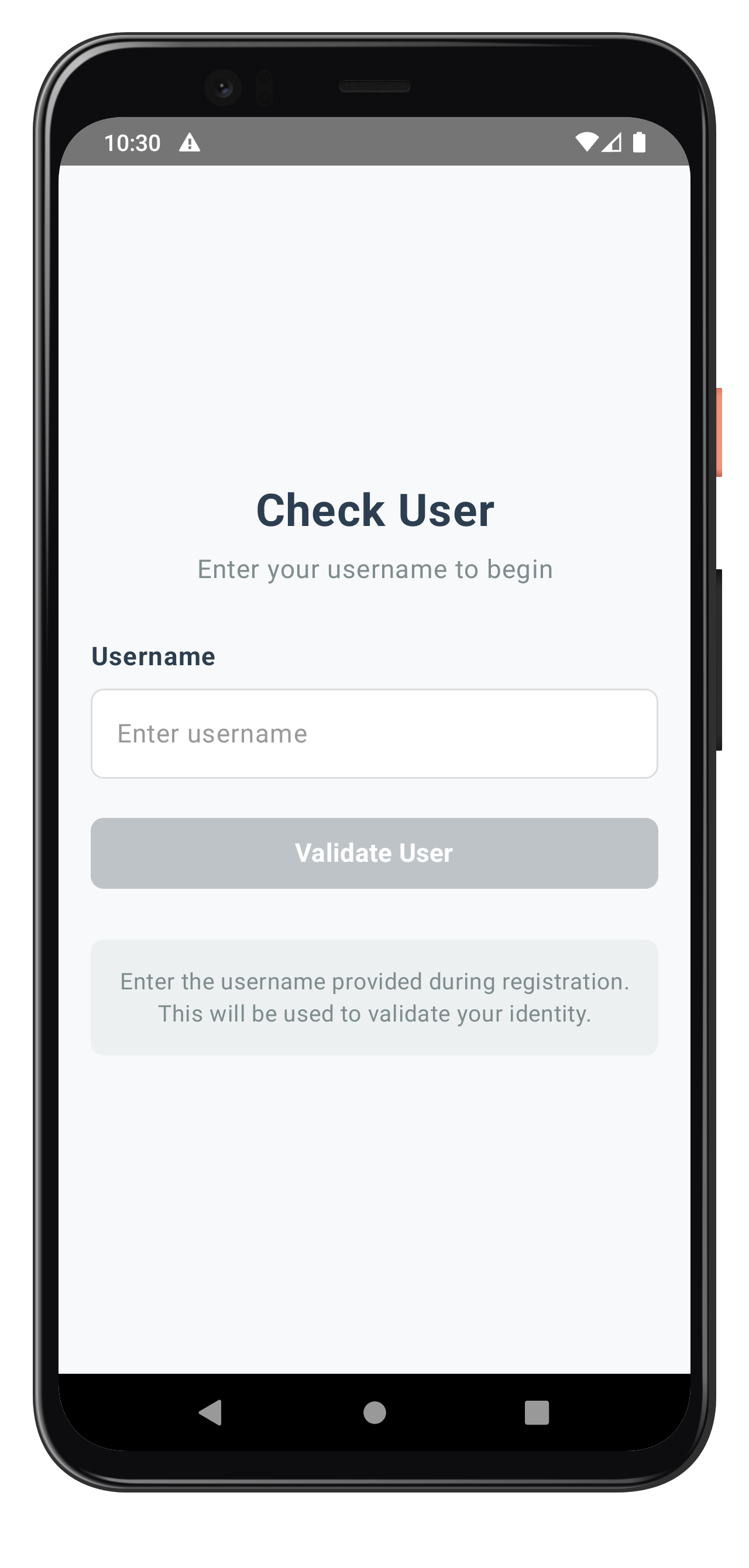
CheckUserScreen Composable
The CheckUserScreen composable renders the UI and collects state from the ViewModel:
// app/src/main/java/com/relidcodelab/tutorial/screens/mfa/CheckUserScreen.kt

/**
 * CheckUserScreen - User ID input for MFA activation
 *
 * UI Elements Checklist:
 * ✓ Title (28sp, bold, centered)
 * ✓ Subtitle (16sp, centered)
 * ✓ StatusBanner (conditional, success/error)
 * ✓ Input field (Username with label, placeholder, error)
 * ✓ Button (primary variant)
 * ✓ Help container (bottom)
 * ✓ Keyboard management (IME padding, done action)
 */
@Composable
fun CheckUserScreen(
    viewModel: CheckUserViewModel,
    title: String = "Check User",
    subtitle: String = "Enter your username to begin",
    placeholder: String = "Enter username",
    buttonText: String = "Validate User"
) {
    val uiState by viewModel.uiState.collectAsStateWithLifecycle()
    val focusManager = LocalFocusManager.current

    // Disable hardware back button during MFA flow
    BackHandler(enabled = true) {
        // Do nothing - prevent back navigation
    }

    Scaffold(
        containerColor = PageBackground
    ) { padding ->
        Column(
            modifier = Modifier
                .fillMaxSize()
                .padding(padding)
                .imePadding() // Keyboard management
                .verticalScroll(rememberScrollState())
                .padding(20.dp),
            horizontalAlignment = Alignment.CenterHorizontally,
            verticalArrangement = Arrangement.Center
        ) {
            // Title
            Text(
                text = title,
                fontSize = 28.sp,
                fontWeight = FontWeight.Bold,
                color = DarkGray,
                textAlign = TextAlign.Center,
                modifier = Modifier
                    .fillMaxWidth()
                    .padding(bottom = 8.dp)
            )

            // Subtitle
            Text(
                text = subtitle,
                fontSize = 16.sp,
                color = MediumGray,
                textAlign = TextAlign.Center,
                modifier = Modifier
                    .fillMaxWidth()
                    .padding(bottom = 30.dp)
            )

            // Status Banner (conditional)
            uiState.validationResult?.let { result ->
                StatusBanner(
                    type = if (result.success) StatusBannerType.SUCCESS else StatusBannerType.ERROR,
                    message = result.message
                )
            }

            if (uiState.error.isNotEmpty()) {
                StatusBanner(
                    type = StatusBannerType.ERROR,
                    message = uiState.error
                )
            }

            // Username Input
            Column(
                modifier = Modifier
                    .fillMaxWidth()
                    .padding(bottom = 24.dp)
            ) {
                Text(
                    text = "Username",
                    fontSize = 16.sp,
                    fontWeight = FontWeight.Bold,
                    color = DarkGray,
                    modifier = Modifier.padding(bottom = 8.dp)
                )

                OutlinedTextField(
                    value = uiState.username,
                    onValueChange = viewModel::onUsernameChange,
                    modifier = Modifier.fillMaxWidth(),
                    placeholder = { Text(text = placeholder, color = PlaceholderText) },
                    singleLine = true,
                    keyboardOptions = KeyboardOptions(
                        keyboardType = KeyboardType.Text,
                        imeAction = ImeAction.Done
                    ),
                    keyboardActions = KeyboardActions(
                        onDone = {
                            focusManager.clearFocus()
                            viewModel.validateUser()
                        }
                    ),
                    isError = uiState.error.isNotEmpty()
                )
            }

            // Validate Button
            Button(
                onClick = {
                    focusManager.clearFocus()
                    viewModel.validateUser()
                },
                modifier = Modifier
                    .fillMaxWidth()
                    .height(56.dp),
                enabled = uiState.username.isNotEmpty() && !uiState.isValidating
            ) {
                if (uiState.isValidating) {
                    Row(
                        verticalAlignment = Alignment.CenterVertically,
                        horizontalArrangement = Arrangement.Center
                    ) {
                        CircularProgressIndicator(
                            modifier = Modifier.size(20.dp),
                            strokeWidth = 2.dp
                        )
                        Spacer(modifier = Modifier.width(8.dp))
                        Text("Setting User...")
                    }
                } else {
                    Text(buttonText)
                }
            }

            // Help Container
            Card(
                modifier = Modifier.fillMaxWidth().padding(top = 20.dp)
            ) {
                Text(
                    text = "Enter the username provided during registration. This will be used to validate your identity.",
                    fontSize = 14.sp,
                    textAlign = TextAlign.Center,
                    modifier = Modifier.padding(16.dp)
                )
            }
        }
    }
}
Specific Status Code handling
Status Code | Event Name | Meaning |
101 |
| Triggered when an invalid user is provided in setUser API. |
138 |
| User is blocked due to exceeded OTP attempts or blocked by admin |
Key Implementation Features
The CheckUserScreen demonstrates several important patterns:
- Cyclical Event Handling: Supports repeated
getUsercallbacks if validation fails - Response Data Processing: Uses
RDNAEventUtilsfor consistent error checking - Form Validation: Real-time validation with user feedback
- Loading States: Clear indication during API calls with CircularProgressIndicator
- Error/Status Display: User-friendly error/status messages from API responses
- Keyboard Management: IME padding and keyboard actions for better UX
- Lifecycle Awareness: State collection with collectAsStateWithLifecycle
The following image showcases the screen from the sample application:
Create the activation code input screen that handles OTP verification during the activation flow.
ActivationCodeViewModel Implementation
The ActivationCodeViewModel handles activation code state and provides resend functionality:
// app/src/main/java/com/relidcodelab/tutorial/viewmodels/ActivationCodeViewModel.kt

/**
 * UI State for ActivationCodeScreen
 */
data class ActivationCodeUiState(
    val activationCode: String = "",
    val error: String = "",
    val isValidating: Boolean = false,
    val isResending: Boolean = false,
    val validationResult: ValidationResult? = null,
    val attemptsLeft: Int = 0
)

/**
 * ViewModel for ActivationCodeScreen
 *
 * Handles activation code (OTP) input and validation for MFA activation flow.
 *
 * State Management:
 * - activationCode: User input
 * - error: Validation/API errors
 * - isValidating: Loading state during setActivationCode
 * - isResending: Loading state during resendActivationCode
 * - validationResult: Success/error message
 * - attemptsLeft: Remaining attempts from event data
 *
 * SDK Integration:
 * - setActivationCode(code) - Submit OTP
 * - resendActivationCode() - Request new OTP
 * - resetAuthState() - Close/cancel flow
 */
class ActivationCodeViewModel(
    private val rdnaService: RDNAService,
    private val callbackManager: RDNACallbackManager,
    private val initialEventData: GetActivationCodeEventData?
) : ViewModel() {

    companion object {
        private const val TAG = "ActivationCodeViewModel"
    }

    // UI State
    private val _uiState = MutableStateFlow(ActivationCodeUiState())
    val uiState: StateFlow<ActivationCodeUiState> = _uiState.asStateFlow()

    // Close/reset navigation event
    private val _navigateBack = MutableSharedFlow<Unit>()
    val navigateBack: SharedFlow<Unit> = _navigateBack.asSharedFlow()

    init {
        processInitialEventData()
    }

    /**
     * Process initial event data
     */
    private fun processInitialEventData() {
        initialEventData?.let { data ->
            // Set attempts left
            _uiState.update { it.copy(attemptsLeft = data.attemptsLeft) }

            // Check for errors
            if (RDNAEventUtils.hasApiError(data.error)) {
                val errorMessage = RDNAEventUtils.getErrorMessage(data.error)
                _uiState.update { it.copy(error = errorMessage) }
                Log.e(TAG, "Initial event has API error: $errorMessage")
            } else if (RDNAEventUtils.hasStatusError(data.response)) {
                val errorMessage = RDNAEventUtils.getErrorMessage(data.error, data.response)
                _uiState.update { it.copy(error = errorMessage) }
                Log.e(TAG, "Initial event has status error: $errorMessage")
            }

            Log.d(TAG, "Initialized with userId: ${data.userId}, attempts: ${data.attemptsLeft}")
        }
    }

    /**
     * Handle activation code change
     */
    fun onActivationCodeChange(newCode: String) {
        _uiState.update { it.copy(
            activationCode = newCode,
            error = "",
            validationResult = null
        )}
    }

    /**
     * Validate and submit activation code
     */
    fun validateActivationCode() {
        val trimmedCode = _uiState.value.activationCode.trim()

        // Validation
        if (trimmedCode.isEmpty()) {
            _uiState.update { it.copy(error = "Please enter the activation code") }
            return
        }

        viewModelScope.launch {
            _uiState.update { it.copy(
                isValidating = true,
                error = "",
                validationResult = null
            )}

            Log.d(TAG, "Calling setActivationCode API")

            try {
                // Call SDK setActivationCode
                val error = rdnaService.setActivationCode(trimmedCode)

                // Check sync response
                if (error.longErrorCode != 0) {
                    val errorMessage = RDNAEventUtils.getErrorMessage(error)
                    Log.e(TAG, "setActivationCode sync error: $errorMessage")

                    _uiState.update { it.copy(
                        isValidating = false,
                        error = errorMessage
                    )}
                } else {
                    // Sync success - async events will be handled globally
                    Log.d(TAG, "setActivationCode sync success - waiting for async events")

                    _uiState.update { it.copy(
                        isValidating = false,
                        validationResult = ValidationResult(
                            success = true,
                            message = "Activation code validated successfully. Please wait..."
                        )
                    )}
                }
            } catch (e: Exception) {
                Log.e(TAG, "Exception during setActivationCode", e)
                _uiState.update { it.copy(
                    isValidating = false,
                    error = "An unexpected error occurred: ${e.message}"
                )}
            }
        }
    }

    /**
     * Resend activation code
     */
    fun resendActivationCode() {
        viewModelScope.launch {
            _uiState.update { it.copy(
                isResending = true,
                error = "",
                validationResult = null
            )}

            Log.d(TAG, "Calling resendActivationCode API")

            try {
                // Call SDK resendActivationCode
                val error = rdnaService.resendActivationCode()

                // Check sync response
                if (error.longErrorCode != 0) {
                    val errorMessage = RDNAEventUtils.getErrorMessage(error)
                    Log.e(TAG, "resendActivationCode sync error: $errorMessage")

                    _uiState.update { it.copy(
                        isResending = false,
                        error = errorMessage
                    )}
                } else {
                    // Sync success - new getActivationCode event will be triggered
                    Log.d(TAG, "resendActivationCode sync success - waiting for new event")

                    _uiState.update { it.copy(
                        isResending = false,
                        activationCode = "", // Clear input
                        validationResult = ValidationResult(
                            success = true,
                            message = "New activation code sent successfully!"
                        )
                    )}
                }
            } catch (e: Exception) {
                Log.e(TAG, "Exception during resendActivationCode", e)
                _uiState.update { it.copy(
                    isResending = false,
                    error = "Failed to resend activation code: ${e.message}"
                )}
            }
        }
    }

    /**
     * Handle close button
     */
    fun onClose() {
        viewModelScope.launch {
            Log.d(TAG, "Calling resetAuthState API")

            try {
                val error = rdnaService.resetAuthState()

                if (error.longErrorCode != 0) {
                    Log.e(TAG, "resetAuthState error: ${error.errorString}")
                }

                _navigateBack.emit(Unit)
            } catch (e: Exception) {
                Log.e(TAG, "Exception during resetAuthState", e)
                _navigateBack.emit(Unit)
            }
        }
    }
}
ActivationCodeScreen Composable
The ActivationCodeScreen renders the UI with resend functionality:
// app/src/main/java/com/relidcodelab/tutorial/screens/mfa/ActivationCodeScreen.kt

/**
 * ActivationCodeScreen - Activation code (OTP) input
 */
@Composable
fun ActivationCodeScreen(
    viewModel: ActivationCodeViewModel,
    onNavigateBack: () -> Unit,
    title: String = "Activation Code",
    subtitle: String = "Enter the activation code sent to you",
    placeholder: String = "Enter activation code",
    buttonText: String = "Validate Code"
) {
    val uiState by viewModel.uiState.collectAsStateWithLifecycle()
    val focusManager = LocalFocusManager.current

    // Disable hardware back button during MFA flow
    BackHandler(enabled = true) {
        // Do nothing - prevent back navigation
    }

    // Handle back navigation
    LaunchedEffect(Unit) {
        viewModel.navigateBack.collect {
            onNavigateBack()
        }
    }

    Box(modifier = Modifier.fillMaxSize()) {
        Scaffold(containerColor = PageBackground) { padding ->
            Column(
                modifier = Modifier
                    .fillMaxSize()
                    .padding(padding)
                    .imePadding()
                    .verticalScroll(rememberScrollState())
                    .padding(20.dp)
                    .padding(top = 40.dp),
                horizontalAlignment = Alignment.CenterHorizontally,
                verticalArrangement = Arrangement.Center
            ) {
                // Title
                Text(
                    text = title,
                    fontSize = 28.sp,
                    fontWeight = FontWeight.Bold,
                    color = DarkGray,
                    textAlign = TextAlign.Center,
                    modifier = Modifier.fillMaxWidth().padding(bottom = 8.dp)
                )

                // Subtitle
                Text(
                    text = subtitle,
                    fontSize = 16.sp,
                    color = MediumGray,
                    textAlign = TextAlign.Center,
                    modifier = Modifier.fillMaxWidth().padding(bottom = 20.dp)
                )

                // Attempts Warning
                if (uiState.attemptsLeft > 0) {
                    StatusBanner(
                        type = StatusBannerType.WARNING,
                        message = "Attempts remaining: ${uiState.attemptsLeft}"
                    )
                }

                // Validation Result
                uiState.validationResult?.let { result ->
                    StatusBanner(
                        type = if (result.success) StatusBannerType.SUCCESS else StatusBannerType.ERROR,
                        message = result.message
                    )
                }

                if (uiState.error.isNotEmpty()) {
                    StatusBanner(
                        type = StatusBannerType.ERROR,
                        message = uiState.error
                    )
                }

                // Activation Code Input
                Column(modifier = Modifier.fillMaxWidth().padding(bottom = 24.dp)) {
                    Text(
                        text = "Activation Code",
                        fontSize = 16.sp,
                        fontWeight = FontWeight.Bold,
                        color = DarkGray,
                        modifier = Modifier.padding(bottom = 8.dp)
                    )

                    OutlinedTextField(
                        value = uiState.activationCode,
                        onValueChange = viewModel::onActivationCodeChange,
                        modifier = Modifier.fillMaxWidth(),
                        placeholder = { Text(text = placeholder, color = PlaceholderText) },
                        singleLine = true,
                        enabled = !uiState.isValidating,
                        keyboardOptions = KeyboardOptions(imeAction = ImeAction.Done),
                        keyboardActions = KeyboardActions(
                            onDone = {
                                focusManager.clearFocus()
                                viewModel.validateActivationCode()
                            }
                        )
                    )
                }

                // Validate Button
                Button(
                    onClick = { viewModel.validateActivationCode() },
                    modifier = Modifier.fillMaxWidth().height(56.dp).padding(bottom = 12.dp),
                    enabled = uiState.activationCode.isNotEmpty() && !uiState.isValidating && !uiState.isResending
                ) {
                    if (uiState.isValidating) {
                        Row(verticalAlignment = Alignment.CenterVertically) {
                            CircularProgressIndicator(modifier = Modifier.size(20.dp), strokeWidth = 2.dp)
                            Spacer(modifier = Modifier.width(8.dp))
                            Text("Setting Activation Code...")
                        }
                    } else {
                        Text(buttonText)
                    }
                }

                // Resend Button
                OutlinedButton(
                    onClick = { viewModel.resendActivationCode() },
                    modifier = Modifier.fillMaxWidth().height(56.dp).padding(bottom = 12.dp),
                    enabled = !uiState.isValidating && !uiState.isResending
                ) {
                    if (uiState.isResending) {
                        Row(verticalAlignment = Alignment.CenterVertically) {
                            CircularProgressIndicator(modifier = Modifier.size(20.dp), strokeWidth = 2.dp)
                            Spacer(modifier = Modifier.width(8.dp))
                            Text("Sending...")
                        }
                    } else {
                        Text("Resend Activation Code")
                    }
                }

                // Help Container
                Card(modifier = Modifier.fillMaxWidth().padding(top = 20.dp)) {
                    Text(
                        text = "Didn't receive the code? Click 'Resend' to get a new activation code sent to your registered email or phone.",
                        fontSize = 14.sp,
                        textAlign = TextAlign.Center,
                        modifier = Modifier.padding(16.dp)
                    )
                }
            }
        }

        // Close Button (top-left, absolute)
        CloseButton(
            onPress = { viewModel.onClose() },
            enabled = !uiState.isValidating && !uiState.isResending
        )
    }
}
Specific Status Code Handling
Status Code | Event Name | Meaning |
106 |
| Triggered when an invalid OTP is provided in setActivationCode API. |
Key Implementation Features
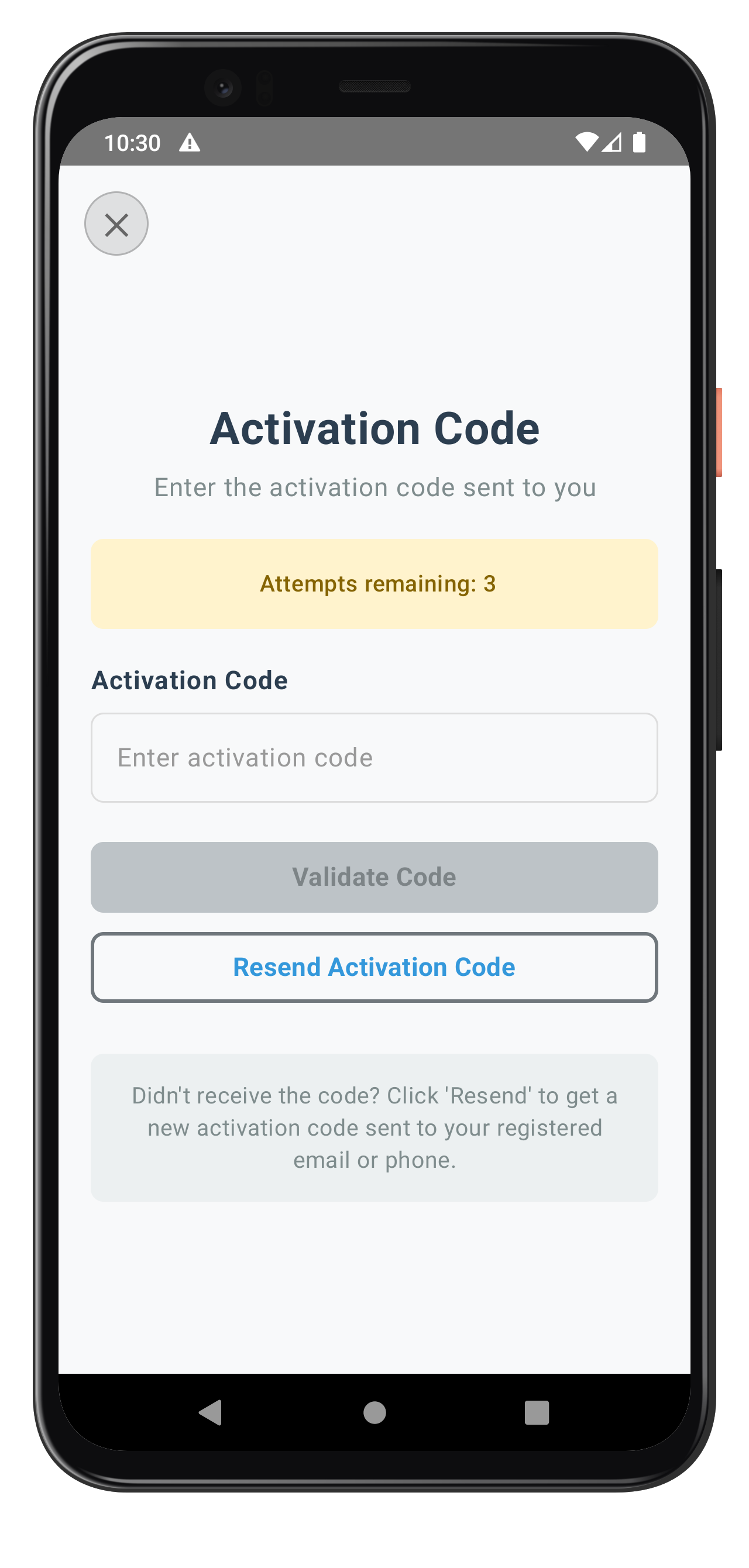
The ActivationCodeScreen demonstrates these patterns:
- OTP Input: Handles activation code entry with attempts tracking
- Resend Functionality: Allows users to request a new activation code
- Attempts Display: Shows remaining attempts for security
- Loading States: Separate states for validation and resend operations
- Error Handling: Clear feedback for invalid codes
The following image showcases the screen from the sample application:
After successful OTP verification, the SDK determines whether to request Local Device Authentication (LDA) setup or password authentication based on device capabilities.
Decision Flow
The SDK automatically chooses the authentication method:
Option 1: LDA Available
- Device supports biometric authentication
- SDK triggers
getUserConsentForLDAcallback - User can approve/reject biometric setup
- If rejected, falls back to password
Option 2: LDA Not Available
- Device lacks biometric capabilities
- SDK triggers
getPasswordcallback with mode=1 (SET) - User creates password for authentication
Implementation Pattern
Both screens follow the event-driven pattern:
- SDKEventProvider receives callback
- Creates appropriate ViewModel with event data
- Navigates to corresponding screen
- User completes action
- SDK continues flow automatically
Implement the device authentication screens that handle biometric consent and password setup.
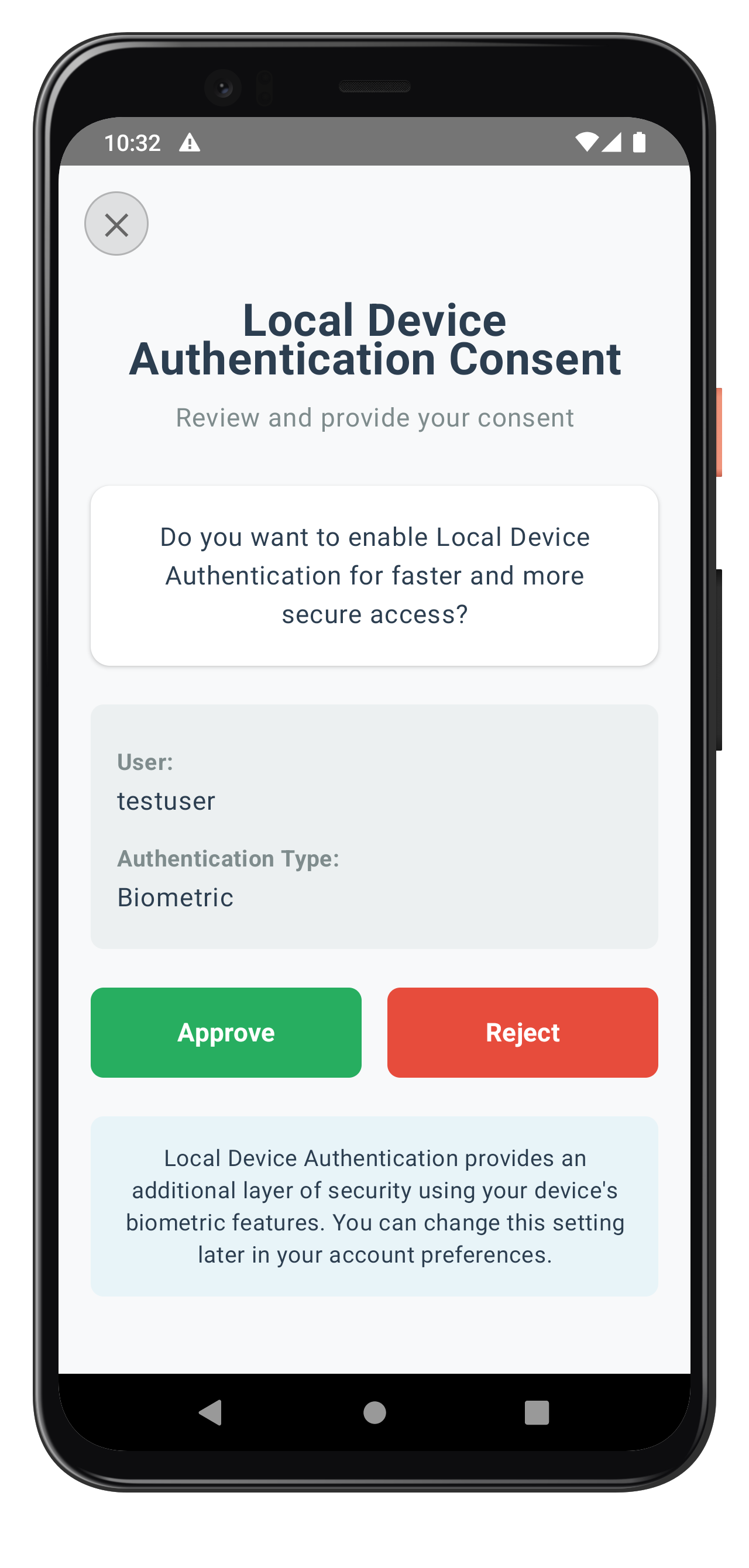
User LDA Consent Screen
The UserLDAConsentScreen handles biometric authentication consent. Create the ViewModel and Screen:
// app/src/main/java/com/relidcodelab/tutorial/viewmodels/UserLDAConsentViewModel.kt

/**
 * UI State for UserLDAConsentScreen
 */
data class UserLDAConsentUiState(
    val isProcessing: Boolean = false,
    val error: String = "",
    val consentTitle: String = "Local Device Authentication Consent",
    val consentMessage: String = "Do you want to enable Local Device Authentication?",
    val approveButtonText: String = "Approve",
    val rejectButtonText: String = "Reject",
    val userID: String = "",
    val ldaName: String = ""
)

/**
 * ViewModel for UserLDAConsentScreen
 *
 * Handles LDA consent during MFA flows.
 * Extracts consent message and processes user decision.
 */
class UserLDAConsentViewModel(
    private val rdnaService: RDNAService,
    private val callbackManager: RDNACallbackManager,
    private val initialEventData: GetUserConsentForLDAEventData?
) : ViewModel() {

    private val _uiState = MutableStateFlow(UserLDAConsentUiState())
    val uiState: StateFlow<UserLDAConsentUiState> = _uiState.asStateFlow()

    private var challengeMode: RDNA.RDNAChallengeOpMode? = null
    private var ldaCapabilities: RDNA.RDNALDACapabilities? = null

    init {
        processEventData()
    }

    private fun processEventData() {
        initialEventData?.let { data ->
            // Check for errors
            if (RDNAEventUtils.hasApiError(data.error)) {
                _uiState.update { it.copy(error = RDNAEventUtils.getErrorMessage(data.error)) }
                return
            }

            // Store challenge mode and capabilities
            challengeMode = data.mode
            ldaCapabilities = data.capabilities

            val userID = data.userId ?: ""
            val ldaName = "Biometric" // Simplified for this example

            // Extract consent message from challenge info
            val consentMessageJson = RDNAEventUtils.getChallengeValue(
                data.response,
                "LDA_CONSENT_MESSAGE"
            )

            if (consentMessageJson != null) {
                processConsentMessage(consentMessageJson, ldaName, userID)
            } else {
                _uiState.update { it.copy(userID = userID, ldaName = ldaName) }
            }
        }
    }

    private fun processConsentMessage(jsonString: String, ldaName: String, userID: String) {
        try {
            val jsonObject = JSONObject(jsonString)

            val title = jsonObject.optString("title", "Local Device Authentication Consent")
            val message = jsonObject.optString("message", "")
            val approveText = jsonObject.optString("approveButtonText", "Approve")
            val rejectText = jsonObject.optString("rejectButtonText", "Reject")

            val processedMessage = message
                .replace("<BR>", "\n")
                .replace("__LDA_NAME__", ldaName)

            _uiState.update { it.copy(
                consentTitle = title,
                consentMessage = processedMessage,
                approveButtonText = approveText,
                rejectButtonText = rejectText,
                userID = userID,
                ldaName = ldaName
            )}
        } catch (e: Exception) {
            _uiState.update { it.copy(userID = userID, ldaName = ldaName) }
        }
    }

    /**
     * Handle user consent decision
     */
    fun handleUserConsent(isApproved: Boolean) {
        viewModelScope.launch {
            _uiState.update { it.copy(isProcessing = true, error = "") }

            val mode = challengeMode
            if (mode == null) {
                _uiState.update { it.copy(isProcessing = false, error = "Invalid challenge mode") }
                return@launch
            }

            try {
                val error = rdnaService.setUserConsentForLDA(isApproved, mode, ldaCapabilities)

                if (error.longErrorCode != 0) {
                    _uiState.update { it.copy(
                        isProcessing = false,
                        error = RDNAEventUtils.getErrorMessage(error)
                    )}
                } else {
                    _uiState.update { it.copy(isProcessing = false) }
                }
            } catch (e: Exception) {
                _uiState.update { it.copy(
                    isProcessing = false,
                    error = "An unexpected error occurred: ${e.message}"
                )}
            }
        }
    }
}
The corresponding screen composable:
// app/src/main/java/com/relidcodelab/tutorial/screens/mfa/UserLDAConsentScreen.kt

@Composable
fun UserLDAConsentScreen(
    viewModel: UserLDAConsentViewModel,
    onClose: () -> Unit,
    subtitle: String = "Review and provide your consent"
) {
    val uiState by viewModel.uiState.collectAsStateWithLifecycle()

    BackHandler(enabled = true) { /* Prevent back navigation */ }

    Box(modifier = Modifier.fillMaxSize()) {
        Scaffold(containerColor = PageBackground) { padding ->
            Column(
                modifier = Modifier
                    .fillMaxSize()
                    .padding(padding)
                    .imePadding()
                    .verticalScroll(rememberScrollState())
                    .padding(horizontal = 20.dp)
                    .padding(top = 80.dp, bottom = 20.dp),
                horizontalAlignment = Alignment.CenterHorizontally
            ) {
                // Title (dynamic from consent data)
                Text(
                    text = uiState.consentTitle,
                    fontSize = 28.sp,
                    fontWeight = FontWeight.Bold,
                    color = DarkGray,
                    textAlign = TextAlign.Center,
                    modifier = Modifier.fillMaxWidth().padding(bottom = 8.dp)
                )

                // Subtitle
                Text(
                    text = subtitle,
                    fontSize = 16.sp,
                    color = MediumGray,
                    textAlign = TextAlign.Center,
                    modifier = Modifier.fillMaxWidth().padding(bottom = 30.dp)
                )

                // Error banner
                if (uiState.error.isNotEmpty()) {
                    StatusBanner(type = StatusBannerType.ERROR, message = uiState.error)
                }

                // Message container
                Card(
                    modifier = Modifier.fillMaxWidth().padding(bottom = 24.dp),
                    colors = CardDefaults.cardColors(containerColor = CardBackground),
                    shape = RoundedCornerShape(12.dp)
                ) {
                    Text(
                        text = uiState.consentMessage,
                        fontSize = 16.sp,
                        color = DarkGray,
                        textAlign = TextAlign.Center,
                        lineHeight = 24.sp,
                        modifier = Modifier.padding(20.dp)
                    )
                }

                // User info (conditional)
                if (uiState.userID.isNotEmpty()) {
                    Card(
                        modifier = Modifier.fillMaxWidth().padding(bottom = 24.dp),
                        colors = CardDefaults.cardColors(containerColor = HelpBackground)
                    ) {
                        Column(modifier = Modifier.padding(16.dp)) {
                            Text("User:", fontWeight = FontWeight.Bold, fontSize = 14.sp)
                            Text(uiState.userID, fontSize = 16.sp, color = DarkGray)

                            Text("Authentication Type:", fontWeight = FontWeight.Bold, fontSize = 14.sp, modifier = Modifier.padding(top = 8.dp))
                            Text(uiState.ldaName, fontSize = 16.sp, color = DarkGray)
                        }
                    }
                }

                // Button container
                Row(
                    modifier = Modifier.fillMaxWidth().padding(bottom = 24.dp),
                    horizontalArrangement = Arrangement.spacedBy(16.dp)
                ) {
                    // Approve Button
                    Button(
                        onClick = { viewModel.handleUserConsent(true) },
                        modifier = Modifier.weight(1f).height(56.dp),
                        enabled = !uiState.isProcessing,
                        colors = ButtonDefaults.buttonColors(containerColor = PrimaryGreen)
                    ) {
                        Text(uiState.approveButtonText, fontWeight = FontWeight.Bold)
                    }

                    // Reject Button
                    Button(
                        onClick = { viewModel.handleUserConsent(false) },
                        modifier = Modifier.weight(1f).height(56.dp),
                        enabled = !uiState.isProcessing,
                        colors = ButtonDefaults.buttonColors(containerColor = PrimaryRed)
                    ) {
                        Text(uiState.rejectButtonText, fontWeight = FontWeight.Bold)
                    }
                }

                // Help Container
                Card(modifier = Modifier.fillMaxWidth()) {
                    Text(
                        text = "Local Device Authentication provides an additional layer of security using your device's biometric features.",
                        fontSize = 14.sp,
                        textAlign = TextAlign.Center,
                        modifier = Modifier.padding(16.dp)
                    )
                }
            }
        }

        CloseButton(onPress = { viewModel.handleClose(); onClose() }, enabled = !uiState.isProcessing)
    }
}
The following image showcases the LDA consent screen from the sample application:
Set Password Authentication Screen
The Set Password screen handles password creation during the MFA enrollment flow. This screen processes getPassword callbacks from the SDK and includes dynamic password policy parsing.
SetPasswordViewModel Implementation
// app/src/main/java/com/relidcodelab/tutorial/viewmodels/SetPasswordViewModel.kt

/**
 * UI State for SetPasswordScreen
 */
data class SetPasswordUiState(
    val password: String = "",
    val confirmPassword: String = "",
    val error: String = "",
    val isSubmitting: Boolean = false,
    val challengeMode: Int = 1,
    val userName: String = "",
    val passwordPolicyMessage: String = ""
)

/**
 * ViewModel for SetPasswordScreen
 * Handles password setup during MFA activation flow.
 */
class SetPasswordViewModel(
    private val rdnaService: RDNAService,
    private val callbackManager: RDNACallbackManager,
    private val initialEventData: GetPasswordEventData?
) : ViewModel() {

    private val _uiState = MutableStateFlow(SetPasswordUiState())
    val uiState: StateFlow<SetPasswordUiState> = _uiState.asStateFlow()

    init {
        processEventData()
    }

    private fun processEventData() {
        initialEventData?.let { data ->
            val userID = data.userId ?: ""
            val mode = data.mode?.intValue ?: 1

            // Extract password policy from challenge info
            val policyJsonString = RDNAEventUtils.getChallengeValue(
                data.response,
                "RELID_PASSWORD_POLICY"
            )

            val policyMessage = if (policyJsonString != null) {
                PasswordPolicyUtils.parseAndGeneratePolicyMessage(policyJsonString)
            } else {
                ""
            }

            // Check for errors
            val errorMessage = when {
                RDNAEventUtils.hasApiError(data.error) -> RDNAEventUtils.getErrorMessage(data.error)
                RDNAEventUtils.hasStatusError(data.response) -> RDNAEventUtils.getErrorMessage(data.error, data.response)
                else -> ""
            }

            _uiState.update { it.copy(
                userName = userID,
                challengeMode = mode,
                passwordPolicyMessage = policyMessage,
                error = errorMessage
            )}
        }
    }

    fun onPasswordChange(newPassword: String) {
        _uiState.update { it.copy(password = newPassword, error = "") }
    }

    fun onConfirmPasswordChange(newConfirmPassword: String) {
        _uiState.update { it.copy(confirmPassword = newConfirmPassword, error = "") }
    }

    /**
     * Validate and submit password
     */
    fun setPassword() {
        val currentState = _uiState.value
        val trimmedPassword = currentState.password.trim()
        val trimmedConfirmPassword = currentState.confirmPassword.trim()

        // Validation
        if (trimmedPassword.isEmpty()) {
            _uiState.update { it.copy(error = "Please enter a password") }
            return
        }

        if (trimmedConfirmPassword.isEmpty()) {
            _uiState.update { it.copy(error = "Please confirm your password") }
            return
        }

        if (trimmedPassword != trimmedConfirmPassword) {
            _uiState.update { it.copy(error = "Passwords do not match") }
            return
        }

        viewModelScope.launch {
            _uiState.update { it.copy(isSubmitting = true, error = "") }

            try {
                val error = rdnaService.setPassword(trimmedPassword, currentState.challengeMode)

                if (error.longErrorCode != 0) {
                    _uiState.update { it.copy(
                        isSubmitting = false,
                        error = RDNAEventUtils.getErrorMessage(error),
                        password = "",
                        confirmPassword = ""
                    )}
                } else {
                    _uiState.update { it.copy(isSubmitting = false) }
                }
            } catch (e: Exception) {
                _uiState.update { it.copy(
                    isSubmitting = false,
                    error = "An unexpected error occurred: ${e.message}",
                    password = "",
                    confirmPassword = ""
                )}
            }
        }
    }
}
SetPasswordScreen Composable
// app/src/main/java/com/relidcodelab/tutorial/screens/mfa/SetPasswordScreen.kt

@Composable
fun SetPasswordScreen(
    viewModel: SetPasswordViewModel,
    onClose: () -> Unit,
    title: String = "Set Password",
    subtitle: String = "Create a secure password"
) {
    val uiState by viewModel.uiState.collectAsStateWithLifecycle()
    val focusManager = LocalFocusManager.current
    val confirmPasswordFocusRequester = remember { FocusRequester() }

    BackHandler(enabled = true) { /* Prevent back navigation */ }

    Box(modifier = Modifier.fillMaxSize()) {
        Scaffold(containerColor = PageBackground) { padding ->
            Column(
                modifier = Modifier
                    .fillMaxSize()
                    .padding(padding)
                    .imePadding()
                    .verticalScroll(rememberScrollState())
                    .padding(horizontal = 20.dp)
                    .padding(top = 80.dp, bottom = 20.dp),
                horizontalAlignment = Alignment.CenterHorizontally
            ) {
                // Title
                Text(title, fontSize = 28.sp, fontWeight = FontWeight.Bold, textAlign = TextAlign.Center)

                // Subtitle
                Text(subtitle, fontSize = 16.sp, color = MediumGray, textAlign = TextAlign.Center, modifier = Modifier.padding(bottom = 30.dp))

                // User container
                if (uiState.userName.isNotEmpty()) {
                    Column(horizontalAlignment = Alignment.CenterHorizontally, modifier = Modifier.padding(bottom = 20.dp)) {
                        Text("Welcome", fontSize = 18.sp)
                        Text(uiState.userName, fontSize = 20.sp, fontWeight = FontWeight.Bold, color = PrimaryBlue)
                    }
                }

                // Password policy container
                if (uiState.passwordPolicyMessage.isNotEmpty()) {
                    Row(modifier = Modifier.fillMaxWidth().padding(bottom = 20.dp)) {
                        Box(modifier = Modifier.width(4.dp).fillMaxHeight().background(PolicyBorder))
                        Column(modifier = Modifier.weight(1f).padding(16.dp)) {
                            Text("Password Requirements", fontWeight = FontWeight.Bold, modifier = Modifier.padding(bottom = 8.dp))
                            Text(uiState.passwordPolicyMessage, fontSize = 14.sp)
                        }
                    }
                }

                // Error banner
                if (uiState.error.isNotEmpty()) {
                    StatusBanner(type = StatusBannerType.ERROR, message = uiState.error)
                }

                // Password Input
                Column(modifier = Modifier.fillMaxWidth().padding(bottom = 20.dp)) {
                    Text("Password", fontWeight = FontWeight.Bold, modifier = Modifier.padding(bottom = 8.dp))

                    OutlinedTextField(
                        value = uiState.password,
                        onValueChange = viewModel::onPasswordChange,
                        modifier = Modifier.fillMaxWidth(),
                        placeholder = { Text("Enter password") },
                        visualTransformation = PasswordVisualTransformation(),
                        singleLine = true,
                        keyboardOptions = KeyboardOptions(keyboardType = KeyboardType.Password, imeAction = ImeAction.Next),
                        keyboardActions = KeyboardActions(onNext = { confirmPasswordFocusRequester.requestFocus() })
                    )
                }

                // Confirm Password Input
                Column(modifier = Modifier.fillMaxWidth().padding(bottom = 20.dp)) {
                    Text("Confirm Password", fontWeight = FontWeight.Bold, modifier = Modifier.padding(bottom = 8.dp))

                    OutlinedTextField(
                        value = uiState.confirmPassword,
                        onValueChange = viewModel::onConfirmPasswordChange,
                        modifier = Modifier.fillMaxWidth().focusRequester(confirmPasswordFocusRequester),
                        placeholder = { Text("Confirm password") },
                        visualTransformation = PasswordVisualTransformation(),
                        singleLine = true,
                        keyboardOptions = KeyboardOptions(keyboardType = KeyboardType.Password, imeAction = ImeAction.Done),
                        keyboardActions = KeyboardActions(onDone = { focusManager.clearFocus(); viewModel.setPassword() })
                    )
                }

                // Submit Button
                Button(
                    onClick = { focusManager.clearFocus(); viewModel.setPassword() },
                    modifier = Modifier.fillMaxWidth().height(56.dp),
                    enabled = uiState.password.isNotEmpty() && uiState.confirmPassword.isNotEmpty() && !uiState.isSubmitting
                ) {
                    if (uiState.isSubmitting) {
                        Row(verticalAlignment = Alignment.CenterVertically) {
                            CircularProgressIndicator(modifier = Modifier.size(20.dp), strokeWidth = 2.dp)
                            Spacer(modifier = Modifier.width(8.dp))
                            Text("Setting Password...")
                        }
                    } else {
                        Text("Submit")
                    }
                }

                // Help Container
                Card(modifier = Modifier.fillMaxWidth().padding(top = 20.dp)) {
                    Text(
                        "Your password must meet the requirements listed above.",
                        fontSize = 14.sp,
                        textAlign = TextAlign.Center,
                        modifier = Modifier.padding(16.dp)
                    )
                }
            }
        }

        CloseButton(onPress = { viewModel.handleClose(); onClose() }, enabled = !uiState.isSubmitting)
    }
}
The following image showcases the Set Password screen from the sample application:
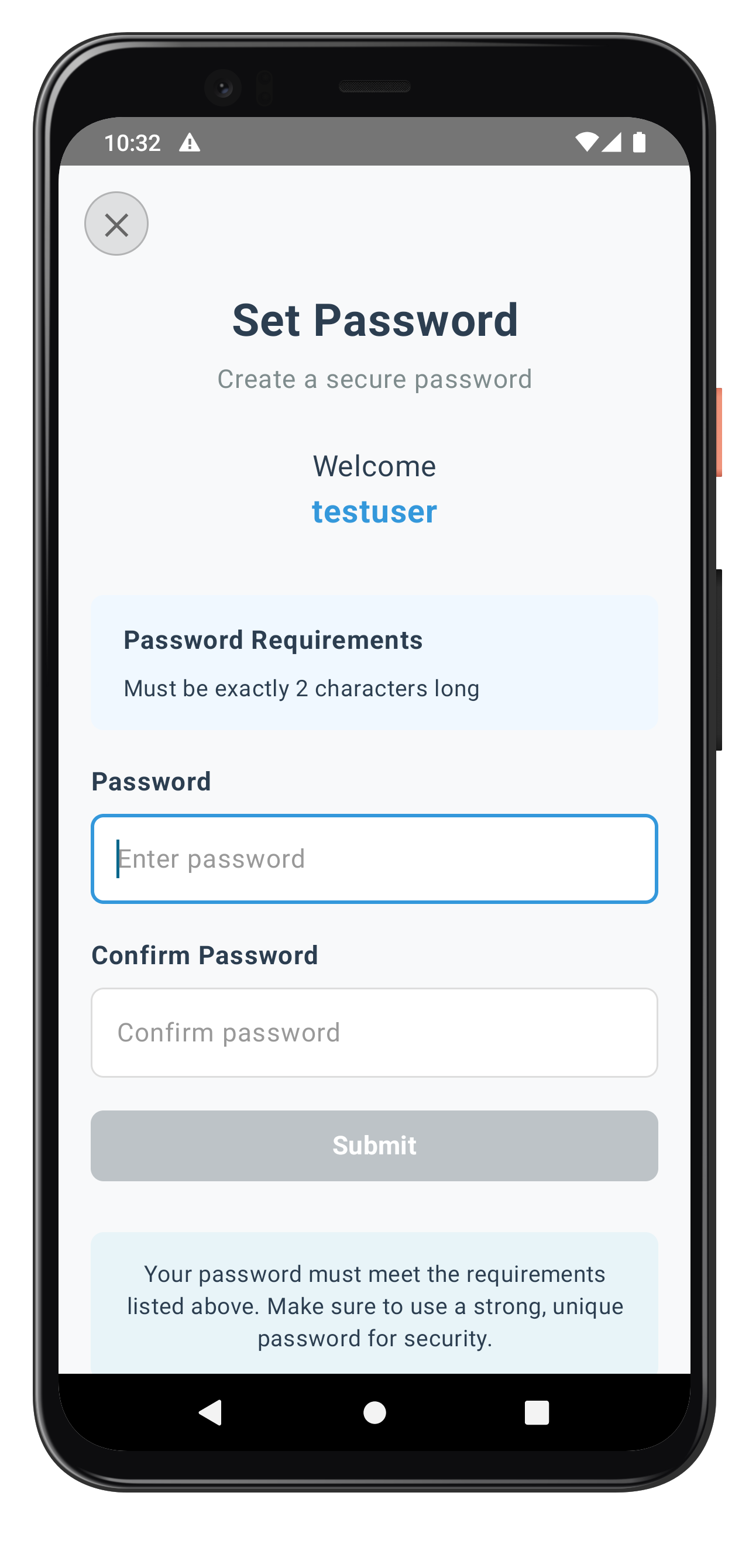
After successful authentication, users are navigated to the dashboard screen which displays session information and provides logout functionality.
Dashboard Features
The dashboard provides:
- Session Information: Displays user ID, session ID, and login time
- JWT Token Display: Shows authentication token for API calls
- Side Drawer Navigation: Material 3 NavigationDrawer for app navigation
- Logout Functionality: Calls
logOffAPI to end user session - Session Management: Handles session expiration gracefully
Adding logOff API to Service Layer
First, add the logOff API to RDNAService:
// app/src/main/java/com/relidcodelab/uniken/services/RDNAService.kt

/**
 * Log off current user and clean up session
 * @returns RDNAError with longErrorCode 0 for success
 */
fun logOff(): RDNA.RDNAError {
    Log.d(TAG, "logOff() called")
    val error = rdna.logOff()
    if (error.longErrorCode != 0) {
        Log.e(TAG, "logOff sync error: ${error.errorString}")
    } else {
        Log.d(TAG, "logOff sync success, waiting for onUserLoggedOff callback")
    }
    return error
}
DashboardViewModel Implementation
The DashboardViewModel manages session state and logout:
// app/src/main/java/com/relidcodelab/tutorial/viewmodels/DashboardViewModel.kt

/**
 * UI State for DashboardScreen
 */
data class DashboardUiState(
    val userId: String = "",
    val sessionId: String = "",
    val sessionType: Int = 0,
    val jwtToken: String = "",
    val loginTime: String = "",
    val isLoggingOut: Boolean = false,
    val error: String = ""
)

/**
 * ViewModel for DashboardScreen
 *
 * Manages user session and logout functionality
 */
class DashboardViewModel(
    private val rdnaService: RDNAService,
    private val callbackManager: RDNACallbackManager,
    private val initialEventData: UserLoggedInEventData?
) : ViewModel() {

    companion object {
        private const val TAG = "DashboardViewModel"
    }

    private val _uiState = MutableStateFlow(DashboardUiState())
    val uiState: StateFlow<DashboardUiState> = _uiState.asStateFlow()

    init {
        loadSessionInfo()
    }

    /**
     * Load session information from event data
     */
    private fun loadSessionInfo() {
        initialEventData?.let { data ->
            val sessionId = data.response?.session?.sessionID ?: ""
            val sessionType = data.response?.session?.sessionType ?: 0
            val jwtToken = RDNAEventUtils.getJWTToken(data.response) ?: ""
            val userId = data.userId ?: ""

            _uiState.update { it.copy(
                userId = userId,
                sessionId = sessionId,
                sessionType = sessionType,
                jwtToken = jwtToken,
                loginTime = java.text.SimpleDateFormat("yyyy-MM-dd HH:mm:ss")
                    .format(java.util.Date())
            )}
        }
    }

    /**
     * Perform logout
     */
    fun performLogOut(onComplete: () -> Unit) {
        viewModelScope.launch {
            _uiState.update { it.copy(isLoggingOut = true, error = "") }

            try {
                val error = rdnaService.logOff()

                if (error.longErrorCode != 0) {
                    _uiState.update { it.copy(
                        isLoggingOut = false,
                        error = RDNAEventUtils.getErrorMessage(error)
                    )}
                } else {
                    // Logout successful - onUserLoggedOff callback will handle navigation
                    Log.d(TAG, "Logout successful, waiting for onUserLoggedOff callback")
                    onComplete()
                }
            } catch (e: Exception) {
                _uiState.update { it.copy(
                    isLoggingOut = false,
                    error = "Logout failed: ${e.message}"
                )}
            }
        }
    }
}
DashboardScreen Composable
The Dashboard screen displays session info with drawer navigation:
// app/src/main/java/com/relidcodelab/tutorial/screens/mfa/DashboardScreen.kt

@Composable
fun DashboardScreen(
    viewModel: DashboardViewModel,
    onLogout: () -> Unit
) {
    val uiState by viewModel.uiState.collectAsStateWithLifecycle()
    val drawerState = rememberDrawerState(initialValue = DrawerValue.Closed)
    val scope = rememberCoroutineScope()
    var showLogoutDialog by remember { mutableStateOf(false) }

    ModalNavigationDrawer(
        drawerState = drawerState,
        drawerContent = {
            ModalDrawerSheet {
                Text("Menu", modifier = Modifier.padding(16.dp), fontSize = 24.sp, fontWeight = FontWeight.Bold)
                NavigationDrawerItem(
                    label = { Text("Dashboard") },
                    selected = true,
                    onClick = { scope.launch { drawerState.close() } }
                )
                NavigationDrawerItem(
                    label = { Text("Logout") },
                    selected = false,
                    onClick = {
                        scope.launch { drawerState.close() }
                        showLogoutDialog = true
                    }
                )
            }
        }
    ) {
        Scaffold(
            topBar = {
                TopAppBar(
                    title = { Text("Dashboard") },
                    navigationIcon = {
                        IconButton(onClick = { scope.launch { drawerState.open() } }) {
                            Icon(Icons.Default.Menu, contentDescription = "Menu")
                        }
                    }
                )
            }
        ) { padding ->
            Column(
                modifier = Modifier
                    .fillMaxSize()
                    .padding(padding)
                    .padding(20.dp)
                    .verticalScroll(rememberScrollState())
            ) {
                Text("Welcome!", fontSize = 28.sp, fontWeight = FontWeight.Bold)
                Spacer(modifier = Modifier.height(20.dp))

                // Session Information
                Card(modifier = Modifier.fillMaxWidth()) {
                    Column(modifier = Modifier.padding(16.dp)) {
                        Text("Session Information", fontWeight = FontWeight.Bold, fontSize = 18.sp)
                        Spacer(modifier = Modifier.height(12.dp))

                        InfoRow("User ID:", uiState.userId)
                        InfoRow("Session ID:", uiState.sessionId)
                        InfoRow("Login Time:", uiState.loginTime)
                        InfoRow("JWT Token:", uiState.jwtToken.take(30) + "...")
                    }
                }

                Spacer(modifier = Modifier.height(20.dp))

                // Logout Button
                Button(
                    onClick = { showLogoutDialog = true },
                    modifier = Modifier.fillMaxWidth().height(56.dp),
                    enabled = !uiState.isLoggingOut
                ) {
                    Text("Logout")
                }

                if (uiState.error.isNotEmpty()) {
                    Spacer(modifier = Modifier.height(16.dp))
                    StatusBanner(type = StatusBannerType.ERROR, message = uiState.error)
                }
            }
        }
    }

    // Logout Confirmation Dialog
    if (showLogoutDialog) {
        AlertDialog(
            onDismissRequest = { showLogoutDialog = false },
            title = { Text("Confirm Logout") },
            text = { Text("Are you sure you want to logout?") },
            confirmButton = {
                Button(
                    onClick = {
                        showLogoutDialog = false
                        viewModel.performLogOut(onLogout)
                    }
                ) {
                    Text("Logout")
                }
            },
            dismissButton = {
                Button(onClick = { showLogoutDialog = false }) {
                    Text("Cancel")
                }
            }
        )
    }
}

@Composable
fun InfoRow(label: String, value: String) {
    Row(modifier = Modifier.padding(vertical = 4.dp)) {
        Text(label, fontWeight = FontWeight.Bold, modifier = Modifier.width(100.dp))
        Text(value, modifier = Modifier.weight(1f))
    }
}
Logout Flow Sequence
User Clicks Logout Button
        ↓
Dashboard shows confirmation dialog
        ↓
User confirms logout
        ↓
Call rdnaService.logOff()
        ↓
SDK cleans up session
        ↓
onUserLoggedOff callback triggered
        ↓
SDKEventProvider handles callback
        ↓
Navigate to initial screen (clear backstack)
        ↓
SDK auto-triggers getUser callback
        ↓
User can start new login flow
Key Implementation Patterns
- Drawer Navigation: Uses ModalNavigationDrawer for side menu
- Session State: Maintains session info in ViewModel with StateFlow
- Logout Flow: Calls
rdnaService.logOff()and handlesonUserLoggedOffcallback - Dialog Confirmation: Shows AlertDialog before logout for better UX
The following images showcase the Dashboard and Logout screens from the sample application:
Dashboard Screen |
Logout Confirmation |
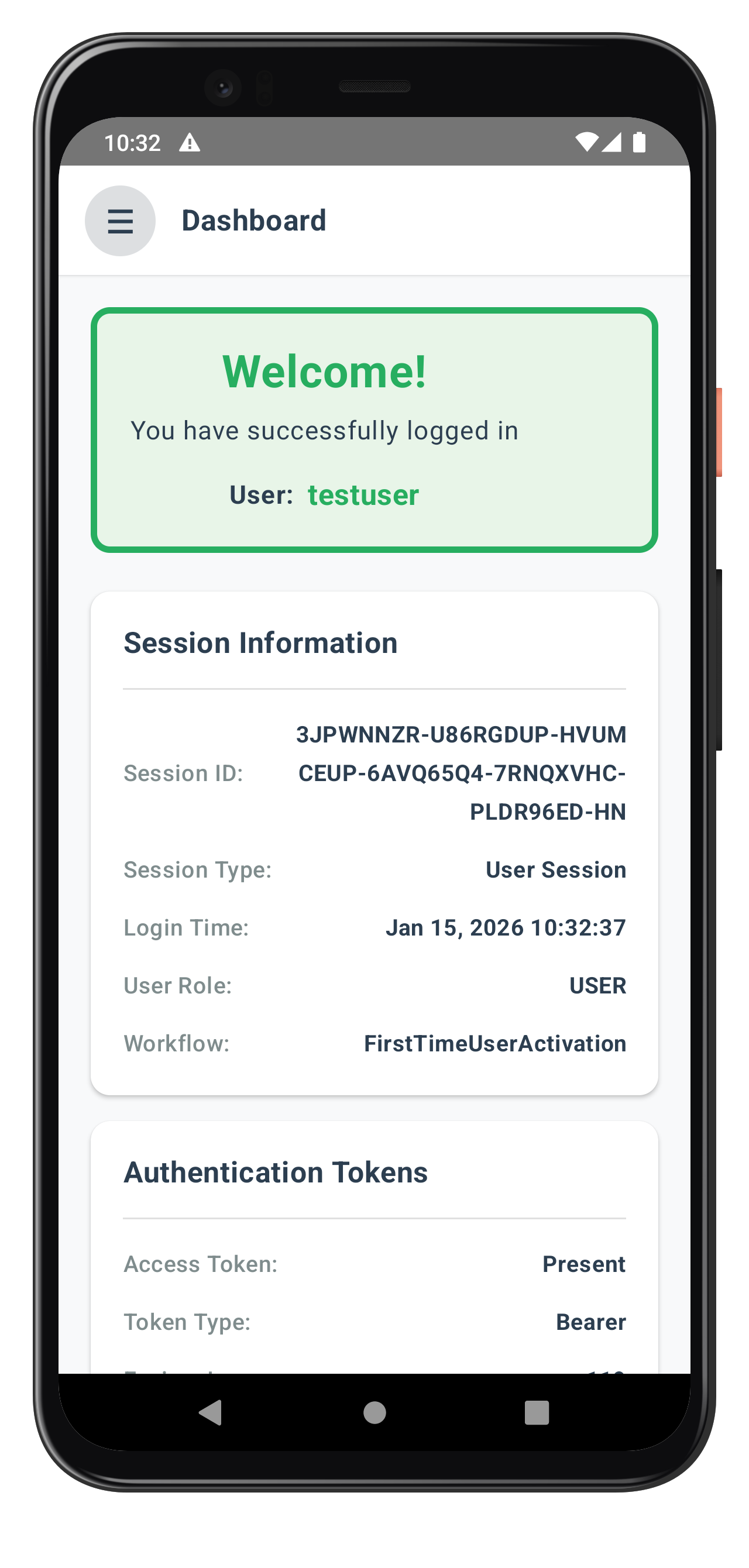
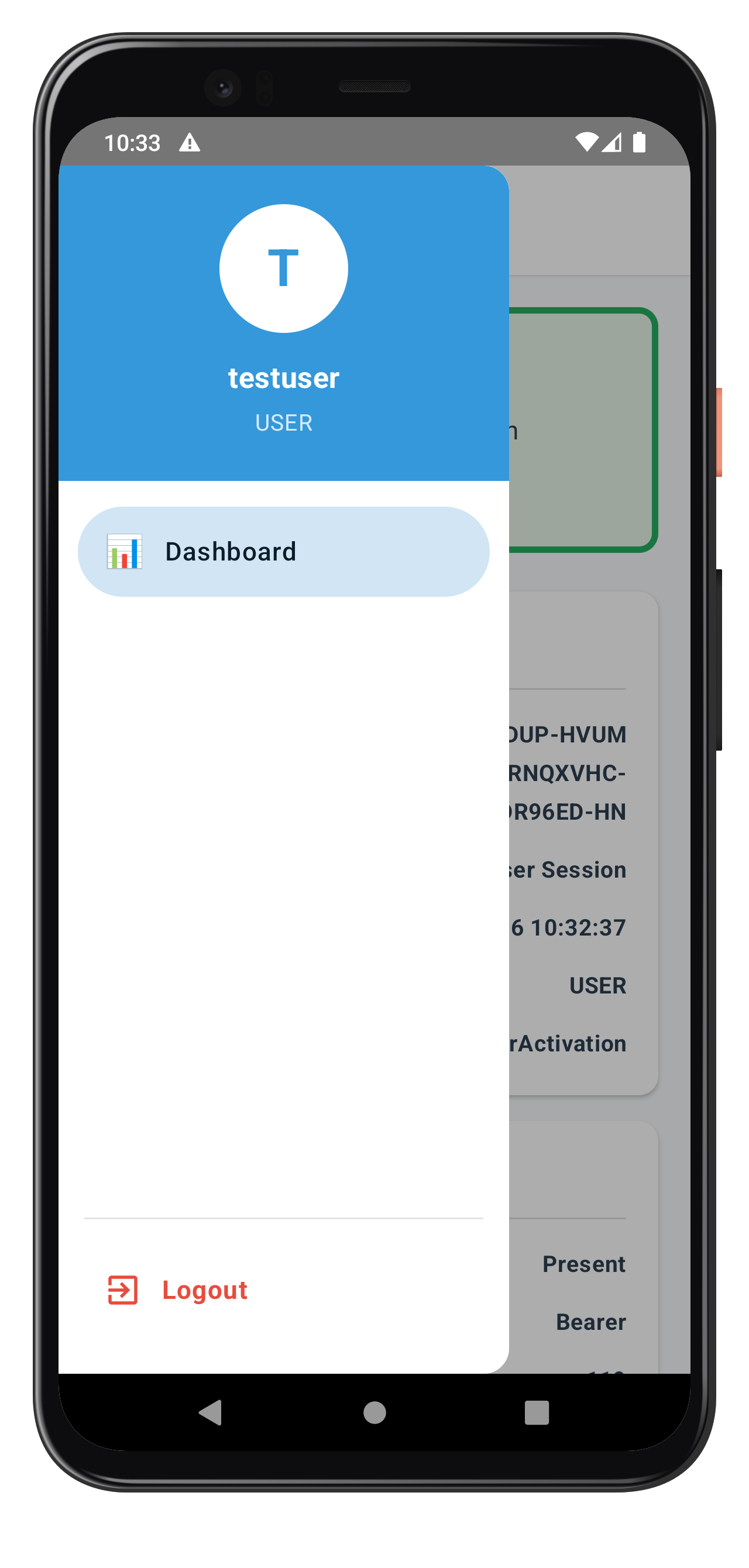
📝 What We're Building: Streamlined authentication for returning users who have previously activated on the device.
Understanding Login Flow
The login flow is simpler than activation:
- User Identification: Enter username (same as activation)
- Authentication:
- If LDA enabled: Biometric authentication
- If LDA not enabled: Password verification
- Success: Navigate to dashboard
Key Differences from Activation
Aspect | Activation Flow | Login Flow |
OTP Required | Yes | No |
Password Mode | SET (mode=1) | VERIFY (mode=0) |
LDA Setup | Optional setup | Uses existing if enabled |
Complexity | More steps | Fewer steps |
Create the password verification screen for returning users during login.
VerifyPasswordViewModel Implementation
The VerifyPasswordViewModel handles password verification for login:
// app/src/main/java/com/relidcodelab/tutorial/viewmodels/VerifyPasswordViewModel.kt

/**
 * UI State for VerifyPasswordScreen
 */
data class VerifyPasswordUiState(
    val password: String = "",
    val error: String = "",
    val isSubmitting: Boolean = false,
    val challengeMode: Int = 0,
    val userName: String = "",
    val attemptsLeft: Int = 0
)

/**
 * ViewModel for VerifyPasswordScreen
 *
 * Handles password verification during MFA login flow.
 *
 * State Management:
 * - password: Password input
 * - error: Validation/API errors
 * - isSubmitting: Loading state during setPassword API call
 * - challengeMode: Challenge mode (0 = verify password)
 * - userName: User's username from event data
 * - attemptsLeft: Number of remaining verification attempts
 *
 * SDK Integration:
 * - Calls rdnaService.setPassword(password, challengeMode) with mode 0 (verify)
 */
class VerifyPasswordViewModel(
    private val rdnaService: RDNAService,
    private val callbackManager: RDNACallbackManager,
    private val initialEventData: GetPasswordEventData?
) : ViewModel() {

    companion object {
        private const val TAG = "VerifyPasswordViewModel"
    }

    // UI State
    private val _uiState = MutableStateFlow(VerifyPasswordUiState())
    val uiState: StateFlow<VerifyPasswordUiState> = _uiState.asStateFlow()

    init {
        processEventData()
    }

    /**
     * Process initial event data
     */
    private fun processEventData() {
        initialEventData?.let { data ->
            // Check for errors
            if (RDNAEventUtils.hasApiError(data.error)) {
                val errorMessage = RDNAEventUtils.getErrorMessage(data.error)
                _uiState.update { it.copy(error = errorMessage) }
                Log.e(TAG, "Initial event has API error: $errorMessage")
                return
            }

            if (RDNAEventUtils.hasStatusError(data.response)) {
                val errorMessage = RDNAEventUtils.getErrorMessage(data.error, data.response)
                _uiState.update { it.copy(error = errorMessage) }
                Log.e(TAG, "Initial event has status error: $errorMessage")
                return
            }

            // Extract username from userId
            val userID = data.userId ?: ""

            // Extract challenge mode (should be 0 for verify)
            val mode = data.mode?.intValue ?: 0

            // Extract attempts left from challenge info
            val attemptsString = RDNAEventUtils.getChallengeValue(
                data.response,
                "RELID_PASSWORD_ATTEMPTS_LEFT"
            )
            val attempts = attemptsString?.toIntOrNull() ?: 0

            _uiState.update { it.copy(
                userName = userID,
                challengeMode = mode,
                attemptsLeft = attempts
            )}

            Log.d(TAG, "Processed event data: userName=$userID, challengeMode=$mode, attemptsLeft=$attempts")
        }
    }

    /**
     * Handle password change
     */
    fun onPasswordChange(newPassword: String) {
        _uiState.update { it.copy(
            password = newPassword,
            error = ""
        )}
    }

    /**
     * Validate and submit password
     */
    fun verifyPassword() {
        val currentState = _uiState.value
        val trimmedPassword = currentState.password.trim()

        // Validation
        if (trimmedPassword.isEmpty()) {
            _uiState.update { it.copy(error = "Please enter your password") }
            return
        }

        viewModelScope.launch {
            _uiState.update { it.copy(
                isSubmitting = true,
                error = ""
            )}

            Log.d(TAG, "Calling setPassword API with challengeMode: ${currentState.challengeMode} (verify)")

            try {
                // Call SDK setPassword method with mode 0 (verify)
                val error = rdnaService.setPassword(trimmedPassword, currentState.challengeMode)

                // Check sync response
                if (error.longErrorCode != 0) {
                    // Sync error
                    val errorMessage = RDNAEventUtils.getErrorMessage(error)
                    Log.e(TAG, "setPassword sync error: $errorMessage")

                    _uiState.update { it.copy(
                        isSubmitting = false,
                        error = errorMessage,
                        password = "" // Reset input on error
                    )}
                } else {
                    // Sync success - async events will be handled globally
                    Log.d(TAG, "setPassword verify sync success - waiting for async events")

                    _uiState.update { it.copy(
                        isSubmitting = false
                    )}
                }
            } catch (e: Exception) {
                Log.e(TAG, "Exception during setPassword", e)
                _uiState.update { it.copy(
                    isSubmitting = false,
                    error = "An unexpected error occurred: ${e.message}",
                    password = ""
                )}
            }
        }
    }

    /**
     * Handle close button (reset auth state)
     */
    fun handleClose() {
        viewModelScope.launch {
            try {
                Log.d(TAG, "Calling resetAuthState")
                rdnaService.resetAuthState()
            } catch (e: Exception) {
                Log.e(TAG, "Exception during resetAuthState", e)
            }
        }
    }
}
VerifyPasswordScreen Composable
The VerifyPasswordScreen renders the UI for password verification:
// app/src/main/java/com/relidcodelab/tutorial/screens/mfa/VerifyPasswordScreen.kt

/**
 * VerifyPasswordScreen - Password verification during MFA login
 */
@Composable
fun VerifyPasswordScreen(
    viewModel: VerifyPasswordViewModel,
    onClose: () -> Unit,
    title: String = "Verify Password",
    subtitle: String = "Enter your password to continue"
) {
    val uiState by viewModel.uiState.collectAsStateWithLifecycle()
    val focusManager = LocalFocusManager.current

    // Disable hardware back button during MFA flow
    BackHandler(enabled = true) {
        // Do nothing - prevent back navigation
    }

    Box(modifier = Modifier.fillMaxSize()) {
        Scaffold(containerColor = PageBackground) { padding ->
            Column(
                modifier = Modifier
                    .fillMaxSize()
                    .padding(padding)
                    .imePadding()
                    .verticalScroll(rememberScrollState())
                    .padding(horizontal = 20.dp)
                    .padding(top = 80.dp, bottom = 20.dp),
                horizontalAlignment = Alignment.CenterHorizontally
            ) {
                // Title
                Text(
                    text = title,
                    fontSize = 28.sp,
                    fontWeight = FontWeight.Bold,
                    color = DarkGray,
                    textAlign = TextAlign.Center,
                    modifier = Modifier.fillMaxWidth().padding(bottom = 8.dp)
                )

                // Subtitle
                Text(
                    text = subtitle,
                    fontSize = 16.sp,
                    color = MediumGray,
                    textAlign = TextAlign.Center,
                    modifier = Modifier.fillMaxWidth().padding(bottom = 30.dp)
                )

                // User container (conditional)
                if (uiState.userName.isNotEmpty()) {
                    Column(
                        modifier = Modifier.fillMaxWidth().padding(bottom = 20.dp),
                        horizontalAlignment = Alignment.CenterHorizontally
                    ) {
                        Text(
                            text = "Welcome back",
                            fontSize = 18.sp,
                            color = DarkGray,
                            modifier = Modifier.padding(bottom = 4.dp)
                        )
                        Text(
                            text = uiState.userName,
                            fontSize = 20.sp,
                            fontWeight = FontWeight.Bold,
                            color = PrimaryBlue,
                            modifier = Modifier.padding(bottom = 20.dp)
                        )
                    }
                }

                // Attempts warning banner (conditional)
                if (uiState.attemptsLeft > 0) {
                    StatusBanner(
                        type = StatusBannerType.WARNING,
                        message = "${uiState.attemptsLeft} attempt(s) remaining"
                    )
                }

                // Status Banner (error, conditional)
                if (uiState.error.isNotEmpty()) {
                    StatusBanner(
                        type = StatusBannerType.ERROR,
                        message = uiState.error
                    )
                }

                // Password Input
                Column(modifier = Modifier.fillMaxWidth().padding(bottom = 24.dp)) {
                    Text(
                        text = "Password",
                        fontSize = 16.sp,
                        fontWeight = FontWeight.Bold,
                        color = DarkGray,
                        modifier = Modifier.padding(bottom = 8.dp)
                    )

                    OutlinedTextField(
                        value = uiState.password,
                        onValueChange = viewModel::onPasswordChange,
                        modifier = Modifier.fillMaxWidth(),
                        placeholder = { Text(text = "Enter your password", color = PlaceholderText) },
                        visualTransformation = PasswordVisualTransformation(),
                        singleLine = true,
                        keyboardOptions = KeyboardOptions(
                            keyboardType = KeyboardType.Password,
                            imeAction = ImeAction.Done
                        ),
                        keyboardActions = KeyboardActions(
                            onDone = {
                                focusManager.clearFocus()
                                viewModel.verifyPassword()
                            }
                        ),
                        isError = uiState.error.isNotEmpty()
                    )
                }

                // Verify Button
                Button(
                    onClick = {
                        focusManager.clearFocus()
                        viewModel.verifyPassword()
                    },
                    modifier = Modifier.fillMaxWidth().height(56.dp).padding(bottom = 12.dp),
                    enabled = uiState.password.isNotEmpty() && !uiState.isSubmitting
                ) {
                    if (uiState.isSubmitting) {
                        Row(
                            verticalAlignment = Alignment.CenterVertically,
                            horizontalArrangement = Arrangement.Center
                        ) {
                            CircularProgressIndicator(
                                modifier = Modifier.size(20.dp),
                                strokeWidth = 2.dp
                            )
                            Spacer(modifier = Modifier.width(8.dp))
                            Text(text = "Verifying...", fontSize = 16.sp, fontWeight = FontWeight.Bold)
                        }
                    } else {
                        Text(text = "Verify Password", fontSize = 16.sp, fontWeight = FontWeight.Bold)
                    }
                }

                // Help Container
                Card(modifier = Modifier.fillMaxWidth().padding(top = 20.dp)) {
                    Text(
                        text = "Enter the password you created during activation to verify your identity and continue.",
                        fontSize = 14.sp,
                        textAlign = TextAlign.Center,
                        lineHeight = 20.sp,
                        modifier = Modifier.padding(16.dp)
                    )
                }
            }
        }

        // Close Button (top-left, absolute)
        CloseButton(
            onPress = {
                viewModel.handleClose()
                onClose()
            },
            enabled = !uiState.isSubmitting
        )
    }
}
Specific Status Code Handling
Status Code | Event Name | Meaning |
141 |
| User is blocked due to exceeded verify password attempts. Can be unblocked using resetBlockedUserAccount API |
Key Implementation Features
The VerifyPasswordScreen handles:
- Password Input: Secure text field for password entry
- Attempts Tracking: Displays remaining attempts
- Challenge Mode: Handles VERIFY mode (mode=0)
- Error Feedback: Clear messages for incorrect passwords
- Lockout Handling: Shows lockout message when attempts exhausted
The following image showcases the Verify Password screen from the sample application:
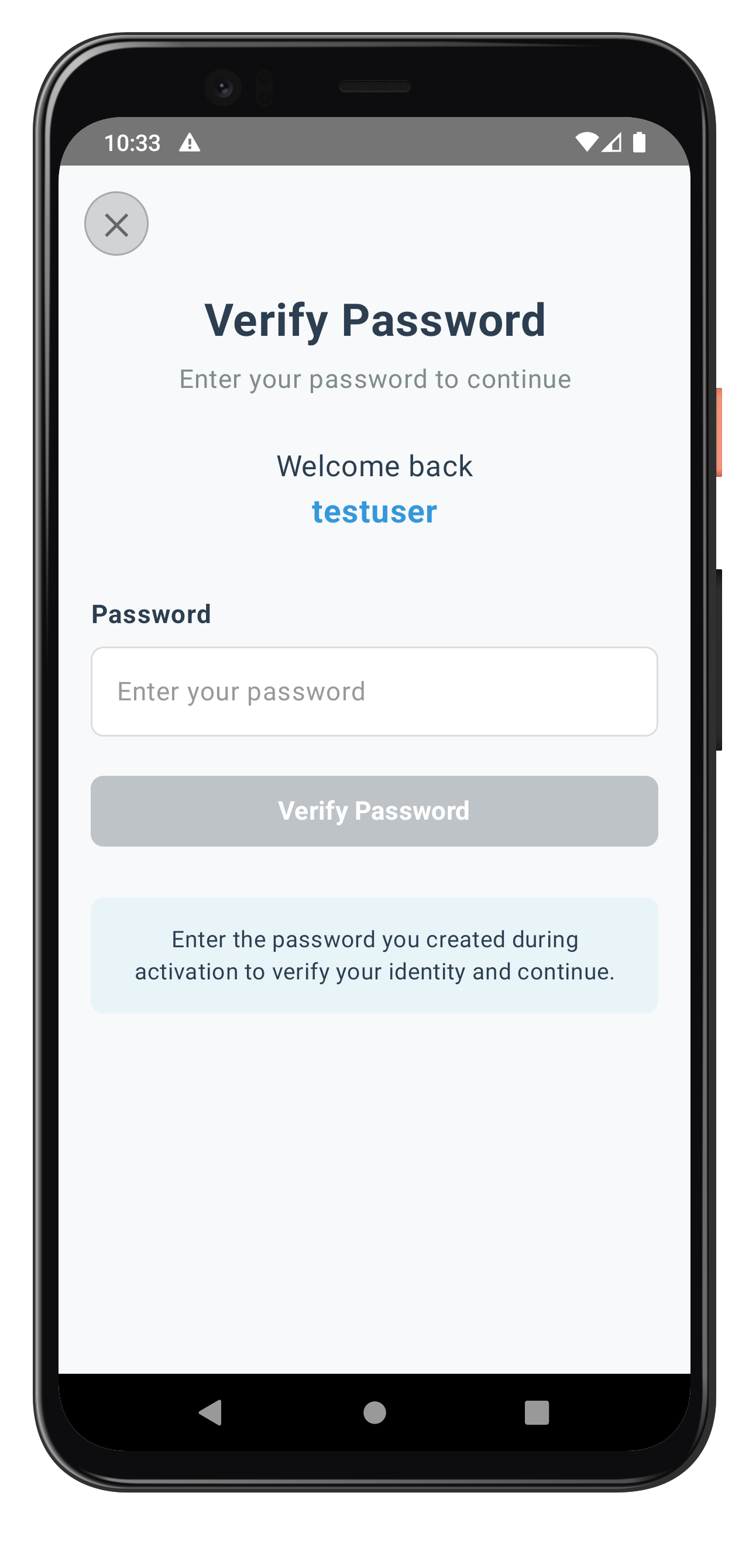
Build and Run
Using Android Studio:
- Open project in Android Studio
- Select target device or emulator
- Click Run (▶) or press Shift+F10
Using command line:
# Build APK
./gradlew assembleDebug

# Install on device
./gradlew installDebug

# Or combined
adb install app/build/outputs/apk/debug/app-debug.apk
Testing Activation Flow
- Initialize SDK: Start from Tutorial Home screen
- Enter Username: Test with valid/invalid usernames
- Enter OTP: Verify activation code flow
- Choose Authentication:
- Test biometric consent (if available)
- Test password setup (fallback)
- Verify Dashboard: Check session information display
Testing Login Flow
- Logout: Use logout from dashboard
- Re-authenticate: Enter same username
- Verify Authentication:
- Test biometric (if enabled)
- Test password verification
- Check Session: Verify dashboard shows new session
Debugging
Logcat: View real-time logs with filtering
adb logcat | grep -E "(RDNA|MainActivity|SDKEventProvider)"
Android Studio Debugger: Use breakpoints in ViewModels and callbacks Layout Inspector: Inspect Compose UI hierarchy
The Dashboard screen serves as the primary landing destination after successful activation or login completion. When the SDK triggers the onUserLoggedIn callback, it indicates that the user session has started and provides session details including userID and session tokens. This callback should trigger navigation to the Dashboard screen, marking the successful completion of either the activation or login flow.
Implementing User Logout API and Events
Complete MFA systems need secure logout functionality with proper session cleanup.
Understanding Logout Flow
The logout flow follows this sequence:
- User initiates logout (button press)
- Call
logOff()API to clean up session - SDK triggers
onUserLoggedOffcallback - Navigate back to initial screen
- SDK automatically triggers
getUsercallback (flow restarts)
Adding logOff API to Service Layer
Add the logOff API to RDNAService:
// app/src/main/java/com/relidcodelab/uniken/services/RDNAService.kt

/**
 * Log off current user and clean up session
 * @returns RDNAError with longErrorCode 0 for success
 */
fun logOff(): RDNA.RDNAError {
    Log.d(TAG, "logOff() called")
    val error = rdna.logOff()
    if (error.longErrorCode != 0) {
        Log.e(TAG, "logOff sync error: ${error.errorString}")
    } else {
        Log.d(TAG, "logOff sync success, waiting for onUserLoggedOff callback")
    }
    return error
}
Building Dashboard with Logout Functionality
The Dashboard provides session information and logout capability:
// app/src/main/java/com/relidcodelab/tutorial/viewmodels/DashboardViewModel.kt

data class DashboardUiState(
    val userId: String = "",
    val sessionId: String = "",
    val sessionType: Int = 0,
    val jwtToken: String = "",
    val loginTime: String = "",
    val isLoggingOut: Boolean = false,
    val error: String = ""
)

class DashboardViewModel(
    private val rdnaService: RDNAService,
    private val callbackManager: RDNACallbackManager,
    private val initialEventData: UserLoggedInEventData?
) : ViewModel() {

    private val _uiState = MutableStateFlow(DashboardUiState())
    val uiState: StateFlow<DashboardUiState> = _uiState.asStateFlow()

    init {
        loadSessionInfo()
    }

    private fun loadSessionInfo() {
        initialEventData?.let { data ->
            val sessionId = data.response?.session?.sessionID ?: ""
            val sessionType = data.response?.session?.sessionType ?: 0
            val jwtToken = RDNAEventUtils.getJWTToken(data.response) ?: ""
            val userId = data.userId ?: ""

            _uiState.update { it.copy(
                userId = userId,
                sessionId = sessionId,
                sessionType = sessionType,
                jwtToken = jwtToken,
                loginTime = java.text.SimpleDateFormat("yyyy-MM-dd HH:mm:ss")
                    .format(java.util.Date())
            )}
        }
    }

    fun performLogOut(onComplete: () -> Unit) {
        viewModelScope.launch {
            _uiState.update { it.copy(isLoggingOut = true, error = "") }

            try {
                val error = rdnaService.logOff()

                if (error.longErrorCode != 0) {
                    _uiState.update { it.copy(
                        isLoggingOut = false,
                        error = RDNAEventUtils.getErrorMessage(error)
                    )}
                } else {
                    // Logout successful - onUserLoggedOff callback will handle navigation
                    Log.d(TAG, "Logout successful, waiting for onUserLoggedOff callback")
                    onComplete()
                }
            } catch (e: Exception) {
                _uiState.update { it.copy(
                    isLoggingOut = false,
                    error = "Logout failed: ${e.message}"
                )}
            }
        }
    }

    companion object {
        private const val TAG = "DashboardViewModel"
    }
}
Logout Flow Sequence
User Clicks Logout Button
        ↓
Dashboard shows confirmation dialog
        ↓
User confirms logout
        ↓
Call rdnaService.logOff()
        ↓
SDK cleans up session
        ↓
onUserLoggedOff callback triggered
        ↓
SDKEventProvider handles callback
        ↓
Navigate to initial screen (clear backstack)
        ↓
SDK auto-triggers getUser callback
        ↓
User can start new login flow
🔑 Key Implementation Notes
- Session Cleanup: logOff() properly cleans up SDK session state
- Callback Handling: onUserLoggedOff callback confirms successful logout
- Navigation Reset: Clear navigation backstack to prevent back button issues
- Flow Restart: SDK automatically starts fresh authentication flow
✅ Implementation Status
After implementing dashboard with logout:
- ✅ Session information displayed
- ✅ JWT token available for API calls
- ✅ Logout functionality working
- ✅ Clean session cleanup
- ✅ Automatic flow restart after logout
📝 What We're Building: Streamlined authentication for returning users with biometric prompts and password verification.
Login Flow vs Activation Flow
Key Differences:
Aspect | Activation Flow | Login Flow |
User Type | First-time users | Returning users |
OTP Required | Always required | Usually not required |
Biometric Setup | User chooses to enable | Automatic prompt if enabled |
Password Setup | Creates new password | Verifies existing password |
Navigation | Multiple screens | Fewer screens |
When Login Flow Occurs
Login Flow Triggers When:
- User previously completed activation on any device
- User has an existing account with established credentials
- Device authentication is already configured
- User logged out and is logging back in
Flow Detection: The same SDK callbacks (getUser, getPassword) are used for both flows. The difference is in:
- Context: SDK knows user history
- UI Adaptation: Screens show login-specific content
- Skip Steps: OTP verification often skipped
- Automatic LDA Prompts or Password Verification: Biometric authentication is triggered automatically if LDA is enabled; otherwise, password verification is required.
Login Flow Events Sequence
SDK Initialization Complete
        ↓
   getUser Callback (Challenge: checkuser)
        ↓
   setUser API Call → User Recognition
        ↓
   [SDK Decision - Skip OTP for known users]
        ↓
   Device Authentication:
   ├─ LDA Enabled? → [Automatic Biometric Prompt]
   │                 ├─ Success → onUserLoggedIn Callback
   │                 └─ Failed/Cancelled → getUser Callback with error
   │
   └─ Password Only? → getPassword Callback (verification mode)
                       ↓
                       setPassword API Call
        ↓
   onUserLoggedIn Callback (Success) → Dashboard Screen
The same CheckUserScreen is used for login flow as activation flow. The SDK automatically determines the appropriate next step based on user history.
Specific Status Code handling
Status Code | Event Name | Meaning |
141 |
| User is blocked due to exceeded verify password attempts. Can be unblocked using resetBlockedUserAccount API |
The screens we built for activation automatically handle login flow contexts through the SDKEventProvider.
SDK Event Provider
The same SDKEventProvider (app/src/main/java/com/relidcodelab/uniken/providers/SDKEventProvider.kt) handles all navigation for both flows:
- Activation Flow: getUser → getActivationCode → getUserConsentForLDA/getPassword → onUserLoggedIn
- Login Flow: getUser → getPassword (verify mode) → onUserLoggedIn
The event-driven architecture automatically routes to the correct screens based on SDK callbacks.
Test both activation and login flows to ensure proper implementation.
Testing Preparation
Before Testing:
- Clear app data to simulate first-time user
adb shell pm clear com.relidcodelab - Ensure device has biometric authentication available
- Have valid test credentials ready
- Enable debug logging in development
End-to-End Testing Scenarios
Scenario 1: Complete Activation Flow (New User)
1. Launch app → TutorialHome
2. Tap "Initialize SDK" → SDK Initialize → getUser callback → CheckUserScreen
3. Enter username → setUser API → getActivationCode callback → ActivationCodeScreen
4. Enter OTP → setActivationCode API → getUserConsentForLDA callback → UserLDAConsentScreen
5. Enable biometric → setUserConsentForLDA API → [Biometric prompt]
6. Complete biometric → onUserLoggedIn callback → DashboardScreen
✅ Validation Points:
- Each screen transition happens smoothly
- No duplicate callback handling
- Loading states show during API calls
- Biometric prompt appears automatically
- Dashboard shows activation success
Scenario 2: Login Flow (Returning User with Biometric)
1. Launch app (user previously activated)
2. SDK auto-triggers getUser callback → CheckUserScreen
3. Enter username → setUser API → [Automatic biometric prompt]
4. Complete biometric authentication → onUserLoggedIn callback → DashboardScreen
✅ Validation Points:
- No OTP screen (skipped for known users)
- Biometric prompt appears immediately after user validation
- Fast login experience (< 5 seconds)
- Direct navigation to Dashboard
Scenario 3: Login Flow with Password
1. Launch app → CheckUserScreen
2. Enter username → setUser API → getPassword callback → VerifyPasswordScreen (mode=0)
3. Enter password → setPassword API → onUserLoggedIn callback → DashboardScreen
✅ Validation Points:
- Password screen shows verification context
- Attempts counter displays correctly
- Error recovery works smoothly
Scenario 4: Logout and Re-login Cycle
1. From Dashboard → Tap logout → Confirmation dialog
2. Confirm logout → logOff API → onUserLoggedOff callback → TutorialHome
3. SDK auto-triggers getUser callback → CheckUserScreen
4. Complete login flow → Back to Dashboard
✅ Validation Points:
- Clean logout process
- Proper session cleanup
- Automatic flow restart
- All callback handlers reset properly
Callback Handler Issues
Callback Not Triggering
Problem: SDK callbacks not firing after API calls
Solutions:
// 1. Verify callback manager initialization
class MainActivity : ComponentActivity() {
    override fun onCreate(savedInstanceState: Bundle?) {
        super.onCreate(savedInstanceState)

        // Create callback manager BEFORE SDK initialization
        callbackManager = RDNACallbackManager(
            context = applicationContext,
            currentActivity = this
        )

        // Then initialize SDK
        rdnaService.getInstance(applicationContext)

        Log.d(TAG, "Callback manager initialized")
    }
}

// 2. Verify SDKEventProvider initialization
private fun initializeMFANavigationHandler() {
    val navCtrl = navController ?: return

    SDKEventProvider.initialize(
        lifecycleOwner = this,
        rdnaService = rdnaService,
        callbackManager = callbackManager,
        navController = navCtrl
    )

    Log.d(TAG, "SDK Event Provider initialized")
}

// 3. Check SharedFlow collection
viewModelScope.launch {
    callbackManager.getUserEvent.collect { eventData ->
        Log.d(TAG, "getUserEvent collected: $eventData")
        // Handle event
    }
}
Navigation Stack Issues
Duplicate Screens in Navigation Stack
Problem: Same screen appears multiple times in navigation stack when SDK callbacks fire repeatedly
Symptoms:
- Multiple instances of the same screen in navigation history
- Back button behavior is confusing (goes through duplicate screens)
- Memory usage increases with duplicate screens
- Performance degradation
Root Cause: Using navController.navigate() for SDK callback-driven navigation creates new screen instances even when already on the target screen.
Solution: Use proper navigation with popUpTo in SDKEventProvider:
// ✅ Solution: Clear previous instances
private suspend fun handleGetUserEvents(
    rdnaService: RDNAService,
    callbackManager: RDNACallbackManager,
    navController: NavController
) {
    callbackManager.getUserEvent.collect { eventData ->
        Log.d(TAG, "getUser callback received - navigating to CheckUserScreen")

        checkUserViewModel = CheckUserViewModel(
            rdnaService = rdnaService,
            callbackManager = callbackManager,
            initialEventData = eventData
        )

        navController.navigate(Routes.CHECK_USER) {
            // Prevent duplicates
            popUpTo(Routes.TUTORIAL_HOME) { inclusive = false }
            launchSingleTop = true
        }
    }
}
Screen Not Updating with New Callback Data
Problem: Screen doesn't reflect updated callback data when SDK callback fires multiple times
Symptoms:
- Screen shows old callback data
- User inputs or error messages don't update
- Stale state displayed to user
Solution: Ensure ViewModels process initialEventData in init block:
class CheckUserViewModel(
    private val rdnaService: RDNAService,
    private val callbackManager: RDNACallbackManager,
    private val initialEventData: GetUserEventData? // ✅ Passed from SDKEventProvider
) : ViewModel() {

    init {
        // ✅ Process event data immediately
        checkForErrors()
    }

    private fun checkForErrors() {
        initialEventData?.let { data ->
            if (RDNAEventUtils.hasApiError(data.error)) {
                val errorMessage = RDNAEventUtils.getErrorMessage(data.error)
                _uiState.update { it.copy(error = errorMessage) }
            }
        }
    }
}
Navigation Performance Issues
Problem: App becomes slow or unresponsive during navigation
Performance Benefits of Proper Navigation:
- Reduced Memory Usage: Prevents accumulation of duplicate screens
- Faster Navigation: Reuses existing screen instances when appropriate
- Cleaner Stack: Maintains optimal navigation stack depth
- Better UX: Smooth transitions without lag
Monitoring Navigation Stack:
// Debug navigation stack depth
private fun debugNavigationStack(navController: NavController) {
    val backStackEntry = navController.currentBackStackEntry
    val currentRoute = backStackEntry?.destination?.route
    val backStackSize = navController.backQueue.size

    Log.d(TAG, "Current route: $currentRoute")
    Log.d(TAG, "Back stack size: $backStackSize")
    Log.d(TAG, "Back stack: ${navController.backQueue.map { it.destination.route }}")
}

// Call periodically during development
LaunchedEffect(Unit) {
    while (true) {
        delay(5000)
        debugNavigationStack(navController)
    }
}
API Response Issues
Sync Response Errors
Problem: API calls returning error codes
Debugging:
val error = rdnaService.setUser(username)
Log.d(TAG, "API Response: ${error.longErrorCode} - ${error.errorString}")

// Common error codes:
// 0 - Success
// > 0 - Various error conditions (check errorString)
Activation Code Expired
Problem: Activation code no longer valid
Solution:
fun resendActivationCode() {
    viewModelScope.launch {
        try {
            val error = rdnaService.resendActivationCode()
            if (error.longErrorCode == 0) {
                _uiState.update { it.copy(
                    validationResult = ValidationResult(
                        success = true,
                        message = "New activation code sent!"
                    )
                )}
            }
        } catch (e: Exception) {
            Log.e(TAG, "Resend failed", e)
        }
    }
}
Navigation Issues
Back Button During MFA Flow
Problem: Hardware back button disrupts MFA flow
Solution: Disable back button in MFA screens:
@Composable
fun CheckUserScreen(viewModel: CheckUserViewModel) {
    // Disable hardware back button during MFA flow
    BackHandler(enabled = true) {
        // Do nothing - prevent back navigation
    }

    // Or show confirmation dialog
    BackHandler(enabled = true) {
        showExitConfirmationDialog()
    }
}
NavController Not Ready
Problem: Navigation called before NavController is initialized
Solution:
// In SDKEventProvider
fun initialize(
    lifecycleOwner: LifecycleOwner,
    rdnaService: RDNAService,
    callbackManager: RDNACallbackManager,
    navController: NavController // ✅ Pass ready NavController
) {
    // NavController is already initialized and ready to use
    lifecycleOwner.lifecycleScope.launch {
        lifecycleOwner.repeatOnLifecycle(Lifecycle.State.STARTED) {
            launch { handleGetUserEvents(rdnaService, callbackManager, navController) }
        }
    }
}
Biometric Authentication Problems
Biometric Prompt Not Appearing
Problem: LDA consent given but biometric prompt doesn't show
Solutions:
- Check Device Capability:
// Verify biometric hardware availability
val biometricManager = BiometricManager.from(context)
when (biometricManager.canAuthenticate(BIOMETRIC_STRONG)) {
    BiometricManager.BIOMETRIC_SUCCESS ->
        Log.d(TAG, "Biometric available")
    BiometricManager.BIOMETRIC_ERROR_NO_HARDWARE ->
        Log.e(TAG, "No biometric hardware")
    BiometricManager.BIOMETRIC_ERROR_HW_UNAVAILABLE ->
        Log.e(TAG, "Biometric hardware unavailable")
    BiometricManager.BIOMETRIC_ERROR_NONE_ENROLLED ->
        Log.e(TAG, "No biometric enrolled")
}
- Check Permissions:
<!-- AndroidManifest.xml -->
<uses-permission android:name="android.permission.USE_BIOMETRIC" />
- SDK Handles Biometric: The SDK automatically shows biometric prompts when LDA is enabled. Your app doesn't need to implement BiometricPrompt directly.
Password Fallback Not Working
Problem: Password fallback doesn't trigger after biometric failure
Solution: The SDK automatically triggers getPassword callback if:
- Biometric authentication is cancelled
- Biometric authentication fails multiple times
- User chooses password option
Ensure you handle the getPassword callback in SDKEventProvider.
MFA Flow Issues
getUser callback fires repeatedly
- Username validation failing on server side
- Solution: Check Logcat for status codes, verify username format
Callbacks not received
- RDNACallbackManager not properly initialized
- Solution: Verify callbacks parameter in Initialize() call
Navigation not working
- SDKEventProvider not initialized in MainActivity
- Solution: Check initializeMFANavigationHandler() is called
State not updating in UI
- Not collecting StateFlow with lifecycle awareness
- Solution: Use collectAsStateWithLifecycle() in composables
Performance Issues
Slow initialization
- Large connection profile or network latency
- Solution: Normal behavior, ensure proper loading indicators
UI freezing
- SDK calls on Main thread
- Solution: Verify suspend functions use Dispatchers.IO
Memory leaks
- ViewModels not cleared properly
- Solution: Check SDKEventProvider.cleanup() is called in onDestroy
Data Security
Secure Storage
- Use EncryptedSharedPreferences for sensitive data
- Never store passwords or PINs in plain text
- Clear sensitive data from memory after use
Logging
- Use RDNA_NO_LOGS in production builds
- Remove Log.d() statements before release
- Never log sensitive user information
Code Obfuscation
- Enable ProGuard/R8 for release builds
- Add ProGuard rules for SDK classes
- Obfuscate all application code
Network Security
Secure Communication
- SDK uses TLS for all gateway communication
- Verify certificate pinning if required
- Use network security configuration for Android
Connection Profile
- Store agent_info.json securely
- Update regularly as required
- Use encrypted channels for distribution
App Security
Permissions
- Request minimum required permissions
- Explain permission usage to users
- Handle permission denials gracefully
Root Detection
- SDK provides MTD (Mobile Threat Defense)
- Use onTerminateWithThreats callback
- Implement appropriate threat responses
Memory Management
State Cleanup
- Clear ViewModels on screen exit
- Cancel coroutines properly
- Use viewModelScope for automatic cleanup
Resource Management
- Close resources in finally blocks
- Use
usefunction for streams - Avoid context leaks in callbacks
Threading Best Practices
Dispatcher Usage
- Always use Dispatchers.Main for UI updates
- Use Dispatchers.IO for network/disk operations
- SDK operations should run on IO dispatcher
- Collect flows with lifecycle awareness
Authentication Security
Password Policies
- Enforce strong passwords via SDK policy
- Display policy requirements to users
- Validate on client before submission
Biometric Security
- Use BiometricPrompt API properly
- Handle biometric changes gracefully
- Provide password fallback
Session Management
- Implement session timeouts
- Clear session data on logout
- Handle session expiration
Congratulations! You've successfully implemented complete Multi-Factor Authentication (MFA) in Android with both Activation and Login flows!
🎉 What You've Accomplished
Core SDK Integration:
- ✅ Android SDK AAR + Maven dependency setup
- ✅ Raw resource loading from res/raw (agent_info.json)
- ✅ Coroutine-based event architecture with SharedFlow
- ✅ RDNACallbackManager with all 70+ callback methods
- ✅ Comprehensive error handling with RDNAEventUtils
Architecture Patterns:
- ✅ Object singleton RDNAService for SDK access
- ✅ SDKEventProvider for centralized callback handling
- ✅ Event-driven navigation with NavController
- ✅ ViewModel pattern with StateFlow for state management
- ✅ Lifecycle-aware event collection with repeatOnLifecycle
User Interface:
- ✅ Jetpack Compose declarative UI
- ✅ Material 3 components and theming
- ✅ CheckUserScreen for username input
- ✅ ActivationCodeScreen for OTP verification
- ✅ UserLDAConsentScreen for biometric setup
- ✅ SetPasswordScreen for password creation
- ✅ VerifyPasswordScreen for password verification
- ✅ Dashboard with session management
Complete Flows:
- ✅ Activation Flow: Username → OTP → Device Auth/Password → Dashboard
- ✅ Login Flow: Username → Device Auth/Password → Dashboard
- ✅ Cyclical event handling for repeated callbacks
- ✅ Error recovery and user feedback
- ✅ Logout functionality with session cleanup
📚 Additional Resources
- REL-ID Android SDK Documentation
- Jetpack Compose Guide
- Kotlin Coroutines
- StateFlow Documentation
- Navigation Compose
- Material 3 Design
🔄 What Happens Next
Next User Login Experience:
When users return to your app, they'll experience the optimized login flow:
- SDK automatically triggers
getUserevent - User enters credentials → Instant biometric prompt (if enabled)
- One-touch authentication → Direct access to app
🚀 Next Steps & Advanced Features
With this foundation, you're ready to explore:
Advanced MFA Features:
- Session Management
- Additional device activation
🎯 You're now ready to deploy a production-grade MFA system! Your implementation demonstrates enterprise-level security practices and provides an excellent foundation for building secure, user-friendly authentication experiences.
The complete working implementation is available in the sample app for reference and further customization.