This codelab demonstrates how to implement the RELID Initialization flow using the REL-ID Android SDK (AAR). The RELID SDK provides secure identity verification and session management for mobile applications.
What You'll Learn
- How to initialize the RELID SDK in an Android application
- Event-driven architecture using Kotlin Coroutines and SharedFlow
- Connection profile management with raw resources
- Error handling and user feedback using Jetpack Compose
What You'll Need
- Android development environment (Android Studio Narwhal 2025.1.1 or later)
- REL-ID Android SDK (AAR) installed
- Basic understanding of Kotlin, Coroutines, and Jetpack Compose
- Connection profile JSON file from your Uniken Admin or Uniken gateway manager
- Access to the sample app source code for reference
Get the Code from GitHub
The code to get started is stored in a GitHub repository.
You can clone the repository using the following command:
git clone https://github.com/uniken-public/codelab-android.git
Navigate to the relid-initialize folder in the repository you cloned earlier
Before implementing your own RELID initialization, let's examine the sample app structure to understand the recommended architecture:
Component | Purpose | Sample App Reference |
Connection Profile | Configuration data |
|
Profile Parser | Utility to parse connection data |
|
Callback Manager | Handles SDK callbacks |
|
RELID Service | Main SDK interface |
|
Event Provider | Global event handling |
|
UI Components | Composable screens |
|
Recommended Directory Structure
Create the following directory structure in your Android project:
YourApp/
├── app/
│   ├── build.gradle.kts            # Dependencies and configuration
│   ├── src/main/
│   │   ├── AndroidManifest.xml     # App permissions and config
│   │   ├── java/com/yourapp/
│   │   │   ├── MainActivity.kt     # App entry point
│   │   │   ├── tutorial/
│   │   │   │   ├── navigation/
│   │   │   │   │   └── AppNavigation.kt
│   │   │   │   ├── screens/        # Composable screens
│   │   │   │   │   ├── TutorialHomeScreen.kt
│   │   │   │   │   ├── TutorialSuccessScreen.kt
│   │   │   │   │   └── TutorialErrorScreen.kt
│   │   │   │   └── viewmodels/     # ViewModels with StateFlow
│   │   │   │       └── TutorialHomeViewModel.kt
│   │   │   └── uniken/             # REL-ID SDK integration
│   │   │       ├── providers/
│   │   │       │   └── SDKEventProvider.kt
│   │   │       ├── services/
│   │   │       │   ├── RDNAService.kt
│   │   │       │   └── RDNACallbackManager.kt
│   │   │       ├── models/
│   │   │       │   └── RDNAModels.kt
│   │   │       └── utils/
│   │   │           ├── ConnectionProfileParser.kt
│   │   │           └── ProgressHelper.kt
│   │   └── res/
│   │       ├── raw/                # Resources
│   │       │   └── agent_info.json
│   │       └── values/
│   │           ├── colors.xml
│   │           └── strings.xml
│   └── libs/                       # AAR files
│       └── REL-ID_API_SDK_vX.X.X_release.aar
├── build.gradle.kts                # Project-level Gradle config
└── settings.gradle.kts             # Project settings
Prerequisites
Ensure you have Android Studio installed:
# Check Android Studio and SDK
android --version  # or check in Android Studio > Settings > Languages & Frameworks > Android SDK
You need Android Studio Narwhal (2025.1.1) or later with:
- Android SDK API 23+ (minSdk)
- Android SDK API 36+ (targetSdk)
- Kotlin 1.9+
- Gradle 8.0+
Add SDK Dependency
Step 1: Add AAR File
Copy the REL-ID SDK AAR file to your project:
# Create libs directory if it doesn't exist
mkdir -p app/libs

# Copy AAR file (get from your Uniken administrator)
cp REL-ID_API_SDK_vX.X.X_release.aar app/libs/
Step 2: Configure Maven Repository
Add the Uniken Maven repository to settings.gradle.kts:
dependencyResolutionManagement {
    repositories {
        google()
        mavenCentral()

        // Uniken Maven repository for REL-ID engine dependency
        maven {
            url = uri("https://pkgs.dev.azure.com/managevm/REL-ID-Thirdparty-Repo/_packaging/library/maven/v1")
        }
    }
}
Step 3: Configure build.gradle.kts
Add dependencies to app/build.gradle.kts:
dependencies {
    // REL-ID SDK
    implementation(files("libs/REL-ID_API_SDK_vX.X.X_release.aar"))
    implementation("com.uniken.relid:engine:X.X.Xen") {
        isTransitive = true
    }

    // Core Android
    implementation(libs.androidx.core.ktx)
    implementation(libs.androidx.lifecycle.runtime.ktx)
    implementation(libs.androidx.activity.compose)

    // Compose
    implementation(platform(libs.androidx.compose.bom))
    implementation(libs.androidx.ui)
    implementation(libs.androidx.material3)

    // ViewModel Compose
    implementation("androidx.lifecycle:lifecycle-viewmodel-compose:2.7.0")
    implementation("androidx.lifecycle:lifecycle-runtime-compose:2.7.0")

    // Navigation Compose
    implementation("androidx.navigation:navigation-compose:2.7.6")

    // Coroutines
    implementation("org.jetbrains.kotlinx:kotlinx-coroutines-android:1.7.3")

    // JSON parsing
    implementation("com.google.code.gson:gson:2.10.1")
}
Step 4: Sync Gradle
Click "Sync Now" in the banner or:
./gradlew sync
Platform Configuration
Add required permissions to AndroidManifest.xml:
<uses-permission android:name="android.permission.INTERNET" />
<uses-permission android:name="android.permission.ACCESS_NETWORK_STATE" />
Follow the Android SDK setup guide for:
- Additional AndroidManifest.xml permissions (Camera, Location, etc.)
- ProGuard rules for release builds
- Network security configuration
agent_info.json
Create your connection profile JSON file in app/src/main/res/raw/agent_info.json:
{
  "RelIds": [
    {
      "Name": "YourRELIDAgentName",
      "RelId": "your-rel-id-string-here"
    }
  ],
  "Profiles": [
    {
      "Name": "YourRELIDAgentName",
      "Host": "your-gateway-host.com",
      "Port": "443"
    }
  ]
}
Security Considerations
- Never print RelId values to logs
- Use environment-specific configuration files
Define the data model and parser for type safety:
// app/src/main/java/*/uniken/models/ConnectionProfile.kt
package com.yourapp.uniken.models

data class ConnectionProfile(
    val relId: String,
    val host: String,
    val port: String
)
// app/src/main/java/*/uniken/utils/ConnectionProfileParser.kt
package com.yourapp.uniken.utils

import android.content.Context
import com.google.gson.Gson
import com.google.gson.JsonObject
import com.yourapp.R
import com.yourapp.uniken.models.ConnectionProfile
import java.io.InputStreamReader

/**
 * Parses agent_info.json connection profile from raw resources
 */
object ConnectionProfileParser {

    /**
     * Loads and parses the connection profile from res/raw/agent_info.json
     *
     * @param context Application or Activity context
     * @return ConnectionProfile or null if parsing fails
     */
    fun loadFromRawResource(context: Context): ConnectionProfile? {
        return try {
            val inputStream = context.resources.openRawResource(R.raw.agent_info)
            val reader = InputStreamReader(inputStream)
            val json = Gson().fromJson(reader, JsonObject::class.java)
            reader.close()

            // Parse RelIds array
            val relIdsArray = json.getAsJsonArray("RelIds")
            val firstRelId = relIdsArray?.get(0)?.asJsonObject
            val relId = firstRelId?.get("RelId")?.asString ?: return null

            // Parse Profiles array
            val profilesArray = json.getAsJsonArray("Profiles")
            val firstProfile = profilesArray?.get(0)?.asJsonObject
            val host = firstProfile?.get("Host")?.asString ?: return null
            val port = firstProfile?.get("Port")?.asString ?: return null

            ConnectionProfile(relId, host, port)
        } catch (e: Exception) {
            android.util.Log.e("ConnectionProfileParser", "Failed to load connection profile", e)
            null
        }
    }
}
The parser performs several critical functions:
- Validates JSON structure
- Extracts RelId and Profile from arrays
- Uses
context.resources.openRawResource()for accessing raw resources - Provides comprehensive error handling with try-catch
- Returns null on failure for safe handling
The callback manager handles all RELID SDK callbacks using Kotlin Coroutines and SharedFlow:
// app/src/main/java/*/uniken/services/RDNACallbackManager.kt
package com.yourapp.uniken.services

import android.app.Activity
import android.content.Context
import com.uniken.rdna.RDNA
import kotlinx.coroutines.CoroutineScope
import kotlinx.coroutines.Dispatchers
import kotlinx.coroutines.SupervisorJob
import kotlinx.coroutines.flow.MutableSharedFlow
import kotlinx.coroutines.flow.SharedFlow
import kotlinx.coroutines.flow.asSharedFlow
import kotlinx.coroutines.launch

/**
 * RDNACallbackManager - Implements ALL RDNACallbacks interface methods
 *
 * CRITICAL: Implements all 58 methods from RDNACallbacks interface.
 * - Active callbacks (used in relid-initialize): onInitializeProgress, onInitializeError, onInitialized
 * - Remaining 55 methods: Stubbed for interface compliance
 *
 * Uses SharedFlow for reactive event handling with Kotlin coroutines.
 */
class RDNACallbackManager(
    private val context: Context,
    private val currentActivity: Activity?
) : RDNA.RDNACallbacks {

    private val scope = CoroutineScope(SupervisorJob() + Dispatchers.Main)

    // ===== ACTIVE EVENTS FOR RELID-INITIALIZE =====

    /**
     * Initialization progress events - Using SDK type directly
     */
    private val _initializeProgressEvent = MutableSharedFlow<RDNA.RDNAInitProgressStatus>()
    val initializeProgressEvent: SharedFlow<RDNA.RDNAInitProgressStatus> = _initializeProgressEvent.asSharedFlow()

    /**
     * Initialization error events - Using SDK type directly
     */
    private val _initializeErrorEvent = MutableSharedFlow<RDNA.RDNAError>()
    val initializeErrorEvent: SharedFlow<RDNA.RDNAError> = _initializeErrorEvent.asSharedFlow()

    /**
     * Initialization success events - Using SDK type directly
     */
    private val _initializedEvent = MutableSharedFlow<RDNA.RDNAChallengeResponse>()
    val initializedEvent: SharedFlow<RDNA.RDNAChallengeResponse> = _initializedEvent.asSharedFlow()

    // ===== RDNA CALLBACKS IMPLEMENTATION =====

    // === Context/Activity Methods (Required) ===

    override fun getDeviceContext(): Context {
        return context
    }

    override fun getCurrentActivity(): Activity? {
        return currentActivity
    }

    override fun getDeviceToken(): String {
        return "" // Not used in relid-initialize
    }

    // === Initialization Callbacks (ACTIVE) ===

    override fun onInitializeProgress(progress: RDNA.RDNAInitProgressStatus) {
        scope.launch {
            _initializeProgressEvent.emit(progress)
        }
    }

    override fun onInitializeError(error: RDNA.RDNAError) {
        scope.launch {
            _initializeErrorEvent.emit(error)
        }
    }

    override fun onInitialized(response: RDNA.RDNAChallengeResponse) {
        scope.launch {
            _initializedEvent.emit(response)
        }
    }

    // === Remaining 55 methods stubbed for interface compliance ===
    // See sample app for complete implementation

    override fun onGetNotifications(status: RDNA.RDNAStatusGetNotifications): Int = 0
    override fun onUpdateNotification(status: RDNA.RDNAStatusUpdateNotification): Int = 0
    override fun onGetNotificationsHistory(status: RDNA.RDNAStatusGetNotificationHistory): Int = 0
    override fun onTerminate(status: RDNA.RDNAStatusTerminate): Int = 0
    override fun onTerminateWithThreats(threats: Array<out RDNA.RDNAThreat>) {}
    override fun onPauseRuntime(status: RDNA.RDNAStatusPause): Int = 0
    override fun onResumeRuntime(status: RDNA.RDNAStatusResume): Int = 0
    override fun onConfigReceived(status: RDNA.RDNAStatusGetConfig): Int = 0
    override fun onGetAllChallengeStatus(status: RDNA.RDNAStatusGetAllChallenges): Int = 0
    override fun onGetPostLoginChallenges(status: RDNA.RDNAStatusGetPostLoginChallenges): Int = 0
    override fun onHandleCustomChallenge(userId: String?, challenge: String?, status: RDNA.RDNARequestStatus?, error: RDNA.RDNAError?) {}
    override fun onLogOff(status: RDNA.RDNAStatusLogOff): Int = 0
    override fun onUserLoggedOff(response: RDNA.RDNAChallengeResponse?, error: RDNA.RDNAError?) {}
    override fun getCredentials(userId: String?): RDNA.RDNAIWACreds? = null
    override fun onGetRegistredDeviceDetails(status: RDNA.RDNAStatusGetRegisteredDeviceDetails): Int = 0
    override fun onUpdateDeviceDetails(status: RDNA.RDNAStatusUpdateDeviceDetails): Int = 0
    override fun onSessionTimeout(sessionId: String?): Int = 0
    override fun onSessionTimeOutNotification(userId: String?, sessionId: String?, timeOut: Int, warningTime: Int, generalInfo: RDNA.RDNAGeneralInfo?) {}
    override fun onSessionExtensionResponse(sessionId: String?, generalInfo: RDNA.RDNAGeneralInfo?, status: RDNA.RDNARequestStatus?, error: RDNA.RDNAError?) {}
    override fun onSdkLogPrintRequest(level: RDNA.RDNALoggingLevel?, message: String?): Int = 0
    override fun getUser(userIds: Array<out String>?, challenge: String?, response: RDNA.RDNAChallengeResponse?, error: RDNA.RDNAError?) {}
    override fun getActivationCode(userId: String?, challenge: String?, attempts: Int, response: RDNA.RDNAChallengeResponse?, error: RDNA.RDNAError?) {}
    override fun getPassword(userId: String?, mode: RDNA.RDNAChallengeOpMode?, attempts: Int, response: RDNA.RDNAChallengeResponse?, error: RDNA.RDNAError?) {}
    override fun getDeviceName(userId: String?, challenge: String?, response: RDNA.RDNAChallengeResponse?, error: RDNA.RDNAError?) {}
    override fun getEmailOTP(userId: String?, challenge: String?, attempts: Int, mode: RDNA.RDNAChallengeOpMode?, response: RDNA.RDNAChallengeResponse?, error: RDNA.RDNAError?) {}
    override fun getSMSOTP(userId: String?, challenge: String?, attempts: Int, mode: RDNA.RDNAChallengeOpMode?, response: RDNA.RDNAChallengeResponse?, error: RDNA.RDNAError?) {}
    override fun addNewDeviceOptions(userId: String?, options: Array<out String>?, details: HashMap<String, String>?) {}
    override fun activateUserOptions(userId: String?, options: Array<out String>?, details: HashMap<String, String>?) {}
    override fun onUserLoggedIn(userId: String?, response: RDNA.RDNAChallengeResponse?, error: RDNA.RDNAError?) {}
    override fun getLoginId() {}
    override fun onLoginIdUpdateStatus(loginId: String?, status: RDNA.RDNARequestStatus?, error: RDNA.RDNAError?) {}
    override fun onForgotLoginIDStatus(status: RDNA.RDNARequestStatus?, error: RDNA.RDNAError?) {}
    override fun onTOTPRegistrationStatus(error: RDNA.RDNAError?) {}
    override fun onTOTPGenerated(userId: String?, secretKey: String?, timeRemaining: Int, error: RDNA.RDNAError?) {}
    override fun getTOTPPassword(userId: String?, attempt: Int, timeRemaining: Int, response: RDNA.RDNAChallengeResponse?, error: RDNA.RDNAError?) {}
    override fun hideLoader() {}
    override fun showLoader() {}
    override fun onCredentialsAvailableForUpdate(userId: String?, credentials: Array<out String>?, error: RDNA.RDNAError?) {}
    override fun onUpdateCredentialResponse(userId: String?, credential: String?, status: RDNA.RDNARequestStatus?, error: RDNA.RDNAError?) {}
    override fun onUserConsentThreats(threats: Array<out RDNA.RDNAThreat>?) {}
    override fun getSecretAnswer(userId: String?, mode: RDNA.RDNAChallengeOpMode?, attempts: Int, question: RDNA.RDNASecretQuestionAnswer?, response: RDNA.RDNAChallengeResponse?, error: RDNA.RDNAError?) {}
    override fun onSelectSecretQuestionAnswer(userId: String?, mode: RDNA.RDNAChallengeOpMode?, questions: Array<out Array<String>>?, maxSelection: Int, response: RDNA.RDNAChallengeResponse?, error: RDNA.RDNAError?) {}
    override fun onDeviceAuthManagementStatus(userId: String?, enabled: Boolean, capabilities: RDNA.RDNALDACapabilities?, status: RDNA.RDNARequestStatus?, error: RDNA.RDNAError?) {}
    override fun onAccessTokenRefreshed(accessToken: String?, status: RDNA.RDNARequestStatus?, error: RDNA.RDNAError?) {}
    override fun onUserEnrollmentResponse(userId: String?, status: RDNA.RDNARequestStatus?, error: RDNA.RDNAError?) {}
    override fun getUserConsentForLDA(userId: String?, mode: RDNA.RDNAChallengeOpMode?, capabilities: RDNA.RDNALDACapabilities?, response: RDNA.RDNAChallengeResponse?, error: RDNA.RDNAError?) {}
    override fun onAuthenticateUserAndSignData(details: RDNA.RDNADataSigningDetails?, status: RDNA.RDNARequestStatus?, error: RDNA.RDNAError?) {}
    override fun onAuthenticationOptionsAvailable(userId: String?, options: Array<out String>?, mode: RDNA.RDNAChallengeOpMode?, response: RDNA.RDNAChallengeResponse?, error: RDNA.RDNAError?) {}
    override fun onGetUserConsentForSimBinding(mode: RDNA.RDNAChallengeOpMode?, response: RDNA.RDNAChallengeResponse?, error: RDNA.RDNAError?) {}
    override fun onGetUserDetailsForSimBinding(mode: RDNA.RDNAChallengeOpMode?, simDetails: ArrayList<RDNA.RDNASimDetails>?, response: RDNA.RDNAChallengeResponse?, error: RDNA.RDNAError?) {}
    override fun onGetUserAccountConfirmationForSimBinding(mode: RDNA.RDNAChallengeOpMode?, accounts: Array<out String>?, response: RDNA.RDNAChallengeResponse?, error: RDNA.RDNAError?) {}
}
Key features of the callback manager:
- onInitializeProgress: Tracks initialization progress through various stages
- onInitializeError: Reports initialization errors with specific error codes
- onInitialized: Confirms successful initialization with session data
- SharedFlow: Hot flow for broadcasting events to multiple collectors (ViewModels, providers)
- Coroutines: Asynchronous event emission with structured concurrency
- Interface Compliance: All 58 methods implemented (3 active, 55 stubbed)
The RELID service provides the main interface for SDK operations using Kotlin coroutines:
// app/src/main/java/*/uniken/services/RDNAService.kt
package com.yourapp.uniken.services

import android.content.Context
import android.util.Log
import com.uniken.rdna.RDNA
import com.yourapp.uniken.models.ConnectionProfile
import com.yourapp.uniken.utils.ConnectionProfileParser
import kotlinx.coroutines.Dispatchers
import kotlinx.coroutines.withContext
import kotlin.coroutines.resume
import kotlin.coroutines.resumeWithException
import kotlin.coroutines.suspendCoroutine

/**
 * RDNAService - Simple wrapper for REL-ID SDK methods
 *
 * Provides Kotlin-friendly coroutine-based API for SDK methods.
 */
object RDNAService {

    private const val TAG = "RDNAService"
    private lateinit var rdna: RDNA

    /**
     * Get RDNA instance
     */
    fun getInstance(context: Context): RDNA {
        if (!::rdna.isInitialized) {
            rdna = RDNA.getInstance()
        }
        return rdna
    }

    /**
     * Get SDK version
     *
     * @return SDK version string or "Unknown" if error
     */
     fun getSDKVersion(): String {
        return try {
            Log.d(TAG, "Getting SDK version")
            val versionStatus = RDNA.getSDKVersion()

            val version = versionStatus?.result
            if (version != null) {
                Log.d(TAG, "SDK Version: $version")
                version
            } else {
                Log.w(TAG, "SDK version returned null")
                "Unknown"
            }
        } catch (e: Exception) {
            Log.e(TAG, "Failed to get SDK version", e)
            "Unknown"
        }
    }

    /**
     * Initialize REL-ID SDK
     *
     * @param context Application context
     * @param callbacks RDNACallbackManager instance
     * @return RDNAError - Error with longErrorCode = 0 indicates success (async events follow)
     * @throws Exception if initialization synchronously fails
     */
    suspend fun initialize(
        context: Context,
        callbacks: RDNACallbackManager
    ): RDNA.RDNAError = withContext(Dispatchers.IO) {
        Log.d(TAG, "Starting SDK initialization")

        // Load connection profile
        val profile = ConnectionProfileParser.loadFromRawResource(context)
            ?: throw Exception("Failed to load connection profile")

        Log.d(TAG, "Loaded connection profile: host=${profile.host}, port=${profile.port}")

        suspendCoroutine { continuation ->
            try {
                // Call SDK Initialize method
                val error = rdna.Initialize(
                    profile.relId,                          // agentInfo: REL-ID encrypted string
                    callbacks,                              // callbacks: RDNACallbacks interface
                    profile.host,                           // host: Gateway hostname
                    profile.port.toInt(),                   // port: Gateway port
                    "",                                     // cipherSpecs: Encryption format (optional)
                    "",                                     // cipherSalt: Cryptographic salt (optional)
                    null,                                   // proxySettings: Proxy config (optional)
                    null,                                   // sslCertificate: SSL cert (optional)
                    null,                                   // dnsServerList: DNS servers (optional)
                    RDNA.RDNALoggingLevel.RDNA_NO_LOGS,    // logLevel: Logging level
                    null                                    // reserved: Reserved parameter
                )

                Log.d(TAG, "Initialize sync response received - Error code: ${error?.longErrorCode}")

                if (error != null) {
                    if (error.longErrorCode == 0) {
                        // Success - async events will follow via callbacks
                        Log.d(TAG, "Initialize sync success, waiting for async events")
                        continuation.resume(error)
                    } else {
                        // Synchronous error
                        Log.e(TAG, "Initialize sync error: ${error.errorString}")
                        continuation.resumeWithException(
                            Exception("Initialize failed: ${error.errorString} (${error.longErrorCode})")
                        )
                    }
                } else {
                    Log.e(TAG, "Initialize returned null error")
                    continuation.resumeWithException(Exception("Initialize returned null"))
                }
            } catch (e: Exception) {
                Log.e(TAG, "Initialize exception", e)
                continuation.resumeWithException(e)
            }
        }
    }
}
Important API Parameters
The rdna.Initialize() call requires specific parameter ordering:
Parameter | Purpose | Example |
| RelId | From connection profile Ex. {"Name": "YourRELIDAgentName", "RelId": "your-rel-id-string-here"} |
| RDNACallbackManager | Implements RDNACallbacks interface |
| Server hostname | From connection profile Ex. {"Host": "your-gateway-host.com", "Port": "443"} |
| Server port | From connection profile Ex. {"Host": "your-gateway-host.com", "Port": "443"} |
| Logging setting |
|
Key Patterns
- Suspend Functions: Uses
suspendandwithContext(Dispatchers.IO)for async SDK calls - Coroutines: Wraps callback-based SDK with
suspendCoroutinefor structured concurrency - Error Handling: Returns
RDNAErroron success (longErrorCode = 0), throws exception on failure - Threading: SDK calls executed on IO dispatcher, safe for main thread usage
Create the SDKEventProvider to handle global SDK events and navigation:
// app/src/main/java/*/uniken/providers/SDKEventProvider.kt
package com.yourapp.uniken.providers

import android.util.Log
import androidx.lifecycle.Lifecycle
import androidx.lifecycle.LifecycleOwner
import androidx.lifecycle.lifecycleScope
import androidx.lifecycle.repeatOnLifecycle
import androidx.navigation.NavController
import com.yourapp.tutorial.navigation.Routes
import com.yourapp.uniken.services.RDNACallbackManager
import com.uniken.rdna.RDNA
import kotlinx.coroutines.launch

/**
 * SDK Event Provider
 *
 * Centralized provider for REL-ID SDK global event handling.
 * Manages all global SDK events and navigation logic in one place.
 *
 * Key Features:
 * - Consolidated global event handling
 * - Success navigation routing to appropriate screens
 * - Lifecycle-aware event collection
 */
object SDKEventProvider {

    private const val TAG = "SDKEventProvider"

    /**
     * Navigation controller for routing
     */
    private var navController: NavController? = null

    /**
     * Initialize SDK Event Provider
     *
     * Sets up global event handlers that persist for the app lifecycle.
     *
     * @param lifecycleOwner Activity or Fragment lifecycle owner
     * @param callbackManager RDNACallbackManager instance
     * @param navController NavController for navigation
     */
    fun initialize(
        lifecycleOwner: LifecycleOwner,
        callbackManager: RDNACallbackManager,
        navController: NavController
    ) {
        Log.d(TAG, "Initializing SDK Event Provider")

        // Store navigation controller
        this.navController = navController

        // Setup event subscriptions with lifecycle awareness
        lifecycleOwner.lifecycleScope.launch {
            lifecycleOwner.repeatOnLifecycle(Lifecycle.State.STARTED) {
                setupEventHandlers(callbackManager)
            }
        }

        Log.d(TAG, "SDK Event Provider initialized successfully")
    }

    /**
     * Setup SDK Event Subscriptions
     *
     * Only handles GLOBAL events (success). Local events handled in ViewModels.
     */
    private suspend fun setupEventHandlers(callbackManager: RDNACallbackManager) {
        // Handle initialize success events (GLOBAL)
        callbackManager.initializedEvent.collect { response ->
            handleInitialized(response)
        }
    }

    /**
     * Event handler for successful initialization
     *
     * @param response RDNAChallengeResponse from SDK
     */
    private fun handleInitialized(response: RDNA.RDNAChallengeResponse) {
        // Extract data from SDK response
        val status = response.status
        val session = response.sessionInfo
        val sessionId = session?.sessionID ?: ""

        Log.d(TAG, "Successfully initialized, Session ID: $sessionId")

        // Extract session type using reflection
        val sessionType = try {
            session?.sessionType?.let { sessionTypeEnum ->
                val field = sessionTypeEnum.javaClass.getField("intValue")
                field.getInt(sessionTypeEnum)
            } ?: 0
        } catch (e: Exception) {
            Log.w(TAG, "Failed to extract sessionType", e)
            0
        }

        // Navigate to success screen
        navController?.navigate(
            Routes.tutorialSuccess(
                statusCode = status?.statusCode ?: 0,
                statusMessage = status?.statusMessage ?: "Unknown",
                sessionId = sessionId,
                sessionType = sessionType
            )
        )
    }

    /**
     * Cleanup event handlers
     * Called when provider is destroyed
     */
    fun cleanup() {
        Log.d(TAG, "Cleaning up SDK Event Provider")
        navController = null
    }
}
SDKEventProvider Pattern
The SDKEventProvider acts as a centralized global event handler for SDK events.
Architecture:
- Singleton object for app-wide access
- Initialized in MainActivity with NavController
- Handles GLOBAL events (e.g., success navigation)
- ViewModels handle LOCAL events (e.g., progress, errors)
- Lifecycle-aware event collection with
repeatOnLifecycle
Why This Pattern?
- Success navigation works even if user navigates away
- Clear separation: global vs local events
- Prevents duplicate event handlers
- Centralized navigation logic
Create a screen component using Jetpack Compose that handles user interaction and displays progress:
ViewModel Implementation
// app/src/main/java/*/tutorial/viewmodels/TutorialHomeViewModel.kt
package com.yourapp.tutorial.viewmodels

import android.content.Context
import androidx.lifecycle.ViewModel
import androidx.lifecycle.viewModelScope
import com.yourapp.uniken.services.RDNACallbackManager
import com.yourapp.uniken.services.RDNAService
import com.yourapp.uniken.utils.ProgressHelper
import com.uniken.rdna.RDNA
import kotlinx.coroutines.flow.*
import kotlinx.coroutines.launch

data class TutorialHomeUiState(
    val sdkVersion: String = "Loading...",
    val isInitializing: Boolean = false,
    val progressMessage: String = "",
    val showAlert: Boolean = false,
    val alertTitle: String = "",
    val alertMessage: String = ""
)

class TutorialHomeViewModel(
    private val context: Context,
    private val rdnaService: RDNAService,
    private val callbackManager: RDNACallbackManager
) : ViewModel() {

    // UI State as StateFlow
    private val _uiState = MutableStateFlow(TutorialHomeUiState())
    val uiState: StateFlow<TutorialHomeUiState> = _uiState.asStateFlow()

    // Local error navigation (success handled globally)
    private val _navigateToError = MutableSharedFlow<RDNA.RDNAError>()
    val navigateToError: SharedFlow<RDNA.RDNAError> = _navigateToError.asSharedFlow()

    init {
        loadSDKVersion()
        setupEventHandlers()
    }

    private fun loadSDKVersion() {
        val version = rdnaService.getSDKVersion()
        _uiState.update { it.copy(sdkVersion = version) }
    }

    private fun setupEventHandlers() {
        // Progress events
        viewModelScope.launch {
            callbackManager.initializeProgressEvent.collect { progress ->
                val message = ProgressHelper.getProgressMessage(progress)
                _uiState.update { it.copy(progressMessage = message) }
            }
        }

        // Error events
        viewModelScope.launch {
            callbackManager.initializeErrorEvent.collect { error ->
                _uiState.update { it.copy(isInitializing = false, progressMessage = "") }
                _navigateToError.emit(error)
            }
        }
    }

    fun onInitializeClick() {
        viewModelScope.launch {
            _uiState.update { it.copy(isInitializing = true, progressMessage = "Starting RDNA initialization...") }

            try {
                val error = rdnaService.initialize(context, callbackManager)
                if (error.longErrorCode != 0) {
                    _uiState.update { it.copy(
                        isInitializing = false,
                        showAlert = true,
                        alertTitle = "Initialization Failed",
                        alertMessage = "${error.errorString}\n\nError Codes:\nLong: ${error.longErrorCode}\nShort: ${error.shortErrorCode}"
                    )}
                }
            } catch (e: Exception) {
                _uiState.update { it.copy(
                    isInitializing = false,
                    showAlert = true,
                    alertTitle = "Initialization Failed",
                    alertMessage = e.message ?: "Unknown error"
                )}
            }
        }
    }

    fun dismissAlert() {
        _uiState.update { it.copy(showAlert = false) }
    }
}
Composable Screen
// app/src/main/java/*/tutorial/screens/TutorialHomeScreen.kt
package com.yourapp.tutorial.screens

import androidx.compose.foundation.layout.*
import androidx.compose.material3.*
import androidx.compose.runtime.*
import androidx.compose.ui.Modifier
import androidx.compose.ui.unit.dp
import androidx.lifecycle.compose.collectAsStateWithLifecycle
import com.yourapp.tutorial.viewmodels.TutorialHomeViewModel

@Composable
fun TutorialHomeScreen(
    viewModel: TutorialHomeViewModel,
    onNavigateToError: (shortErrorCode: Int, longErrorCode: Int, errorString: String) -> Unit
) {
    // Collect state with lifecycle awareness
    val uiState by viewModel.uiState.collectAsStateWithLifecycle()

    // Collect error navigation events
    LaunchedEffect(Unit) {
        viewModel.navigateToError.collect { error ->
            onNavigateToError(error.shortErrorCode, error.longErrorCode, error.errorString ?: "")
        }
    }

    TutorialHomeScreenContent(
        uiState = uiState,
        onInitializeClick = viewModel::onInitializeClick,
        onDismissAlert = viewModel::dismissAlert
    )
}

@Composable
private fun TutorialHomeScreenContent(
    uiState: TutorialHomeUiState,
    onInitializeClick: () -> Unit,
    onDismissAlert: () -> Unit
) {
    Column(
        modifier = Modifier
            .fillMaxSize()
            .padding(16.dp),
        verticalArrangement = Arrangement.spacedBy(16.dp)
    ) {
        // SDK Info Card
        Card {
            Column(modifier = Modifier.padding(16.dp)) {
                Text("REL-ID SDK", style = MaterialTheme.typography.titleLarge)
                Text("Version: ${uiState.sdkVersion}")
            }
        }

        // Initialize Button
        Button(
            onClick = onInitializeClick,
            enabled = !uiState.isInitializing,
            modifier = Modifier.fillMaxWidth()
        ) {
            Text(if (uiState.isInitializing) "Initializing..." else "Initialize SDK")
        }

        // Progress Container
        if (uiState.isInitializing && uiState.progressMessage.isNotEmpty()) {
            Card {
                Column(modifier = Modifier.padding(16.dp)) {
                    CircularProgressIndicator()
                    Spacer(modifier = Modifier.height(8.dp))
                    Text(uiState.progressMessage)
                }
            }
        }
    }

    // Alert Dialog
    if (uiState.showAlert) {
        AlertDialog(
            onDismissRequest = onDismissAlert,
            title = { Text(uiState.alertTitle) },
            text = { Text(uiState.alertMessage) },
            confirmButton = {
                TextButton(onClick = onDismissAlert) {
                    Text("OK")
                }
            }
        )
    }
}
Success Event Handling
The sample app uses SDKEventProvider for handling the onInitialized success event. This provider is initialized in MainActivity and automatically navigates to the success screen when initialization completes.
Key Implementation Features
Jetpack Compose Architecture:
- @Composable functions define UI components declaratively
- ViewModels manage UI state with StateFlow
- collectAsStateWithLifecycle() observes state changes safely
- Recomposition automatically updates UI when state changes
- Material 3 provides modern UI components
Event-Driven Architecture:
- Success navigation handled by SDKEventProvider's onInitialized handler
- Progress updates delivered through callback manager's SharedFlow
- Error events trigger local navigation to error screen
Progress Tracking:
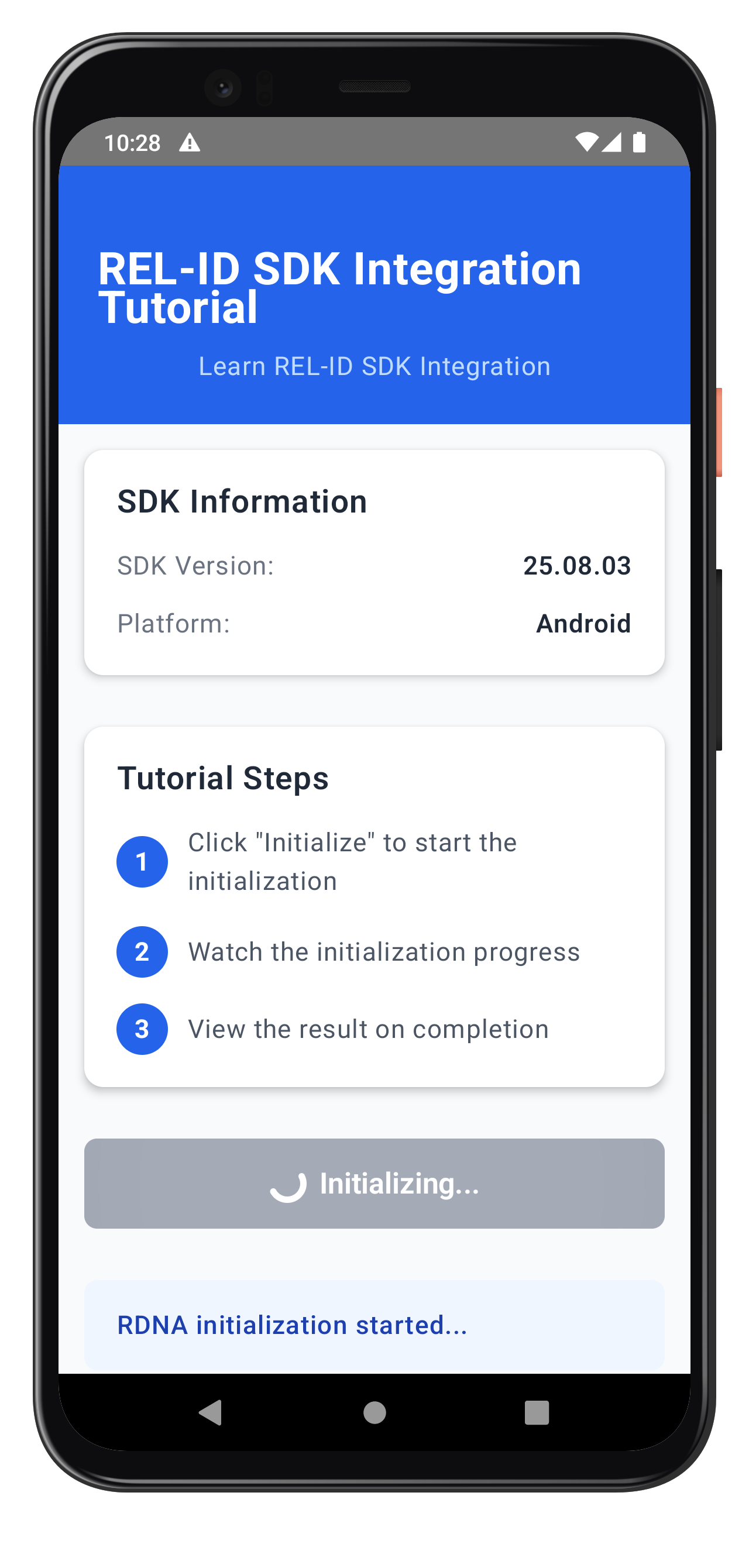
- Real-time progress updates during initialization stages
- System threat check status
- App threat check status
- Network threat check status
- Overall initialization status
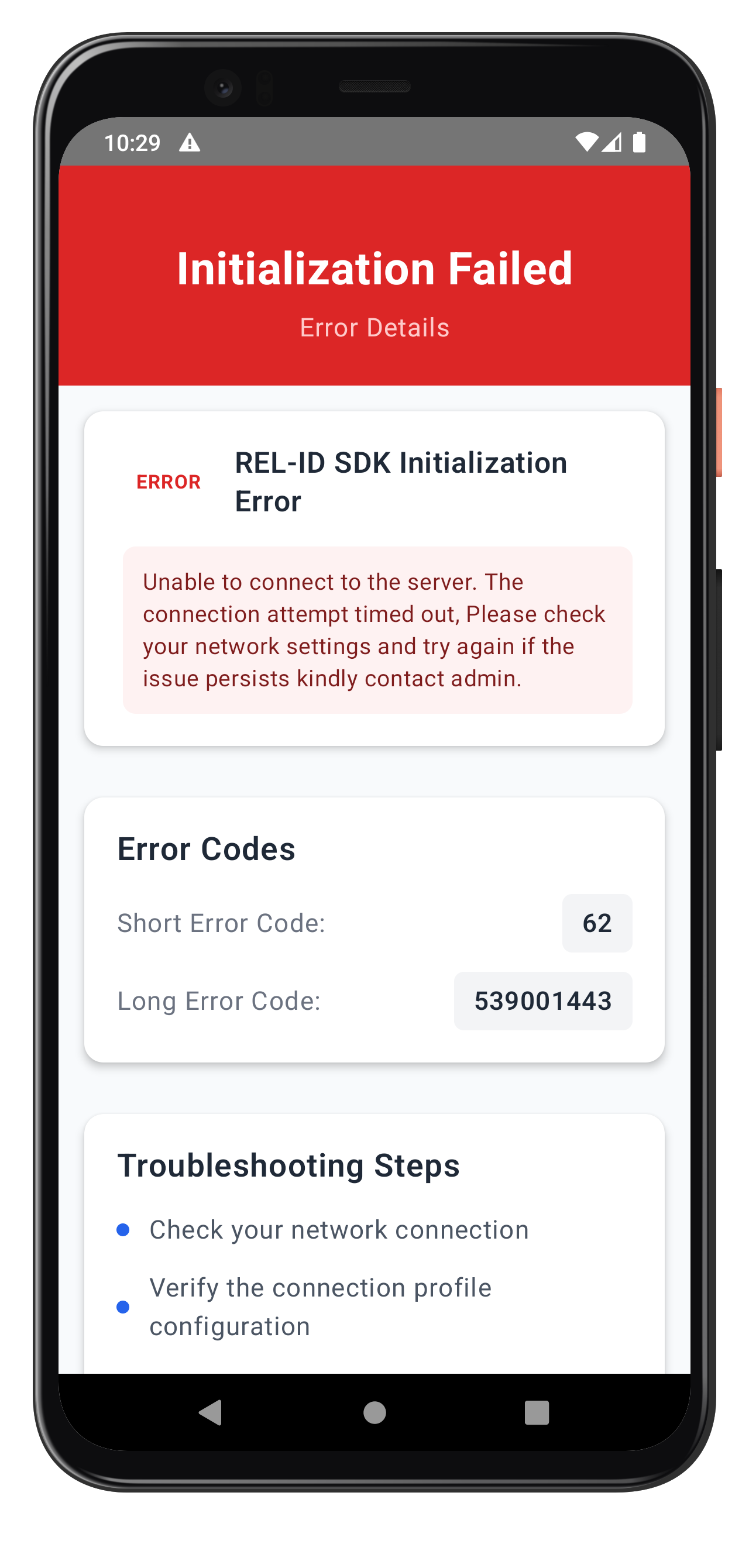
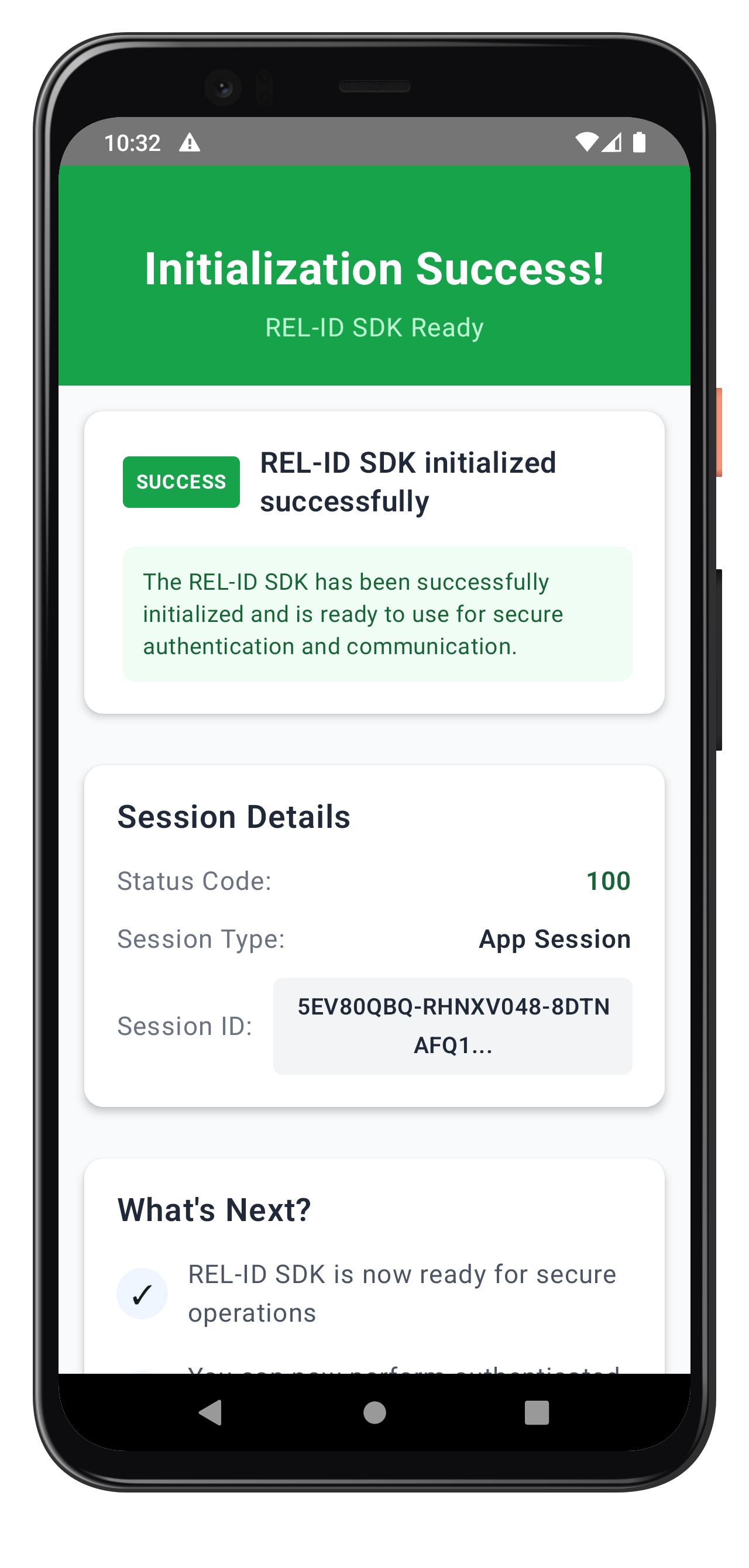
The following images showcase screens from the sample application:
|
|
|
Build and Run
Using Android Studio:
- Open project in Android Studio
- Select target device or emulator
- Click Run (▶) or press Shift+F10
Using command line:
# Build APK
./gradlew assembleDebug

# Install on device
./gradlew installDebug

# Or combined
adb install app/build/outputs/apk/debug/app-debug.apk
Debugging
Logcat: View real-time logs with filtering
adb logcat | grep -E "(RDNA|YourApp)"
Android Studio Debugger: Use breakpoints and variable inspection
Layout Inspector: Inspect Compose UI hierarchy
Verification Steps
Test your implementation with the following scenarios:
- SDK Version Retrieval: Verify SDK version displays correctly on launch
- Successful Initialization: Click Initialize and verify complete flow works end-to-end
- Progress Tracking: Verify progress events are properly displayed during initialization
- Success Navigation: Verify automatic navigation to success screen on completion
- Error Handling: Test with invalid host/port to verify error screen navigation
- Invalid Credentials: Test with incorrect RelId values to verify error handling
Key Test Scenarios
Test initialization with various configurations:
// Test SDK version retrieval
val version = rdnaService.getSDKVersion()
Log.d(TAG, "SDK Version: $version")

// Test initialization
viewModelScope.launch {
    try {
        val result = rdnaService.initialize(context, callbacks)
        Log.d(TAG, "Initialization successful: ${result.longErrorCode}")
    } catch (e: Exception) {
        Log.e(TAG, "Initialization failed", e)
    }
}
Connection Profile Issues
Error: "Failed to load connection profile" Solution: Verify your JSON file exists in app/src/main/res/raw/agent_info.json and matches the required structure
Error: Parser returns null Solution: Ensure the JSON structure matches with RelIds and Profiles arrays properly formatted
Network Connectivity
Error: Network connection failures Solution: Check host/port values and network accessibility, verify INTERNET permission in AndroidManifest.xml
Error: REL-ID connection issues Solution: Verify the REL-ID server is set up and running, check firewall rules
SDK Initialization
Error Code 88: SDK already initialized Solution: Terminate the SDK before re-initializing
Error Code 288: SDK detected dynamic attack performed on the app Solution: Terminate the app and investigate security issues
Error Code 179: Initialization in progress Solution: Wait for current initialization to complete before retrying
Security Considerations
- Use
RDNA.RDNALoggingLevel.RDNA_NO_LOGSin production - Never log full RelId values (use partial logging:
relId.substring(0, 10) + "...") - Store session data securely using EncryptedSharedPreferences
- Validate all connection profile data before use
- Enable code obfuscation: ProGuard/R8
Memory Management
- Use StateFlow instead of LiveData for Compose
- Clean up coroutines with viewModelScope
- Avoid context leaks in callbacks
- Lifecycle-aware collection with
collectAsStateWithLifecycle()
Threading
- Always use Dispatchers.Main for UI updates
- Use Dispatchers.IO for network/disk operations
- SDK operations should run on IO dispatcher
- Collect flows with lifecycle awareness
Performance
- Use lazy initialization for expensive objects
- Cache SDK responses when appropriate
- Profile with Android Profiler regularly
- Minimize recomposition in Compose
App Lifecycle
- Handle SDK state in onPause/onResume
- Save state in ViewModel SavedStateHandle
- Clean up resources in onDestroy
- Use repeatOnLifecycle for flow collection
User Experience
- Provide clear progress indicators during initialization
- Display meaningful error messages to users
- Implement retry mechanisms for network failures
- Handle background/foreground app state changes
Congratulations! You've successfully implemented RELID SDK initialization in Android with:
- ✅ Android SDK AAR integration with Gradle
- ✅ Raw resource loading from res/raw
- ✅ Coroutine-based event architecture with SharedFlow
- ✅ Jetpack Compose UI patterns
- ✅ ViewModel state management with StateFlow
- ✅ Comprehensive error handling and debugging
Key Android Patterns Learned
- Suspend functions with coroutines for async operations
- SharedFlow and StateFlow for reactive programming
- Composable functions for declarative UI
- ViewModel lifecycle management
- Resource management with Context
- Lifecycle-aware collection with collectAsStateWithLifecycle
Next Steps
- Explore the sample app's MTD (Mobile Threat Detection) implementation