🎯 Learning Path:
- Complete REL-ID Complete Activation & Login Flow Codelab
- Complete REL-ID Additional Device Activation Flow Codelab
- You are here → Forgot Password Flow Implementation
Welcome to the REL-ID Forgot Password codelab! This tutorial builds upon your existing MFA implementation to add secure password recovery capabilities using REL-ID SDK's verification challenge.
What You'll Build
In this codelab, you'll enhance your existing MFA application with:
- 🔐 Conditional Forgot Password UI: Smart display logic based on challenge mode and server configuration
- 📧 Verification Challenge Flow: OTP and email verification for secure password reset
- 🔄 Multi-Path Reset Workflows: Dynamic routing through LDA consent or direct password reset
- 🎛️ Event Chain Orchestration: Complete forgot password event sequence management
- 🛡️ Security Best Practices: Secure password recovery with proper validation
What You'll Learn
By completing this codelab, you'll master:
- Forgot Password API Integration: Implementing
forgotPassword()API with proper sync response handling - Conditional UI Logic: Display forgot password based on
challengeModeandENABLE_FORGOT_PASSWORDconfiguration - Verification Challenge Handling: Managing SDK events for OTP/email verification
- Dynamic Post-Verification Flow: Navigate through LDA consent or direct password reset paths
- Complete Event Chain Management: Orchestrate forgot password → verification → reset → login sequences using coroutines and SharedFlow
- Production Security Patterns: Implement secure password recovery with comprehensive error handling
Prerequisites
Before starting this codelab, ensure you have:
- ✅ Completed REL-ID MFA Codelab - All MFA screens and flows must be fully implemented
- ✅ Completed REL-ID MFA Complete Activation & Login Flow Codelab and REL-ID Additional Device Activation Flow Codelab - All MFA screens and flows must be fully implemented
- ✅ Android Development Environment - Android Studio Hedgehog (2023.1.1) or later with Android SDK API 23+ (minSdk) and API 36+ (targetSdk)
- ✅ REL-ID SDK Integration - Latest SDK with forgot password support configured (AAR + Maven dependencies)
- ✅ Kotlin Knowledge - Understanding of Kotlin coroutines, StateFlow, and Jetpack Compose patterns
- ✅ Server Configuration - REL-ID server with
ENABLE_FORGOT_PASSWORDcapability
Get the Code from GitHub
The code to get started can be found in a GitHub repository.
You can clone the repository using the following command:
git clone https://github.com/uniken-public/codelab-android.git
Navigate to the relid-MFA-forgot-password folder in the repository you cloned earlier
Codelab Architecture Overview
This codelab extends your MFA application with three core forgot password components:
- Enhanced VerifyPasswordScreen: Conditional forgot password link with proper challenge mode detection
- Forgot Password API Integration: Service layer implementation following established SDK patterns
- Event Chain Management: Complete forgot password event sequence handling with navigation coordination
Before implementing forgot password functionality, let's understand the key SDK events and APIs that power the password recovery workflow.
Forgot Password Event Flow
The password recovery process follows this event-driven pattern:
VerifyPasswordScreen (challengeMode=0 and ENABLE_FORGOT_PASSWORD=true) → forgotPassword() API → getActivationCode Event →
User Enters OTP → setActivationCode() API → getUserConsentForLDA/getPassword Event →
Password Reset Complete → onUserLoggedIn Event → Dashboard
Core Forgot Password Event Types
The REL-ID SDK triggers these main events during forgot password flow:
Event Type | Description | User Action Required |
Verification challenge triggered after forgotPassword() | User enters OTP/verification code | |
LDA setup required after verification (Path A) | User approves biometric authentication setup | |
Direct password reset required (Path B) | User creates new password with policy validation | |
Automatic login after successful password reset | System navigates to dashboard automatically |
Conditional Display Logic
Forgot password functionality requires specific conditions:
// Forgot password display conditions
challengeMode == 0 AND ENABLE_FORGOT_PASSWORD == "true"
Condition | Description | Display Forgot Password |
| Manual password entry mode | ✅ Required condition |
| Password creation mode | ❌ Not applicable |
| Server feature enabled | ✅ Required configuration |
| Server feature disabled | ❌ Hide forgot password link |
Forgot Password API Pattern
Here's the Android Kotlin implementation pattern for the forgot password API:
// RDNAService.kt (forgot password addition)

/**
 * Initiates forgot password flow for password reset
 * @param userId User ID for the forgot password flow
 * @return RDNA.RDNAError with sync response
 */
fun forgotPassword(userId: String): RDNA.RDNAError {
    Log.d(TAG, "forgotPassword() called for user: $userId")
    val error = rdna.forgotPassword(userId)

    if (error.longErrorCode != 0) {
        Log.e(TAG, "forgotPassword sync error: ${error.errorString} (code: ${error.longErrorCode})")
    } else {
        Log.d(TAG, "forgotPassword sync success, waiting for async events (getActivationCode, getPassword)")
    }
    return error
}
Let's implement the forgot password API in your service layer following established REL-ID SDK patterns.
Enhance RDNAService.kt with Forgot Password
Add the forgot password method to your existing service implementation:
// app/src/main/java/.../uniken/services/RDNAService.kt (addition to existing object)

/**
 * Initiates forgot password flow for password reset
 *
 * This method initiates the forgot password flow when challengeMode == 0 and ENABLE_FORGOT_PASSWORD is true.
 * It triggers a verification challenge followed by password reset process.
 * Can only be used on an active device and requires user verification.
 * Uses sync response pattern similar to other API methods.
 *
 * @see https://developer.uniken.com/docs/forgot-password
 *
 * Workflow:
 * 1. User initiates forgot password
 * 2. SDK triggers verification challenge (e.g., activation code, email OTP)
 * 3. User completes challenge
 * 4. SDK validates challenge
 * 5. User sets new password
 * 6. SDK logs user in automatically
 *
 * Response Validation Logic:
 * 1. Check error.longErrorCode: 0 = success, > 0 = error
 * 2. Success typically starts verification challenge flow
 * 3. Error Code 170 = Feature not supported
 * 4. Async events will be handled by event listeners
 *
 * @param userId User ID for the forgot password flow
 * @return RDNA.RDNAError with sync response structure
 */
fun forgotPassword(userId: String): RDNA.RDNAError {
    Log.d(TAG, "Initiating forgot password flow for userId: $userId")

    val error = rdna.forgotPassword(userId)

    if (error.longErrorCode != 0) {
        Log.e(TAG, "ForgotPassword sync error: ${error.errorString} (code: ${error.longErrorCode})")
    } else {
        Log.d(TAG, "ForgotPassword sync success, starting verification challenge")
    }

    return error
}
Service Pattern Consistency
Notice how this implementation follows the exact pattern established by other service methods:
Pattern Element | Implementation Detail |
Synchronous Wrapper | Direct call to SDK with immediate RDNAError return |
Error Checking | Validates |
Logging Strategy | Comprehensive logging for debugging |
Error Handling | Returns RDNAError for caller to handle |
Now let's enhance your VerifyPasswordScreen to display forgot password functionality conditionally based on challenge mode and server configuration.
Add Conditional Display Logic to ViewModel
Implement the logic to determine when forgot password should be available:
// app/src/main/java/.../tutorial/viewmodels/VerifyPasswordViewModel.kt (additions)

/**
 * Process event data to determine UI state
 * Check if forgot password is enabled from challenge info
 * According to documentation: Show "Forgot Password" only when:
 * - challengeMode is 0 (manual password entry)
 * - ENABLE_FORGOT_PASSWORD is true
 */
private fun processEventData() {
    initialEventData?.let { data ->
        val challengeMode = data.mode?.intValue ?: 0

        // Extract if forgot password is enabled from SDK response
        val enableForgotPassword = RDNAEventUtils.getChallengeValue(
            data.response,
            "ENABLE_FORGOT_PASSWORD"
        )

        // Only show "Forgot Password?" link when:
        // 1. Mode = 0 (VERIFY mode during login)
        // 2. ENABLE_FORGOT_PASSWORD = true in SDK response
        val isForgotPasswordEnabled = challengeMode == 0 && enableForgotPassword == "true"

        _uiState.update { it.copy(
            userName = data.userId ?: "",
            challengeMode = challengeMode,
            attemptsLeft = data.attempts,
            isForgotPasswordEnabled = isForgotPasswordEnabled
        )}
    }
}
Add State Management for Forgot Password
Enhance your ViewModel's state management to handle forgot password loading:
// app/src/main/java/.../tutorial/viewmodels/VerifyPasswordViewModel.kt (state additions)

data class VerifyPasswordUiState(
    val password: String = "",
    val error: String = "",
    val isSubmitting: Boolean = false,
    val isForgotPasswordLoading: Boolean = false,  // NEW: Forgot password loading state
    val challengeMode: Int = 0,
    val userName: String = "",
    val attemptsLeft: Int = 0,
    val isForgotPasswordEnabled: Boolean = false   // NEW: Conditional display flag
)

/**
 * Check if any operation is in progress
 */
private fun isLoading(): Boolean {
    return uiState.value.isSubmitting || uiState.value.isForgotPasswordLoading
}
Implement Forgot Password Handler
Add the forgot password handling logic with proper error management:
// app/src/main/java/.../tutorial/viewmodels/VerifyPasswordViewModel.kt (handler implementation)

/**
 * Handle forgot password flow
 */
fun forgotPassword() {
    val currentState = _uiState.value

    if (currentState.isSubmitting || currentState.isForgotPasswordLoading) {
        return
    }

    viewModelScope.launch {
        _uiState.update { it.copy(
            isForgotPasswordLoading = true,
            error = ""
        )}

        try {
            Log.d(TAG, "Initiating forgot password flow for userID: ${currentState.userName}")

            val error = rdnaService.forgotPassword(currentState.userName)

            // Check sync response
            if (error.longErrorCode != 0) {
                val errorMessage = RDNAEventUtils.getErrorMessage(error)
                _uiState.update { it.copy(
                    isForgotPasswordLoading = false,
                    error = errorMessage
                )}
            } else {
                // Sync success - SDK will trigger getActivationCode event
                Log.d(TAG, "ForgotPassword sync success - waiting for async events")

                _uiState.update { it.copy(isForgotPasswordLoading = false) }

                // Navigation to ActivationCodeScreen handled by SDKEventProvider
            }
        } catch (e: Exception) {
            Log.e(TAG, "ForgotPassword exception: ${e.message}", e)
            _uiState.update { it.copy(
                isForgotPasswordLoading = false,
                error = "An unexpected error occurred: ${e.message}"
            )}
        }
    }
}
Add Conditional UI Rendering
Implement the forgot password link with proper loading states in your Composable screen:
// app/src/main/java/.../tutorial/screens/mfa/VerifyPasswordScreen.kt (UI additions)

// Forgot Password Link - Only show when challengeMode == 0 and ENABLE_FORGOT_PASSWORD is true
if (uiState.isForgotPasswordEnabled) {
    Row(
        modifier = Modifier
            .fillMaxWidth()
            .padding(bottom = 16.dp),
        horizontalArrangement = Arrangement.End
    ) {
        TextButton(
            onClick = { viewModel.forgotPassword() },
            enabled = !uiState.isSubmitting && !uiState.isForgotPasswordLoading
        ) {
            if (uiState.isForgotPasswordLoading) {
                Row(verticalAlignment = Alignment.CenterVertically) {
                    CircularProgressIndicator(
                        modifier = Modifier.size(16.dp),
                        color = PrimaryBlue,
                        strokeWidth = 2.dp
                    )
                    Spacer(modifier = Modifier.width(8.dp))
                    Text(
                        text = "Processing...",
                        color = PrimaryBlue,
                        fontSize = 14.sp
                    )
                }
            } else {
                Text(
                    text = "Forgot Password?",
                    color = PrimaryBlue,
                    fontSize = 14.sp,
                    fontWeight = FontWeight.Bold
                )
            }
        }
    }
}
The forgot password flow involves a sequence of events that your event manager must handle properly. Let's ensure your event handling supports the complete flow.
Event Chain Overview
After calling forgotPassword(), the SDK triggers this event sequence:
// Complete forgot password event flow
forgotPassword() → getActivationCode → getUserConsentForLDA/getPassword → onUserLoggedIn
Verify Event Manager Configuration
Ensure your RDNACallbackManager.kt has proper handlers for all forgot password events:
// app/src/main/java/.../uniken/services/RDNACallbackManager.kt (verify these handlers exist)

class RDNACallbackManager(
    private val context: Context,
    private val currentActivity: Activity?
) : RDNA.RDNACallbacks {

    private val scope = CoroutineScope(SupervisorJob() + Dispatchers.Main)

    // Event flows for forgot password chain
    private val _getActivationCodeEvent = MutableSharedFlow<GetActivationCodeEventData>()
    val getActivationCodeEvent: SharedFlow<GetActivationCodeEventData> = _getActivationCodeEvent.asSharedFlow()

    private val _getPasswordEvent = MutableSharedFlow<GetPasswordEventData>()
    val getPasswordEvent: SharedFlow<GetPasswordEventData> = _getPasswordEvent.asSharedFlow()

    private val _getUserConsentForLDAEvent = MutableSharedFlow<GetUserConsentForLDAEventData>()
    val getUserConsentForLDAEvent: SharedFlow<GetUserConsentForLDAEventData> =
        _getUserConsentForLDAEvent.asSharedFlow()

    private val _userLoggedInEvent = MutableSharedFlow<UserLoggedInEventData>()
    val userLoggedInEvent: SharedFlow<UserLoggedInEventData> = _userLoggedInEvent.asSharedFlow()

    /**
     * Handle activation code request (triggered after forgotPassword)
     */
    override fun getActivationCode(
        code: String?,
        type: String?,
        mode: RDNA.RDNAChallengeOpMode?,
        response: RDNA.RDNAChallengeResponse?,
        error: RDNA.RDNAError?
    ) {
        Log.d(TAG, "getActivationCode callback - type: $type, mode: ${mode?.intValue}")
        scope.launch {
            _getActivationCodeEvent.emit(
                GetActivationCodeEventData(code, type, mode, response, error)
            )
        }
    }

    /**
     * Handle password request (can be SET mode after verification)
     */
    override fun getPassword(
        userId: String?,
        mode: RDNA.RDNAChallengeOpMode?,
        attempts: Int,
        response: RDNA.RDNAChallengeResponse?,
        error: RDNA.RDNAError?
    ) {
        Log.d(TAG, "getPassword callback - mode: ${mode?.intValue}")
        scope.launch {
            _getPasswordEvent.emit(GetPasswordEventData(userId, mode, attempts, response, error))
        }
    }

    /**
     * Handle LDA consent request (alternative path after verification)
     */
    override fun getUserConsentForLDA(
        userId: String?,
        mode: RDNA.RDNAChallengeOpMode?,
        capabilities: RDNA.RDNALDACapabilities?,
        response: RDNA.RDNAChallengeResponse?,
        error: RDNA.RDNAError?
    ) {
        Log.d(TAG, "getUserConsentForLDA callback - mode: ${mode?.intValue}")
        scope.launch {
            _getUserConsentForLDAEvent.emit(
                GetUserConsentForLDAEventData(userId, mode, capabilities, response, error)
            )
        }
    }

    /**
     * Handle successful login (final step of forgot password flow)
     */
    override fun onUserLoggedIn(
        userId: String?,
        response: RDNA.RDNAChallengeResponse?,
        error: RDNA.RDNAError?
    ) {
        Log.d(TAG, "onUserLoggedIn - userId: $userId (forgot password flow complete)")
        scope.launch {
            _userLoggedInEvent.emit(UserLoggedInEventData(userId, response, error))
        }
    }
}
Verify SDKEventProvider Navigation Handlers
Ensure your global event provider properly handles the forgot password event chain:
// app/src/main/java/.../uniken/providers/SDKEventProvider.kt (verify navigation handlers)

object SDKEventProvider {

    fun initialize(
        lifecycleOwner: LifecycleOwner,
        rdnaService: RDNAService,
        callbackManager: RDNACallbackManager,
        navController: NavController
    ) {
        lifecycleOwner.lifecycleScope.launch {
            lifecycleOwner.repeatOnLifecycle(Lifecycle.State.STARTED) {
                // Launch all event collectors
                launch { handleGetActivationCodeEvents(rdnaService, callbackManager, navController) }
                launch { handleGetPasswordEvents(rdnaService, callbackManager, navController) }
                launch { handleGetUserConsentForLDAEvents(rdnaService, callbackManager, navController) }
                launch { handleUserLoggedInEvents(rdnaService, callbackManager, navController) }
            }
        }
    }

    private suspend fun handleGetActivationCodeEvents(
        rdnaService: RDNAService,
        callbackManager: RDNACallbackManager,
        navController: NavController
    ) {
        callbackManager.getActivationCodeEvent.collect { eventData ->
            Log.d(TAG, "getActivationCode event - navigating to ActivationCodeScreen")

            activationCodeViewModel = ActivationCodeViewModel(
                rdnaService, callbackManager, eventData
            )
            navController.navigate(Routes.ACTIVATION_CODE)
        }
    }

    private suspend fun handleGetPasswordEvents(
        rdnaService: RDNAService,
        callbackManager: RDNACallbackManager,
        navController: NavController
    ) {
        callbackManager.getPasswordEvent.collect { eventData ->
            val challengeMode = eventData.mode?.intValue ?: 1

            when (challengeMode) {
                1 -> { // SET mode (password reset)
                    Log.d(TAG, "getPassword (SET mode) - navigating to SetPasswordScreen")
                    setPasswordViewModel = SetPasswordViewModel(
                        rdnaService, callbackManager, eventData
                    )
                    navController.navigate(Routes.SET_PASSWORD)
                }
                0 -> { // VERIFY mode
                    Log.d(TAG, "getPassword (VERIFY mode) - navigating to VerifyPasswordScreen")
                    verifyPasswordViewModel = VerifyPasswordViewModel(
                        rdnaService, callbackManager, eventData
                    )
                    navController.navigate(Routes.VERIFY_PASSWORD)
                }
            }
        }
    }

    private suspend fun handleUserLoggedInEvents(
        rdnaService: RDNAService,
        callbackManager: RDNACallbackManager,
        navController: NavController
    ) {
        callbackManager.userLoggedInEvent.collect { eventData ->
            Log.d(TAG, "onUserLoggedIn event - forgot password flow complete, navigating to Dashboard")

            // Extract session information
            val sessionId = eventData.response?.sessionId ?: ""
            val statusCode = eventData.response?.status?.statusCode ?: 0
            val statusMessage = eventData.response?.status?.statusMessage ?: "Success"

            navController.navigate(
                Routes.tutorialSuccess(statusCode, statusMessage, sessionId, 1)
            )
        }
    }
}
Update your navigation types to support the forgot password parameters and ensure type safety throughout the flow.
Enhance Navigation Routes
Update your navigation route definitions:
// app/src/main/java/.../tutorial/navigation/AppNavigation.kt (route definitions)

object Routes {
    // Tutorial Screens
    const val TUTORIAL_HOME = "TutorialHome"
    const val TUTORIAL_SUCCESS = "TutorialSuccess"
    const val TUTORIAL_ERROR = "TutorialError"

    // MFA Flow Screens (Event-driven)
    const val CHECK_USER = "CheckUser"
    const val ACTIVATION_CODE = "ActivationCode"
    const val SET_PASSWORD = "SetPassword"
    const val VERIFY_PASSWORD = "VerifyPassword"
    const val USER_LDA_CONSENT = "UserLDAConsent"
    const val DASHBOARD = "Dashboard"

    // Routes with parameters
    fun tutorialSuccess(
        statusCode: Int,
        statusMessage: String,
        sessionId: String,
        sessionType: Int
    ): String {
        val encodedMessage = java.net.URLEncoder.encode(statusMessage, "UTF-8")
        val encodedSessionId = java.net.URLEncoder.encode(sessionId, "UTF-8")
        return "$TUTORIAL_SUCCESS/$statusCode/$encodedMessage/$encodedSessionId/$sessionType"
    }
}
Navigation Integration in MainActivity
Ensure proper initialization in MainActivity:
// app/src/main/java/.../MainActivity.kt (navigation setup)

class MainActivity : ComponentActivity() {

    private lateinit var rdnaService: RDNAService
    private lateinit var callbackManager: RDNACallbackManager

    override fun onCreate(savedInstanceState: Bundle?) {
        super.onCreate(savedInstanceState)

        // Initialize service and callback manager
        rdnaService = RDNAService
        callbackManager = RDNACallbackManager(applicationContext, this)

        setContent {
            RelidCodelabTheme {
                Surface(modifier = Modifier.fillMaxSize()) {
                    val navCtrl = AppNavigation(
                        currentActivity = this@MainActivity,
                        rdnaService = rdnaService,
                        callbackManager = callbackManager
                    )

                    // Initialize global event provider for MFA navigation
                    LaunchedEffect(Unit) {
                        SDKEventProvider.initialize(
                            lifecycleOwner = this@MainActivity,
                            rdnaService = rdnaService,
                            callbackManager = callbackManager,
                            navController = navCtrl
                        )
                    }
                }
            }
        }
    }
}
Let's test your forgot password implementation with comprehensive scenarios to ensure proper functionality.
Test Scenario 1: Standard Forgot Password Flow
Setup Requirements:
- Server configuration:
ENABLE_FORGOT_PASSWORD = "true" - Navigation to VerifyPasswordScreen with
challengeMode = 0
Test Steps:
- Build and run the app
./gradlew installDebug - Navigate to VerifyPasswordScreen
- Verify "Forgot Password?" link is visible
- Tap forgot password link
- Verify loading state displays: "Processing..."
- Complete OTP verification when ActivationCodeScreen appears
- Follow either LDA consent or password reset path
- Confirm automatic login to dashboard
Expected Results:
- ✅ Forgot password link appears conditionally
- ✅ Loading states provide clear user feedback
- ✅ Event chain completes successfully
- ✅ User reaches dashboard without manual navigation
Test Scenario 2: Forgot Password Disabled
Setup Requirements:
- Server configuration:
ENABLE_FORGOT_PASSWORD = "false"or missing - Navigation to VerifyPasswordScreen with
challengeMode = 0
Test Steps:
- Navigate to VerifyPasswordScreen
- Verify forgot password link is NOT visible
- Confirm only standard password verification is available
Expected Results:
- ❌ Forgot password link should not appear
- ✅ Standard password flow remains functional
Test Scenario 3: Wrong Challenge Mode
Setup Requirements:
- Navigation with
challengeMode = 1(password creation mode)
Test Steps:
- Navigate to VerifyPasswordScreen with challengeMode = 1
- Verify forgot password link is NOT visible
- Confirm only password creation flow is available
Expected Results:
- ❌ Forgot password link should not appear
- ✅ Password creation flow works normally
Debugging with Logcat
Monitor the forgot password flow with Android Logcat:
# Filter for REL-ID related logs
adb logcat | grep -E "(RDNAService|VerifyPasswordViewModel|SDKEventProvider)"
Prepare your forgot password implementation for production deployment with these essential considerations.
Security Validation Checklist
- [ ] No Sensitive Data Logging: Verify no user credentials or verification codes are logged
- [ ] Rate Limiting Awareness: Handle verification attempt limits gracefully
- [ ] Session Management: Proper handling of session timeouts during password reset
- [ ] Input Validation: Validate all user inputs before sending to server
- [ ] ProGuard Configuration: Ensure SDK classes are properly protected in release builds
User Experience Optimization
- [ ] Clear Error Messages: User-friendly errors for all failure scenarios
- [ ] Consistent Loading States: Visual feedback during all async operations
- [ ] Accessibility Support: Screen reader compatibility and keyboard navigation
- [ ] Performance Testing: Validate performance with slow network conditions
- [ ] Lifecycle Handling: Proper app state management during password reset
Android-Specific Best Practices
- [ ] Memory Management: Use StateFlow instead of LiveData for Compose
- [ ] Threading: Always use Dispatchers.IO for SDK operations
- [ ] Lifecycle Awareness: Collect flows with lifecycle awareness
- [ ] Configuration Changes: Handle device rotation properly
- [ ] ProGuard Rules: Add keep rules for SDK classes
Here's your complete reference implementation combining all the patterns and best practices covered in this codelab.
Enhanced VerifyPasswordViewModel with Forgot Password
// app/src/main/java/.../tutorial/viewmodels/VerifyPasswordViewModel.kt (complete implementation)

package com.relidcodelab.tutorial.viewmodels

import android.util.Log
import androidx.lifecycle.ViewModel
import androidx.lifecycle.viewModelScope
import com.relidcodelab.uniken.services.RDNACallbackManager
import com.relidcodelab.uniken.services.RDNAService
import com.relidcodelab.uniken.models.GetPasswordEventData
import com.relidcodelab.uniken.utils.RDNAEventUtils
import kotlinx.coroutines.flow.MutableStateFlow
import kotlinx.coroutines.flow.StateFlow
import kotlinx.coroutines.flow.asStateFlow
import kotlinx.coroutines.flow.update
import kotlinx.coroutines.launch

data class VerifyPasswordUiState(
    val password: String = "",
    val error: String = "",
    val isSubmitting: Boolean = false,
    val isForgotPasswordLoading: Boolean = false,
    val challengeMode: Int = 0,
    val userName: String = "",
    val attemptsLeft: Int = 0,
    val isForgotPasswordEnabled: Boolean = false
)

class VerifyPasswordViewModel(
    private val rdnaService: RDNAService,
    private val callbackManager: RDNACallbackManager,
    private val initialEventData: GetPasswordEventData?
) : ViewModel() {

    companion object {
        private const val TAG = "VerifyPasswordViewModel"
    }

    private val _uiState = MutableStateFlow(VerifyPasswordUiState())
    val uiState: StateFlow<VerifyPasswordUiState> = _uiState.asStateFlow()

    init {
        processEventData()
    }

    /**
     * Process event data to determine UI state
     * Check if forgot password is enabled from challenge info
     */
    private fun processEventData() {
        initialEventData?.let { data ->
            val challengeMode = data.mode?.intValue ?: 0

            // Extract if forgot password is enabled
            val enableForgotPassword = RDNAEventUtils.getChallengeValue(
                data.response,
                "ENABLE_FORGOT_PASSWORD"
            )

            // Only show "Forgot Password?" link when:
            // 1. Mode = 0 (VERIFY mode during login)
            // 2. ENABLE_FORGOT_PASSWORD = true in SDK response
            val isForgotPasswordEnabled = challengeMode == 0 && enableForgotPassword == "true"

            _uiState.update { it.copy(
                userName = data.userId ?: "",
                challengeMode = challengeMode,
                attemptsLeft = data.attempts,
                isForgotPasswordEnabled = isForgotPasswordEnabled
            )}

            Log.d(TAG, "VerifyPassword initialized - challengeMode: $challengeMode, " +
                    "forgotPasswordEnabled: $isForgotPasswordEnabled")
        }
    }

    fun onPasswordChange(newPassword: String) {
        _uiState.update { it.copy(password = newPassword, error = "") }
    }

    /**
     * Handle forgot password flow
     */
    fun forgotPassword() {
        val currentState = _uiState.value

        if (currentState.isSubmitting || currentState.isForgotPasswordLoading) {
            return
        }

        viewModelScope.launch {
            _uiState.update { it.copy(
                isForgotPasswordLoading = true,
                error = ""
            )}

            try {
                Log.d(TAG, "Calling forgotPassword API for user: ${currentState.userName}")

                // Call SDK forgotPassword method
                val error = rdnaService.forgotPassword(currentState.userName)

                // Check sync response
                if (error.longErrorCode != 0) {
                    val errorMessage = RDNAEventUtils.getErrorMessage(error)
                    Log.e(TAG, "ForgotPassword sync error: $errorMessage")

                    _uiState.update { it.copy(
                        isForgotPasswordLoading = false,
                        error = errorMessage
                    )}
                } else {
                    // Sync success - SDK will trigger getActivationCode event
                    Log.d(TAG, "ForgotPassword sync success - waiting for getActivationCode event")

                    _uiState.update { it.copy(isForgotPasswordLoading = false) }

                    // Navigation to ActivationCodeScreen handled by SDKEventProvider
                }
            } catch (e: Exception) {
                Log.e(TAG, "ForgotPassword exception: ${e.message}", e)
                _uiState.update { it.copy(
                    isForgotPasswordLoading = false,
                    error = "An unexpected error occurred: ${e.message}"
                )}
            }
        }
    }

    /**
     * Handle password verification
     */
    fun verifyPassword() {
        val currentState = _uiState.value
        val trimmedPassword = currentState.password.trim()

        if (trimmedPassword.isEmpty()) {
            _uiState.update { it.copy(error = "Please enter your password") }
            return
        }

        if (currentState.isSubmitting) return

        viewModelScope.launch {
            _uiState.update { it.copy(isSubmitting = true, error = "") }

            try {
                Log.d(TAG, "Verifying password for user: ${currentState.userName}")

                val error = rdnaService.setPassword(trimmedPassword, currentState.challengeMode)

                if (error.longErrorCode != 0) {
                    val errorMessage = RDNAEventUtils.getErrorMessage(error)
                    Log.e(TAG, "SetPassword sync error: $errorMessage")

                    _uiState.update { it.copy(
                        isSubmitting = false,
                        error = errorMessage,
                        password = ""
                    )}
                } else {
                    Log.d(TAG, "SetPassword sync success - waiting for async events")
                    _uiState.update { it.copy(isSubmitting = false) }
                }
            } catch (e: Exception) {
                Log.e(TAG, "SetPassword exception: ${e.message}", e)
                _uiState.update { it.copy(
                    isSubmitting = false,
                    error = "An unexpected error occurred: ${e.message}",
                    password = ""
                )}
            }
        }
    }

    /**
     * Handle close action
     */
    fun handleClose() {
        viewModelScope.launch {
            try {
                rdnaService.resetAuthState()
            } catch (e: Exception) {
                Log.e(TAG, "ResetAuthState error: ${e.message}", e)
            }
        }
    }
}
Enhanced VerifyPasswordScreen Composable
// app/src/main/java/.../tutorial/screens/mfa/VerifyPasswordScreen.kt

@Composable
fun VerifyPasswordScreen(
    viewModel: VerifyPasswordViewModel,
    onClose: () -> Unit,
    title: String = "Verify Password",
    subtitle: String = "Enter your password to continue"
) {
    val uiState by viewModel.uiState.collectAsStateWithLifecycle()
    val focusManager = LocalFocusManager.current

    // Disable back button during MFA
    BackHandler(enabled = true) { /* Do nothing */ }

    Box(modifier = Modifier.fillMaxSize()) {
        Scaffold(containerColor = PageBackground) { padding ->
            Column(
                modifier = Modifier
                    .fillMaxSize()
                    .padding(padding)
                    .imePadding()
                    .verticalScroll(rememberScrollState())
                    .padding(horizontal = 20.dp)
                    .padding(top = 80.dp, bottom = 20.dp),
                horizontalAlignment = Alignment.CenterHorizontally
            ) {
                // Title
                Text(
                    text = title,
                    fontSize = 28.sp,
                    fontWeight = FontWeight.Bold,
                    color = DarkGray,
                    textAlign = TextAlign.Center,
                    modifier = Modifier
                        .fillMaxWidth()
                        .padding(bottom = 8.dp)
                )

                // Subtitle
                Text(
                    text = subtitle,
                    fontSize = 16.sp,
                    color = MediumGray,
                    textAlign = TextAlign.Center,
                    modifier = Modifier
                        .fillMaxWidth()
                        .padding(bottom = 30.dp)
                )

                // User Name
                if (uiState.userName.isNotEmpty()) {
                    Column(
                        modifier = Modifier.padding(bottom = 20.dp),
                        horizontalAlignment = Alignment.CenterHorizontally
                    ) {
                        Text(
                            text = "Welcome back",
                            fontSize = 18.sp,
                            color = DarkGray
                        )
                        Text(
                            text = uiState.userName,
                            fontSize = 20.sp,
                            fontWeight = FontWeight.Bold,
                            color = PrimaryBlue,
                            modifier = Modifier.padding(top = 4.dp)
                        )
                    }
                }

                // Attempts Left Warning
                if (uiState.attemptsLeft > 0) {
                    StatusBanner(
                        type = BannerType.WARNING,
                        message = "${uiState.attemptsLeft} attempt${if (uiState.attemptsLeft != 1) "s" else ""} remaining"
                    )
                }

                // Error Banner
                if (uiState.error.isNotEmpty()) {
                    StatusBanner(
                        type = BannerType.ERROR,
                        message = uiState.error
                    )
                }

                // Password Input
                OutlinedTextField(
                    value = uiState.password,
                    onValueChange = viewModel::onPasswordChange,
                    modifier = Modifier
                        .fillMaxWidth()
                        .padding(bottom = 8.dp),
                    label = { Text("Password") },
                    placeholder = { Text("Enter your password") },
                    visualTransformation = PasswordVisualTransformation(),
                    singleLine = true,
                    enabled = !uiState.isSubmitting && !uiState.isForgotPasswordLoading,
                    isError = uiState.error.isNotEmpty(),
                    keyboardOptions = KeyboardOptions(
                        keyboardType = KeyboardType.Password,
                        imeAction = ImeAction.Done,
                        autoCorrect = false
                    ),
                    keyboardActions = KeyboardActions(
                        onDone = {
                            focusManager.clearFocus()
                            viewModel.verifyPassword()
                        }
                    ),
                    colors = OutlinedTextFieldDefaults.colors(
                        focusedBorderColor = PrimaryBlue,
                        unfocusedBorderColor = BorderGray
                    )
                )

                // Forgot Password Link (conditional)
                if (uiState.isForgotPasswordEnabled) {
                    Row(
                        modifier = Modifier
                            .fillMaxWidth()
                            .padding(bottom = 16.dp),
                        horizontalArrangement = Arrangement.End
                    ) {
                        TextButton(
                            onClick = { viewModel.forgotPassword() },
                            enabled = !uiState.isSubmitting && !uiState.isForgotPasswordLoading
                        ) {
                            if (uiState.isForgotPasswordLoading) {
                                Row(verticalAlignment = Alignment.CenterVertically) {
                                    CircularProgressIndicator(
                                        modifier = Modifier.size(16.dp),
                                        color = PrimaryBlue,
                                        strokeWidth = 2.dp
                                    )
                                    Spacer(modifier = Modifier.width(8.dp))
                                    Text(
                                        text = "Processing...",
                                        color = PrimaryBlue,
                                        fontSize = 14.sp
                                    )
                                }
                            } else {
                                Text(
                                    text = "Forgot Password?",
                                    color = PrimaryBlue,
                                    fontSize = 14.sp,
                                    fontWeight = FontWeight.Bold
                                )
                            }
                        }
                    }
                }

                // Verify Button
                Button(
                    onClick = {
                        focusManager.clearFocus()
                        viewModel.verifyPassword()
                    },
                    modifier = Modifier
                        .fillMaxWidth()
                        .height(50.dp),
                    enabled = uiState.password.isNotEmpty() &&
                             !uiState.isSubmitting &&
                             !uiState.isForgotPasswordLoading,
                    colors = ButtonDefaults.buttonColors(
                        containerColor = PrimaryBlue,
                        disabledContainerColor = LightGray
                    )
                ) {
                    if (uiState.isSubmitting) {
                        Row(verticalAlignment = Alignment.CenterVertically) {
                            CircularProgressIndicator(
                                modifier = Modifier.size(20.dp),
                                color = Color.White,
                                strokeWidth = 2.dp
                            )
                            Spacer(modifier = Modifier.width(8.dp))
                            Text("Verifying...", color = Color.White, fontSize = 16.sp)
                        }
                    } else {
                        Text("Verify Password", color = Color.White, fontSize = 16.sp)
                    }
                }

                // Help Text
                Box(
                    modifier = Modifier
                        .fillMaxWidth()
                        .padding(top = 20.dp)
                        .background(
                            color = Color(0xFFE8F4F8),
                            shape = RoundedCornerShape(8.dp)
                        )
                        .padding(16.dp)
                ) {
                    Text(
                        text = "Enter your password to verify your identity and continue.",
                        fontSize = 14.sp,
                        color = DarkGray,
                        textAlign = TextAlign.Center,
                        lineHeight = 20.sp
                    )
                }
            }
        }

        // Close Button (absolute position)
        CloseButton(
            onPress = {
                viewModel.handleClose()
                onClose()
            },
            enabled = !uiState.isSubmitting && !uiState.isForgotPasswordLoading
        )
    }
}
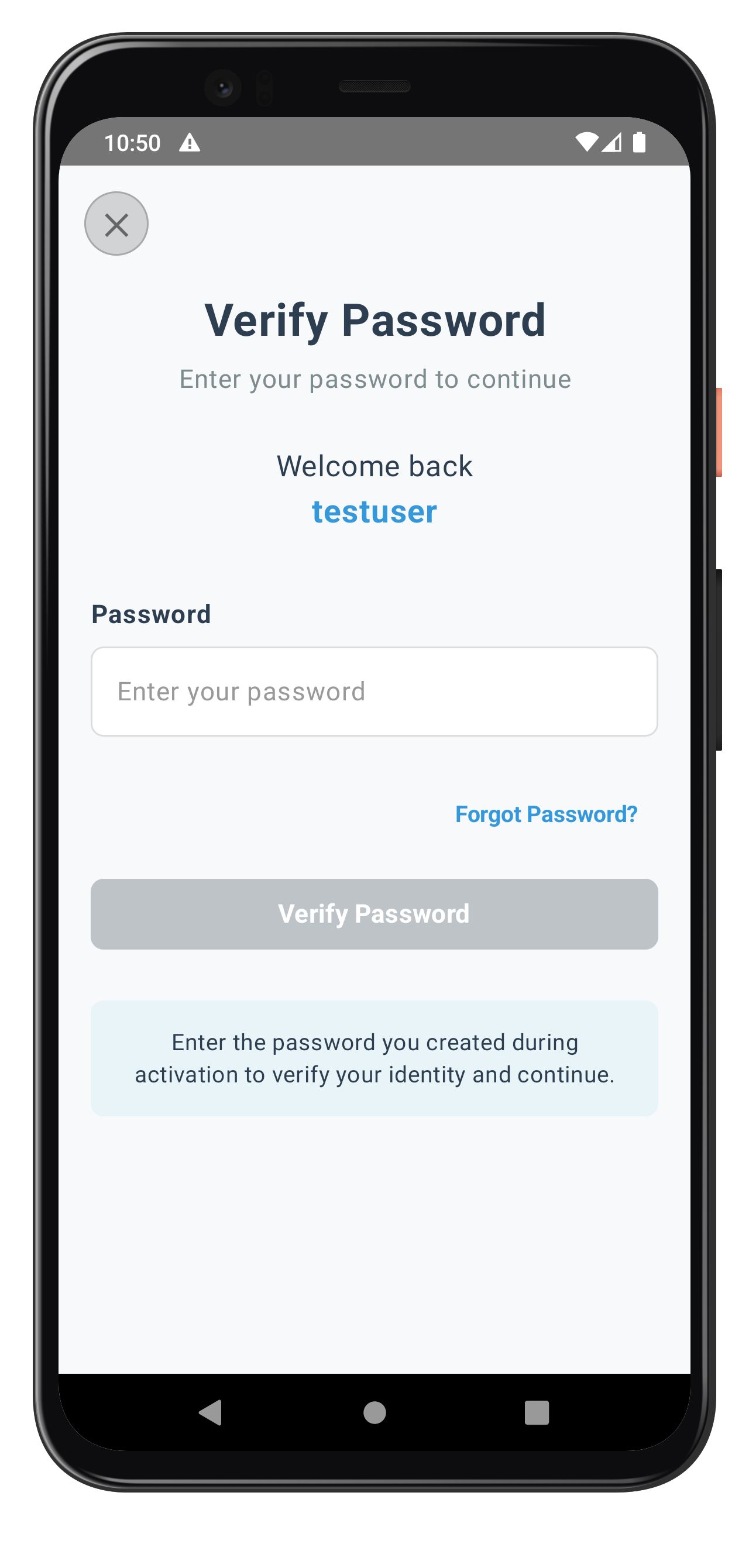
The following image showcases the screen from the sample application:
Congratulations! You've successfully implemented secure forgot password functionality with the REL-ID SDK in Android.
🚀 What You've Accomplished
✅ Conditional Forgot Password UI - Smart display logic based on challenge mode and server configuration using Kotlin conditionals
✅ Secure API Integration - Proper forgotPassword() implementation with error handling in RDNAService
✅ Event Chain Management - Complete flow from verification to password reset to login using coroutines and SharedFlow
✅ Production-Ready Code - Comprehensive error handling, loading states, and security practices with StateFlow
✅ User Experience Excellence - Clear feedback with Jetpack Compose, intuitive flow, and Material Design 3
📚 Additional Resources
- REL-ID Developer Documentation - Complete API reference
- Android Security Best Practices - Platform security guidelines
- Kotlin Coroutines Guide - Advanced coroutine patterns
- Jetpack Compose Documentation - Compose UI patterns
🔐 You've mastered secure password recovery with REL-ID SDK in Android!
Your implementation provides users with a seamless, secure way to recover their accounts while maintaining the highest security standards. Use this foundation to build robust authentication experiences that users can trust.