🎯 Learning Path:
- Complete REL-ID Complete Activation & Login Flow Codelab
- Complete REL-ID Additional Device Activation Flow With Notifications Codelab
- You are here → Step-Up Authentication for Notification Actions
Welcome to the REL-ID Step-Up Authentication with Notifications codelab! This tutorial builds upon your existing MFA implementation to add secure re-authentication for sensitive notification actions using REL-ID SDK's step-up authentication capabilities.
What You'll Build
In this codelab, you'll enhance your existing notification application with:
- 🔐 Step-Up Authentication Flow: Re-authentication when acting on sensitive notifications with
challengeMode = 3(RDNA_OP_AUTHORIZE_NOTIFICATION) - 🔑 Password Step-Up Dialog: Modal dialog with password input, attempts counter, and error handling
- 📱 LDA Step-Up Support: Biometric authentication with automatic password fallback
- 🎯 Modular Manager Pattern: StepUpAuthManager separates business logic from UI components
- ⚠️ Error Recovery: Critical status code handling (110, 153) with alerts before logout and error code (131) for cancelled LDA
- 🔄 Centralized Event Routing: SDKEventProvider delegates challengeMode 3 to specialized manager
What You'll Learn
By completing this codelab, you'll master:
- Step-Up Authentication Concept: Understanding when and why re-authentication is required for notification actions
- Authentication Method Selection: How SDK determines password vs LDA based on user's login method
- Modular Manager Pattern: Implementing StepUpAuthManager to separate business logic from UI
- StepUpPasswordDialog Component: Building modal password dialog with vanilla JavaScript and DOM manipulation
- LDA Fallback Handling: Managing biometric cancellation with automatic password fallback
- DOM-Based State Management: Managing modal state without React's virtual DOM
- Error State Management: Auto-clearing password fields on authentication failure
- Critical Status Code Handling: Displaying alerts before SDK triggers logout for status codes 110 and 153
- Error Code Management: Managing LDA cancellation (error code 131) with retry options
Prerequisites
Before starting this codelab, ensure you have:
- ✅ Completed REL-ID MFA Complete Activation & Login Flow Codelab - All MFA screens and flows must be fully implemented
- ✅ Completed REL-ID Additional Device Activation Flow With Notifications Codelab - Notification retrieval and display must be working
- ✅ Cordova Development Environment - Android Studio, Xcode, and Cordova CLI configured
- ✅ REL-ID SDK Integration - Latest Cordova plugin with step-up authentication support
- ✅ JavaScript/HTML/CSS Knowledge - Understanding of vanilla JavaScript and DOM manipulation
- ✅ Singleton Pattern Familiarity - Experience with object-based state management
- ✅ Server Configuration - REL-ID server with step-up authentication enabled for notification actions
Get the Code from GitHub
The code to get started can be found in a GitHub repository.
You can clone the repository using the following command:
git clone https://github.com/uniken-public/codelab-cordova.git
Navigate to the relid-step-up-auth-notification folder in the repository you cloned earlier
Codelab Architecture Overview
This codelab extends your notification application with three core step-up authentication components:
- StepUpPasswordDialog: Modal password dialog component with attempts counter, error display, and DOM-based rendering
- StepUpAuthManager: Business logic manager for context management and password submission
- Enhanced SDKEventProvider: Event router that delegates challengeMode 3 to StepUpAuthManager
Before implementing step-up authentication, let's understand the key SDK events and APIs that power the notification action re-authentication workflow.
What is Step-Up Authentication?
Step-up authentication is a security mechanism that requires users to re-authenticate when performing sensitive operations, even if they're already logged in. For notification actions, this adds an extra layer of security.
User Logged In → Acts on Notification → updateNotification() API →
SDK Checks if Action Requires Auth → Step-Up Authentication Required →
Password or LDA Verification → onUpdateNotification Event → Success/Failure
Step-Up Authentication Event Flow
The step-up authentication process follows this event-driven pattern:
User Taps Notification Action → updateNotification(uuid, action) API Called →
SDK Determines Auth Method (Based on Login Method + Enrolled Credentials) →

IF Password Required:
  SDK Triggers getPassword Event (challengeMode=3) →
  StepUpAuthManager Receives Event → StepUpPasswordDialog Displays →
  User Enters Password → setPassword(password, 3) API → onUpdateNotification Event

IF LDA Required:
  SDK Prompts Biometric Internally → User Authenticates →
  onUpdateNotification Event (No getPassword event)

IF LDA Cancelled AND Password Enrolled:
  SDK Directly Triggers getPassword Event (challengeMode=3) → No Error, Seamless Fallback →
  StepUpAuthManager Receives Event → StepUpPasswordDialog Displays →
  User Enters Password → setPassword(password, 3) API → onUpdateNotification Event

IF LDA Cancelled AND Password NOT Enrolled:
  onUpdateNotification Event with error code 131 →
  Show Alert "Authentication Cancelled" → User Can Retry LDA
Challenge Mode 3 - RDNA_OP_AUTHORIZE_NOTIFICATION
Challenge Mode 3 is specifically for notification action authorization:
Challenge Mode | Purpose | User Action Required | UI Pattern | Trigger |
| Verify existing password | Enter password to login | VerifyPasswordScreen | User login attempt |
| Set new password | Create password during activation | SetPasswordScreen | First-time activation |
| Update password (user-initiated) | Provide current + new password | UpdatePasswordScreen | User taps "Update Password" |
| Authorize notification action | Re-enter password for verification | StepUpPasswordDialog (Modal) | updateNotification() requires auth |
| Update expired password | Provide current + new password | UpdateExpiryPasswordScreen | Server detects expired password |
Authentication Method Selection Logic
Important: The SDK automatically determines which authentication method to use based on:
- How the user logged in (Password or LDA)
- What authentication methods are enrolled for the app
Login Method | Enrolled Methods | Step-Up Authentication Method | SDK Behavior |
Password | Password only | Password | SDK triggers |
LDA | LDA only | LDA | SDK prompts biometric internally, no |
Password | Both Password & LDA | Password | SDK triggers |
LDA | Both Password & LDA | LDA (with Password fallback) | SDK attempts LDA first. If user cancels, SDK directly triggers |
Core Step-Up Authentication Events
The REL-ID SDK triggers these main events during step-up authentication:
Event Type | Description | Handler |
Password required for notification action authorization | SDKEventProvider → StepUpAuthManager.showPasswordDialog() | |
Notification action result (success/failure/auth errors) | GetNotificationsScreen.handleUpdateNotificationResponse() |
Error Codes and Status Handling
Step-up authentication can fail with these critical errors:
Error/Status Code | Type | Meaning | SDK Behavior | Action Required |
| Status | Success - action completed | Continue normal flow | Display success message |
| Status | Password expired during action | SDK triggers logout | Show alert BEFORE logout |
| Status | Attempts exhausted | SDK triggers logout | Show alert BEFORE logout |
| Error | LDA cancelled and Password NOT enrolled | No fallback available | Show alert, allow retry |
UpdateNotification API Pattern
The updateNotification API triggers the step-up authentication flow when required:
// src/uniken/services/rdnaService.js (notification APIs)

/**
 * Updates notification with user's action selection
 * @param {string} notificationUUID - The unique identifier of the notification
 * @param {string} action - The action selected by the user
 * @returns {Promise} that resolves with sync response structure
 *
 * Note: If action requires authentication, SDK will trigger:
 * - getPassword event with challengeMode 3 (if password required)
 * - Biometric prompt internally (if LDA required)
 */
updateNotification: function(notificationUUID, action) {
  return new Promise((resolve, reject) => {
    com.uniken.rdnaplugin.RdnaClient.updateNotification(
      function(response) {
        const result = JSON.parse(response);
        if (result.error && result.error.longErrorCode === 0) {
          resolve(result);
        } else {
          reject(result);
        }
      },
      function(error) {
        reject(JSON.parse(error));
      },
      [notificationUUID, action]
    );
  });
}
Let's create the modal password dialog component that will be displayed when step-up authentication is required.
Understanding the Dialog Requirements
The StepUpPasswordDialog needs to:
- Display notification context (title) so user knows what they're authorizing
- Show attempts counter with color-coding (green → orange → red)
- Handle password input with visibility toggle
- Clear password field automatically when authentication fails
- Render content dynamically using DOM manipulation
- Support loading states during authentication
- Disable hardware back button during submission
Add Modal Div to index.html
First, add the persistent modal div to your HTML structure:
<!-- www/index.html (add after session modal, before closing body tag) -->

<!-- Step-Up Password Modal Overlay (always in DOM, visibility toggled) -->
<div id="stepup-password-modal" class="stepup-modal-overlay" style="display: none;">
  <div id="stepup-modal-content" class="stepup-modal-container">
    <!-- Step-up modal content will be rendered dynamically by StepUpPasswordDialog.js -->
  </div>
</div>
Create the StepUpPasswordDialog Component
Create a new file for the password dialog module:
// www/src/uniken/components/modals/StepUpPasswordDialog.js

/**
 * Step-Up Password Dialog Component
 *
 * Modal dialog for step-up authentication during notification actions.
 * Handles challengeMode = 3 (RDNA_OP_AUTHORIZE_NOTIFICATION) when the SDK
 * requires password verification before allowing a notification action.
 *
 * Features:
 * - Password input with visibility toggle
 * - Attempts left counter with color-coding
 * - Error message display
 * - Loading state during authentication
 * - Notification context display (title)
 * - Auto-focus on password field
 * - Auto-clear password on error
 * - Hardware back button handling
 *
 * Usage:
 * ```javascript
 * StepUpPasswordDialog.show({
 *   notificationTitle: "Payment Approval",
 *   notificationMessage: "Approve payment of $500",
 *   userID: "john.doe",
 *   attemptsLeft: 3,
 *   errorMessage: "Incorrect password",
 *   onSubmitPassword: (password) => handlePasswordSubmit(password),
 *   onCancel: () => console.log('Cancelled')
 * });
 * ```
 */

const StepUpPasswordDialog = {
  // Modal state
  visible: false,
  notificationTitle: '',
  notificationMessage: '',
  userID: '',
  attemptsLeft: 3,
  errorMessage: '',
  isSubmitting: false,

  // Callbacks
  onSubmitPassword: null,
  onCancel: null,

  /**
   * Shows the modal with the specified configuration
   *
   * @param {Object} config - Configuration object
   * @param {string} config.notificationTitle - Notification title to display
   * @param {string} config.notificationMessage - Notification message
   * @param {string} config.userID - Current user ID
   * @param {number} config.attemptsLeft - Remaining authentication attempts
   * @param {string} [config.errorMessage] - Error message to display
   * @param {Function} config.onSubmitPassword - Callback when password submitted
   * @param {Function} config.onCancel - Callback when user cancels
   */
  show(config) {
    console.log('StepUpPasswordDialog - Showing modal');

    this.visible = true;
    this.notificationTitle = config.notificationTitle || 'Notification Action';
    this.notificationMessage = config.notificationMessage || '';
    this.userID = config.userID || '';
    this.attemptsLeft = config.attemptsLeft || 3;
    this.errorMessage = config.errorMessage || '';
    this.isSubmitting = false;
    this.onSubmitPassword = config.onSubmitPassword;
    this.onCancel = config.onCancel;

    // Render modal content
    this.render();

    // Show modal
    const modalElement = document.getElementById('stepup-password-modal');
    if (modalElement) {
      modalElement.style.display = 'flex';
    }

    // Auto-focus password input after a short delay
    setTimeout(() => {
      const passwordInput = document.getElementById('stepup-password-input');
      if (passwordInput) {
        passwordInput.focus();
      }
    }, 300);
  },

  /**
   * Updates the modal state without hiding/showing
   * Used when SDK re-triggers getPassword with updated attemptsLeft or error
   *
   * @param {Object} updates - State updates
   */
  update(updates) {
    console.log('StepUpPasswordDialog - Updating modal state');

    if (updates.attemptsLeft !== undefined) {
      this.attemptsLeft = updates.attemptsLeft;
    }

    if (updates.errorMessage !== undefined) {
      this.errorMessage = updates.errorMessage;
    }

    if (updates.isSubmitting !== undefined) {
      this.isSubmitting = updates.isSubmitting;
    }

    // Re-render with updated state
    this.render();

    // Clear and refocus password input
    const passwordInput = document.getElementById('stepup-password-input');
    if (passwordInput) {
      passwordInput.value = '';
      passwordInput.focus();
    }
  },

  /**
   * Hides the modal and cleans up
   */
  hide() {
    console.log('StepUpPasswordDialog - Hiding modal');

    this.visible = false;
    const modalElement = document.getElementById('stepup-password-modal');
    if (modalElement) {
      modalElement.style.display = 'none';
    }

    // Clear password input
    const passwordInput = document.getElementById('stepup-password-input');
    if (passwordInput) {
      passwordInput.value = '';
    }
  },

  /**
   * Renders the modal content using DOM manipulation
   */
  render() {
    const contentElement = document.getElementById('stepup-modal-content');
    if (!contentElement) return;

    // Get attempts color (green → orange → red)
    const attemptsColor = this.getAttemptsColor();

    // Build modal HTML
    contentElement.innerHTML = `
      <!-- Header -->
      <div class="stepup-modal-header">
        <div class="stepup-modal-title">🔐 Authentication Required</div>
        <div class="stepup-modal-subtitle">Please verify your password to authorize this action</div>
      </div>

      <!-- Body -->
      <div class="stepup-modal-body">
        <!-- Notification Context -->
        <div class="stepup-notification-context">
          <div class="stepup-notification-title">${this.escapeHtml(this.notificationTitle)}</div>
        </div>

        <!-- Attempts Counter -->
        ${this.attemptsLeft <= 3 ? `
          <div class="stepup-attempts-container" style="background-color: ${attemptsColor}20;">
            <div class="stepup-attempts-text" style="color: ${attemptsColor};">
              ${this.attemptsLeft} attempt${this.attemptsLeft !== 1 ? 's' : ''} remaining
            </div>
          </div>
        ` : ''}

        <!-- Error Message -->
        ${this.errorMessage ? `
          <div class="stepup-error-container">
            <div class="stepup-error-text">${this.escapeHtml(this.errorMessage)}</div>
          </div>
        ` : ''}

        <!-- Password Input -->
        <div class="stepup-input-container">
          <label class="stepup-input-label">Password</label>
          <div class="stepup-password-wrapper">
            <input
              type="password"
              id="stepup-password-input"
              class="stepup-password-input"
              placeholder="Enter your password"
              autocapitalize="none"
              autocorrect="off"
              ${this.isSubmitting ? 'disabled' : ''}
            />
            <button
              id="stepup-toggle-visibility"
              class="stepup-visibility-button"
              type="button"
              ${this.isSubmitting ? 'disabled' : ''}
            >
              <span class="stepup-visibility-icon">🙈</span>
            </button>
          </div>
        </div>
      </div>

      <!-- Footer Buttons -->
      <div class="stepup-modal-footer">
        <button
          id="stepup-verify-button"
          class="stepup-verify-button"
          ${this.isSubmitting ? 'disabled' : ''}
        >
          ${this.isSubmitting ? `
            <span class="stepup-button-loading">
              <span class="spinner-small"></span>
              <span>Verifying...</span>
            </span>
          ` : 'Verify & Continue'}
        </button>
        <button
          id="stepup-cancel-button"
          class="stepup-cancel-button"
          ${this.isSubmitting ? 'disabled' : ''}
        >
          Cancel
        </button>
      </div>
    `;

    // Attach event listeners
    this.attachEventListeners();
  },

  /**
   * Attaches event listeners to modal elements
   */
  attachEventListeners() {
    // Verify button
    const verifyButton = document.getElementById('stepup-verify-button');
    if (verifyButton) {
      verifyButton.onclick = () => this.handleSubmit();
    }

    // Cancel button
    const cancelButton = document.getElementById('stepup-cancel-button');
    if (cancelButton) {
      cancelButton.onclick = () => this.handleCancel();
    }

    // Visibility toggle button
    const toggleButton = document.getElementById('stepup-toggle-visibility');
    if (toggleButton) {
      toggleButton.onclick = () => this.togglePasswordVisibility();
    }

    // Password input - Enter key submission
    const passwordInput = document.getElementById('stepup-password-input');
    if (passwordInput) {
      passwordInput.onkeypress = (e) => {
        if (e.key === 'Enter' && !this.isSubmitting) {
          this.handleSubmit();
        }
      };
    }

    // Handle hardware back button (Android Cordova)
    const backHandler = () => {
      if (this.visible && !this.isSubmitting) {
        this.handleCancel();
        return true; // Prevent default back action
      }
      return false;
    };

    document.addEventListener('backbutton', backHandler, false);
  },

  /**
   * Handles password submission
   */
  handleSubmit() {
    if (this.isSubmitting) return;

    const passwordInput = document.getElementById('stepup-password-input');
    if (!passwordInput) return;

    const password = passwordInput.value.trim();
    if (!password) return;

    console.log('StepUpPasswordDialog - Submitting password');

    // Call callback
    if (this.onSubmitPassword) {
      this.onSubmitPassword(password);
    }
  },

  /**
   * Handles cancel action
   */
  handleCancel() {
    console.log('StepUpPasswordDialog - Cancel clicked');

    // Call callback
    if (this.onCancel) {
      this.onCancel();
    }

    // Hide modal
    this.hide();
  },

  /**
   * Toggles password visibility
   */
  togglePasswordVisibility() {
    const passwordInput = document.getElementById('stepup-password-input');
    const visibilityIcon = document.querySelector('.stepup-visibility-icon');

    if (!passwordInput || !visibilityIcon) return;

    const isPassword = passwordInput.type === 'password';
    passwordInput.type = isPassword ? 'text' : 'password';
    visibilityIcon.textContent = isPassword ? '👁️' : '🙈';
  },

  /**
   * Gets color for attempts counter based on remaining attempts
   * @returns {string} Color hex code
   */
  getAttemptsColor() {
    if (this.attemptsLeft === 1) return '#dc2626'; // Red
    if (this.attemptsLeft === 2) return '#f59e0b'; // Orange
    return '#10b981'; // Green
  },

  /**
   * Escapes HTML to prevent XSS
   * @param {string} text - Text to escape
   * @returns {string} Escaped text
   */
  escapeHtml(text) {
    const div = document.createElement('div');
    div.textContent = text;
    return div.innerHTML;
  }
};

// Expose globally for StepUpAuthManager
window.StepUpPasswordDialog = StepUpPasswordDialog;
Load the Script in index.html
Add the script reference to your index.html:
<!-- www/index.html (add with other component scripts) -->

<!-- Step-Up Authentication Components -->
<script type="text/javascript" src="src/uniken/components/modals/StepUpPasswordDialog.js"></script>
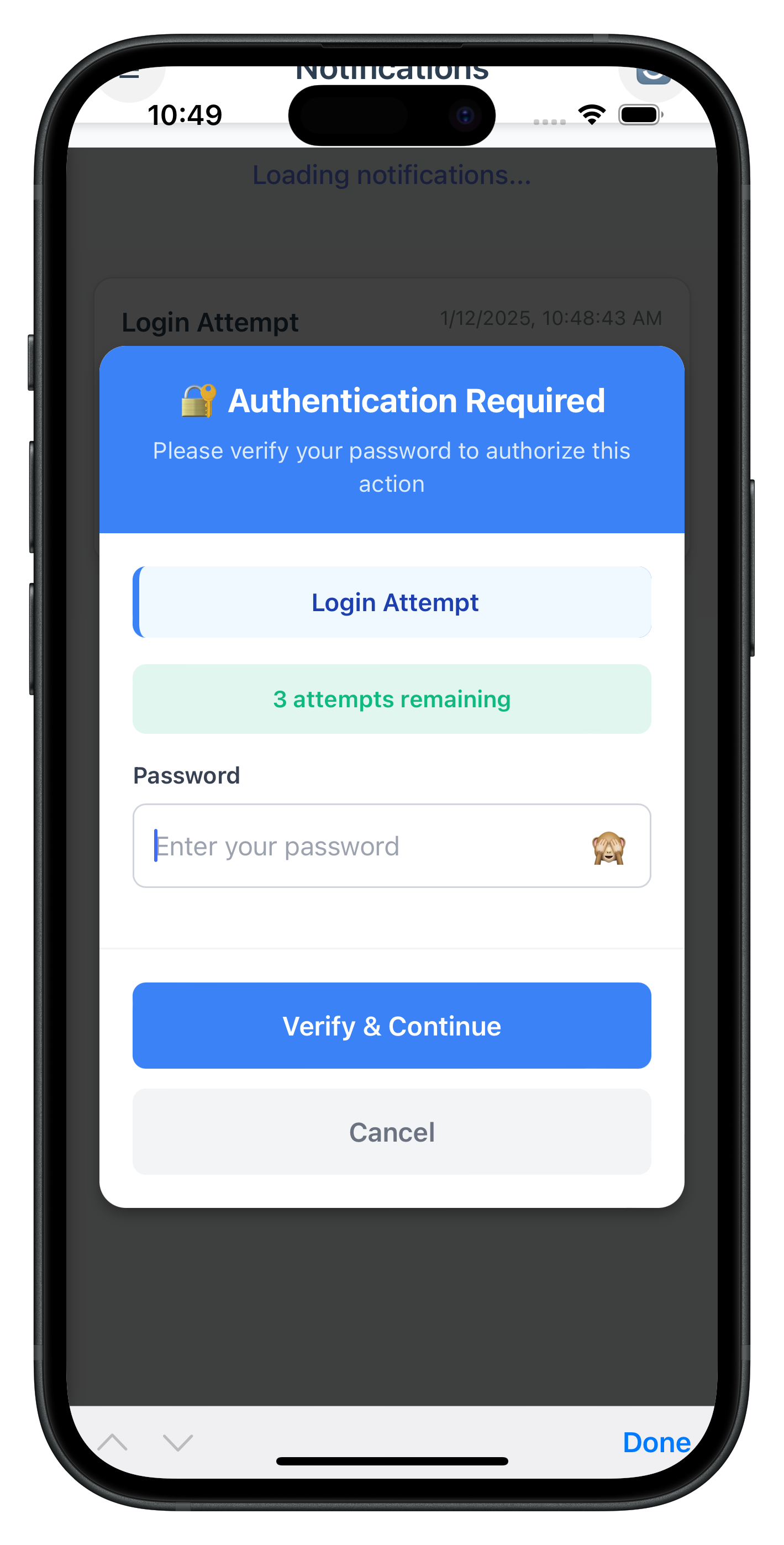
The following image showcases the step-up authentication dialog from the sample application:
Now let's create the business logic manager that will handle step-up authentication context and coordinate between the SDK events and the UI dialog.
Understanding the Manager Pattern
The StepUpAuthManager serves as a modular business logic layer that:
- Stores notification context before calling
updateNotificationAPI - Shows/hides the password dialog when SDK triggers events
- Handles password submission to the SDK
- Manages cleanup after success/failure/cancellation
This pattern keeps SDKEventProvider clean and separates concerns effectively.
Create the StepUpAuthManager Module
Create a new file for the manager:
// www/src/uniken/managers/StepUpAuthManager.js

/**
 * Step-Up Authentication Manager
 *
 * Centralized manager for handling step-up authentication (challengeMode 3)
 * for notification actions. Manages context, modal display, and password verification.
 *
 * This module keeps SDKEventProvider clean by separating step-up auth logic.
 *
 * Key Responsibilities:
 * - Store step-up authentication context (notification details)
 * - Show/hide step-up password dialog
 * - Handle password submission with challengeMode 3
 * - Handle cancellation and cleanup
 *
 * Usage:
 * ```javascript
 * // Before calling updateNotification
 * StepUpAuthManager.setContext({ notificationUUID, notificationTitle, ... });
 *
 * // When SDK triggers getPassword with challengeMode 3
 * StepUpAuthManager.showPasswordDialog(data);
 *
 * // After success/error
 * StepUpAuthManager.clearContext();
 * ```
 */

const StepUpAuthManager = {
  /**
   * Step-up authentication context
   * Stores notification details when updateNotification triggers step-up auth
   */
  _context: {
    notificationUUID: null,
    notificationTitle: '',
    notificationMessage: '',
    action: null,
    userID: '',
    sessionParams: {}
  },

  /**
   * Set step-up authentication context
   * Called by GetNotificationsScreen before calling updateNotification
   *
   * @param {Object} context - Step-up context
   * @param {string} context.notificationUUID - UUID of notification being acted upon
   * @param {string} context.notificationTitle - Title to display in modal
   * @param {string} context.notificationMessage - Message to display in modal
   * @param {string} context.action - Action being performed
   * @param {string} context.userID - Current user ID
   * @param {Object} context.sessionParams - Session parameters for navigation
   */
  setContext(context) {
    console.log('StepUpAuthManager - Setting context:', JSON.stringify(context, null, 2));
    this._context = {
      notificationUUID: context.notificationUUID || null,
      notificationTitle: context.notificationTitle || '',
      notificationMessage: context.notificationMessage || '',
      action: context.action || null,
      userID: context.userID || '',
      sessionParams: context.sessionParams || {}
    };
  },

  /**
   * Clear step-up authentication context
   * Called after successful/failed authentication or on error
   */
  clearContext() {
    console.log('StepUpAuthManager - Clearing context');
    this._context = {
      notificationUUID: null,
      notificationTitle: '',
      notificationMessage: '',
      action: null,
      userID: '',
      sessionParams: {}
    };
  },

  /**
   * Get step-up authentication context
   * @returns {Object} Step-up context
   */
  getContext() {
    return this._context;
  },

  /**
   * Check if context is set (has notification UUID)
   * @returns {boolean} True if context is set
   */
  hasContext() {
    return !!this._context.notificationUUID;
  },

  /**
   * Show step-up password dialog
   * Called by SDKEventProvider when getPassword event received with challengeMode 3
   *
   * @param {Object} data - Get password data from SDK
   */
  showPasswordDialog(data) {
    console.log('StepUpAuthManager - Showing password dialog');

    // Check for error status codes
    const statusCode = data.challengeResponse?.status?.statusCode;
    const statusMessage = data.challengeResponse?.status?.statusMessage || '';
    const errorMessage = statusCode !== 100 ? (statusMessage || 'Authentication failed. Please try again.') : '';

    // Show step-up password dialog
    if (typeof StepUpPasswordDialog !== 'undefined') {
      StepUpPasswordDialog.show({
        notificationTitle: this._context.notificationTitle || 'Notification Action',
        notificationMessage: this._context.notificationMessage || '',
        userID: this._context.userID || data.userID || '',
        attemptsLeft: data.attemptsLeft,
        errorMessage: errorMessage,
        onSubmitPassword: (password) => this.handlePasswordSubmit(password),
        onCancel: () => this.handleCancel()
      });
    } else {
      console.error('StepUpAuthManager - StepUpPasswordDialog not found');
    }
  },

  /**
   * Hide step-up password dialog
   */
  hidePasswordDialog() {
    console.log('StepUpAuthManager - Hiding password dialog');

    if (typeof StepUpPasswordDialog !== 'undefined') {
      StepUpPasswordDialog.hide();
    }
  },

  /**
   * Handle password submission
   * @param {string} password - User-entered password
   */
  handlePasswordSubmit(password) {
    console.log('StepUpAuthManager - Password submitted');

    // Update modal to show loading state
    if (typeof StepUpPasswordDialog !== 'undefined') {
      StepUpPasswordDialog.update({ isSubmitting: true });
    }

    // Call setPassword with challengeMode 3
    rdnaService.setPassword(password, 3)
      .then((syncResponse) => {
        console.log('StepUpAuthManager - setPassword sync response:', JSON.stringify({
          longErrorCode: syncResponse.error?.longErrorCode,
          errorString: syncResponse.error?.errorString
        }, null, 2));

        // If setPassword succeeds, SDK will either:
        // 1. Trigger getPassword again if password is wrong (with error status)
        // 2. Process the updateNotification and trigger onUpdateNotification
        // The modal will stay visible until we get the final response
      })
      .catch((error) => {
        console.error('StepUpAuthManager - setPassword sync error:', JSON.stringify(error, null, 2));

        const errorMessage = error?.error?.errorString || 'Failed to verify password';

        // Update modal with error
        if (typeof StepUpPasswordDialog !== 'undefined') {
          StepUpPasswordDialog.update({
            errorMessage: errorMessage,
            isSubmitting: false
          });
        }
      });
  },

  /**
   * Handle cancellation
   */
  handleCancel() {
    console.log('StepUpAuthManager - Authentication cancelled');

    // Clear context
    this.clearContext();

    // Hide modal
    this.hidePasswordDialog();
  }
};

// Expose globally for SDKEventProvider
window.StepUpAuthManager = StepUpAuthManager;
Load the Script in index.html
Add the script reference to your index.html:
<!-- www/index.html (add after StepUpPasswordDialog.js) -->

<script type="text/javascript" src="src/uniken/managers/StepUpAuthManager.js"></script>
Now let's update the SDKEventProvider to delegate challengeMode 3 events to the StepUpAuthManager.
Understanding the Delegation Pattern
The SDKEventProvider acts as a centralized event router. When it receives a getPassword event with challengeMode = 3, it delegates to StepUpAuthManager rather than navigating to a screen.
This keeps the provider clean and allows modular handling of different challenge modes.
Update SDKEventProvider handleGetPassword Method
Modify your existing SDKEventProvider to add challengeMode 3 handling:
// www/src/uniken/providers/SDKEventProvider.js (modification)

/**
 * Handle get password event for MFA authentication
 * @param {Object} data - Get password data from SDK
 */
handleGetPassword(data) {
  console.log('SDKEventProvider - Get password event received, challengeMode:', data.challengeMode);

  if (data.challengeMode === 0) {
    // challengeMode = 0: Verify existing password
    NavigationService.navigate('VerifyPassword', {
      eventData: data,
      responseData: data,
      title: 'Verify Password',
      subtitle: 'Enter your password to continue',
      userID: data.userID,
      challengeMode: data.challengeMode,
      attemptsLeft: data.attemptsLeft
    });
  } else if (data.challengeMode === 1) {
    // challengeMode = 1: Set new password
    NavigationService.navigate('SetPassword', {
      eventData: data,
      responseData: data,
      title: 'Set Password',
      subtitle: `Create a secure password for user: ${data.userID}`,
      userID: data.userID,
      challengeMode: data.challengeMode,
      attemptsLeft: data.attemptsLeft
    });
  } else if (data.challengeMode === 2) {
    // challengeMode = 2: Update password (RDNA_OP_UPDATE_CREDENTIALS)
    console.log('SDKEventProvider - User-initiated password update, navigating to UpdatePassword screen');
    NavigationService.navigate('UpdatePassword', {
      eventData: data,
      responseData: data,
      title: 'Update Password',
      subtitle: 'Update your account password',
      userID: data.userID,
      challengeMode: data.challengeMode,
      attemptsLeft: data.attemptsLeft
    });
  } else if (data.challengeMode === 3) {
    // challengeMode = 3: Step-up authentication for notification actions (RDNA_OP_AUTHORIZE_NOTIFICATION)
    // Delegate to StepUpAuthManager for modular handling
    console.log('SDKEventProvider - Step-up authentication required, delegating to StepUpAuthManager');

    if (typeof StepUpAuthManager !== 'undefined') {
      StepUpAuthManager.showPasswordDialog(data);
    } else {
      console.error('SDKEventProvider - StepUpAuthManager not found');
    }
  } else if (data.challengeMode === 4) {
    // challengeMode = 4: Update expired password (RDNA_OP_UPDATE_ON_EXPIRY)
    const statusMessage = data.challengeResponse?.status?.statusMessage || 'Your password has expired. Please update it to continue.';

    console.log('SDKEventProvider - Password expired, navigating to UpdateExpiryPassword screen');
    NavigationService.navigate('UpdateExpiryPassword', {
      eventData: data,
      responseData: data,
      title: 'Update Expired Password',
      subtitle: statusMessage,
      userID: data.userID,
      challengeMode: data.challengeMode,
      attemptsLeft: data.attemptsLeft
    });
  } else {
    console.warn('SDKEventProvider - Unknown challengeMode:', data.challengeMode);
  }
}
Now let's integrate step-up authentication with the GetNotificationsScreen by setting context before calling updateNotification and handling the response.
Understanding the Integration Pattern
The GetNotificationsScreen needs to:
- Set context before calling
updateNotificationAPI (so StepUpAuthManager has notification details) - Handle onUpdateNotification event with three-layer error checking
- Clear context after success/failure
- Hide modal after completion
Modify handleActionButtonClick Method
Update the action button handler to set context before calling the API:
// www/src/tutorial/screens/notification/GetNotificationsScreen.js (modification)

/**
 * Handle action button click (React Native style - direct action)
 */
handleActionButtonClick(actionValue) {
  if (!this.currentNotification || !actionValue) {
    console.error('GetNotificationsScreen - Invalid action or notification');
    return;
  }

  // Store UUID BEFORE closing modal (closeActionModal sets currentNotification to null!)
  const notificationUUID = this.currentNotification.notification_uuid;
  const title = this.currentNotification.body?.[0]?.subject || 'Notification Action';
  const message = this.currentNotification.body?.[0]?.message || '';

  console.log('GetNotificationsScreen - Action button clicked:', actionValue);
  console.log('GetNotificationsScreen - Notification UUID:', notificationUUID);

  // Set step-up context in StepUpAuthManager (modular state management)
  // SDKEventProvider will delegate to StepUpAuthManager when challengeMode 3 is triggered
  if (typeof StepUpAuthManager !== 'undefined') {
    StepUpAuthManager.setContext({
      notificationUUID: notificationUUID,
      notificationTitle: title,
      notificationMessage: message,
      action: actionValue,
      userID: this.sessionParams.userID || '',
      sessionParams: this.sessionParams
    });
  }

  // Close modal
  this.closeActionModal();

  // Show loading
  this.showLoading(true);

  // Call SDK updateNotification API
  rdnaService.updateNotification(notificationUUID, actionValue)
    .then((syncResponse) => {
      console.log('GetNotificationsScreen - UpdateNotification sync response:', JSON.stringify(syncResponse, null, 2));
      // Waiting for onUpdateNotification event
      // If step-up auth is required, SDK will trigger getPassword with challengeMode 3
      // SDKEventProvider will handle it and show StepUpPasswordDialog
    })
    .catch((error) => {
      console.error('GetNotificationsScreen - UpdateNotification error:', JSON.stringify(error, null, 2));
      this.showLoading(false);
      this.showError('Failed to update notification. Please try again.');

      // Clear step-up context on error
      if (typeof StepUpAuthManager !== 'undefined') {
        StepUpAuthManager.clearContext();
      }
    });
}
Implement handleUpdateNotificationResponse Method
Update the response handler with comprehensive error handling:
// www/src/tutorial/screens/notification/GetNotificationsScreen.js (modification)

/**
 * Handle updateNotification response event (Cordova reference app pattern)
 */
handleUpdateNotificationResponse(data) {
  console.log('GetNotificationsScreen - Processing update notification response');

  this.showLoading(false);

  // Clear step-up context and hide modal via StepUpAuthManager
  if (typeof StepUpAuthManager !== 'undefined') {
    StepUpAuthManager.clearContext();
    StepUpAuthManager.hidePasswordDialog();
  }

  // Layer 1: Check API-level error (error.longErrorCode)
  if (data.error && data.error.longErrorCode !== 0) {
    const errorCode = data.error.longErrorCode;
    const errorMsg = data.error.errorString || 'API error occurred';
    console.error('GetNotificationsScreen - API error:', errorMsg, 'Code:', errorCode);

    // Handle LDA cancelled (errorCode 131)
    if (errorCode === 131) {
      alert('Authentication Cancelled\\n\\nLocal device authentication was cancelled. Please try again.');
      return;
    }

    alert(`${errorMsg}\\nError: ${errorCode}`);
    this.loadNotifications(); // Refresh to get current state
    return;
  }

  // Layer 2: Check status code (pArgs.response.StatusCode)
  const statusCode = data.pArgs?.response?.StatusCode;
  const statusMsg = data.pArgs?.response?.StatusMsg || 'Unknown error';

  if (statusCode === 100) {
    // Success case
    console.log('GetNotificationsScreen - Notification updated successfully:', statusMsg);

    // Show success message
    alert(statusMsg);

    // Refresh notifications (stay on GetNotifications screen)
    this.loadNotifications();
  } else if (statusCode === 110 || statusCode === 153) {
    // Critical errors: Password expired (110) or Attempts exhausted (153)
    console.warn('GetNotificationsScreen - Critical error, user will be logged out:', statusCode);

    // Hide step-up auth modal if visible
    if (typeof StepUpPasswordDialog !== 'undefined') {
      StepUpPasswordDialog.hide();
    }

    alert('Authentication Failed\\n\\n' + statusMsg);
    // SDK will automatically trigger onUserLoggedOff → getUser
  } else {
    console.error('GetNotificationsScreen - StatusCode error:', statusCode, statusMsg);

    // Hide step-up auth modal if visible
    if (typeof StepUpPasswordDialog !== 'undefined') {
      StepUpPasswordDialog.hide();
    }

    alert(statusMsg);
    this.loadNotifications();
  }
}
Now let's add the CSS styles for the step-up password modal.
Add Modal Styles to index.css
Add these styles to your main CSS file:
/* www/css/index.css (add at end of file) */

/* ===================================
   Step-Up Password Modal Styles
   =================================== */

.stepup-modal-overlay {
  position: fixed;
  top: 0;
  left: 0;
  right: 0;
  bottom: 0;
  background-color: rgba(0, 0, 0, 0.75);
  display: flex;
  justify-content: center;
  align-items: center;
  z-index: 10000; /* Above all other modals */
  padding: 20px;
}

.stepup-modal-container {
  background-color: #ffffff;
  border-radius: 16px;
  width: 100%;
  max-width: 480px;
  max-height: 80%;
  display: flex;
  flex-direction: column;
  box-shadow: 0 4px 20px rgba(0, 0, 0, 0.3);
}

.stepup-modal-header {
  background-color: #3b82f6;
  padding: 20px;
  border-top-left-radius: 16px;
  border-top-right-radius: 16px;
  text-align: center;
}

.stepup-modal-title {
  font-size: 20px;
  font-weight: bold;
  color: #ffffff;
  margin-bottom: 8px;
}

.stepup-modal-subtitle {
  font-size: 14px;
  color: #dbeafe;
  line-height: 20px;
}

.stepup-modal-body {
  padding: 20px;
  overflow-y: auto;
  flex-grow: 1;
}

.stepup-notification-context {
  background-color: #f0f9ff;
  border-radius: 8px;
  padding: 12px;
  margin-bottom: 16px;
  border-left: 4px solid #3b82f6;
}

.stepup-notification-title {
  font-size: 15px;
  font-weight: 600;
  color: #1e40af;
  text-align: center;
}

.stepup-attempts-container {
  border-radius: 8px;
  padding: 12px;
  margin-bottom: 16px;
  text-align: center;
}

.stepup-attempts-text {
  font-size: 14px;
  font-weight: 600;
}

.stepup-error-container {
  background-color: #fef2f2;
  border-radius: 8px;
  padding: 12px;
  margin-bottom: 16px;
  border-left: 4px solid #dc2626;
}

.stepup-error-text {
  font-size: 14px;
  color: #7f1d1d;
  line-height: 20px;
  text-align: center;
}

.stepup-input-container {
  margin-bottom: 16px;
}

.stepup-input-label {
  font-size: 14px;
  font-weight: 600;
  color: #374151;
  margin-bottom: 8px;
  display: block;
}

.stepup-password-wrapper {
  display: flex;
  align-items: center;
  border: 1px solid #d1d5db;
  border-radius: 8px;
  background-color: #ffffff;
}

.stepup-password-input {
  flex: 1;
  padding: 12px;
  font-size: 16px;
  color: #1f2937;
  border: none;
  outline: none;
  border-radius: 8px;
}

.stepup-visibility-button {
  padding: 12px;
  background: transparent;
  border: none;
  cursor: pointer;
}

.stepup-visibility-icon {
  font-size: 20px;
}

.stepup-modal-footer {
  padding: 20px;
  border-top: 1px solid #f3f4f6;
}

.stepup-verify-button {
  background-color: #3b82f6;
  color: #ffffff;
  padding: 16px;
  border-radius: 8px;
  border: none;
  width: 100%;
  font-size: 16px;
  font-weight: 600;
  cursor: pointer;
  margin-bottom: 12px;
}

.stepup-verify-button:hover {
  background-color: #2563eb;
}

.stepup-verify-button:disabled {
  opacity: 0.6;
  cursor: not-allowed;
}

.stepup-cancel-button {
  background-color: #f3f4f6;
  color: #6b7280;
  padding: 16px;
  border-radius: 8px;
  border: none;
  width: 100%;
  font-size: 16px;
  font-weight: 600;
  cursor: pointer;
}

.stepup-cancel-button:hover {
  background-color: #e5e7eb;
}

.stepup-cancel-button:disabled {
  opacity: 0.6;
  cursor: not-allowed;
}

.stepup-button-loading {
  display: flex;
  align-items: center;
  justify-content: center;
  gap: 8px;
}

.spinner-small {
  width: 16px;
  height: 16px;
  border: 2px solid rgba(255, 255, 255, 0.3);
  border-top-color: #ffffff;
  border-radius: 50%;
  animation: spin 0.6s linear infinite;
}

@keyframes spin {
  to {
    transform: rotate(360deg);
  }
}
Now let's test the complete step-up authentication implementation with various scenarios.
Server Configuration
Before testing, ensure your REL-ID server is configured for step-up authentication:
Test Scenario 1: Password Step-Up (User Logged in with Password)
Test the basic password step-up flow:
- Complete MFA flow and log in to dashboard using password
- Navigate to Notifications screen from drawer menu
- Verify notifications loaded - Check that
getNotifications()succeeded - Tap notification action button (e.g., "Approve", "Reject")
- Verify updateNotification API called - Check browser console logs
- Verify step-up dialog appears:
- Modal should display with notification title
- "Authentication Required" header visible
- Password input field should be focused
- Attempts counter shows "3 attempts remaining" in green
- Action modal should be closed
- Enter incorrect password and tap "Verify & Continue"
- Verify error handling:
getPasswordevent triggered again with error- Error message displayed in red box
- Password field automatically cleared
- Attempts counter decremented to "2 attempts remaining" (orange)
- Enter correct password and tap "Verify & Continue"
- Verify success:
onUpdateNotificationevent with statusCode 100- Success alert displayed
- Dialog closes
- Notifications refreshed
Test Scenario 2: LDA Step-Up (User Logged in with LDA)
Test biometric authentication step-up:
- Complete MFA flow and log in to dashboard using LDA (biometric)
- Navigate to Notifications screen
- Tap notification action button
- Verify LDA prompt appears:
- System biometric prompt (Face ID, Touch ID, Fingerprint)
- No
getPasswordevent triggered - No password dialog displayed
- Complete biometric authentication
- Verify success:
onUpdateNotificationevent with statusCode 100- Success alert displayed
- Notifications refreshed
Test Scenario 3: LDA Cancellation with Password Fallback
Test automatic fallback when user cancels biometric (requires both Password & LDA enrolled):
- Enroll both Password and LDA during activation
- Log in using LDA (biometric)
- Navigate to Notifications screen
- Tap notification action button
- LDA prompt appears - System biometric prompt
- Cancel the biometric prompt (tap "Cancel")
- Verify fallback behavior:
- SDK automatically triggers
getPasswordwith challengeMode 3 (no error) - StepUpPasswordDialog appears as fallback
- SDK automatically triggers
- Enter password and tap "Verify & Continue"
- Verify success:
onUpdateNotificationevent with statusCode 100- Success alert displayed
- Notifications refreshed
Test Scenario 4: Critical Error - Password Expired (statusCode 110)
Test error handling when password expires during action:
- Log in with password that will expire during the action
- Navigate to Notifications screen
- Tap notification action button
- Enter password in step-up dialog
- Verify critical error handling:
onUpdateNotificationreceives statusCode 110- Alert displays BEFORE logout: "Authentication Failed"
- Step-up dialog closes
- Tap "OK" on alert
- Verify logout flow:
- SDK triggers
onUserLoggedOffevent - SDKEventProvider handles logout
- User navigated to CheckUserScreen
- SDK triggers
Test Scenario 5: Critical Error - Attempts Exhausted (statusCode 153)
Test error handling when authentication attempts are exhausted:
- Log in with password
- Navigate to Notifications screen
- Tap notification action button
- Enter wrong password 3 times:
- First attempt: "3 attempts remaining" (green)
- Second attempt: "2 attempts remaining" (orange)
- Third attempt: "1 attempt remaining" (red)
- Verify attempts exhausted:
onUpdateNotificationreceives statusCode 153- Alert displays BEFORE logout: "Authentication Failed"
- Step-up dialog closes
- Tap "OK" on alert
- Verify logout flow:
- SDK triggers
onUserLoggedOffevent - SDKEventProvider handles logout
- User navigated to CheckUserScreen
- SDK triggers
Test Scenario 6: Hardware Back Button (Android)
Test that hardware back button properly closes modal:
- Log in and navigate to Notifications screen
- Tap notification action button
- Step-up dialog appears
- Press hardware back button (Android device)
- Verify behavior:
- Modal closes
- Returns to notifications list
- Context cleared
- Try pressing back button during submission:
- Back button should be disabled (no action)
Verification Checklist
Use this checklist to verify your implementation:
- [ ] Password step-up works for password login
- [ ] LDA step-up works for biometric login (no password dialog)
- [ ] LDA cancellation triggers password fallback (when both enrolled)
- [ ] Wrong password shows error and clears field automatically
- [ ] Attempts counter color-codes correctly (green→orange→red)
- [ ] Critical errors (110, 153) show alert BEFORE logout
- [ ] Success shows alert and refreshes notifications
- [ ] Hardware back button is disabled during submission (Android)
- [ ] Modal dismisses properly on cancel
- [ ] Context is cleared after success/error/cancel
- [ ] StepUpAuthManager pattern keeps SDKEventProvider clean
Let's understand why we chose the modular manager pattern with StepUpAuthManager instead of handling everything in GetNotificationsScreen or SDKEventProvider.
Design Decision Rationale
The implementation uses three separate modules for step-up authentication:
- StepUpPasswordDialog - UI component (modal rendering and user input)
- StepUpAuthManager - Business logic (context, API calls, coordination)
- SDKEventProvider - Event router (delegates challengeMode 3 to manager)
This is a deliberate architectural choice with significant benefits.
Modular Manager Approach (Current Implementation)
Advantages:
- Separation of Concerns: UI, logic, and routing are completely separate
- Reusability: StepUpAuthManager can be used by any screen that needs step-up auth
- Testability: Each module can be tested independently
- Maintainability: Changes to UI don't affect business logic
- Clean Provider: SDKEventProvider stays focused on routing, not implementation details
- Explicit Context Management:
setContext()/clearContext()makes data flow obvious
// Modular approach - Clean separation

// 1. Screen sets context
StepUpAuthManager.setContext({ notificationUUID, title, ... });

// 2. Screen calls API
rdnaService.updateNotification(uuid, action);

// 3. SDK triggers event → Provider routes to manager
SDKEventProvider.handleGetPassword(data) {
  if (data.challengeMode === 3) {
    StepUpAuthManager.showPasswordDialog(data);
  }
}

// 4. Manager shows UI and handles submission
StepUpAuthManager.showPasswordDialog(data) {
  StepUpPasswordDialog.show({ ...this._context, ...data });
}
Alternative Approach: Everything in GetNotificationsScreen
Disadvantages if we put everything in one screen:
- Screen Bloat: 500+ lines of step-up auth logic in one file
- Code Duplication: Other screens needing step-up auth must duplicate logic
- Tight Coupling: UI, logic, and state management all intertwined
- Hard to Test: Can't test business logic without rendering screen
- Poor Reusability: Step-up auth logic locked to one screen
Alternative Approach: Everything in SDKEventProvider
Disadvantages if we put everything in provider:
- Provider Bloat: 300+ lines of step-up logic in global provider
- No Context Access: Provider doesn't have notification details
- Complex State Management: Need global state to pass data
- Reduced Focus: Provider should route events, not implement features
Architecture Comparison
Aspect | Modular Manager (✅ Current) | Screen-Only (❌ Alternative) | Provider-Only (❌ Alternative) |
Lines of Code | StepUpAuthManager: ~220 lines | GetNotificationsScreen: ~800 lines | SDKEventProvider: ~600 lines |
Separation of Concerns | Excellent (UI/Logic/Routing separate) | Poor (all mixed together) | Poor (routing + logic mixed) |
Reusability | High (any screen can use manager) | None (locked to one screen) | Medium (but requires global state) |
Maintainability | Easy (change one module at a time) | Hard (must understand entire screen) | Medium (provider does too much) |
Testability | Excellent (test each module) | Poor (must test entire screen) | Poor (provider has side effects) |
Context Management | Explicit via setContext() | Implicit via screen state | Complex via global state |
Code Locality | Related code grouped in manager | All code in one giant file | Step-up logic mixed with routing |
Modular Architecture Flow Diagram
┌─────────────────────────────────────────────────┐
│         GetNotificationsScreen.js               │
│  (Sets context, handles response)               │
└────────────┬───────────────────┬────────────────┘
             │                   │
             │ setContext()      │ handleUpdateNotification()
             │                   │
             ▼                   ▼
┌─────────────────────────────────────────────────┐
│         StepUpAuthManager.js                    │
│  (Context storage, password submission)         │
└────────────┬────────────────────────────────────┘
             │
             │ showPasswordDialog()
             │
             ▼
┌─────────────────────────────────────────────────┐
│         StepUpPasswordDialog.js                 │
│  (Modal UI, user input capture)                 │
└─────────────────────────────────────────────────┘
             ▲
             │
             │ show() / update() / hide()
             │
┌────────────┴────────────────────────────────────┐
│         SDKEventProvider.js                     │
│  (Event router - delegates mode 3)              │
└─────────────────────────────────────────────────┘
When to Use Each Pattern
Use modular manager pattern when:
- Feature has significant business logic separate from UI
- Multiple screens might need the same functionality
- You want explicit context management
- Code maintainability is a priority
Use screen-level pattern when:
- Feature is screen-specific and won't be reused
- Logic is minimal (< 50 lines)
- Screen already has necessary context
Use provider-level pattern when:
- Feature must work globally across all screens
- No screen-specific context needed
- Navigation to dedicated screen is required
Let's address common issues you might encounter when implementing step-up authentication in Cordova.
Issue 1: Step-Up Dialog Not Appearing
Symptoms:
getPasswordevent logged but modal doesn't display- Screen stays on notification list without any visible change
Possible Causes & Solutions:
- StepUpPasswordDialog not loaded: Script not included in index.html
<!-- ❌ Wrong - Script missing -->
<!-- No script tag for StepUpPasswordDialog.js -->

<!-- ✅ Correct - Script loaded -->
<script src="src/uniken/components/modals/StepUpPasswordDialog.js"></script>
<script src="src/uniken/managers/StepUpAuthManager.js"></script>
- Modal div missing in HTML: Persistent modal div not in DOM
<!-- ❌ Wrong - No modal div in index.html -->

<!-- ✅ Correct - Modal div present -->
<div id="stepup-password-modal" class="stepup-modal-overlay" style="display: none;">
  <div id="stepup-modal-content" class="stepup-modal-container">
  </div>
</div>
- Context not set: Forgot to call
setContext()beforeupdateNotification()
// ❌ Wrong - No context set
rdnaService.updateNotification(uuid, action);

// ✅ Correct - Set context first
StepUpAuthManager.setContext({ notificationUUID: uuid, notificationTitle: title, ... });
rdnaService.updateNotification(uuid, action);
Issue 2: Password Field Not Clearing on Retry
Symptoms:
- Wrong password entered
- Field not cleared when
getPasswordtriggers again
Solution: Verify update() method clears input
// ✅ Correct - update() clears password field
update(updates) {
  // ... update state
  this.render();

  const passwordInput = document.getElementById('stepup-password-input');
  if (passwordInput) {
    passwordInput.value = '';  // Clear field
    passwordInput.focus();      // Refocus
  }
}
Issue 3: Modal Not Dismissing Properly
Symptoms:
- Modal stays visible after success
- Cannot interact with screen after closing modal
Solution: Ensure proper cleanup in hide() method
// ✅ Correct - Complete cleanup
hide() {
  this.visible = false;

  // Hide modal element
  const modalElement = document.getElementById('stepup-password-modal');
  if (modalElement) {
    modalElement.style.display = 'none';
  }

  // Clear password input
  const passwordInput = document.getElementById('stepup-password-input');
  if (passwordInput) {
    passwordInput.value = '';
  }

  // Reset state
  this.notificationTitle = '';
  this.errorMessage = '';
  // ... reset all state
}
Issue 4: Alert Not Showing Before Logout
Symptoms:
- Status codes 110 or 153 received
- User logged out without seeing error message
Solution: Ensure alert is shown in handleUpdateNotificationResponse
// ✅ Correct - Show alert BEFORE SDK logout
if (statusCode === 110 || statusCode === 153) {
  // Clear context and hide modal first
  StepUpAuthManager.clearContext();
  StepUpAuthManager.hidePasswordDialog();

  // Show alert (SDK triggers logout after this)
  alert('Authentication Failed\\n\\n' + statusMsg);

  // SDK will automatically trigger onUserLoggedOff event
}
Issue 5: Hardware Back Button Not Working (Android)
Symptoms:
- Back button doesn't close modal
- User stuck on modal screen
Solution: Verify back button handler is registered
// ✅ Correct - Back button handler
attachEventListeners() {
  // ... other listeners

  // Hardware back button handler
  const backHandler = () => {
    if (this.visible && !this.isSubmitting) {
      this.handleCancel();
      return true; // Prevent default back action
    }
    return false;
  };

  document.addEventListener('backbutton', backHandler, false);
}
Issue 6: StepUpAuthManager Not Found
Symptoms:
- Console error: "StepUpAuthManager is not defined"
- SDKEventProvider cannot delegate to manager
Solution: Verify script loading order in index.html
<!-- ✅ Correct - Load order matters -->

<!-- 1. UI Component first -->
<script src="src/uniken/components/modals/StepUpPasswordDialog.js"></script>

<!-- 2. Manager second (depends on UI) -->
<script src="src/uniken/managers/StepUpAuthManager.js"></script>

<!-- 3. Provider third (depends on manager) -->
<script src="src/uniken/providers/SDKEventProvider.js"></script>
Issue 7: Modal Styling Broken
Symptoms:
- Modal appears but layout is broken
- Buttons not visible or misaligned
Solution: Verify CSS file is loaded and styles are correct
<!-- ✅ Correct - CSS file loaded -->
<link rel="stylesheet" type="text/css" href="css/index.css">
Check that step-up modal styles are present in index.css:
/* Verify these classes exist in index.css */
.stepup-modal-overlay { ... }
.stepup-modal-container { ... }
.stepup-modal-header { ... }
.stepup-modal-body { ... }
.stepup-modal-footer { ... }
Cordova-Specific Issues
Issue 8: Plugin Not Loaded
Symptoms:
com.uniken.rdnaplugin.RdnaClientis undefined- SDK methods not available
Solution: Ensure plugin is installed and app is rebuilt
# Verify plugin installation
cordova plugin ls

# If not installed (local plugin)
cordova plugin add ./RdnaClient

# Rebuild app
cordova prepare
cordova run ios
# or
cordova run android
Issue 9: DOM Not Ready
Symptoms:
- Modal elements not found
getElementByIdreturns null
Solution: Ensure code runs after deviceready event
// ✅ Correct - Wait for deviceready
document.addEventListener('deviceready', function() {
  // Initialize components after DOM is ready
  SDKEventProvider.initialize();
}, false);
Debugging Tips
Enable detailed logging to troubleshoot issues:
// Add detailed console logs at each step
console.log('GetNotificationsScreen - Setting context:', JSON.stringify(context, null, 2));
console.log('StepUpAuthManager - Context set:', this._context);
console.log('SDKEventProvider - Delegating to StepUpAuthManager');
console.log('StepUpPasswordDialog - Showing modal');
console.log('StepUpPasswordDialog - Modal element:', document.getElementById('stepup-password-modal'));
Let's review important security considerations for step-up authentication implementation in Cordova.
Password Handling
Never log or expose passwords:
// ❌ Wrong - Logging password
console.log('Password submitted:', password);

// ✅ Correct - Only log that password was submitted
console.log('Password submitted for step-up auth');
Clear sensitive data properly:
// ✅ Correct - Clear password on hide
hide() {
  const passwordInput = document.getElementById('stepup-password-input');
  if (passwordInput) {
    passwordInput.value = '';  // Clear immediately
  }

  // Also clear from memory if stored
  this.password = null;
}
Authentication Method Respect
Never bypass step-up authentication:
// ❌ Wrong - Trying to skip authentication
if (requiresAuth) {
  // Don't try to call action again without auth
}

// ✅ Correct - Always respect SDK's auth requirement
rdnaService.updateNotification(uuid, action);
// Let SDK handle auth requirement via events
Error Message Sanitization
Don't expose sensitive information in error messages:
// ❌ Wrong - Exposing system details
alert('Database connection failed: ' + sqlError.connectionString);

// ✅ Correct - User-friendly generic message
alert('Unable to process action. Please try again.');
Attempt Limiting
Respect server-configured attempt limits:
// ✅ Correct - Use SDK-provided attempts
this.attemptsLeft = data.attemptsLeft;

// ❌ Wrong - Implementing custom attempt limit
const maxAttempts = 5; // Don't do this - use SDK's value
Session Security
Handle critical errors properly:
// ✅ Correct - Show alert BEFORE logout
if (statusCode === 110 || statusCode === 153) {
  // Clear context and hide modal
  StepUpAuthManager.clearContext();
  StepUpAuthManager.hidePasswordDialog();

  // Alert user before automatic logout
  alert('Authentication Failed\\n\\n' + statusMsg);

  // SDK will automatically trigger logout
}
Biometric Fallback Security
Implement proper LDA cancellation handling:
// ✅ Correct - Handle cancellation based on enrollment
if (data.error.longErrorCode === 131) {
  // LDA cancelled
  // If both Password & LDA enrolled: SDK falls back to password
  // If only LDA enrolled: Allow user to retry LDA
  alert('Authentication Cancelled\\n\\nLocal device authentication was cancelled. Please try again.');
}
XSS Prevention
Always escape user-provided content:
// ✅ Correct - Escape HTML
escapeHtml(text) {
  const div = document.createElement('div');
  div.textContent = text;
  return div.innerHTML;
}

// Use when rendering
contentElement.innerHTML = `
  <div class="notification-title">${this.escapeHtml(this.notificationTitle)}</div>
`;
Modal Security
Prevent dismissal during sensitive operations:
// ✅ Correct - Disable cancellation during submission
handleCancel() {
  if (this.isSubmitting) {
    console.log('Cannot cancel during submission');
    return;
  }

  // Allow cancellation only when not submitting
  this.hide();
}

// Hardware back button
const backHandler = () => {
  if (this.visible && !this.isSubmitting) {
    this.handleCancel();
    return true;
  }
  return false;
};
Audit and Monitoring
Log security-relevant events:
// ✅ Correct - Log auth attempts and results
console.log('Step-up authentication initiated for notification:', notificationUUID);
console.log('Step-up authentication result:', {
  success: statusCode === 100,
  attemptsRemaining: attemptsLeft,
  timestamp: new Date().toISOString()
});
Content Security Policy
Configure CSP in index.html:
<!-- ✅ Recommended - Strict CSP -->
<meta http-equiv="Content-Security-Policy"
      content="default-src 'self' data: gap: https://ssl.gstatic.com;
               style-src 'self' 'unsafe-inline';
               script-src 'self' 'unsafe-inline' 'unsafe-eval';">
Testing Security Scenarios
Always test these security scenarios:
- Attempt exhaustion: Verify logout after max attempts
- Password expiry: Verify proper error handling for expired passwords
- Concurrent sessions: Test behavior with multiple devices
- Network failures: Ensure graceful handling of connection issues
- Biometric spoofing: Verify SDK handles biometric security
- XSS attacks: Test with malicious notification titles/messages
Let's optimize the step-up authentication implementation for better performance in Cordova.
DOM Manipulation Optimization
Minimize reflows and repaints:
// ✅ Correct - Update innerHTML once
render() {
  const html = `
    <!-- Build complete HTML string -->
  `;
  contentElement.innerHTML = html;
  this.attachEventListeners(); // Attach once after render
}

// ❌ Wrong - Multiple DOM updates
render() {
  contentElement.innerHTML = '<div class="header">...</div>';
  contentElement.innerHTML += '<div class="body">...</div>'; // Triggers reflow
  contentElement.innerHTML += '<div class="footer">...</div>'; // Another reflow
}
Event Listener Management
Remove event listeners properly:
// ✅ Correct - Store reference and remove
attachEventListeners() {
  this._backHandler = () => {
    if (this.visible && !this.isSubmitting) {
      this.handleCancel();
      return true;
    }
    return false;
  };

  document.addEventListener('backbutton', this._backHandler, false);
}

hide() {
  // Remove listener on hide
  if (this._backHandler) {
    document.removeEventListener('backbutton', this._backHandler, false);
  }
}
Avoid Unnecessary Re-renders
Only render when state actually changes:
// ✅ Correct - Check if state changed
update(updates) {
  let hasChanges = false;

  if (updates.attemptsLeft !== undefined && updates.attemptsLeft !== this.attemptsLeft) {
    this.attemptsLeft = updates.attemptsLeft;
    hasChanges = true;
  }

  // Only re-render if something changed
  if (hasChanges) {
    this.render();
  }
}
Debounce Password Input (Optional)
For complex validation, debounce input:
// Optional optimization
handlePasswordInput(text) {
  clearTimeout(this._inputTimeout);

  this._inputTimeout = setTimeout(() => {
    // Validate password format if needed
    this.validatePassword(text);
  }, 300);
}
Optimize Attempts Color Calculation
Cache color value:
// ✅ Correct - Simple lookup (already optimized)
getAttemptsColor() {
  if (this.attemptsLeft === 1) return '#dc2626';
  if (this.attemptsLeft === 2) return '#f59e0b';
  return '#10b981';
}

// No need for caching - this is already fast
Memory Management
Clean up references on hide:
// ✅ Correct - Clear callbacks and references
hide() {
  // Clear DOM references
  this.visible = false;

  // Clear callbacks to prevent memory leaks
  this.onSubmitPassword = null;
  this.onCancel = null;

  // Clear state
  this.notificationTitle = '';
  this.errorMessage = '';

  // Remove event listeners
  if (this._backHandler) {
    document.removeEventListener('backbutton', this._backHandler);
    this._backHandler = null;
  }
}
CSS Performance
Use hardware-accelerated properties:
/* ✅ Correct - GPU-accelerated */
.stepup-modal-overlay {
  transform: translateZ(0); /* Force GPU acceleration */
  will-change: opacity; /* Hint browser about changes */
}

/* Smooth animations */
@keyframes spin {
  to {
    transform: rotate(360deg);
  }
}
Lazy Initialization
Initialize only when needed:
// ✅ Correct - No heavy initialization upfront
const StepUpPasswordDialog = {
  // Properties are lightweight
  visible: false,
  attemptsLeft: 3,

  // Heavy work only happens on show()
  show(config) {
    this.render(); // Render only when showing
  }
};
Performance Monitoring
Monitor step-up auth performance:
// Optional: Add performance monitoring
show(config) {
  const startTime = performance.now();

  // ... show modal logic

  const duration = performance.now() - startTime;
  console.log(`Step-up modal shown in ${duration}ms`);
}

handlePasswordSubmit(password) {
  const startTime = performance.now();

  rdnaService.setPassword(password, 3)
    .then(() => {
      const duration = performance.now() - startTime;
      console.log(`Step-up auth completed in ${duration}ms`);
    });
}
Avoid Over-Engineering
Keep it simple:
// ✅ Correct - Simple and clear
show(config) {
  this.notificationTitle = config.notificationTitle || 'Notification Action';
  this.render();
  document.getElementById('stepup-password-modal').style.display = 'flex';
}

// ❌ Wrong - Over-engineered
show(config) {
  // Don't add unnecessary complexity
  this.stateManager = new StateManager();
  this.renderer = new Renderer();
  this.eventBus = new EventBus();
  // ... too complex for a simple modal
}
Congratulations! You've successfully implemented step-up authentication for notification actions with REL-ID SDK in Cordova.
What You've Accomplished
In this codelab, you've learned how to:
✅ Understand Step-Up Authentication: Learned when and why re-authentication is required for sensitive operations
✅ Create StepUpPasswordDialog: Built a modal password dialog with DOM manipulation, attempts counter, and error handling
✅ Implement StepUpAuthManager: Created a modular business logic manager for context and password submission
✅ Integrate with SDKEventProvider: Updated event provider to delegate challengeMode 3 to specialized manager
✅ Handle LDA and Password Flows: Supported both biometric authentication and password-based step-up with automatic fallback
✅ Manage Critical Errors: Properly handled status codes 110, 153 with alerts before logout and error code 131 with alert
✅ Use DOM-Based State Management: Managed modal state using vanilla JavaScript without React
✅ Understand Modular Architecture: Learned benefits of separating UI, logic, and routing into distinct modules
Key Takeaways
Authentication Method Selection:
- SDK determines password vs LDA based on login method
- Login with Password → Step-up uses Password
- Login with LDA → Step-up uses LDA with Password fallback
Error Handling:
- Status 110/153: Show alert BEFORE SDK logout
- Error 131: LDA cancelled, SDK falls back to password (if both enrolled)
- Always use three-layer error checking (API errors, status codes, promise rejections)
Architecture Pattern:
- Modular managers for business logic separation
- StepUpPasswordDialog for UI rendering
- StepUpAuthManager for context and coordination
- SDKEventProvider for event routing
Security Best Practices:
- Never log or expose passwords
- Respect SDK's attempt limits
- Escape HTML to prevent XSS
- Handle critical errors with user notifications
Additional Resources
- REL-ID Step-Up Authentication Documentation - Comprehensive guide to step-up authentication
- REL-ID Notification Management Documentation - Learn about notification features
- REL-ID Cordova Plugin API Reference - Complete API documentation
- GitHub Repository - Source code and examples
Thank you for completing this codelab! You now have the knowledge to implement secure, production-ready step-up authentication for notification actions in your Cordova applications.
Happy Coding! 🚀