🎯 Learning Path:
Welcome to the REL-ID Device Management codelab! This tutorial builds upon your existing MFA implementation to add comprehensive device management capabilities using REL-ID SDK's device management APIs.
In this codelab, you'll enhance your existing MFA application with:
getRegisteredDeviceDetails() APIupdateDeviceDetails() operationType 0updateDeviceDetails() operationType 1By completing this codelab, you'll master:
onGetRegistredDeviceDetails and onUpdateDeviceDetails eventsBefore starting this codelab, ensure you have:
The code to get started can be found in a GitHub repository.
You can clone the repository using the following command:
git clone https://github.com/uniken-public/codelab-cordova.git
Navigate to the relid-device-management folder in the repository you cloned earlier
This codelab extends your MFA application with three core device management components:
This project includes a local Cordova plugin. Ensure the plugin directory exists in your project root:
# Verify plugin directory exists
ls -la ./RdnaClient
The SDK plugin is included as a local plugin in the project. Install it from the local directory:
cordova plugin add ./RdnaClient
For loading local JSON files, install cordova-plugin-file:
cordova plugin add cordova-plugin-file
# Add platforms
cordova platform add ios
cordova platform add android

# Prepare platforms
cordova prepare
Follow the Cordova platform setup guide for platform-specific configuration.
Before implementing device management screens, let's understand the key SDK events and APIs that power the device lifecycle management workflow.
The device management process follows this event-driven pattern:
User Logs In → Navigate to Device Management →
getRegisteredDeviceDetails() Called → onGetRegistredDeviceDetails Event →
Device List Displayed with Cooling Period Check →
User Taps Device → Navigate to Detail Screen →
User Renames/Deletes → updateDeviceDetails() Called →
onUpdateDeviceDetails Event → Success/Error Feedback →
Navigate Back → Device List Auto-Refreshes
The REL-ID SDK provides these APIs and events for device management:
API/Event | Type | Description | User Action Required |
API | Fetch all registered devices with cooling period info | System calls automatically | |
Event | Receives device list with metadata | System processes response | |
API | Rename or delete device with JSON payload | User taps action button | |
Event | Update operation result with status codes | System handles response |
The updateDeviceDetails() API supports two operation types via the status field in JSON payload:
Operation Type | Status Value | Description | devName Value |
Rename Device |
| Update device name | New device name string |
Delete Device |
| Remove device from account | Empty string |
The onGetRegistredDeviceDetails event returns this data structure:
/**
 * @typedef {Object} RDNAGetRegisteredDeviceDetailsData
 * @property {Object} error - API-level error (longErrorCode)
 * @property {Object} pArgs
 * @property {Object} pArgs.response
 * @property {number} pArgs.response.StatusCode - 100=success, 146=cooling period
 * @property {string} pArgs.response.StatusMsg - Status message
 * @property {Object} pArgs.response.ResponseData
 * @property {Array<RDNARegisteredDevice>} pArgs.response.ResponseData.device - Array of devices
 * @property {number|null} pArgs.response.ResponseData.deviceManagementCoolingPeriodEndTimestamp - Cooling period end
 */

/**
 * @typedef {Object} RDNARegisteredDevice
 * @property {string} devUUID - Device unique identifier
 * @property {string} devName - Device display name
 * @property {string} status - "ACTIVE" or other status
 * @property {boolean} currentDevice - true if this is the current device
 * @property {number} lastAccessedTsEpoch - Last access timestamp (milliseconds)
 * @property {number} createdTsEpoch - Creation timestamp (milliseconds)
 * @property {string} appUuid - Application identifier
 * @property {number} devBind - Device binding status
 */
Cooling periods are server-enforced timeouts between device operations:
Status Code | Meaning | Cooling Period Active | Actions Allowed |
| Success | No | All actions enabled |
| Cooling period active | Yes | All actions disabled |
The currentDevice flag identifies the active device:
currentDevice Value | Delete Button | Rename Button | Reason |
| ❌ Disabled/Hidden | ✅ Enabled | Cannot delete active device |
| ✅ Enabled | ✅ Enabled | Can delete non-current devices |
The updateDeviceDetails() API requires a complete device object in JSON format:
Rename Operation Example:
{
  "device": [{
    "devUUID": "DEVICE_UUID_HERE",
    "devName": "My New Device Name",
    "status": "Update",
    "lastAccessedTs": "2025-10-09T11:39:49UTC",
    "lastAccessedTsEpoch": 1760009989000,
    "createdTs": "2025-10-09T11:38:34UTC",
    "createdTsEpoch": 1760009914000,
    "appUuid": "6b72172f-3e51-4ea9-b217-2f3e51aea9c3",
    "currentDevice": true,
    "devBind": 0
  }]
}
Delete Operation Example:
{
  "device": [{
    "devUUID": "DEVICE_UUID_HERE",
    "devName": "",
    "status": "Delete",
    "lastAccessedTs": "2025-10-09T11:39:49UTC",
    "lastAccessedTsEpoch": 1760009989000,
    "createdTs": "2025-10-09T11:38:34UTC",
    "createdTsEpoch": 1760009914000,
    "appUuid": "6b72172f-3e51-4ea9-b217-2f3e51aea9c3",
    "currentDevice": false,
    "devBind": 0
  }]
}
Device management implements comprehensive error detection:
Layer | Check | Error Source | Example |
Layer 1 |
| API-level errors | Network timeout, invalid userID |
Layer 2 |
| Status codes | 146 (cooling period), validation errors |
Layer 3 |
| SDK/Network failures | Connection refused, SDK errors |
Device management screens use proper event handler cleanup in Cordova's SPA architecture:
// DeviceManagementScreen - onContentLoaded cleanup
onContentLoaded(params) {
  this.setupEventListeners();
  this.registerSDKEventHandlers();
  this.loadDevices();
}

// DeviceDetailScreen - Screen-level event handler
registerSDKEventHandlers() {
  const eventManager = rdnaService.getEventManager();

  // Set screen-specific handler
  eventManager.setUpdateDeviceDetailsHandler((data) => {
    this.handleUpdateDeviceResponse(data);
  });
}
Let's implement the device management APIs in your service layer following established REL-ID SDK patterns for Cordova.
Add this method to
www/src/uniken/services/rdnaService.js
:
// www/src/uniken/services/rdnaService.js (addition to existing class)

/**
 * Get registered device details for a user
 *
 * Fetches all devices registered to the specified user account.
 * Returns device list with metadata including cooling period information.
 *
 * @see https://developer.uniken.com/docs/get-registered-devices
 *
 * Workflow:
 * 1. User navigates to Device Management screen
 * 2. Screen calls getRegisteredDeviceDetails(userID)
 * 3. SDK fetches device list from server via native plugin
 * 4. SDK triggers onGetRegistredDeviceDetails DOM event
 * 5. Event handler receives device array with cooling period data
 * 6. App displays device list with cooling period banner if StatusCode = 146
 *
 * Response Validation Logic:
 * 1. Check error.longErrorCode: 0 = success, > 0 = error
 * 2. Wait for onGetRegistredDeviceDetails event with device list
 * 3. Event contains StatusCode (100 = success, 146 = cooling period)
 * 4. Event contains device array and cooling period timestamp
 * 5. Async event handled by screen-level event handler
 *
 * @param {string} userId - User identifier from session params
 * @returns {Promise<Object>} Promise that resolves with sync response structure
 */
async getRegisteredDeviceDetails(userId) {
  return new Promise((resolve, reject) => {
    console.log('RdnaService - Getting registered device details for userId:', userId);

    com.uniken.rdnaplugin.RdnaClient.getRegisteredDeviceDetails(
      (response) => {
        console.log('RdnaService - GetRegisteredDeviceDetails sync callback received');

        const result = JSON.parse(response);
        console.log('RdnaService - getRegisteredDeviceDetails sync response:', JSON.stringify({
          longErrorCode: result.error?.longErrorCode,
          shortErrorCode: result.error?.shortErrorCode,
          errorString: result.error?.errorString
        }, null, 2));

        // Success callback - always errorCode 0 (plugin routes by error code)
        console.log('RdnaService - GetRegisteredDeviceDetails sync response success, waiting for onGetRegistredDeviceDetails event');
        resolve(result);
      },
      (error) => {
        console.error('RdnaService - getRegisteredDeviceDetails error callback:', error);
        const result = JSON.parse(error);
        reject(result);
      },
      [userId] // [USER_ID]
    );
  });
}
Add this method to
www/src/uniken/services/rdnaService.js
:
// www/src/uniken/services/rdnaService.js (addition to existing class)

/**
 * Updates device details (rename or delete)
 *
 * Updates device information or removes a device from the registered devices list.
 * This method follows the sync+async pattern: sync callback returns immediately,
 * then triggers an onUpdateDeviceDetails event with operation result.
 *
 * @see https://developer.uniken.com/docs/device-management
 *
 * Workflow:
 * 1. User taps device in list → navigates to Device Detail screen
 * 2. User taps "Rename Device" → modal opens, user enters new name
 * 3. Screen calls updateDeviceDetails(userId, devicePayload) with operationType: 0
 * 4. OR user taps "Remove Device" → confirmation dialog → calls with operationType: 1
 * 5. Sync callback returns immediately with error structure
 * 6. SDK triggers onUpdateDeviceDetails event with operation status
 * 7. Screen shows success/error alert and navigates back to device list
 *
 * Operation Types:
 * - 0: RENAME - Update device name (devName must be provided, status = "Update")
 * - 1: DELETE - Remove device (devName must be empty string "", status = "Delete")
 *
 * Device Payload Structure (JSON string):
 * {
 *   "device": [{
 *     "devUUID": "device-uuid-string",
 *     "devName": "New Device Name" (rename) or "" (delete),
 *     "status": "Update" (rename) or "Delete" (delete),
 *     "lastAccessedTs": "2025-10-09T11:39:49UTC",
 *     "lastAccessedTsEpoch": 1760009989000,
 *     "createdTs": "2025-10-09T11:38:34UTC",
 *     "createdTsEpoch": 1760009914000,
 *     "appUuid": "app-uuid-string",
 *     "currentDevice": true or false,
 *     "devBind": 0
 *   }]
 * }
 *
 * Important Notes:
 * - Cannot delete current device (currentDevice: true) - server will reject
 * - During cooling period (StatusCode 146), all operations are disabled
 * - Must pass complete device object with all fields
 * - Device payload must be valid JSON string
 *
 * Response Structure (Sync):
 * {
 *   error: { longErrorCode, shortErrorCode, errorString }
 * }
 *
 * Event Structure (Async - onUpdateDeviceDetails):
 * {
 *   errCode: number,
 *   error: { longErrorCode, shortErrorCode, errorString },
 *   eMethId: number,
 *   pArgs: {
 *     response: {
 *       ResponseData: {
 *         status_code: number,
 *         message: string,
 *         dev_uuid: string
 *       },
 *       StatusMsg: string,
 *       StatusCode: number,  // 100 = success, 146 = cooling period
 *       CredOpMode: number
 *     }
 *   }
 * }
 *
 * Response Validation Logic:
 * 1. Check error.longErrorCode: 0 = success, > 0 = error
 * 2. Wait for onUpdateDeviceDetails event with operation result
 * 3. Check StatusCode: 100 = success, 146 = cooling period
 * 4. Check ResponseData.status_code for detailed operation status
 * 5. Display success message or error alert to user
 *
 * @param {string} userId - User identifier from session params
 * @param {string} devicePayload - JSON string containing device array with update/delete details
 * @returns {Promise<Object>} Promise that resolves with sync response structure
 */
async updateDeviceDetails(userId, devicePayload) {
  return new Promise((resolve, reject) => {
    console.log('RdnaService - Updating device details for userId:', userId);
    console.log('RdnaService - Device payload:', devicePayload);

    com.uniken.rdnaplugin.RdnaClient.updateDeviceDetails(
      (response) => {
        console.log('RdnaService - UpdateDeviceDetails sync callback received');

        const result = JSON.parse(response);
        console.log('RdnaService - updateDeviceDetails sync response:', JSON.stringify({
          longErrorCode: result.error?.longErrorCode,
          shortErrorCode: result.error?.shortErrorCode,
          errorString: result.error?.errorString
        }, null, 2));

        // Success callback - always errorCode 0 (plugin routes by error code)
        console.log('RdnaService - UpdateDeviceDetails sync response success, waiting for onUpdateDeviceDetails event');
        resolve(result);
      },
      (error) => {
        console.error('RdnaService - updateDeviceDetails error callback:', error);
        const result = JSON.parse(error);
        reject(result);
      },
      [userId, devicePayload] // [USER_ID, DEVICE_PAYLOAD]
    );
  });
}
Ensure your service singleton exports all methods in
www/src/uniken/services/rdnaService.js
:
class RdnaService {
  // Existing MFA methods...

  // ✅ New device management methods
  async getRegisteredDeviceDetails(userId) { /* ... */ }
  async updateDeviceDetails(userId, devicePayload) { /* ... */ }
}

// Export singleton instance
const rdnaService = new RdnaService();
window.rdnaService = rdnaService;
Now let's enhance your event manager to handle device management events using Cordova's DOM event system.
Enhance
www/src/uniken/services/rdnaEventManager.js
with device management event handlers:
// www/src/uniken/services/rdnaEventManager.js (additions)

/**
 * Handles get registered device details response events
 * This event is triggered after calling getRegisteredDeviceDetails() API.
 * Contains array of registered devices with metadata and cooling period information.
 *
 * @param {RDNAJsonResponse} event - Event from native SDK containing device list data
 */
onGetRegistredDeviceDetails(event) {
  console.log("RdnaEventManager - Get registered device details response event received");

  try {
    // Handle both string and object responses
    let deviceDetailsData;
    if (typeof event.response === 'string') {
      deviceDetailsData = JSON.parse(event.response);
    } else {
      deviceDetailsData = event.response;
    }

    console.log("RdnaEventManager - Device details response:", JSON.stringify({
      deviceCount: deviceDetailsData.pArgs?.response?.ResponseData?.device?.length || 0,
      statusCode: deviceDetailsData.pArgs?.response?.StatusCode,
      statusMsg: deviceDetailsData.pArgs?.response?.StatusMsg,
      coolingPeriodEndTs: deviceDetailsData.pArgs?.response?.ResponseData?.deviceManagementCoolingPeriodEndTimestamp,
      errCode: deviceDetailsData.errCode,
      errorString: deviceDetailsData.error?.errorString
    }, null, 2));

    if (this.getRegisteredDeviceDetailsHandler) {
      this.getRegisteredDeviceDetailsHandler(deviceDetailsData);
    }
  } catch (error) {
    console.error("RdnaEventManager - Failed to parse device details response:", error);
  }
}

/**
 * Handles update device details response events
 * This event is triggered after calling updateDeviceDetails() API.
 * Contains result of device rename or delete operation.
 *
 * @param {RDNAJsonResponse} event - Event from native SDK containing update result
 */
onUpdateDeviceDetails(event) {
  console.log("RdnaEventManager - Update device details response event received");

  try {
    // Handle both string and object responses
    let updateDeviceData;
    if (typeof event.response === 'string') {
      updateDeviceData = JSON.parse(event.response);
    } else {
      updateDeviceData = event.response;
    }

    console.log("RdnaEventManager - Update device response:", JSON.stringify({
      statusCode: updateDeviceData.pArgs?.response?.StatusCode,
      statusMsg: updateDeviceData.pArgs?.response?.StatusMsg,
      responseStatusCode: updateDeviceData.pArgs?.response?.ResponseData?.status_code,
      message: updateDeviceData.pArgs?.response?.ResponseData?.message,
      devUuid: updateDeviceData.pArgs?.response?.ResponseData?.dev_uuid,
      errCode: updateDeviceData.errCode,
      errorString: updateDeviceData.error?.errorString
    }, null, 2));

    if (this.updateDeviceDetailsHandler) {
      this.updateDeviceDetailsHandler(updateDeviceData);
    }
  } catch (error) {
    console.error("RdnaEventManager - Failed to parse update device response:", error);
  }
}
Add DOM event listener registration in the constructor (around line 240):
// www/src/uniken/services/rdnaEventManager.js (constructor additions)

constructor() {
  // ... existing listeners ...

  // Device Management event registrations
  document.addEventListener('onGetRegistredDeviceDetails', getRegisteredDeviceDetailsListener, false);
  document.addEventListener('onUpdateDeviceDetails', updateDeviceDetailsListener, false);
}

// Create listener functions
const getRegisteredDeviceDetailsListener = (event) => {
  rdnaEventManager.onGetRegistredDeviceDetails(event);
};

const updateDeviceDetailsListener = (event) => {
  rdnaEventManager.onUpdateDeviceDetails(event);
};
Add setter methods for event handlers (around line 1190):
// www/src/uniken/services/rdnaEventManager.js (setter methods)

/**
 * Sets handler for get registered device details response events
 * @param {Function} callback - Callback function receiving device list data
 */
setGetRegisteredDeviceDetailsHandler(callback) {
  this.getRegisteredDeviceDetailsHandler = callback;
}

/**
 * Gets the current get registered device details handler
 * @returns {Function|undefined}
 */
getGetRegisteredDeviceDetailsHandler() {
  return this.getRegisteredDeviceDetailsHandler;
}

/**
 * Sets handler for update device details response events
 * @param {Function} callback - Callback function receiving update operation result
 */
setUpdateDeviceDetailsHandler(callback) {
  this.updateDeviceDetailsHandler = callback;
}

/**
 * Gets the current update device details handler
 * @returns {Function|undefined}
 */
getUpdateDeviceDetailsHandler() {
  return this.updateDeviceDetailsHandler;
}
Create the DeviceManagementScreen that displays the device list with pull-to-refresh, cooling period detection, and auto-refresh capabilities using Cordova's SPA architecture.
Add this template to
www/index.html
(after other screen templates):
<!-- ========== DEVICE MANAGEMENT SCREEN TEMPLATE ========== -->
<template id="DeviceManagement-template">
  <div class="screen-container">
    <!-- Header with Menu Button -->
    <div class="notifications-header">
      <button id="device-management-menu-button" class="header-icon-btn">☰</button>
      <h1 class="header-title">📱 Device Management</h1>
      <button id="device-management-refresh-button" class="header-icon-btn refresh-btn">🔄</button>
    </div>

    <!-- Error Message -->
    <div id="device-mgmt-error" class="error-message" style="display: none;"></div>

    <!-- Loading Indicator -->
    <div id="device-mgmt-loading-spinner" class="loading-indicator" style="display: none;">
      <div class="spinner"></div>
      <p>Loading devices...</p>
    </div>

    <!-- Cooling Period Warning Banner -->
    <div id="cooling-period-warning" class="cooling-period-warning" style="display: none;">
      <div class="warning-icon">⏳</div>
      <div class="warning-content">
        <h3 class="warning-title">Cooling Period Active</h3>
        <p id="cooling-period-message" class="warning-message"></p>
        <p id="cooling-period-end" class="warning-end-time" style="display: none;"></p>
      </div>
    </div>

    <!-- Main Content Area -->
    <div class="content">
      <div class="device-mgmt-intro">
        <p class="intro-text">Manage your registered devices. Tap a device to view details, rename, or remove.</p>
      </div>

      <!-- Device List Container -->
      <div id="device-list" class="device-list">
        <!-- Devices rendered here by JavaScript -->
      </div>
    </div>
  </div>
</template>
Create new file:
www/src/tutorial/screens/deviceManagement/DeviceManagementScreen.js
Add this complete implementation:
/**
 * Device Management Screen - Device List and Management
 *
 * This screen displays all registered devices for the authenticated user and allows
 * device management operations (view details, rename, delete).
 *
 * Key Features:
 * - Automatic device list loading on screen entry
 * - Pull-to-refresh support
 * - Cooling period detection and warning display
 * - Current device highlighting
 * - Device status indicators (ACTIVE/INACTIVE)
 * - Navigation to device detail screen
 *
 * User Flow:
 * 1. User opens drawer and taps "📱 Device Management"
 * 2. Screen auto-loads devices via getRegisteredDeviceDetails() API
 * 3. Devices displayed with status indicators and tap-to-view-details
 * 4. Current device highlighted with green border and badge
 * 5. Cooling period warning banner shown if StatusCode 146
 * 6. User taps device card to navigate to DeviceDetailScreen
 *
 * SPA Lifecycle:
 * - onContentLoaded(params) - Called when template loaded, auto-loads devices
 * - setupEventListeners() - Attach button and navigation handlers
 * - loadDevices() - Fetch devices from server
 * - renderDeviceList() - Display devices with formatting
 */

const DeviceManagementScreen = {
  /**
   * Screen state
   */
  devices: [],
  isLoading: false,
  isCoolingPeriodActive: false,
  coolingPeriodEndTimestamp: null,
  coolingPeriodMessage: '',
  sessionParams: {},

  /**
   * Called when screen content is loaded (SPA lifecycle)
   *
   * @param {Object} params - Navigation parameters (must include userID)
   */
  onContentLoaded(params) {
    console.log('DeviceManagementScreen - Content loaded with params:', JSON.stringify(params, null, 2));

    // Store session params for API calls and navigation
    this.sessionParams = params || {};

    // Validate required userID parameter
    if (!this.sessionParams.userID) {
      console.error('DeviceManagementScreen - userID is required in params');
      this.showError('Session expired. Please log in again.');
      return;
    }

    // Store session params globally for use across screens
    if (typeof SDKEventProvider !== 'undefined') {
      SDKEventProvider.setSessionParams(this.sessionParams);
    }

    // Setup UI
    this.setupEventListeners();
    this.registerSDKEventHandlers();

    // Auto-load devices
    this.loadDevices();
  },

  /**
   * Setup event listeners
   */
  setupEventListeners() {
    // Menu button
    const menuButton = document.getElementById('device-management-menu-button');
    if (menuButton) {
      menuButton.onclick = () => {
        NavigationService.toggleDrawer();
      };
    }

    // Refresh button
    const refreshButton = document.getElementById('device-management-refresh-button');
    if (refreshButton) {
      refreshButton.onclick = () => {
        this.loadDevices();
      };
    }

    // Setup drawer menu link handlers to pass session params
    this.setupDrawerLinks();

    console.log('DeviceManagementScreen - Event listeners setup complete');
  },

  /**
   * Setup drawer menu link handlers
   */
  setupDrawerLinks() {
    const drawerDashboardLink = document.getElementById('drawer-dashboard-link');
    const drawerNotificationsLink = document.getElementById('drawer-notifications-link');
    const drawerDeviceMgmtLink = document.getElementById('drawer-device-mgmt-link');

    if (drawerDashboardLink) {
      drawerDashboardLink.onclick = (e) => {
        e.preventDefault();
        NavigationService.closeDrawer();
        console.log('DeviceManagementScreen - Navigating to Dashboard');
        NavigationService.navigate('Dashboard', this.sessionParams);
      };
    }

    if (drawerNotificationsLink) {
      drawerNotificationsLink.onclick = (e) => {
        e.preventDefault();
        NavigationService.closeDrawer();
        console.log('DeviceManagementScreen - Navigating to GetNotifications');
        NavigationService.navigate('GetNotifications', this.sessionParams);
      };
    }

    if (drawerDeviceMgmtLink) {
      drawerDeviceMgmtLink.onclick = (e) => {
        e.preventDefault();
        NavigationService.closeDrawer();
        // Already on Device Management screen, just reload
        this.loadDevices();
      };
    }
  },

  /**
   * Register SDK event handlers
   */
  registerSDKEventHandlers() {
    const eventManager = rdnaService.getEventManager();

    // Handle getRegisteredDeviceDetails response
    eventManager.setGetRegisteredDeviceDetailsHandler((data) => {
      console.log('DeviceManagementScreen - onGetRegistredDeviceDetails event received');
      this.handleGetDevicesResponse(data);
    });

    console.log('DeviceManagementScreen - SDK event handlers registered');
  },

  /**
   * Load devices from server (auto-triggered on screen load)
   */
  loadDevices() {
    if (this.isLoading) {
      console.log('DeviceManagementScreen - Already loading devices');
      return;
    }

    if (!this.sessionParams.userID) {
      console.error('DeviceManagementScreen - userID not available');
      this.showError('Session expired. Please log in again.');
      return;
    }

    this.isLoading = true;
    this.showLoading(true);
    console.log('DeviceManagementScreen - Loading devices for userID:', this.sessionParams.userID);

    // Call SDK getRegisteredDeviceDetails API
    rdnaService.getRegisteredDeviceDetails(this.sessionParams.userID)
      .then((syncResponse) => {
        console.log('DeviceManagementScreen - GetRegisteredDeviceDetails sync response:', JSON.stringify(syncResponse, null, 2));
        // Waiting for onGetRegistredDeviceDetails event with device list
      })
      .catch((error) => {
        console.error('DeviceManagementScreen - GetRegisteredDeviceDetails error:', JSON.stringify(error, null, 2));
        this.isLoading = false;
        this.showLoading(false);
        this.showError('Failed to load devices. Please try again.');
      });
  },

  /**
   * Handle getRegisteredDeviceDetails response event
   */
  handleGetDevicesResponse(data) {
    console.log('DeviceManagementScreen - Processing device details response');

    this.isLoading = false;
    this.showLoading(false);

    // Layer 1: Check API-level error (error.longErrorCode)
    if (data.error && data.error.longErrorCode !== 0) {
      const errorMsg = data.error.errorString || 'API error occurred';
      console.error('DeviceManagementScreen - API error:', errorMsg, 'Code:', data.error.longErrorCode);
      this.showError(errorMsg);
      return;
    }

    // Layer 2: Check status code (pArgs.response.StatusCode)
    const statusCode = data.pArgs?.response?.StatusCode;
    if (statusCode === 146) {
      // Cooling period active
      this.isCoolingPeriodActive = true;
      this.coolingPeriodEndTimestamp = data.pArgs?.response?.ResponseData?.deviceManagementCoolingPeriodEndTimestamp;
      this.coolingPeriodMessage = data.pArgs?.response?.StatusMsg || 'Device management operations are temporarily disabled. Please try again later.';
      console.log('DeviceManagementScreen - Cooling period detected. End timestamp:', this.coolingPeriodEndTimestamp);
      this.showCoolingPeriodWarning();
    } else if (statusCode !== 100) {
      const statusMsg = data.pArgs?.response?.StatusMsg || 'Failed to retrieve devices';
      console.error('DeviceManagementScreen - Status error:', statusCode, 'Message:', statusMsg);
      this.showError(statusMsg);
      return;
    } else {
      // Success - clear cooling period state
      this.isCoolingPeriodActive = false;
      this.coolingPeriodEndTimestamp = null;
      this.coolingPeriodMessage = '';
      this.hideCoolingPeriodWarning();
    }

    // Process devices data
    this.devices = data.pArgs?.response?.ResponseData?.device || [];
    console.log('DeviceManagementScreen - Received', this.devices.length, 'devices');

    // Display devices
    this.renderDeviceList();
  },

  /**
   * Render device list
   */
  renderDeviceList() {
    const container = document.getElementById('device-list');
    if (!container) return;

    // Clear container
    container.innerHTML = '';

    if (this.devices.length === 0) {
      // Empty state
      const emptyState = document.createElement('div');
      emptyState.className = 'empty-state';
      emptyState.innerHTML = `
        <p class="empty-state-text">📱</p>
        <p class="empty-state-message">No devices found</p>
      `;
      container.appendChild(emptyState);
      return;
    }

    // Render each device
    this.devices.forEach((device) => {
      const deviceCard = this.createDeviceCard(device);
      container.appendChild(deviceCard);
    });
  },

  /**
   * Create device card element
   */
  createDeviceCard(device) {
    const card = document.createElement('div');
    card.className = 'device-card';

    // Add current device styling
    if (device.currentDevice) {
      card.classList.add('current-device');
    }

    // Add click handler to navigate to detail screen
    card.onclick = () => {
      console.log('DeviceManagementScreen - Device tapped:', device.devUUID);
      this.navigateToDeviceDetail(device);
    };

    // Status indicator color
    const statusClass = device.status === 'ACTIVE' ? 'status-active' : 'status-inactive';

    // Format timestamps using epoch values
    const lastAccessedDate = this.formatTimestamp(device.lastAccessedTsEpoch);
    const createdDate = this.formatTimestamp(device.createdTsEpoch);

    card.innerHTML = `
      ${device.currentDevice ? '<div class="current-device-badge">Current Device</div>' : ''}
      <h3 class="device-name">${device.devName || 'Unnamed Device'}</h3>
      <div class="device-status-inline ${statusClass}">
        <span class="status-dot"></span>
        <span class="status-text">${device.status}</span>
      </div>
      <div class="device-timestamps">
        <div class="timestamp-row">
          <span class="timestamp-label">Last Accessed:</span>
          <span class="timestamp-value">${lastAccessedDate}</span>
        </div>
        <div class="timestamp-row">
          <span class="timestamp-label">Created:</span>
          <span class="timestamp-value">${createdDate}</span>
        </div>
      </div>
      <div class="device-card-footer">
        <span class="tap-hint">Tap for details →</span>
      </div>
    `;

    return card;
  },

  /**
   * Format timestamp for display
   * @param {number} timestamp - Epoch timestamp in milliseconds
   */
  formatTimestamp(timestamp) {
    if (!timestamp) return 'Unknown';

    try {
      const date = new Date(timestamp);
      // Check if date is valid
      if (isNaN(date.getTime())) {
        return 'Invalid Date';
      }
      return date.toLocaleString('en-US', {
        month: 'short',
        day: 'numeric',
        year: 'numeric',
        hour: 'numeric',
        minute: '2-digit'
      });
    } catch (error) {
      console.error('DeviceManagementScreen - Error formatting timestamp:', error);
      return 'Unknown';
    }
  },

  /**
   * Navigate to device detail screen
   */
  navigateToDeviceDetail(device) {
    const params = {
      ...this.sessionParams,
      device: device,
      isCoolingPeriodActive: this.isCoolingPeriodActive,
      coolingPeriodEndTimestamp: this.coolingPeriodEndTimestamp,
      coolingPeriodMessage: this.coolingPeriodMessage
    };

    NavigationService.navigate('DeviceDetail', params);
  },

  /**
   * Show loading indicator
   */
  showLoading(show) {
    const spinner = document.getElementById('device-mgmt-loading-spinner');
    if (spinner) {
      spinner.style.display = show ? 'flex' : 'none';
    }
  },

  /**
   * Show error message
   */
  showError(message) {
    const errorElement = document.getElementById('device-mgmt-error');
    if (errorElement) {
      errorElement.textContent = message;
      errorElement.style.display = 'block';

      // Auto-hide after 5 seconds
      setTimeout(() => {
        errorElement.style.display = 'none';
      }, 5000);
    } else {
      alert(message);
    }
  },

  /**
   * Show cooling period warning banner
   */
  showCoolingPeriodWarning() {
    const warningBanner = document.getElementById('cooling-period-warning');
    const warningMessage = document.getElementById('cooling-period-message');
    const warningEnd = document.getElementById('cooling-period-end');

    if (warningBanner) {
      warningBanner.style.display = 'block';
    }

    if (warningMessage) {
      warningMessage.textContent = this.coolingPeriodMessage || 'Device management operations are temporarily disabled.';
    }

    if (warningEnd && this.coolingPeriodEndTimestamp) {
      const endDate = new Date(this.coolingPeriodEndTimestamp);
      warningEnd.textContent = `Cooling period ends: ${endDate.toLocaleString()}`;
      warningEnd.style.display = 'block';
    } else if (warningEnd) {
      warningEnd.style.display = 'none';
    }
  },

  /**
   * Hide cooling period warning banner
   */
  hideCoolingPeriodWarning() {
    const warningBanner = document.getElementById('cooling-period-warning');
    if (warningBanner) {
      warningBanner.style.display = 'none';
    }
  }
};

// Expose globally for NavigationService
window.DeviceManagementScreen = DeviceManagementScreen;
Add script reference before closing
tag in
www/index.html
:
<script src="src/tutorial/screens/deviceManagement/DeviceManagementScreen.js"></script>
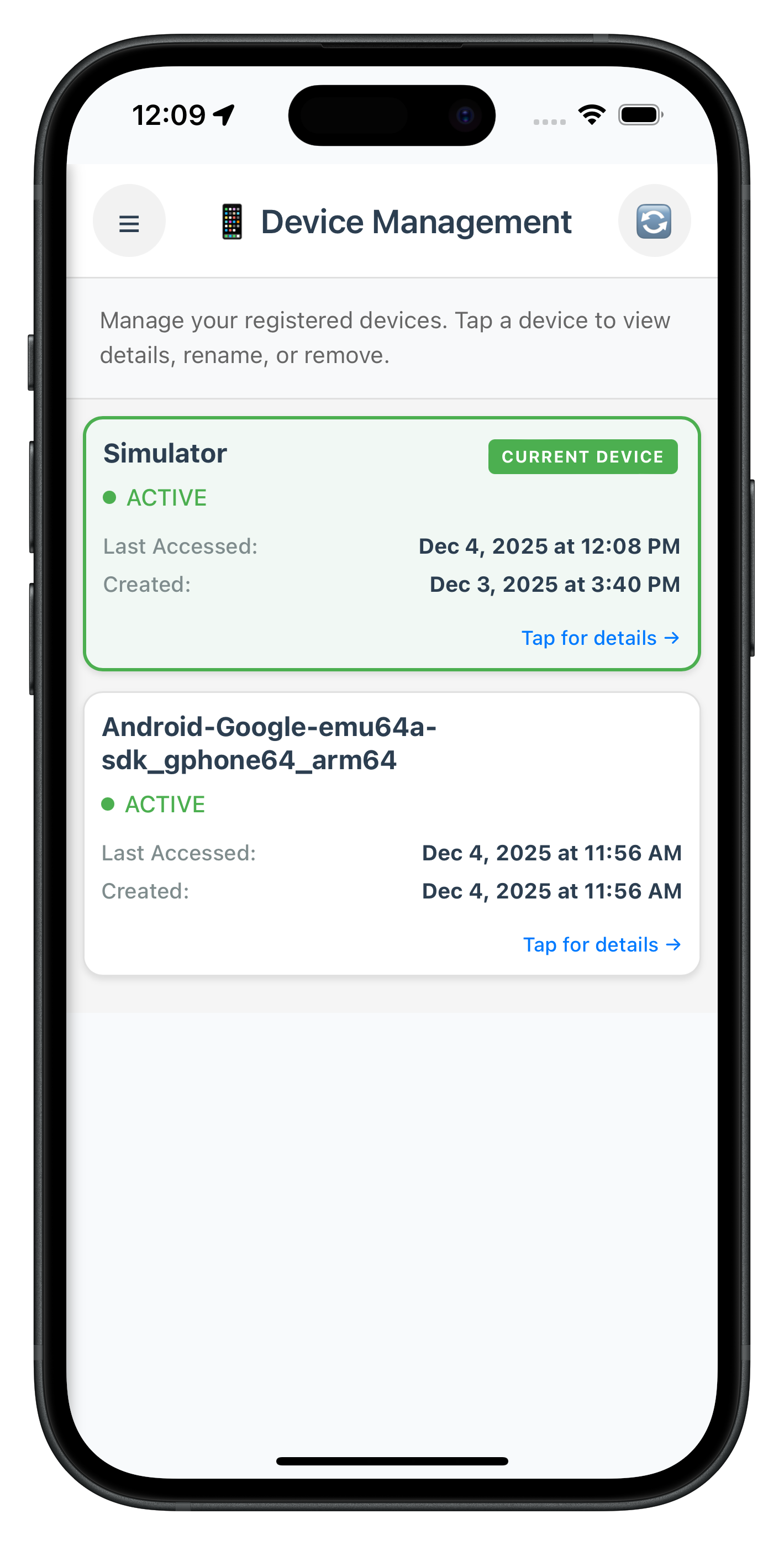
The following image showcases the screen from the sample application:
Create the DeviceDetailScreen that displays complete device information and provides rename and delete operations with current device protection.
Add this template to
www/index.html
(after DeviceManagement template):
<!-- ========== DEVICE DETAIL SCREEN TEMPLATE ========== -->
<template id="DeviceDetail-template">
  <div class="screen-container">
    <!-- Header with Back Button -->
    <div class="device-detail-header">
      <button id="device-detail-back-btn" class="header-icon-btn back-btn">←</button>
      <h1 class="header-title">Device Details</h1>
      <div class="header-spacer"></div>
    </div>

    <!-- Error Message -->
    <div id="device-detail-error" class="error-message" style="display: none;"></div>

    <!-- Main Content Area -->
    <div class="content device-detail-content">
      <!-- Device Information Section -->
      <div class="detail-section">
        <h3 class="section-header">DEVICE INFORMATION</h3>
        <div class="section-card">
          <h2 id="device-detail-name" class="device-detail-name">Device Name</h2>
          <div class="device-status-row">
            <span class="status-dot"></span>
            <span id="device-detail-status" class="status-text">Unknown</span>
          </div>
        </div>
      </div>

      <!-- Details Section -->
      <div class="detail-section">
        <h3 class="section-header">DETAILS</h3>
        <div class="section-card">
          <div class="detail-item">
            <span class="detail-label">Device UUID</span>
            <span id="device-detail-uuid" class="detail-value device-uuid">N/A</span>
          </div>
          <div class="detail-item">
            <span class="detail-label">App UUID</span>
            <span id="device-detail-app-uuid" class="detail-value device-uuid">N/A</span>
          </div>
          <div class="detail-item">
            <span class="detail-label">Device Bind</span>
            <span id="device-detail-bind" class="detail-value">N/A</span>
          </div>
        </div>
      </div>

      <!-- Access Information Section -->
      <div class="detail-section">
        <h3 class="section-header">ACCESS INFORMATION</h3>
        <div class="section-card">
          <div class="access-item">
            <span class="access-label">Last Accessed</span>
            <span id="device-detail-last-accessed" class="access-value">Unknown</span>
            <span id="device-detail-last-accessed-relative" class="relative-time">Just now</span>
          </div>
          <div class="access-divider"></div>
          <div class="access-item">
            <span class="access-label">Created</span>
            <span id="device-detail-created" class="access-value">Unknown</span>
            <span id="device-detail-created-relative" class="relative-time">Just now</span>
          </div>
        </div>
      </div>

      <!-- Cooling Period Warning -->
      <div id="device-detail-cooling-warning" class="cooling-period-warning-card" style="display: none;">
        <div class="warning-icon">⚠️</div>
        <div class="warning-content">
          <h3 class="warning-title">Actions Disabled</h3>
          <p id="device-detail-cooling-message" class="warning-message"></p>
        </div>
      </div>

      <!-- Device Actions Section -->
      <div class="detail-section">
        <h3 class="section-header">DEVICE ACTIONS</h3>
        <div class="action-buttons-section">
          <button id="rename-device-btn" class="action-button rename-button">
            <span class="button-icon">✏️</span>
            <span class="button-text">Rename Device</span>
          </button>
          <button id="delete-device-btn" class="action-button delete-button">
            <span class="button-icon">🗑️</span>
            <span class="button-text">Remove Device</span>
          </button>
        </div>
      </div>
    </div>
  </div>

  <!-- Rename Device Modal -->
  <div id="rename-device-modal" class="modal-overlay" style="display: none;">
    <div class="modal-container rename-modal">
      <div class="modal-header">
        <h2 class="modal-title">Rename Device</h2>
      </div>

      <div class="modal-body">
        <div class="modal-field">
          <label class="field-label">Current Name:</label>
          <p id="rename-current-name" class="current-name-text">-</p>
        </div>

        <div class="modal-field">
          <label class="field-label">New Name:</label>
          <input
            type="text"
            id="rename-device-input"
            class="text-input"
            placeholder="Enter new device name"
            maxlength="50"
          />
        </div>

        <div id="rename-error" class="error-message" style="display: none;"></div>
      </div>

      <div class="modal-footer">
        <button id="rename-modal-cancel" class="secondary-button modal-cancel-btn">Cancel</button>
        <button id="rename-modal-submit" class="primary-button modal-submit-btn">Rename</button>
      </div>
    </div>
  </div>
</template>
Create new file:
www/src/tutorial/screens/deviceManagement/DeviceDetailScreen.js
Add the first part of the implementation:
/**
 * Device Detail Screen - Device Information and Management
 *
 * This screen displays complete device information and provides rename and delete operations.
 *
 * Key Features:
 * - Complete device metadata display (UUID, status, timestamps, app UUID)
 * - Rename device with inline modal
 * - Delete device with confirmation dialog
 * - Current device protection (cannot delete current device)
 * - Cooling period enforcement (all operations disabled during cooling period)
 * - Three-layer error handling (API errors, status codes, Promise rejections)
 * - Success/error feedback with alerts
 *
 * User Flow:
 * 1. User taps device card in Device Management screen
 * 2. Navigation to Device Detail screen with device params
 * 3. View complete device information
 * 4. Tap "Rename Device" → Modal opens → Enter new name → Submit
 * 5. OR tap "Remove Device" → Confirmation alert → Confirm/Cancel
 * 6. Success → Alert → Navigate back to device list
 * 7. Error → Alert with error message → Stay on screen
 *
 * SPA Lifecycle:
 * - onContentLoaded(params) - Called when template loaded, displays device info
 * - setupEventListeners() - Attach rename/delete button handlers
 * - handleRename() - Process rename operation
 * - handleDelete() - Process delete operation
 * - handleUpdateDeviceResponse() - Handle SDK event response
 */

const DeviceDetailScreen = {
  /**
   * Screen state
   */
  device: null,
  isCoolingPeriodActive: false,
  coolingPeriodEndTimestamp: null,
  coolingPeriodMessage: '',
  sessionParams: {},
  isSubmitting: false,

  /**
   * Called when screen content is loaded (SPA lifecycle)
   *
   * @param {Object} params - Navigation parameters (must include device, userID, cooling period info)
   */
  onContentLoaded(params) {
    console.log('DeviceDetailScreen - Content loaded with params:', JSON.stringify(params, null, 2));

    // Store all params
    this.sessionParams = params || {};
    this.device = params.device || null;
    this.isCoolingPeriodActive = params.isCoolingPeriodActive || false;
    this.coolingPeriodEndTimestamp = params.coolingPeriodEndTimestamp || null;
    this.coolingPeriodMessage = params.coolingPeriodMessage || '';

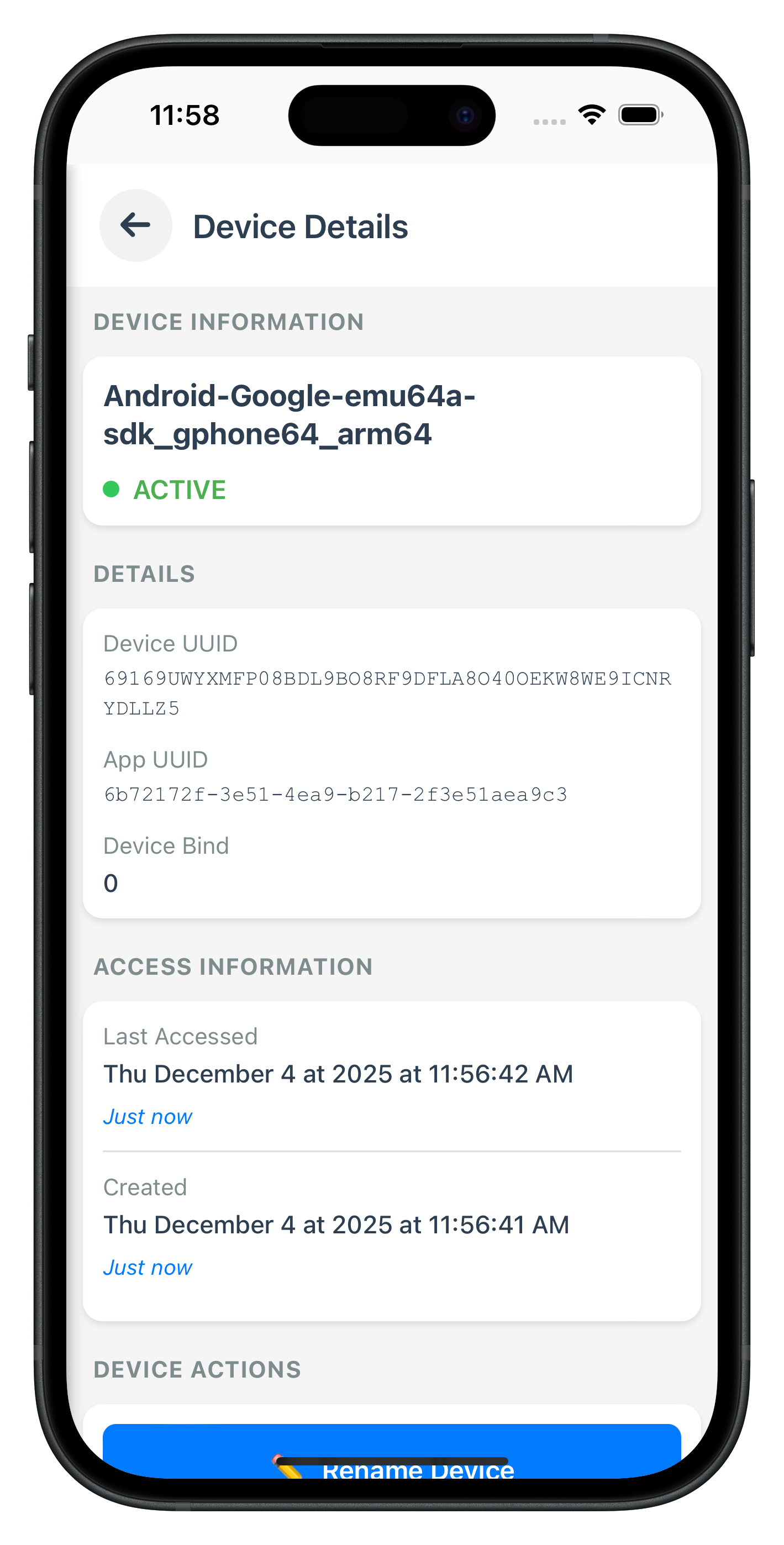
    // Validate required device parameter
    if (!this.device) {
      console.error('DeviceDetailScreen - device is required in params');
      this.showError('Device information not available');
      setTimeout(() => {
        this.navigateBack();
      }, 2000);
      return;
    }

    // Validate required userID parameter
    if (!this.sessionParams.userID) {
      console.error('DeviceDetailScreen - userID is required in params');
      this.showError('Session expired. Please log in again.');
      return;
    }

    // Store session params globally
    if (typeof SDKEventProvider !== 'undefined') {
      SDKEventProvider.setSessionParams(this.sessionParams);
    }

    // Setup UI
    this.setupEventListeners();
    this.registerSDKEventHandlers();

    // Display device information
    this.displayDeviceInfo();

    // Show cooling period warning if active
    if (this.isCoolingPeriodActive) {
      this.showCoolingPeriodWarning();
    }
  },

  /**
   * Setup event listeners
   */
  setupEventListeners() {
    // Back button
    const backBtn = document.getElementById('device-detail-back-btn');
    if (backBtn) {
      backBtn.onclick = () => {
        console.log('DeviceDetailScreen - Back button tapped');
        this.navigateBack();
      };
    }

    // Rename button
    const renameBtn = document.getElementById('rename-device-btn');
    if (renameBtn) {
      renameBtn.onclick = () => {
        console.log('DeviceDetailScreen - Rename button tapped');
        if (!this.isCoolingPeriodActive) {
          this.showRenameModal();
        }
      };
    }

    // Delete button
    const deleteBtn = document.getElementById('delete-device-btn');
    if (deleteBtn) {
      deleteBtn.onclick = () => {
        console.log('DeviceDetailScreen - Delete button tapped');
        if (!this.isCoolingPeriodActive && !this.device.currentDevice) {
          this.showDeleteConfirmation();
        }
      };
    }

    // Rename modal controls
    const renameModalClose = document.getElementById('rename-modal-close');
    const renameModalCancel = document.getElementById('rename-modal-cancel');
    const renameModalSubmit = document.getElementById('rename-modal-submit');
    const renameInput = document.getElementById('rename-device-input');

    if (renameModalClose) {
      renameModalClose.onclick = () => this.hideRenameModal();
    }

    if (renameModalCancel) {
      renameModalCancel.onclick = () => this.hideRenameModal();
    }

    if (renameModalSubmit) {
      renameModalSubmit.onclick = () => this.handleRenameSubmit();
    }

    if (renameInput) {
      // Clear error on input
      renameInput.oninput = () => {
        const errorElement = document.getElementById('rename-error');
        if (errorElement) {
          errorElement.style.display = 'none';
        }
      };

      // Submit on Enter key
      renameInput.onkeypress = (e) => {
        if (e.key === 'Enter') {
          this.handleRenameSubmit();
        }
      };
    }

    console.log('DeviceDetailScreen - Event listeners setup complete');
  },

  /**
   * Register SDK event handlers
   */
  registerSDKEventHandlers() {
    const eventManager = rdnaService.getEventManager();

    // Handle updateDeviceDetails response
    eventManager.setUpdateDeviceDetailsHandler((data) => {
      console.log('DeviceDetailScreen - onUpdateDeviceDetails event received');
      this.handleUpdateDeviceResponse(data);
    });

    console.log('DeviceDetailScreen - SDK event handlers registered');
  },

  /**
   * Display device information
   */
  displayDeviceInfo() {
    // Device name
    const nameElement = document.getElementById('device-detail-name');
    if (nameElement) {
      nameElement.textContent = this.device.devName || 'Unnamed Device';
    }

    // Status
    const statusElement = document.getElementById('device-detail-status');
    const statusRow = statusElement?.parentElement;
    const statusDot = statusRow?.querySelector('.status-dot');

    if (statusElement) {
      statusElement.textContent = this.device.status || 'Unknown';
      statusElement.className = 'status-text';

      if (this.device.status === 'ACTIVE') {
        statusElement.classList.add('status-active');
        if (statusDot) {
          statusDot.style.backgroundColor = '#34C759';
        }
      } else {
        statusElement.classList.add('status-inactive');
        if (statusDot) {
          statusDot.style.backgroundColor = '#FF3B30';
        }
      }
    }

    // UUID
    const uuidElement = document.getElementById('device-detail-uuid');
    if (uuidElement) {
      uuidElement.textContent = this.device.devUUID || 'N/A';
    }

    // App UUID
    const appUuidElement = document.getElementById('device-detail-app-uuid');
    if (appUuidElement) {
      appUuidElement.textContent = this.device.appUuid || 'N/A';
    }

    // Last Accessed
    const lastAccessedElement = document.getElementById('device-detail-last-accessed');
    const lastAccessedRelativeElement = document.getElementById('device-detail-last-accessed-relative');
    if (lastAccessedElement) {
      lastAccessedElement.textContent = this.formatTimestamp(this.device.lastAccessedTsEpoch);
    }
    if (lastAccessedRelativeElement) {
      const relativeTime = this.getRelativeTime(this.device.lastAccessedTsEpoch);
      if (relativeTime) {
        lastAccessedRelativeElement.textContent = relativeTime;
        lastAccessedRelativeElement.style.display = 'block';
      } else {
        lastAccessedRelativeElement.style.display = 'none';
      }
    }

    // Created
    const createdElement = document.getElementById('device-detail-created');
    const createdRelativeElement = document.getElementById('device-detail-created-relative');
    if (createdElement) {
      createdElement.textContent = this.formatTimestamp(this.device.createdTsEpoch);
    }
    if (createdRelativeElement) {
      const relativeTime = this.getRelativeTime(this.device.createdTsEpoch);
      if (relativeTime) {
        createdRelativeElement.textContent = relativeTime;
        createdRelativeElement.style.display = 'block';
      } else {
        createdRelativeElement.style.display = 'none';
      }
    }

    // Device Bind
    const bindElement = document.getElementById('device-detail-bind');
    if (bindElement) {
      bindElement.textContent = this.device.devBind !== undefined ? this.device.devBind : 'N/A';
    }

    // Control buttons based on cooling period and current device
    this.updateButtonStates();
  },

  /**
   * Update button states based on cooling period and current device
   */
  updateButtonStates() {
    const renameBtn = document.getElementById('rename-device-btn');
    const deleteBtn = document.getElementById('delete-device-btn');

    // Disable buttons during cooling period
    if (renameBtn) {
      renameBtn.disabled = this.isCoolingPeriodActive;
      if (this.isCoolingPeriodActive) {
        renameBtn.classList.add('button-disabled');
      } else {
        renameBtn.classList.remove('button-disabled');
      }
    }

    if (deleteBtn) {
      // Hide delete button if current device, disable if cooling period
      if (this.device.currentDevice) {
        deleteBtn.style.display = 'none';
      } else {
        deleteBtn.style.display = 'block';
        deleteBtn.disabled = this.isCoolingPeriodActive;
        if (this.isCoolingPeriodActive) {
          deleteBtn.classList.add('button-disabled');
        } else {
          deleteBtn.classList.remove('button-disabled');
        }
      }
    }
  },

  /**
   * Format timestamp for display (matches mockup format)
   * @param {number} timestamp - Epoch timestamp in milliseconds
   */
  formatTimestamp(timestamp) {
    if (!timestamp) return 'Unknown';

    try {
      const date = new Date(timestamp);
      // Check if date is valid
      if (isNaN(date.getTime())) {
        console.error('DeviceDetailScreen - Invalid timestamp:', timestamp);
        return 'Invalid Date';
      }
      // Format: "Thu, October 16, 2025 at 12:40:44 PM"
      return date.toLocaleString('en-US', {
        weekday: 'short',
        year: 'numeric',
        month: 'long',
        day: 'numeric',
        hour: 'numeric',
        minute: '2-digit',
        second: '2-digit',
        hour12: true
      }).replace(',', '').replace(',', ' at');
    } catch (error) {
      console.error('DeviceDetailScreen - Error formatting timestamp:', error);
      return 'Unknown';
    }
  },

  /**
   * Get relative time string (e.g., "Just now", "2 minutes ago")
   * @param {number} timestamp - Epoch timestamp in milliseconds
   */
  getRelativeTime(timestamp) {
    if (!timestamp) return '';

    try {
      const date = new Date(timestamp);
      // Check if date is valid
      if (isNaN(date.getTime())) {
        return '';
      }

      const now = Date.now();
      const diffMs = now - timestamp;
      const diffSecs = Math.floor(diffMs / 1000);
      const diffMins = Math.floor(diffSecs / 60);
      const diffHours = Math.floor(diffMins / 60);
      const diffDays = Math.floor(diffHours / 24);

      if (diffSecs < 60) {
        return 'Just now';
      } else if (diffMins < 60) {
        return diffMins === 1 ? '1 minute ago' : `${diffMins} minutes ago`;
      } else if (diffHours < 24) {
        return diffHours === 1 ? '1 hour ago' : `${diffHours} hours ago`;
      } else if (diffDays < 7) {
        return diffDays === 1 ? '1 day ago' : `${diffDays} days ago`;
      } else {
        return '';
      }
    } catch (error) {
      return '';
    }
  },

  // ... Continue in Part 2
};
Continue the implementation with rename and delete operations:
// ... Continued from Part 1

  /**
   * Show rename modal
   */
  showRenameModal() {
    const modal = document.getElementById('rename-device-modal');
    const currentNameElement = document.getElementById('rename-current-name');
    const input = document.getElementById('rename-device-input');
    const errorElement = document.getElementById('rename-error');

    if (modal) {
      modal.style.display = 'flex';
    }

    // Display current device name
    if (currentNameElement) {
      currentNameElement.textContent = this.device.devName || 'Unnamed Device';
    }

    // Clear input and focus
    if (input) {
      input.value = '';
      input.focus();
    }

    if (errorElement) {
      errorElement.style.display = 'none';
    }
  },

  /**
   * Hide rename modal
   */
  hideRenameModal() {
    const modal = document.getElementById('rename-device-modal');
    if (modal) {
      modal.style.display = 'none';
    }
  },

  /**
   * Handle rename submit
   */
  handleRenameSubmit() {
    const input = document.getElementById('rename-device-input');

    if (!input) return;

    const newName = input.value.trim();

    // Validation
    if (!newName) {
      this.showRenameError('Device name cannot be empty');
      return;
    }

    if (newName === this.device.devName) {
      this.showRenameError('Please enter a different name');
      return;
    }

    if (newName.length < 3) {
      this.showRenameError('Device name must be at least 3 characters');
      return;
    }

    if (newName.length > 50) {
      this.showRenameError('Device name must be less than 50 characters');
      return;
    }

    // Perform rename
    this.performRename(newName);
  },

  /**
   * Show rename error
   */
  showRenameError(message) {
    const errorElement = document.getElementById('rename-error');
    if (errorElement) {
      errorElement.textContent = message;
      errorElement.style.display = 'block';
    }
  },

  /**
   * Perform rename operation
   */
  performRename(newName) {
    if (this.isSubmitting) {
      console.log('DeviceDetailScreen - Already submitting');
      return;
    }

    this.isSubmitting = true;
    console.log('DeviceDetailScreen - Renaming device to:', newName);

    // Show loading in submit button
    const submitBtn = document.getElementById('rename-modal-submit');
    if (submitBtn) {
      submitBtn.disabled = true;
      submitBtn.textContent = 'Renaming...';
    }

    // Build device payload for rename operation
    const devicePayload = {
      device: [{
        devUUID: this.device.devUUID,
        devName: newName,
        status: "Update", // Rename operation
        lastAccessedTs: this.device.lastAccessedTs,
        lastAccessedTsEpoch: this.device.lastAccessedTsEpoch,
        createdTs: this.device.createdTs,
        createdTsEpoch: this.device.createdTsEpoch,
        appUuid: this.device.appUuid,
        currentDevice: this.device.currentDevice,
        devBind: this.device.devBind
      }]
    };

    // Call SDK updateDeviceDetails API
    rdnaService.updateDeviceDetails(this.sessionParams.userID, JSON.stringify(devicePayload))
      .then((syncResponse) => {
        console.log('DeviceDetailScreen - UpdateDeviceDetails sync response:', JSON.stringify(syncResponse, null, 2));
        // Waiting for onUpdateDeviceDetails event
      })
      .catch((error) => {
        console.error('DeviceDetailScreen - UpdateDeviceDetails error:', JSON.stringify(error, null, 2));
        this.isSubmitting = false;

        // Reset submit button
        if (submitBtn) {
          submitBtn.disabled = false;
          submitBtn.textContent = 'Rename';
        }

        this.hideRenameModal();
        this.showError('Failed to rename device. Please try again.');
      });
  },

  /**
   * Show delete confirmation
   */
  showDeleteConfirmation() {
    const confirmed = confirm(`Are you sure you want to remove "${this.device.devName || 'this device'}"?\n\nThis action cannot be undone.`);

    if (confirmed) {
      this.performDelete();
    }
  },

  /**
   * Perform delete operation
   */
  performDelete() {
    if (this.isSubmitting) {
      console.log('DeviceDetailScreen - Already submitting');
      return;
    }

    this.isSubmitting = true;
    console.log('DeviceDetailScreen - Deleting device:', this.device.devUUID);

    // Disable buttons
    const renameBtn = document.getElementById('rename-device-btn');
    const deleteBtn = document.getElementById('delete-device-btn');
    if (renameBtn) renameBtn.disabled = true;
    if (deleteBtn) {
      deleteBtn.disabled = true;
      deleteBtn.textContent = 'Removing...';
    }

    // Build device payload for delete operation
    const devicePayload = {
      device: [{
        devUUID: this.device.devUUID,
        devName: "", // Empty for delete
        status: "Delete", // Delete operation
        lastAccessedTs: this.device.lastAccessedTs,
        lastAccessedTsEpoch: this.device.lastAccessedTsEpoch,
        createdTs: this.device.createdTs,
        createdTsEpoch: this.device.createdTsEpoch,
        appUuid: this.device.appUuid,
        currentDevice: this.device.currentDevice,
        devBind: this.device.devBind
      }]
    };

    // Call SDK updateDeviceDetails API
    rdnaService.updateDeviceDetails(this.sessionParams.userID, JSON.stringify(devicePayload))
      .then((syncResponse) => {
        console.log('DeviceDetailScreen - UpdateDeviceDetails (delete) sync response:', JSON.stringify(syncResponse, null, 2));
        // Waiting for onUpdateDeviceDetails event
      })
      .catch((error) => {
        console.error('DeviceDetailScreen - UpdateDeviceDetails (delete) error:', JSON.stringify(error, null, 2));
        this.isSubmitting = false;

        // Reset buttons
        if (renameBtn) renameBtn.disabled = false;
        if (deleteBtn) {
          deleteBtn.disabled = false;
          deleteBtn.textContent = 'Remove Device';
        }

        this.showError('Failed to delete device. Please try again.');
      });
  },

  /**
   * Handle updateDeviceDetails response event
   */
  handleUpdateDeviceResponse(data) {
    console.log('DeviceDetailScreen - Processing update device response');

    this.isSubmitting = false;

    // Reset buttons
    const submitBtn = document.getElementById('rename-modal-submit');
    const deleteBtn = document.getElementById('delete-device-btn');
    const renameBtn = document.getElementById('rename-device-btn');

    if (submitBtn) {
      submitBtn.disabled = false;
      submitBtn.textContent = 'Rename';
    }
    if (deleteBtn) {
      deleteBtn.disabled = false;
      deleteBtn.textContent = 'Remove Device';
    }
    if (renameBtn) {
      renameBtn.disabled = false;
    }

    // Layer 1: Check API-level error (error.longErrorCode)
    if (data.error && data.error.longErrorCode !== 0) {
      const errorMsg = data.error.errorString || 'API error occurred';
      console.error('DeviceDetailScreen - API error:', errorMsg, 'Code:', data.error.longErrorCode);
      this.hideRenameModal();
      this.showError(errorMsg);
      return;
    }

    // Layer 2: Check status code (pArgs.response.StatusCode)
    const statusCode = data.pArgs?.response?.StatusCode;
    if (statusCode === 146) {
      // Cooling period active
      console.log('DeviceDetailScreen - Cooling period detected');
      this.hideRenameModal();
      this.showError('Device management operations are temporarily disabled. Please try again later.');
      return;
    } else if (statusCode !== 100) {
      const statusMsg = data.pArgs?.response?.StatusMsg || 'Operation failed';
      console.error('DeviceDetailScreen - Status error:', statusCode, 'Message:', statusMsg);
      this.hideRenameModal();
      this.showError(statusMsg);
      return;
    }

    // Success
    const message = data.pArgs?.response?.StatusMsg || 'Device updated successfully';
    console.log('DeviceDetailScreen - Operation successful:', message);

    this.hideRenameModal();
    alert(message);

    // Navigate back to device list
    setTimeout(() => {
      this.navigateBack();
    }, 500);
  },

  /**
   * Navigate back to device management screen
   */
  navigateBack() {
    NavigationService.navigate('DeviceManagement', this.sessionParams);
  },

  /**
   * Show error message
   */
  showError(message) {
    const errorElement = document.getElementById('device-detail-error');
    if (errorElement) {
      errorElement.textContent = message;
      errorElement.style.display = 'block';

      // Auto-hide after 5 seconds
      setTimeout(() => {
        errorElement.style.display = 'none';
      }, 5000);
    } else {
      alert(message);
    }
  },

  /**
   * Show cooling period warning
   */
  showCoolingPeriodWarning() {
    const warningCard = document.getElementById('device-detail-cooling-warning');
    const warningMessage = document.getElementById('device-detail-cooling-message');

    if (warningCard) {
      warningCard.style.display = 'block';
    }

    if (warningMessage) {
      warningMessage.textContent = this.coolingPeriodMessage || 'All device management operations are temporarily disabled.';
    }
  }
};

// Expose globally for NavigationService
window.DeviceDetailScreen = DeviceDetailScreen;
Add script reference before closing
tag in
www/index.html
:
<script src="src/tutorial/screens/deviceManagement/DeviceDetailScreen.js"></script>
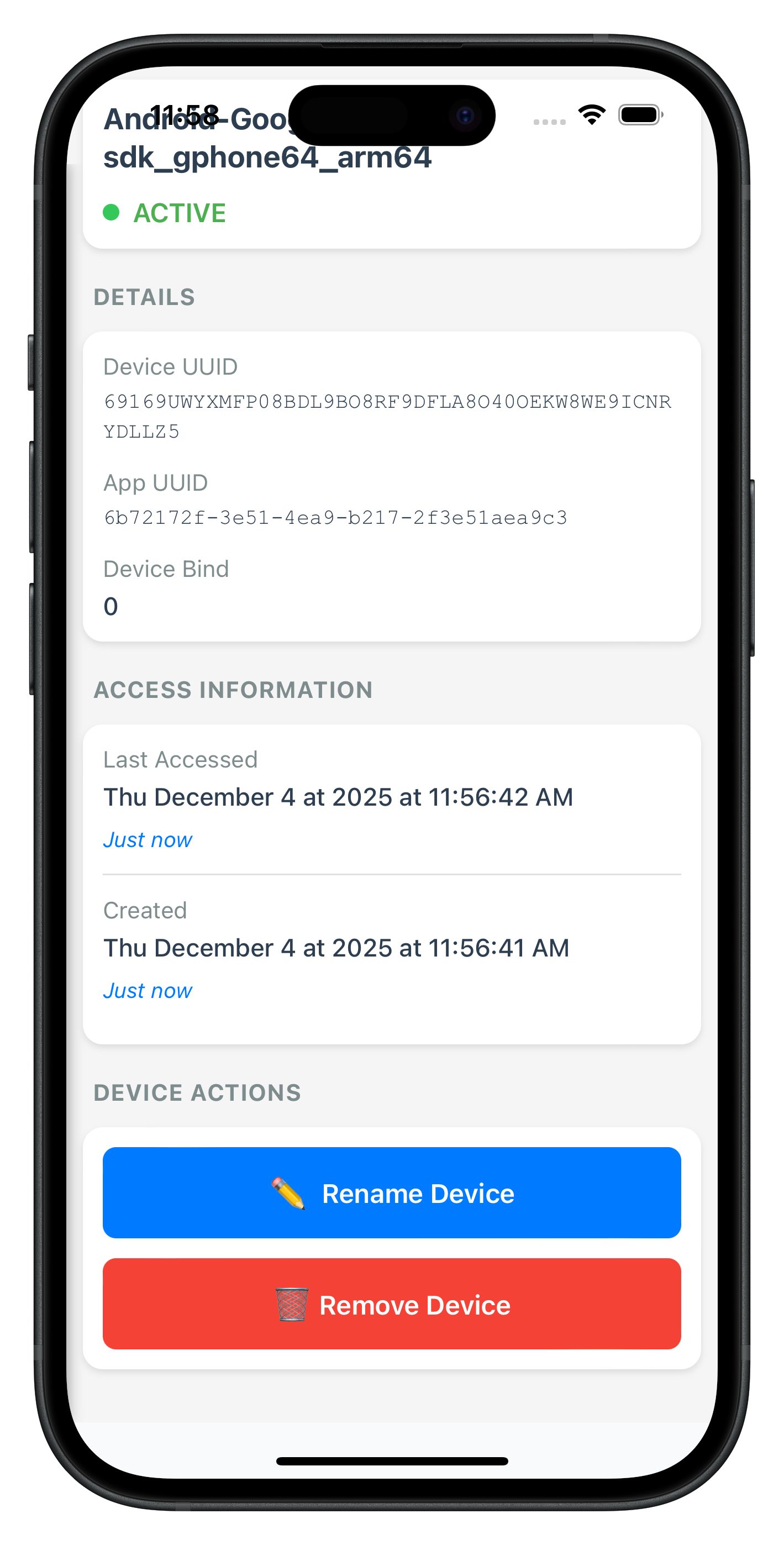
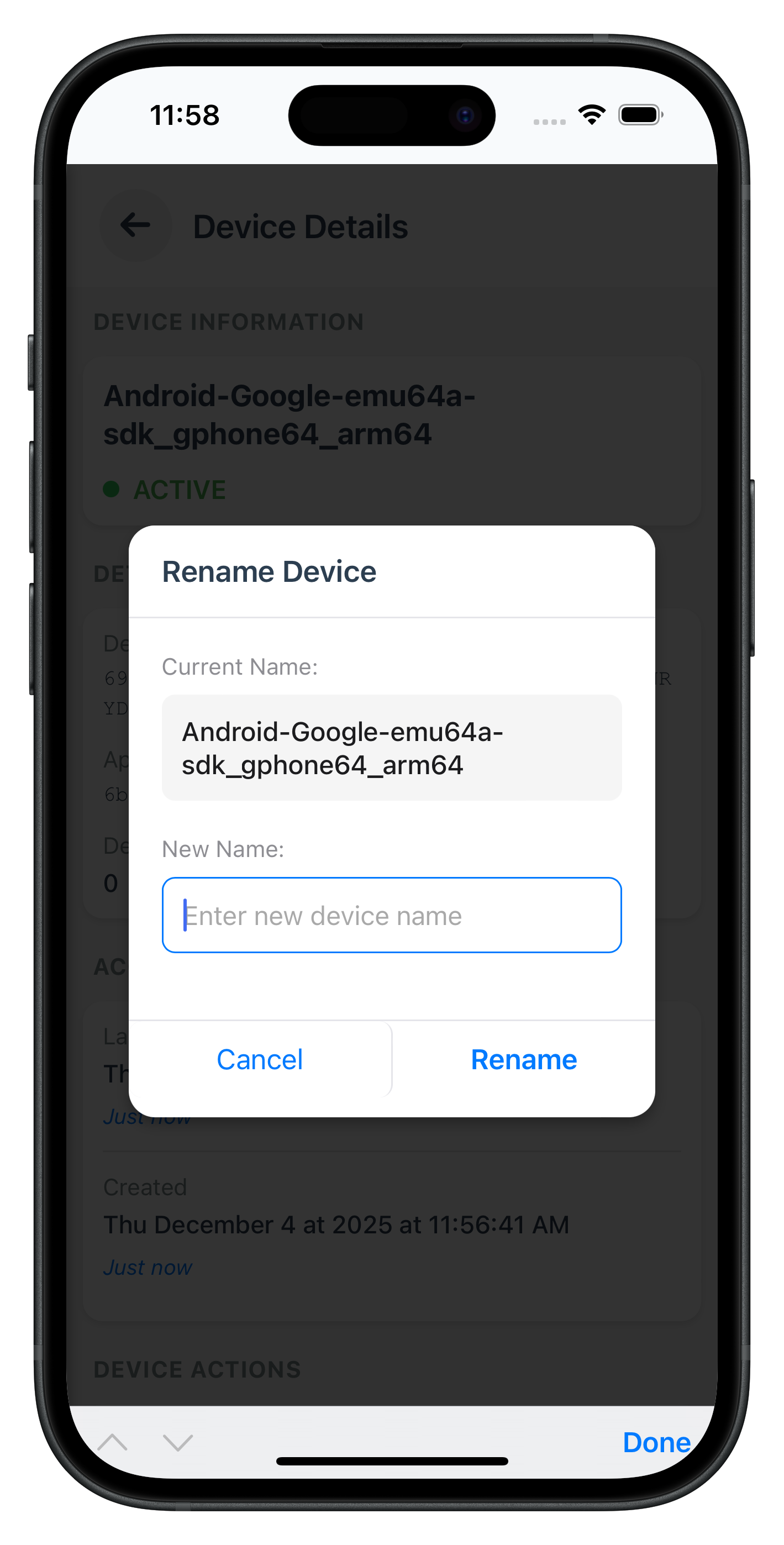
The following image showcases the screen from the sample application:
|
|
|
Integrate device management screens into your existing navigation system and drawer menu.
The NavigationService in Cordova uses template-based routing. Ensure your templates have correct IDs matching the route names used in navigation calls.
Verify template IDs in
www/index.html
:
<!-- DeviceManagement route → DeviceManagement-template -->
<template id="DeviceManagement-template">
  <!-- ... -->
</template>

<!-- DeviceDetail route → DeviceDetail-template -->
<template id="DeviceDetail-template">
  <!-- ... -->
</template>
Add device management menu item to your drawer menu in
www/index.html
:
<!-- Inside drawer menu -->
<div id="drawer-menu" class="drawer-menu">
  <!-- ... existing menu items ... -->

  <!-- Device Management Menu Item -->
  <a href="#" id="drawer-device-mgmt-link" class="drawer-item">
    <span class="drawer-icon">📱</span>
    <span class="drawer-text">Device Management</span>
  </a>

  <!-- ... other menu items ... -->
</div>
Update your DashboardScreen to include device management navigation:
// www/src/tutorial/screens/dashboard/DashboardScreen.js (drawer links setup)

setupDrawerLinks() {
  // ... existing drawer links ...

  // Device Management link
  const drawerDeviceMgmtLink = document.getElementById('drawer-device-mgmt-link');
  if (drawerDeviceMgmtLink) {
    drawerDeviceMgmtLink.onclick = (e) => {
      e.preventDefault();
      NavigationService.closeDrawer();
      console.log('DashboardScreen - Navigating to DeviceManagement');
      NavigationService.navigate('DeviceManagement', this.sessionParams);
    };
  }
}
Test your device management implementation across platforms to ensure all features work correctly.
# Prepare platforms
cordova prepare

# Run on iOS
cordova run ios

# Run on Android
cordova run android
currentDevice: falseiOS Debugging:
# Open Safari → Develop → Simulator → index.html
# View console logs and network requests
Android Debugging:
# Open Chrome → chrome://inspect
# Click "inspect" under your device
# View console logs and network requests
Common Issues:
Issue | Possible Cause | Solution |
"Can't find variable: com" | Plugin not loaded | Ensure |
"Plugin not found" | Plugin not installed | Run |
Devices not loading | userID missing | Check session params in navigation |
Events not firing | Handler not set | Verify |
Changes not reflecting | Platform not prepared | Run |
1. Three-Layer Error Handling
Always implement all three error detection layers:
// Layer 1: API-level error
if (data.error && data.error.longErrorCode !== 0) {
  console.error('API error:', data.error.errorString);
  this.showError(data.error.errorString);
  return;
}

// Layer 2: Status code validation
const statusCode = data.pArgs?.response?.StatusCode;
if (statusCode === 146) {
  // Cooling period handling
} else if (statusCode !== 100) {
  // Other status errors
}

// Layer 3: Promise rejection
rdnaService.getRegisteredDeviceDetails(userID)
  .catch((error) => {
    // Network/SDK failures
  });
2. Complete Device Payload
Always send complete device objects with ALL fields:
const devicePayload = {
  device: [{
    devUUID: device.devUUID,
    devName: newName,
    status: "Update",
    lastAccessedTs: device.lastAccessedTs,
    lastAccessedTsEpoch: device.lastAccessedTsEpoch,
    createdTs: device.createdTs,
    createdTsEpoch: device.createdTsEpoch,
    appUuid: device.appUuid,
    currentDevice: device.currentDevice,
    devBind: device.devBind
  }]
};
3. Cooling Period Enforcement
Always check cooling period status before operations:
if (this.isCoolingPeriodActive) {
  this.showError('Operations disabled during cooling period');
  return;
}
4. Current Device Validation
Always prevent current device deletion:
if (device.currentDevice) {
  this.showError('Cannot delete current device');
  return;
}
Problem: Plugin Not Found
# Check installed plugins
cordova plugin ls

# Verify RdnaClient plugin exists
# If missing, reinstall:
cordova plugin add ./RdnaClient
Problem: Events Not Firing
// Verify event listeners registered
document.addEventListener('onGetRegistredDeviceDetails', listener, false);

// Check handler is set
eventManager.setGetRegisteredDeviceDetailsHandler((data) => {
  console.log('Handler called', data);
});
Problem: "Can't find variable: com"
// Ensure deviceready fired
document.addEventListener('deviceready', () => {
  console.log('Cordova ready');
  // Now safe to use com.uniken.rdnaplugin.RdnaClient
}, false);
Problem: Changes Not Reflecting
# Always prepare after code changes
cordova prepare

# Clean build if needed
rm -rf platforms/ios/build
rm -rf platforms/android/build
cordova prepare
Problem: Local Plugin Installation Fails
# Verify plugin directory exists
ls -la ./RdnaClient

# Check plugin.xml exists
ls -la ./RdnaClient/plugin.xml

# Reinstall with force flag
cordova plugin remove com.uniken.rdnaplugin
cordova plugin add ./RdnaClient
Problem: File Loading Fails
# Ensure cordova-plugin-file installed
cordova plugin add cordova-plugin-file

# Verify file path is correct
console.log('File path:', cordova.file.applicationDirectory + 'www/...');
Ensure your www/index.html has proper CSP configuration:
<meta http-equiv="Content-Security-Policy"
  content="default-src 'self' data: gap: https://ssl.gstatic.com 'unsafe-eval' 'unsafe-inline';
  style-src 'self' 'unsafe-inline';
  media-src *;
  img-src 'self' data: content:;
  connect-src *;">
1. Minimize DOM Manipulation
// Bad: Multiple DOM updates
devices.forEach(device => {
  container.innerHTML += createCard(device);
});

// Good: Batch DOM updates
const fragment = document.createDocumentFragment();
devices.forEach(device => {
  fragment.appendChild(createCard(device));
});
container.appendChild(fragment);
2. Clean Up Event Handlers
// Always clean up handlers when screen changes
onScreenChange() {
  const eventManager = rdnaService.getEventManager();
  eventManager.setGetRegisteredDeviceDetailsHandler(undefined);
  eventManager.setUpdateDeviceDetailsHandler(undefined);
}
3. Use Singleton Pattern
// Service layer should be singleton
const rdnaService = new RdnaService();
window.rdnaService = rdnaService;
You now have a fully functional device management system with:
✅ Device List Display - Complete device listing with metadata
✅ Pull-to-Refresh - Manual device synchronization
✅ Cooling Period Detection - Server-enforced operation restrictions
✅ Device Rename - Update device names with validation
✅ Device Delete - Remove non-current devices safely
✅ Current Device Protection - Prevent active device deletion
✅ Three-Layer Error Handling - Comprehensive error detection
✅ SPA Navigation - Seamless screen transitions with parameter passing
Thank you for completing this codelab! 🎉