🎯 Learning Path:
- Complete REL-ID Complete Activation & Login Flow Codelab (Android)
- Complete REL-ID Additional Device Activation Flow Codelab (Android)
- You are here → Device Management Implementation (Post-Login)
Welcome to the REL-ID Device Management codelab! This tutorial builds upon your existing MFA implementation to add comprehensive device management capabilities using REL-ID Android SDK's device management APIs.
What You'll Build
In this codelab, you'll enhance your existing MFA application with:
- 📱 Device List Display: View all registered devices with
getRegisteredDeviceDetails()API - 🔄 Pull-to-Refresh: Real-time device synchronization with swipe-to-refresh
- ⏳ Cooling Period Detection: Server-enforced cooling periods with visual warnings (StatusCode 146)
- ✏️ Device Rename: Update device names using SDK object modification pattern
- 🗑️ Device Deletion: Remove non-current devices with proper validation
- 🛡️ Current Device Protection: Prevent accidental deletion of active device
- 🎯 Reactive State Management: StateFlow-based UI updates with lifecycle awareness
What You'll Learn
By completing this codelab, you'll master:
- Device Listing API Integration: Fetching registered devices with cooling period information
- Device Update Operations: Implementing rename and delete with SDK object modification
- Cooling Period Management: Detecting and handling server-enforced cooling periods
- Current Device Protection: Validating and preventing current device deletion
- Event-Driven Architecture: Handling SDK callbacks via SharedFlow and coroutines
- StateFlow State Management: Reactive UI state with Jetpack Compose
- Real-time Synchronization: Auto-refresh with pull-to-refresh and navigation-based updates
- Drawer Navigation Integration: Post-login device management access
Prerequisites
Before starting this codelab, ensure you have:
- ✅ Completed REL-ID MFA Complete Activation & Login Flow Codelab** - All MFA screens and flows must be fully implemented
- ✅ Android Development Environment - Android Studio Hedgehog (2023.1.1) or later
- ✅ REL-ID SDK Integration - Latest Android SDK with device management APIs
- ✅ Kotlin Knowledge - Understanding of Kotlin coroutines, StateFlow, and data classes
- ✅ Jetpack Compose - Basic understanding of Composable functions and state management
- ✅ Drawer Navigation Setup - Navigation Drawer configured with Dashboard screen
- ✅ Server Configuration - REL-ID server with device management enabled
Get the Code from GitHub
The code to get started can be found in a GitHub repository.
You can clone the repository using the following command:
git clone https://github.com/uniken-public/codelab-android.git
Navigate to the relid-device-management folder in the repository you cloned earlier
Codelab Architecture Overview
This codelab extends your MFA application with three core device management components:
- DeviceManagementScreen: Device list with pull-to-refresh and cooling period detection in drawer navigation
- DeviceDetailScreen: Device details with rename and delete operations
- RenameDeviceDialog: Modal dialog for device renaming with validation
These are implemented using:
- ViewModels with StateFlow for reactive state management
- Jetpack Compose for declarative UI
- Coroutines and SharedFlow for event handling
- Navigation Compose for screen navigation
Before implementing device management screens, let's understand the key SDK events and APIs that power the device lifecycle management workflow.
Device Management Event Flow
The device management process follows this event-driven pattern:
User Logs In → Navigate to Device Management →
getRegisteredDeviceDetails() Called → onGetRegistredDeviceDetails Callback →
Device List Displayed with Cooling Period Check →
User Taps Device → Navigate to Detail Screen →
User Taps Rename/Delete → Device Object Modified → updateDeviceDetails() Called →
onUpdateDeviceDetails Callback → Success/Error Alert → Navigate Back
Android Event Handling Architecture
The Android SDK uses callback-based events that are converted to reactive flows:
- RDNACallbacks Interface: SDK callbacks implemented in RDNACallbackManager
- SharedFlow: Broadcasts events to multiple collectors (ViewModels)
- StateFlow: Holds UI state in ViewModels
- Coroutines: Async event collection with lifecycle awareness
- collectAsStateWithLifecycle(): Safe UI state observation in Composables
Core Device Management APIs and Events
The REL-ID SDK provides these APIs and events for device management:
API/Event | Type | Description | User Action Required |
API | Fetch all registered devices with cooling period info | System calls automatically | |
Callback | Receives device list with metadata | System processes response | |
API | Rename or delete device with SDK objects | User taps action button | |
Callback | Update operation result with status codes | System handles response |
SDK Object Modification Pattern
Android device management uses direct SDK object modification (no JSON):
Operation | SDK Method | Description |
Rename |
| Sets new name on SDK object |
Delete |
| Marks device for deletion |
Submit |
| Submits modified SDK object |
Device List Response Structure
The onGetRegistredDeviceDetails callback returns SDK types:
// Callback signature
override fun onGetRegistredDeviceDetails(
    status: RDNA.RDNAStatusGetRegisteredDeviceDetails
): Int

// Extract data using SDK getters
val devices = status.getDevices()  // Array<RDNA.RDNADeviceDetails>
val coolingPeriodEnd = status.getDeviceManagementCoolingPeriodEndTimestamp()
val responseStatus = status.getStatus()
val statusCode = responseStatus?.statusCode?.intValue  // 100 or 146
RDNADeviceDetails Key Methods:
device.getDeviceUUID(): String           // Device unique identifier
device.getDeviceName(): String           // Device display name
device.getDeviceStatus(): RDNADeviceStatus  // ACTIVE, BLOCKED, etc.
device.getCurrentDevice(): Boolean       // true if current device
device.getLastAccessEpochTime(): Long    // Last access timestamp (ms)
device.getDeviceRegistrationEpochTime(): Long  // Creation timestamp (ms)
device.getAppUUID(): String              // Application identifier
device.getDeviceBinding(): RDNADeviceBinding  // Device binding status
Cooling Period Management
Cooling periods are server-enforced timeouts between device operations:
Status Code | Meaning | Cooling Period Active | Actions Allowed |
| Success | No | All actions enabled |
| Cooling period active | Yes | All actions disabled |
Current Device Protection
The getCurrentDevice() method identifies the active device:
getCurrentDevice() Value | Delete Button | Rename Button | Reason |
| ❌ Disabled/Hidden | ✅ Enabled | Cannot delete active device |
| ✅ Enabled | ✅ Enabled | Can delete non-current devices |
Error Handling Pattern
Device management implements comprehensive error detection:
// Layer 1: API-level errors
val error = status.getError()
if (error != null && error.longErrorCode != 0) {
    // Handle API error
}

// Layer 2: Status code validation
val responseStatus = status.getStatus()
val statusCode = responseStatus?.statusCode?.intValue ?: 0
when (statusCode) {
    0, 100 -> // Success
    146 -> // Cooling period
    else -> // Other errors
}
Let's implement the device management APIs in your RDNAService singleton following established patterns.
Step 1: Add getRegisteredDeviceDetails API
Add this method to
RDNAService.kt
:
// RDNAService.kt (addition to existing object)

/**
 * Get registered device details
 *
 * NEW for Device Management codelab
 * Retrieves list of all registered devices for the specified user.
 * Results delivered via onGetRegistredDeviceDetails callback event.
 *
 * Response includes:
 * - List of registered devices with their details
 * - Cooling period end timestamp (if active)
 * - Status codes (100 = success, 146 = cooling period active)
 *
 * @param userId The user ID to fetch device details for
 * @return RDNAError with status (longErrorCode = 0 indicates success, async event follows)
 */
fun getRegisteredDeviceDetails(userId: String): RDNAError {
    Log.d(TAG, "getRegisteredDeviceDetails() called for user: $userId")

    val error = rdna.getRegisteredDeviceDetails(userId)

    if (error.longErrorCode != 0) {
        Log.e(TAG, "getRegisteredDeviceDetails sync error: ${error.errorString} (code: ${error.longErrorCode})")
    } else {
        Log.d(TAG, "getRegisteredDeviceDetails sync success - waiting for onGetRegistredDeviceDetails callback")
    }

    return error
}
Step 2: Add updateDeviceDetails API
Add this method to
RDNAService.kt
:
// RDNAService.kt (addition to existing object)

/**
 * Update device details (rename or delete)
 *
 * NEW for Device Management codelab
 * Updates device details - can rename or delete a device.
 * Results delivered via onUpdateDeviceDetails callback event.
 *
 * Operation Pattern (Android-specific):
 * 1. For RENAME: Call device.setNewDeviceName(newName) on the SDK object
 * 2. For DELETE: Call device.deleteDevice() on the SDK object
 * 3. Pass the modified SDK object to this method
 * 4. SDK submits the changes to server
 *
 * The SDK object modification pattern:
 * - device.setNewDeviceName() sets internal status to "Update"
 * - device.deleteDevice() sets internal status to "Delete"
 * - No manual JSON payload construction needed
 *
 * @param userId The user ID
 * @param deviceDetails Array of RDNADeviceDetails with update information
 * @return RDNAError with status (longErrorCode = 0 indicates success, async event follows)
 */
fun updateDeviceDetails(userId: String, deviceDetails: Array<RDNADeviceDetails>): RDNAError {
    Log.d(TAG, "updateDeviceDetails() called for user: $userId")
    Log.d(TAG, "  Device count: ${deviceDetails.size}")

    val error = rdna.updateDeviceDetails(userId, deviceDetails)

    if (error.longErrorCode != 0) {
        Log.e(TAG, "updateDeviceDetails sync error: ${error.errorString} (code: ${error.longErrorCode})")
    } else {
        Log.d(TAG, "updateDeviceDetails sync success - waiting for onUpdateDeviceDetails callback")
    }

    return error
}
Implementation Details
RDNAService Singleton Pattern
The RDNAService is a Kotlin object singleton that wraps SDK methods:
object RDNAService {
    private const val TAG = "RDNAService"
    private lateinit var rdna: RDNA

    fun getInstance(context: Context): RDNA {
        if (!::rdna.isInitialized) {
            rdna = RDNA.getInstance()
        }
        return rdna
    }

    // Device management methods
    fun getRegisteredDeviceDetails(userId: String): RDNAError { /* ... */ }
    fun updateDeviceDetails(userId: String, deviceDetails: Array<RDNADeviceDetails>): RDNAError { /* ... */ }
}
Key Characteristics:
- Object singleton provides global access
- Synchronous SDK methods return RDNAError for immediate feedback
- Async results delivered via callbacks to RDNACallbackManager
- Logging for debugging
- Error codes: 0 = success, non-zero = error
Now let's enhance your RDNACallbackManager to handle device management events and convert them to reactive flows.
Step 1: Add SharedFlow Declarations
Add these SharedFlows to
RDNACallbackManager.kt
:
// RDNACallbackManager.kt (additions)

// === Device Management Events (NEW for Device Management Codelab) ===

/**
 * Get registered device details events - Using SDK type directly
 * NEW for Device Management codelab
 * Triggered when getRegisteredDeviceDetails() response received
 */
private val _getRegisteredDeviceDetailsEvent = MutableSharedFlow<RDNA.RDNAStatusGetRegisteredDeviceDetails>()
val getRegisteredDeviceDetailsEvent: SharedFlow<RDNA.RDNAStatusGetRegisteredDeviceDetails> = _getRegisteredDeviceDetailsEvent.asSharedFlow()

/**
 * Update device details events - Using SDK type directly
 * NEW for Device Management codelab
 * Triggered when updateDeviceDetails() response received
 */
private val _updateDeviceDetailsEvent = MutableSharedFlow<RDNA.RDNAStatusUpdateDeviceDetails>()
val updateDeviceDetailsEvent: SharedFlow<RDNA.RDNAStatusUpdateDeviceDetails> = _updateDeviceDetailsEvent.asSharedFlow()
Step 2: Implement Callback Methods
Add these callback implementations to
RDNACallbackManager.kt
:
// RDNACallbackManager.kt (callback implementations)

/**
 * onGetRegistredDeviceDetails callback - NEW for Device Management codelab
 * Triggered when getRegisteredDeviceDetails() response received from server
 * Emits SDK object directly - parsing handled in ViewModel layer
 *
 * Response contains:
 * - Device list with details (devUUID, devName, status, timestamps, etc.)
 * - Cooling period information (deviceManagementCoolingPeriodEndTimestamp)
 * - Status codes (100 = success, 146 = cooling period active)
 */
override fun onGetRegistredDeviceDetails(status: RDNA.RDNAStatusGetRegisteredDeviceDetails): Int {
    Log.d(TAG, "onGetRegistredDeviceDetails callback received")

    scope.launch {
        _getRegisteredDeviceDetailsEvent.emit(status)
    }

    return 0
}

/**
 * onUpdateDeviceDetails callback - NEW for Device Management codelab
 * Triggered when updateDeviceDetails() response received from server
 * Emits SDK object directly - parsing handled in ViewModel layer
 *
 * Response contains:
 * - Status codes (100 = success, 146 = cooling period active)
 * - Updated device information
 */
override fun onUpdateDeviceDetails(status: RDNA.RDNAStatusUpdateDeviceDetails): Int {
    Log.d(TAG, "onUpdateDeviceDetails callback received")

    scope.launch {
        _updateDeviceDetailsEvent.emit(status)
    }

    return 0
}
Event Broadcasting with SharedFlow
The RDNACallbackManager converts SDK callbacks to reactive flows:
Key Patterns:
- SharedFlow allows multiple collectors (ViewModels) to receive events
- Events use SDK types directly (RDNA.RDNAStatusGetRegisteredDeviceDetails, etc.)
- Coroutine scope ensures events are emitted on Main dispatcher
- SupervisorJob prevents event emission failures from crashing the app
Event Flow Architecture:
SDK Callback (Background Thread)
    ↓
RDNACallbackManager.onGetRegistredDeviceDetails()
    ↓
scope.launch { _getRegisteredDeviceDetailsEvent.emit(status) }
    ↓
DeviceManagementViewModel collects via Flow
    ↓
StateFlow updates UI state
    ↓
Composable observes with collectAsStateWithLifecycle()
    ↓
UI updates reactively
Create the DeviceManagementScreen that displays the device list with pull-to-refresh, cooling period detection, and navigation.
Step 1: Create DeviceManagementUiState Data Class
Create
DeviceManagementViewModel.kt
with this state class:
package com.relidcodelab.tutorial.viewmodels

import androidx.lifecycle.ViewModel
import androidx.lifecycle.viewModelScope
import com.relidcodelab.uniken.services.RDNACallbackManager
import com.relidcodelab.uniken.services.RDNAService
import com.uniken.rdna.RDNA
import kotlinx.coroutines.flow.*
import kotlinx.coroutines.launch

/**
 * UI State for DeviceManagementScreen
 *
 * Stores original SDK RDNADeviceDetails objects directly
 * instead of converting to custom model classes.
 */
data class DeviceManagementUiState(
    val isLoading: Boolean = true,
    val isRefreshing: Boolean = false,
    val devices: List<RDNA.RDNADeviceDetails> = emptyList(),  // ← SDK objects directly!
    val isCoolingPeriodActive: Boolean = false,
    val coolingPeriodEndTimestamp: Long? = null,
    val coolingPeriodMessage: String = "",
    val error: String? = null
)
State Properties:
devices: List- Stores SDK objects directly (no conversion)isCoolingPeriodActive: Boolean- Status code 146 indicates cooling periodisLoading/isRefreshing- Different loading states for UXerror: String?- Error messages for user feedback
Step 2: Create DeviceManagementViewModel
Continue in
DeviceManagementViewModel.kt
:
/**
 * Navigation event for device tap
 * Passes original SDK object to detail screen
 */
data class NavigateToDeviceDetail(
    val device: RDNA.RDNADeviceDetails,  // ← SDK object directly!
    val userID: String,
    val isCoolingPeriodActive: Boolean,
    val coolingPeriodEndTimestamp: Long?,
    val coolingPeriodMessage: String
)

/**
 * DeviceManagementViewModel
 *
 * Handles device list loading and cooling period management.
 * Key Features:
 * - Auto-load devices on screen mount
 * - Pull-to-refresh functionality
 * - Cooling period detection with status code 146
 * - Current device highlighting
 * - Navigation to device details
 */
class DeviceManagementViewModel(
    private val rdnaService: RDNAService,
    private val callbackManager: RDNACallbackManager,
    private val userID: String
) : ViewModel() {

    companion object {
        private const val TAG = "DeviceManagementVM"
    }

    // UI State
    private val _uiState = MutableStateFlow(DeviceManagementUiState())
    val uiState: StateFlow<DeviceManagementUiState> = _uiState.asStateFlow()

    // Navigation events
    private val _navigateToDeviceDetail = MutableSharedFlow<NavigateToDeviceDetail>()
    val navigateToDeviceDetail: SharedFlow<NavigateToDeviceDetail> = _navigateToDeviceDetail.asSharedFlow()

    init {
        setupEventHandlers()
    }

    /**
     * Setup event handlers for SDK callbacks
     */
    private fun setupEventHandlers() {
        viewModelScope.launch {
            callbackManager.getRegisteredDeviceDetailsEvent.collect { status ->
                handleGetRegisteredDeviceDetailsResponse(status)
            }
        }
    }

    /**
     * Handle get registered device details response
     * Uses SDK getters to extract data
     */
    private fun handleGetRegisteredDeviceDetailsResponse(
        status: RDNA.RDNAStatusGetRegisteredDeviceDetails
    ) {
        Log.d(TAG, "Received device details response")

        try {
            // Extract status code first
            val responseStatus = status.getStatus()
            val statusCode = responseStatus?.statusCode?.intValue ?: 0
            val statusMsg = responseStatus?.message ?: ""

            Log.d(TAG, "Response status code: $statusCode, message: $statusMsg")

            // Check for errors
            val error = status.getError()
            if (error != null && error.longErrorCode != 0) {
                Log.e(TAG, "Device details error: ${error.errorString} (code: ${error.longErrorCode})")
                _uiState.update { it.copy(
                    isLoading = false,
                    isRefreshing = false,
                    error = error.errorString ?: "Failed to load devices"
                )}
                return
            }

            // Validate status code - only 0, 100, or 146 are valid
            if (statusCode != 0 && statusCode != 100 && statusCode != 146) {
                Log.e(TAG, "Invalid status code: $statusCode - $statusMsg")
                _uiState.update { it.copy(
                    isLoading = false,
                    isRefreshing = false,
                    error = statusMsg.ifEmpty { "Failed to load devices. Status code: $statusCode" }
                )}
                return
            }

            // Extract device list from SDK response
            val sdkDevices = status.getDevices()  // Returns RDNADeviceDetails[]
            val deviceList = if (sdkDevices != null && sdkDevices.isNotEmpty()) {
                Log.d(TAG, "Device count from SDK: ${sdkDevices.size}")
                sdkDevices.toList()  // Convert array to list, keep SDK objects!
            } else {
                emptyList()
            }

            // Sort devices - current device first, then by last accessed
            val sortedDevices = deviceList.sortedWith(
                compareByDescending<RDNA.RDNADeviceDetails> { it.getCurrentDevice() }
                    .thenByDescending { it.getLastAccessEpochTime() ?: 0L }
            )

            // Extract cooling period info
            val coolingPeriodEnd = status.getDeviceManagementCoolingPeriodEndTimestamp()

            // Check if cooling period is active based on status code 146
            val isCoolingActive = statusCode == 146

            Log.d(TAG, "Loaded ${sortedDevices.size} devices, cooling period active: $isCoolingActive")

            _uiState.update { it.copy(
                isLoading = false,
                isRefreshing = false,
                devices = sortedDevices,
                isCoolingPeriodActive = isCoolingActive,
                coolingPeriodEndTimestamp = if (coolingPeriodEnd > 0) coolingPeriodEnd else null,
                coolingPeriodMessage = statusMsg,
                error = null
            )}

        } catch (e: Exception) {
            Log.e(TAG, "Error parsing device details", e)
            _uiState.update { it.copy(
                isLoading = false,
                isRefreshing = false,
                error = "Failed to parse device details: ${e.message}"
            )}
        }
    }

    /**
     * Load devices from SDK
     */
    fun loadDevices() {
        if (userID.isEmpty()) {
            Log.e(TAG, "No userID available")
            _uiState.update { it.copy(
                isLoading = false,
                error = "User ID is required to load devices"
            )}
            return
        }

        Log.d(TAG, "Loading devices for user: $userID")
        _uiState.update { it.copy(isLoading = true, error = null) }

        val error = rdnaService.getRegisteredDeviceDetails(userID)
        if (error.longErrorCode != 0) {
            Log.e(TAG, "getRegisteredDeviceDetails sync error: ${error.errorString}")
            _uiState.update { it.copy(
                isLoading = false,
                error = error.errorString ?: "Failed to load devices"
            )}
        }
        // Success - wait for callback event
    }

    /**
     * Handle pull-to-refresh
     */
    fun onRefresh() {
        Log.d(TAG, "Pull to refresh triggered")
        _uiState.update { it.copy(isRefreshing = true) }
        loadDevices()
    }

    /**
     * Handle device tap - navigate to detail screen
     * Passes original SDK object to detail screen
     */
    fun onDeviceTap(device: RDNA.RDNADeviceDetails) {
        Log.d(TAG, "Device tapped: ${device.getDeviceUUID()}")
        viewModelScope.launch {
            _navigateToDeviceDetail.emit(NavigateToDeviceDetail(
                device = device,  // ← Pass original SDK object!
                userID = userID,
                isCoolingPeriodActive = _uiState.value.isCoolingPeriodActive,
                coolingPeriodEndTimestamp = _uiState.value.coolingPeriodEndTimestamp,
                coolingPeriodMessage = _uiState.value.coolingPeriodMessage
            ))
        }
    }

    /**
     * Clear error message
     */
    fun clearError() {
        _uiState.update { it.copy(error = null) }
    }
}
ViewModel State Management
ViewModels manage UI state using StateFlow:
Key ViewModel Patterns:
StateFlow- Holds UI stateSharedFlow- One-time navigation eventssetupEventHandlers()- Collects SDK events in init blockviewModelScope.launch- Lifecycle-aware coroutines_uiState.update { }- Thread-safe state updates
Step 3: Create DeviceManagementScreen Composable
Create
DeviceManagementScreen.kt
:
package com.relidcodelab.tutorial.screens.devicemanagement

import androidx.compose.foundation.background
import androidx.compose.foundation.clickable
import androidx.compose.foundation.layout.*
import androidx.compose.foundation.lazy.LazyColumn
import androidx.compose.foundation.lazy.items
import androidx.compose.foundation.shape.CircleShape
import androidx.compose.foundation.shape.RoundedCornerShape
import androidx.compose.material.ExperimentalMaterialApi
import androidx.compose.material.icons.Icons
import androidx.compose.material.icons.filled.Menu
import androidx.compose.material.icons.filled.Refresh
import androidx.compose.material.pullrefresh.PullRefreshIndicator
import androidx.compose.material.pullrefresh.pullRefresh
import androidx.compose.material.pullrefresh.rememberPullRefreshState
import androidx.compose.material3.*
import androidx.compose.runtime.*
import androidx.compose.ui.Alignment
import androidx.compose.ui.Modifier
import androidx.compose.ui.graphics.Color
import androidx.compose.ui.text.font.FontWeight
import androidx.compose.ui.text.style.TextOverflow
import androidx.compose.ui.unit.dp
import androidx.compose.ui.unit.sp
import androidx.lifecycle.compose.collectAsStateWithLifecycle
import com.relidcodelab.tutorial.viewmodels.DeviceManagementViewModel
import com.relidcodelab.tutorial.viewmodels.NavigateToDeviceDetail
import com.relidcodelab.ui.theme.*
import com.uniken.rdna.RDNA
import java.text.SimpleDateFormat
import java.util.*

/**
 * Device Management Screen
 *
 * Displays all registered devices for the current user with pull-to-refresh functionality.
 * Key Features:
 * - Auto-load devices on screen mount
 * - Pull-to-refresh functionality
 * - Cooling period banner with countdown timer
 * - Current device highlighting
 * - Device list with friendly UI
 * - Tap device to view details
 */
@OptIn(ExperimentalMaterialApi::class, ExperimentalMaterial3Api::class)
@Composable
fun DeviceManagementScreen(
    viewModel: DeviceManagementViewModel,
    onMenuClick: () -> Unit,
    onNavigateToDeviceDetail: (NavigateToDeviceDetail) -> Unit
) {
    val uiState by viewModel.uiState.collectAsStateWithLifecycle()

    // Load devices on first composition
    LaunchedEffect(Unit) {
        viewModel.loadDevices()
    }

    // Handle navigation events
    LaunchedEffect(Unit) {
        viewModel.navigateToDeviceDetail.collect { event ->
            onNavigateToDeviceDetail(event)
        }
    }

    // Pull-to-refresh state
    val pullRefreshState = rememberPullRefreshState(
        refreshing = uiState.isRefreshing,
        onRefresh = { viewModel.onRefresh() }
    )

    Scaffold(
        containerColor = PageBackground,
        topBar = {
            DeviceManagementHeader(
                onMenuClick = onMenuClick,
                onRefreshClick = { viewModel.loadDevices() }
            )
        }
    ) { padding ->
        Column(
            modifier = Modifier
                .fillMaxSize()
                .padding(padding)
        ) {
            // Cooling Period Banner
            if (uiState.isCoolingPeriodActive) {
                CoolingPeriodBanner(message = uiState.coolingPeriodMessage)
            }

            // Main Content
            Box(
                modifier = Modifier
                    .fillMaxSize()
                    .pullRefresh(pullRefreshState)
            ) {
                when {
                    uiState.isLoading && !uiState.isRefreshing -> {
                        LoadingContent()
                    }
                    uiState.error != null -> {
                        ErrorContent(
                            error = uiState.error!!,
                            onRetry = { viewModel.loadDevices() }
                        )
                    }
                    uiState.devices.isEmpty() -> {
                        EmptyContent()
                    }
                    else -> {
                        // Device list
                        LazyColumn(
                            modifier = Modifier.fillMaxSize(),
                            contentPadding = PaddingValues(16.dp),
                            verticalArrangement = Arrangement.spacedBy(12.dp)
                        ) {
                            items(
                                items = uiState.devices,
                                key = { it.getDeviceUUID() ?: "" }  // ← Use SDK getter!
                            ) { device ->
                                DeviceCard(
                                    device = device,
                                    onClick = { viewModel.onDeviceTap(device) }
                                )
                            }
                        }
                    }
                }

                // Pull-to-refresh indicator
                PullRefreshIndicator(
                    refreshing = uiState.isRefreshing,
                    state = pullRefreshState,
                    modifier = Modifier.align(Alignment.TopCenter),
                    contentColor = PrimaryBlue
                )
            }
        }
    }
}

/**
 * Header with menu button, title, and refresh button
 */
@OptIn(ExperimentalMaterial3Api::class)
@Composable
private fun DeviceManagementHeader(
    onMenuClick: () -> Unit,
    onRefreshClick: () -> Unit
) {
    TopAppBar(
        title = {
            Text(
                text = "Device Management",
                fontSize = 18.sp,
                fontWeight = FontWeight.Bold,
                color = DarkGray
            )
        },
        navigationIcon = {
            IconButton(onClick = onMenuClick) {
                Icon(
                    imageVector = Icons.Default.Menu,
                    contentDescription = "Menu",
                    tint = DarkGray
                )
            }
        },
        actions = {
            IconButton(onClick = onRefreshClick) {
                Icon(
                    imageVector = Icons.Default.Refresh,
                    contentDescription = "Refresh",
                    tint = DarkGray
                )
            }
        },
        colors = TopAppBarDefaults.topAppBarColors(
            containerColor = CardBackground
        )
    )
}
(Continue with helper composables...)
/**
 * Cooling period warning banner
 */
@Composable
private fun CoolingPeriodBanner(message: String) {
    Row(
        modifier = Modifier
            .fillMaxWidth()
            .padding(16.dp)
            .background(
                color = Color(0xFFFFF3CD),
                shape = RoundedCornerShape(8.dp)
            )
            .padding(start = 4.dp),
        verticalAlignment = Alignment.CenterVertically
    ) {
        // Orange left border effect
        Box(
            modifier = Modifier
                .width(4.dp)
                .height(60.dp)
                .background(Color(0xFFFF9800))
        )
        Spacer(modifier = Modifier.width(12.dp))
        Text(text = "⏳", fontSize = 24.sp)
        Spacer(modifier = Modifier.width(12.dp))
        Column(modifier = Modifier.weight(1f)) {
            Text(
                text = "Cooling Period Active",
                fontSize = 16.sp,
                fontWeight = FontWeight.Bold,
                color = Color(0xFF856404)
            )
            Spacer(modifier = Modifier.height(4.dp))
            Text(
                text = message,
                fontSize = 14.sp,
                color = Color(0xFF856404),
                lineHeight = 20.sp
            )
        }
    }
}

/**
 * Device card component
 * Accepts SDK RDNADeviceDetails object and uses getters
 */
@Composable
private fun DeviceCard(
    device: RDNA.RDNADeviceDetails,  // ← SDK object!
    onClick: () -> Unit
) {
    val isCurrentDevice = device.getCurrentDevice()
    val deviceStatus = device.getDeviceStatus()
    val isActive = deviceStatus == RDNA.RDNADeviceStatus.RDNA_DEVSTATUS_ACTIVE

    // Get status string for display
    val statusString = when (deviceStatus) {
        RDNA.RDNADeviceStatus.RDNA_DEVSTATUS_ACTIVE -> "ACTIVE"
        RDNA.RDNADeviceStatus.RDNA_DEVSTATUS_BLOCKED -> "BLOCKED"
        RDNA.RDNADeviceStatus.RDNA_DEVSTATUS_SUSPEND -> "SUSPENDED"
        else -> "UNKNOWN"
    }

    Card(
        modifier = Modifier
            .fillMaxWidth()
            .clickable { onClick() },
        shape = RoundedCornerShape(12.dp),
        colors = CardDefaults.cardColors(
            containerColor = if (isCurrentDevice) Color(0xFFF1F8F4) else Color.White
        ),
        border = if (isCurrentDevice) {
            androidx.compose.foundation.BorderStroke(2.dp, Color(0xFF4CAF50))
        } else {
            androidx.compose.foundation.BorderStroke(1.dp, Color(0xFFE0E0E0))
        },
        elevation = CardDefaults.cardElevation(defaultElevation = 2.dp)
    ) {
        Box(modifier = Modifier.padding(16.dp)) {
            Column {
                // Current Device Badge
                if (isCurrentDevice) {
                    Box(
                        modifier = Modifier
                            .align(Alignment.End)
                            .background(
                                color = Color(0xFF4CAF50),
                                shape = RoundedCornerShape(4.dp)
                            )
                            .padding(horizontal = 8.dp, vertical = 4.dp)
                    ) {
                        Text(
                            text = "Current Device",
                            fontSize = 10.sp,
                            fontWeight = FontWeight.Bold,
                            color = Color.White
                        )
                    }
                }

                // Device Name
                Text(
                    text = device.getDeviceName() ?: "Unknown Device",
                    fontSize = 18.sp,
                    fontWeight = FontWeight.Bold,
                    color = Color(0xFF2C3E50),
                    maxLines = 1,
                    overflow = TextOverflow.Ellipsis,
                    modifier = Modifier.padding(
                        end = if (isCurrentDevice) 100.dp else 0.dp
                    )
                )

                Spacer(modifier = Modifier.height(8.dp))

                // Device Status
                Row(verticalAlignment = Alignment.CenterVertically) {
                    Box(
                        modifier = Modifier
                            .size(8.dp)
                            .background(
                                color = if (isActive) Color(0xFF4CAF50) else Color(0xFFF44336),
                                shape = CircleShape
                            )
                    )
                    Spacer(modifier = Modifier.width(6.dp))
                    Text(
                        text = statusString,
                        fontSize = 14.sp,
                        fontWeight = FontWeight.Medium,
                        color = if (isActive) Color(0xFF4CAF50) else Color(0xFFF44336)
                    )
                }

                Spacer(modifier = Modifier.height(12.dp))

                // Device Details
                DetailRow(
                    label = "Last Accessed:",
                    value = formatDate(device.getLastAccessEpochTime() ?: 0L)
                )
                Spacer(modifier = Modifier.height(6.dp))
                DetailRow(
                    label = "Created:",
                    value = formatDate(device.getDeviceRegistrationEpochTime() ?: 0L)
                )

                Spacer(modifier = Modifier.height(12.dp))

                // Tap indicator
                Text(
                    text = "Tap for details →",
                    fontSize = 12.sp,
                    fontWeight = FontWeight.Medium,
                    color = Color(0xFF007AFF),
                    modifier = Modifier.align(Alignment.End)
                )
            }
        }
    }
}

/**
 * Detail row component
 */
@Composable
private fun DetailRow(label: String, value: String) {
    Row(
        modifier = Modifier.fillMaxWidth(),
        horizontalArrangement = Arrangement.SpaceBetween
    ) {
        Text(
            text = label,
            fontSize = 14.sp,
            fontWeight = FontWeight.Medium,
            color = Color(0xFF7F8C8D)
        )
        Text(
            text = value,
            fontSize = 14.sp,
            fontWeight = FontWeight.Bold,
            color = Color(0xFF2C3E50)
        )
    }
}

/**
 * Loading content
 */
@Composable
private fun LoadingContent() {
    Box(
        modifier = Modifier.fillMaxSize(),
        contentAlignment = Alignment.Center
    ) {
        Column(horizontalAlignment = Alignment.CenterHorizontally) {
            CircularProgressIndicator(color = PrimaryBlue)
            Spacer(modifier = Modifier.height(16.dp))
            Text(
                text = "Loading devices...",
                fontSize = 16.sp,
                color = MediumGray
            )
        }
    }
}

/**
 * Error content
 */
@Composable
private fun ErrorContent(error: String, onRetry: () -> Unit) {
    Box(
        modifier = Modifier.fillMaxSize(),
        contentAlignment = Alignment.Center
    ) {
        Column(horizontalAlignment = Alignment.CenterHorizontally) {
            Text(
                text = "Error: $error",
                fontSize = 16.sp,
                color = PrimaryRed
            )
            Spacer(modifier = Modifier.height(16.dp))
            Button(
                onClick = onRetry,
                colors = ButtonDefaults.buttonColors(containerColor = PrimaryBlue)
            ) {
                Text("Retry")
            }
        }
    }
}

/**
 * Empty content
 */
@Composable
private fun EmptyContent() {
    Box(
        modifier = Modifier.fillMaxSize(),
        contentAlignment = Alignment.Center
    ) {
        Text(
            text = "No devices found",
            fontSize = 16.sp,
            color = MediumGray
        )
    }
}

/**
 * Format timestamp to readable date string
 */
private fun formatDate(timestamp: Long): String {
    return try {
        val date = Date(timestamp)
        val formatter = SimpleDateFormat("MMM d, yyyy, h:mm a", Locale.US)
        formatter.format(date)
    } catch (e: Exception) {
        "Unknown"
    }
}
Jetpack Compose UI
Composables observe ViewModel state reactively:
Key Compose Patterns:
collectAsStateWithLifecycle()- Lifecycle-aware state collectionLaunchedEffect(Unit)- Run side effects on composition- Pull-to-refresh integration with
rememberPullRefreshState - Conditional rendering for loading/error/empty states
- LazyColumn for efficient scrolling with
items()
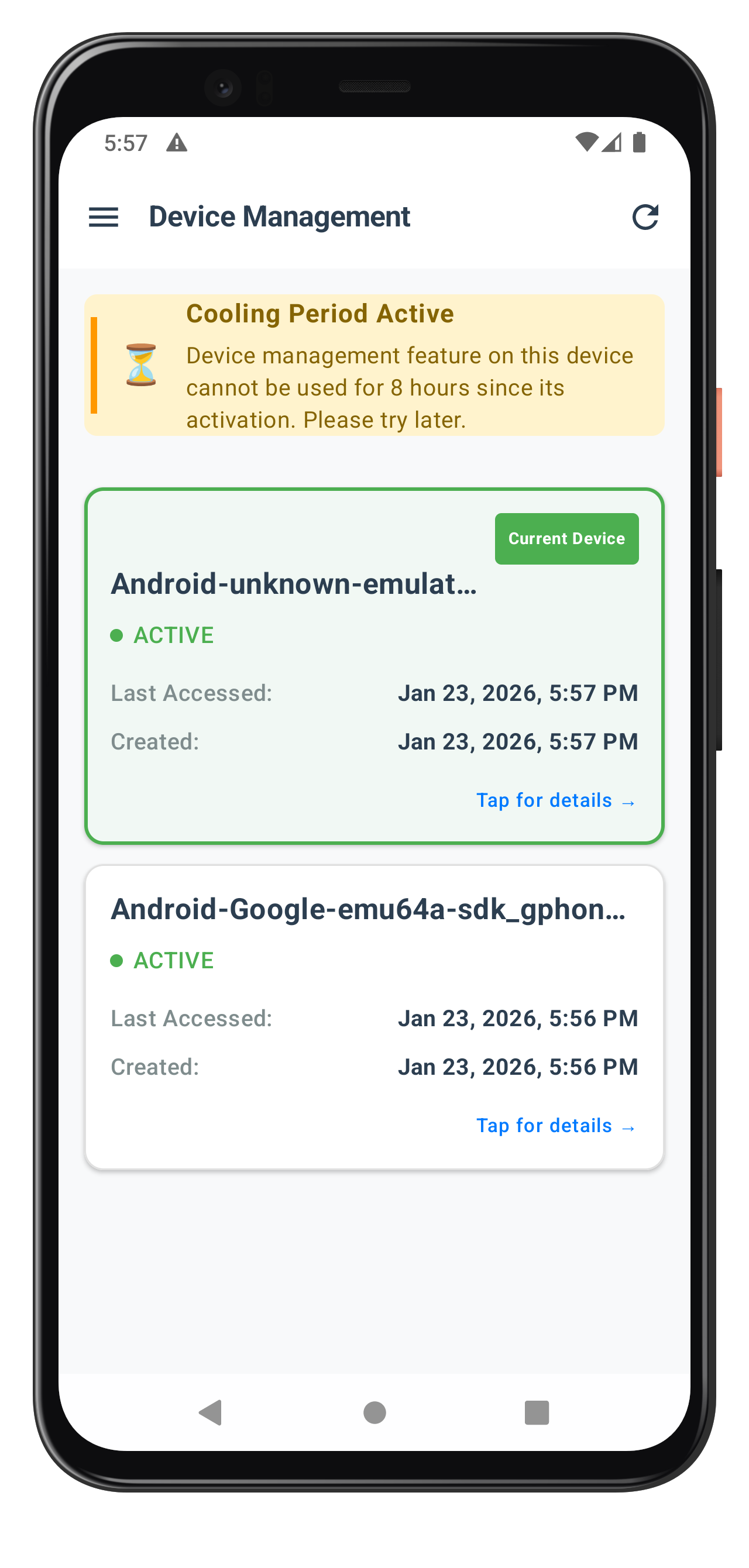
Key DeviceManagementScreen Features
Auto-Loading and Refresh
- Auto-load on Composition: Automatically calls
getRegisteredDeviceDetails()when screen first loads usingLaunchedEffect(Unit) - Pull-to-Refresh: Swipe down to manually refresh device list with
rememberPullRefreshState - Navigation-Based Refresh: Screen recomposes when returning from DeviceDetailScreen
Cooling Period Management
- Detection: Checks
statusCode == 146to detect active cooling period - Visual Warning: Displays prominent banner when cooling period is active
- Banner Content: Shows cooling period message and end timestamp
- Action Blocking: Passes cooling period state to DeviceDetailScreen for action disabling
Current Device Highlighting
- Visual Distinction: Green border and background for current device
- Current Device Badge: "Current Device" badge displayed prominently
- Status Indicators: Color-coded status dots (green = ACTIVE, red = BLOCKED)
- Device Sorting: Current device appears first, then sorted by last accessed time
Lifecycle Management
- ViewModel Scope: All coroutines automatically canceled when ViewModel is cleared
- StateFlow Collection: Uses
collectAsStateWithLifecycle()to prevent memory leaks - Event Subscription: Automatic cleanup via viewModelScope when screen is disposed
- Recomposition Safety: State updates trigger recomposition automatically
The following image showcases the screen from the sample application:
Create the DeviceDetailScreen that shows device information and provides rename/delete actions.
Step 1: Create DeviceDetailUiState
Create
DeviceDetailViewModel.kt
with state:
package com.relidcodelab.tutorial.viewmodels

import androidx.lifecycle.ViewModel
import androidx.lifecycle.viewModelScope
import com.relidcodelab.uniken.services.RDNACallbackManager
import com.relidcodelab.uniken.services.RDNAService
import com.uniken.rdna.RDNA
import kotlinx.coroutines.flow.*
import kotlinx.coroutines.launch

/**
 * UI State for DeviceDetailScreen
 * Holds original SDK RDNADeviceDetails object
 */
data class DeviceDetailUiState(
    val device: RDNA.RDNADeviceDetails,  // ← SDK object directly!
    val currentDeviceName: String,
    val userID: String,
    val isCoolingPeriodActive: Boolean,
    val coolingPeriodMessage: String,
    val isRenaming: Boolean = false,
    val isDeleting: Boolean = false,
    val showRenameDialog: Boolean = false,
    val actionAlert: DeviceActionAlertState? = null
)

/**
 * Alert dialog state (like React Native Alert.alert)
 */
data class DeviceActionAlertState(
    val title: String,
    val message: String,
    val isSuccess: Boolean,  // true = success (navigate after OK), false = error (stay on screen)
    val operation: String    // "rename" or "delete"
)

/**
 * Navigation/result events
 */
sealed class DeviceDetailEvent {
    object NavigateBack : DeviceDetailEvent()
}
Step 2: Create DeviceDetailViewModel
Continue in
DeviceDetailViewModel.kt
:
/**
 * DeviceDetailViewModel
 *
 * Handles device detail display and actions (rename/delete).
 * Key Features:
 * - Display device information
 * - Rename device functionality
 * - Delete device functionality
 * - Cooling period awareness
 *
 * Receives original SDK RDNADeviceDetails object
 * and uses it directly without recreation
 */
class DeviceDetailViewModel(
    private val rdnaService: RDNAService,
    private val callbackManager: RDNACallbackManager,
    private val device: RDNA.RDNADeviceDetails,  // ← Original SDK object!
    userID: String,
    isCoolingPeriodActive: Boolean,
    coolingPeriodMessage: String
) : ViewModel() {

    companion object {
        private const val TAG = "DeviceDetailVM"
        const val OPERATION_RENAME = 0
        const val OPERATION_DELETE = 1
    }

    // UI State
    private val _uiState = MutableStateFlow(DeviceDetailUiState(
        device = device,  // ← Store SDK object directly!
        currentDeviceName = device.getDeviceName() ?: "Unknown Device",
        userID = userID,
        isCoolingPeriodActive = isCoolingPeriodActive,
        coolingPeriodMessage = coolingPeriodMessage
    ))
    val uiState: StateFlow<DeviceDetailUiState> = _uiState.asStateFlow()

    // Events
    private val _events = MutableSharedFlow<DeviceDetailEvent>()
    val events: SharedFlow<DeviceDetailEvent> = _events.asSharedFlow()

    init {
        setupEventHandlers()
    }

    /**
     * Setup event handlers for SDK callbacks
     */
    private fun setupEventHandlers() {
        viewModelScope.launch {
            callbackManager.updateDeviceDetailsEvent.collect { status ->
                handleUpdateDeviceDetailsResponse(status)
            }
        }
    }

    /**
     * Handle update device details response
     */
    private fun handleUpdateDeviceDetailsResponse(
        status: RDNA.RDNAStatusUpdateDeviceDetails
    ) {
        Log.d(TAG, "Received update device details response")

        val isRenaming = _uiState.value.isRenaming
        val isDeleting = _uiState.value.isDeleting
        val operation = if (isRenaming) "rename" else "delete"

        try {
            // Check for errors
            val error = status.getError()
            if (error != null && error.longErrorCode != 0) {
                Log.e(TAG, "$operation error: ${error.errorString} (code: ${error.longErrorCode})")
                _uiState.update { it.copy(
                    actionAlert = DeviceActionAlertState(
                        title = "${operation.capitalize()} Failed",
                        message = error.errorString ?: "Failed to $operation device",
                        isSuccess = false,
                        operation = operation
                    ),
                    isRenaming = false,
                    isDeleting = false
                )}
                return
            }

            // Check status code
            val responseStatus = status.getStatus()
            val statusCode = responseStatus?.statusCode?.intValue ?: 0
            val statusMsg = responseStatus?.message ?: ""

            Log.d(TAG, "$operation response - statusCode: $statusCode, statusMsg: $statusMsg")

            // Validate status code
            when {
                statusCode == 0 || statusCode == 100 -> {
                    // Success - show alert dialog
                    Log.d(TAG, "$operation successful")
                    val successMessage = if (isRenaming) {
                        "Device renamed successfully"
                    } else {
                        "Device deleted successfully"
                    }
                    _uiState.update { it.copy(
                        actionAlert = DeviceActionAlertState(
                            title = "Success",
                            message = successMessage,
                            isSuccess = true,
                            operation = operation
                        ),
                        isRenaming = false,
                        isDeleting = false
                    )}
                }
                statusCode == 146 -> {
                    // Cooling period active
                    Log.w(TAG, "Cooling period active")
                    _uiState.update { it.copy(
                        actionAlert = DeviceActionAlertState(
                            title = "$operation Failed",
                            message = "Device management is currently in cooling period. Please try again later.",
                            isSuccess = false,
                            operation = operation
                        ),
                        isRenaming = false,
                        isDeleting = false
                    )}
                }
                else -> {
                    // Other error
                    Log.e(TAG, "$operation failed with status: $statusCode - $statusMsg")
                    _uiState.update { it.copy(
                        actionAlert = DeviceActionAlertState(
                            title = "$operation Failed",
                            message = statusMsg.ifEmpty { "Failed to $operation device" },
                            isSuccess = false,
                            operation = operation
                        ),
                        isRenaming = false,
                        isDeleting = false
                    )}
                }
            }

        } catch (e: Exception) {
            Log.e(TAG, "Error handling update response", e)
            _uiState.update { it.copy(
                actionAlert = DeviceActionAlertState(
                    title = "${operation.capitalize()} Failed",
                    message = "Failed to $operation device: ${e.message}",
                    isSuccess = false,
                    operation = operation
                ),
                isRenaming = false,
                isDeleting = false
            )}
        }
    }

    /**
     * Show rename dialog
     */
    fun showRenameDialog() {
        _uiState.update { it.copy(showRenameDialog = true) }
    }

    /**
     * Hide rename dialog
     */
    fun hideRenameDialog() {
        _uiState.update { it.copy(showRenameDialog = false) }
    }

    /**
     * Rename device
     */
    fun renameDevice(newName: String) {
        Log.d(TAG, "Renaming device to: $newName")
        _uiState.update { it.copy(
            isRenaming = true,
            currentDeviceName = newName  // Optimistic update
        )}

        performDeviceUpdate(newName, OPERATION_RENAME)
    }

    /**
     * Delete device
     */
    fun deleteDevice() {
        Log.d(TAG, "Deleting device: ${device.getDeviceUUID()}")
        _uiState.update { it.copy(isDeleting = true) }

        performDeviceUpdate(_uiState.value.currentDeviceName, OPERATION_DELETE)
    }

    /**
     * Perform device update (rename or delete)
     *
     * Uses the original SDK RDNADeviceDetails object directly!
     * No object recreation needed.
     *
     * For RENAME: call device.setNewDeviceName()
     * For DELETE: call device.deleteDevice()
     */
    private fun performDeviceUpdate(newName: String, operationType: Int) {
        val userID = _uiState.value.userID

        try {
            // Use the original SDK object directly (no recreation!)
            if (operationType == OPERATION_RENAME) {
                // For rename: call setNewDeviceName() - SDK handles status internally
                device.setNewDeviceName(newName)
                Log.d(TAG, "Set new device name: $newName")
            } else {
                // For delete: call deleteDevice() - sets status to RDNA_DEVSTATUS_DELETE
                device.deleteDevice()
                Log.d(TAG, "Delete device: ${device.getDeviceUUID()}")
            }

            // Pass the same SDK object to updateDeviceDetails
            val error = rdnaService.updateDeviceDetails(userID, arrayOf(device))
            if (error.longErrorCode != 0) {
                Log.e(TAG, "updateDeviceDetails sync error: ${error.errorString}")
                _uiState.update { it.copy(
                    actionAlert = DeviceActionAlertState(
                        title = "${operationType.toString().capitalize()} Failed",
                        message = error.errorString ?: "Failed to update device",
                        isSuccess = false,
                        operation = if (operationType == OPERATION_RENAME) "rename" else "delete"
                    ),
                    isRenaming = false,
                    isDeleting = false
                )}
            }
            // Success - wait for callback event
        } catch (e: Exception) {
            Log.e(TAG, "Error creating device details", e)
            _uiState.update { it.copy(
                actionAlert = DeviceActionAlertState(
                    title = "${operationType.toString().capitalize()} Failed",
                    message = "Failed to update device: ${e.message}",
                    isSuccess = false,
                    operation = if (operationType == OPERATION_RENAME) "rename" else "delete"
                ),
                isRenaming = false,
                isDeleting = false
            )}
        }
    }

    /**
     * Dismiss alert dialog
     */
    fun dismissAlert() {
        _uiState.update { it.copy(actionAlert = null) }
    }
}
SDK Object Modification Pattern
The key difference from React Native is the direct SDK object modification:
// Android: Direct SDK object modification
device.setNewDeviceName(newName)  // Sets internal status to "Update"
rdnaService.updateDeviceDetails(userID, arrayOf(device))

// OR

device.deleteDevice()  // Sets internal status to "Delete"
rdnaService.updateDeviceDetails(userID, arrayOf(device))
Step 3: Create DeviceDetailScreen Composable
Create
DeviceDetailScreen.kt
: (showing key sections)
package com.relidcodelab.tutorial.screens.devicemanagement

import androidx.compose.foundation.background
import androidx.compose.foundation.layout.*
import androidx.compose.foundation.rememberScrollState
import androidx.compose.foundation.shape.CircleShape
import androidx.compose.foundation.shape.RoundedCornerShape
import androidx.compose.foundation.verticalScroll
import androidx.compose.material.icons.Icons
import androidx.compose.material.icons.automirrored.filled.ArrowBack
import androidx.compose.material3.*
import androidx.compose.runtime.*
import androidx.compose.ui.Alignment
import androidx.compose.ui.Modifier
import androidx.compose.ui.graphics.Color
import androidx.compose.ui.text.font.FontWeight
import androidx.compose.ui.unit.dp
import androidx.compose.ui.unit.sp
import androidx.lifecycle.compose.collectAsStateWithLifecycle
import com.relidcodelab.tutorial.viewmodels.*
import com.relidcodelab.ui.theme.*
import com.uniken.rdna.RDNA
import java.text.SimpleDateFormat
import java.util.*

/**
 * Device Detail Screen
 *
 * Displays detailed information about a selected device.
 * Key Features:
 * - Complete device information display
 * - Current device indicator
 * - Status display
 * - Cooling period awareness
 * - Action buttons (rename/delete)
 */
@OptIn(ExperimentalMaterial3Api::class)
@Composable
fun DeviceDetailScreen(
    viewModel: DeviceDetailViewModel,
    onNavigateBack: () -> Unit
) {
    val uiState by viewModel.uiState.collectAsStateWithLifecycle()
    var showDeleteConfirmDialog by remember { mutableStateOf(false) }

    // Handle navigation events
    LaunchedEffect(Unit) {
        viewModel.events.collect { event ->
            when (event) {
                is DeviceDetailEvent.NavigateBack -> {
                    onNavigateBack()
                }
            }
        }
    }

    val device = uiState.device
    val isCurrentDevice = device.getCurrentDevice()
    val deviceStatus = device.getDeviceStatus()
    val isActive = deviceStatus == RDNA.RDNADeviceStatus.RDNA_DEVSTATUS_ACTIVE

    Scaffold(
        containerColor = PageBackground,
        topBar = {
            DeviceDetailHeader(onBackClick = onNavigateBack)
        }
    ) { padding ->
        Column(
            modifier = Modifier
                .fillMaxSize()
                .padding(padding)
                .verticalScroll(rememberScrollState())
        ) {
            // Current Device Banner
            if (isCurrentDevice) {
                CurrentDeviceBanner()
            }

            // Device Information Card
            DeviceInfoCard(
                deviceName = uiState.currentDeviceName,
                status = when (deviceStatus) {
                    RDNA.RDNADeviceStatus.RDNA_DEVSTATUS_ACTIVE -> "ACTIVE"
                    RDNA.RDNADeviceStatus.RDNA_DEVSTATUS_BLOCKED -> "BLOCKED"
                    RDNA.RDNADeviceStatus.RDNA_DEVSTATUS_SUSPEND -> "SUSPENDED"
                    else -> "UNKNOWN"
                },
                isActive = isActive
            )

            // Device Details Card
            DeviceDetailsCard(device = device)

            // Access Information Card
            AccessInfoCard(
                lastAccessedEpoch = device.getLastAccessEpochTime() ?: 0L,
                createdEpoch = device.getDeviceRegistrationEpochTime() ?: 0L
            )

            // Cooling Period Warning
            if (uiState.isCoolingPeriodActive) {
                CoolingPeriodWarning(message = uiState.coolingPeriodMessage)
            }

            // Action Buttons Card
            ActionsCard(
                isCurrentDevice = isCurrentDevice,
                isCoolingPeriodActive = uiState.isCoolingPeriodActive,
                isRenaming = uiState.isRenaming,
                isDeleting = uiState.isDeleting,
                onRenameClick = { viewModel.showRenameDialog() },
                onDeleteClick = { showDeleteConfirmDialog = true }
            )

            Spacer(modifier = Modifier.height(32.dp))
        }
    }

    // Rename Dialog
    if (uiState.showRenameDialog) {
        RenameDeviceDialog(
            currentDeviceName = uiState.currentDeviceName,
            isSubmitting = uiState.isRenaming,
            onSubmit = { newName -> viewModel.renameDevice(newName) },
            onCancel = { viewModel.hideRenameDialog() }
        )
    }

    // Delete Confirmation Dialog
    if (showDeleteConfirmDialog) {
        AlertDialog(
            onDismissRequest = { showDeleteConfirmDialog = false },
            title = { Text("Delete Device") },
            text = {
                Text("Are you sure you want to delete \"${uiState.currentDeviceName}\"? This action cannot be undone.")
            },
            confirmButton = {
                TextButton(
                    onClick = {
                        showDeleteConfirmDialog = false
                        viewModel.deleteDevice()
                    },
                    colors = ButtonDefaults.textButtonColors(contentColor = PrimaryRed)
                ) {
                    Text("Delete")
                }
            },
            dismissButton = {
                TextButton(onClick = { showDeleteConfirmDialog = false }) {
                    Text("Cancel")
                }
            }
        )
    }

    // Success/Error Alert Dialog
    uiState.actionAlert?.let { alert ->
        AlertDialog(
            onDismissRequest = {
                viewModel.dismissAlert()
                if (alert.isSuccess) {
                    onNavigateBack()  // Navigate back after success
                }
            },
            title = { Text(alert.title) },
            text = { Text(alert.message) },
            confirmButton = {
                TextButton(
                    onClick = {
                        viewModel.dismissAlert()
                        if (alert.isSuccess) {
                            onNavigateBack()  // Navigate back after success
                        }
                    }
                ) {
                    Text("OK")
                }
            }
        )
    }
}
(Include all helper composables from the reference file - DeviceDetailHeader, CurrentDeviceBanner, DeviceInfoCard, DeviceDetailsCard, AccessInfoCard, CoolingPeriodWarning, ActionsCard, InfoRow, formatDateLong, formatRelativeTime)
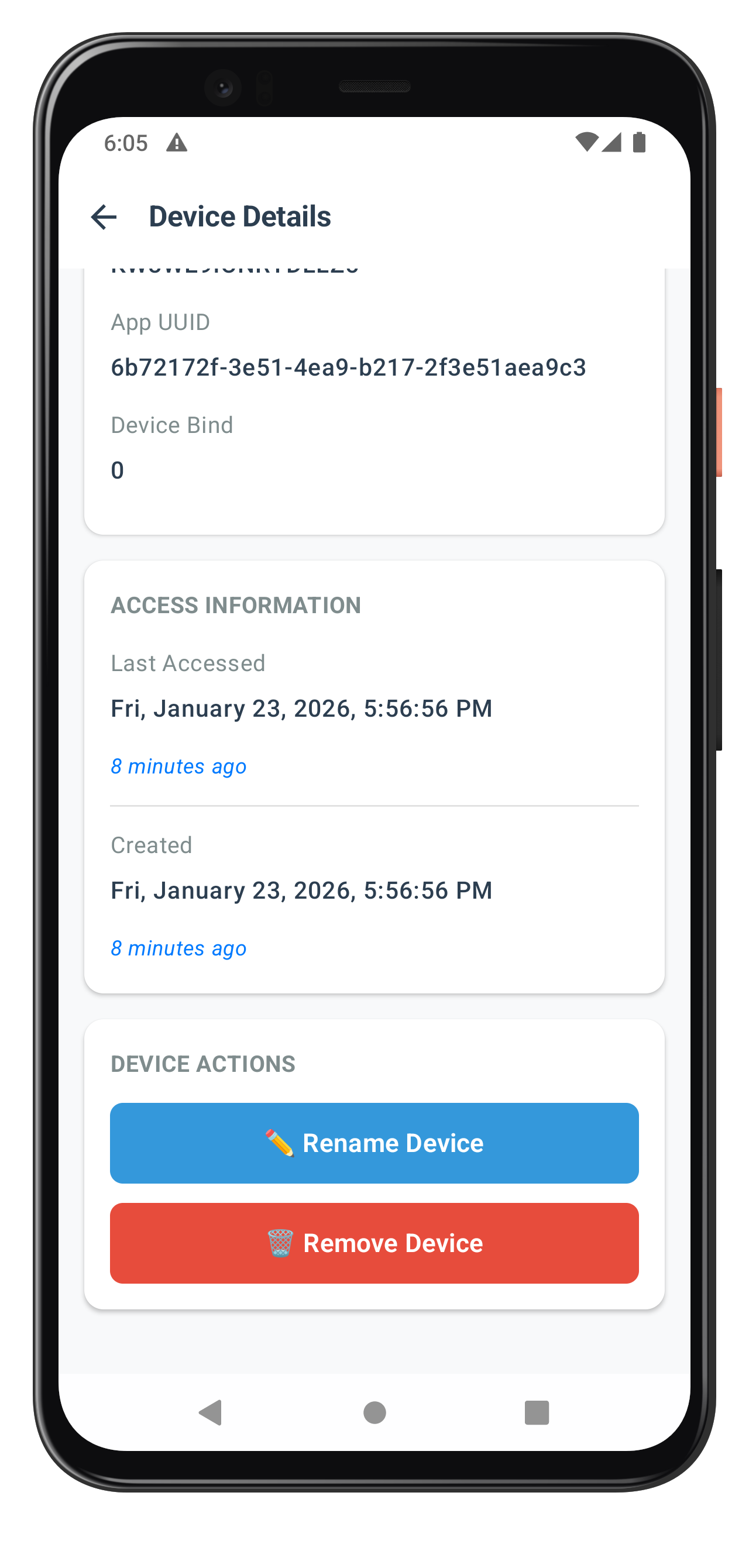
Key DeviceDetailScreen Features
SDK Object Modification
- Direct Modification: Uses
device.setNewDeviceName()anddevice.deleteDevice()SDK methods - No Conversion: Original SDK object is modified in-place without creating wrappers
- Type Safety: Compiler enforces correct usage of SDK object methods
Cooling Period Awareness
- State-Based Disabling: Action buttons disabled when
isCoolingPeriodActive == true - Visual Feedback: Buttons show disabled state with reduced opacity
- Warning Display: Cooling period banner displays above action buttons
- User Guidance: Clear messaging about why actions are unavailable
Current Device Protection
- Delete Prevention: Delete button hidden/disabled for current device
- Visual Indicator: "Current Device" banner displays at top of screen
- Validation Logic:
device.getCurrentDevice()checked before enabling delete - Server-Side Backup: Server also validates, but client prevents unnecessary calls
Alert Dialog Feedback
- Success Alerts: Modal dialog displays on successful operation
- Error Alerts: Modal dialog displays with error message on failure
- Auto-Navigation: Success alerts automatically navigate back to device list
- User Confirmation: Deletes require confirmation dialog before proceeding
The following image showcase the screen from the sample application:
Create the modal dialog for device renaming with input validation.
Create
RenameDeviceDialog.kt
:
package com.relidcodelab.tutorial.screens.devicemanagement

import androidx.compose.foundation.background
import androidx.compose.foundation.layout.*
import androidx.compose.foundation.shape.RoundedCornerShape
import androidx.compose.material3.*
import androidx.compose.runtime.*
import androidx.compose.ui.Alignment
import androidx.compose.ui.Modifier
import androidx.compose.ui.graphics.Color
import androidx.compose.ui.text.font.FontWeight
import androidx.compose.ui.unit.dp
import androidx.compose.ui.unit.sp
import androidx.compose.ui.window.Dialog

/**
 * Rename Device Dialog
 *
 * Modal dialog for renaming a device with input validation.
 */
@Composable
fun RenameDeviceDialog(
    currentDeviceName: String,
    isSubmitting: Boolean,
    onSubmit: (String) -> Unit,
    onCancel: () -> Unit
) {
    var newName by remember(currentDeviceName) { mutableStateOf(currentDeviceName) }
    var error by remember { mutableStateOf<String?>(null) }

    // Reset state when dialog opens
    LaunchedEffect(currentDeviceName) {
        newName = currentDeviceName
        error = null
    }

    Dialog(onDismissRequest = { if (!isSubmitting) onCancel() }) {
        Card(
            modifier = Modifier
                .fillMaxWidth()
                .padding(16.dp),
            shape = RoundedCornerShape(12.dp),
            colors = CardDefaults.cardColors(containerColor = Color.White)
        ) {
            Column {
                // Header
                Box(
                    modifier = Modifier
                        .fillMaxWidth()
                        .padding(20.dp)
                ) {
                    Text(
                        text = "Rename Device",
                        fontSize = 18.sp,
                        fontWeight = FontWeight.Bold,
                        color = Color(0xFF2C3E50)
                    )
                }

                HorizontalDivider(color = Color(0xFFE0E0E0))

                // Content
                Column(
                    modifier = Modifier
                        .fillMaxWidth()
                        .padding(20.dp)
                ) {
                    // Current Name
                    Text(
                        text = "Current Name:",
                        fontSize = 14.sp,
                        fontWeight = FontWeight.SemiBold,
                        color = Color(0xFF7F8C8D)
                    )
                    Spacer(modifier = Modifier.height(8.dp))
                    Text(
                        text = currentDeviceName,
                        fontSize = 16.sp,
                        fontWeight = FontWeight.Medium,
                        color = Color(0xFF2C3E50)
                    )

                    Spacer(modifier = Modifier.height(20.dp))

                    // New Name
                    Text(
                        text = "New Name:",
                        fontSize = 14.sp,
                        fontWeight = FontWeight.SemiBold,
                        color = Color(0xFF7F8C8D)
                    )
                    Spacer(modifier = Modifier.height(8.dp))
                    OutlinedTextField(
                        value = newName,
                        onValueChange = {
                            newName = it
                            error = null
                        },
                        modifier = Modifier.fillMaxWidth(),
                        placeholder = { Text("Enter new device name") },
                        enabled = !isSubmitting,
                        isError = error != null,
                        singleLine = true,
                        colors = OutlinedTextFieldDefaults.colors(
                            focusedBorderColor = Color(0xFF007AFF),
                            unfocusedBorderColor = Color(0xFFE0E0E0),
                            errorBorderColor = Color(0xFFE74C3C),
                            focusedContainerColor = Color(0xFFF8F9FA),
                            unfocusedContainerColor = Color(0xFFF8F9FA)
                        ),
                        shape = RoundedCornerShape(8.dp)
                    )

                    // Error message
                    if (error != null) {
                        Spacer(modifier = Modifier.height(8.dp))
                        Text(
                            text = error!!,
                            fontSize = 12.sp,
                            color = Color(0xFFE74C3C)
                        )
                    }
                }

                HorizontalDivider(color = Color(0xFFE0E0E0))

                // Actions
                Row(
                    modifier = Modifier
                        .fillMaxWidth()
                        .height(56.dp)
                ) {
                    // Cancel button
                    Box(
                        modifier = Modifier
                            .weight(1f)
                            .fillMaxHeight()
                            .background(Color.Transparent),
                        contentAlignment = Alignment.Center
                    ) {
                        TextButton(
                            onClick = onCancel,
                            enabled = !isSubmitting,
                            modifier = Modifier.fillMaxSize()
                        ) {
                            Text(
                                text = "Cancel",
                                fontSize = 16.sp,
                                fontWeight = FontWeight.SemiBold,
                                color = Color(0xFF7F8C8D)
                            )
                        }
                    }

                    // Vertical divider
                    Box(
                        modifier = Modifier
                            .width(1.dp)
                            .fillMaxHeight()
                            .background(Color(0xFFE0E0E0))
                    )

                    // Submit button
                    Box(
                        modifier = Modifier
                            .weight(1f)
                            .fillMaxHeight()
                            .background(
                                if (isSubmitting) Color(0xFF95A5A6) else Color(0xFF007AFF)
                            ),
                        contentAlignment = Alignment.Center
                    ) {
                        TextButton(
                            onClick = {
                                // Validation
                                val trimmedName = newName.trim()

                                when {
                                    trimmedName.isEmpty() -> {
                                        error = "Device name cannot be empty"
                                    }
                                    trimmedName == currentDeviceName -> {
                                        error = "New name must be different from current name"
                                    }
                                    trimmedName.length < 3 -> {
                                        error = "Device name must be at least 3 characters"
                                    }
                                    trimmedName.length > 50 -> {
                                        error = "Device name must be less than 50 characters"
                                    }
                                    else -> {
                                        onSubmit(trimmedName)
                                    }
                                }
                            },
                            enabled = !isSubmitting,
                            modifier = Modifier.fillMaxSize()
                        ) {
                            if (isSubmitting) {
                                CircularProgressIndicator(
                                    modifier = Modifier.size(20.dp),
                                    color = Color.White,
                                    strokeWidth = 2.dp
                                )
                            } else {
                                Text(
                                    text = "Rename",
                                    fontSize = 16.sp,
                                    fontWeight = FontWeight.SemiBold,
                                    color = Color.White
                                )
                            }
                        }
                    }
                }
            }
        }
    }
}
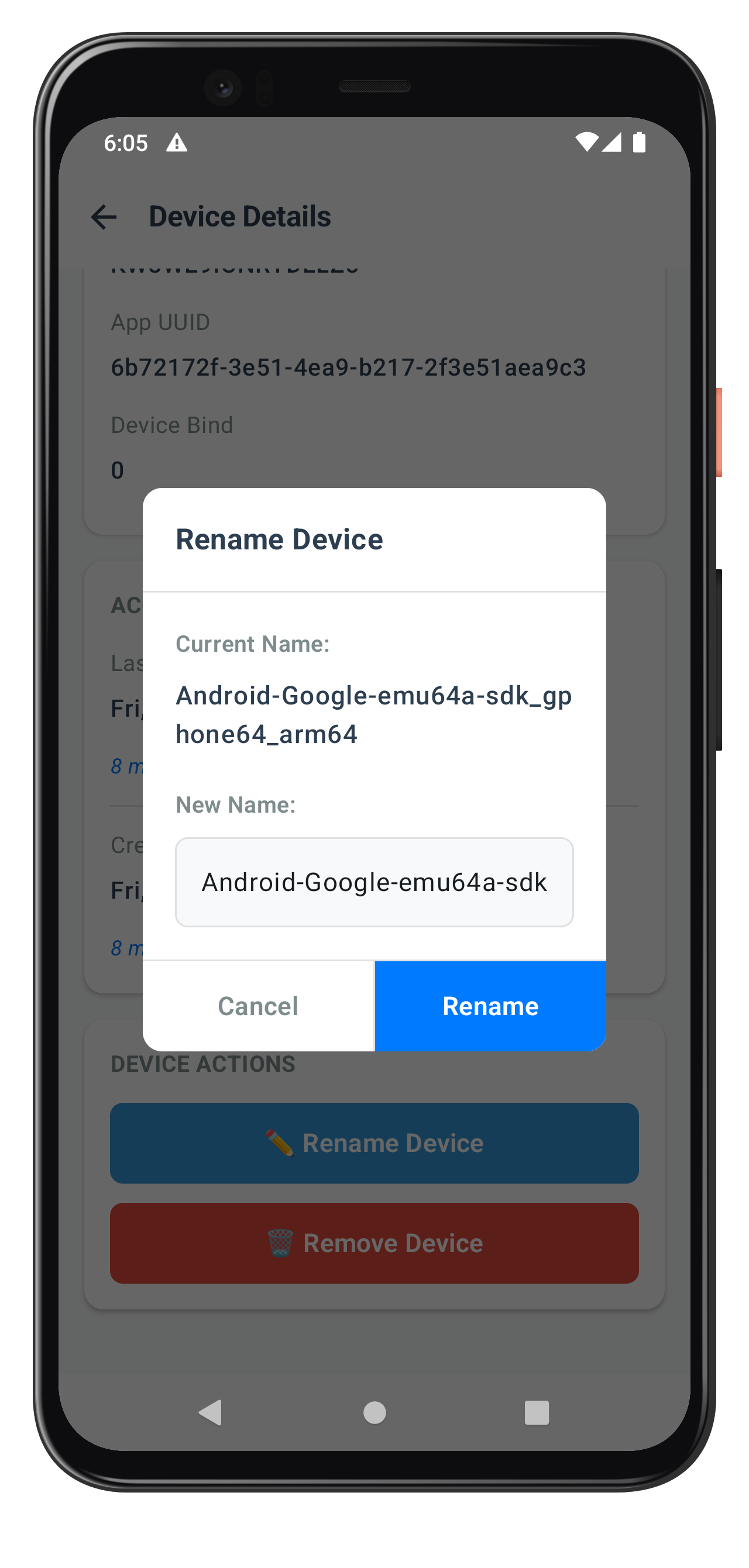
Validation Logic
The dialog implements comprehensive validation:
- ✅ Empty name check
- ✅ Name unchanged check
- ✅ Minimum length (3 characters)
- ✅ Maximum length (50 characters)
- ✅ Real-time error feedback
- ✅ Disabled state during submission
Key RenameDeviceDialog Features
Input Validation
- Required Field: Prevents submission with empty name
- Trimming: Automatically trims whitespace from input
- Real-time Feedback: Submit button disabled when validation fails
- Clear Error State: Visual indication of invalid input
Keyboard Management
- Auto-Focus: Text field automatically receives focus when dialog opens
- Keyboard Actions: "Done" action on keyboard triggers submit
- Dismiss on Submit: Keyboard automatically dismissed after successful submit
- Accessibility: Proper keyboard navigation support
State Management
- Local State: Dialog manages its own text input state with
remember - Parent Callback: Uses callback pattern to communicate with parent ViewModel
- Dismissal Handling: Clears state when dialog is dismissed
- Loading State: Shows loading indicator during API call (if needed)
The following image showcases the screen from the sample application:
Integrate device management into your drawer navigation system.
Update
DrawerNavigator.kt
:
// DrawerNavigator.kt (additions)

import com.relidcodelab.tutorial.screens.devicemanagement.DeviceManagementScreen
import com.relidcodelab.tutorial.screens.devicemanagement.DeviceDetailScreen
import com.relidcodelab.tutorial.viewmodels.DeviceManagementViewModel
import com.relidcodelab.tutorial.viewmodels.DeviceDetailViewModel
import com.relidcodelab.tutorial.viewmodels.NavigateToDeviceDetail

// In SideMenuContent - add device management menu item
onDeviceManagementClick = {
    scope.launch {
        drawerState.close()
        navController.navigate("DeviceManagement")
    }
}

// In DrawerNavHost - add navigation state
var currentDeviceDetailData by remember { mutableStateOf<NavigateToDeviceDetail?>(null) }

// In NavHost - add composables
composable("DeviceManagement") {
    val userID = dashboardViewModel.uiState.value.userID

    val deviceManagementViewModel = remember(userID) {
        DeviceManagementViewModel(
            rdnaService = rdnaService,
            callbackManager = callbackManager,
            userID = userID
        )
    }

    DeviceManagementScreen(
        viewModel = deviceManagementViewModel,
        onMenuClick = onOpenDrawer,
        onNavigateToDeviceDetail = { event ->
            // Store device data directly
            currentDeviceDetailData = event
            navController.navigate("DeviceDetail")
        }
    )
}

composable("DeviceDetail") {
    val detailData = currentDeviceDetailData
    if (detailData != null) {
        val deviceDetailViewModel = remember(detailData) {
            DeviceDetailViewModel(
                rdnaService = rdnaService,
                callbackManager = callbackManager,
                device = detailData.device,
                userID = detailData.userID,
                isCoolingPeriodActive = detailData.isCoolingPeriodActive,
                coolingPeriodMessage = detailData.coolingPeriodMessage
            )
        }

        DeviceDetailScreen(
            viewModel = deviceDetailViewModel,
            onNavigateBack = {
                currentDeviceDetailData = null
                navController.popBackStack("DeviceManagement", inclusive = false)
            }
        )
    } else {
        // No device data available, navigate back
        LaunchedEffect(Unit) {
            navController.popBackStack("DeviceManagement", inclusive = false)
        }
    }
}
Navigation Data Passing
Device data is passed using in-memory state variables:
// Store navigation data
currentDeviceDetailData = NavigateToDeviceDetail(
    device = device,  // Original SDK object
    userID = userID,
    isCoolingPeriodActive = isCoolingPeriodActive,
    coolingPeriodEndTimestamp = coolingPeriodEndTimestamp,
    coolingPeriodMessage = coolingPeriodMessage
)
navController.navigate("DeviceDetail")

// Access in destination
val detailData = currentDeviceDetailData
if (detailData != null) {
    // Use detailData.device (original SDK object)
}
Let's verify your device management implementation with comprehensive manual testing scenarios.
Test Scenario 1: Successful Device List Display
Steps:
- Launch the app and complete MFA login flow successfully
- Verify navigation to Dashboard screen
- Open drawer menu (☰ button or swipe from left)
- Tap "📱 Device Management" menu item
- Verify loading indicator displays
- Wait for device list to load
Expected Logcat Output:
D/RDNAService: getRegisteredDeviceDetails() called for user: user@example.com
D/RDNAService: getRegisteredDeviceDetails sync success - waiting for callback
D/RDNACallbackManager: onGetRegistredDeviceDetails callback received
D/DeviceManagementViewModel: Device count: 3, Status code: 100
Expected Result: ✅ Device list displays with:
- Device names, status indicators, timestamps
- Current device highlighted with green border and badge
- "Tap for details →" indicator on each card
- No cooling period banner (StatusCode 100)
Test Scenario 2: Pull-to-Refresh
Steps:
- Navigate to Device Management screen (following Scenario 1)
- Swipe down on device list
- Release when refresh indicator appears
- Verify refresh indicator spins
- Wait for device list to reload
Expected Logcat Output:
D/DeviceManagementViewModel: Pull-to-refresh triggered
D/RDNAService: getRegisteredDeviceDetails() called for user: user@example.com
D/RDNACallbackManager: onGetRegistredDeviceDetails callback received
Expected Behavior: ✅ Device list refreshes, refresh indicator disappears, updated device data displayed
Test Scenario 3: Cooling Period Detection
Steps:
- Trigger cooling period (perform a device operation)
- Navigate to Device Management screen
- Verify cooling period banner appears
- Tap on any device
- Verify rename and delete buttons are disabled
Expected Logcat Output:
D/DeviceManagementViewModel: Cooling period detected, Status code: 146
D/DeviceManagementViewModel: Cooling period end: [timestamp]
Expected Result: ✅
- Orange/yellow banner displays at top: "⏳ Cooling Period Active"
- Banner shows end timestamp
- All action buttons disabled in detail screen
- User can still view device details
Test Scenario 4: Successful Device Rename
Steps:
- Navigate to Device Management screen
- Tap on a non-current device card
- Verify navigation to DeviceDetailScreen
- Verify device details displayed correctly
- Tap "✏️ Rename Device" button
- Verify rename dialog opens with current name pre-filled
- Enter new device name (e.g., "My Updated Device")
- Tap "Rename" button
- Wait for success alert
Expected Logcat Output:
D/DeviceDetailViewModel: Renaming device to: My Updated Device
D/RDNAService: updateDeviceDetails() called for user: user@example.com
D/RDNACallbackManager: onUpdateDeviceDetails callback received
D/DeviceDetailViewModel: Rename successful, Status code: 100
Expected Result: ✅
- Success alert: "Device renamed successfully"
- Dialog closes automatically
- Device name updates in UI
- Navigation back to device list
- Updated name visible in device list
Test Scenario 5: Successful Device Deletion
Steps:
- Navigate to Device Management screen
- Tap on a NON-CURRENT device card (ensure not current device)
- Verify navigation to DeviceDetailScreen
- Scroll to Action Buttons section
- Verify "🗑️ Delete Device" button is visible and enabled
- Tap "🗑️ Delete Device" button
- Verify confirmation dialog: "Are you sure you want to delete..."
- Tap "Delete" / "Confirm" button
- Wait for success alert
Expected Logcat Output:
D/DeviceDetailViewModel: Deleting device: [device name]
D/RDNAService: updateDeviceDetails() called for user: user@example.com
D/RDNACallbackManager: onUpdateDeviceDetails callback received
D/DeviceDetailViewModel: Delete successful, Status code: 100
Expected Result: ✅
- Success alert: "Device deleted successfully"
- Navigation back to device list
- Deleted device no longer appears in list
- Device count decreases by 1
Test Scenario 6: Current Device Deletion Prevention
Steps:
- Navigate to Device Management screen
- Tap on CURRENT device card (has "Current Device" badge)
- Verify navigation to DeviceDetailScreen
- Verify green banner: "✓ This is your current device"
- Scroll to Action Buttons section
- Verify "🗑️ Delete Device" button is NOT visible or is disabled
Expected Result: ✅
- Delete button hidden or disabled (grayed out)
- Green "Current Device" banner displays at top
- Rename button still enabled and functional
- Tooltip or message explains why delete is disabled
Test Scenario 7: Error Handling
Steps:
- Simulate network error (disable WiFi/mobile data or use airplane mode)
- Navigate to Device Management screen
- Attempt to load devices
- Verify error message displays
Expected Logcat Output:
E/RDNAService: getRegisteredDeviceDetails sync error: Network error
E/DeviceManagementViewModel: Failed to load devices: Network timeout
Expected Result: ✅
- Error message displays: "Failed to load devices. Please check your connection."
- Retry button available
- No crash or blank screen
- User can navigate back
Test Scenario 8: Empty Device List
Steps:
- Use account with no additional devices (only current device)
- Delete all non-current devices (if any)
- Navigate to Device Management screen
- Verify empty state displays
Expected Result: ✅
- Current device still displays in list
- Message: "You have 1 device registered"
- No error message
- Pull-to-refresh still functional
Debug Console Logs
Enable verbose logging for debugging:
// In RDNAService.kt
companion object {
    private const val TAG = "RDNAService"
    private const val DEBUG = true  // Set to false for production
}

// In ViewModels
companion object {
    private const val TAG = "DeviceManagementViewModel"  // or DeviceDetailViewModel
}
Key log patterns to watch:
D/RDNAService:- SDK API calls and responsesD/RDNACallbackManager:- SDK callback events receivedD/DeviceManagementViewModel:- State updates and business logicE/prefix - Errors that need attention
Use Logcat filtering:
# Filter for device management logs
adb logcat | grep -E "(RDNAService|DeviceManagement|RDNACallback)"

# Filter for errors only
adb logcat *:E

# Filter with tag
adb logcat -s DeviceManagementViewModel
Android-Specific Issues
Device list not updating after refresh
- Event collection may not be active
- Solution: Check ViewModel event collection in init block
Cooling period banner not showing
- Status code 146 not detected
- Solution: Check handleGetRegisteredDeviceDetailsResponse logic
Common SDK Error Codes
Error Code | Description | Solution |
0 | Success | Operation completed successfully |
StatusCode 100 | Success | Device operation successful |
StatusCode 146 | Cooling period active | Disable operations, show banner |
StatusCode != 100/146 | Server error | Check status message, contact support |
longErrorCode 1001 | Network error | Check connectivity, retry |
longErrorCode 1002 | Invalid user ID | Verify user ID parameter |
longErrorCode 1003 | Invalid device UUID | Verify device UUID |
Debugging Tips
Enable verbose logging:
// In RDNAService methods
Log.d(TAG, "Device details: ${status.getDevices()?.joinToString { it.getDeviceName() ?: "" }}")
Check event flow:
// In ViewModel
private fun setupEventHandlers() {
    viewModelScope.launch {
        callbackManager.getRegisteredDeviceDetailsEvent.collect { status ->
            Log.d(TAG, "Event received: $status")
            handleGetRegisteredDeviceDetailsResponse(status)
        }
    }
}
State Management
- Use StateFlow for UI state, never mutable state in Composables
- Collect flows with lifecycle awareness (collectAsStateWithLifecycle)
- Clean up coroutines with viewModelScope
Threading
- SDK operations already handled on appropriate threads
- UI updates automatically on Main via SharedFlow
- Use Dispatchers.Main for UI, Dispatchers.IO for disk operations
Error Handling
- Always check error.longErrorCode (0 = success)
- Validate status codes (0, 100 = success; 146 = cooling period)
- Show user-friendly error messages
- Log errors for debugging
Security
- Validate device operations (prevent current device deletion)
- Use ProGuard/R8 for code obfuscation
- Handle cooling periods to prevent rapid operations
- Never log sensitive device information
Performance
- Use LazyColumn for long device lists
- Minimize recomposition by using stable parameters
- Cache device list in ViewModel
- Use remember for expensive computations
Organize your Android device management implementation following these file structure and architectural patterns.
File Structure
Directory Organization:
app/src/main/
├── java/com/yourapp/
│   ├── uniken/
│   │   ├── services/
│   │   │   ├── RDNAService.kt (✅ Add getRegisteredDeviceDetails, updateDeviceDetails)
│   │   │   └── RDNACallbackManager.kt (✅ Add device management event flows)
│   │   ├── providers/
│   │   │   └── SDKEventProvider.kt (✅ Optional: Global device management events)
│   │   ├── models/
│   │   │   └── RDNAModels.kt (✅ Optional: Wrapper types if needed)
│   │   └── utils/
│   │       └── DeviceUtils.kt (✅ Optional: Helper functions)
│   └── tutorial/
│       ├── navigation/
│       │   ├── DrawerNavigator.kt (✅ Add DeviceManagement routes)
│       │   └── AppNavigation.kt (✅ Route definitions)
│       ├── screens/
│       │   └── devicemanagement/
│       │       ├── DeviceManagementScreen.kt (✅ NEW)
│       │       ├── DeviceDetailScreen.kt (✅ NEW)
│       │       ├── RenameDeviceDialog.kt (✅ NEW)
│       │       └── DeviceManagementComponents.kt (✅ NEW - Reusable UI components)
│       └── viewmodels/
│           ├── DeviceManagementViewModel.kt (✅ NEW)
│           └── DeviceDetailViewModel.kt (✅ NEW)
└── res/
    ├── values/
    │   ├── strings.xml (✅ Add device management strings)
    │   └── colors.xml (✅ Optional: Custom colors)
    └── drawable/
        └── ic_device.xml (✅ Optional: Device icons)
Component Responsibilities
ViewModels:
- DeviceManagementViewModel:
- Device list state management
- Pull-to-refresh handling
- Cooling period detection (StatusCode 146)
- Device sorting (current device first)
- Event collection from RDNACallbackManager
- DeviceDetailViewModel:
- Device detail state management
- Rename operation with SDK object modification
- Delete operation with SDK object modification
- Alert dialog state management
- Success/error feedback
Composable Screens:
- DeviceManagementScreen:
- Device list display with LazyColumn
- Pull-to-refresh UI
- Cooling period banner
- Loading/error/empty states
- Navigation to detail screen
- DeviceDetailScreen:
- Device detail display
- Rename/delete action buttons
- Current device protection
- Cooling period awareness
- Alert dialogs for feedback
- RenameDeviceDialog:
- Text input with validation
- Character limit enforcement
- Keyboard management
- Submit/cancel actions
Service Layer:
- RDNAService:
- SDK API wrappers
- Synchronous method calls
- Error logging
- Device management operations
- RDNACallbackManager:
- SDK callback implementation
- SharedFlow event broadcasting
- Event-to-flow conversion
- Lifecycle-safe emission
Performance Optimization
Compose Optimization:
- Use
collectAsStateWithLifecycle()for lifecycle-aware state observation - Implement
rememberfor expensive computations - Use stable parameters to minimize recomposition
- LazyColumn with keys for efficient scrolling
- Avoid unnecessary lambda recreations in Composables
Memory Management:
- ViewModels automatically handle coroutine cleanup via viewModelScope
- SharedFlow collectors are automatically canceled when ViewModel is cleared
- Use lifecycle-aware collection to prevent memory leaks
- Clear navigation state when returning to device list
- Dispose of resources in ViewModel onCleared()
State Management:
- Use StateFlow for UI state (single source of truth)
- Use SharedFlow for one-time events (navigation, alerts)
- Minimize state updates with
update { it.copy(...) } - Collect flows in ViewModels, not Composables (when possible)
- Cache device list in ViewModel state
Network Optimization:
- Call
getRegisteredDeviceDetails()only when screen is first displayed - Don't repeatedly fetch device list unnecessarily
- Use pull-to-refresh for user-initiated updates
- Auto-refresh after successful operations (rename/delete)
- Handle offline scenarios gracefully
Testing Checklist
Before deploying to production, verify:
Device List:
- ✅ Device list loads successfully after login
- ✅ Pull-to-refresh works correctly
- ✅ Cooling period detected and enforced (StatusCode 146)
- ✅ Current device highlighted with badge and green border
- ✅ Device sorting: current device first, then by last accessed
- ✅ Loading indicator displays during fetch
- ✅ Error messages display on failure
- ✅ Empty state displays when no devices
Device Detail:
- ✅ Device details display correctly
- ✅ Current device badge shows for active device
- ✅ Device status (ACTIVE/BLOCKED) displays correctly
- ✅ Last accessed and created dates format properly
- ✅ Back navigation returns to device list
Device Operations:
- ✅ Current device delete button disabled/hidden
- ✅ Non-current device delete button visible and functional
- ✅ Rename dialog opens with current name pre-filled
- ✅ Rename validation prevents empty names
- ✅ Rename operation succeeds with valid name
- ✅ Delete confirmation dialog displays
- ✅ Delete operation succeeds after confirmation
- ✅ Device list auto-refreshes after operations
- ✅ Success alerts display after operations
- ✅ Error alerts display on failure
Cooling Period:
- ✅ Cooling period banner displays (StatusCode 146)
- ✅ Rename/delete buttons disabled during cooling period
- ✅ User can still view device details during cooling period
- ✅ Pull-to-refresh works during cooling period
Performance & Memory:
- ✅ No memory leaks after repeated navigation
- ✅ Event handlers cleaned up on ViewModel disposal
- ✅ No excessive recomposition in device list
- ✅ Smooth scrolling in long device lists
- ✅ No ANRs (Application Not Responding) during operations
Logging & Debugging:
- ✅ Logcat shows RDNAService operation calls
- ✅ Logcat shows callback events received
- ✅ Error codes logged for debugging
- ✅ No sensitive data logged in release builds
- ✅ ProGuard rules preserve SDK classes
Congratulations! You've successfully implemented Device Management in Android with:
- ✅ Device List with Pull-to-Refresh using LazyColumn
- ✅ Cooling Period Detection with Status Code 146
- ✅ Device Rename with SDK object modification pattern
- ✅ Device Delete with SDK object modification pattern
- ✅ Current Device Protection with validation
- ✅ Event-Driven Architecture with Coroutines and SharedFlow
- ✅ Drawer Navigation Integration
Key Android Patterns Learned
- StateFlow: Reactive UI state management
- SharedFlow: Event broadcasting to multiple collectors
- Jetpack Compose: Declarative UI with state observation
- Coroutines: Async event handling with lifecycle awareness
- ViewModel: Separation of UI logic from presentation
- Navigation Compose: Type-safe screen navigation
- SDK Object Modification: Direct object modification without JSON