🎯 Learning Path:
- Complete REL-ID Complete Activation & Login Flow Codelab
- Complete REL-ID Additional Device Activation Flow Codelab
- You are here → Device Management Implementation (Post-Login)
Welcome to the REL-ID Device Management codelab! This tutorial builds upon your existing MFA implementation to add comprehensive device management capabilities using REL-ID SDK's device management APIs.
What You'll Build
In this codelab, you'll enhance your existing MFA application with:
- 📱 Device List Display: View all registered devices with
getRegisteredDeviceDetails()API - 🔄 Pull-to-Refresh: Real-time device synchronization with manual refresh
- ⏳ Cooling Period Detection: Server-enforced cooling periods with visual warnings (StatusCode 146)
- ✏️ Device Rename: Update device names with
updateDeviceDetails()operationType 0 - 🗑️ Device Deletion: Remove non-current devices with
updateDeviceDetails()operationType 1 - 🛡️ Current Device Protection: Prevent accidental deletion of active device
- 🎯 Three-Layer Error Handling: API errors, status codes, and promise rejections
What You'll Learn
By completing this codelab, you'll master:
- Device Listing API Integration: Fetching registered devices with cooling period information
- Device Update Operations: Implementing rename and delete with proper JSON payloads
- Cooling Period Management: Detecting and handling server-enforced cooling periods
- Current Device Protection: Validating and preventing current device deletion
- Event-Driven Architecture: Handling
onGetRegistredDeviceDetailsandonUpdateDeviceDetailsevents - Three-Layer Error Handling: Comprehensive error detection and user feedback
- Real-time Synchronization: Auto-refresh with pull-to-refresh and navigation-based updates
- Drawer Navigation Integration: Post-login device management access
Prerequisites
Before starting this codelab, ensure you have:
- ✅ Completed REL-ID MFA Complete Activation & Login Flow Codelab - All MFA screens and flows must be fully implemented
- ✅ React Native Development Environment - Android Studio, Xcode, and React Native CLI configured
- ✅ REL-ID SDK Integration - Latest SDK with device management APIs
- ✅ TypeScript Knowledge - Understanding of TypeScript interfaces and type safety patterns
- ✅ Drawer Navigation Setup - DrawerNavigator configured with Dashboard screen
- ✅ Server Configuration - REL-ID server with device management enabled
Get the Code from GitHub
The code to get started can be found in a GitHub repository.
You can clone the repository using the following command:
git clone https://github.com/uniken-public/codelab-react-native.git
Navigate to the relid-device-management folder in the repository you cloned earlier
Codelab Architecture Overview
This codelab extends your MFA application with three core device management components:
- DeviceManagementScreen: Device list with pull-to-refresh and cooling period detection in drawer navigation
- DeviceDetailScreen: Device details with rename and delete operations
- RenameDeviceDialog: Modal dialog for device renaming with validation
Before implementing device management screens, let's understand the key SDK events and APIs that power the device lifecycle management workflow.
Device Management Event Flow
The device management process follows this event-driven pattern:
User Logs In → Navigate to Device Management →
getRegisteredDeviceDetails() Called → onGetRegistredDeviceDetails Event →
Device List Displayed with Cooling Period Check →
User Taps Device → Navigate to Detail Screen →
User Renames/Deletes → updateDeviceDetails() Called →
onUpdateDeviceDetails Event → Success/Error Feedback →
Navigate Back → Device List Auto-Refreshes
Core Device Management APIs and Events
The REL-ID SDK provides these APIs and events for device management:
API/Event | Type | Description | User Action Required |
API | Fetch all registered devices with cooling period info | System calls automatically | |
Event | Receives device list with metadata | System processes response | |
API | Rename or delete device with JSON payload | User taps action button | |
Event | Update operation result with status codes | System handles response |
Device Operation Types
The updateDeviceDetails() API supports two operation types via the status field in JSON payload:
Operation Type | Status Value | Description | devName Value |
Rename Device |
| Update device name | New device name string |
Delete Device |
| Remove device from account | NA or Empty string |
Device List Response Structure
The onGetRegistredDeviceDetails event returns this data structure:
interface RDNAGetRegisteredDeviceDetailsData {
  error: RDNAError;                      // API-level error (longErrorCode)
  pArgs: {
    response: {
      StatusCode: number;                // 100=success, 146=cooling period
      StatusMsg: string;                 // Status message
      ResponseData: {
        device: RDNARegisteredDevice[];  // Array of devices
        deviceManagementCoolingPeriodEndTimestamp: number | null; // Cooling period end
      };
    };
  };
}

interface RDNARegisteredDevice {
  devUUID: string;           // Device unique identifier
  devName: string;           // Device display name
  status: string;            // "ACTIVE" or other status
  currentDevice: boolean;    // true if this is the current device
  lastAccessedTsEpoch: number;  // Last access timestamp (milliseconds)
  createdTsEpoch: number;       // Creation timestamp (milliseconds)
  appUuid: string;           // Application identifier
  devBind: number;           // Device binding status
}
Cooling Period Management
Cooling periods are server-enforced timeouts between device operations:
Status Code | Meaning | Cooling Period Active | Actions Allowed |
| Success | No | All actions enabled |
| Cooling period active | Yes | All actions disabled |
Current Device Protection
The currentDevice flag identifies the active device:
currentDevice Value | Delete Button | Rename Button | Reason |
| ❌ Disabled/Hidden | ✅ Enabled | Cannot delete active device |
| ✅ Enabled | ✅ Enabled | Can delete non-current devices |
Update Device JSON Payload Structure
The updateDeviceDetails() API requires a complete device object in JSON format:
Rename Operation Example:
{
  "device": [{
    "devUUID": "DEVICE_UUID_HERE",
    "devName": "My New Device Name",
    "status": "Update",
    "lastAccessedTs": "2025-10-09T11:39:49UTC",
    "lastAccessedTsEpoch": 1760009989000,
    "createdTs": "2025-10-09T11:38:34UTC",
    "createdTsEpoch": 1760009914000,
    "appUuid": "6b72172f-3e51-4ea9-b217-2f3e51aea9c3",
    "currentDevice": true,
    "devBind": 0
  }]
}
Delete Operation Example:
{
  "device": [{
    "devUUID": "DEVICE_UUID_HERE",
    "devName": "",
    "status": "Delete",
    "lastAccessedTs": "2025-10-09T11:39:49UTC",
    "lastAccessedTsEpoch": 1760009989000,
    "createdTs": "2025-10-09T11:38:34UTC",
    "createdTsEpoch": 1760009914000,
    "appUuid": "6b72172f-3e51-4ea9-b217-2f3e51aea9c3",
    "currentDevice": false,
    "devBind": 0
  }]
}
Three-Layer Error Handling
Device management implements comprehensive error detection:
Layer | Check | Error Source | Example |
Layer 1 |
| API-level errors | Network timeout, invalid userID |
Layer 2 |
| Status codes | 146 (cooling period), validation errors |
Layer 3 |
| SDK/Network failures | Connection refused, SDK errors |
Event Handler Cleanup Pattern
Device management screens use proper event handler cleanup:
// DeviceManagementScreen - useFocusEffect cleanup
useFocusEffect(
  useCallback(() => {
    loadDevices();
    return () => {
      // Cleanup when screen unfocuses
      const eventManager = rdnaService.getEventManager();
      eventManager.setGetRegisteredDeviceDetailsHandler(undefined);
    };
  }, [loadDevices])
);

// DeviceDetailScreen - useEffect cleanup
React.useEffect(() => {
  return () => {
    // Cleanup when component unmounts
    const eventManager = rdnaService.getEventManager();
    eventManager.setUpdateDeviceDetailsHandler(undefined);
  };
}, []);
Let's implement the device management APIs in your service layer following established REL-ID SDK patterns.
Step 1: Add getRegisteredDeviceDetails API
Add this method to
src/uniken/services/rdnaService.ts
:
// src/uniken/services/rdnaService.ts (addition to existing class)

/**
 * Get registered device details for a user
 *
 * This API fetches all devices registered to the specified user account.
 * It returns device list with metadata including cooling period information.
 *
 * @see https://developer.uniken.com/docs/get-registered-devices
 *
 * Workflow:
 * 1. User navigates to Device Management screen
 * 2. Call getRegisteredDeviceDetails(userID)
 * 3. SDK fetches device list from server
 * 4. SDK triggers onGetRegistredDeviceDetails event
 * 5. Event handler receives device array with cooling period data
 * 6. App displays device list with cooling period banner if StatusCode = 146
 *
 * Response Validation Logic:
 * 1. Check error.longErrorCode: 0 = success, > 0 = error
 * 2. On success, triggers onGetRegistredDeviceDetails event
 * 3. Event contains StatusCode (100 = success, 146 = cooling period)
 * 4. Event contains device array and cooling period timestamp
 * 5. Async event will be handled by screen-level event handler
 *
 * @param userId The user ID to fetch devices for
 * @returns Promise<RDNASyncResponse> that resolves with sync response structure
 */
async getRegisteredDeviceDetails(userId: string): Promise<RDNASyncResponse> {
  return new Promise((resolve, reject) => {
    console.log('RdnaService - Getting registered device details for user:', userId);

    RdnaClient.getRegisteredDeviceDetails(userId, response => {
      console.log('RdnaService - GetRegisteredDeviceDetails sync callback received');
      const result: RDNASyncResponse = response;

      if (result.error && result.error.longErrorCode === 0) {
        console.log('RdnaService - GetRegisteredDeviceDetails sync response success, waiting for onGetRegistredDeviceDetails event');
        resolve(result);
      } else {
        console.error('RdnaService - GetRegisteredDeviceDetails sync response error:', result);
        reject(result);
      }
    });
  });
}
Step 2: Add updateDeviceDetails API
Add this method to
src/uniken/services/rdnaService.ts
:
// src/uniken/services/rdnaService.ts (addition to existing class)

/**
 * Update device details (rename or delete)
 *
 * This API updates device information including rename and delete operations.
 * The operation type is determined by the "status" field in the JSON payload:
 * - status: "Update" = Rename device
 * - status: "Delete" = Delete device
 *
 * @see https://developer.uniken.com/docs/update-device-details
 *
 * Workflow:
 * 1. User taps rename or delete on device detail screen
 * 2. App validates operation (cooling period check, current device check)
 * 3. Call updateDeviceDetails(userID, device, newDevName, operationType)
 * 4. SDK submits update to server with complete device object payload
 * 5. SDK triggers onUpdateDeviceDetails event
 * 6. Event handler receives StatusCode (100 = success, 146 = cooling period)
 * 7. App displays success/error message and navigates back to refresh device list
 *
 * Operation Types:
 * - operationType = 0: Rename device (status: "Update", devName: new name)
 * - operationType = 1: Delete device (status: "Delete", devName: "")
 *
 * Response Validation Logic:
 * 1. Check error.longErrorCode: 0 = success, > 0 = error
 * 2. On success, triggers onUpdateDeviceDetails event
 * 3. Event contains StatusCode (100 = success, 146 = cooling period)
 * 4. Async event will be handled by screen-level event handler
 *
 * JSON Payload Structure:
 * The SDK expects a complete device object with all fields:
 * {
 *   "device": [{
 *     "devUUID": "device-uuid-string",
 *     "devName": "New Device Name" or "",
 *     "status": "Update" or "Delete",
 *     "lastAccessedTs": "2025-10-09T11:39:49UTC",
 *     "lastAccessedTsEpoch": 1760009989000,
 *     "createdTs": "2025-10-09T11:38:34UTC",
 *     "createdTsEpoch": 1760009914000,
 *     "appUuid": "app-uuid-string",
 *     "currentDevice": true or false,
 *     "devBind": 0
 *   }]
 * }
 *
 * @param userId The user ID
 * @param device Complete device object with all fields
 * @param newDevName New device name (for rename) or empty string (for delete)
 * @param operationType Operation type (0 = rename, 1 = delete)
 * @returns Promise<RDNASyncResponse> that resolves with sync response structure
 */
async updateDeviceDetails(
  userId: string,
  device: RDNARegisteredDevice,
  newDevName: string,
  operationType: number
): Promise<RDNASyncResponse> {
  return new Promise((resolve, reject) => {
    console.log('RdnaService - Updating device details:', {
      userId,
      devUUID: device.devUUID,
      operationType,
      newDevName: operationType === 0 ? newDevName : '[DELETE]'
    });

    // Determine status based on operation type
    const status = operationType === 0 ? 'Update' : 'Delete';

    // Create complete device object payload with ALL fields from actual device
    // IMPORTANT: SDK requires all device fields, not just the ones being updated
    const payload = JSON.stringify({
      device: [{
        devUUID: device.devUUID,
        devName: newDevName,
        status: status,
        lastAccessedTs: device.lastAccessedTs,
        lastAccessedTsEpoch: device.lastAccessedTsEpoch,
        createdTs: device.createdTs,
        createdTsEpoch: device.createdTsEpoch,
        appUuid: device.appUuid,
        currentDevice: device.currentDevice,
        devBind: device.devBind
      }]
    });

    RdnaClient.updateDeviceDetails(userId, payload, response => {
      console.log('RdnaService - UpdateDeviceDetails sync callback received');
      const result: RDNASyncResponse = response;

      if (result.error && result.error.longErrorCode === 0) {
        console.log('RdnaService - UpdateDeviceDetails sync response success, waiting for onUpdateDeviceDetails event');
        resolve(result);
      } else {
        console.error('RdnaService - UpdateDeviceDetails sync response error:', result);
        reject(result);
      }
    });
  });
}
Step 3: Verify Service Layer Integration
Ensure these imports exist in
src/uniken/services/rdnaService.ts
:
import RdnaClient from 'react-native-rdna-client';
import type { RDNASyncResponse } from '../types/rdnaEvents';
Verify your service class exports all methods:
import type { RDNARegisteredDevice } from '../types/rdnaEvents';

class RdnaService {
  // Existing MFA methods...

  // ✅ New device management methods
  async getRegisteredDeviceDetails(userId: string): Promise<RDNASyncResponse> { /* ... */ }
  async updateDeviceDetails(userId: string, device: RDNARegisteredDevice, newDevName: string, operationType: number): Promise<RDNASyncResponse> { /* ... */ }
}

export default new RdnaService();
Now let's enhance your event manager to handle device management events and callbacks.
Step 1: Add TypeScript Type Definitions
Ensure these types exist in
src/uniken/types/rdnaEvents.ts
:
// src/uniken/types/rdnaEvents.ts (additions)

/**
 * Registered Device Interface
 * Individual device object structure
 */
export interface RDNARegisteredDevice {
  devUUID: string;              // Device unique identifier
  devName: string;              // Device display name
  status: string;               // "ACTIVE" or other status
  currentDevice: boolean;       // true if this is the current device
  lastAccessedTs: string;       // Last access timestamp (formatted string)
  lastAccessedTsEpoch: number;  // Last access timestamp (milliseconds)
  createdTs: string;            // Creation timestamp (formatted string)
  createdTsEpoch: number;       // Creation timestamp (milliseconds)
  appUuid: string;              // Application identifier
  devBind: number;              // Device binding status
}

/**
 * Get Registered Device Details Event Data
 * Triggered after getRegisteredDeviceDetails() API call
 */
export interface RDNAGetRegisteredDeviceDetailsData {
  error: RDNAError;            // API-level error information
  pArgs: {
    response: {
      StatusCode: number;      // 100=success, 146=cooling period
      StatusMsg: string;       // Status message
      ResponseData: {
        device: RDNARegisteredDevice[];  // Array of registered devices
        deviceManagementCoolingPeriodEndTimestamp: number | null; // Cooling period end timestamp
      };
    };
  };
}

/**
 * Update Device Details Event Data
 * Triggered after updateDeviceDetails() API call
 */
export interface RDNAUpdateDeviceDetailsData {
  error: RDNAError;            // API-level error information
  pArgs: {
    response: {
      StatusCode: number;      // 100=success, 146=cooling period
      StatusMsg: string;       // Status message
      ResponseData: any;       // Update response data
    };
  };
}

// Callback type definitions
export type RDNAGetRegisteredDeviceDetailsCallback = (data: RDNAGetRegisteredDeviceDetailsData) => void;
export type RDNAUpdateDeviceDetailsCallback = (data: RDNAUpdateDeviceDetailsData) => void;
Step 2: Add Event Handlers to rdnaEventManager
Enhance
src/uniken/services/rdnaEventManager.ts
:
// src/uniken/services/rdnaEventManager.ts (additions)

import type {
  // ... existing types
  RDNAGetRegisteredDeviceDetailsCallback,
  RDNAUpdateDeviceDetailsCallback,
} from '../types/rdnaEvents';

class RdnaEventManager {
  // Existing callbacks...

  // ✅ New callback properties
  private getRegisteredDeviceDetailsHandler?: RDNAGetRegisteredDeviceDetailsCallback;
  private updateDeviceDetailsHandler?: RDNAUpdateDeviceDetailsCallback;

  private registerEventListeners() {
    // ... existing listeners ...

    // ✅ Register device management event listeners
    this.listeners.push(
      this.rdnaEmitter.addListener('onGetRegistredDeviceDetails', this.onGetRegistredDeviceDetails.bind(this)),
      this.rdnaEmitter.addListener('onUpdateDeviceDetails', this.onUpdateDeviceDetails.bind(this))
    );
  }

  /**
   * Handles get registered device details response
   * Triggered after getRegisteredDeviceDetails API call completes
   */
  private onGetRegistredDeviceDetails(response: RDNAJsonResponse) {
    console.log("RdnaEventManager - Get registered device details event received");

    try {
      const data: RDNAGetRegisteredDeviceDetailsData = JSON.parse(response.response);

      console.log("RdnaEventManager - Device details data:", {
        statusCode: data.pArgs?.response?.StatusCode,
        deviceCount: data.pArgs?.response?.ResponseData?.device?.length || 0,
        coolingPeriodEnd: data.pArgs?.response?.ResponseData?.deviceManagementCoolingPeriodEndTimestamp
      });

      if (this.getRegisteredDeviceDetailsHandler) {
        this.getRegisteredDeviceDetailsHandler(data);
      }
    } catch (error) {
      console.error("RdnaEventManager - Failed to parse get registered device details:", error);
    }
  }

  /**
   * Handles update device details response
   * Triggered after updateDeviceDetails API call completes
   */
  private onUpdateDeviceDetails(response: RDNAJsonResponse) {
    console.log("RdnaEventManager - Update device details event received");

    try {
      const data: RDNAUpdateDeviceDetailsData = JSON.parse(response.response);

      console.log("RdnaEventManager - Update device data:", {
        statusCode: data.pArgs?.response?.StatusCode,
        statusMsg: data.pArgs?.response?.StatusMsg
      });

      if (this.updateDeviceDetailsHandler) {
        this.updateDeviceDetailsHandler(data);
      }
    } catch (error) {
      console.error("RdnaEventManager - Failed to parse update device details:", error);
    }
  }

  // ✅ New setter methods
  public setGetRegisteredDeviceDetailsHandler(callback?: RDNAGetRegisteredDeviceDetailsCallback): void {
    this.getRegisteredDeviceDetailsHandler = callback;
  }

  public setUpdateDeviceDetailsHandler(callback?: RDNAUpdateDeviceDetailsCallback): void {
    this.updateDeviceDetailsHandler = callback;
  }

  // Enhanced cleanup method
  public cleanup(): void {
    // Clear existing handlers...

    // Clear device management handlers
    this.getRegisteredDeviceDetailsHandler = undefined;
    this.updateDeviceDetailsHandler = undefined;

    // Remove all event listeners
    this.listeners.forEach(listener => listener.remove());
    this.listeners = [];
  }
}

export default RdnaEventManager;
Create the DeviceManagementScreen that displays the device list with pull-to-refresh, cooling period detection, and auto-refresh capabilities.
Step 1: Create DeviceManagementScreen File
Create new file:
src/tutorial/screens/deviceManagement/DeviceManagementScreen.tsx
Step 2: Implement DeviceManagementScreen with Full Code
Add this complete implementation:
/**
 * Device Management Screen
 *
 * Displays all registered devices for the current user with pull-to-refresh functionality.
 * Features cooling period banner, current device highlighting, and navigation to device details.
 *
 * Key Features:
 * - Auto-load devices on screen mount
 * - Pull-to-refresh functionality
 * - Cooling period banner with countdown timer
 * - Current device highlighting
 * - Device list with friendly UI
 * - Tap device to view details
 *
 * Usage:
 * Navigation.navigate('DeviceManagementScreen');
 */

import React, { useState, useCallback } from 'react';
import {
  View,
  Text,
  StyleSheet,
  FlatList,
  TouchableOpacity,
  RefreshControl,
  ActivityIndicator,
  Alert,
  SafeAreaView,
  StatusBar,
} from 'react-native';
import { useNavigation, useRoute, useFocusEffect } from '@react-navigation/native';
import type { RouteProp } from '@react-navigation/native';
import rdnaService from '../../../uniken/services/rdnaService';
import type { RDNARegisteredDevice, RDNAGetRegisteredDeviceDetailsData } from '../../../uniken/types/rdnaEvents';

/**
 * Route Parameters for Device Management Screen
 */
interface DeviceManagementScreenParams {
  userID?: string;
}

type DeviceManagementScreenRouteProp = RouteProp<
  { DeviceManagementScreen: DeviceManagementScreenParams },
  'DeviceManagementScreen'
>;

/**
 * Device Management Screen Component
 */
const DeviceManagementScreen: React.FC = () => {
  const navigation = useNavigation();
  const route = useRoute<DeviceManagementScreenRouteProp>();

  const { userID } = route.params || {};

  const [devices, setDevices] = useState<RDNARegisteredDevice[]>([]);
  const [isLoading, setIsLoading] = useState<boolean>(true);
  const [isRefreshing, setIsRefreshing] = useState<boolean>(false);
  const [coolingPeriodEndTimestamp, setCoolingPeriodEndTimestamp] = useState<number | null>(null);
  const [coolingPeriodMessage, setCoolingPeriodMessage] = useState<string>('');
  const [isCoolingPeriodActive, setIsCoolingPeriodActive] = useState<boolean>(false);

  /**
   * Fetches registered device details from the SDK
   */
  const loadDevices = useCallback(async () => {
    if (!userID) {
      console.error('DeviceManagementScreen - No userID available');
      Alert.alert('Error', 'User ID is required to load devices');
      setIsLoading(false);
      setIsRefreshing(false);
      return;
    }

    console.log('DeviceManagementScreen - Loading devices for user:', userID);
    setIsLoading(true);

    try {
      // Set up event handler for device details response
      const eventManager = rdnaService.getEventManager();

      await new Promise<void>((resolve, reject) => {
        // Set callback for this screen
        eventManager.setGetRegisteredDeviceDetailsHandler((data: RDNAGetRegisteredDeviceDetailsData) => {
          console.log('DeviceManagementScreen - Received device details event');
          console.log('DeviceManagementScreen - Device count:', data.pArgs?.response?.ResponseData?.device?.length || 0);
          console.log('DeviceManagementScreen - Status code:', data.pArgs?.response?.StatusCode);

          // Check for errors using data.error.longErrorCode
          if (data.error && data.error.longErrorCode !== 0) {
            console.error('DeviceManagementScreen - API error:', data.error);
            reject(new Error(data.error?.errorString || 'Failed to load devices'));
            return;
          }

          // Extract device data
          const deviceList = data.pArgs?.response?.ResponseData?.device || [];
          const coolingPeriodEnd = data.pArgs?.response?.ResponseData?.deviceManagementCoolingPeriodEndTimestamp || null;
          const statusCode = data.pArgs?.response?.StatusCode || 0;
          const statusMsg = data.pArgs?.response?.StatusMsg || '';

          console.log('DeviceManagementScreen - Device list:', deviceList);
          console.log('DeviceManagementScreen - Cooling period end:', coolingPeriodEnd);

          setDevices(deviceList);
          setCoolingPeriodEndTimestamp(coolingPeriodEnd);
          setCoolingPeriodMessage(statusMsg);
          setIsCoolingPeriodActive(statusCode === 146);

          resolve();
        });

        // Call the API with userID
        rdnaService.getRegisteredDeviceDetails(userID).catch((error) => {
          console.error('DeviceManagementScreen - API call failed:', error);
          reject(error);
        });
      });

      console.log('DeviceManagementScreen - Devices loaded successfully');
    } catch (error) {
      console.error('DeviceManagementScreen - Failed to load devices:', error);
      const errorMessage = error instanceof Error ? error.message : 'Failed to load devices. Please try again.';
      Alert.alert('Error', errorMessage);
    } finally {
      setIsLoading(false);
      setIsRefreshing(false);
    }
  }, [userID]);

  /**
   * Handles pull-to-refresh action
   */
  const onRefresh = useCallback(() => {
    console.log('DeviceManagementScreen - Pull to refresh triggered');
    setIsRefreshing(true);
    loadDevices();
  }, [loadDevices]);

  /**
   * Handles device item tap
   */
  const handleDeviceTap = useCallback((device: RDNARegisteredDevice) => {
    console.log('DeviceManagementScreen - Device tapped:', device.devUUID);

    // Navigate to DeviceDetailScreen
    (navigation as any).navigate('DeviceDetailScreen', {
      device: device,
      userID: userID,
      isCoolingPeriodActive: isCoolingPeriodActive,
      coolingPeriodEndTimestamp: coolingPeriodEndTimestamp,
      coolingPeriodMessage: coolingPeriodMessage,
    });
  }, [navigation, userID, isCoolingPeriodActive, coolingPeriodEndTimestamp, coolingPeriodMessage]);

  /**
   * Formats timestamp to readable date string
   */
  const formatDate = (timestamp: number): string => {
    const date = new Date(timestamp);
    return date.toLocaleString('en-US', {
      year: 'numeric',
      month: 'short',
      day: 'numeric',
      hour: '2-digit',
      minute: '2-digit',
    });
  };

  /**
   * Renders individual device item
   */
  const renderDeviceItem = ({ item }: { item: RDNARegisteredDevice }) => {
    const isCurrentDevice = item.currentDevice;
    const isActive = item.status === 'ACTIVE';

    return (
      <TouchableOpacity
        style={[
          styles.deviceCard,
          isCurrentDevice && styles.currentDeviceCard,
        ]}
        onPress={() => handleDeviceTap(item)}
        activeOpacity={0.7}
      >
        {/* Current Device Badge */}
        {isCurrentDevice && (
          <View style={styles.currentDeviceBadge}>
            <Text style={styles.currentDeviceBadgeText}>Current Device</Text>
          </View>
        )}

        {/* Device Name */}
        <Text style={styles.deviceName} numberOfLines={1}>
          {item.devName}
        </Text>

        {/* Device Status */}
        <View style={styles.statusContainer}>
          <View style={[styles.statusDot, isActive ? styles.statusDotActive : styles.statusDotInactive]} />
          <Text style={[styles.statusText, isActive ? styles.statusTextActive : styles.statusTextInactive]}>
            {item.status}
          </Text>
        </View>

        {/* Device Details */}
        <View style={styles.detailsContainer}>
          <View style={styles.detailRow}>
            <Text style={styles.detailLabel}>Last Accessed:</Text>
            <Text style={styles.detailValue}>{formatDate(item.lastAccessedTsEpoch)}</Text>
          </View>
          <View style={styles.detailRow}>
            <Text style={styles.detailLabel}>Created:</Text>
            <Text style={styles.detailValue}>{formatDate(item.createdTsEpoch)}</Text>
          </View>
        </View>

        {/* Tap Indicator */}
        <Text style={styles.tapIndicator}>Tap for details →</Text>
      </TouchableOpacity>
    );
  };

  /**
   * Renders cooling period banner
   */
  const renderCoolingPeriodBanner = () => {
    if (!isCoolingPeriodActive) {
      return null;
    }

    return (
      <View style={styles.coolingPeriodBanner}>
        <Text style={styles.coolingPeriodIcon}>⏳</Text>
        <View style={styles.coolingPeriodTextContainer}>
          <Text style={styles.coolingPeriodTitle}>Cooling Period Active</Text>
          <Text style={styles.coolingPeriodMessage}>{coolingPeriodMessage}</Text>
        </View>
      </View>
    );
  };

  /**
   * Load devices on mount and cleanup event handlers on unmount
   */
  useFocusEffect(
    useCallback(() => {
      console.log('DeviceManagementScreen - Screen focused, loading devices');
      loadDevices();

      // Cleanup function: restore original event handler when screen unfocuses
      return () => {
        console.log('DeviceManagementScreen - Screen unfocused, cleaning up event handlers');
        const eventManager = rdnaService.getEventManager();
        // Reset handler to prevent memory leaks
        eventManager.setGetRegisteredDeviceDetailsHandler(undefined);
      };
    }, [loadDevices])
  );

  return (
    <SafeAreaView style={styles.safeArea}>
      <StatusBar barStyle="dark-content" backgroundColor="#f8f9fa" />

      {/* Header with Menu Button */}
      <View style={styles.header}>
        <TouchableOpacity
          style={styles.menuButton}
          onPress={() => (navigation as any).openDrawer?.()}
        >
          <Text style={styles.menuButtonText}>☰</Text>
        </TouchableOpacity>
        <Text style={styles.headerTitle}>Device Management</Text>
        <View style={styles.headerSpacer} />
      </View>

      {/* Cooling Period Banner */}
      {renderCoolingPeriodBanner()}

      {/* Main Content */}
      <View style={styles.container}>
        {isLoading ? (
          <View style={styles.loadingContainer}>
            <ActivityIndicator size="large" color="#007AFF" />
            <Text style={styles.loadingText}>Loading devices...</Text>
          </View>
        ) : (
          <FlatList
            data={devices}
            renderItem={renderDeviceItem}
            keyExtractor={(item) => item.devUUID}
            contentContainerStyle={styles.listContent}
            refreshControl={
              <RefreshControl
                refreshing={isRefreshing}
                onRefresh={onRefresh}
                colors={['#007AFF']}
                tintColor="#007AFF"
              />
            }
            ListEmptyComponent={
              <View style={styles.emptyContainer}>
                <Text style={styles.emptyText}>No devices found</Text>
              </View>
            }
            showsVerticalScrollIndicator={false}
          />
        )}
      </View>
    </SafeAreaView>
  );
};

const styles = StyleSheet.create({
  safeArea: {
    flex: 1,
    backgroundColor: '#f8f9fa',
  },
  header: {
    flexDirection: 'row',
    alignItems: 'center',
    paddingHorizontal: 16,
    paddingVertical: 12,
    backgroundColor: '#fff',
    borderBottomWidth: 1,
    borderBottomColor: '#e0e0e0',
    elevation: 2,
    shadowColor: '#000',
    shadowOffset: { width: 0, height: 2 },
    shadowOpacity: 0.1,
    shadowRadius: 4,
  },
  container: {
    flex: 1,
  },
  menuButton: {
    width: 44,
    height: 44,
    borderRadius: 22,
    backgroundColor: 'rgba(0, 0, 0, 0.05)',
    justifyContent: 'center',
    alignItems: 'center',
  },
  menuButtonText: {
    fontSize: 20,
    color: '#2c3e50',
    fontWeight: 'bold',
  },
  headerTitle: {
    fontSize: 18,
    fontWeight: 'bold',
    color: '#2c3e50',
    marginLeft: 16,
    flex: 1,
  },
  headerSpacer: {
    flex: 1,
  },
  coolingPeriodBanner: {
    flexDirection: 'row',
    alignItems: 'center',
    backgroundColor: '#fff3cd',
    borderLeftWidth: 4,
    borderLeftColor: '#ff9800',
    padding: 16,
    marginHorizontal: 16,
    marginTop: 16,
    borderRadius: 8,
  },
  coolingPeriodIcon: {
    fontSize: 24,
    marginRight: 12,
  },
  coolingPeriodTextContainer: {
    flex: 1,
  },
  coolingPeriodTitle: {
    fontSize: 16,
    fontWeight: 'bold',
    color: '#856404',
    marginBottom: 4,
  },
  coolingPeriodMessage: {
    fontSize: 14,
    color: '#856404',
    lineHeight: 20,
  },
  loadingContainer: {
    flex: 1,
    justifyContent: 'center',
    alignItems: 'center',
  },
  loadingText: {
    marginTop: 16,
    fontSize: 16,
    color: '#7f8c8d',
  },
  listContent: {
    padding: 16,
  },
  deviceCard: {
    backgroundColor: '#fff',
    borderRadius: 12,
    padding: 16,
    marginBottom: 12,
    elevation: 2,
    shadowColor: '#000',
    shadowOffset: { width: 0, height: 2 },
    shadowOpacity: 0.1,
    shadowRadius: 4,
    borderWidth: 1,
    borderColor: '#e0e0e0',
  },
  currentDeviceCard: {
    borderColor: '#4CAF50',
    borderWidth: 2,
    backgroundColor: '#f1f8f4',
  },
  currentDeviceBadge: {
    position: 'absolute',
    top: 12,
    right: 12,
    backgroundColor: '#4CAF50',
    paddingHorizontal: 8,
    paddingVertical: 4,
    borderRadius: 4,
  },
  currentDeviceBadgeText: {
    color: '#fff',
    fontSize: 10,
    fontWeight: 'bold',
  },
  deviceName: {
    fontSize: 18,
    fontWeight: 'bold',
    color: '#2c3e50',
    marginBottom: 8,
    paddingRight: 100, // Make room for badge
  },
  statusContainer: {
    flexDirection: 'row',
    alignItems: 'center',
    marginBottom: 12,
  },
  statusDot: {
    width: 8,
    height: 8,
    borderRadius: 4,
    marginRight: 6,
  },
  statusDotActive: {
    backgroundColor: '#4CAF50',
  },
  statusDotInactive: {
    backgroundColor: '#f44336',
  },
  statusText: {
    fontSize: 14,
    fontWeight: '500',
  },
  statusTextActive: {
    color: '#4CAF50',
  },
  statusTextInactive: {
    color: '#f44336',
  },
  detailsContainer: {
    marginTop: 8,
  },
  detailRow: {
    flexDirection: 'row',
    justifyContent: 'space-between',
    marginBottom: 6,
  },
  detailLabel: {
    fontSize: 14,
    color: '#7f8c8d',
    fontWeight: '500',
  },
  detailValue: {
    fontSize: 14,
    color: '#2c3e50',
    fontWeight: 'bold',
  },
  tapIndicator: {
    marginTop: 12,
    fontSize: 12,
    color: '#007AFF',
    fontWeight: '500',
    textAlign: 'right',
  },
  emptyContainer: {
    flex: 1,
    justifyContent: 'center',
    alignItems: 'center',
    paddingVertical: 60,
  },
  emptyText: {
    fontSize: 16,
    color: '#999',
  },
});

export default DeviceManagementScreen;
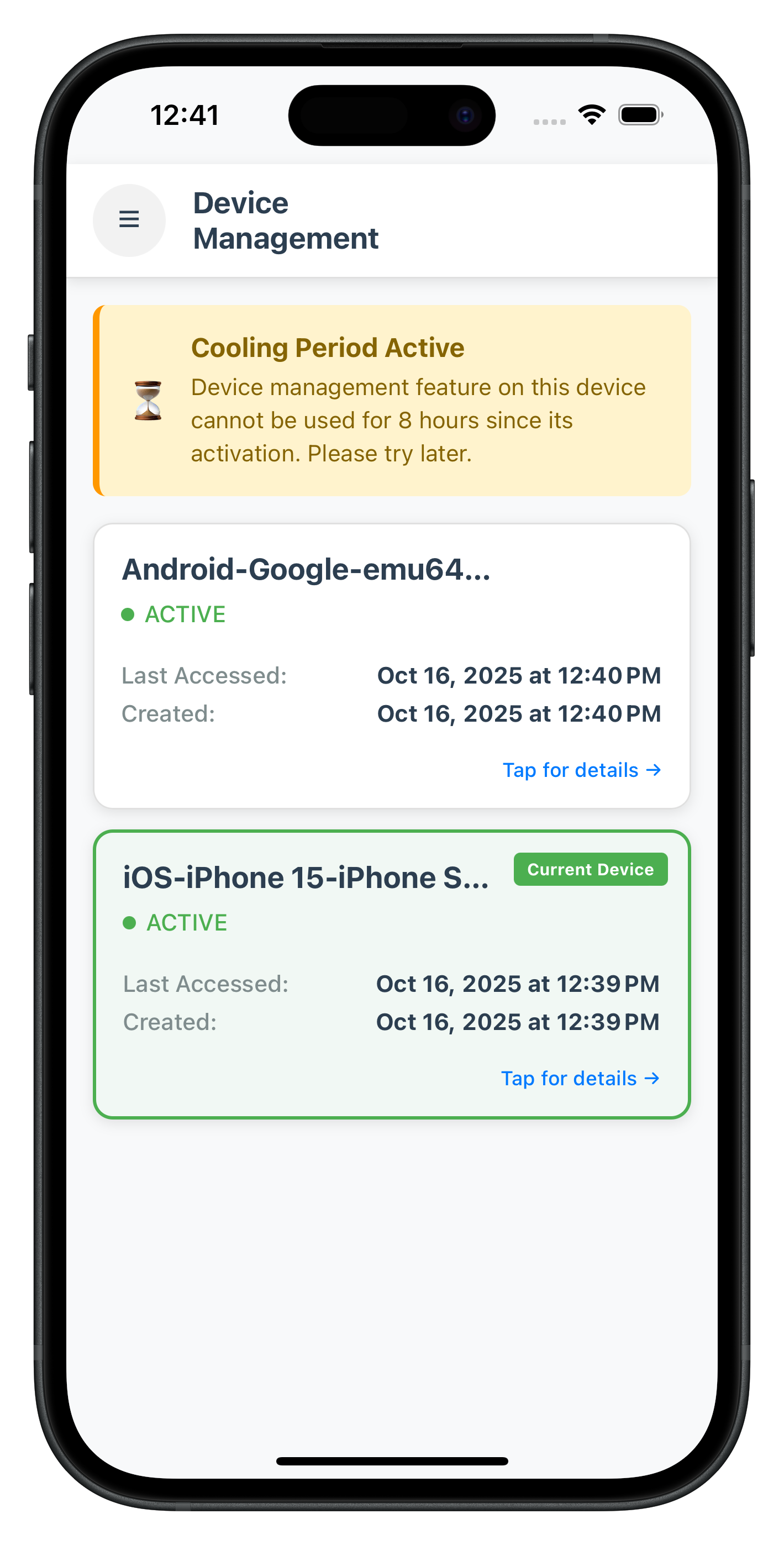
Key DeviceManagementScreen Features
Auto-Loading and Refresh
- Auto-load on Mount: Automatically calls
getRegisteredDeviceDetails()when screen loads usinguseFocusEffect - Pull-to-Refresh: Swipe down to manually refresh device list
- Navigation-Based Refresh: Auto-refreshes when returning from DeviceDetailScreen
Cooling Period Management
- Detection: Checks
StatusCode === 146to detect active cooling period - Visual Warning: Displays prominent banner when cooling period is active
- Banner Content: Shows cooling period message and end timestamp
- Action Blocking: Passes cooling period state to DeviceDetailScreen for action disabling
Current Device Highlighting
- Visual Distinction: Green border and background for current device
- Current Device Badge: "Current Device" badge in top-right corner
- Status Indicators: Color-coded status dots (green = ACTIVE, red = inactive)
Event Handler Cleanup
- useFocusEffect Cleanup: Resets event handler when screen unfocuses
- Memory Leak Prevention: Cleans up handlers to prevent accumulation
- Navigation Integration: Proper cleanup ensures consistent behavior across navigation
The following image showcases the screen from the sample application:
Create the DeviceDetailScreen that displays device details and provides rename and delete operations.
Step 1: Create DeviceDetailScreen File
Create new file:
src/tutorial/screens/deviceManagement/DeviceDetailScreen.tsx
Step 2: Implement DeviceDetailScreen with Full Code
Add this complete implementation:
/**
 * Device Detail Screen
 *
 * Displays detailed information about a specific device and provides
 * rename and delete operations with proper validation and error handling.
 *
 * Key Features:
 * - Device metadata display
 * - Rename device functionality with modal dialog
 * - Delete device with confirmation and current device protection
 * - Cooling period enforcement
 * - Three-layer error handling
 * - Automatic navigation back after successful operations
 *
 * Usage:
 * Navigation.navigate('DeviceDetailScreen', {
 *   device: deviceObject,
 *   userID: 'user@example.com',
 *   isCoolingPeriodActive: false,
 *   coolingPeriodEndTimestamp: null,
 *   coolingPeriodMessage: ''
 * });
 */

import React, { useState } from 'react';
import {
  View,
  Text,
  StyleSheet,
  ScrollView,
  TouchableOpacity,
  Alert,
  SafeAreaView,
  StatusBar,
  ActivityIndicator,
} from 'react-native';
import { useRoute, useNavigation } from '@react-navigation/native';
import type { RouteProp } from '@react-navigation/native';
import rdnaService from '../../../uniken/services/rdnaService';
import type { RDNARegisteredDevice, RDNAUpdateDeviceDetailsData } from '../../../uniken/types/rdnaEvents';
import RenameDeviceDialog from './RenameDeviceDialog';

/**
 * Route Parameters for Device Detail Screen
 */
interface DeviceDetailScreenParams {
  device: RDNARegisteredDevice;
  userID: string;
  isCoolingPeriodActive: boolean;
  coolingPeriodEndTimestamp: number | null;
  coolingPeriodMessage: string;
}

type DeviceDetailScreenRouteProp = RouteProp<
  { DeviceDetailScreen: DeviceDetailScreenParams },
  'DeviceDetailScreen'
>;

/**
 * Device Detail Screen Component
 */
const DeviceDetailScreen: React.FC = () => {
  const navigation = useNavigation();
  const route = useRoute<DeviceDetailScreenRouteProp>();

  const { device, userID, isCoolingPeriodActive, coolingPeriodEndTimestamp, coolingPeriodMessage } = route.params;

  const [showRenameDialog, setShowRenameDialog] = useState<boolean>(false);
  const [isRenaming, setIsRenaming] = useState<boolean>(false);
  const [isDeleting, setIsDeleting] = useState<boolean>(false);
  const [currentDeviceName, setCurrentDeviceName] = useState<string>(device.devName);

  /**
   * Cleanup event handlers on component unmount
   */
  React.useEffect(() => {
    return () => {
      console.log('DeviceDetailScreen - Component unmounting, cleaning up event handlers');
      const eventManager = rdnaService.getEventManager();
      // Reset handler to prevent memory leaks
      eventManager.setUpdateDeviceDetailsHandler(undefined);
    };
  }, []);

  /**
   * Formats timestamp to readable date string
   */
  const formatDate = (timestamp: number): string => {
    const date = new Date(timestamp);
    return date.toLocaleString('en-US', {
      year: 'numeric',
      month: 'short',
      day: 'numeric',
      hour: '2-digit',
      minute: '2-digit',
      second: '2-digit',
    });
  };

  /**
   * Unified method to handle device update operations (rename/delete)
   */
  const updateDevice = async (newName: string, operationType: number): Promise<void> => {
    const isRename = operationType === 0;
    const operation = isRename ? 'rename' : 'delete';

    if (isRename) {
      setIsRenaming(true);
    } else {
      setIsDeleting(true);
    }

    try {
      console.log(`DeviceDetailScreen - ${operation} device:`, device.devUUID);

      const eventManager = rdnaService.getEventManager();

      await new Promise<void>((resolve, reject) => {
        // Set callback for this operation
        eventManager.setUpdateDeviceDetailsHandler((data: RDNAUpdateDeviceDetailsData) => {
          console.log('DeviceDetailScreen - Received update device details event');

          // Check API errors
          if (data.error && data.error.longErrorCode !== 0) {
            console.error(`DeviceDetailScreen - ${operation} error:`, data.error);
            reject(new Error(data.error?.errorString || `Failed to ${operation} device`));
            return;
          }

          // Check status code
          const statusCode = data.pArgs?.response?.StatusCode || 0;
          const statusMsg = data.pArgs?.response?.StatusMsg || '';

          if (statusCode === 100) {
            console.log(`DeviceDetailScreen - ${operation} successful`);
            if (isRename) {
              setCurrentDeviceName(newName);
            }
            resolve();
          } else if (statusCode === 146) {
            reject(new Error('Device management is currently in cooling period. Please try again later.'));
          } else {
            reject(new Error(statusMsg || `Failed to ${operation} device`));
          }
        });

        rdnaService.updateDeviceDetails(userID, device, newName, operationType).catch(reject);
      });

      // Success handling
      if (isRename) {
        setShowRenameDialog(false);
      }

      Alert.alert('Success', `Device ${isRename ? 'renamed' : 'deleted'} successfully`, [
        { text: 'OK', onPress: () => navigation.goBack() }
      ]);
    } catch (error) {
      console.error(`DeviceDetailScreen - ${operation} failed:`, error);
      const errorMessage = error instanceof Error ? error.message : `Failed to ${operation} device`;
      Alert.alert(`${isRename ? 'Rename' : 'Delete'} Failed`, errorMessage);
    } finally {
      if (isRename) {
        setIsRenaming(false);
      } else {
        setIsDeleting(false);
      }
    }
  };

  /**
   * Handles device rename
   */
  const handleRenameDevice = async (newName: string) => {
    if (!newName.trim()) {
      Alert.alert('Error', 'Device name cannot be empty');
      return;
    }

    if (newName.trim() === currentDeviceName.trim()) {
      Alert.alert('Error', 'New name is same as current name');
      return;
    }

    await updateDevice(newName, 0);
  };

  /**
   * Handles device deletion
   */
  const handleDeleteDevice = () => {
    // Validation: Cannot delete current device
    if (device.currentDevice) {
      Alert.alert('Error', 'Cannot delete the current device. Please switch to another device first.');
      return;
    }

    // Validation: Cannot delete during cooling period
    if (isCoolingPeriodActive) {
      Alert.alert('Error', 'Device management is currently in cooling period. Please try again later.');
      return;
    }

    // Show confirmation dialog
    Alert.alert(
      'Delete Device',
      `Are you sure you want to delete "${currentDeviceName}"? This action cannot be undone.`,
      [
        { text: 'Cancel', style: 'cancel' },
        { text: 'Delete', style: 'destructive', onPress: performDeleteDevice },
      ]
    );
  };

  /**
   * Performs device deletion
   */
  const performDeleteDevice = async () => {
    await updateDevice('', 1);
  };

  return (
    <SafeAreaView style={styles.safeArea}>
      <StatusBar barStyle="dark-content" backgroundColor="#f8f9fa" />

      {/* Header */}
      <View style={styles.header}>
        <TouchableOpacity style={styles.backButton} onPress={() => navigation.goBack()}>
          <Text style={styles.backButtonText}>← Back</Text>
        </TouchableOpacity>
        <Text style={styles.headerTitle}>Device Details</Text>
        <View style={styles.headerSpacer} />
      </View>

      <ScrollView style={styles.container}>
        {/* Current Device Badge */}
        {device.currentDevice && (
          <View style={styles.currentDeviceBanner}>
            <Text style={styles.currentDeviceIcon}>✓</Text>
            <Text style={styles.currentDeviceText}>This is your current device</Text>
          </View>
        )}

        {/* Cooling Period Warning */}
        {isCoolingPeriodActive && (
          <View style={styles.coolingPeriodWarning}>
            <Text style={styles.warningIcon}>⏳</Text>
            <View style={styles.warningTextContainer}>
              <Text style={styles.warningTitle}>Cooling Period Active</Text>
              <Text style={styles.warningMessage}>{coolingPeriodMessage}</Text>
            </View>
          </View>
        )}

        {/* Device Name */}
        <View style={styles.section}>
          <Text style={styles.sectionTitle}>Device Name</Text>
          <Text style={styles.deviceNameText}>{currentDeviceName}</Text>
        </View>

        {/* Device Information */}
        <View style={styles.section}>
          <Text style={styles.sectionTitle}>Device Information</Text>

          <View style={styles.infoRow}>
            <Text style={styles.infoLabel}>Status:</Text>
            <Text style={[styles.infoValue, device.status === 'ACTIVE' ? styles.statusActive : styles.statusInactive]}>
              {device.status}
            </Text>
          </View>

          <View style={styles.infoRow}>
            <Text style={styles.infoLabel}>Device UUID:</Text>
            <Text style={styles.infoValue} numberOfLines={1}>{device.devUUID}</Text>
          </View>

          <View style={styles.infoRow}>
            <Text style={styles.infoLabel}>Last Accessed:</Text>
            <Text style={styles.infoValue}>{formatDate(device.lastAccessedTsEpoch)}</Text>
          </View>

          <View style={styles.infoRow}>
            <Text style={styles.infoLabel}>Created:</Text>
            <Text style={styles.infoValue}>{formatDate(device.createdTsEpoch)}</Text>
          </View>

          <View style={styles.infoRow}>
            <Text style={styles.infoLabel}>App UUID:</Text>
            <Text style={styles.infoValue} numberOfLines={1}>{device.appUuid}</Text>
          </View>
        </View>

        {/* Action Buttons */}
        <View style={styles.actionSection}>
          <Text style={styles.sectionTitle}>Device Actions</Text>

          {/* Rename Button */}
          <TouchableOpacity
            style={[
              styles.actionButton,
              (isCoolingPeriodActive || isRenaming) && styles.actionButtonDisabled,
            ]}
            onPress={() => setShowRenameDialog(true)}
            disabled={isCoolingPeriodActive || isRenaming}
          >
            {isRenaming ? (
              <ActivityIndicator size="small" color="#fff" />
            ) : (
              <Text style={styles.actionButtonText}>✏️ Rename Device</Text>
            )}
          </TouchableOpacity>

          {/* Delete Button - Only show for non-current devices */}
          {!device.currentDevice && (
            <TouchableOpacity
              style={[
                styles.actionButtonDanger,
                (isCoolingPeriodActive || isDeleting) && styles.actionButtonDisabled,
              ]}
              onPress={handleDeleteDevice}
              disabled={isCoolingPeriodActive || isDeleting}
            >
              {isDeleting ? (
                <ActivityIndicator size="small" color="#fff" />
              ) : (
                <Text style={styles.actionButtonDangerText}>🗑️ Remove Device</Text>
              )}
            </TouchableOpacity>
          )}

          {/* Current Device Protection Message */}
          {device.currentDevice && (
            <View style={styles.protectionMessage}>
              <Text style={styles.protectionText}>
                ⚠️ You cannot delete your current device. Switch to another device first.
              </Text>
            </View>
          )}
        </View>
      </ScrollView>

      {/* Rename Dialog */}
      <RenameDeviceDialog
        visible={showRenameDialog}
        currentName={currentDeviceName}
        onCancel={() => setShowRenameDialog(false)}
        onConfirm={handleRenameDevice}
        isLoading={isRenaming}
      />
    </SafeAreaView>
  );
};

const styles = StyleSheet.create({
  safeArea: {
    flex: 1,
    backgroundColor: '#f8f9fa',
  },
  header: {
    flexDirection: 'row',
    alignItems: 'center',
    paddingHorizontal: 16,
    paddingVertical: 12,
    backgroundColor: '#fff',
    borderBottomWidth: 1,
    borderBottomColor: '#e0e0e0',
    elevation: 2,
    shadowColor: '#000',
    shadowOffset: { width: 0, height: 2 },
    shadowOpacity: 0.1,
    shadowRadius: 4,
  },
  backButton: {
    paddingVertical: 8,
    paddingHorizontal: 12,
  },
  backButtonText: {
    fontSize: 16,
    color: '#007AFF',
    fontWeight: '500',
  },
  headerTitle: {
    fontSize: 18,
    fontWeight: 'bold',
    color: '#2c3e50',
    marginLeft: 16,
    flex: 1,
  },
  headerSpacer: {
    width: 60,
  },
  container: {
    flex: 1,
    padding: 16,
  },
  currentDeviceBanner: {
    flexDirection: 'row',
    alignItems: 'center',
    backgroundColor: '#e8f5e9',
    borderLeftWidth: 4,
    borderLeftColor: '#4CAF50',
    padding: 16,
    marginBottom: 16,
    borderRadius: 8,
  },
  currentDeviceIcon: {
    fontSize: 24,
    marginRight: 12,
  },
  currentDeviceText: {
    fontSize: 16,
    color: '#2e7d32',
    fontWeight: '600',
  },
  coolingPeriodWarning: {
    flexDirection: 'row',
    alignItems: 'center',
    backgroundColor: '#fff3cd',
    borderLeftWidth: 4,
    borderLeftColor: '#ff9800',
    padding: 16,
    marginBottom: 16,
    borderRadius: 8,
  },
  warningIcon: {
    fontSize: 24,
    marginRight: 12,
  },
  warningTextContainer: {
    flex: 1,
  },
  warningTitle: {
    fontSize: 16,
    fontWeight: 'bold',
    color: '#856404',
    marginBottom: 4,
  },
  warningMessage: {
    fontSize: 14,
    color: '#856404',
    lineHeight: 20,
  },
  section: {
    backgroundColor: '#fff',
    borderRadius: 12,
    padding: 16,
    marginBottom: 16,
    elevation: 1,
    shadowColor: '#000',
    shadowOffset: { width: 0, height: 1 },
    shadowOpacity: 0.05,
    shadowRadius: 2,
  },
  sectionTitle: {
    fontSize: 16,
    fontWeight: 'bold',
    color: '#2c3e50',
    marginBottom: 12,
  },
  deviceNameText: {
    fontSize: 20,
    fontWeight: '600',
    color: '#2c3e50',
  },
  infoRow: {
    flexDirection: 'row',
    justifyContent: 'space-between',
    paddingVertical: 8,
    borderBottomWidth: 1,
    borderBottomColor: '#f0f0f0',
  },
  infoLabel: {
    fontSize: 14,
    color: '#7f8c8d',
    fontWeight: '500',
    flex: 1,
  },
  infoValue: {
    fontSize: 14,
    color: '#2c3e50',
    fontWeight: 'bold',
    flex: 2,
    textAlign: 'right',
  },
  statusActive: {
    color: '#4CAF50',
  },
  statusInactive: {
    color: '#f44336',
  },
  actionSection: {
    marginBottom: 32,
  },
  actionButton: {
    backgroundColor: '#007AFF',
    borderRadius: 8,
    padding: 16,
    alignItems: 'center',
    marginBottom: 12,
  },
  actionButtonDisabled: {
    backgroundColor: '#ccc',
    opacity: 0.6,
  },
  actionButtonText: {
    color: '#fff',
    fontSize: 16,
    fontWeight: '600',
  },
  actionButtonDanger: {
    backgroundColor: '#f44336',
    borderRadius: 8,
    padding: 16,
    alignItems: 'center',
    marginBottom: 12,
  },
  actionButtonDangerText: {
    color: '#fff',
    fontSize: 16,
    fontWeight: '600',
  },
  protectionMessage: {
    backgroundColor: '#fff3cd',
    borderRadius: 8,
    padding: 12,
    marginTop: 8,
  },
  protectionText: {
    fontSize: 14,
    color: '#856404',
    textAlign: 'center',
    lineHeight: 20,
  },
});

export default DeviceDetailScreen;
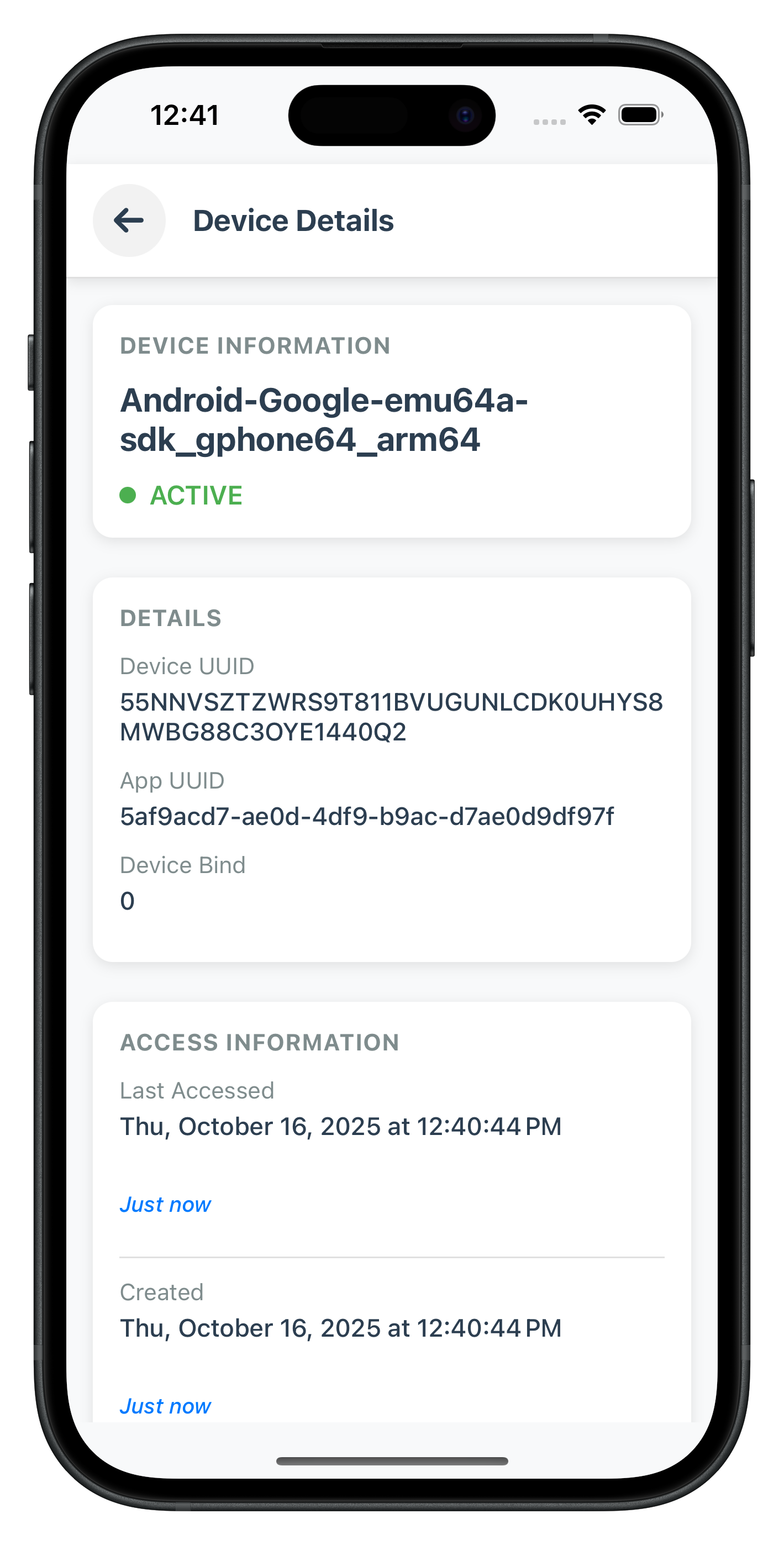
Key DeviceDetailScreen Features
Three-Layer Error Handling
- Layer 1: API error detection via
data.error.longErrorCode !== 0 - Layer 2: Status code validation (100 = success, 146 = cooling period)
- Layer 3: Promise rejection handling for network/SDK failures
Current Device Protection
- Client-Side Validation: Checks
device.currentDevice === truebefore allowing delete - UI Protection: Delete button hidden for current device
- Warning Message: Displays protection message explaining why delete is disabled
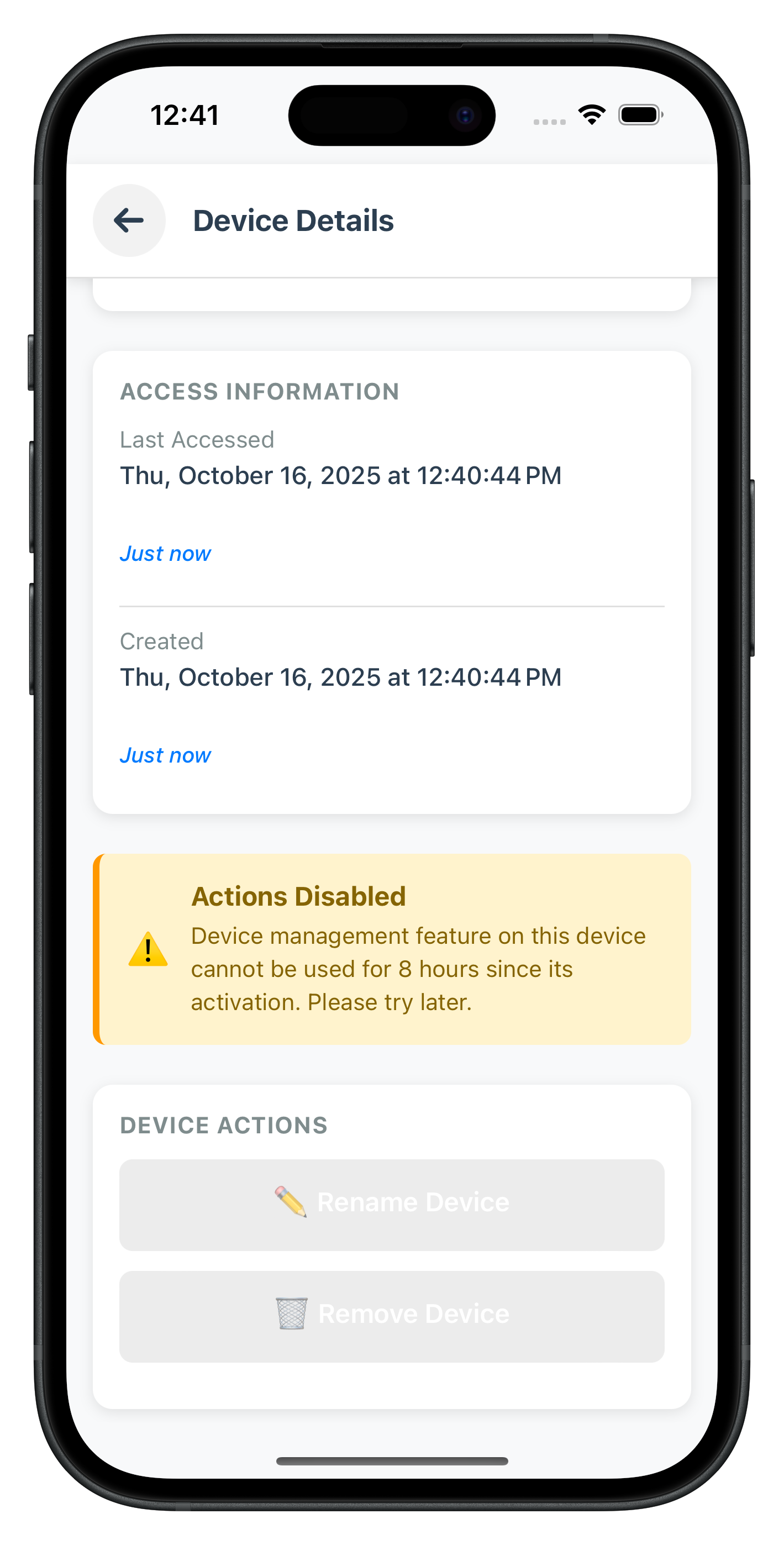
Cooling Period Enforcement
- Visual Warning: Prominent banner when cooling period is active
- Action Disabling: Both rename and delete buttons disabled during cooling period
- Status Code Check: Validates StatusCode 146 in event responses
- User Feedback: Clear error messages when operations attempted during cooling period
Event Handler Cleanup
- useEffect Cleanup: Resets event handler when component unmounts
- Memory Leak Prevention: Ensures no lingering handlers after screen navigation
- Unified Handler: Single event handler method for both rename and delete operations
The following image showcases the screen from the sample application:
|
|
Create the RenameDeviceDialog modal component for device renaming with validation.
Step 1: Create RenameDeviceDialog File
Create new file:
src/tutorial/screens/deviceManagement/RenameDeviceDialog.tsx
Step 2: Implement RenameDeviceDialog with Full Code
Add this complete implementation:
/**
 * Rename Device Dialog Component
 *
 * Modal dialog for renaming devices with validation and error handling.
 *
 * Key Features:
 * - Pre-filled current name
 * - Real-time validation
 * - Loading state during rename
 * - Keyboard handling
 * - Focus management
 *
 * Usage:
 * <RenameDeviceDialog
 *   visible={showDialog}
 *   currentName="My Device"
 *   onCancel={() => setShowDialog(false)}
 *   onConfirm={(newName) => handleRename(newName)}
 *   isLoading={isRenaming}
 * />
 */

import React, { useState, useEffect, useRef } from 'react';
import {
  Modal,
  View,
  Text,
  TextInput,
  TouchableOpacity,
  StyleSheet,
  KeyboardAvoidingView,
  Platform,
  TouchableWithoutFeedback,
  Keyboard,
  ActivityIndicator,
} from 'react-native';

interface RenameDeviceDialogProps {
  visible: boolean;
  currentName: string;
  onCancel: () => void;
  onConfirm: (newName: string) => void;
  isLoading?: boolean;
}

const RenameDeviceDialog: React.FC<RenameDeviceDialogProps> = ({
  visible,
  currentName,
  onCancel,
  onConfirm,
  isLoading = false,
}) => {
  const [newName, setNewName] = useState<string>(currentName);
  const [error, setError] = useState<string>('');
  const inputRef = useRef<TextInput>(null);

  // Reset state when dialog opens
  useEffect(() => {
    if (visible) {
      setNewName(currentName);
      setError('');
      // Focus input when dialog opens
      setTimeout(() => {
        inputRef.current?.focus();
      }, 100);
    }
  }, [visible, currentName]);

  /**
   * Validates new device name
   */
  const validateName = (name: string): string | null => {
    const trimmedName = name.trim();

    if (!trimmedName) {
      return 'Device name cannot be empty';
    }

    if (trimmedName === currentName.trim()) {
      return 'New name is same as current name';
    }

    if (trimmedName.length < 3) {
      return 'Device name must be at least 3 characters';
    }

    if (trimmedName.length > 50) {
      return 'Device name must be less than 50 characters';
    }

    return null;
  };

  /**
   * Handles confirm button press
   */
  const handleConfirm = () => {
    const validationError = validateName(newName);

    if (validationError) {
      setError(validationError);
      return;
    }

    onConfirm(newName.trim());
  };

  /**
   * Handles cancel button press
   */
  const handleCancel = () => {
    if (isLoading) return;
    Keyboard.dismiss();
    onCancel();
  };

  /**
   * Handles text input change
   */
  const handleTextChange = (text: string) => {
    setNewName(text);
    if (error) {
      setError('');
    }
  };

  return (
    <Modal
      visible={visible}
      transparent={true}
      animationType="fade"
      onRequestClose={handleCancel}
    >
      <TouchableWithoutFeedback onPress={handleCancel}>
        <View style={styles.overlay}>
          <TouchableWithoutFeedback onPress={() => {}}>
            <KeyboardAvoidingView
              behavior={Platform.OS === 'ios' ? 'padding' : 'height'}
              style={styles.keyboardAvoidingView}
            >
              <View style={styles.dialog}>
                {/* Header */}
                <Text style={styles.title}>Rename Device</Text>
                <Text style={styles.subtitle}>Enter a new name for your device</Text>

                {/* Input */}
                <TextInput
                  ref={inputRef}
                  style={styles.input}
                  value={newName}
                  onChangeText={handleTextChange}
                  placeholder="Enter device name"
                  autoFocus={true}
                  selectTextOnFocus={true}
                  editable={!isLoading}
                  maxLength={50}
                />

                {/* Error Message */}
                {error && (
                  <Text style={styles.errorText}>{error}</Text>
                )}

                {/* Buttons */}
                <View style={styles.buttonContainer}>
                  <TouchableOpacity
                    style={[styles.button, styles.cancelButton]}
                    onPress={handleCancel}
                    disabled={isLoading}
                  >
                    <Text style={styles.cancelButtonText}>Cancel</Text>
                  </TouchableOpacity>

                  <TouchableOpacity
                    style={[styles.button, styles.confirmButton, isLoading && styles.buttonDisabled]}
                    onPress={handleConfirm}
                    disabled={isLoading}
                  >
                    {isLoading ? (
                      <ActivityIndicator size="small" color="#fff" />
                    ) : (
                      <Text style={styles.confirmButtonText}>Rename</Text>
                    )}
                  </TouchableOpacity>
                </View>
              </View>
            </KeyboardAvoidingView>
          </TouchableWithoutFeedback>
        </View>
      </TouchableWithoutFeedback>
    </Modal>
  );
};

const styles = StyleSheet.create({
  overlay: {
    flex: 1,
    backgroundColor: 'rgba(0, 0, 0, 0.5)',
    justifyContent: 'center',
    alignItems: 'center',
  },
  keyboardAvoidingView: {
    width: '100%',
    alignItems: 'center',
  },
  dialog: {
    width: '85%',
    backgroundColor: '#fff',
    borderRadius: 12,
    padding: 20,
    elevation: 5,
    shadowColor: '#000',
    shadowOffset: { width: 0, height: 2 },
    shadowOpacity: 0.25,
    shadowRadius: 4,
  },
  title: {
    fontSize: 20,
    fontWeight: 'bold',
    color: '#2c3e50',
    marginBottom: 8,
  },
  subtitle: {
    fontSize: 14,
    color: '#7f8c8d',
    marginBottom: 20,
  },
  input: {
    borderWidth: 1,
    borderColor: '#e0e0e0',
    borderRadius: 8,
    padding: 12,
    fontSize: 16,
    color: '#2c3e50',
    backgroundColor: '#f8f9fa',
    marginBottom: 8,
  },
  errorText: {
    fontSize: 14,
    color: '#f44336',
    marginBottom: 16,
  },
  buttonContainer: {
    flexDirection: 'row',
    justifyContent: 'space-between',
    marginTop: 8,
  },
  button: {
    flex: 1,
    padding: 12,
    borderRadius: 8,
    alignItems: 'center',
    marginHorizontal: 6,
  },
  cancelButton: {
    backgroundColor: '#f0f0f0',
  },
  cancelButtonText: {
    fontSize: 16,
    fontWeight: '600',
    color: '#7f8c8d',
  },
  confirmButton: {
    backgroundColor: '#007AFF',
  },
  confirmButtonText: {
    fontSize: 16,
    fontWeight: '600',
    color: '#fff',
  },
  buttonDisabled: {
    backgroundColor: '#ccc',
    opacity: 0.6,
  },
});

export default RenameDeviceDialog;
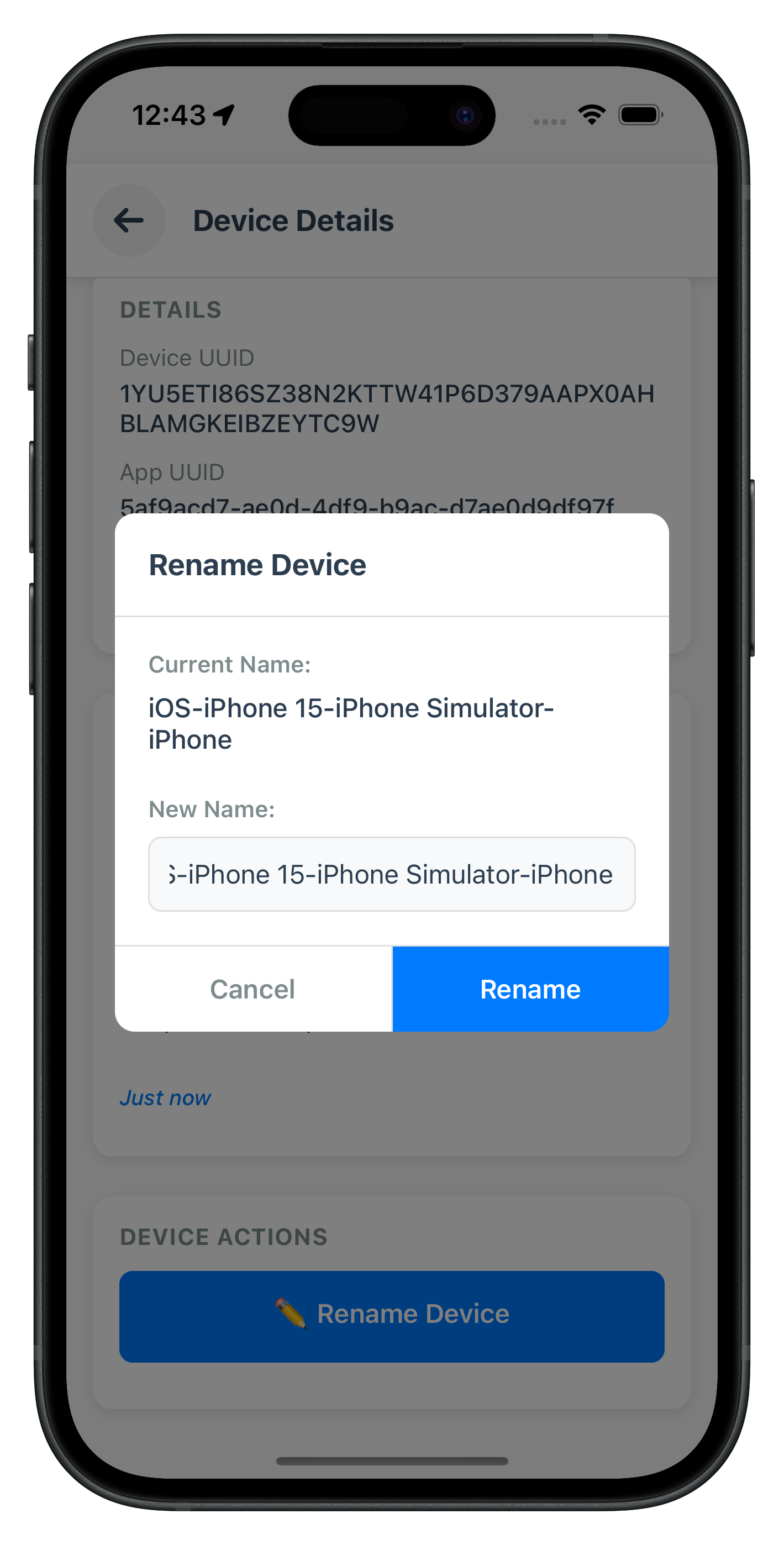
Key RenameDeviceDialog Features
Input Validation
- Empty Name Check: Prevents empty device names
- Same Name Check: Validates new name differs from current name
- Length Validation: Minimum 3 characters, maximum 50 characters
- Real-time Error Clearing: Clears error messages as user types
User Experience
- Pre-filled Current Name: Input pre-populated with current device name
- Auto-focus: Input automatically focused when dialog opens
- Select Text on Focus: Current name selected for easy replacement
- Keyboard Handling: Proper keyboard dismissal and avoidance
Loading States
- Disabled During Loading: All controls disabled while rename is processing
- Loading Indicator: Activity indicator replaces confirm button text
- Prevent Multiple Submissions: Prevents double-tap on confirm button
The following image showcases the screen from the sample application:
Step 3: Create Index Export File
Create
src/tutorial/screens/deviceManagement/index.ts
:
export { default as DeviceManagementScreen } from './DeviceManagementScreen';
export { default as DeviceDetailScreen } from './DeviceDetailScreen';
export { default as RenameDeviceDialog } from './RenameDeviceDialog';
Now let's integrate the Device Management screens into your DrawerNavigator for post-login access.
Step 1: Add Device Management to DrawerNavigator
Enhance
src/tutorial/navigation/DrawerNavigator.tsx
:
// src/tutorial/navigation/DrawerNavigator.tsx (modifications)

import { createDrawerNavigator } from '@react-navigation/drawer';
import { DashboardScreen } from '../screens/mfa';
import { GetNotificationsScreen } from '../screens/notification';
import { UpdatePasswordScreen } from '../screens/updatePassword';
import { DeviceManagementScreen } from '../screens/deviceManagement'; // ✅ NEW: Import DeviceManagementScreen
import DrawerContent from '../screens/components/DrawerContent';

const Drawer = createDrawerNavigator();

const DrawerNavigator = () => {
  return (
    <Drawer.Navigator
      drawerContent={(props) => <DrawerContent {...props} userParams={props.route?.params} />}
      screenOptions={{
        headerShown: false,
        drawerType: 'front',
      }}
    >
      <Drawer.Screen name="Dashboard" component={DashboardScreen} />
      <Drawer.Screen name="GetNotifications" component={GetNotificationsScreen} />
      <Drawer.Screen name="UpdatePassword" component={UpdatePasswordScreen} />
      {/* ✅ NEW: Add DeviceManagement screen to drawer */}
      <Drawer.Screen name="DeviceManagement" component={DeviceManagementScreen} />
    </Drawer.Navigator>
  );
};

export default DrawerNavigator;
Step 2: Add DeviceDetailScreen to AppNavigator
Update
src/tutorial/navigation/AppNavigator.tsx
:
// src/tutorial/navigation/AppNavigator.tsx (additions)

import { DeviceDetailScreen } from '../screens/deviceManagement';

const Stack = createNativeStackNavigator<RootStackParamList>();

export default function AppNavigator() {
  return (
    <Stack.Navigator
      initialRouteName="TutorialHome"
      screenOptions={{
        headerShown: false,
        gestureEnabled: false,
      }}
    >
      {/* Existing screens... */}

      {/* ✅ NEW: Add DeviceDetailScreen to stack */}
      <Stack.Screen name="DeviceDetailScreen" component={DeviceDetailScreen} />

      {/* DrawerNavigator (contains DeviceManagementScreen) */}
      <Stack.Screen name="DrawerNavigator" component={DrawerNavigator} />
    </Stack.Navigator>
  );
}
Step 3: Update AppNavigator Route Types
Add Device Management screens to
src/tutorial/navigation/AppNavigator.tsx
type definitions:
// src/tutorial/navigation/AppNavigator.tsx (type additions)

import type { RDNARegisteredDevice } from '../../uniken/types/rdnaEvents';

export type RootStackParamList = {
  // Existing screens...

  // ✅ NEW: Device Management screens
  DeviceManagementScreen: {
    userID: string;
  };
  DeviceDetailScreen: {
    device: RDNARegisteredDevice;
    userID: string;
    isCoolingPeriodActive: boolean;
    coolingPeriodEndTimestamp: number | null;
    coolingPeriodMessage: string;
  };
};
Step 4: Add Device Management Menu to DrawerContent
Modify
src/tutorial/screens/components/DrawerContent.tsx
:
// src/tutorial/screens/components/DrawerContent.tsx (additions)

const DrawerContent: React.FC<DrawerContentProps> = ({ userParams, ...props }) => {
  // ... existing code ...

  return (
    <View style={styles.container}>
      <DrawerContentScrollView {...props}>
        {/* Header */}
        <View style={styles.header}>
          <View style={styles.avatar}>
            <Text style={styles.avatarText}>
              {userID.substring(0, 2).toUpperCase()}
            </Text>
          </View>
          <Text style={styles.userName}>{userID}</Text>
        </View>

        {/* Menu Items */}
        <View style={styles.menu}>
          <TouchableOpacity
            style={styles.menuItem}
            onPress={() => props.navigation.navigate('Dashboard')}
          >
            <Text style={styles.menuText}>🏠 Dashboard</Text>
          </TouchableOpacity>

          <TouchableOpacity
            style={styles.menuItem}
            onPress={() => props.navigation.navigate('GetNotifications')}
          >
            <Text style={styles.menuText}>🔔 Get Notifications</Text>
          </TouchableOpacity>

          {isPasswordUpdateAvailable && (
            <TouchableOpacity
              style={styles.menuItem}
              onPress={handleUpdatePassword}
              disabled={isInitiatingUpdate}
            >
              {isInitiatingUpdate ? (
                <View style={styles.menuItemWithLoader}>
                  <Text style={styles.menuText}>🔑 Update Password</Text>
                  <ActivityIndicator size="small" color="#3498db" style={styles.menuLoader} />
                </View>
              ) : (
                <Text style={styles.menuText}>🔑 Update Password</Text>
              )}
            </TouchableOpacity>
          )}

          {/* ✅ NEW: Device Management Menu Item */}
          <TouchableOpacity
            style={styles.menuItem}
            onPress={() => props.navigation.navigate('DeviceManagement', { userID })}
          >
            <Text style={styles.menuText}>📱 Device Management</Text>
          </TouchableOpacity>
        </View>
      </DrawerContentScrollView>

      {/* Logout Button */}
      <View style={styles.footer}>
        <TouchableOpacity
          style={styles.logoutButton}
          onPress={handleLogOut}
          disabled={isLoggingOut}
        >
          {isLoggingOut ? (
            <ActivityIndicator size="small" color="#e74c3c" />
          ) : (
            <Text style={styles.logoutText}>🚪 Log Off</Text>
          )}
        </TouchableOpacity>
      </View>
    </View>
  );
};
Let's verify your device management implementation with comprehensive manual testing scenarios.
Test Scenario 1: Successful Device List Display
Steps:
- Launch the app and complete MFA login flow successfully
- Verify navigation to Dashboard screen
- Open drawer menu (☰ button or swipe from left)
- Tap "📱 Device Management" menu item
- Verify loading indicator displays
- Wait for device list to load
Expected Console Logs:
DeviceManagementScreen - Loading devices for user: user@example.com
RdnaService - GetRegisteredDeviceDetails sync response success
DeviceManagementScreen - Received device details event
DeviceManagementScreen - Device count: 3
DeviceManagementScreen - Status code: 100
Expected Result: ✅ Device list displays with:
- Device names, status indicators, timestamps
- Current device highlighted with green border and badge
- "Tap for details →" indicator on each card
- No cooling period banner (StatusCode 100)
Test Scenario 2: Pull-to-Refresh
Steps:
- Navigate to Device Management screen (following Scenario 1)
- Pull down on device list
- Release when refresh indicator appears
- Verify refresh indicator spins
- Wait for device list to reload
Expected Behavior: ✅ Device list refreshes, refresh indicator disappears, updated device data displayed
Test Scenario 3: Successful Device Rename
Steps:
- Navigate to Device Management screen
- Tap on a non-current device card
- Verify navigation to DeviceDetailScreen
- Verify device details displayed correctly
- Tap "✏️ Rename Device" button
- Verify rename modal opens with current name pre-filled
- Enter new device name (e.g., "My Updated Device")
- Tap "Rename" button
- Wait for success alert
Expected Console Logs:
DeviceDetailScreen - Received update device details event
DeviceDetailScreen - Status code: 100
DeviceDetailScreen - Rename successful
Expected Result: ✅ Success alert "Device renamed successfully", modal closes, device name updates in UI
Test Scenario 4: Successful Device Deletion
Steps:
- Navigate to Device Management screen
- Tap on a NON-CURRENT device card (ensure
currentDevice: false) - Verify navigation to DeviceDetailScreen
- Scroll to Action Buttons section
- Verify "🗑️ Remove Device" button is visible and enabled
- Tap "🗑️ Remove Device" button
- Verify confirmation dialog: "Are you sure you want to delete..."
- Tap "Delete" button
- Wait for success alert
Expected Console Logs:
DeviceDetailScreen - Received delete device details event
DeviceDetailScreen - Status code: 100
DeviceDetailScreen - Delete successful
Expected Result: ✅ Success alert "Device deleted successfully", navigation back to device list, deleted device no longer appears
Test Scenario 5: Current Device Deletion Prevention
Steps:
- Navigate to Device Management screen
- Tap on CURRENT device card (has "Current Device" badge)
- Verify navigation to DeviceDetailScreen
- Verify green banner: "✓ This is your current device"
- Scroll to Action Buttons section
- Verify "🗑️ Remove Device" button is NOT visible
- Verify protection message displayed
Expected Result: ✅ Delete button hidden, protection message: "⚠️ You cannot delete your current device. Switch to another device first."
Test Scenario 6: Cooling Period Detection and Enforcement
Prerequisites: Perform a device operation (rename or delete) to trigger cooling period
Steps:
- Complete Scenario 3 or 4 to trigger cooling period
- Navigate back to Device Management screen
- Pull to refresh device list
- Verify cooling period banner displays with StatusCode 146
Expected Console Logs:
DeviceManagementScreen - Status code: 146
DeviceManagementScreen - Cooling period end: 1760013589000
Expected Result: ✅ Orange/yellow banner displays:
- "⏳ Cooling Period Active"
- Cooling period message from server
- All devices still listed but operations disabled
- Tap any device card
- Navigate to DeviceDetailScreen
- Verify cooling period warning banner displays
- Verify "✏️ Rename Device" button is DISABLED (grayed out)
- Verify "🗑️ Remove Device" button is DISABLED (grayed out)
- Attempt to tap disabled button
Expected Result: ✅ Nothing happens, buttons remain disabled during cooling period
Test Scenario 7: Three-Layer Error Handling
Test Layer 1 - API Error (Invalid UserID):
- Manually modify code to pass invalid userID
- Attempt to load devices
Expected Result: ✅ Alert with error message from Layer 1 API error check
Test Layer 2 - Status Code Error (Cooling Period):
- Trigger cooling period (complete rename/delete)
- Attempt another operation immediately
Expected Result: ✅ Alert: "Device management is currently in cooling period. Please try again later."
Test Layer 3 - Network Error:
- Disable network connection
- Attempt to load devices or perform operation
Expected Result: ✅ Alert with network error message from Layer 3 Promise rejection
Test Scenario 8: Rename Validation
Test Empty Name:
- Navigate to DeviceDetailScreen
- Open rename dialog
- Clear all text from input
- Tap "Rename" button
Expected Result: ✅ Error message: "Device name cannot be empty"
Test Same Name:
- Open rename dialog
- Leave current name unchanged
- Tap "Rename" button
Expected Result: ✅ Error message: "New name is same as current name"
Test Too Short:
- Open rename dialog
- Enter "AB" (2 characters)
- Tap "Rename" button
Expected Result: ✅ Error message: "Device name must be at least 3 characters"
Test Too Long:
- Open rename dialog
- Enter 51+ characters
- Tap "Rename" button
Expected Result: ✅ Error message: "Device name must be less than 50 characters"
Test Scenario 9: Auto-Refresh After Operations
Steps:
- Navigate to Device Management screen
- Note device list state
- Tap device, navigate to detail
- Rename device successfully
- Navigate back to Device Management screen
- Verify device list automatically refreshes
- Verify renamed device shows new name
Expected Behavior: ✅ Device list auto-refreshes via useFocusEffect, showing updated device name without manual refresh
Test Scenario 10: Event Handler Cleanup
Steps:
- Navigate to Device Management screen
- Let devices load completely
- Navigate to Dashboard
- Check console logs for cleanup message
- Navigate back to Device Management
- Verify devices load again without issues
Expected Console Logs:
DeviceManagementScreen - Screen unfocused, cleaning up event handlers
DeviceManagementScreen - Screen focused, loading devices
Expected Result: ✅ Event handlers properly cleaned up and re-registered, no memory leaks or duplicate event handling
Issue 1: Device List Not Loading
Symptoms:
- Loading indicator stays visible indefinitely
- No devices appear in list
- Console shows: "No userID available"
Causes & Solutions:
Cause 1: UserID not passed to DeviceManagementScreen
Solution: Verify DrawerContent passes userID parameter
- Check: props.navigation.navigate('DeviceManagement', { userID })
- Verify route.params?.userID in DeviceManagementScreen
- Ensure userID is available in DrawerContent props
Cause 2: Event handler not triggered
Solution: Verify event handler registration
- Check: eventManager.setGetRegisteredDeviceDetailsHandler() is called
- Verify handler is set BEFORE API call
- Check console for: "Received device details event"
Cause 3: API call fails silently
Solution: Check sync response error handling
- Verify: rdnaService.getRegisteredDeviceDetails() returns Promise
- Check .catch() handler logs errors
- Verify Layer 1 error check: data.error.longErrorCode !== 0
Issue 2: Cooling Period Banner Not Appearing
Symptoms:
- StatusCode 146 received but no banner displayed
- Operations not disabled during cooling period
Causes & Solutions:
Cause 1: StatusCode check incorrect
Solution: Verify exact status code comparison
- Check: setIsCoolingPeriodActive(statusCode === 146)
- Verify statusCode is number, not string
- Log statusCode value: console.log('Status code:', statusCode, typeof statusCode)
Cause 2: Banner render logic error
Solution: Check conditional rendering
- Verify: {isCoolingPeriodActive && (<View>...</View>)}
- Ensure isCoolingPeriodActive state is boolean
- Check banner component is not commented out
Cause 3: Status code extracted from wrong path
Solution: Verify response structure
- Check: data.pArgs?.response?.StatusCode
- Log response structure: console.log('Response:', JSON.stringify(data.pArgs))
- Verify SDK version matches expected response format
Issue 3: Cannot Delete Non-Current Device
Symptoms:
- Delete button disabled even for non-current devices
- Delete operation fails with current device error
Causes & Solutions:
Cause 1: currentDevice flag check incorrect
Solution: Verify boolean comparison
- Check: if (device.currentDevice) { ... }
- Ensure device.currentDevice is boolean
- Log device object: console.log('Current device:', device.currentDevice, typeof device.currentDevice)
Cause 2: Device object not passed correctly
Solution: Verify navigation parameters
- Check: navigation.navigate('DeviceDetailScreen', { device: device })
- Verify route.params.device in DeviceDetailScreen
- Ensure complete device object passed, not just UUID
Cause 3: Cooling period active
Solution: Check cooling period state
- Verify: isCoolingPeriodActive is false
- Check cooling period end timestamp hasn't expired
- Log cooling period state before operations
Issue 4: Rename Dialog Not Appearing
Symptoms:
- Tapping "Rename Device" button does nothing
- Dialog doesn't open
Causes & Solutions:
Cause 1: showRenameDialog state not updating
Solution: Verify state setter called
- Check: setShowRenameDialog(true) is called in onPress
- Verify button disabled state allows tap
- Log button press: console.log('Rename button tapped')
Cause 2: Modal component not rendering
Solution: Verify RenameDeviceDialog component
- Check: <RenameDeviceDialog visible={showRenameDialog} />
- Ensure component imported correctly
- Verify Modal visible prop is bound to state
Cause 3: Button disabled during cooling period
Solution: Check button disabled logic
- Verify: disabled={isCoolingPeriodActive || isRenaming}
- Ensure cooling period is not active
- Check button styles don't prevent taps
Issue 5: Event Handler Not Firing
Symptoms:
- API call succeeds but no event received
- Console shows sync success but no async event
Causes & Solutions:
Cause 1: Event handler not set before API call
Solution: Verify handler registration timing
- Set handler BEFORE calling API: eventManager.setGetRegisteredDeviceDetailsHandler()
- Verify timing: handler -> API call -> event received
- Check for race conditions
Cause 2: Event name mismatch
Solution: Verify exact event name
- Check: rdnaEmitter.addListener('onGetRegistredDeviceDetails')
- Note spelling: 'Registred' not 'Registered' (SDK typo)
- Verify event name matches SDK documentation
Cause 3: Handler not cleaned up properly
Solution: Implement proper lifecycle cleanup
- Set handler when needed: eventManager.setHandler(callback)
- Clean up in useEffect return: eventManager.setHandler(undefined)
- For navigation screens: Use useFocusEffect cleanup
- Verify cleanup runs: Add console.log in cleanup function
Issue 6: Memory Leaks and Duplicate Events
Symptoms:
- Events fire multiple times
- Screen becomes slow after multiple navigations
- Memory usage increases over time
Causes & Solutions:
Cause 1: Event handlers not cleaned up
Solution: Implement proper cleanup
- Add useEffect cleanup: return () => eventManager.setHandler(undefined)
- Use useFocusEffect for navigation cleanup
- Verify cleanup runs on unmount: console.log('Cleaning up')
Cause 2: Multiple handlers registered
Solution: Remove handlers before setting new ones
- Check existing handler before setting: if (handler) { ... }
- Use single handler per screen
- Avoid setting handlers in render methods
Cause 3: Listeners not removed
Solution: Remove native event listeners
- Store listener: const listener = rdnaEmitter.addListener()
- Remove on cleanup: listener.remove()
- Verify listeners array cleared
Security Considerations
Device Data Handling:
- Never log complete device UUIDs in production (use partial logging:
uuid.substring(0, 10) + '...') - Validate userID on every API call
- Store device data securely, don't persist in plain text
Cooling Period Enforcement:
- Trust server cooling period detection (StatusCode 146)
- Disable ALL device management operations during cooling period
- Display prominent visual warnings to users
- Don't attempt to bypass cooling periods client-side
- Handle cooling period end timestamp correctly
Error Handling:
- Display user-friendly error messages, not raw error codes
- Log detailed error information to console for debugging
- Implement all three error detection layers
- Never expose sensitive error details to users
User Experience Best Practices
Loading States:
- Show loading indicators during ALL API operations
- Disable buttons and inputs during processing
- Prevent double-tap on action buttons
- Display progress for long-running operations
Visual Feedback:
- Highlight current device clearly (green border, badge)
- Use color-coded status indicators (green = active, red = inactive)
- Display cooling period warnings prominently
- Show timestamps in user's local timezone
- Use icons to enhance readability (✓, ⏳, ✏️, 🗑️)
Navigation:
- Auto-refresh device list when returning from detail screen
- Provide clear back navigation on detail screen
- Open drawer with hamburger menu button
- Use pull-to-refresh for manual updates
- Navigate back automatically after successful delete
Validation:
- Validate device names client-side before API calls
- Provide real-time validation feedback in rename dialog
- Clear error messages when user starts typing
- Pre-fill current name in rename dialog
- Select text on focus for easy replacement
Code Organization
File Structure:
src/
├── uniken/
│   ├── services/
│   │   ├── rdnaService.ts (✅ Add getRegisteredDeviceDetails, updateDeviceDetails)
│   │   └── rdnaEventManager.ts (✅ Add device management event handlers)
│   └── types/
│       └── rdnaEvents.ts (✅ Add device management types)
└── tutorial/
    ├── navigation/
    │   ├── DrawerNavigator.tsx (✅ Add DeviceManagement screen)
    │   └── AppNavigator.tsx (✅ Add DeviceDetailScreen)
    └── screens/
        ├── deviceManagement/
        │   ├── DeviceManagementScreen.tsx (✅ NEW)
        │   ├── DeviceDetailScreen.tsx (✅ NEW)
        │   ├── RenameDeviceDialog.tsx (✅ NEW)
        │   └── index.ts (✅ NEW)
        └── components/
            └── DrawerContent.tsx (✅ Add device management menu)
Component Responsibilities:
- DeviceManagementScreen: List display, auto-loading, pull-to-refresh, cooling period detection
- DeviceDetailScreen: Device details, rename/delete operations, three-layer error handling
- RenameDeviceDialog: Modal input, validation, keyboard management
- rdnaService: API layer for all device management operations
- rdnaEventManager: Event listener registration and callback management
Performance Optimization
Render Optimization:
- Use
useFocusEffectfor navigation-based data loading - Implement
useCallbackfor event handlers and callbacks - Avoid unnecessary re-renders with proper state management
- Use FlatList for efficient device list rendering
Memory Management:
- Always clean up event handlers in useEffect return function
- Use
useFocusEffectfor navigation-based cleanup - Remove listeners when components unmount
- Clear state when screens lose focus
Network Optimization:
- Call
getRegisteredDeviceDetails()only when screen focuses - Don't repeatedly fetch device list unnecessarily
- Use pull-to-refresh for user-initiated updates
- Cache device data appropriately
Testing Checklist
Before deploying to production, verify:
- ✅ Device list loads successfully after login
- ✅ Pull-to-refresh works correctly
- ✅ Cooling period detected and enforced (StatusCode 146)
- ✅ Current device highlighted with badge and green border
- ✅ Current device delete button hidden/disabled
- ✅ Non-current device delete button visible and functional
- ✅ Rename dialog opens and validates input
- ✅ Rename operation succeeds with valid name
- ✅ Delete operation succeeds with confirmation
- ✅ Device list auto-refreshes after operations
- ✅ Three-layer error handling works for all error types
- ✅ Event handlers cleaned up on unmount/unfocus
- ✅ No memory leaks after repeated navigation
- ✅ Loading indicators display during operations
- ✅ Error messages are user-friendly
- ✅ Console logs provide debugging information
- ✅ No sensitive data logged in production
Congratulations! You've successfully implemented comprehensive device management functionality with REL-ID SDK!
What You've Accomplished
In this codelab, you learned how to:
- ✅ Implement Device Listing API - Fetching registered devices with
getRegisteredDeviceDetails() - ✅ Handle Device Management Events - Processing
onGetRegistredDeviceDetailsandonUpdateDeviceDetails - ✅ Build Device List UI - FlatList with pull-to-refresh and auto-loading
- ✅ Detect Cooling Periods - StatusCode 146 detection and visual warnings
- ✅ Implement Device Rename - Modal dialog with validation and operationType 0
- ✅ Implement Device Deletion - Confirmation flow with operationType 1
- ✅ Protect Current Device - Client-side
- ✅ Apply Three-Layer Error Handling - API errors, status codes, promise rejections
- ✅ Integrate Drawer Navigation - Post-login device management access
- ✅ Implement Event Handler Cleanup - Memory leak prevention with useFocusEffect
Additional Resources
- REL-ID SDK Documentation
- Get Registered Devices API
- Update Device Details API
- React Native Drawer Navigation
- React Native FlatList
Thank you for completing this codelab! If you have questions or feedback, please reach out to the REL-ID Development Team.