🎯 Learning Path:
- Complete REL-ID Complete Activation & Login Flow Codelab
- Complete REL-ID Additional Device Activation Flow Codelab
- You are here → Update Password Flow Implementation (Post-Login)
Welcome to the REL-ID Update Password codelab! This tutorial builds upon your existing MFA implementation to add secure user-initiated password update capabilities using REL-ID SDK's credential management APIs.
What You'll Build
In this codelab, you'll enhance your existing MFA application with:
- 🔐 Post-Login Password Update: User-initiated password change from dashboard with
challengeMode = 2(RDNA_OP_UPDATE_CREDENTIALS) - 📋 Credential Availability Detection: Automatic detection using
getAllChallenges()API andonCredentialsAvailableForUpdateevent - 🎯 Conditional Menu Display: Show "Update Password" only when credential is available for update
- 📝 Three-Field Password Form: Current password, new password, and confirm password validation with keyboard management
- 🔄 Screen-Level Event Handling: Proper
onUpdateCredentialResponseevent handling with cleanup - ⚠️ SDK Event Chain Management: Handle automatic
onUserLoggedOff→getUserevents for status codes 110/153
What You'll Learn
By completing this codelab, you'll master:
- Credential Availability Check: Post-login detection using
getAllChallenges()API - Update Flow Initiation: Triggering password update with
initiateUpdateFlowForCredential('Password')API - Side Menu Integration: Conditional menu item rendering based on credential availability
- UpdatePassword API Integration: Implementing
updatePassword(current, new, 2)with challengeMode 2 - Password Policy Extraction: Parsing
RELID_PASSWORD_POLICYfrom challenge data - Screen-Level Event Management:
onUpdateCredentialResponsehandler with proper cleanup - SDK Event Chain Handling: Managing automatic logout events for specific status codes
- Keyboard Management: Proper UIScrollView and keyboard handling for multi-field forms
Prerequisites
Before starting this codelab, ensure you have:
- ✅ Completed REL-ID MFA Complete Activation & Login Flow Codelab - All MFA screens and flows must be fully implemented
- ✅ iOS Development Environment - Xcode 13.0 or later with iOS 13.0+ target
- ✅ REL-ID SDK Integration - Latest RELID.xcframework with credential management APIs
- ✅ Swift Knowledge - Understanding of Swift protocols, closures, and type safety patterns
- ✅ Side Menu Setup - SideMenuNavigationController configured with Dashboard screen
- ✅ Server Configuration - REL-ID server with password update credential enabled
Get the Code from GitHub
The code to get started can be found in a GitHub repository.
You can clone the repository using the following command:
git clone https://github.com/uniken-public/codelab-ios.git
Navigate to the relid-MFA-update-password folder in the repository you cloned earlier
Codelab Architecture Overview
This codelab extends your MFA application with five core password update components:
- UpdatePasswordViewController: Three-field password form with policy display and keyboard management in side menu navigation
- Credential Availability Detection:
getAllChallenges()API integration after login withonCredentialsAvailableForUpdateevent handler - Update Flow Initiation:
initiateUpdateFlowForCredential('Password')API to trigger password update from side menu - Conditional Menu Rendering: Dynamic side menu based on
onCredentialsAvailableForUpdateevent - Screen-Level Event Handling:
onUpdateCredentialResponsehandler with automatic cleanup and SDK event chain management
Before implementing password update functionality, let's understand the key SDK events and APIs that power the user-initiated password update workflow (post-login).
Update Password API-Callback Flow
The password update process follows this callback-driven pattern:
User Logs In Successfully → getAllChallenges() API Called →
onCredentialsAvailableForUpdate Event → Side Menu Shows "Update Password" →
User Taps Menu Item → initiateUpdateFlowForCredential('Password') API →
getPassword Callback (challengeMode=2) → UpdatePasswordViewController Displays →
User Updates Password → updatePassword(current, new, 2) API →
onUpdateCredentialResponse (statusCode 110/153) Callback →
SDK Triggers onUserLoggedOff → getUser Callback → Navigation to Login
Challenge Mode 2 vs Challenge Mode 4
It's crucial to understand the difference between user-initiated update and password expiry:
Challenge Mode | Use Case | Trigger | User Action | Screen Location |
| User-initiated password update (post-login) | User taps "Update Password" menu | Provide current + new password | Side Menu |
| Password expiry during login | Server detects expired password | Provide current + new password | Navigation Stack |
| Password verification for login | User attempts to log in | Enter password | Navigation Stack |
| Set new password during activation | First-time activation | Create password | Navigation Stack |
Credential Availability Detection Flow
Post-login password update requires credential availability check:
Step | API/Event | Description |
1. User Login |
| User successfully completes MFA login |
2. Credential Check |
| Check which credentials are available for update |
3. Availability Event |
| SDK returns array of updatable credentials (e.g., |
4. Menu Display | Conditional rendering | Show "Update Password" menu item if array includes "Password" |
5. User Initiates |
| User taps menu item to start update flow |
6. SDK Triggers |
| SDK requests password update |
7. Screen Display | UpdatePasswordViewController | Show three-field password form in side menu |
Core Update Password APIs and Events
The REL-ID SDK provides these APIs and events for password update:
API/Event | Type | Description | User Action Required |
API | Check available credential updates after login | System calls automatically | |
Event | Receives array of updatable credentials | System stores in service | |
API | Initiate update flow for specific credential | User taps menu item | |
Event | Password update request with policy | User provides passwords | |
API | Submit password update | User submits form | |
Event | Password update result with status codes | System handles response |
Password Policy Extraction
Password update flow uses the standard policy key:
Flow | Policy Key | Description |
Password Creation (challengeMode=1) |
| Policy for new password creation |
Password Update (challengeMode=2) |
| Policy for user-initiated password update |
Password Expiry (challengeMode=4) |
| Policy for expired password update |
SDK Event Chain - Critical Status Codes
When onUpdateCredentialResponse receives these status codes, the SDK automatically triggers onUserLoggedOff → getUser event chain:
Status Code | Meaning | SDK Behavior | Action Required |
| Password has expired while updating | SDK triggers | Clear fields, user must re-login |
| Attempts exhausted | SDK triggers | Clear fields, user logs out |
| Password does not meet policy | No automatic logout but triggers | Clear fields, display error |
Side Menu vs Navigation Stack
Update Password flow uses Side Menu, not navigation stack:
Screen | Navigation Type | Reason | Access Method |
UpdatePasswordViewController | Side Menu | Post-login feature, conditional access | Menu item in side menu |
UpdateExpiryPasswordViewController | Navigation Stack | Login-blocking feature, forced update | Automatic SDK navigation |
SetPasswordViewController | Navigation Stack | Activation flow, first-time setup | Automatic SDK navigation |
VerifyPasswordViewController | Navigation Stack | Login flow, authentication | Automatic SDK navigation |
Screen-Level Callback/Event Handler Pattern
Update password uses screen-level event handling with cleanup:
// UpdatePasswordViewController.swift - Screen-level event handler
override func viewDidLoad() {
    super.viewDidLoad()
    setupEventHandlers()
}

private func setupEventHandlers() {
    let delegateManager = RDNADelegateManager.shared

    // Set handler when screen appears
    delegateManager.onUpdateCredentialResponse = { [weak self] userID, credType, status, error in
        // Process status codes 110, 153
        // SDK will trigger onUserLoggedOff → getUser after this
    }
}

deinit {
    // Cleanup when screen deallocates
    RDNADelegateManager.shared.onUpdateCredentialResponse = nil
}
Let's implement the credential management APIs in your service layer following established REL-ID SDK patterns.
Step 1: Add getAllChallenges API
Add this method to
Sources/Uniken/Services/RDNAService.swift
:
// Sources/Uniken/Services/RDNAService.swift (addition to existing class)

/**
 * Get all available challenges for credential updates
 *
 * This API checks which credentials are available for update after successful login.
 * Call this immediately after onUserLoggedIn event to populate the side menu with
 * available credential update options.
 *
 * @see https://developer.uniken.com/docs/getallchallenges
 *
 * Workflow:
 * 1. User logs in successfully (onUserLoggedIn event)
 * 2. Call getAllChallenges(username) immediately after login
 * 3. SDK checks server for available credential updates
 * 4. SDK triggers onCredentialsAvailableForUpdate event
 * 5. Event handler receives options array (e.g., ["Password", "PIN"])
 * 6. App displays conditional menu items in side menu
 *
 * Response Validation Logic:
 * 1. Check error.longErrorCode: 0 = success, > 0 = error
 * 2. On success, triggers onCredentialsAvailableForUpdate event
 * 3. On failure, credentials update unavailable
 * 4. Async event will be handled by RDNADelegateManager
 *
 * @param username The username to check credential availability
 * @returns RDNAError with result status
 */
func getAllChallenges(_ username: String) -> RDNAError {
    print("RDNAService - Getting all challenges for user: \(username)")

    let error = rdna.getAllChallenges(username)

    if error.longErrorCode == 0 {
        print("RDNAService - GetAllChallenges sync response success, waiting for onCredentialsAvailableForUpdate event")
    } else {
        print("RDNAService - GetAllChallenges sync response error: \(error.errorString)")
    }

    return error
}
Step 2: Add initiateUpdateFlowForCredential API
Add this method to
Sources/Uniken/Services/RDNAService.swift
:
// Sources/Uniken/Services/RDNAService.swift (addition to existing class)

/**
 * Initiate update flow for a specific credential
 *
 * This API triggers the SDK to start the credential update flow for a specific type.
 * Call this when user taps "Update Password" menu item in side menu.
 * The SDK will respond with getPassword event (challengeMode=2).
 *
 * @see https://developer.uniken.com/docs/initiateupdateflowforcredential
 *
 * Workflow:
 * 1. User taps "Update Password" menu item
 * 2. Call initiateUpdateFlowForCredential('Password')
 * 3. SDK processes request
 * 4. SDK triggers getPassword event with challengeMode=2
 * 5. RDNADelegateManager navigates to UpdatePasswordViewController in side menu
 * 6. User provides current and new passwords
 *
 * Response Validation Logic:
 * 1. Check error.longErrorCode: 0 = success, > 0 = error
 * 2. On success, triggers getPassword event with challengeMode=2
 * 3. On failure, update flow cannot be initiated
 * 4. Async event will be handled by RDNADelegateManager
 *
 * @param credentialType The credential type to update (e.g., "Password", "PIN")
 * @returns RDNAError with result status
 */
func initiateUpdateFlowForCredential(_ credentialType: String) -> RDNAError {
    print("RDNAService - Initiating update flow for credential: \(credentialType)")

    let error = rdna.initiateUpdateFlowForCredential(credentialType)

    if error.longErrorCode == 0 {
        print("RDNAService - InitiateUpdateFlowForCredential sync response success, waiting for getPassword event")
    } else {
        print("RDNAService - InitiateUpdateFlowForCredential sync response error: \(error.errorString)")
    }

    return error
}
Step 3: Add updatePassword API with challengeMode 2
Add this method to
Sources/Uniken/Services/RDNAService.swift
:
// Sources/Uniken/Services/RDNAService.swift (addition to existing class)

/**
 * Updates password for user-initiated password update (Post-Login)
 *
 * This method is specifically used for user-initiated password updates after login.
 * When user taps "Update Password" in side menu and enters passwords, this API
 * submits the password update request with challengeMode=2 (RDNA_OP_UPDATE_CREDENTIALS).
 *
 * @see https://developer.uniken.com/docs/updating-other-credentials
 *
 * Workflow:
 * 1. User taps "Update Password" menu item (post-login)
 * 2. initiateUpdateFlowForCredential('Password') called
 * 3. SDK triggers getPassword with challengeMode=2
 * 4. App displays UpdatePasswordViewController in side menu
 * 5. User provides current and new passwords
 * 6. App calls updatePassword(current, new, 2)
 * 7. SDK validates and updates password
 * 8. SDK triggers onUpdateCredentialResponse event
 * 9. On statusCode 110/153, SDK auto-triggers onUserLoggedOff → getUser
 *
 * Response Validation Logic:
 * 1. Check error.longErrorCode: 0 = success, > 0 = error
 * 2. On success, triggers onUpdateCredentialResponse event
 * 3. On failure, may trigger getPassword again with error status
 * 4. StatusCode 100 = Success
 * 5. StatusCode 110 = Password expired (SDK triggers logout)
 * 6. StatusCode 153 = Attempts exhausted (SDK triggers logout)
 * 7. StatusCode 190 = Policy violation (no automatic logout)
 * 8. Async events will be handled by screen-level handler
 *
 * @param currentPassword The user's current password
 * @param newPassword The new password to set
 * @param challengeMode Challenge mode (should be 2 for RDNA_OP_UPDATE_CREDENTIALS)
 * @returns RDNAError with result status
 */
func updatePassword(_ currentPassword: String, withNewPassword newPassword: String, challengeMode: RDNAChallengeOpMode) -> RDNAError {
    print("RDNAService - Updating password with challengeMode: \(challengeMode.rawValue)")

    let error = rdna.updatePassword(currentPassword, withNewPassword: newPassword, challenge: challengeMode)

    if error.longErrorCode == 0 {
        print("RDNAService - UpdatePassword sync response success, waiting for onUpdateCredentialResponse event")
    } else {
        print("RDNAService - UpdatePassword sync response error: \(error.errorString)")
    }

    return error
}
Step 4: Verify Service Layer Integration
Ensure these imports exist in
Sources/Uniken/Services/RDNAService.swift
:
import Foundation
import RELID
Verify your service class exports all methods:
class RDNAService {
    static let shared = RDNAService()
    private let rdna = RDNA.sharedInstance()
    private init() {}

    // Existing MFA methods...

    // ✅ New credential management methods
    func getAllChallenges(_ username: String) -> RDNAError { /* ... */ }
    func initiateUpdateFlowForCredential(_ credentialType: String) -> RDNAError { /* ... */ }
    func updatePassword(_ currentPassword: String, withNewPassword newPassword: String, challengeMode: RDNAChallengeOpMode) -> RDNAError { /* ... */ }
}
Now let's enhance your RDNADelegateManager to handle credential availability detection and password update routing.
Step 1: Add Closure Properties
Enhance
Sources/Uniken/Services/RDNADelegateManager.swift
:
// Sources/Uniken/Services/RDNADelegateManager.swift (additions)

import Foundation
import RELID

class RDNADelegateManager: NSObject, RDNACallbacks {
    static let shared = RDNADelegateManager()

    private override init() {
        super.init()
    }

    // Existing callbacks...
    var onGetPassword: ((_ userID: String, _ challengeMode: RDNAChallengeOpMode, _ attemptsLeft: Int, _ response: RDNAChallengeResponse, _ error: RDNAError) -> Void)?

    var onUserLoggedIn: ((_ userID: String, _ response: RDNAChallengeResponse, _ error: RDNAError) -> Void)?

    // ✅ NEW: Credential management closures
    var onCredentialsAvailableForUpdate: ((_ userID: String, _ options: [String]) -> Void)?

    var onUpdateCredentialResponse: ((_ userID: String, _ credType: String, _ status: RDNARequestStatus, _ error: RDNAError) -> Void)?

    // ... existing protocol implementations
}
Step 2: Implement Protocol Methods for Credential Events
Add these protocol implementations to
RDNADelegateManager.swift
:
// Sources/Uniken/Services/RDNADelegateManager.swift (new protocol implementations)

// MARK: - Credential Management Protocol Implementations

func onCredentialsAvailable(forUpdate userID: String, options: [String]) {
    print("RDNADelegateManager - onCredentialsAvailableForUpdate received:")
    print("  UserID: \(userID)")
    print("  Options: \(options)")

    DispatchQueue.main.async { [weak self] in
        self?.onCredentialsAvailableForUpdate?(userID, options)
    }
}

func onUpdateCredentialResponse(for userID: String, credType: String, status: RDNARequestStatus, error: RDNAError) {
    print("RDNADelegateManager - onUpdateCredentialResponse received:")
    print("  UserID: \(userID)")
    print("  CredType: \(credType)")
    print("  Status: \(status.statusCode) - \(status.statusMessage)")
    print("  Error: \(error.longErrorCode) - \(error.errorString)")

    DispatchQueue.main.async { [weak self] in
        self?.onUpdateCredentialResponse?(userID, credType, status, error)
    }
}
Step 3: Add getAllChallenges Call in onUserLoggedIn
Enhance the
onUserLoggedIn
implementation in
RDNADelegateManager.swift
:
// Sources/Uniken/Services/RDNADelegateManager.swift (modification)

func onUserLogged(in userID: String, challengeResponse response: RDNAChallengeResponse, error: RDNAError) {
    print("RDNADelegateManager - onUserLoggedIn received:")
    print("  UserID: \(userID)")
    print("  Session ID: \(response.session.sessionID)")
    print("  Session Type: \(response.session.sessionType)")

    // ✅ NEW: Call getAllChallenges after successful login
    if error.longErrorCode == 0 && response.status.statusCode == 100 {
        print("RDNADelegateManager - Login successful, calling getAllChallenges")

        DispatchQueue.global(qos: .userInitiated).async {
            let error = RDNAService.shared.getAllChallenges(userID)

            if error.longErrorCode == 0 {
                print("RDNADelegateManager - getAllChallenges called successfully")
            } else {
                print("RDNADelegateManager - getAllChallenges failed: \(error.errorString)")
                // Non-critical error - user can still use app without password update
            }
        }
    }

    DispatchQueue.main.async { [weak self] in
        self?.onUserLoggedIn?(userID, response, error)
    }
}
Step 4: Add Credential Update Handler Storage
Create a new property to store available credentials in
Sources/Uniken/Services/RDNAService.swift
:
// Sources/Uniken/Services/RDNAService.swift (addition)

class RDNAService {
    static let shared = RDNAService()
    private let rdna = RDNA.sharedInstance()
    private init() {
        setupCredentialHandlers()
    }

    // ✅ NEW: Store available credentials
    private(set) var availableCredentials: [String] = []

    // ✅ NEW: Setup credential handlers
    private func setupCredentialHandlers() {
        let delegateManager = RDNADelegateManager.shared

        delegateManager.onCredentialsAvailableForUpdate = { [weak self] userID, options in
            print("RDNAService - Credentials available for update: \(options)")
            self?.availableCredentials = options

            // Post notification for UI updates
            NotificationCenter.default.post(
                name: NSNotification.Name("CredentialsAvailableForUpdate"),
                object: nil,
                userInfo: ["credentials": options]
            )
        }
    }
}
Step 5: Add getPassword Handler for Challenge Mode 2
Enhance the
getPassword
implementation in
RDNADelegateManager.swift
:
// Sources/Uniken/Services/RDNADelegateManager.swift (modification)

func getPassword(_ userID: String, challenge mode: RDNAChallengeOpMode, attemptsLeft: Int32, response: RDNAChallengeResponse, error: RDNAError) {
    print("RDNADelegateManager - getPassword received:")
    print("  UserID: \(userID)")
    print("  ChallengeMode: \(mode.rawValue)")
    print("  AttemptsLeft: \(attemptsLeft)")
    print("  Status: \(response.status.statusCode) - \(response.status.statusMessage)")

    DispatchQueue.main.async { [weak self] in
        // Check challenge mode and route to appropriate screen
        if mode.rawValue == 2 {
            // ✅ NEW: challengeMode = 2: Update password (RDNA_OP_UPDATE_CREDENTIALS)
            // Navigate to UpdatePasswordViewController in side menu
            NotificationCenter.default.post(
                name: NSNotification.Name("ShowUpdatePassword"),
                object: nil,
                userInfo: [
                    "userID": userID,
                    "challengeMode": mode,
                    "attemptsLeft": Int(attemptsLeft),
                    "response": response,
                    "error": error
                ]
            )
        } else {
            // Existing challenge mode handling (0, 1, 4)
            self?.onGetPassword?(userID, mode, Int(attemptsLeft), response, error)
        }
    }
}
Step 6: Add Fallback onUpdateCredentialResponse Handler
Add this fallback handler setup in
RDNAService.swift
:
// Sources/Uniken/Services/RDNAService.swift (addition to setupCredentialHandlers)

private func setupCredentialHandlers() {
    let delegateManager = RDNADelegateManager.shared

    delegateManager.onCredentialsAvailableForUpdate = { [weak self] userID, options in
        print("RDNAService - Credentials available for update: \(options)")
        self?.availableCredentials = options

        NotificationCenter.default.post(
            name: NSNotification.Name("CredentialsAvailableForUpdate"),
            object: nil,
            userInfo: ["credentials": options]
        )
    }

    // ✅ NEW: Fallback handler for update credential response
    // Note: UpdatePasswordViewController sets its own handler when displayed
    delegateManager.onUpdateCredentialResponse = { userID, credType, status, error in
        print("RDNAService - Update credential response (fallback handler):")
        print("  UserID: \(userID)")
        print("  CredType: \(credType)")
        print("  Status: \(status.statusCode) - \(status.statusMessage)")
        print("  Error: \(error.longErrorCode) - \(error.errorString)")

        // This is a fallback handler in case the screen-specific handler is not set
        // Normally, UpdatePasswordViewController should handle this when it's open
    }
}
Now let's create the UpdatePasswordViewController with proper keyboard management and three-field password validation.
Step 1: Add UpdatePasswordViewController to Main Storyboard
Add UpdatePasswordViewController scene to
Main.storyboard
and create Swift file:
Sources/Tutorial/Screens/UpdatePassword/UpdatePasswordViewController.swift
Step 2: Implement UpdatePasswordViewController with Full Code
Add this complete implementation to
UpdatePasswordViewController.swift
:
/**
 * Update Password View Controller (Password Update Credentials Flow)
 *
 * This screen is designed for updating passwords via the credential update flow.
 * It handles challengeMode = 2 (RDNA_OP_UPDATE_CREDENTIALS) where users can update
 * their password by providing current and new passwords.
 *
 * Key Features:
 * - Current password, new password, and confirm password inputs with validation
 * - Password policy parsing and validation
 * - Real-time error handling and loading states
 * - Attempts left counter display
 * - Success/error feedback
 * - Password policy display
 * - Challenge mode 2 handling for password updates
 * - Keyboard management with UIScrollView
 * - Screen-level onUpdateCredentialResponse handler with cleanup
 *
 * Usage:
 * Present as part of side menu navigation after user taps "Update Password"
 */

import UIKit
import RELID

class UpdatePasswordViewController: UIViewController {

    // MARK: - IBOutlets

    @IBOutlet weak var scrollView: UIScrollView!
    @IBOutlet weak var contentView: UIView!
    @IBOutlet weak var titleLabel: UILabel!
    @IBOutlet weak var userContainer: UIView!
    @IBOutlet weak var welcomeLabel: UILabel!
    @IBOutlet weak var userNameLabel: UILabel!
    @IBOutlet weak var attemptsContainer: UIView!
    @IBOutlet weak var attemptsLabel: UILabel!
    @IBOutlet weak var policyContainer: UIView!
    @IBOutlet weak var policyTitleLabel: UILabel!
    @IBOutlet weak var policyTextLabel: UILabel!
    @IBOutlet weak var errorBannerView: UIView!
    @IBOutlet weak var errorLabel: UILabel!
    @IBOutlet weak var currentPasswordTextField: UITextField!
    @IBOutlet weak var newPasswordTextField: UITextField!
    @IBOutlet weak var confirmPasswordTextField: UITextField!
    @IBOutlet weak var updateButton: UIButton!
    @IBOutlet weak var activityIndicator: UIActivityIndicatorView!
    @IBOutlet weak var helpContainer: UIView!
    @IBOutlet weak var helpLabel: UILabel!

    // MARK: - Properties

    private var userID: String = ""
    private var challengeMode: RDNAChallengeOpMode = RDNAChallengeOpMode(rawValue: 2) ?? .OP_UPDATE_CREDENTIALS
    private var attemptsLeft: Int = 0
    private var response: RDNAChallengeResponse?
    private var error: RDNAError?
    private var passwordPolicyMessage: String = ""
    private var isSubmitting: Bool = false

    // MARK: - Lifecycle

    override func viewDidLoad() {
        super.viewDidLoad()
        print("UpdatePasswordViewController - viewDidLoad called")

        setupUI()
        setupTextFields()
        setupEventHandlers()

        // Listen for show update password notification
        NotificationCenter.default.addObserver(
            self,
            selector: #selector(handleShowUpdatePassword(_:)),
            name: NSNotification.Name("ShowUpdatePassword"),
            object: nil
        )
    }

    override func viewWillAppear(_ animated: Bool) {
        super.viewWillAppear(animated)
        print("UpdatePasswordViewController - viewWillAppear, clearing fields")
        clearPasswordFields()
    }

    deinit {
        print("UpdatePasswordViewController - deinit, cleaning up handlers")
        RDNADelegateManager.shared.onUpdateCredentialResponse = nil
        NotificationCenter.default.removeObserver(self)
    }

    // MARK: - Setup

    private func setupUI() {
        view.backgroundColor = UIColor(hex: "#f8f9fa")

        titleLabel.text = "Update Password"
        titleLabel.font = UIFont.boldSystemFont(ofSize: 24)
        titleLabel.textColor = UIColor(hex: "#2c3e50")

        userContainer.backgroundColor = .clear
        welcomeLabel.text = "User"
        welcomeLabel.font = UIFont.systemFont(ofSize: 16)
        welcomeLabel.textColor = UIColor(hex: "#2c3e50")

        userNameLabel.font = UIFont.boldSystemFont(ofSize: 18)
        userNameLabel.textColor = UIColor(hex: "#3498db")

        attemptsContainer.backgroundColor = UIColor(hex: "#fff3cd")
        attemptsContainer.layer.cornerRadius = 8
        attemptsContainer.layer.borderColor = UIColor(hex: "#ffc107")?.cgColor
        attemptsContainer.layer.borderWidth = 2
        attemptsContainer.isHidden = true

        attemptsLabel.font = UIFont.systemFont(ofSize: 14, weight: .semibold)
        attemptsLabel.textColor = UIColor(hex: "#856404")

        policyContainer.backgroundColor = UIColor(hex: "#f0f8ff")
        policyContainer.layer.cornerRadius = 8
        policyContainer.layer.borderColor = UIColor(hex: "#3498db")?.cgColor
        policyContainer.layer.borderWidth = 2
        policyContainer.isHidden = true

        policyTitleLabel.text = "Password Requirements"
        policyTitleLabel.font = UIFont.boldSystemFont(ofSize: 16)
        policyTitleLabel.textColor = UIColor(hex: "#2c3e50")

        policyTextLabel.font = UIFont.systemFont(ofSize: 14)
        policyTextLabel.textColor = UIColor(hex: "#2c3e50")
        policyTextLabel.numberOfLines = 0

        errorBannerView.isHidden = true
        errorBannerView.backgroundColor = UIColor(hex: "#ffeeee")
        errorBannerView.layer.cornerRadius = 8
        errorBannerView.layer.borderColor = UIColor(hex: "#e74c3c")?.cgColor
        errorBannerView.layer.borderWidth = 1

        errorLabel.font = UIFont.systemFont(ofSize: 14)
        errorLabel.textColor = UIColor(hex: "#e74c3c")
        errorLabel.numberOfLines = 0

        helpContainer.backgroundColor = UIColor(hex: "#e8f4f8")
        helpContainer.layer.cornerRadius = 8

        helpLabel.text = "Update your password. Your new password must be different from your current password and meet all policy requirements."
        helpLabel.font = UIFont.systemFont(ofSize: 14)
        helpLabel.textColor = UIColor(hex: "#2c3e50")
        helpLabel.numberOfLines = 0
        helpLabel.textAlignment = .center

        [currentPasswordTextField, newPasswordTextField, confirmPasswordTextField].forEach { textField in
            textField?.borderStyle = .roundedRect
            textField?.font = UIFont.systemFont(ofSize: 16)
            textField?.isSecureTextEntry = true
            textField?.backgroundColor = .white
        }

        updateButton.titleLabel?.font = UIFont.boldSystemFont(ofSize: 16)
        updateButton.layer.cornerRadius = 8
        updateButton.setTitleColor(.white, for: .normal)
        updateButton.setTitle("Update Password", for: .normal)

        activityIndicator.hidesWhenStopped = true
        activityIndicator.color = .white
    }

    private func setupTextFields() {
        currentPasswordTextField.delegate = self
        newPasswordTextField.delegate = self
        confirmPasswordTextField.delegate = self

        currentPasswordTextField.placeholder = "Enter current password"
        newPasswordTextField.placeholder = "Enter new password"
        confirmPasswordTextField.placeholder = "Confirm new password"

        currentPasswordTextField.returnKeyType = .next
        newPasswordTextField.returnKeyType = .next
        confirmPasswordTextField.returnKeyType = .done

        currentPasswordTextField.addTarget(self, action: #selector(textFieldDidChange), for: .editingChanged)
        newPasswordTextField.addTarget(self, action: #selector(textFieldDidChange), for: .editingChanged)
        confirmPasswordTextField.addTarget(self, action: #selector(textFieldDidChange), for: .editingChanged)
    }

    private func setupEventHandlers() {
        let delegateManager = RDNADelegateManager.shared

        // Set up handler for update credential response
        delegateManager.onUpdateCredentialResponse = { [weak self] userID, credType, status, error in
            self?.handleUpdateCredentialResponse(userID: userID, credType: credType, status: status, error: error)
        }
    }

    // MARK: - Configuration

    @objc private func handleShowUpdatePassword(_ notification: Notification) {
        guard let userInfo = notification.userInfo,
              let userID = userInfo["userID"] as? String,
              let challengeMode = userInfo["challengeMode"] as? RDNAChallengeOpMode,
              let attemptsLeft = userInfo["attemptsLeft"] as? Int,
              let response = userInfo["response"] as? RDNAChallengeResponse,
              let error = userInfo["error"] as? RDNAError else {
            return
        }

        configure(userID: userID, challengeMode: challengeMode, attemptsLeft: attemptsLeft, response: response, error: error)
    }

    /// Configure screen with password update data
    func configure(userID: String, challengeMode: RDNAChallengeOpMode, attemptsLeft: Int, response: RDNAChallengeResponse, error: RDNAError) {
        self.userID = userID
        self.challengeMode = challengeMode
        self.attemptsLeft = attemptsLeft
        self.response = response
        self.error = error

        extractPasswordPolicy()
        updateInfoLabels()
        checkAndDisplayErrors()

        currentPasswordTextField.becomeFirstResponder()
    }

    // MARK: - Actions

    @IBAction func updatePasswordTapped(_ sender: UIButton) {
        guard !isSubmitting else { return }

        let currentPassword = currentPasswordTextField.text?.trimmingCharacters(in: .whitespaces) ?? ""
        let newPassword = newPasswordTextField.text?.trimmingCharacters(in: .whitespaces) ?? ""
        let confirmPassword = confirmPasswordTextField.text?.trimmingCharacters(in: .whitespaces) ?? ""

        // Basic validation
        if currentPassword.isEmpty {
            showError("Please enter your current password")
            currentPasswordTextField.becomeFirstResponder()
            return
        }

        if newPassword.isEmpty {
            showError("Please enter a new password")
            newPasswordTextField.becomeFirstResponder()
            return
        }

        if confirmPassword.isEmpty {
            showError("Please confirm your new password")
            confirmPasswordTextField.becomeFirstResponder()
            return
        }

        // Check password match
        if newPassword != confirmPassword {
            showError("New password and confirm password do not match")
            resetPasswordFields(keepCurrent: true)
            newPasswordTextField.becomeFirstResponder()
            return
        }

        // Check if new password is same as current password
        if currentPassword == newPassword {
            showError("New password must be different from current password")
            resetPasswordFields(keepCurrent: true)
            newPasswordTextField.becomeFirstResponder()
            return
        }

        // Start submission
        isSubmitting = true
        hideError()
        updateButtonState()
        activityIndicator.startAnimating()
        view.endEditing(true)

        print("UpdatePasswordViewController - Calling updatePassword with challengeMode: \(challengeMode.rawValue)")

        // Call SDK method
        let error = RDNAService.shared.updatePassword(
            currentPassword,
            withNewPassword: newPassword,
            challengeMode: challengeMode
        )

        if error.longErrorCode == 0 {
            print("UpdatePasswordViewController - UpdatePassword sync response successful, waiting for async events")
        } else {
            print("UpdatePasswordViewController - UpdatePassword error: \(error.errorString)")
            isSubmitting = false
            activityIndicator.stopAnimating()
            showError(error.errorString)
            resetPasswordFields(keepCurrent: false)
            updateButtonState()
        }
    }

    // MARK: - Event Handlers

    private func handleUpdateCredentialResponse(userID: String, credType: String, status: RDNARequestStatus, error: RDNAError) {
        print("UpdatePasswordViewController - Update credential response received:")
        print("  UserID: \(userID)")
        print("  CredType: \(credType)")
        print("  Status: \(status.statusCode) - \(status.statusMessage)")
        print("  Error: \(error.longErrorCode) - \(error.errorString)")

        isSubmitting = false
        activityIndicator.stopAnimating()

        let statusCode = status.statusCode
        let statusMessage = status.statusMessage

        // IMPORTANT: onUpdateCredentialResponse event with statusCode 100, 110, or 153
        // causes the SDK to automatically trigger onUserLoggedOff → getUser event chain
        // These status codes are specific to onUpdateCredentialResponse event only:
        // - 100: Password updated successfully
        // - 110: Password has expired while updating password
        // - 153: Attempts exhausted

        if statusCode == 100 || statusCode == 0 {
            // Success case
            let alert = UIAlertController(
                title: "Success",
                message: statusMessage.isEmpty ? "Password updated successfully" : statusMessage,
                preferredStyle: .alert
            )

            alert.addAction(UIAlertAction(title: "OK", style: .default) { [weak self] _ in
                // Close side menu and navigate to dashboard
                self?.navigationController?.dismiss(animated: true)
            })

            present(alert, animated: true)
            // SDK will trigger onUserLoggedOff → getUser after this

        } else if statusCode == 110 || statusCode == 153 || statusCode == 190 {
            // Critical error cases that trigger logout
            // statusCode 110: Password has expired
            // statusCode 153: Attempts exhausted, user/device blocked
            // statusCode 190: Password does not meet policy standards

            // Clear all password fields
            clearPasswordFields()
            showError(statusMessage.isEmpty ? "Update failed" : statusMessage)

            let alert = UIAlertController(
                title: "Update Failed",
                message: statusMessage,
                preferredStyle: .alert
            )

            alert.addAction(UIAlertAction(title: "OK", style: .default) { [weak self] _ in
                // SDK will trigger onUserLoggedOff → getUser, leading to logout
                print("UpdatePasswordViewController - Critical error, waiting for onUserLoggedOff and getUser events")
            })

            present(alert, animated: true)

        } else {
            // Other error cases
            clearPasswordFields()
            showError(statusMessage.isEmpty ? "Failed to update password" : statusMessage)
        }

        updateButtonState()
    }

    // MARK: - Helper Methods

    private func extractPasswordPolicy() {
        guard let response = response else { return }

        if let policyJsonString = getChallengeValue(from: response, key: "RELID_PASSWORD_POLICY") {
            passwordPolicyMessage = PasswordPolicyHelper.parseAndGeneratePolicyMessage(from: policyJsonString)
            print("UpdatePasswordViewController - Password policy extracted: \(passwordPolicyMessage)")
        }
    }

    private func getChallengeValue(from response: RDNAChallengeResponse, key: String) -> String? {
        for info in response.info {
            if info.infoKey == key {
                return info.infoMessage
            }
        }
        return nil
    }

    private func updateInfoLabels() {
        userContainer.isHidden = userID.isEmpty
        userNameLabel.text = userID

        attemptsContainer.isHidden = attemptsLeft > 3
        attemptsLabel.text = "Attempts remaining: \(attemptsLeft)"

        if attemptsLeft == 1 {
            attemptsContainer.backgroundColor = UIColor(hex: "#f8d7da")
            attemptsContainer.layer.borderColor = UIColor(hex: "#dc3545")?.cgColor
            attemptsLabel.textColor = UIColor(hex: "#721c24")
        }

        policyContainer.isHidden = passwordPolicyMessage.isEmpty
        policyTextLabel.text = passwordPolicyMessage
    }

    private func checkAndDisplayErrors() {
        if let error = error, error.longErrorCode != 0 {
            showError(error.errorString)
            resetPasswordFields(keepCurrent: false)
            return
        }

        if let response = response, response.status.statusCode != 0 {
            showError(response.status.statusMessage)
            resetPasswordFields(keepCurrent: false)
            return
        }
    }

    private func showError(_ message: String) {
        errorLabel.text = message
        errorBannerView.isHidden = false
    }

    private func hideError() {
        errorBannerView.isHidden = true
    }

    private func clearPasswordFields() {
        currentPasswordTextField.text = ""
        newPasswordTextField.text = ""
        confirmPasswordTextField.text = ""
        hideError()
        updateButtonState()
    }

    private func resetPasswordFields(keepCurrent: Bool) {
        if !keepCurrent {
            currentPasswordTextField.text = ""
        }
        newPasswordTextField.text = ""
        confirmPasswordTextField.text = ""
        updateButtonState()
    }

    private func updateButtonState() {
        let isValid = isFormValid()
        updateButton.isEnabled = isValid && !isSubmitting
        updateButton.backgroundColor = isValid && !isSubmitting ? UIColor(hex: "#3498db") : UIColor(hex: "#95a5a6")

        if isSubmitting {
            updateButton.setTitle("Updating Password...", for: .normal)
        } else {
            updateButton.setTitle("Update Password", for: .normal)
        }
    }

    private func isFormValid() -> Bool {
        let currentText = currentPasswordTextField.text?.trimmingCharacters(in: .whitespaces) ?? ""
        let newText = newPasswordTextField.text?.trimmingCharacters(in: .whitespaces) ?? ""
        let confirmText = confirmPasswordTextField.text?.trimmingCharacters(in: .whitespaces) ?? ""
        return !currentText.isEmpty && !newText.isEmpty && !confirmText.isEmpty
    }

    @objc private func textFieldDidChange() {
        hideError()
        updateButtonState()
    }
}

// MARK: - UITextFieldDelegate

extension UpdatePasswordViewController: UITextFieldDelegate {
    func textFieldShouldReturn(_ textField: UITextField) -> Bool {
        if textField == currentPasswordTextField {
            newPasswordTextField.becomeFirstResponder()
        } else if textField == newPasswordTextField {
            confirmPasswordTextField.becomeFirstResponder()
        } else if textField == confirmPasswordTextField {
            textField.resignFirstResponder()
            if isFormValid() && !isSubmitting {
                updatePasswordTapped(updateButton)
            }
        }
        return true
    }
}

// MARK: - UIColor Extension

extension UIColor {
    convenience init?(hex: String) {
        var hexSanitized = hex.trimmingCharacters(in: .whitespacesAndNewlines)
        hexSanitized = hexSanitized.replacingOccurrences(of: "#", with: "")

        var rgb: UInt64 = 0

        guard Scanner(string: hexSanitized).scanHexInt64(&rgb) else { return nil }

        self.init(
            red: CGFloat((rgb & 0xFF0000) >> 16) / 255.0,
            green: CGFloat((rgb & 0x00FF00) >> 8) / 255.0,
            blue: CGFloat(rgb & 0x0000FF) / 255.0,
            alpha: 1.0
        )
    }
}
The following images showcase screens from the sample application:
|
|
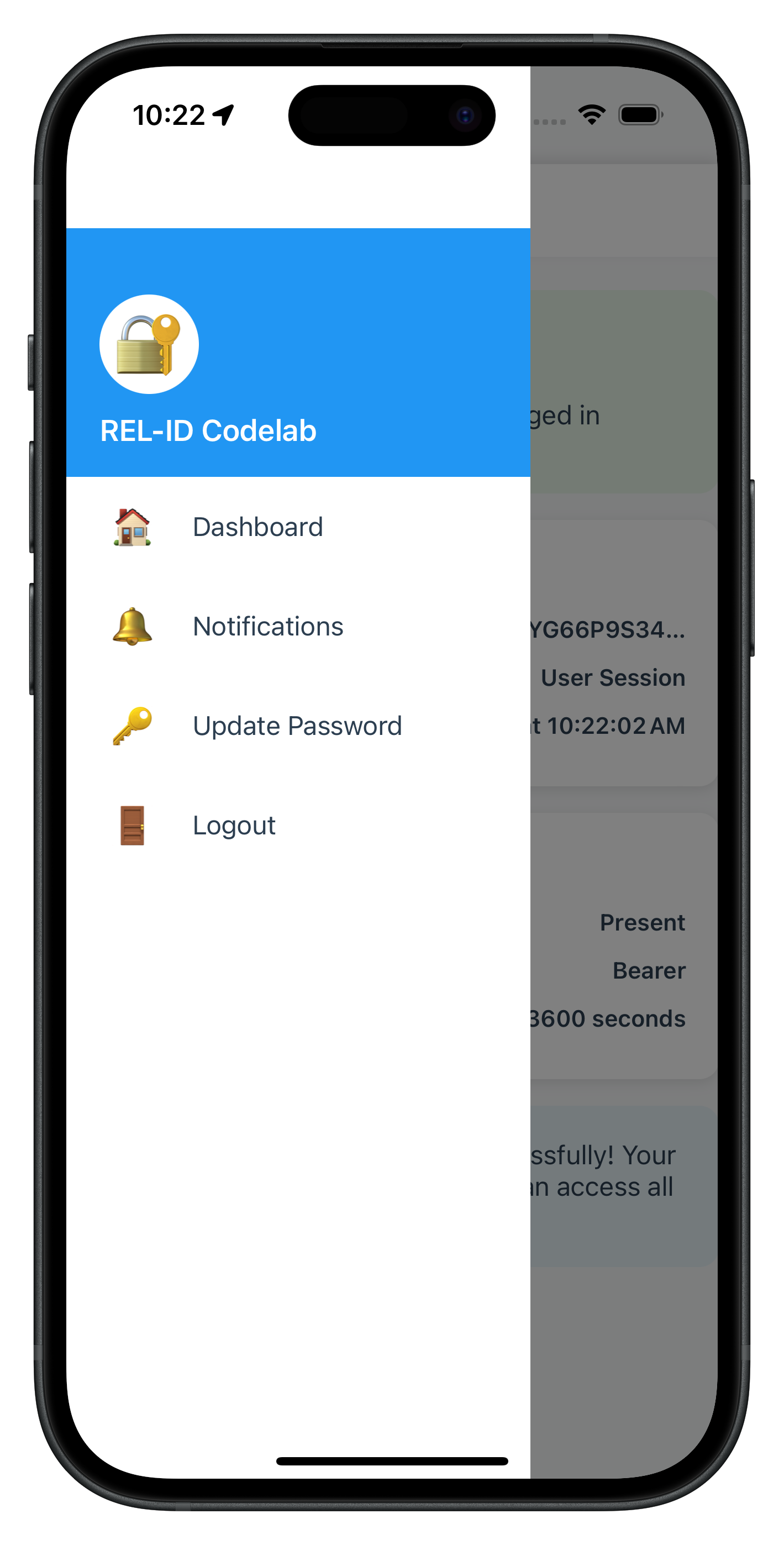
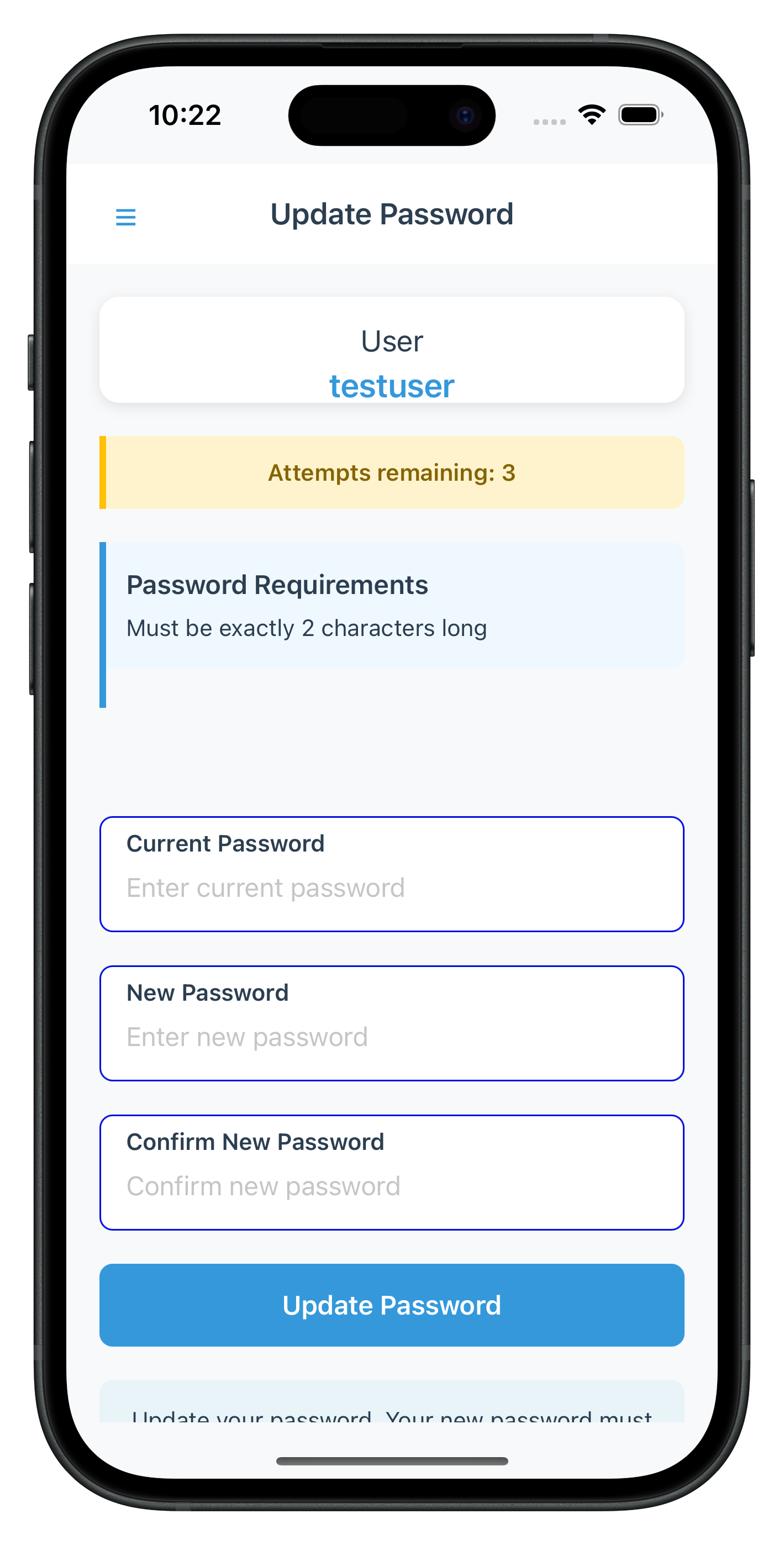
Now let's integrate the UpdatePasswordViewController into your Side Menu and add conditional menu rendering.
Step 1: Add UpdatePasswordViewController to Menu Options
Create or enhance
Sources/Tutorial/Screens/Components/SideMenuViewController.swift
:
import UIKit
import SideMenu
import RELID

class SideMenuViewController: UIViewController {

    @IBOutlet weak var tableView: UITableView!
    @IBOutlet weak var headerView: UIView!
    @IBOutlet weak var avatarLabel: UILabel!
    @IBOutlet weak var userNameLabel: UILabel!

    private var userID: String = ""
    private var availableCredentials: [String] = []

    // Menu items
    private var menuItems: [MenuItem] = []

    struct MenuItem {
        let icon: String
        let title: String
        let action: () -> Void
    }

    override func viewDidLoad() {
        super.viewDidLoad()
        setupUI()
        setupTableView()
        setupNotificationObservers()
        loadMenuItems()
    }

    private func setupUI() {
        headerView.backgroundColor = UIColor(hex: "#3498db")
        avatarLabel.font = UIFont.boldSystemFont(ofSize: 20)
        avatarLabel.textColor = .white
        userNameLabel.font = UIFont.boldSystemFont(ofSize: 18)
        userNameLabel.textColor = .white
    }

    private func setupTableView() {
        tableView.delegate = self
        tableView.dataSource = self
        tableView.register(UITableViewCell.self, forCellReuseIdentifier: "MenuCell")
        tableView.separatorStyle = .singleLine
        tableView.backgroundColor = .white
    }

    private func setupNotificationObservers() {
        // Listen for credentials available update
        NotificationCenter.default.addObserver(
            self,
            selector: #selector(handleCredentialsAvailable(_:)),
            name: NSNotification.Name("CredentialsAvailableForUpdate"),
            object: nil
        )
    }

    @objc private func handleCredentialsAvailable(_ notification: Notification) {
        if let credentials = notification.userInfo?["credentials"] as? [String] {
            print("SideMenuViewController - Credentials available: \(credentials)")
            availableCredentials = credentials
            loadMenuItems()
            tableView.reloadData()
        }
    }

    func configure(userID: String) {
        self.userID = userID
        userNameLabel.text = userID
        avatarLabel.text = String(userID.prefix(2)).uppercased()

        // Load available credentials from service
        availableCredentials = RDNAService.shared.availableCredentials
        loadMenuItems()
    }

    private func loadMenuItems() {
        menuItems = []

        // Dashboard
        menuItems.append(MenuItem(icon: "🏠", title: "Dashboard") { [weak self] in
            self?.navigateToDashboard()
        })

        // Get Notifications
        menuItems.append(MenuItem(icon: "🔔", title: "Get Notifications") { [weak self] in
            self?.navigateToNotifications()
        })

        // ✅ NEW: Conditional Update Password Menu Item
        if availableCredentials.contains("Password") {
            menuItems.append(MenuItem(icon: "🔑", title: "Update Password") { [weak self] in
                self?.handleUpdatePassword()
            })
        }

        tableView.reloadData()
    }

    // MARK: - Navigation Actions

    private func navigateToDashboard() {
        dismiss(animated: true) {
            // Side menu controller handles navigation
            NotificationCenter.default.post(name: NSNotification.Name("NavigateToDashboard"), object: nil)
        }
    }

    private func navigateToNotifications() {
        dismiss(animated: true) {
            NotificationCenter.default.post(name: NSNotification.Name("NavigateToNotifications"), object: nil)
        }
    }

    // ✅ NEW: Handle Update Password Menu Tap
    private func handleUpdatePassword() {
        print("SideMenuViewController - Update Password tapped")

        // Show loading indicator
        let loadingAlert = UIAlertController(title: nil, message: "Initiating update flow...", preferredStyle: .alert)
        let loadingIndicator = UIActivityIndicatorView(style: .medium)
        loadingIndicator.translatesAutoresizingMaskIntoConstraints = false
        loadingIndicator.startAnimating()
        loadingAlert.view.addSubview(loadingIndicator)

        NSLayoutConstraint.activate([
            loadingIndicator.centerXAnchor.constraint(equalTo: loadingAlert.view.centerXAnchor),
            loadingIndicator.centerYAnchor.constraint(equalTo: loadingAlert.view.centerYAnchor, constant: -20)
        ])

        present(loadingAlert, animated: true)

        // Call initiateUpdateFlowForCredential API
        DispatchQueue.global(qos: .userInitiated).async {
            let error = RDNAService.shared.initiateUpdateFlowForCredential("Password")

            DispatchQueue.main.async { [weak self] in
                loadingAlert.dismiss(animated: true) {
                    if error.longErrorCode == 0 {
                        print("SideMenuViewController - InitiateUpdateFlowForCredential successful, waiting for getPassword event")
                        // The SDK will trigger getPassword event with challengeMode = 2
                        // RDNADelegateManager will handle navigation to UpdatePasswordViewController
                        self?.dismiss(animated: true)
                    } else {
                        print("SideMenuViewController - InitiateUpdateFlowForCredential error: \(error.errorString)")

                        let alert = UIAlertController(
                            title: "Update Password Error",
                            message: error.errorString,
                            preferredStyle: .alert
                        )
                        alert.addAction(UIAlertAction(title: "OK", style: .default))
                        self?.present(alert, animated: true)
                    }
                }
            }
        }
    }

    deinit {
        NotificationCenter.default.removeObserver(self)
    }
}

// MARK: - UITableViewDelegate, UITableViewDataSource

extension SideMenuViewController: UITableViewDelegate, UITableViewDataSource {

    func tableView(_ tableView: UITableView, numberOfRowsInSection section: Int) -> Int {
        return menuItems.count
    }

    func tableView(_ tableView: UITableView, cellForRowAt indexPath: IndexPath) -> UITableViewCell {
        let cell = tableView.dequeueReusableCell(withIdentifier: "MenuCell", for: indexPath)
        let item = menuItems[indexPath.row]

        cell.textLabel?.text = "\(item.icon) \(item.title)"
        cell.textLabel?.font = UIFont.systemFont(ofSize: 16)
        cell.textLabel?.textColor = UIColor(hex: "#333333")
        cell.backgroundColor = .white
        cell.selectionStyle = .default

        return cell
    }

    func tableView(_ tableView: UITableView, didSelectRowAt indexPath: IndexPath) {
        tableView.deselectRow(at: indexPath, animated: true)
        let item = menuItems[indexPath.row]
        item.action()
    }

    func tableView(_ tableView: UITableView, heightForRowAt indexPath: IndexPath) -> CGFloat {
        return 60
    }
}
Step 2: Configure Side Menu Navigation
Enhance your
AppCoordinator
or navigation setup to handle UpdatePassword presentation:
// Sources/Tutorial/Navigation/AppCoordinator.swift (additions)

class AppCoordinator {
    static let shared = AppCoordinator()

    private weak var navigationController: UINavigationController?
    private var sideMenuNavigationController: SideMenuNavigationController?

    private init() {
        setupNotificationObservers()
    }

    private func setupNotificationObservers() {
        // Listen for show update password notification
        NotificationCenter.default.addObserver(
            self,
            selector: #selector(handleShowUpdatePassword(_:)),
            name: NSNotification.Name("ShowUpdatePassword"),
            object: nil
        )
    }

    @objc private func handleShowUpdatePassword(_ notification: Notification) {
        guard let userInfo = notification.userInfo,
              let userID = userInfo["userID"] as? String,
              let challengeMode = userInfo["challengeMode"] as? RDNAChallengeOpMode,
              let attemptsLeft = userInfo["attemptsLeft"] as? Int,
              let response = userInfo["response"] as? RDNAChallengeResponse,
              let error = userInfo["error"] as? RDNAError else {
            return
        }

        presentUpdatePasswordScreen(
            userID: userID,
            challengeMode: challengeMode,
            attemptsLeft: attemptsLeft,
            response: response,
            error: error
        )
    }

    private func presentUpdatePasswordScreen(
        userID: String,
        challengeMode: RDNAChallengeOpMode,
        attemptsLeft: Int,
        response: RDNAChallengeResponse,
        error: RDNAError
    ) {
        DispatchQueue.main.async { [weak self] in
            guard let navigationController = self?.navigationController else { return }

            // Dismiss side menu if open
            if let presentedVC = navigationController.presentedViewController {
                presentedVC.dismiss(animated: true) {
                    self?.showUpdatePasswordViewController(
                        userID: userID,
                        challengeMode: challengeMode,
                        attemptsLeft: attemptsLeft,
                        response: response,
                        error: error
                    )
                }
            } else {
                self?.showUpdatePasswordViewController(
                    userID: userID,
                    challengeMode: challengeMode,
                    attemptsLeft: attemptsLeft,
                    response: response,
                    error: error
                )
            }
        }
    }

    private func showUpdatePasswordViewController(
        userID: String,
        challengeMode: RDNAChallengeOpMode,
        attemptsLeft: Int,
        response: RDNAChallengeResponse,
        error: RDNAError
    ) {
        guard let updatePasswordVC = UIStoryboard(name: "Main", bundle: nil)
            .instantiateViewController(withIdentifier: "UpdatePasswordViewController") as? UpdatePasswordViewController else {
            print("AppCoordinator - Failed to instantiate UpdatePasswordViewController")
            return
        }

        updatePasswordVC.configure(
            userID: userID,
            challengeMode: challengeMode,
            attemptsLeft: attemptsLeft,
            response: response,
            error: error
        )

        navigationController?.pushViewController(updatePasswordVC, animated: true)
    }

    deinit {
        NotificationCenter.default.removeObserver(self)
    }
}
Let's verify your password update implementation with comprehensive manual testing scenarios.
Test Scenario 1: Successful Password Update
Steps:
- Launch the app and complete MFA login flow successfully
- Verify navigation to Dashboard screen
- Check console logs for: "RDNADelegateManager - Calling getAllChallenges after login"
- Wait for: "RDNADelegateManager - Credentials available for update event received"
- Open side menu (☰ button or swipe from left)
- Verify "🔑 Update Password" menu item is visible
- Tap "🔑 Update Password" menu item
- Verify loading alert appears briefly
- Verify navigation to UpdatePasswordViewController
- Verify screen displays:
- User name
- Attempts remaining counter
- Password policy requirements
- Three password fields (Current, New, Confirm)
- Enter valid current password
- Enter valid new password (meeting policy requirements)
- Enter matching confirm password
- Tap "Update Password" button
- Verify button shows "Updating Password..." with loading indicator
- Wait for success alert: "Password updated successfully"
- Tap "OK" on alert
- Verify navigation back to Dashboard
- IMPORTANT: After a few seconds, verify SDK automatically triggers logout
- Verify navigation to CheckUserViewController (login screen)
Expected Console Logs:
UpdatePasswordVC - updatePassword sync response: 0
RDNAService - UpdatePassword successful, awaiting onUpdateCredentialResponse or getPassword
UpdatePasswordVC - Update credential response received
UpdatePasswordVC - Password update successful!
AppCoordinator - onUserLoggedOff called
AppCoordinator - onGetUser called
Expected Result: ✅ Password updated successfully, user logged out automatically by SDK
Test Scenario 2: Password Mismatch Validation
Steps:
- Navigate to UpdatePasswordViewController (follow steps 1-10 from Scenario 1)
- Enter valid current password
- Enter valid new password
- Enter different confirm password (intentional mismatch)
- Tap "Update Password" button
Expected Result: ✅ Error message: "New password and confirm password do not match" Expected Behavior: New and confirm password fields cleared, focus on new password field
Test Scenario 3: Same Password Validation
Steps:
- Navigate to UpdatePasswordViewController
- Enter current password (e.g., "Test@1234")
- Enter same password as new password ("Test@1234")
- Enter same password as confirm password ("Test@1234")
- Tap "Update Password" button
Expected Result: ✅ Error message: "New password must be different from current password" Expected Behavior: New and confirm password fields cleared, focus on new password field
Test Scenario 4: Password Policy Violation
Steps:
- Navigate to UpdatePasswordViewController
- Verify password policy is displayed (e.g., "Minimum 8 characters, 1 uppercase, 1 digit")
- Enter valid current password
- Enter new password that violates policy (e.g., "weak" - too short)
- Enter matching confirm password
- Tap "Update Password" button
Expected Console Logs:
UpdatePasswordVC - Update credential response received
UpdatePasswordVC - Status error: 190 - Password does not meet policy standards
UpdatePasswordVC - Showing error: Password does not meet policy standards
Expected Result: ✅ Error message: "Password does not meet policy standards" Expected Behavior: All password fields cleared Expected SDK Behavior: ❌ SDK does NOT trigger automatic logout for statusCode 190
Test Scenario 5: Attempts Exhausted (Critical Error)
Prerequisites: Configure server to allow 3 password update attempts only
Steps:
- Navigate to UpdatePasswordViewController
- Verify "Attempts remaining: 3" displayed
- Enter incorrect current password 3 times (or violate policy 3 times)
- On third attempt, verify SDK responds with statusCode 153
Expected Console Logs:
UpdatePasswordVC - Update credential response received
UpdatePasswordVC - Status error: 153 - Attempts exhausted
UpdatePasswordVC - Presenting error alert, will navigate to dashboard on OK
AppCoordinator - onUserLoggedOff called
AppCoordinator - onGetUser called
Expected Result: ✅ Alert: "Attempts exhausted" or similar message
Expected Behavior:
- All password fields cleared
- After closing alert, SDK automatically triggers logout
- Navigation to CheckUserViewController (login screen)
Test Scenario 6: Password Expired While Updating (statusCode 110)
Prerequisites: Configure server with very short password expiry (e.g., 1 minute)
Steps:
- Login with password that will expire during update process
- Navigate to UpdatePasswordViewController
- Wait for password to expire on server side
- Enter passwords and attempt update
- Server responds with statusCode 110
Expected Console Logs:
UpdatePasswordVC - Update credential response received
UpdatePasswordVC - Status error: 110 - Password has expired while updating password
UpdatePasswordVC - Presenting error alert, will navigate to dashboard on OK
AppCoordinator - onUserLoggedOff called
AppCoordinator - onGetUser called
Expected Result: ✅ Alert: "Password has expired while updating password" Expected Behavior:
- All password fields cleared
- SDK automatically triggers logout and getUser events
- Navigation to login screen
Test Scenario 7: Screen Focus Behavior
Steps:
- Navigate to UpdatePasswordViewController
- Enter passwords in all three fields (don't submit)
- Tap back button or swipe to dismiss
- Open side menu again
- Tap "🔑 Update Password" to return to UpdatePasswordViewController
Expected Behavior: ✅ All password fields are cleared (viewWillAppear cleanup)
Expected Console Logs:
UpdatePasswordVC - viewWillAppear, clearing all password fields
Test Scenario 8: No Password Update Available
Prerequisites: Configure server to disable password update credential
Steps:
- Complete MFA login
- Wait for getAllChallenges() to complete
- Verify onCredentialsAvailableForUpdate event returns empty array or array without "Password"
- Open side menu
Expected Result: ✅ "🔑 Update Password" menu item is NOT visible
Expected Console Logs:
DashboardVC - Credentials available for update: []
CredentialUpdateManager - Setting available credentials: []
Test Scenario 9: Network Error During Update
Prerequisites: Simulate network issues or server downtime
Steps:
- Navigate to UpdatePasswordViewController
- Disable network connection or stop REL-ID server
- Enter valid passwords
- Tap "Update Password" button
Expected Result: ✅ Error message with network/connection error details Expected Behavior: Password fields cleared, error banner displayed
Issue 1: "Update Password" Menu Not Appearing
Symptoms:
- Side menu doesn't show "🔑 Update Password" option after login
- Console shows: "Available credentials: []"
Causes & Solutions:
Cause 1: Server credential not configured
Solution: Enable password update credential in REL-ID server configuration
- Log into REL-ID admin portal
- Navigate to User/Application Settings
- Enable "Password Update" credential
- Save and restart server if needed
Cause 2: getAllChallenges() not called after login
Solution: Verify RDNADelegateManager onUserLoggedIn calls getAllChallenges()
- Check console for: "RDNAService - Calling getAllChallenges for user:"
- Verify background dispatch is correct
- Ensure error handling doesn't silently fail
Cause 3: onCredentialsAvailableForUpdate not triggering
Solution: Verify event handler is registered
- Check RDNADelegateManager implements onCredentialsAvailable(forUpdate:options:)
- Verify protocol conformance to RDNACallbacks
- Check console for: "DashboardVC - Credentials available for update:"
Cause 4: Conditional rendering logic error in SideMenuViewController
Solution: Debug availableCredentials array
- Add breakpoint in loadMenuItems()
- Verify RDNAService.shared.availableCredentials is populated
- Check string matching: availableCredentials.contains("Password")
Issue 2: Keyboard Obscures Input Fields
Symptoms:
- Keyboard covers password input fields
- Cannot scroll to see confirm password field
- Submit button hidden behind keyboard
Causes & Solutions:
Cause 1: IQKeyboardManager not configured
Solution: Verify IQKeyboardManager setup in AppDelegate
- Check Podfile includes: pod 'IQKeyboardManagerSwift'
- Run: pod install
- Verify AppDelegate.swift contains:
  IQKeyboardManager.shared.isEnabled = true
  IQKeyboardManager.shared.enableAutoToolbar = true
  IQKeyboardManager.shared.resignOnTouchOutside = true
Cause 2: UIScrollView not properly configured
Solution: Verify Storyboard layout
- Ensure UpdatePasswordViewController uses UIScrollView
- Check content size is set correctly
- Verify constraints allow scrolling
Cause 3: IQKeyboardManager disabled for specific view controller
Solution: Check if keyboard manager is disabled
- Remove any IQKeyboardManager.shared.isEnabled = false
- Don't set disabledDistanceHandlingClasses
- Let IQKeyboardManager handle all text fields
Issue 3: onUpdateCredentialResponse Not Firing
Symptoms:
- Password update submits but no response
- No success or error feedback
- Console shows sync success but no event
Causes & Solutions:
Cause 1: Protocol method not implemented
Solution: Verify RDNADelegateManager implements protocol
- Check: func onUpdateCredentialResponse(for userID:credType:status:error:)
- Verify RDNACallbacks protocol conformance
- Ensure main thread dispatch is correct
Cause 2: Handler cleanup removes handler too early
Solution: Check deinit timing
- Verify deinit only runs when view controller deallocates
- Don't set handler to nil in viewWillDisappear
- Keep handler active until screen is fully dismissed
Cause 3: Screen-level handler overridden by global handler
Solution: Use proper handler precedence
- Set screen handler in viewDidLoad or setupEventHandlers
- Global handler should be fallback only
- Screen handler takes precedence when screen is active
Issue 4: Automatic Logout Not Happening (Status Codes 110/153)
Symptoms:
- Password update succeeds but user remains logged in
- Status code 100 received but no logout
- Console shows success but no onUserLoggedOff event
Causes & Solutions:
Cause 1: Misunderstanding SDK behavior
Solution: This is EXPECTED SDK behavior
- SDK automatically triggers onUserLoggedOff → getUser after status 110/153
- Your app doesn't trigger logout - SDK does it automatically
- Wait a few seconds after success alert - logout will happen
- Check console for: "AppCoordinator - onUserLoggedOff called"
Cause 2: onUserLoggedOff handler not implemented
Solution: Verify RDNADelegateManager has logout handler
- Check: func onUserLoggedOff(_ userID:error:)
- Verify handler posts notification or navigates
- Ensure getUser handler navigates to login screen
Cause 3: Navigation prevents automatic flow
Solution: Don't manually navigate after success
- After statusCode 100, only show alert and navigate to Dashboard
- SDK will handle the logout navigation automatically
- Don't call resetAuthState() manually
Issue 5: Password Policy Not Displaying
Symptoms:
- "Password Requirements" section not showing
- passwordPolicyMessage is empty string
- Policy exists on server but not displayed
Causes & Solutions:
Cause 1: Wrong policy key
Solution: Use RELID_PASSWORD_POLICY, not PASSWORD_POLICY_BKP
- Check: getChallengeValue(from: response, key: "RELID_PASSWORD_POLICY")
- Verify key name matches server configuration
- Check console: "Password policy extracted: ..."
Cause 2: getPassword event missing challenge data
Solution: Verify challengeMode 2 includes policy
- Check response.info array
- Verify server sends policy with challengeMode 2
- Log: response.info to see all challenge data
Cause 3: PasswordPolicyHelper parsing error
Solution: Debug policy parsing utility
- Add breakpoint in parseAndGeneratePolicyMessage
- Log policyJsonString before parsing
- Verify JSON structure matches PasswordPolicy struct
- Check Codable decoding errors
Issue 6: initiateUpdateFlowForCredential Errors
Symptoms:
- Tapping menu item shows error alert
- Console: "InitiateUpdateFlowForCredential sync error"
- No navigation to UpdatePasswordViewController
Causes & Solutions:
Cause 1: Incorrect credential type string
Solution: Use exact credential type name
- Use: "Password" (capital P)
- Not: "password", "PASSWORD", or "pwd"
- Match server credential type name exactly
- Check availableCredentials array for exact string
Cause 2: SDK not ready or session invalid
Solution: Verify user session is active
- Check user is logged in before calling API
- Verify session hasn't expired
- Test with fresh login
- Check console for session-related errors
Cause 3: API not implemented in RDNAService
Solution: Verify API method exists
- Check: RDNAService.shared.initiateUpdateFlowForCredential is defined
- Verify method signature matches SDK
- Ensure method calls rdna.initiateUpdateFlowForCredential
- Check for typos in method name
Security Considerations
Password Handling:
- Never log actual password values in console (only log presence/absence)
- Clear password fields immediately after errors
- Use
isSecureTextEntry = truefor all password text fields - Clear password fields when screen appears (viewWillAppear)
- Never send passwords over unencrypted channels
Session Management:
- Trust SDK-triggered logout events (status codes 110/153)
- Don't manually call resetAuthState() after password update success
- Let SDK handle automatic logout flow
- Verify session validity before showing UpdatePasswordViewController
- Handle session expiration gracefully
Callback/Event Handler Management:
- Always clean up screen-level callback/event handlers in deinit
- Use screen-level handlers for UpdatePasswordViewController to avoid conflicts
- Keep global handlers in RDNADelegateManager as fallbacks only
- Never set multiple handlers for the same event simultaneously
Error Handling:
- Display user-friendly error messages, not raw error codes
- Log detailed error information to console for debugging
- Clear sensitive data from memory after errors
- Handle network errors gracefully with retry options
- Validate inputs before API calls to prevent unnecessary server requests
User Experience Best Practices
Keyboard Management:
- Use IQKeyboardManagerSwift pod for automatic keyboard handling
- Configure in AppDelegate for global effect
- Set resignOnTouchOutside = true for better UX
- Enable toolbar for input accessory view
- Test on both iOS physical devices and simulators
Form Validation:
- Validate on client-side before server call (password match, non-empty, different from current)
- Display real-time validation feedback
- Focus appropriate field after validation error
- Clear error messages when user starts typing
- Show loading states during API calls
Password Policy Display:
- Always display password policy requirements prominently
- Extract policy from RELID_PASSWORD_POLICY challenge value
- Parse and format policy for user-friendly display using PasswordPolicyHelper
- Show policy before user enters new password
- Highlight violated policy rules in error messages
Loading States:
- Show loading indicator on "Update Password" button during submission
- Display loading alert in menu during initiateUpdateFlowForCredential
- Disable all inputs during loading states
- Prevent double-tap on submit button
- Clear loading states on both success and error
Code Organization
File Structure:
Sources/
├── Uniken/
│   ├── Services/
│   │   ├── RDNAService.swift (✅ Add getAllChallenges, initiateUpdateFlowForCredential, updatePassword)
│   │   └── RDNADelegateManager.swift (✅ Add credential event handlers)
│   └── Utils/
│       └── PasswordPolicyHelper.swift (✅ Password policy parsing)
└── Tutorial/
    ├── Navigation/
    │   └── AppCoordinator.swift (✅ Add UpdatePassword navigation)
    └── Screens/
        ├── UpdatePassword/
        │   └── UpdatePasswordViewController.swift (✅ NEW)
        └── Components/
            └── SideMenuViewController.swift (✅ Add conditional menu and handler)

Main.storyboard (✅ Add UpdatePasswordViewController scene with Storyboard ID: "UpdatePasswordViewController")
Component Responsibilities:
- RDNADelegateManager: Global event handling, credential detection, routing
- SideMenuViewController: Conditional menu rendering, initiateUpdateFlowForCredential call
- UpdatePasswordViewController: Three-field form, validation, screen-level event handler, keyboard management
- RDNAService: API layer for all SDK operations, credential storage
- AppCoordinator: Navigation coordination and screen presentation
Performance Optimization
Memory Management:
- Always clean up event handlers in deinit
- Clear password state when screen disappears
- Remove NotificationCenter observers when components deallocate
- Use weak self in closures to prevent retain cycles
Network Optimization:
- Call getAllChallenges only once after login, not on every menu open
- Cache credential availability in RDNAService
- Use background threads for SDK API calls
- Handle offline scenarios gracefully
Testing Checklist
Before deploying to production, verify:
- ✅ Password update succeeds with valid credentials
- ✅ Password mismatch validation works
- ✅ Same password validation works
- ✅ Password policy violation handled correctly
- ✅ Status code 100 password update successfully
- ✅ Status code 110 triggers automatic logout
- ✅ Status code 153 triggers automatic logout
- ✅ Status code 190 does NOT trigger automatic logout
- ✅ Keyboard management works on iOS devices
- ✅ Screen focus clears password fields
- ✅ Conditional menu shows/hides based on credential availability
- ✅ Loading states display correctly
- ✅ Error messages are user-friendly
- ✅ Console logs provide debugging information
- ✅ No password values logged to console
Congratulations! You've successfully implemented user-initiated password update functionality with REL-ID SDK in iOS!
What You've Accomplished
In this codelab, you learned how to:
- ✅ Implement Credential Availability Detection - Automatic post-login check using
getAllChallenges()API - ✅ Handle Credential Update Events - Process
onCredentialsAvailableForUpdateevent and store available credentials - ✅ Create Conditional Menu Rendering - Display "Update Password" only when credential is available
- ✅ Integrate Side Menu Navigation - Place UpdatePasswordViewController in side menu for post-login access
- ✅ Build Three-Field Password Form - Validate current, new, and confirm passwords with keyboard management
- ✅ Extract Password Policy - Parse and display
RELID_PASSWORD_POLICYrequirements - ✅ Handle Screen-Level Events - Implement
onUpdateCredentialResponsehandler with proper cleanup - ✅ Manage SDK Event Chain - Handle automatic
onUserLoggedOff→getUserevents for status codes 110/153 - ✅ Implement Keyboard Management - Use IQKeyboardManagerSwift for automatic keyboard handling
- ✅ Apply Security Best Practices - Clear sensitive data, validate inputs, handle errors gracefully
Key Takeaways
Challenge Mode 2 is for User-Initiated Updates:
- Triggered by user action from side menu, not by SDK automatically
- Requires credential availability check with
getAllChallenges()first - Screen uses side menu navigation, not navigation stack
- User must be logged in to access this flow
SDK Event Chain for Status Codes 110/153:
- These status codes are exclusive to
onUpdateCredentialResponseevent - SDK automatically triggers
onUserLoggedOff→getUserafter these codes - Your app should NOT manually trigger logout - SDK does it automatically
- Always handle these automatic logout events in RDNADelegateManager
Screen-Level Event Handlers:
- Use screen-level handlers to avoid conflicts with password expiry flow
- Always clean up handlers in deinit
- Screen-level handlers override global handlers
- Essential for multiple screens using the same event type
Side Menu Integration:
- UpdatePasswordViewController is a post-login feature accessed via side menu
- Conditional rendering based on
onCredentialsAvailableForUpdateevent - Different from password expiry (challengeMode 4) which blocks login
- Provides voluntary password management for users
Additional Resources
- REL-ID SDK Documentation
- Updating Other Credentials Guide
- getAllChallenges API Reference
- onCredentialsAvailableForUpdate Event
- initiateUpdateFlowForCredential API
- onUpdateCredentialResponse Event
- Change Password Documentation
- SideMenu Library
- IQKeyboardManagerSwift
Sample App Repository
The complete implementation is available in the GitHub repository:
git clone https://github.com/uniken-public/codelab-ios.git
cd relid-MFA-update-password
Thank you for completing this codelab! If you have questions or feedback, please reach out to the REL-ID Development Team.