🎯 Learning Path:
- Complete REL-ID Complete Activation & Login Flow Codelab
- Complete REL-ID Notification Management Codelab
- You are here → Notification History Implementation
Welcome to the REL-ID Notification History codelab! This tutorial extends your notification management capabilities to provide comprehensive audit trails and historical data management.
What You'll Build
In this codelab, you'll enhance your existing notification application with:
- 📜 Comprehensive History View: Complete audit trail of all notification interactions
- 📱 Enterprise-Ready UI: Professional interface with UITableView and detail modals
- 🔐 Secure Data Handling: Proper privacy controls and data sanitization
What You'll Learn
By completing this codelab, you'll master:
- Notification History API Integration: Implementing
getNotificationHistory()API with basic parameters - History Data Modeling: Proper Swift structs for audit data
- Enterprise UI Patterns: Professional UIKit data display with pull-to-refresh
- Performance Optimization: Efficient rendering for notification lists
Prerequisites
Before starting this codelab, ensure you have:
- ✅ Completed REL-ID MFA Codelab - All MFA screens and flows must be fully implemented
- ✅ Completed REL-ID Notification Management Codelab - Basic notification handling must be functional
- ✅ iOS Development Environment - Xcode 13.0+ and iOS SDK configured
- ✅ REL-ID SDK Integration - Latest SDK with notification history support configured
- ✅ Swift Knowledge - Understanding of Swift structs, closures, and protocols
- ✅ Server Configuration - REL-ID server with notification history capabilities enabled
Get the Code from GitHub
The code to get started can be found in a GitHub repository.
You can clone the repository using the following command:
git clone https://github.com/uniken-public/codelab-ios.git
Navigate to the relid-notification-history folder in the repository you cloned earlier.
Codelab Architecture Overview
This codelab extends your notification application with four core history components:
- Notification History Service: API integration with filtering and pagination
- History Data Management: Swift structs for type-safe data handling
- Professional UI Components: UITableView with custom cells and pull-to-refresh
- Detail Views: Modal presentation for comprehensive notification details
Before implementing notification history functionality, let's understand the comprehensive data model and API patterns that power enterprise notification audit trails.
Notification History Data Flow
The notification history system follows this enterprise-grade pattern:
User Request → getNotificationHistory() API → onGetNotificationsHistory Delegate Callback → Data Processing → UITableView Rendering → Detail Modal
Core History Event Types
The REL-ID SDK provides comprehensive notification history through these main events:
Event Type | Description | Data Provided |
Retrieves notification history | Complete audit trail with metadata | |
Delegate callback with history data | Historical notification records |
History Data Structure
Add these Swift definitions to understand the complete history data model:
// NotificationHistoryViewController.swift (notification history types)

/**
 * Individual Notification History Item
 * Complete audit information for a single notification
 */
struct NotificationHistoryItem {
    let notificationUUID: String
    let status: String  // "UPDATED", "EXPIRED", "DISCARDED", "DISMISSED"
    let actionPerformed: String  // "Accept", "Reject", "NONE"
    let body: [NotificationBody]
    let createEpoch: TimeInterval  // Epoch time in milliseconds
    let updateEpoch: TimeInterval  // Epoch time in milliseconds
    let expiryEpoch: TimeInterval  // Epoch time in milliseconds
    let signingStatus: String?
    let actions: [NotificationAction]

    struct NotificationBody {
        let language: String
        let subject: String
        let message: String
        let label: [String: String]
    }

    struct NotificationAction {
        let label: String
        let action: String
        let authLevel: String
    }
}
Let's implement the notification history service following enterprise-grade patterns for accessing historical data.
Enhance RDNAService.swift with History API
Add the notification history method to your existing service implementation:
// RDNAService.swift (addition to existing class)

/**
 * Gets notification history from the REL-ID SDK server
 *
 * This method fetches notification history for the current user.
 * It returns a synchronous error response, then triggers an onGetNotificationsHistory
 * delegate callback with history data.
 *
 * @see https://developer.uniken.com/docs/get-notification-history
 *
 * Response Validation Logic (following reference app pattern):
 * 1. Check returned RDNAError.longErrorCode: 0 = success, > 0 = error
 * 2. An onGetNotificationsHistory callback will be triggered with history data
 * 3. Async callbacks will be handled by RDNADelegateManager
 *
 * @param recordCount Number of records to fetch (0 = all history records)
 * @param startIndex Index to begin fetching from (must be >= 1)
 * @param enterpriseID Enterprise ID filter (empty = all)
 * @param startDate Start date filter (format: YYYY-MM-DD, empty = no filter)
 * @param endDate End date filter (format: YYYY-MM-DD, empty = no filter)
 * @param notificationStatus Status filter (empty = all statuses)
 * @param actionPerformed Action filter (empty = all actions)
 * @param keywordSearch Keyword search (empty = no search)
 * @param deviceID Device ID filter (empty = all devices)
 * @returns RDNAError with longErrorCode: 0 = success, > 0 = error
 */
func getNotificationHistory(
    recordCount: Int = 10,
    startIndex: Int = 1,
    enterpriseID: String = "",
    startDate: String = "",
    endDate: String = "",
    notificationStatus: String = "",
    actionPerformed: String = "",
    keywordSearch: String = "",
    deviceID: String = ""
) -> RDNAError {
    print("RDNAService - Fetching notification history")
    print("   recordCount: \(recordCount)")
    print("   startIndex: \(startIndex)")

    // ⚠️ SDK requires Int32 for count and index parameters
    let error = rdna.getNotificationHistory(
        Int32(recordCount),
        withEnterpriseID: enterpriseID,
        withStart: Int32(startIndex),
        withStartDate: startDate,
        withEndDate: endDate,
        withNotificationStatus: notificationStatus,
        withActionPerformed: actionPerformed,
        withKeywordSearch: keywordSearch,
        withDeviceID: deviceID
    )

    if error.longErrorCode == 0 {
        print("RDNAService - GetNotificationHistory API call successful")
        print("   Waiting for onGetNotificationsHistory callback...")
    } else {
        print("RDNAService - GetNotificationHistory API call failed")
        print("   Error code: \(error.longErrorCode)")
        print("   Error message: \(error.errorString)")
    }

    return error
}
Service Pattern Consistency
Notice how this implementation maintains enterprise service patterns:
Pattern Element | Implementation Detail |
Comprehensive Logging | Detailed parameter logging for audit trails |
Direct SDK Integration | Direct calls to RELID framework methods |
Error Handling | Proper error classification with RDNAError |
Parameter Validation | Type-safe parameter handling with Swift types |
Documentation | Complete documentation with usage examples and workflow |
Enhance your callback manager to handle notification history responses with comprehensive data processing and state management.
Enhance RDNADelegateManager.swift for History
Update your event manager to handle notification history events:
// RDNADelegateManager.swift (additions to existing class)

// MARK: - Notification History Callback Closures

/// Closure invoked when notification history response is received from SDK
/// NOTIFICATION-HISTORY-SPECIFIC: Contains array of RDNANotfHistory objects with complete audit information
var onGetNotificationsHistory: ((RDNAStatusGetNotificationHistory) -> Void)?

// MARK: - RDNACallbacks Protocol Implementation (add to existing protocol methods)

/**
 * Handle notification history response events
 * @param status Complete status object containing notification history array and error info
 * @return Int32 (SDK requirement, always return 0)
 */
func onGetNotificationsHistory(_ status: RDNAStatusGetNotificationHistory) -> Int32 {
    print("RDNADelegateManager - Notification history callback received")
    print("   History count: \(status.notificationHistory.count)")
    print("   Error code: \(status.error.longErrorCode)")

    // Dispatch to main thread for UI updates
    DispatchQueue.main.async { [weak self] in
        self?.onGetNotificationsHistory?(status)
    }

    return 0
}
Delegate Manager Registration
The history event callback is automatically registered when you set the closure:
// In your view controller (NotificationHistoryViewController.swift)

override func viewDidLoad() {
    super.viewDidLoad()
    setupEventHandlers()
}

private func setupEventHandlers() {
    // Setup SDK event handlers (like RN useEffect)
    RDNADelegateManager.shared.onGetNotificationsHistory = { [weak self] status in
        self?.handleNotificationHistoryResponse(status: status)
    }
}

override func viewWillDisappear(_ animated: Bool) {
    super.viewWillDisappear(animated)
    cleanupEventHandlers()
}

private func cleanupEventHandlers() {
    // Cleanup SDK event handlers (like RN useEffect cleanup)
    RDNADelegateManager.shared.onGetNotificationsHistory = nil
}
Let's create enterprise-grade UI components for notification history management with comprehensive visualizations.
The following images showcase the notification history screens:
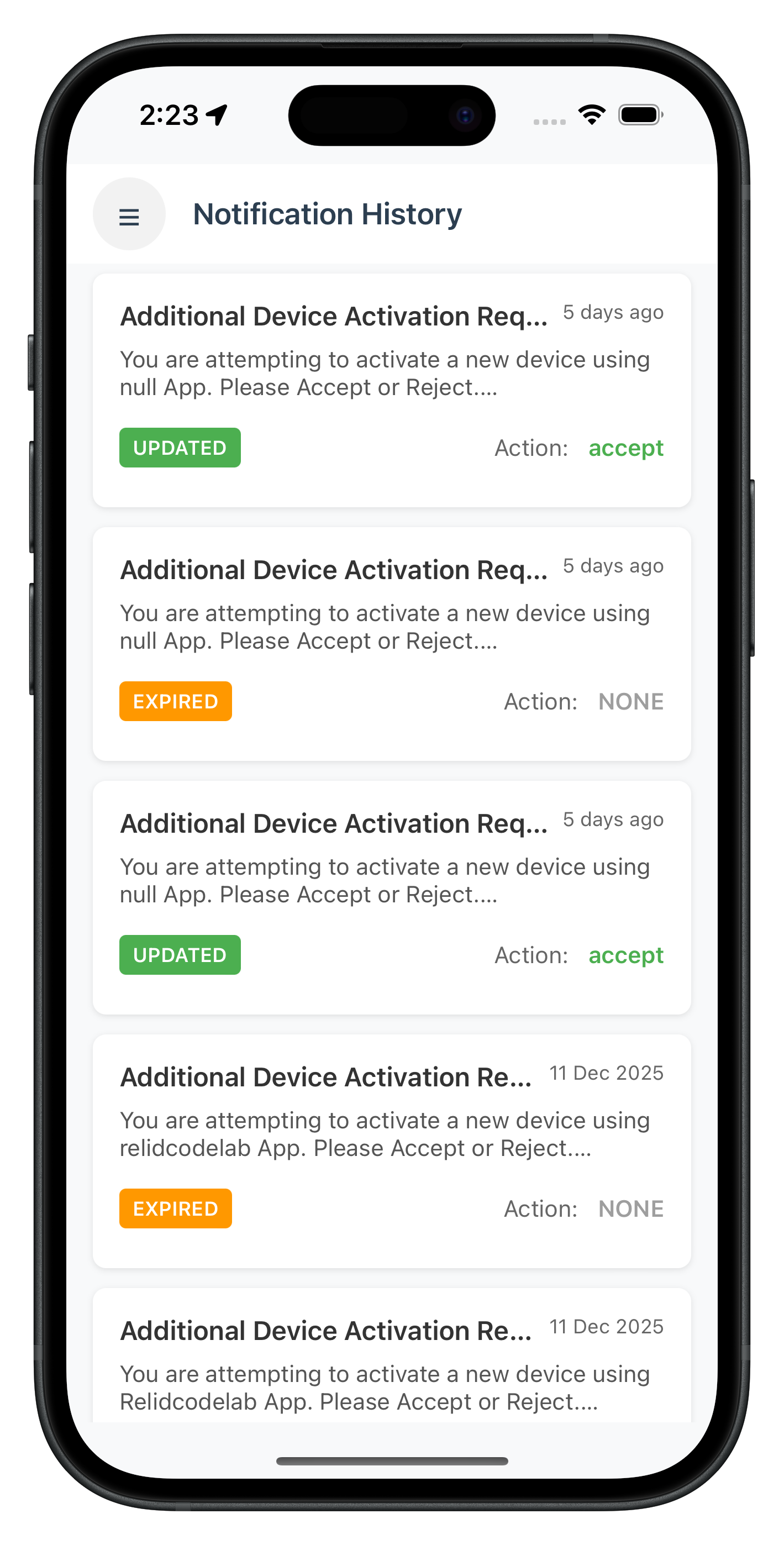
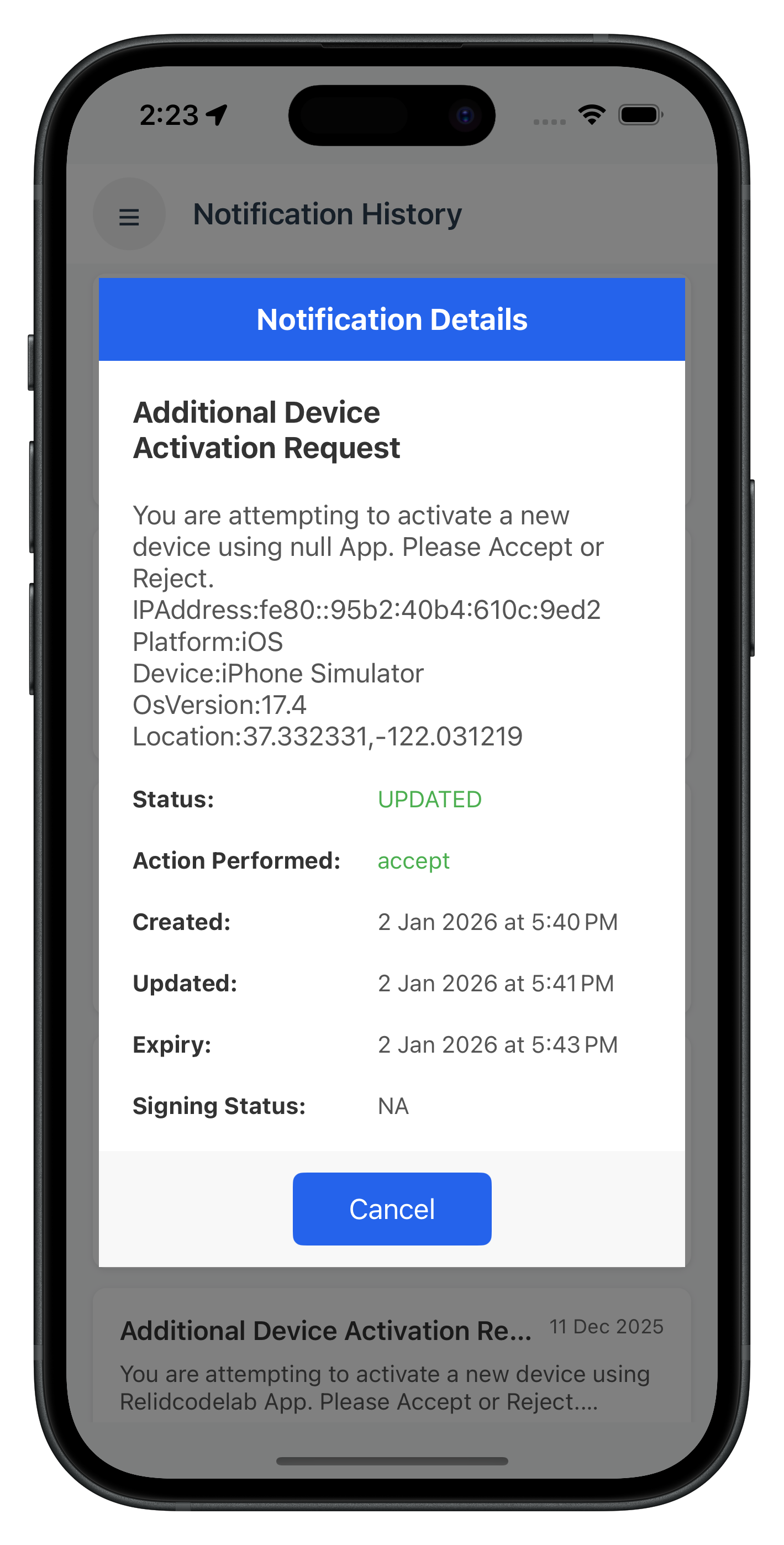
Create Notification History View Controller
Implement the main history screen with comprehensive functionality:
// NotificationHistoryViewController.swift

import UIKit
import RELID

/// Notification History View Controller
/// Displays notification history with filtering, pull-to-refresh, and detail views
class NotificationHistoryViewController: UIViewController {

    // MARK: - IBOutlets

    @IBOutlet weak var menuButton: UIButton!
    @IBOutlet weak var headerTitle: UILabel!
    @IBOutlet weak var tableView: UITableView!
    @IBOutlet weak var loadingContainer: UIView!
    @IBOutlet weak var loadingIndicator: UIActivityIndicatorView!
    @IBOutlet weak var loadingLabel: UILabel!
    @IBOutlet weak var emptyContainer: UIView!
    @IBOutlet weak var emptyIconLabel: UILabel!
    @IBOutlet weak var emptyTitleLabel: UILabel!
    @IBOutlet weak var emptyMessageLabel: UILabel!
    @IBOutlet weak var retryButton: UIButton!

    // MARK: - Properties

    private var historyItems: [NotificationHistoryItem] = []
    private var isLoading = false
    private var refreshControl: UIRefreshControl!

    // Screen parameters (passed during navigation)
    var userID: String = ""
    var sessionID: String = ""
    var sessionType: Int = 0
    var jwtToken: String = ""

    // MARK: - Lifecycle

    override func viewDidLoad() {
        super.viewDidLoad()
        setupUI()
        setupTableView()
        setupRefreshControl()
        MenuViewController.setupSideMenu(for: self)
        setupEventHandlers()

        // Auto-load notification history on screen mount (like RN useEffect)
        loadNotificationHistory()
    }

    override func viewWillDisappear(_ animated: Bool) {
        super.viewWillDisappear(animated)
        // Cleanup event handlers (like RN useEffect cleanup)
        cleanupEventHandlers()
    }

    // MARK: - Setup

    private func setupUI() {
        view.backgroundColor = UIColor(hex: "#f8f9fa")

        // Header
        headerTitle.text = "Notification History"
        headerTitle.font = UIFont.boldSystemFont(ofSize: 18)
        headerTitle.textColor = UIColor(hex: "#2c3e50")

        // Menu button
        menuButton.layer.cornerRadius = 22
        menuButton.backgroundColor = UIColor(red: 0, green: 0, blue: 0, alpha: 0.05)
        menuButton.setTitle("☰", for: .normal)
        menuButton.setTitleColor(UIColor(hex: "#2c3e50"), for: .normal)
        menuButton.titleLabel?.font = UIFont.boldSystemFont(ofSize: 20)

        // Loading UI
        loadingLabel.text = "Loading notification history..."
        loadingLabel.font = UIFont.systemFont(ofSize: 16)
        loadingLabel.textColor = UIColor(hex: "#666666")

        // Empty state UI
        emptyIconLabel.text = "📜"
        emptyIconLabel.font = UIFont.systemFont(ofSize: 64)

        emptyTitleLabel.text = "No notification history found"
        emptyTitleLabel.font = UIFont.boldSystemFont(ofSize: 16)
        emptyTitleLabel.textColor = UIColor(hex: "#666666")
        emptyTitleLabel.textAlignment = .center
        emptyTitleLabel.numberOfLines = 0

        emptyMessageLabel.text = ""
        emptyMessageLabel.font = UIFont.systemFont(ofSize: 14)
        emptyMessageLabel.textColor = UIColor(hex: "#999999")
        emptyMessageLabel.textAlignment = .center
        emptyMessageLabel.numberOfLines = 0

        retryButton.setTitle("Retry", for: .normal)
        retryButton.titleLabel?.font = UIFont.boldSystemFont(ofSize: 16)
        retryButton.layer.cornerRadius = 6
        retryButton.backgroundColor = UIColor(hex: "#007AFF")
        retryButton.setTitleColor(.white, for: .normal)

        // Initial state: hide all, show loading
        updateUIState()
    }

    private func setupTableView() {
        tableView.dataSource = self
        tableView.delegate = self
        tableView.separatorStyle = .none
        tableView.backgroundColor = UIColor(hex: "#f8f9fa")
        // Cell is registered in Storyboard as prototype cell
    }

    private func setupRefreshControl() {
        refreshControl = UIRefreshControl()
        refreshControl.tintColor = UIColor(hex: "#007AFF")
        refreshControl.attributedTitle = NSAttributedString(
            string: "Pull to refresh",
            attributes: [.foregroundColor: UIColor(hex: "#007AFF")]
        )
        refreshControl.addTarget(self, action: #selector(handleRefresh), for: .valueChanged)
        tableView.refreshControl = refreshControl
    }

    private func setupEventHandlers() {
        // Setup SDK event handlers (like RN useEffect)
        RDNADelegateManager.shared.onGetNotificationsHistory = { [weak self] status in
            self?.handleNotificationHistoryResponse(status: status)
        }
    }

    private func cleanupEventHandlers() {
        // Cleanup SDK event handlers (like RN useEffect cleanup)
        RDNADelegateManager.shared.onGetNotificationsHistory = nil
    }

    // MARK: - Data Loading

    /// Load notification history from SDK
    private func loadNotificationHistory() {
        if isLoading { return }

        isLoading = true
        updateUIState()

        print("NotificationHistoryViewController - Loading notification history")

        // Call getNotificationHistory API with parameters
        let error = RDNAService.shared.getNotificationHistory(
            recordCount: 10,
            startIndex: 1,
            enterpriseID: "",
            startDate: "",
            endDate: "",
            notificationStatus: "",
            actionPerformed: "",
            keywordSearch: "",
            deviceID: ""
        )

        if error.longErrorCode != 0 {
            print("NotificationHistoryViewController - Error loading notification history: \(error.errorString)")
            isLoading = false
            updateUIState()
            showAlert(
                title: "Error",
                message: error.errorString
            )
        }
        // Success will be handled by handleNotificationHistoryResponse
    }

    /// Handle notification history response from onGetNotificationsHistory event
    private func handleNotificationHistoryResponse(status: RDNAStatusGetNotificationHistory) {
        print("NotificationHistoryViewController - Received notification history response")
        isLoading = false
        refreshControl.endRefreshing()

        // Check for SDK errors
        if status.error.longErrorCode != 0 {
            let errorMsg = status.error.errorString
            print("NotificationHistoryViewController - API error: \(errorMsg)")
            showAlert(title: "Error", message: errorMsg)
            historyItems = []
            updateUIState()
            return
        }

        // Parse notification history
        let history = status.notificationHistory
        if !history.isEmpty {
            print("NotificationHistoryViewController - Loaded \(history.count) history items")

            // Map SDK objects to our model
            historyItems = history.map { item in
                // Parse body array
                let bodyArray = item.notfBody.compactMap { body -> NotificationHistoryItem.NotificationBody? in
                    guard let body = body as? RDNANotfHistBody else { return nil }
                    return NotificationHistoryItem.NotificationBody(
                        language: body.language ?? "en",
                        subject: body.subject ?? "No Subject",
                        message: body.notificationMessage ?? "No message available",
                        label: [:]
                    )
                }

                // History items don't have expected responses - actions are already performed
                let actionsArray: [NotificationHistoryItem.NotificationAction] = []

                return NotificationHistoryItem(
                    notificationUUID: item.notificationID ?? "",
                    status: item.status ?? "UNKNOWN",
                    actionPerformed: item.actionPerformed ?? "NONE",
                    body: bodyArray,
                    createEpoch: item.createdEpochTime,
                    updateEpoch: item.updatedEpochTime,
                    expiryEpoch: item.expiredEpochTime,
                    signingStatus: item.signingStatus ?? "UNKNOWN",
                    actions: actionsArray
                )
            }

            // Sort by update timestamp (most recent first)
            historyItems.sort { (a, b) in
                let aTime = a.updateEpoch > 0 ? a.updateEpoch : a.createEpoch
                let bTime = b.updateEpoch > 0 ? b.updateEpoch : b.createEpoch
                return aTime > bTime
            }

            print("NotificationHistoryViewController - Parsed \(historyItems.count) history items")
        } else {
            historyItems = []
            print("NotificationHistoryViewController - No notification history available")
        }

        updateUIState()
        tableView.reloadData()
    }

    // MARK: - UI State Management

    private func updateUIState() {
        loadingContainer.isHidden = !isLoading
        emptyContainer.isHidden = !historyItems.isEmpty || isLoading
        tableView.isHidden = historyItems.isEmpty || isLoading

        if isLoading {
            loadingIndicator.startAnimating()
        } else {
            loadingIndicator.stopAnimating()
        }
    }

    // MARK: - Actions

    @IBAction func menuButtonTapped(_ sender: UIButton) {
        // Present side menu
        print("NotificationHistoryViewController - Menu button tapped")
    }

    @IBAction func retryButtonTapped(_ sender: UIButton) {
        print("NotificationHistoryViewController - Retry button tapped")
        loadNotificationHistory()
    }

    @objc private func handleRefresh() {
        print("NotificationHistoryViewController - Pull to refresh triggered")
        loadNotificationHistory()
    }

    // MARK: - Helper Methods

    /**
     * Convert UTC epoch timestamp (milliseconds) to local time string
     * SDK provides epoch time in milliseconds, must divide by 1000 for Date
     */
    fileprivate func convertUTCToLocal(_ epochTime: TimeInterval) -> String {
        guard epochTime > 0 else { return "Not available" }

        // SDK provides milliseconds, convert to seconds for Date
        let date = Date(timeIntervalSince1970: epochTime / 1000.0)

        let localFormatter = DateFormatter()
        localFormatter.dateStyle = .medium
        localFormatter.timeStyle = .short
        localFormatter.timeZone = TimeZone.current

        return localFormatter.string(from: date)
    }

    /**
     * Get color for notification status
     */
    fileprivate func getStatusColor(_ status: String) -> UIColor {
        switch status.uppercased() {
        case "UPDATED", "ACCEPTED":
            return UIColor(hex: "#4CAF50") ?? .systemGreen
        case "REJECTED", "DISCARDED":
            return UIColor(hex: "#F44336") ?? .systemRed
        case "EXPIRED":
            return UIColor(hex: "#FF9800") ?? .systemOrange
        case "DISMISSED":
            return UIColor(hex: "#9E9E9E") ?? .systemGray
        default:
            return UIColor(hex: "#2196F3") ?? .systemBlue
        }
    }

    /**
     * Get color for action performed
     */
    fileprivate func getActionColor(_ action: String) -> UIColor {
        switch action.uppercased() {
        case "ACCEPT", "ACCEPTED":
            return UIColor(hex: "#4CAF50") ?? .systemGreen
        case "REJECT", "REJECTED":
            return UIColor(hex: "#F44336") ?? .systemRed
        default:
            return UIColor(hex: "#9E9E9E") ?? .systemGray
        }
    }
}

// MARK: - UITableViewDataSource

extension NotificationHistoryViewController: UITableViewDataSource {
    func tableView(_ tableView: UITableView, numberOfRowsInSection section: Int) -> Int {
        return historyItems.count
    }

    func tableView(_ tableView: UITableView, cellForRowAt indexPath: IndexPath) -> UITableViewCell {
        let cell = tableView.dequeueReusableCell(withIdentifier: "NotificationHistoryCell", for: indexPath) as! NotificationHistoryCell
        let item = historyItems[indexPath.row]
        cell.configure(with: item, viewController: self)
        return cell
    }
}

// MARK: - UITableViewDelegate

extension NotificationHistoryViewController: UITableViewDelegate {
    func tableView(_ tableView: UITableView, didSelectRowAt indexPath: IndexPath) {
        tableView.deselectRow(at: indexPath, animated: true)
        let item = historyItems[indexPath.row]
        showDetailModal(for: item)
    }

    /**
     * Show detail modal for notification history item
     */
    private func showDetailModal(for item: NotificationHistoryItem) {
        let storyboard = UIStoryboard(name: "Main", bundle: nil)
        guard let modalVC = storyboard.instantiateViewController(withIdentifier: "DetailModalViewController") as? DetailModalViewController else {
            print("NotificationHistoryViewController - Failed to instantiate DetailModalViewController")
            return
        }

        modalVC.item = item
        modalVC.historyViewController = self
        modalVC.modalPresentationStyle = .overFullScreen
        modalVC.modalTransitionStyle = .crossDissolve

        present(modalVC, animated: true)
    }
}
Create History Cell Component
Build a professional UITableViewCell for individual history records. Add this class to the same file as NotificationHistoryViewController:
// NotificationHistoryViewController.swift (add this class at the end of the file)

// MARK: - Notification History Cell

class NotificationHistoryCell: UITableViewCell {

    @IBOutlet weak var containerView: UIView!
    @IBOutlet weak var subjectLabel: UILabel!
    @IBOutlet weak var messageLabel: UILabel!
    @IBOutlet weak var statusBadge: UIView!
    @IBOutlet weak var statusLabel: UILabel!
    @IBOutlet weak var actionLabel: UILabel!
    @IBOutlet weak var timestampLabel: UILabel!

    override func awakeFromNib() {
        super.awakeFromNib()
        setupUI()
    }

    private func setupUI() {
        // Container styling
        containerView.backgroundColor = .white
        containerView.layer.cornerRadius = 8
        containerView.layer.shadowColor = UIColor.black.cgColor
        containerView.layer.shadowOpacity = 0.1
        containerView.layer.shadowOffset = CGSize(width: 0, height: 2)
        containerView.layer.shadowRadius = 4

        // Status badge styling
        statusBadge.layer.cornerRadius = 4

        // Label styling
        subjectLabel.font = UIFont.boldSystemFont(ofSize: 16)
        subjectLabel.textColor = UIColor(hex: "#2c3e50")

        messageLabel.font = UIFont.systemFont(ofSize: 14)
        messageLabel.textColor = UIColor(hex: "#6c757d")
        messageLabel.numberOfLines = 2

        statusLabel.font = UIFont.boldSystemFont(ofSize: 12)
        statusLabel.textColor = .white

        actionLabel.font = UIFont.systemFont(ofSize: 12)
        actionLabel.textColor = UIColor(hex: "#495057")

        timestampLabel.font = UIFont.systemFont(ofSize: 12)
        timestampLabel.textColor = UIColor(hex: "#adb5bd")
    }

    func configure(with item: NotificationHistoryItem, viewController: NotificationHistoryViewController) {
        let body = item.body.first

        subjectLabel.text = body?.subject ?? "No Subject"
        messageLabel.text = body?.message ?? "No message available"

        // Status badge
        statusLabel.text = item.status
        statusBadge.backgroundColor = viewController.getStatusColor(item.status)

        // Action
        let action = item.actionPerformed.isEmpty ? "NONE" : item.actionPerformed
        actionLabel.text = "Action: \(action)"
        actionLabel.textColor = viewController.getActionColor(item.actionPerformed)

        // Timestamp (use update time, fallback to create time)
        let displayTime = item.updateEpoch > 0 ? item.updateEpoch : item.createEpoch
        timestampLabel.text = viewController.convertUTCToLocal(displayTime)
    }
}
Before diving deeper into implementation, let's understand how iOS UIKit architecture differs and how we organize our notification history screens.
iOS UIKit Architecture
iOS applications use a view controller-based architecture:
- UIViewController manages a screen's view hierarchy and lifecycle
- View lifecycle handled via
viewDidLoad(),viewWillAppear(),viewWillDisappear() - State management via properties, property observers (
didSet), and delegates - UI updates must occur on main thread (
DispatchQueue.main.async) - Navigation via
UINavigationControlleror modal presentation - Events handled via target-action, delegates, or closures
- Memory management via ARC (Automatic Reference Counting) with weak references
Project Structure
Organize your iOS project following these conventions:
relidcodelab/
├── AppDelegate.swift                   # App entry point
├── SceneDelegate.swift                 # Scene lifecycle (iOS 13+)
├── Sources/
│   ├── Tutorial/                       # Codelab screens
│   │   ├── Screens/
│   │   │   ├── Notification/
│   │   │   │   └── NotificationHistoryViewController.swift  # Includes NotificationHistoryCell class
│   │   │   └── MFA/
│   │   └── Navigation/
│   │       └── AppCoordinator.swift    # Navigation coordinator
│   └── Uniken/                         # SDK integration layer
│       ├── Services/
│       │   ├── RDNAService.swift       # SDK service wrapper
│       │   └── RDNADelegateManager.swift
│       ├── Utils/
│       │   └── ConnectionProfileParser.swift
│       └── CP/
│           └── agent_info.json         # Connection profile
├── Base.lproj/
│   └── Main.storyboard                 # UI definitions
├── Assets.xcassets/                    # Images and colors
├── Info.plist                          # App configuration
├── RELID.xcframework/                  # REL-ID SDK framework (at project root)
└── Podfile                             # CocoaPods dependencies (at project root)
Let's test your notification history implementation with comprehensive scenarios to ensure enterprise-grade functionality.
Test Scenario 1: Basic History Loading
Setup Requirements:
- Active user session with notification permissions
- Historical notifications available in the system
- Proper SDK event handler registration
Test Steps:
- Navigate to Notification History screen
- Verify initial loading state displays correctly
- Confirm history data loads and displays in table view
- Check individual notification items display all required information
- Test pull-to-refresh functionality
Expected Results:
- ✅ Loading indicator appears during data fetch
- ✅ UITableView populates with formatted notification items
- ✅ Each cell displays title, status badge, timestamp, and action
- ✅ Timestamps are converted to local time zone
- ✅ Status badges show appropriate colors
- ✅ Pull-to-refresh reloads data successfully
Test Scenario 2: Item Detail Display
Setup Requirements:
- Notification history with varied statuses and actions
- Different notification types and content
- Modal presentation capability
Test Steps:
- Tap on a notification history item in the table view
- Verify detail modal appears with complete information
- Check that all fields display correctly (subject, message, timestamps, status, action)
- Test modal dismissal
- Try tapping multiple different items
Expected Results:
- ✅ Modal presents smoothly with fade animation
- ✅ All notification details display correctly
- ✅ Timestamps show in local time format
- ✅ Status and action colors match the list view
- ✅ Modal dismisses properly
- ✅ Selecting different items shows correct data
Test Scenario 3: Empty State Handling
Setup Requirements:
- User with no notification history
- Network conditions (slow/fast)
- Error simulation capability
Test Steps:
- Load screen with no notification history
- Verify empty state displays correctly
- Test retry button functionality
- Simulate network error and verify error handling
- Test pull-to-refresh with empty state
Expected Results:
- ✅ Empty state view displays with appropriate icon and message
- ✅ Retry button is visible and functional
- ✅ Network errors display user-friendly alert dialogs
- ✅ Pull-to-refresh works even with empty state
- ✅ Loading states transition smoothly
Prepare your notification history implementation for enterprise deployment with essential security and performance considerations.
Security & Privacy Checklist
- [ ] Data Sanitization: Remove or mask sensitive information in logs
- [ ] Access Control: Verify users can only access their own notification history
- [ ] Memory Management: Use
weak selfin closures to prevent retain cycles - [ ] Search Limitations: Implement reasonable record count limits
- [ ] Audit Logging: Track access to notification history for compliance
Performance Optimization
- [ ] Lazy Loading: Implement efficient pagination with
startIndexparameter - [ ] Memory Management: Properly dispose of view controllers and clear delegates
- [ ] Network Efficiency: Use appropriate
recordCountto minimize data transfer - [ ] UI Responsiveness: Ensure smooth scrolling with UITableView reuse
- [ ] Background Handling: Clean up handlers in
viewWillDisappear
iOS-Specific Best Practices
- [ ] Thread Safety: Always update UI on main thread
- [ ] Delegate Cleanup: Set delegates to
nilinviewWillDisappearordeinit - [ ] Weak References: Use
[weak self]in closures to prevent retain cycles - [ ] Error Handling: Check both API errors and delegate callback errors
- [ ] Type Safety: Use Swift structs for type-safe data models
Memory Management Example
// Proper closure memory management

// ✅ CORRECT - Uses weak self to prevent retain cycle
private func setupEventHandlers() {
    RDNADelegateManager.shared.onGetNotificationsHistory = { [weak self] status in
        self?.handleNotificationHistoryResponse(status: status)
    }
}

// ✅ CORRECT - Cleanup in viewWillDisappear
override func viewWillDisappear(_ animated: Bool) {
    super.viewWillDisappear(animated)
    RDNADelegateManager.shared.onGetNotificationsHistory = nil
}

// ❌ WRONG - Strong reference cycle
private func setupEventHandlers() {
    RDNADelegateManager.shared.onGetNotificationsHistory = { status in
        // self is captured strongly here, causing memory leak
        self.handleNotificationHistoryResponse(status: status)
    }
}
Threading Best Practices
// ✅ CORRECT - UI updates on main thread
private func handleNotificationHistoryResponse(status: RDNAStatusGetNotificationHistory) {
    // Data processing can happen on any thread
    let items = processHistoryData(status)

    // UI updates MUST happen on main thread
    DispatchQueue.main.async { [weak self] in
        self?.historyItems = items
        self?.tableView.reloadData()
        self?.updateUIState()
    }
}

// ❌ WRONG - UI updates on background thread
private func handleNotificationHistoryResponse(status: RDNAStatusGetNotificationHistory) {
    // This will cause crashes or undefined behavior
    self.tableView.reloadData()  // ❌ Not on main thread!
}
Logging Best Practices
// ✅ GOOD - Structured, informative logging
print("NotificationHistoryViewController - Loading notification history")
print("   recordCount: \(recordCount)")
print("   startIndex: \(startIndex)")

// ✅ GOOD - Error context
print("NotificationHistoryViewController - API error: \(error.errorString)")

// ❌ BAD - Logging sensitive data
print("User password: \(password)")  // ❌ Never log credentials
print("Full notification body: \(notification)")  // ❌ May contain PII
Congratulations! You've successfully implemented comprehensive notification history management with the REL-ID SDK for iOS.
🚀 What You've Accomplished
✅ Enterprise-Grade History Management - Complete audit trail with UITableView and detail modals
✅ Professional UI Components - UIKit-based interface with pull-to-refresh and custom cells
✅ Service Layer Integration - RDNAService wrapper with proper delegate management
✅ Performance Optimization - Efficient UITableView with
✅ Memory Management - Proper weak references and delegate cleanup
✅ Security Best Practices - Thread-safe UI updates and proper error handling
📚 Additional Resources
- REL-ID Developer Documentation - Complete API reference
- Apple UIKit Documentation - UIViewController and UITableView guides
🏆 You've mastered enterprise notification history management with REL-ID SDK on iOS!
Your implementation provides organizations with comprehensive audit capabilities, advanced data analysis, and secure historical data management. Use this foundation to build powerful analytics and compliance reporting features that meet enterprise requirements.