🎯 Learning Path:
- Complete REL-ID Complete Activation & Login Flow Codelab
- Complete REL-ID Additional Device Activation Flow Codelab
- You are here → Device Management Implementation (Post-Login)
Welcome to the REL-ID Device Management codelab! This tutorial builds upon your existing MFA implementation to add comprehensive device management capabilities using REL-ID iOS SDK's device management APIs.
What You'll Build
In this codelab, you'll enhance your existing MFA application with:
- 📱 Device List Display: View all registered devices with
getRegisteredDeviceDetails()API - 🔄 Pull-to-Refresh: Real-time device synchronization with UIRefreshControl
- ⏳ Cooling Period Detection: Server-enforced cooling periods with visual warnings (StatusCode 146)
- ✏️ Device Rename: Update device names with
updateDeviceDetails()method - 🗑️ Device Deletion: Remove non-current devices with
updateDeviceDetails()method - 🛡️ Current Device Protection: Prevent accidental deletion of active device
- 🎯 Three-Layer Error Handling: Error codes, status codes, and delegate callbacks
What You'll Learn
By completing this codelab, you'll master:
- Device Listing API Integration: Fetching registered devices with cooling period information
- Device Update Operations: Implementing rename and delete with RDNADeviceDetails objects
- Cooling Period Management: Detecting and handling server-enforced cooling periods
- Current Device Protection: Validating and preventing current device deletion
- Delegate-Based Architecture: Handling
onGetRegistredDeviceDetailsandonUpdateDeviceDetailscallbacks - Three-Layer Error Handling: Comprehensive error detection and user feedback
- Real-time Synchronization: Auto-refresh with pull-to-refresh and navigation-based updates
- UIKit View Controller Patterns: Implementing device management screens with proper lifecycle management
Prerequisites
Before starting this codelab, ensure you have:
- ✅ Completed REL-ID MFA Complete Activation & Login Flow Codelab - All MFA screens and flows must be fully implemented
- ✅ iOS Development Environment - Xcode 13.0 or later installed
- ✅ REL-ID iOS SDK Integration - RELID.xcframework with device management APIs
- ✅ Swift Knowledge - Understanding of Swift structs, classes, closures, and protocols
- ✅ Navigation Setup - UINavigationController configured with Dashboard screen
- ✅ Server Configuration - REL-ID server with device management enabled
Get the Code from GitHub
The code to get started can be found in a GitHub repository.
You can clone the repository using the following command:
git clone https://github.com/uniken-public/codelab-ios.git
Navigate to the relid-device-management folder in the repository you cloned earlier
Codelab Architecture Overview
This codelab extends your MFA application with three core device management components:
- DeviceManagementViewController: Device list with pull-to-refresh and cooling period detection
- DeviceDetailViewController: Device details with rename and delete operations
- RenameDeviceViewController: Modal dialog for device renaming with validation
Before implementing device management screens, let's understand the key SDK delegates and APIs that power the device lifecycle management workflow.
Device Management Callback Flow
The device management process follows this delegate-driven pattern:
User Logs In → Navigate to Device Management →
getRegisteredDeviceDetails() Called → onGetRegistredDeviceDetails Delegate →
Device List Displayed with Cooling Period Check →
User Taps Device → Navigate to Detail Screen →
User Renames/Deletes → updateDeviceDetails() Called →
onUpdateDeviceDetails Delegate → Success/Error Feedback →
Navigate Back → Device List Auto-Refreshes
Core Device Management APIs and Delegates
The REL-ID iOS SDK provides these APIs and delegates for device management:
API/Delegate | Type | Description | User Action Required |
API | Fetch all registered devices with cooling period info | System calls automatically | |
Delegate | Receives device list with metadata | System processes response | |
API | Rename or delete device with RDNADeviceDetails array | User taps action button | |
Delegate | Update operation result with status codes | System handles response |
Device Operation Types
The updateDeviceDetails() API supports two operation types via the status property on RDNADeviceDetails:
Operation Type | Status Value | Description | deviceName Value |
Rename Device |
| Update device name | New device name string |
Delete Device |
| Remove device from account | Empty string |
Device List Response Structure
The onGetRegistredDeviceDetails delegate receives this data structure:
// RDNAStatusGetRegisteredDeviceDetails structure
struct RDNAStatusGetRegisteredDeviceDetails {
    var devices: [RDNADeviceDetails]                           // Array of device objects
    var deviceManagementCoolingPeriodEndTimestamp: TimeInterval // Cooling period end (epoch ms)
    var status: RDNARequestStatus                              // Status object
    var error: RDNAError                                       // Error information
    var errCode: Int32                                         // Error code
}

// Individual device structure
struct RDNADeviceDetails {
    var deviceUUID: String              // Device unique identifier
    var deviceName: String              // Device display name
    var deviceStatus: String            // "Active" or other status
    var currentDevice: Bool             // true if this is the current device
    var lastAccessEpochTime: TimeInterval    // Last access timestamp (milliseconds)
    var deviceRegistrationEpochTime: TimeInterval // Creation timestamp (milliseconds)
    var appUUID: String                 // Application identifier
    var deviceBinding: RDNADeviceBinding // Device binding status (enum: permanent=0, temporary=1)
    var status: String                  // "Update" or "Delete" for operations
}
Cooling Period Management
Cooling periods are server-enforced timeouts between device operations:
Status Code | Meaning | Cooling Period Active | Actions Allowed |
| Success | No | All actions enabled |
| Cooling period active | Yes | All actions disabled |
Current Device Protection
The currentDevice flag identifies the active device:
currentDevice Value | Delete Button | Rename Button | Reason |
| ❌ Disabled/Hidden | ✅ Enabled | Cannot delete active device |
| ✅ Enabled | ✅ Enabled | Can delete non-current devices |
Update Device Pattern
The updateDeviceDetails() API requires an array of RDNADeviceDetails objects:
Rename Operation Example:
// Get the device object
var device = selectedDevice

// Set operation type and new name
device.status = "Update"
device.deviceName = "My New Device Name"

// Call SDK API
let error = RDNAService.shared.updateDeviceDetails(
    userID: userID,
    devices: [device]
)

if error.longErrorCode != 0 {
    print("Error: \(error.errorString)")
}
Delete Operation Example:
// Get the device object
var device = selectedDevice

// Set operation type for deletion
device.status = "Delete"
device.deviceName = ""

// Call SDK API
let error = RDNAService.shared.updateDeviceDetails(
    userID: userID,
    devices: [device]
)

if error.longErrorCode != 0 {
    print("Error: \(error.errorString)")
}
Three-Layer Error Handling
Device management implements comprehensive error detection:
Layer | Check | Error Source | Example |
Layer 1 |
| API-level errors | Network timeout, invalid userID |
Layer 2 |
| Status codes | 146 (cooling period), validation errors |
Layer 3 |
| SDK/Network failures | Connection refused, SDK errors |
Delegate Handler Cleanup Pattern
Device management screens use proper delegate handler cleanup:
// DeviceManagementViewController - viewWillAppear setup
override func viewWillAppear(_ animated: Bool) {
    super.viewWillAppear(animated)
    setupEventHandlers()
    loadDevices()
}

// DeviceManagementViewController - viewWillDisappear cleanup
override func viewWillDisappear(_ animated: Bool) {
    super.viewWillDisappear(animated)
    // Cleanup: Reset handler to prevent memory leaks
    RDNADelegateManager.shared.onGetRegistredDeviceDetails = nil
}

// DeviceDetailViewController - similar cleanup pattern
override func viewWillDisappear(_ animated: Bool) {
    super.viewWillDisappear(animated)
    RDNADelegateManager.shared.onUpdateDeviceDetails = nil
}
Let's implement the device management APIs in your service layer following established REL-ID SDK patterns.
Step 1: Add getRegisteredDeviceDetails API
Add this method to
Sources/Uniken/Services/RDNAService.swift
:
// Sources/Uniken/Services/RDNAService.swift (addition to existing class)

// MARK: - Device Management Methods

/// Get Registered Device Details - Fetch all registered devices for user
/// Retrieves list of devices registered to the specified user.
/// After successful call, SDK triggers onGetRegistredDeviceDetails callback with device data.
///
/// @see https://developer.uniken.com/docs/get-registered-devices
///
/// Workflow:
/// 1. User navigates to Device Management screen
/// 2. Call getRegisteredDeviceDetails(userID:)
/// 3. SDK fetches device list from server
/// 4. SDK triggers onGetRegistredDeviceDetails delegate method
/// 5. Delegate handler receives device array with cooling period data
/// 6. App displays device list with cooling period banner if statusCode = 146
///
/// Response Validation Logic:
/// 1. Check error.longErrorCode: 0 = success, > 0 = error
/// 2. On success, triggers onGetRegistredDeviceDetails delegate
/// 3. Delegate contains statusCode (100 = success, 146 = cooling period)
/// 4. Delegate contains device array and cooling period timestamp
/// 5. Async delegate will be handled by view controller-level closure
///
/// - Parameter userID: User ID to fetch devices for
/// - Returns: RDNAError indicating immediate API call success or failure
func getRegisteredDeviceDetails(userID: String) -> RDNAError {
    print("RDNAService - Getting registered device details for userID: \(userID)")

    let error = rdna.getRegisteredDeviceDetails(userID)

    if error.longErrorCode == 0 {
        print("RDNAService - GetRegisteredDeviceDetails request successful, awaiting onGetRegistredDeviceDetails callback")
    } else {
        print("RDNAService - GetRegisteredDeviceDetails failed: \(error.errorString)")
    }

    return error
}
Step 2: Add updateDeviceDetails API
Add this method to
Sources/Uniken/Services/RDNAService.swift
:
// Sources/Uniken/Services/RDNAService.swift (addition to existing class)

/// Update Device Details - Rename or delete a device
/// Updates device information (name) or removes device from user's registered devices.
/// After successful call, SDK triggers onUpdateDeviceDetails callback with operation result.
///
/// @see https://developer.uniken.com/docs/update-device-details
///
/// Workflow:
/// 1. User taps rename or delete on device detail screen
/// 2. App validates operation (cooling period check, current device check)
/// 3. Modify device object: Set device.status and device.deviceName
/// 4. Call updateDeviceDetails(userID:devices:) with modified device array
/// 5. SDK submits update to server
/// 6. SDK triggers onUpdateDeviceDetails delegate
/// 7. Delegate handler receives statusCode (100 = success, 146 = cooling period)
/// 8. App displays success/error message and navigates back to refresh device list
///
/// Operation Types:
/// - Rename: device.status = "Update", device.deviceName = new name
/// - Delete: device.status = "Delete", device.deviceName = ""
///
/// Response Validation Logic:
/// 1. Check error.longErrorCode: 0 = success, > 0 = error
/// 2. On success, triggers onUpdateDeviceDetails delegate
/// 3. Delegate contains statusCode (100 = success, 146 = cooling period)
/// 4. Async delegate will be handled by view controller-level closure
///
/// - Parameters:
///   - userID: User ID who owns the device
///   - devices: Array of RDNADeviceDetails with updated information
/// - Returns: RDNAError indicating immediate API call success or failure
/// - Note: To rename device: Set device.status to "Update", modify deviceName
/// - Note: To delete device: Set device.status to "Delete"
func updateDeviceDetails(userID: String, devices: [RDNADeviceDetails]) -> RDNAError {
    print("RDNAService - Updating device details for userID: \(userID)")
    print("  Devices count: \(devices.count)")

    let error = rdna.updateDeviceDetails(userID, withDevices: devices)

    if error.longErrorCode == 0 {
        print("RDNAService - UpdateDeviceDetails request successful, awaiting onUpdateDeviceDetails callback")
    } else {
        print("RDNAService - UpdateDeviceDetails failed: \(error.errorString)")
    }

    return error
}
Step 3: Verify Service Layer Integration
Ensure these imports exist in
Sources/Uniken/Services/RDNAService.swift
:
import Foundation
import RELID

class RDNAService {
    static let shared = RDNAService()
    private let rdna = RDNA.sharedInstance()

    // Existing MFA methods...

    // ✅ New device management methods
    func getRegisteredDeviceDetails(userID: String) -> RDNAError { /* ... */ }
    func updateDeviceDetails(userID: String, devices: [RDNADeviceDetails]) -> RDNAError { /* ... */ }
}
Now let's enhance your delegate manager to handle device management callbacks and closures.
Step 1: Add Callback Closure Properties
Enhance
Sources/Uniken/Services/RDNADelegateManager.swift
:
// Sources/Uniken/Services/RDNADelegateManager.swift (additions)

class RDNADelegateManager: NSObject, RDNACallbacks {

    static let shared = RDNADelegateManager()

    // Existing callbacks...

    // MARK: - Device Management Callback Closures

    /// Closure invoked with registered device details from server
    /// DEVICE-MANAGEMENT-SPECIFIC: Update DeviceManagementViewController with device list
    /// - Parameter status: Status containing device array, cooling period info, and metadata
    var onGetRegistredDeviceDetails: ((RDNAStatusGetRegisteredDeviceDetails) -> Void)?

    /// Closure invoked after device update (rename/delete) request
    /// DEVICE-MANAGEMENT-SPECIFIC: Show update result in DeviceDetailViewController
    /// - Parameter status: Status containing update result (statusCode 100 = success, 146 = cooling period)
    var onUpdateDeviceDetails: ((RDNAStatusUpdateDeviceDetails) -> Void)?

    // ... rest of class
}
Step 2: Implement Delegate Methods
Add delegate protocol implementations:
// Sources/Uniken/Services/RDNADelegateManager.swift (additions)

// MARK: - Device Management Delegate Methods (RDNACallbacks Protocol)

func onGetRegistredDeviceDetails(_ status: RDNAStatusGetRegisteredDeviceDetails) -> Int32 {
    // DEVICE-MANAGEMENT-SPECIFIC: Devices retrieved from server
    print("RDNADelegateManager - Get registered device details response received:")
    print("  Error code: \(status.errCode)")
    print("  Devices count: \(status.devices.count)")
    print("  Cooling period timestamp: \(status.deviceManagementCoolingPeriodEndTimestamp)")

    // Always dispatch to main thread for UI updates
    DispatchQueue.main.async { [weak self] in
        self?.onGetRegistredDeviceDetails?(status)
    }
    return 0
}

func onUpdateDeviceDetails(_ status: RDNAStatusUpdateDeviceDetails) -> Int32 {
    // DEVICE-MANAGEMENT-SPECIFIC: Device update response received
    print("RDNADelegateManager - Update device details response received:")
    print("  Error code: \(status.errCode)")
    print("  Status code: \(status.status.statusCode.rawValue)")

    // Always dispatch to main thread for UI updates
    DispatchQueue.main.async { [weak self] in
        self?.onUpdateDeviceDetails?(status)
    }
    return 0
}
Create the DeviceManagementViewController that displays the device list with pull-to-refresh, cooling period detection, and auto-refresh capabilities.
Step 1: Create DeviceManagementViewController File
Create new file:
Sources/Tutorial/Screens/DeviceManagement/DeviceManagementViewController.swift
Step 2: Implement DeviceManagementViewController with Full Code
Add this complete implementation:
//
//  DeviceManagementViewController.swift
//  relidcodelab
//
//  Purpose: Display list of registered devices with refresh capability
//  Architecture: UIViewController with UITableView and closures
//

import UIKit
import RELID

/// Device Management Screen - Displays list of registered devices
/// Allows user to view all their registered devices and manage them
class DeviceManagementViewController: UIViewController {

    // MARK: - IBOutlets

    @IBOutlet weak var menuButton: UIButton!
    @IBOutlet weak var tableView: UITableView!
    @IBOutlet weak var coolingPeriodBannerView: UIView!
    @IBOutlet weak var coolingPeriodMessageLabel: UILabel!
    @IBOutlet weak var activityIndicator: UIActivityIndicatorView!
    @IBOutlet weak var emptyStateLabel: UILabel!

    // Constraint outlets for collapsing banner
    @IBOutlet weak var coolingPeriodBannerHeightConstraint: NSLayoutConstraint!
    @IBOutlet weak var coolingPeriodBannerTopConstraint: NSLayoutConstraint!
    @IBOutlet weak var tableViewTopConstraint: NSLayoutConstraint!

    // Additional constraint to force height to 0 when hidden
    private var bannerCollapseConstraint: NSLayoutConstraint?

    // MARK: - Properties

    var userID: String = ""
    private var devices: [RDNADeviceDetails] = []
    private var isLoading = false {
        didSet {
            updateLoadingState()
        }
    }
    private var coolingPeriodEndTimestamp: TimeInterval = 0
    private var isCoolingPeriodActive = false {
        didSet {
            print("DeviceManagementVC - Cooling period active changed to: \(isCoolingPeriodActive)")
            coolingPeriodBannerView?.isHidden = !isCoolingPeriodActive

            if isCoolingPeriodActive {
                // Show banner - remove collapse constraint, allow content to determine height
                bannerCollapseConstraint?.isActive = false
                coolingPeriodBannerTopConstraint?.constant = 16
                tableViewTopConstraint?.constant = 16
            } else {
                // Hide banner - activate collapse constraint to force height = 0
                bannerCollapseConstraint?.isActive = true
                coolingPeriodBannerTopConstraint?.constant = 0
                tableViewTopConstraint?.constant = 0
            }

            // Force layout update
            view.layoutIfNeeded()
        }
    }

    private let refreshControl = UIRefreshControl()

    // MARK: - Lifecycle

    override func viewDidLoad() {
        super.viewDidLoad()
        setupUI()
    }

    override func viewWillAppear(_ animated: Bool) {
        super.viewWillAppear(animated)
        setupEventHandlers()
        loadDevices()
    }

    override func viewWillDisappear(_ animated: Bool) {
        super.viewWillDisappear(animated)
        // Cleanup: Reset event handler to prevent memory leaks
        RDNADelegateManager.shared.onGetRegistredDeviceDetails = nil
    }

    // MARK: - Setup

    private func setupUI() {
        title = "Device Management"

        // Setup table view
        tableView.delegate = self
        tableView.dataSource = self
        tableView.rowHeight = UITableView.automaticDimension
        tableView.estimatedRowHeight = 120
        tableView.separatorStyle = .none
        tableView.backgroundColor = UIColor(red: 0.97, green: 0.97, blue: 0.98, alpha: 1.0)

        // Setup pull-to-refresh
        refreshControl.addTarget(self, action: #selector(handleRefresh), for: .valueChanged)
        tableView.refreshControl = refreshControl

        // Setup menu button action
        menuButton.addTarget(self, action: #selector(menuButtonTapped), for: .touchUpInside)

        // Setup banner collapse constraint (inactive by default)
        bannerCollapseConstraint = coolingPeriodBannerView.heightAnchor.constraint(equalToConstant: 0)
        bannerCollapseConstraint?.priority = .required

        // Initially hide banner
        coolingPeriodBannerView.isHidden = true
        bannerCollapseConstraint?.isActive = true
    }

    private func setupEventHandlers() {
        // Set closure for device details response
        RDNADelegateManager.shared.onGetRegistredDeviceDetails = { [weak self] status in
            self?.handleDeviceDetailsResponse(status)
        }
    }

    // MARK: - Device Loading

    private func loadDevices() {
        guard !userID.isEmpty else {
            print("DeviceManagementVC - No userID available")
            showAlert(title: "Error", message: "User ID is required to load devices")
            return
        }

        print("DeviceManagementVC - Loading devices for userID: \(userID)")
        isLoading = true

        // Call SDK API
        let error = RDNAService.shared.getRegisteredDeviceDetails(userID: userID)

        // Check immediate error
        if error.longErrorCode != 0 {
            print("DeviceManagementVC - API call failed: \(error.errorString)")
            isLoading = false
            showAlert(title: "Error", message: error.errorString)
        }
        // Success - wait for delegate callback
    }

    // MARK: - Response Handling

    private func handleDeviceDetailsResponse(_ status: RDNAStatusGetRegisteredDeviceDetails) {
        print("DeviceManagementVC - Received device details response")
        isLoading = false
        refreshControl.endRefreshing()

        // Check error first
        if status.error.longErrorCode != 0 {
            print("DeviceManagementVC - Error: \(status.error.errorString)")
            showAlert(title: "Error", message: status.error.errorString)
            return
        }

        // Check status code
        let statusCode = status.status.statusCode.rawValue
        print("DeviceManagementVC - Status code: \(statusCode)")

        switch statusCode {
        case 146:
            // Cooling period active
            print("DeviceManagementVC - Cooling period active")
            isCoolingPeriodActive = true
            coolingPeriodEndTimestamp = status.deviceManagementCoolingPeriodEndTimestamp
            coolingPeriodMessageLabel.text = status.status.message

        case 0, 100:
            // Success
            print("DeviceManagementVC - Success")
            isCoolingPeriodActive = false

        default:
            // Other status codes
            print("DeviceManagementVC - Other status: \(statusCode)")
            showAlert(title: "Status", message: status.status.message)
        }

        // Update devices and reload table
        devices = status.devices
        print("DeviceManagementVC - Loaded \(devices.count) devices")
        tableView.reloadData()

        // Update empty state
        emptyStateLabel.isHidden = !devices.isEmpty
    }

    // MARK: - Actions

    @objc private func handleRefresh() {
        print("DeviceManagementVC - Pull to refresh triggered")
        loadDevices()
    }

    @objc private func menuButtonTapped() {
        // Open side menu or drawer
        // Implementation depends on your navigation structure
        print("DeviceManagementVC - Menu button tapped")
    }

    // MARK: - UI Updates

    private func updateLoadingState() {
        if isLoading {
            activityIndicator.startAnimating()
            tableView.isUserInteractionEnabled = false
        } else {
            activityIndicator.stopAnimating()
            tableView.isUserInteractionEnabled = true
        }
    }

    // MARK: - Helper Methods

    private func showAlert(title: String, message: String) {
        let alert = UIAlertController(title: title, message: message, preferredStyle: .alert)
        alert.addAction(UIAlertAction(title: "OK", style: .default))
        present(alert, animated: true)
    }

    private func formatDate(_ timestamp: TimeInterval) -> String {
        let date = Date(timeIntervalSince1970: timestamp / 1000.0)
        let formatter = DateFormatter()
        formatter.dateStyle = .medium
        formatter.timeStyle = .short
        return formatter.string(from: date)
    }
}

// MARK: - UITableViewDataSource

extension DeviceManagementViewController: UITableViewDataSource {

    func tableView(_ tableView: UITableView, numberOfRowsInSection section: Int) -> Int {
        return devices.count
    }

    func tableView(_ tableView: UITableView, cellForRowAt indexPath: IndexPath) -> UITableViewCell {
        let cell = tableView.dequeueReusableCell(withIdentifier: "DeviceCell", for: indexPath) as! DeviceCell
        let device = devices[indexPath.row]
        cell.configure(with: device)
        return cell
    }
}

// MARK: - UITableViewDelegate

extension DeviceManagementViewController: UITableViewDelegate {

    func tableView(_ tableView: UITableView, didSelectRowAt indexPath: IndexPath) {
        tableView.deselectRow(at: indexPath, animated: true)

        let device = devices[indexPath.row]
        print("DeviceManagementVC - Device tapped: \(device.deviceUUID)")

        // Navigate to DeviceDetailViewController
        if let detailVC = storyboard?.instantiateViewController(
            withIdentifier: "DeviceDetailViewController"
        ) as? DeviceDetailViewController {
            detailVC.device = device
            detailVC.userID = userID
            detailVC.isCoolingPeriodActive = isCoolingPeriodActive
            detailVC.coolingPeriodEndTimestamp = coolingPeriodEndTimestamp
            navigationController?.pushViewController(detailVC, animated: true)
        }
    }
}

// MARK: - DeviceCell

class DeviceCell: UITableViewCell {

    @IBOutlet weak var deviceNameLabel: UILabel!
    @IBOutlet weak var deviceStatusLabel: UILabel!
    @IBOutlet weak var lastAccessLabel: UILabel!
    @IBOutlet weak var currentDeviceBadge: UILabel!
    @IBOutlet weak var cardView: UIView!

    override func awakeFromNib() {
        super.awakeFromNib()
        setupUI()
    }

    private func setupUI() {
        // Card styling
        cardView.layer.cornerRadius = 12
        cardView.layer.shadowColor = UIColor.black.cgColor
        cardView.layer.shadowOffset = CGSize(width: 0, height: 2)
        cardView.layer.shadowRadius = 4
        cardView.layer.shadowOpacity = 0.1

        // Badge styling
        currentDeviceBadge.layer.cornerRadius = 4
        currentDeviceBadge.clipsToBounds = true
    }

    func configure(with device: RDNADeviceDetails) {
        deviceNameLabel.text = device.deviceName
        deviceStatusLabel.text = device.deviceStatus

        let date = Date(timeIntervalSince1970: device.lastAccessEpochTime / 1000.0)
        let formatter = DateFormatter()
        formatter.dateStyle = .medium
        formatter.timeStyle = .short
        lastAccessLabel.text = "Last accessed: \(formatter.string(from: date))"

        // Show/hide current device badge
        currentDeviceBadge.isHidden = !device.currentDevice

        // Highlight current device
        if device.currentDevice {
            cardView.backgroundColor = UIColor(red: 0.93, green: 0.96, blue: 1.0, alpha: 1.0)
        } else {
            cardView.backgroundColor = .white
        }
    }
}
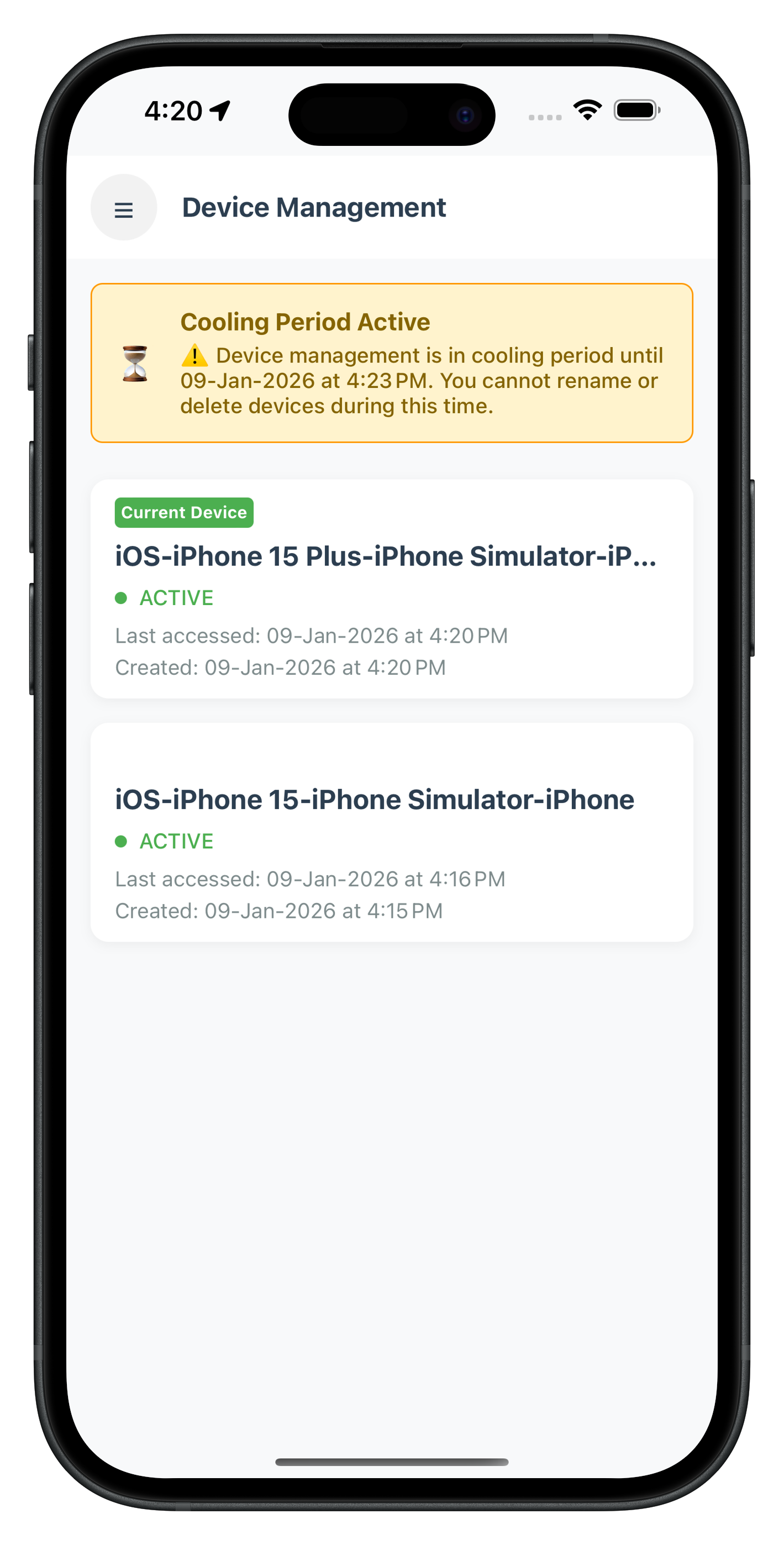
UI Preview
The following image showcases the Device Management screen from the sample application:
Create the DeviceDetailViewController that displays device details and provides rename/delete functionality.
Step 1: Create DeviceDetailViewController File
Create new file:
Sources/Tutorial/Screens/DeviceManagement/DeviceDetailViewController.swift
Step 2: Implement DeviceDetailViewController with Full Code
Add this complete implementation:
//
//  DeviceDetailViewController.swift
//  relidcodelab
//
//  Purpose: Display device details with rename and delete actions
//  Architecture: UIViewController with action buttons and closure-based event handling
//

import UIKit
import RELID

/// Device Detail Screen - Displays details of a selected device
/// Allows user to rename or delete the device
class DeviceDetailViewController: UIViewController {

    // MARK: - IBOutlets

    @IBOutlet weak var deviceNameLabel: UILabel!
    @IBOutlet weak var deviceStatusLabel: UILabel!
    @IBOutlet weak var deviceUUIDLabel: UILabel!
    @IBOutlet weak var lastAccessLabel: UILabel!
    @IBOutlet weak var createdLabel: UILabel!
    @IBOutlet weak var currentDeviceBadge: UILabel!
    @IBOutlet weak var renameButton: UIButton!
    @IBOutlet weak var deleteButton: UIButton!
    @IBOutlet weak var activityIndicator: UIActivityIndicatorView!
    @IBOutlet weak var coolingPeriodBannerView: UIView!
    @IBOutlet weak var coolingPeriodMessageLabel: UILabel!

    // MARK: - Properties

    var device: RDNADeviceDetails!
    var userID: String = ""
    var isCoolingPeriodActive: Bool = false
    var coolingPeriodEndTimestamp: TimeInterval = 0

    private var isProcessing = false {
        didSet {
            updateProcessingState()
        }
    }

    // MARK: - Lifecycle

    override func viewDidLoad() {
        super.viewDidLoad()
        setupUI()
        displayDeviceDetails()
    }

    override func viewWillAppear(_ animated: Bool) {
        super.viewWillAppear(animated)
        setupEventHandlers()
    }

    override func viewWillDisappear(_ animated: Bool) {
        super.viewWillDisappear(animated)
        // Cleanup: Reset event handler
        RDNADelegateManager.shared.onUpdateDeviceDetails = nil
    }

    // MARK: - Setup

    private func setupUI() {
        title = "Device Details"

        // Setup buttons
        renameButton.addTarget(self, action: #selector(renameButtonTapped), for: .touchUpInside)
        deleteButton.addTarget(self, action: #selector(deleteButtonTapped), for: .touchUpInside)

        // Update button states based on cooling period
        updateButtonStates()

        // Show/hide cooling period banner
        coolingPeriodBannerView.isHidden = !isCoolingPeriodActive
    }

    private func setupEventHandlers() {
        // Set closure for device update response
        RDNADelegateManager.shared.onUpdateDeviceDetails = { [weak self] status in
            self?.handleUpdateDeviceResponse(status)
        }
    }

    private func displayDeviceDetails() {
        deviceNameLabel.text = device.deviceName
        deviceStatusLabel.text = device.deviceStatus
        deviceUUIDLabel.text = device.deviceUUID

        lastAccessLabel.text = "Last accessed: \(formatDate(device.lastAccessEpochTime))"
        createdLabel.text = "Created: \(formatDate(device.deviceRegistrationEpochTime))"

        // Show/hide current device badge
        currentDeviceBadge.isHidden = !device.currentDevice

        // Disable delete button for current device
        if device.currentDevice {
            deleteButton.isEnabled = false
            deleteButton.alpha = 0.5
        }
    }

    private func updateButtonStates() {
        let actionsEnabled = !isCoolingPeriodActive

        renameButton.isEnabled = actionsEnabled
        renameButton.alpha = actionsEnabled ? 1.0 : 0.5

        // Delete button also respects current device check
        let canDelete = actionsEnabled && !device.currentDevice
        deleteButton.isEnabled = canDelete
        deleteButton.alpha = canDelete ? 1.0 : 0.5
    }

    // MARK: - Actions

    @objc private func renameButtonTapped() {
        print("DeviceDetailVC - Rename button tapped")

        // Show rename dialog
        if let renameVC = storyboard?.instantiateViewController(
            withIdentifier: "RenameDeviceViewController"
        ) as? RenameDeviceViewController {
            renameVC.currentDeviceName = device.deviceName
            renameVC.onSubmit = { [weak self] newName in
                self?.renameDevice(newName: newName)
            }
            renameVC.modalPresentationStyle = .overCurrentContext
            renameVC.modalTransitionStyle = .crossDissolve
            present(renameVC, animated: true)
        }
    }

    @objc private func deleteButtonTapped() {
        print("DeviceDetailVC - Delete button tapped")

        // Confirm deletion
        let alert = UIAlertController(
            title: "Delete Device",
            message: "Are you sure you want to delete '\(device.deviceName)'? This action cannot be undone.",
            preferredStyle: .alert
        )

        alert.addAction(UIAlertAction(title: "Cancel", style: .cancel))
        alert.addAction(UIAlertAction(title: "Delete", style: .destructive) { [weak self] _ in
            self?.deleteDevice()
        })

        present(alert, animated: true)
    }

    // MARK: - Device Operations

    private func renameDevice(newName: String) {
        print("DeviceDetailVC - Renaming device to: \(newName)")
        isProcessing = true

        // Update device object
        device.status = "Update"
        device.deviceName = newName

        // Call SDK API
        let error = RDNAService.shared.updateDeviceDetails(
            userID: userID,
            devices: [device]
        )

        // Check immediate error
        if error.longErrorCode != 0 {
            print("DeviceDetailVC - API call failed: \(error.errorString)")
            isProcessing = false
            showAlert(title: "Error", message: error.errorString)
        }
        // Success - wait for delegate callback
    }

    private func deleteDevice() {
        print("DeviceDetailVC - Deleting device")
        isProcessing = true

        // Update device object for deletion
        device.status = "Delete"
        device.deviceName = ""

        // Call SDK API
        let error = RDNAService.shared.updateDeviceDetails(
            userID: userID,
            devices: [device]
        )

        // Check immediate error
        if error.longErrorCode != 0 {
            print("DeviceDetailVC - API call failed: \(error.errorString)")
            isProcessing = false
            showAlert(title: "Error", message: error.errorString)
        }
        // Success - wait for delegate callback
    }

    // MARK: - Response Handling

    private func handleUpdateDeviceResponse(_ status: RDNAStatusUpdateDeviceDetails) {
        print("DeviceDetailVC - Received update device response")
        isProcessing = false

        // Check error first
        if status.error.longErrorCode != 0 {
            print("DeviceDetailVC - Error: \(status.error.errorString)")
            showAlert(title: "Error", message: status.error.errorString)
            return
        }

        // Check status code
        let statusCode = status.status.statusCode.rawValue
        print("DeviceDetailVC - Status code: \(statusCode)")

        if statusCode == 100 || statusCode == 0 {
            // Success
            print("DeviceDetailVC - Operation successful")
            let message = device.status == "Delete" ? "Device deleted successfully" : "Device renamed successfully"
            showAlert(title: "Success", message: message) { [weak self] in
                // Navigate back to device list
                self?.navigationController?.popViewController(animated: true)
            }
        } else if statusCode == 146 {
            // Cooling period active
            print("DeviceDetailVC - Cooling period active")
            showAlert(title: "Cooling Period", message: "Cannot modify devices during cooling period. Please try again later.")
        } else {
            // Other status codes
            print("DeviceDetailVC - Other status: \(statusCode)")
            showAlert(title: "Status", message: status.status.message)
        }
    }

    // MARK: - UI Updates

    private func updateProcessingState() {
        if isProcessing {
            activityIndicator.startAnimating()
            renameButton.isEnabled = false
            deleteButton.isEnabled = false
        } else {
            activityIndicator.stopAnimating()
            updateButtonStates()
        }
    }

    // MARK: - Helper Methods

    private func showAlert(title: String, message: String, completion: (() -> Void)? = nil) {
        let alert = UIAlertController(title: title, message: message, preferredStyle: .alert)
        alert.addAction(UIAlertAction(title: "OK", style: .default) { _ in
            completion?()
        })
        present(alert, animated: true)
    }

    private func formatDate(_ timestamp: TimeInterval) -> String {
        let date = Date(timeIntervalSince1970: timestamp / 1000.0)
        let formatter = DateFormatter()
        formatter.dateStyle = .medium
        formatter.timeStyle = .short
        return formatter.string(from: date)
    }
}
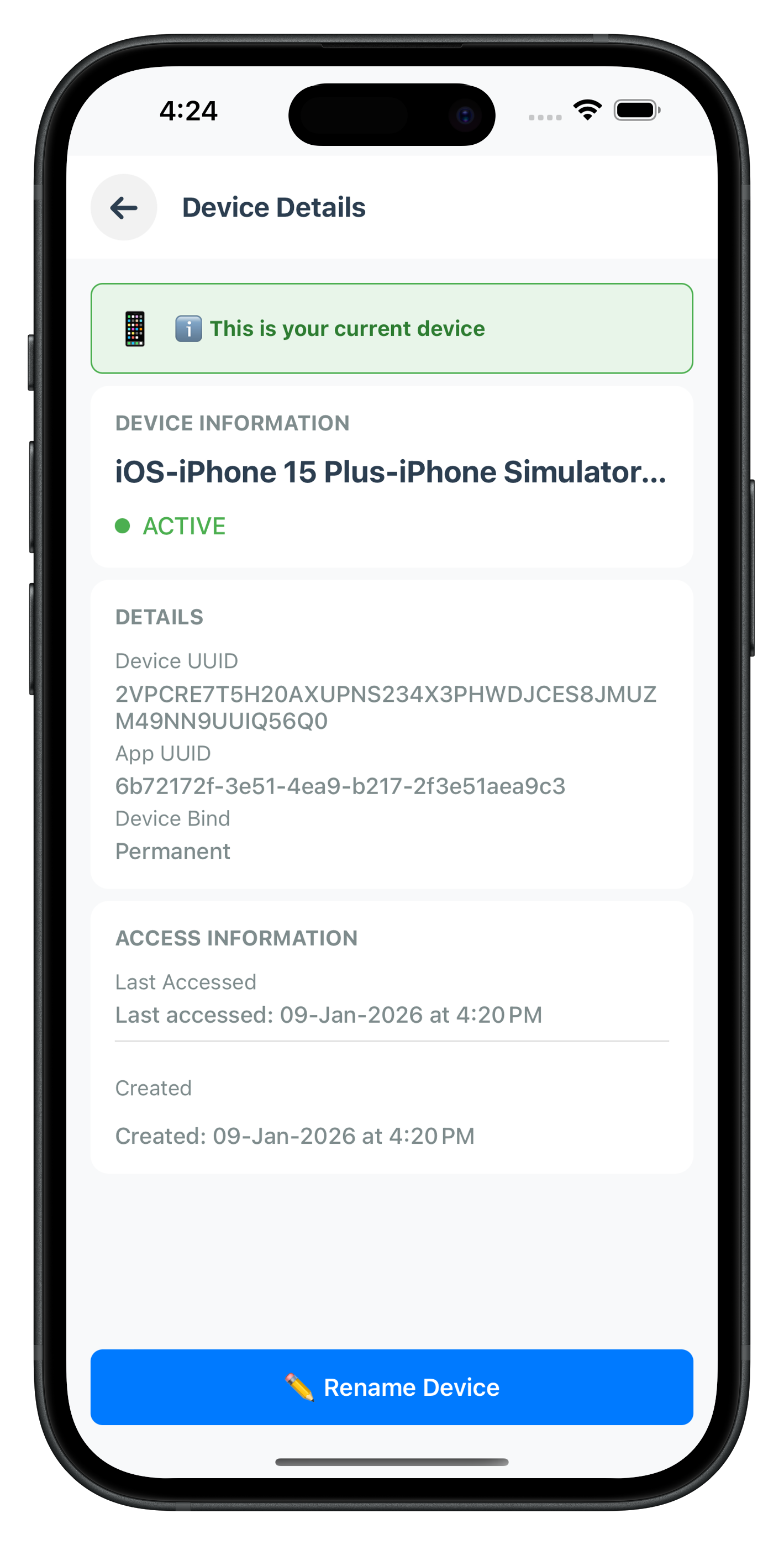
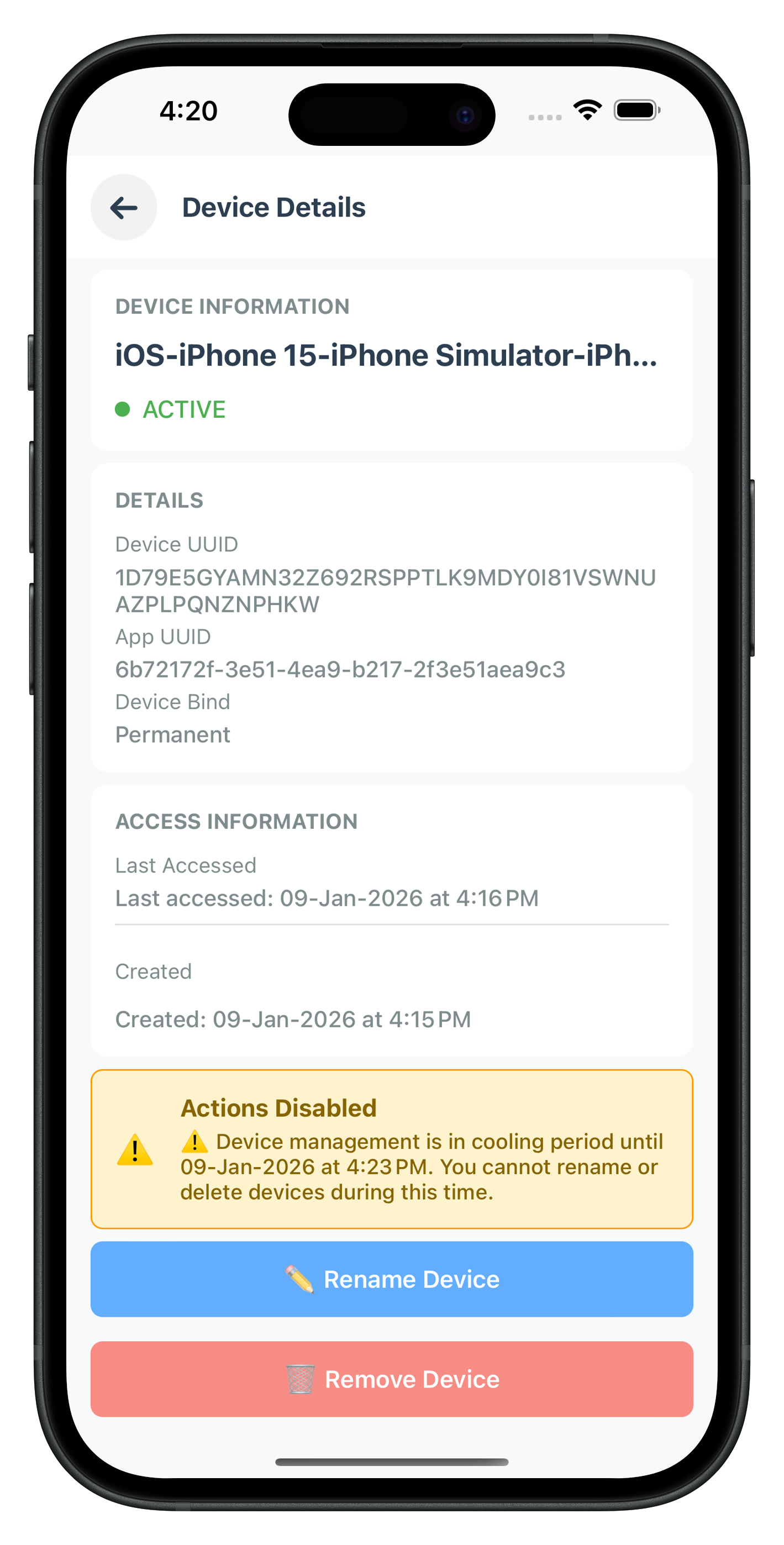
UI Preview
The following image showcase the Device Detail screen from the sample application:
Device Detail - Current Device |
Device Detail - Other Device |
Create the RenameDeviceViewController that provides a modal dialog for renaming devices with validation.
Step 1: Create RenameDeviceViewController File
Create new file:
Sources/Tutorial/Screens/DeviceManagement/RenameDeviceViewController.swift
Step 2: Implement RenameDeviceViewController with Full Code
Add this complete implementation:
//
//  RenameDeviceViewController.swift
//  relidcodelab
//
//  Purpose: Modal dialog for renaming a device with validation
//  Architecture: UIViewController presented modally
//

import UIKit

/// Rename Device Dialog - Modal dialog for device renaming
/// Provides input validation and submission callback
class RenameDeviceViewController: UIViewController {

    // MARK: - IBOutlets

    @IBOutlet weak var dialogView: UIView!
    @IBOutlet weak var currentNameLabel: UILabel!
    @IBOutlet weak var newNameTextField: UITextField!
    @IBOutlet weak var errorLabel: UILabel!
    @IBOutlet weak var cancelButton: UIButton!
    @IBOutlet weak var submitButton: UIButton!

    // MARK: - Properties

    var currentDeviceName: String = ""
    var onSubmit: ((String) -> Void)?

    // MARK: - Lifecycle

    override func viewDidLoad() {
        super.viewDidLoad()
        setupUI()
    }

    override func viewDidAppear(_ animated: Bool) {
        super.viewDidAppear(animated)
        // Focus text field and show keyboard
        newNameTextField.becomeFirstResponder()
    }

    // MARK: - Setup

    private func setupUI() {
        // Setup dialog styling
        dialogView.layer.cornerRadius = 12
        dialogView.layer.shadowColor = UIColor.black.cgColor
        dialogView.layer.shadowOffset = CGSize(width: 0, height: 4)
        dialogView.layer.shadowRadius = 8
        dialogView.layer.shadowOpacity = 0.2

        // Display current name
        currentNameLabel.text = currentDeviceName

        // Pre-fill text field with current name
        newNameTextField.text = currentDeviceName
        newNameTextField.delegate = self

        // Setup buttons
        cancelButton.addTarget(self, action: #selector(cancelButtonTapped), for: .touchUpInside)
        submitButton.addTarget(self, action: #selector(submitButtonTapped), for: .touchUpInside)

        // Hide error label initially
        errorLabel.isHidden = true

        // Dismiss keyboard on tap outside
        let tapGesture = UITapGestureRecognizer(target: self, action: #selector(dismissKeyboard))
        tapGesture.cancelsTouchesInView = false
        view.addGestureRecognizer(tapGesture)
    }

    // MARK: - Actions

    @objc private func cancelButtonTapped() {
        print("RenameDeviceVC - Cancel tapped")
        dismiss(animated: true)
    }

    @objc private func submitButtonTapped() {
        print("RenameDeviceVC - Submit tapped")

        guard let newName = newNameTextField.text else {
            return
        }

        // Validate input
        if let errorMessage = validateInput(newName) {
            showError(errorMessage)
            return
        }

        // Call submission callback
        onSubmit?(newName)
        dismiss(animated: true)
    }

    @objc private func dismissKeyboard() {
        view.endEditing(true)
    }

    // MARK: - Validation

    private func validateInput(_ newName: String) -> String? {
        let trimmed = newName.trimmingCharacters(in: .whitespacesAndNewlines)

        if trimmed.isEmpty {
            return "Device name cannot be empty"
        }

        if trimmed == currentDeviceName {
            return "New name must be different from current name"
        }

        if trimmed.count < 3 {
            return "Device name must be at least 3 characters"
        }

        if trimmed.count > 50 {
            return "Device name must be less than 50 characters"
        }

        return nil
    }

    private func showError(_ message: String) {
        errorLabel.text = message
        errorLabel.isHidden = false

        // Shake animation
        let animation = CAKeyframeAnimation(keyPath: "transform.translation.x")
        animation.timingFunction = CAMediaTimingFunction(name: .linear)
        animation.duration = 0.6
        animation.values = [-20, 20, -15, 15, -10, 10, -5, 5, 0]
        dialogView.layer.add(animation, forKey: "shake")
    }
}

// MARK: - UITextFieldDelegate

extension RenameDeviceViewController: UITextFieldDelegate {

    func textFieldShouldReturn(_ textField: UITextField) -> Bool {
        // Submit on return key
        submitButtonTapped()
        return true
    }

    func textFieldDidChangeSelection(_ textField: UITextField) {
        // Hide error when user starts typing
        errorLabel.isHidden = true
    }
}
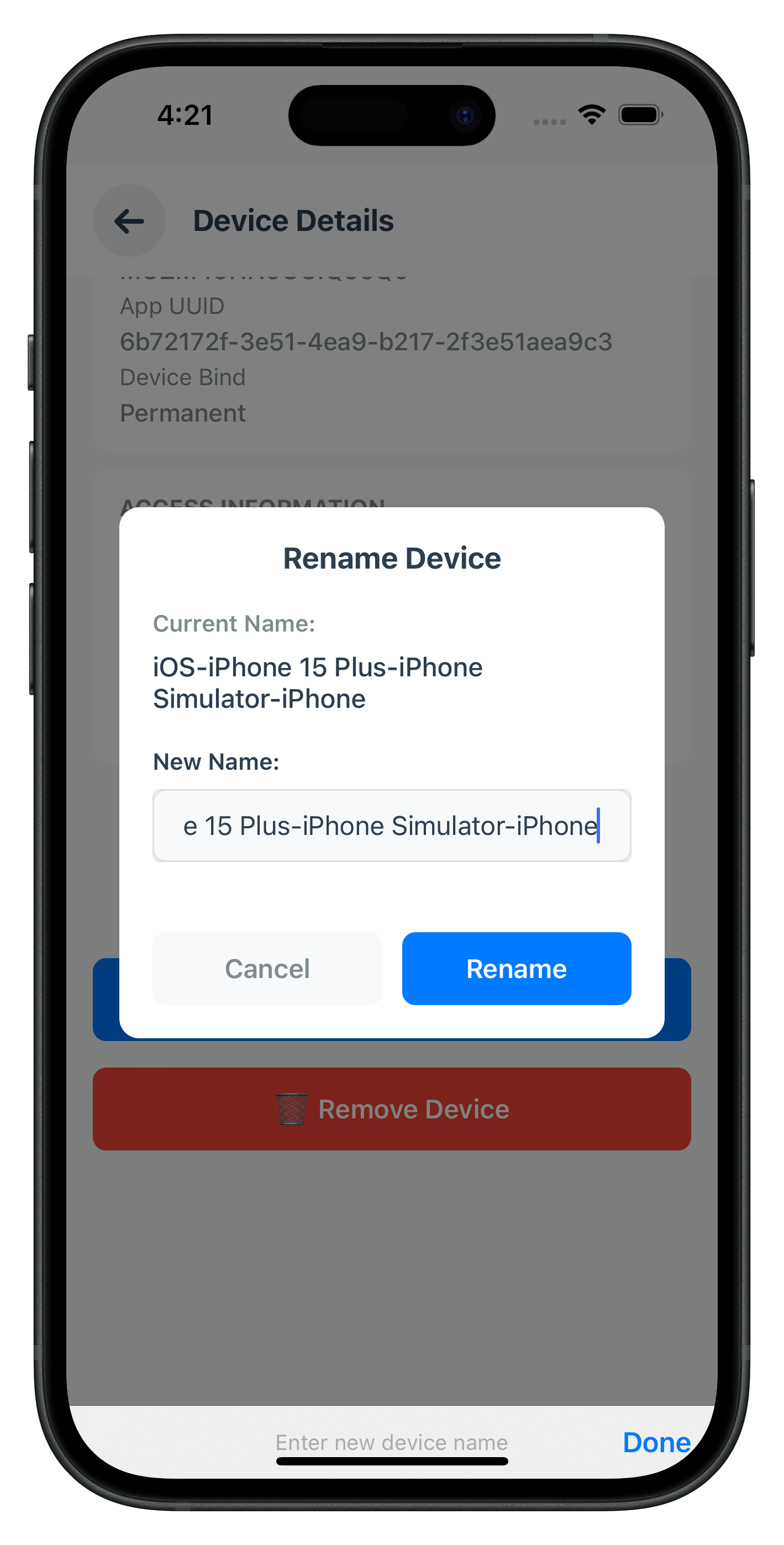
UI Preview
The following image showcases the Rename Device dialog from the sample application:
Integrate device management into your app's navigation structure.
Step 1: Add Device Management to Storyboard
In
Main.storyboard
:
- Add three new UIViewController scenes:
- DeviceManagementViewController
- DeviceDetailViewController
- RenameDeviceViewController
- Set Storyboard IDs:
- "DeviceManagementViewController"
- "DeviceDetailViewController"
- "RenameDeviceViewController"
- Connect IBOutlets for each view controller
- Design the UI layouts (or use provided XIB files)
Step 2: Add Navigation from Dashboard
In
DashboardViewController.swift
:
// Add menu item for Device Management
@IBAction func deviceManagementButtonTapped(_ sender: Any) {
    navigateToDeviceManagement()
}

private func navigateToDeviceManagement() {
    guard let userID = currentUserID else {
        showAlert(title: "Error", message: "User ID not available")
        return
    }

    if let deviceMgmtVC = storyboard?.instantiateViewController(
        withIdentifier: "DeviceManagementViewController"
    ) as? DeviceManagementViewController {
        deviceMgmtVC.userID = userID
        navigationController?.pushViewController(deviceMgmtVC, animated: true)
    }
}
Let's test the device management functionality to ensure everything works correctly.
Step 1: Build and Run
Using Xcode:
- Open
relidcodelab.xcworkspace(if using CocoaPods) - Select target device or simulator
- Press Cmd+R to build and run
Using command line:
# Build
xcodebuild -workspace relidcodelab.xcworkspace \
           -scheme relidcodelab \
           -sdk iphonesimulator

# Run on simulator
xcodebuild -workspace relidcodelab.xcworkspace \
           -scheme relidcodelab \
           -sdk iphonesimulator \
           -destination 'platform=iOS Simulator,name=iPhone 14'
Step 2: Test Device List Display
- Login with your test user credentials
- Navigate to Device Management from dashboard
- Verify:
- Device list loads and displays
- Current device is highlighted
- Pull-to-refresh works
- Device count is accurate
Expected Console Output:
RDNAService - Getting registered device details for userID: testuser
RDNAService - GetRegisteredDeviceDetails request successful, awaiting onGetRegistredDeviceDetails callback
RDNADelegateManager - Get registered device details response received:
  Error code: 0
  Devices count: 2
  Cooling period timestamp: 0
DeviceManagementVC - handleDeviceDetailsResponse called
  - Error code: 0
  - Status code: 100
DeviceManagementVC - Success case (status 100), no cooling period
DeviceManagementVC - Loaded 2 devices
Step 3: Test Device Rename
- Tap on a device in the list
- Tap "Rename" button
- Enter new device name
- Tap "Submit"
- Verify:
- Device name updates
- Success message appears
- Navigation returns to device list
- Device list shows updated name
Expected Console Output:
RDNAService - Updating device details for userID: testuser
  Devices count: 1
RDNAService - UpdateDeviceDetails request successful, awaiting onUpdateDeviceDetails callback
RDNADelegateManager - Update device details response received:
  Error code: 0
  Status code: 100
Note: DeviceDetailViewController shows a success alert and navigates back to the device list upon successful completion.
Step 4: Test Device Deletion
- Tap on a non-current device
- Tap "Delete" button
- Confirm deletion
- Verify:
- Device is removed
- Success message appears
- Navigation returns to device list
- Device list refreshes without deleted device
Expected Console Output:
RDNAService - Updating device details for userID: testuser
  Devices count: 1
RDNAService - UpdateDeviceDetails request successful, awaiting onUpdateDeviceDetails callback
RDNADelegateManager - Update device details response received:
  Error code: 0
  Status code: 100
Note: DeviceDetailViewController shows a success alert and navigates back to the device list. The device list automatically refreshes via viewWillAppear.
Step 5: Test Cooling Period
- Trigger cooling period by performing multiple operations quickly
- Navigate to Device Management
- Verify:
- Cooling period banner appears
- All action buttons are disabled
- Warning message is clear
- Attempting operations shows appropriate message
Expected Console Output:
RDNAService - Getting registered device details for userID: testuser
RDNAService - GetRegisteredDeviceDetails request successful, awaiting onGetRegistredDeviceDetails callback
RDNADelegateManager - Get registered device details response received:
  Error code: 0
  Devices count: 2
  Cooling period timestamp: 1760009989000
DeviceManagementVC - handleDeviceDetailsResponse called
  - Error code: 0
  - Status code: 146
DeviceManagementVC - Cooling period detected (status 146)
DeviceManagementVC - Loaded 2 devices
DeviceManagementVC - Cooling period active changed to: true
DeviceManagementVC - Banner expanded, content determines height
DeviceManagementVC - Layout updated
Step 6: Test Current Device Protection
- Navigate to current device details
- Verify:
- Delete button is disabled
- Rename button is enabled
- "Current Device" badge is visible
- Attempting to delete shows appropriate message
Device List Not Loading
Symptom: Device list screen shows loading indicator indefinitely
Possible Causes:
- Invalid
userIDpassed to view controller - Network connectivity issues
- SDK not initialized properly
- Delegate handler not set correctly
Solutions:
// Check userID
print("UserID: \(userID)")

// Verify delegate handler is set
print("Delegate handler set: \(RDNADelegateManager.shared.onGetRegistredDeviceDetails != nil)")

// Check SDK initialization
let version = RDNAService.shared.getSDKVersion()
print("SDK Version: \(version)")

// Check error callback
if error.longErrorCode != 0 {
    print("API Error: \(error.errorString)")
}
Cooling Period Banner Not Showing
Symptom: Banner doesn't appear even when status code is 146
Solution:
// Verify status code check
print("Status code: \(status.status.statusCode.rawValue)")

// Check banner constraint setup
print("Banner hidden: \(coolingPeriodBannerView.isHidden)")
print("Collapse constraint active: \(bannerCollapseConstraint?.isActive ?? false)")

// Force layout update
view.layoutIfNeeded()
Device Operations Failing
Symptom: Rename or delete operations fail with error
Possible Causes:
- Cooling period active
- Attempting to delete current device
- Network issues
- Invalid device object
Solutions:
// Check cooling period
if isCoolingPeriodActive {
    print("Operations disabled - cooling period active")
    return
}

// Check current device
if device.currentDevice && operation == .delete {
    print("Cannot delete current device")
    return
}

// Verify device object
print("Device UUID: \(device.deviceUUID)")
print("Device status: \(device.status)")
print("Device name: \(device.deviceName)")
Memory Leaks
Symptom: App crashes or memory warnings
Solution:
// Always use [weak self] in closures
RDNADelegateManager.shared.onGetRegistredDeviceDetails = { [weak self] status in
    self?.handleDeviceDetailsResponse(status)
}

// Clean up handlers in viewWillDisappear
override func viewWillDisappear(_ animated: Bool) {
    super.viewWillDisappear(animated)
    RDNADelegateManager.shared.onGetRegistredDeviceDetails = nil
}
Memory Management
// Use weak self in closures to avoid retain cycles
RDNADelegateManager.shared.onGetRegistredDeviceDetails = { [weak self] status in
    guard let self = self else { return }
    self.handleResponse(status)
}

// Clean up observers and delegates in viewWillDisappear
override func viewWillDisappear(_ animated: Bool) {
    super.viewWillDisappear(animated)
    RDNADelegateManager.shared.onGetRegistredDeviceDetails = nil
}

// Use deinit for final cleanup
deinit {
    print("DeviceManagementVC - Deallocated")
}
Threading
// Always update UI on main thread
DispatchQueue.main.async {
    self.tableView.reloadData()
    self.activityIndicator.stopAnimating()
}

// SDK operations on background thread (if needed)
DispatchQueue.global(qos: .userInitiated).async {
    // Heavy operation
    DispatchQueue.main.async {
        // Update UI
    }
}

// Delegate callbacks are already on main thread (via RDNADelegateManager)
Error Handling
// Three-layer error handling pattern
func loadDevices() {
    // Layer 1: Check immediate API error
    let error = RDNAService.shared.getRegisteredDeviceDetails(userID: userID)
    if error.longErrorCode != 0 {
        showAlert(title: "Error", message: error.errorString)
        return
    }

    // Layer 2 & 3: Check delegate response
    RDNADelegateManager.shared.onGetRegistredDeviceDetails = { [weak self] status in
        // Layer 2: Check response error
        if status.error.longErrorCode != 0 {
            self?.showAlert(title: "Error", message: status.error.errorString)
            return
        }

        // Layer 3: Check status code
        if status.status.statusCode.rawValue != 100 {
            self?.handleStatusCode(status.status.statusCode.rawValue)
            return
        }

        // Success
        self?.updateUI(with: status.devices)
    }
}
Security
// Use Keychain for sensitive data (not UserDefaults)
// Use Security framework for secure storage
let query: [String: Any] = [
    kSecClass as String: kSecClassGenericPassword,
    kSecAttrAccount as String: "userID",
    kSecValueData as String: userData
]
SecItemAdd(query as CFDictionary, nil)

// Enable app protection
// Set appropriate logging levels for production
RDNAService.shared.initialize(loggingLevel: .NO_LOGS) { error in
    // Handle initialization
}

// Code signing and entitlements in Xcode settings
Performance
// Lazy load resources
private lazy var deviceFormatter: DateFormatter = {
    let formatter = DateFormatter()
    formatter.dateStyle = .medium
    formatter.timeStyle = .short
    return formatter
}()

// Cache expensive computations
private var cachedDeviceCount: Int?

// Use defer for cleanup code
func processDevices() {
    defer {
        isProcessing = false
        activityIndicator.stopAnimating()
    }

    // Processing logic
}

// Profile with Instruments regularly
App Lifecycle
// Save state in applicationDidEnterBackground
func applicationDidEnterBackground(_ application: UIApplication) {
    // Save pending state
    UserDefaults.standard.synchronize()
}

// Pause SDK operations when app is backgrounded
func applicationWillResignActive(_ application: UIApplication) {
    // Pause ongoing operations
}

// Resume operations in applicationWillEnterForeground
func applicationWillEnterForeground(_ application: UIApplication) {
    // Resume operations
    // Refresh device list if needed
}
What You've Accomplished
🎉 Congratulations! You've successfully implemented complete Device Management functionality in your iOS application using the REL-ID iOS SDK!
Skills Mastered
In this codelab, you learned:
- ✅ Device Listing API Integration: Fetching and displaying registered devices with cooling period information
- ✅ Device Update Operations: Implementing rename and delete with proper validation
- ✅ Cooling Period Management: Detecting and handling server-enforced cooling periods
- ✅ Current Device Protection: Preventing accidental deletion of the active device
- ✅ Delegate-Based Architecture: Handling
onGetRegistredDeviceDetailsandonUpdateDeviceDetailscallbacks - ✅ Three-Layer Error Handling: Comprehensive error detection across API, response, and delegate layers
- ✅ Real-time Synchronization: Auto-refresh with pull-to-refresh and navigation-based updates
- ✅ UIKit View Controller Patterns: Implementing device management screens with proper lifecycle management
- ✅ Memory Management: Using weak self and proper delegate cleanup to prevent memory leaks
Key iOS Patterns Learned
- Delegate Pattern: Closure-based event handling with RDNADelegateManager
- View Controller Lifecycle: Setup in viewWillAppear, cleanup in viewWillDisappear
- Main Thread UI Updates: Using DispatchQueue.main.async for all UI updates
- Memory Management: Weak self in closures and proper handler cleanup
- Resource Management: Loading files with Bundle.main
- UITableView Patterns: Data source, delegate, and pull-to-refresh
- Modal Presentation: Presenting dialogs with .overCurrentContext
Additional Resources
Thank you for completing this codelab! If you have questions or feedback, please reach out to the REL-ID Development Team.