🎯 Learning Path:
- Complete REL-ID Complete Activation & Login Flow Codelab
- Complete REL-ID Additional Device Activation Flow Codelab
- You are here → Update Password Flow Implementation (Post-Login)
Welcome to the REL-ID Update Password codelab! This tutorial builds upon your existing MFA implementation to add secure user-initiated password update capabilities using REL-ID SDK's credential management APIs.
What You'll Build
In this codelab, you'll enhance your existing MFA application with:
- 🔐 Post-Login Password Update: User-initiated password change from dashboard with
challengeMode = 2(RDNA_OP_UPDATE_CREDENTIALS) - 📋 Credential Availability Detection: Automatic detection using
getAllChallenges()API andonCredentialsAvailableForUpdateevent - 🎯 Conditional Menu Display: Show "Update Password" only when credential is available for update
- 📝 Three-Field Password Form: Current password, new password, and confirm password validation with focus management
- 🔄 Screen-Level Event Handling: Proper
onUpdateCredentialResponseevent handling with cleanup - ⚠️ SDK Event Chain Management: Handle automatic
onUserLoggedOff→getUserevents for status codes 110/153
What You'll Learn
By completing this codelab, you'll master:
- Credential Availability Check: Post-login detection using
getAllChallenges()API - Update Flow Initiation: Triggering password update with
initiateUpdateFlowForCredential('Password')API - Drawer Navigation Integration: Conditional menu item rendering based on credential availability
- UpdatePassword API Integration: Implementing
updatePassword(current, new, RDNA_OP_UPDATE_CREDENTIALS)with challengeMode 2 - Password Policy Extraction: Parsing
RELID_PASSWORD_POLICYfrom challenge data - Screen-Level Event Management:
onUpdateCredentialResponsehandler with proper cleanup - SDK Event Chain Handling: Managing automatic logout events for specific status codes
- Focus Management: Proper
FocusNodeimplementation for multi-field forms
Prerequisites
Before starting this codelab, ensure you have:
- ✅ Completed REL-ID MFA Complete Activation & Login Flow Codelab - All MFA screens and flows must be fully implemented
- ✅ Flutter Development Environment - Flutter SDK, Android Studio/VS Code configured
- ✅ REL-ID SDK Integration - Latest SDK with credential management APIs
- ✅ Dart Knowledge - Understanding of Dart classes and type safety patterns
- ✅ Drawer Navigation Setup - Drawer navigation configured with Dashboard screen
- ✅ Server Configuration - REL-ID server with password update credential enabled
Get the Code from GitHub
The code to get started can be found in a GitHub repository.
You can clone the repository using the following command:
git clone https://github.com/uniken-public/codelab-flutter.git
Navigate to the relid-MFA-update-password folder in the repository you cloned earlier
Codelab Architecture Overview
This codelab extends your MFA application with five core password update components:
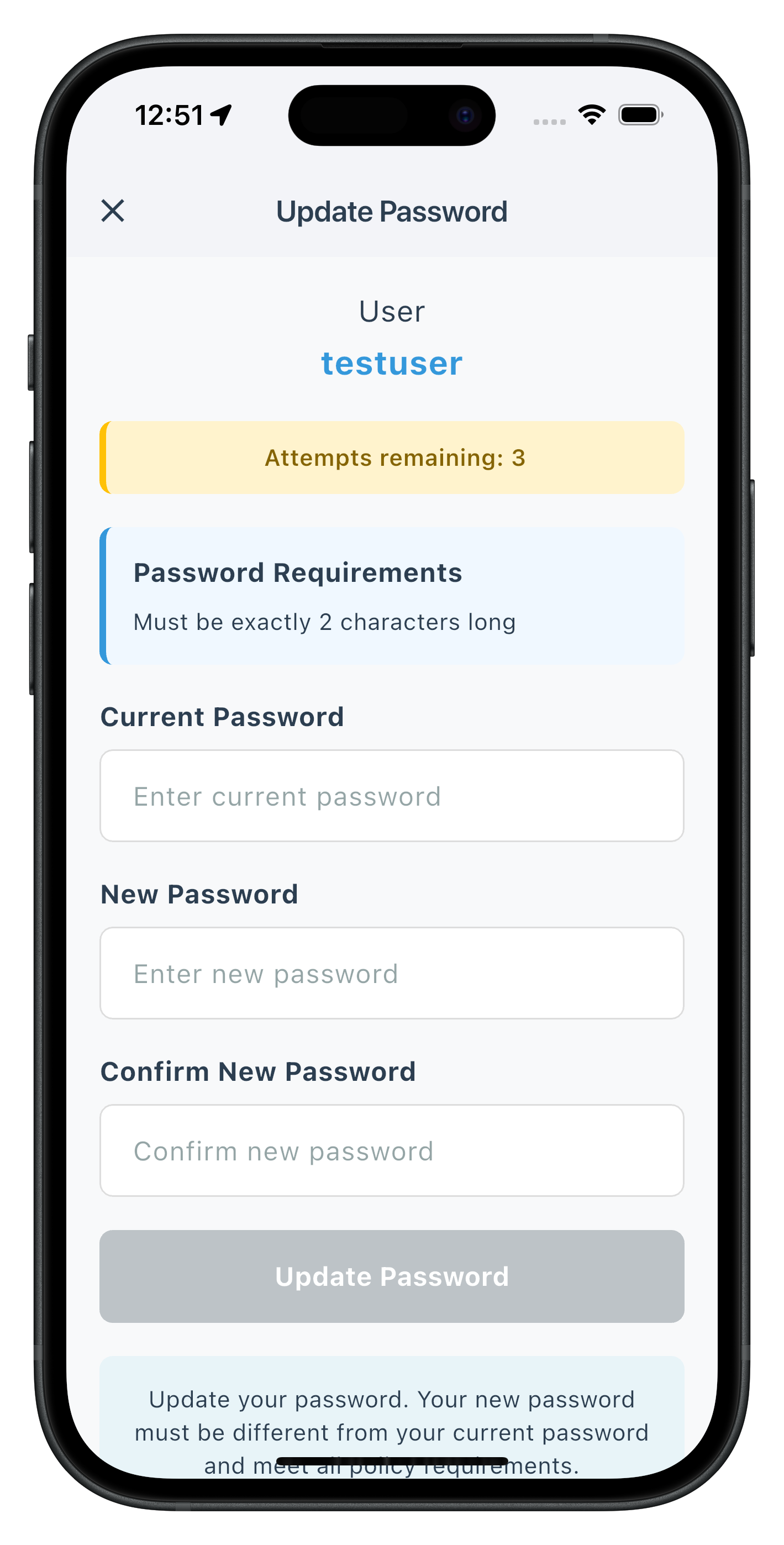
- UpdatePasswordScreen: Three-field password form with policy display and focus management in drawer navigation
- Credential Availability Detection:
getAllChallenges()API integration after login withonCredentialsAvailableForUpdateevent handler - Update Flow Initiation:
initiateUpdateFlowForCredential('Password')API to trigger password update from drawer menu - Conditional Menu Rendering: Dynamic drawer menu based on
onCredentialsAvailableForUpdateevent - Screen-Level Event Handling:
onUpdateCredentialResponsehandler with automatic cleanup and SDK event chain management
Before implementing password update functionality, let's understand the key SDK events and APIs that power the user-initiated password update workflow (post-login).
Update Password Event Flow
The password update process follows this event-driven pattern:
User Logs In Successfully → getAllChallenges() Called →
onCredentialsAvailableForUpdate Event → Drawer Menu Shows "Update Password" →
User Taps Menu Item → initiateUpdateFlowForCredential('Password') →
getPassword Event (challengeMode=2) → UpdatePasswordScreen Displays →
User Updates Password → updatePassword(current, new, RDNA_OP_UPDATE_CREDENTIALS) →
onUpdateCredentialResponse (statusCode 110/153) →
SDK Triggers onUserLoggedOff → getUser Event → Navigation to Login
Challenge Mode 2 vs Challenge Mode 4
It's crucial to understand the difference between user-initiated update and password expiry:
Challenge Mode | Use Case | Trigger | User Action | Screen Location |
| User-initiated password update (post-login) | User taps "Update Password" menu | Provide current + new password | Drawer Navigation |
| Password expiry during login | Server detects expired password | Provide current + new password | Stack Navigation |
| Password verification for login | User attempts to log in | Enter password | Stack Navigation |
| Set new password during activation | First-time activation | Create password | Stack Navigation |
Credential Availability Detection Flow
Post-login password update requires credential availability check:
Step | API/Event | Description |
1. User Login |
| User successfully completes MFA login |
2. Credential Check |
| Check which credentials are available for update |
3. Availability Event |
| SDK returns list of updatable credentials (e.g., |
4. Menu Display | Conditional rendering | Show "Update Password" menu item if |
5. User Initiates |
| User taps menu item to start update flow |
6. SDK Triggers |
| SDK requests password update |
7. Screen Display | UpdatePasswordScreen | Show three-field password form in drawer |
Core Update Password APIs and Events
The REL-ID SDK provides these APIs and events for password update:
API/Event | Type | Description | User Action Required |
API | Check available credential updates after login | System calls automatically | |
Event | Receives list of updatable credentials | System stores in state | |
API | Initiate update flow for specific credential | User taps menu item | |
Event | Password update request with policy | User provides passwords | |
API | Submit password update | User submits form | |
Event | Password update result with status codes | System handles response |
Password Policy Extraction
Password update flow uses the standard policy key:
Flow | Policy Key | Description |
Password Creation (challengeMode=1) |
| Policy for new password creation |
Password Update (challengeMode=2) |
| Policy for user-initiated password update |
Password Expiry (challengeMode=4) |
| Policy for expired password update |
SDK Event Chain - Critical Status Codes
When onUpdateCredentialResponse receives these status codes, the SDK automatically triggers onUserLoggedOff → getUser event chain:
Status Code | Meaning | SDK Behavior | Action Required |
| Password has expired while updating | SDK triggers | Clear fields, user must re-login |
| Attempts exhausted | SDK triggers | Clear fields, user logs out |
| Password does not meet policy | No automatic logout but triggers | Clear fields, display error |
Drawer Navigation vs Stack Navigation
Update Password flow uses Drawer navigation, not Stack navigation:
Screen | Navigation Type | Reason | Access Method |
UpdatePasswordScreen | Drawer Navigation | Post-login feature, conditional access | Menu item in drawer |
UpdateExpiryPasswordScreen | Stack Navigation | Login-blocking feature, forced update | Automatic SDK navigation |
SetPasswordScreen | Stack Navigation | Activation flow, first-time setup | Automatic SDK navigation |
VerifyPasswordScreen | Stack Navigation | Login flow, authentication | Automatic SDK navigation |
Screen-Level Event Handler Pattern
Update password uses screen-level event handling with cleanup:
// UpdatePasswordScreen - Screen-level event handler
void _setupEventHandlers() {
  final eventManager = _rdnaService.getEventManager();

  // Set handler when screen initializes
  eventManager.setUpdateCredentialResponseHandler((data) {
    // Process status codes 110, 153
    // SDK will trigger onUserLoggedOff → getUser after this
  });
}

@override
void dispose() {
  // Cleanup when screen unmounts
  _rdnaService.getEventManager().setUpdateCredentialResponseHandler(null);
  super.dispose();
}
Let's implement the credential management APIs in your service layer following established REL-ID SDK patterns.
Step 1: Add getAllChallenges API
Add this method to
lib/uniken/services/rdna_service.dart
:
// lib/uniken/services/rdna_service.dart (addition to existing class)

/// Get all available challenges for credential updates
///
/// This API checks which credentials are available for update after successful login.
/// Call this immediately after onUserLoggedIn event to populate the drawer menu with
/// available credential update options.
///
/// See: https://developer.uniken.com/docs/getallchallenges
///
/// Workflow:
/// 1. User logs in successfully (onUserLoggedIn event)
/// 2. Call getAllChallenges(username) immediately after login
/// 3. SDK checks server for available credential updates
/// 4. SDK triggers onCredentialsAvailableForUpdate event
/// 5. Event handler receives options list (e.g., ["Password", "PIN"])
/// 6. App displays conditional menu items in drawer
///
/// Response Validation Logic:
/// 1. Check error.longErrorCode: 0 = success, > 0 = error
/// 2. On success, triggers onCredentialsAvailableForUpdate event
/// 3. On failure, credentials update unavailable
/// 4. Async event will be handled by SDKEventProvider
///
/// @param username The username to check credential availability
/// @returns Future<RDNASyncResponse> that resolves with sync response structure
Future<RDNASyncResponse> getAllChallenges(String username) async {
  print('RdnaService - Getting all available challenges for user: $username');

  final response = await _rdnaClient.getAllChallenges(username);

  print('RdnaService - GetAllChallenges sync response received');
  print('RdnaService - Sync response:');
  print('  Long Error Code: ${response.error?.longErrorCode}');
  print('  Short Error Code: ${response.error?.shortErrorCode}');

  return response;
}
Step 2: Add initiateUpdateFlowForCredential API
Add this method to
lib/uniken/services/rdna_service.dart
:
// lib/uniken/services/rdna_service.dart (addition to existing class)

/// Initiate update flow for a specific credential
///
/// This API triggers the SDK to start the credential update flow for a specific type.
/// Call this when user taps "Update Password" menu item in drawer.
/// The SDK will respond with getPassword event (challengeMode=2).
///
/// See: https://developer.uniken.com/docs/initiateupdateflowforcredential
///
/// Workflow:
/// 1. User taps "Update Password" menu item
/// 2. Call initiateUpdateFlowForCredential('Password')
/// 3. SDK processes request
/// 4. SDK triggers getPassword event with challengeMode=2
/// 5. SDKEventProvider navigates to UpdatePasswordScreen in drawer
/// 6. User provides current and new passwords
///
/// Response Validation Logic:
/// 1. Check error.longErrorCode: 0 = success, > 0 = error
/// 2. On success, triggers getPassword event with challengeMode=2
/// 3. On failure, update flow cannot be initiated
/// 4. Async event will be handled by SDKEventProvider
///
/// @param credentialType The credential type to update (e.g., "Password", "PIN")
/// @returns Future<RDNASyncResponse> that resolves with sync response structure
Future<RDNASyncResponse> initiateUpdateFlowForCredential(String credentialType) async {
  print('RdnaService - Initiating update flow for credential: $credentialType');

  final response = await _rdnaClient.initiateUpdateFlowForCredential(credentialType);

  print('RdnaService - InitiateUpdateFlowForCredential sync response received');
  print('RdnaService - Sync response:');
  print('  Long Error Code: ${response.error?.longErrorCode}');
  print('  Short Error Code: ${response.error?.shortErrorCode}');

  return response;
}
Step 3: Add updatePassword API with challengeMode 2
Add this method to
lib/uniken/services/rdna_service.dart
:
// lib/uniken/services/rdna_service.dart (addition to existing class)

/// Updates password for user-initiated password update (Post-Login)
///
/// This method is specifically used for user-initiated password updates after login.
/// When user taps "Update Password" in drawer and enters passwords, this API
/// submits the password update request with challengeMode=RDNA_OP_UPDATE_CREDENTIALS.
/// Uses async/await pattern for Flutter SDK integration.
///
/// See: https://developer.uniken.com/docs/updating-other-credentials
///
/// Workflow:
/// 1. User taps "Update Password" menu item (post-login)
/// 2. initiateUpdateFlowForCredential('Password') called
/// 3. SDK triggers getPassword with challengeMode=2
/// 4. App displays UpdatePasswordScreen in drawer
/// 5. User provides current and new passwords
/// 6. App calls updatePassword(current, new, RDNA_OP_UPDATE_CREDENTIALS)
/// 7. SDK validates and updates password
/// 8. SDK triggers onUpdateCredentialResponse event
/// 9. On statusCode 110/153, SDK auto-triggers onUserLoggedOff → getUser
///
/// Response Validation Logic:
/// 1. Check error.longErrorCode: 0 = success, > 0 = error
/// 2. On success, triggers onUpdateCredentialResponse event
/// 3. On failure, may trigger getPassword again with error status
/// 4. StatusCode 100 = Success
/// 5. StatusCode 110 = Password expired (SDK triggers logout)
/// 6. StatusCode 153 = Attempts exhausted (SDK triggers logout)
/// 7. StatusCode 190 = Policy violation (no automatic logout)
/// 8. Async events will be handled by screen-level handler
///
/// @param currentPassword The user's current password
/// @param newPassword The new password to set
/// @param challengeMode Challenge mode (should be RDNA_OP_UPDATE_CREDENTIALS for mode 2)
/// @returns Future<RDNASyncResponse> that resolves with sync response structure
Future<RDNASyncResponse> updatePassword(
  String currentPassword,
  String newPassword,
  RDNAChallengeOpMode challengeMode
) async {
  print('RdnaService - Updating password (challengeMode: $challengeMode)');

  final response = await _rdnaClient.updatePassword(
    currentPassword,
    newPassword,
    challengeMode
  );

  print('RdnaService - UpdatePassword sync response received');
  print('RdnaService - Sync response:');
  print('  Long Error Code: ${response.error?.longErrorCode}');
  print('  Short Error Code: ${response.error?.shortErrorCode}');

  return response;
}
Step 4: Verify Service Layer Integration
Ensure these imports exist in
lib/uniken/services/rdna_service.dart
:
import 'package:rdna_client/rdna_client.dart';
import '../types/rdna_events.dart';
Verify your service class exports all methods:
class RdnaService {
  // Existing MFA methods...

  // ✅ New credential management methods
  Future<RDNASyncResponse> getAllChallenges(String username) async { /* ... */ }
  Future<RDNASyncResponse> initiateUpdateFlowForCredential(String credentialType) async { /* ... */ }
  Future<RDNASyncResponse> updatePassword(String currentPassword, String newPassword, RDNAChallengeOpMode challengeMode) async { /* ... */ }
}
Now let's enhance your SDKEventProvider to handle credential availability detection and password update routing.
Step 1: Add Dart Type Definitions
Ensure these types exist in
lib/uniken/types/rdna_events.dart
:
// lib/uniken/types/rdna_events.dart (additions)

/// Credentials Available for Update Event Data
/// Triggered after getAllChallenges() API call
class RDNACredentialsAvailableForUpdate {
  final String? userID;
  final List<String>? options; // List of updatable credentials: ["Password", "PIN", etc.]

  RDNACredentialsAvailableForUpdate({
    this.userID,
    this.options,
  });

  factory RDNACredentialsAvailableForUpdate.fromJson(Map<String, dynamic> json) {
    return RDNACredentialsAvailableForUpdate(
      userID: json['userID'] as String?,
      options: (json['options'] as List<dynamic>?)?.cast<String>(),
    );
  }
}

/// Update Credential Response Event Data
/// Triggered after updatePassword() API call
class RDNAUpdateCredentialResponse {
  final String? userId;
  final String? credType; // "Password", "PIN", etc.
  final RDNAStatus? status;
  final RDNAError? error;

  RDNAUpdateCredentialResponse({
    this.userId,
    this.credType,
    this.status,
    this.error,
  });

  factory RDNAUpdateCredentialResponse.fromJson(Map<String, dynamic> json) {
    return RDNAUpdateCredentialResponse(
      userId: json['userId'] as String?,
      credType: json['credType'] as String?,
      status: json['status'] != null ? RDNAStatus.fromJson(json['status']) : null,
      error: json['error'] != null ? RDNAError.fromJson(json['error']) : null,
    );
  }
}

// Callback type definitions
typedef RDNACredentialsAvailableForUpdateCallback = void Function(RDNACredentialsAvailableForUpdate);
typedef RDNAUpdateCredentialResponseCallback = void Function(RDNAUpdateCredentialResponse);
Step 2: Add Event Handlers to rdnaEventManager
Enhance
lib/uniken/services/rdna_event_manager.dart
:
// lib/uniken/services/rdna_event_manager.dart (additions)

class RdnaEventManager {
  // Existing callbacks...

  // ✅ New callback properties
  RDNACredentialsAvailableForUpdateCallback? _credentialsAvailableForUpdateHandler;
  RDNAUpdateCredentialResponseCallback? _updateCredentialResponseHandler;

  // ✅ New event listener methods
  void _onCredentialsAvailableForUpdate(dynamic credentialsData) {
    print('RdnaEventManager - Credentials available for update event received');

    final data = credentialsData as RDNACredentialsAvailableForUpdate;
    print('RdnaEventManager - Available options: ${data.options}');

    if (_credentialsAvailableForUpdateHandler != null) {
      _credentialsAvailableForUpdateHandler!(data);
    }
  }

  void _onUpdateCredentialResponse(dynamic updateData) {
    print('RdnaEventManager - Update credential response event received');

    final response = updateData as RDNAUpdateCredentialResponse;
    print('RdnaEventManager - Update credential response:');
    print('  userId: ${response.userId}');
    print('  credType: ${response.credType}');
    print('  statusCode: ${response.status?.statusCode}');
    print('  statusMessage: ${response.status?.statusMessage}');

    if (_updateCredentialResponseHandler != null) {
      _updateCredentialResponseHandler!(response);
    }
  }

  // ✅ New setter methods
  void setCredentialsAvailableForUpdateHandler(RDNACredentialsAvailableForUpdateCallback? callback) {
    _credentialsAvailableForUpdateHandler = callback;
  }

  void setUpdateCredentialResponseHandler(RDNAUpdateCredentialResponseCallback? callback) {
    _updateCredentialResponseHandler = callback;
  }

  // ✅ Register listeners in _registerEventListeners()
  void _registerEventListeners() {
    // Existing listeners...

    _listeners.add(
      _rdnaClient.on(RdnaClient.onCredentialsAvailableForUpdate, _onCredentialsAvailableForUpdate),
    );
    _listeners.add(
      _rdnaClient.on(RdnaClient.onUpdateCredentialResponse, _onUpdateCredentialResponse),
    );
  }

  void cleanup() {
    // Existing cleanup...
    _credentialsAvailableForUpdateHandler = null;
    _updateCredentialResponseHandler = null;
  }
}
Step 3: Update SDKEventProvider State Management
Modify
lib/uniken/providers/sdk_event_provider.dart
:
// lib/uniken/providers/sdk_event_provider.dart (modifications)

// ✅ NEW: Add state provider for available credentials
final availableCredentialsProvider = StateProvider<List<String>>((ref) => []);

class SDKEventProvider extends ConsumerWidget {
  // ... existing code

  // ✅ NEW: Add onCredentialsAvailableForUpdate handler
  void _handleCredentialsAvailableForUpdate(
    WidgetRef ref,
    RDNACredentialsAvailableForUpdate data
  ) {
    print('SDKEventProvider - Credentials available for update event received');
    print('  UserID: ${data.userID}');
    print('  Available options: ${data.options}');

    // Update state so drawer menu can show/hide Update Password menu item
    ref.read(availableCredentialsProvider.notifier).state = data.options ?? [];
    print('SDKEventProvider - Available credentials state updated: ${data.options}');
  }

  // ... existing code
}
Step 4: Add getAllChallenges Call in onUserLoggedIn
Enhance the
_handleUserLoggedIn
method in
lib/uniken/providers/sdk_event_provider.dart
:
// lib/uniken/providers/sdk_event_provider.dart (modification)

void _handleUserLoggedIn(WidgetRef ref, RDNAUserLoggedIn data) async {
  print('SDKEventProvider - User logged in event received');
  print('  UserID: ${data.userId}');
  print('  Session ID: ${data.challengeResponse?.session?.sessionId}');

  // Store session data globally for access by other screens
  ref.read(sessionDataProvider.notifier).state = data;

  // Navigate to dashboard
  appRouter.goNamed('dashboardScreen', extra: data);

  // ✅ NEW: Call getAllChallenges after successful login
  try {
    print('SDKEventProvider - Calling getAllChallenges after login for user: ${data.userId}');
    await RdnaService.getInstance().getAllChallenges(data.userId ?? '');
    print('SDKEventProvider - getAllChallenges called successfully, waiting for onCredentialsAvailableForUpdate event');
  } catch (error) {
    print('SDKEventProvider - getAllChallenges failed: $error');
    // Non-critical error - user can still use app without password update
  }
}
Step 5: Add getPassword Handler for Challenge Mode 2
Enhance the
_handleGetPassword
method in
lib/uniken/providers/sdk_event_provider.dart
:
// lib/uniken/providers/sdk_event_provider.dart (modification)

void _handleGetPassword(WidgetRef ref, RDNAGetPassword data) {
  print('SDKEventProvider - Get password event received');
  print('  Status Code: ${data.challengeResponse?.status?.statusCode}');
  print('  UserID: ${data.userId}, ChallengeMode: ${data.challengeMode}, AttemptsLeft: ${data.attemptsLeft}');

  // Navigate based on challenge mode
  if (data.challengeMode == 0) {
    // Mode 0: Verify existing password (login)
    print('SDKEventProvider - Routing to VerifyPasswordScreen (challengeMode 0)');
    appRouter.goNamed('verifyPasswordScreen', extra: data);
  } else if (data.challengeMode == 2) {
    // ✅ NEW: Mode 2: User-initiated password update (RDNA_OP_UPDATE_CREDENTIALS)
    print('SDKEventProvider - Routing to UpdatePasswordScreen (challengeMode 2)');
    appRouter.goNamed('updatePasswordScreen', extra: {
      'eventData': data,
      'responseData': data,
    });
  } else if (data.challengeMode == 4) {
    // Mode 4: Update expired password (password expiry flow)
    print('SDKEventProvider - Routing to UpdateExpiryPasswordScreen (challengeMode 4)');
    appRouter.goNamed('updateExpiryPasswordScreen', extra: data);
  } else {
    // Mode 1 or other: Set new password
    print('SDKEventProvider - Routing to SetPasswordScreen (challengeMode ${data.challengeMode})');
    appRouter.goNamed('setPasswordScreen', extra: data);
  }
}
Step 6: Add Fallback onUpdateCredentialResponse Handler
Add this fallback handler in
lib/uniken/providers/sdk_event_provider.dart
:
// lib/uniken/providers/sdk_event_provider.dart (new handler)

/// Event handler for update credential response event
/// Note: This is a fallback handler. UpdatePasswordScreen sets its own handler when mounted.
void _handleUpdateCredentialResponse(
  WidgetRef ref,
  RDNAUpdateCredentialResponse data
) {
  print('SDKEventProvider - Update credential response event received (fallback handler):');
  print('  userId: ${data.userId}');
  print('  credType: ${data.credType}');
  print('  statusCode: ${data.status?.statusCode}');
  print('  statusMessage: ${data.status?.statusMessage}');

  // This is a fallback handler in case the screen-specific handler is not set
  // Normally, UpdatePasswordScreen should handle this when it's open
}
Step 7: Register Event Handlers During Initialization
Update the initialization in
lib/uniken/providers/sdk_event_provider.dart
:
// lib/uniken/providers/sdk_event_provider.dart (modification)

@override
Widget build(BuildContext context, WidgetRef ref) {
  // Setup event handlers on first build
  useEffect(() {
    final eventManager = RdnaService.getInstance().getEventManager();

    // Existing MFA event handlers
    eventManager.setInitializedHandler((data) => _handleInitialized(ref, data));
    eventManager.setGetUserHandler((data) => _handleGetUser(ref, data));
    eventManager.setGetPasswordHandler((data) => _handleGetPassword(ref, data)); // ✅ Now handles challengeMode 2
    eventManager.setUserLoggedInHandler((data) => _handleUserLoggedIn(ref, data)); // ✅ Now calls getAllChallenges
    eventManager.setUserLoggedOffHandler((data) => _handleUserLoggedOff(ref, data));

    // ✅ NEW: Credential management event handlers
    eventManager.setCredentialsAvailableForUpdateHandler((data) => _handleCredentialsAvailableForUpdate(ref, data));
    eventManager.setUpdateCredentialResponseHandler((data) => _handleUpdateCredentialResponse(ref, data));

    // Other event handlers...
    eventManager.setAddNewDeviceOptionsHandler((data) => _handleAddNewDeviceOptions(ref, data));

    return () {
      // Cleanup on unmount
      eventManager.cleanup();
    };
  }, []);

  return child;
}
Now let's create the UpdatePasswordScreen with proper focus management and three-field password validation.
Step 1: Create UpdatePasswordScreen File Structure
Create new directory and file:
lib/tutorial/screens/updatePassword/update_password_screen.dart
Step 2: Implement UpdatePasswordScreen with Full Code
Add this complete implementation to
update_password_screen.dart
:
/// Update Password Screen (Password Update Credentials Flow)
///
/// This screen is designed for updating passwords via the credential update flow.
/// It handles challengeMode = 2 (RDNA_OP_UPDATE_CREDENTIALS) where users can update
/// their password by providing current and new passwords.
///
/// Key Features:
/// - Current password, new password, and confirm password inputs with validation
/// - Password policy parsing and validation
/// - Real-time error handling and loading states
/// - Attempts left counter display
/// - Success/error feedback
/// - Password policy display
/// - Challenge mode 2 handling for password updates
/// - Focus management with FocusNode
/// - Screen-level onUpdateCredentialResponse handler with cleanup
///
/// Usage:
/// appRouter.goNamed('updatePasswordScreen', extra: {
/// 'eventData': data,
/// 'responseData': data
/// });
import 'package:flutter/material.dart';
import '../../../uniken/services/rdna_service.dart';
import '../../../uniken/types/rdna_events.dart';
import '../../../uniken/utils/password_policy_utils.dart';
import '../components/custom_input.dart';
import '../components/custom_button.dart';
import '../components/status_banner.dart';
class UpdatePasswordScreen extends StatefulWidget {
final RDNAGetPassword? eventData;
final RDNAGetPassword? responseData;
const UpdatePasswordScreen({
Key? key,
this.eventData,
this.responseData,
}) : super(key: key);
@override
State<UpdatePasswordScreen> createState() => _UpdatePasswordScreenState();
}
class _UpdatePasswordScreenState extends State<UpdatePasswordScreen> {
final _rdnaService = RdnaService.getInstance();
String _currentPassword = '';
String _newPassword = '';
String _confirmPassword = '';
String _error = '';
bool _isSubmitting = false;
int _challengeMode = 2;
String _userName = '';
String _passwordPolicyMessage = '';
int _attemptsLeft = 3;
final _currentPasswordFocus = FocusNode();
final _newPasswordFocus = FocusNode();
final _confirmPasswordFocus = FocusNode();
RDNAGetPasswordCallback? _originalGetPasswordHandler;
@override
void initState() {
super.initState();
_setupEventHandlers();
_processResponseData();
}
@override
void dispose() {
// Cleanup event handlers
_rdnaService.getEventManager().setUpdateCredentialResponseHandler(null);
// Restore original getPassword handler
if (_originalGetPasswordHandler != null) {
_rdnaService.getEventManager().setGetPasswordHandler(_originalGetPasswordHandler);
}
_currentPasswordFocus.dispose();
_newPasswordFocus.dispose();
_confirmPasswordFocus.dispose();
super.dispose();
}
/// Set up event handler for onUpdateCredentialResponse when screen is mounted
/// CRITICAL: Screen-level handler to avoid conflicts with password expiry flow
void _setupEventHandlers() {
final eventManager = _rdnaService.getEventManager();
// Preserve original getPassword handler from SDKEventProvider
_originalGetPasswordHandler = eventManager.getPasswordHandler;
// Intercept getPassword events for challengeMode 2 retry handling
eventManager.setGetPasswordHandler((data) {
// Only handle challengeMode 2 when this screen is mounted
if (mounted && data.challengeMode == 2) {
print('UpdatePasswordScreen - Get password retry received (challengeMode 2)');
print(' StatusCode: ${data.challengeResponse?.status?.statusCode}');
print(' AttemptsLeft: ${data.attemptsLeft}');
// Reset submitting state
setState(() {
_isSubmitting = false;
});
// Check for errors in retry
final statusCode = data.challengeResponse?.status?.statusCode ?? -1;
final statusMessage = data.challengeResponse?.status?.statusMessage ?? 'Unknown error';
if (statusCode != 100) {
// Wrong password or other error - show error and allow retry
setState(() {
_error = statusMessage;
_attemptsLeft = data.attemptsLeft ?? 3;
});
_resetInputs();
} else {
// StatusCode 100 - update state for retry
setState(() {
_attemptsLeft = data.attemptsLeft ?? 3;
});
}
// Don't call original handler to prevent re-navigation by SDKEventProvider
return;
}
// For other challenge modes, call preserved original handler
if (_originalGetPasswordHandler != null) {
_originalGetPasswordHandler!(data);
}
});
// Set up handler for update credential response
eventManager.setUpdateCredentialResponseHandler((data) {
print('UpdatePasswordScreen - Update credential response received:');
print(' userId: ${data.userId}');
print(' credType: ${data.credType}');
print(' statusCode: ${data.status?.statusCode}');
print(' statusMessage: ${data.status?.statusMessage}');
if (!mounted) return;
setState(() {
_isSubmitting = false;
});
// Check for API-level errors first
if (data.error != null && data.error!.longErrorCode != 0) {
final errorMessage = data.error!.errorString ?? 'API error occurred';
print('UpdatePasswordScreen - API error: $errorMessage');
_resetInputs();
setState(() {
_error = errorMessage;
});
return;
}
// Now check status codes
final statusCode = data.status?.statusCode ?? -1;
final statusMessage = data.status?.statusMessage ?? 'Unknown error';
if (statusCode == 100 || statusCode == 0) {
// Success case - don't clear fields, just navigate
_showSuccessDialog(statusMessage);
} else if (statusCode == 110 || statusCode == 153 || statusCode == 190) {
// Critical error cases
_resetInputs();
setState(() {
_error = statusMessage;
});
_showCriticalErrorDialog(statusMessage);
} else {
// Other error cases
_resetInputs();
setState(() {
_error = statusMessage;
});
print('UpdatePasswordScreen - Update credential error: $statusMessage');
}
});
}
/// Handle response data from route params
void _processResponseData() {
if (widget.responseData != null) {
final data = widget.responseData!;
print('UpdatePasswordScreen - Processing response data from RDNAGetPassword');
setState(() {
_userName = data.userId ?? '';
_challengeMode = data.challengeMode ?? 2;
_attemptsLeft = data.attemptsLeft ?? 3;
});
// Extract and process password policy from challenge info
final challengeInfo = data.challengeResponse?.challengeInfo;
if (challengeInfo != null && challengeInfo.isNotEmpty) {
try {
final policyChallenge = challengeInfo.firstWhere(
(c) => c.key == 'RELID_PASSWORD_POLICY',
);
if (policyChallenge.value != null) {
final policyMessage = parseAndGeneratePolicyMessage(policyChallenge.value!);
setState(() {
_passwordPolicyMessage = policyMessage;
});
print('UpdatePasswordScreen - Password policy extracted: $policyMessage');
}
} catch (e) {
print('UpdatePasswordScreen - RELID_PASSWORD_POLICY not found');
}
}
// Check for API errors
if (data.error != null && data.error!.longErrorCode != 0) {
final errorMessage = data.error!.errorString ?? 'Unknown error';
print('UpdatePasswordScreen - API error: $errorMessage');
setState(() {
_error = errorMessage;
});
_resetInputs();
return;
}
// Check for status errors
final statusCode = data.challengeResponse?.status?.statusCode;
if (statusCode != null && statusCode != 100) {
final errorMessage = data.challengeResponse?.status?.statusMessage ?? 'Unknown error';
print('UpdatePasswordScreen - Status error: $errorMessage');
setState(() {
_error = errorMessage;
});
_resetInputs();
return;
}
// Success case - ready for input
setState(() {
_isSubmitting = false;
});
}
}
/// Handle password update submission
Future<void> _handleUpdatePassword() async {
if (_isSubmitting) return;
final trimmedCurrentPassword = _currentPassword.trim();
final trimmedNewPassword = _newPassword.trim();
final trimmedConfirmPassword = _confirmPassword.trim();
// Basic validation
if (trimmedCurrentPassword.isEmpty) {
setState(() {
_error = 'Please enter your current password';
});
_currentPasswordFocus.requestFocus();
return;
}
if (trimmedNewPassword.isEmpty) {
setState(() {
_error = 'Please enter a new password';
});
_newPasswordFocus.requestFocus();
return;
}
if (trimmedConfirmPassword.isEmpty) {
setState(() {
_error = 'Please confirm your new password';
});
_confirmPasswordFocus.requestFocus();
return;
}
// Check password match
if (trimmedNewPassword != trimmedConfirmPassword) {
setState(() {
_error = 'New password and confirm password do not match';
_newPassword = '';
_confirmPassword = '';
});
_newPasswordFocus.requestFocus();
return;
}
// Check if new password is same as current password
if (trimmedCurrentPassword == trimmedNewPassword) {
setState(() {
_error = 'New password must be different from current password';
_newPassword = '';
_confirmPassword = '';
});
_newPasswordFocus.requestFocus();
return;
}
setState(() {
_isSubmitting = true;
_error = '';
});
try {
print('UpdatePasswordScreen - Updating password with challengeMode: $_challengeMode');
final response = await _rdnaService.updatePassword(
trimmedCurrentPassword,
trimmedNewPassword,
RDNAChallengeOpMode.RDNA_OP_UPDATE_CREDENTIALS,
);
print('UpdatePasswordScreen - UpdatePassword sync response received');
print(' longErrorCode: ${response.error?.longErrorCode}');
print(' errorString: ${response.error?.errorString}');
// Check sync response for errors
if (response.error?.longErrorCode != 0) {
final errorMessage = response.error?.errorString ?? 'Update password failed';
print('UpdatePasswordScreen - UpdatePassword sync error: $errorMessage');
setState(() {
_error = errorMessage;
_isSubmitting = false;
});
_resetInputs();
return;
}
print('UpdatePasswordScreen - UpdatePassword sync successful, waiting for async events');
// Success - wait for onUpdateCredentialResponse event
} catch (error) {
print('UpdatePasswordScreen - UpdatePassword exception: $error');
setState(() {
_error = error.toString();
_isSubmitting = false;
});
_resetInputs();
}
}
/// Reset form inputs
void _resetInputs() {
setState(() {
_currentPassword = '';
_newPassword = '';
_confirmPassword = '';
});
_currentPasswordFocus.requestFocus();
}
/// Show success dialog
void _showSuccessDialog(String message) {
showDialog(
context: context,
barrierDismissible: false,
builder: (context) => AlertDialog(
title: const Text('Success'),
content: Text(message.isEmpty ? 'Password updated successfully' : message),
actions: [
TextButton(
onPressed: () {
Navigator.of(context).pop();
// Navigate back to dashboard
Navigator.of(context).popUntil((route) => route.isFirst);
},
child: const Text('OK'),
),
],
),
);
}
/// Show critical error dialog
void _showCriticalErrorDialog(String message) {
showDialog(
context: context,
barrierDismissible: false,
builder: (context) => AlertDialog(
title: const Text('Update Failed'),
content: Text(message),
actions: [
TextButton(
onPressed: () {
Navigator.of(context).pop();
// SDK will trigger onUserLoggedOff → getUser
},
child: const Text('OK'),
),
],
),
);
}
@override
Widget build(BuildContext context) {
return Scaffold(
backgroundColor: const Color(0xFFF8F9FA),
appBar: AppBar(
leading: Builder(
builder: (context) => IconButton(
icon: const Icon(Icons.menu, color: Color(0xFF3498DB)),
onPressed: () => Scaffold.of(context).openDrawer(),
),
),
title: const Text(
'Update Password',
style: TextStyle(
color: Color(0xFF2C3E50),
fontSize: 18,
fontWeight: FontWeight.w600,
),
),
backgroundColor: Colors.white,
elevation: 2,
),
body: SafeArea(
child: SingleChildScrollView(
padding: const EdgeInsets.all(20),
child: Column(
crossAxisAlignment: CrossAxisAlignment.stretch,
children: [
// User Information
if (_userName.isNotEmpty)
Column(
children: [
const Text(
'User',
style: TextStyle(
fontSize: 18,
color: Color(0xFF2C3E50),
),
),
const SizedBox(height: 4),
Text(
_userName,
style: const TextStyle(
fontSize: 20,
fontWeight: FontWeight.bold,
color: Color(0xFF3498DB),
),
),
const SizedBox(height: 10),
],
),
// Attempts Left Counter
if (_attemptsLeft <= 3)
Container(
padding: const EdgeInsets.all(12),
margin: const EdgeInsets.only(bottom: 20),
decoration: BoxDecoration(
color: _attemptsLeft == 1
? const Color(0xFFF8D7DA)
: const Color(0xFFFFF3CD),
borderRadius: BorderRadius.circular(8),
border: Border(
left: BorderSide(
color: _attemptsLeft == 1
? const Color(0xFFDC3545)
: const Color(0xFFFFC107),
width: 4,
),
),
),
child: Text(
'Attempts remaining: $_attemptsLeft',
style: TextStyle(
fontSize: 14,
color: _attemptsLeft == 1
? const Color(0xFF721C24)
: const Color(0xFF856404),
fontWeight: FontWeight.w600,
),
textAlign: TextAlign.center,
),
),
// Password Policy Display
if (_passwordPolicyMessage.isNotEmpty)
Container(
padding: const EdgeInsets.all(16),
margin: const EdgeInsets.only(bottom: 20),
decoration: BoxDecoration(
color: const Color(0xFFF0F8FF),
borderRadius: BorderRadius.circular(8),
border: const Border(
left: BorderSide(
color: Color(0xFF3498DB),
width: 4,
),
),
),
child: Column(
crossAxisAlignment: CrossAxisAlignment.start,
children: [
const Text(
'Password Requirements',
style: TextStyle(
fontSize: 16,
fontWeight: FontWeight.bold,
color: Color(0xFF2C3E50),
),
),
const SizedBox(height: 8),
Text(
_passwordPolicyMessage,
style: const TextStyle(
fontSize: 14,
color: Color(0xFF2C3E50),
height: 1.4,
),
),
],
),
),
// Error Display
if (_error.isNotEmpty)
StatusBanner(
type: BannerType.error,
message: _error,
),
// Current Password Input
CustomInput(
value: _currentPassword,
focusNode: _currentPasswordFocus,
label: 'Current Password',
placeholder: 'Enter current password',
obscureText: true,
enabled: !_isSubmitting,
onChanged: (value) {
setState(() {
_currentPassword = value;
if (_error.isNotEmpty) _error = '';
});
},
onSubmitted: () => _newPasswordFocus.requestFocus(),
),
const SizedBox(height: 20),
// New Password Input
CustomInput(
value: _newPassword,
focusNode: _newPasswordFocus,
label: 'New Password',
placeholder: 'Enter new password',
obscureText: true,
enabled: !_isSubmitting,
onChanged: (value) {
setState(() {
_newPassword = value;
if (_error.isNotEmpty) _error = '';
});
},
onSubmitted: () => _confirmPasswordFocus.requestFocus(),
),
const SizedBox(height: 20),
// Confirm New Password Input
CustomInput(
value: _confirmPassword,
focusNode: _confirmPasswordFocus,
label: 'Confirm New Password',
placeholder: 'Confirm new password',
obscureText: true,
enabled: !_isSubmitting,
onChanged: (value) {
setState(() {
_confirmPassword = value;
if (_error.isNotEmpty) _error = '';
});
},
onSubmitted: () => _handleUpdatePassword(),
),
const SizedBox(height: 20),
// Submit Button
CustomButton(
title: _isSubmitting ? 'Updating Password...' : 'Update Password',
onPressed: _handleUpdatePassword,
loading: _isSubmitting,
enabled: _currentPassword.trim().isNotEmpty &&
_newPassword.trim().isNotEmpty &&
_confirmPassword.trim().isNotEmpty &&
_error.isEmpty,
),
// Help Text
Container(
margin: const EdgeInsets.only(top: 20),
padding: const EdgeInsets.all(16),
decoration: BoxDecoration(
color: const Color(0xFFE8F4F8),
borderRadius: BorderRadius.circular(8),
),
child: const Text(
'Update your password. Your new password must be different from your current password and meet all policy requirements.',
style: TextStyle(
fontSize: 14,
color: Color(0xFF2C3E50),
height: 1.4,
),
textAlign: TextAlign.center,
),
),
],
),
),
),
);
}
}
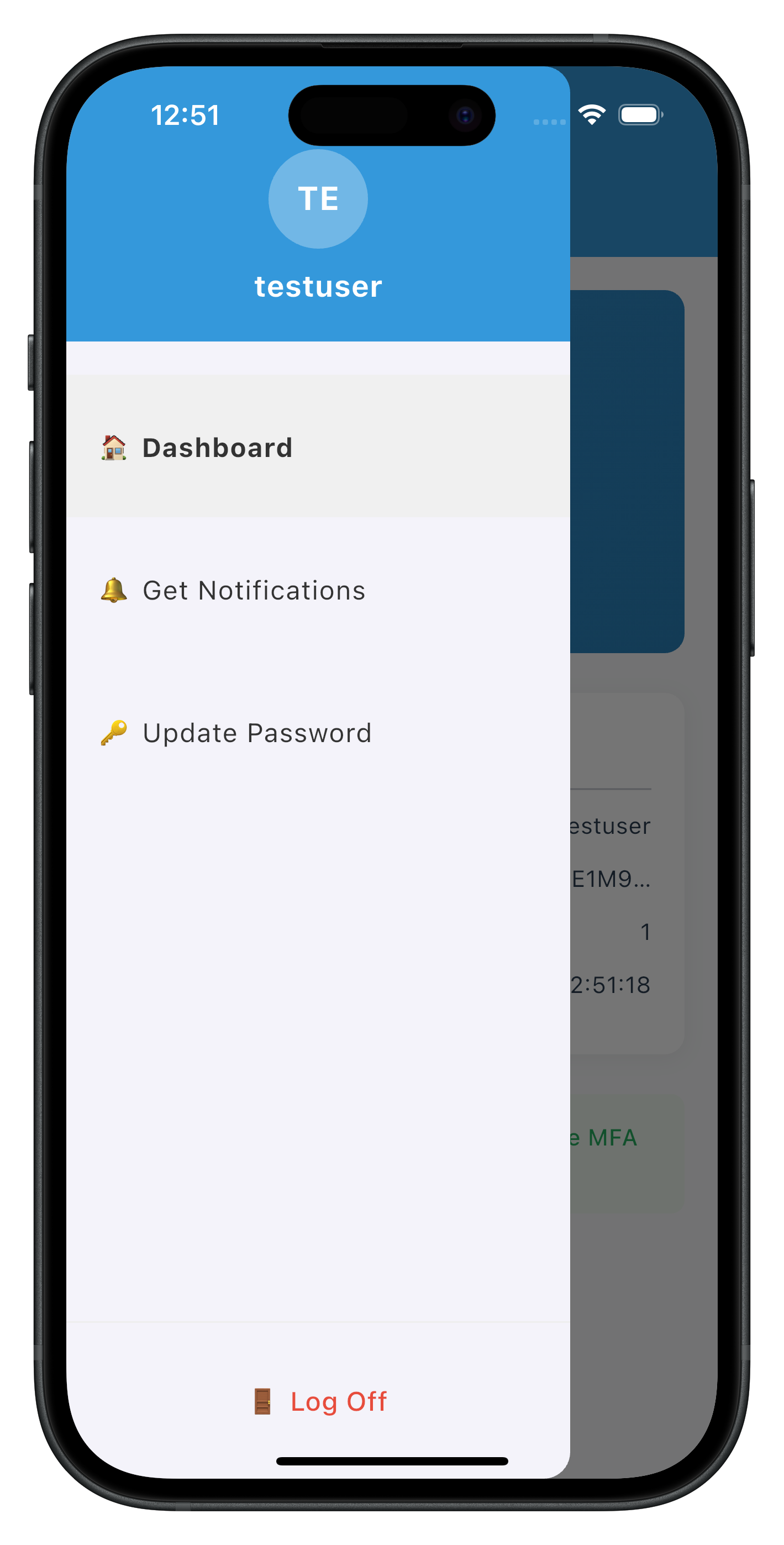
The following images showcase screens from the sample application:
|
|
Step 3: Create Index Export File
Create
lib/tutorial/screens/updatePassword/index.dart
:
export 'update_password_screen.dart';
Now let's integrate the UpdatePasswordScreen into your Drawer navigation and add conditional menu rendering.
Step 1: Add UpdatePasswordScreen to App Router
Enhance
lib/tutorial/navigation/app_router.dart
:
// lib/tutorial/navigation/app_router.dart (modifications)

import 'package:go_router/go_router.dart';
import '../screens/mfa/dashboard_screen.dart';
import '../screens/notification/get_notifications_screen.dart';
import '../screens/updatePassword/update_password_screen.dart'; // ✅ NEW: Import UpdatePasswordScreen

final appRouter = GoRouter(
  routes: [
    // Existing routes...

    // ✅ NEW: Add UpdatePassword screen route
    GoRoute(
      path: '/update-password',
      name: 'updatePasswordScreen',
      builder: (context, state) {
        final params = state.extra as Map<String, dynamic>?;
        return UpdatePasswordScreen(
          eventData: params?['eventData'] as RDNAGetPassword?,
          responseData: params?['responseData'] as RDNAGetPassword?,
        );
      },
    ),
  ],
);
Step 2: Implement Conditional Menu in DrawerContent
Modify
lib/tutorial/screens/components/drawer_content.dart
to add conditional "Update Password" menu:
// lib/tutorial/screens/components/drawer_content.dart (modifications and additions)

import 'package:flutter/material.dart';
import 'package:flutter_riverpod/flutter_riverpod.dart';
import '../../../uniken/services/rdna_service.dart';
import '../../../uniken/providers/sdk_event_provider.dart';

class DrawerContent extends ConsumerStatefulWidget {
  final RDNAUserLoggedIn? sessionData;
  final String? currentRoute;

  const DrawerContent({
    Key? key,
    this.sessionData,
    this.currentRoute,
  }) : super(key: key);

  @override
  ConsumerState<DrawerContent> createState() => _DrawerContentState();
}

class _DrawerContentState extends ConsumerState<DrawerContent> {
  bool _isLoggingOut = false;
  bool _isInitiatingUpdate = false; // ✅ NEW: Loading state for password update

  /// ✅ NEW: Handle Update Password menu tap
  Future<void> _handleUpdatePassword() async {
    setState(() {
      _isInitiatingUpdate = true;
    });

    try {
      print('DrawerContent - Initiating update flow for Password credential');
      final rdnaService = RdnaService.getInstance();
      final response = await rdnaService.initiateUpdateFlowForCredential('Password');

      print('DrawerContent - InitiateUpdateFlowForCredential response:');
      print('  Long Error Code: ${response.error?.longErrorCode}');

      if (response.error?.longErrorCode == 0) {
        print('DrawerContent - Update flow initiated successfully, waiting for getPassword event with challengeMode 2');
        // SDK will trigger getPassword event with challengeMode 2
        // SDKEventProvider will handle navigation to UpdatePasswordScreen
      } else {
        final errorMessage = response.error?.errorString ?? 'Failed to initiate update flow';
        print('DrawerContent - Update flow error: $errorMessage');
        if (mounted) {
          showDialog(
            context: context,
            builder: (context) => AlertDialog(
              title: const Text('Update Password Error'),
              content: Text(errorMessage),
              actions: [
                TextButton(
                  onPressed: () => Navigator.of(context).pop(),
                  child: const Text('OK'),
                ),
              ],
            ),
          );
        }
      }
    } catch (error) {
      print('DrawerContent - Update flow exception: $error');
      if (mounted) {
        showDialog(
          context: context,
          builder: (context) => AlertDialog(
            title: const Text('Update Password Error'),
            content: Text('Failed to initiate update flow: $error'),
            actions: [
              TextButton(
                onPressed: () => Navigator.of(context).pop(),
                child: const Text('OK'),
              ),
            ],
          ),
        );
      }
    } finally {
      if (mounted) {
        setState(() {
          _isInitiatingUpdate = false;
        });
      }
    }
  }

  Future<void> _handleLogOut() async {
    final confirmed = await showDialog<bool>(
      context: context,
      builder: (context) => AlertDialog(
        title: const Text('Log Off'),
        content: const Text('Are you sure you want to log off?'),
        actions: [
          TextButton(
            onPressed: () => Navigator.of(context).pop(false),
            child: const Text('Cancel'),
          ),
          TextButton(
            onPressed: () => Navigator.of(context).pop(true),
            style: TextButton.styleFrom(
              foregroundColor: const Color(0xFFE74C3C),
            ),
            child: const Text('Log Off'),
          ),
        ],
      ),
    );

    if (confirmed != true) return;

    setState(() {
      _isLoggingOut = true;
    });

    try {
      print('DrawerContent - Initiating logOff for user: ${widget.sessionData?.userId}');

      final response = await RdnaService.getInstance().logOff(widget.sessionData?.userId ?? '');
      print('DrawerContent - LogOff sync response successful');
      print('  longErrorCode: ${response.error?.longErrorCode}');

    } catch (error) {
      print('DrawerContent - LogOff sync error: $error');
      if (mounted) {
        showDialog(
          context: context,
          builder: (context) => AlertDialog(
            title: const Text('Logout Error'),
            content: Text(error.toString()),
            actions: [
              TextButton(
                onPressed: () => Navigator.of(context).pop(),
                child: const Text('OK'),
              ),
            ],
          ),
        );
      }
    } finally {
      if (mounted) {
        setState(() {
          _isLoggingOut = false;
        });
      }
    }
  }

  /// ✅ NEW: Build Update Password menu item with loading indicator
  Widget _buildUpdatePasswordMenuItem() {
    return ListTile(
      contentPadding: const EdgeInsets.symmetric(horizontal: 20, vertical: 15),
      title: Row(
        children: [
          Expanded(
            child: Text(
              '🔑 Update Password',
              style: TextStyle(
                fontSize: 16,
                color: const Color(0xFF333333),
                fontWeight: widget.currentRoute == 'updatePasswordScreen'
                    ? FontWeight.bold
                    : FontWeight.normal,
              ),
            ),
          ),
          if (_isInitiatingUpdate)
            const SizedBox(
              width: 16,
              height: 16,
              child: CircularProgressIndicator(
                strokeWidth: 2,
                valueColor: AlwaysStoppedAnimation<Color>(Color(0xFF3498DB)),
              ),
            ),
        ],
      ),
      tileColor: widget.currentRoute == 'updatePasswordScreen'
          ? const Color(0xFFF0F0F0)
          : null,
      onTap: _isInitiatingUpdate
          ? null
          : () async {
              Navigator.pop(context); // Close drawer
              await _handleUpdatePassword();
            },
    );
  }

  @override
  Widget build(BuildContext context) {
    final userID = widget.sessionData?.userId ?? 'Unknown User';

    // ✅ NEW: Watch available credentials to show/hide Update Password menu
    final availableCredentials = ref.watch(availableCredentialsProvider);
    final isPasswordUpdateAvailable = availableCredentials.contains('Password');

    return Drawer(
      child: Column(
        children: [
          // Header
          Container(
            color: const Color(0xFF3498DB),
            padding: const EdgeInsets.only(top: 50, bottom: 20, left: 20, right: 20),
            width: double.infinity,
            child: Column(
              children: [
                Container(
                  width: 60,
                  height: 60,
                  decoration: BoxDecoration(
                    color: Colors.white.withOpacity(0.3),
                    borderRadius: BorderRadius.circular(30),
                  ),
                  child: Center(
                    child: Text(
                      userID.substring(0, 2).toUpperCase(),
                      style: const TextStyle(
                        color: Colors.white,
                        fontSize: 20,
                        fontWeight: FontWeight.bold,
                      ),
                    ),
                  ),
                ),
                const SizedBox(height: 10),
                Text(
                  userID,
                  style: const TextStyle(
                    color: Colors.white,
                    fontSize: 18,
                    fontWeight: FontWeight.bold,
                  ),
                ),
              ],
            ),
          ),

          // Menu Items
          Expanded(
            child: ListView(
              padding: const EdgeInsets.only(top: 20),
              children: [
                _buildMenuItem(
                  icon: '🏠',
                  title: 'Dashboard',
                  routeName: 'dashboardScreen',
                ),
                _buildMenuItem(
                  icon: '🔔',
                  title: 'Get Notifications',
                  routeName: 'getNotificationsScreen',
                ),

                // ✅ NEW: Conditional Update Password menu item
                if (isPasswordUpdateAvailable) _buildUpdatePasswordMenuItem(),
              ],
            ),
          ),

          // Logout Button
          Container(
            decoration: const BoxDecoration(
              border: Border(
                top: BorderSide(color: Color(0xFFEEEEEE)),
              ),
            ),
            padding: const EdgeInsets.all(20),
            child: SizedBox(
              width: double.infinity,
              child: ElevatedButton(
                onPressed: _isLoggingOut ? null : _handleLogOut,
                style: ElevatedButton.styleFrom(
                  backgroundColor: Colors.white,
                  foregroundColor: const Color(0xFFE74C3C),
                  padding: const EdgeInsets.symmetric(vertical: 15),
                  elevation: 0,
                ),
                child: _isLoggingOut
                    ? const SizedBox(
                        width: 16,
                        height: 16,
                        child: CircularProgressIndicator(
                          strokeWidth: 2,
                          valueColor: AlwaysStoppedAnimation<Color>(Color(0xFFE74C3C)),
                        ),
                      )
                    : const Text(
                        '🚪 Log Off',
                        style: TextStyle(
                          fontSize: 16,
                          fontWeight: FontWeight.w500,
                        ),
                      ),
              ),
            ),
          ),
        ],
      ),
    );
  }

  Widget _buildMenuItem({
    required String icon,
    required String title,
    required String routeName,
  }) {
    final isActive = widget.currentRoute == routeName;
    return ListTile(
      contentPadding: const EdgeInsets.symmetric(horizontal: 20, vertical: 15),
      title: Text(
        '$icon $title',
        style: TextStyle(
          fontSize: 16,
          color: const Color(0xFF333333),
          fontWeight: isActive ? FontWeight.bold : FontWeight.normal,
        ),
      ),
      tileColor: isActive ? const Color(0xFFF0F0F0) : null,
      onTap: () {
        Navigator.pop(context);
        appRouter.goNamed(routeName);
      },
    );
  }
}
Let's verify your password update implementation with comprehensive manual testing scenarios.
Test Scenario 1: Successful Password Update
Steps:
- Launch the app and complete MFA login flow successfully
- Verify navigation to Dashboard screen in drawer navigation
- Check console logs for: "SDKEventProvider - Calling getAllChallenges after login"
- Wait for: "SDKEventProvider - Credentials available for update event received"
- Open drawer menu (☰ button or swipe from left)
- Verify "🔑 Update Password" menu item is visible
- Tap "🔑 Update Password" menu item
- Verify loading indicator appears briefly
- Verify navigation to UpdatePasswordScreen within drawer
- Verify screen displays:
- User name
- Attempts remaining counter
- Password policy requirements
- Three password fields (Current, New, Confirm)
- Enter valid current password
- Enter valid new password (meeting policy requirements)
- Enter matching confirm password
- Tap "Update Password" button
- Verify button shows "Updating Password..." with loading indicator
- Wait for success alert: "Password updated successfully"
- Tap "OK" on alert
- Verify navigation back to Dashboard
- IMPORTANT: After a few seconds, verify SDK automatically triggers logout
- Verify navigation to login screen
Expected Console Logs:
UpdatePasswordScreen - Updating password with challengeMode: 2
RdnaService - UpdatePassword sync response success
UpdatePasswordScreen - Update credential response received: statusCode: 100
SDKEventProvider - User logged off event received
SDKEventProvider - Get user event received
Expected Result: ✅ Password updated successfully, user logged out automatically by SDK
Test Scenario 2: Password Mismatch Validation
Steps:
- Navigate to UpdatePasswordScreen (follow steps 1-10 from Scenario 1)
- Enter valid current password
- Enter valid new password
- Enter different confirm password (intentional mismatch)
- Tap "Update Password" button
Expected Result: ✅ Error message: "New password and confirm password do not match" Expected Behavior: New and confirm password fields cleared, focus on new password field
Test Scenario 3: Same Password Validation
Steps:
- Navigate to UpdatePasswordScreen
- Enter current password (e.g., "Test@1234")
- Enter same password as new password ("Test@1234")
- Enter same password as confirm password ("Test@1234")
- Tap "Update Password" button
Expected Result: ✅ Error message: "New password must be different from current password" Expected Behavior: New and confirm password fields cleared, focus on new password field
Test Scenario 4: Password Policy Violation
Steps:
- Navigate to UpdatePasswordScreen
- Verify password policy is displayed (e.g., "Must be at least 8 characters long, ...")
- Enter valid current password
- Enter new password that violates policy (e.g., "weak" - too short)
- Enter matching confirm password
- Tap "Update Password" button
Expected Console Logs:
UpdatePasswordScreen - Update credential response received: statusCode: 190
UpdatePasswordScreen - Update credential error: Password does not meet policy standards
Expected Result: ✅ Error message: "Password does not meet policy standards" Expected Behavior: All password fields cleared Expected SDK Behavior: ❌ SDK does NOT trigger automatic logout for statusCode 190
Test Scenario 5: Attempts Exhausted (Critical Error)
Prerequisites: Configure server to allow 3 password update attempts only
Steps:
- Navigate to UpdatePasswordScreen
- Verify "Attempts remaining: 3" displayed
- Enter incorrect current password 3 times (or violate policy 3 times)
- On third attempt, verify SDK responds with statusCode 153
Expected Console Logs:
UpdatePasswordScreen - Update credential response received: statusCode: 153
UpdatePasswordScreen - Critical error, waiting for onUserLoggedOff and getUser events
SDKEventProvider - User logged off event received
SDKEventProvider - Get user event received
Expected Result: ✅ Alert: "Attempts exhausted" or similar message
Expected Behavior:
- All password fields cleared
- After closing alert, SDK automatically triggers logout
- Navigation to login screen
Test Scenario 6: Password Expired While Updating (statusCode 110)
Prerequisites: Configure server with very short password expiry (e.g., 1 minute)
Steps:
- Login with password that will expire during update process
- Navigate to UpdatePasswordScreen
- Wait for password to expire on server side
- Enter passwords and attempt update
- Server responds with statusCode 110
Expected Console Logs:
UpdatePasswordScreen - Update credential response received: statusCode: 110
UpdatePasswordScreen - Critical error, waiting for onUserLoggedOff and getUser events
SDKEventProvider - User logged off event received
SDKEventProvider - Get user event received
Expected Result: ✅ Alert: "Password has expired while updating password" Expected Behavior:
- All password fields cleared
- SDK automatically triggers logout and getUser events
- Navigation to login screen
Test Scenario 7: Focus Management
Steps:
- Navigate to UpdatePasswordScreen
- Tap current password field
- Verify keyboard appears and field gains focus
- Tap "Next" on keyboard (or press Enter)
- Verify new password field gains focus automatically
- Tap "Next" on keyboard
- Verify confirm password field gains focus automatically
- Tap "Done" on keyboard (or press Enter)
- Verify form submission is triggered
Expected Result: ✅ Sequential focus transitions work smoothly between all three fields
Test Scenario 8: No Password Update Available
Prerequisites: Configure server to disable password update credential
Steps:
- Complete MFA login
- Wait for getAllChallenges() to complete
- Verify onCredentialsAvailableForUpdate event returns empty list or list without "Password"
- Open drawer menu
Expected Result: ✅ "🔑 Update Password" menu item is NOT visible Expected Console Logs: "SDKEventProvider - Available options: []" or similar
Test Scenario 9: Network Error During Update
Prerequisites: Simulate network issues or server downtime
Steps:
- Navigate to UpdatePasswordScreen
- Disable network connection or stop REL-ID server
- Enter valid passwords
- Tap "Update Password" button
Expected Result: ✅ Error message with network/connection error details Expected Behavior: Password fields cleared, error banner displayed
Issue 1: "Update Password" Menu Not Appearing
Symptoms:
- Drawer menu doesn't show "🔑 Update Password" option after login
- Console shows: "Available options: []"
Causes & Solutions:
Cause 1: Server credential not configured
Solution: Enable password update credential in REL-ID server configuration
- Log into REL-ID admin portal
- Navigate to User/Application Settings
- Enable "Password Update" credential
- Save and restart server if needed
Cause 2: getAllChallenges() not called after login
Solution: Verify SDKEventProvider _handleUserLoggedIn calls getAllChallenges()
- Check console for: "Calling getAllChallenges after login"
- Verify async/await syntax is correct
- Ensure error handling doesn't silently fail
Cause 3: onCredentialsAvailableForUpdate not triggering
Solution: Verify event handler is registered
- Check rdnaEventManager.setCredentialsAvailableForUpdateHandler() is called
- Verify handler is set before getAllChallenges() is called
- Check console for: "Credentials available for update event received"
Cause 4: Conditional rendering logic error in DrawerContent
Solution: Debug availableCredentials list
- Add print in DrawerContent: print('availableCredentials: $availableCredentials')
- Verify Riverpod provider returns correct state
- Check string matching: availableCredentials.contains('Password')
Issue 2: Focus Not Transitioning Between Fields
Symptoms:
- Tapping "Next" on keyboard doesn't move to next field
- Focus stays on current field after submit
- Keyboard doesn't show "Next" or "Done" button
Causes & Solutions:
Cause 1: Missing onSubmitted callbacks
Solution: Add onSubmitted to each CustomInput
- Current field: onSubmitted: () => _newPasswordFocus.requestFocus()
- New field: onSubmitted: () => _confirmPasswordFocus.requestFocus()
- Confirm field: onSubmitted: () => _handleUpdatePassword()
Cause 2: FocusNode not initialized
Solution: Verify FocusNode initialization and disposal
- Check: final _currentPasswordFocus = FocusNode();
- Verify dispose: _currentPasswordFocus.dispose();
- Ensure FocusNode is created before build
Cause 3: Wrong textInputAction
Solution: Set correct keyboard action
- Current/New fields: textInputAction: TextInputAction.next
- Confirm field: textInputAction: TextInputAction.done
- This shows appropriate keyboard button
Issue 3: onUpdateCredentialResponse Not Firing
Symptoms:
- Password update submits but no response
- No success or error feedback
- Console shows sync success but no event
Causes & Solutions:
Cause 1: Event handler not registered
Solution: Verify _setupEventHandlers in initState
- Check eventManager.setUpdateCredentialResponseHandler() is called
- Verify handler is set BEFORE updatePassword() API call
- Ensure handler is set when screen initializes
Cause 2: Handler cleanup removes handler too early
Solution: Check dispose() method
- Verify dispose only runs on screen unmount
- Don't call cleanup in other lifecycle methods
- Use proper mounted checks in handler
Cause 3: Global handler in SDKEventProvider conflicts
Solution: Use screen-level handler, not global
- Remove or make fallback the global handler in SDKEventProvider
- Screen-level handler should override global handler
- Ensure cleanup sets to null, not previous handler
Cause 4: Event listener not registered in rdnaEventManager
Solution: Verify event registration
- Check: _listeners.add(_rdnaClient.on(RdnaClient.onUpdateCredentialResponse, ...))
- Verify rdna_client plugin version supports this event
- Check SDK documentation for event name
Issue 4: Automatic Logout Not Happening (Status Codes 110/153)
Symptoms:
- Password update succeeds but user remains logged in
- Status code 100 received but no logout
- Console shows success but no onUserLoggedOff event
Causes & Solutions:
Cause 1: Misunderstanding SDK behavior
Solution: This is EXPECTED SDK behavior
- SDK automatically triggers onUserLoggedOff → getUser after status 110/153
- Your app doesn't trigger logout - SDK does it automatically
- Wait a few seconds after success alert - logout will happen
- Check console for: "User logged off event received"
Cause 2: onUserLoggedOff handler not set
Solution: Verify SDKEventProvider has logout handler
- Check: eventManager.setUserLoggedOffHandler(_handleUserLoggedOff)
- Verify handler logs: "User logged off event received"
- Ensure getUser handler navigates to login screen
Cause 3: Navigation prevents automatic flow
Solution: Don't manually navigate after success
- After statusCode 100, only show alert and navigate to Dashboard
- SDK will handle the logout navigation automatically
- Don't call resetAuthState() or logOff() manually
Cause 4: Event chain broken
Solution: Check both event handlers work
- Test onUserLoggedOff handler separately
- Test getUser handler separately
- Verify both handlers are registered in SDKEventProvider
- Check for errors in handler execution
Issue 5: Password Policy Not Displaying
Symptoms:
- "Password Requirements" section not showing
- _passwordPolicyMessage is empty string
- Policy exists on server but not displayed
Causes & Solutions:
Cause 1: Wrong policy key
Solution: Use RELID_PASSWORD_POLICY, not PASSWORD_POLICY_BKP
- Check: challengeInfo.firstWhere((c) => c.key == 'RELID_PASSWORD_POLICY')
- Verify key name matches server configuration
- Check console: "Password policy extracted: ..."
Cause 2: getPassword event missing challenge data
Solution: Verify challengeMode 2 includes policy
- Check responseData.challengeResponse?.challengeInfo
- Verify server sends policy with challengeMode 2
- Log: print(responseData.challengeResponse?.challengeInfo)
Cause 3: parseAndGeneratePolicyMessage error
Solution: Debug policy parsing utility
- Add try-catch around parseAndGeneratePolicyMessage()
- Log policyChallenge.value before parsing
- Verify JSON structure matches expected format
- Check for parsing errors in utility function
Cause 4: Conditional rendering logic
Solution: Check rendering condition
- Verify: if (_passwordPolicyMessage.isNotEmpty) Container(...)
- Log: print('Policy message: $_passwordPolicyMessage')
- Ensure empty string evaluates to false
Issue 6: initiateUpdateFlowForCredential Errors
Symptoms:
- Tapping menu item shows error alert
- Console: "InitiateUpdateFlowForCredential error"
- No navigation to UpdatePasswordScreen
Causes & Solutions:
Cause 1: Incorrect credential type string
Solution: Use exact credential type name
- Use: 'Password' (capital P)
- Not: 'password', 'PASSWORD', or 'pwd'
- Match server credential type name exactly
- Check availableCredentials list for exact string
Cause 2: SDK not ready or session invalid
Solution: Verify user session is active
- Check user is logged in before calling API
- Verify session hasn't expired
- Test with fresh login
- Check console for session-related errors
Cause 3: API not implemented in rdnaService
Solution: Verify API method exists
- Check: RdnaService.getInstance().initiateUpdateFlowForCredential is defined
- Verify method signature matches usage
- Ensure Future-based implementation
- Check for typos in method name
Cause 4: Server doesn't support credential update
Solution: Verify server configuration
- Check REL-ID server version supports this API
- Verify credential update feature is enabled
- Test with different server environment
- Check server logs for API errors
Security Considerations
Password Handling:
- Never log actual password values in console (only log presence/absence)
- Clear password fields immediately after errors
- Use
obscureText: truefor all password inputs - Clear password fields when screen loses focus
- Never send passwords over unencrypted channels
Session Management:
- Trust SDK-triggered logout events (status codes 110/153)
- Don't manually call resetAuthState() after password update success
- Let SDK handle automatic logout flow
- Verify session validity before showing UpdatePasswordScreen
- Handle session expiration gracefully
Event Handler Management:
- Always clean up screen-level event handlers in dispose()
- Use screen-level handlers for UpdatePasswordScreen to avoid conflicts
- Keep global handlers in SDKEventProvider as fallbacks only
- Never set multiple handlers for the same event simultaneously
Error Handling:
- Display user-friendly error messages, not raw error codes
- Log detailed error information to console for debugging
- Clear sensitive data from memory after errors
- Handle network errors gracefully with retry options
- Validate inputs before API calls to prevent unnecessary server requests
User Experience Best Practices
Focus Management:
- Always use FocusNode for multi-field forms
- Implement sequential focus transitions with onSubmitted
- Use textInputAction for appropriate keyboard buttons
- Auto-focus first field when screen loads
- Clear focus when form is submitted
Form Validation:
- Validate on client-side before server call (password match, non-empty, different from current)
- Display real-time validation feedback
- Focus appropriate field after validation error
- Clear error messages when user starts typing
- Show loading states during API calls
Password Policy Display:
- Always display password policy requirements prominently
- Extract policy from RELID_PASSWORD_POLICY challenge value
- Parse and format policy for user-friendly display
- Show policy before user enters new password
- Highlight violated policy rules in error messages
Loading States:
- Show loading indicator on "Update Password" button during submission
- Display loading spinner in menu item during initiateUpdateFlowForCredential
- Disable all inputs during loading states
- Prevent double-tap on submit button
- Clear loading states on both success and error
Code Organization
File Structure:
lib/
├── uniken/
│   ├── services/
│   │   ├── rdna_service.dart (✅ Add getAllChallenges, initiateUpdateFlowForCredential, updatePassword)
│   │   └── rdna_event_manager.dart (✅ Add credential event handlers)
│   ├── providers/
│   │   └── sdk_event_provider.dart (✅ Add credential detection and routing)
│   ├── types/
│   │   └── rdna_events.dart (✅ Add credential event types)
│   └── utils/
│       └── password_policy_utils.dart (Policy parsing)
└── tutorial/
    ├── navigation/
    │   └── app_router.dart (✅ Add UpdatePasswordScreen route)
    └── screens/
        ├── updatePassword/
        │   ├── update_password_screen.dart (✅ NEW)
        │   └── index.dart (✅ NEW)
        └── components/
            └── drawer_content.dart (✅ Add conditional menu and handler)
Component Responsibilities:
- SDKEventProvider: Global event handling, credential detection, routing
- DrawerContent: Conditional menu rendering, initiateUpdateFlowForCredential call
- UpdatePasswordScreen: Three-field form, validation, screen-level event handler, focus management
- rdnaService: API layer for all SDK operations
- rdnaEventManager: Event listener registration and cleanup
Performance Optimization
Render Optimization:
- Use proper state management with Riverpod for global state
- Avoid unnecessary re-renders with proper widget keys
- Use const constructors where possible
- Keep availableCredentials in provider to share across components
Memory Management:
- Always dispose FocusNode instances in dispose()
- Clean up event handlers in dispose()
- Remove listeners when widgets unmount
- Use weak references for large data structures if needed
Network Optimization:
- Call getAllChallenges only once after login, not on every drawer open
- Cache credential availability in provider
- Handle offline scenarios gracefully
- Use proper error handling for network failures
Testing Checklist
Before deploying to production, verify:
- ✅ Password update succeeds with valid credentials
- ✅ Password mismatch validation works
- ✅ Same password validation works
- ✅ Password policy violation handled correctly
- ✅ Status code 100 password update successfully
- ✅ Status code 110 triggers automatic logout
- ✅ Status code 153 triggers automatic logout
- ✅ Status code 190 does NOT trigger automatic logout
- ✅ Focus management works on iOS and Android
- ✅ Screen dispose clears password fields
- ✅ Conditional menu shows/hides based on credential availability
- ✅ Loading states display correctly
- ✅ Error messages are user-friendly
- ✅ Console logs provide debugging information
- ✅ No password values logged to console
Congratulations! You've successfully implemented user-initiated password update functionality with REL-ID SDK!
What You've Accomplished
In this codelab, you learned how to:
- ✅ Implement Credential Availability Detection - Automatic post-login check using
getAllChallenges()API - ✅ Handle Credential Update Events - Process
onCredentialsAvailableForUpdateevent and store available credentials - ✅ Create Conditional Menu Rendering - Display "Update Password" only when credential is available
- ✅ Integrate Drawer Navigation - Place UpdatePasswordScreen in drawer navigation for post-login access
- ✅ Build Three-Field Password Form - Validate current, new, and confirm passwords with focus management
- ✅ Extract Password Policy - Parse and display
RELID_PASSWORD_POLICYrequirements - ✅ Handle Screen-Level Events - Implement
onUpdateCredentialResponsehandler with proper cleanup - ✅ Manage SDK Event Chain - Handle automatic
onUserLoggedOff→getUserevents for status codes 110/153 - ✅ Implement Focus Management - Proper
FocusNodefor multi-field forms - ✅ Apply Security Best Practices - Clear sensitive data, validate inputs, handle errors gracefully
Key Takeaways
Challenge Mode 2 is for User-Initiated Updates:
- Triggered by user action from drawer menu, not by SDK automatically
- Requires credential availability check with
getAllChallenges()first - Screen lives in drawer navigation, not stack navigation
- User must be logged in to access this flow
SDK Event Chain for Status Codes 110/153:
- These status codes are exclusive to
onUpdateCredentialResponseevent - SDK automatically triggers
onUserLoggedOff→getUserafter these codes - Your app should NOT manually trigger logout - SDK does it automatically
- Always handle these automatic logout events in SDKEventProvider
Screen-Level Event Handlers:
- Use screen-level handlers to avoid conflicts with password expiry flow
- Always clean up handlers in dispose()
- Screen-level handlers override global handlers
- Essential for multiple screens using the same event type
Drawer Navigation Integration:
- UpdatePasswordScreen is a post-login feature accessed via drawer menu
- Conditional rendering based on
onCredentialsAvailableForUpdateevent - Different from password expiry (challengeMode 4) which blocks login
- Provides voluntary password management for users
Additional Resources
- REL-ID SDK Documentation
- Updating Other Credentials Guide
- getAllChallenges API Reference
- onCredentialsAvailableForUpdate Event
- initiateUpdateFlowForCredential API
- onUpdateCredentialResponse Event
- Change Password Documentation
- Flutter Navigation and Routing
- Flutter FocusNode Documentation
Sample App Repository
The complete implementation is available in the GitHub repository:
git clone https://github.com/uniken-public/codelab-flutter.git
cd relid-MFA-update-password
Thank you for completing this codelab! If you have questions or feedback, please reach out to the REL-ID Development Team.