🎯 Learning Path:
- Complete RELID Initialization first
- You are here → MFA Activation & Login Implementation
This comprehensive codelab teaches you to implement complete Multi-Factor Authentication using the rdna_client plugin. You'll build both Activation Flow (first-time users) and Login Flow (returning users) with error handling and security practices.
🚀 What You'll Build
By the end of this codelab, you'll have a complete MFA system that handles:
📱 Activation Flow (First-Time Users):
- Complete user onboarding and device enrollment
- Multi-factor verification with cyclical challenge handling
- Flexible authentication (biometric + password fallback)
🔐 Login Flow (Returning Users):
- Streamlined biometric authentication
- Password verification with attempt tracking
- Graceful error recovery and fallbacks
✅ Technical Requirements
Before starting, verify you have:
- [ ] Completed RELID Initialization codelab
✅ Knowledge Prerequisites
You should be comfortable with:
- [ ] Flutter & Dart fundamentals
- [ ] GoRouter or Navigator 2.0 basics
- [ ] async/await patterns
- [ ] Riverpod or Provider concepts
Get the Code from GitHub
The code to get started is stored in a GitHub repository.
You can clone the repository using the following command:
git clone https://github.com/uniken-public/codelab-flutter.git
Navigate to the relid-MFA folder in the repository you cloned earlier
Platform-Specific Permissions
The RELID SDK requires specific permissions for optimal MFA functionality:
iOS Configuration: Refer to the iOS Permissions Documentation for complete Info.plist configuration including:
- NSFaceIDUsageDescription (Face ID authentication)
- NSLocationWhenInUseUsageDescription (login verification)
- NSLocalNetworkUsageDescription (network threat detection and optional for DNS resolution)
Android Configuration: Refer to the Android Permissions Documentation for runtime and normal permissions required for MFA features.
Understanding MFA Flow Types
Quick Overview: This codelab covers two flows:
- Activation Flow: For first-time users
- Login Flow: For returning users
📊 Flow Comparison at a Glance
Aspect | 🆕 Activation Flow | 🔄 Login Flow |
When | First-time users, new devices | Returning users, registered devices |
Purpose | Device registration + auth setup | Quick authentication |
Steps | Username → OTP → Device Auth or Password → Success | Username → Device Auth/Password → Success |
Device Auth(LDA) | Optional setup during flow | Automatic if previously enabled |
🔄 What Does Activation and Login Flow Mean
Activation Flow Occurs When:
- User registers for the first time
- User has never activated on any device
- Initial device enrollment scenarios
Login Flow Occurs When:
- User has previously activated on this device
- Device is registered but user session expired
- User explicitly logged out and logging back in
🏗️ Plugin Architecture & Event System
The Plugin uses an event-driven architecture where:
- Plugin Events → Trigger challenges requiring user input
- API Calls → Respond to challenges with user data
- Event Handling → Handle event responses and navigate accordingly
Key Architecture Pattern: Async + Callback
// Asynchronous API response
final syncResponse = await rdnaService.setUser(username);

// Event callback handling
eventManager.setGetUserHandler((challenge) {
  // Handle the challenge in UI
  appRouter.goNamed('checkUserScreen');
});
📋 Quick Reference: Core Events & APIs
SDK Event | API Response | Purpose | Flow |
|
| User identification | Both |
|
| OTP verification | Activation |
|
| Biometric setup | Activation |
|
| Password setup/verify | Both |
| N/A | Success notification(user logged in) | Both |
|
| User Session cleanup(if user logged in) | Both |
Both - Activation and Login
📝 What We're Building: Complete first-time user registration with device enrollment, OTP verification, and LDA setup.
Understanding Activation Flow Sequence
Please refer to the flow diagram from uniken developer documentation portal, user activation
Activation Challenge Phases
Phase | Challenge Type | User Action | SDK Validation | Result |
1. User ID |
| Enter username/email | Validates user exists/format | Proceeds or repeats |
2. OTP Verify |
| Enter activation code | Validates code from email/SMS | Proceeds or shows error |
3. Device Auth |
| Choose biometric or password | Sets up device authentication | Completes activation |
4. Success | N/A | Automatic navigation | User session established | User activated & logged in |
🔄 Cyclical Challenge Handling
Important: The getUser event can trigger multiple times if:
- Username validation fails
- User enters invalid format
- Network errors occur during validation
Your UI must handle repeated events gracefully without breaking navigation.
Before implementing the activation flow, understand the Dart types provided by the plugin for type safety and better development experience.
Core Type Definitions
The rdna_client plugin provides all necessary data classes:
// lib/uniken/services/rdna_event_manager.dart

// Import all types from plugin
import 'package:rdna_client/rdna_struct.dart';

/// Type definitions for event callbacks
typedef RDNAInitializeProgressCallback = void Function(RDNAInitProgressStatus);
typedef RDNAInitializeErrorCallback = void Function(RDNAInitializeError);
typedef RDNAInitializeSuccessCallback = void Function(RDNAInitialized);
typedef RDNAGetUserCallback = void Function(RDNAGetUser);
typedef RDNAGetActivationCodeCallback = void Function(RDNAActivationCode);
typedef RDNAGetUserConsentForLDACallback = void Function(GetUserConsentForLDAData);
typedef RDNAGetPasswordCallback = void Function(RDNAGetPassword);
typedef RDNAUserLoggedInCallback = void Function(RDNAUserLoggedIn);
MFA Event Data Types
All data classes are provided by the plugin and contain:
RDNAGetUser: User information request event
challengeResponse: Status and session informationerror: Error details if anyrecentLoggedInUser: Previously logged in userrememberedUsers: List of remembered usernames
RDNAActivationCode: Activation code request event
userId: User identifierverificationKey: Verification key for activationattemptsLeft: Remaining attempts
GetUserConsentForLDAData: User consent request for LDA authentication
userID: User identifierchallengeMode: Challenge mode numberauthenticationType: Authentication type number
RDNAGetPassword: Password request event
userId: User identifierchallengeMode: Challenge mode (0=verify, 1=create, 2=update, 3=authorize, 4=expiry)attemptsLeft: Remaining attempts
RDNAUserLoggedIn: User login completion event
userId: Logged in user identifierchallengeResponse: Complete session and JWT information
Error Handling Utility Functions
Create utility functions for consistent error handling:
// lib/uniken/utils/rdna_event_utils.dart

class RDNAEventUtils {
  /// Check if event data contains API errors (longErrorCode != 0)
  static bool hasApiError(RDNAError? error) {
    return error != null &&
           error.longErrorCode != null &&
           error.longErrorCode != 0;
  }

  /// Check if event data contains status errors (statusCode != 100)
  static bool hasStatusError(RDNARequestStatus? status) {
    return status != null &&
           status.statusCode != null &&
           status.statusCode != 100;
  }

  /// Get user-friendly error message from event data
  static String getErrorMessage(RDNAError? error, RDNARequestStatus? status) {
    if (hasApiError(error)) {
      return error!.errorString ?? 'Unknown API error occurred';
    }
    if (hasStatusError(status)) {
      return status!.statusMessage ??
             'Operation failed with status ${status.statusCode}';
    }
    return 'Unknown error occurred';
  }

  /// Get challenge value from challenge info list
  static String? getChallengeValue(
    List<RDNAChallengeInfo>? challengeInfo,
    String key
  ) {
    if (challengeInfo == null) return null;
    try {
      final item = challengeInfo.firstWhere((item) => item.key == key);
      return item.value;
    } catch (e) {
      return null;
    }
  }
}
Building on your existing RELID event manager, add support for activation flow events. The activation flow requires handling five key MFA events.
Adding MFA Event Handlers
Extend your event manager to handle activation-specific events:
// lib/uniken/services/rdna_event_manager.dart

import 'package:eventify/eventify.dart';
import 'package:rdna_client/rdna_client.dart';
import 'package:rdna_client/rdna_struct.dart';

class RdnaEventManager {
  static RdnaEventManager? _instance;
  final RdnaClient _rdnaClient;
  final List<Listener?> _listeners = [];

  // Event handlers for activation flow
  RDNAGetUserCallback? _getUserHandler;
  RDNAGetActivationCodeCallback? _getActivationCodeHandler;
  RDNAGetUserConsentForLDACallback? _getUserConsentForLDAHandler;
  RDNAGetPasswordCallback? _getPasswordHandler;
  RDNAUserLoggedInCallback? _onUserLoggedInHandler;

  RdnaEventManager._(this._rdnaClient) {
    _registerEventListeners();
  }

  static RdnaEventManager getInstance(RdnaClient rdnaClient) {
    _instance ??= RdnaEventManager._(rdnaClient);
    return _instance!;
  }

  void _registerEventListeners() {
    print('RdnaEventManager - Registering native event listeners');

    // Register activation flow event listeners
    _listeners.add(
      _rdnaClient.on(RdnaClient.getUser, _onGetUser),
    );
    _listeners.add(
      _rdnaClient.on(RdnaClient.getActivationCode, _onGetActivationCode),
    );
    _listeners.add(
      _rdnaClient.on(RdnaClient.getUserConsentForLDA, _onGetUserConsentForLDA),
    );
    _listeners.add(
      _rdnaClient.on(RdnaClient.getPassword, _onGetPassword),
    );
    _listeners.add(
      _rdnaClient.on(RdnaClient.onUserLoggedIn, _onUserLoggedIn),
    );

    print('RdnaEventManager - Native event listeners registered');
  }
}
Implementing Event Handlers
Each activation event requires specific handling:
/// Handles user identification challenge (always first in activation flow)
/// Can be triggered multiple times if user validation fails
void _onGetUser(dynamic userData) {
  print('RdnaEventManager - Get user event received');

  final data = userData as RDNAGetUser;
  print('RdnaEventManager - Status: ${data.challengeResponse?.status?.statusCode}');

  if (_getUserHandler != null) {
    _getUserHandler!(data);
  }
}

/// Handles activation code challenge (OTP verification)
/// Provides attempts left information for user feedback
void _onGetActivationCode(dynamic activationCodeData) {
  print('RdnaEventManager - Get activation code event received');

  final data = activationCodeData as RDNAActivationCode;
  print('RdnaEventManager - UserID: ${data.userId}');
  print('RdnaEventManager - Attempts left: ${data.attemptsLeft}');

  if (_getActivationCodeHandler != null) {
    _getActivationCodeHandler!(data);
  }
}

/// Handles Local Device Authentication consent request
/// Triggered when biometric authentication is available
void _onGetUserConsentForLDA(dynamic ldaConsentData) {
  print('RdnaEventManager - Get user consent for LDA event received');

  final data = ldaConsentData as GetUserConsentForLDAData;
  print('RdnaEventManager - UserID: ${data.userID}');
  print('RdnaEventManager - Challenge mode: ${data.challengeMode}');
  print('RdnaEventManager - Authentication type: ${data.authenticationType}');

  if (_getUserConsentForLDAHandler != null) {
    _getUserConsentForLDAHandler!(data);
  }
}

/// Handles password authentication challenge
/// Fallback when biometric authentication is not available
void _onGetPassword(dynamic passwordData) {
  print('RdnaEventManager - Get password event received');

  final data = passwordData as RDNAGetPassword;
  print('RdnaEventManager - UserID: ${data.userId}');
  print('RdnaEventManager - Challenge mode: ${data.challengeMode}');
  print('RdnaEventManager - Attempts left: ${data.attemptsLeft}');

  if (_getPasswordHandler != null) {
    _getPasswordHandler!(data);
  }
}

/// Handles successful activation completion
/// Provides session information and JWT token details
void _onUserLoggedIn(dynamic loggedInData) {
  print('RdnaEventManager - User logged in event received');

  final data = loggedInData as RDNAUserLoggedIn;
  print('RdnaEventManager - UserID: ${data.userId}');
  print('RdnaEventManager - Session ID: ${data.challengeResponse?.session?.sessionId}');

  if (_onUserLoggedInHandler != null) {
    _onUserLoggedInHandler!(data);
  }
}
Event Handler Registration Methods
Provide public methods for setting event handlers:
// Public setter methods for activation event handlers
void setGetUserHandler(RDNAGetUserCallback? callback) {
  _getUserHandler = callback;
}

void setGetActivationCodeHandler(RDNAGetActivationCodeCallback? callback) {
  _getActivationCodeHandler = callback;
}

void setGetUserConsentForLDAHandler(RDNAGetUserConsentForLDACallback? callback) {
  _getUserConsentForLDAHandler = callback;
}

void setGetPasswordHandler(RDNAGetPasswordCallback? callback) {
  _getPasswordHandler = callback;
}

void setOnUserLoggedInHandler(RDNAUserLoggedInCallback? callback) {
  _onUserLoggedInHandler = callback;
}

// Cleanup method
void cleanup() {
  print('RdnaEventManager - Cleaning up event listeners');

  for (final listener in _listeners) {
    if (listener != null) {
      _rdnaClient.off(listener);
    }
  }
  _listeners.clear();

  // Clear handlers
  _getUserHandler = null;
  _getActivationCodeHandler = null;
  _getUserConsentForLDAHandler = null;
  _getPasswordHandler = null;
  _onUserLoggedInHandler = null;
}
🔑 Key Implementation Features
- Type Safety: Dart's strong typing for all challenges
- Single Handler Pattern: One handler per event type (simpler than React Native)
- Event Package Integration: Uses eventify package for event management
- Cleanup Support: Proper cleanup of event listeners
- Debugging Support: Comprehensive logging for all activation events
Add the activation flow APIs to your RELID service. These APIs respond to the activation challenges with user-provided data.
Core Activation APIs
Add these methods to your RdnaService class:
// lib/uniken/services/rdna_service.dart

class RdnaService {
  static RdnaService? _instance;
  final RdnaClient _rdnaClient;
  final RdnaEventManager _eventManager;

  RdnaService._(this._rdnaClient, this._eventManager);

  static RdnaService getInstance() {
    if (_instance == null) {
      final rdnaClient = RdnaClient();
      final eventManager = RdnaEventManager.getInstance(rdnaClient);
      _instance = RdnaService._(rdnaClient, eventManager);
    }
    return _instance!;
  }

  /// Sets the user identifier for activation flow
  /// Responds to getUser challenge - can be called multiple times
  Future<RDNASyncResponse> setUser(String username) async {
    print('RdnaService - Setting user: $username');
    final response = await _rdnaClient.setUser(username);
    print('RdnaService - SetUser response: ${response.error?.longErrorCode}');
    return response;
  }

  /// Sets the activation code for user verification
  /// Responds to getActivationCode challenge
  Future<RDNASyncResponse> setActivationCode(String activationCode) async {
    print('RdnaService - Setting activation code');
    final response = await _rdnaClient.setActivationCode(activationCode);
    print('RdnaService - SetActivationCode response: ${response.error?.longErrorCode}');
    return response;
  }

  /// Sets user consent for Local Device Authentication (biometric)
  /// Responds to getUserConsentForLDA challenge
  Future<RDNASyncResponse> setUserConsentForLDA(
    bool isEnrollLDA,
    int challengeMode,
    int authenticationType
  ) async {
    print('RdnaService - Setting LDA consent: $isEnrollLDA');
    print('  Challenge mode: $challengeMode, Auth type: $authenticationType');

    final response = await _rdnaClient.setUserConsentForLDA(
      isEnrollLDA,
      challengeMode,
      authenticationType
    );
    print('RdnaService - SetUserConsentForLDA response: ${response.error?.longErrorCode}');
    return response;
  }

  /// Sets the password for authentication
  /// Responds to getPassword challenge
  Future<RDNASyncResponse> setPassword(
    String password,
    RDNAChallengeOpMode challengeMode
  ) async {
    print('RdnaService - Setting password, mode: $challengeMode');
    final response = await _rdnaClient.setPassword(password, challengeMode);
    print('RdnaService - SetPassword response: ${response.error?.longErrorCode}');
    return response;
  }

  /// Requests resend of activation code
  /// Can be called when user doesn't receive initial activation code
  Future<RDNASyncResponse> resendActivationCode() async {
    print('RdnaService - Requesting resend of activation code');
    final response = await _rdnaClient.resendActivationCode();
    print('RdnaService - ResendActivationCode response: ${response.error?.longErrorCode}');
    return response;
  }

  /// Resets authentication state and returns to initial flow
  Future<RDNASyncResponse> resetAuthState() async {
    print('RdnaService - Resetting authentication state');
    final response = await _rdnaClient.resetAuthState();
    print('RdnaService - ResetAuthState response: ${response.error?.longErrorCode}');
    return response;
  }

  RdnaEventManager getEventManager() => _eventManager;

  void cleanup() {
    print('RdnaService - Cleaning up service');
    _eventManager.cleanup();
  }
}
Understanding resetAuthState API
The resetAuthState API is a critical method for managing authentication flow state. It provides a clean way to reset the current authentication session and return the SDK to its initial state.
When to Use resetAuthState
The resetAuthState API should be called in these pre-login scenarios:
- User-Initiated Cancellation: When the user decides to cancel the authentication process
- Switching Users: When switching between different user accounts during the login process
- Error Recovery: When recovering from authentication errors or timeout conditions during login
Note: These use cases only apply during the authentication process, before onUserLoggedIn event is triggered.
How resetAuthState Works
// The resetAuthState API triggers a clean state transition
final response = await rdnaClient.resetAuthState();

// Check response
if (response.error?.longErrorCode == 0) {
  // The SDK will immediately trigger a new 'getUser' event
  // This allows you to restart the authentication flow cleanly
  print('Reset successful, waiting for new getUser event');
}
Key Behaviors:
- Immediately clears the current authentication session
- Triggers a fresh
getUserevent after successful reset - Returns the SDK to its initial state, ready for new authentication
- Provides synchronous response indicating success/failure of the reset operation
Understanding resendActivationCode API
The resendActivationCode API is used when the user has not received their activation code (OTP) via email or SMS and requests a new one.
Purpose and Functionality
Calling this method sends a new OTP to the user and triggers a new getActivationCode event. This allows users to receive a fresh activation code without having to restart the entire authentication process.
When to Use resendActivationCode
The resendActivationCode API should be used in these scenarios:
- OTP Not Received: When the user reports they haven't received the initial activation code
- Code Expired: When the activation code has expired before the user could enter it
- Delivery Issues: When there are suspected issues with email or SMS delivery
- User Request: When the user explicitly requests a new activation code
How resendActivationCode Works
// The resendActivationCode API sends a new OTP and triggers fresh event
final response = await rdnaClient.resendActivationCode();

// Check response
if (response.error?.longErrorCode == 0) {
  // The SDK will trigger a new 'getActivationCode' event
  // This provides fresh OTP data to the application
  print('New code sent, waiting for getActivationCode event');
}
Key Behaviors:
- Sends a new OTP to the user via their registered email or SMS
- Triggers a fresh
getActivationCodeevent with new OTP details - Provides synchronous response indicating success/failure of the resend request
- Does not reset the overall authentication state (unlike
resetAuthState)
API Response Handling Pattern
All activation APIs follow the same response handling pattern:
- Synchronous Response: Immediate response indicates if API call was accepted
- Success Condition:
longErrorCode === 0means SDK accepted the data - Asynchronous Events: Next challenge event triggered after successful API call
- Error Handling: Non-zero error codes contain error details
Create navigation configuration using GoRouter for type-safe navigation throughout the activation flow.
GoRouter Configuration
// lib/tutorial/navigation/app_router.dart

import 'package:go_router/go_router.dart';
import 'package:rdna_client/rdna_struct.dart';
import '../screens/mfa/check_user_screen.dart';
import '../screens/mfa/activation_code_screen.dart';
import '../screens/mfa/user_lda_consent_screen.dart';
import '../screens/mfa/set_password_screen.dart';
import '../screens/tutorial/dashboard_screen.dart';

final appRouter = GoRouter(
  initialLocation: '/',
  routes: [
    GoRoute(
      path: '/',
      name: 'tutorialHomeScreen',
      builder: (context, state) => const TutorialHomeScreen(),
    ),
    GoRoute(
      path: '/check-user',
      name: 'checkUserScreen',
      builder: (context, state) {
        final data = state.extra as RDNAGetUser?;
        return CheckUserScreen(eventData: data);
      },
    ),
    GoRoute(
      path: '/activation-code',
      name: 'activationCodeScreen',
      builder: (context, state) {
        final data = state.extra as RDNAActivationCode?;
        return ActivationCodeScreen(eventData: data);
      },
    ),
    GoRoute(
      path: '/user-lda-consent',
      name: 'userLDAConsentScreen',
      builder: (context, state) {
        final data = state.extra as GetUserConsentForLDAData?;
        return UserLDAConsentScreen(eventData: data);
      },
    ),
    GoRoute(
      path: '/set-password',
      name: 'setPasswordScreen',
      builder: (context, state) {
        final data = state.extra as RDNAGetPassword?;
        return SetPasswordScreen(eventData: data);
      },
    ),
    GoRoute(
      path: '/dashboard',
      name: 'dashboardScreen',
      builder: (context, state) {
        final data = state.extra as RDNAUserLoggedIn?;
        return DashboardScreen(eventData: data);
      },
    ),
  ],
);

// Navigation with event data
// appRouter.goNamed('checkUserScreen', extra: eventData);
Navigation Pattern
GoRouter provides:
- Type-safe route names
- Parameter passing via
extra - Declarative routing configuration
- Deep linking support
Create a centralized SDK Event Provider to handle all REL-ID SDK events and coordinate navigation throughout the activation flow. This provider acts as the central nervous system for your MFA application.
Understanding the SDK Event Provider
The SDKEventProvider is a widget that:
- Centralizes Event Handling: Manages all SDK events in one place for better maintainability
- Coordinates Navigation: Automatically navigates to appropriate screens based on SDK events
- Manages Screen State: Tracks current screen state and handles navigation logic
- Provides Type Safety: Uses Dart types for all event handlers
- Handles Lifecycle: Properly manages event subscriptions and cleanup
SDKEventProvider Implementation
Create the main SDK Event Provider:
// lib/uniken/providers/sdk_event_provider.dart

import 'package:flutter/material.dart';
import 'package:flutter_riverpod/flutter_riverpod.dart';
import 'package:rdna_client/rdna_struct.dart';
import '../services/rdna_service.dart';
import '../../tutorial/navigation/app_router.dart';

/// SDK Event Provider Widget
///
/// Centralized widget for REL-ID SDK event handling.
/// Manages all SDK events, screen state, and navigation logic in one place.
class SDKEventProviderWidget extends ConsumerStatefulWidget {
  final Widget child;

  const SDKEventProviderWidget({
    super.key,
    required this.child,
  });

  @override
  ConsumerState<SDKEventProviderWidget> createState() =>
      _SDKEventProviderWidgetState();
}

class _SDKEventProviderWidgetState
    extends ConsumerState<SDKEventProviderWidget> {

  @override
  void initState() {
    super.initState();
    _setupSDKEventHandlers();
  }

  void _setupSDKEventHandlers() {
    final rdnaService = RdnaService.getInstance();
    final eventManager = rdnaService.getEventManager();

    // Register handlers for automatic navigation
    eventManager.setInitializedHandler(_handleInitialized);
    eventManager.setGetUserHandler(_handleGetUser);
    eventManager.setGetActivationCodeHandler(_handleGetActivationCode);
    eventManager.setGetUserConsentForLDAHandler(_handleGetUserConsentForLDA);
    eventManager.setGetPasswordHandler(_handleGetPassword);
    eventManager.setOnUserLoggedInHandler(_handleUserLoggedIn);
  }

  void _handleInitialized(RDNAInitialized data) {
    print('SDKEventProvider - Successfully initialized');
    // In MFA flow, SDK will automatically trigger getUser or other events
  }

  void _handleGetUser(RDNAGetUser data) {
    print('SDKEventProvider - Get user event received');
    appRouter.goNamed('checkUserScreen', extra: data);
  }

  void _handleGetActivationCode(RDNAActivationCode data) {
    print('SDKEventProvider - Get activation code event received');
    appRouter.goNamed('activationCodeScreen', extra: data);
  }

  void _handleGetUserConsentForLDA(GetUserConsentForLDAData data) {
    print('SDKEventProvider - Get user consent for LDA event received');
    appRouter.goNamed('userLDAConsentScreen', extra: data);
  }

  void _handleGetPassword(RDNAGetPassword data) {
    print('SDKEventProvider - Get password event received');

    // Route based on challenge mode
    if (data.challengeMode == 0) {
      // Verification mode (login)
      appRouter.goNamed('verifyPasswordScreen', extra: data);
    } else {
      // Creation mode (activation)
      appRouter.goNamed('setPasswordScreen', extra: data);
    }
  }

  void _handleUserLoggedIn(RDNAUserLoggedIn data) {
    print('SDKEventProvider - User logged in');
    appRouter.goNamed('dashboardScreen', extra: data);
  }

  @override
  void dispose() {
    final rdnaService = RdnaService.getInstance();
    rdnaService.cleanup();
    super.dispose();
  }

  @override
  Widget build(BuildContext context) {
    return widget.child;
  }
}
Integrating with Main App
Wrap your app with the SDK Event Provider:
// lib/main.dart

import 'package:flutter/material.dart';
import 'package:flutter_riverpod/flutter_riverpod.dart';
import 'uniken/providers/sdk_event_provider.dart';
import 'tutorial/navigation/app_router.dart';

void main() {
  runApp(
    const ProviderScope(
      child: MyApp(),
    ),
  );
}

class MyApp extends ConsumerWidget {
  const MyApp({super.key});

  @override
  Widget build(BuildContext context, WidgetRef ref) {
    return SDKEventProviderWidget(
      child: MaterialApp.router(
        title: 'REL-ID MFA Tutorial',
        debugShowCheckedModeBanner: false,
        theme: ThemeData(
          colorScheme: ColorScheme.fromSeed(
            seedColor: const Color(0xFF2563EB)
          ),
          useMaterial3: true,
        ),
        routerConfig: appRouter,
      ),
    );
  }
}
Create the username input screen that handles user validation during the activation flow.
CheckUserScreen Implementation
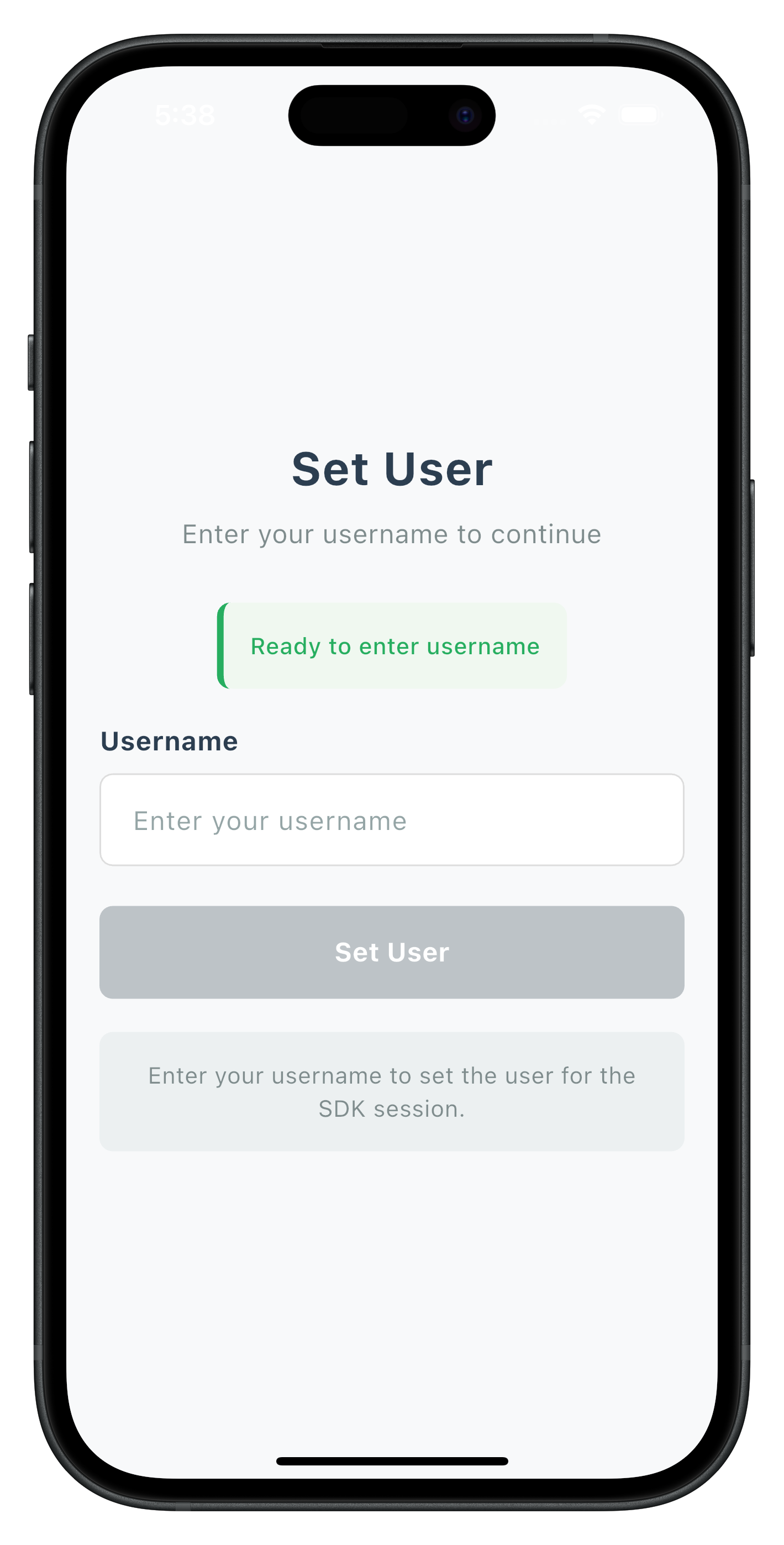
The CheckUserScreen handles username input with cyclical event handling:
// lib/tutorial/screens/mfa/check_user_screen.dart

import 'package:flutter/material.dart';
import 'package:flutter_riverpod/flutter_riverpod.dart';
import 'package:rdna_client/rdna_struct.dart';
import '../../../uniken/services/rdna_service.dart';
import '../../../uniken/utils/rdna_event_utils.dart';
import '../components/custom_button.dart';
import '../components/custom_input.dart';
import '../components/status_banner.dart';

class CheckUserScreen extends ConsumerStatefulWidget {
  final RDNAGetUser? eventData;

  const CheckUserScreen({
    super.key,
    this.eventData,
  });

  @override
  ConsumerState<CheckUserScreen> createState() => _CheckUserScreenState();
}

class _CheckUserScreenState extends ConsumerState<CheckUserScreen> {
  final _usernameController = TextEditingController();
  String? _error;
  bool _isValidating = false;
  String? _validationMessage;
  bool _validationSuccess = false;

  @override
  void initState() {
    super.initState();
    _processEventData();
  }

  @override
  void didUpdateWidget(CheckUserScreen oldWidget) {
    super.didUpdateWidget(oldWidget);
    // Re-process when SDK re-triggers getUser event with errors
    if (widget.eventData != oldWidget.eventData) {
      print('CheckUserScreen - Event data updated, re-processing');
      _processEventData();
    }
  }

  /// Process event data and check for errors
  void _processEventData() {
    if (widget.eventData == null) return;

    final data = widget.eventData!;

    // Check for API errors
    if (RDNAEventUtils.hasApiError(data.error)) {
      final errorMessage = RDNAEventUtils.getErrorMessage(data.error, null);
      setState(() {
        _error = errorMessage;
        _validationSuccess = false;
        _validationMessage = errorMessage;
      });
      return;
    }

    // Check for status errors
    if (RDNAEventUtils.hasStatusError(data.challengeResponse?.status)) {
      final errorMessage = RDNAEventUtils.getErrorMessage(
        null,
        data.challengeResponse?.status
      );
      setState(() {
        _error = errorMessage;
        _validationSuccess = false;
        _validationMessage = errorMessage;
      });
      return;
    }

    // Success - ready for input
    setState(() {
      _validationSuccess = true;
      _validationMessage = 'Ready to enter username';
      _error = null;
    });
  }

  /// Handle user validation
  Future<void> _handleValidateUser() async {
    final username = _usernameController.text.trim();

    setState(() {
      _isValidating = true;
      _error = null;
      _validationMessage = null;
    });

    final rdnaService = RdnaService.getInstance();
    final response = await rdnaService.setUser(username);

    if (response.error?.longErrorCode == 0) {
      setState(() {
        _validationSuccess = true;
        _validationMessage = 'User set successfully! Waiting for next step...';
        _isValidating = false;
      });
    } else {
      setState(() {
        _error = response.error?.errorString ?? 'Unknown error';
        _isValidating = false;
      });
    }
  }

  bool _isFormValid() {
    return _usernameController.text.trim().isNotEmpty && _error == null;
  }

  @override
  Widget build(BuildContext context) {
    return GestureDetector(
      onTap: () => FocusScope.of(context).unfocus(),
      child: Scaffold(
        backgroundColor: const Color(0xFFF8F9FA),
        body: SafeArea(
          child: Padding(
            padding: const EdgeInsets.all(20),
            child: Column(
              mainAxisAlignment: MainAxisAlignment.center,
              children: [
                const Text(
                  'Set User',
                  style: TextStyle(
                    fontSize: 28,
                    fontWeight: FontWeight.bold,
                    color: Color(0xFF2c3e50),
                  ),
                  textAlign: TextAlign.center,
                ),
                const SizedBox(height: 8),
                const Text(
                  'Enter your username to continue',
                  style: TextStyle(
                    fontSize: 16,
                    color: Color(0xFF7f8c8d),
                  ),
                  textAlign: TextAlign.center,
                ),
                const SizedBox(height: 30),

                // Validation Message
                if (_validationMessage != null)
                  StatusBanner(
                    type: _validationSuccess
                        ? StatusBannerType.success
                        : StatusBannerType.error,
                    message: _validationMessage!,
                  ),

                // Username Input
                CustomInput(
                  label: 'Username',
                  value: _usernameController.text,
                  onChanged: (value) => setState(() {
                    _usernameController.text = value;
                    _error = null;
                  }),
                  placeholder: 'Enter your username',
                  enabled: !_isValidating,
                  error: _error,
                  onSubmitted: _isFormValid() ? _handleValidateUser : null,
                ),
                const SizedBox(height: 24),

                // Validate Button
                CustomButton(
                  title: _isValidating ? 'Setting User...' : 'Set User',
                  onPress: _handleValidateUser,
                  loading: _isValidating,
                  disabled: !_isFormValid(),
                ),

                // Help Text
                Container(
                  margin: const EdgeInsets.only(top: 20),
                  padding: const EdgeInsets.all(16),
                  decoration: BoxDecoration(
                    color: const Color(0xFFecf0f1),
                    borderRadius: BorderRadius.circular(8),
                  ),
                  child: const Text(
                    'Enter your username to set the user for the SDK session.',
                    style: TextStyle(
                      fontSize: 14,
                      color: Color(0xFF7f8c8d),
                    ),
                    textAlign: TextAlign.center,
                  ),
                ),
              ],
            ),
          ),
        ),
      ),
    );
  }

  @override
  void dispose() {
    _usernameController.dispose();
    super.dispose();
  }
}
Specific Status Code Handling
Status Code | Event Name | Meaning |
101 |
| Triggered when an invalid user is provided in setUser API |
138 |
| User is blocked due to exceeded OTP attempts or blocked by admin |
Specific Status Code handling
Status Code | Event Name | Meaning |
101 | `getUser` | Triggered when an invalid user is provided in setuser API. |
138 | `getUser ` | User is blocked due to exceeded OTP attempts or blocked by admin or previously blocked in other flow |
Key Implementation Features
The CheckUserScreen demonstrates several important patterns:
- Cyclical Event Handling: Supports repeated
getUserevents if validation fails - Response Data Processing: Uses
RDNAEventUtilsfor consistent error checking - Form Validation: Real-time validation with user feedback
- Loading States: Clear indication during API calls
- Error Display: User-friendly error messages from API and Event responses
The following image showcases screen from the sample application:
Create the activation code input screen that handles OTP verification during the activation flow.
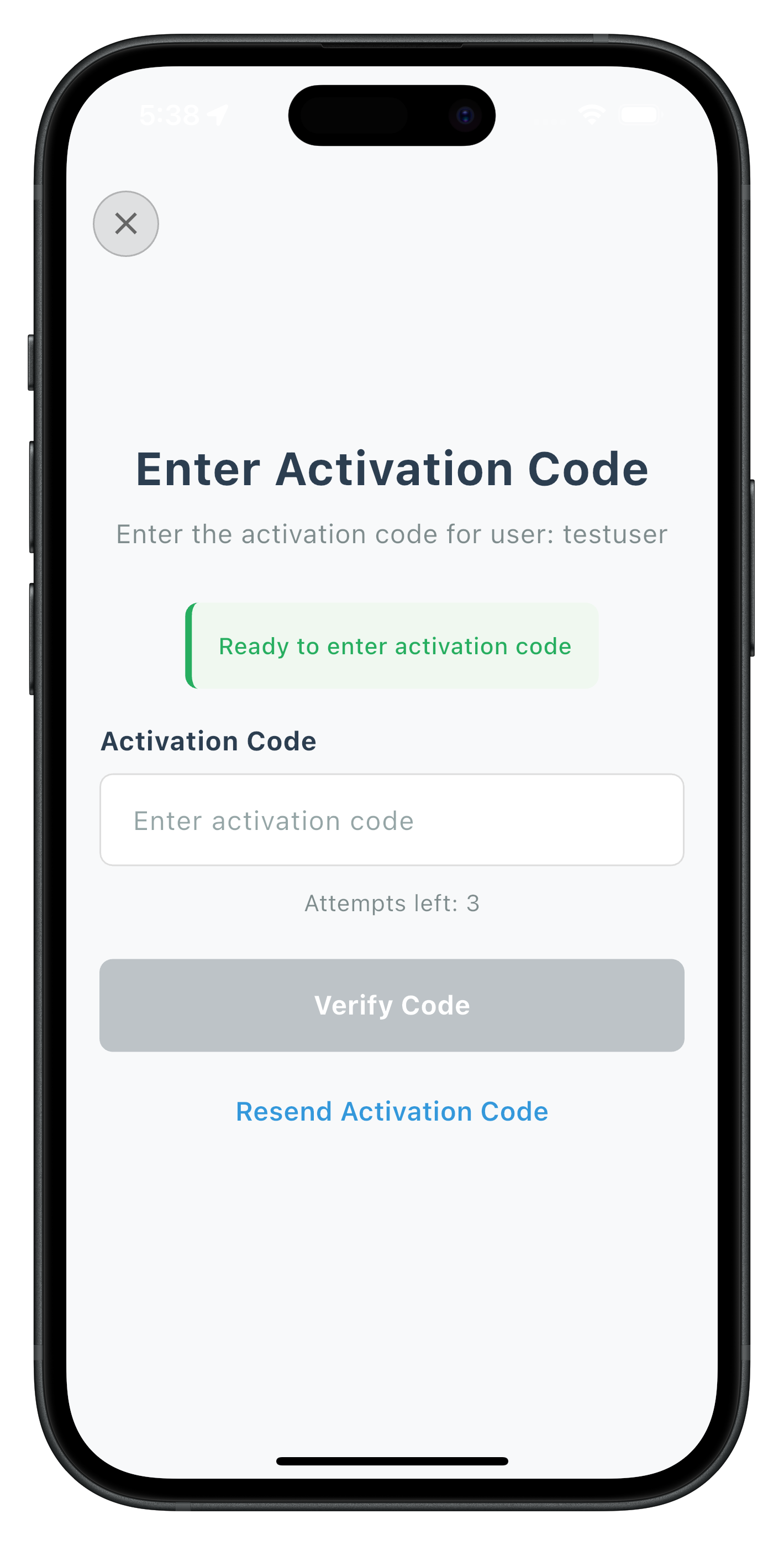
ActivationCodeScreen Key Features
- Attempts Tracking: Displays remaining attempts from
getActivationCodeevent data - Resend Functionality: Allows users to request new activation codes
- Input Validation: Real-time validation with clear error messaging
- Loading States: Separate loading states for validation and resend operations
The implementation follows the same pattern as CheckUserScreen with:
ConsumerStatefulWidgetfor Riverpod integrationdidUpdateWidgetfor cyclical event handlingRDNAEventUtilsfor error processing- Async API calls with loading states
// Key implementation pattern (condensed)
Future<void> _handleValidateActivationCode() async {
  final code = _activationCodeController.text.trim();

  setState(() => _isValidating = true);

  final response = await rdnaService.setActivationCode(code);

  if (response.error?.longErrorCode == 0) {
    setState(() => _validationMessage = 'Code set successfully!');
  } else {
    setState(() => _error = response.error?.errorString);
  }

  setState(() => _isValidating = false);
}

Future<void> _handleResendActivationCode() async {
  setState(() => _isResending = true);

  await rdnaService.resendActivationCode();

  setState(() {
    _validationMessage = 'New activation code sent!';
    _isResending = false;
  });
}
Specific Status Code handling
Status Code | Event Name | Meaning |
106 |
| Triggered when an invalid otp is provided in setActivationCode API. |
The following image showcases screen from the sample application:
Plugin checks if LDA is available:
- If available:
- Trigger
getUserConsentForLDAevent- User chooses:
- Biometric:
setUserConsentForLDA(true)→ biometric prompt →onUserLoggedIn - Password:
setUserConsentForLDA(false)→getPasswordevent → password screen
- Biometric:
- User chooses:
- Trigger
- If not available:
- Directly trigger
getPasswordevent → password screen
- Directly trigger
getUserConsentForLDA Event
        ↓
    User Decision:
    ├─ Allow Biometric → setUserConsentForLDA(true) → SDK handles biometric → onUserLoggedIn
    └─ Use Password → setUserConsentForLDA(false) → getPassword → Password Screen

Alternative Flow (No LDA):
getPassword Event → Password Screen → setPassword → onUserLoggedIn
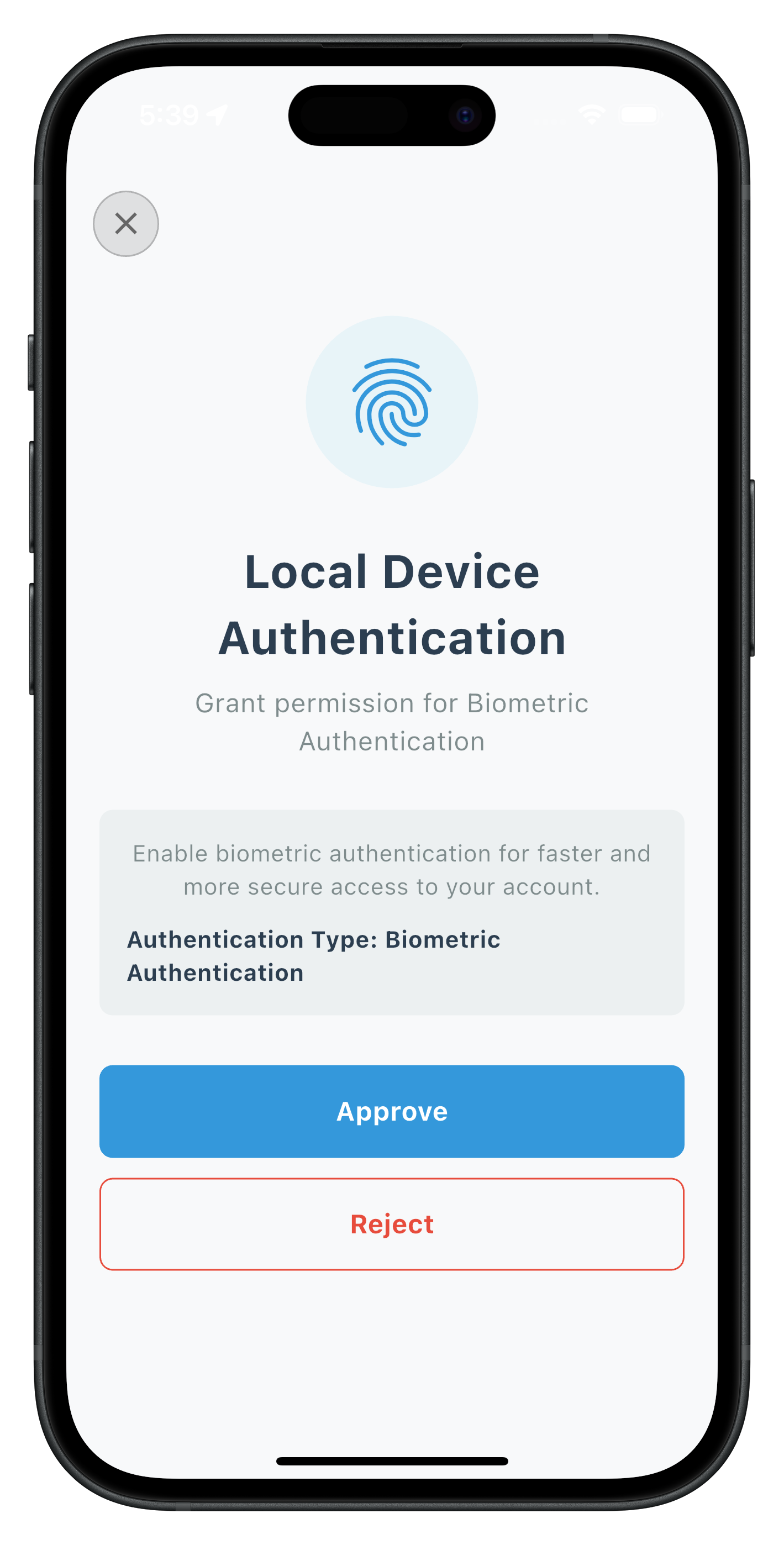
User LDA Consent Screen
The UserLDAConsentScreen handles biometric authentication consent with:
- User consent buttons (Allow Biometric / Use Password)
- SDK automatic biometric prompt on positive consent
- Navigation to password screen on negative consent
- Error handling for consent failures
// Key pattern
Future<void> _handleUserConsent(bool consent) async {
  final response = await rdnaService.setUserConsentForLDA(
    consent,
    eventData.challengeMode,
    eventData.authenticationType
  );

  if (consent) {
    // SDK handles biometric prompt automatically
    // On success: onUserLoggedIn event triggered
  } else {
    // SDK triggers getPassword event
    // Navigate to password screen
  }
}
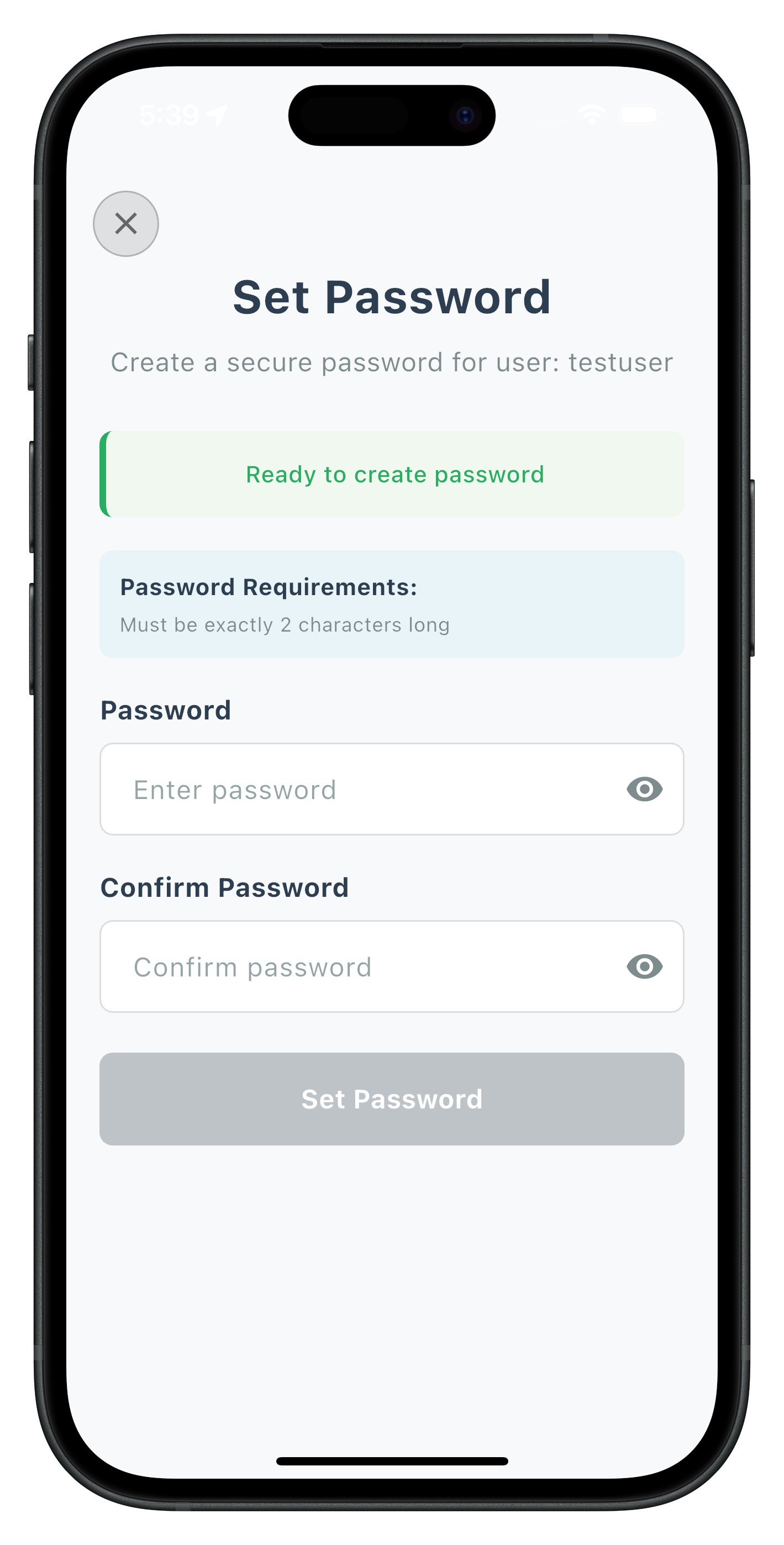
Set Password Screen
Handles password creation with policy validation:
- Dynamic password policy parsing from challenge data
- Password confirmation matching
- Policy requirements display
- Comprehensive validation
// Password policy extraction
final policyValue = RDNAEventUtils.getChallengeValue(
  eventData.challengeResponse?.challengeInfo,
  'RELID_PASSWORD_POLICY',
);

if (policyValue != null) {
  final policyMessage = parseAndGeneratePolicyMessage(policyValue);
  setState(() => _passwordPolicy = policyMessage);
}
Specific Status Code handling
Status Code | Event Name | Meaning |
190 |
| Triggered when the provided password does not meet the password policy requirements in the setPassword API. |
164 |
| Please enter a new password. The password you entered using setPassword API has been used previously. You are not allowed to reuse any of your last 5 passwords. |
The following image showcases screen from the sample application:
The following image showcases screen from the sample application:
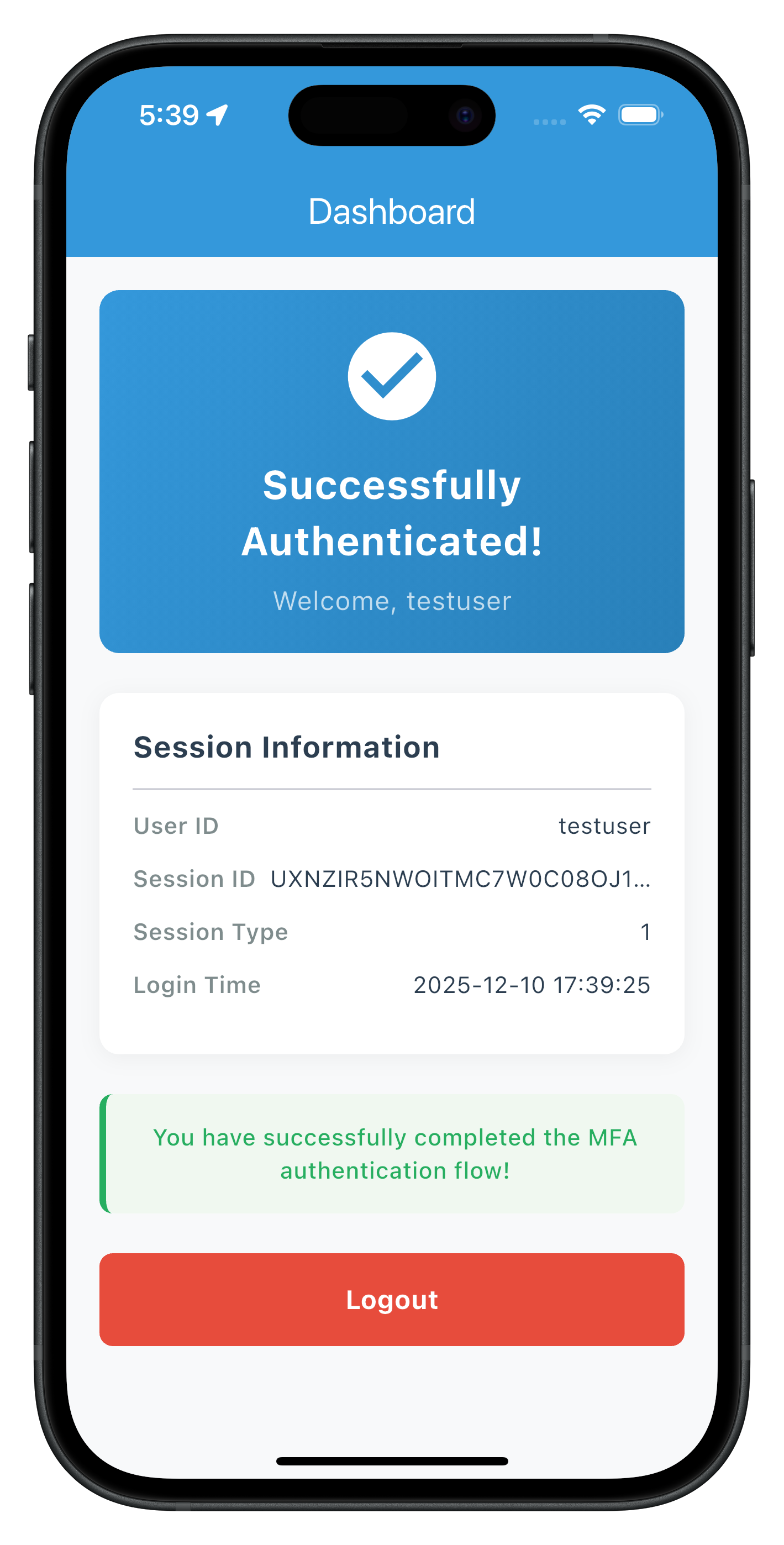
The Dashboard screen serves as the landing destination after successful login, triggered by the onUserLoggedIn event.
Building Dashboard with Logout Functionality
// lib/tutorial/screens/tutorial/dashboard_screen.dart


class DashboardScreen extends ConsumerStatefulWidget {
  final RDNAUserLoggedIn? eventData;

  const DashboardScreen({super.key, this.eventData});

  @override
  ConsumerState<DashboardScreen> createState() => _DashboardScreenState();
}

class _DashboardScreenState extends ConsumerState<DashboardScreen> {
  bool _isLoggingOut = false;

  Future<void> _handleLogout() async {
    setState(() => _isLoggingOut = true);

    final rdnaService = RdnaService.getInstance();
    await rdnaService.logOff();

    // SDK triggers onUserLoggedOff event
    // Then automatically triggers getUser event (flow restarts)
  }

  @override
  Widget build(BuildContext context) {
    return Scaffold(
      appBar: AppBar(title: const Text('Dashboard')),
      body: Center(
        child: Column(
          mainAxisAlignment: MainAxisAlignment.center,
          children: [
            const Text(
              'Welcome to Your Dashboard',
              style: TextStyle(fontSize: 24, fontWeight: FontWeight.bold),
            ),
            const SizedBox(height: 20),
            const Text('You have successfully completed MFA activation!'),
            const SizedBox(height: 40),
            ElevatedButton(
              onPressed: _isLoggingOut ? null : _handleLogout,
              child: _isLoggingOut
                  ? const CircularProgressIndicator()
                  : const Text('Logout'),
            ),
          ],
        ),
      ),
    );
  }
}
Logout Flow Sequence
User clicks "Logout" button
        ↓
logOff() API call
        ↓
onUserLoggedOff event triggered
        ↓
getUser event automatically triggered
        ↓
Navigate to CheckUserScreen (flow restarts)
The following images showcase screens from the sample application:
|
📝 What We're Building: Streamlined authentication for returning users with biometric prompts and password verification.
Login Flow vs Activation Flow
Key Differences:
Aspect | Activation Flow | Login Flow |
User Type | First-time users | Returning users |
OTP Required | Always required | Usually not required |
Biometric Setup | User chooses to enable | Automatic prompt if enabled |
Password Setup | Creates new password | Verifies existing password |
Navigation | Multiple screens | Fewer screens |
When Login Flow Occurs
Login Flow Triggers When:
- User previously completed activation on any device
- User has an existing account with established credentials
- Device authentication is already configured
- User logged out and is logging back in
Login Flow Events Sequence
SDK Initialization Complete
        ↓
   getUser Event
        ↓
   setUser API Call → User Recognition
        ↓
   [SDK Decision - Skip OTP for known users]
        ↓
   Device Authentication:
   ├─ LDA Enabled? → [Automatic Biometric Prompt]
   │                 ├─ Success → onUserLoggedIn
   │                 └─ Failed → getUser with error
   │
   └─ Password Only? → getPassword (challengeMode = 0)
                       ↓
                       setPassword API Call
        ↓
   onUserLoggedIn → Dashboard
Same screen will be used which in activation flow.
Specific Status Code handling
Status Code | Event Name | Meaning |
141 |
| Triggered when an user is blocked due to exceeded verify password attempts. This means the user can be unblocked using the resetBlockedUserAccount API. The implementation of this API can be found in the codelab. |
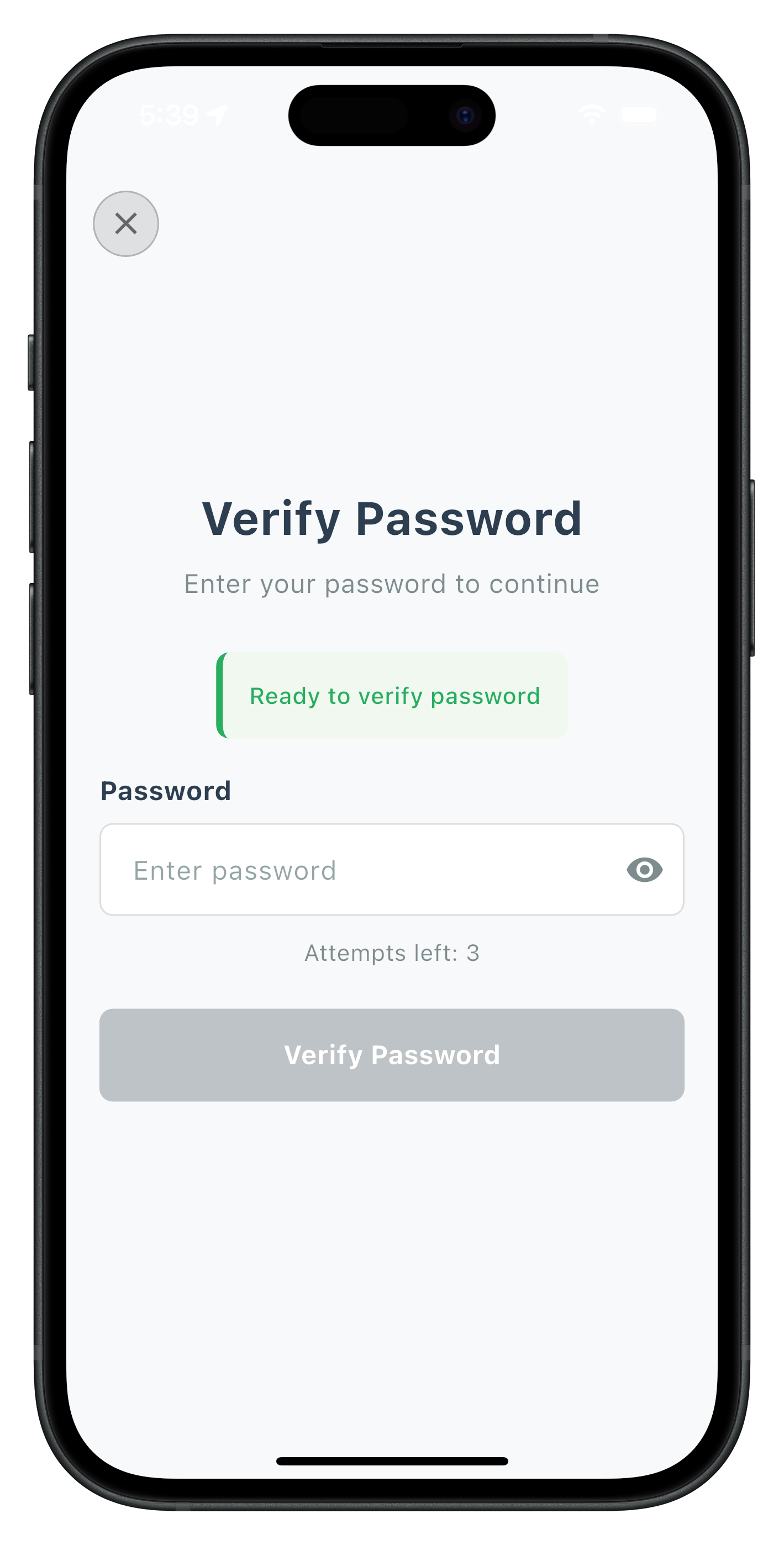
The Verify Password screen handles password verification during login when users need to enter their existing password.
Key Features
- Single Password Input: Only requires password entry (no confirmation needed)
- Challenge Mode 0: Specifically for login flow password verification
- Attempts Tracking: Displays remaining login attempts
- Error Recovery: Handles verification failures with clear feedback
Implementation Pattern
// lib/tutorial/screens/mfa/verify_password_screen.dart


class VerifyPasswordScreen extends ConsumerStatefulWidget {
  final RDNAGetPassword? eventData;

  const VerifyPasswordScreen({super.key, this.eventData});

  @override
  ConsumerState<VerifyPasswordScreen> createState() =>
      _VerifyPasswordScreenState();
}

class _VerifyPasswordScreenState extends ConsumerState<VerifyPasswordScreen> {
  final _passwordController = TextEditingController();
  bool _isSubmitting = false;
  String? _error;

  Future<void> _handleVerifyPassword() async {
    final password = _passwordController.text.trim();

    setState(() => _isSubmitting = true);

    final response = await rdnaService.setPassword(
      password,
      RDNAChallengeOpMode.rdnaOpLogin  // Challenge mode 0
    );

    if (response.error?.longErrorCode == 0) {
      // Success - wait for onUserLoggedIn event
      print('Password verified successfully');
    } else {
      setState(() => _error = response.error?.errorString);
    }

    setState(() => _isSubmitting = false);
  }

  @override
  Widget build(BuildContext context) {
    return Scaffold(
      body: SafeArea(
        child: Padding(
          padding: const EdgeInsets.all(20),
          child: Column(
            mainAxisAlignment: MainAxisAlignment.center,
            children: [
              const Text('Verify Password',
                style: TextStyle(fontSize: 28, fontWeight: FontWeight.bold)),
              const SizedBox(height: 30),

              // Password Input
              CustomInput(
                label: 'Password',
                value: _passwordController.text,
                onChanged: (value) => setState(() {
                  _passwordController.text = value;
                  _error = null;
                }),
                obscureText: true,
                error: _error,
              ),
              const SizedBox(height: 24),

              // Verify Button
              CustomButton(
                title: _isSubmitting ? 'Verifying...' : 'Verify Password',
                onPress: _handleVerifyPassword,
                loading: _isSubmitting,
                disabled: _passwordController.text.isEmpty,
              ),
            ],
          ),
        ),
      ),
    );
  }
}
Specific Status Code handling
Status Code | Event Name | Meaning |
102 |
| Triggered when an invalid password is provided in setPassword API with challengeMode = 0. |
The following image showcases screen from the sample application:
The screens we built for activation automatically handle login flow contexts. Let's set up the navigation and integration.
SDK Event Provider
The same SDK Event Provider handles login flow navigation automatically through event-driven routing.
Testing Commands
Build and run your Flutter application:
# Run on connected device
flutter run

# Run on iOS simulator
flutter run -d ios

# Run on Android emulator
flutter run -d android

# List available devices
flutter devices

# Hot reload
# Press 'r' in terminal for hot reload
# Press 'R' for hot restart
Testing Scenarios
Scenario 1: Complete Activation Flow
1. Launch app → CheckUserScreen
2. Enter username → setUser API → getActivationCode event → ActivationCodeScreen
3. Enter OTP → setActivationCode API → getUserConsentForLDA event → UserLDAConsentScreen
4. Choose biometric → setUserConsentForLDA(true) → SDK biometric prompt → onUserLoggedIn → DashboardScreen
✅ Validation Points:
- All screens display correctly
- SDK events trigger navigation
- Biometric prompt works on device
- Dashboard shows success state
Scenario 2: Activation with Password Fallback
1. Launch app → CheckUserScreen
2. Enter username → getActivationCode → ActivationCodeScreen
3. Enter OTP → getUserConsentForLDA → UserLDAConsentScreen
4. Choose password → setUserConsentForLDA(false) → getPassword event → SetPasswordScreen
5. Enter password → setPassword API → onUserLoggedIn → DashboardScreen
✅ Validation Points:
- Password policy displays correctly
- Password confirmation validation works
- Error messages display appropriately
Scenario 3: Login Flow (Returning User)
1. Launch app → CheckUserScreen
2. Enter username → setUser API → getPassword (challengeMode=0) → VerifyPasswordScreen
3. Enter password → setPassword API → onUserLoggedIn → DashboardScreen
✅ Validation Points:
- Password screen shows verification context
- Error recovery works smoothly
Scenario 4: Logout and Re-login Cycle
1. From Dashboard → Tap logout
2. Confirm logout → logOff API → onUserLoggedOff event
3. Plugin auto-triggers getUser event → CheckUserScreen
4. Complete login flow → Back to Dashboard
✅ Validation Points:
- Clean logout process
- Proper session cleanup
- Automatic flow restart
Hot Reload and Development
Flutter supports hot reload for rapid development:
- Hot Reload (r): Updates UI without restarting app, preserves state
- Hot Restart (R): Restarts app completely, resets state
- Changes to native code require full restart
Debugging
VS Code: Use built-in debugger with breakpoints Android Studio: Use Flutter Inspector DevTools: Run flutter pub global activate devtools then devtools
Event Handler Issues
Event Not Triggering
Problem: Plugin events not firing after API calls
Solutions:
// 1. Verify event handler registration
@override
void initState() {
  super.initState();
  final eventManager = rdnaService.getEventManager();
  eventManager.setGetUserHandler(_handleGetUser);
}

// 2. Check handler implementation
void _handleGetUser(RDNAGetUser data) {
  print('✅ getUser event received: ${data.challengeResponse?.status?.statusCode}');
  // Handler logic...
}
API Response Issues
Sync Response Errors
Problem: API calls returning error codes
Debugging:
final response = await rdnaService.setUser(username);
print('🔍 API Response:');
print('  Long Error Code: ${response.error?.longErrorCode}');
print('  Error String: ${response.error?.errorString}');

// Common error codes:
// 0 - Success
// Non-zero - Check errorString for details
Flutter-Specific Issues
"MissingPluginException"
- Plugin not properly registered
- Solution: Run
flutter clean && flutter pub get, then rebuild
"Asset not found"
- Asset not declared in pubspec.yaml
- Solution: Add asset path under
flutter.assetsin pubspec.yaml
"Null check operator used on null value"
- Accessing null before initialization
- Solution: Ensure async initialization completes before use
Hot reload not working
- Changes to native code require full restart
- Solution: Stop and restart with
flutter run
iOS build fails
- CocoaPods issues
- Solution:
cd ios && pod install --repo-update
Android build fails
- Gradle sync issues
- Solution: Run
flutter cleanand rebuild
Biometric Authentication Problems
Biometric Prompt Not Showing
Problem: LDA consent not showing for biometric prompt
Solutions:
Ensure that:
- Required permission declared in platform manifests
- Permission granted at runtime
- Biometric authentication available on device
- Device has enrolled biometric credentials
Secure Data Handling
User Credentials Protection
// ❌ DON'T: Store credentials in plain text
final user = {
  'username': 'user@example.com',
  'password': 'plaintext123',  // Never store passwords
  'activationCode': '123456'    // Never log activation codes
};

// ✅ DO: Handle credentials securely
void handleUserInput(String username) {
  // Validate input format
  if (!isValidEmail(username)) {
    setState(() => _error = 'Please enter a valid email address');
    return;
  }

  // Send to SDK immediately, don't store
  rdnaService.setUser(username);

  // Clear sensitive form data
  Future.delayed(const Duration(seconds: 1), () {
    setState(() => _usernameController.clear());
  });
}
Error Message Security
// ❌ DON'T: Expose sensitive information in errors
if (error.message.contains('user not found')) {
  setError('User does not exist in our system');  // Reveals user existence
}

// ✅ DO: Use generic error messages
String getSafeErrorMessage(dynamic error) {
  final errorMap = {
    'RESULT_INVALID_USER': 'Please check your credentials and try again',
    'RESULT_INVALID_CODE': 'Invalid activation code. Please try again',
    'RESULT_EXPIRED': 'Your session has expired. Please start over'
  };

  return errorMap[error.code] ?? 'An error occurred. Please try again';
}
Session Management Security
Secure Logout Implementation
Future<void> performSecureLogout() async {
  try {
    // 1. Clear sensitive data from memory
    setState(() {
      _usernameController.clear();
      _passwordController.clear();
      _error = null;
    });

    // 2. Call SDK logout
    await rdnaService.logOff();

    // 3. Reset navigation stack
    appRouter.go('/');

  } catch (error) {
    print('Logout error: $error');
    // Force navigation even on error
    appRouter.go('/');
  }
}
Memory Security
Secure Memory Management
// Clear sensitive data from component state
@override
void dispose() {
  _passwordController.clear();
  _activationCodeController.clear();
  _usernameController.dispose();
  _passwordController.dispose();
  _activationCodeController.dispose();
  super.dispose();
}

// Handle app backgrounding
@override
void initState() {
  super.initState();

  final lifecycleListener = AppLifecycleListener(
    onStateChange: (AppLifecycleState state) {
      if (state == AppLifecycleState.paused ||
          state == AppLifecycleState.inactive) {
        // Clear sensitive data when app goes to background
        _passwordController.clear();
        _activationCodeController.clear();
      }
    },
  );
}
Production Deployment Checklist
✅ Security Review:
- [ ] Remove all debug logging in production builds
- [ ] Validate all user inputs
- [ ] Implement proper error handling without information disclosure
- [ ] Use secure storage for any cached data
- [ ] Implement certificate pinning for external API calls
- [ ] Test with security scanning tools
✅ Performance Review:
- [ ] Optimize widget rebuilds
- [ ] Implement proper memory management
- [ ] Test on various device types and OS versions
- [ ] Verify app performance under low memory conditions
- [ ] Test network error scenarios and offline behavior
✅ User Experience Review:
- [ ] Verify proper keyboard navigation
- [ ] Test with various screen sizes and orientations
- [ ] Validate user flows with actual users
Congratulations! You've successfully implemented a complete, production-ready MFA Activation and Login flow using the rdna_client plugin:
🎉 What You've Built
✅ Complete MFA Implementation:
- Activation Flow: Full first-time user onboarding with device enrollment
- Login Flow: Streamlined authentication for returning users
- Event-Driven Architecture: Robust handling of all SDK events and challenges
- Production-Ready UI: Responsive screens with proper error handling and loading states
- Security Implementation: Following security best practices throughout
- Testing Strategy: Comprehensive testing approach for both flows
🏆 Key Implementation Patterns Mastered
- Async/Await Pattern: Flutter's asynchronous programming for API calls
- Event Callback Pattern: SDK event handling with eventify package
- Cyclical Challenge Handling: Managing repeated events gracefully
- Flow Detection Logic: Distinguishing between activation and login contexts
- Error Boundary Implementation: Graceful error handling at API and UI levels
- State Management: Riverpod for reactive state management
🚀 Architecture Benefits
Your implementation provides:
- Scalable Event System: Easy to extend for additional MFA challenges
- Reusable Widgets: UI patterns that work across both flows
- Type-Safe Navigation: GoRouter with type-safe routing
- Robust Error Recovery: Users can recover from errors without restarting flows
- Performance Optimization: Streamlined login experience for returning users
🔄 What Happens Next
Next User Login Experience:
When users return to your app, they'll experience the optimized login flow:
- SDK automatically triggers
getUserevent - User enters credentials → Instant biometric prompt (if enabled)
- One-touch authentication → Direct access to app
🚀 Next Steps & Advanced Features
With this foundation, you're ready to explore:
Advanced MFA Features:
- Session Management
- Additional device activation
- Multi-device management
📚 References & Resources
🎯 You're now ready to deploy a production-grade MFA system! Your implementation demonstrates enterprise-level security practices and provides an excellent foundation for building secure, user-friendly authentication experiences.