This codelab demonstrates how to implement the RELID Initialization flow using the rdna_client Flutter plugin. The RELID SDK provides secure identity verification and session management for mobile applications.
What You'll Learn
- How to initialize the RELID SDK in a Flutter application
- Event-driven architecture for handling initialization callbacks
- Connection profile management and configuration
- Error handling and user feedback implementation
What You'll Need
- Flutter development environment set up
rdna_clientplugin added to your project- Basic understanding of Flutter widgets and state management
- Connection profile JSON file from your Uniken Admin or Uniken gateway manager
- Access to the sample app source code for reference
Get the Code from GitHub
The code to get started is stored in a GitHub repository.
You can clone the repository using the following command:
git clone https://github.com/uniken-public/codelab-flutter.git
Navigate to the relid-initialize folder in the repository you cloned earlier
Before implementing your own RELID initialization, let's examine the sample app structure to understand the recommended architecture:
Component | Purpose | Sample App Reference |
Connection Profile | Configuration data |
|
Profile Parser | Utility to parse connection data |
|
Event Manager | Handles SDK callbacks |
|
RELID Service | Main SDK interface |
|
Event Provider | Global event handling |
|
UI Components | User interface screens |
|
Recommended Directory Structure
Create the following directory structure in your Flutter project:
lib/
├── main.dart
├── uniken/
│   ├── cp/
│   │   └── agent_info.json
│   ├── services/
│   │   ├── rdna_event_manager.dart
│   │   └── rdna_service.dart
│   ├── utils/
│   │   ├── connection_profile_parser.dart
│   │   └── progress_helper.dart
│   └── providers/
│       └── sdk_event_provider.dart
├── tutorial/
│   ├── navigation/
│   │   └── app_router.dart
│   └── screens/
│       └── tutorial/
│           ├── tutorial_home_screen.dart
│           ├── tutorial_success_screen.dart
│           └── tutorial_error_screen.dart
assets/
Prerequisites
Ensure you have Flutter installed:
flutter doctor
Add Plugin Dependency
Add the SDK plugin to your pubspec.yaml:
For local package:
dependencies:
  flutter:
    sdk: flutter
  rdna_client:
    path: rdna_client
For remote package:
dependencies:
  flutter:
    sdk: flutter
  rdna_client: ^1.0.0
Install Dependencies
flutter pub get
Platform Setup
Follow the Flutter platform setup guide for platform-specific configuration.
How Flutter Plugins Work
Flutter plugins provide platform-specific functionality through Dart APIs.
Plugin Structure:
- Dart API: The interface you use in your Flutter code
- Platform Channels: Communication with native code (iOS/Android)
- Native Implementation: Platform-specific code (Swift/Kotlin)
Using the SDK Plugin
import 'package:rdna_client/rdna_client.dart';

// Create instance
final rdnaClient = RdnaClient();

// Initialize
await rdnaClient.initialize(config);

// Use methods
final result = await rdnaClient.someMethod();
Project Structure
Organize your Flutter project:
lib/
├── main.dart                 # App entry point
├── uniken/
│   ├── services/            # SDK service wrappers
│   │   ├── rdna_service.dart
│   │   └── rdna_event_manager.dart
│   ├── screens/             # UI screens
│   │   └── tutorial_home_screen.dart
│   ├── widgets/             # Reusable widgets
│   └── utils/               # Utilities
│       └── connection_profile_parser.dart
assets/
└── agent_info.json          # Asset files
agent_info.json
Create your connection profile JSON file in lib/uniken/cp/agent_info.json:
{
  "RelIds": [
    {
      "Name": "YourRELIDAgentName",
      "RelId": "your-rel-id-string-here"
    }
  ],
  "Profiles": [
    {
      "Name": "YourRELIDAgentName",
      "Host": "your-gateway-host.com",
      "Port": "443"
    }
  ]
}
Declare Assets in pubspec.yaml
Add the asset to your pubspec.yaml:
flutter:
  assets:
    - lib/uniken/cp/agent_info.json
Security Considerations
- Never print RelId values to console
- Use environment-specific configuration files
Define the Dart classes for type safety:
// lib/uniken/utils/connection_profile_parser.dart
import 'dart:convert';
import 'package:flutter/services.dart';

/// Represents a single REL-ID entry from the connection profile
class RelId {
  final String name;
  final String relId;

  RelId({required this.name, required this.relId});

  factory RelId.fromJson(Map<String, dynamic> json) {
    return RelId(
      name: json['Name'] as String,
      relId: json['RelId'] as String,
    );
  }
}

/// Represents a single Profile entry with connection details
class Profile {
  final String name;
  final String host;
  final dynamic port; // Can be String or int from JSON

  Profile({required this.name, required this.host, required this.port});

  factory Profile.fromJson(Map<String, dynamic> json) {
    return Profile(
      name: json['Name'] as String,
      host: json['Host'] as String,
      port: json['Port'], // Accept both String and int
    );
  }
}

/// Complete agent info structure from JSON file
class AgentInfo {
  final List<RelId> relIds;
  final List<Profile> profiles;

  AgentInfo({required this.relIds, required this.profiles});

  factory AgentInfo.fromJson(Map<String, dynamic> json) {
    return AgentInfo(
      relIds: (json['RelIds'] as List)
          .map((e) => RelId.fromJson(e as Map<String, dynamic>))
          .toList(),
      profiles: (json['Profiles'] as List)
          .map((e) => Profile.fromJson(e as Map<String, dynamic>))
          .toList(),
    );
  }
}

/// Parsed connection profile with extracted values
class ParsedAgentInfo {
  final String relId;
  final String host;
  final int port;

  ParsedAgentInfo({
    required this.relId,
    required this.host,
    required this.port,
  });
}

/// Parses agent info structure and extracts connection details
ParsedAgentInfo parseAgentInfo(AgentInfo profileData) {
  if (profileData.relIds.isEmpty) {
    throw Exception('No RelIds found in agent info');
  }

  if (profileData.profiles.isEmpty) {
    throw Exception('No Profiles found in agent info');
  }

  // Always pick the first array objects
  final firstRelId = profileData.relIds[0];

  if (firstRelId.name.isEmpty || firstRelId.relId.isEmpty) {
    throw Exception('Invalid RelId object - missing Name or RelId');
  }

  // Find matching profile by Name (1-1 mapping)
  final matchingProfile = profileData.profiles.firstWhere(
    (profile) => profile.name == firstRelId.name,
    orElse: () => throw Exception(
        'No matching profile found for RelId name: ${firstRelId.name}'),
  );

  if (matchingProfile.host.isEmpty || matchingProfile.port == null) {
    throw Exception('Invalid Profile object - missing Host or Port');
  }

  // Convert port to int if it's a String
  int port;
  if (matchingProfile.port is String) {
    port = int.tryParse(matchingProfile.port as String) ?? -1;
    if (port == -1) {
      throw Exception('Invalid port value: ${matchingProfile.port}');
    }
  } else {
    port = matchingProfile.port as int;
  }

  return ParsedAgentInfo(
    relId: firstRelId.relId,
    host: matchingProfile.host,
    port: port,
  );
}

/// Loads and parses the agent_info.json file from assets
Future<ParsedAgentInfo> loadAgentInfo() async {
  try {
    final jsonString =
        await rootBundle.loadString('lib/uniken/cp/agent_info.json');
    final jsonData = json.decode(jsonString) as Map<String, dynamic>;
    final profileData = AgentInfo.fromJson(jsonData);
    return parseAgentInfo(profileData);
  } catch (error) {
    throw Exception('Failed to load agent info: $error');
  }
}
The parser performs several critical functions:
- Validates JSON structure
- Matches RelIds with Profiles by name
- Converts port values to numbers
- Provides comprehensive error handling
- Uses
rootBundlefor asset loading
The event manager handles all RELID SDK callbacks using a singleton pattern:
// lib/uniken/services/rdna_event_manager.dart
import 'package:eventify/eventify.dart';
import 'package:rdna_client/rdna_client.dart';
import 'package:rdna_client/rdna_struct.dart';

/// Type definitions for event callbacks
typedef RDNAInitializeProgressCallback = void Function(RDNAInitProgressStatus);
typedef RDNAInitializeErrorCallback = void Function(RDNAInitializeError);
typedef RDNAInitializeSuccessCallback = void Function(RDNAInitialized);

/// REL-ID SDK Event Manager
class RdnaEventManager {
  static RdnaEventManager? _instance;
  final RdnaClient _rdnaClient;
  final List<Listener?> _listeners = [];

  // Composite event handlers (can handle multiple concerns)
  RDNAInitializeProgressCallback? _initializeProgressHandler;
  RDNAInitializeErrorCallback? _initializeErrorHandler;
  RDNAInitializeSuccessCallback? _initializedHandler;

  RdnaEventManager._(this._rdnaClient) {
    _registerEventListeners();
  }

  /// Gets the singleton instance of RdnaEventManager
  static RdnaEventManager getInstance(RdnaClient rdnaClient) {
    _instance ??= RdnaEventManager._(rdnaClient);
    return _instance!;
  }

  /// Registers native event listeners for all SDK events
  void _registerEventListeners() {
    print('RdnaEventManager - Registering native event listeners');

    _listeners.add(
      _rdnaClient.on(RdnaClient.onInitializeProgress, _onInitializeProgress),
    );
    _listeners.add(
      _rdnaClient.on(RdnaClient.onInitializeError, _onInitializeError),
    );
    _listeners.add(
      _rdnaClient.on(RdnaClient.onInitialized, _onInitialized),
    );

    print('RdnaEventManager - Native event listeners registered');
  }

  /// Handles SDK initialization progress events
  void _onInitializeProgress(dynamic progressData) {
    print('RdnaEventManager - Initialize progress event received');

    final data = progressData as RDNAInitProgressStatus;
    print('RdnaEventManager - Progress: ${data.initializeStatus}');

    if (_initializeProgressHandler != null) {
      _initializeProgressHandler!(data);
    }
  }

  /// Handles SDK initialization error events
  void _onInitializeError(dynamic errorData) {
    print('RdnaEventManager - Initialize error event received');

    final data = errorData as RDNAInitializeError;
    print('RdnaEventManager - Initialize error: ${data.errorString}');

    if (_initializeErrorHandler != null) {
      _initializeErrorHandler!(data);
    }
  }

  /// Handles SDK initialization success events
  void _onInitialized(dynamic initializedData) {
    print('RdnaEventManager - Initialize success event received');

    final data = initializedData as RDNAInitialized;
    print('RdnaEventManager - Successfully initialized, Session ID: ${data.session?.sessionId}');

    if (_initializedHandler != null) {
      _initializedHandler!(data);
    }
  }

  /// Sets event handlers for SDK events. Only one handler per event type.

  /// Sets the handler for initialization progress events
  void setInitializeProgressHandler(RDNAInitializeProgressCallback? callback) {
    _initializeProgressHandler = callback;
  }

  /// Sets the handler for initialization error events
  void setInitializeErrorHandler(RDNAInitializeErrorCallback? callback) {
    _initializeErrorHandler = callback;
  }

  /// Sets the handler for initialization success events
  void setInitializedHandler(RDNAInitializeSuccessCallback? callback) {
    _initializedHandler = callback;
  }

  /// Cleans up all event listeners and handlers
  void cleanup() {
    print('RdnaEventManager - Cleaning up event listeners and handlers');

    // Remove native event listeners
    for (final listener in _listeners) {
      if (listener != null) {
        _rdnaClient.off(listener);
      }
    }
    _listeners.clear();

    // Clear all event handlers
    _initializeProgressHandler = null;
    _initializeErrorHandler = null;
    _initializedHandler = null;

    print('RdnaEventManager - Cleanup completed');
  }
}
Key features of the event manager:
- onInitializeProgress: Tracks initialization progress through various stages
- onInitializeError: Reports initialization errors with specific error codes
- onInitialized: Confirms successful initialization with session data
- Setter Methods: Use
setInitializeProgressHandler(),setInitializeErrorHandler(), etc. to register callbacks - Cleanup: Proper cleanup of event listeners to prevent memory leaks
The RELID service provides the main interface for SDK operations:
// lib/uniken/services/rdna_service.dart
import 'package:rdna_client/rdna_client.dart';
import 'package:rdna_client/rdna_struct.dart';
import '../utils/connection_profile_parser.dart';
import 'rdna_event_manager.dart';

/// REL-ID SDK Service
class RdnaService {
  static RdnaService? _instance;
  final RdnaClient _rdnaClient;
  final RdnaEventManager _eventManager;

  RdnaService._(this._rdnaClient, this._eventManager);

  /// Gets the singleton instance of RdnaService
  static RdnaService getInstance() {
    if (_instance == null) {
      final rdnaClient = RdnaClient();
      final eventManager = RdnaEventManager.getInstance(rdnaClient);
      _instance = RdnaService._(rdnaClient, eventManager);
    }
    return _instance!;
  }

  /// Cleans up the service and event manager
  void cleanup() {
    print('RdnaService - Cleaning up service');
    _eventManager.cleanup();
  }

  /// Gets the event manager instance for external callback setup
  RdnaEventManager getEventManager() {
    return _eventManager;
  }

  /// Gets the version of the REL-ID SDK
  Future<String> getSDKVersion() async {
    print('RdnaService - Requesting SDK version');

    final response = await _rdnaClient.getSDKVersion();

    final version = response.response ?? 'Unknown';
    print('RdnaService - SDK Version: $version');
    return version;
  }

  /// Initializes the REL-ID SDK
  Future<RDNASyncResponse> initialize() async {
    final profile = await loadAgentInfo();
    print('RdnaService - Loaded connection profile:');
    print('  Host: ${profile.host}');
    print('  Port: ${profile.port}');
    print('  RelId: ${profile.relId.substring(0, 10)}...');

    print('RdnaService - Starting initialization');

    final response = await _rdnaClient.initialize(
      profile.relId,                   // agentInfo: RelId from connection profile
      profile.host,                    // gatewayHost: Server hostname from connection profile
      profile.port,                    // gatewayPort: Server port from connection profile
      '',                              // cipherSpec: Empty for default
      '',                              // cipherSalt: Empty for default
      null,                            // proxySettings: null for no proxy
      null,                            // sslCertificate: null for default
      RDNALoggingLevel.RDNA_NO_LOGS,   // logLevel: No logs for production
    );

    print('RdnaService - Initialize sync response received');
    print('RdnaService - Sync response:');
    print('  Long Error Code: ${response.error?.longErrorCode}');
    print('  Short Error Code: ${response.error?.shortErrorCode}');

    return response;
  }
}
Important API Parameters
The rdnaClient.initialize() call requires specific parameter ordering:
Parameter | Purpose | Example |
| RelId | From connection profile Ex. {"Name": "YourRELIDAgentName","RelId": "your-rel-id-string-here"} |
| Server hostname | From connection profile Ex. {"Host": "your-gateway-host.com","Port": "443"} |
| Server port | From connection profile Ex. {"Host": "your-gateway-host.com","Port": "443"} |
| Logging setting |
|
Create a screen widget that handles user interaction and displays progress:
// lib/tutorial/screens/tutorial/tutorial_home_screen.dart
import 'package:flutter/material.dart';
import 'package:flutter_riverpod/flutter_riverpod.dart';
import 'package:go_router/go_router.dart';
import 'package:rdna_client/rdna_struct.dart';
import '../../../uniken/services/rdna_service.dart';
import '../../../uniken/utils/progress_helper.dart';

class TutorialHomeScreen extends ConsumerStatefulWidget {
  const TutorialHomeScreen({super.key});

  @override
  ConsumerState<TutorialHomeScreen> createState() => _TutorialHomeScreenState();
}

class _TutorialHomeScreenState extends ConsumerState<TutorialHomeScreen> {
  String _sdkVersion = 'Loading...';
  bool _isInitializing = false;
  String _progressMessage = '';

  @override
  void initState() {
    super.initState();
    _loadSDKVersion();
    _setupEventHandlers();
  }

  @override
  void dispose() {
    // Cleanup - reset handlers
    final rdnaService = RdnaService.getInstance();
    final eventManager = rdnaService.getEventManager();
    eventManager.setInitializeProgressHandler(null);
    eventManager.setInitializeErrorHandler(null);
    super.dispose();
  }

  /// Load SDK version on screen init
  Future<void> _loadSDKVersion() async {
    try {
      final rdnaService = RdnaService.getInstance();
      final version = await rdnaService.getSDKVersion();

      if (mounted) {
        setState(() {
          _sdkVersion = version;
        });
      }
    } catch (error) {
      print('TutorialHomeScreen - Failed to load SDK version: $error');

      if (mounted) {
        setState(() {
          _sdkVersion = 'Unknown';
        });
      }
    }
  }

  void _setupEventHandlers() {
    final rdnaService = RdnaService.getInstance();
    final eventManager = rdnaService.getEventManager();

    // Register error handler directly in TutorialHomeScreen
    eventManager.setInitializeErrorHandler((RDNAInitializeError errorData) {
      print('TutorialHomeScreen - Received initialize error: ${errorData.errorString}');

      // Update local state
      setState(() {
        _isInitializing = false;
        _progressMessage = '';
      });

      // Navigate to error screen with the error details
      if (mounted) {
        context.goNamed('tutorialErrorScreen', extra: errorData);
      }
    });
  }

  Future<void> _handleInitializePress() async {
    if (_isInitializing) return;

    setState(() {
      _isInitializing = true;
      _progressMessage = 'Starting RDNA initialization...';
    });

    print('TutorialHomeScreen - User clicked Initialize - Starting RDNA...');

    // Register progress handler directly with the event manager
    final rdnaService = RdnaService.getInstance();
    final eventManager = rdnaService.getEventManager();

    eventManager.setInitializeProgressHandler((RDNAInitProgressStatus data) {
      print('TutorialHomeScreen - Progress update: ${data.initializeStatus}');
      final message = getProgressMessage(data);
      if (mounted) {
        setState(() {
          _progressMessage = message;
        });
      }
    });

    // Call rdnaService.initialize()
    final syncResponse = await rdnaService.initialize();

    print('TutorialHomeScreen - RDNA initialization sync response received');
    print('TutorialHomeScreen - Sync response:');
    print('  Long Error Code: ${syncResponse.error!.longErrorCode}');
    print('  Short Error Code: ${syncResponse.error!.shortErrorCode}');

    // Check sync response - error is always present, check longErrorCode
    if (syncResponse.error!.longErrorCode != 0) {
      // Sync error - show dialog immediately
      print('TutorialHomeScreen - Sync error: ${syncResponse.error!.errorString}');

      if (mounted) {
        setState(() {
          _isInitializing = false;
          _progressMessage = '';
        });

        _showErrorDialog(syncResponse.error!);
      }
    } else {
      // Sync success (longErrorCode == 0) - async events will handle next steps
      print('TutorialHomeScreen - Sync success, waiting for async events...');
    }
  }

  /// Show sync error dialog
  void _showErrorDialog(RDNAError error) {
    showDialog(
      context: context,
      builder: (context) => AlertDialog(
        title: const Text('Initialization Failed'),
        content: Text(
          '${error.errorString}\n\n'
          'Error Codes:\n'
          'Long: ${error.longErrorCode}\n'
          'Short: ${error.shortErrorCode}',
        ),
        actions: [
          TextButton(
            onPressed: () => Navigator.of(context).pop(),
            child: const Text('OK'),
          ),
        ],
      ),
    );
  }

  @override
  Widget build(BuildContext context) {
    // Build method includes SDK version display, initialize button, and progress display
    return Scaffold(
      body: SafeArea(
        child: Column(
          children: [
            // Display SDK version, initialize button, progress message
            Text('SDK Version: $_sdkVersion'),
            ElevatedButton(
              onPressed: _isInitializing ? null : _handleInitializePress,
              child: Text(_isInitializing ? 'Initializing...' : 'Initialize'),
            ),
            if (_isInitializing)
              Text(_progressMessage),
          ],
        ),
      ),
    );
  }
}
Success Event Handling
The sample app uses a centralized approach for handling the onInitialized success event through SDKEventProvider:
// lib/uniken/providers/sdk_event_provider.dart
class SDKEventProviderWidget extends ConsumerStatefulWidget {
  final Widget child;

  const SDKEventProviderWidget({super.key, required this.child});

  @override
  ConsumerState<SDKEventProviderWidget> createState() => _SDKEventProviderWidgetState();
}

class _SDKEventProviderWidgetState extends ConsumerState<SDKEventProviderWidget> {
  @override
  void initState() {
    super.initState();
    _setupSDKEventHandlers();
  }

  void _setupSDKEventHandlers() {
    final rdnaService = RdnaService.getInstance();
    final eventManager = rdnaService.getEventManager();

    // Set up event handlers once on mount
    eventManager.setInitializedHandler(_handleInitialized);
  }

  /// Event handler for successful initialization
  void _handleInitialized(RDNAInitialized data) {
    print('SDKEventProvider - Successfully initialized, Session ID: ${data.session?.sessionId}');

    appRouter.goNamed('tutorialSuccessScreen', extra: data);
  }

  @override
  Widget build(BuildContext context) {
    return widget.child;
  }
}
This provider should wrap your app's root to ensure the onInitialized event is handled globally.
Key Implementation Features
The sample app demonstrates several important patterns:
Async/Await Pattern:
- Uses async/await for clean asynchronous handling
- Direct response checking without excessive error handling
Error Handling:
- Checks
longErrorCodeto determine sync success - Shows user-friendly error messages with specific error codes
Progress Tracking:
- Real-time progress updates during initialization stages:
- System threat check status
- App threat check status
- Network threat check status
- Overall initialization status
Event-Driven Architecture:
- Success navigation is handled by SDKEventProvider's onInitialized handler
- Progress updates are delivered through the event manager system
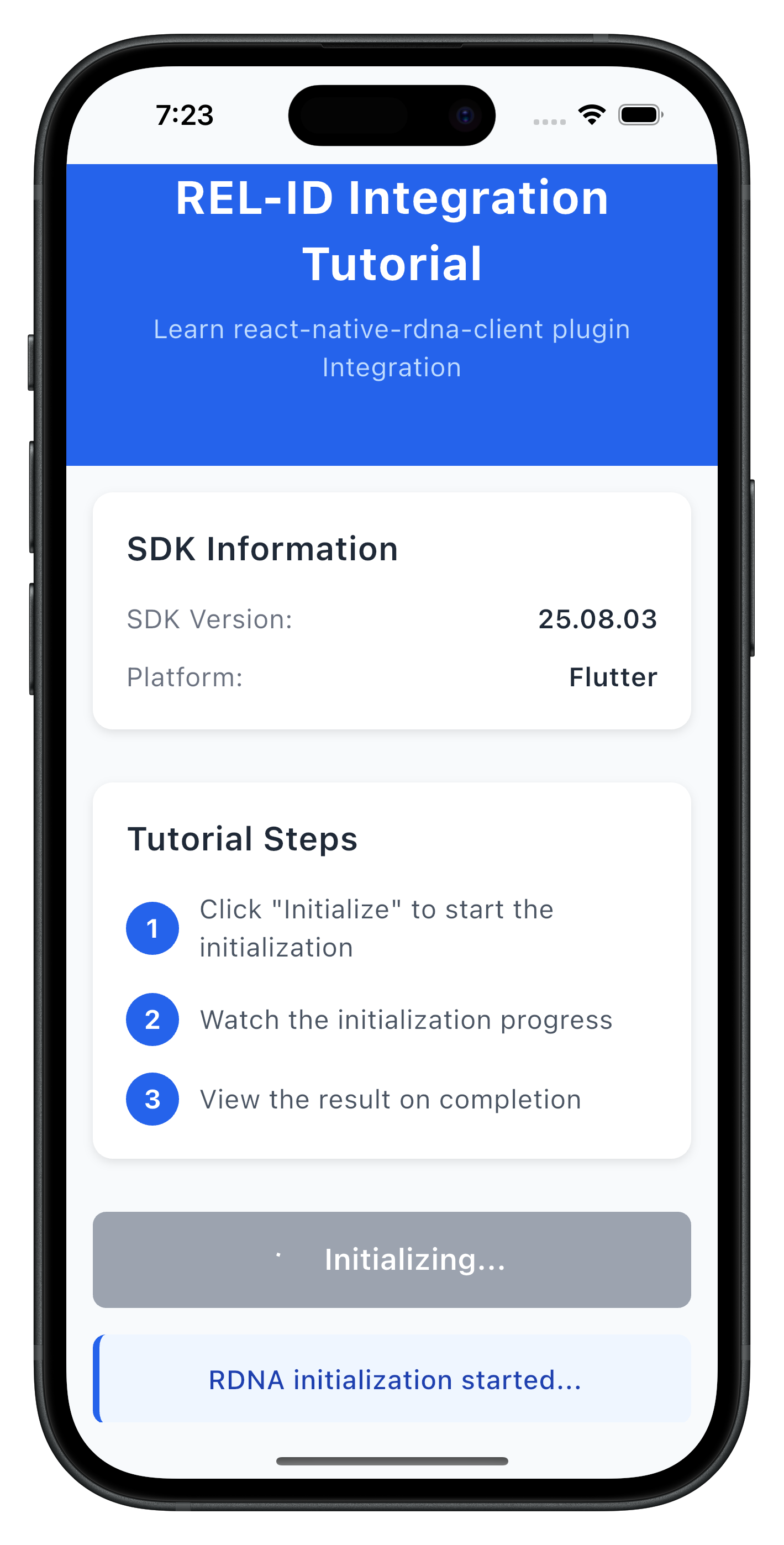
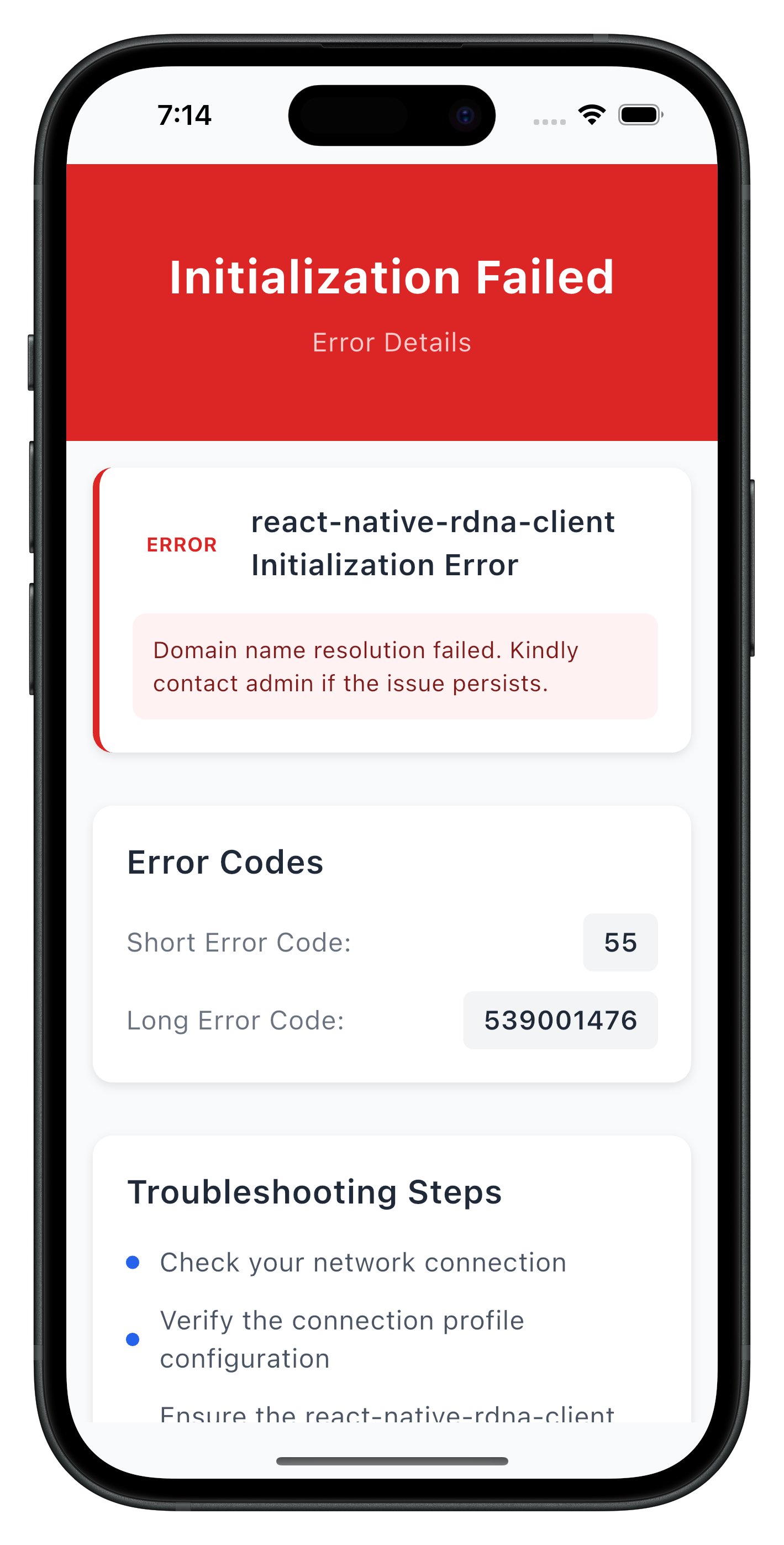
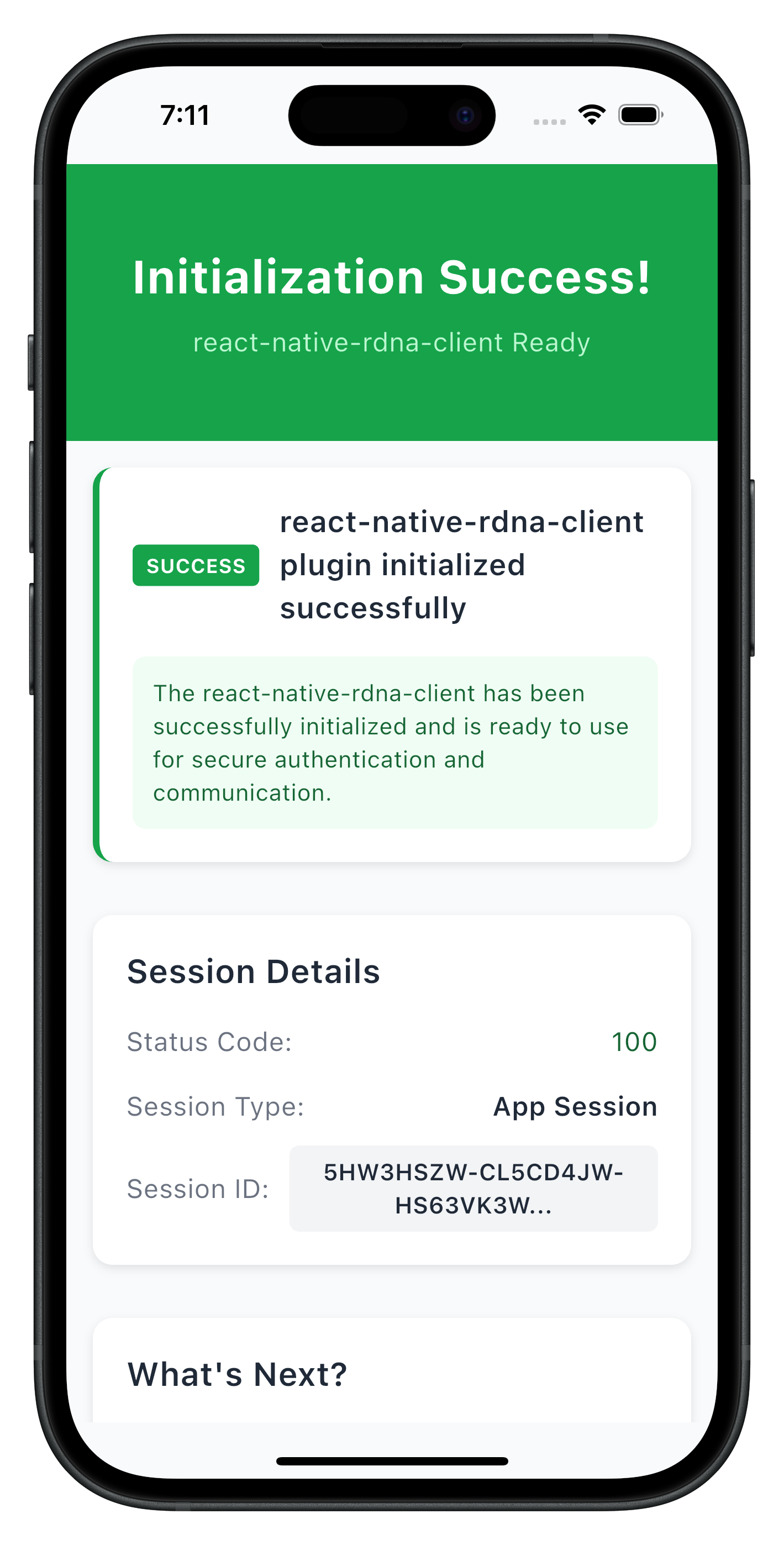
The following images showcase screens from the sample application:
|
|
|
Build and Run
# Run on connected device
flutter run

# Run on iOS simulator
flutter run -d ios

# Run on Android emulator
flutter run -d android

# List available devices
flutter devices
Hot Reload
Flutter supports hot reload for rapid development:
- Press
rin terminal for hot reload - Press
Rfor hot restart - Changes reflect instantly
Debugging
VS Code: Use the built-in debugger with breakpoints Android Studio: Use the Flutter Inspector DevTools: Run flutter pub global activate devtools then devtools
Key Test Scenarios
- Successful Initialization: Verify the complete flow works end-to-end
- Network Errors: Test with invalid host/port configurations
- Invalid Credentials: Test with incorrect RelId values
- Progress Tracking: Verify progress events are properly displayed
Verification Steps
Test your implementation with below APIs:
// Test SDK version retrieval
final version = await rdnaService.getSDKVersion();
print('SDK Version: $version');

// Test initialization
final syncResponse = await rdnaService.initialize();
if (syncResponse.error?.longErrorCode == 0) {
  print('Initialization successful');
} else {
  print('Initialization failed: ${syncResponse.error?.errorString}');
}
The sample app includes comprehensive testing patterns in the tutorial screens:
- SDK version verification before initialization
- Progress message formatting and display
- Error handling with user-friendly messages
- Navigation between success and error states
Connection Profile Issues
Error: "No RelIds found in agent info" Solution: Verify your JSON structure matches the sample in lib/uniken/cp/agent_info.json
Error: "No matching profile found for RelId name" Solution: Ensure the Name field in RelIds matches the Name field in Profiles
Flutter-Specific Issues
"MissingPluginException"
- Plugin not properly registered
- Solution: Run
flutter clean && flutter pub get, then rebuild
"Asset not found"
- Asset not declared in pubspec.yaml
- Solution: Add asset path under
flutter.assetsin pubspec.yaml
"Null check operator used on null value"
- Accessing null before initialization
- Solution: Ensure async initialization completes before use
Hot reload not working
- Changes to native code require full restart
- Solution: Stop and restart with
flutter run
iOS build fails
- CocoaPods issues
- Solution:
cd ios && pod install --repo-update
Android build fails
- Gradle sync issues
- Solution: Run
flutter cleanand rebuild
Plugin version conflicts
- Dependency resolution issues
- Solution: Check
pubspec.lock, runflutter pub upgrade
Network Connectivity
Error: Network connection failures Solution: Check host/port values and network accessibility
Error: REL-ID connection issues Solution: Verify the REL-ID server setup and running
SDK Initialization
Error Code 88: SDK already initialized Solution: Terminate the sdk
Error Code 288: SDK detected dynamic attack performed on the app Solution: Terminate the app
Error Code 179: Initialization in progress Solution: Wait for current initialization to complete before retrying
Security Considerations
- Use
RDNALoggingLevel.RDNA_NO_LOGSin production - Never log full RelId values (use partial logging:
relId.substring(0, 10) + '...') - Store session data securely using flutter_secure_storage
- Validate all connection profile data before use
- Enable obfuscation for release builds:
flutter build --obfuscate
State Management
- Use appropriate state management for app complexity
- Consider Provider or Riverpod for dependency injection
- Avoid storing sensitive data in widget state
Performance
- Use
constconstructors where possible - Avoid rebuilding widgets unnecessarily
- Profile with Flutter DevTools
Memory Management
- Cancel StreamSubscriptions in dispose()
- Dispose controllers (TextEditingController, AnimationController)
- Use weak references for long-lived callbacks
- Always clean up event listeners in widget
dispose()if needed - Use the singleton pattern for services to avoid memory leaks
- Implement proper error boundaries
- Handle component unmounting gracefully
User Experience
- Provide clear progress indicators during initialization
- Display meaningful error messages to users
- Implement retry mechanisms for network failures
- Handle background/foreground app state changes
Congratulations! You've successfully learned how to implement RELID SDK initialization with:
- ✅ Proper project structure and organization
- ✅ Connection profile management and parsing
- ✅ Event-driven initialization handling
- ✅ Comprehensive error handling and user feedback
- ✅ Security best practices and memory management
Key Flutter Patterns Learned
- Async/await for asynchronous operations
- Streams for event handling
- StatefulWidget lifecycle management
- Proper resource disposal
- Asset management with pubspec.yaml
- Hot reload for rapid development
Next Steps
- Explore the sample app's MTD (Mobile Threat Detection) implementation