🎯 Learning Path:
- Complete REL-ID Complete Activation & Login Flow Codelab
- Complete REL-ID Notification Management Codelab
- You are here → Notification History Implementation
Welcome to the REL-ID Notification History codelab! This tutorial teaches you how to retrieve and display historical notification data using the REL-ID SDK.
What You'll Build
In this codelab, you'll implement:
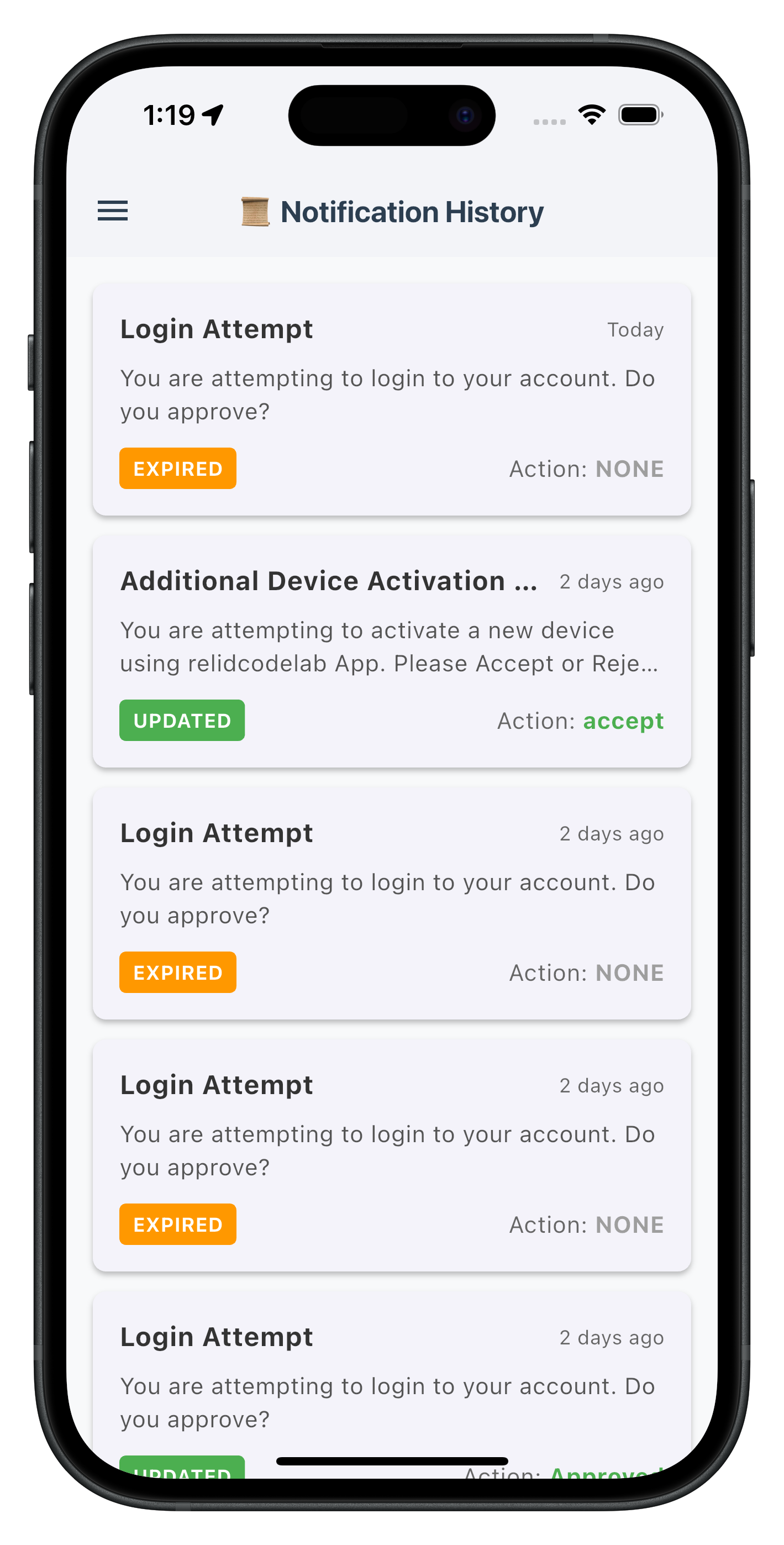
- 📜 Notification History List: Display past notifications with status and action badges
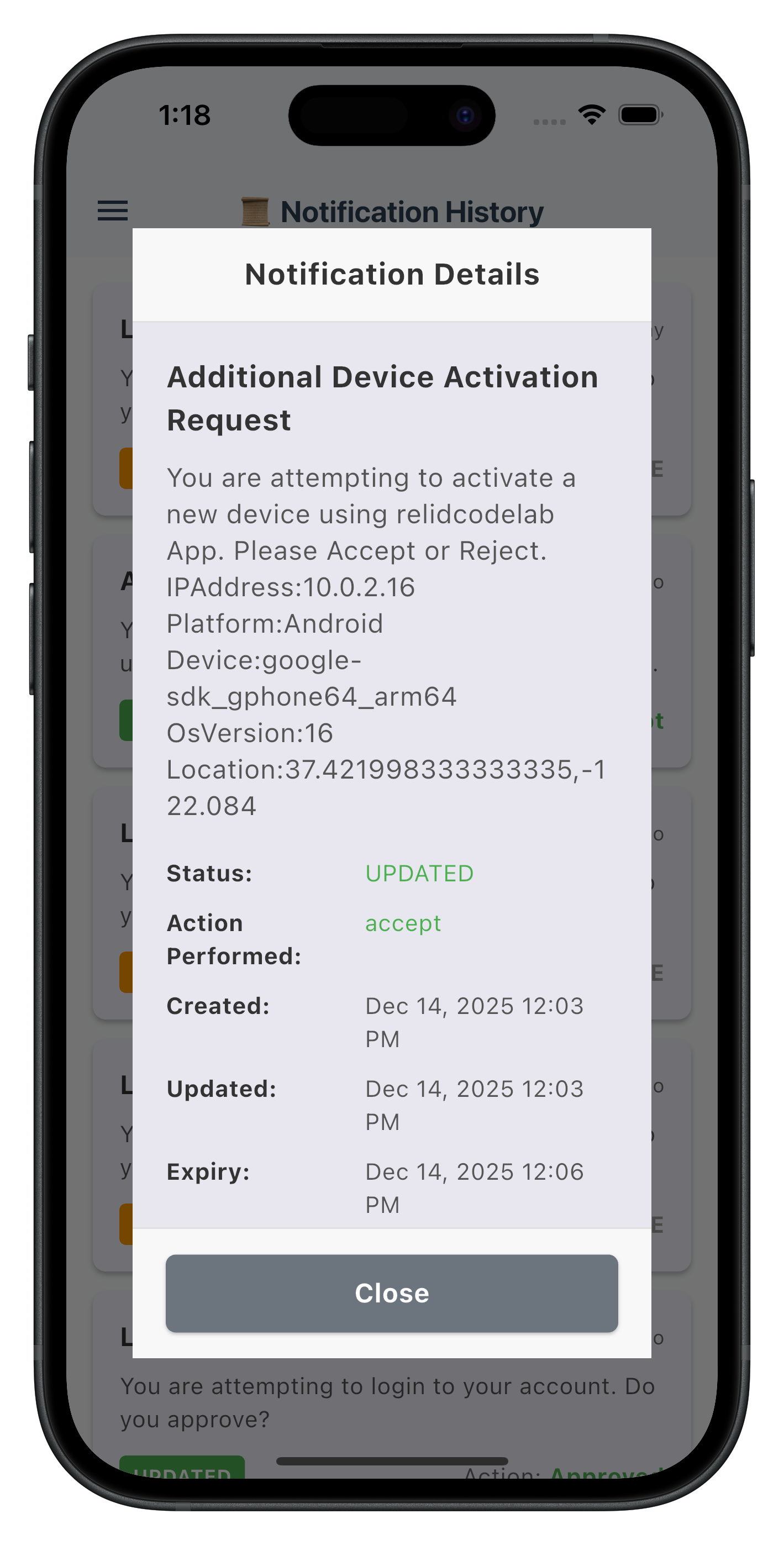
- 📱 Detail View: Modal showing complete notification information
- 🔄 Pull-to-Refresh: Reload history data with swipe gesture
What You'll Learn
By completing this codelab, you'll master:
- Notification History API: Using
getNotificationHistory()with filtering parameters - Event Handling: Processing history responses from SDK events
- UI Implementation: Building list views with status badges and detail modals
- Timestamp Handling: Converting epoch timestamps to readable formats
Prerequisites
Before starting this codelab, ensure you have:
- ✅ Completed REL-ID MFA Codelab - All MFA screens and flows must be fully implemented
- ✅ Completed REL-ID Notification Management Codelab - Basic notification handling must be functional
- ✅ Flutter Development Environment - Android Studio, Xcode, and Flutter SDK configured
- ✅ REL-ID SDK Integration - Latest SDK with notification history support
- ✅ Server Configuration - REL-ID server with notification history enabled
Get the Code from GitHub
Clone the repository and navigate to the notification history sample:
git clone https://github.com/uniken-public/codelab-flutter.git
cd codelab-flutter/relid-notification-history
Before implementing notification history, let's understand the data flow and API patterns.
Notification History Data Flow
User Request → getNotificationHistory() → Sync Response → onGetNotificationsHistory Event → Update UI
Core API and Events
Component | Description |
getNotificationHistory() | API method with 9 filter parameters |
Sync Response | Immediate response with error code |
onGetNotificationsHistory | Async event with history data |
History Data Structure
The SDK provides these typed classes:
// Individual history record
class RDNANotificationHistory {
  final String? id;
  final String? status;              // 'UPDATED', 'ACCEPTED', 'REJECTED', 'EXPIRED'
  final String? actionPerformed;     // User's action
  final int? createTsEpoch;          // Creation timestamp (milliseconds)
  final int? updateTsEpoch;          // Update timestamp (milliseconds)
  final int? expiryTimestampEpoch;   // Expiry timestamp (milliseconds)
  final List<RDNANotificationBody>? body;
  final String? signingStatus;
}

// Notification content
class RDNANotificationBody {
  final String? subject;
  final String? message;
}

// Event response
class RDNAStatusGetNotificationHistory {
  final RDNAError? error;
  final RDNAStatusArgs? pArgs;  // Contains nested response
}

// Nested response data
class RDNAGetNotificationHistoryResponse {
  final List<RDNANotificationHistory>? history;
}
Key Points:
- All fields are nullable
- Timestamps are in milliseconds
- Data is nested:
pArgs?.response?.responseData?.response - Status values are strings
The getNotificationHistory() method is already in your RdnaService class. Let's examine it.
Service Method Implementation
From lib/uniken/services/rdna_service.dart:
/// Fetches notification history with filtering options
///
/// [recordCount] Number of records (0 = all)
/// [enterpriseID] Filter by enterprise (empty = all)
/// [startIndex] Pagination start (1-based)
/// [startDate] Start date filter (YYYY-MM-DD)
/// [endDate] End date filter (YYYY-MM-DD)
/// [notificationStatus] Status filter (e.g., "ACCEPTED")
/// [actionPerformed] Action filter (e.g., "Accept")
/// [keywordSearch] Keyword search in content
/// [deviceID] Device ID filter
Future<RDNASyncResponse> getNotificationHistory({
  int recordCount = 0,
  String enterpriseID = '',
  int startIndex = 1,
  String startDate = '',
  String endDate = '',
  String notificationStatus = '',
  String actionPerformed = '',
  String keywordSearch = '',
  String deviceID = '',
}) async {
  print('RdnaService - Fetching notification history');
  print('  recordCount: $recordCount, startIndex: $startIndex');

  final response = await _rdnaClient.getNotificationHistory(
    recordCount,
    enterpriseID,
    startIndex,
    startDate,
    endDate,
    notificationStatus,
    actionPerformed,
    keywordSearch,
    deviceID,
  );

  print('RdnaService - Sync response:');
  print('  Long Error Code: ${response.error?.longErrorCode}');

  return response;
}
API Usage Pattern
// Call API
final response = await RdnaService.getInstance().getNotificationHistory(
  recordCount: 10,    // Get 10 records
  startIndex: 1,      // Start from record 1
);

// Check sync response
if (response.error?.longErrorCode == 0) {
  print('Success - waiting for async event');
} else {
  print('Error: ${response.error?.errorString}');
}
The event manager handles history responses. Let's examine the implementation.
Event Handler
From lib/uniken/services/rdna_event_manager.dart
/// Handles notification history response events
void _onGetNotificationHistory(dynamic historyData) {
  print('RdnaEventManager - Get notification history event received');

  final statusData = historyData as RDNAStatusGetNotificationHistory;

  if (_getNotificationHistoryHandler != null) {
    _getNotificationHistoryHandler!(statusData);
  }
}
Event Listener Registration
// Register in _registerEventListeners()
_listeners.add(
  _rdnaClient.on(RdnaClient.onGetNotificationsHistory, _onGetNotificationHistory),
);
Handler Setter
/// Sets the handler for notification history events
void setGetNotificationHistoryHandler(
    RDNAGetNotificationHistoryCallback? callback) {
  _getNotificationHistoryHandler = callback;
}
Callback Type Definition
typedef RDNAGetNotificationHistoryCallback =
    void Function(RDNAStatusGetNotificationHistory);
Now let's build the complete notification history screen. This is the actual implementation from the reference app.
The screen includes:
- List view with status badges
- Pull-to-refresh
- Detail modal
- Loading and empty states
The following images showcase the notification history screens:
Screen Implementation
From lib/tutorial/screens/notification/notification_history_screen.dart:
import 'package:flutter/material.dart';
import 'package:flutter_riverpod/flutter_riverpod.dart';
import 'package:rdna_client/rdna_struct.dart';
import 'package:intl/intl.dart';
import '../../navigation/app_router.dart';
import '../../../uniken/services/rdna_service.dart';
import '../components/drawer_content.dart';

class NotificationHistoryScreen extends ConsumerStatefulWidget {
  final RDNAUserLoggedIn? userParams;

  const NotificationHistoryScreen({super.key, this.userParams});

  @override
  ConsumerState<NotificationHistoryScreen> createState() =>
      _NotificationHistoryScreenState();
}

class _NotificationHistoryScreenState
    extends ConsumerState<NotificationHistoryScreen> {
  List<RDNANotificationHistory> _historyItems = [];
  bool _loading = false;
  bool _refreshing = false;

  @override
  void initState() {
    super.initState();
    WidgetsBinding.instance.addPostFrameCallback((_) {
      _loadNotificationHistory();
      _setupEventHandler();
    });
  }

  @override
  void dispose() {
    // CRITICAL: Clean up handler to prevent memory leaks
    final eventManager = RdnaService.getInstance().getEventManager();
    eventManager.setGetNotificationHistoryHandler(null);
    super.dispose();
  }

  void _setupEventHandler() {
    final eventManager = RdnaService.getInstance().getEventManager();
    eventManager.setGetNotificationHistoryHandler((data) {
      _handleNotificationHistoryResponse(data);
    });
  }

  Future<void> _loadNotificationHistory() async {
    if (_loading) return;

    setState(() {
      _loading = true;
    });

    final response = await RdnaService.getInstance().getNotificationHistory(
      recordCount: 10,
      startIndex: 1,
    );

    // Check sync response
    if (response.error?.longErrorCode == 0) {
      print('Sync success, waiting for event');
    } else {
      final errorMsg = response.error?.errorString ?? 'Failed to load';
      setState(() {
        _loading = false;
      });
      if (mounted) {
        _showErrorDialog(errorMsg);
      }
    }
  }

  void _handleNotificationHistoryResponse(
      RDNAStatusGetNotificationHistory data) {
    setState(() {
      _loading = false;
      _refreshing = false;
    });

    try {
      if (data.error?.longErrorCode == 0) {
        if (data.pArgs?.response?.responseData?.response != null) {
          final responseData = data.pArgs!.response!.responseData!.response
              as RDNAGetNotificationHistoryResponse?;

          if (responseData?.history != null) {
            final history = responseData!.history!;

            // Sort by timestamp (most recent first)
            history.sort((a, b) {
              final aTime = (a.updateTsEpoch != null && a.updateTsEpoch! > 0)
                  ? a.updateTsEpoch!
                  : (a.createTsEpoch ?? 0);
              final bTime = (b.updateTsEpoch != null && b.updateTsEpoch! > 0)
                  ? b.updateTsEpoch!
                  : (b.createTsEpoch ?? 0);
              return bTime.compareTo(aTime);
            });

            setState(() {
              _historyItems = history;
            });
          } else {
            setState(() {
              _historyItems = [];
            });
          }
        }
      } else {
        final errorMsg = data.error?.errorString ?? 'Unknown error';
        _showErrorDialog(errorMsg);
      }
    } catch (error) {
      _showErrorDialog('Failed to parse response');
    }
  }

  Future<void> _onRefresh() async {
    setState(() {
      _refreshing = true;
    });
    await _loadNotificationHistory();
  }

  String _formatTimestamp(int? epoch) {
    try {
      if (epoch == null || epoch == 0) return 'Unknown';

      final date = DateTime.fromMillisecondsSinceEpoch(epoch);
      final now = DateTime.now();
      final difference = now.difference(date);

      if (difference.inDays == 0) {
        return 'Today';
      } else if (difference.inDays == 1) {
        return 'Yesterday';
      } else if (difference.inDays <= 7) {
        return '${difference.inDays} days ago';
      } else {
        return DateFormat('MMM dd, yyyy').format(date);
      }
    } catch (error) {
      return 'Unknown';
    }
  }

  String _convertEpochToLocal(int? epoch) {
    try {
      if (epoch == null || epoch == 0) return 'Not available';
      final date = DateTime.fromMillisecondsSinceEpoch(epoch);
      return DateFormat('MMM dd, yyyy hh:mm a').format(date);
    } catch (error) {
      return 'Not available';
    }
  }

  Color _getStatusColor(String? status) {
    if (status == null) return Colors.blue;
    switch (status.toUpperCase()) {
      case 'UPDATED':
      case 'ACCEPTED':
        return const Color(0xFF4CAF50);
      case 'REJECTED':
      case 'DISCARDED':
        return const Color(0xFFF44336);
      case 'EXPIRED':
        return const Color(0xFFFF9800);
      case 'DISMISSED':
        return const Color(0xFF9E9E9E);
      default:
        return const Color(0xFF2196F3);
    }
  }

  Color _getActionColor(String? action) {
    if (action == null || action == 'NONE') return const Color(0xFF9E9E9E);
    final lowerAction = action.toLowerCase();
    if (lowerAction.contains('accept') || lowerAction.contains('approve')) {
      return const Color(0xFF4CAF50);
    }
    if (lowerAction.contains('reject') || lowerAction.contains('deny')) {
      return const Color(0xFFF44336);
    }
    return const Color(0xFF2196F3);
  }

  void _showErrorDialog(String message) {
    showDialog(
      context: context,
      builder: (context) => AlertDialog(
        title: const Text('Error'),
        content: Text(message),
        actions: [
          TextButton(
            onPressed: () => Navigator.pop(context),
            child: const Text('OK'),
          ),
        ],
      ),
    );
  }

  void _showDetailModal(RDNANotificationHistory item) {
    final body = item.body?.isNotEmpty == true ? item.body![0] : null;

    showDialog(
      context: context,
      builder: (context) => Dialog(
        shape: RoundedRectangleBorder(borderRadius: BorderRadius.circular(10)),
        child: Container(
          constraints: BoxConstraints(
            maxHeight: MediaQuery.of(context).size.height * 0.8,
          ),
          child: Column(
            mainAxisSize: MainAxisSize.min,
            children: [
              // Header
              Container(
                padding: const EdgeInsets.all(20),
                decoration: const BoxDecoration(
                  color: Color(0xFFF8F8F8),
                  border: Border(bottom: BorderSide(color: Color(0xFFE0E0E0))),
                ),
                child: const Text(
                  'Notification Details',
                  style: TextStyle(fontSize: 18, fontWeight: FontWeight.bold),
                ),
              ),

              // Body
              Flexible(
                child: SingleChildScrollView(
                  padding: const EdgeInsets.all(20),
                  child: Column(
                    crossAxisAlignment: CrossAxisAlignment.start,
                    children: [
                      Text(
                        body?.subject ?? 'No Subject',
                        style: const TextStyle(
                            fontSize: 18, fontWeight: FontWeight.bold),
                      ),
                      const SizedBox(height: 10),
                      Text(
                        (body?.message ?? 'No message')
                            .replaceAll('\\n', '\n'),
                        style: const TextStyle(fontSize: 16),
                      ),
                      const SizedBox(height: 20),
                      _buildDetailRow(
                        'Status:',
                        item.status ?? 'Unknown',
                        color: _getStatusColor(item.status),
                      ),
                      _buildDetailRow(
                        'Action:',
                        item.actionPerformed ?? 'NONE',
                        color: _getActionColor(item.actionPerformed),
                      ),
                      _buildDetailRow(
                        'Created:',
                        _convertEpochToLocal(item.createTsEpoch),
                      ),
                      if (item.updateTsEpoch != null && item.updateTsEpoch! > 0)
                        _buildDetailRow(
                          'Updated:',
                          _convertEpochToLocal(item.updateTsEpoch),
                        ),
                      _buildDetailRow(
                        'Expiry:',
                        _convertEpochToLocal(item.expiryTimestampEpoch),
                      ),
                    ],
                  ),
                ),
              ),

              // Footer
              Container(
                padding: const EdgeInsets.all(20),
                child: ElevatedButton(
                  onPressed: () => Navigator.pop(context),
                  child: const Text('Close'),
                ),
              ),
            ],
          ),
        ),
      ),
    );
  }

  Widget _buildDetailRow(String label, String value, {Color? color}) {
    return Padding(
      padding: const EdgeInsets.only(bottom: 10),
      child: Row(
        crossAxisAlignment: CrossAxisAlignment.start,
        children: [
          SizedBox(
            width: 100,
            child: Text(
              label,
              style: const TextStyle(fontWeight: FontWeight.bold),
            ),
          ),
          Expanded(
            child: Text(
              value,
              style: TextStyle(color: color ?? Colors.black87),
            ),
          ),
        ],
      ),
    );
  }

  Widget _buildHistoryItem(RDNANotificationHistory item) {
    final body = item.body?.isNotEmpty == true ? item.body![0] : null;
    final subject = body?.subject ?? 'No Subject';
    final message = (body?.message ?? '').replaceAll('\\n', ' ');

    return Card(
      margin: const EdgeInsets.only(bottom: 12),
      child: InkWell(
        onTap: () => _showDetailModal(item),
        child: Padding(
          padding: const EdgeInsets.all(16),
          child: Column(
            crossAxisAlignment: CrossAxisAlignment.start,
            children: [
              Row(
                mainAxisAlignment: MainAxisAlignment.spaceBetween,
                children: [
                  Expanded(
                    child: Text(
                      subject,
                      style: const TextStyle(
                        fontSize: 16,
                        fontWeight: FontWeight.bold,
                      ),
                      maxLines: 1,
                      overflow: TextOverflow.ellipsis,
                    ),
                  ),
                  Text(
                    _formatTimestamp(
                      (item.updateTsEpoch != null && item.updateTsEpoch! > 0)
                          ? item.updateTsEpoch
                          : item.createTsEpoch,
                    ),
                    style: const TextStyle(fontSize: 12, color: Colors.grey),
                  ),
                ],
              ),
              const SizedBox(height: 8),
              Text(
                message,
                maxLines: 2,
                overflow: TextOverflow.ellipsis,
              ),
              const SizedBox(height: 12),
              Row(
                mainAxisAlignment: MainAxisAlignment.spaceBetween,
                children: [
                  Container(
                    padding:
                        const EdgeInsets.symmetric(horizontal: 8, vertical: 4),
                    decoration: BoxDecoration(
                      color: _getStatusColor(item.status),
                      borderRadius: BorderRadius.circular(4),
                    ),
                    child: Text(
                      item.status ?? 'UNKNOWN',
                      style: const TextStyle(
                        color: Colors.white,
                        fontSize: 12,
                        fontWeight: FontWeight.bold,
                      ),
                    ),
                  ),
                  Text(
                    'Action: ${item.actionPerformed ?? "NONE"}',
                    style: TextStyle(
                      color: _getActionColor(item.actionPerformed),
                      fontWeight: FontWeight.bold,
                    ),
                  ),
                ],
              ),
            ],
          ),
        ),
      ),
    );
  }

  @override
  Widget build(BuildContext context) {
    return Scaffold(
      backgroundColor: const Color(0xFFF8F9FA),
      drawer: DrawerContent(
        sessionData: widget.userParams,
        currentRoute: 'notificationHistoryScreen',
      ),
      appBar: AppBar(
        title: const Text('📜 Notification History'),
      ),
      body: RefreshIndicator(
        onRefresh: _onRefresh,
        child: _loading && !_refreshing
            ? const Center(child: CircularProgressIndicator())
            : _historyItems.isEmpty
                ? Center(
                    child: Column(
                      mainAxisAlignment: MainAxisAlignment.center,
                      children: [
                        const Text('No notification history found'),
                        const SizedBox(height: 20),
                        ElevatedButton(
                          onPressed: _loadNotificationHistory,
                          child: const Text('Retry'),
                        ),
                      ],
                    ),
                  )
                : ListView.builder(
                    padding: const EdgeInsets.all(16),
                    itemCount: _historyItems.length,
                    itemBuilder: (context, index) =>
                        _buildHistoryItem(_historyItems[index]),
                  ),
      ),
    );
  }
}
Key Implementation Patterns
Widget Lifecycle:
initState() → addPostFrameCallback() → _loadNotificationHistory() + _setupEventHandler()
dispose() → setGetNotificationHistoryHandler(null)
Data Flow:
API Call → Check Sync Response → Wait for Event → Handle Event → Update UI
Memory Management:
@override
void dispose() {
  // CRITICAL: Prevent memory leaks
  eventManager.setGetNotificationHistoryHandler(null);
  super.dispose();
}
Let's test the notification history implementation.
Build and Run
flutter pub get
flutter run
Test Scenarios
Scenario 1: Load History
- Navigate to history screen
- Verify loading indicator appears
- Check that history items display with correct formatting
- Verify status badges show correct colors
Scenario 2: Pull-to-Refresh
- Pull down on the list
- Verify refresh indicator appears
- Check that data reloads
Scenario 3: Detail Modal
- Tap on a history item
- Verify modal shows complete details
- Check timestamp formatting
- Test close button
Scenario 4: Empty State
- Load when no history exists
- Verify empty state message
- Test retry button
Debugging
Use Flutter DevTools for debugging:
flutter pub global activate devtools
flutter pub global run devtools
Check console logs for:
RdnaService - Fetching notification historyRdnaEventManager - Get notification history event receivedNotificationHistoryScreen - Loaded X items
Add the history screen to your app navigation.
GoRouter Setup
In lib/tutorial/navigation/app_router.dart:
import '../screens/notification/notification_history_screen.dart';

final appRouter = GoRouter(
  routes: [
    GoRoute(
      path: '/notification-history',
      name: 'notificationHistoryScreen',
      builder: (context, state) {
        final userParams = state.extra as RDNAUserLoggedIn?;
        return NotificationHistoryScreen(userParams: userParams);
      },
    ),
  ],
);
Navigate to Screen
// From any screen
context.goNamed('notificationHistoryScreen', extra: sessionData);
Add to Drawer
In drawer_content.dart:
ListTile(
  leading: const Icon(Icons.history),
  title: const Text('Notification History'),
  onTap: () {
    Navigator.pop(context);
    context.goNamed('notificationHistoryScreen', extra: sessionData);
  },
),
Congratulations! You've successfully implemented notification history management with the REL-ID SDK in Flutter.
🚀 What You Accomplished
✅ API Integration - Called getNotificationHistory() with proper error handling
✅ Event Handling - Processed async responses through event manager
✅ UI Implementation - Built list view with pull-to-refresh and detail modal
✅ Data Formatting - Converted epoch timestamps to readable formats
✅ Memory Management - Implemented proper cleanup to prevent leaks
📚 Additional Resources
- REL-ID Developer Docs - Complete API reference
- Flutter Docs - Flutter best practices
- Riverpod - State management
🏆 You've mastered notification history with REL-ID SDK in Flutter!
Your implementation provides audit trail capabilities for compliance and user transparency.