This codelab demonstrates how to implement Mobile Threat Detection (MTD) flow using the rdna_flutter_client Flutter plugin. MTD now performs a synchronous check during the RELID SDK initialization to ensure critical threats are detected early. Once the SDK is successfully initialized, MTD continues monitoring asynchronously in the background to detect and respond to any emerging threats during runtime.
What You'll Learn
- How to handle MTD threat detection events
- Implementing user consent workflows for security threats
- Creating threat detection UI components with Flutter
- Managing threat responses and actions
- Understanding different threat types and severities
- Using Riverpod for global threat state management
Get the Code from GitHub
The code to get started is stored in a GitHub repository.
You can clone the repository using the following command:
git clone https://github.com/uniken-public/codelab-flutter.git
Navigate to the relid-MTD folder in the repository you cloned earlier
What You'll Need
- Completed RELID Initialization codelab
rdna_clientplugin installed and configured- Basic understanding of Flutter state management (Riverpod)
- Understanding of Flutter widget composition
- Access to the sample app source code for reference
The sample app provides a complete MTD implementation. Let's examine the key components:
Component | Purpose | Sample App Reference |
MTD Provider | Global threat state management |
|
Threat Modal | UI for displaying threats |
|
Event Handling | Extended event manager |
|
Threat Types | Dart classes |
|
Permissions
Platform-Specific Permissions
The plugin requires specific permissions for optimal MTD functionality:
iOS Configuration: Refer to the iOS Permissions Documentation for complete Info.plist configuration including:
- NSLocationWhenInUseUsageDescription (network threat detection)
- NSLocalNetworkUsageDescription (network threat detection)
Android Configuration: Refer to the Android Permissions Documentation for runtime and normal permissions required for MTD features.
MTD Event Types
The RELID SDK triggers two main MTD events during initialization:
Event Type | Description | User Action Required |
Non-terminating threats | User can choose to proceed or exit using takeActionOnThreats API | |
Critical threats | Application must exit immediately |
The Flutter plugin provides comprehensive Dart classes for MTD threat handling. These types are defined in the rdna_client plugin package.
Threat Data Structure
The plugin provides the RDNAThreat class with all necessary threat information:
// From rdna_client/lib/rdna_struct.dart (included in the plugin)
class RDNAThreat {
  int? threatId;                  // unique threat ID
  String? threatName;
  String? threatMsg;
  String? threatReason;
  String? threatCategory;         // SYSTEM, APP, NETWORK
  String? threatSeverity;         // LOW, MEDIUM, HIGH
  String? configuredAction;
  RDNAAppInfo? appInfo;          // detail of the threat, if threat is of app level
  RDNANetworkInfo? networkInfo;   // detail of the threat, if threat is of network level
  bool? shouldProceedWithThreats; // false - do not proceed, true - proceed with threat
  bool? rememberActionForSession; // false - show every time, true - show once per session

  RDNAThreat({
    this.threatId,
    this.threatName,
    this.threatMsg,
    this.threatReason,
    this.threatCategory,
    this.threatSeverity,
    this.configuredAction,
    this.appInfo,
    this.networkInfo,
    this.shouldProceedWithThreats,
    this.rememberActionForSession,
  });
}
Threat Categories and Severities
Understanding threat classification helps in implementing appropriate responses:
Category | Examples | Platform |
SYSTEM | Usb Debugging, Rooted Device | Android and iOS |
NETWORK | Network MITM, Unsecured Access Point | Android and iOS |
APP | Malware App, Repacked App | Only Android |
Extend your existing event manager to handle MTD events. The Flutter plugin uses the eventify package for event handling.
// lib/uniken/services/rdna_event_manager.dart (additions)
import 'package:eventify/eventify.dart';
import 'package:rdna_client/rdna_client.dart';
import 'package:rdna_client/rdna_struct.dart';

/// Type definitions for MTD event callbacks
typedef RDNAUserConsentThreatsCallback = void Function(List<RDNAThreat>);
typedef RDNATerminateWithThreatsCallback = void Function(List<RDNAThreat>);

class RdnaEventManager {
  final RdnaClient _rdnaClient;
  final List<Listener?> _listeners = [];

  // Add MTD callback properties
  RDNAUserConsentThreatsCallback? _userConsentThreatsHandler;
  RDNATerminateWithThreatsCallback? _terminateWithThreatsHandler;

  void _registerEventListeners() {
    // ... existing listeners ...

    // Add MTD event listeners
    _listeners.add(
      _rdnaClient.on(RdnaClient.onUserConsentThreats, _onUserConsentThreats),
    );
    _listeners.add(
      _rdnaClient.on(RdnaClient.onTerminateWithThreats, _onTerminateWithThreats),
    );
  }

  /// Handles security threat events requiring user consent
  ///
  /// Called when SDK detects non-critical threats that the user can choose
  /// to proceed with or exit the application.
  void _onUserConsentThreats(dynamic threatsData) {
    print('RdnaEventManager - User consent threats event received');

    final threats = threatsData as List<RDNAThreat>;
    print('RdnaEventManager - Consent threats detected: ${threats.length}');

    if (_userConsentThreatsHandler != null) {
      _userConsentThreatsHandler!(threats);
    }
  }

  /// Handles critical security threat events requiring app termination
  ///
  /// Called when SDK detects critical threats that require the application
  /// to be terminated for security reasons.
  void _onTerminateWithThreats(dynamic threatsData) {
    print('RdnaEventManager - Terminate with threats event received');

    final threats = threatsData as List<RDNAThreat>;
    print('RdnaEventManager - Critical threats detected, terminating: ${threats.length}');

    if (_terminateWithThreatsHandler != null) {
      _terminateWithThreatsHandler!(threats);
    }
  }

  /// Sets the handler for user consent threats events
  void setUserConsentThreatsHandler(RDNAUserConsentThreatsCallback? callback) {
    _userConsentThreatsHandler = callback;
  }

  /// Sets the handler for terminate with threats events
  void setTerminateWithThreatsHandler(RDNATerminateWithThreatsCallback? callback) {
    _terminateWithThreatsHandler = callback;
  }
}
Key features of MTD event handling:
- Typed callbacks: Flutter uses strongly-typed callbacks for type safety
- Direct object access: Threat data arrives as typed Dart objects
- Event delegation: Routes threats to appropriate UI components
- Single event handler: One handler per event type for simplicity
The takeActionOnThreats API is only required for handling threats received through the onUserConsentThreats event. This allows the application to take appropriate action based on user consent.
The onTerminateWithThreats event is triggered only when critical threats are detected. In such cases, the SDK automatically terminates internally, and no further actions can be performed through the plugin until the SDK is reinitialized.
Add threat response capability to your RELID service:
// lib/uniken/services/rdna_service.dart (addition)
import 'package:rdna_client/rdna_client.dart';
import 'package:rdna_client/rdna_struct.dart';

class RdnaService {
  final RdnaClient _rdnaClient;

  /// Takes action on detected security threats
  ///
  /// Sends the user's threat action decision (proceed or exit) back to the SDK.
  /// The SDK will process the decision and may trigger additional events based
  /// on the user's choice.
  ///
  /// ## Parameters
  /// - [threatList]: List of threat objects with user decisions set
  ///   - Each threat should have `shouldProceedWithThreats` set (true/false)
  ///   - Each threat should have `rememberActionForSession` set (typically true)
  ///
  /// ## Returns
  /// RDNASyncResponse containing sync response (may have error or success)
  ///
  /// ## Events Triggered
  /// - If user chose to exit (shouldProceedWithThreats = false):
  ///   - `onTerminateWithThreats`: Triggered after sync response
  /// - If user chose to proceed (shouldProceedWithThreats = true):
  ///   - SDK continues initialization flow normally
  ///
  /// ## Example
  /// ```dart
  /// // User chose to proceed despite threats
  /// final modifiedThreats = threats.map((threat) => RDNAThreat(
  ///   threatId: threat.threatId,
  ///   threatName: threat.threatName,
  ///   // ... other threat properties
  ///   shouldProceedWithThreats: true,
  ///   rememberActionForSession: true,
  /// )).toList();
  ///
  /// final response = await rdnaService.takeActionOnThreats(modifiedThreats);
  /// if (response.error?.longErrorCode == 0) {
  ///   print('Action taken successfully');
  /// }
  /// ```
  Future<RDNASyncResponse> takeActionOnThreats(List<RDNAThreat> threatList) async {
    print('RdnaService - Taking action on ${threatList.length} threats');

    final response = await _rdnaClient.takeActionOnThreats(threatList);

    print('RdnaService - Take action on threats response received');
    print('RdnaService - Sync response:');
    print('  Long Error Code: ${response.error?.longErrorCode}');
    print('  Short Error Code: ${response.error?.shortErrorCode}');

    return response;
  }
}
Important Response Parameters
When responding to threats, two key parameters control the behavior:
Parameter | Purpose | Implementation Values |
| Whether to continue despite threats |
|
| Cache decision for session |
|
Create a Riverpod provider to manage MTD state across your application. Flutter uses Riverpod for dependency injection and state management.
// lib/uniken/providers/mtd_threat_provider.dart
import 'package:flutter/material.dart';
import 'package:flutter_riverpod/flutter_riverpod.dart';
import 'package:rdna_client/rdna_struct.dart';
import 'dart:io' show Platform, exit;
import '../services/rdna_service.dart';

/// MTD Threat State
///
/// Holds the current state of threat detection and modal display
class MTDThreatState {
  final bool isModalVisible;
  final List<RDNAThreat> threats;
  final bool isConsentMode;
  final bool isProcessing;
  final List<int> pendingExitThreats;

  const MTDThreatState({
    this.isModalVisible = false,
    this.threats = const [],
    this.isConsentMode = false,
    this.isProcessing = false,
    this.pendingExitThreats = const [],
  });

  MTDThreatState copyWith({
    bool? isModalVisible,
    List<RDNAThreat>? threats,
    bool? isConsentMode,
    bool? isProcessing,
    List<int>? pendingExitThreats,
  }) {
    return MTDThreatState(
      isModalVisible: isModalVisible ?? this.isModalVisible,
      threats: threats ?? this.threats,
      isConsentMode: isConsentMode ?? this.isConsentMode,
      isProcessing: isProcessing ?? this.isProcessing,
      pendingExitThreats: pendingExitThreats ?? this.pendingExitThreats,
    );
  }
}

/// MTD Threat Provider
///
/// Riverpod StateNotifier for managing threat detection state and actions
class MTDThreatNotifier extends StateNotifier<MTDThreatState> {
  final RdnaService _rdnaService;

  MTDThreatNotifier(this._rdnaService) : super(const MTDThreatState()) {
    _registerEventHandlers();
  }

  /// Registers SDK event handlers for threat detection
  void _registerEventHandlers() {
    final eventManager = _rdnaService.getEventManager();

    eventManager.setUserConsentThreatsHandler((threats) {
      print('MTDThreatProvider - User consent threats received: ${threats.length}');
      showThreatModal(threats, true);
    });

    eventManager.setTerminateWithThreatsHandler((threats) {
      print('MTDThreatProvider - Terminate with threats received: ${threats.length}');

      // Check if this is a self-triggered event (result of our own takeActionOnThreats call)
      final incomingThreatIds = threats.map((threat) => threat.threatId ?? 0).toList();
      final currentPendingThreats = state.pendingExitThreats;

      final isSelfTriggered = currentPendingThreats.isNotEmpty &&
          incomingThreatIds.every((id) => currentPendingThreats.contains(id));

      if (isSelfTriggered) {
        // User already made the decision - exit directly
        state = state.copyWith(
          pendingExitThreats: [],
          isProcessing: false,
          isModalVisible: false,
        );
        _handlePlatformSpecificExit();
      } else {
        // Genuine terminate event - show dialog
        state = state.copyWith(isProcessing: false);
        showThreatModal(threats, false);
      }
    });
  }

  /// Shows the threat modal
  void showThreatModal(List<RDNAThreat> threats, bool isConsent) {
    state = state.copyWith(
      threats: threats,
      isConsentMode: isConsent,
      isModalVisible: true,
    );
  }

  /// Hides the threat modal
  void hideThreatModal() {
    state = state.copyWith(
      isModalVisible: false,
      threats: [],
      isConsentMode: false,
      isProcessing: false,
    );
  }
}

/// Global MTD threat provider
final mtdThreatProvider = StateNotifierProvider<MTDThreatNotifier, MTDThreatState>((ref) {
  final rdnaService = RdnaService.getInstance();
  return MTDThreatNotifier(rdnaService);
});
Threat Response Logic
The provider handles user decisions by modifying threat objects:
/// User chose to proceed despite threats
Future<void> handleProceed(BuildContext context) async {
  state = state.copyWith(isProcessing: true);

  // Modify all threats to proceed with action
  final modifiedThreats = state.threats.map((threat) {
    return RDNAThreat(
      threatId: threat.threatId,
      threatName: threat.threatName,
      threatMsg: threat.threatMsg,
      threatReason: threat.threatReason,
      threatCategory: threat.threatCategory,
      threatSeverity: threat.threatSeverity,
      configuredAction: threat.configuredAction,
      appInfo: threat.appInfo,
      networkInfo: threat.networkInfo,
      shouldProceedWithThreats: true,  // Allow app to continue
      rememberActionForSession: true,  // Remember decision
    );
  }).toList();

  final response = await _rdnaService.takeActionOnThreats(modifiedThreats);

  if (response.error?.longErrorCode != 0) {
    state = state.copyWith(isProcessing: false);
    // Show error dialog
    return;
  }

  hideThreatModal();
}

/// User chose to exit application
Future<void> handleExit(BuildContext context) async {
  if (state.isConsentMode) {
    state = state.copyWith(isProcessing: true);

    // Track threat IDs to identify self-triggered events
    final threatIds = state.threats.map((threat) => threat.threatId ?? 0).toList();
    state = state.copyWith(pendingExitThreats: threatIds);

    // Modify all threats to NOT proceed
    final modifiedThreats = state.threats.map((threat) {
      return RDNAThreat(
        threatId: threat.threatId,
        threatName: threat.threatName,
        threatMsg: threat.threatMsg,
        threatReason: threat.threatReason,
        threatCategory: threat.threatCategory,
        threatSeverity: threat.threatSeverity,
        configuredAction: threat.configuredAction,
        appInfo: threat.appInfo,
        networkInfo: threat.networkInfo,
        shouldProceedWithThreats: false,  // Do not allow app to continue
        rememberActionForSession: true,   // Remember decision
      );
    }).toList();

    await _rdnaService.takeActionOnThreats(modifiedThreats);
    // terminateWithThreats event will handle the exit
  } else {
    // Direct exit for terminate mode
    hideThreatModal();
    _handlePlatformSpecificExit();
  }
}

/// Platform-specific exit handler
void _handlePlatformSpecificExit() {
  if (Platform.isIOS) {
    // iOS: Navigate to SecurityExitScreen (HIG-compliant)
    // Set flag for navigation (handled by main.dart)
  } else {
    // Android: Use exit(0) for forceful termination
    exit(0);
  }
}
Key features of the MTD provider:
- Global state management: Centralized threat handling via Riverpod
- Event integration: Automatic registration with the event manager
- User decision handling: Processes user choices for threats
- Self-triggered detection: Prevents double-dialog on user exit choice
- Platform-specific exit: iOS uses SecurityExitScreen, Android uses exit(0)
Create a modal widget to display threat information to users. Flutter uses StatelessWidget for UI components.
// lib/uniken/components/threat_detection_modal.dart
import 'package:flutter/material.dart';
import 'dart:ui' show ImageFilter;
import 'package:rdna_client/rdna_struct.dart';

/// Threat Detection Modal
///
/// Displays detected security threats in a modal dialog with appropriate
/// actions based on the threat severity (consent vs terminate).
class ThreatDetectionModal extends StatelessWidget {
  final bool visible;
  final List<RDNAThreat> threats;
  final bool isConsentMode;
  final bool isProcessing;
  final VoidCallback? onProceed;
  final VoidCallback onExit;

  const ThreatDetectionModal({
    super.key,
    required this.visible,
    required this.threats,
    required this.isConsentMode,
    this.isProcessing = false,
    this.onProceed,
    required this.onExit,
  });

  /// Get severity color based on threat severity level
  Color _getThreatSeverityColor(String? severity) {
    switch (severity?.toUpperCase()) {
      case 'HIGH':
        return const Color(0xFFDC2626); // #dc2626 (red)
      case 'MEDIUM':
        return const Color(0xFFF59E0B); // #f59e0b (orange)
      case 'LOW':
        return const Color(0xFF10B981); // #10b981 (green)
      default:
        return const Color(0xFF6B7280); // #6b7280 (gray)
    }
  }

  /// Get category icon emoji based on threat category
  String _getThreatCategoryIcon(String? category) {
    switch (category?.toUpperCase()) {
      case 'SYSTEM':
        return '🛡️';
      case 'NETWORK':
        return '🌐';
      case 'APP':
        return '📱';
      default:
        return '⚠️';
    }
  }

  /// Renders a single threat item
  Widget _buildThreatItem(RDNAThreat threat) {
    return Container(
      decoration: BoxDecoration(
        color: const Color(0xFFFEF2F2), // #fef2f2 (light red background)
        borderRadius: BorderRadius.circular(12),
        border: const Border(
          left: BorderSide(
            color: Color(0xFFDC2626), // #dc2626 (red left border)
            width: 4,
          ),
        ),
      ),
      padding: const EdgeInsets.all(16),
      margin: const EdgeInsets.only(bottom: 12),
      child: Column(
        crossAxisAlignment: CrossAxisAlignment.start,
        children: [
          // Threat header with icon, name, and severity badge
          Row(
            children: [
              Text(
                _getThreatCategoryIcon(threat.threatCategory),
                style: const TextStyle(fontSize: 24),
              ),
              const SizedBox(width: 12),
              Expanded(
                child: Column(
                  crossAxisAlignment: CrossAxisAlignment.start,
                  children: [
                    Text(
                      threat.threatName ?? 'Unknown Threat',
                      style: const TextStyle(
                        fontSize: 16,
                        fontWeight: FontWeight.w600,
                        color: Color(0xFF1F2937),
                      ),
                    ),
                    Text(
                      (threat.threatCategory ?? 'UNKNOWN').toUpperCase(),
                      style: const TextStyle(
                        fontSize: 12,
                        color: Color(0xFF6B7280),
                        fontWeight: FontWeight.w500,
                      ),
                    ),
                  ],
                ),
              ),
              Container(
                padding: const EdgeInsets.symmetric(horizontal: 8, vertical: 4),
                decoration: BoxDecoration(
                  color: _getThreatSeverityColor(threat.threatSeverity),
                  borderRadius: BorderRadius.circular(4),
                ),
                child: Text(
                  (threat.threatSeverity ?? 'UNKNOWN').toUpperCase(),
                  style: const TextStyle(
                    color: Colors.white,
                    fontSize: 12,
                    fontWeight: FontWeight.bold,
                  ),
                ),
              ),
            ],
          ),
          const SizedBox(height: 12),
          // Threat message
          Text(
            threat.threatMsg ?? 'No message available',
            style: const TextStyle(
              fontSize: 14,
              color: Color(0xFF7F1D1D), // #7f1d1d (dark red)
              height: 1.4,
            ),
          ),
        ],
      ),
    );
  }

  @override
  Widget build(BuildContext context) {
    if (!visible) return const SizedBox.shrink();

    return PopScope(
      canPop: false, // Prevent dismissal with back button
      child: BackdropFilter(
        filter: ImageFilter.blur(sigmaX: 5.0, sigmaY: 5.0),
        child: Dialog(
          backgroundColor: Colors.transparent,
          child: Container(
            decoration: BoxDecoration(
              color: Colors.white,
              borderRadius: BorderRadius.circular(16),
            ),
            child: Column(
              mainAxisSize: MainAxisSize.min,
              children: [
                // Header
                Container(
                  decoration: const BoxDecoration(
                    color: Color(0xFFDC2626),
                    borderRadius: BorderRadius.only(
                      topLeft: Radius.circular(16),
                      topRight: Radius.circular(16),
                    ),
                  ),
                  padding: const EdgeInsets.all(20),
                  child: Text(
                    isConsentMode
                        ? '⚠️ Security Threats Detected'
                        : '🚫 Security Threat - Action Required',
                    style: const TextStyle(
                      fontSize: 20,
                      fontWeight: FontWeight.bold,
                      color: Colors.white,
                    ),
                    textAlign: TextAlign.center,
                  ),
                ),
                // Threats list
                Flexible(
                  child: SingleChildScrollView(
                    padding: const EdgeInsets.all(20),
                    child: Column(
                      children: threats.map(_buildThreatItem).toList(),
                    ),
                  ),
                ),
                // Action buttons
                Padding(
                  padding: const EdgeInsets.all(20),
                  child: Column(
                    children: [
                      if (isConsentMode && onProceed != null)
                        ElevatedButton(
                          onPressed: isProcessing ? null : onProceed,
                          style: ElevatedButton.styleFrom(
                            backgroundColor: const Color(0xFFF59E0B),
                            minimumSize: const Size(double.infinity, 48),
                          ),
                          child: Text(isProcessing ? 'Processing...' : 'Proceed Anyway'),
                        ),
                      const SizedBox(height: 12),
                      ElevatedButton(
                        onPressed: isProcessing ? null : onExit,
                        style: ElevatedButton.styleFrom(
                          backgroundColor: const Color(0xFFDC2626),
                          minimumSize: const Size(double.infinity, 48),
                        ),
                        child: const Text('Exit Application'),
                      ),
                    ],
                  ),
                ),
              ],
            ),
          ),
        ),
      ),
    );
  }
}
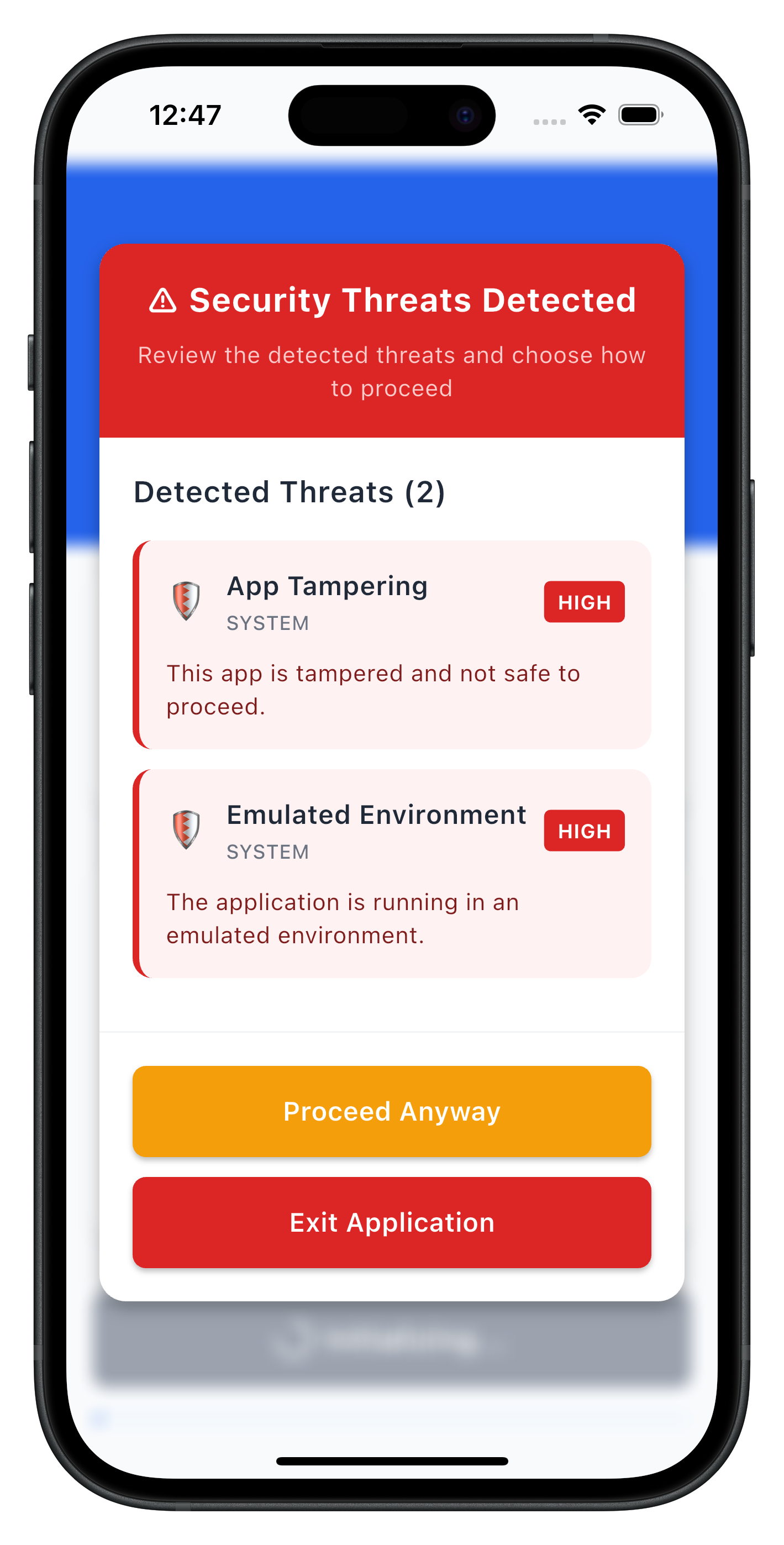
Key features of the threat detection modal:
- StatelessWidget: Pure UI component without internal state
- Threat display: Shows threat name, message, and severity level
- Color-coded severity: Visual indication of threat levels (HIGH=red, MEDIUM=orange, LOW=green)
- Conditional buttons: Different actions based on threat type (consent vs terminate)
- Loading states: Processing indicators during API calls
- PopScope: Prevents dismissal with back button
The following image showcases screen from the sample application:
Wrap your application with the Riverpod ProviderScope and integrate the MTD modal:
// lib/main.dart
import 'package:flutter/material.dart';
import 'package:flutter_riverpod/flutter_riverpod.dart';
import 'tutorial/navigation/app_router.dart';
import 'uniken/providers/mtd_threat_provider.dart';
import 'uniken/components/threat_detection_modal.dart';

void main() {
  runApp(
    const ProviderScope(
      child: MyApp(),
    ),
  );
}

class MyApp extends ConsumerWidget {
  const MyApp({super.key});

  @override
  Widget build(BuildContext context, WidgetRef ref) {
    // Watch MTD threat state for global modal display
    final mtdState = ref.watch(mtdThreatProvider);

    return MaterialApp.router(
      title: 'REL-ID MTD Tutorial',
      theme: ThemeData(
        colorScheme: ColorScheme.fromSeed(seedColor: const Color(0xFF2563EB)),
        useMaterial3: true,
      ),
      routerConfig: appRouter,
      builder: (context, child) {
        return Stack(
          children: [
            // Main app content
            child ?? const SizedBox.shrink(),
            // Global MTD Threat Detection Modal
            ThreatDetectionModal(
              visible: mtdState.isModalVisible,
              threats: mtdState.threats,
              isConsentMode: mtdState.isConsentMode,
              isProcessing: mtdState.isProcessing,
              onProceed: mtdState.isConsentMode
                  ? () => ref.read(mtdThreatProvider.notifier).handleProceed(context)
                  : null,
              onExit: () => ref.read(mtdThreatProvider.notifier).handleExit(context),
            ),
          ],
        );
      },
    );
  }
}
The Riverpod provider approach offers several advantages:
- Global state management: MTD state accessible throughout the app via
ref.watch() - Automatic event handling: Callbacks registered once at provider level
- Consistent UI: Single modal widget handles all threat scenarios
- Memory efficiency: Provider lifecycle management prevents memory leaks
- Platform-specific handling: Automatic iOS SecurityExitScreen navigation
Test Scenarios
- User Consent Threats: Test with low-medium severity threats
- Terminate Threats: Test with high severity threats requiring app exit
- Mixed Threat Types: Test scenarios with multiple threat categories
- User Interactions: Test both "Proceed" and "Exit" flows
Common MTD Test Scenarios
Threat Category | Examples | Typical Severity | Expected Response |
SYSTEM | Usb Debugging, Rooted Device | LOW-HIGH | User consent or termination |
NETWORK | Network MITM, Unsecured Access Point | LOW-MEDIUM | User consent or termination |
APP | Malware App, Repacked App | MEDIUM-HIGH | User consent or termination |
Debugging MTD Events
Use these debugging techniques to verify MTD functionality:
// Verify callback registration
print('MTD callbacks registered');

// Log threat data
print('Received threats: ${threats.map((t) => {
  'name': t.threatName,
  'severity': t.threatSeverity,
  'category': t.threatCategory,
}).toList()}');

// Use Flutter DevTools for debugging
// Run: flutter pub global activate devtools
// Then: devtools
Running Tests
# Run on connected device
flutter run

# Run on iOS simulator
flutter run -d ios

# Run on Android emulator
flutter run -d android

# Hot reload for rapid testing
# Press 'r' in terminal for hot reload
# Press 'R' for hot restart
Modal Not Appearing
Cause: MTD provider not properly initialized Solution: Verify ProviderScope wraps your app and provider is watched
Cause: Event listeners not attached Solution: Check that event registration happens in provider constructor
Threats Not Processed
Cause: Incorrect threat object modification Solution: Ensure all required threat properties are preserved
// Correct format
final modifiedThreats = threats.map((threat) => RDNAThreat(
  threatId: threat.threatId,
  threatName: threat.threatName,
  // ... preserve all other properties
  shouldProceedWithThreats: true,
  rememberActionForSession: true,
)).toList();
Cause: Missing required threat properties Solution: Verify all threat fields are copied to modified threat objects
App Not Exiting
Cause: Platform-specific exit handling not configured Solution: Ensure proper platform detection and exit strategy
import 'dart:io' show Platform, exit;

void _handleExit() {
  if (Platform.isIOS) {
    // Navigate to SecurityExitScreen
  } else {
    // Use exit(0) for Android
    exit(0);
  }
}
Best Practice: Test exit behavior on both iOS and Android devices
Flutter-Specific Issues
"MissingPluginException"
- Plugin not properly registered
- Solution: Run
flutter clean && flutter pub get, then rebuild
Hot reload not working after threat modal changes
- Changes to native code require full restart
- Solution: Stop and restart with
flutter run
Provider state not updating
- Missing
ref.watch()orref.listen() - Solution: Ensure proper Riverpod usage in widgets
Important Security Guidelines
- Never ignore terminate threats - Always exit the app when required
- Log threat details securely - For analysis without exposing sensitive data
- Educate users appropriately - Provide clear but not alarming explanations
- Keep SDK updated - Regular updates include latest threat detection
- Test thoroughly - Verify MTD behavior across different device states
Threat Response Guidelines
Threat Severity | Recommended Action | User Choice |
LOW | Usually proceed with warning | User decides |
MEDIUM | Proceed with caution | User decides with strong warning |
HIGH | Consider termination | Limited or no user choice |
Flutter-Specific Best Practices
State Management:
- Use appropriate state management for app complexity
- Consider Riverpod for dependency injection
- Avoid storing sensitive data in widget state
Performance:
- Use
constconstructors where possible - Avoid rebuilding widgets unnecessarily
- Profile with Flutter DevTools
Memory Management:
- Dispose providers properly
- Cancel stream subscriptions
- Use weak references for long-lived callbacks
Widget Lifecycle:
- Implement proper disposal in StatefulWidgets
- Use
mountedchecks before async operations - Handle platform-specific behaviors appropriately
Congratulations! You've successfully learned how to implement comprehensive MTD functionality with:
- ✅ Real-time threat detection and handling
- ✅ User-friendly threat information display
- ✅ Secure threat response mechanisms
- ✅ Global state management using Riverpod
- ✅ Proper app termination for critical threats
- ✅ Platform-specific exit strategies
Key Security Benefits
Your MTD implementation now provides:
- Proactive threat detection during SDK initialization
- User-informed decision making for non-critical threats
- Automatic protection against severe security violations
- Comprehensive logging for security analysis
Key Flutter Patterns Learned
- Riverpod StateNotifier for global state management
- StatelessWidget for pure UI components
- Event handling with typed Dart callbacks
- Platform detection with
dart:io - Widget composition with Stack and overlay
- Hot reload for rapid development
- Flutter DevTools for debugging
Next Steps
- Implement additional RELID SDK features