🎯 Learning Path:
- Complete REL-ID Complete Activation & Login Flow Codelab
- Complete REL-ID Notification Management Codelab
- You are here → Notification History Implementation
Welcome to the REL-ID Notification History codelab! This tutorial extends your notification management capabilities to provide comprehensive audit trails and historical data management.
What You'll Build
In this codelab, you'll enhance your existing notification application with:
- 📜 Comprehensive History View: Complete audit trail of all notification interactions
- 📱 Enterprise-Ready UI: Professional interface with data display capabilities
- 🔐 Secure Data Handling: Proper privacy controls and data sanitization
What You'll Learn
By completing this codelab, you'll master:
- Notification History API Integration: Implementing
getNotificationHistory()API with filtering parameters - History Data Modeling: Proper JavaScript data structures for audit data
- Enterprise UI Patterns: Professional data display with DOM manipulation
- Performance Optimization: Efficient rendering for notification lists
Prerequisites
Before starting this codelab, ensure you have:
- ✅ Completed REL-ID MFA Codelab - All MFA screens and flows must be fully implemented
- ✅ Completed REL-ID Notification Management Codelab - Basic notification handling must be functional
- ✅ Cordova Development Environment - Android Studio, Xcode, and Cordova CLI configured
- ✅ REL-ID SDK Integration - Latest SDK with notification history support configured
- ✅ JavaScript Knowledge - Understanding of JavaScript patterns and DOM manipulation
- ✅ Server Configuration - REL-ID server with notification history capabilities enabled
Get the Code from GitHub
The code to get started can be found in a GitHub repository.
You can clone the repository using the following command:
git clone https://github.com/uniken-public/codelab-cordova.git
Navigate to the relid-notification-history folder in the repository you cloned earlier
Codelab Architecture Overview
This codelab extends your notification application with four core history components:
- Notification History Service: Advanced API integration with filtering and pagination
- History Data Management: Efficient state management for large datasets
- Professional UI Components: Enterprise-grade display views and controls
- Analytics Capabilities: Data display and usage tracking
Before implementing notification history functionality, let's understand the comprehensive data model and API patterns that power enterprise notification audit trails.
Notification History Data Flow
The notification history system follows this enterprise-grade pattern:
User Request → getNotificationHistory() API → onGetNotificationsHistory Event Response → Data Processing → UI Rendering
Core History Event Types
The REL-ID SDK provides comprehensive notification history through these main operations:
Operation | Description | Data Provided |
Retrieves notification history | Complete audit trail with metadata | |
Async response with history data | Historical notification records |
History Data Structure
Cordova applications use JSDoc for type documentation. Here's the complete history data model:
// www/src/uniken/services/rdnaEventManager.js (notification history types)

/**
 * Individual Notification History Record
 * Complete audit information for a single notification
 *
 * @typedef {Object} NotificationHistoryRecord
 * @property {string} notificationId
 * @property {string} notificationTitle
 * @property {string} notificationBody
 * @property {string} notificationStatus - "UPDATED", "EXPIRED", "DISCARDED", "DISMISSED"
 * @property {string} actionPerformed - "Accept", "Reject", "NONE"
 * @property {string} createdDate
 * @property {string} updatedDate
 * @property {string} expiryDate
 * @property {string} deviceId
 * @property {string} enterpriseId
 * @property {Object} [transactionData] - Optional transaction details
 */

/**
 * Notification History Response Data
 * Complete response from getNotificationHistory
 *
 * @typedef {Object} RDNAGetNotificationHistoryData
 * @property {Object} pArgs - Response wrapper
 * @property {Object} pArgs.response - Inner response
 * @property {number} pArgs.response.StatusCode - Status code (100 = success)
 * @property {string} pArgs.response.StatusMsg - Status message
 * @property {Object} pArgs.response.ResponseData - Response data wrapper
 * @property {NotificationHistoryRecord[]} pArgs.response.ResponseData.history - History records array
 * @property {number} errCode - Error code
 * @property {Object} error - Error object
 * @property {number} error.longErrorCode
 * @property {number} error.shortErrorCode
 * @property {string} error.errorString
 */
Cordova Event Handling Pattern
Cordova applications handle SDK events using standard DOM events:
// Events are dispatched to the document object
document.addEventListener('onGetNotificationsHistory', (event) => {
  // Event data is in event.response property
  const historyData = JSON.parse(event.response);

  // Process history data
  console.log('History records:', historyData.pArgs.response.ResponseData.history);
}, false);
Key Cordova Patterns:
- SDK events are DOM events dispatched to
document - Event data is accessible via
event.responseproperty - Response is a JSON string - must use
JSON.parse() - Events are already processed objects after parsing
Let's implement the notification history service following enterprise-grade patterns for accessing historical data.
Enhance rdnaService.js with History API
Add the notification history method to your existing service implementation:
// www/src/uniken/services/rdnaService.js (addition to existing class)

/**
 * Gets notification history from the REL-ID SDK server
 *
 * This method fetches notification history for the current user. It follows the sync+async pattern:
 * the method returns a sync response, then triggers an onGetNotificationsHistory event with history data.
 * Uses sync response pattern similar to other API methods.
 *
 * Response Validation Logic:
 * 1. Check error.longErrorCode: 0 = success, > 0 = error
 * 2. An onGetNotificationsHistory event will be triggered with history data
 * 3. Async events will be handled by event listeners
 *
 * @param {number} recordCount - Number of records to fetch (0 = all history records)
 * @param {number} startIndex - Index to begin fetching from (must be >= 1)
 * @param {string} enterpriseId - Enterprise ID filter (optional)
 * @param {string} startDate - Start date filter in YYYY-MM-DD format (optional)
 * @param {string} endDate - End date filter in YYYY-MM-DD format (optional)
 * @param {string} notificationStatus - Status filter (UPDATED, EXPIRED, DISCARDED, DISMISSED, etc.) (optional)
 * @param {string} actionPerformed - Action filter (Accept, Reject, NONE, etc.) (optional)
 * @param {string} keywordSearch - Keyword search filter (optional)
 * @param {string} deviceId - Device ID filter (optional)
 * @returns {Promise<RDNASyncResponse>} Promise that resolves with sync response structure
 */
async getNotificationHistory(
  recordCount = 10,
  startIndex = 1,
  enterpriseId = '',
  startDate = '',
  endDate = '',
  notificationStatus = '',
  actionPerformed = '',
  keywordSearch = '',
  deviceId = ''
) {
  return new Promise((resolve, reject) => {
    console.log('RdnaService - Fetching notification history with params:', JSON.stringify({
      recordCount,
      startIndex,
      enterpriseId,
      startDate,
      endDate,
      notificationStatus,
      actionPerformed,
      keywordSearch,
      deviceId
    }, null, 2));

    com.uniken.rdnaplugin.RdnaClient.getNotificationHistory(
      (response) => {
        console.log('RdnaService - GetNotificationHistory sync callback received');

        const result = JSON.parse(response);
        console.log('RdnaService - getNotificationHistory sync response:', JSON.stringify({
          longErrorCode: result.error?.longErrorCode,
          shortErrorCode: result.error?.shortErrorCode,
          errorString: result.error?.errorString
        }, null, 2));

        // Success callback - always errorCode 0 (plugin routes by error code)
        console.log('RdnaService - GetNotificationHistory sync response success, waiting for onGetNotificationsHistory event');
        resolve(result);
      },
      (error) => {
        console.error('RdnaService - getNotificationHistory error callback:', error);
        const result = JSON.parse(error);
        reject(result);
      },
      [recordCount, enterpriseId, startIndex, startDate, endDate, notificationStatus, actionPerformed, keywordSearch, deviceId]
    );
  });
}
Service Pattern Consistency
Notice how this implementation maintains enterprise service patterns:
Pattern Element | Implementation Detail |
Comprehensive Logging | Detailed parameter logging for audit trails |
Promise-Based API | Consistent async/await pattern for modern JavaScript |
Error Handling | Proper error classification and logging |
Parameter Validation | Clear parameter handling with defaults |
Documentation | Complete JSDoc with usage examples and workflow |
Key Cordova API Patterns:
// Cordova plugin API structure
com.uniken.rdnaplugin.RdnaClient.methodName(
  successCallback,  // Called on success
  errorCallback,    // Called on error
  [param1, param2]  // Parameters as array
);

// Responses are JSON strings
const result = JSON.parse(response);

// Check error code
if (result.error && result.error.longErrorCode === 0) {
  // Success
} else {
  // Error
}
Enhance your event manager to handle notification history responses with comprehensive data processing and state management.
Enhance rdnaEventManager.js for History
Update your event manager to handle notification history events:
// www/src/uniken/services/rdnaEventManager.js (additions to existing class)

/**
 * Handles get notification history response events
 * This event is triggered after calling getNotificationHistory() API.
 * Contains the list of historical notification records with their metadata.
 *
 * Note: The SDK fires 'onGetNotificationsHistory' event (plural "Notifications")
 *
 * @param {Object} event - Event from native SDK containing notification history data
 */
onGetNotificationHistory(event) {
  console.log("RdnaEventManager - Get notification history response event received");

  try {
    // Handle both string and object responses
    let historyData;
    if (typeof event.response === 'string') {
      historyData = JSON.parse(event.response);
    } else {
      historyData = event.response;
    }

    console.log("RdnaEventManager - Notification history response:", JSON.stringify({
      statusCode: historyData.pArgs?.response?.StatusCode,
      historyCount: historyData.pArgs?.response?.ResponseData?.history?.length,
      errCode: historyData.errCode,
      errorString: historyData.error?.errorString
    }, null, 2));

    if (this.getNotificationHistoryHandler) {
      this.getNotificationHistoryHandler(historyData);
    }
  } catch (error) {
    console.error("RdnaEventManager - Failed to parse notification history response:", error);
  }
}
Event Manager Registration
Ensure the history event listener is properly registered in the registerEventListeners() method:
// www/src/uniken/services/rdnaEventManager.js (in registerEventListeners method)

// Notification History event listener
const getNotificationHistoryListener = this.onGetNotificationHistory.bind(this);

// Register with DOM
document.addEventListener('onGetNotificationsHistory', getNotificationHistoryListener, false);

// Store for cleanup
this.listeners.push(
  { name: 'onGetNotificationsHistory', handler: getNotificationHistoryListener }
);
History Event Handler Setters
Add the handler management methods:
// www/src/uniken/services/rdnaEventManager.js (add to handler setters section)

/**
 * Sets handler for get notification history response events
 * @param {Function} callback
 */
setGetNotificationHistoryHandler(callback) {
  this.getNotificationHistoryHandler = callback;
}

/**
 * Gets the current get notification history handler
 * @returns {Function|undefined}
 */
getOnGetNotificationHistoryHandler() {
  return this.getNotificationHistoryHandler;
}
Cordova Event Handling Pattern:
// 1. Register event listener (done once in rdnaEventManager)
document.addEventListener('eventName', handlerFunction, false);

// 2. Set screen-specific handler
eventManager.setEventHandler((data) => {
  // Handle event in your screen
});

// 3. Cleanup when leaving screen
eventManager.setEventHandler(undefined);
Let's create enterprise-grade UI components for notification history management with comprehensive visualizations.
The following images showcase the notification history screens:
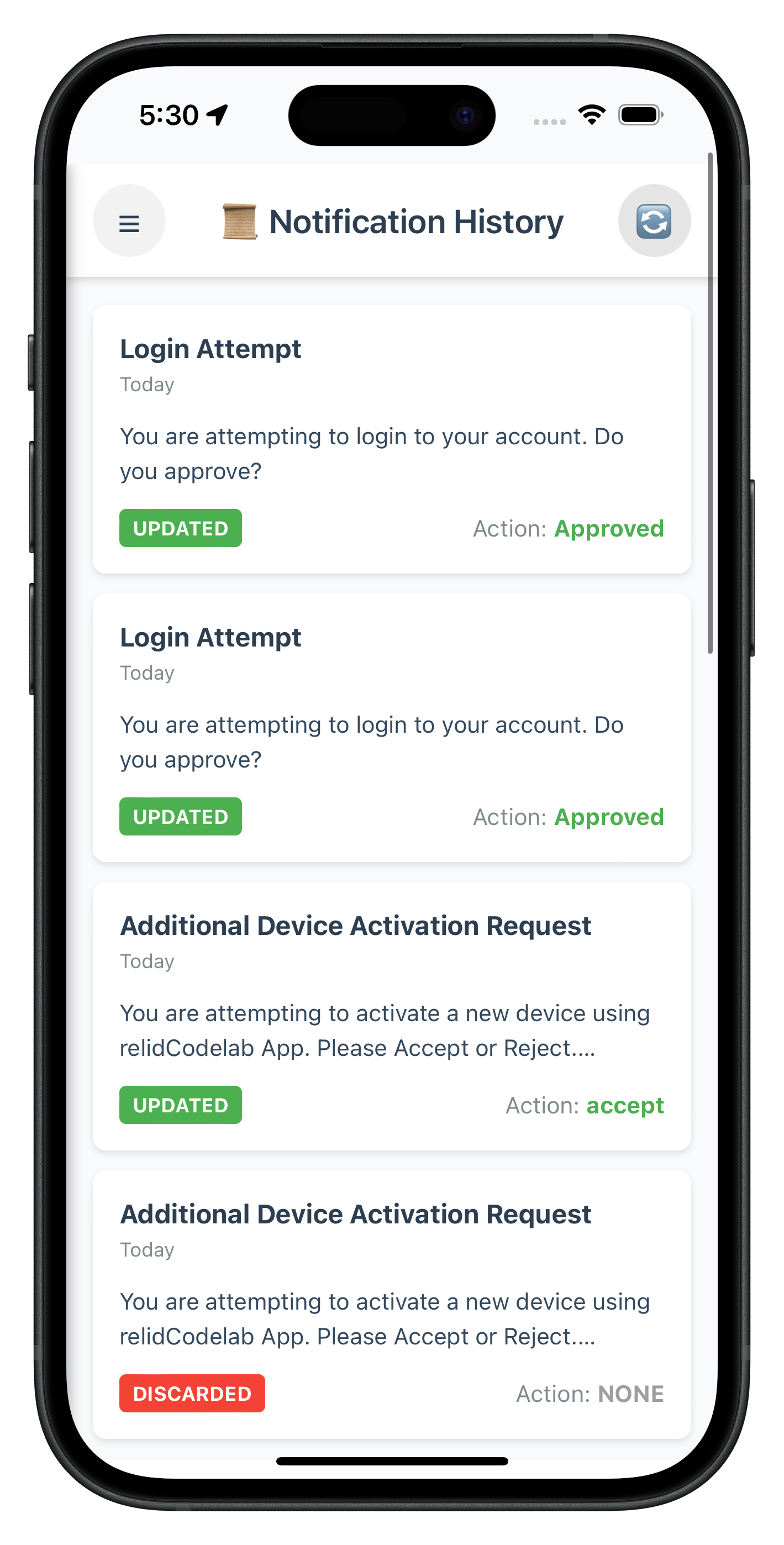
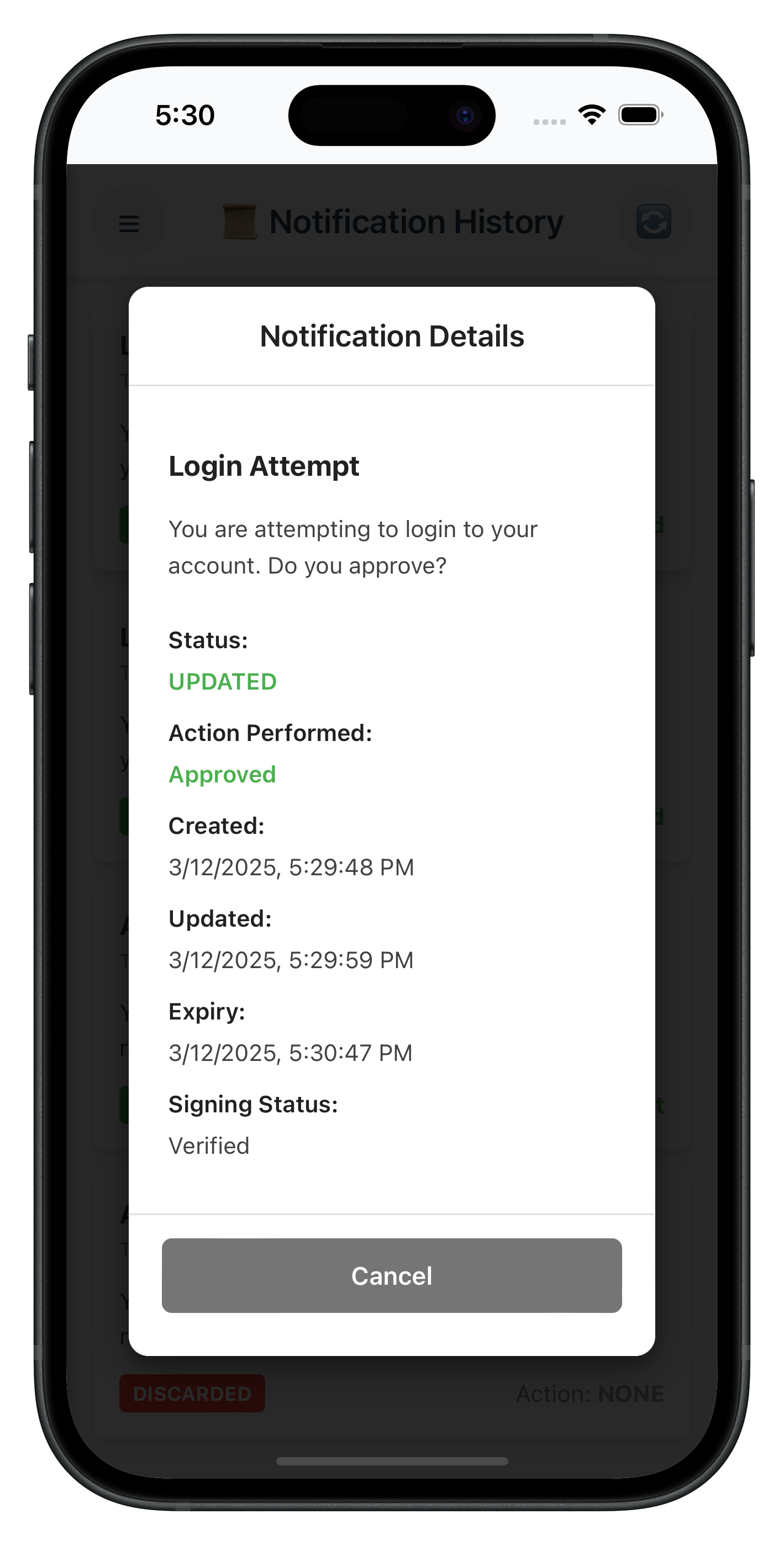
Create Notification History Screen HTML
First, create the HTML structure for the notification history screen:
<!-- www/src/tutorial/screens/notification/NotificationHistoryScreen.html -->

<!DOCTYPE html>
<html>
<head>
    <meta charset="utf-8">
    <meta name="viewport" content="width=device-width, initial-scale=1.0">
    <title>Notification History</title>
    <link rel="stylesheet" href="../../../css/styles.css">
    <link rel="stylesheet" href="../../../css/drawer.css">
</head>
<body>
    <!-- Header -->
    <div class="header">
        <button id="notification-history-menu-button" class="menu-button">☰</button>
        <h1 class="header-title">Notification History</h1>
        <button id="notification-history-refresh-button" class="refresh-button">🔄</button>
    </div>

    <!-- Main Content -->
    <div id="notification-history-content" class="content-container">
        <!-- History list will be rendered here dynamically -->
    </div>

    <!-- Detail Modal -->
    <div id="notification-history-detail-modal" class="modal" style="display: none;">
        <div id="notification-history-detail-modal-overlay" class="modal-overlay">
            <div class="modal-content">
                <h2 class="modal-title">Notification Details</h2>
                <div id="notification-history-detail-body" class="modal-body">
                    <!-- Detail content will be populated dynamically -->
                </div>
                <div class="modal-footer">
                    <button id="notification-history-detail-cancel" class="modal-button modal-button-secondary">
                        Close
                    </button>
                </div>
            </div>
        </div>
    </div>

    <!-- Drawer Menu -->
    <div id="drawer" class="drawer">
        <div class="drawer-content">
            <h2 class="drawer-title">Menu</h2>
            <nav class="drawer-nav">
                <a href="#" id="drawer-dashboard-link" class="drawer-link">🏠 Dashboard</a>
                <a href="#" id="drawer-notifications-link" class="drawer-link">🔔 Get Notifications</a>
                <a href="#" id="drawer-notification-history-link" class="drawer-link drawer-link-active">📜 Notification History</a>
                <a href="#" id="drawer-update-password-link" class="drawer-link">🔑 Update Password</a>
                <a href="#" id="drawer-lda-toggling-link" class="drawer-link">🔐 LDA Toggling</a>
                <a href="#" id="drawer-data-signing-link" class="drawer-link">✍️ Data Signing</a>
            </nav>
        </div>
    </div>
    <div id="drawer-overlay" class="drawer-overlay"></div>

    <!-- Scripts -->
    <script src="../../../cordova.js"></script>
    <script src="../../../src/uniken/utils/connectionProfileParser.js"></script>
    <script src="../../../src/uniken/services/rdnaEventManager.js"></script>
    <script src="../../../src/uniken/services/rdnaService.js"></script>
    <script src="../../../src/tutorial/navigation/NavigationService.js"></script>
    <script src="NotificationHistoryScreen.js"></script>
</body>
</html>
Create Notification History Screen JavaScript
Now implement the screen logic following Cordova's object-based pattern:
// www/src/tutorial/screens/notification/NotificationHistoryScreen.js

/**
 * Notification History Screen
 *
 * Displays historical notifications with status badges and detail modal.
 *
 * Features:
 * - Auto-loads notification history on screen mount
 * - Displays notifications sorted by timestamp (newest first)
 * - Color-coded status indicators (UPDATED, EXPIRED, DISCARDED, etc.)
 * - Manual refresh functionality
 * - Detail modal for viewing full notification information
 * - UTC timestamp conversion to local time
 * - Handles response from getNotificationHistory API
 *
 * API Used:
 * - getNotificationHistory(recordCount, startIndex, enterpriseId, startDate, endDate, notificationStatus, actionPerformed, keywordSearch, deviceId)
 *
 * Event Handled:
 * - onGetNotificationsHistory - History data response
 */

const NotificationHistoryScreen = {
  /**
   * Screen state
   */
  state: {
    loading: false,
    historyItems: [],
    selectedItem: null,
    showDetailModal: false
  },

  /**
   * Called when screen content is loaded into #app-content
   * Replaces React's componentDidMount / useEffect
   *
   * @param {Object} params - Navigation parameters (userParams from Dashboard)
   */
  onContentLoaded(params) {
    console.log('NotificationHistoryScreen - Content loaded with params:', JSON.stringify(params, null, 2));

    // Cleanup any existing handlers from previous visits to prevent accumulation
    this.cleanup();

    // Store user params
    this.userParams = params;

    // Setup event listeners
    this.setupEventListeners();

    // Setup event handler for notification history response
    this.setupEventHandlers();

    // Load notification history automatically
    this.loadNotificationHistory();
  },

  /**
   * Setup DOM event listeners
   */
  setupEventListeners() {
    // Menu button
    const menuButton = document.getElementById('notification-history-menu-button');
    if (menuButton) {
      menuButton.onclick = () => {
        NavigationService.toggleDrawer();
      };
    }

    // Refresh button
    const refreshButton = document.getElementById('notification-history-refresh-button');
    if (refreshButton) {
      refreshButton.onclick = () => {
        this.loadNotificationHistory();
      };
    }

    // Detail modal cancel button
    const cancelButton = document.getElementById('notification-history-detail-cancel');
    if (cancelButton) {
      cancelButton.onclick = () => {
        this.closeDetailModal();
      };
    }

    // Detail modal overlay (click to close)
    const modalOverlay = document.getElementById('notification-history-detail-modal-overlay');
    if (modalOverlay) {
      modalOverlay.onclick = (e) => {
        if (e.target === modalOverlay) {
          this.closeDetailModal();
        }
      };
    }

    // Setup drawer menu link handlers to pass session params
    this.setupDrawerLinks();
  },

  /**
   * Setup drawer menu link handlers
   */
  setupDrawerLinks() {
    const drawerDashboardLink = document.getElementById('drawer-dashboard-link');
    const drawerNotificationsLink = document.getElementById('drawer-notifications-link');
    const drawerNotificationHistoryLink = document.getElementById('drawer-notification-history-link');
    const drawerLdaTogglingLink = document.getElementById('drawer-lda-toggling-link');
    const drawerDataSigningLink = document.getElementById('drawer-data-signing-link');

    if (drawerDashboardLink) {
      drawerDashboardLink.onclick = (e) => {
        e.preventDefault();
        NavigationService.closeDrawer();
        NavigationService.navigate('Dashboard', this.userParams);
      };
    }

    if (drawerNotificationsLink) {
      drawerNotificationsLink.onclick = (e) => {
        e.preventDefault();
        NavigationService.closeDrawer();
        NavigationService.navigate('GetNotifications', this.userParams);
      };
    }

    if (drawerNotificationHistoryLink) {
      drawerNotificationHistoryLink.onclick = (e) => {
        e.preventDefault();
        NavigationService.closeDrawer();
        // Already on NotificationHistory, just close drawer
      };
    }

    if (drawerLdaTogglingLink) {
      drawerLdaTogglingLink.onclick = (e) => {
        e.preventDefault();
        NavigationService.closeDrawer();
        NavigationService.navigate('LDAToggling', this.userParams);
      };
    }

    if (drawerDataSigningLink) {
      drawerDataSigningLink.onclick = (e) => {
        e.preventDefault();
        NavigationService.closeDrawer();
        NavigationService.navigate('DataSigningInput', this.userParams);
      };
    }
  },

  /**
   * Setup SDK event handlers
   */
  setupEventHandlers() {
    const eventManager = rdnaService.getEventManager();

    // Set our handler directly (no preservation needed - only NotificationHistoryScreen uses this event)
    eventManager.setGetNotificationHistoryHandler((data) => {
      this.handleNotificationHistoryResponse(data);
    });
  },

  /**
   * Cleanup event handlers when leaving screen
   */
  cleanup() {
    const eventManager = rdnaService.getEventManager();

    // Clear the handler
    eventManager.setGetNotificationHistoryHandler(undefined);
  },

  /**
   * Load notification history from the server
   */
  async loadNotificationHistory() {
    this.state.loading = true;
    this.showLoadingState();

    try {
      console.log('NotificationHistoryScreen - Loading notification history');

      // Call getNotificationHistory API
      await rdnaService.getNotificationHistory(
        10,    // recordCount
        1,     // startIndex
        '',    // enterpriseId
        '',    // startDate
        '',    // endDate
        '',    // notificationStatus
        '',    // actionPerformed
        '',    // keywordSearch
        ''     // deviceId
      );

      console.log('NotificationHistoryScreen - getNotificationHistory API call successful');
    } catch (error) {
      console.error('NotificationHistoryScreen - Error loading notification history:', error);
      this.state.loading = false;
      this.showErrorState(error.error?.errorString || 'Failed to load notification history');
    }
  },

  /**
   * Handle notification history response from SDK event
   *
   * @param {Object} data - Response data from onGetNotificationsHistory event
   */
  handleNotificationHistoryResponse(data) {
    console.log('NotificationHistoryScreen - Received notification history response');
    this.state.loading = false;

    // Layer 1: Check API-level error (error.longErrorCode)
    if (data.error && data.error.longErrorCode !== 0) {
      const errorMsg = data.error.errorString || 'API error occurred';
      console.error('NotificationHistoryScreen - API error:', errorMsg, 'Code:', data.error.longErrorCode);
      this.showErrorState(errorMsg);
      return;
    }

    // Layer 2: Check status code (pArgs.response.StatusCode)
    const statusCode = data.pArgs?.response?.StatusCode;
    if (statusCode !== 100) {
      const statusMsg = data.pArgs?.response?.StatusMsg || 'Failed to retrieve notification history';
      console.error('NotificationHistoryScreen - Status error:', statusCode, 'Message:', statusMsg);
      this.showErrorState(statusMsg);
      return;
    }

    // Success: Process history data
    try {
      const history = data.pArgs?.response?.ResponseData?.history || [];
      console.log(`NotificationHistoryScreen - Loaded ${history.length} history items`);

      // Sort by update timestamp (most recent first)
      const sortedHistory = history.sort((a, b) =>
        new Date(b.update_ts || b.create_ts).getTime() - new Date(a.update_ts || a.create_ts).getTime()
      );

      this.state.historyItems = sortedHistory;
      this.renderHistoryList();
    } catch (error) {
      console.error('NotificationHistoryScreen - Error parsing response:', error);
      this.showErrorState('Failed to parse notification history response');
    }
  },

  /**
   * Show loading state
   */
  showLoadingState() {
    const contentDiv = document.getElementById('notification-history-content');
    if (contentDiv) {
      contentDiv.innerHTML = `
        <div class="notification-history-loading-container">
          <div class="spinner"></div>
          <p class="notification-history-loading-text">Loading notification history...</p>
        </div>
      `;
    }
  },

  /**
   * Show error state
   *
   * @param {string} errorMessage - Error message to display
   */
  showErrorState(errorMessage) {
    const contentDiv = document.getElementById('notification-history-content');
    if (contentDiv) {
      contentDiv.innerHTML = `
        <div class="notification-history-empty-container">
          <p class="notification-history-error-text">${errorMessage}</p>
          <button id="notification-history-retry-button" class="notification-history-retry-button">
            Retry
          </button>
        </div>
      `;

      // Re-attach retry button listener
      const retryButton = document.getElementById('notification-history-retry-button');
      if (retryButton) {
        retryButton.onclick = () => {
          this.loadNotificationHistory();
        };
      }
    }
  },

  /**
   * Render the history list
   */
  renderHistoryList() {
    const contentDiv = document.getElementById('notification-history-content');

    if (!contentDiv) {
      console.error('NotificationHistoryScreen - Content container not found');
      return;
    }

    if (this.state.historyItems.length === 0) {
      // Empty state
      contentDiv.innerHTML = `
        <div class="notification-history-empty-container">
          <p class="notification-history-empty-text">No notification history found</p>
          <button id="notification-history-retry-button" class="notification-history-retry-button">
            Retry
          </button>
        </div>
      `;

      // Re-attach retry button listener
      const retryButton = document.getElementById('notification-history-retry-button');
      if (retryButton) {
        retryButton.onclick = () => {
          this.loadNotificationHistory();
        };
      }
      return;
    }

    // Render history items
    let html = '<div class="notification-history-list">';

    this.state.historyItems.forEach((item, index) => {
      const body = item.body?.[0] || {};
      const subject = body.subject || 'No Subject';
      const message = (body.message || 'No message available').replace(/\\n/g, ' ');
      const statusColor = this.getStatusColor(item.status);
      const actionColor = this.getActionColor(item.action_performed);
      const timestamp = this.formatTimestamp(item.update_ts || item.create_ts);

      html += `
        <div class="notification-history-item" data-index="${index}" onclick="NotificationHistoryScreen.handleItemPress(${index})">
          <div class="notification-history-item-header">
            <span class="notification-history-item-subject">${subject}</span>
            <span class="notification-history-item-time">${timestamp}</span>
          </div>
          <p class="notification-history-item-message">${message}</p>
          <div class="notification-history-item-footer">
            <span class="notification-history-status-badge" style="background-color: ${statusColor}">
              ${item.status}
            </span>
            <div class="notification-history-action-container">
              <span class="notification-history-action-label">Action: </span>
              <span class="notification-history-action-value" style="color: ${actionColor}">
                ${item.action_performed || 'NONE'}
              </span>
            </div>
          </div>
        </div>
      `;
    });

    html += '</div>';
    contentDiv.innerHTML = html;
  },

  /**
   * Handle history item press
   *
   * @param {number} index - Index of the item in historyItems array
   */
  handleItemPress(index) {
    const item = this.state.historyItems[index];
    if (!item) return;

    this.state.selectedItem = item;
    this.state.showDetailModal = true;
    this.showDetailModal();
  },

  /**
   * Show detail modal
   */
  showDetailModal() {
    const modal = document.getElementById('notification-history-detail-modal');
    if (!modal) return;

    const item = this.state.selectedItem;
    if (!item) return;

    const body = item.body?.[0] || {};
    const subject = body.subject || 'No Subject';
    const message = (body.message || 'No message available').replace(/\\n/g, '<br>');
    const statusColor = this.getStatusColor(item.status);
    const actionColor = this.getActionColor(item.action_performed);

    // Populate modal content
    const modalBody = document.getElementById('notification-history-detail-body');
    if (modalBody) {
      modalBody.innerHTML = `
        <p class="notification-history-detail-subject">${subject}</p>
        <p class="notification-history-detail-message">${message}</p>
        <div class="notification-history-detail-row">
          <span class="notification-history-detail-label">Status:</span>
          <span class="notification-history-detail-value" style="color: ${statusColor}">${item.status}</span>
        </div>
        <div class="notification-history-detail-row">
          <span class="notification-history-detail-label">Action Performed:</span>
          <span class="notification-history-detail-value" style="color: ${actionColor}">${item.action_performed || 'NONE'}</span>
        </div>
        <div class="notification-history-detail-row">
          <span class="notification-history-detail-label">Created:</span>
          <span class="notification-history-detail-value">${this.convertUTCToLocal(item.create_ts)}</span>
        </div>
        ${item.update_ts ? `
          <div class="notification-history-detail-row">
            <span class="notification-history-detail-label">Updated:</span>
            <span class="notification-history-detail-value">${this.convertUTCToLocal(item.update_ts)}</span>
          </div>
        ` : ''}
        <div class="notification-history-detail-row">
          <span class="notification-history-detail-label">Expiry:</span>
          <span class="notification-history-detail-value">${this.convertUTCToLocal(item.expiry_timestamp)}</span>
        </div>
        ${item.signing_status ? `
          <div class="notification-history-detail-row">
            <span class="notification-history-detail-label">Signing Status:</span>
            <span class="notification-history-detail-value">${item.signing_status}</span>
          </div>
        ` : ''}
      `;
    }

    // Show modal
    modal.style.display = 'flex';
  },

  /**
   * Close detail modal
   */
  closeDetailModal() {
    const modal = document.getElementById('notification-history-detail-modal');
    if (modal) {
      modal.style.display = 'none';
    }
    this.state.showDetailModal = false;
    this.state.selectedItem = null;
  },

  /**
   * Format timestamp to user-friendly format
   *
   * @param {string} timestamp - Timestamp string
   * @returns {string} Formatted timestamp
   */
  formatTimestamp(timestamp) {
    try {
      if (!timestamp) return 'Unknown';

      // Handle UTC timestamp format (e.g., "2025-12-03T10:30:00UTC")
      let cleanTimestamp = timestamp;
      if (timestamp.endsWith('UTC')) {
        cleanTimestamp = timestamp.replace('UTC', 'Z');
      }

      const date = new Date(cleanTimestamp);

      // Check if date is valid
      if (isNaN(date.getTime())) {
        console.log('formatTimestamp - Invalid date for timestamp:', timestamp);
        return timestamp;
      }

      const now = new Date();
      const diffMs = now.getTime() - date.getTime();
      const diffDays = Math.floor(diffMs / (1000 * 60 * 60 * 24));

      if (diffDays === 0) {
        return 'Today';
      } else if (diffDays === 1) {
        return 'Yesterday';
      } else if (diffDays <= 7) {
        return `${diffDays} days ago`;
      } else {
        return date.toLocaleDateString();
      }
    } catch (error) {
      console.log('formatTimestamp - Error:', error);
      return timestamp;
    }
  },

  /**
   * Convert UTC timestamp to local time
   *
   * @param {string} utcTimestamp - UTC timestamp string
   * @returns {string} Local time string
   */
  convertUTCToLocal(utcTimestamp) {
    try {
      if (!utcTimestamp) return 'Not available';

      // Handle different UTC timestamp formats
      let cleanTimestamp = utcTimestamp;

      // If timestamp ends with 'UTC', replace with 'Z' for proper parsing
      if (utcTimestamp.endsWith('UTC')) {
        cleanTimestamp = utcTimestamp.replace('UTC', 'Z');
      }

      // Create date object from cleaned UTC timestamp
      const utcDate = new Date(cleanTimestamp);

      // Check if date is valid
      if (isNaN(utcDate.getTime())) {
        console.log('convertUTCToLocal - Invalid date for timestamp:', utcTimestamp);
        return utcTimestamp; // Return original if can't parse
      }

      // Convert to local time string
      const localTime = utcDate.toLocaleString();
      return localTime;
    } catch (error) {
      console.log('convertUTCToLocal - Error:', error);
      return utcTimestamp; // Return original on error
    }
  },

  /**
   * Get color for status
   *
   * @param {string} status - Notification status
   * @returns {string} Color hex code
   */
  getStatusColor(status) {
    switch (status.toUpperCase()) {
      case 'UPDATED':
      case 'ACCEPTED':
        return '#4CAF50'; // Green
      case 'REJECTED':
      case 'DISCARDED':
        return '#F44336'; // Red
      case 'EXPIRED':
        return '#FF9800'; // Orange
      case 'DISMISSED':
        return '#9E9E9E'; // Gray
      default:
        return '#2196F3'; // Blue
    }
  },

  /**
   * Get color for action performed
   *
   * @param {string} action - Action performed
   * @returns {string} Color hex code
   */
  getActionColor(action) {
    if (!action || action === 'NONE') return '#9E9E9E'; // Gray
    if (action.toLowerCase().includes('accept') || action.toLowerCase().includes('approve')) {
      return '#4CAF50'; // Green
    }
    if (action.toLowerCase().includes('reject') || action.toLowerCase().includes('deny')) {
      return '#F44336'; // Red
    }
    return '#2196F3'; // Blue
  }
};

// Expose globally for NavigationService
window.NotificationHistoryScreen = NotificationHistoryScreen;
Cordova UI Architecture Pattern
Cordova applications use standard web technologies for UI:
Component | Technology | Purpose |
HTML files | HTML5 | Define structure and layout |
JavaScript modules | ES5/ES6 | Contain logic and state management |
CSS files | CSS3 | Handle styling and presentation |
State | Object properties | Manage component state |
Lifecycle |
| Initialize and cleanup |
DOM updates |
| Manual DOM manipulation |
Navigation | Custom NavigationService | Screen transitions |
Events |
| User interaction handling |
How Cordova Plugins Work
Cordova plugins are loaded automatically - no imports needed.
Loading Flow (Local Plugin):
- Install:
cordova plugin add ./RdnaClient - Build: Plugin registers JavaScript interface
- Access: Use global namespace
com.uniken.rdnaplugin.RdnaClient
// ❌ NOT NEEDED (no imports for local plugins)
import RdnaClient from './RdnaClient';

// ✅ CORRECT - Direct access (same for both local and remote plugins)
com.uniken.rdnaplugin.RdnaClient.getSDKVersion(successCallback, errorCallback);
Script Loading Order
In your HTML files, maintain this order:
<!-- 1. Cordova core -->
<script src="cordova.js"></script>

<!-- 2. Utilities -->
<script src="src/uniken/utils/connectionProfileParser.js"></script>

<!-- 3. Services -->
<script src="src/uniken/services/rdnaEventManager.js"></script>
<script src="src/uniken/services/rdnaService.js"></script>

<!-- 4. Navigation -->
<script src="src/tutorial/navigation/NavigationService.js"></script>

<!-- 5. Your screen -->
<script src="NotificationHistoryScreen.js"></script>
Plugin Installation with Local Path
This project uses a local Cordova plugin. Install it with:
# Verify plugin directory exists
ls -la ./RdnaClient

# Install from local directory
cordova plugin add ./RdnaClient

# Verify installation
cordova plugin ls
Let's test your notification history implementation with comprehensive scenarios to ensure enterprise-grade functionality.
Build and Run
# Prepare platforms
cordova prepare

# Run on iOS
cordova run ios

# Run on Android
cordova run android
Debugging
iOS: Safari → Develop → Simulator → [Your App] Android: Chrome → chrome://inspect → Inspect
Test Scenario 1: Basic History Loading
Setup Requirements:
- Active user session with notification permissions
- Historical notifications available in the system
- Proper SDK event handler registration
Test Steps:
- Navigate to Notification History screen
- Verify initial loading state displays correctly
- Confirm history data loads and displays in list format
- Check individual notification items display all required information
- Tap on a notification to view details modal
Expected Results:
- ✅ Loading spinner appears during data fetch
- ✅ History list populates with formatted notification items
- ✅ Each item displays title, status, date, and action badges
- ✅ Transaction details appear when available
- ✅ Detail modal shows complete notification information
Test Scenario 2: Empty State Handling
Test Steps:
- Access notification history with no historical data
- Verify empty state message displays
- Test retry button functionality
Expected Results:
- ✅ Empty state shows "No notification history found"
- ✅ Retry button is present and functional
- ✅ Tapping retry reloads data
Test Scenario 3: Error Handling
Test Steps:
- Simulate network error (disable network)
- Attempt to load notification history
- Verify error message displays
- Re-enable network and test retry
Expected Results:
- ✅ Error message shows user-friendly text
- ✅ Retry button allows recovery
- ✅ Successful retry loads data normally
Test Scenario 4: Status and Action Colors
Test Steps:
- View notifications with different statuses (UPDATED, EXPIRED, DISCARDED, DISMISSED)
- View notifications with different actions (Accept, Reject, NONE)
- Verify color coding is correct
Expected Results:
- ✅ UPDATED/ACCEPTED = Green (#4CAF50)
- ✅ REJECTED/DISCARDED = Red (#F44336)
- ✅ EXPIRED = Orange (#FF9800)
- ✅ DISMISSED = Gray (#9E9E9E)
- ✅ Accept actions = Green
- ✅ Reject actions = Red
- ✅ NONE actions = Gray
Test Scenario 5: Timestamp Formatting
Test Steps:
- View notifications from today
- View notifications from yesterday
- View notifications from within last week
- View older notifications
Expected Results:
- ✅ Today's notifications show "Today"
- ✅ Yesterday's notifications show "Yesterday"
- ✅ Recent notifications show "X days ago"
- ✅ Older notifications show formatted date
Test Scenario 6: Detail Modal
Test Steps:
- Tap on a notification in the list
- Verify modal displays all details
- Close modal using close button
- Close modal by tapping overlay
Expected Results:
- ✅ Modal opens with complete notification details
- ✅ All fields display correctly (status, action, dates, signing status)
- ✅ Close button dismisses modal
- ✅ Overlay tap dismisses modal
- ✅ UTC timestamps converted to local time
Prepare your notification history implementation for enterprise deployment with essential security and performance considerations.
Security & Privacy Checklist
- [ ] Data Sanitization: Remove or mask sensitive information in logs and displays
- [ ] Access Control: Verify users can only access their own notification history
- [ ] Secure Logging: Use
com.uniken.rdnaplugin.RdnaClient.RDNALoggingLevel.RDNA_NO_LOGSin production - [ ] XSS Prevention: Sanitize user-generated content before inserting into DOM
- [ ] Audit Logging: Track access to notification history for compliance requirements
Performance Optimization
- [ ] Efficient DOM Updates: Minimize
innerHTMLoperations, batch updates when possible - [ ] Memory Management: Clean up event listeners and handlers properly
- [ ] Network Efficiency: Optimize API calls to minimize bandwidth usage
- [ ] Loading States: Show appropriate loading indicators for better UX
- [ ] Error Boundaries: Graceful error handling at all levels
Cordova-Specific Best Practices
- [ ] Event Cleanup: Always remove event listeners in
cleanup()methods - [ ] Script Order: Maintain correct script loading order in HTML
- [ ] Plugin Verification: Check plugin availability before making SDK calls
- [ ] deviceready Event: Wait for deviceready before SDK operations
- [ ] Memory Leaks: Properly cleanup screen state when navigating away
Security Implementation Example
// www/src/tutorial/screens/notification/NotificationHistoryScreen.js (security enhancements)
/**
* Sanitize notification data for display
*/
sanitizeForDisplay(text) {
if (!text) return '';
// Escape HTML to prevent XSS
return text
.replace(/&/g, '&')
.replace(/</g, '<')
.replace(/>/g, '>')
.replace(/"/g, '"')
.replace(/'/g, ''');
},
/**
* Mask sensitive device IDs
*/
maskDeviceId(deviceId) {
if (!deviceId || deviceId.length < 8) return '****';
return deviceId.substring(0, 4) + '****' + deviceId.substring(deviceId.length - 4);
},
/**
* Render history list with sanitized data
*/
renderHistoryList() {
// ... existing code ...
this.state.historyItems.forEach((item, index) => {
const body = item.body?.[0] || {};
// Sanitize text content
const subject = this.sanitizeForDisplay(body.subject || 'No Subject');
const message = this.sanitizeForDisplay(body.message || 'No message available');
// ... rest of rendering code ...
});
}
Memory Management
// Proper cleanup pattern
cleanup() {
  const eventManager = rdnaService.getEventManager();

  // Clear SDK event handlers
  eventManager.setGetNotificationHistoryHandler(undefined);

  // Clear state
  this.state.historyItems = [];
  this.state.selectedItem = null;

  // Clear any timers or intervals
  if (this.refreshTimer) {
    clearInterval(this.refreshTimer);
    this.refreshTimer = null;
  }
}
Congratulations! You've successfully implemented comprehensive notification history management with the REL-ID SDK in Cordova.
🚀 What You've Accomplished
✅ Enterprise-Grade History Management - Complete audit trail with comprehensive data handling ✅ Professional UI Components - Modern interface with intuitive navigation and data visualization ✅ Cordova Architecture Mastery - DOM manipulation, event handling, and state management ✅ Performance Optimization - Efficient rendering and memory management for large datasets ✅ Security Best Practices - Data sanitization, access control, and secure logging
📚 Key Cordova Patterns Learned
- Global Plugin API Access: No imports needed - use
com.uniken.rdnaplugin.RdnaClientdirectly - DOM Events for SDK Callbacks:
document.addEventListener()for all SDK events - Manual DOM Updates: Building HTML strings and using
innerHTMLfor state changes - Script Loading Order: Dependencies must load before dependent code
- Lifecycle Methods:
onContentLoaded()for initialization,cleanup()for teardown - State Management: Object properties instead of React hooks
- Event Cleanup: Proper
removeEventListener()to prevent memory leaks
📚 Additional Resources
- REL-ID Developer Documentation - Complete API reference
- Cordova Documentation - Platform guides and API reference
🏆 You've mastered enterprise notification history management with REL-ID SDK in Cordova!
Your implementation provides organizations with comprehensive audit capabilities, advanced data analysis, and secure historical data management. Use this foundation to build powerful analytics and compliance reporting features that meet enterprise requirements.