This codelab demonstrates how to implement Mobile Threat Detection (MTD) flow using the Cordova plugin. MTD now performs a synchronous check during the RELID SDK initialization to ensure critical threats are detected early. Once the SDK is successfully initialized, MTD continues monitoring asynchronously in the background to detect and respond to any emerging threats during runtime.
What You'll Learn
- How to handle MTD threat detection events in Cordova
- Implementing user consent workflows for security threats
- Creating threat detection UI with DOM manipulation
- Managing threat responses with the takeActionOnThreats API
- Understanding different threat types and severities
- Platform-specific exit strategies (iOS vs Android)
Get the Code from GitHub
The code to get started is stored in a GitHub repository.
You can clone the repository using the following command:
git clone https://github.com/uniken-public/codelab-cordova.git
Navigate to the relid-MTD folder in the repository you cloned earlier
What You'll Need
- Completed RELID Initialization codelab
- Cordova plugin installed and configured (local plugin:
./RdnaClient) - Basic understanding of JavaScript and DOM manipulation
- Understanding of Cordova event system
- Access to the sample app source code for reference
The sample app provides a complete MTD implementation using Cordova patterns. Let's examine the key components:
Component | Purpose | Sample App Reference |
MTD Manager | Global threat state management (singleton) |
|
Threat Modal | UI for displaying threats with DOM |
|
Event Handling | Extended event manager |
|
Platform Helper | Platform detection and exit |
|
Permissions
Platform-Specific Permissions
The plugin requires specific permissions for optimal MTD functionality:
iOS Configuration: Refer to the iOS Permissions Documentation for complete Info.plist configuration including:
- NSLocationWhenInUseUsageDescription (network threat detection)
- NSLocalNetworkUsageDescription (network threat detection)
Android Configuration: Refer to the Android Permissions Documentation for runtime and normal permissions required for MTD features.
MTD Event Types
The RELID SDK triggers two main MTD events during initialization:
Event Type | Description | User Action Required |
Non-terminating threats | User can choose to proceed or exit using takeActionOnThreats API | |
Critical threats | Application must exit immediately |
Project Structure
This project includes a local Cordova plugin. Ensure the plugin directory exists in your project root:
# Verify plugin directory exists
ls -la ./RdnaClient
Add the SDK Plugin (Local)
The SDK plugin is included as a local plugin in the project. Install it from the local directory:
cordova plugin add ./RdnaClient
Add File Plugin
For loading local JSON files, install cordova-plugin-file:
cordova plugin add cordova-plugin-file
Platform Setup
# Add platforms
cordova platform add ios
cordova platform add android

# Prepare platforms
cordova prepare
Follow the Cordova platform setup guide for platform-specific configuration.
Define JSDoc type definitions for MTD threat handling:
// www/src/uniken/services/rdnaEventManager.js (type definitions)

/**
 * Threat information structure
 * @typedef {Object} RDNAThreatInfo
 * @property {string} threatName
 * @property {string} threatMsg
 * @property {number} threatId
 * @property {string} threatCategory - SYSTEM, APP, NETWORK
 * @property {string} threatSeverity - LOW, MEDIUM, HIGH
 * @property {string[]|string} threatReason
 * @property {Object} networkInfo
 * @property {string} networkInfo.bssid
 * @property {string} networkInfo.maliciousAddress
 * @property {string} networkInfo.maliciousMacAddress
 * @property {string} networkInfo.ssid
 * @property {Object} appInfo
 * @property {string} appInfo.appName
 * @property {string} appInfo.appSha256
 * @property {string} appInfo.packageName
 * @property {number} rememberActionForSession - 0/1 for API
 * @property {string} configuredAction
 * @property {number} shouldProceedWithThreats - 0/1 for API
 */

/**
 * User consent threats data
 * @typedef {Object} RDNAUserConsentThreatsData
 * @property {RDNAThreatInfo[]} threats
 */

/**
 * Terminate with threats data
 * @typedef {Object} RDNATerminateWithThreatsData
 * @property {RDNAThreatInfo[]} threats
 */

/**
 * @callback RDNAUserConsentThreatsCallback
 * @param {RDNAUserConsentThreatsData} data
 */

/**
 * @callback RDNATerminateWithThreatsCallback
 * @param {RDNATerminateWithThreatsData} data
 */
Threat Categories and Severities
Understanding threat classification helps in implementing appropriate responses:
Category | Examples | Platform |
SYSTEM | Usb Debugging, Rooted Device | Android and iOS |
NETWORK | Network MITM, Unsecured Access Point | Android and iOS |
APP | Malware App, Repacked App | Only Android |
Extend your existing event manager to handle MTD events:
// www/src/uniken/services/rdnaEventManager.js (additions)
class RdnaEventManager {
  constructor() {
    // ... existing properties ...

    // Add MTD callback properties
    this.userConsentThreatsHandler = null;
    this.terminateWithThreatsHandler = null;
  }

  registerEventListeners() {
    // ... existing listeners ...

    // Add MTD event listeners
    const userConsentThreatsListener = this.onUserConsentThreats.bind(this);
    const terminateWithThreatsListener = this.onTerminateWithThreats.bind(this);

    document.addEventListener('onUserConsentThreats', userConsentThreatsListener, false);
    document.addEventListener('onTerminateWithThreats', terminateWithThreatsListener, false);

    // Store listeners for cleanup
    this.listeners.push(
      { name: 'onUserConsentThreats', handler: userConsentThreatsListener },
      { name: 'onTerminateWithThreats', handler: terminateWithThreatsListener }
    );
  }

  /**
   * Handles security threat events requiring user consent
   * @param {RDNAJsonResponse} event - Event from native SDK
   */
  onUserConsentThreats(event) {
    console.log("RdnaEventManager - User consent threats event received");

    try {
      const threatsData = JSON.parse(event.response);

      // Determine threats count (data could be array or object with threats property)
      const threatCount = Array.isArray(threatsData)
        ? threatsData.length
        : (threatsData.threats?.length || 0);

      console.log("RdnaEventManager - User consent threats count:", threatCount);

      if (this.userConsentThreatsHandler) {
        this.userConsentThreatsHandler(threatsData);
      }
    } catch (error) {
      console.error("RdnaEventManager - Failed to parse user consent threats:", error);
      console.error("RdnaEventManager - Raw event data:", event.response);
    }
  }

  /**
   * Handles critical security threat events requiring app termination
   * @param {RDNAJsonResponse} event - Event from native SDK
   */
  onTerminateWithThreats(event) {
    console.log("RdnaEventManager - Terminate with threats event received");

    try {
      const threatsData = JSON.parse(event.response);

      // Determine threats count (data could be array or object with threats property)
      const threatCount = Array.isArray(threatsData)
        ? threatsData.length
        : (threatsData.threats?.length || 0);

      console.log("RdnaEventManager - Terminate threats count:", threatCount);

      if (this.terminateWithThreatsHandler) {
        this.terminateWithThreatsHandler(threatsData);
      }
    } catch (error) {
      console.error("RdnaEventManager - Failed to parse terminate with threats:", error);
      console.error("RdnaEventManager - Raw event data:", event.response);
    }
  }

  /**
   * Sets handler for user consent threats
   * @param {RDNAUserConsentThreatsCallback} callback
   */
  setUserConsentThreatsHandler(callback) {
    this.userConsentThreatsHandler = callback;
  }

  /**
   * Sets handler for terminate with threats
   * @param {RDNATerminateWithThreatsCallback} callback
   */
  setTerminateWithThreatsHandler(callback) {
    this.terminateWithThreatsHandler = callback;
  }
}
Key features of MTD event handling in Cordova:
- DOM events: Uses
document.addEventListenerfor SDK events - JSON parsing: Converts threat data from native SDK responses (event.response)
- Error handling: Graceful error handling with raw data logging
- Callback management: Clean API for registering threat handlers
- Defensive coding: Handles both array and object threat data structures
The takeActionOnThreats API is only required for handling threats received through the onUserConsentThreats event. This allows the application to take appropriate action based on user consent.
The onTerminateWithThreats event is triggered only when critical threats are detected. In such cases, the SDK automatically terminates internally, and no further actions can be performed through the plugin until the SDK is reinitialized.
Add threat response capability to your RELID service:
// www/src/uniken/services/rdnaService.js (addition)
class RdnaService {
  /**
   * Takes action on detected security threats
   *
   * @param {string} modifiedThreatsJson - JSON string containing threat action decisions
   * @returns {Promise<RDNASyncResponse>} Promise that resolves with sync response structure
   *
   * @example
   * const modifiedThreats = threats.map(threat => ({
   *   ...threat,
   *   shouldProceedWithThreats: true,
   *   rememberActionForSession: true
   * }));
   * await rdnaService.takeActionOnThreats(JSON.stringify(modifiedThreats));
   */
  async takeActionOnThreats(modifiedThreatsJson) {
    console.log('RdnaService - Taking action on threats');

    return new Promise((resolve, reject) => {
      com.uniken.rdnaplugin.RdnaClient.takeActionOnThreats(
        (response) => {
          console.log('RdnaService - Take action on threats sync callback received');

          // Plugin returns JSON string - must parse
          const result = JSON.parse(response);
          console.log('RdnaService - takeActionOnThreats sync response:', JSON.stringify({
            longErrorCode: result.error?.longErrorCode,
            shortErrorCode: result.error?.shortErrorCode,
            errorString: result.error?.errorString
          }, null, 2));
          resolve(result);
        },
        (error) => {
          console.error('RdnaService - takeActionOnThreats error callback');
          const result = JSON.parse(error);
          console.error('RdnaService - takeActionOnThreats error:', JSON.stringify({
            longErrorCode: result.error?.longErrorCode,
            shortErrorCode: result.error?.shortErrorCode,
            errorString: result.error?.errorString
          }, null, 2));
          reject(result);
        },
        [modifiedThreatsJson] // ← CRITICAL: Must be array with stringified JSON
      );
    });
  }
}
Important Response Parameters
When responding to threats, two key parameters control the behavior:
Parameter | Purpose | Implementation Values | API Values |
| Whether to continue despite threats |
| Converted to boolean in JSON |
| Cache decision for session |
| Converted to boolean in JSON |
Critical: The plugin expects parameters as an array with the stringified JSON: [modifiedThreatsJson], not just modifiedThreatsJson.
Create a singleton manager to handle MTD state across your application:
// www/src/uniken/MTDContext/MTDThreatManager.js
const MTDThreatManager = {
  /**
   * Initialization flag
   */
  _initialized: false,

  /**
   * Current threats array
   */
  threats: [],

  /**
   * Consent mode flag (true = user choice, false = forced exit)
   */
  isConsentMode: false,

  /**
   * Processing flag for button loading states
   */
  isProcessing: false,

  /**
   * Pending exit threat IDs for self-triggered detection
   * When user chooses to exit in consent mode, we track threat IDs
   * to differentiate self-triggered terminateWithThreats from genuine ones
   */
  pendingExitThreats: [],

  /**
   * Get singleton instance
   * @returns {MTDThreatManager} Singleton instance
   */
  getInstance() {
    if (!MTDThreatManager._instance) {
      MTDThreatManager._instance = MTDThreatManager;
    }
    return MTDThreatManager._instance;
  },

  /**
   * Initialize MTD threat manager
   * Idempotent - safe to call multiple times
   * Called ONCE in AppInitializer
   */
  initialize() {
    if (this._initialized) {
      console.log('MTDThreatManager - Already initialized, skipping');
      return;
    }

    console.log('MTDThreatManager - Initializing');

    // Initialize modal controller
    ThreatDetectionModal.initialize();

    // Register threat event handlers with rdnaEventManager
    const eventManager = rdnaService.getEventManager();

    eventManager.setUserConsentThreatsHandler((data) => {
      // Handle both array and object with threats property
      const threats = Array.isArray(data) ? data : (data.threats || []);

      console.log('MTDThreatManager - User consent threats received:', JSON.stringify({
        count: threats.length,
        threats: threats.map(t => ({
          id: t.threatId,
          name: t.threatName,
          severity: t.threatSeverity
        }))
      }, null, 2));

      if (threats.length > 0) {
        this.showThreatModal(threats, true);
      }
    });

    eventManager.setTerminateWithThreatsHandler((data) => {
      const threats = Array.isArray(data) ? data : (data.threats || []);

      console.log('MTDThreatManager - Terminate with threats received:', JSON.stringify({
        count: threats.length,
        threats: threats.map(t => ({
          id: t.threatId,
          name: t.threatName,
          severity: t.threatSeverity
        }))
      }, null, 2));

      if (threats.length === 0) {
        console.warn('MTDThreatManager - No threats in terminate event, ignoring');
        return;
      }

      // Check if this is a self-triggered terminate event
      const incomingThreatIds = threats.map(threat => threat.threatId);

      const isSelfTriggered = this.pendingExitThreats.length > 0 &&
        incomingThreatIds.every(id => this.pendingExitThreats.includes(id)) &&
        incomingThreatIds.length === this.pendingExitThreats.length;

      if (isSelfTriggered) {
        console.log('MTDThreatManager - Self-triggered terminate event - exiting directly');
        this.pendingExitThreats = [];
        this.hideThreatModal();
        this.handlePlatformSpecificExit('self-triggered');
      } else {
        console.log('MTDThreatManager - Genuine terminate event - showing dialog');
        this.showThreatModal(threats, false);
      }
    });

    this._initialized = true;
    console.log('MTDThreatManager - Initialization complete');
  },

  /**
   * Show threat modal with threat data
   * @param {Array} threatList - Array of threat objects
   * @param {boolean} isConsent - Consent mode flag
   */
  showThreatModal(threatList, isConsent) {
    console.log('MTDThreatManager - Showing threat modal');

    this.threats = threatList;
    this.isConsentMode = isConsent;

    ThreatDetectionModal.show(
      threatList,
      isConsent,
      isConsent ? this.handleProceed.bind(this) : undefined,
      this.handleExit.bind(this)
    );
  },

  /**
   * Hide threat modal
   */
  hideThreatModal() {
    console.log('MTDThreatManager - Hiding threat modal');
    ThreatDetectionModal.hide();
    this.threats = [];
    this.isConsentMode = false;
    this.isProcessing = false;
  }
};

// Expose to global scope
window.MTDThreatManager = MTDThreatManager;
Threat Response Logic
The manager handles user decisions by modifying threat objects:
// www/src/uniken/MTDContext/MTDThreatManager.js (continued)

/**
 * Handle user choosing to proceed with threats
 * Only available in consent mode
 */
handleProceed() {
  console.log('MTDThreatManager - User chose to proceed with threats');

  this.isProcessing = true;

  // Modify all threats to proceed with action
  const modifiedThreats = this.threats.map(threat => ({
    ...threat,
    shouldProceedWithThreats: true,
    rememberActionForSession: true,
    // Convert threatReason array to string if needed
    threatReason: Array.isArray(threat.threatReason)
      ? threat.threatReason.join(',')
      : threat.threatReason
  }));

  const threatsJsonString = JSON.stringify(modifiedThreats);
  console.log('MTDThreatManager - Calling takeActionOnThreats with proceed=true');

  // Call rdnaService to take action on threats
  rdnaService.takeActionOnThreats(threatsJsonString)
    .then(() => {
      console.log('MTDThreatManager - takeActionOnThreats succeeded (proceed)');
      this.hideThreatModal();
    })
    .catch((error) => {
      this.isProcessing = false;
      console.error('MTDThreatManager - takeActionOnThreats failed:', JSON.stringify(error, null, 2));

      alert(
        `Failed to proceed with threats\n\n` +
        `${error.error?.errorString}\n\n` +
        `Error Codes:\n` +
        `Long: ${error.error?.longErrorCode}\n` +
        `Short: ${error.error?.shortErrorCode}`
      );
    });
},

/**
 * Handle user choosing to exit application
 * Available in both consent and terminate modes
 */
handleExit() {
  console.log('MTDThreatManager - User chose to exit application due to threats');

  if (this.isConsentMode) {
    console.log('MTDThreatManager - Consent mode: calling takeAction with shouldProceedWithThreats = false');

    this.isProcessing = true;

    // Track threat IDs for pending exit to identify self-triggered terminateWithThreats
    const threatIds = this.threats.map(threat => threat.threatId);
    this.pendingExitThreats = threatIds;
    console.log('MTDThreatManager - Tracking pending exit for threat IDs:', JSON.stringify(threatIds, null, 2));

    // Modify all threats to NOT proceed with action
    const modifiedThreats = this.threats.map(threat => ({
      ...threat,
      shouldProceedWithThreats: false,
      rememberActionForSession: true,
      threatReason: Array.isArray(threat.threatReason)
        ? threat.threatReason.join(',')
        : threat.threatReason
    }));

    const threatsJsonString = JSON.stringify(modifiedThreats);

    // Call rdnaService to take action (will trigger terminateWithThreats event)
    rdnaService.takeActionOnThreats(threatsJsonString)
      .then(() => {
        console.log('MTDThreatManager - takeActionOnThreats succeeded (exit), awaiting terminateWithThreats event');
        // The terminateWithThreats event handler will process the exit
      })
      .catch((error) => {
        this.pendingExitThreats = [];
        this.isProcessing = false;
        console.error('MTDThreatManager - takeActionOnThreats failed:', JSON.stringify(error, null, 2));

        alert(
          `Failed to process threat action\n\n` +
          `${error.error?.errorString}\n\n` +
          `Error Codes:\n` +
          `Long: ${error.error?.longErrorCode}\n` +
          `Short: ${error.error?.shortErrorCode}`
        );
      });
  } else {
    console.log('MTDThreatManager - Terminate mode - directly exiting application');
    this.hideThreatModal();
    this.handlePlatformSpecificExit('terminate');
  }
},

/**
 * Handle platform-specific application exit
 * iOS: Navigate to SecurityExitScreen (HIG compliance)
 * Android: Use navigator.app.exitApp()
 *
 * @param {string} exitType - 'self-triggered' or 'terminate'
 */
handlePlatformSpecificExit(exitType) {
  const platform = getPlatformId();

  console.log('MTDThreatManager - Platform-specific exit called:', JSON.stringify({
    platform,
    exitType
  }, null, 2));

  if (platform === 'ios') {
    console.log('MTDThreatManager - iOS detected - navigating to SecurityExitScreen');
    // iOS: Navigate to SecurityExitScreen for HIG-compliant exit guidance
    NavigationService.navigate('SecurityExit');
  } else {
    console.log('MTDThreatManager - Non-iOS platform - using exitApp()');
    // Android and other platforms: Use direct app exit
    try {
      exitApp();
      console.log('MTDThreatManager - exitApp() called successfully');
    } catch (error) {
      console.error('MTDThreatManager - Failed to exit app on platform:', platform, error);
    }
  }
}
Key features of the MTD threat manager:
- Singleton pattern: Global state management without React Context
- Direct property access: No useState/useRef needed
- Event integration: Automatic registration with the event manager
- Self-triggered detection: Prevents showing modal twice for same threat decision
- Platform-specific exit: iOS uses SecurityExitScreen, Android uses exitApp()
- API integration: Calls takeActionOnThreats with proper threat modifications
Create a modal controller to display threat information using DOM manipulation:
// www/src/uniken/components/modals/ThreatDetectionModal.js
const ThreatDetectionModal = {
  /**
   * Initialize modal functionality
   * Sets up back button handler
   */
  initialize() {
    console.log('ThreatDetectionModal - Initializing');

    // Block hardware back button when modal is visible
    this.backButtonHandler = (e) => {
      const modal = document.getElementById('mtd-modal-overlay');
      if (modal && modal.style.display !== 'none') {
        e.preventDefault();
        console.log('ThreatDetectionModal - Back button blocked while modal visible');
        return false;
      }
    };

    document.addEventListener('backbutton', this.backButtonHandler, false);

    // Prevent backdrop dismissal
    const overlay = document.getElementById('mtd-modal-overlay');
    if (overlay) {
      overlay.onclick = (e) => {
        if (e.target === overlay) {
          e.preventDefault();
          console.log('ThreatDetectionModal - Backdrop click prevented');
          return false;
        }
      };
    }
  },

  /**
   * Show modal with threat data
   * @param {Array} threats - Array of threat objects
   * @param {boolean} isConsentMode - true for consent, false for terminate
   * @param {Function} onProceed - Callback for proceed button (consent only)
   * @param {Function} onExit - Callback for exit button
   */
  show(threats, isConsentMode, onProceed, onExit) {
    console.log('ThreatDetectionModal - Showing modal');

    // Update modal title and subtitle
    const title = document.getElementById('modal-title');
    const subtitle = document.getElementById('modal-subtitle');

    if (title) {
      title.textContent = isConsentMode
        ? '⚠️ Security Threats Detected'
        : '🚫 Security Threat - Action Required';
    }

    if (subtitle) {
      subtitle.textContent = isConsentMode
        ? 'Review the detected threats and choose how to proceed'
        : 'Critical security threats detected. Application must exit for safety.';
    }

    // Update threats header
    const threatsHeader = document.getElementById('threats-header');
    if (threatsHeader) {
      threatsHeader.textContent = `Detected Threats (${threats.length})`;
    }

    // Populate threat list
    this.populateThreatList(threats);

    // Setup action buttons
    this.setupButtons(isConsentMode, onProceed, onExit);

    // Show modal
    const overlay = document.getElementById('mtd-modal-overlay');
    if (overlay) {
      overlay.style.display = 'flex';
    }
  },

  /**
   * Hide modal
   */
  hide() {
    console.log('ThreatDetectionModal - Hiding modal');

    const overlay = document.getElementById('mtd-modal-overlay');
    if (overlay) {
      overlay.style.display = 'none';
    }

    // Clear content
    const threatsList = document.getElementById('threats-list');
    if (threatsList) {
      threatsList.innerHTML = '';
    }

    const buttonsContainer = document.getElementById('modal-buttons');
    if (buttonsContainer) {
      buttonsContainer.innerHTML = '';
    }
  },

  /**
   * Get color for threat severity
   * @param {string} severity - Threat severity level
   * @returns {string} Color hex code
   */
  getThreatSeverityColor(severity) {
    const severityUpper = (severity || '').toUpperCase();
    switch (severityUpper) {
      case 'HIGH':
        return '#dc2626'; // Red
      case 'MEDIUM':
        return '#f59e0b'; // Orange
      case 'LOW':
        return '#10b981'; // Green
      default:
        return '#6b7280'; // Gray
    }
  },

  /**
   * Get icon for threat category
   * @param {string} category - Threat category
   * @returns {string} Emoji icon
   */
  getThreatCategoryIcon(category) {
    const categoryUpper = (category || '').toUpperCase();
    switch (categoryUpper) {
      case 'SYSTEM':
        return '🛡️';
      case 'NETWORK':
        return '🌐';
      case 'APPLICATION':
      case 'APP':
        return '📱';
      default:
        return '⚠️';
    }
  },

  /**
   * Setup action buttons based on mode
   * @param {boolean} isConsentMode - Consent vs terminate mode
   * @param {Function} onProceed - Proceed callback (consent only)
   * @param {Function} onExit - Exit callback
   */
  setupButtons(isConsentMode, onProceed, onExit) {
    const buttonsContainer = document.getElementById('modal-buttons');
    if (!buttonsContainer) return;

    buttonsContainer.innerHTML = '';

    if (isConsentMode && onProceed) {
      // Consent mode: show both Proceed and Exit buttons
      const proceedButton = document.createElement('button');
      proceedButton.id = 'modal-proceed-btn';
      proceedButton.className = 'modal-button proceed-button';
      proceedButton.textContent = 'Proceed Anyway';
      proceedButton.onclick = () => {
        this.setButtonLoading('modal-proceed-btn', true, 'Processing...');
        onProceed();
      };
      buttonsContainer.appendChild(proceedButton);
    }

    // Exit button (always present)
    const exitButton = document.createElement('button');
    exitButton.id = 'modal-exit-btn';
    exitButton.className = isConsentMode
      ? 'modal-button exit-button'
      : 'modal-button exit-button-full';
    exitButton.textContent = 'Exit Application';
    exitButton.onclick = () => {
      if (confirm('This will close the application due to security threats. Are you sure?')) {
        this.setButtonLoading('modal-exit-btn', true, 'Processing Exit...');
        onExit();
      }
    };
    buttonsContainer.appendChild(exitButton);
  }
};

// Expose to global scope
window.ThreatDetectionModal = ThreatDetectionModal;
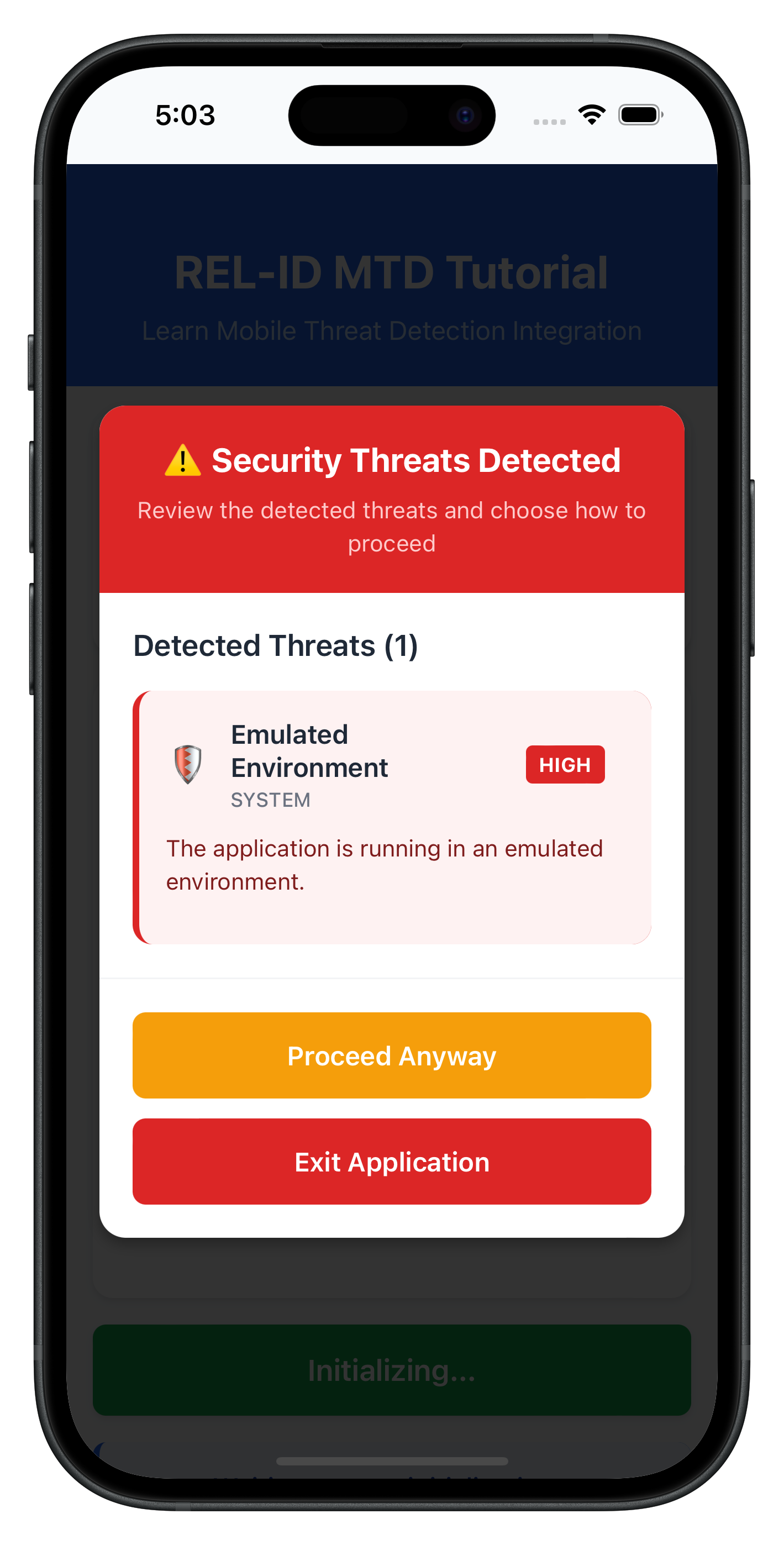
Key features of the threat detection modal:
- DOM manipulation: Direct manipulation using getElementById and createElement
- Threat display: Shows threat name, message, category, and severity level
- Color-coded severity: Visual indication of threat levels (HIGH=red, MEDIUM=orange, LOW=green)
- Conditional buttons: Different actions based on threat type (consent vs terminate)
- Hardware back button blocking: Prevents modal dismissal on Android
- Loading states: Processing indicators during API calls
The following image showcases screen from the sample application:
HTML Structure
Add the MTD modal to your persistent HTML shell:
<!-- www/index.html (persistent shell) -->
<!DOCTYPE html>
<html>
<head>
    <title>RELID MTD Sample</title>
    <link rel="stylesheet" href="css/index.css">
</head>
<body>
    <!-- MTD Modal (persistent, always in DOM) -->
    <div id="mtd-modal-overlay" class="modal-overlay" style="display: none;">
        <div id="mtd-modal-container" class="modal-container">
            <div class="modal-header">
                <h2 id="modal-title"></h2>
                <p id="modal-subtitle"></p>
            </div>
            <div class="threats-container">
                <div id="threats-header" class="threats-header"></div>
                <div id="threats-list" class="threats-list"></div>
            </div>
            <div id="modal-buttons" class="modal-buttons"></div>
        </div>
    </div>

    <!-- Dynamic Content -->
    <div id="app-content"></div>

    <!-- Cordova Scripts -->
    <script src="cordova.js"></script>

    <!-- Utilities -->
    <script src="src/uniken/utils/platformHelper.js"></script>
    <script src="src/uniken/utils/connectionProfileParser.js"></script>

    <!-- Services -->
    <script src="src/uniken/services/rdnaEventManager.js"></script>
    <script src="src/uniken/services/rdnaService.js"></script>

    <!-- MTD Components -->
    <script src="src/uniken/components/modals/ThreatDetectionModal.js"></script>
    <script src="src/uniken/MTDContext/MTDThreatManager.js"></script>

    <!-- App Initialization -->
    <script src="src/uniken/AppInitializer.js"></script>
    <script src="js/app.js"></script>
</body>
</html>
AppInitializer Integration
Initialize MTD threat manager in your app initializer:
// www/src/uniken/AppInitializer.js
const AppInitializer = {
  _initialized: false,

  initialize() {
    if (this._initialized) {
      console.log('AppInitializer - Already initialized, skipping');
      return;
    }

    console.log('AppInitializer - Initializing SDK handlers');

    // Step 1: Initialize event manager
    const eventManager = rdnaService.getEventManager();
    eventManager.initialize();

    // Step 2: Initialize SDK event provider
    SDKEventProvider.initialize();

    // Step 3: Initialize MTD Threat Manager (NEW)
    MTDThreatManager.getInstance().initialize();

    this._initialized = true;
    console.log('AppInitializer - SDK handlers successfully initialized (including MTD)');
  }
};

window.AppInitializer = AppInitializer;
The integration approach offers several advantages:
- Persistent modal: MTD modal always in DOM, visibility toggled via CSS
- Global state management: MTD state accessible throughout the app via singleton
- Automatic event handling: Callbacks registered once at app level
- Consistent UI: Single modal component handles all threat scenarios
- Memory efficiency: Singleton pattern prevents memory leaks
- Platform-specific handling: NavigationService enables iOS SecurityExitScreen navigation for HIG-compliant exit guidance
Build and Run
# Prepare platforms
cordova prepare

# Run on iOS
cordova run ios

# Run on Android
cordova run android
Debugging
iOS: Safari → Develop → Simulator → [Your App] Android: Chrome → chrome://inspect → Inspect
Test Scenarios
- User Consent Threats: Test with low-medium severity threats
- Terminate Threats: Test with high severity threats requiring app exit
- Mixed Threat Types: Test scenarios with multiple threat categories
- User Interactions: Test both "Proceed" and "Exit" flows
- Platform-specific Exit: Test iOS SecurityExitScreen navigation and Android exitApp()
Common MTD Test Scenarios
Threat Category | Examples | Typical Severity | Expected Response |
SYSTEM | Usb Debugging, Rooted Device | LOW-HIGH | User consent or termination |
NETWORK | Network MITM, Unsecured Access Point | LOW-MEDIUM | User consent or termination |
APP | Malware App, Repacked App | MEDIUM-HIGH | User consent or termination |
Debugging MTD Events
Use these debugging techniques to verify MTD functionality:
// Verify callback registration
console.log('MTD callbacks:', {
  userConsent: !!eventManager.userConsentThreatsHandler,
  terminate: !!eventManager.terminateWithThreatsHandler
});

// Log threat data with JSON.stringify for readable output
console.log('Received threats:', JSON.stringify(
  threats.map(t => ({
    name: t.threatName,
    severity: t.threatSeverity,
    category: t.threatCategory
  })),
  null,
  2
));
Modal Not Appearing
Cause: MTD callbacks not properly registered Solution: Verify MTDThreatManager.initialize() is called in AppInitializer
Cause: Event listeners not attached Solution: Check that document.addEventListener calls are successful
Cause: Modal HTML missing from index.html Solution: Ensure MTD modal structure is in persistent shell
Threats Not Processed
Cause: Incorrect JSON format in takeActionOnThreats call Solution: Ensure threat objects are properly serialized
// Correct format
const threatsJsonString = JSON.stringify(modifiedThreats);
console.log('Sending to API:', threatsJsonString);
Cause: Missing required threat properties Solution: Verify all required properties are present in threat objects
Cause: Plugin parameter format incorrect Solution: Ensure parameters are passed as array: [modifiedThreatsJson]
App Not Exiting
Cause: Platform-specific exit not configured Solution: Use platform-appropriate exit handling
const handleExit = () => {
  if (isConsentMode) {
    // For consent threats, call takeActionOnThreats first
    // This will trigger terminateWithThreats callback which handles exit
  } else {
    // For terminate threats, use platform-specific exit
    const platform = getPlatformId();
    if (platform === 'ios') {
      NavigationService.navigate('SecurityExit');
    } else {
      exitApp();
    }
  }
};
Best Practice: Test exit behavior on both iOS and Android devices
Cordova-Specific Issues
"Can't find variable: com"
- Plugin not loaded
- Solution: Run
cordova prepareand rebuild - For local plugins: Verify plugin installed with
cordova plugin ls
"Plugin not found"
- Plugin not installed
- Solution:
cordova plugin lsto check installed plugins - For local plugins: Reinstall with
cordova plugin add ./RdnaClient - For remote plugins: Reinstall with
cordova plugin add cordova-plugin-rdna
Local plugin installation fails
- Plugin directory not found
- Solution: Verify
./RdnaClientdirectory exists in project root - Check plugin.xml exists:
test -f ./RdnaClient/plugin.xml
Events not firing
- Event names don't match
- Listeners not registered before SDK calls
- Solution: Verify event names, register handlers in AppInitializer
Changes not reflecting
- www/ files not synced to platforms
- Solution: Run
cordova prepareafter changes
Plugin reinstallation needed
- After modifying local plugin, changes not reflected
- Solution: Remove and re-add plugin:
cordova plugin remove cordova-plugin-rdna
cordova plugin add ./RdnaClient
cordova prepare
Important Security Guidelines
- Never ignore terminate threats - Always exit the app when required
- Log threat details securely - For analysis without exposing sensitive data
- Educate users appropriately - Provide clear but not alarming explanations
- Keep SDK updated - Regular updates include latest threat detection
- Test thoroughly - Verify MTD behavior across different device states
Threat Response Guidelines
Threat Severity | Recommended Action | User Choice |
LOW | Usually proceed with warning | User decides |
MEDIUM | Proceed with caution | User decides with strong warning |
HIGH | Consider termination | Limited or no user choice |
Memory and Performance
- Clean up event listeners properly with
removeEventListener - Use singleton pattern for services and managers
- Minimize DOM manipulation frequency
- Test on various device configurations
- Monitor for memory leaks in threat handling
- Use
JSON.stringify(obj, null, 2)for readable console logs
Cordova-Specific Security
- Configure Content Security Policy in index.html
- Use
com.uniken.rdnaplugin.RdnaClient.RDNALoggingLevel.RDNA_NO_LOGSin production - Properly handle platform-specific exit strategies
- Block hardware back button when modal is visible
- Validate plugin availability before calling methods
Congratulations! You've successfully learned how to implement comprehensive MTD functionality in Cordova with:
- ✅ Real-time threat detection and handling with DOM events
- ✅ User-friendly threat information display using DOM manipulation
- ✅ Secure threat response mechanisms with takeActionOnThreats API
- ✅ Global state management using singleton pattern
- ✅ Platform-specific app termination (iOS SecurityExitScreen, Android exitApp)
- ✅ Self-triggered threat detection to prevent duplicate modals
Key Cordova Patterns Learned
Your MTD implementation demonstrates:
- Singleton pattern: Global state management without React Context
- DOM manipulation: Direct UI updates without virtual DOM
- Event handling: Document-level event listeners for SDK callbacks
- JSDoc types: Type safety through documentation comments
- Plugin API usage: Cordova plugin patterns with callback-first parameters
- Platform detection: Handling iOS vs Android differences
- Hardware back button: Preventing modal dismissal on Android
Key Security Benefits
Your MTD implementation now provides:
- Proactive threat detection during SDK initialization
- User-informed decision making for non-critical threats
- Automatic protection against severe security violations
- Comprehensive logging for security analysis
Next Steps
- Implement additional RELID SDK features using Cordova patterns