🎯 Learning Path:
- Complete REL-ID Complete Activation & Login Flow Codelab
- Complete REL-ID Notification Management Codelab
- You are here → Notification History Implementation
Welcome to the REL-ID Notification History codelab! This tutorial extends your notification management capabilities to provide comprehensive audit trails and historical data management.
What You'll Build
In this codelab, you'll enhance your existing notification application with:
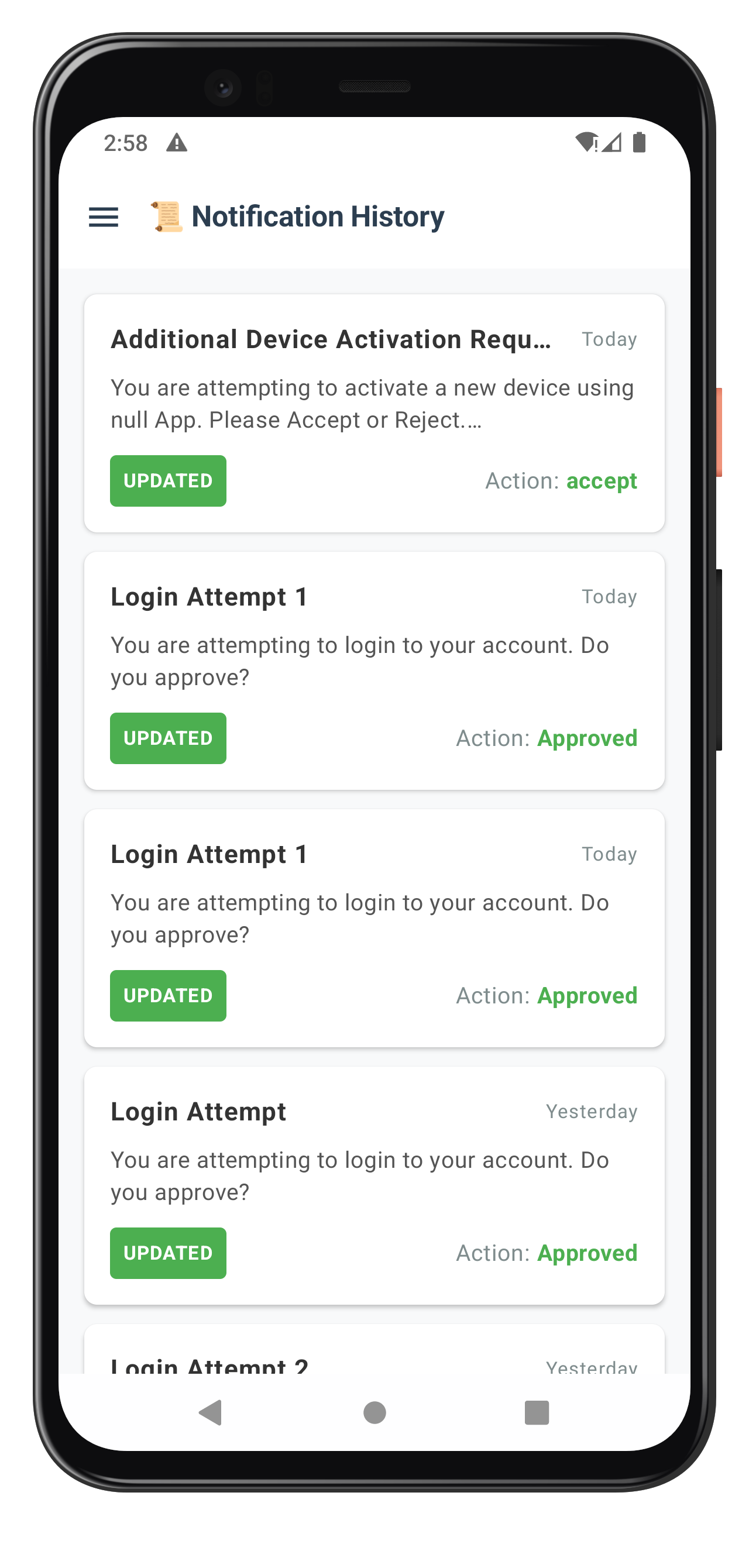
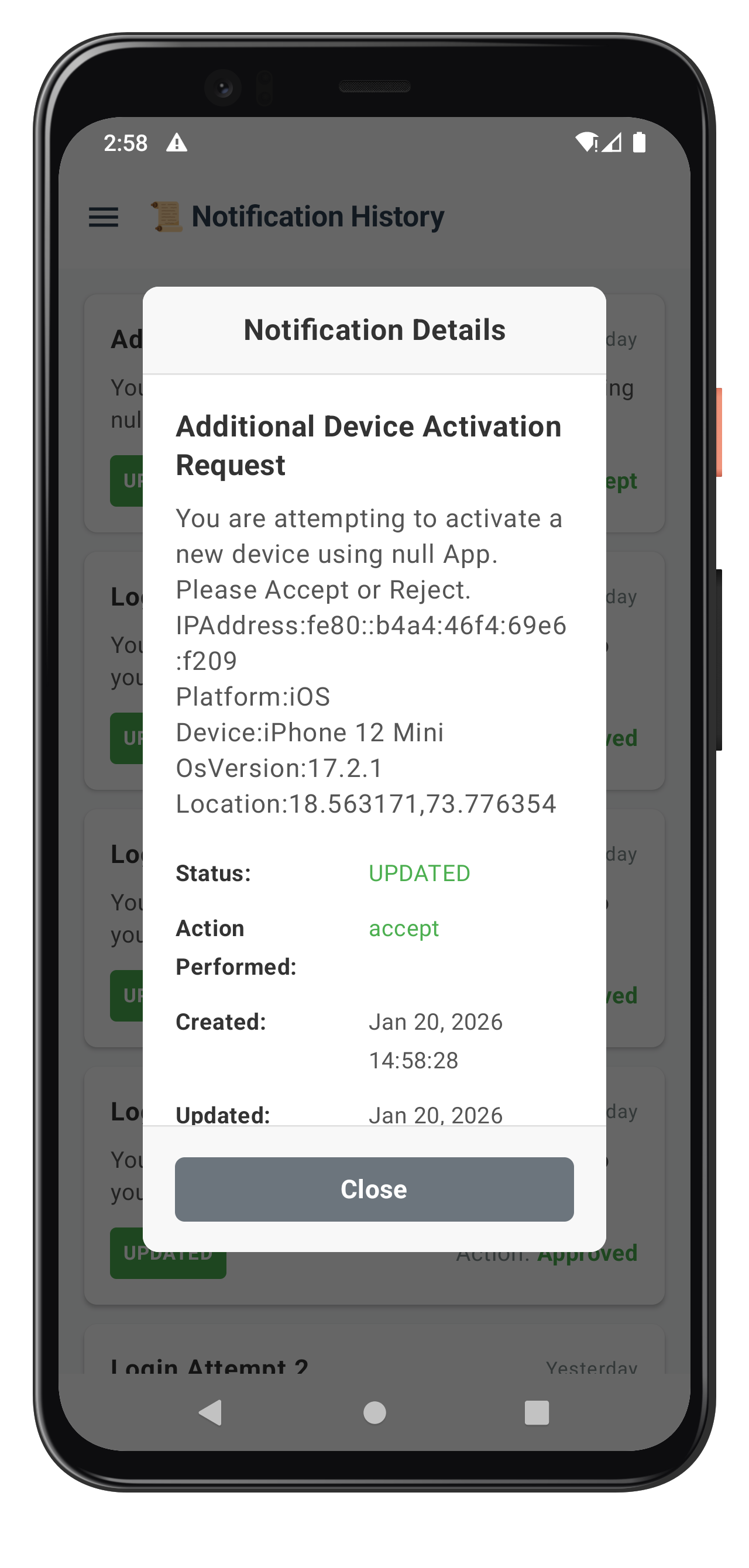
- 📜 Comprehensive History View: Complete audit trail of all notification interactions
- 📱 Enterprise-Ready UI: Professional interface with data export capabilities
- 🔐 Secure Data Handling: Proper privacy controls and data sanitization
What You'll Learn
By completing this codelab, you'll master:
- Notification History API Integration: Implementing
getNotificationHistory()API with basic parameters - History Data Modeling: Proper Kotlin data classes for audit data
- Enterprise UI Patterns: Professional data display with Jetpack Compose
- Performance Optimization: Efficient rendering for notification lists with StateFlow
Prerequisites
Before starting this codelab, ensure you have:
- ✅ Completed REL-ID MFA Codelab - All MFA screens and flows must be fully implemented
- ✅ Completed REL-ID Notification Management Codelab - Basic notification handling must be functional
- ✅ Android Development Environment - Android Studio with Kotlin support configured
- ✅ REL-ID SDK Integration - Latest SDK (AAR + Maven) with notification history support configured
- ✅ Kotlin Knowledge - Understanding of Kotlin data classes and coroutines
- ✅ Server Configuration - REL-ID server with notification history capabilities enabled
Get the Code from GitHub
The code to get started can be found in a GitHub repository.
You can clone the repository using the following command:
git clone https://github.com/uniken-public/codelab-android.git
Navigate to the relid-notification-history folder in the repository you cloned earlier
Codelab Architecture Overview
This codelab extends your notification application with four core history components:
- Notification History Service: Advanced API integration with filtering and pagination
- History Data Management: Efficient state management with StateFlow for large datasets
- Professional UI Components: Enterprise-grade Compose views and filtering controls
- Export & Analytics: Data export capabilities and usage analytics
Before implementing notification history functionality, let's understand the comprehensive data model and API patterns that power enterprise notification audit trails.
Notification History Data Flow
The notification history system follows this enterprise-grade pattern:
User Request → getNotificationHistory() API → onGetNotificationsHistory Event Response → Data Processing → UI Rendering → Export
Core History Event Types
The REL-ID SDK provides comprehensive notification history through these main events:
Event Type | Description | Data Provided |
Retrieves notification history | Complete audit trail with metadata | |
Async response with history data | Historical notification records |
History Data Structure
The Android SDK uses the following data structures for notification history:
// app/src/main/java/com/relidcodelab/uniken/models/RDNAModels.kt

/**
 * Notification item structure
 * Represents a single notification from REL-ID server
 */
data class NotificationItem(
    val notification_uuid: String,
    val create_ts: String,
    val update_ts: String = "",
    val expiry_timestamp: String,
    val create_ts_epoch: Long,
    val update_ts_epoch: Long = 0,
    val expiry_timestamp_epoch: Long,
    val status: String = "",
    val signing_status: String = "",
    val body: List<NotificationBody>,
    val actions: List<NotificationAction>,
    val action_performed: String = "",
    val ds_required: Boolean = false
)

/**
 * Notification body structure
 * Contains localized notification content
 */
data class NotificationBody(
    val lng: String,
    val subject: String,
    val message: String,
    val label: Map<String, String>?
)

/**
 * Notification action structure
 * Represents user action options for notifications
 */
data class NotificationAction(
    val label: String,
    val action: String,
    val authlevel: String
)
Status Values
Notification history records can have the following statuses:
Status | Description |
| Notification was updated with user action |
| Notification expired without user action |
| Notification was discarded |
| Notification was dismissed by user |
Action Values
User actions performed on notifications:
Action | Description |
| User accepted the notification |
| User rejected the notification |
| No action performed |
Let's implement the notification history service following enterprise-grade patterns for accessing historical data.
Add History API to RDNAService
The notification history method is already implemented in your existing RDNAService class:
// app/src/main/java/com/relidcodelab/uniken/services/RDNAService.kt

/**
 * Get notification history
 *
 * NEW for Notification History codelab
 * Retrieves notification history from REL-ID server for the authenticated user.
 * Results delivered via onGetNotificationsHistory callback event.
 *
 * SDK Signature: getNotificationHistory(recordCount, enterpriseID, startIndex, startDate,
 *                                       endDate, notificationStatus, actionPerformed,
 *                                       keywordSearch, deviceID)
 *
 * @param recordCount Number of records to retrieve (0 = all history records, default 10)
 * @param enterpriseID Optional enterprise ID (blank if not applicable)
 * @param startIndex Starting index (must be ≥ 1)
 * @param startDate Start date filter (format: "yyyy-MM-dd" or empty)
 * @param endDate End date filter (format: "yyyy-MM-dd" or empty)
 * @param notificationStatus Status filter (UPDATED, EXPIRED, DISCARDED, DISMISSED, etc., or empty)
 * @param actionPerformed Action filter (Accept, Reject, NONE, etc., or empty)
 * @param keywordSearch Keyword search filter (or empty)
 * @param deviceID Device ID filter (or empty)
 * @return RDNAError with status (longErrorCode = 0 indicates success, async events follow)
 */
fun getNotificationHistory(
    recordCount: Int = 10,
    enterpriseID: String = "",
    startIndex: Int = 1,
    startDate: String = "",
    endDate: String = "",
    notificationStatus: String = "",
    actionPerformed: String = "",
    keywordSearch: String = "",
    deviceID: String = ""
): RDNAError {
    Log.d(TAG, "getNotificationHistory() called")
    Log.d(TAG, "  - recordCount: $recordCount")
    Log.d(TAG, "  - enterpriseID: $enterpriseID")
    Log.d(TAG, "  - startIndex: $startIndex")
    Log.d(TAG, "  - startDate: $startDate")
    Log.d(TAG, "  - endDate: $endDate")
    Log.d(TAG, "  - notificationStatus: $notificationStatus")
    Log.d(TAG, "  - actionPerformed: $actionPerformed")
    Log.d(TAG, "  - keywordSearch: $keywordSearch")
    Log.d(TAG, "  - deviceID: $deviceID")

    val error = rdna.getNotificationHistory(
        recordCount,
        enterpriseID,
        startIndex,
        startDate,
        endDate,
        notificationStatus,
        actionPerformed,
        keywordSearch,
        deviceID
    )

    if (error.longErrorCode != 0) {
        Log.e(TAG, "getNotificationHistory failed - Error: ${error.errorString}")
    } else {
        Log.d(TAG, "getNotificationHistory success - waiting for onGetNotificationsHistory callback")
    }

    return error
}
Service Pattern Consistency
Notice how this implementation maintains enterprise service patterns:
Pattern Element | Implementation Detail |
Comprehensive Logging | Detailed parameter logging for audit trails |
Synchronous API | Direct SDK call with error checking |
Error Handling | Proper error classification and logging |
Parameter Validation | Type-safe parameter handling with defaults |
Documentation | Complete KDoc with usage examples and workflow |
Enhance your event manager to handle notification history responses with comprehensive data processing and state management.
Add History Event to RDNACallbackManager
The event manager already includes the notification history callback:
// app/src/main/java/com/relidcodelab/uniken/services/RDNACallbackManager.kt

/**
 * Notification history events - Using SDK types directly
 * NEW for Notification History codelab
 * Triggered when getNotificationHistory() response received
 */
private val _notificationHistoryEvent = MutableSharedFlow<RDNA.RDNAStatusGetNotificationHistory>()
val notificationHistoryEvent: SharedFlow<RDNA.RDNAStatusGetNotificationHistory> = _notificationHistoryEvent.asSharedFlow()
Callback Implementation
The callback implementation emits the SDK response directly to the SharedFlow:
// app/src/main/java/com/relidcodelab/uniken/services/RDNACallbackManager.kt

/**
 * onGetNotificationsHistory callback - NEW for Notification History codelab
 * Triggered when getNotificationHistory() response received from server
 */
override fun onGetNotificationsHistory(status: RDNA.RDNAStatusGetNotificationHistory): Int {
    Log.d(TAG, "onGetNotificationsHistory callback received")
    scope.launch {
        _notificationHistoryEvent.emit(status)
    }
    return 0
}
Event Flow Pattern
The notification history follows this coroutine-based event flow:
- Service Call:
RDNAService.getNotificationHistory()returns sync response - Async Callback: SDK triggers
onGetNotificationsHistory()with history data - SharedFlow Emission: Callback emits SDK type to
notificationHistoryEventflow - ViewModel Collection: ViewModel collects from flow and parses data
- UI Update: StateFlow updates trigger UI recomposition
Let's create enterprise-grade UI components for notification history management with comprehensive visualizations using Jetpack Compose.
The following images showcase the notification history screens:
Create Notification History ViewModel
First, implement the ViewModel for managing history state and business logic:
// app/src/main/java/com/relidcodelab/tutorial/viewmodels/NotificationHistoryViewModel.kt

package com.relidcodelab.tutorial.viewmodels

import android.util.Log
import androidx.lifecycle.ViewModel
import androidx.lifecycle.viewModelScope
import com.relidcodelab.uniken.models.*
import com.relidcodelab.uniken.services.RDNACallbackManager
import com.relidcodelab.uniken.services.RDNAService
import kotlinx.coroutines.flow.*
import kotlinx.coroutines.launch
import java.text.SimpleDateFormat
import java.util.*

/**
 * UI State for NotificationHistoryScreen
 */
data class NotificationHistoryUiState(
    val isLoading: Boolean = true,
    val historyItems: List<NotificationItem> = emptyList(),
    val selectedItem: NotificationItem? = null,
    val showDetailModal: Boolean = false,
    val error: String? = null,
    val refreshing: Boolean = false
)

/**
 * ViewModel for NotificationHistoryScreen
 *
 * State Management:
 * - isLoading: Loading state during initial load
 * - historyItems: List of notification history items (sorted by update_ts desc)
 * - selectedItem: Currently selected item for detail modal
 * - showDetailModal: Modal visibility
 * - error: API errors
 * - refreshing: Pull-to-refresh state
 *
 * SDK Integration:
 * - Auto-loads notification history on init via getNotificationHistory()
 * - Listens to notificationHistoryEvent for response
 * - Provides manual refresh capability
 */
class NotificationHistoryViewModel(
    private val rdnaService: RDNAService,
    private val callbackManager: RDNACallbackManager
) : ViewModel() {

    companion object {
        private const val TAG = "NotificationHistoryViewModel"
    }

    // UI State
    private val _uiState = MutableStateFlow(NotificationHistoryUiState())
    val uiState: StateFlow<NotificationHistoryUiState> = _uiState.asStateFlow()

    init {
        setupEventHandlers()
        loadNotificationHistory()
    }

    /**
     * Setup event handlers for notification history callbacks
     */
    private fun setupEventHandlers() {
        Log.d(TAG, "Setting up event handlers")

        // Listen for notification history response
        viewModelScope.launch {
            callbackManager.notificationHistoryEvent.collect { status ->
                handleNotificationHistoryResponse(status)
            }
        }
    }

    /**
     * Load notification history from server
     */
    fun loadNotificationHistory() {
        if (_uiState.value.isLoading && _uiState.value.historyItems.isNotEmpty()) {
            return // Skip duplicate call
        }

        Log.d(TAG, "Loading notification history")
        _uiState.update { it.copy(isLoading = true, error = null) }

        val error = rdnaService.getNotificationHistory(
            recordCount = 10,
            startIndex = 1
        )

        if (error.longErrorCode != 0) {
            Log.e(TAG, "getNotificationHistory failed: ${error.errorString}")
            _uiState.update {
                it.copy(
                    isLoading = false,
                    refreshing = false,
                    error = error.errorString
                )
            }
        } else {
            Log.d(TAG, "getNotificationHistory call successful, waiting for callback")
        }
    }

    /**
     * Refresh notification history (pull-to-refresh)
     */
    fun refreshHistory() {
        Log.d(TAG, "Refreshing notification history")
        _uiState.update { it.copy(refreshing = true, error = null) }

        val error = rdnaService.getNotificationHistory(
            recordCount = 10,
            startIndex = 1
        )

        if (error.longErrorCode != 0) {
            Log.e(TAG, "Refresh failed: ${error.errorString}")
            _uiState.update {
                it.copy(refreshing = false, error = error.errorString)
            }
        }
    }

    /**
     * Handle notification history response from SDK
     */
    private fun handleNotificationHistoryResponse(status: com.uniken.rdna.RDNA.RDNAStatusGetNotificationHistory) {
        Log.d(TAG, "Received notification history response")

        // Check for errors
        val error = status.getError()
        if (error != null && error.longErrorCode != 0) {
            Log.e(TAG, "History error: ${error.errorString}")
            _uiState.update {
                it.copy(isLoading = false, refreshing = false, error = error.errorString)
            }
            return
        }

        // Check status
        val responseStatus = status.getStatus()
        if (responseStatus?.statusCode != com.uniken.rdna.RDNA.RDNAResponseStatusCode.RDNA_RESP_STATUS_SUCCESS) {
            val errorMsg = "Failed to get history: ${responseStatus?.message ?: "Unknown error"}"
            Log.e(TAG, errorMsg)
            _uiState.update {
                it.copy(isLoading = false, refreshing = false, error = errorMsg)
            }
            return
        }

        // Parse history data
        val historyArray = status.getNotificationHistory()

        if (historyArray != null && historyArray.isNotEmpty()) {
            val historyList = parseHistoryResponse(status)
            Log.d(TAG, "Parsed ${historyList.size} history items")

            // Sort by update timestamp (most recent first)
            val sortedHistory = historyList.sortedByDescending { it.update_ts_epoch }

            _uiState.update {
                it.copy(
                    isLoading = false,
                    refreshing = false,
                    historyItems = sortedHistory,
                    error = null
                )
            }
        } else {
            Log.d(TAG, "No notification history found")
            _uiState.update {
                it.copy(isLoading = false, refreshing = false, historyItems = emptyList())
            }
        }
    }

    /**
     * Parse notification history response from SDK
     */
    private fun parseHistoryResponse(status: com.uniken.rdna.RDNA.RDNAStatusGetNotificationHistory): List<NotificationItem> {
        try {
            val historyArray = status.getNotificationHistory() ?: return emptyList()

            return historyArray.map { historyItem ->
                // Parse body array
                val bodyList = historyItem.getNotfBody()?.map { bodyItem ->
                    NotificationBody(
                        lng = bodyItem.getLanguage() ?: "en",
                        subject = bodyItem.getSubject() ?: "No Subject",
                        message = bodyItem.getNotificationMessage() ?: "No Message",
                        label = emptyMap()
                    )
                } ?: emptyList()

                // Actions not available in history response
                val actionsList = emptyList<NotificationAction>()

                // Use epoch times only
                val createdEpoch = historyItem.getCreatedEpochTime() ?: 0L
                val updatedEpoch = historyItem.getUpdatedEpochTime() ?: 0L
                val expiredEpoch = historyItem.getExpiredEpochTime() ?: 0L

                NotificationItem(
                    notification_uuid = historyItem.getNotificationID() ?: "",
                    status = historyItem.getStatus() ?: "",
                    action_performed = historyItem.getActionPerformed() ?: "NONE",
                    body = bodyList,
                    create_ts = "",
                    update_ts = "",
                    expiry_timestamp = "",
                    create_ts_epoch = createdEpoch,
                    update_ts_epoch = updatedEpoch,
                    expiry_timestamp_epoch = expiredEpoch,
                    signing_status = historyItem.getSigningStatus() ?: "",
                    actions = actionsList
                )
            }
        } catch (e: Exception) {
            Log.e(TAG, "Error parsing history: ${e.message}")
            return emptyList()
        }
    }

    /**
     * Show detail modal for selected item
     */
    fun showDetailModal(item: NotificationItem) {
        Log.d(TAG, "Showing detail modal: ${item.notification_uuid}")
        _uiState.update {
            it.copy(selectedItem = item, showDetailModal = true)
        }
    }

    /**
     * Hide detail modal
     */
    fun hideDetailModal() {
        _uiState.update {
            it.copy(showDetailModal = false, selectedItem = null)
        }
    }

    /**
     * Format relative timestamp (Today, Yesterday, X days ago)
     * @param epochTime Unix epoch timestamp in milliseconds
     */
    fun formatRelativeTime(epochTime: Long): String {
        return try {
            if (epochTime == 0L) return "Unknown"

            val calendar = java.util.Calendar.getInstance()
            val todayStart = calendar.apply {
                timeInMillis = System.currentTimeMillis()
                set(java.util.Calendar.HOUR_OF_DAY, 0)
                set(java.util.Calendar.MINUTE, 0)
                set(java.util.Calendar.SECOND, 0)
                set(java.util.Calendar.MILLISECOND, 0)
            }.timeInMillis

            val notificationCalendar = java.util.Calendar.getInstance().apply {
                timeInMillis = epochTime
                set(java.util.Calendar.HOUR_OF_DAY, 0)
                set(java.util.Calendar.MINUTE, 0)
                set(java.util.Calendar.SECOND, 0)
                set(java.util.Calendar.MILLISECOND, 0)
            }
            val notificationDayStart = notificationCalendar.timeInMillis

            val diffDays = ((todayStart - notificationDayStart) / (1000 * 60 * 60 * 24)).toInt()

            when {
                diffDays == 0 -> "Today"
                diffDays == 1 -> "Yesterday"
                diffDays <= 7 -> "$diffDays days ago"
                else -> SimpleDateFormat("MMM dd, yyyy", Locale.US).format(Date(epochTime))
            }
        } catch (e: Exception) {
            "Unknown"
        }
    }

    /**
     * Convert epoch timestamp to local time string
     * @param epochTime Unix epoch timestamp in milliseconds
     */
    fun convertEpochToLocal(epochTime: Long): String {
        return try {
            if (epochTime == 0L) return "Not available"
            val date = Date(epochTime)
            SimpleDateFormat("MMM dd, yyyy HH:mm:ss", Locale.getDefault()).format(date)
        } catch (e: Exception) {
            "Not available"
        }
    }
}
Create Notification History Screen
Now implement the main Compose screen with comprehensive functionality:
// app/src/main/java/com/relidcodelab/tutorial/screens/notification/NotificationHistoryScreen.kt

package com.relidcodelab.tutorial.screens.notification

import androidx.compose.foundation.background
import androidx.compose.foundation.clickable
import androidx.compose.foundation.layout.*
import androidx.compose.foundation.rememberScrollState
import androidx.compose.foundation.shape.RoundedCornerShape
import androidx.compose.foundation.verticalScroll
import androidx.compose.material.ExperimentalMaterialApi
import androidx.compose.material.icons.Icons
import androidx.compose.material.icons.filled.Menu
import androidx.compose.material.pullrefresh.PullRefreshIndicator
import androidx.compose.material.pullrefresh.pullRefresh
import androidx.compose.material.pullrefresh.rememberPullRefreshState
import androidx.compose.material3.*
import androidx.compose.runtime.*
import androidx.compose.ui.Alignment
import androidx.compose.ui.Modifier
import androidx.compose.ui.graphics.Color
import androidx.compose.ui.text.font.FontWeight
import androidx.compose.ui.text.style.TextOverflow
import androidx.compose.ui.unit.dp
import androidx.compose.ui.unit.sp
import androidx.compose.ui.window.Dialog
import androidx.lifecycle.compose.collectAsStateWithLifecycle
import com.relidcodelab.tutorial.viewmodels.NotificationHistoryViewModel
import com.relidcodelab.uniken.models.NotificationItem

@OptIn(ExperimentalMaterial3Api::class)
@Composable
fun NotificationHistoryScreen(
    viewModel: NotificationHistoryViewModel,
    onMenuClick: () -> Unit
) {
    val uiState by viewModel.uiState.collectAsStateWithLifecycle()

    Scaffold(
        topBar = {
            TopAppBar(
                title = {
                    Text(
                        text = "📜 Notification History",
                        fontSize = 18.sp,
                        fontWeight = FontWeight.Bold
                    )
                },
                navigationIcon = {
                    IconButton(onClick = onMenuClick) {
                        Icon(Icons.Default.Menu, "Menu")
                    }
                },
                colors = TopAppBarDefaults.topAppBarColors(
                    containerColor = Color.White
                )
            )
        }
    ) { padding ->
        Box(
            modifier = Modifier
                .fillMaxSize()
                .padding(padding)
        ) {
            when {
                uiState.isLoading && !uiState.refreshing -> {
                    LoadingHistoryState()
                }
                uiState.error != null -> {
                    ErrorHistoryState(
                        error = uiState.error!!,
                        onRetry = { viewModel.loadNotificationHistory() }
                    )
                }
                uiState.historyItems.isEmpty() -> {
                    EmptyHistoryState(
                        onRetry = { viewModel.loadNotificationHistory() }
                    )
                }
                else -> {
                    HistoryList(
                        historyItems = uiState.historyItems,
                        viewModel = viewModel,
                        onItemClick = { item ->
                            viewModel.showDetailModal(item)
                        }
                    )
                }
            }
        }

        // Detail Modal
        if (uiState.showDetailModal && uiState.selectedItem != null) {
            NotificationDetailModal(
                notification = uiState.selectedItem!!,
                viewModel = viewModel,
                onDismiss = { viewModel.hideDetailModal() }
            )
        }
    }
}

@Composable
private fun LoadingHistoryState() {
    Box(
        modifier = Modifier.fillMaxSize(),
        contentAlignment = Alignment.Center
    ) {
        Column(
            horizontalAlignment = Alignment.CenterHorizontally
        ) {
            CircularProgressIndicator()
            Spacer(modifier = Modifier.height(16.dp))
            Text("Loading notification history...")
        }
    }
}

@Composable
private fun ErrorHistoryState(error: String, onRetry: () -> Unit) {
    Box(
        modifier = Modifier.fillMaxSize(),
        contentAlignment = Alignment.Center
    ) {
        Column(
            horizontalAlignment = Alignment.CenterHorizontally
        ) {
            Text(
                text = error,
                color = Color(0xFFE74C3C),
                modifier = Modifier.padding(bottom = 16.dp)
            )
            Button(onClick = onRetry) {
                Text("Retry")
            }
        }
    }
}

@Composable
private fun EmptyHistoryState(onRetry: () -> Unit) {
    Box(
        modifier = Modifier.fillMaxSize(),
        contentAlignment = Alignment.Center
    ) {
        Column(
            horizontalAlignment = Alignment.CenterHorizontally
        ) {
            Text(
                text = "No notification history found",
                modifier = Modifier.padding(bottom = 20.dp)
            )
            Button(onClick = onRetry) {
                Text("Retry")
            }
        }
    }
}

@OptIn(ExperimentalMaterialApi::class)
@Composable
private fun HistoryList(
    historyItems: List<NotificationItem>,
    viewModel: NotificationHistoryViewModel,
    onItemClick: (NotificationItem) -> Unit
) {
    val uiState by viewModel.uiState.collectAsStateWithLifecycle()

    val pullRefreshState = rememberPullRefreshState(
        refreshing = uiState.refreshing,
        onRefresh = { viewModel.refreshHistory() }
    )

    Box(
        modifier = Modifier
            .fillMaxSize()
            .pullRefresh(pullRefreshState)
    ) {
        Column(
            modifier = Modifier
                .fillMaxSize()
                .verticalScroll(rememberScrollState())
                .padding(16.dp)
        ) {
            historyItems.forEach { item ->
                HistoryItemCard(
                    item = item,
                    viewModel = viewModel,
                    onClick = { onItemClick(item) }
                )
                Spacer(modifier = Modifier.height(12.dp))
            }
        }

        PullRefreshIndicator(
            refreshing = uiState.refreshing,
            state = pullRefreshState,
            modifier = Modifier.align(Alignment.TopCenter)
        )
    }
}

@Composable
private fun HistoryItemCard(
    item: NotificationItem,
    viewModel: NotificationHistoryViewModel,
    onClick: () -> Unit
) {
    val body = item.body.firstOrNull()
    val subject = body?.subject ?: "No Subject"
    val message = body?.message?.replace("\\n", " ") ?: "No message available"

    Card(
        modifier = Modifier
            .fillMaxWidth()
            .clickable { onClick() },
        colors = CardDefaults.cardColors(containerColor = Color.White),
        elevation = CardDefaults.cardElevation(defaultElevation = 2.dp)
    ) {
        Column(
            modifier = Modifier.padding(16.dp)
        ) {
            // Header: Subject and Time
            Row(
                modifier = Modifier.fillMaxWidth(),
                horizontalArrangement = Arrangement.SpaceBetween
            ) {
                Text(
                    text = subject,
                    fontSize = 16.sp,
                    fontWeight = FontWeight.Bold,
                    maxLines = 1,
                    overflow = TextOverflow.Ellipsis,
                    modifier = Modifier.weight(1f)
                )
                Spacer(modifier = Modifier.width(10.dp))
                Text(
                    text = viewModel.formatRelativeTime(
                        if (item.update_ts_epoch > 0) item.update_ts_epoch else item.create_ts_epoch
                    ),
                    fontSize = 12.sp,
                    color = Color.Gray
                )
            }

            Spacer(modifier = Modifier.height(8.dp))

            // Message preview
            Text(
                text = message,
                fontSize = 14.sp,
                maxLines = 2,
                overflow = TextOverflow.Ellipsis,
                modifier = Modifier.padding(bottom = 12.dp)
            )

            // Footer: Status badge and Action
            Row(
                modifier = Modifier.fillMaxWidth(),
                horizontalArrangement = Arrangement.SpaceBetween
            ) {
                // Status badge
                StatusBadge(status = item.status)

                // Action performed
                Row {
                    Text("Action: ", fontSize = 14.sp, color = Color.Gray)
                    Text(
                        text = item.action_performed.ifEmpty { "NONE" },
                        fontSize = 14.sp,
                        fontWeight = FontWeight.Bold,
                        color = getActionColor(item.action_performed)
                    )
                }
            }
        }
    }
}

@Composable
private fun StatusBadge(status: String) {
    Text(
        text = status,
        fontSize = 12.sp,
        fontWeight = FontWeight.Bold,
        color = Color.White,
        modifier = Modifier
            .background(getStatusColor(status), RoundedCornerShape(4.dp))
            .padding(horizontal = 8.dp, vertical = 4.dp)
    )
}

private fun getStatusColor(status: String): Color {
    return when (status.uppercase()) {
        "UPDATED", "ACCEPTED" -> Color(0xFF4CAF50) // Green
        "REJECTED", "DISCARDED" -> Color(0xFFF44336) // Red
        "EXPIRED" -> Color(0xFFFF9800) // Orange
        "DISMISSED" -> Color(0xFF9E9E9E) // Gray
        else -> Color(0xFF2196F3) // Blue
    }
}

private fun getActionColor(action: String): Color {
    if (action.isEmpty() || action == "NONE") return Color(0xFF9E9E9E)
    if (action.lowercase().contains("accept")) return Color(0xFF4CAF50)
    if (action.lowercase().contains("reject")) return Color(0xFFF44336)
    return Color(0xFF2196F3)
}

@Composable
private fun NotificationDetailModal(
    notification: NotificationItem,
    viewModel: NotificationHistoryViewModel,
    onDismiss: () -> Unit
) {
    val body = notification.body.firstOrNull()

    Dialog(onDismissRequest = onDismiss) {
        Card(
            modifier = Modifier
                .fillMaxWidth(0.9f)
                .fillMaxHeight(0.8f),
            colors = CardDefaults.cardColors(containerColor = Color.White)
        ) {
            Column(modifier = Modifier.fillMaxSize()) {
                // Header
                Surface(
                    color = Color(0xFFF8F8F8),
                    modifier = Modifier.fillMaxWidth()
                ) {
                    Box(
                        modifier = Modifier
                            .fillMaxWidth()
                            .padding(15.dp),
                        contentAlignment = Alignment.Center
                    ) {
                        Text(
                            text = "Notification Details",
                            fontSize = 18.sp,
                            fontWeight = FontWeight.Bold
                        )
                    }
                }

                HorizontalDivider()

                // Body
                Column(
                    modifier = Modifier
                        .weight(1f)
                        .verticalScroll(rememberScrollState())
                        .padding(20.dp)
                ) {
                    Text(
                        text = body?.subject ?: "No Subject",
                        fontSize = 18.sp,
                        fontWeight = FontWeight.Bold,
                        modifier = Modifier.padding(bottom = 10.dp)
                    )

                    Text(
                        text = (body?.message ?: "No message").replace("\\n", "\n"),
                        fontSize = 16.sp,
                        modifier = Modifier.padding(bottom = 20.dp)
                    )

                    DetailRow("Status:", notification.status, getStatusColor(notification.status))
                    DetailRow("Action:", notification.action_performed.ifEmpty { "NONE" }, getActionColor(notification.action_performed))
                    DetailRow("Created:", viewModel.convertEpochToLocal(notification.create_ts_epoch))

                    if (notification.update_ts_epoch > 0) {
                        DetailRow("Updated:", viewModel.convertEpochToLocal(notification.update_ts_epoch))
                    }

                    DetailRow("Expiry:", viewModel.convertEpochToLocal(notification.expiry_timestamp_epoch))
                }

                HorizontalDivider()

                // Footer
                Surface(
                    color = Color(0xFFF8F8F8),
                    modifier = Modifier.fillMaxWidth()
                ) {
                    Button(
                        onClick = onDismiss,
                        modifier = Modifier
                            .fillMaxWidth()
                            .padding(20.dp)
                    ) {
                        Text("Close")
                    }
                }
            }
        }
    }
}

@Composable
private fun DetailRow(
    label: String,
    value: String,
    valueColor: Color = Color(0xFF555555)
) {
    Row(
        modifier = Modifier
            .fillMaxWidth()
            .padding(bottom = 10.dp)
    ) {
        Text(
            text = label,
            fontSize = 14.sp,
            fontWeight = FontWeight.Bold,
            modifier = Modifier.width(120.dp)
        )
        Text(
            text = value,
            fontSize = 14.sp,
            color = valueColor,
            modifier = Modifier.weight(1f)
        )
    }
}
Let's test your notification history implementation with comprehensive scenarios to ensure enterprise-grade functionality.
Test Scenario 1: Basic History Loading
Setup Requirements:
- Active user session with notification permissions
- Historical notifications available in the system
- Proper SDK event handler registration
Test Steps:
- Navigate to Notification History screen
- Verify initial loading state displays correctly
- Confirm history data loads and displays in list format
- Check that items are sorted by most recent first
- Verify individual notification items display all required information
Expected Results:
- ✅ Loading indicator appears during data fetch
- ✅ History list populates with formatted notification items
- ✅ Each item displays title, status, date, and action badges
- ✅ Pull-to-refresh functionality works correctly
- ✅ Status colors match notification states (green/red/orange/gray)
Test Scenario 2: Detail View Testing
Setup Requirements:
- Notification history with varied statuses and actions
- Items with different message lengths
- Various timestamp values
Test Steps:
- Tap on a notification history item
- Verify detail modal appears with full information
- Check all fields are displayed correctly
- Verify epoch timestamps are converted to local time
- Test modal dismissal
- Repeat with different notification types
Expected Results:
- ✅ Modal opens smoothly with correct data
- ✅ All notification details are visible and formatted
- ✅ Timestamps show in readable local format (e.g., "Jan 15, 2026 14:30:45")
- ✅ Status and action colors are consistent with list view
- ✅ Modal dismisses correctly without errors
Test Scenario 3: Error Handling
Test Steps:
- Test with network disconnected
- Test with invalid authentication
- Test with empty history response
- Verify retry functionality works
Expected Results:
- ❌ Network failures show user-friendly error messages
- ❌ Empty results show appropriate empty state with retry button
- ❌ API errors display proper error text from SDK
- ✅ Retry button successfully reloads data after error resolution
Prepare your notification history implementation for enterprise deployment with essential security and performance considerations.
Security & Privacy Checklist
- [ ] Data Sanitization: Remove or mask sensitive information in logs and displays
- [ ] Access Control: Verify users can only access their own notification history
- [ ] Export Security: Implement proper authorization for history export functionality
- [ ] Search Limitations: Prevent overly broad searches that could impact performance
- [ ] Audit Logging: Track access to notification history for compliance requirements
Performance Optimization
- [ ] Lazy Loading: Implement efficient pagination to handle large datasets
- [ ] Memory Management: Properly dispose of large data sets when not needed
- [ ] Network Efficiency: Optimize API calls to minimize bandwidth usage
- [ ] UI Responsiveness: Ensure smooth scrolling with large lists using LazyColumn
- [ ] Background Handling: Proper state management when app moves to background
Enterprise Integration
- [ ] Export Formats: Support multiple export formats (CSV, JSON, PDF)
- [ ] Compliance Reporting: Generate audit reports for regulatory compliance
- [ ] Data Retention: Implement appropriate data retention policies
- [ ] Analytics Integration: Track usage patterns for business intelligence
- [ ] Accessibility: Ensure screen reader compatibility and keyboard navigation
Security Implementation Example
// app/src/main/java/com/relidcodelab/tutorial/utils/HistorySecurityUtils.kt

/**
 * Sanitize notification data for display and export
 */
fun sanitizeNotificationData(notifications: List<NotificationItem>): List<NotificationItem> {
    return notifications.map { notification ->
        notification.copy(
            // Mask sensitive notification IDs
            notification_uuid = notification.notification_uuid.take(8) + "****",

            // Remove internal system information
            signing_status = if (notification.signing_status.contains("internal")) {
                "SIGNED"
            } else {
                notification.signing_status
            }
        )
    }
}

/**
 * Validate export request to prevent data leakage
 */
fun validateExportRequest(recordCount: Int, dateRange: Pair<String, String>?): Boolean {
    // Prevent exports of excessive data
    val maxExportRecords = 10000
    if (recordCount > maxExportRecords) {
        throw IllegalArgumentException("Export limited to $maxExportRecords records")
    }

    // Ensure date range is not excessively broad
    if (dateRange != null) {
        val (startDate, endDate) = dateRange
        val start = SimpleDateFormat("yyyy-MM-dd", Locale.US).parse(startDate)
        val end = SimpleDateFormat("yyyy-MM-dd", Locale.US).parse(endDate)

        if (start != null && end != null) {
            val daysDiff = (end.time - start.time) / (1000 * 60 * 60 * 24)
            if (daysDiff > 365) {
                throw IllegalArgumentException("Export date range cannot exceed 1 year")
            }
        }
    }

    return true
}
Here's your complete reference implementation combining all the patterns and best practices covered in this codelab.
Project Structure
Your notification history implementation follows this structure:
app/
├── build.gradle.kts
├── src/main/
│   ├── AndroidManifest.xml
│   ├── java/com/relidcodelab/
│   │   ├── MainActivity.kt
│   │   ├── tutorial/
│   │   │   ├── screens/
│   │   │   │   └── notification/
│   │   │   │       └── NotificationHistoryScreen.kt
│   │   │   └── viewmodels/
│   │   │       └── NotificationHistoryViewModel.kt
│   │   └── uniken/
│   │       ├── services/
│   │       │   ├── RDNAService.kt
│   │       │   └── RDNACallbackManager.kt
│   │       └── models/
│   │           └── RDNAModels.kt
│   └── res/
│       └── raw/
│           └── agent_info.json
└── libs/
    └── REL-ID_API_SDK_v25.08.03_release.aar
Gradle Dependencies
Ensure your build.gradle.kts includes all necessary dependencies:
dependencies {
    // REL-ID SDK
    implementation(files("libs/REL-ID_API_SDK_v25.08.03_release.aar"))
    implementation("com.uniken.relid:engine:7.7.4") {
        isTransitive = true
    }

    // Compose
    implementation(platform(libs.androidx.compose.bom))
    implementation(libs.androidx.ui)
    implementation(libs.androidx.material3)
    implementation("androidx.compose.material:material:1.5.4") // For pull-to-refresh

    // ViewModel Compose
    implementation("androidx.lifecycle:lifecycle-viewmodel-compose:2.7.0")
    implementation("androidx.lifecycle:lifecycle-runtime-compose:2.7.0")

    // Coroutines
    implementation("org.jetbrains.kotlinx:kotlinx-coroutines-android:1.7.3")
}
Navigation Integration
Add notification history to your navigation graph:
// app/src/main/java/com/relidcodelab/tutorial/navigation/AppNavigation.kt

NavHost(navController = navController, startDestination = "dashboard") {
    composable("dashboard") {
        DashboardScreen(
            onNavigateToHistory = {
                navController.navigate("notificationHistory")
            }
        )
    }

    composable("notificationHistory") {
        NotificationHistoryScreen(
            viewModel = notificationHistoryViewModel,
            onMenuClick = { /* drawer action */ }
        )
    }
}
Congratulations! You've successfully implemented comprehensive notification history management with the REL-ID SDK for Android.
🚀 What You've Accomplished
✅ Enterprise-Grade History Management - Complete audit trail with Kotlin coroutines and StateFlow
✅ Professional UI Components - Modern Jetpack Compose interface with intuitive navigation
✅ Efficient Data Handling - StateFlow-based reactive state management for large datasets
✅ Performance Optimization - Efficient pagination and memory management
✅ Security Best Practices - Data sanitization, access control, and audit logging
✅ Pull-to-Refresh - Modern UX with Material Design patterns
📚 Additional Resources
- REL-ID Developer Documentation - Complete API reference
- Jetpack Compose Guide - Modern Android UI toolkit
- Kotlin Coroutines - Async programming guide
🏆 You've mastered enterprise notification history management with REL-ID SDK for Android!
Your implementation provides organizations with comprehensive audit capabilities, advanced data analysis, and secure historical data management using modern Android development practices with Kotlin and Jetpack Compose. Use this foundation to build powerful analytics and compliance reporting features that meet enterprise requirements.