This codelab demonstrates how to implement Mobile Threat Detection (MTD) flow using the REL-ID Android SDK. MTD now performs a synchronous check during the RELID SDK initialization to ensure critical threats are detected early. Once the SDK is successfully initialized, MTD continues monitoring asynchronously in the background to detect and respond to any emerging threats during runtime.
What You'll Learn
- How to handle MTD threat detection events
- Implementing user consent workflows for security threats
- Creating threat detection UI components with Jetpack Compose
- Managing threat responses and actions
- Understanding different threat types and severities
Get the Code from GitHub
The code to get started is stored in a GitHub repository.
You can clone the repository using the following command:
git clone https://github.com/uniken-public/codelab-android.git
Navigate to the relid-MTD folder in the repository you cloned earlier
What You'll Need
- Completed RELID Initialization codelab
- REL-ID Android SDK installed and configured
- Basic understanding of Jetpack Compose
- Understanding of Kotlin coroutines and Flow
- Access to the sample app source code for reference
The sample app provides a complete MTD implementation. Let's examine the key components:
Component | Purpose | Sample App Reference |
MTD Provider | Global threat state management |
|
Threat Manager | State management and SDK API calls |
|
Threat Modal | UI for displaying threats |
|
Callback Manager | Event handling with SharedFlow |
|
Permissions
Platform-Specific Permissions
The SDK requires specific permissions for optimal MTD functionality:
Android Configuration: Refer to the Android Permissions Documentation for runtime and normal permissions required for MTD features.
Key permissions include:
- INTERNET (required for network threat detection)
- ACCESS_NETWORK_STATE (required for network monitoring)
- CAMERA (optional, for specific SDK features)
- ACCESS_FINE_LOCATION / ACCESS_COARSE_LOCATION (optional, for location-based threat detection)
MTD Callback Types
The RELID SDK triggers two main MTD events during initialization:
Event Type | Description | User Action Required |
Non-terminating threats | User can choose to proceed or exit using takeActionOnThreats API | |
Critical threats | Application must exit immediately |
The Android MTD implementation uses a three-file, self-contained module that's easy to integrate into any Android project.
Three-File MTD Module
app/src/main/java/*/uniken/
├── providers/
│   └── MTDProvider.kt              # Composable provider wrapping app content
├── managers/
│   └── MTDThreatManager.kt         # State management and SDK API calls
└── components/
    └── ThreatDetectionModal.kt     # Threat detection UI (Jetpack Compose)
Architecture Overview
The MTD module follows a clean separation of concerns:
- MTDProvider.kt:
- Wraps app content (similar to React Context Provider)
- Subscribes to MTD callbacks from RDNACallbackManager
- Displays threat modal as overlay using Box + conditional rendering
- Self-contained - no props drilling needed
- MTDThreatManager.kt:
- Singleton object managing global MTD state
- Exposes StateFlow for reactive UI updates
- Handles both consent and terminate threat modes
- Calls SDK takeActionOnThreats API
- ThreatDetectionModal.kt:
- Composable UI component for threat display
- Color-coded severity badges (HIGH=red, MEDIUM=orange, LOW=green)
- Conditional button rendering based on threat type
- Loading states and error handling
Event Flow Architecture
SDK Callbacks (RDNA.RDNACallbacks)
           ↓
RDNACallbackManager (SharedFlow emission)
           ↓
MTDProvider (LaunchedEffect subscription)
           ↓
MTDThreatManager (StateFlow state updates)
           ↓
ThreatDetectionModal (Composable UI rendering)
The Android SDK provides threat types directly, eliminating the need for wrapper models. You'll use RDNA.RDNAThreat objects directly throughout your implementation.
Threat Data Structure
The SDK's RDNA.RDNAThreat class includes:
// SDK provides these properties directly
threat.threatName: String?              // Name of the threat
threat.threatMsg: String?               // Detailed message
threat.threatId: Int                    // Unique threat ID
threat.threatCategory: String?          // SYSTEM, APP, NETWORK
threat.threatSeverity: String?          // LOW, MEDIUM, HIGH
threat.threatReason: String?            // Reason for detection
threat.configuredAction: String?        // Configured action from gateway

// Network-related properties
threat.networkInfo?.ssid: String?
threat.networkInfo?.bssid: String?
threat.networkInfo?.maliciousAddress: String?

// App-related properties
threat.appInfo?.appName: String?
threat.appInfo?.packageName: String?
threat.appInfo?.appSha256: String?

// Action control properties (modified for SDK response)
threat.setShouldProceedWithThreats(Boolean)    // Set to true to proceed, false to terminate
threat.setRememberActionForSession(Boolean)    // Set to true to remember decision
Threat Categories and Severities
Understanding threat classification helps in implementing appropriate responses:
Category | Examples | Platform |
SYSTEM | USB Debugging, Rooted Device | Android and iOS |
NETWORK | Network MITM, Unsecured Access Point | Android and iOS |
APP | Malware App, Repacked App | Only Android |
Extend your existing RDNACallbackManager to handle MTD events using SharedFlow for reactive event handling.
// app/src/main/java/*/uniken/services/RDNACallbackManager.kt (additions)

class RDNACallbackManager(
    private val context: Context,
    private val currentActivity: Activity?
) : RDNA.RDNACallbacks {

    private val scope = CoroutineScope(SupervisorJob() + Dispatchers.Main)

    // MTD Callbacks - Using SDK types directly
    private val _userConsentThreatsEvent = MutableSharedFlow<Array<out RDNA.RDNAThreat>>()
    val userConsentThreatsEvent: SharedFlow<Array<out RDNA.RDNAThreat>> =
        _userConsentThreatsEvent.asSharedFlow()

    private val _terminateWithThreatsEvent = MutableSharedFlow<Array<out RDNA.RDNAThreat>>()
    val terminateWithThreatsEvent: SharedFlow<Array<out RDNA.RDNAThreat>> =
        _terminateWithThreatsEvent.asSharedFlow()

    /**
     * Handles security threat events requiring user consent
     * Non-critical threats that allow user to proceed or exit
     */
    override fun onUserConsentThreats(threats: Array<out RDNA.RDNAThreat>?) {
        threats?.let {
            Log.d(TAG, "User consent threats received: ${it.size} threats")
            scope.launch {
                _userConsentThreatsEvent.emit(it)
            }
        }
    }

    /**
     * Handles critical security threat events requiring app termination
     * SDK automatically terminates after this callback
     */
    override fun onTerminateWithThreats(threats: Array<out RDNA.RDNAThreat>) {
        Log.d(TAG, "Terminate threats received: ${threats.size} threats")
        scope.launch {
            _terminateWithThreatsEvent.emit(threats)
        }
    }

    // ... other 56 callback methods (initialization, session, etc.)
}
Key features of MTD event handling:
- SharedFlow emission: Broadcasts threat events to multiple collectors
- SDK types directly: No JSON parsing needed - SDK provides typed objects
- Coroutine scope: Main dispatcher ensures UI-safe event emission
- Array of threats: SDK can report multiple threats simultaneously
- Lifecycle-aware: Collectors use
collectAsStateWithLifecycle()for safety
The takeActionOnThreats API is only required for handling threats received through the onUserConsentThreats event. This allows the application to take appropriate action based on user consent.
The onTerminateWithThreats event is triggered only when critical threats are detected. In such cases, the SDK automatically terminates internally, and no further actions can be performed through the SDK until it is reinitialized.
Add threat response capability to your RELID service:
// app/src/main/java/*/uniken/services/RDNAService.kt (addition)

object RDNAService {

    /**
     * Take action on detected security threats (MTD-specific)
     *
     * Note: This is a SYNCHRONOUS, lightweight SDK call (returns immediately)
     * Safe to call from any thread (main thread safe)
     *
     * @param threats Array of RDNAThreat objects with modified action flags
     * @return RDNAError - Error with longErrorCode = 0 indicates success
     */
    fun takeActionOnThreats(threats: Array<RDNA.RDNAThreat>): RDNA.RDNAError {
        Log.d(TAG, "Taking action on ${threats.size} threats")

        // Call SDK takeActionOnThreats method (synchronous, lightweight)
        val error = rdna.takeActionOnThreats(threats)

        if (error.longErrorCode != 0) {
            Log.e(TAG, "takeActionOnThreats error: ${error.errorString} " +
                "(Long: ${error.longErrorCode}, Short: ${error.shortErrorCode})")
        } else {
            Log.d(TAG, "takeActionOnThreats success")
        }

        return error
    }
}
Important Response Parameters
When responding to threats, two key methods control the behavior:
Method | Purpose | Values |
| Whether to continue despite threats |
|
| Cache decision for session |
|
Implementation Example:
// Modify threat objects before calling SDK
threats.forEach { threat ->
    threat.setShouldProceedWithThreats(true)     // Allow continuation
    threat.setRememberActionForSession(true)      // Remember decision
}

// Call SDK with modified threats
val error = RDNAService.takeActionOnThreats(threats)
Create a singleton object to manage MTD state globally across your application:
// app/src/main/java/*/uniken/managers/MTDThreatManager.kt

object MTDThreatManager {

    private const val TAG = "MTDThreatManager"

    /**
     * Threat state data class
     * Holds all UI state for threat modal display
     */
    data class ThreatState(
        val isModalVisible: Boolean = false,
        val threats: List<RDNA.RDNAThreat> = emptyList(),
        val isConsentMode: Boolean = false,  // true = consent, false = terminate
        val isProcessing: Boolean = false,
        val errorMessage: String? = null
    )

    // StateFlow for reactive UI updates
    private val _threatState = MutableStateFlow(ThreatState())
    val threatState: StateFlow<ThreatState> = _threatState.asStateFlow()

    /**
     * Show threat modal with detected threats
     * @param threats Array of threats from SDK callback
     * @param isConsent true for consent mode, false for terminate mode
     */
    fun showThreatModal(threats: Array<out RDNA.RDNAThreat>, isConsent: Boolean) {
        Log.d(TAG, "Showing threat modal: ${threats.size} threats, consent=$isConsent")

        _threatState.value = ThreatState(
            isModalVisible = true,
            threats = threats.toList(),
            isConsentMode = isConsent,
            isProcessing = false,
            errorMessage = null
        )
    }

    /**
     * Handle user decision to proceed with threats (consent mode only)
     * Modifies threat objects and calls SDK API
     */
    suspend fun handleProceed(): Result<Unit> {
        Log.d(TAG, "User chose to proceed with threats")
        _threatState.value = _threatState.value.copy(isProcessing = true)

        return try {
            // Modify threat objects in-place using setter methods
            val threatsArray = _threatState.value.threats.toTypedArray()
            threatsArray.forEach { threat ->
                threat.setShouldProceedWithThreats(true)     // Allow continuation
                threat.setRememberActionForSession(true)      // Remember decision
            }

            // Call SDK API with modified threat array
            val error = RDNAService.takeActionOnThreats(threatsArray)

            if (error.longErrorCode == 0) {
                Log.d(TAG, "Successfully proceeded with threats")
                hideThreatModal()
                Result.success(Unit)
            } else {
                val errorMsg = "Failed to proceed\n\n${error.errorString}\n\n" +
                    "Error Codes:\nLong: ${error.longErrorCode}\nShort: ${error.shortErrorCode}"
                Log.e(TAG, errorMsg)

                _threatState.value = _threatState.value.copy(
                    isProcessing = false,
                    errorMessage = errorMsg
                )
                Result.failure(Exception(error.errorString))
            }
        } catch (e: Exception) {
            val errorMsg = "Failed to proceed\n\n${e.message}"
            Log.e(TAG, errorMsg, e)

            _threatState.value = _threatState.value.copy(
                isProcessing = false,
                errorMessage = errorMsg
            )
            Result.failure(e)
        }
    }

    /**
     * Handle user decision to exit application
     * For consent mode: Reports decision to SDK first
     * For terminate mode: Direct app exit
     */
    suspend fun handleExit(onExit: () -> Unit): Result<Unit> {
        Log.d(TAG, "User chose to exit (consent=${_threatState.value.isConsentMode})")

        if (_threatState.value.isConsentMode) {
            // Consent mode: Report decision to SDK first
            _threatState.value = _threatState.value.copy(isProcessing = true)

            return try {
                val threatsArray = _threatState.value.threats.toTypedArray()
                threatsArray.forEach { threat ->
                    threat.setShouldProceedWithThreats(false)    // Do NOT proceed
                    threat.setRememberActionForSession(true)      // Remember decision
                }

                val error = RDNAService.takeActionOnThreats(threatsArray)

                if (error.longErrorCode == 0) {
                    Log.d(TAG, "Successfully reported exit decision")
                    hideThreatModal()
                    onExit()
                    Result.success(Unit)
                } else {
                    val errorMsg = "Failed to process\n\n${error.errorString}\n\n" +
                        "Error Codes:\nLong: ${error.longErrorCode}\nShort: ${error.shortErrorCode}"
                    Log.e(TAG, errorMsg)

                    _threatState.value = _threatState.value.copy(
                        isProcessing = false,
                        errorMessage = errorMsg
                    )
                    Result.failure(Exception(error.errorString))
                }
            } catch (e: Exception) {
                Log.e(TAG, "Exception in handleExit", e)
                Result.failure(e)
            }
        } else {
            // Terminate mode: Direct exit (no SDK call)
            hideThreatModal()
            onExit()
            return Result.success(Unit)
        }
    }

    /**
     * Hide threat modal and reset state
     */
    fun hideThreatModal() {
        _threatState.value = ThreatState()
    }

    /**
     * Clear error message
     */
    fun clearError() {
        _threatState.value = _threatState.value.copy(errorMessage = null)
    }
}
Key features of the MTD threat manager:
- Singleton pattern: Global state management accessible throughout the app
- StateFlow: Reactive UI updates with lifecycle-aware collection
- Dual mode handling: Supports both consent and terminate threat scenarios
- In-place modification: Uses SDK setter methods to modify threat objects
- Error handling: Comprehensive error messages with error codes
- Result type: Returns Result for success/failure handling
Create a Composable provider that wraps your application content and handles MTD events globally:
// app/src/main/java/*/uniken/providers/MTDProvider.kt

private const val TAG = "MTDProvider"

/**
 * MTD Provider - Self-contained MTD threat detection UI
 *
 * Wraps entire app content and handles MTD callbacks internally.
 * Displays threat detection modal as overlay when threats are detected.
 *
 * @param callbackManager RDNACallbackManager instance for event subscriptions
 * @param onAppExit Callback invoked when user confirms app exit
 * @param content App content to wrap
 */
@Composable
fun MTDProvider(
    callbackManager: RDNACallbackManager,
    onAppExit: () -> Unit,
    content: @Composable () -> Unit
) {
    // Observe threat state from MTDThreatManager
    val threatState by MTDThreatManager.threatState.collectAsStateWithLifecycle()
    val coroutineScope = rememberCoroutineScope()

    // Subscribe to MTD callbacks directly (self-contained)
    LaunchedEffect(callbackManager) {
        // User consent threats (non-critical)
        launch {
            callbackManager.userConsentThreatsEvent.collect { threats ->
                Log.d(TAG, "User consent threats received (${threats.size} threats)")
                MTDThreatManager.showThreatModal(threats, isConsent = true)
            }
        }

        // Terminate threats (critical)
        launch {
            callbackManager.terminateWithThreatsEvent.collect { threats ->
                Log.d(TAG, "Terminate threats received (${threats.size} threats)")
                MTDThreatManager.showThreatModal(threats, isConsent = false)
            }
        }
    }

    Box(modifier = Modifier.fillMaxSize()) {
        // App content
        content()

        // Global MTD Threat Detection Modal (overlay)
        ThreatDetectionModal(
            visible = threatState.isModalVisible,
            threats = threatState.threats,
            isConsentMode = threatState.isConsentMode,
            isProcessing = threatState.isProcessing,
            errorMessage = threatState.errorMessage,
            onClearError = { MTDThreatManager.clearError() },
            onProceed = if (threatState.isConsentMode) {
                {
                    coroutineScope.launch {
                        MTDThreatManager.handleProceed()
                    }
                }
            } else null,
            onExit = {
                coroutineScope.launch {
                    MTDThreatManager.handleExit(onExit = onAppExit)
                }
            }
        )
    }
}
Key features of the MTD provider:
- Self-contained: Subscribes to MTD callbacks and manages UI internally
- LaunchedEffect: Lifecycle-aware event subscription
- Parallel collection: Handles both consent and terminate events simultaneously
- Box overlay: Modal displayed on top of app content
- Conditional proceed: Proceed button only shown for consent mode
- Coroutine scope: Handles async SDK calls
Create a Composable modal component to display threat information to users:
// app/src/main/java/*/uniken/components/ThreatDetectionModal.kt
@Composable
fun ThreatDetectionModal(
visible: Boolean,
threats: List<RDNA.RDNAThreat>,
isConsentMode: Boolean,
isProcessing: Boolean = false,
errorMessage: String? = null,
onClearError: () -> Unit = {},
onProceed: (() -> Unit)? = null,
onExit: () -> Unit
) {
var showExitConfirmation by remember { mutableStateOf(false) }
// Disable back button when modal is visible
BackHandler(enabled = visible) {
// Prevent dismissal - force user decision
}
if (visible) {
Dialog(
onDismissRequest = { /* Prevent dismissal */ },
properties = DialogProperties(
dismissOnBackPress = false,
dismissOnClickOutside = false,
usePlatformDefaultWidth = false
)
) {
Box(
modifier = Modifier
.fillMaxSize()
.background(Color(0xCC000000)) // Semi-transparent overlay
.padding(20.dp),
contentAlignment = Alignment.Center
) {
Card(
modifier = Modifier
.fillMaxWidth()
.heightIn(max = 700.dp),
shape = RoundedCornerShape(16.dp),
colors = CardDefaults.cardColors(
containerColor = Color.White
)
) {
Column(
modifier = Modifier
.fillMaxWidth()
.padding(24.dp)
) {
// Header
Row(
modifier = Modifier.fillMaxWidth(),
verticalAlignment = Alignment.CenterVertically
) {
Icon(
imageVector = Icons.Default.Warning,
contentDescription = "Warning",
tint = Color(0xFFDC2626),
modifier = Modifier.size(32.dp)
)
Spacer(modifier = Modifier.width(12.dp))
Text(
text = if (isConsentMode) {
"Security Threats Detected"
} else {
"Critical Security Threat"
},
fontSize = 20.sp,
fontWeight = FontWeight.Bold,
color = Color(0xFF1F2937)
)
}
Spacer(modifier = Modifier.height(16.dp))
// Threat description
Text(
text = if (isConsentMode) {
"The following security threats have been detected. " +
"Review the information below and choose whether to continue."
} else {
"A critical security threat has been detected. " +
"The application must close for your protection."
},
fontSize = 14.sp,
color = Color(0xFF6B7280),
lineHeight = 20.sp
)
Spacer(modifier = Modifier.height(20.dp))
// Threats list (scrollable)
Box(
modifier = Modifier
.weight(1f, fill = false)
.fillMaxWidth()
) {
LazyColumn(
modifier = Modifier.fillMaxWidth(),
verticalArrangement = Arrangement.spacedBy(12.dp)
) {
items(threats.size) { index ->
ThreatItem(threat = threats[index], index = index)
}
}
}
Spacer(modifier = Modifier.height(24.dp))
// Action buttons
Column(
modifier = Modifier.fillMaxWidth(),
verticalArrangement = Arrangement.spacedBy(12.dp)
) {
// Proceed button (consent mode only)
if (isConsentMode && onProceed != null) {
Button(
onClick = onProceed,
enabled = !isProcessing,
modifier = Modifier
.fillMaxWidth()
.height(50.dp),
colors = ButtonDefaults.buttonColors(
containerColor = Color(0xFFF59E0B)
),
shape = RoundedCornerShape(8.dp)
) {
if (isProcessing) {
CircularProgressIndicator(
modifier = Modifier.size(20.dp),
color = Color.White,
strokeWidth = 2.dp
)
Spacer(modifier = Modifier.width(8.dp))
Text(
text = "Processing...",
fontSize = 16.sp,
fontWeight = FontWeight.SemiBold
)
} else {
Text(
text = "Proceed Anyway",
fontSize = 16.sp,
fontWeight = FontWeight.SemiBold
)
}
}
}
// Exit button
Button(
onClick = { showExitConfirmation = true },
enabled = !isProcessing,
modifier = Modifier
.fillMaxWidth()
.height(50.dp),
colors = ButtonDefaults.buttonColors(
containerColor = Color(0xFFDC2626)
),
shape = RoundedCornerShape(8.dp)
) {
Text(
text = "Exit Application",
fontSize = 16.sp,
fontWeight = FontWeight.SemiBold,
color = Color.White
)
}
}
}
}
}
}
// Exit Confirmation Dialog
if (showExitConfirmation) {
ExitConfirmationDialog(
onConfirm = {
showExitConfirmation = false
onExit()
},
onDismiss = { showExitConfirmation = false }
)
}
// Error Alert Dialog
errorMessage?.let { error ->
ErrorAlertDialog(
errorMessage = error,
onDismiss = onClearError
)
}
}
}
/**
* Individual threat item display
*/
@Composable
private fun ThreatItem(threat: RDNA.RDNAThreat, index: Int) {
Card(
modifier = Modifier.fillMaxWidth(),
shape = RoundedCornerShape(12.dp),
colors = CardDefaults.cardColors(
containerColor = Color(0xFFFEF2F2)
)
) {
Row(modifier = Modifier.fillMaxWidth()) {
// Left border (4dp red indicator)
Box(
modifier = Modifier
.width(4.dp)
.fillMaxHeight()
.background(Color(0xFFDC2626))
)
Column(
modifier = Modifier
.weight(1f)
.padding(16.dp)
) {
Row(
modifier = Modifier.fillMaxWidth(),
verticalAlignment = Alignment.CenterVertically
) {
// Category Icon
Text(
text = getThreatCategoryIcon(threat.threatCategory ?: ""),
fontSize = 24.sp,
modifier = Modifier.padding(end = 12.dp)
)
// Threat Name and Category
Column(modifier = Modifier.weight(1f)) {
Text(
text = threat.threatName ?: "Unknown Threat",
fontSize = 16.sp,
fontWeight = FontWeight.SemiBold,
color = Color(0xFF7F1D1D)
)
Text(
text = (threat.threatCategory ?: "UNKNOWN").uppercase(),
fontSize = 12.sp,
color = Color(0xFF991B1B),
fontWeight = FontWeight.Medium
)
}
// Severity Badge
Surface(
color = getThreatSeverityColor(threat.threatSeverity ?: ""),
shape = RoundedCornerShape(4.dp),
modifier = Modifier.padding(start = 8.dp)
) {
Text(
text = (threat.threatSeverity ?: "UNKNOWN").uppercase(),
fontSize = 12.sp,
fontWeight = FontWeight.Bold,
color = Color.White,
modifier = Modifier.padding(
horizontal = 8.dp,
vertical = 4.dp
)
)
}
}
Spacer(modifier = Modifier.height(8.dp))
// Threat Message
Text(
text = threat.threatMsg ?: "No message available",
fontSize = 14.sp,
color = Color(0xFF7F1D1D),
lineHeight = 20.sp
)
// Threat Reason (if available)
threat.threatReason?.let { reason ->
if (reason.isNotBlank()) {
Spacer(modifier = Modifier.height(8.dp))
Text(
text = "Reason: $reason",
fontSize = 12.sp,
color = Color(0xFF991B1B),
fontStyle = FontStyle.Italic
)
}
}
}
}
}
}
/**
* Get icon emoji for threat category
*/
private fun getThreatCategoryIcon(category: String): String {
return when (category.uppercase()) {
"SYSTEM" -> "⚙️"
"NETWORK" -> "🌐"
"APP" -> "📱"
else -> "⚠️"
}
}
/**
* Get color for threat severity level
*/
private fun getThreatSeverityColor(severity: String): Color {
return when (severity.uppercase()) {
"HIGH" -> Color(0xFFDC2626) // Red
"MEDIUM" -> Color(0xFFF59E0B) // Orange
"LOW" -> Color(0xFF10B981) // Green
else -> Color(0xFF6B7280) // Gray
}
}
/**
* Exit confirmation dialog
*/
@Composable
private fun ExitConfirmationDialog(
onConfirm: () -> Unit,
onDismiss: () -> Unit
) {
AlertDialog(
onDismissRequest = onDismiss,
icon = {
Icon(
imageVector = Icons.Default.Warning,
contentDescription = "Warning",
tint = Color(0xFFDC2626)
)
},
title = {
Text(
text = "Exit Application?",
fontWeight = FontWeight.Bold
)
},
text = {
Text("Are you sure you want to exit the application?")
},
confirmButton = {
Button(
onClick = onConfirm,
colors = ButtonDefaults.buttonColors(
containerColor = Color(0xFFDC2626)
)
) {
Text("Exit", color = Color.White)
}
},
dismissButton = {
OutlinedButton(onClick = onDismiss) {
Text("Cancel")
}
}
)
}
/**
* Error alert dialog
*/
@Composable
private fun ErrorAlertDialog(
errorMessage: String,
onDismiss: () -> Unit
) {
AlertDialog(
onDismissRequest = onDismiss,
icon = {
Icon(
imageVector = Icons.Default.Warning,
contentDescription = "Error",
tint = Color(0xFFDC2626)
)
},
title = {
Text(
text = "Error",
fontWeight = FontWeight.Bold
)
},
text = {
Text(
text = errorMessage,
fontSize = 14.sp
)
},
confirmButton = {
Button(onClick = onDismiss) {
Text("OK")
}
}
)
}
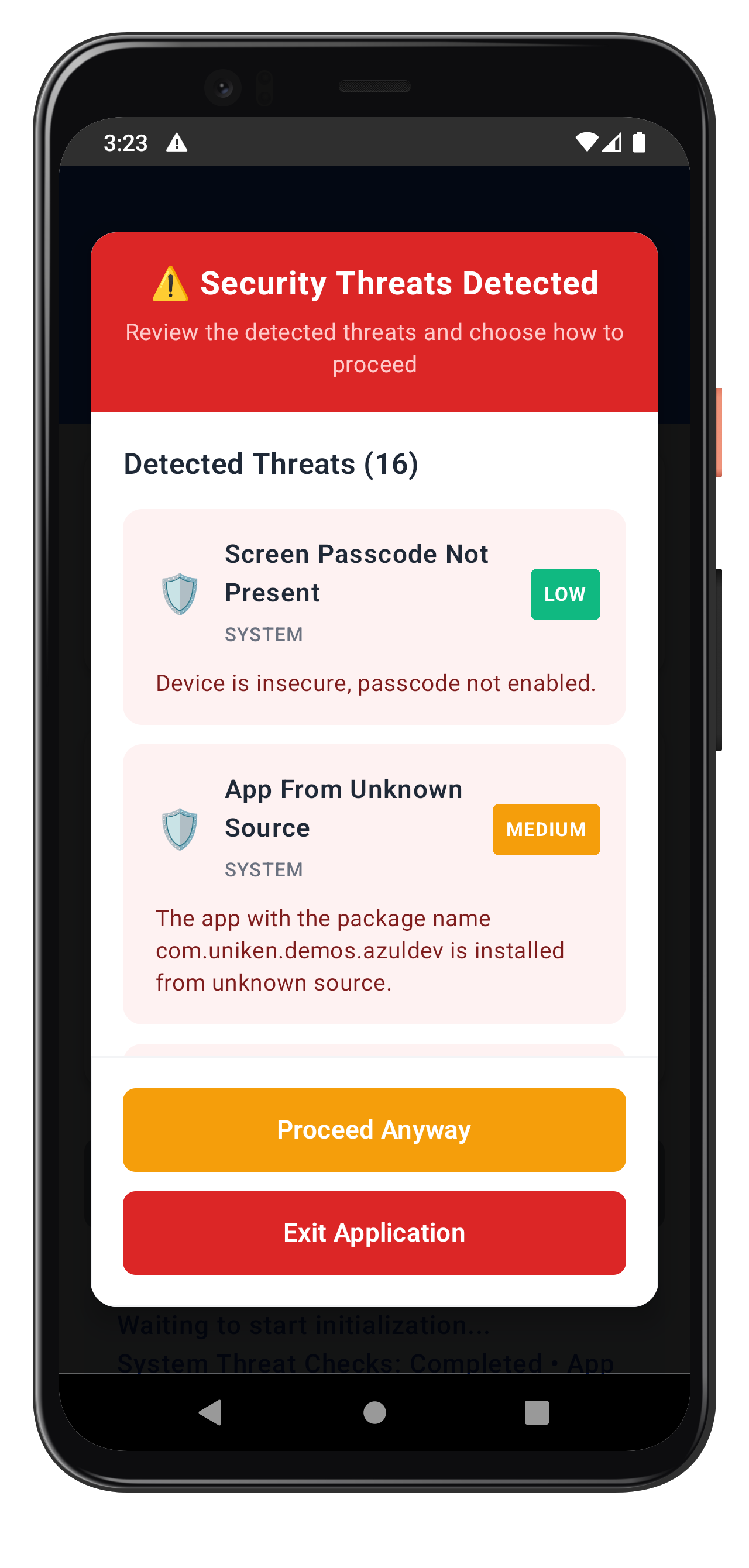
Key features of the threat detection modal:
- Full-screen Dialog: Semi-transparent overlay prevents underlying UI interaction
- BackHandler integration: Disables back button to force user decision
- Threat display: Shows threat name, category, severity, and detailed message
- Color-coded severity: Visual indication of threat levels (HIGH=red, MEDIUM=orange, LOW=green)
- Category icons: Emoji icons for SYSTEM (⚙️), NETWORK (🌐), APP (📱)
- Conditional buttons: Proceed button only shown for consent mode
- Loading states: CircularProgressIndicator during SDK API calls
- Nested dialogs: Confirmation dialog for exit, error dialog for API failures
- Scrollable list: LazyColumn for multiple threats
- Material 3 design: Modern UI with proper spacing and typography
The following image showcases screen from the sample application:
Wrap your application with the MTD provider in MainActivity:
// app/src/main/java/*/MainActivity.kt

class MainActivity : ComponentActivity() {

    private lateinit var callbackManager: RDNACallbackManager
    private val rdnaService = RDNAService
    private var navController: NavHostController? by mutableStateOf(null)

    override fun onCreate(savedInstanceState: Bundle?) {
        super.onCreate(savedInstanceState)

        // Initialize RDNA SDK instance
        rdnaService.getInstance(applicationContext)

        // Create callback manager
        callbackManager = RDNACallbackManager(
            context = applicationContext,
            currentActivity = this
        )

        setContent {
            RelidCodelabTheme {
                Surface(
                    modifier = Modifier.fillMaxSize(),
                    color = MaterialTheme.colorScheme.background
                ) {
                    // MTD Provider - Fully self-contained threat detection UI
                    // Wraps entire app and handles MTD callbacks internally
                    MTDProvider(
                        callbackManager = callbackManager,
                        onAppExit = {
                            // Clean app exit
                            finishAndRemoveTask()
                            exitProcess(0)
                        }
                    ) {
                        // App navigation and content
                        val navCtrl = AppNavigation(
                            currentActivity = this@MainActivity,
                            rdnaService = rdnaService,
                            callbackManager = callbackManager
                        )

                        navController = navCtrl

                        // Initialize SDK Event Provider (handles init events only)
                        initializeSDKEventProvider()
                    }
                }
            }
        }
    }

    /**
     * Initialize SDK Event Provider for global initialization events
     * Separated from MTD events for clean architecture
     */
    @Composable
    private fun initializeSDKEventProvider() {
        val navCtrl = navController ?: return

        LaunchedEffect(Unit) {
            SDKEventProvider.initialize(
                lifecycleOwner = this@MainActivity,
                callbackManager = callbackManager,
                navController = navCtrl
            )
        }
    }

    override fun onDestroy() {
        super.onDestroy()
        SDKEventProvider.cleanup()
    }
}
The provider approach offers several advantages:
- Global state management: MTD state accessible throughout the app
- Automatic event handling: Callbacks registered once at app level
- Consistent UI: Single modal component handles all threat scenarios
- Memory efficiency: Singleton pattern prevents memory leaks
- Clean separation: MTDProvider handles threats, SDKEventProvider handles initialization
- Lifecycle-aware: Proper cleanup prevents crashes and leaks
Test Scenarios
- User Consent Threats: Test with low-medium severity threats
- Terminate Threats: Test with high severity threats requiring app exit
- Mixed Threat Types: Test scenarios with multiple threat categories
- User Interactions: Test both "Proceed" and "Exit" flows
Common MTD Test Scenarios
Threat Category | Examples | Typical Severity | Expected Response |
SYSTEM | USB Debugging, Rooted Device | LOW-HIGH | User consent or termination |
NETWORK | Network MITM, Unsecured Access Point | LOW-MEDIUM | User consent or termination |
APP | Malware App, Repacked App | MEDIUM-HIGH | User consent or termination |
Building and Running Tests
Using Android Studio:
- Open project in Android Studio
- Select target device or emulator
- Click Run (▶) or press Shift+F10
Using command line:
# Build debug APK
./gradlew assembleDebug

# Install on device
./gradlew installDebug

# Or combined
adb install app/build/outputs/apk/debug/app-debug.apk
Debugging MTD Events
Use Logcat to verify MTD functionality:
# View MTD-related logs
adb logcat | grep -E "(MTD|RDNA|Threat)"

# Filter by tag
adb logcat MTDProvider:D MTDThreatManager:D RDNAService:D *:S
Example log output:
D/MTDProvider: User consent threats received (2 threats)
D/MTDThreatManager: Showing threat modal: 2 threats, consent=true
D/MTDThreatManager: User chose to proceed with threats
D/RDNAService: Taking action on 2 threats
D/RDNAService: takeActionOnThreats success
Verify Callback Registration
Add logging to verify callbacks are properly registered:
Log.d(TAG, "MTD callbacks registered: " +
    "userConsent=${callbackManager.userConsentThreatsEvent}, " +
    "terminate=${callbackManager.terminateWithThreatsEvent}")
Modal Not Appearing
Cause: MTD callbacks not properly registered Solution: Verify MTDProvider wraps your app and LaunchedEffect is executed
// Verify provider is wrapping content
MTDProvider(callbackManager = callbackManager, onAppExit = { ... }) {
    // Your app content
}
Cause: StateFlow not being collected Solution: Ensure you're using collectAsStateWithLifecycle() in Composables
Threats Not Processed
Cause: Incorrect threat modification Solution: Ensure you're using setter methods correctly
// Correct - use setter methods
threats.forEach { threat ->
    threat.setShouldProceedWithThreats(true)
    threat.setRememberActionForSession(true)
}

// Incorrect - direct property assignment won't work
threat.shouldProceedWithThreats = true  // This doesn't exist
Cause: Error checking takeActionOnThreats result Solution: Check longErrorCode for success (0 = success)
val error = RDNAService.takeActionOnThreats(threats)
if (error.longErrorCode != 0) {
    // Handle error
    Log.e(TAG, "Error: ${error.errorString}")
}
App Not Exiting
Cause: Incorrect exit implementation Solution: Use proper Android app exit pattern
// Recommended approach in MainActivity
onAppExit = {
    finishAndRemoveTask()
    exitProcess(0)
}
Cause: Trying to exit from non-Activity context Solution: Pass Activity reference or use system exit
Important Security Guidelines
- Never ignore terminate threats - Always exit the app when required
- Log threat details securely - For analysis without exposing sensitive data
- Educate users appropriately - Provide clear but not alarming explanations
- Keep SDK updated - Regular updates include latest threat detection
- Test thoroughly - Verify MTD behavior across different device states
Threat Response Guidelines
Threat Severity | Recommended Action | User Choice |
LOW | Usually proceed with warning | User decides |
MEDIUM | Proceed with caution | User decides with strong warning |
HIGH | Consider termination | Limited or no user choice |
Memory and Performance
- Clean up StateFlow collectors properly with lifecycle awareness
- Use
collectAsStateWithLifecycle()in Composables to prevent leaks - Handle background/foreground app states correctly
- Implement proper error boundaries
- Test on various device configurations and Android versions
- Monitor for memory leaks in threat handling with Android Profiler
Code Security
// Use appropriate logging levels
// Development
Log.d(TAG, "Threat details: ${threat.threatName}")

// Production - disable detailed logs
if (BuildConfig.DEBUG) {
    Log.d(TAG, "Threat details: ${threat.threatName}")
}

// Or use SDK logging control
RDNA.RDNALoggingLevel.RDNA_NO_LOGS  // Production
RDNA.RDNALoggingLevel.RDNA_VERBOSE_LOGS  // Development
Threading Best Practices
- MTD callbacks run on SDK thread - use coroutines for thread safety
- StateFlow updates are thread-safe
- Composable recomposition happens on main thread
- Use appropriate Dispatchers:
Dispatchers.Main - UI updates
Dispatchers.IO - SDK calls (if async)
Dispatchers.Default - CPU-intensive work
Congratulations! You've successfully learned how to implement comprehensive MTD functionality with:
- ✅ Real-time threat detection and handling
- ✅ User-friendly threat information display with Jetpack Compose
- ✅ Secure threat response mechanisms using SDK APIs
- ✅ Global state management using StateFlow
- ✅ Reactive event handling with SharedFlow
- ✅ Proper app termination for critical threats
Key Android Patterns Learned
Your MTD implementation now uses:
- MTDProvider pattern - Self-contained provider wrapping app content
- StateFlow - Reactive UI state management with lifecycle awareness
- SharedFlow - Broadcast MTD events to multiple collectors
- Composable UI - Declarative threat detection modal
- Coroutines - Structured concurrency for async operations
- Direct SDK types - Type-safe threat handling without wrapper models
Key Security Benefits
Your MTD implementation now provides:
- Proactive threat detection during SDK initialization
- User-informed decision making for non-critical threats
- Automatic protection against severe security violations
- Comprehensive logging for security analysis
Next Steps
- Implement additional RELID SDK features
- Customize threat UI to match your app's design system
- Add analytics for threat detection patterns
- Integrate with your app's security monitoring