🎯 Learning Path:
- Complete REL-ID Complete Activation & Login Flow Codelab
- You are here → Internationalization Implementation (Pre-Login and Post-Login)
Welcome to the REL-ID Internationalization codelab! This tutorial builds upon your existing MFA implementation to add comprehensive multi-language support with dynamic language switching using REL-ID SDK's language management APIs.
What You'll Build
In this codelab, you'll enhance your existing MFA application with:
- 🌍 Language Initialization: Set language preference during SDK
initialize()withRDNAInitOptions - 🔄 Dynamic Language Switching: Change language at runtime using
setSDKLanguage()API without app restart after SDK initialization - 📱 Language Selection UI: Create language selector dialog with native script display (हिन्दी, Español, etc.)
- 🌐 Language State Management: Implement LanguageManager singleton with StateFlow for centralized language state
- 💾 Language Persistence: Save and restore language preferences using SharedPreferences
- 🔊 Native Localization: Setup Android
strings.xmlfiles for error code mapping - ↔️ RTL/LTR Support: Handle bidirectional text with
RDNALanguageDirectionenum - ⚠️ Two-Phase Error Handling: Initialization errors (mapped to native files) vs runtime errors (from SDK events)
What You'll Learn
By completing this codelab, you'll master:
- SDK Language Lifecycle: Two distinct phases - initialization vs runtime language management
- Language APIs Integration:
initialize()withRDNAInitOptions.rdnaLanguageOptionsandsetSDKLanguage()API - Language Event Handling: Processing
onSetLanguageResponsecallbacks for language updates - Native Platform Localization: How SDK automatically reads language-specific string resources during initialization
- Language State Management: StateFlow pattern with persistence and synchronization
- Automatic Error Localization: SDK reads app's localization files and returns localized error messages
- Dynamic Language Updates: Changing UI language at runtime with Compose recomposition
- RTL/LTR Support: Implementing bidirectional text support for various languages
Prerequisites
Before starting this codelab, ensure you have:
- ✅ Completed REL-ID MFA Complete Activation & Login Flow Codelab - All MFA screens and flows must be fully implemented
- ✅ Android Development Environment - Android Studio Hedgehog (2023.1.1) or later with Kotlin 1.9+
- ✅ REL-ID SDK Integration - Latest SDK with language management APIs
- ✅ Kotlin Knowledge - Understanding of Kotlin data classes and type safety
- ✅ Jetpack Compose - Experience with Compose for declarative UI
- ✅ SharedPreferences Knowledge - Basic understanding of local data persistence
- ✅ Drawer Navigation Setup - NavigationDrawer configured with navigation infrastructure
Get the Code from GitHub
The code to get started can be found in a GitHub repository.
You can clone the repository using the following command:
git clone https://github.com/uniken-public/codelab-android.git
Navigate to the relid-internationalization folder in the repository you cloned earlier
Codelab Architecture Overview
This codelab extends your MFA application with three core internationalization components:
- LanguageManager: Centralized language state management with SharedPreferences persistence, synced with SDK supported languages via
onInitializedcallback - LanguageSelector Dialog: UI component for language selection with native script display
- Service Layer Integration: SDK initialization with
RDNAInitOptions,setSDKLanguage()API and event handlers (onInitialized,onSetLanguageResponse)
Before implementing internationalization, let's understand the two critical phases of language management with REL-ID SDK.
Two-Phase Language Lifecycle
REL-ID SDK manages language in two distinct phases:
PHASE 1: SDK INITIALIZATION
  ↓
  App starts → Load default languages → Get user's saved language preference →
  Extract short language code (e.g., 'en-US' → 'en') →
  Call initialize() with RDNAInitOptions.rdnaLanguageOptions.localeCode = 'en' →
  SDK initializes with language preference →
  If error occurs: SDK internally reads app's localization files (strings.xml) →
                   SDK returns LOCALIZED error message (not error code) →
                   App displays error message directly to user
  If success: Fire onInitialized callback with:
             - additionalInfo.supportedLanguages (array of available languages)
             - additionalInfo.selectedLanguage (initialized language code)
             → App calls LanguageManager.updateFromSDK() to sync state
  ↓
  ↓
PHASE 2: RUNTIME LANGUAGE SWITCHING (After initialization)
  ↓
  User selects language from UI → Call setSDKLanguage('hi-IN', direction) →
  SDK processes request → Fire onSetLanguageResponse callback →
  Response includes supportedLanguages and localeCode →
  Check status code and error longErrorCode for success →
  Update LanguageManager with new languages if successful →
  No app restart needed - UI updates via StateFlow and Compose recomposition
Language API Reference Table
Phase | API Method | Parameters | Response | Purpose | Documentation |
Initialization |
|
| Localized error message (if error) or success response | Set initial language preference with fallback to English | |
Runtime |
| locale: ‘en-US', ‘hi-IN'; direction: RDNA_LOCALE_LTR/RTL | Sync error response | Request language change | |
Runtime |
| N/A | Complete language data + supported languages | Callback with language update result |
SDK Automatic Error Localization
During initialization, if an error occurs, the SDK automatically reads your app's localization files and returns the localized error message:
Initialize Called with initOptions.rdnaLanguageOptions.localeCode = 'hi' (Hindi)
                     ↓
SDK initializes and encounters error
                     ↓
SDK internally reads: app/src/main/res/values-hi/strings_rel_id.xml
                     ↓
SDK finds localized message: "SDK प्रारंभीकरण विफल"
                     ↓
SDK Returns: RDNAError { errorString: "SDK प्रारंभीकरण विफल" }
                     ↓
App displays error message directly to user
No manual error code mapping needed - SDK handles reading localization files internally!
Supported Languages from onInitialized Callback
On successful initialization, the SDK returns the list of supported languages via the onInitialized callback:
// onInitialized callback returns RDNAChallengeResponse
override fun onInitialized(response: RDNAChallengeResponse) {
  // Access supported languages from additionalInfo
  val additionalInfo = response.additionalInfo
  val supportedLanguages = additionalInfo.supportedLanguages  // Array<RDNASupportedLanguage>
  val selectedLanguage = additionalInfo.selectedLanguage      // String (e.g., 'hi-IN')

  // Supported languages structure (from AAR):
  // Each RDNASupportedLanguage contains:
  //   - localeCode: String (e.g., 'en-US', 'hi-IN')
  //   - localeName: String (e.g., 'English', 'Hindi')
  //   - languageDirection: RDNALanguageDirection (RDNA_LOCALE_LTR or RDNA_LOCALE_RTL)

  // Update LanguageManager with SDK's languages
  LanguageManager.updateFromSDK(context, supportedLanguages, selectedLanguage)
}
Key Points:
additionalInfo.supportedLanguages- Array of all languages SDK supportsadditionalInfo.selectedLanguage- Currently selected language code- These values sync your app's language state with the SDK's state
- Use
LanguageManager.updateFromSDK()to update state after initialization
Supported Languages & Direction
The RDNALanguageDirection enum provides language direction options:
enum class RDNALanguageDirection {
    RDNA_LOCALE_LTR,        // 0 - Left-to-Right (English, Spanish, Hindi)
    RDNA_LOCALE_RTL,        // 1 - Right-to-Left (Arabic, Hebrew)
    RDNA_LOCALE_TBRL,       // 2 - Top-Bottom Right-Left (vertical)
    RDNA_LOCALE_TBLR,       // 3 - Top-Bottom Left-Right (vertical)
    RDNA_LOCALE_UNSUPPORTED // 4
}
Example languages:
Language | Locale Code | Direction | Native Name |
English | en-US | LTR (0) | English |
Hindi | hi-IN | LTR (0) | हिन्दी |
Spanish | es-ES | LTR (0) | Español |
Arabic | ar-SA | RTL (1) | العربية |
Callback Response Structure
After calling setSDKLanguage(), the SDK fires onSetLanguageResponse with this structure:
override fun onSetLanguageResponse(
    localeCode: String?,                                        // 'es-ES'
    localeName: String?,                                        // 'Spanish'
    languageDirection: RDNA.RDNALanguageDirection?,            // RDNA_LOCALE_LTR or RTL
    supportedLanguages: Array<out RDNA.RDNASupportedLanguage?>?, // All available languages
    appMessages: java.util.HashMap<String?, String?>?,         // Localized messages
    status: RDNA.RDNARequestStatus?,                           // statusCode: 100 = success
    error: RDNA.RDNAError?                                     // longErrorCode: 0 = success
)
Event Handler Lifecycle Pattern
Language screens use proper lifecycle-aware event collection:
// In ViewModel - collect language response events
init {
    viewModelScope.launch {
        callbackManager.setLanguageResponseEvent.collect { eventData ->
            handleSetLanguageResponse(eventData)
        }
    }
}

// Global handler in SDKEventProvider
private suspend fun handleSetLanguageResponseEvents(
    context: Context,
    callbackManager: RDNACallbackManager
) {
    callbackManager.setLanguageResponseEvent.collect { eventData ->
        // Process language change
        // Update LanguageManager
        // Show Toast message
    }
}
Initialize error codes need to be mapped to localized strings. Let's set up native localization files for Android.
How SDK Uses Localization Files
During SDK initialization, if an error occurs, the SDK automatically reads your app's localization files:
Scenario: User starts app with Spanish preference, but network is down
  1. App calls initialize() with initOptions.rdnaLanguageOptions.localeCode = 'es'
  2. SDK tries to initialize but fails due to network error
  3. SDK internally reads: app/src/main/res/values-es/strings_rel_id.xml
  4. SDK finds the localized error message: "Error de conexión de red"
  5. SDK returns: RDNAError { errorString: "Error de conexión de red" }
  6. App displays the error message to user in Spanish
Key Point: The SDK handles all localization internally. Your app just displays the error message it receives from the SDK.
Android: Setting Up strings.xml
Create localized string files in app/src/main/res/:
Step 1: Create default English strings
Create file: app/src/main/res/values/strings_rel_id.xml
<?xml version="1.0" encoding="utf-8"?>
<resources>
    <!-- REL-ID SDK Error Codes -->
    <string name="RDNA_ERR_50001">Network connection error</string>
    <string name="RDNA_ERR_50002">Invalid server configuration</string>
    <string name="RDNA_ERR_50003">SDK initialization timeout</string>
    <string name="RDNA_ERR_UNKNOWN">An unexpected error occurred</string>
</resources>
Step 2: Create Spanish localization
Create file: app/src/main/res/values-es/strings_rel_id.xml
<?xml version="1.0" encoding="utf-8"?>
<resources>
    <!-- REL-ID SDK Error Codes - Spanish -->
    <string name="RDNA_ERR_50001">Error de conexión de red</string>
    <string name="RDNA_ERR_50002">Configuración de servidor inválida</string>
    <string name="RDNA_ERR_50003">Tiempo de espera de inicialización del SDK</string>
    <string name="RDNA_ERR_UNKNOWN">Ocurrió un error inesperado</string>
</resources>
Step 3: Create Hindi localization
Create file: app/src/main/res/values-hi/strings_rel_id.xml
<?xml version="1.0" encoding="utf-8"?>
<resources>
    <!-- REL-ID SDK Error Codes - Hindi -->
    <string name="RDNA_ERR_50001">नेटवर्क कनेक्शन त्रुटि</string>
    <string name="RDNA_ERR_50002">अमान्य सर्वर कॉन्फ़िगरेशन</string>
    <string name="RDNA_ERR_50003">SDK प्रारंभीकरण समय समाप्त</string>
    <string name="RDNA_ERR_UNKNOWN">एक अप्रत्याशित त्रुटि हुई</string>
</resources>
Step 4: Create Arabic localization (RTL support)
Create file: app/src/main/res/values-ar/strings_rel_id.xml
<?xml version="1.0" encoding="utf-8"?>
<resources>
    <!-- REL-ID SDK Error Codes - Arabic (RTL) -->
    <string name="RDNA_ERR_50001">خطأ في اتصال الشبكة</string>
    <string name="RDNA_ERR_50002">تكوين الخادم غير صالح</string>
    <string name="RDNA_ERR_50003">انتهت مهلة تهيئة SDK</string>
    <string name="RDNA_ERR_UNKNOWN">حدث خطأ غير متوقع</string>
</resources>
Folder Structure for Localization
Your final resource folder structure should look like:
app/src/main/res/
├── values/                      # Default (English)
│   └── strings_rel_id.xml
├── values-es/                   # Spanish
│   └── strings_rel_id.xml
├── values-hi/                   # Hindi
│   └── strings_rel_id.xml
└── values-ar/                   # Arabic (RTL)
    └── strings_rel_id.xml
Building and Verification
After creating localization files:
- Sync Project with Gradle - Click "Sync Now" in Android Studio
- Verify Resource IDs - Android Studio should generate
R.string.RDNA_ERR_*references - Build APK - Run
./gradlew assembleDebugto verify resources are included - Test Localization - Change device language and test initialization errors
Let's implement the language management APIs in your service layer following REL-ID SDK patterns.
Step 1: Add setSDKLanguage API
Add this method to
uniken/services/RDNAService.kt
:
/**
 * Set SDK language dynamically after initialization
 *
 * Changes the SDK's language preference at runtime without requiring app restart.
 * The SDK updates all internal messages and supported language configurations accordingly.
 * Results delivered via onSetLanguageResponse callback event with updated language data.
 *
 * Response Validation Logic:
 * 1. Check error.longErrorCode: 0 = success, > 0 = error
 * 2. An onSetLanguageResponse callback will be triggered with updated language configuration
 * 3. Async events will be handled by event listeners
 *
 * @param localeCode Full locale code (e.g., 'en-US', 'hi-IN', 'ar-SA', 'es-ES')
 * @param languageDirection Language text direction (RDNA_LOCALE_LTR or RDNA_LOCALE_RTL)
 * @return RDNAError with status (longErrorCode = 0 indicates success, async callback follows)
 *
 * @see <a href="https://developer.uniken.com/docs/internationalization">Set SDK Language API</a>
 */
fun setSDKLanguage(localeCode: String, languageDirection: RDNA.RDNALanguageDirection): RDNAError {
    Log.d(TAG, "setSDKLanguage() called")
    Log.d(TAG, "  localeCode: $localeCode")
    Log.d(TAG, "  languageDirection: $languageDirection")

    val error = rdna.setSDKLanguage(localeCode, languageDirection)

    if (error.longErrorCode != 0) {
        Log.e(TAG, "setSDKLanguage sync error: ${error.errorString} (code: ${error.longErrorCode})")
    } else {
        Log.d(TAG, "setSDKLanguage sync success - waiting for onSetLanguageResponse callback")
    }

    return error
}
Step 2: Add Event Data Class
Add to
uniken/models/RDNAModels.kt
:
/**
 * Set language response event data
 * Triggered when setSDKLanguage() completes with updated language configuration
 *
 * USES SDK TYPES DIRECTLY - No wrapper classes!
 * From AAR - Complete callback signature:
 *   onSetLanguageResponse(
 *     localeCode: String?,
 *     localeName: String?,
 *     languageDirection: RDNA.RDNALanguageDirection?,
 *     supportedLanguages: Array<out RDNA.RDNASupportedLanguage?>?,
 *     appMessages: java.util.HashMap<String?, String?>?,
 *     status: RDNA.RDNARequestStatus?,
 *     error: RDNA.RDNAError?
 *   )
 */
data class SetLanguageResponseEventData(
    val localeCode: String?,                                        // Current locale code (e.g., "en-US", "hi-IN")
    val localeName: String?,                                        // Display name of the language (e.g., "English", "Hindi")
    val languageDirection: RDNA.RDNALanguageDirection?,            // Text direction (LTR or RTL)
    val supportedLanguages: Array<out RDNA.RDNASupportedLanguage?>?, // All available languages from SDK
    val appMessages: java.util.HashMap<String?, String?>?,         // Application-specific messages from SDK
    val status: RDNA.RDNARequestStatus?,                           // Request status (statusCode 100/0 = success)
    val error: RDNA.RDNAError?                                     // Error structure (longErrorCode = 0 indicates success)
)
Step 3: Add Callback Handler to RDNACallbackManager
Add to
uniken/services/RDNACallbackManager.kt
:
// Add SharedFlow for language response events
private val _setLanguageResponseEvent = MutableSharedFlow<SetLanguageResponseEventData>()
val setLanguageResponseEvent: SharedFlow<SetLanguageResponseEventData> =
    _setLanguageResponseEvent.asSharedFlow()

// Implement callback method
override fun onSetLanguageResponse(
    localeCode: String?,
    localeName: String?,
    languageDirection: RDNA.RDNALanguageDirection?,
    supportedLanguages: Array<out RDNA.RDNASupportedLanguage?>?,
    appMessages: java.util.HashMap<String?, String?>?,
    status: RDNA.RDNARequestStatus?,
    error: RDNA.RDNAError?
) {
    Log.d(TAG, "onSetLanguageResponse callback received:")
    Log.d(TAG, "  - localeCode: $localeCode")
    Log.d(TAG, "  - localeName: $localeName")
    Log.d(TAG, "  - languageDirection: $languageDirection")
    Log.d(TAG, "  - supportedLanguagesCount: ${supportedLanguages?.size ?: 0}")
    Log.d(TAG, "  - statusCode: ${status?.statusCode}")
    Log.d(TAG, "  - errorCode: ${error?.longErrorCode}")

    scope.launch {
        _setLanguageResponseEvent.emit(
            SetLanguageResponseEventData(
                localeCode = localeCode,
                localeName = localeName,
                languageDirection = languageDirection,
                supportedLanguages = supportedLanguages,
                appMessages = appMessages,
                status = status,
                error = error
            )
        )
    }
}
After successful initialization, the SDK provides supported languages via the onInitialized callback. Let's integrate this with LanguageManager to sync UI with SDK's available languages.
Step 1: Handle onInitialized Callback for Supported Languages
Add to
uniken/providers/SDKEventProvider.kt
:
/**
 * Handle onInitialized events → Update languages from SDK and navigate
 *
 * Extracts supportedLanguages and selectedLanguage from SDK response and updates LanguageManager
 */
private suspend fun handleInitializedEvents(
    context: Context,
    callbackManager: RDNACallbackManager,
    navController: NavController
) {
    callbackManager.initializedEvent.collect { response ->
        Log.d(TAG, "onInitialized event received")

        // Update language context with SDK's supported languages and selected language
        val additionalInfo = response.additionalInfo
        if (additionalInfo != null) {
            val supportedLanguages = additionalInfo.supportedLanguages
            val selectedLanguage = additionalInfo.selectedLanguage

            if (supportedLanguages != null && supportedLanguages.isNotEmpty()) {
                Log.d(TAG, "Updating language context with SDK languages:")
                Log.d(TAG, "  - supportedCount: ${supportedLanguages.size}")
                Log.d(TAG, "  - selectedLanguage: $selectedLanguage")

                // Update LanguageManager with SDK data
                LanguageManager.updateFromSDK(
                    context,
                    supportedLanguages,
                    selectedLanguage
                )
            } else {
                Log.d(TAG, "No supported languages in SDK response, keeping defaults")
            }
        } else {
            Log.d(TAG, "No additionalInfo in SDK response")
        }

        // Navigate to success screen
        val route = Routes.tutorialSuccess(
            statusCode = 0,
            statusMessage = "Initialization Successful",
            sessionId = response.sessionInfo?.sessionID ?: "",
            sessionType = 0
        )

        navController.navigate(route) {
            popUpTo(Routes.TUTORIAL_HOME) { inclusive = true }
        }
    }
}
Step 2: Handle onSetLanguageResponse Callback
Add to
uniken/providers/SDKEventProvider.kt
:
/**
 * Handle onSetLanguageResponse events
 *
 * Processes language change responses and updates LanguageManager.
 * Shows success/error messages to user via Toast.
 */
private suspend fun handleSetLanguageResponseEvents(
    context: Context,
    callbackManager: RDNACallbackManager
) {
    callbackManager.setLanguageResponseEvent.collect { eventData ->
        Log.d(TAG, "onSetLanguageResponse event received")
        Log.d(TAG, "  - statusCode: ${eventData.status?.statusCode}")
        Log.d(TAG, "  - errorCode: ${eventData.error?.longErrorCode}")

        // Early error check - exit immediately if error exists
        if (eventData.error != null && eventData.error.longErrorCode != 0) {
            Log.e(TAG, "Language change failed: ${eventData.error.errorString}")

            // Show error alert
            android.widget.Toast.makeText(
                context,
                "Language Change Failed: ${eventData.error.errorString} (Code: ${eventData.error.longErrorCode})",
                android.widget.Toast.LENGTH_LONG
            ).show()
            return@collect
        }

        // Check if language change was successful
        // Success: statusCode === 100 or 0, AND longErrorCode === 0
        if (eventData.status?.statusCode == 100 || eventData.status?.statusCode == 0) {
            Log.d(TAG, "Language changed successfully")

            // Update language context with new languages and selected language
            if (eventData.supportedLanguages != null &&
                eventData.supportedLanguages.isNotEmpty() &&
                eventData.localeCode != null) {

                Log.d(TAG, "Updating LanguageManager with SDK response:")
                Log.d(TAG, "  - supportedLanguagesCount: ${eventData.supportedLanguages.size}")
                Log.d(TAG, "  - selectedLanguage: ${eventData.localeCode}")

                LanguageManager.updateFromSDK(
                    context,
                    eventData.supportedLanguages,
                    eventData.localeCode
                )
            } else {
                Log.d(TAG, "No supported languages in SDK response, language already updated locally")
            }

            // Show success message
            android.widget.Toast.makeText(
                context,
                "Language changed successfully",
                android.widget.Toast.LENGTH_SHORT
            ).show()

        } else {
            // Language change failed due to status code
            Log.e(TAG, "Language change failed: statusCode=${eventData.status?.statusCode}")

            android.widget.Toast.makeText(
                context,
                "Language Change Failed: ${eventData.status?.statusMessage}",
                android.widget.Toast.LENGTH_LONG
            ).show()
        }
    }
}
Step 3: Understanding the Data Flow
Supported Languages Data Structure from onInitialized:
// From: additionalInfo.supportedLanguages (array)
// Each RDNASupportedLanguage contains:
[
  RDNASupportedLanguage(
    localeCode = "en-US",              // Full locale code
    localeName = "English",            // Display name
    languageDirection = RDNA_LOCALE_LTR // Text direction
  ),
  RDNASupportedLanguage(
    localeCode = "hi-IN",
    localeName = "Hindi",
    languageDirection = RDNA_LOCALE_LTR
  ),
  RDNASupportedLanguage(
    localeCode = "es-ES",
    localeName = "Spanish",
    languageDirection = RDNA_LOCALE_LTR
  )
]

// From: additionalInfo.selectedLanguage (string)
"hi-IN"  // Currently selected language code (what was initialized with)
Step 4: Key Points
LanguageManager.updateFromSDK()is called twice:- After
onInitialized- sync SDK's supported languages with app - After
onSetLanguageResponse(from runtime language change) - update with new language selection
- After
- Data is automatically localized:
- SDK returns error messages in the language specified in
RDNAInitOptions - Supported languages list is provided by the server in your app's language
- SDK returns error messages in the language specified in
- Two-phase synchronization:
- Phase 1: Default languages before initialization
- Phase 1 Complete: SDK languages after
onInitializedcallback - Phase 2: Language change after
onSetLanguageResponsecallback
Let's create the language state management and UI components for language selection.
Step 1: Create LanguageManager Singleton
Create
tutorial/context/LanguageManager.kt
:
package com.relidcodelab.tutorial.context

import android.content.Context
import android.util.Log
import com.relidcodelab.tutorial.models.Language
import com.relidcodelab.tutorial.utils.LanguageConfig
import com.relidcodelab.tutorial.utils.LanguageStorage
import kotlinx.coroutines.flow.MutableStateFlow
import kotlinx.coroutines.flow.StateFlow
import kotlinx.coroutines.flow.asStateFlow

/**
 * LanguageManager - Centralized language state management
 *
 * Singleton pattern for managing application language state.
 * Manages current language and supported languages with StateFlow for reactive UI updates.
 *
 * Key Features:
 * - Manages current language and supported languages
 * - Two-phase loading: Default languages → SDK languages
 * - Persists language preference with SharedPreferences
 * - Reactive state updates with StateFlow
 */
object LanguageManager {

    private const val TAG = "LanguageManager"

    // Language state using StateFlow for reactive UI updates
    private val _currentLanguage = MutableStateFlow(LanguageConfig.DEFAULT_LANGUAGE)
    val currentLanguage: StateFlow<Language> = _currentLanguage.asStateFlow()

    private val _supportedLanguages = MutableStateFlow(LanguageConfig.DEFAULT_SUPPORTED_LANGUAGES)
    val supportedLanguages: StateFlow<List<Language>> = _supportedLanguages.asStateFlow()

    private val _isLoading = MutableStateFlow(true)
    val isLoading: StateFlow<Boolean> = _isLoading.asStateFlow()

    /**
     * Initialize language manager and load persisted language preference
     *
     * Should be called once during app startup (in Application.onCreate or MainActivity)
     */
    fun initialize(context: Context) {
        Log.d(TAG, "Initializing LanguageManager")
        loadPersistedLanguage(context)
    }

    /**
     * Load persisted language preference from SharedPreferences
     */
    private fun loadPersistedLanguage(context: Context) {
        try {
            val savedCode = LanguageStorage.load(context)

            if (savedCode != null) {
                val language = LanguageConfig.getLanguageByCode(
                    savedCode,
                    _supportedLanguages.value
                )
                _currentLanguage.value = language
                Log.d(TAG, "Loaded persisted language: ${language.displayText}")
            } else {
                Log.d(TAG, "No persisted language, using default: ${LanguageConfig.DEFAULT_LANGUAGE.displayText}")
            }
        } catch (e: Exception) {
            Log.e(TAG, "Error loading language", e)
        } finally {
            _isLoading.value = false
        }
    }

    /**
     * Change language and persist preference
     *
     * This method updates the current language in memory and persists it.
     * For SDK language changes, call setSDKLanguage() on RDNAService separately.
     */
    fun changeLanguage(context: Context, language: Language) {
        try {
            LanguageStorage.save(context, language.lang)
            _currentLanguage.value = language
            Log.d(TAG, "Language changed to: ${language.displayText}")
        } catch (e: Exception) {
            Log.e(TAG, "Error changing language", e)
            throw e
        }
    }

    /**
     * Update supported languages and current language from SDK response
     *
     * Called after SDK initialization completes or after setSDKLanguage() response.
     * Synchronizes the application's language state with SDK's language configuration.
     *
     * NOTE: SDK doesn't provide native names in response, so we add them from lookup table.
     */
    fun updateFromSDK(
        context: Context,
        sdkLanguages: Array<out com.uniken.rdna.RDNA.RDNASupportedLanguage?>?,
        sdkSelectedLanguage: String?
    ) {
        try {
            // Handle null or empty input
            if (sdkLanguages == null || sdkLanguages.isEmpty()) {
                Log.w(TAG, "updateFromSDK called with null or empty SDK languages")
                return
            }

            if (sdkSelectedLanguage == null || sdkSelectedLanguage.isEmpty()) {
                Log.w(TAG, "updateFromSDK called with null or empty selected language")
                return
            }

            Log.d(TAG, "Converting SDK native types to Language models")

            // Convert SDK types to Language models directly
            val convertedLanguages = sdkLanguages.mapNotNull { sdkLang ->
                sdkLang?.let { convertSDKLanguageToCustomer(it) }
            }

            if (convertedLanguages.isEmpty()) {
                Log.w(TAG, "No valid languages after conversion")
                return
            }

            // Update supported languages
            _supportedLanguages.value = convertedLanguages
            Log.d(TAG, "Updated supported languages: ${convertedLanguages.map { it.lang }}")

            // Update current language based on SDK's selected language
            val sdkCurrentLanguage = LanguageConfig.getLanguageByCode(
                sdkSelectedLanguage,
                convertedLanguages
            )
            _currentLanguage.value = sdkCurrentLanguage
            Log.d(TAG, "SDK selected language: ${sdkCurrentLanguage.displayText}")

            // Persist SDK's selected language
            try {
                LanguageStorage.save(context, sdkCurrentLanguage.lang)
            } catch (e: Exception) {
                Log.e(TAG, "Failed to persist SDK language", e)
            }

        } catch (e: Exception) {
            Log.e(TAG, "Error updating from SDK native types", e)
        }
    }

    /**
     * Convert SDK's RDNASupportedLanguage to our Language model
     */
    private fun convertSDKLanguageToCustomer(
        sdkLang: com.uniken.rdna.RDNA.RDNASupportedLanguage
    ): Language {
        val localeCode = sdkLang.localeCode ?: "en-US"
        val localeName = sdkLang.localeName ?: "Unknown"
        val languageDirection = sdkLang.languageDirection
            ?: com.uniken.rdna.RDNA.RDNALanguageDirection.RDNA_LOCALE_LTR

        val isRTL = languageDirection == com.uniken.rdna.RDNA.RDNALanguageDirection.RDNA_LOCALE_RTL
        val nativeName = LanguageConfig.getNativeName(localeCode, localeName)

        return Language(
            lang = localeCode,
            displayText = localeName,
            nativeName = nativeName,
            direction = languageDirection,
            isRTL = isRTL
        )
    }

    /**
     * Get current language value (non-reactive)
     */
    fun getCurrentLanguage(): Language = _currentLanguage.value

    /**
     * Get supported languages (non-reactive)
     */
    fun getSupportedLanguages(): List<Language> = _supportedLanguages.value
}
Step 2: Create Language Model and Utilities
Create
tutorial/models/Language.kt
:
package com.relidcodelab.tutorial.models

import com.uniken.rdna.RDNA

/**
 * Customer Language Interface
 * Separate from SDK's types - optimized for customer UI
 */
data class Language(
    val lang: String,           // Full locale code: 'en-US', 'hi-IN', 'ar-SA', 'es-ES'
    val displayText: String,    // Display name: 'English', 'Hindi', 'Arabic', 'Spanish'
    val nativeName: String,     // Native script: 'English', 'हिन्दी', 'العربية', 'Español'
    val direction: RDNA.RDNALanguageDirection,  // RDNA_LOCALE_LTR or RDNA_LOCALE_RTL
    val isRTL: Boolean          // Helper for UI decisions
)
Create
tutorial/utils/LanguageConfig.kt
:
package com.relidcodelab.tutorial.utils

import com.relidcodelab.tutorial.models.Language
import com.uniken.rdna.RDNA

/**
 * Language Configuration Utilities
 *
 * Provides default languages, conversion utilities, and lookup functions
 * for internationalization support.
 */
object LanguageConfig {

    /**
     * Default Hardcoded Languages
     * Shown before SDK initialization completes
     * Using full locale codes for consistency with SDK
     */
    val DEFAULT_SUPPORTED_LANGUAGES: List<Language> = listOf(
        Language(
            lang = "en-US",
            displayText = "English",
            nativeName = "English",
            direction = RDNA.RDNALanguageDirection.RDNA_LOCALE_LTR,
            isRTL = false
        ),
        Language(
            lang = "hi-IN",
            displayText = "Hindi",
            nativeName = "हिन्दी",
            direction = RDNA.RDNALanguageDirection.RDNA_LOCALE_LTR,
            isRTL = false
        ),
        Language(
            lang = "ar-SA",
            displayText = "Arabic",
            nativeName = "العربية",
            direction = RDNA.RDNALanguageDirection.RDNA_LOCALE_RTL,
            isRTL = true
        ),
        Language(
            lang = "es-ES",
            displayText = "Spanish",
            nativeName = "Español",
            direction = RDNA.RDNALanguageDirection.RDNA_LOCALE_LTR,
            isRTL = false
        ),
        Language(
            lang = "fr-FR",
            displayText = "French",
            nativeName = "Français",
            direction = RDNA.RDNALanguageDirection.RDNA_LOCALE_LTR,
            isRTL = false
        )
    )

    val DEFAULT_LANGUAGE: Language = DEFAULT_SUPPORTED_LANGUAGES[0] // English

    /**
     * Native Name Lookup Table
     * SDK doesn't provide native names, so we maintain this hardcoded mapping
     * Maps language code prefix to native script name
     */
    private val NATIVE_NAME_LOOKUP: Map<String, String> = mapOf(
        "en" to "English",
        "hi" to "हिन्दी",
        "ar" to "العربية",
        "es" to "Español",
        "fr" to "Français",
        "de" to "Deutsch",
        "it" to "Italiano",
        "pt" to "Português",
        "ru" to "Русский",
        "zh" to "中文",
        "ja" to "日本語",
        "ko" to "한국어"
    )

    /**
     * Get native name for a language code
     * Extracts base language code and looks up native name
     */
    fun getNativeName(langCode: String, displayText: String): String {
        val baseCode = langCode.split("-")[0] // 'en-US' → 'en'
        return NATIVE_NAME_LOOKUP[baseCode] ?: displayText
    }

    /**
     * Get language by locale code
     */
    fun getLanguageByCode(langCode: String, languages: List<Language>): Language {
        // Try exact match first
        var found = languages.find { it.lang == langCode }

        // If not found, try matching base code (e.g., 'en' matches 'en-US')
        if (found == null) {
            val baseCode = langCode.split("-")[0]
            found = languages.find { it.lang.startsWith(baseCode) }
        }

        return found ?: DEFAULT_LANGUAGE
    }

    /**
     * Extract short language code for SDK initOptions
     * SDK initOptions expects short codes like 'en', 'hi', 'ar'
     */
    fun getShortLanguageCode(fullLocale: String): String {
        return fullLocale.split("-")[0]
    }
}
Create
tutorial/utils/LanguageStorage.kt
:
package com.relidcodelab.tutorial.utils

import android.content.Context

/**
 * Language persistence using SharedPreferences
 */
object LanguageStorage {
    private const val PREF_NAME = "language_prefs"
    private const val PREF_KEY = "selected_language"

    fun save(context: Context, languageCode: String) {
        val sharedPref = context.getSharedPreferences(PREF_NAME, Context.MODE_PRIVATE)
        with(sharedPref.edit()) {
            putString(PREF_KEY, languageCode)
            apply()
        }
    }

    fun load(context: Context): String? {
        val sharedPref = context.getSharedPreferences(PREF_NAME, Context.MODE_PRIVATE)
        return sharedPref.getString(PREF_KEY, null)
    }
}
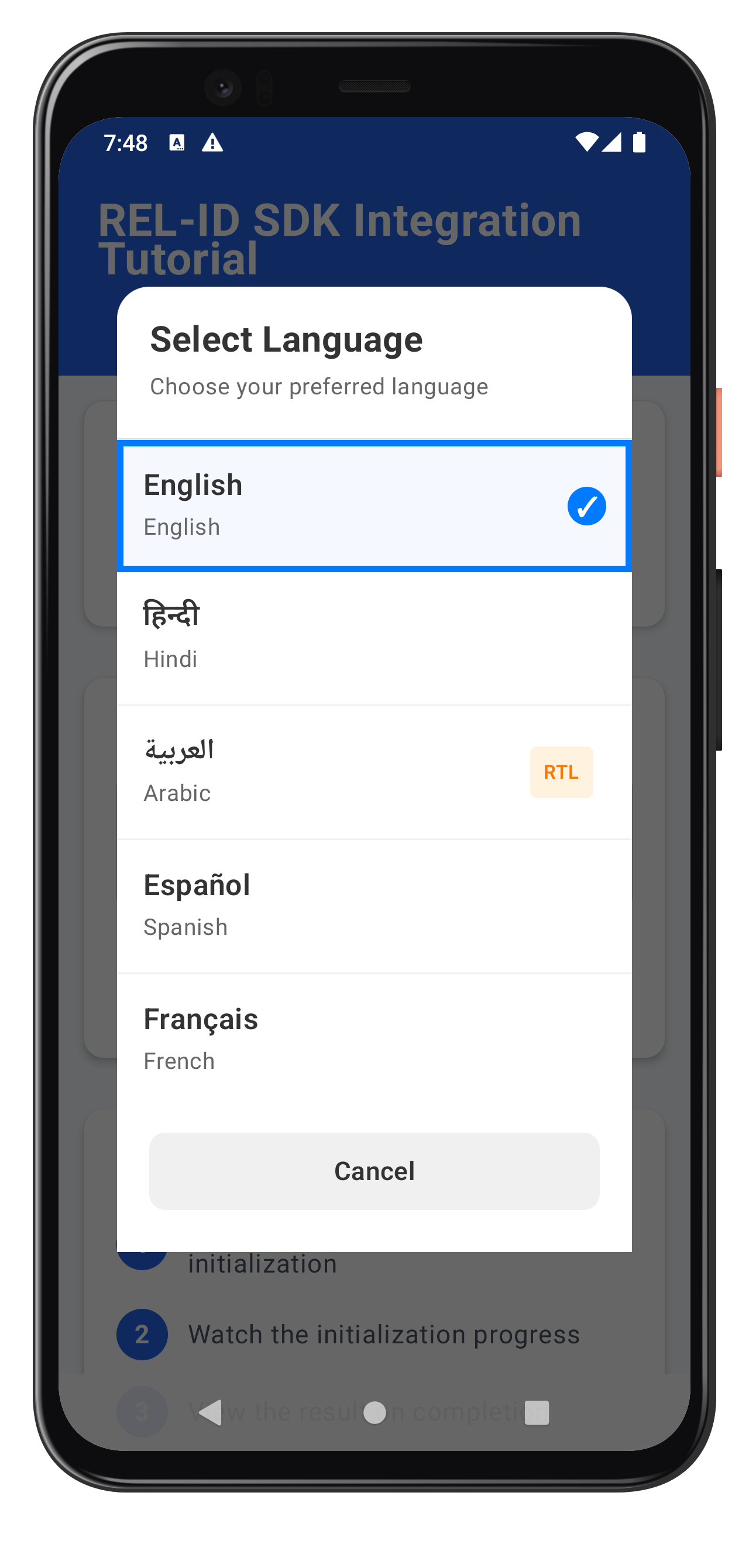
Step 3: Create Language Selector Composable
Create
tutorial/screens/components/LanguageSelector.kt
:
package com.relidcodelab.tutorial.screens.components

import androidx.compose.foundation.background
import androidx.compose.foundation.border
import androidx.compose.foundation.clickable
import androidx.compose.foundation.layout.*
import androidx.compose.foundation.lazy.LazyColumn
import androidx.compose.foundation.lazy.items
import androidx.compose.foundation.shape.CircleShape
import androidx.compose.foundation.shape.RoundedCornerShape
import androidx.compose.material3.*
import androidx.compose.runtime.Composable
import androidx.compose.ui.Alignment
import androidx.compose.ui.Modifier
import androidx.compose.ui.graphics.Color
import androidx.compose.ui.text.font.FontWeight
import androidx.compose.ui.unit.dp
import androidx.compose.ui.unit.sp
import androidx.compose.ui.window.Dialog
import androidx.compose.ui.window.DialogProperties
import com.relidcodelab.tutorial.models.Language

/**
 * Language Selector Dialog Component
 *
 * Provides a UI for selecting application language with:
 * - Native script display (English, हिन्दी, العربية, Español)
 * - RTL badge indicators for right-to-left languages
 * - Current language checkmark
 * - Bottom sheet style dialog
 */
@Composable
fun LanguageSelector(
    visible: Boolean,
    currentLanguage: Language,
    supportedLanguages: List<Language>,
    onSelectLanguage: (Language) -> Unit,
    onClose: () -> Unit
) {
    if (!visible) return

    Dialog(
        onDismissRequest = onClose,
        properties = DialogProperties(
            dismissOnBackPress = true,
            dismissOnClickOutside = true
        )
    ) {
        // Container with rounded top corners (bottom sheet style)
        Card(
            modifier = Modifier
                .fillMaxWidth()
                .fillMaxHeight(0.8f),
            shape = RoundedCornerShape(topStart = 20.dp, topEnd = 20.dp),
            colors = CardDefaults.cardColors(
                containerColor = Color(0xFFFFFFFF)
            )
        ) {
            Column(
                modifier = Modifier.fillMaxSize()
            ) {
                // Header
                Column(
                    modifier = Modifier
                        .fillMaxWidth()
                        .padding(20.dp)
                ) {
                    Text(
                        text = "Select Language",
                        fontSize = 22.sp,
                        fontWeight = FontWeight.Bold,
                        color = Color(0xFF333333),
                        modifier = Modifier.padding(bottom = 4.dp)
                    )
                    Text(
                        text = "Choose your preferred language",
                        fontSize = 14.sp,
                        color = Color(0xFF666666)
                    )
                }

                // Divider for header border
                HorizontalDivider(
                    thickness = 1.dp,
                    color = Color(0xFFE0E0E0)
                )

                // Language List (scrollable)
                LazyColumn(
                    modifier = Modifier
                        .weight(1f)
                        .heightIn(max = 400.dp)
                ) {
                    items(supportedLanguages) { language ->
                        LanguageItem(
                            language = language,
                            isSelected = currentLanguage.lang == language.lang,
                            onSelect = { onSelectLanguage(language) }
                        )
                    }
                }

                // Close Button
                TextButton(
                    onClick = onClose,
                    modifier = Modifier
                        .fillMaxWidth()
                        .padding(horizontal = 20.dp, vertical = 10.dp)
                        .padding(vertical = 16.dp)
                        .background(
                            color = Color(0xFFF0F0F0),
                            shape = RoundedCornerShape(10.dp)
                        ),
                    colors = ButtonDefaults.textButtonColors(
                        contentColor = Color(0xFF333333)
                    )
                ) {
                    Text(
                        text = "Cancel",
                        fontSize = 16.sp,
                        fontWeight = FontWeight.SemiBold
                    )
                }
            }
        }
    }
}

/**
 * Language Item Component
 *
 * Represents a single language option in the selector
 */
@Composable
private fun LanguageItem(
    language: Language,
    isSelected: Boolean,
    onSelect: () -> Unit
) {
    Row(
        modifier = Modifier
            .fillMaxWidth()
            .clickable(onClick = onSelect)
            .background(
                color = if (isSelected) {
                    Color(0xFFF5F9FF)
                } else {
                    Color.Transparent
                }
            )
            .then(
                if (isSelected) {
                    Modifier.border(
                        width = 4.dp,
                        color = Color(0xFF007AFF),
                        shape = RoundedCornerShape(0.dp)
                    )
                        .padding(start = 0.dp)
                } else {
                    Modifier
                }
            )
            .padding(16.dp),
        horizontalArrangement = Arrangement.SpaceBetween,
        verticalAlignment = Alignment.CenterVertically
    ) {
        // Language Info (left side)
        Column(
            modifier = Modifier.weight(1f)
        ) {
            Text(
                text = language.nativeName,
                fontSize = 18.sp,
                fontWeight = FontWeight.SemiBold,
                color = Color(0xFF333333),
                modifier = Modifier.padding(bottom = 2.dp)
            )
            Text(
                text = language.displayText,
                fontSize = 14.sp,
                color = Color(0xFF666666)
            )
        }

        // Language Metadata (right side)
        Row(
            horizontalArrangement = Arrangement.spacedBy(8.dp),
            verticalAlignment = Alignment.CenterVertically
        ) {
            // RTL Badge
            if (language.isRTL) {
                Surface(
                    color = Color(0xFFFFF3E0),
                    shape = RoundedCornerShape(4.dp),
                    modifier = Modifier.padding(horizontal = 8.dp, vertical = 4.dp)
                ) {
                    Text(
                        text = "RTL",
                        fontSize = 12.sp,
                        fontWeight = FontWeight.SemiBold,
                        color = Color(0xFFF57C00),
                        modifier = Modifier.padding(horizontal = 8.dp, vertical = 4.dp)
                    )
                }
            }

            // Checkmark (Selection Indicator)
            if (isSelected) {
                Surface(
                    modifier = Modifier.size(24.dp),
                    shape = CircleShape,
                    color = Color(0xFF007AFF)
                ) {
                    Box(
                        contentAlignment = Alignment.Center,
                        modifier = Modifier.fillMaxSize()
                    ) {
                        Text(
                            text = "✓",
                            color = Color(0xFFFFFFFF),
                            fontSize = 16.sp,
                            fontWeight = FontWeight.Bold
                        )
                    }
                }
            }
        }
    }

    // Item bottom border
    if (!isSelected) {
        HorizontalDivider(
            thickness = 1.dp,
            color = Color(0xFFF0F0F0)
        )
    }
}
Step 4: Integrate Language Selector in Dashboard
Add to your Dashboard or Drawer menu screen:
@Composable
fun DashboardScreen(
    viewModel: DashboardViewModel,
    rdnaService: RDNAService
) {
    // Collect language state
    val currentLanguage by LanguageManager.currentLanguage.collectAsStateWithLifecycle()
    val supportedLanguages by LanguageManager.supportedLanguages.collectAsStateWithLifecycle()

    var showLanguageSelector by remember { mutableStateOf(false) }
    var isChangingLanguage by remember { mutableStateOf(false) }

    // Language change handler
    val handleLanguageSelect: (Language) -> Unit = { language ->
        showLanguageSelector = false

        if (language.lang != currentLanguage.lang) {
            isChangingLanguage = true

            // Call setSDKLanguage API
            try {
                val error = rdnaService.setSDKLanguage(
                    language.lang,
                    language.direction
                )

                if (error.longErrorCode != 0) {
                    // Show error
                    android.widget.Toast.makeText(
                        context,
                        "Language change error: ${error.errorString}",
                        android.widget.Toast.LENGTH_SHORT
                    ).show()
                }
                // Wait for onSetLanguageResponse event in SDKEventProvider
            } catch (e: Exception) {
                android.widget.Toast.makeText(
                    context,
                    "Language change failed: ${e.message}",
                    android.widget.Toast.LENGTH_SHORT
                ).show()
            } finally {
                isChangingLanguage = false
            }
        }
    }

    // Dashboard UI
    Column {
        // Language change button
        Button(
            onClick = { showLanguageSelector = true },
            enabled = !isChangingLanguage
        ) {
            Text("🌐 Change Language (${currentLanguage.nativeName})")
        }

        // Language Selector Dialog
        LanguageSelector(
            visible = showLanguageSelector,
            currentLanguage = currentLanguage,
            supportedLanguages = supportedLanguages,
            onSelectLanguage = handleLanguageSelect,
            onClose = { showLanguageSelector = false }
        )
    }
}
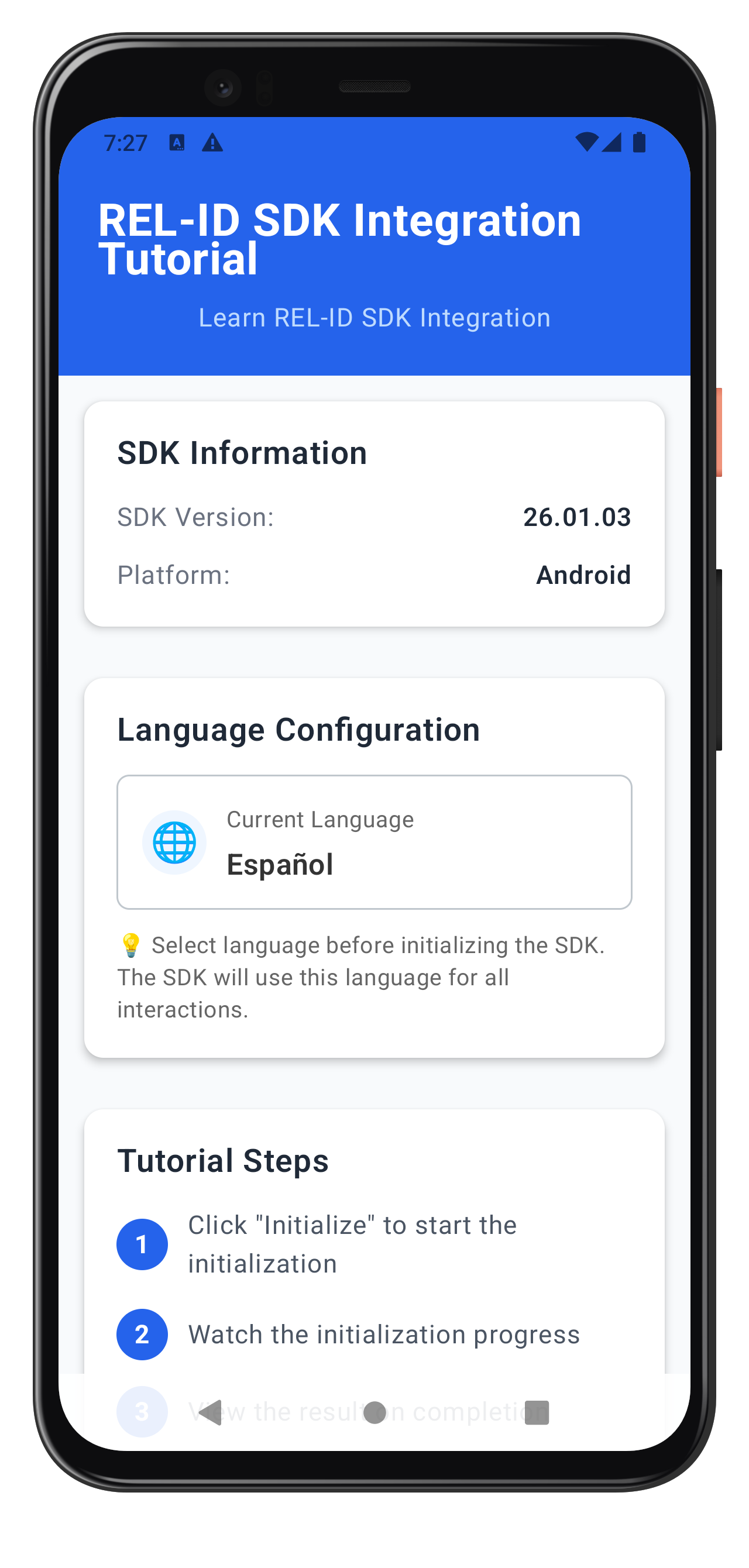
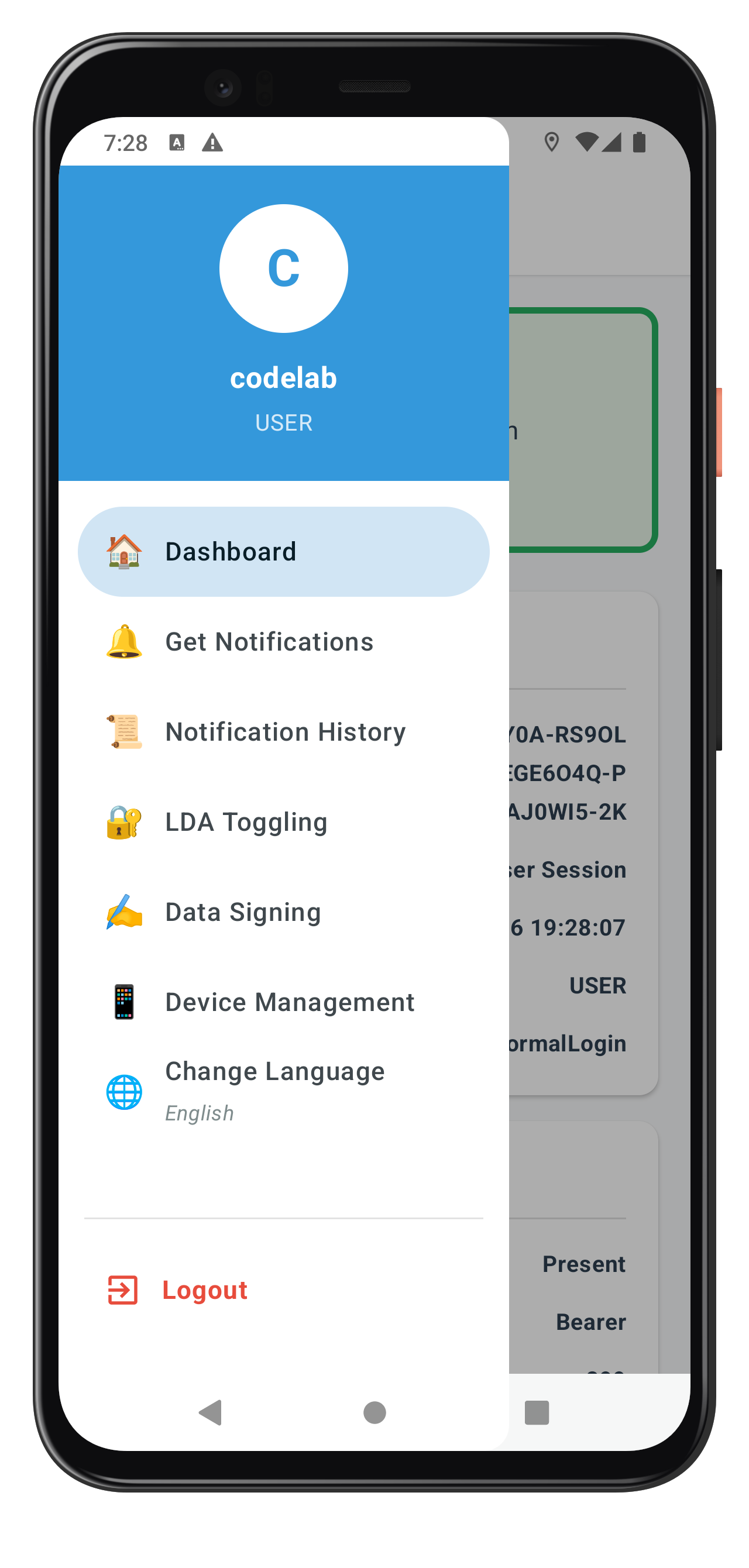
The following image showcases the screens from the sample application:
|
|
|
Let's verify that your internationalization implementation works correctly.
Verification Checklist
Follow these steps to test your i18n implementation:
Phase 1: SDK Initialization (App Startup)
- [ ] App starts with saved language preference (e.g., Spanish)
- [ ] SDK initializes with short language code (
RDNAInitOptions.rdnaLanguageOptions.localeCode = 'es') - [ ] If initialization succeeds, SDK returns supported languages
- [ ] If initialization fails with network down, SDK returns Spanish error message from
values-es/strings_rel_id.xml - [ ] Localized error message is displayed correctly to user without app-level mapping
Phase 2: Runtime Language Switching (Post-Login)
- [ ] Navigate to dashboard and tap "Change Language"
- [ ] Language Selector dialog opens with all supported languages
- [ ] Current language is marked with checkmark
- [ ] Tapping a language calls
setSDKLanguage()API - [ ] Loading indicator appears during language change (optional)
- [ ]
onSetLanguageResponsecallback fires after API call - [ ] If successful (statusCode === 100 or 0 and longErrorCode === 0):
- [ ] LanguageManager updates with new language
- [ ] Success Toast is shown to user
- [ ] All language-dependent UI updates immediately via Compose recomposition
- [ ] If failed (longErrorCode !== 0):
- [ ] Error Toast is shown to user
- [ ] Language does NOT change
- [ ] User can retry language selection
Localization Files Setup (Android)
- [ ] Verify
app/src/main/res/values-hi/strings_rel_id.xmlexists - [ ] Error messages are properly formatted:
Hindi message here - [ ] Build app:
./gradlew assembleDebug - [ ] Test with network offline to verify SDK returns localized error messages
State Management Verification
- [ ] Check Logcat for LanguageManager logs showing state updates
- [ ] Verify StateFlow collectors receive language updates
- [ ] Test app restart - language preference persists
- [ ] Test multiple language switches - no memory leaks
Internationalization Best Practices
- Use Short Codes for Initialization, Full Codes for APIs
- Initialize:
RDNAInitOptions.rdnaLanguageOptions.localeCode = 'en'(short code) - setSDKLanguage:
'en-US'(full code)
- Initialize:
- Bundle Localization Files with App
- SDK reads localization files during initialization errors
- Ensure strings.xml files are in correct
values-xx/directories - Do not load localization files remotely - they won't be available if network is down
- Test error scenarios with network disconnected to verify error messages display
- Use Lifecycle-Aware Coroutine Scopes
- Collect language events in
viewModelScopeorlifecycleScope - Automatic cleanup when scope is cancelled
- Prevent memory leaks from dangling collectors
- Collect language events in
- Validate Before API Calls
- Check if selected language equals current language
- Skip API call if no change needed
- Reduce unnecessary network requests
- Persist User Preferences
- Save language choice to SharedPreferences
- Restore on app restart
- Respect user's language preferences across sessions
- Handle RTL Languages
- Detect RTL languages from
languageDirectionfield - Show RTL badge in language selector
- Test UI layout with RTL languages (Arabic, Hebrew)
- Detect RTL languages from
Security Considerations
- Localization File Security
- Localization files are bundled with the app binary (not downloaded)
- Ensures error messages are always available even without network
- Review all error messages in localization files - SDK will display them to users
- Keep error messages user-friendly without exposing internal error codes
- Language Validation
- Validate language codes before sending to SDK
- Use enum values like
RDNALanguageDirection - Prevent injection attacks through language selection
- State Management Security
- Use immutable StateFlow for exposing state
- Private MutableStateFlow for internal updates
- Prevent external modification of language state
Performance Optimization
- Use StateFlow for Reactive Updates
- StateFlow caches current value (hot flow)
- Efficient recomposition in Jetpack Compose
- Automatic lifecycle awareness with
collectAsStateWithLifecycle()
- Minimize API Calls
- Don't call
setSDKLanguage()if language hasn't changed - Cache supported languages after initialization
- Use local state for UI updates before SDK confirmation
- Don't call
- Coroutine Dispatchers
- Use
Dispatchers.IOfor SDK calls (network/file operations) - Use
Dispatchers.Mainfor UI updates - SharedPreferences operations are fast enough for Main dispatcher
- Use
🎉 Congratulations! You've successfully implemented comprehensive internationalization support with REL-ID SDK for Android!
What You've Accomplished
In this codelab, you've learned and implemented:
✅ Two-Phase Language Lifecycle
- SDK initialization with language preference via
RDNAInitOptions - Runtime language switching using
setSDKLanguage()API - Automatic error localization via SDK reading native localization files
- Event-driven language updates with
onSetLanguageResponse - Synchronizing supported languages from
onInitializedcallback
✅ Native Platform Localization
- Android
strings.xmlconfiguration for error codes - Multi-language support (English, Hindi, Spanish, Arabic, and beyond)
- RTL language support with proper badges and indicators
✅ Language State Management
- LanguageManager singleton with StateFlow for reactive state
- SharedPreferences persistence for language preferences
- Lifecycle-aware state collection with Compose
✅ User Interface Components
- Language Selector dialog with native script display
- Dashboard integration for language change
- RTL/LTR support with direction indicators
- Material 3 design patterns
✅ Production-Ready Error Handling
- Three-layer error detection (sync response, status code, error code)
- Early return pattern for cleaner code
- User-friendly Toast messages and feedback
Next Steps
Your internationalization implementation is now production-ready! Consider these enhancements:
- Add More Languages: Expand your language support
- Add German, French, or other languages to
DEFAULT_SUPPORTED_LANGUAGES - Create corresponding
values-xx/strings_rel_id.xmlfiles - Update the
NATIVE_NAME_LOOKUPtable inLanguageConfig.kt - Test RTL layout with Arabic or Hebrew languages
- Add German, French, or other languages to
- Server-Side Language Management: Sync with backend
- Validate language availability against server-supported languages
- Store user language preference in user profile on backend
- Implement language fallback chains (e.g., ‘zh-TW' → ‘zh-CN' → ‘en')
- Handle cases where user's preferred language is not available
- Enhanced UI/UX
- Add language preview before confirming change
- Implement language-specific fonts for better native script rendering
- Add language search/filter in selector for many languages
- Show language change loading state in UI
Happy coding with internationalization! 🌍
This codelab was created to help you master multi-language support with REL-ID SDK. The patterns you've learned here are production-tested and used by enterprise applications worldwide.