🎯 Learning Path:
- Complete REL-ID Complete Activation & Login Flow Codelab
- You are here → Data Signing Flow Implementation
Welcome to the REL-ID Data Signing codelab! This tutorial builds upon your existing MFA implementation to add secure cryptographic data signing capabilities using REL-ID SDK's authentication and signing infrastructure.
What You'll Build
In this codelab, you'll enhance your existing MFA application with:
- 🔐 Cryptographic Data Signing: Secure payload signing with user authentication
- 📊 Multi-Level Authentication: Configurable authentication levels (0-4) for different security needs
- 🎛️ Authentication Type Selection: Support for various authenticator types (biometric, password, LDA)
- 🔄 Step-Up Authentication Flow: Password challenges for additional security when required
What You'll Learn
By completing this codelab, you'll master:
- Data Signing API Integration: Implementing
authenticateUserAndSignData()with proper parameter handling - Authentication Levels & Types: Understanding and implementing RDNAAuthLevel and RDNAAuthenticatorType enums
- Step-Up Authentication: Handling password challenges during sensitive signing operations
- Event-Driven Architecture: Managing
onAuthenticateUserAndSignDatacallbacks and state updates
Prerequisites
Before starting this codelab, ensure you have:
- ✅ Completed REL-ID MFA Codelabs - All MFA screens and flows must be fully implemented
- ✅ Android Development Environment - Android Studio with Kotlin and Jetpack Compose configured
- ✅ REL-ID SDK Integration - Latest SDK (AAR v25.08.03 + Engine v7.7.4) with data signing support
- ✅ Server Configuration - REL-ID server with data signing capabilities enabled
Get the Code from GitHub
The code to get started can be found in a GitHub repository.
You can clone the repository using the following command:
git clone https://github.com/uniken-public/codelab-android.git
Navigate to the relid-data-signing folder in the repository you cloned earlier
Codelab Architecture Overview
This codelab extends your MFA application with comprehensive data signing functionality:
- REL-ID SDK Integration: Direct integration with REL-ID data signing APIs via AAR
- Multi-Level Authentication: Support for REL-ID authentication levels 0, 1, and 4 only
- Step-Up Authentication Flow: Password challenges and biometric authentication
- Event-Driven Integration: Seamless integration with REL-ID SDK's callback architecture via SharedFlow
- State Management: Proper cleanup using resetAuthenticateUserAndSignDataState API
Before implementing data signing functionality, let's understand the cryptographic concepts and security architecture that powers REL-ID's data signing capabilities.
What is Cryptographic Data Signing?
Data signing is a cryptographic process that creates a digital signature for a piece of data, providing:
- 🔐 Authentication: Proves the identity of the signer
- 🛡️ Data Integrity: Ensures data hasn't been tampered with
- 📝 Non-Repudiation: Prevents the signer from denying they signed the data
- 🔒 Legal Validity: Creates legally binding digital signatures
REL-ID Data Signing Architecture
REL-ID's data signing implementation follows enterprise security standards:
User Data Input → Authentication Challenge → Biometric/LDA/Password Verification →
Cryptographic Signing → Signed Payload → Verification
Key Security Features
- Multi-Level Authentication: 3 supported authentication levels (0, 1, 4) for different security requirements
- Supported Authenticator Types: NONE (auto-selection) and IDV Server Biometric only
- Step-Up Authentication: Additional password challenges for sensitive operations
- Secure State Management: Proper cleanup and reset to prevent authentication bypass
- Comprehensive Error Handling: Detailed error codes and recovery mechanisms
When to Use Data Signing
Data signing is ideal for:
- 📄 Document Authorization: Legal documents, contracts, approvals
- 💰 Financial Transactions: High-value payments, transfers, authorizations
- 🏥 Medical Records: Patient consent, prescription approvals, medical authorizations
- 🔐 Security Operations: Administrative actions, privilege escalations, policy changes
- 📊 Audit Trail Requirements: Operations requiring non-repudiable audit logs
Security Considerations
Key security guidelines:
- Authentication Level Selection: Match authentication level to data sensitivity
- Proper State Cleanup: Always reset authentication state after completion or cancellation
- Error Handling: Never expose sensitive error details to end users
- Audit Logging: Log all signing attempts for security monitoring
- User Experience: Balance security with usability for optimal user adoption
Let's explore the three core APIs that power REL-ID's data signing functionality, understanding their parameters, responses, and integration patterns.
authenticateUserAndSignData API
This is the primary API for initiating cryptographic data signing with user authentication.
API Signature
fun authenticateUserAndSignData(
    payload: String,
    authLevel: RDNA.RDNAAuthLevel,
    authenticatorType: RDNA.RDNAAuthenticatorType,
    reason: String
): RDNA.RDNAError
Parameters Deep Dive
Parameter | Type | Required | Description |
| String | ✅ | The data to be cryptographically signed (max 500 characters) |
| RDNA.RDNAAuthLevel | ✅ | Authentication security level (0, 1, or 4 only) |
| RDNA.RDNAAuthenticatorType | ✅ | Type of authentication method (0 or 1 only) |
| String | ✅ | Human-readable reason for signing (max 100 characters) |
Official REL-ID Data Signing Authentication Mapping
RDNAAuthLevel | RDNAAuthenticatorType | Supported Authentication | Description |
|
| No Authentication | No authentication required - NOT RECOMMENDED for production |
|
| Device biometric, Device passcode, or Password | Priority: Device biometric → Device passcode → Password |
| NOT SUPPORTED | ❌ SDK will error out | Level 2 is not supported for data signing |
| NOT SUPPORTED | ❌ SDK will error out | Level 3 is not supported for data signing |
|
| IDV Server Biometric | Maximum security - Any other authenticator type will cause SDK error |
How to Use AuthLevel and AuthenticatorType
REL-ID data signing supports three authentication modes:
1. No Authentication (Level 0)
authLevel = RDNA.RDNAAuthLevel.RDNA_AUTH_LEVEL_NONE
authenticatorType = RDNA.RDNAAuthenticatorType.RDNA_AUTH_TYPE_NONE
- Use Case: Testing environments only
- Security: No authentication required
- ⚠️ Warning: Never use in production applications
2. Re-Authentication (Level 1)
authLevel = RDNA.RDNAAuthLevel.RDNA_AUTH_LEVEL_1
authenticatorType = RDNA.RDNAAuthenticatorType.RDNA_AUTH_TYPE_NONE
- Use Case: Standard document signing with flexible authentication
- Security: User logs in the same way they logged into the app
- Authenticator Priority: Device biometric → Device passcode → Password
- Behavior: REL-ID automatically selects best available authenticator
3. Step-up Authentication (Level 4)
authLevel = RDNA.RDNAAuthLevel.RDNA_AUTH_LEVEL_4
authenticatorType = RDNA.RDNAAuthenticatorType.RDNA_IDV_SERVER_BIOMETRIC
- Use Case: High-value transactions, sensitive documents, compliance requirements
- Security: Maximum security with server-side biometric verification
- Requirement: Must use
RDNA_IDV_SERVER_BIOMETRIC- other types will cause errors - Behavior: Forces strong biometric authentication regardless of user's enrolled authenticators
Sync Response Pattern
// Success Response
RDNAError(
    longErrorCode = 0,
    shortErrorCode = 0,
    errorString = ""
)

// Error Response
RDNAError(
    longErrorCode = 123,
    shortErrorCode = 45,
    errorString = "Authentication failed"
)
Implementation Example
// Service layer implementation (RDNAService.kt)
fun authenticateUserAndSignData(
    payload: String,
    authLevel: RDNAAuthLevel,
    authenticatorType: RDNAAuthenticatorType,
    reason: String
): RDNAError {
    Log.d(TAG, "authenticateUserAndSignData() called")
    Log.d(TAG, "  payload: ${payload.take(50)}${if (payload.length > 50) "..." else ""}")
    Log.d(TAG, "  authLevel: ${authLevel.intValue}")
    Log.d(TAG, "  authenticatorType: ${authenticatorType.intValue}")
    Log.d(TAG, "  reason: $reason")

    // Call SDK method directly
    val error = rdna.authenticateUserAndSignData(payload, authLevel, authenticatorType, reason)

    if (error.longErrorCode != 0) {
        Log.e(TAG, "authenticateUserAndSignData sync error: ${error.errorString} (code: ${error.longErrorCode})")
    } else {
        Log.d(TAG, "authenticateUserAndSignData sync success - awaiting authentication challenge and signature callback")
    }

    return error
}
resetAuthenticateUserAndSignDataState API
This API cleans up authentication state after signing completion or cancellation.
API Signature
fun resetAuthenticateUserAndSignDataState(): RDNA.RDNAError
When to Use
- ✅ User Cancellation: When user cancels the signing process
- ✅ Error Recovery: After signing errors to clean state
- ✅ Navigation Away: When user navigates away from signing screens when signing is in progress
Implementation Example
// Service layer cleanup implementation (RDNAService.kt)
fun resetAuthenticateUserAndSignDataState(): RDNAError {
    Log.d(TAG, "resetAuthenticateUserAndSignDataState() called")

    val error = rdna.resetAuthenticateUserAndSignDataState()

    if (error.longErrorCode != 0) {
        Log.e(TAG, "resetAuthenticateUserAndSignDataState error: ${error.errorString} (code: ${error.longErrorCode})")
    } else {
        Log.d(TAG, "resetAuthenticateUserAndSignDataState success - data signing state reset")
    }

    return error
}
onAuthenticateUserAndSignData Event
This callback event delivers the final signing results after authentication completion.
Event Response Structure
// SDK Type: RDNA.RDNADataSigningDetails
data class RDNADataSigningDetails(
    val dataPayload: String,           // Original payload that was signed
    val dataPayloadLength: Int,        // Length of the payload
    val reason: String,                // Reason provided for signing
    val payloadSignature: String,      // Cryptographic signature
    val dataSignatureID: String,       // Unique signature identifier
    val authLevel: RDNAAuthLevel,      // Authentication level used
    val authenticatorType: RDNAAuthenticatorType  // Authentication type used
)
Event Handler Implementation
// Callback implementation (RDNACallbackManager.kt)
override fun onAuthenticateUserAndSignData(
    rdnaDataSigningDetails: RDNA.RDNADataSigningDetails?,
    rdnaRequestStatus: RDNA.RDNARequestStatus?,
    rdnaError: RDNA.RDNAError?
) {
    Log.d(TAG, "onAuthenticateUserAndSignData callback received")
    Log.d(TAG, "  Status Code: ${rdnaRequestStatus?.statusCode}")
    Log.d(TAG, "  Error Code: ${rdnaError?.longErrorCode}")
    Log.d(TAG, "  Payload Length: ${rdnaDataSigningDetails?.dataPayloadLength}")
    Log.d(TAG, "  Signature ID Length: ${rdnaDataSigningDetails?.dataSignatureID?.length}")

    // Emit SDK type directly to SharedFlow
    if (rdnaDataSigningDetails != null && rdnaRequestStatus != null && rdnaError != null) {
        scope.launch {
            _dataSigningEvent.emit(
                DataSigningEventData(
                    signingDetails = rdnaDataSigningDetails,  // SDK type directly!
                    status = rdnaRequestStatus,
                    error = rdnaError
                )
            )
            Log.d(TAG, "Data signing event emitted to flow")
        }
    } else {
        Log.w(TAG, "onAuthenticateUserAndSignData received null parameters")
    }
}
Success vs Error Handling
Success Indicators:
error.longErrorCode == 0status.statusCode == 100- Valid
payloadSignatureanddataSignatureID
Error Handling:
- Log comprehensive error details
- Show user-friendly error messages
- Reset authentication state
- Allow retry opportunities
Now let's implement the service layer architecture that provides clean abstraction over REL-ID SDK data signing APIs. This follows the established patterns from your MFA implementation.
RDNAService Integration
The core SDK service methods are already implemented in your RDNAService.kt from the MFA codelab:
// app/src/main/java/com/relidcodelab/uniken/services/RDNAService.kt

/**
 * Authenticate user and sign data
 *
 * NEW for Data Signing codelab
 * Initiates cryptographic data signing with step-up authentication.
 */
fun authenticateUserAndSignData(
    payload: String,
    authLevel: RDNAAuthLevel,
    authenticatorType: RDNAAuthenticatorType,
    reason: String
): RDNAError {
    Log.d(TAG, "authenticateUserAndSignData() called")
    Log.d(TAG, "  payload: ${payload.take(50)}${if (payload.length > 50) "..." else ""}")
    Log.d(TAG, "  authLevel: ${authLevel.intValue}")
    Log.d(TAG, "  authenticatorType: ${authenticatorType.intValue}")
    Log.d(TAG, "  reason: $reason")

    // Call SDK method - signature verified from AAR (PHASE 0.5)
    val error = rdna.authenticateUserAndSignData(payload, authLevel, authenticatorType, reason)

    if (error.longErrorCode != 0) {
        Log.e(TAG, "authenticateUserAndSignData sync error: ${error.errorString} (code: ${error.longErrorCode})")
    } else {
        Log.d(TAG, "authenticateUserAndSignData sync success - awaiting authentication challenge and signature callback")
    }

    return error
}

/**
 * Reset authenticate user and sign data state
 *
 * NEW for Data Signing codelab
 * Resets the data signing authentication flow back to initial state.
 * Used when user cancels the signing operation.
 */
fun resetAuthenticateUserAndSignDataState(): RDNAError {
    Log.d(TAG, "resetAuthenticateUserAndSignDataState() called")

    // Call SDK method - signature verified from AAR (PHASE 0.5)
    val error = rdna.resetAuthenticateUserAndSignDataState()

    if (error.longErrorCode != 0) {
        Log.e(TAG, "resetAuthenticateUserAndSignDataState error: ${error.errorString} (code: ${error.longErrorCode})")
    } else {
        Log.d(TAG, "resetAuthenticateUserAndSignDataState success - data signing state reset")
    }

    return error
}
Key Service Implementation Details
The service layer provides:
- Direct SDK Integration: Calls SDK methods with proper parameter mapping
- Comprehensive Logging: Logs all operations with context for debugging
- Error Handling: Returns SDK errors directly for upstream handling
- Type Safety: Uses SDK enums directly (no conversion needed)
Service Integration Pattern
Unlike other platforms, Android uses the SDK types directly:
// ViewModel calls RDNAService
viewModelScope.launch {
    // Call SDK method - using SDK enums directly!
    val error = rdnaService.authenticateUserAndSignData(
        payload = state.payload,
        authLevel = state.selectedAuthLevel!!,        // RDNA.RDNAAuthLevel enum
        authenticatorType = state.selectedAuthenticatorType!!,  // RDNA.RDNAAuthenticatorType enum
        reason = state.reason
    )

    if (error.longErrorCode != 0) {
        Log.e(TAG, "authenticateUserAndSignData sync error: ${error.errorString}")
        _uiState.update {
            it.copy(
                isLoading = false,
                error = "Failed to initiate signing: ${error.errorString}"
            )
        }
    } else {
        Log.d(TAG, "authenticateUserAndSignData sync success - awaiting callback")
        // Keep loading true until callback received
    }
}
Error Handling Patterns
Key error handling strategies in the service layer:
- Comprehensive Logging: Log all operations with context
- Direct Error Codes: Return SDK error codes unchanged
- State Cleanup: Always attempt to reset state on errors
- Non-Blocking Cleanup: Don't let cleanup errors block user flow
- Error Categorization: Different handling for different error types
Android uses Kotlin SharedFlow for reactive event handling from the SDK callbacks. Let's examine the data signing event implementation.
RDNACallbackManager - Event Emission
The callback manager emits SDK types directly to SharedFlow:
// app/src/main/java/com/relidcodelab/uniken/services/RDNACallbackManager.kt

/**
 * Data signing response events - Using SDK type directly!
 * NEW for Data Signing codelab
 * Triggered when authenticateUserAndSignData() completes with signature
 */
private val _dataSigningEvent = MutableSharedFlow<DataSigningEventData>()
val dataSigningEvent: SharedFlow<DataSigningEventData> = _dataSigningEvent.asSharedFlow()

/**
 * Data signing response callback
 *
 * USES SDK TYPES DIRECTLY - No wrapper classes!
 * rdnaDataSigningDetails properties:
 *   - dataPayload: String - Original payload that was signed
 *   - dataPayloadLength: Int - Length of the payload
 *   - reason: String - Reason for signing
 *   - payloadSignature: String - THE CRYPTOGRAPHIC SIGNATURE
 *   - dataSignatureID: String - Unique signature identifier
 *   - authLevel: RDNAAuthLevel - Authentication level used
 *   - authenticatorType: RDNAAuthenticatorType - Authenticator type used
 */
override fun onAuthenticateUserAndSignData(
    rdnaDataSigningDetails: RDNA.RDNADataSigningDetails?,
    rdnaRequestStatus: RDNA.RDNARequestStatus?,
    rdnaError: RDNA.RDNAError?
) {
    Log.d(TAG, "onAuthenticateUserAndSignData callback received")
    Log.d(TAG, "  Status Code: ${rdnaRequestStatus?.statusCode}")
    Log.d(TAG, "  Error Code: ${rdnaError?.longErrorCode}")
    Log.d(TAG, "  Payload Length: ${rdnaDataSigningDetails?.dataPayloadLength}")
    Log.d(TAG, "  Signature ID Length: ${rdnaDataSigningDetails?.dataSignatureID?.length}")

    // Emit SDK type directly to SharedFlow - NO conversion!
    if (rdnaDataSigningDetails != null && rdnaRequestStatus != null && rdnaError != null) {
        scope.launch {
            _dataSigningEvent.emit(
                DataSigningEventData(
                    signingDetails = rdnaDataSigningDetails,  // SDK type directly!
                    status = rdnaRequestStatus,
                    error = rdnaError
                )
            )
            Log.d(TAG, "Data signing event emitted to flow")
        }
    } else {
        Log.w(TAG, "onAuthenticateUserAndSignData received null parameters")
    }
}
Event Data Class
The event data class wraps SDK types without conversion:
// app/src/main/java/com/relidcodelab/uniken/models/EventDataModels.kt

/**
 * Data signing event data wrapper
 * USES SDK TYPE DIRECTLY: RDNA.RDNADataSigningDetails
 */
data class DataSigningEventData(
    val signingDetails: RDNA.RDNADataSigningDetails,  // SDK type!
    val status: RDNA.RDNARequestStatus,
    val error: RDNA.RDNAError
)
ViewModel Event Collection
ViewModels collect events from the callback manager:
// app/src/main/java/com/relidcodelab/tutorial/viewmodels/DataSigningInputViewModel.kt

/**
 * Setup event handlers for data signing callback and password challenge
 */
private fun setupEventHandlers() {
    // Data signing response handler
    viewModelScope.launch {
        callbackManager.dataSigningEvent.collect { event ->
            handleDataSigningResponse(event.signingDetails, event.status, event.error)
        }
    }

    // Password challenge handler (for challengeMode 12 - data signing)
    viewModelScope.launch {
        callbackManager.getPasswordEvent.collect { event ->
            handlePasswordChallenge(event)
        }
    }
}

/**
 * Handle data signing response from SDK
 * USES SDK TYPE DIRECTLY: RDNA.RDNADataSigningDetails
 */
private fun handleDataSigningResponse(
    signingDetails: RDNA.RDNADataSigningDetails,
    status: RDNA.RDNARequestStatus,
    error: RDNA.RDNAError
) {
    Log.d(TAG, "Data signing response received - statusCode: ${status.statusCode}, errorCode: ${error.longErrorCode}")

    _uiState.update { it.copy(isLoading = false) }

    // Check for errors first
    if (error.longErrorCode != 0) {
        Log.e(TAG, "Data signing error - errorCode: ${error.longErrorCode}, errorString: ${error.errorString}")
        _uiState.update {
            it.copy(
                error = "Signing failed: ${error.errorString} (Error code: ${error.longErrorCode})"
            )
        }
        return
    }

    // Check status code
    if (status.statusCode != 100) {
        Log.e(TAG, "Data signing status error - statusCode: ${status.statusCode}, statusMessage: ${status.statusMessage}")
        _uiState.update {
            it.copy(
                error = "Signing failed: ${status.statusMessage} (Status code: ${status.statusCode})"
            )
        }
        return
    }

    // Success - both error code 0 and status code 100
    Log.d(TAG, "Data signing successful - signature length: ${signingDetails.payloadSignature.length}")
    // Navigate to result screen with SDK type directly!
    viewModelScope.launch {
        _navigateToResult.emit(signingDetails)
        // Reset form after navigation
        resetForm()
    }
}
SharedFlow Pattern Benefits
The SharedFlow pattern provides:
- Reactive Updates: Automatic UI updates when events occur
- Type Safety: Compile-time type checking
- No Conversion: SDK types used directly (no overhead)
- Lifecycle Awareness: Automatic cleanup when ViewModel is destroyed
- Concurrent Collection: Multiple collectors can receive same event
Let's implement the ViewModels that manage UI state and coordinate between the service layer and Compose screens.
DataSigningInputViewModel - Form State Management
This ViewModel handles the input form and step-up authentication:
// app/src/main/java/com/relidcodelab/tutorial/viewmodels/DataSigningInputViewModel.kt

package com.relidcodelab.tutorial.viewmodels

import android.util.Log
import androidx.lifecycle.ViewModel
import androidx.lifecycle.viewModelScope
import com.relidcodelab.uniken.services.RDNACallbackManager
import com.relidcodelab.uniken.services.RDNAService
import com.uniken.rdna.RDNA
import kotlinx.coroutines.flow.*
import kotlinx.coroutines.launch

/**
 * UI State for Data Signing Input Screen
 */
data class DataSigningInputUiState(
    val payload: String = "",
    val selectedAuthLevel: RDNA.RDNAAuthLevel? = null,
    val selectedAuthenticatorType: RDNA.RDNAAuthenticatorType? = null,
    val reason: String = "",
    val isLoading: Boolean = false,
    val error: String? = null,
    val validationError: String? = null,
    // Password challenge dialog state
    val showPasswordDialog: Boolean = false,
    val passwordChallengeMode: Int = 0,
    val passwordAttemptsLeft: Int = 3,
    val passwordDialogError: String? = null,
    val passwordDialogStatus: String? = null
)

/**
 * ViewModel for Data Signing Input Screen
 *
 * Handles:
 * - Form state management (payload, auth level, authenticator type, reason)
 * - Validation before submission
 * - SDK call to authenticateUserAndSignData
 * - Listening for data signing result event
 * - Navigation event to results screen
 *
 * USES SDK TYPES DIRECTLY - No wrapper classes!
 */
class DataSigningInputViewModel(
    private val rdnaService: RDNAService,
    private val callbackManager: RDNACallbackManager
) : ViewModel() {

    companion object {
        private const val TAG = "DataSigningInputVM"
        private const val MAX_PAYLOAD_LENGTH = 500
        private const val MAX_REASON_LENGTH = 100
    }

    // UI State as StateFlow
    private val _uiState = MutableStateFlow(DataSigningInputUiState())
    val uiState: StateFlow<DataSigningInputUiState> = _uiState.asStateFlow()

    // Navigation event - using SDK type directly!
    private val _navigateToResult = MutableSharedFlow<RDNA.RDNADataSigningDetails>()
    val navigateToResult: SharedFlow<RDNA.RDNADataSigningDetails> = _navigateToResult.asSharedFlow()

    init {
        setupEventHandlers()
    }

    /**
     * Setup event handlers for data signing callback and password challenge
     */
    private fun setupEventHandlers() {
        // Data signing response handler
        viewModelScope.launch {
            callbackManager.dataSigningEvent.collect { event ->
                handleDataSigningResponse(event.signingDetails, event.status, event.error)
            }
        }

        // Password challenge handler (for challengeMode 12 - data signing)
        viewModelScope.launch {
            callbackManager.getPasswordEvent.collect { event ->
                handlePasswordChallenge(event)
            }
        }
    }

    /**
     * Handle password challenge event
     * Intercepts challengeMode 12 (data signing step-up auth) to show local dialog
     */
    private fun handlePasswordChallenge(event: com.relidcodelab.uniken.models.GetPasswordEventData) {
        val challengeMode = event.mode?.ordinal ?: 0
        val attemptsLeft = event.attemptsLeft
        val errorCode = event.error?.longErrorCode ?: 0
        val errorString = event.error?.errorString ?: ""
        val statusCode = event.response?.status?.statusCode ?: 0
        val statusMessage = event.response?.status?.statusMessage ?: ""

        Log.d(TAG, "Password challenge received - challengeMode: $challengeMode, attemptsLeft: $attemptsLeft, errorCode: $errorCode, statusCode: $statusCode")

        // Check if this is data signing step-up authentication (challengeMode 12)
        if (challengeMode == 12) {
            Log.d(TAG, "ChallengeMode 12 detected (data signing) - showing password dialog")

            // Prepare error message if present
            val dialogError = if (errorCode != 0) {
                "Authentication error: $errorString (Error code: $errorCode)"
            } else null

            // Prepare status message if present
            val dialogStatus = if (statusCode != 0 && statusCode != 100) {
                "Status: $statusMessage (Code: $statusCode)"
            } else null

            _uiState.update {
                it.copy(
                    showPasswordDialog = true,
                    passwordChallengeMode = challengeMode,
                    passwordAttemptsLeft = attemptsLeft,
                    passwordDialogError = dialogError,
                    passwordDialogStatus = dialogStatus
                )
            }
        } else {
            // Other challenge modes are handled globally
            Log.d(TAG, "ChallengeMode $challengeMode - delegating to global handler")
        }
    }

    /**
     * Handle data signing response from SDK
     */
    private fun handleDataSigningResponse(
        signingDetails: RDNA.RDNADataSigningDetails,
        status: RDNA.RDNARequestStatus,
        error: RDNA.RDNAError
    ) {
        Log.d(TAG, "Data signing response received - statusCode: ${status.statusCode}, errorCode: ${error.longErrorCode}")

        _uiState.update { it.copy(isLoading = false) }

        // Check for errors first
        if (error.longErrorCode != 0) {
            _uiState.update {
                it.copy(error = "Signing failed: ${error.errorString} (Error code: ${error.longErrorCode})")
            }
            return
        }

        // Check status code
        if (status.statusCode != 100) {
            _uiState.update {
                it.copy(error = "Signing failed: ${status.statusMessage} (Status code: ${status.statusCode})")
            }
            return
        }

        // Success - navigate to result screen
        viewModelScope.launch {
            _navigateToResult.emit(signingDetails)
            resetForm()
        }
    }

    /**
     * Update form fields
     */
    fun updatePayload(value: String) {
        if (value.length <= MAX_PAYLOAD_LENGTH) {
            _uiState.update { it.copy(payload = value, validationError = null) }
        }
    }

    fun updateAuthLevel(authLevel: RDNA.RDNAAuthLevel) {
        _uiState.update { it.copy(selectedAuthLevel = authLevel, validationError = null) }
    }

    fun updateAuthenticatorType(authenticatorType: RDNA.RDNAAuthenticatorType) {
        _uiState.update { it.copy(selectedAuthenticatorType = authenticatorType, validationError = null) }
    }

    fun updateReason(value: String) {
        if (value.length <= MAX_REASON_LENGTH) {
            _uiState.update { it.copy(reason = value, validationError = null) }
        }
    }

    /**
     * Validate form before submission
     */
    private fun validateForm(): String? {
        val state = _uiState.value

        if (state.payload.isBlank()) {
            return "Please enter a payload to sign"
        }

        if (state.selectedAuthLevel == null) {
            return "Please select an authentication level"
        }

        if (state.selectedAuthenticatorType == null) {
            return "Please select an authenticator type"
        }

        if (state.reason.isBlank()) {
            return "Please enter a reason for signing"
        }

        return null
    }

    /**
     * Submit data signing request
     */
    fun submitDataSigning() {
        val validationError = validateForm()
        if (validationError != null) {
            _uiState.update { it.copy(validationError = validationError) }
            return
        }

        val state = _uiState.value
        Log.d(TAG, "Submitting data signing request")

        _uiState.update { it.copy(isLoading = true, error = null, validationError = null) }

        viewModelScope.launch {
            // Call SDK method - using SDK enums directly!
            val error = rdnaService.authenticateUserAndSignData(
                payload = state.payload,
                authLevel = state.selectedAuthLevel!!,
                authenticatorType = state.selectedAuthenticatorType!!,
                reason = state.reason
            )

            if (error.longErrorCode != 0) {
                _uiState.update {
                    it.copy(
                        isLoading = false,
                        error = "Failed to initiate signing: ${error.errorString}"
                    )
                }
            } else {
                // Keep loading true until callback received
                Log.d(TAG, "authenticateUserAndSignData sync success - awaiting callback")
            }
        }
    }

    /**
     * Submit password for data signing step-up authentication
     */
    suspend fun submitPassword(password: String): Result<Unit> {
        Log.d(TAG, "Submitting password for data signing authentication")

        val error = rdnaService.setPassword(
            password = password,
            challengeMode = _uiState.value.passwordChallengeMode
        )

        if (error.longErrorCode == 0) {
            Log.d(TAG, "Password submitted successfully - closing dialog")
            _uiState.update {
                it.copy(
                    showPasswordDialog = false,
                    passwordDialogError = null
                )
            }
            return Result.success(Unit)
        } else {
            Log.e(TAG, "Password submission error: ${error.errorString}")
            _uiState.update {
                it.copy(
                    passwordDialogError = "Password error: ${error.errorString} (Error code: ${error.longErrorCode})"
                )
            }
            return Result.failure(Exception(error.errorString))
        }
    }

    /**
     * Cancel password challenge and reset data signing state
     */
    suspend fun cancelPasswordChallenge() {
        Log.d(TAG, "Cancelling password challenge - resetting state")

        val error = rdnaService.resetAuthenticateUserAndSignDataState()

        if (error.longErrorCode != 0) {
            _uiState.update {
                it.copy(
                    showPasswordDialog = false,
                    isLoading = false,
                    error = "Failed to cancel: ${error.errorString}"
                )
            }
        } else {
            _uiState.update {
                it.copy(
                    showPasswordDialog = false,
                    isLoading = false
                )
            }
        }
    }

    fun dismissPasswordDialog() {
        _uiState.update { it.copy(showPasswordDialog = false) }
    }

    fun clearError() {
        _uiState.update { it.copy(error = null) }
    }

    fun resetForm() {
        _uiState.update { DataSigningInputUiState() }
    }

    /**
     * Get available auth level options
     */
    fun getAuthLevelOptions(): List<Pair<RDNA.RDNAAuthLevel, String>> = listOf(
        RDNA.RDNAAuthLevel.RDNA_AUTH_LEVEL_NONE to "NONE (0)",
        RDNA.RDNAAuthLevel.RDNA_AUTH_LEVEL_1 to "RDNA_AUTH_LEVEL_1 (1)",
        RDNA.RDNAAuthLevel.RDNA_AUTH_LEVEL_2 to "RDNA_AUTH_LEVEL_2 (2)",
        RDNA.RDNAAuthLevel.RDNA_AUTH_LEVEL_3 to "RDNA_AUTH_LEVEL_3 (3)",
        RDNA.RDNAAuthLevel.RDNA_AUTH_LEVEL_4 to "RDNA_AUTH_LEVEL_4 (4) - Recommended"
    )

    /**
     * Get available authenticator type options
     */
    fun getAuthenticatorTypeOptions(): List<Pair<RDNA.RDNAAuthenticatorType, String>> = listOf(
        RDNA.RDNAAuthenticatorType.RDNA_AUTH_TYPE_NONE to "NONE (0)",
        RDNA.RDNAAuthenticatorType.RDNA_IDV_SERVER_BIOMETRIC to "RDNA_IDV_SERVER_BIOMETRIC (1)",
        RDNA.RDNAAuthenticatorType.RDNA_AUTH_PASS to "RDNA_AUTH_PASS (2)",
        RDNA.RDNAAuthenticatorType.RDNA_AUTH_LDA to "RDNA_AUTH_LDA (3)"
    )
}
DataSigningResultViewModel - Results Display
This ViewModel handles the results screen:
// app/src/main/java/com/relidcodelab/tutorial/viewmodels/DataSigningResultViewModel.kt

package com.relidcodelab.tutorial.viewmodels

import android.content.ClipData
import android.content.ClipboardManager
import android.content.Context
import android.util.Log
import androidx.lifecycle.ViewModel
import androidx.lifecycle.viewModelScope
import com.relidcodelab.uniken.services.RDNAService
import com.uniken.rdna.RDNA
import kotlinx.coroutines.flow.*
import kotlinx.coroutines.launch

data class ResultInfoItem(
    val name: String,
    val value: String,
    val isSignature: Boolean = false
)

data class DataSigningResultUiState(
    val resultItems: List<ResultInfoItem> = emptyList(),
    val copiedField: String? = null
)

/**
 * ViewModel for Data Signing Result Screen
 * USES SDK TYPE DIRECTLY: RDNA.RDNADataSigningDetails
 */
class DataSigningResultViewModel(
    private val rdnaService: RDNAService,
    private val context: Context
) : ViewModel() {

    companion object {
        private const val TAG = "DataSigningResultVM"
    }

    private val _uiState = MutableStateFlow(DataSigningResultUiState())
    val uiState: StateFlow<DataSigningResultUiState> = _uiState.asStateFlow()

    private val _navigateBack = MutableSharedFlow<Unit>()
    val navigateBack: SharedFlow<Unit> = _navigateBack.asSharedFlow()

    /**
     * Set signing result from SDK type directly
     */
    fun setSigningResult(signingDetails: RDNA.RDNADataSigningDetails) {
        Log.d(TAG, "Setting signing result")
        val resultItems = convertToResultInfoItems(signingDetails)
        _uiState.update { it.copy(resultItems = resultItems) }
    }

    private fun convertToResultInfoItems(details: RDNA.RDNADataSigningDetails): List<ResultInfoItem> {
        return listOf(
            ResultInfoItem(
                name = "Payload Signature",
                value = details.payloadSignature,
                isSignature = true
            ),
            ResultInfoItem(name = "Data Signature ID", value = details.dataSignatureID),
            ResultInfoItem(name = "Reason", value = details.reason),
            ResultInfoItem(name = "Data Payload", value = details.dataPayload),
            ResultInfoItem(name = "Auth Level", value = details.authLevel.intValue.toString()),
            ResultInfoItem(name = "Authentication Type", value = details.authenticatorType.intValue.toString()),
            ResultInfoItem(name = "Data Payload Length", value = details.dataPayloadLength.toString())
        )
    }

    fun copyToClipboard(fieldName: String, value: String) {
        try {
            val clipboardManager = context.getSystemService(Context.CLIPBOARD_SERVICE) as ClipboardManager
            val clipData = ClipData.newPlainText(fieldName, value)
            clipboardManager.setPrimaryClip(clipData)

            _uiState.update { it.copy(copiedField = fieldName) }

            viewModelScope.launch {
                kotlinx.coroutines.delay(2000)
                _uiState.update { it.copy(copiedField = null) }
            }

            Log.d(TAG, "Copied $fieldName to clipboard")
        } catch (e: Exception) {
            Log.e(TAG, "Failed to copy to clipboard", e)
        }
    }

    fun signAnother() {
        Log.d(TAG, "Sign another button clicked")

        viewModelScope.launch {
            try {
                val error = rdnaService.resetAuthenticateUserAndSignDataState()
                if (error.longErrorCode != 0) {
                    Log.w(TAG, "resetAuthenticateUserAndSignDataState warning: ${error.errorString}")
                }
                _navigateBack.emit(Unit)
            } catch (e: Exception) {
                Log.e(TAG, "Exception during reset", e)
                _navigateBack.emit(Unit)
            }
        }
    }
}
ViewModel State Management Patterns
Key patterns used in the ViewModels:
- StateFlow for UI State: Continuous state updates for UI
- SharedFlow for Events: One-time events like navigation
- SDK Types Direct: No conversion - use RDNA types directly
- Lifecycle Aware: Automatic cleanup with viewModelScope
- Error Handling: Comprehensive error messages with codes
Now let's implement the Jetpack Compose screens for data signing input and results display.
DataSigningInputScreen - Main Form Interface
This is the primary screen where users input data to be signed:
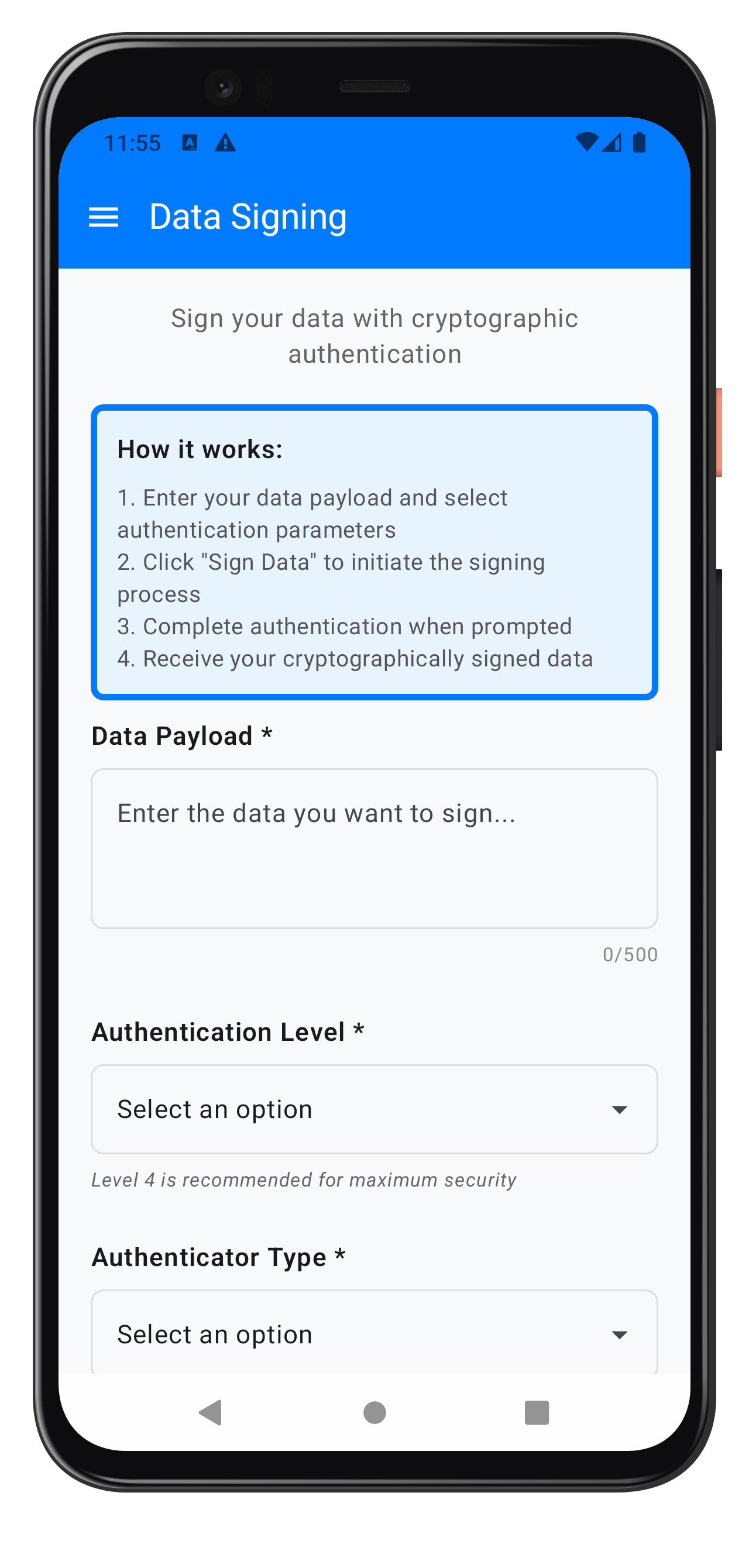
The complete implementation is available in the reference code:
// app/src/main/java/com/relidcodelab/tutorial/screens/datasigning/DataSigningInputScreen.kt

@Composable
fun DataSigningInputScreen(
    viewModel: DataSigningInputViewModel,
    onNavigateToResult: (RDNA.RDNADataSigningDetails) -> Unit,
    onMenuClick: () -> Unit
) {
    val uiState by viewModel.uiState.collectAsStateWithLifecycle()

    // Listen for navigation event
    LaunchedEffect(Unit) {
        viewModel.navigateToResult.collect { signingDetails ->
            onNavigateToResult(signingDetails)
        }
    }

    DataSigningInputScreenContent(
        uiState = uiState,
        authLevelOptions = viewModel.getAuthLevelOptions(),
        authenticatorTypeOptions = viewModel.getAuthenticatorTypeOptions(),
        onPayloadChange = viewModel::updatePayload,
        onAuthLevelChange = viewModel::updateAuthLevel,
        onAuthenticatorTypeChange = viewModel::updateAuthenticatorType,
        onReasonChange = viewModel::updateReason,
        onSubmit = viewModel::submitDataSigning,
        onErrorDismiss = viewModel::clearError,
        onMenuClick = onMenuClick
    )

    // Password Challenge Dialog (for data signing step-up auth)
    if (uiState.showPasswordDialog) {
        PasswordChallengeDialog(
            challengeMode = uiState.passwordChallengeMode,
            attemptsLeft = uiState.passwordAttemptsLeft,
            sdkError = uiState.passwordDialogError,
            sdkStatus = uiState.passwordDialogStatus,
            onSubmit = { password -> viewModel.submitPassword(password) },
            onCancel = { viewModel.cancelPasswordChallenge() },
            onDismissRequest = viewModel::dismissPasswordDialog
        )
    }
}
Key UI Components
1. Data Payload Input (Multiline)
// Payload Input (Multiline)
InputGroup(
    label = "Data Payload *",
    modifier = Modifier.padding(bottom = 24.dp)
) {
    OutlinedTextField(
        value = uiState.payload,
        onValueChange = onPayloadChange,
        modifier = Modifier
            .fillMaxWidth()
            .height(100.dp),
        placeholder = { Text("Enter the data you want to sign...") },
        shape = RoundedCornerShape(8.dp),
        enabled = !uiState.isLoading,
        maxLines = 4
    )
    Text(
        text = "${uiState.payload.length}/500",
        fontSize = 12.sp,
        color = Color(0xFF888888),
        modifier = Modifier
            .fillMaxWidth()
            .padding(top = 4.dp),
        textAlign = TextAlign.End
    )
}
2. Authentication Level Dropdown
// Auth Level Dropdown
InputGroup(
    label = "Authentication Level *",
    modifier = Modifier.padding(bottom = 24.dp)
) {
    DropdownField(
        options = authLevelOptions,
        selectedOption = uiState.selectedAuthLevel,
        onOptionSelected = onAuthLevelChange,
        enabled = !uiState.isLoading,
        borderColor = inputBorderColor
    )
    Text(
        text = "Level 4 is recommended for maximum security",
        fontSize = 12.sp,
        color = Color(0xFF666666),
        fontStyle = FontStyle.Italic,
        modifier = Modifier.padding(top = 4.dp)
    )
}
3. Authenticator Type Dropdown
// Authenticator Type Dropdown
InputGroup(
    label = "Authenticator Type *",
    modifier = Modifier.padding(bottom = 24.dp)
) {
    DropdownField(
        options = authenticatorTypeOptions,
        selectedOption = uiState.selectedAuthenticatorType,
        onOptionSelected = onAuthenticatorTypeChange,
        enabled = !uiState.isLoading,
        borderColor = inputBorderColor
    )
    Text(
        text = "Choose the authentication method for signing",
        fontSize = 12.sp,
        color = Color(0xFF666666),
        fontStyle = FontStyle.Italic,
        modifier = Modifier.padding(top = 4.dp)
    )
}
4. Submit Button with Loading State
Button(
    onClick = onSubmit,
    modifier = Modifier
        .fillMaxWidth()
        .height(50.dp),
    enabled = !uiState.isLoading,
    colors = ButtonDefaults.buttonColors(
        containerColor = if (uiState.isLoading) disabledButtonColor else primaryColor,
        disabledContainerColor = disabledButtonColor
    ),
    shape = RoundedCornerShape(12.dp)
) {
    if (uiState.isLoading) {
        Row(
            horizontalArrangement = Arrangement.Center,
            verticalAlignment = Alignment.CenterVertically
        ) {
            CircularProgressIndicator(
                modifier = Modifier.size(20.dp),
                color = Color.White,
                strokeWidth = 2.dp
            )
            Spacer(modifier = Modifier.width(12.dp))
            Text(
                text = "Processing...",
                fontSize = 18.sp,
                fontWeight = FontWeight.SemiBold
            )
        }
    } else {
        Text(
            text = "Sign Data",
            fontSize = 18.sp,
            fontWeight = FontWeight.SemiBold
        )
    }
}
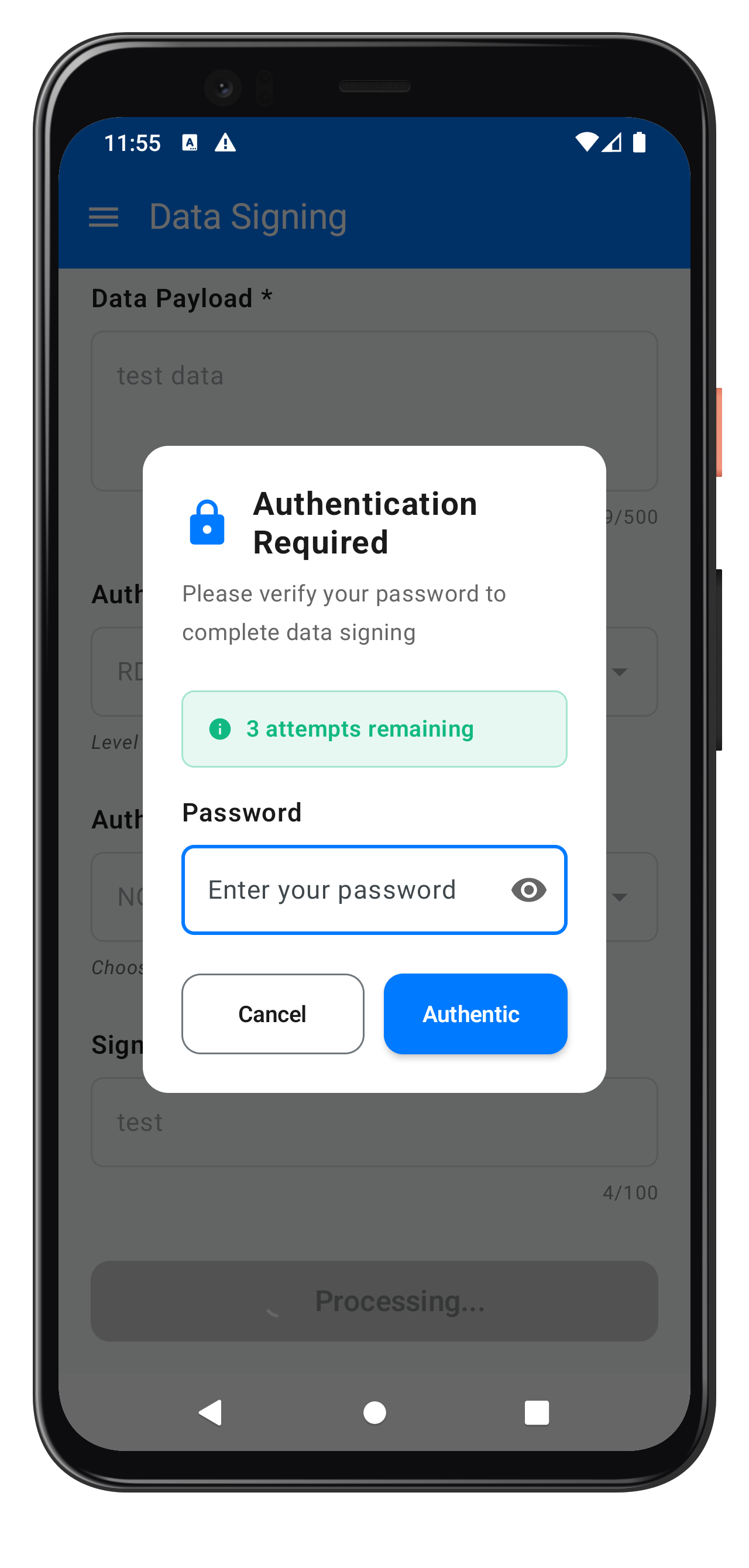
PasswordChallengeDialog - Step-Up Authentication
Modal dialog for password verification during data signing.
The following image showcases the authentication required modal during step-up authentication:
// app/src/main/java/com/relidcodelab/tutorial/screens/datasigning/PasswordChallengeDialog.kt

@Composable
fun PasswordChallengeDialog(
    challengeMode: Int,
    attemptsLeft: Int,
    sdkError: String? = null,
    sdkStatus: String? = null,
    onSubmit: suspend (String) -> Result<Unit>,
    onCancel: suspend () -> Unit,
    onDismissRequest: () -> Unit
) {
    var password by remember { mutableStateOf("") }
    var isPasswordVisible by remember { mutableStateOf(false) }
    var isSubmitting by remember { mutableStateOf(false) }
    var localErrorMessage by remember { mutableStateOf("") }
    val focusRequester = remember { FocusRequester() }

    val displayError = sdkError ?: localErrorMessage

    // Auto-focus password input
    LaunchedEffect(Unit) {
        delay(100)
        focusRequester.requestFocus()
    }

    Dialog(
        onDismissRequest = { if (!isSubmitting) onDismissRequest() },
        properties = DialogProperties(
            dismissOnBackPress = !isSubmitting,
            dismissOnClickOutside = false
        )
    ) {
        Surface(
            modifier = Modifier
                .fillMaxWidth()
                .padding(horizontal = 16.dp),
            shape = RoundedCornerShape(16.dp),
            color = Color.White
        ) {
            Column(
                modifier = Modifier
                    .padding(24.dp)
                    .fillMaxWidth()
            ) {
                // Header with lock icon
                PasswordDialogHeader()

                Spacer(modifier = Modifier.height(24.dp))

                // Attempts Counter (if <= 3 attempts)
                if (attemptsLeft <= 3) {
                    AttemptsCounter(attemptsLeft)
                    Spacer(modifier = Modifier.height(16.dp))
                }

                // Error Message
                if (!displayError.isNullOrEmpty()) {
                    ErrorMessage(displayError)
                    Spacer(modifier = Modifier.height(16.dp))
                }

                // Password Input
                PasswordInput(
                    password = password,
                    isPasswordVisible = isPasswordVisible,
                    isSubmitting = isSubmitting,
                    focusRequester = focusRequester,
                    onPasswordChange = { password = it },
                    onVisibilityToggle = { isPasswordVisible = !isPasswordVisible },
                    onSubmit = { /* Handle enter key */ }
                )

                Spacer(modifier = Modifier.height(24.dp))

                // Submit and Cancel Buttons
                DialogButtons(
                    isSubmitting = isSubmitting,
                    onCancel = {
                        isSubmitting = true
                        kotlinx.coroutines.MainScope().launch { onCancel() }
                    },
                    onSubmit = {
                        if (password.isBlank()) {
                            localErrorMessage = "Password is required"
                            return@DialogButtons
                        }

                        isSubmitting = true
                        localErrorMessage = ""

                        kotlinx.coroutines.MainScope().launch {
                            val result = onSubmit(password)
                            result.fold(
                                onSuccess = { /* Dialog closed by parent */ },
                                onFailure = { error ->
                                    isSubmitting = false
                                    localErrorMessage = error.message ?: "Password submission failed"
                                }
                            )
                        }
                    }
                )
            }
        }
    }
}
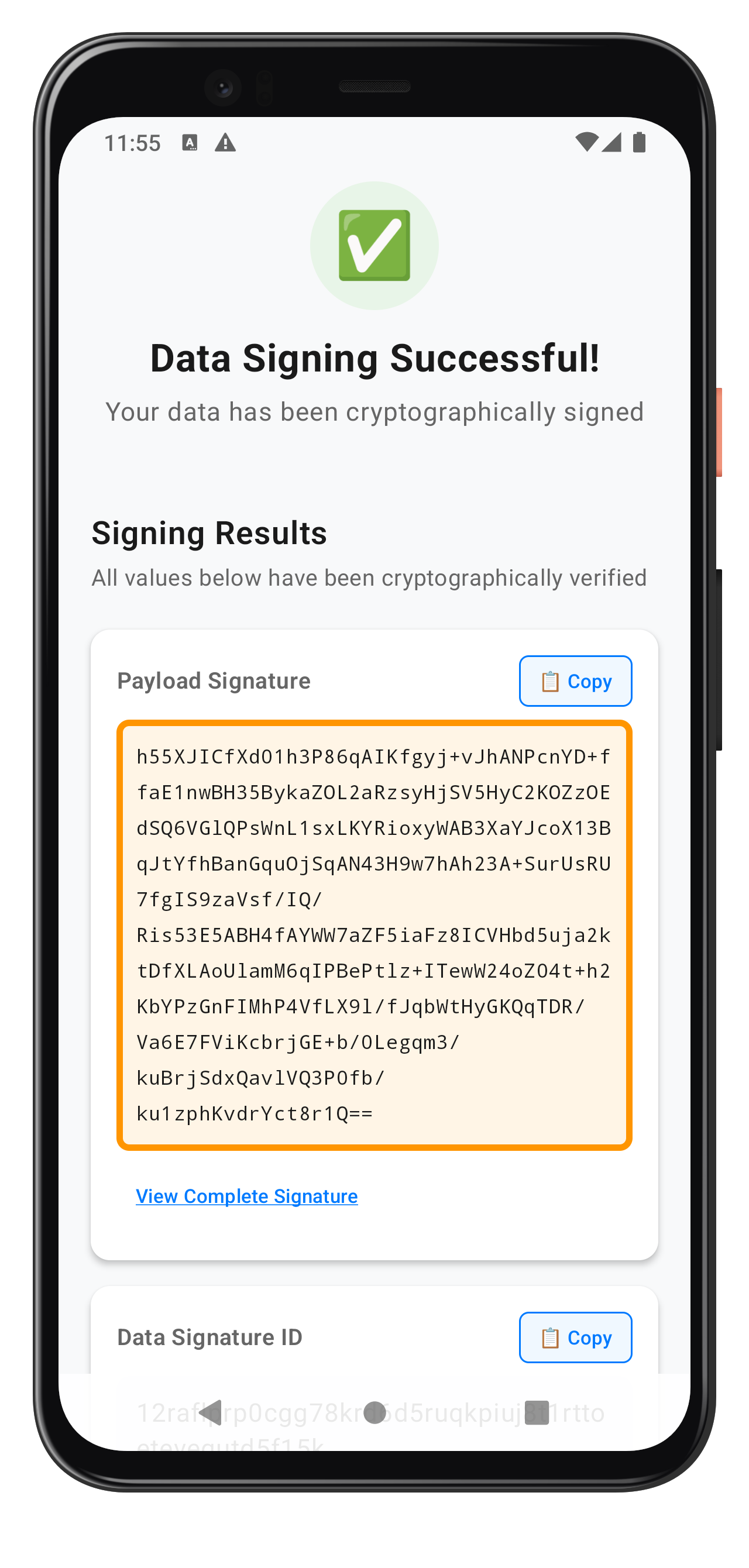
DataSigningResultScreen - Success Display
Screen for displaying signed data results:
// app/src/main/java/com/relidcodelab/tutorial/screens/datasigning/DataSigningResultScreen.kt

@Composable
fun DataSigningResultScreen(
    viewModel: DataSigningResultViewModel,
    signingDetails: RDNA.RDNADataSigningDetails,
    onNavigateBack: () -> Unit
) {
    val uiState by viewModel.uiState.collectAsStateWithLifecycle()

    // Set signing result when screen opens
    LaunchedEffect(signingDetails) {
        viewModel.setSigningResult(signingDetails)
    }

    // Listen for navigation event
    LaunchedEffect(Unit) {
        viewModel.navigateBack.collect {
            onNavigateBack()
        }
    }

    DataSigningResultScreenContent(
        uiState = uiState,
        onCopyToClipboard = viewModel::copyToClipboard,
        onSignAnother = viewModel::signAnother
    )
}
Compose UI Patterns
Key patterns used in the Compose UI:
- State Hoisting: UI state managed in ViewModel
- LaunchedEffect: For one-time side effects (event collection)
- collectAsStateWithLifecycle: Lifecycle-aware state collection
- Reusable Components: InfoCard, InputGroup, DropdownField
- Material3 Design: Modern Material Design components
Let's test the data signing implementation with various scenarios.
Testing Scenarios
Scenario 1: Basic Data Signing (Level 0)
Test no-authentication signing:
// Test Configuration
Payload: "Test document content"
Auth Level: RDNA_AUTH_LEVEL_NONE (0)
Authenticator Type: RDNA_AUTH_TYPE_NONE (0)
Reason: "Testing basic signing"

// Expected Result
✅ Immediate signing without authentication
✅ Valid signature returned
✅ No password challenge
Scenario 2: Re-Authentication (Level 1)
Test flexible authentication:
// Test Configuration
Payload: "Financial transaction data"
Auth Level: RDNA_AUTH_LEVEL_1 (1)
Authenticator Type: RDNA_AUTH_TYPE_NONE (0)
Reason: "Standard transaction approval"

// Expected Result
✅ Authentication challenge (biometric/password based on device)
✅ Valid signature after authentication
✅ Signature ID generated
Scenario 3: Step-Up Authentication (Level 4)
Test maximum security:
// Test Configuration
Payload: "High-value contract"
Auth Level: RDNA_AUTH_LEVEL_4 (4)
Authenticator Type: RDNA_IDV_SERVER_BIOMETRIC (1)
Reason: "Legal document signing"

// Expected Result
✅ Password challenge (challengeMode 12)
✅ Server-side biometric verification
✅ Cryptographic signature
✅ Complete audit trail
Testing Password Challenge Flow
- Submit with Level 4:
viewModel.submitDataSigning()
- Verify Dialog Shows:
// Check UI state
assertTrue(uiState.showPasswordDialog)
assertEquals(12, uiState.passwordChallengeMode)
- Submit Password:
viewModel.submitPassword("userPassword")
- Verify Success:
// Check navigation event
verify { navigateToResult.emit(any()) }
Testing State Cleanup
Test proper state reset:
// Scenario: User cancels during password challenge
viewModel.cancelPasswordChallenge()

// Verify cleanup
verify { rdnaService.resetAuthenticateUserAndSignDataState() }
assertTrue(!uiState.showPasswordDialog)
assertFalse(uiState.isLoading)
Using Android Studio Debugger
Set breakpoints at key locations:
// 1. Service call
fun authenticateUserAndSignData(...) {
    val error = rdna.authenticateUserAndSignData(...)  // BREAKPOINT HERE
    return error
}

// 2. Callback reception
override fun onAuthenticateUserAndSignData(...) {
    Log.d(TAG, "onAuthenticateUserAndSignData callback received")  // BREAKPOINT HERE
}

// 3. Event handling
private fun handleDataSigningResponse(...) {
    Log.d(TAG, "Data signing response received")  // BREAKPOINT HERE
}

// 4. Navigation
viewModelScope.launch {
    _navigateToResult.emit(signingDetails)  // BREAKPOINT HERE
}
Running Tests
# Build and install debug APK
./gradlew installDebug

# View logs
adb logcat | grep -E "(DataSigningInputVM|RDNAService|RDNACallbackManager)"

# Filter for data signing logs only
adb logcat | grep "authenticateUserAndSignData"
Validation Checklist
Before considering your implementation complete:
- ✅ All authentication levels work correctly (0, 1, 4)
- ✅ Password challenge appears for Level 4
- ✅ Signatures are valid and verifiable
- ✅ Error handling works properly
- ✅ State cleanup occurs on cancel
- ✅ Copy to clipboard works
- ✅ "Sign Another" resets state correctly
- ✅ No memory leaks in ViewModels
- ✅ Logs are comprehensive and clear
Let's review essential best practices for deploying data signing in production applications.
Security Best Practices
1. Always Use Maximum Security for Sensitive Operations
// ❌ BAD - No authentication for sensitive data
val error = rdnaService.authenticateUserAndSignData(
    payload = "Transfer $100,000",
    authLevel = RDNA.RDNAAuthLevel.RDNA_AUTH_LEVEL_NONE,  // NO AUTH!
    authenticatorType = RDNA.RDNAAuthenticatorType.RDNA_AUTH_TYPE_NONE,
    reason = "Money transfer"
)

// ✅ GOOD - Maximum security for sensitive data
val error = rdnaService.authenticateUserAndSignData(
    payload = "Transfer $100,000",
    authLevel = RDNA.RDNAAuthLevel.RDNA_AUTH_LEVEL_4,  // Maximum security
    authenticatorType = RDNA.RDNAAuthenticatorType.RDNA_IDV_SERVER_BIOMETRIC,
    reason = "High-value money transfer requiring biometric verification"
)
2. Implement Proper Error Handling
// ❌ BAD - Generic error messages
if (error.longErrorCode != 0) {
    _uiState.update { it.copy(error = "Error occurred") }
}

// ✅ GOOD - Detailed error handling with user-friendly messages
if (error.longErrorCode != 0) {
    val userMessage = when (error.longErrorCode) {
        214 -> "This authentication method is not available. Please try a different method."
        102 -> "Authentication failed. Please verify your credentials and try again."
        153 -> "Operation cancelled. Your data was not signed."
        else -> "Unable to complete signing at this time. Please try again later."
    }

    Log.e(TAG, "Data signing failed - Code: ${error.longErrorCode}, Message: ${error.errorString}")
    _uiState.update { it.copy(error = userMessage) }
}
3. Always Clean Up State
// ✅ GOOD - Cleanup in all exit paths
fun cancelPasswordChallenge() {
    viewModelScope.launch {
        try {
            val error = rdnaService.resetAuthenticateUserAndSignDataState()
            if (error.longErrorCode != 0) {
                Log.w(TAG, "State reset warning: ${error.errorString}")
            }
        } catch (e: Exception) {
            Log.e(TAG, "State reset exception", e)
        } finally {
            // Always clean UI state regardless of SDK result
            _uiState.update {
                it.copy(
                    showPasswordDialog = false,
                    isLoading = false
                )
            }
        }
    }
}
Performance Best Practices
1. Limit Payload Size
// Validate payload before submission
companion object {
    private const val MAX_PAYLOAD_LENGTH = 500
    private const val MAX_REASON_LENGTH = 100
}

fun updatePayload(value: String) {
    if (value.length <= MAX_PAYLOAD_LENGTH) {
        _uiState.update { it.copy(payload = value) }
    } else {
        _uiState.update {
            it.copy(validationError = "Payload must be less than $MAX_PAYLOAD_LENGTH characters")
        }
    }
}
2. Efficient Event Collection
// ✅ GOOD - Lifecycle-aware collection
private fun setupEventHandlers() {
    // Automatically cancelled when ViewModel is destroyed
    viewModelScope.launch {
        callbackManager.dataSigningEvent.collect { event ->
            handleDataSigningResponse(event.signingDetails, event.status, event.error)
        }
    }
}
User Experience Best Practices
1. Provide Clear Loading States
// Show loading during async operations
_uiState.update { it.copy(isLoading = true) }

// Always stop loading on completion or error
_uiState.update { it.copy(isLoading = false) }
2. Give Meaningful Feedback
// ✅ GOOD - Clear, actionable feedback
_uiState.update {
    it.copy(
        validationError = "Please enter a payload to sign",
        // Highlight which field has the error
    )
}
3. Auto-Focus Critical Inputs
// Auto-focus password input in dialog
LaunchedEffect(Unit) {
    delay(100)
    focusRequester.requestFocus()
}
Logging Best Practices
// ✅ GOOD - Structured logging with context
Log.d(TAG, "Data signing initiated")
Log.d(TAG, "  Payload length: ${payload.length}")
Log.d(TAG, "  Auth level: ${authLevel.intValue}")
Log.d(TAG, "  Authenticator type: ${authenticatorType.intValue}")
Log.d(TAG, "  Reason: $reason")

// Log success/failure
if (error.longErrorCode == 0) {
    Log.d(TAG, "Data signing sync success - awaiting callback")
} else {
    Log.e(TAG, "Data signing sync error: ${error.errorString} (code: ${error.longErrorCode})")
}
What You've Accomplished
Congratulations! You've successfully implemented REL-ID's cryptographic data signing functionality in your Android application. Here's what you've mastered:
Core Achievements
✅ Data Signing API Integration: Successfully integrated authenticateUserAndSignData() with proper parameter handling
✅ Multi-Level Authentication: Implemented support for authentication levels 0, 1, and 4 with proper enum usage
✅ Step-Up Authentication: Built password challenge flow for high-security signing operations
✅ Event-Driven Architecture: Integrated SharedFlow patterns for SDK callback handling
✅ State Management: Implemented proper cleanup with resetAuthenticateUserAndSignDataState()
✅ Production-Ready UI: Built Jetpack Compose screens with Material3 design
Technical Skills Gained
- REL-ID SDK data signing APIs (AAR integration)
- Kotlin coroutines and Flow patterns
- Jetpack Compose state management
- ViewModel architecture with StateFlow/SharedFlow
- Android security best practices
- Error handling and user feedback patterns
Resources & Further Learning
REL-ID Documentation
Thank you for completing the REL-ID Data Signing Flow codelab! 🎉
You're now equipped to build secure, production-grade data signing features in your Cordova applications using REL-ID SDK's powerful cryptographic capabilities.