🎯 Learning Path:
- Complete REL-ID Complete Activation & Login Flow Codelab
- Complete REL-ID Notification Management Codelab
- You are here → Notification History Implementation
Welcome to the REL-ID Notification History codelab! This tutorial extends your notification management capabilities to provide comprehensive audit trails and historical data management.
What You'll Build
In this codelab, you'll enhance your existing notification application with:
- 📜 Comprehensive History View: Complete audit trail of all notification interactions
- 📱 Enterprise-Ready UI: Professional interface with data export capabilities
- 🔐 Secure Data Handling: Proper privacy controls and data sanitization
What You'll Learn
By completing this codelab, you'll master:
- Notification History API Integration: Implementing
getNotificationHistory()API with basic parameters - History Data Modeling: Proper TypeScript interfaces for audit data
- Enterprise UI Patterns: Professional data display with export capabilities
- Performance Optimization: Efficient rendering for notification lists
Prerequisites
Before starting this codelab, ensure you have:
- ✅ Completed REL-ID MFA Codelab - All MFA screens and flows must be fully implemented
- ✅ Completed REL-ID Notification Management Codelab - Basic notification handling must be functional
- ✅ React Native Development Environment - Android Studio, Xcode, and React Native CLI configured
- ✅ REL-ID SDK Integration - Latest SDK with notification history support configured
- ✅ TypeScript Knowledge - Understanding of TypeScript interfaces and generic types
- ✅ Server Configuration - REL-ID server with notification history capabilities enabled
Get the Code from GitHub
The code to get started can be found in a GitHub repository.
You can clone the repository using the following command:
git clone https://github.com/uniken-public/codelab-react-native.git
Navigate to the relid-notification-history folder in the repository you cloned earlier
Codelab Architecture Overview
This codelab extends your notification application with four core history components:
- Notification History Service: Advanced API integration with filtering and pagination
- History Data Management: Efficient state management for large datasets
- Professional UI Components: Enterprise-grade table views and filtering controls
- Export & Analytics: Data export capabilities and usage analytics
Before implementing notification history functionality, let's understand the comprehensive data model and API patterns that power enterprise notification audit trails.
Notification History Data Flow
The notification history system follows this enterprise-grade pattern:
User Request → getNotificationHistory() API → onGetNotificationsHistory Event Response → Data Processing → UI Rendering → Export
Core History Event Types
The REL-ID SDK provides comprehensive notification history through these main events:
Event Type | Description | Data Provided |
Retrieves notification history | Complete audit trail with metadata | |
Async response with history data | Historical notification records |
History Data Structure
Add these TypeScript definitions to understand the complete history data model:
// src/uniken/types/rdnaEvents.ts (notification history types)

/**
 * Individual Notification History Record
 * Complete audit information for a single notification
 */
export interface NotificationHistoryRecord {
  notificationId: string;
  notificationTitle: string;
  notificationBody: string;
  notificationStatus: 'UPDATED' | 'EXPIRED' | 'DISCARDED' | 'DISMISSED';
  actionPerformed: 'Accept' | 'Reject' | 'NONE';
  createdDate: string;
  updatedDate: string;
  expiryDate: string;
  deviceId: string;
  enterpriseId: string;
  transactionData?: {
    amount?: string;
    transactionId?: string;
    merchant?: string;
    category?: string;
  };
}

/**
 * Notification History Response Data
 * Complete paginated response from getNotificationHistory
 */
export interface RDNAGetNotificationHistoryData {
  notifications: NotificationHistoryRecord[];
  totalRecords: number;
  error: RDNAError;
}
Let's implement the notification history service following enterprise-grade patterns for accessing historical data.
Enhance rdnaService.ts with History API
Add the notification history method to your existing service implementation:
// src/uniken/services/rdnaService.ts (addition to existing class)

/**
 * Gets notification history from the REL-ID SDK server
 *
 * This method fetches notification history for the current user.
 * It follows the sync+async pattern: returns a sync response, then triggers an onGetNotificationHistory
 * event with history data.
 * Uses sync response pattern similar to other API methods.
 *
 * @see https://developer.uniken.com/docs/get-notification-history
 *
 * Response Validation Logic (following reference app pattern):
 * 1. Check error.longErrorCode: 0 = success, > 0 = error
 * 2. An onGetNotificationHistory event will be triggered with history data
 * 3. Async events will be handled by event listeners
 *
 * @param recordCount Number of records to fetch (0 = all history records)
 * @param startIndex Index to begin fetching from (must be >= 1)
 * @returns Promise<RDNASyncResponse> that resolves with sync response structure
 */
async getNotificationHistory(
  recordCount: number = 10,
  startIndex: number = 1
): Promise<RDNASyncResponse> {
  return new Promise((resolve, reject) => {
    console.log('RdnaService - Fetching notification history:', {
      recordCount,
      startIndex
    });

    RdnaClient.getNotificationHistory(
      recordCount,           // recordCount
      '',                    // enterpriseId
      startIndex,            // startIndex
      '',                    // startDate
      '',                    // endDate
      '',                    // notificationStatus
      '',                    // actionPerformed
      '',                    // keywordSearch
      '',                    // deviceId
      response => {          // syncCallback
        console.log('RdnaService - GetNotificationHistory sync callback received');

        const result: RDNASyncResponse = response;

        if (result.error && result.error.longErrorCode === 0) {
          console.log('RdnaService - GetNotificationHistory sync response success, waiting for onGetNotificationHistory event');
          resolve(result);
        } else {
          console.error('RdnaService - GetNotificationHistory sync response error:', result);
          reject(result);
        }
      }
    );
  });
}
Service Pattern Consistency
Notice how this implementation maintains enterprise service patterns:
Pattern Element | Implementation Detail |
Comprehensive Logging | Detailed parameter logging for audit trails |
Promise-Based API | Consistent async/await pattern for modern JavaScript |
Error Handling | Proper error classification and logging |
Parameter Validation | Type-safe parameter handling with defaults |
Documentation | Complete JSDoc with usage examples and workflow |
Enhance your event manager to handle notification history responses with comprehensive data processing and state management.
Enhance rdnaEventManager.ts for History
Update your event manager to handle notification history events:
// src/uniken/services/rdnaEventManager.ts (additions to existing class)

/**
 * Handle notification history response events
 * @param response Raw response from native SDK containing history data
 */
private onGetNotificationHistory(response: RDNAJsonResponse) {
  console.log("RdnaEventManager - Notification history response event received");

  try {
    const historyData: RDNAGetNotificationHistoryData = JSON.parse(response.response);

    console.log("RdnaEventManager - Notification history data processed:", {
      totalRecords: historyData.notifications?.length || 0,
      errorCode: historyData.error?.longErrorCode
    });

    // Pass clean, unmodified data to handler - no UI formatting here
    if (this.getNotificationHistoryHandler) {
      this.getNotificationHistoryHandler(historyData);
    }
  } catch (error) {
    console.error("RdnaEventManager - Failed to parse notification history response:", error);

    // Provide fallback error response
    const fallbackData: RDNAGetNotificationHistoryData = {
      notifications: [],
      totalRecords: 0,
      error: {
        longErrorCode: -1,
        shortErrorCode: -1,
        errorString: 'Failed to parse notification history data'
      }
    };

    if (this.getNotificationHistoryHandler) {
      this.getNotificationHistoryHandler(fallbackData);
    }
  }
}
Event Manager Registration
Ensure the history event listener is properly registered:
// src/uniken/services/rdnaEventManager.ts (in constructor listeners array)

// Add this to your existing event listeners array
this.rdnaEmitter.addListener('onGetNotificationHistory', this.onGetNotificationHistory.bind(this))
History Event Handler Setters
Add the handler management methods:
// src/uniken/services/rdnaEventManager.ts (add to handler setters section)

/**
 * Set notification history response handler
 */
public setGetNotificationHistoryHandler(callback?: RDNAGetNotificationHistoryCallback): void {
  this.getNotificationHistoryHandler = callback;
}

/**
 * Get current notification history handler (for debugging)
 */
public getOnGetNotificationHistoryHandler(): RDNAGetNotificationHistoryCallback | undefined {
  return this.getNotificationHistoryHandler;
}
Let's create enterprise-grade UI components for notification history management with comprehensive visualizations.
The following images showcase the notification history screens:
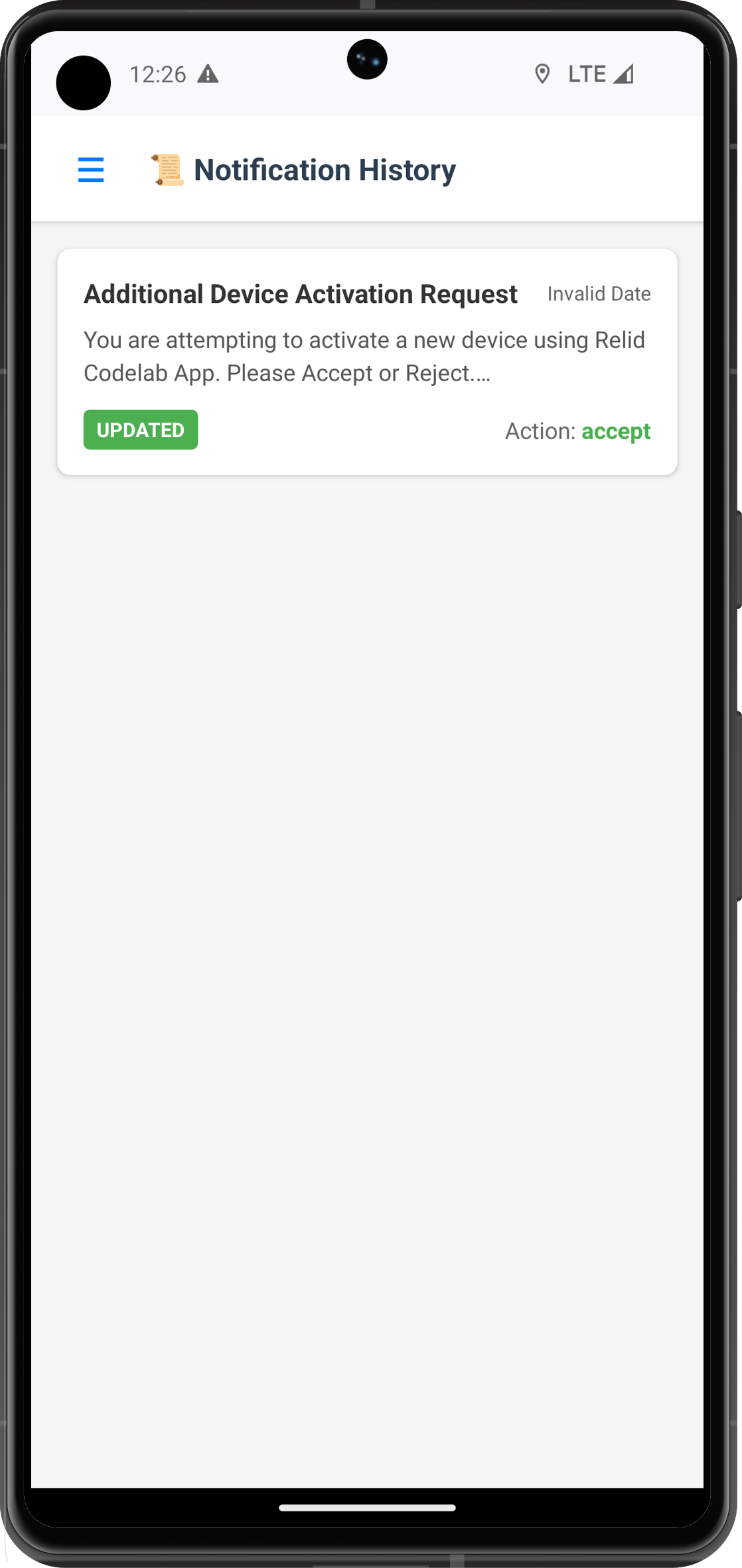
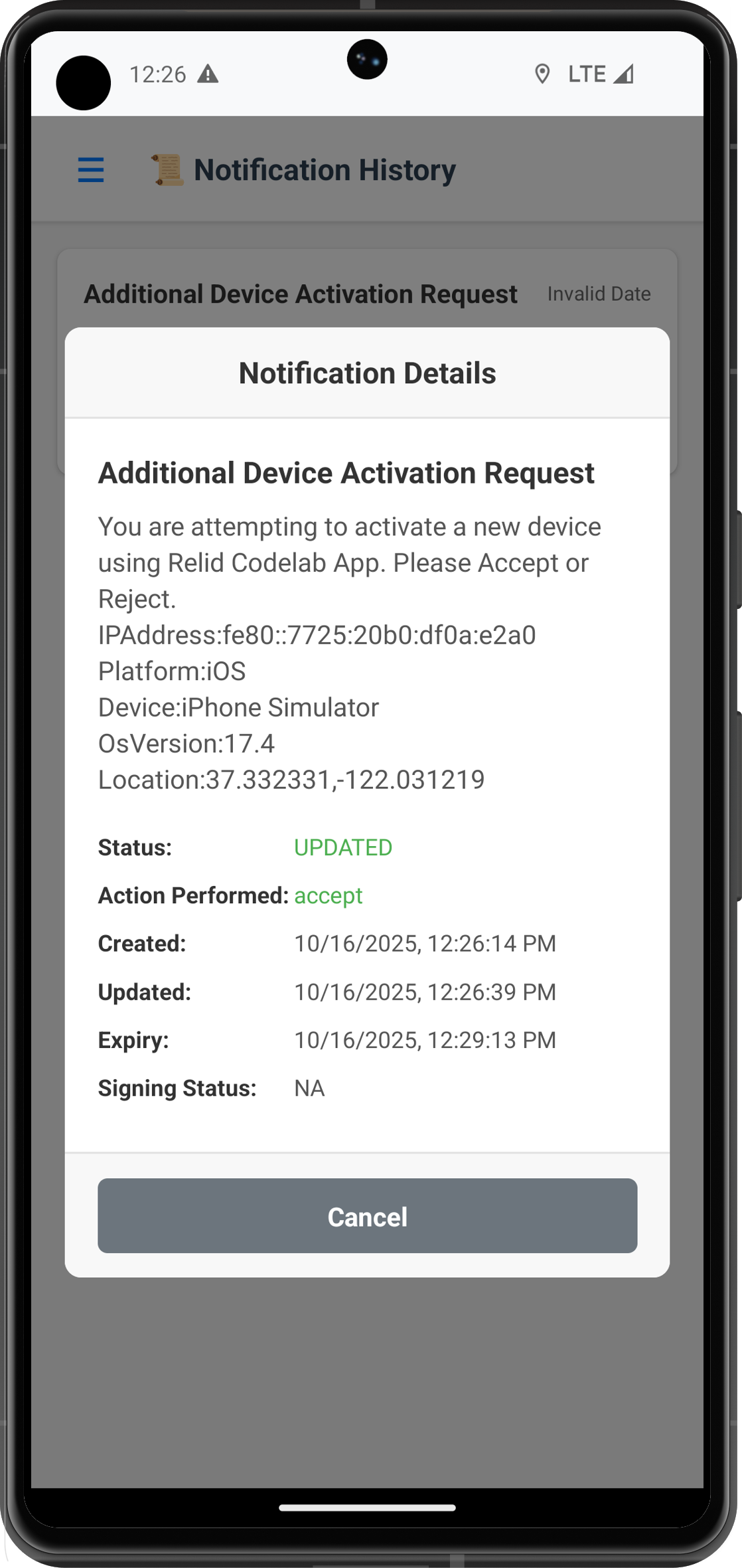
Create Notification History Screen
Implement the main history screen with comprehensive functionality:
// src/tutorial/screens/notification/NotificationHistoryScreen.tsx

import React, { useState, useEffect, useCallback } from 'react';
import {
  View,
  Text,
  StyleSheet,
  SafeAreaView,
  ScrollView,
  FlatList,
  TouchableOpacity,
  ActivityIndicator,
  Alert,
  RefreshControl,
} from 'react-native';
import { useRoute, useFocusEffect } from '@react-navigation/native';
import type { RouteProp } from '@react-navigation/native';

import { useNotificationHistory } from '../../../uniken/providers/SDKEventProvider';
import { NotificationHistoryService } from '../../services/NotificationHistoryService';
import type {
  NotificationHistoryFilters,
  NotificationHistoryRecord,
  RDNAGetNotificationHistoryData
} from '../../types/NotificationHistoryTypes';

// UI Components
import { StatusBanner, LoadingSpinner } from '../components';
import { HistoryFilterPanel } from './components/HistoryFilterPanel';
import { HistoryListItem } from './components/HistoryListItem';
import { HistoryEmptyState } from './components/HistoryEmptyState';
import { HistoryPagination } from './components/HistoryPagination';

import type { RootStackParamList } from '../../navigation/AppNavigator';

type NotificationHistoryScreenRouteProp = RouteProp<RootStackParamList, 'NotificationHistory'>;

const NotificationHistoryScreen: React.FC = () => {
  const route = useRoute<NotificationHistoryScreenRouteProp>();
  const { userID, sessionID } = route.params;

  // State Management
  const [historyData, setHistoryData] = useState<NotificationHistoryRecord[]>([]);
  const [isLoading, setIsLoading] = useState<boolean>(false);
  const [isRefreshing, setIsRefreshing] = useState<boolean>(false);
  const [error, setError] = useState<string>('');
  const [totalRecords, setTotalRecords] = useState<number>(0);
  const [currentPage, setCurrentPage] = useState<number>(1);
  const [hasMoreData, setHasMoreData] = useState<boolean>(false);
  const [showFilters, setShowFilters] = useState<boolean>(false);

  // Filter State
  const [filters, setFilters] = useState<NotificationHistoryFilters>({
    status: 'ALL',
    action: 'ALL',
    pageSize: 20,
    currentPage: 1
  });

  // Hook into SDK event system
  const { handleNotificationHistoryResponse } = useNotificationHistory();

  /**
   * Setup notification history event handler
   */
  useFocusEffect(
    useCallback(() => {
      handleNotificationHistoryResponse((data: RDNAGetNotificationHistoryData) => {
        console.log('NotificationHistoryScreen - History data received:', {
          recordCount: data.notifications?.length || 0,
          totalRecords: data.totalRecords,
          currentPage: data.currentPage,
          hasMoreData: data.hasMoreData
        });

        setHistoryData(data.notifications || []);
        setTotalRecords(data.totalRecords || 0);
        setCurrentPage(data.currentPage || 1);
        setHasMoreData(data.hasMoreData || false);
        setIsLoading(false);
        setIsRefreshing(false);
        setError('');
      });

      // Load initial data
      loadNotificationHistory(filters);

      return () => {
        // Cleanup if needed
      };
    }, [])
  );

  /**
   * Load notification history with current filters
   */
  const loadNotificationHistory = async (filterOptions: NotificationHistoryFilters) => {
    if (isLoading) return;

    setIsLoading(true);
    setError('');

    try {
      console.log('NotificationHistoryScreen - Loading history with filters:', filterOptions);

      const syncResponse = await NotificationHistoryService.fetchHistory(filterOptions);
      console.log('NotificationHistoryScreen - History request successful, waiting for async data');

    } catch (error: any) {
      console.error('NotificationHistoryScreen - Failed to load history:', error);
      setError(error.error?.errorString || 'Failed to load notification history');
      setIsLoading(false);
    }
  };

  /**
   * Handle filter changes
   */
  const handleFiltersApply = (newFilters: NotificationHistoryFilters) => {
    const updatedFilters = { ...newFilters, currentPage: 1 };
    setFilters(updatedFilters);
    setCurrentPage(1);
    loadNotificationHistory(updatedFilters);
    setShowFilters(false);
  };

  /**
   * Handle page navigation
   */
  const handlePageChange = (page: number) => {
    const updatedFilters = { ...filters, currentPage: page };
    setFilters(updatedFilters);
    setCurrentPage(page);
    loadNotificationHistory(updatedFilters);
  };

  /**
   * Handle refresh
   */
  const handleRefresh = () => {
    setIsRefreshing(true);
    loadNotificationHistory(filters);
  };

  /**
   * Handle export functionality
   */
  const handleExport = async () => {
    try {
      Alert.alert(
        'Export History',
        'Export all notification history matching current filters?',
        [
          { text: 'Cancel', style: 'cancel' },
          {
            text: 'Export',
            onPress: async () => {
              const exportResponse = await NotificationHistoryService.exportHistory(filters);
              Alert.alert('Success', 'History exported successfully');
            }
          }
        ]
      );
    } catch (error) {
      Alert.alert('Error', 'Failed to export history');
    }
  };

  /**
   * Render individual history item
   */
  const renderHistoryItem = ({ item }: { item: NotificationHistoryRecord }) => (
    <HistoryListItem
      notification={item}
      onPress={() => {
        // Handle item press - show details
        Alert.alert('Notification Details', `ID: ${item.notificationId}\nStatus: ${item.notificationStatus}`);
      }}
    />
  );

  /**
   * Calculate pagination info
   */
  const totalPages = Math.ceil(totalRecords / filters.pageSize);
  const startRecord = ((currentPage - 1) * filters.pageSize) + 1;
  const endRecord = Math.min(currentPage * filters.pageSize, totalRecords);

  return (
    <SafeAreaView style={styles.container}>
      {/* Header */}
      <View style={styles.header}>
        <Text style={styles.title}>Notification History</Text>
        <View style={styles.headerActions}>
          <TouchableOpacity
            style={styles.filterButton}
            onPress={() => setShowFilters(!showFilters)}
          >
            <Text style={styles.filterButtonText}>
              {showFilters ? 'Hide Filters' : 'Show Filters'}
            </Text>
          </TouchableOpacity>

          <TouchableOpacity
            style={styles.exportButton}
            onPress={handleExport}
            disabled={historyData.length === 0}
          >
            <Text style={styles.exportButtonText}>Export</Text>
          </TouchableOpacity>
        </View>
      </View>

      {/* Filter Panel */}
      {showFilters && (
        <HistoryFilterPanel
          filters={filters}
          onFiltersApply={handleFiltersApply}
          onClose={() => setShowFilters(false)}
        />
      )}

      {/* Status Banner */}
      {error && (
        <StatusBanner
          type="error"
          message={error}
          onDismiss={() => setError('')}
        />
      )}

      {/* Stats Bar */}
      {!isLoading && totalRecords > 0 && (
        <View style={styles.statsBar}>
          <Text style={styles.statsText}>
            Showing {startRecord}-{endRecord} of {totalRecords} notifications
          </Text>
          <Text style={styles.statsText}>
            Page {currentPage} of {totalPages}
          </Text>
        </View>
      )}

      {/* Content */}
      <View style={styles.content}>
        {isLoading && historyData.length === 0 ? (
          <LoadingSpinner message="Loading notification history..." />
        ) : historyData.length === 0 ? (
          <HistoryEmptyState
            message="No notification history found"
            subMessage="Try adjusting your filter criteria"
            onRefresh={handleRefresh}
          />
        ) : (
          <FlatList
            data={historyData}
            renderItem={renderHistoryItem}
            keyExtractor={(item) => item.notificationId}
            style={styles.historyList}
            refreshControl={
              <RefreshControl
                refreshing={isRefreshing}
                onRefresh={handleRefresh}
                colors={['#3498db']}
              />
            }
            showsVerticalScrollIndicator={false}
          />
        )}
      </View>

      {/* Pagination */}
      {totalPages > 1 && (
        <HistoryPagination
          currentPage={currentPage}
          totalPages={totalPages}
          onPageChange={handlePageChange}
          hasMoreData={hasMoreData}
        />
      )}
    </SafeAreaView>
  );
};

const styles = StyleSheet.create({
  container: {
    flex: 1,
    backgroundColor: '#f8f9fa',
  },
  header: {
    flexDirection: 'row',
    justifyContent: 'space-between',
    alignItems: 'center',
    padding: 16,
    backgroundColor: '#ffffff',
    borderBottomWidth: 1,
    borderBottomColor: '#e9ecef',
  },
  title: {
    fontSize: 24,
    fontWeight: 'bold',
    color: '#2c3e50',
  },
  headerActions: {
    flexDirection: 'row',
    gap: 12,
  },
  filterButton: {
    paddingHorizontal: 16,
    paddingVertical: 8,
    backgroundColor: '#3498db',
    borderRadius: 6,
  },
  filterButtonText: {
    color: '#ffffff',
    fontSize: 14,
    fontWeight: '500',
  },
  exportButton: {
    paddingHorizontal: 16,
    paddingVertical: 8,
    backgroundColor: '#28a745',
    borderRadius: 6,
  },
  exportButtonText: {
    color: '#ffffff',
    fontSize: 14,
    fontWeight: '500',
  },
  statsBar: {
    flexDirection: 'row',
    justifyContent: 'space-between',
    alignItems: 'center',
    paddingHorizontal: 16,
    paddingVertical: 8,
    backgroundColor: '#e9ecef',
  },
  statsText: {
    fontSize: 12,
    color: '#6c757d',
    fontWeight: '500',
  },
  content: {
    flex: 1,
  },
  historyList: {
    flex: 1,
    padding: 16,
  },
});

export default NotificationHistoryScreen;
Create History List Item Component
Build a professional list item component for individual history records:
// src/tutorial/screens/notification/components/HistoryListItem.tsx

import React from 'react';
import {
  View,
  Text,
  TouchableOpacity,
  StyleSheet,
} from 'react-native';
import type { NotificationHistoryRecord } from '../../../types/NotificationHistoryTypes';

interface HistoryListItemProps {
  notification: NotificationHistoryRecord;
  onPress?: () => void;
}
Implement comprehensive filtering capabilities with date ranges, status filters, and keyword search functionality.
Create Advanced Filter Panel
Build a professional filter interface:
// src/tutorial/screens/notification/components/HistoryFilterPanel.tsx

import React, { useState, useEffect } from 'react';
import {
  View,
  Text,
  TextInput,
  TouchableOpacity,
  StyleSheet,
  ScrollView,
  Alert,
} from 'react-native';
import DatePicker from 'react-native-date-picker';
import type { NotificationHistoryFilters } from '../../../types/NotificationHistoryTypes';

interface HistoryFilterPanelProps {
  filters: NotificationHistoryFilters;
  onFiltersApply: (filters: NotificationHistoryFilters) => void;
  onClose: () => void;
}

const HistoryFilterPanel: React.FC<HistoryFilterPanelProps> = ({
  filters,
  onFiltersApply,
  onClose,
}) => {
  // Local filter state
  const [localFilters, setLocalFilters] = useState<NotificationHistoryFilters>(filters);
  const [showStartDatePicker, setShowStartDatePicker] = useState(false);
  const [showEndDatePicker, setShowEndDatePicker] = useState(false);

  /**
   * Status filter options
   */
  const statusOptions = [
    { label: 'All Statuses', value: 'ALL' },
    { label: 'Updated', value: 'UPDATED' },
    { label: 'Expired', value: 'EXPIRED' },
    { label: 'Discarded', value: 'DISCARDED' },
    { label: 'Dismissed', value: 'DISMISSED' },
  ];

  /**
   * Action filter options
   */
  const actionOptions = [
    { label: 'All Actions', value: 'ALL' },
    { label: 'Accept', value: 'Accept' },
    { label: 'Reject', value: 'Reject' },
    { label: 'No Action', value: 'NONE' },
  ];

  /**
   * Page size options
   */
  const pageSizeOptions = [10, 20, 50, 100];

  /**
   * Format date for display
   */
  const formatDisplayDate = (dateString?: string): string => {
    if (!dateString) return 'Select Date';
    try {
      const date = new Date(dateString);
      return date.toLocaleDateString('en-US', {
        year: 'numeric',
        month: 'short',
        day: 'numeric',
      });
    } catch (error) {
      return 'Invalid Date';
    }
  };

  /**
   * Format date for API
   */
  const formatApiDate = (date: Date): string => {
    return date.toISOString().split('T')[0]; // YYYY-MM-DD format
  };

  /**
   * Handle filter reset
   */
  const handleReset = () => {
    const resetFilters: NotificationHistoryFilters = {
      status: 'ALL',
      action: 'ALL',
      pageSize: 20,
      currentPage: 1,
    };
    setLocalFilters(resetFilters);
  };

  /**
   * Handle apply filters
   */
  const handleApply = () => {
    // Validate date range
    if (localFilters.dateRange?.startDate && localFilters.dateRange?.endDate) {
      const startDate = new Date(localFilters.dateRange.startDate);
      const endDate = new Date(localFilters.dateRange.endDate);

      if (startDate > endDate) {
        Alert.alert('Invalid Date Range', 'Start date cannot be after end date');
        return;
      }
    }

    onFiltersApply(localFilters);
  };

  /**
   * Render filter option buttons
   */
  const renderFilterOptions = (
    title: string,
    options: Array<{ label: string; value: string }>,
    currentValue: string,
    onSelect: (value: string) => void
  ) => (
    <View style={styles.filterSection}>
      <Text style={styles.filterTitle}>{title}</Text>
      <ScrollView horizontal showsHorizontalScrollIndicator={false} style={styles.optionsContainer}>
        {options.map((option) => (
          <TouchableOpacity
            key={option.value}
            style={[
              styles.optionButton,
              currentValue === option.value && styles.optionButtonActive,
            ]}
            onPress={() => onSelect(option.value)}
          >
            <Text
              style={[
                styles.optionButtonText,
                currentValue === option.value && styles.optionButtonTextActive,
              ]}
            >
              {option.label}
            </Text>
          </TouchableOpacity>
        ))}
      </ScrollView>
    </View>
  );

  return (
    <View style={styles.container}>
      <ScrollView style={styles.scrollView} showsVerticalScrollIndicator={false}>
        {/* Header */}
        <View style={styles.header}>
          <Text style={styles.headerTitle}>Filter Options</Text>
          <TouchableOpacity onPress={onClose} style={styles.closeButton}>
            <Text style={styles.closeButtonText}>×</Text>
          </TouchableOpacity>
        </View>

        {/* Keyword Search */}
        <View style={styles.filterSection}>
          <Text style={styles.filterTitle}>Search Keywords</Text>
          <TextInput
            style={styles.searchInput}
            placeholder="Search notifications..."
            value={localFilters.keyword || ''}
            onChangeText={(text) =>
              setLocalFilters({ ...localFilters, keyword: text })
            }
            clearButtonMode="while-editing"
          />
        </View>

        {/* Status Filter */}
        {renderFilterOptions(
          'Status',
          statusOptions,
          localFilters.status || 'ALL',
          (value) =>
            setLocalFilters({
              ...localFilters,
              status: value as NotificationHistoryFilters['status'],
            })
        )}

        {/* Action Filter */}
        {renderFilterOptions(
          'Action Performed',
          actionOptions,
          localFilters.action || 'ALL',
          (value) =>
            setLocalFilters({
              ...localFilters,
              action: value as NotificationHistoryFilters['action'],
            })
        )}

        {/* Date Range Filter */}
        <View style={styles.filterSection}>
          <Text style={styles.filterTitle}>Date Range</Text>
          <View style={styles.dateRangeContainer}>
            <TouchableOpacity
              style={styles.dateButton}
              onPress={() => setShowStartDatePicker(true)}
            >
              <Text style={styles.dateButtonText}>
                From: {formatDisplayDate(localFilters.dateRange?.startDate)}
              </Text>
            </TouchableOpacity>

            <TouchableOpacity
              style={styles.dateButton}
              onPress={() => setShowEndDatePicker(true)}
            >
              <Text style={styles.dateButtonText}>
                To: {formatDisplayDate(localFilters.dateRange?.endDate)}
              </Text>
            </TouchableOpacity>

            {(localFilters.dateRange?.startDate || localFilters.dateRange?.endDate) && (
              <TouchableOpacity
                style={styles.clearDateButton}
                onPress={() =>
                  setLocalFilters({
                    ...localFilters,
                    dateRange: undefined,
                  })
                }
              >
                <Text style={styles.clearDateButtonText}>Clear</Text>
              </TouchableOpacity>
            )}
          </View>
        </View>

        {/* Page Size */}
        <View style={styles.filterSection}>
          <Text style={styles.filterTitle}>Results Per Page</Text>
          <ScrollView horizontal showsHorizontalScrollIndicator={false} style={styles.optionsContainer}>
            {pageSizeOptions.map((size) => (
              <TouchableOpacity
                key={size}
                style={[
                  styles.optionButton,
                  localFilters.pageSize === size && styles.optionButtonActive,
                ]}
                onPress={() =>
                  setLocalFilters({ ...localFilters, pageSize: size })
                }
              >
                <Text
                  style={[
                    styles.optionButtonText,
                    localFilters.pageSize === size && styles.optionButtonTextActive,
                  ]}
                >
                  {size}
                </Text>
              </TouchableOpacity>
            ))}
          </ScrollView>
        </View>

        {/* Action Buttons */}
        <View style={styles.actionButtons}>
          <TouchableOpacity style={styles.resetButton} onPress={handleReset}>
            <Text style={styles.resetButtonText}>Reset All</Text>
          </TouchableOpacity>

          <TouchableOpacity style={styles.applyButton} onPress={handleApply}>
            <Text style={styles.applyButtonText}>Apply Filters</Text>
          </TouchableOpacity>
        </View>
      </ScrollView>

      {/* Date Pickers */}
      <DatePicker
        modal
        open={showStartDatePicker}
        date={localFilters.dateRange?.startDate ? new Date(localFilters.dateRange.startDate) : new Date()}
        mode="date"
        onConfirm={(date) => {
          const formattedDate = formatApiDate(date);
          setLocalFilters({
            ...localFilters,
            dateRange: {
              startDate: formattedDate,
              endDate: localFilters.dateRange?.endDate || '',
            },
          });
          setShowStartDatePicker(false);
        }}
        onCancel={() => setShowStartDatePicker(false)}
      />

      <DatePicker
        modal
        open={showEndDatePicker}
        date={localFilters.dateRange?.endDate ? new Date(localFilters.dateRange.endDate) : new Date()}
        mode="date"
        onConfirm={(date) => {
          const formattedDate = formatApiDate(date);
          setLocalFilters({
            ...localFilters,
            dateRange: {
              startDate: localFilters.dateRange?.startDate || '',
              endDate: formattedDate,
            },
          });
          setShowEndDatePicker(false);
        }}
        onCancel={() => setShowEndDatePicker(false)}
      />
    </View>
  );
};

const styles = StyleSheet.create({
  container: {
    backgroundColor: '#ffffff',
    borderBottomWidth: 1,
    borderBottomColor: '#e9ecef',
    maxHeight: 400,
  },
  scrollView: {
    maxHeight: 380,
  },
  header: {
    flexDirection: 'row',
    justifyContent: 'space-between',
    alignItems: 'center',
    padding: 16,
    borderBottomWidth: 1,
    borderBottomColor: '#e9ecef',
  },
  headerTitle: {
    fontSize: 18,
    fontWeight: 'bold',
    color: '#2c3e50',
  },
  closeButton: {
    width: 30,
    height: 30,
    borderRadius: 15,
    backgroundColor: '#e9ecef',
    justifyContent: 'center',
    alignItems: 'center',
  },
  closeButtonText: {
    fontSize: 20,
    color: '#495057',
    fontWeight: 'bold',
  },
  filterSection: {
    padding: 16,
    borderBottomWidth: 1,
    borderBottomColor: '#f8f9fa',
  },
  filterTitle: {
    fontSize: 14,
    fontWeight: '600',
    color: '#2c3e50',
    marginBottom: 12,
  },
  searchInput: {
    borderWidth: 1,
    borderColor: '#dee2e6',
    borderRadius: 6,
    padding: 12,
    fontSize: 16,
    backgroundColor: '#f8f9fa',
  },
  optionsContainer: {
    flexDirection: 'row',
  },
  optionButton: {
    paddingHorizontal: 16,
    paddingVertical: 8,
    borderRadius: 6,
    backgroundColor: '#e9ecef',
    marginRight: 8,
  },
  optionButtonActive: {
    backgroundColor: '#3498db',
  },
  optionButtonText: {
    fontSize: 14,
    color: '#495057',
    fontWeight: '500',
  },
  optionButtonTextActive: {
    color: '#ffffff',
  },
  dateRangeContainer: {
    gap: 12,
  },
  dateButton: {
    borderWidth: 1,
    borderColor: '#dee2e6',
    borderRadius: 6,
    padding: 12,
    backgroundColor: '#f8f9fa',
  },
  dateButtonText: {
    fontSize: 16,
    color: '#495057',
  },
  clearDateButton: {
    alignSelf: 'flex-start',
    paddingHorizontal: 12,
    paddingVertical: 6,
    backgroundColor: '#dc3545',
    borderRadius: 4,
  },
  clearDateButtonText: {
    fontSize: 12,
    color: '#ffffff',
    fontWeight: '500',
  },
  actionButtons: {
    flexDirection: 'row',
    justifyContent: 'space-between',
    padding: 16,
    gap: 12,
  },
  resetButton: {
    flex: 1,
    paddingVertical: 12,
    borderRadius: 6,
    borderWidth: 1,
    borderColor: '#6c757d',
    alignItems: 'center',
  },
  resetButtonText: {
    fontSize: 16,
    color: '#6c757d',
    fontWeight: '500',
  },
  applyButton: {
    flex: 1,
    paddingVertical: 12,
    borderRadius: 6,
    backgroundColor: '#3498db',
    alignItems: 'center',
  },
  applyButtonText: {
    fontSize: 16,
    color: '#ffffff',
    fontWeight: '500',
  },
});

export default HistoryFilterPanel;
Let's test your notification history implementation with comprehensive scenarios to ensure enterprise-grade functionality.
Test Scenario 1: Basic History Loading
Setup Requirements:
- Active user session with notification permissions
- Historical notifications available in the system
- Proper SDK event handler registration
Test Steps:
- Navigate to Notification History screen
- Verify initial loading state displays correctly
- Confirm history data loads and displays in list format
- Check pagination information shows correctly
- Verify individual notification items display all required information
Expected Results:
- ✅ Loading spinner appears during data fetch
- ✅ History list populates with formatted notification items
- ✅ Pagination controls show accurate page information
- ✅ Each item displays title, status, date, and action badges
- ✅ Transaction details appear when available
Test Scenario 2: Advanced Filtering
Setup Requirements:
- Notification history with varied statuses and actions
- Notifications spanning multiple date ranges
- Mix of different notification types and content
Test Steps:
- Open filter panel by tapping "Show Filters"
- Test status filtering: Select "UPDATED" status filter
- Verify results show only updated notifications
- Test action filtering: Select "Accept" action filter
- Test keyword search: Enter transaction-related keywords
- Test date range: Set specific start and end dates
- Apply multiple filters simultaneously
- Reset filters and verify return to unfiltered state
Expected Results:
- ✅ Filter panel opens with all available options
- ✅ Each filter type correctly narrows results
- ✅ Multiple filters work together (AND logic)
- ✅ Keyword search finds relevant notifications
- ✅ Date range filtering respects selected boundaries
- ✅ Reset functionality clears all applied filters
Test Scenario 3: Pagination and Performance
Setup Requirements:
- Large dataset with 100+ notification history records
- Various page size configurations
- Network conditions (slow/fast)
Test Steps:
- Set page size to 10 records
- Navigate through multiple pages using pagination controls
- Change page size to 50 records mid-session
- Test with slow network conditions
- Verify data consistency across page changes
- Test refresh functionality on different pages
Expected Results:
- ✅ Pagination loads correct records for each page
- ✅ Page size changes update display correctly
- ✅ Loading states appear during page transitions
- ✅ Data remains consistent across page navigation
- ✅ Refresh maintains current page and filters
Test Scenario 4: Export Functionality
Setup Requirements:
- Various notification types and statuses in history
- Different filter combinations applied
- Export permissions configured
Test Steps:
- Apply specific filters (e.g., last 30 days, "Accept" actions)
- Tap export button
- Confirm export dialog appears with filter summary
- Confirm export operation
- Test export with different filter combinations
- Verify export handles empty results gracefully
Expected Results:
- ✅ Export confirmation shows applied filters
- ✅ Export processes successfully with current filters
- ✅ Success confirmation appears after export
- ✅ Empty result sets handled gracefully
- ✅ Export includes all filtered data, not just current page
Error Handling Test Scenarios
Network Error Handling:
// Simulate network error scenarios
const simulateNetworkError = async () => {
  try {
    // Force network timeout
    await NotificationHistoryService.fetchHistory({
      ...filters,
      // Simulate conditions that cause network errors
    });
  } catch (error) {
    // Verify error is displayed to user
    console.log('Network error handled correctly');
  }
};
Expected Error Behaviors:
- ❌ Network failures show user-friendly error messages
- ❌ Invalid date ranges prevent API calls with validation alerts
- ❌ Empty filter results show appropriate empty state messaging
- ❌ API timeouts display retry options to users
Prepare your notification history implementation for enterprise deployment with essential security and performance considerations.
Security & Privacy Checklist
- [ ] Data Sanitization: Remove or mask sensitive information in logs and displays
- [ ] Access Control: Verify users can only access their own notification history
- [ ] Export Security: Implement proper authorization for history export functionality
- [ ] Search Limitations: Prevent overly broad searches that could impact performance
- [ ] Audit Logging: Track access to notification history for compliance requirements
Performance Optimization
- [ ] Lazy Loading: Implement efficient pagination to handle large datasets
- [ ] Memory Management: Properly dispose of large data sets when not needed
- [ ] Network Efficiency: Optimize API calls to minimize bandwidth usage
- [ ] UI Responsiveness: Ensure smooth scrolling with large lists using virtualization
- [ ] Background Handling: Proper state management when app moves to background
Enterprise Integration
- [ ] Export Formats: Support multiple export formats (CSV, JSON, PDF)
- [ ] Compliance Reporting: Generate audit reports for regulatory compliance
- [ ] Data Retention: Implement appropriate data retention policies
- [ ] Analytics Integration: Track usage patterns for business intelligence
- [ ] Accessibility: Ensure screen reader compatibility and keyboard navigation
Security Implementation Example
// src/tutorial/services/NotificationHistoryService.ts (security enhancements)

/**
 * Sanitize notification data for display and export
 */
const sanitizeNotificationData = (notifications: NotificationHistoryRecord[]): NotificationHistoryRecord[] => {
  return notifications.map(notification => ({
    ...notification,
    // Mask sensitive transaction data
    transactionData: notification.transactionData ? {
      ...notification.transactionData,
      // Mask account numbers or sensitive IDs
      transactionId: notification.transactionData.transactionId?.replace(/(\d{4})\d*(\d{4})/, '$1****$2'),
      // Remove internal system information
      internalRef: undefined,
    } : undefined,
    // Remove device-specific sensitive information
    deviceId: notification.deviceId.substring(0, 8) + '****',
  }));
};

/**
 * Validate export request to prevent data leakage
 */
const validateExportRequest = (filters: NotificationHistoryFilters): boolean => {
  // Prevent exports of excessive data
  const maxExportRecords = 10000;
  if (filters.pageSize > maxExportRecords) {
    throw new Error(`Export limited to ${maxExportRecords} records`);
  }

  // Ensure date range is not excessively broad
  if (filters.dateRange) {
    const startDate = new Date(filters.dateRange.startDate);
    const endDate = new Date(filters.dateRange.endDate);
    const daysDiff = Math.abs(endDate.getTime() - startDate.getTime()) / (1000 * 60 * 60 * 24);

    if (daysDiff > 365) {
      throw new Error('Export date range cannot exceed 1 year');
    }
  }

  return true;
};
Here's your complete reference implementation combining all the patterns and best practices covered in this codelab.
Enhanced Notification History Hook
// src/uniken/providers/SDKEventProvider.tsx (notification history addition)

/**
 * Notification History Management Hook
 * Enterprise-grade hook for comprehensive history management
 */
export const useNotificationHistory = () => {
  const [isLoading, setIsLoading] = useState<boolean>(false);
  const [historyData, setHistoryData] = useState<NotificationHistoryRecord[]>([]);
  const [error, setError] = useState<string>('');
  const [pagination, setPagination] = useState({
    currentPage: 1,
    totalPages: 0,
    totalRecords: 0,
    hasMoreData: false,
  });

  /**
   * Handle notification history response from SDK
   */
  const handleNotificationHistoryResponse = useCallback(
    (callback: (data: RDNAGetNotificationHistoryData) => void) => {
      rdnaEventManager.setGetNotificationHistoryHandler((data: RDNAGetNotificationHistoryData) => {
        console.log('useNotificationHistory - Processing history response');

        // Update local state
        setHistoryData(data.notifications || []);
        setPagination({
          currentPage: data.currentPage || 1,
          totalPages: data.totalPages || 0,
          totalRecords: data.totalRecords || 0,
          hasMoreData: data.hasMoreData || false,
        });

        // Update loading state
        setIsLoading(false);

        // Clear any existing errors
        setError('');

        // Call the provided callback
        callback(data);
      });
    },
    []
  );

  /**
   * Load notification history with filters
   */
  const loadHistory = useCallback(async (filters: NotificationHistoryFilters) => {
    setIsLoading(true);
    setError('');

    try {
      const response = await NotificationHistoryService.fetchHistory(filters);
      console.log('useNotificationHistory - History request initiated successfully');

    } catch (error: any) {
      console.error('useNotificationHistory - Failed to load history:', error);
      setError(error.error?.errorString || 'Failed to load notification history');
      setIsLoading(false);
    }
  }, []);

  /**
   * Export notification history
   */
  const exportHistory = useCallback(async (filters: NotificationHistoryFilters) => {
    try {
      const response = await NotificationHistoryService.exportHistory(filters);
      console.log('useNotificationHistory - Export initiated successfully');
      return response;

    } catch (error: any) {
      console.error('useNotificationHistory - Export failed:', error);
      throw error;
    }
  }, []);

  return {
    // State
    isLoading,
    historyData,
    error,
    pagination,

    // Actions
    handleNotificationHistoryResponse,
    loadHistory,
    exportHistory,
  };
};
Navigation Integration
// src/tutorial/navigation/DrawerNavigator.tsx (add notification history route)

<Drawer.Screen
  name="NotificationHistory"
  component={NotificationHistoryScreen}
  initialParams={persistedUserParams}
  options={{
    drawerLabel: 'Notification History',
    title: 'Notification History',
    headerShown: true,
    headerBackTitle: 'Back',
  }}
/>
Congratulations! You've successfully implemented comprehensive notification history management with the REL-ID SDK.
🚀 What You've Accomplished
✅ Enterprise-Grade History Management - Complete audit trail with advanced filtering and pagination ✅ Professional UI Components - Modern interface with intuitive navigation and data visualization ✅ Advanced Filtering System - Date ranges, status filters, action filters, and keyword search ✅ Performance Optimization - Efficient pagination and memory management for large datasets ✅ Export Capabilities - Comprehensive data export with security controls ✅ Security Best Practices - Data sanitization, access control, and audit logging
📚 Additional Resources
- REL-ID Developer Documentation - Complete API reference
- React Native Performance Guide - Optimization best practices
🏆 You've mastered enterprise notification history management with REL-ID SDK!
Your implementation provides organizations with comprehensive audit capabilities, advanced data analysis, and secure historical data management. Use this foundation to build powerful analytics and compliance reporting features that meet enterprise requirements.