🎯 Learning Path:
- Complete REL-ID Complete Activation & Login Flow Codelab
- You are here → Internationalization Implementation (Pre-Login and Post-Login)
Welcome to the REL-ID Internationalization codelab! This tutorial builds upon your existing MFA implementation to add comprehensive multi-language support with dynamic language switching using REL-ID SDK's language management APIs.
What You'll Build
In this codelab, you'll enhance your existing MFA application with:
- 🌍 Language Initialization: Set language preference during SDK
initialize()withinitOptions - 🔄 Dynamic Language Switching: Change language at runtime using
setSDKLanguage()API without app restart after sdk initialization - 📱 Language Selection UI: Create language selector modal with native script display (हिन्दी, Español, etc.)
- 🌐 Language Context: Implement React Context API for centralized language state management
- 💾 Language Persistence: Save and restore language preferences using AsyncStorage
- 🔊 Native Localization: Setup Android
strings.xmland iOS.stringsfiles for error code mapping - ↔️ RTL/LTR Support: Handle bidirectional text with
RDNALanguageDirectionenum - ⚠️ Two-Phase Error Handling: Initialization errors (mapped to native files) vs runtime errors (from SDK events)
What You'll Learn
By completing this codelab, you'll master:
- SDK Language Lifecycle: Two distinct phases - initialization vs runtime language management
- Language APIs Integration:
initialize()withinitOptions.internationalizationOptions.localeCodeandsetSDKLanguage()API - Language Event Handling: Processing
onSetLanguageResponsecallbacks for language updates - Native Platform Localization: How SDK automatically reads language-specific string resources during initialization
- Language State Management: React Context pattern with persistence and synchronization
- Automatic Error Localization: SDK reads app's localization files and returns localized error messages
- Dynamic Language Updates: Changing UI language at runtime without component reloads
- RTL/LTR Support: Implementing bidirectional text support for various languages
Prerequisites
Before starting this codelab, ensure you have:
- ✅ Completed REL-ID MFA Complete Activation & Login Flow Codelab - All MFA screens and flows must be fully implemented
- ✅ React Native Development Environment - Android Studio, Xcode, and React Native CLI configured
- ✅ REL-ID SDK Integration - Latest SDK with language management APIs
- ✅ TypeScript Knowledge - Understanding of TypeScript interfaces and type safety
- ✅ React Context API - Experience with React Context for state management
- ✅ AsyncStorage Knowledge - Basic understanding of local data persistence
- ✅ Drawer Navigation Setup - DrawerNavigator configured with navigation infrastructure
Get the Code from GitHub
The code to get started can be found in a GitHub repository.
You can clone the repository using the following command:
git clone https://github.com/uniken-public/codelab-react-native.git
Navigate to the relid-internationalization folder in the repository you cloned earlier
Codelab Architecture Overview
This codelab extends your MFA application with three core internationalization components:
- LanguageContext: Centralized language state management with AsyncStorage persistence, synced with SDK supported languages via
onInitializedcallback - LanguageSelector Modal: UI component for language selection with native script display
- Service Layer Integration: SDK initialization with
initOptions,setSDKLanguage()API and event handlers (onInitialized,onSetLanguageResponse)
Before implementing internationalization, let's understand the two critical phases of language management with REL-ID SDK.
Two-Phase Language Lifecycle
REL-ID SDK manages language in two distinct phases:
PHASE 1: SDK INITIALIZATION
  ↓
  App starts → Load default languages → Get user's saved language preference →
  Extract short language code (e.g., 'en-US' → 'en') →
  Call initialize() with initOptions.internationalizationOptions.localeCode = 'en' →
  SDK initializes with language preference →
  If error occurs: SDK internally reads app's localization files (strings.xml or .strings) →
                   SDK returns LOCALIZED error message (not error code) →
                   App displays error message directly to user
  If success: Fire onInitialized event with:
             - data.additionalInfo.supportedLanguage (array of available languages)
             - data.additionalInfo.selectedLanguage (initialized language code)
             → App calls updateFromSDK() to sync LanguageContext
  ↓
  ↓
PHASE 2: RUNTIME LANGUAGE SWITCHING (After initialization)
  ↓
  User selects language from UI → Call setSDKLanguage('hi-IN', direction) →
  SDK processes request → Fire onSetLanguageResponse event →
  Response includes supportedLanguages and localeCode →
  Check statusCode and longErrorCode for success →
  Update LanguageContext with new languages if successful →
  No app restart needed - UI updates dynamically
Language API Reference Table
Phase | API Method | Parameters | Response | Purpose | Documentation |
Initialization |
|
| Localized error message (if error) or success response | Set initial language preference with fallback to English | |
Runtime |
| locale: ‘en-US', ‘hi-IN'; direction: 0/1 | Sync response with error code | Request language change | |
Runtime |
| N/A | Complete language data + supported languages | Callback with language update result |
SDK Automatic Error Localization
During initialization, if an error occurs, the SDK automatically reads your app's localization files and returns the localized error message:
Initialize Called with initOptions.internationalizationOptions.localeCode = 'hi' (Hindi)
                     ↓
SDK initializes and encounters error
                     ↓
SDK internally reads: android/app/src/main/res/values-hi/strings_rel_id.xml
                  OR: ios/SharedLocalization/hi.lproj/RELID.strings
                     ↓
SDK finds localized message: "SDK प्रारंभीकरण विफल"
                     ↓
SDK Returns: { error: { errorString: "SDK प्रारंभीकरण विफल" } }
                     ↓
App displays error message directly to user
No manual error code mapping needed - SDK handles reading localization files internally!
Supported Languages from onInitialized Callback
On successful initialization, the SDK returns the list of supported languages via the onInitialized event:
// onInitialized callback returns RDNAInitializedData
const handleInitialized = (data: RDNAInitializedData) => {
  // Access supported languages from additionalInfo
  const supportedLanguages = data.additionalInfo.supportedLanguage; // RDNASupportedLanguage[]
  const selectedLanguage = data.additionalInfo.selectedLanguage;     // string (e.g., 'hi-IN')

  // Supported languages structure:
  // [
  //   { lang: 'en-US', display_text: 'English', direction: 'LTR' },
  //   { lang: 'hi-IN', display_text: 'Hindi', direction: 'LTR' },
  //   { lang: 'es-ES', display_text: 'Spanish', direction: 'LTR' }
  // ]

  // Selected language structure:
  // 'hi-IN' (Full locale code that was initialized with)

  // Update LanguageContext with SDK's languages
  updateFromSDK(supportedLanguages, selectedLanguage);
};
Key Points:
data.additionalInfo.supportedLanguage- Array of all languages SDK supportsdata.additionalInfo.selectedLanguage- Currently selected language code- These values sync your app's language context with the SDK's state
- Use
updateFromSDK()to update LanguageContext after initialization
Supported Languages & Direction
The RDNALanguageDirection enum provides language direction options:
export enum RDNALanguageDirection {
  RDNA_LOCALE_LTR = 0,      // Left-to-Right (English, Spanish, Hindi)
  RDNA_LOCALE_RTL = 1,      // Right-to-Left (Arabic, Hebrew)
  RDNA_LOCALE_TBRL = 2,     // Top-Bottom Right-Left (vertical)
  RDNA_LOCALE_TBLR = 3,     // Top-Bottom Left-Right (vertical)
  RDNA_LOCALE_UNSUPPORTED = 4
}
Example languages:
Language | Locale Code | Direction | Native Name |
English | en-US | LTR (0) | English |
Hindi | hi-IN | LTR (0) | हिन्दी |
Spanish | es-ES | LTR (0) | Español |
Arabic | ar-SA | RTL (1) | العربية |
Event Response Structure
After calling setSDKLanguage(), the SDK fires onSetLanguageResponse with this structure:
interface RDNASetLanguageResponseData {
  localeCode: string;                        // 'es-ES'
  localeName: string;                        // 'Spanish'
  languageDirection: string;                 // 'LTR' or 'RTL'
  supportedLanguages: RDNASupportedLanguage[]; // All available languages
  app_messages: Record<string, any>;         // Localized messages
  status: RDNAStatus;                        // { statusCode: 100, statusMessage: 'Success' }
  error: RDNAError;                          // { longErrorCode: 0, errorString: '' }
}
Event Handler Cleanup Pattern
Language screens use proper event handler cleanup:
// On screen focus - setup handler
useFocusEffect(
  useCallback(() => {
    const eventManager = rdnaService.getEventManager();
    eventManager.setSetLanguageResponseHandler(handleSetLanguageResponse);

    return () => {
      // Cleanup when screen unfocuses
      eventManager.setSetLanguageResponseHandler(undefined);
    };
  }, [])
);
Initialize error codes need to be mapped to localized strings. Let's set up native localization files for Android and iOS.
How SDK Uses Localization Files
During SDK initialization, if an error occurs, the SDK automatically reads your app's localization files:
Scenario: User starts app with Spanish preference, but network is down
  1. App calls initialize() with initOptions.internationalizationOptions.localeCode = 'es'
  2. SDK tries to initialize but fails due to network error
  3. SDK internally reads: android/app/src/main/res/values-es/strings_rel_id.xml
                       OR: ios/SharedLocalization/es.lproj/RELID.strings
  4. SDK finds the localized error message: "Error de conexión de red"
  5. SDK returns: { error: { errorString: "Error de conexión de red" } }
  6. App displays the error message to user in Spanish
Key Point: The SDK handles all localization internally. Your app just displays the error message it receives from the SDK.
Android: Setting Up strings.xml
Create localized string files in android/app/src/main/res/:
Step 1: Create default English strings
Create file: android/app/src/main/res/values/strings_rel_id.xml
<?xml version="1.0" encoding="utf-8"?>
<resources>
    <!-- REL-ID SDK Error Codes -->
    <string name="RDNA_ERR_50001">Network connection error</string>
    <string name="RDNA_ERR_50002">Invalid server configuration</string>
    <string name="RDNA_ERR_50003">SDK initialization timeout</string>
    <string name="RDNA_ERR_UNKNOWN">An unexpected error occurred</string>
</resources>
Step 2: Create Spanish localization
Create file: android/app/src/main/res/values-es/strings_rel_id.xml
<?xml version="1.0" encoding="utf-8"?>
<resources>
    <!-- REL-ID SDK Error Codes - Spanish -->
    <string name="RDNA_ERR_50001">Error de conexión de red</string>
    <string name="RDNA_ERR_50002">Configuración de servidor inválida</string>
    <string name="RDNA_ERR_50003">Tiempo de espera de inicialización del SDK</string>
    <string name="RDNA_ERR_UNKNOWN">Ocurrió un error inesperado</string>
</resources>
Step 3: Create Hindi localization
Create file: android/app/src/main/res/values-hi/strings_rel_id.xml
<?xml version="1.0" encoding="utf-8"?>
<resources>
    <!-- REL-ID SDK Error Codes - Hindi -->
    <string name="RDNA_ERR_50001">नेटवर्क कनेक्शन त्रुटि</string>
    <string name="RDNA_ERR_50002">अमान्य सर्वर कॉन्फ़िगरेशन</string>
    <string name="RDNA_ERR_50003">SDK प्रारंभीकरण समय समाप्त</string>
    <string name="RDNA_ERR_UNKNOWN">एक अप्रत्याशित त्रुटि हुई</string>
</resources>
iOS: Setting Up .strings Files
Create localized string files in ios/SharedLocalization/:
Step 1: Create default English strings
Create file: ios/SharedLocalization/en.lproj/RELID.strings
/* REL-ID SDK Error Codes */
"RDNA_ERR_50001" = "Network connection error";
"RDNA_ERR_50002" = "Invalid server configuration";
"RDNA_ERR_50003" = "SDK initialization timeout";
"RDNA_ERR_UNKNOWN" = "An unexpected error occurred";
Step 2: Create Spanish localization
Create file: ios/SharedLocalization/es.lproj/RELID.strings
/* REL-ID SDK Error Codes - Spanish */
"RDNA_ERR_50001" = "Error de conexión de red";
"RDNA_ERR_50002" = "Configuración de servidor inválida";
"RDNA_ERR_50003" = "Tiempo de espera de inicialización del SDK";
"RDNA_ERR_UNKNOWN" = "Ocurrió un error inesperado";
Step 3: Create Hindi localization
Create file: ios/SharedLocalization/hi.lproj/RELID.strings
/* REL-ID SDK Error Codes - Hindi */
"RDNA_ERR_50001" = "नेटवर्क कनेक्शन त्रुटि";
"RDNA_ERR_50002" = "अमान्य सर्वर कॉन्फ़िगरेशन";
"RDNA_ERR_50003" = "SDK प्रारंभीकरण समय समाप्त";
"RDNA_ERR_UNKNOWN" = "एक अप्रत्याशित त्रुटि हुई";
Step 4: Link to Xcode Project
In Xcode:
- Right-click project navigator
- Select "Add Files to Project"
- Navigate to
ios/SharedLocalizationfolder - Uncheck "Copy items if needed" (to link, not copy)
- Select your target
- Click "Add"
This links the same physical files to both projects, enabling shared localization updates.
Let's implement the language management APIs in your service layer following REL-ID SDK patterns.
Step 1: Add setSDKLanguage API
Add this method to
src/uniken/services/rdnaService.ts
:
// src/uniken/services/rdnaService.ts

import { RDNALanguageDirection } from 'react-native-rdna-client';
import type { RDNASyncResponse } from '../types/rdnaEvents';

/**
 * Changes the SDK language dynamically after initialization
 *
 * This method allows changing the SDK's language preference after initialization has completed.
 * The SDK will update all internal messages and supported language configurations accordingly.
 * After successful API call, the SDK triggers an onSetLanguageResponse event with updated language data.
 *
 * @see https://developer.uniken.com/docs/internationalization
 *
 * Response Validation Logic:
 * 1. Check error.longErrorCode: 0 = success, > 0 = error
 * 2. An onSetLanguageResponse event will be triggered with updated language configuration
 * 3. Async events will be handled by event listeners
 *
 * @param localeCode The language locale code to set (e.g., 'en-US', 'hi-IN', 'ar-SA')
 * @param languageDirection Language text direction (RDNA_LOCALE_LTR = 0, RDNA_LOCALE_RTL = 1)
 * @returns Promise<RDNASyncResponse> that resolves with sync response structure
 */
async setSDKLanguage(
  localeCode: string,
  languageDirection: RDNALanguageDirection
): Promise<RDNASyncResponse> {
  return new Promise((resolve, reject) => {
    console.log('RdnaService - Setting SDK language:', {
      localeCode,
      languageDirection,
    });

    RdnaClient.setSDKLanguage(localeCode, languageDirection, response => {
      console.log('RdnaService - SetSDKLanguage sync callback received');
      console.log('RdnaService - SetSDKLanguage sync raw response:', response);

      const result: RDNASyncResponse = response;

      if (result.error && result.error.longErrorCode === 0) {
        console.log('RdnaService - SetSDKLanguage sync response success');
        resolve(result);
      } else {
        console.error('RdnaService - SetSDKLanguage sync response error:', result);
        reject(result);
      }
    });
  });
}
Step 2: Add Type Definitions for Language Response
Add to
src/uniken/types/rdnaEvents.ts
:
// Language response data from onSetLanguageResponse event
export interface RDNASetLanguageResponseData {
  localeCode: string;
  localeName: string;
  languageDirection: string;
  supportedLanguages: RDNASupportedLanguage[];
  app_messages: Record<string, any>;
  status: RDNAStatus;
  error: RDNAError;
}

/**
 * Represents a language supported by the SDK
 */
export interface RDNASupportedLanguage {
  lang: string;              // 'en-US', 'hi-IN', 'es-ES'
  display_text: string;      // 'English', 'Hindi', 'Spanish'
  direction: string;         // 'LTR' or 'RTL'
}

export type RDNASetLanguageResponseCallback = (data: RDNASetLanguageResponseData) => void;
Step 3: Add Event Handler to Event Manager
Add to
src/uniken/services/rdnaEventManager.ts
:
// Import at top
import type {
  RDNASetLanguageResponseData,
  RDNASetLanguageResponseCallback
} from '../types/rdnaEvents';

// In RdnaEventManager class
private setLanguageResponseHandler?: RDNASetLanguageResponseCallback;

// In constructor, add listener
this.rdnaEmitter.addListener(
  'onSetLanguageResponse',
  this.onSetLanguageResponse.bind(this)
);

// Add event handler method
private onSetLanguageResponse(response: RDNAJsonResponse) {
  console.log("RdnaEventManager - Set language response event received");

  try {
    const setLanguageData: RDNASetLanguageResponseData = JSON.parse(response.response);

    console.log("RdnaEventManager - Set language response data:", {
      localeCode: setLanguageData.localeCode,
      localeName: setLanguageData.localeName,
      statusCode: setLanguageData.status.statusCode,
      errorCode: setLanguageData.error.longErrorCode
    });

    if (this.setLanguageResponseHandler) {
      this.setLanguageResponseHandler(setLanguageData);
    }
  } catch (error) {
    console.error("RdnaEventManager - Failed to parse set language response:", error);
  }
}

// Add public setter for handler
public setSetLanguageResponseHandler(callback?: RDNASetLanguageResponseCallback): void {
  this.setLanguageResponseHandler = callback;
}

// In cleanup method, add
this.setLanguageResponseHandler = undefined;
After successful initialization, the SDK provides supported languages via the onInitialized callback. Let's integrate this with LanguageContext to sync UI with SDK's available languages.
Step 1: Handle onInitialized Callback for Supported Languages
Add to
src/uniken/providers/SDKEventProvider.tsx
:
import { useLanguage } from '../../tutorial/context/LanguageContext';
import type { RDNAInitializedData, RDNASetLanguageResponseData } from '../types/rdnaEvents';

export const SDKEventProvider: React.FC = ({ children }) => {
  const { updateFromSDK } = useLanguage();

  /**
   * Event handler for successful initialization
   * Called when SDK initialization completes successfully
   * Retrieves supported languages and currently selected language from SDK
   */
  const handleInitialized = useCallback((data: RDNAInitializedData) => {
    console.log('SDKEventProvider - Successfully initialized');

    // Extract supported languages and selected language from SDK response
    if (data.additionalInfo.supportedLanguage && data.additionalInfo.supportedLanguage.length > 0) {
      console.log('SDKEventProvider - Updating language context with SDK languages:', {
        supportedCount: data.additionalInfo.supportedLanguage.length,
        selectedLanguage: data.additionalInfo.selectedLanguage
      });

      // Sync SDK's supported languages with LanguageContext
      // This replaces any default languages with SDK's actual available languages
      updateFromSDK(
        data.additionalInfo.supportedLanguage,  // Array of RDNASupportedLanguage
        data.additionalInfo.selectedLanguage     // Currently selected locale (e.g., 'hi-IN')
      );
    } else {
      console.warn('SDKEventProvider - No supported languages in SDK response');
    }
  }, [updateFromSDK]);

  /**
   * Event handler for language change response
   * Called when setSDKLanguage API is invoked and SDK responds with updated language configuration
   */
  const handleSetLanguageResponse = useCallback((data: RDNASetLanguageResponseData) => {
    console.log('SDKEventProvider - Set language response received');

    // Early error check - exit immediately if error exists
    if (data.error.longErrorCode !== 0) {
      Alert.alert(
        'Language Change Failed',
        `Failed to change language.\n\nError: ${data.error.errorString}`,
        [{ text: 'OK' }]
      );
      return;
    }

    // Check if language change was successful
    if (data.status.statusCode === 100 || data.status.statusCode === 0) {
      console.log('SDKEventProvider - Language changed successfully to:', data.localeName);

      // Update language context with SDK's updated language configuration
      if (data.supportedLanguages && data.supportedLanguages.length > 0) {
        updateFromSDK(data.supportedLanguages, data.localeCode);

        // Show success message to user
        Alert.alert(
          'Language Changed',
          `Language has been successfully changed to ${data.localeName}.`,
          [{ text: 'OK' }]
        );
      }
    } else {
      // Language change failed due to status code
      Alert.alert(
        'Language Change Failed',
        `Failed to change language.\n\nStatus: ${data.status.statusMessage}`,
        [{ text: 'OK' }]
      );
    }
  }, [updateFromSDK]);

  // Register handlers on mount
  useEffect(() => {
    const eventManager = rdnaService.getEventManager();

    // Register initialization handler to get supported languages
    eventManager.setInitializedHandler(handleInitialized);

    // Register language change handler
    eventManager.setSetLanguageResponseHandler(handleSetLanguageResponse);

    return () => {
      eventManager.setInitializedHandler(undefined);
      eventManager.setSetLanguageResponseHandler(undefined);
    };
  }, [handleInitialized, handleSetLanguageResponse]);

  return <>{children}</>;
};
Step 2: Understanding the Data Flow
Supported Languages Data Structure from onInitialized:
// From: data.additionalInfo.supportedLanguage (array)
[
  {
    lang: 'en-US',              // Full locale code
    display_text: 'English',    // Display name
    direction: 'LTR'            // Text direction: 'LTR' or 'RTL'
  },
  {
    lang: 'hi-IN',
    display_text: 'Hindi',
    direction: 'LTR'
  },
  {
    lang: 'es-ES',
    display_text: 'Spanish',
    direction: 'LTR'
  }
]

// From: data.additionalInfo.selectedLanguage (string)
'hi-IN'  // Currently selected language code (what was initialized with)
Step 3: Key Points
updateFromSDK()is called twice:- After
onInitialized- sync SDK's supported languages with app - After
onSetLanguageResponse(from runtime language change) - update with new language selection
- After
- Data is automatically localized:
- SDK returns error messages in the language specified in
initOptions - Supported languages list is provided by the server in your app's language
- SDK returns error messages in the language specified in
- Two-phase synchronization:
- Phase 1: Default languages before initialization
- Phase 1 Complete: SDK languages after
onInitializedevent - Phase 2: Language change after
onSetLanguageResponseevent
Let's create the language state management and UI components for language selection.
Step 1: Create LanguageContext
Create
src/tutorial/context/LanguageContext.tsx
:
import React, { createContext, useContext, useState, useEffect } from 'react';
import type { Language } from '../types/language';
import type { RDNASupportedLanguage } from '../../uniken/types/rdnaEvents';
import { LanguageStorage } from '../utils/languageStorage';
import { DEFAULT_LANGUAGES, convertSDKLanguageToCustomer } from '../utils/languageConfig';

interface LanguageContextType {
  currentLanguage: Language;
  supportedLanguages: Language[];
  changeLanguage: (language: Language) => Promise<void>;
  updateFromSDK: (sdkLanguages: RDNASupportedLanguage[], sdkSelectedLanguage: string) => void;
  isLoading: boolean;
}

const LanguageContext = createContext<LanguageContextType | undefined>(undefined);

export const LanguageProvider: React.FC<{ children: ReactNode }> = ({ children }) => {
  const [currentLanguage, setCurrentLanguage] = useState<Language>(DEFAULT_LANGUAGES[0]);
  const [supportedLanguages, setSupportedLanguages] = useState<Language[]>(DEFAULT_LANGUAGES);
  const [isLoading, setIsLoading] = useState(true);

  // Load persisted language preference on mount
  useEffect(() => {
    loadPersistedLanguage();
  }, []);

  const loadPersistedLanguage = async () => {
    try {
      const savedCode = await LanguageStorage.load();
      if (savedCode) {
        const language = supportedLanguages.find(l => l.lang === savedCode);
        if (language) setCurrentLanguage(language);
      }
    } catch (error) {
      console.error('LanguageContext - Error loading language:', error);
    } finally {
      setIsLoading(false);
    }
  };

  const changeLanguage = async (language: Language) => {
    try {
      await LanguageStorage.save(language.lang);
      setCurrentLanguage(language);
    } catch (error) {
      console.error('LanguageContext - Error changing language:', error);
      throw error;
    }
  };

  /**
   * Update supported languages from SDK response
   * Called after setSDKLanguage event to sync UI with SDK languages
   */
  const updateFromSDK = (
    sdkLanguages: RDNASupportedLanguage[],
    sdkSelectedLanguage: string
  ) => {
    try {
      const convertedLanguages = sdkLanguages.map(convertSDKLanguageToCustomer);
      setSupportedLanguages(convertedLanguages);

      const sdkCurrentLanguage = convertedLanguages.find(
        l => l.lang === sdkSelectedLanguage
      ) || convertedLanguages[0];
      setCurrentLanguage(sdkCurrentLanguage);

      LanguageStorage.save(sdkCurrentLanguage.lang).catch(err =>
        console.error('LanguageContext - Failed to persist SDK language:', err)
      );
    } catch (error) {
      console.error('LanguageContext - Error updating from SDK:', error);
    }
  };

  return (
    <LanguageContext.Provider
      value={{
        currentLanguage,
        supportedLanguages,
        changeLanguage,
        updateFromSDK,
        isLoading
      }}
    >
      {children}
    </LanguageContext.Provider>
  );
};

export const useLanguage = (): LanguageContextType => {
  const context = useContext(LanguageContext);
  if (!context) {
    throw new Error('useLanguage must be used within a LanguageProvider');
  }
  return context;
};
Step 2: Create Language Types and Utilities
Create
src/tutorial/types/language.ts
:
/**
 * Customer Language Interface
 * Separate from SDK's RDNASupportedLanguage - optimized for customer UI
 */
export interface Language {
  lang: string;           // 'en-US', 'hi-IN', 'es-ES'
  display_text: string;   // 'English', 'Hindi', 'Spanish'
  nativeName: string;     // 'English', 'हिन्दी', 'Español'
  direction: number;      // 0 = LTR, 1 = RTL
  isRTL: boolean;         // Boolean flag for UI decisions
}
Create
src/tutorial/utils/languageConfig.ts
:
import type { Language } from '../types/language';
import type { RDNASupportedLanguage } from '../../uniken/types/rdnaEvents';

export const DEFAULT_LANGUAGES: Language[] = [
  {
    lang: 'en-US',
    display_text: 'English',
    nativeName: 'English',
    direction: 0,
    isRTL: false
  },
  {
    lang: 'hi-IN',
    display_text: 'Hindi',
    nativeName: 'हिन्दी',
    direction: 0,
    isRTL: false
  },
  {
    lang: 'es-ES',
    display_text: 'Spanish',
    nativeName: 'Español',
    direction: 0,
    isRTL: false
  }
];

const NATIVE_NAMES: Record<string, string> = {
  'en': 'English',
  'hi': 'हिन्दी',
  'es': 'Español',
  'ar': 'العربية',
};

export const convertSDKLanguageToCustomer = (sdkLang: RDNASupportedLanguage): Language => {
  const directionNum = sdkLang.direction === 'RTL' ? 1 : 0;
  const baseCode = sdkLang.lang.split('-')[0];
  const nativeName = NATIVE_NAMES[baseCode] || sdkLang.display_text;

  return {
    lang: sdkLang.lang,
    display_text: sdkLang.display_text,
    nativeName: nativeName,
    direction: directionNum,
    isRTL: sdkLang.direction === 'RTL',
  };
};
Create
src/tutorial/utils/languageStorage.ts
:
import AsyncStorage from '@react-native-async-storage/async-storage';

const STORAGE_KEY = '@app_language_preference';

export const LanguageStorage = {
  async save(languageCode: string): Promise<void> {
    try {
      await AsyncStorage.setItem(STORAGE_KEY, languageCode);
    } catch (error) {
      console.error('LanguageStorage - Error saving:', error);
      throw error;
    }
  },

  async load(): Promise<string | null> {
    try {
      return await AsyncStorage.getItem(STORAGE_KEY);
    } catch (error) {
      console.error('LanguageStorage - Error loading:', error);
      return null;
    }
  }
};
Step 3: Create Language Selector Component
Create
src/tutorial/screens/components/LanguageSelector.tsx
:
import React from 'react';
import {
  View,
  Text,
  TouchableOpacity,
  Modal,
  StyleSheet,
  ScrollView,
} from 'react-native';
import type { Language } from '../../types/language';

interface LanguageSelectorProps {
  visible: boolean;
  currentLanguage: Language;
  supportedLanguages: Language[];
  onSelectLanguage: (language: Language) => void;
  onClose: () => void;
}

export const LanguageSelector: React.FC<LanguageSelectorProps> = ({
  visible,
  currentLanguage,
  supportedLanguages,
  onSelectLanguage,
  onClose,
}) => {
  return (
    <Modal
      visible={visible}
      transparent
      animationType="slide"
      onRequestClose={onClose}
    >
      <View style={styles.overlay}>
        <View style={styles.container}>
          <View style={styles.header}>
            <Text style={styles.title}>Select Language</Text>
            <Text style={styles.subtitle}>Choose your preferred language</Text>
          </View>

          <ScrollView style={styles.languageList}>
            {supportedLanguages.map((language) => {
              const isSelected = currentLanguage.lang === language.lang;

              return (
                <TouchableOpacity
                  key={language.lang}
                  style={[
                    styles.languageItem,
                    isSelected && styles.languageItemSelected,
                  ]}
                  onPress={() => onSelectLanguage(language)}
                  activeOpacity={0.7}
                >
                  <View style={styles.languageInfo}>
                    <Text style={styles.languageNativeName}>
                      {language.nativeName}
                    </Text>
                    <Text style={styles.languageEnglishName}>
                      {language.display_text}
                    </Text>
                  </View>

                  {isSelected && (
                    <Text style={styles.checkmark}>✓</Text>
                  )}
                </TouchableOpacity>
              );
            })}
          </ScrollView>

          <TouchableOpacity
            style={styles.closeButton}
            onPress={onClose}
            activeOpacity={0.8}
          >
            <Text style={styles.closeButtonText}>Cancel</Text>
          </TouchableOpacity>
        </View>
      </View>
    </Modal>
  );
};

const styles = StyleSheet.create({
  overlay: {
    flex: 1,
    backgroundColor: 'rgba(0, 0, 0, 0.5)',
    justifyContent: 'flex-end',
  },
  container: {
    backgroundColor: 'white',
    borderTopLeftRadius: 20,
    borderTopRightRadius: 20,
    paddingTop: 20,
    paddingBottom: 20,
    maxHeight: '80%',
  },
  header: {
    paddingHorizontal: 20,
    paddingBottom: 15,
    borderBottomWidth: 1,
    borderBottomColor: '#eee',
  },
  title: {
    fontSize: 18,
    fontWeight: '600',
    color: '#333',
  },
  subtitle: {
    fontSize: 14,
    color: '#666',
    marginTop: 5,
  },
  languageList: {
    paddingHorizontal: 15,
  },
  languageItem: {
    flexDirection: 'row',
    alignItems: 'center',
    justifyContent: 'space-between',
    paddingVertical: 15,
    paddingHorizontal: 15,
    marginVertical: 5,
    borderRadius: 10,
    backgroundColor: '#f5f5f5',
  },
  languageItemSelected: {
    backgroundColor: '#e3f2fd',
    borderWidth: 1,
    borderColor: '#2196f3',
  },
  languageInfo: {
    flex: 1,
  },
  languageNativeName: {
    fontSize: 16,
    fontWeight: '500',
    color: '#333',
  },
  languageEnglishName: {
    fontSize: 13,
    color: '#666',
    marginTop: 3,
  },
  checkmark: {
    fontSize: 20,
    color: '#2196f3',
    fontWeight: 'bold',
    marginLeft: 10,
  },
  closeButton: {
    marginHorizontal: 20,
    marginTop: 15,
    paddingVertical: 12,
    backgroundColor: '#f5f5f5',
    borderRadius: 8,
    alignItems: 'center',
  },
  closeButtonText: {
    fontSize: 16,
    fontWeight: '600',
    color: '#333',
  },
});
Step 4: Add Language Menu Item to Drawer
Add to
src/tutorial/screens/components/DrawerContent.tsx
:
import { RDNALanguageDirection } from 'react-native-rdna-client';
import { useLanguage } from '../../context/LanguageContext';
import { LanguageSelector } from './LanguageSelector';
import type { Language } from '../../types/language';

const DrawerContent: React.FC = (props) => {
  const [showLanguageSelector, setShowLanguageSelector] = useState(false);
  const [isChangingLanguage, setIsChangingLanguage] = useState(false);
  const { currentLanguage, supportedLanguages } = useLanguage();

  const handleLanguageSelect = async (language: Language) => {
    setShowLanguageSelector(false);

    if (language.lang === currentLanguage.lang) return;

    setIsChangingLanguage(true);

    try {
      // Call setSDKLanguage API
      const syncResponse = await rdnaService.setSDKLanguage(
        language.lang,
        language.direction as RDNALanguageDirection
      );

      console.log('DrawerContent - Language change request submitted');
      // Wait for onSetLanguageResponse event in SDKEventProvider

    } catch (error) {
      const result = error as any;
      Alert.alert(
        'Language Change Error',
        `Failed to change language: ${result.error.errorString}`,
        [{ text: 'OK' }]
      );
    } finally {
      setIsChangingLanguage(false);
    }
  };

  return (
    <View>
      {/* Language Change Menu Item */}
      <TouchableOpacity
        style={styles.menuItem}
        onPress={() => setShowLanguageSelector(true)}
        disabled={isChangingLanguage}
      >
        <Text style={styles.menuText}>🌐 Change Language</Text>
        <Text style={styles.currentLanguageText}>
          {currentLanguage.nativeName}
        </Text>
      </TouchableOpacity>

      {/* Language Selector Modal */}
      <LanguageSelector
        visible={showLanguageSelector}
        currentLanguage={currentLanguage}
        supportedLanguages={supportedLanguages}
        onSelectLanguage={handleLanguageSelect}
        onClose={() => setShowLanguageSelector(false)}
      />
    </View>
  );
};
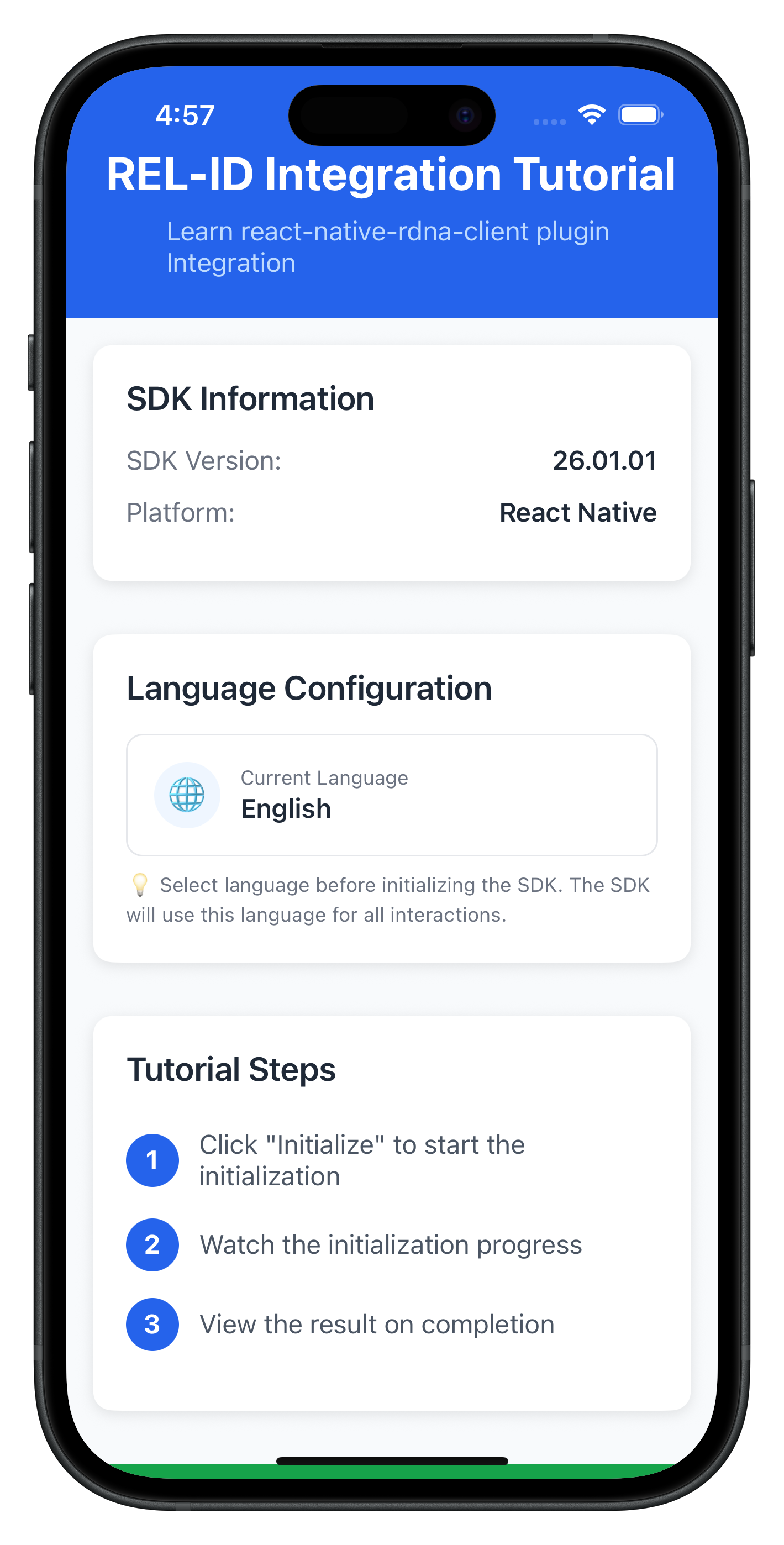
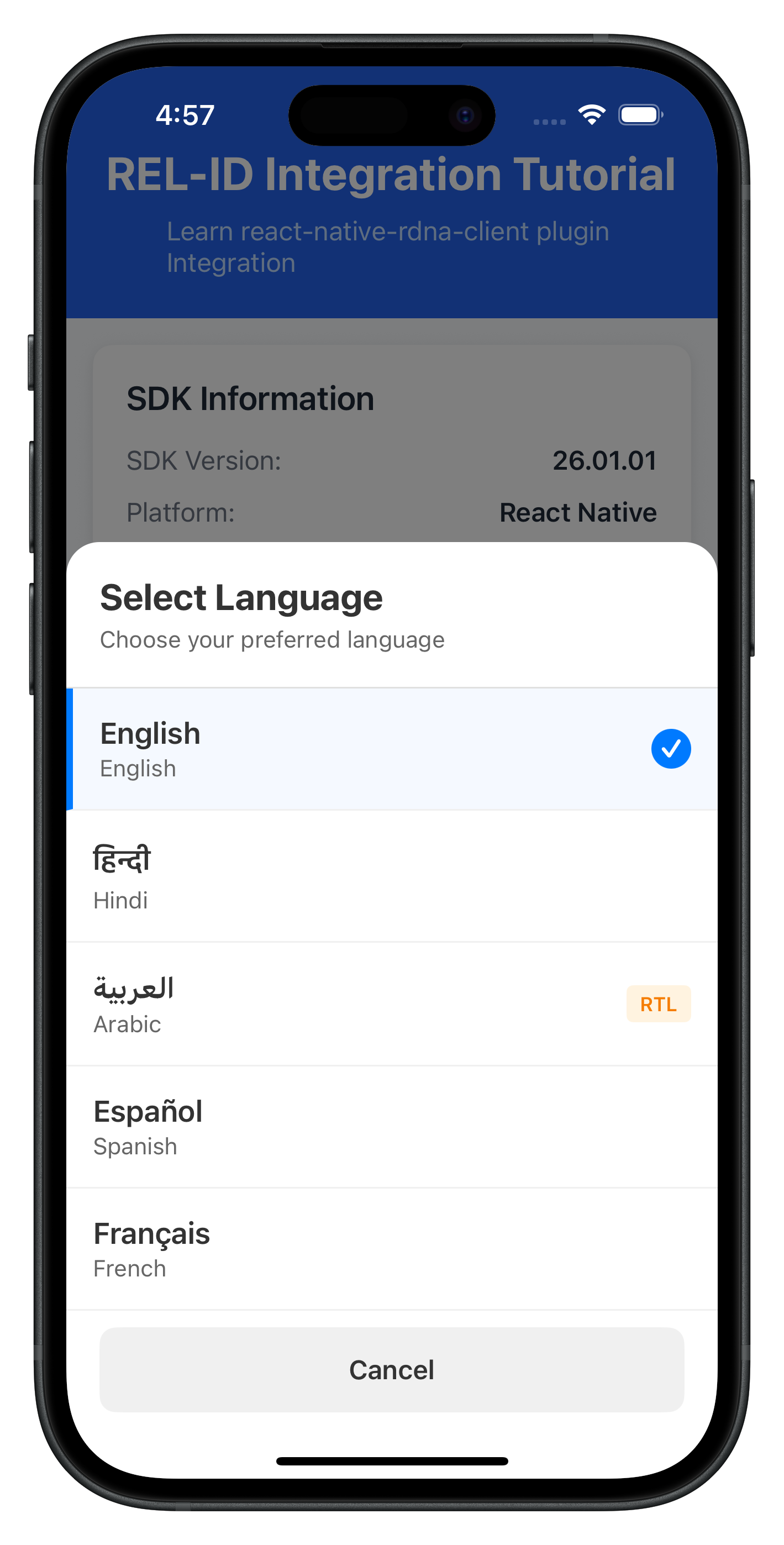
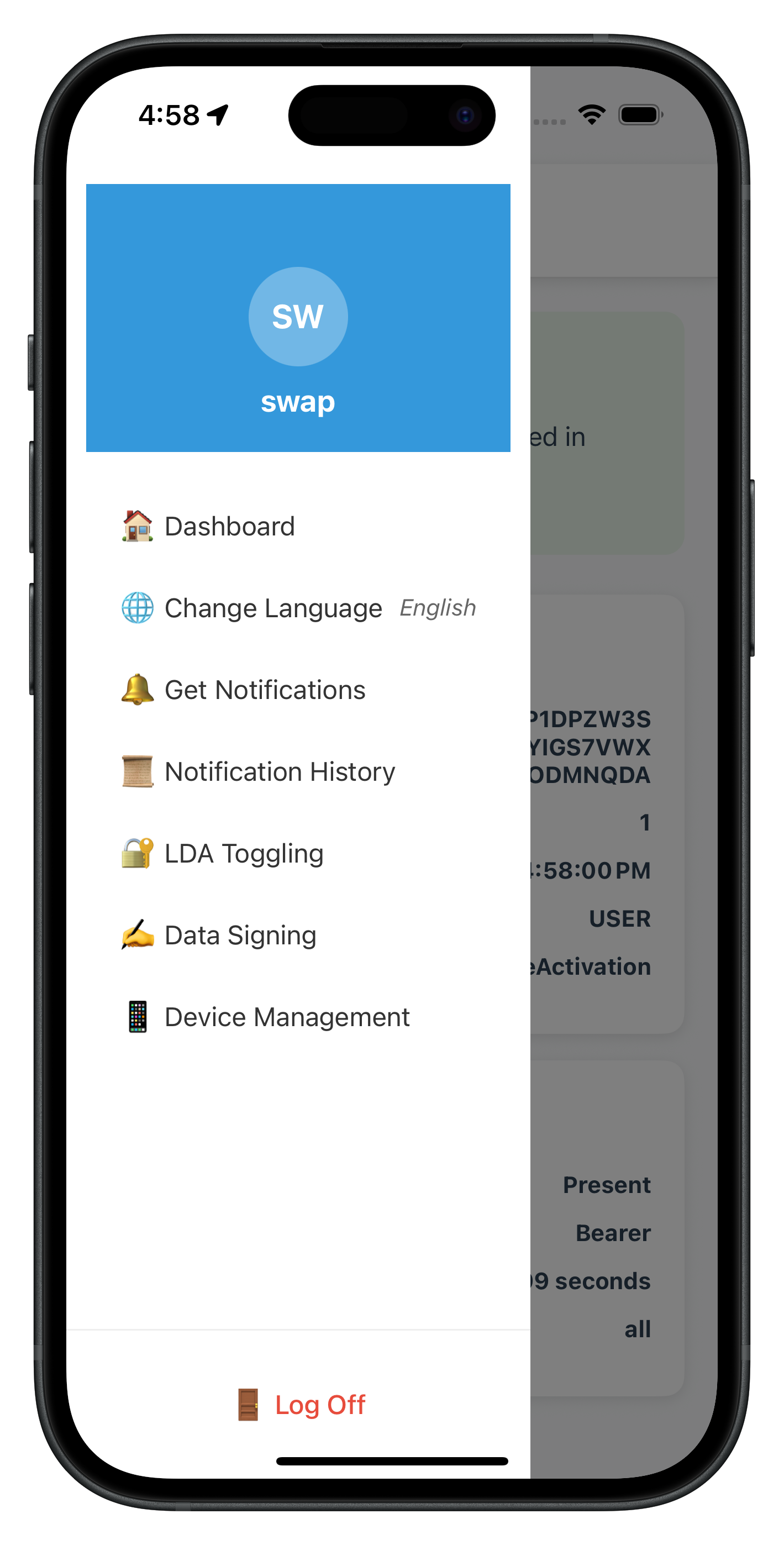
The following image showcases the screen from the sample application:
|
|
|
Let's verify that your internationalization implementation works correctly.
Verification Checklist
Follow these steps to test your i18n implementation:
Phase 1: SDK Initialization (App Startup)
- [ ] App starts with saved language preference (e.g., Spanish)
- [ ] SDK initializes with short language code (
initOptions.internationalizationOptions.localeCode = 'es') - [ ] If initialization succeeds, SDK returns supported languages
- [ ] If initialization fails with network down, SDK returns Spanish error message from
values-es/strings_rel_id.xml - [ ] Localized error message is displayed correctly to user without app-level mapping
Phase 2: Runtime Language Switching (Post-Login)
- [ ] Navigate to drawer menu and tap "Change Language"
- [ ] Language Selector modal opens with all supported languages
- [ ] Current language is marked with checkmark
- [ ] Tapping a language calls
setSDKLanguage()API - [ ] Loading indicator appears during language change
- [ ]
onSetLanguageResponseevent fires after API call - [ ] If successful (statusCode === 100 and longErrorCode === 0):
- [ ] LanguageContext updates with new language
- [ ] Success alert is shown to user
- [ ] All language-dependent UI updates immediately
- [ ] If failed (longErrorCode !== 0):
- [ ] Error alert is shown to user
- [ ] Language does NOT change
- [ ] User can retry language selection
Localization Files Setup (Android)
- [ ] Verify
android/app/src/main/res/values-hi/strings_rel_id.xmlexists - [ ] Error messages are properly formatted:
Hindi message here - [ ] Build app:
npx react-native run-android - [ ] Test with network offline to verify SDK returns localized error messages
Localization Files Setup (iOS)
- [ ] Verify
ios/SharedLocalization/hi.lproj/RELID.stringsexists - [ ] Localization files are linked to Xcode project (not copied)
- [ ] Build app:
npx react-native run-ios - [ ] Test initialization failure to confirm SDK reads localized strings
Internationalization Best Practices
- Use Short Codes for Initialization, Full Codes for APIs
- Initialize:
initOptions.internationalizationOptions.localeCode = 'en'(short code) - setSDKLanguage:
'en-US'(full code)
- Initialize:
- Bundle Localization Files with App
- SDK reads localization files during initialization errors
- Ensure strings.xml (Android) and .strings files (iOS) are bundled with app binary
- Do not load localization files remotely - they won't be available if network is down
- Test error scenarios with network disconnected to verify error messages display
- Clean Up Event Handlers
- Always unsubscribe from language events on unmount
- Use
useFocusEffectfor navigation-based cleanup - Prevent memory leaks and unpredictable event routing
- Validate Before API Calls
- Check if selected language equals current language
- Skip API call if no change needed
- Reduce unnecessary network requests
- Persist User Preferences
- Save language choice to AsyncStorage
- Restore on app restart
- Respect user's language preferences across sessions
- Handle RTL Languages
- Detect RTL languages from
directionfield - Show RTL badge in language selector
- Test UI layout with RTL languages
- Detect RTL languages from
Security Considerations
- Localization File Security
- Localization files are bundled with the app binary (not downloaded)
- Ensures error messages are always available even without network
- Review all error messages in localization files - SDK will display them to users
- Keep error messages user-friendly without exposing internal error codes
- Language Validation
- Validate language codes before sending to SDK
- Use enum values like
RDNALanguageDirection - Prevent injection attacks through language selection
- Event Handler Isolation
- Each screen should have its own event handler
- Clean up handlers when switching screens
- Prevent unintended event handling across screens
🎉 Congratulations! You've successfully implemented comprehensive internationalization support with REL-ID SDK!
What You've Accomplished
In this codelab, you've learned and implemented:
✅ Two-Phase Language Lifecycle
- SDK initialization with language preference via
initOptions - Runtime language switching using
setSDKLanguage()API - Automatic error localization via SDK reading native localization files
- Event-driven language updates with
onSetLanguageResponse - Synchronizing supported languages from
onInitializedcallback
✅ Native Platform Localization
- Android
strings.xmlconfiguration for error codes - iOS
.stringsfile setup for localization - Multi-language support (English, Hindi, Spanish, and beyond)
✅ Language State Management
- React Context implementation with
LanguageProvider - Custom
useLanguage()hook for easy access - AsyncStorage persistence for language preferences
✅ User Interface Components
- Language Selector modal with native script display
- Drawer menu integration for language change
- RTL/LTR support with direction indicators
✅ Production-Ready Error Handling
- Three-layer error detection (API, status code, promise)
- Early return pattern for cleaner code
- User-friendly error alerts and feedback
Next Steps
Your internationalization implementation is now production-ready! Consider these enhancements:
- Add More Languages: Expand your language support
- Add Arabic, French, German, or other languages to
DEFAULT_SUPPORTED_LANGUAGES - Create corresponding native localization files for Android and iOS
- Update the
NATIVE_NAMESlookup table inlanguageConfig.ts - Test RTL layout with Arabic or Hebrew languages
- Add Arabic, French, German, or other languages to
- Server-Side Language Management: Sync with backend
- Validate language availability against server-supported languages
- Store user language preference in user profile on backend
- Implement language fallback chains (e.g., ‘zh-TW' → ‘zh-CN' → ‘en')
- Handle cases where user's preferred language is not available
Happy coding with internationalization! 🌍
This codelab was created to help you master multi-language support with REL-ID SDK. The patterns you've learned here are production-tested and used by enterprise applications worldwide.