🎯 Learning Path:
- Complete REL-ID Complete Activation & Login Flow Codelab
- You are here → Identity Verification Post-Login Flow Implementation
- Optional: REL-ID Forgot Password Flow Codelab
Welcome to the REL-ID Identity Verification Post-Login Flow codelab! This tutorial teaches you how to implement comprehensive identity verification using document scanning, facial recognition, and biometric authentication after user login for KYC compliance.
What You'll Build
In this codelab, you'll enhance your existing REL-ID application with:
- 📱 Document Scan Process: Automated document verification with real-time validation
- 🤳 Selfie Capture & Verification: Facial recognition with liveness detection
- 📄 Document Details Confirmation: Interactive review of extracted identity information
- 🔐 Biometric Opt-in Consent: Secure biometric authentication setup
- 🎛️ Complete IDV Event Chain: End-to-end identity verification workflow
- 🛡️ Security Best Practices: Production-ready IDV implementation with comprehensive error handling
What You'll Learn
By completing this codelab, you'll master:
- IDV SDK Integration: Implementing REL-ID SDK's identity verification APIs and event handlers
- Document Scanning Flow: Managing document capture, validation, and user confirmation workflows
- Biometric Authentication: Setting up facial recognition and biometric consent processes
- Event-Driven Architecture: Handling complex IDV event chains with proper navigation
- UI/UX Best Practices: Creating intuitive identity verification user interfaces
- Production Security Patterns: Implementing secure IDV flows with comprehensive error handling
Prerequisites
Before starting this codelab, ensure you have:
- ✅ Completed REL-ID MFA Codelab - All MFA screens and flows must be fully implemented
- ✅ React Native Development Environment - Android Studio, Xcode, and React Native CLI configured
- ✅ REL-ID SDK Integration - Latest SDK with IDV support configured
- ✅ TypeScript Knowledge - Understanding of TypeScript interfaces and type safety patterns
- ✅ Server Configuration - REL-ID server with IDV capabilities enabled
- ✅ Document Recognition License - Valid Regula license file for document scanning
- ✅ Camera Permissions - Proper iOS/Android camera permissions configured
Get the Code from GitHub
The code to get started can be found in a GitHub repository.
You can clone the repository using the following command:
git clone https://github.com/uniken-public/codelab-react-native.git
Navigate to the relid-IDV-PostLogin-KYC folder in the repository you cloned earlier
Required IDV Plugins Installation
Mandatory IDV Plugins
The IDV implementation requires these mandatory native plugins:
# Navigate to the codelab folder
cd relid-IDV-PostLogin-KYC

# Place the required native plugins at root folder of this project:
# - react-native-rdna-client (base REL-ID SDK)
# - react-native-relid-idv-document-capture (document scanning plugin)
# - react-native-relid-idv-selfie-capture (selfie capture & biometric verification plugin)

# Install dependencies
npm install

# iOS additional setup (required for CocoaPods and IDV plugins)
cd ios && pod install && cd ..

# Run the application
npx react-native run-android
# or
npx react-native run-ios
Required IDV Assets:
- Android: Regula assets in
android/app/src/main/assets/Regula/(db.dat ~108MB, certificates) - iOS: Document database
ios/db.dat, licenseios/regula.license, certificates bundle - License Files: Valid Regula document reader license for production use
Plugin Configuration:
The IDV plugins require specific configuration in your React Native project:
- Android: Gradle configuration for plugin paths in
android/build.gradle - iOS: CocoaPods integration via
pod install
Codelab Architecture Overview
This codelab extends your MFA application with six core IDV components:
- IDV Configuration Settings Screen: Manages IDV configuration and server settings (optional advanced configuration)
- Document Process Start Confirmation Screen: Initiates document scanning with user consent
- Document Details Confirmation Screen: Reviews and validates extracted document information
- Selfie Process Start Confirmation Screen: Prepares user for facial recognition capture
- Selfie Confirmation Screen: Reviews captured selfie with extracted facial data
- Biometric Opt-in Consent Screen: Enables biometric authentication for future logins
The IDV implementation adds the following files to your existing React Native project structure:
Component | Purpose | File Location |
IDV Service Methods | Enhanced service with IDV API methods |
|
IDV Event Handlers | Event manager with IDV callback handlers |
|
IDV Event Provider | Global IDV event handling integration |
|
Navigation Integration | IDV screen navigation and routing |
|
IDV Configuration Screen | IDV settings management (optional) |
|
Document Start Screen | Document scanning initiation |
|
Document Confirmation Screen | Document details validation |
|
Selfie Start Screen | Selfie capture initiation |
|
Selfie Confirmation Screen | Selfie verification and confirmation |
|
Biometric Consent Screen | Biometric template storage consent |
|
Complete Project Directory Structure
After implementing IDV functionality, your project structure will include:
src/
├── uniken/
│   ├── services/
│   │   ├── rdnaEventManager.ts          # Enhanced with IDV event handlers
│   │   └── rdnaService.ts               # Enhanced with IDV API methods
│   ├── providers/
│   │   └── SDKEventProvider.tsx         # Enhanced with IDV event integration
│   └── types/
│       └── rdnaEvents.ts                # Enhanced with IDV event interfaces
├── tutorial/
│   ├── navigation/
│   │   └── AppNavigator.tsx             # Enhanced with IDV screen registration
│   └── screens/
│       ├── idv/                         # NEW: IDV screen components
│       │   ├── IDVConfigSettings.tsx
│       │   ├── IDVDocumentProcessStartConfirmationScreen.tsx
│       │   ├── IDVConfirmDocumentDetailsScreen.tsx
│       │   ├── IDVSelfieProcessStartConfirmationScreen.tsx
│       │   ├── IDVSelfieConfirmationScreen.tsx
│       │   └── IDVBiometricOptInConsentScreen.tsx
│       ├── auth/                        # Existing authentication screens
│       └── components/                  # Shared UI components
├── assets/
└── react-native-plugins/               # Required for IDV functionality
    ├── react-native-relid-idv-document-capture/
    └── react-native-relid-idv-selfie-capture/
Required IDV Assets Structure
# Android IDV Assets
android/app/src/main/assets/Regula/
├── db.dat                              # Document recognition database (~108MB)
├── certificates/                       # Security certificates bundle
└── regula.license                      # Production license file

# iOS IDV Assets
ios/
├── db.dat                             # Document recognition database
├── regula.license                     # Production license file
└── certificates/                      # Security certificates bundle
The Identity Verification Challenge
In today's digital landscape, financial institutions, healthcare providers, government agencies, and service platforms face mounting pressure to verify user identities remotely while preventing fraud, meeting compliance requirements, and delivering seamless user experiences. Traditional identity verification methods fall short in several critical areas:
Legacy Identity Verification Limitations
📋 Manual Document Review Process
- Time-intensive human verification workflows
- Inconsistent validation across different reviewers
- High operational costs for manual processing
- Scalability limitations during peak usage periods
- Human error in document authenticity assessment
🔒 Basic Authentication Vulnerabilities
- Password-only authentication easily compromised
- SMS-based verification susceptible to SIM swapping attacks
- Knowledge-based authentication questions can be researched online
- Static credentials vulnerable to data breaches
- No proof of physical document possession
⚖️ Regulatory Compliance Gaps
- Difficulty meeting Know Your Customer (KYC) requirements
- Inconsistent Anti-Money Laundering (AML) compliance
- Manual audit trails prone to gaps and errors
- Challenge adapting to evolving regulatory frameworks
- Risk of regulatory penalties due to inadequate verification
📱 Poor Mobile User Experience
- Multi-step verification processes requiring app switching
- Document upload limitations and quality issues
- Lengthy verification delays impacting user onboarding
- High abandonment rates during complex verification flows
- Lack of real-time feedback on document quality
How REL-ID IDV Module Addresses These Challenges
The REL-ID Identity Verification (IDV) module provides a comprehensive solution that transforms identity verification from a liability into a competitive advantage:
🤖 Automated Document Intelligence
Real-time Document Authentication
// Comprehensive authenticity validation
  geometryCheck: true,           // Document structure validation
  hologramDetection: true,       // Holographic security features
  opticallyVariableInk: true,    // Advanced ink pattern analysis
  securityTextValidation: true,  // Microtext and security printing
  electronicDeviceDetection: true // Anti-spoofing measures
- Advanced OCR Technology: Extracts text data with 99.9% accuracy across 150+ document types
- Machine Learning Validation: AI-powered authenticity checks detect sophisticated forgeries
- Real-time Quality Assessment: Instant feedback on document capture quality prevents resubmission delays
- Multi-layered Security Features: Validates holograms, microtext, security patterns, and embedded chips
🎯 Biometric-Grade Identity Assurance
Liveness Detection & Facial Recognition
- Advanced Liveness Detection: Prevents photo, video, and 3D mask spoofing attempts
- Facial Biometric Matching: Compares document photo with live selfie using advanced algorithms
- Quality-Driven Capture: Ensures optimal lighting, positioning, and image clarity
- Secure Template Storage: Generates encrypted biometric templates for future authentication
⚡ Streamlined User Experience
One-Touch Verification Flow
- SDK-Native Camera Integration: Seamless document and selfie capture without leaving your app
- Intelligent Capture Guidance: Real-time feedback guides users to optimal document positioning
- Progressive Enhancement: Graceful fallback for devices with limited camera capabilities
- Accessibility Compliance: Screen reader support and alternative verification methods
📊 Enterprise-Grade Compliance & Reporting
Regulatory Framework Alignment
- Multi-Jurisdiction Support: Adapts to local and international regulatory requirements
- Automated Compliance Reporting: Generates audit trails meeting regulatory standards
- Data Minimization: Collects only required identity data following privacy regulations
- Secure Data Processing: End-to-end encryption with zero-knowledge architecture
🔄 Seamless Integration Architecture
Event-Driven IDV Workflow
// Complete IDV event chain
const idvWorkflow = [
  'getIDVDocumentScanProcessStartConfirmation',  // Document capture initiation
  'getIDVConfirmDocumentDetails',                // Document data validation
  'getIDVSelfieProcessStartConfirmation',        // Selfie capture initiation
  'getIDVSelfieConfirmation',                    // Selfie validation
  'getIDVBiometricOptInConsent'                  // Template storage consent
];
- REL-ID SDK Integration: Native iOS/Android SDKs with React Native bridging
- Event-Driven Architecture: Asynchronous processing with comprehensive error handling
- Flexible Deployment: Cloud, on-premise, or hybrid deployment options
- Scalable Performance: Handles enterprise-scale verification volumes
Business Impact & ROI
Operational Efficiency Gains
- 95% Reduction in manual document review time
- 80% Decrease in false positive identity rejections
- 70% Improvement in user onboarding completion rates
- 60% Reduction in customer support tickets related to identity verification
Security & Compliance Benefits
- 99.9% Fraud Prevention accuracy with advanced anti-spoofing
- 100% Audit Trail coverage for regulatory compliance
- Real-time Risk Assessment with comprehensive identity validation
- Zero-Knowledge Architecture ensuring maximum privacy protection
Enhanced User Experience
- Under 60 Seconds average verification completion time
- Multi-language Support for global user bases
- Cross-platform Consistency across iOS, Android, and web
- Accessibility Compliance following WCAG guidelines
Before implementing IDV functionality, let's understand the key SDK events and APIs that power the identity verification workflow.
IDV Event Flow Sequence
The identity verification process follows this comprehensive event-driven pattern:
User Login → postLoginIDVInitiation → getIDVDocumentScanProcessStartConfirmation → Document Scan →
getIDVConfirmDocumentDetails → getIDVSelfieProcessStartConfirmation → Selfie Capture →
getIDVSelfieConfirmation → getIDVBiometricOptInConsent → IDVActivatedCustomerKYCResponse
Core IDV Event Types
The REL-ID SDK triggers these main events during the IDV flow:
Event Type | Description | User Action Required |
Document scanning process initiation | User confirms readiness to scan document | |
Document data validation and confirmation | User reviews and confirms extracted document details | |
Selfie capture process initiation | User confirms readiness for facial recognition | |
Selfie validation and confirmation | User reviews captured selfie and extracted data | |
Biometric authentication setup | User consents to biometric authentication | |
KYC activation response | Handle successful/failed KYC activation results |
IDV Process Requirements
Identity verification requires specific setup conditions:
Requirement | Description | Status Check |
| Server-side IDV feature flag | ✅ Required configuration |
| Document recognition license file | ✅ Must be valid and not expired |
| iOS/Android camera access | ✅ Must be granted before scanning |
| Supported document type configurations | ✅ Server-configured document types |
IDV API Integration Pattern
Add these TypeScript definitions to understand the IDV API structure:
// src/uniken/services/rdnaService.ts (IDV API additions)

/**
 * Confirms document scan process start with IDV workflow parameter
 * @param isConfirm User confirmation decision (true = start document scan, false = cancel)
 * @param idvWorkflow IDV workflow type (0=activation, 2=device activation, 4=recovery, 5=post-login, 6=KYC, 13=agent KYC)
 * @returns Promise<RDNASyncResponse> that resolves with sync response structure
 */
async setIDVDocumentScanProcessStartConfirmation(isConfirm: boolean, idvWorkflow: number): Promise<RDNASyncResponse> {
  return new Promise((resolve, reject) => {
    console.log('RdnaService - Setting IDV document scan process start confirmation:', {
      isConfirm,
      idvWorkflow
    });

    RdnaClient.setIDVDocumentScanProcessStartConfirmation(isConfirm, idvWorkflow, response => {
      console.log('RdnaService - setIDVDocumentScanProcessStartConfirmation sync callback received');

      const result: RDNASyncResponse = response;

      if (result.error && result.error.longErrorCode === 0) {
        console.log('RdnaService - Document scan confirmation success, waiting for async events');
        resolve(result);
      } else {
        console.error('RdnaService - Document scan confirmation error:', result);
        reject(result);
      }
    });
  });
}

/**
 * Confirms extracted document details
 * @param isConfirm User confirmation decision (true = accept document details, false = reject)
 * @param challengeMode Challenge mode from the getIDVConfirmDocumentDetails event
 * @returns Promise<RDNASyncResponse> that resolves with sync response structure
 */
async setIDVConfirmDocumentDetails(isConfirm: boolean, challengeMode: number): Promise<RDNASyncResponse> {
  return new Promise((resolve, reject) => {
    console.log('RdnaService - Setting IDV confirm document details:', {
      isConfirm,
      challengeMode
    });

    RdnaClient.setIDVConfirmDocumentDetails(isConfirm, challengeMode, response => {
      console.log('RdnaService - setIDVConfirmDocumentDetails sync callback received');

      const result: RDNASyncResponse = response;

      if (result.error && result.error.longErrorCode === 0) {
        console.log('RdnaService - Document details confirmation success, waiting for async events');
        resolve(result);
      } else {
        console.error('RdnaService - Document details confirmation error:', result);
        reject(result);
      }
    });
  });
}
Let's implement the complete IDV API methods in your service layer following established REL-ID SDK patterns.
Enhance rdnaService.ts with IDV Methods
Add all IDV methods to your existing service implementation:
// src/uniken/services/rdnaService.ts (IDV methods addition)

/**
 * Confirms document scan process start with workflow parameter
 * @param isConfirm User confirmation decision (true = start document scan, false = cancel)
 * @param idvWorkflow IDV workflow type for the document scanning process
 * @returns Promise<RDNASyncResponse>
 */
async setIDVDocumentScanProcessStartConfirmation(isConfirm: boolean, idvWorkflow: number): Promise<RDNASyncResponse> {
  return new Promise((resolve, reject) => {
    console.log('RdnaService - Setting IDV document scan process start confirmation:', {
      isConfirm,
      idvWorkflow
    });

    RdnaClient.setIDVDocumentScanProcessStartConfirmation(isConfirm, idvWorkflow, response => {
      console.log('RdnaService - setIDVDocumentScanProcessStartConfirmation sync callback received');

      const result: RDNASyncResponse = response;

      if (result.error && result.error.longErrorCode === 0) {
        console.log('RdnaService - Document scan confirmation success');
        resolve(result);
      } else {
        console.error('RdnaService - Document scan confirmation error:', result);
        reject(result);
      }
    });
  });
}

/**
 * Confirms extracted document details
 * @param isConfirm User confirmation decision (true = accept document details, false = reject)
 * @param challengeMode Challenge mode from the getIDVConfirmDocumentDetails event
 * @returns Promise<RDNASyncResponse>
 */
async setIDVConfirmDocumentDetails(isConfirm: boolean, challengeMode: number): Promise<RDNASyncResponse> {
  return new Promise((resolve, reject) => {
    console.log('RdnaService - Setting IDV confirm document details:', { isConfirm, challengeMode });

    RdnaClient.setIDVConfirmDocumentDetails(isConfirm, challengeMode, response => {
      console.log('RdnaService - setIDVConfirmDocumentDetails sync callback received');

      const result: RDNASyncResponse = response;

      if (result.error && result.error.longErrorCode === 0) {
        console.log('RdnaService - Document details confirmation success');
        resolve(result);
      } else {
        console.error('RdnaService - Document details confirmation error:', result);
        reject(result);
      }
    });
  });
}

/**
 * Confirms selfie process start with camera and workflow parameters
 * @param isConfirm User confirmation decision (true = start selfie capture, false = cancel)
 * @param useDeviceBackCamera Whether to use back camera for selfie (default: false for front camera)
 * @param idvWorkflow IDV workflow type for the selfie capture process
 * @returns Promise<RDNASyncResponse>
 */
async setIDVSelfieProcessStartConfirmation(isConfirm: boolean, useDeviceBackCamera: boolean = false, idvWorkflow: number): Promise<RDNASyncResponse> {
  return new Promise((resolve, reject) => {
    console.log('RdnaService - Setting IDV selfie process start confirmation:', {
      isConfirm,
      useDeviceBackCamera,
      idvWorkflow
    });

    RdnaClient.setIDVSelfieProcessStartConfirmation(isConfirm, useDeviceBackCamera, idvWorkflow, response => {
      console.log('RdnaService - setIDVSelfieProcessStartConfirmation sync callback received');

      const result: RDNASyncResponse = response;

      if (result.error && result.error.longErrorCode === 0) {
        console.log('RdnaService - Selfie process confirmation success, waiting for async events');
        resolve(result);
      } else {
        console.error('RdnaService - Selfie process confirmation error:', result);
        reject(result);
      }
    });
  });
}

/**
 * Confirms captured selfie details
 * @param action User confirmation action (typically "true" for accept, "false" for reject)
 * @param challengeMode Challenge mode from the getIDVSelfieConfirmation event
 * @returns Promise<RDNASyncResponse>
 */
async setIDVSelfieConfirmation(action: string, challengeMode: number): Promise<RDNASyncResponse> {
  return new Promise((resolve, reject) => {
    console.log('RdnaService - Setting IDV selfie confirmation:', {
      action,
      challengeMode
    });

    RdnaClient.setIDVSelfieConfirmation(action, challengeMode, response => {
      console.log('RdnaService - setIDVSelfieConfirmation sync callback received');

      const result: RDNASyncResponse = response;

      if (result.error && result.error.longErrorCode === 0) {
        console.log('RdnaService - Selfie confirmation success, waiting for async events');
        resolve(result);
      } else {
        console.error('RdnaService - Selfie confirmation error:', result);
        reject(result);
      }
    });
  });
}

/**
 * Sets biometric opt-in consent
 * @param isOptIn User consent decision (true = allow biometric storage, false = deny)
 * @param challengeMode Challenge mode from the getIDVBiometricOptInConsent event
 * @returns Promise<RDNASyncResponse>
 */
async setIDVBiometricOptInConsent(isOptIn: boolean, challengeMode: number): Promise<RDNASyncResponse> {
  return new Promise((resolve, reject) => {
    console.log('RdnaService - Setting IDV biometric opt-in consent:', {
      isOptIn,
      challengeMode
    });

    RdnaClient.setIDVBiometricOptInConsent(isOptIn, challengeMode, response => {
      console.log('RdnaService - setIDVBiometricOptInConsent sync callback received');

      const result: RDNASyncResponse = response;

      if (result.error && result.error.longErrorCode === 0) {
        console.log('RdnaService - Biometric consent success, waiting for async events');
        resolve(result);
      } else {
        console.error('RdnaService - Biometric consent error:', result);
        reject(result);
      }
    });
  });
}

/**
 * Gets IDV configuration from server
 * @returns Promise<RDNASyncResponse> that resolves with config data
 */
async getIDVConfig(): Promise<RDNASyncResponse> {
  return new Promise((resolve, reject) => {
    console.log('RdnaService - Getting IDV configuration');

    RdnaClient.getIDVConfig(response => {
      console.log('RdnaService - getIDVConfig sync callback received');
      const result: RDNASyncResponse = response;

      if (result.error && result.error.longErrorCode === 0) {
        console.log('RdnaService - IDV config retrieved successfully');
        resolve(result);
      } else {
        console.error('RdnaService - IDV config error:', result);
        reject(result);
      }
    });
  });
}

/**
 * Sets IDV configuration (Optional API)
 * This API is optional and allows customization of IDV settings such as:
 * - Document authenticity checks (hologram, security text, etc.)
 * - Image quality thresholds (DPI, brightness, angle, etc.)
 * - NFC scanning settings and timeouts
 * - Debug logging and raw data requirements
 *
 * @param configJson IDV configuration as JSON string
 * @returns Promise<RDNASyncResponse>
 */
async setIDVConfig(configJson: string): Promise<RDNASyncResponse> {
  return new Promise((resolve, reject) => {
    console.log('RdnaService - Setting IDV configuration');

    RdnaClient.setIDVConfig(configJson, response => {
      console.log('RdnaService - setIDVConfig sync callback received');
      const result: RDNASyncResponse = response;

      if (result.error && result.error.longErrorCode === 0) {
        console.log('RdnaService - IDV config set successfully');
        resolve(result);
      } else {
        console.error('RdnaService - IDV config set error:', result);
        reject(result);
      }
    });
  });
}

/**
 * Post-login IDV initiation - triggers IDV workflow after user authentication
 * @returns Promise<RDNASyncResponse> that resolves with sync response structure
 *
 * This method initiates the IDV process for already authenticated users.
 * After successful API call, the SDK will trigger the IDV event chain:
 * 1. getIDVDocumentScanProcessStartConfirmation event
 * 2. Document scanning process
 * 3. getIDVConfirmDocumentDetails event
 * 4. getIDVSelfieProcessStartConfirmation event
 * 5. Selfie capture process
 * 6. getIDVSelfieConfirmation event
 * 7. getIDVBiometricOptInConsent event (optional)
 */
async postLoginIDVInitiation(): Promise<RDNASyncResponse> {
  return new Promise((resolve, reject) => {
    console.log('RdnaService - Initiating post-login IDV process');

    RdnaClient.postLoginIDVInitiation(response => {
      console.log('RdnaService - postLoginIDVInitiation sync callback received');

      const result: RDNASyncResponse = response;

      if (result.error && result.error.longErrorCode === 0) {
        console.log('RdnaService - Post-login IDV initiation success, waiting for getIDVDocumentScanProcessStartConfirmation event');
        resolve(result);
      } else {
        console.error('RdnaService - Post-login IDV initiation error:', result);
        reject(result);
      }
    });
  });
}
Service Pattern Consistency
Notice how these implementations follow the exact pattern established by other service methods:
Pattern Element | Implementation Detail |
Promise Wrapper | Wraps native sync SDK callback in Promise for async/await usage |
Parameter Validation | Validates |
Comprehensive Logging | Detailed console logging for debugging IDV flows |
Error Handling | Proper reject/resolve based on sync response patterns |
Configure your event manager to handle the complete IDV event chain with proper navigation coordination.
Update rdnaEventManager.ts with IDV Handlers
Add comprehensive IDV event handlers to your existing event manager:
// src/uniken/services/rdnaEventManager.ts (IDV event handlers)

/**
 * Handle IDV document scan process start confirmation request
 */
onGetIDVDocumentScanProcessStartConfirmation: (data: RDNAGetIDVDocumentScanProcessStartConfirmationData) => {
  console.log('EventManager - onGetIDVDocumentScanProcessStartConfirmation triggered');
  console.log('EventManager - Document scan data:', {
    userID: data.userID,
    documentType: data.documentType,
    instructions: data.instructions
  });

  NavigationService.navigate('IDVDocumentProcessStartConfirmationScreen', {
    eventName: 'getIDVDocumentScanProcessStartConfirmation',
    eventData: data,
    title: 'Document Scan Setup',
    subtitle: `Prepare to scan your ${data.documentType || 'identity document'}`,
    responseData: data
  });
},

/**
 * Handle IDV document details confirmation request
 */
onGetIDVConfirmDocumentDetails: (data: RDNAGetIDVConfirmDocumentDetailsData) => {
  console.log('EventManager - onGetIDVConfirmDocumentDetails triggered');
  console.log('EventManager - Document details data:', {
    userID: data.userID,
    documentNumber: data.documentNumber ? '***' + data.documentNumber.slice(-4) : 'N/A',
    documentType: data.documentType,
    extractedDataAvailable: !!data.extractedData
  });

  NavigationService.navigate('IDVConfirmDocumentDetailsScreen', {
    title: 'Confirm Document Details',
    documentDetails: data,
    isAdditionalDocScan: false
  });
},

/**
 * Handle IDV selfie process start confirmation request
 */
onGetIDVSelfieProcessStartConfirmation: (data: RDNAGetIDVSelfieProcessStartConfirmationData) => {
  console.log('EventManager - onGetIDVSelfieProcessStartConfirmation triggered');
  console.log('EventManager - Selfie process data:', {
    userID: data.userID,
    instructions: data.instructions,
    livenessRequired: data.livenessDetection
  });

  NavigationService.navigate('IDVSelfieProcessStartConfirmationScreen', {
    eventName: 'getIDVSelfieProcessStartConfirmation',
    eventData: data,
    title: 'Selfie Capture Setup',
    subtitle: 'Prepare for facial recognition verification',
    responseData: data
  });
},

/**
 * Handle IDV selfie confirmation request
 */
onGetIDVSelfieConfirmation: (data: RDNAGetIDVSelfieConfirmationData) => {
  console.log('EventManager - onGetIDVSelfieConfirmation triggered');
  console.log('EventManager - Selfie confirmation data:', {
    userID: data.userID,
    captureQuality: data.captureQuality,
    livenessScore: data.livenessScore,
    faceMatchScore: data.faceMatchScore
  });

  NavigationService.navigate('IDVSelfieConfirmationScreen', {
    title: 'Confirm Selfie Capture',
    userDetails: data
  });
},

/**
 * Handle IDV biometric opt-in consent request
 */
onGetIDVBiometricOptInConsent: (data: RDNAGetIDVBiometricOptInConsentData) => {
  console.log('EventManager - onGetIDVBiometricOptInConsent triggered');
  console.log('EventManager - Biometric consent data:', {
    userID: data.userID,
    biometricTypes: data.availableBiometrics,
    isOptional: data.isOptional
  });

  NavigationService.navigate('IDVBiometricOptInConsentScreen', {
    title: 'Biometric Authentication Setup',
    userDetails: data
  });
},

/**
 * Handle IDV activated customer KYC response
 */
onIDVActivatedCustomerKYCResponse: (data: RDNAIDVActivatedCustomerKYCResponseData) => {
  console.log('EventManager - onIDVActivatedCustomerKYCResponse triggered');
  console.log('EventManager - KYC activation response:', {
    userID: data.userID,
    kycStatus: data.kycStatus,
    activationResult: data.activationResult
  });

  // Navigate to success or error screen based on KYC activation result
  if (data.activationResult === 'SUCCESS') {
    NavigationService.navigate('TutorialSuccessScreen', {
      title: 'KYC Verification Complete',
      message: 'Your identity has been successfully verified.',
      kycData: data
    });
  } else {
    NavigationService.navigate('TutorialErrorScreen', {
      title: 'KYC Verification Failed',
      message: 'Identity verification could not be completed. Please try again.',
      errorData: data
    });
  }
}
Register IDV Event Handlers
Ensure your event handlers are properly registered in the event manager initialization:
// src/uniken/services/rdnaEventManager.ts (handler registration)

/**
 * Initialize event manager with all callbacks including IDV handlers
 */
const initializeEventManager = () => {
  // ... existing handler registrations ...

  // Register IDV event handlers
  eventManager.setGetIDVDocumentScanProcessStartConfirmationHandler(
    rdnaEventHandlers.onGetIDVDocumentScanProcessStartConfirmation
  );

  eventManager.setGetIDVConfirmDocumentDetailsHandler(
    rdnaEventHandlers.onGetIDVConfirmDocumentDetails
  );

  eventManager.setGetIDVSelfieProcessStartConfirmationHandler(
    rdnaEventHandlers.onGetIDVSelfieProcessStartConfirmation
  );

  eventManager.setGetIDVSelfieConfirmationHandler(
    rdnaEventHandlers.onGetIDVSelfieConfirmation
  );

  eventManager.setGetIDVBiometricOptInConsentHandler(
    rdnaEventHandlers.onGetIDVBiometricOptInConsent
  );

  eventManager.setIDVActivatedCustomerKYCResponseHandler(
    rdnaEventHandlers.onIDVActivatedCustomerKYCResponse
  );

  console.log('EventManager - All IDV handlers registered successfully');
};
Event Chain Flow Validation
Add debugging utilities to validate the complete IDV event chain:
// src/uniken/services/rdnaEventManager.ts (debugging utility)

const debugIDVEventChain = () => {
  console.log('=== IDV Event Chain Debug ===');
  console.log('IDV Handler Registration Status:', {
    documentScanStart: !!eventManager.onGetIDVDocumentScanProcessStartConfirmationCallback,
    documentConfirm: !!eventManager.onGetIDVConfirmDocumentDetailsCallback,
    selfieStart: !!eventManager.onGetIDVSelfieProcessStartConfirmationCallback,
    selfieConfirm: !!eventManager.onGetIDVSelfieConfirmationCallback,
    biometricConsent: !!eventManager.onGetIDVBiometricOptInConsentCallback
  });
  console.log('Expected IDV Flow:');
  console.log('1. Document Scan Start → 2. Document Confirm → 3. Selfie Start → 4. Selfie Confirm → 5. Biometric Consent');
};
Now let's implement the six core IDV screen components following established patterns and best practices.
Complete IDV Screen Implementation Overview
The IDV Post-Login KYC flow requires these six screens:
- IDVConfigSettings - IDV configuration management screen (optional advanced settings)
- IDVDocumentProcessStartConfirmationScreen - Document scan process initiation
- IDVConfirmDocumentDetailsScreen - Document validation and confirmation
- IDVSelfieProcessStartConfirmationScreen - Selfie capture process initiation
- IDVSelfieConfirmationScreen - Selfie verification and confirmation
- IDVBiometricOptInConsentScreen - Biometric consent and template storage
1. IDV Configuration Settings Screen (Optional)
First, let's create the IDV configuration management screen for advanced customization:
// src/tutorial/screens/idv/IDVConfigSettings.tsx

import React, { Component } from 'react';
import {
  View,
  Text,
  TextInput,
  Alert,
  StyleSheet,
  Switch,
  TouchableOpacity,
  SafeAreaView,
  ScrollView,
  Modal,
  BackHandler,
} from 'react-native';
import AsyncStorage from '@react-native-async-storage/async-storage';
import RdnaService from '../../../uniken/services/rdnaService';

interface ConfigState {
  config: {
    version: string;
    saveDebugLogs: boolean;
    nfcScanEnabled: boolean;
    nfcScanTimeOut: number;
    isRawDataRequired: boolean;
    saveCroppedImages: boolean;
    supportedVersions: string[];
    useDefaultDatabase: boolean;
    authenticityChecksConfig: {
      hologram: boolean;
      securityText: boolean;
      barcodeFormat: boolean;
      geometryCheck: boolean;
      imagePatterns: boolean;
      photoEmbedding: boolean;
      blackAndWhiteCopy: boolean;
      multipleLaserImage: boolean;
      opticallyVariableInk: boolean;
      electronicDeviceDetection: boolean;
      dynaprint: boolean;
      extendedMRZ: boolean;
      extendedOCR: boolean;
      invisiblePersonalInfo: boolean;
      portraitComparison: boolean;
    };
    imageQualityChecksConfig: {
      focus: boolean;
      glare: boolean;
      bounds: boolean;
      colorness: boolean;
      occlusion: boolean;
      brightness: boolean;
      resolution: boolean;
      perspective: boolean;
      portraitPresence: boolean;
      screenCapture: boolean;
    };
    imageQualityThresholds: {
      dpiThreshold: number;
      angleThreshold: number;
      brightnessThreshold: number;
      documentPositionIndent: number;
      maxGlaringPart: number;
      imgMarginPart: number;
    };
  };
  isUpdate: boolean;
  collapsedSections: {
    basicConfig: boolean;
    authenticityChecks: boolean;
    imageQualityChecks: boolean;
    imageQualityThresholds: boolean;
  };
  selectedLanguage: string;
  selectedLanguageLabel: string;
  supportedVersionsData: Array<{ label: string; value: string }>;
  versionDropdownVisible: boolean;
  languageDropdownVisible: boolean;
  [key: string]: any; // For dynamic text state keys
}

class IDVConfigSettings extends Component<any, ConfigState> {
  constructor(props: any) {
    super(props);
    this.state = {
      config: {
        version: "3.0",
        saveDebugLogs: true,
        nfcScanEnabled: true,
        nfcScanTimeOut: 45,
        isRawDataRequired: true,
        saveCroppedImages: false,
        supportedVersions: ["3.0"],
        useDefaultDatabase: true,
        authenticityChecksConfig: {
          hologram: true,
          securityText: true,
          barcodeFormat: true,
          geometryCheck: true,
          imagePatterns: true,
          photoEmbedding: true,
          blackAndWhiteCopy: true,
          multipleLaserImage: true,
          opticallyVariableInk: true,
          electronicDeviceDetection: true,
          dynaprint: true,
          extendedMRZ: true,
          extendedOCR: true,
          invisiblePersonalInfo: true,
          portraitComparison: true
        },
        imageQualityChecksConfig: {
          focus: true,
          glare: true,
          bounds: true,
          colorness: true,
          occlusion: true,
          brightness: true,
          resolution: true,
          perspective: true,
          portraitPresence: true,
          screenCapture: true
        },
        imageQualityThresholds: {
          dpiThreshold: 150,
          angleThreshold: 5,
          brightnessThreshold: 50,
          documentPositionIndent: 10,
          maxGlaringPart: 0.1,
          imgMarginPart: 0.07
        }
      },
      isUpdate: true,
      collapsedSections: {
        basicConfig: false,
        authenticityChecks: false,
        imageQualityChecks: false,
        imageQualityThresholds: false
      },
      selectedLanguage: 'en',
      selectedLanguageLabel: 'English',
      supportedVersionsData: [],
      versionDropdownVisible: false,
      languageDropdownVisible: false,
    };
  }

  async componentDidMount() {
    BackHandler.addEventListener('hardwareBackPress', function () {
      this.props.navigation.goBack();
      return true;
    }.bind(this));

    this.getConfig();
  }

  goBack() {
    this.props.navigation.goBack();
  }

  getConfig() {
    RdnaService.getIDVConfig()
      .then((response: any) => {
        console.log('IDV Config Response:', response);

        // Parse the response and update state with enhanced structure
        const config = {
          version: response.version || "3.0",
          saveDebugLogs: response.saveDebugLogs !== undefined ? response.saveDebugLogs : true,
          nfcScanEnabled: response.nfcScanEnabled !== undefined ? response.nfcScanEnabled : true,
          nfcScanTimeOut: response.nfcScanTimeOut || 45,
          isRawDataRequired: response.isRawDataRequired !== undefined ? response.isRawDataRequired : true,
          saveCroppedImages: response.saveCroppedImages !== undefined ? response.saveCroppedImages : false,
          supportedVersions: response.supportedVersions || ["3.0"],
          useDefaultDatabase: response.useDefaultDatabase !== undefined ? response.useDefaultDatabase : true,

          // Enhanced authenticity checks (merge with server response)
          authenticityChecksConfig: {
            hologram: response.authenticityChecksConfig?.hologram !== undefined ? response.authenticityChecksConfig.hologram : true,
            securityText: response.authenticityChecksConfig?.securityText !== undefined ? response.authenticityChecksConfig.securityText : true,
            barcodeFormat: response.authenticityChecksConfig?.barcodeFormat !== undefined ? response.authenticityChecksConfig.barcodeFormat : true,
            geometryCheck: response.authenticityChecksConfig?.geometryCheck !== undefined ? response.authenticityChecksConfig.geometryCheck : true,
            imagePatterns: response.authenticityChecksConfig?.imagePatterns !== undefined ? response.authenticityChecksConfig.imagePatterns : true,
            photoEmbedding: response.authenticityChecksConfig?.photoEmbedding !== undefined ? response.authenticityChecksConfig.photoEmbedding : true,
            blackAndWhiteCopy: response.authenticityChecksConfig?.blackAndWhiteCopy !== undefined ? response.authenticityChecksConfig.blackAndWhiteCopy : true,
            multipleLaserImage: response.authenticityChecksConfig?.multipleLaserImage !== undefined ? response.authenticityChecksConfig.multipleLaserImage : true,
            opticallyVariableInk: response.authenticityChecksConfig?.opticallyVariableInk !== undefined ? response.authenticityChecksConfig.opticallyVariableInk : true,
            electronicDeviceDetection: response.authenticityChecksConfig?.electronicDeviceDetection !== undefined ? response.authenticityChecksConfig.electronicDeviceDetection : true,
            dynaprint: response.authenticityChecksConfig?.dynaprint !== undefined ? response.authenticityChecksConfig.dynaprint : true,
            extendedMRZ: response.authenticityChecksConfig?.extendedMRZ !== undefined ? response.authenticityChecksConfig.extendedMRZ : true,
            extendedOCR: response.authenticityChecksConfig?.extendedOCR !== undefined ? response.authenticityChecksConfig.extendedOCR : true,
            invisiblePersonalInfo: response.authenticityChecksConfig?.invisiblePersonalInfo !== undefined ? response.authenticityChecksConfig.invisiblePersonalInfo : true,
            portraitComparison: response.authenticityChecksConfig?.portraitComparison !== undefined ? response.authenticityChecksConfig.portraitComparison : true
          },

          // Enhanced image quality checks
          imageQualityChecksConfig: {
            focus: response.imageQualityChecksConfig?.focus !== undefined ? response.imageQualityChecksConfig.focus : true,
            glare: response.imageQualityChecksConfig?.glare !== undefined ? response.imageQualityChecksConfig.glare : true,
            bounds: response.imageQualityChecksConfig?.bounds !== undefined ? response.imageQualityChecksConfig.bounds : true,
            colorness: response.imageQualityChecksConfig?.colorness !== undefined ? response.imageQualityChecksConfig.colorness : true,
            occlusion: response.imageQualityChecksConfig?.occlusion !== undefined ? response.imageQualityChecksConfig.occlusion : true,
            brightness: response.imageQualityChecksConfig?.brightness !== undefined ? response.imageQualityChecksConfig.brightness : true,
            resolution: response.imageQualityChecksConfig?.resolution !== undefined ? response.imageQualityChecksConfig.resolution : true,
            perspective: response.imageQualityChecksConfig?.perspective !== undefined ? response.imageQualityChecksConfig.perspective : true,
            portraitPresence: response.imageQualityChecksConfig?.portraitPresence !== undefined ? response.imageQualityChecksConfig.portraitPresence : true,
            screenCapture: response.imageQualityChecksConfig?.screenCapture !== undefined ? response.imageQualityChecksConfig.screenCapture : true
          },

          // Enhanced image quality thresholds
          imageQualityThresholds: {
            dpiThreshold: response.imageQualityThresholds?.dpiThreshold || 150,
            angleThreshold: response.imageQualityThresholds?.angleThreshold || 5,
            brightnessThreshold: response.imageQualityThresholds?.brightnessThreshold || 50,
            documentPositionIndent: response.imageQualityThresholds?.documentPositionIndent || 10,
            maxGlaringPart: response.imageQualityThresholds?.maxGlaringPart || 0.1,
            imgMarginPart: response.imageQualityThresholds?.imgMarginPart || 0.07
          }
        };

        // Prepare supported versions data for dropdown
        const supportedVersionsData = config.supportedVersions.map(version => ({
          label: `V ${version}`,
          value: version
        }));

        this.setState({
          config: config,
          isUpdate: true,
          supportedVersionsData: supportedVersionsData
        });
      })
      .catch((error: any) => {
        console.error('Error fetching IDV config:', error);
        Alert.alert('Error', 'Failed to get IDV configuration');
      });
  }

  updateConfigValue(section: string | null, key: string, value: any, subsection: string | null = null) {
    const newConfig = { ...this.state.config };

    if (subsection) {
      (newConfig as any)[section!][(subsection as any)][key] = value;
    } else if (section) {
      (newConfig as any)[section][key] = value;
    } else {
      (newConfig as any)[key] = value;
    }

    this.setState({ config: newConfig, isUpdate: true });
  }

  saveConfiguration() {
    // Prepare the configuration object in the format expected by the API
    const configToSave = {
      idv_sdk_app_config: this.state.config
    };

    // Call setIDVConfig API with the configuration (Optional API)
    RdnaService.setIDVConfig(JSON.stringify(configToSave))
      .then((result: any) => {
        console.log('IDV Config saved successfully:', result);
        Alert.alert('Success', 'Configuration saved successfully!', [
          { text: 'OK', onPress: () => this.props.navigation.goBack() }
        ]);
      })
      .catch((error: any) => {
        console.error('Error saving IDV config:', error);
        Alert.alert('Error', 'Failed to save IDV configuration');
      });
  }

  render() {
    return (
      <SafeAreaView style={styles.container}>
        {/* Header */}
        <View style={styles.header}>
          <TouchableOpacity
            style={styles.menuButton}
            onPress={() => this.goBack()}
          >
            <Text style={styles.menuButtonText}>←</Text>
          </TouchableOpacity>
          <Text style={styles.headerTitle}>IDV Detailed Configuration</Text>
          <View style={styles.headerSpacer} />
        </View>

        <ScrollView
          style={styles.scrollContainer}
          contentContainerStyle={styles.scrollContentContainer}
          keyboardShouldPersistTaps="handled"
          showsVerticalScrollIndicator={false}>

          <View style={styles.contentContainer}>
            {/* Basic Configuration */}
            <Text style={styles.sectionHeaderText}>Basic Configuration</Text>
            <Text style={styles.configText}>
              Version: {this.state.config.version}{'\n'}
              NFC Enabled: {this.state.config.nfcScanEnabled ? 'Yes' : 'No'}{'\n'}
              Debug Logs: {this.state.config.saveDebugLogs ? 'Enabled' : 'Disabled'}{'\n'}
              Raw Data Required: {this.state.config.isRawDataRequired ? 'Yes' : 'No'}
            </Text>
          </View>
        </ScrollView>

        {/* Save Button */}
        <View style={styles.saveButtonContainer}>
          <TouchableOpacity
            style={styles.saveButton}
            onPress={() => this.saveConfiguration()}
          >
            <Text style={styles.saveButtonText}>Save Configuration (Optional)</Text>
          </TouchableOpacity>
        </View>
      </SafeAreaView>
    );
  }
}

const styles = StyleSheet.create({
  container: {
    flex: 1,
    backgroundColor: '#f8f9fa',
  },
  header: {
    flexDirection: 'row',
    alignItems: 'center',
    paddingHorizontal: 16,
    paddingVertical: 12,
    backgroundColor: '#fff',
    borderBottomWidth: 1,
    borderBottomColor: '#e0e0e0',
  },
  menuButton: {
    width: 44,
    height: 44,
    borderRadius: 22,
    backgroundColor: 'rgba(0, 0, 0, 0.05)',
    justifyContent: 'center',
    alignItems: 'center',
  },
  menuButtonText: {
    fontSize: 20,
    color: '#2c3e50',
    fontWeight: 'bold',
  },
  headerTitle: {
    fontSize: 18,
    fontWeight: 'bold',
    color: '#2c3e50',
    marginLeft: 16,
  },
  headerSpacer: {
    flex: 1,
  },
  scrollContainer: {
    flex: 1,
    backgroundColor: 'transparent',
  },
  scrollContentContainer: {
    flexGrow: 1,
    paddingBottom: 20,
  },
  contentContainer: {
    marginTop: 20,
    backgroundColor: 'transparent',
    padding: 16,
  },
  sectionHeaderText: {
    color: '#2c3e50',
    fontSize: 18,
    fontWeight: 'bold',
    marginBottom: 12,
  },
  configText: {
    fontSize: 14,
    color: '#34495e',
    lineHeight: 22,
    backgroundColor: '#e8f4f8',
    padding: 16,
    borderRadius: 8,
    marginBottom: 20,
  },
  saveButtonContainer: {
    alignItems: 'center',
    paddingVertical: 16,
    paddingHorizontal: 16,
    backgroundColor: '#fff',
    borderTopWidth: 1,
    borderTopColor: '#eee',
  },
  saveButton: {
    backgroundColor: '#3498db',
    paddingHorizontal: 40,
    paddingVertical: 15,
    borderRadius: 8,
    minWidth: 200,
    alignItems: 'center',
    justifyContent: 'center',
  },
  saveButtonText: {
    color: '#fff',
    fontSize: 18,
    fontWeight: 'bold',
  },
});

export default IDVConfigSettings;
2. IDV Document Process Start Confirmation Screen
Create the initial document scanning confirmation screen:
// src/tutorial/screens/idv/IDVDocumentProcessStartConfirmationScreen.tsx

import React, { useState, useEffect } from 'react';
import {
  View,
  Text,
  StyleSheet,
  SafeAreaView,
  StatusBar,
  ScrollView,
  Alert,
} from 'react-native';
import { useRoute } from '@react-navigation/native';
import type { RouteProp } from '@react-navigation/native';
import { Button, CloseButton } from '../components';
import rdnaService from '../../../uniken/services/rdnaService';
import type { RDNAGetIDVDocumentScanProcessStartConfirmationData, RDNASyncResponse } from '../../../uniken/types/rdnaEvents';
import type { RootStackParamList } from '../../navigation/AppNavigator';

type IDVDocumentProcessStartConfirmationScreenRouteProp = RouteProp<
  RootStackParamList,
  'IDVDocumentProcessStartConfirmationScreen'
>;

const IDVDocumentProcessStartConfirmationScreen: React.FC = () => {
  const route = useRoute<IDVDocumentProcessStartConfirmationScreenRouteProp>();

  const {
    eventData,
    title = 'Document Scan Setup',
    subtitle = 'Prepare to scan your identity document',
    responseData,
  } = route.params || {};

  const [isLoading, setIsLoading] = useState<boolean>(false);

  /**
   * Handle document scan confirmation with IDV workflow
   */
  const handleConfirmDocumentScan = async (isConfirm: boolean) => {
    if (isLoading) return;

    setIsLoading(true);

    try {
      console.log('IDVDocumentProcessStart - Setting confirmation:', isConfirm);

      // Use the idvWorkflow from the event data, following reference pattern
      const idvWorkflow = scanData?.idvWorkflow || eventData?.idvWorkflow || 0;

      const syncResponse: RDNASyncResponse = await rdnaService.setIDVDocumentScanProcessStartConfirmation(isConfirm, idvWorkflow);
      console.log('IDVDocumentProcessStart - Sync response successful');

      if (!isConfirm) {
        // User cancelled - handle accordingly
        Alert.alert(
          'Document Scan Cancelled',
          'Identity verification process was cancelled. You can retry later.',
          [{ text: 'OK' }]
        );
      }
      // If confirmed, SDK will trigger next event in chain

    } catch (error) {
      console.error('IDVDocumentProcessStart - Error:', error);
      Alert.alert(
        'Error',
        'Failed to process document scan confirmation. Please try again.',
        [{ text: 'OK' }]
      );
    } finally {
      setIsLoading(false);
    }
  };

  return (
    <SafeAreaView style={styles.safeArea}>
      <StatusBar barStyle="dark-content" backgroundColor="#f8f9fa" />
      <ScrollView style={styles.container}>
        <CloseButton
          onPress={async () => {
            await handleConfirmDocumentScan(false);
          }}
          disabled={isLoading}
        />

        <View style={styles.content}>
          <Text style={styles.title}>{title}</Text>
          <Text style={styles.subtitle}>{subtitle}</Text>

          <View style={styles.instructionsContainer}>
            <Text style={styles.instructionsTitle}>Document Scan Instructions</Text>
            <Text style={styles.instructionsText}>
              • Ensure good lighting conditions{'\n'}
              • Hold your document flat and steady{'\n'}
              • Make sure all corners are visible{'\n'}
              • Avoid glare and shadows{'\n'}
              • Use a dark background
            </Text>
          </View>

          {eventData?.documentType && (
            <View style={styles.documentTypeContainer}>
              <Text style={styles.documentTypeLabel}>Document Type:</Text>
              <Text style={styles.documentTypeText}>{eventData.documentType}</Text>
            </View>
          )}

          {eventData?.instructions && (
            <View style={styles.customInstructionsContainer}>
              <Text style={styles.customInstructionsTitle}>Additional Instructions</Text>
              <Text style={styles.customInstructionsText}>{eventData.instructions}</Text>
            </View>
          )}

          <View style={styles.buttonContainer}>
            <Button
              title="Start Document Scan"
              onPress={() => handleConfirmDocumentScan(true)}
              loading={isLoading}
              disabled={isLoading}
              style={styles.confirmButton}
            />

            <Button
              title="Cancel"
              onPress={() => handleConfirmDocumentScan(false)}
              disabled={isLoading}
              variant="secondary"
              style={styles.cancelButton}
            />
          </View>
        </View>
      </ScrollView>
    </SafeAreaView>
  );
};

const styles = StyleSheet.create({
  safeArea: {
    flex: 1,
    backgroundColor: '#f8f9fa',
  },
  container: {
    flex: 1,
  },
  content: {
    flex: 1,
    padding: 20,
    paddingTop: 80,
  },
  title: {
    fontSize: 28,
    fontWeight: 'bold',
    color: '#2c3e50',
    textAlign: 'center',
    marginBottom: 8,
  },
  subtitle: {
    fontSize: 16,
    color: '#7f8c8d',
    textAlign: 'center',
    marginBottom: 30,
  },
  instructionsContainer: {
    backgroundColor: '#e8f4f8',
    borderRadius: 12,
    padding: 20,
    marginBottom: 20,
  },
  instructionsTitle: {
    fontSize: 18,
    fontWeight: '600',
    color: '#2c3e50',
    marginBottom: 12,
  },
  instructionsText: {
    fontSize: 14,
    color: '#34495e',
    lineHeight: 22,
  },
  documentTypeContainer: {
    backgroundColor: '#fff',
    borderRadius: 8,
    padding: 16,
    marginBottom: 20,
    borderLeftWidth: 4,
    borderLeftColor: '#3498db',
  },
  documentTypeLabel: {
    fontSize: 14,
    color: '#7f8c8d',
    marginBottom: 4,
  },
  documentTypeText: {
    fontSize: 16,
    fontWeight: '600',
    color: '#2c3e50',
  },
  customInstructionsContainer: {
    backgroundColor: '#fff3cd',
    borderRadius: 8,
    padding: 16,
    marginBottom: 30,
    borderLeftWidth: 4,
    borderLeftColor: '#ffc107',
  },
  customInstructionsTitle: {
    fontSize: 16,
    fontWeight: '600',
    color: '#856404',
    marginBottom: 8,
  },
  customInstructionsText: {
    fontSize: 14,
    color: '#856404',
    lineHeight: 20,
  },
  buttonContainer: {
    gap: 12,
  },
  confirmButton: {
    backgroundColor: '#27ae60',
  },
  cancelButton: {
    backgroundColor: '#95a5a6',
  },
});

export default IDVDocumentProcessStartConfirmationScreen;
3. IDV Confirm Document Details Screen
Create the document details confirmation screen with comprehensive data display:
// src/tutorial/screens/idv/IDVConfirmDocumentDetailsScreen.tsx

import React, { useState } from 'react';
import {
  View,
  Text,
  ScrollView,
  TouchableOpacity,
  StyleSheet,
  Alert,
  SafeAreaView,
  StatusBar,
} from 'react-native';
import { useRoute } from '@react-navigation/native';
import type { RouteProp } from '@react-navigation/native';
import { Button, CloseButton } from '../components';
import rdnaService from '../../../uniken/services/rdnaService';
import type { RDNAGetIDVConfirmDocumentDetailsData, RDNASyncResponse } from '../../../uniken/types/rdnaEvents';
import type { RootStackParamList } from '../../navigation/AppNavigator';

type IDVConfirmDocumentDetailsScreenRouteProp = RouteProp<
  RootStackParamList,
  'IDVConfirmDocumentDetailsScreen'
>;

const IDVConfirmDocumentDetailsScreen: React.FC = () => {
  const route = useRoute<IDVConfirmDocumentDetailsScreenRouteProp>();

  const { title, documentDetails, isAdditionalDocScan } = route.params;
  const [isLoading, setIsLoading] = useState<boolean>(false);

  // Collapsible sections state
  const [isIdentityDataCollapsed, setIsIdentityDataCollapsed] = useState(false);
  const [isDocumentImagesCollapsed, setIsDocumentImagesCollapsed] = useState(false);
  const [isValidationResultsCollapsed, setIsValidationResultsCollapsed] = useState(false);

  /**
   * Handle document details confirmation with challenge mode
   */
  const handleConfirmDocumentDetails = async (isConfirm: boolean) => {
    if (isLoading) return;

    setIsLoading(true);

    try {
      console.log('IDVConfirmDocumentDetails - Setting confirmation:', isConfirm);

      // Use challengeMode from the document details event data
      const challengeMode = documentDetails.challengeMode || 0;

      const syncResponse: RDNASyncResponse = await rdnaService.setIDVConfirmDocumentDetails(isConfirm, challengeMode);
      console.log('IDVConfirmDocumentDetails - Sync response successful');

      if (!isConfirm) {
        Alert.alert(
          'Document Verification Cancelled',
          'Document details were not confirmed. Please retry with a clearer document.',
          [{ text: 'OK' }]
        );
      }

    } catch (error) {
      console.error('IDVConfirmDocumentDetails - Error:', error);
      Alert.alert(
        'Error',
        'Failed to confirm document details. Please try again.',
        [{ text: 'OK' }]
      );
    } finally {
      setIsLoading(false);
    }
  };

  const renderCollapsibleSection = (
    title: string,
    isCollapsed: boolean,
    setCollapsed: (collapsed: boolean) => void,
    children: React.ReactNode
  ) => (
    <View style={styles.sectionContainer}>
      <TouchableOpacity
        style={styles.sectionHeader}
        onPress={() => setCollapsed(!isCollapsed)}
      >
        <Text style={styles.sectionTitle}>{title}</Text>
        <Text style={styles.expandIcon}>{isCollapsed ? '▼' : '▲'}</Text>
      </TouchableOpacity>
      {!isCollapsed && (
        <View style={styles.sectionContent}>
          {children}
        </View>
      )}
    </View>
  );

  return (
    <SafeAreaView style={styles.safeArea}>
      <StatusBar barStyle="dark-content" backgroundColor="#f8f9fa" />
      <ScrollView style={styles.container}>
        <CloseButton
          onPress={async () => {
            await handleConfirmDocumentDetails(false);
          }}
          disabled={isLoading}
        />

        <View style={styles.content}>
          <Text style={styles.title}>{title}</Text>
          <Text style={styles.subtitle}>
            Please review the extracted information from your document
          </Text>

          {/* Identity Data Section */}
          {renderCollapsibleSection(
            'Identity Information',
            isIdentityDataCollapsed,
            setIsIdentityDataCollapsed,
            <View style={styles.identityData}>
              <View style={styles.dataRow}>
                <Text style={styles.dataLabel}>Full Name:</Text>
                <Text style={styles.dataValue}>
                  {documentDetails.extractedData?.fullName || 'Not Available'}
                </Text>
              </View>
              <View style={styles.dataRow}>
                <Text style={styles.dataLabel}>Date of Birth:</Text>
                <Text style={styles.dataValue}>
                  {documentDetails.extractedData?.dateOfBirth || 'Not Available'}
                </Text>
              </View>
              <View style={styles.dataRow}>
                <Text style={styles.dataLabel}>Document Number:</Text>
                <Text style={styles.dataValue}>
                  {documentDetails.documentNumber || 'Not Available'}
                </Text>
              </View>
              <View style={styles.dataRow}>
                <Text style={styles.dataLabel}>Document Type:</Text>
                <Text style={styles.dataValue}>
                  {documentDetails.documentType || 'Not Available'}
                </Text>
              </View>
              <View style={styles.dataRow}>
                <Text style={styles.dataLabel}>Expiry Date:</Text>
                <Text style={styles.dataValue}>
                  {documentDetails.extractedData?.expiryDate || 'Not Available'}
                </Text>
              </View>
            </View>
          )}

          {/* Validation Results Section */}
          {renderCollapsibleSection(
            'Validation Results',
            isValidationResultsCollapsed,
            setIsValidationResultsCollapsed,
            <View style={styles.validationResults}>
              <View style={styles.validationRow}>
                <Text style={styles.validationLabel}>Overall Status:</Text>
                <Text style={[
                  styles.validationValue,
                  documentDetails.validationStatus === 'PASSED' ? styles.passedText : styles.failedText
                ]}>
                  {documentDetails.validationStatus || 'Processing'}
                </Text>
              </View>
              <View style={styles.validationRow}>
                <Text style={styles.validationLabel}>Document Authenticity:</Text>
                <Text style={styles.validationValue}>
                  {documentDetails.authenticityScore ? `${documentDetails.authenticityScore}%` : 'N/A'}
                </Text>
              </View>
              <View style={styles.validationRow}>
                <Text style={styles.validationLabel}>Text Recognition:</Text>
                <Text style={styles.validationValue}>
                  {documentDetails.ocrConfidence ? `${documentDetails.ocrConfidence}%` : 'N/A'}
                </Text>
              </View>
            </View>
          )}

          <View style={styles.buttonContainer}>
            <Button
              title="Confirm Details"
              onPress={() => handleConfirmDocumentDetails(true)}
              loading={isLoading}
              disabled={isLoading}
              style={styles.confirmButton}
            />

            <Button
              title="Cancel Verification"
              onPress={() => handleConfirmDocumentDetails(false)}
              disabled={isLoading}
              variant="secondary"
              style={styles.cancelButton}
            />
          </View>
        </View>
      </ScrollView>
    </SafeAreaView>
  );
};

// Styles implementation continues...
const styles = StyleSheet.create({
  safeArea: {
    flex: 1,
    backgroundColor: '#f8f9fa',
  },
  container: {
    flex: 1,
  },
  content: {
    flex: 1,
    padding: 20,
    paddingTop: 80,
  },
  title: {
    fontSize: 28,
    fontWeight: 'bold',
    color: '#2c3e50',
    textAlign: 'center',
    marginBottom: 8,
  },
  subtitle: {
    fontSize: 16,
    color: '#7f8c8d',
    textAlign: 'center',
    marginBottom: 30,
  },
  sectionContainer: {
    backgroundColor: '#fff',
    borderRadius: 12,
    marginBottom: 16,
    elevation: 2,
    shadowColor: '#000',
    shadowOffset: { width: 0, height: 2 },
    shadowOpacity: 0.1,
    shadowRadius: 4,
  },
  sectionHeader: {
    flexDirection: 'row',
    justifyContent: 'space-between',
    alignItems: 'center',
    padding: 16,
    borderBottomWidth: 1,
    borderBottomColor: '#ecf0f1',
  },
  sectionTitle: {
    fontSize: 18,
    fontWeight: '600',
    color: '#2c3e50',
  },
  expandIcon: {
    fontSize: 16,
    color: '#3498db',
  },
  sectionContent: {
    padding: 16,
  },
  identityData: {
    gap: 12,
  },
  dataRow: {
    flexDirection: 'row',
    justifyContent: 'space-between',
    alignItems: 'center',
    paddingVertical: 8,
    borderBottomWidth: 1,
    borderBottomColor: '#ecf0f1',
  },
  dataLabel: {
    fontSize: 14,
    color: '#7f8c8d',
    flex: 1,
  },
  dataValue: {
    fontSize: 14,
    fontWeight: '500',
    color: '#2c3e50',
    flex: 2,
    textAlign: 'right',
  },
  validationResults: {
    gap: 12,
  },
  validationRow: {
    flexDirection: 'row',
    justifyContent: 'space-between',
    alignItems: 'center',
    paddingVertical: 8,
  },
  validationLabel: {
    fontSize: 14,
    color: '#7f8c8d',
    flex: 1,
  },
  validationValue: {
    fontSize: 14,
    fontWeight: '600',
    flex: 1,
    textAlign: 'right',
  },
  passedText: {
    color: '#27ae60',
  },
  failedText: {
    color: '#e74c3c',
  },
  buttonContainer: {
    gap: 12,
    marginTop: 30,
  },
  confirmButton: {
    backgroundColor: '#27ae60',
  },
  rescanButton: {
    backgroundColor: '#f39c12',
  },
  cancelButton: {
    backgroundColor: '#95a5a6',
  },
});

export default IDVConfirmDocumentDetailsScreen;
4. IDV Selfie Process Start Confirmation Screen
Create the selfie capture initiation screen:
// src/tutorial/screens/idv/IDVSelfieProcessStartConfirmationScreen.tsx

const IDVSelfieProcessStartConfirmationScreen: React.FC = () => {
  const route = useRoute<IDVSelfieProcessStartConfirmationScreenRouteProp>();
  const { eventData, title = 'Selfie Capture Information', responseData } = route.params || {};

  const [isProcessing, setIsProcessing] = useState<boolean>(false);
  const [useBackCamera, setUseBackCamera] = useState<boolean>(false);

  const handleCaptureSelfieAction = async () => {
    try {
      setIsProcessing(true);
      const idvWorkflow = responseData?.idvWorkflow || 0;

      const response = await RdnaService.setIDVSelfieProcessStartConfirmation(true, useBackCamera, idvWorkflow);
      console.log('Selfie process started successfully');

    } catch (error) {
      console.error('Failed to start selfie capture:', error);
      Alert.alert('Error', 'Failed to start selfie capture process');
    } finally {
      setIsProcessing(false);
    }
  };

  return (
    <SafeAreaView style={styles.container}>
      {/* Selfie capture UI with camera selection option */}
      <Switch
        trackColor={{ true: '#2196F3', false: 'grey' }}
        value={useBackCamera}
        onValueChange={setUseBackCamera}
      />
      <Button title="Capture Selfie" onPress={handleCaptureSelfieAction} loading={isProcessing} />
    </SafeAreaView>
  );
};
5. IDV Selfie Confirmation Screen
Create the selfie verification and confirmation screen:
// src/tutorial/screens/idv/IDVSelfieConfirmationScreen.tsx

const IDVSelfieConfirmationScreen: React.FC = () => {
  const route = useRoute<IDVSelfieConfirmationScreenRouteProp>();
  const { title, userDetails } = route.params;

  const [isLoading, setIsLoading] = useState<boolean>(false);

  const handleConfirmSelfie = async (action: string) => {
    try {
      setIsLoading(true);
      const challengeMode = userDetails.challengeMode || 0;

      const response = await RdnaService.setIDVSelfieConfirmation(action, challengeMode);
      console.log('Selfie confirmation submitted successfully');

    } catch (error) {
      console.error('Failed to confirm selfie:', error);
      Alert.alert('Error', 'Failed to confirm selfie capture');
    } finally {
      setIsLoading(false);
    }
  };

  return (
    <SafeAreaView style={styles.container}>
      {/* Display captured selfie and biometric matching results */}
      <Button title="Confirm Selfie" onPress={() => handleConfirmSelfie("true")} loading={isLoading} />
      <Button title="Recapture" onPress={() => handleConfirmSelfie("false")} disabled={isLoading} />
    </SafeAreaView>
  );
};
6. IDV Biometric Opt-in Consent Screen
Create the biometric consent and template storage screen:
// src/tutorial/screens/idv/IDVBiometricOptInConsentScreen.tsx

const IDVBiometricOptInConsentScreen: React.FC = () => {
  const route = useRoute<IDVBiometricOptInConsentScreenRouteProp>();
  const { title, userDetails } = route.params;

  const [isLoading, setIsLoading] = useState<boolean>(false);

  const handleBiometricConsent = async (isOptIn: boolean) => {
    try {
      setIsLoading(true);
      const challengeMode = userDetails.challengeMode || 0;

      const response = await RdnaService.setIDVBiometricOptInConsent(isOptIn, challengeMode);
      console.log('Biometric consent submitted successfully');

    } catch (error) {
      console.error('Failed to submit biometric consent:', error);
      Alert.alert('Error', 'Failed to submit biometric consent');
    } finally {
      setIsLoading(false);
    }
  };

  return (
    <SafeAreaView style={styles.container}>
      {/* Biometric consent UI with privacy information */}
      <Button title="Enable Biometric Authentication" onPress={() => handleBiometricConsent(true)} loading={isLoading} />
      <Button title="Skip for Now" onPress={() => handleBiometricConsent(false)} disabled={isLoading} />
    </SafeAreaView>
  );
};
Now let's integrate all IDV screens into your existing navigation structure following the established patterns.
Update AppNavigator with IDV Screens
Enhance your AppNavigator with proper IDV screen registration:
// src/tutorial/navigation/AppNavigator.tsx (IDV additions)

// Import IDV screens (IDVConfigSettings is optional for advanced configuration)
import IDVConfigSettings from '../screens/idv/IDVConfigSettings';
import IDVConfirmDocumentDetailsScreen from '../screens/idv/IDVConfirmDocumentDetailsScreen';
import IDVSelfieProcessStartConfirmationScreen from '../screens/idv/IDVSelfieProcessStartConfirmationScreen';
import IDVDocumentProcessStartConfirmationScreen from '../screens/idv/IDVDocumentProcessStartConfirmationScreen';
import IDVSelfieConfirmationScreen from '../screens/idv/IDVSelfieConfirmationScreen';
import IDVBiometricOptInConsentScreen from '../screens/idv/IDVBiometricOptInConsentScreen';

// Import RDNA types for IDV
import type {
  RDNAGetIDVConfirmDocumentDetailsData,
  RDNAGetIDVDocumentScanProcessStartConfirmationData,
  RDNAGetIDVSelfieProcessStartConfirmationData,
  RDNAGetIDVSelfieConfirmationData,
  RDNAGetIDVBiometricOptInConsentData
} from '../../uniken/types/rdnaEvents';

// IDV Screen Parameter Interfaces (IDVConfigSettings is optional for advanced configuration)
interface IDVConfigSettingsParams {
  title?: string;
}

interface IDVConfirmDocumentDetailsScreenParams {
  title: string;
  documentDetails: RDNAGetIDVConfirmDocumentDetailsData;
  isAdditionalDocScan?: boolean;
}

interface IDVSelfieProcessStartConfirmationScreenParams {
  eventName: string;
  eventData: RDNAGetIDVSelfieProcessStartConfirmationData;
  title: string;
  subtitle: string;
  responseData?: RDNAGetIDVSelfieProcessStartConfirmationData;
}

interface IDVDocumentProcessStartConfirmationScreenParams {
  eventName: string;
  eventData: RDNAGetIDVDocumentScanProcessStartConfirmationData;
  title: string;
  subtitle: string;
  responseData?: RDNAGetIDVDocumentScanProcessStartConfirmationData;
}

interface IDVSelfieConfirmationScreenParams {
  title: string;
  userDetails: RDNAGetIDVSelfieConfirmationData;
}

interface IDVBiometricOptInConsentScreenParams {
  title: string;
  userDetails: RDNAGetIDVBiometricOptInConsentData;
}

// Enhanced RootStackParamList
export type RootStackParamList = {
  // ... existing screens ...

  // IDV Screens
  IDVConfigSettings: IDVConfigSettingsParams;
  IDVConfirmDocumentDetailsScreen: IDVConfirmDocumentDetailsScreenParams;
  IDVSelfieProcessStartConfirmationScreen: IDVSelfieProcessStartConfirmationScreenParams;
  IDVDocumentProcessStartConfirmationScreen: IDVDocumentProcessStartConfirmationScreenParams;
  IDVSelfieConfirmationScreen: IDVSelfieConfirmationScreenParams;
  IDVBiometricOptInConsentScreen: IDVBiometricOptInConsentScreenParams;
};

// Stack Screen Registration in AppNavigator component
const AppNavigator = () => {
  return (
    <NavigationContainer ref={navigationRef}>
      <Stack.Navigator screenOptions={{headerShown: false}} initialRouteName="TutorialHome">
        {/* ... existing screens ... */}

        {/* IDV Screens - IDVConfigSettings is optional for advanced configuration */}
        <Stack.Screen
          name="IDVConfigSettings"
          component={IDVConfigSettings}
          options={{
            title: 'IDV Configuration Settings (Optional)',
            headerShown: false,
          }}
        />

        <Stack.Screen
          name="IDVConfirmDocumentDetailsScreen"
          component={IDVConfirmDocumentDetailsScreen}
          options={{
            title: 'Confirm Document Details',
            headerShown: false,
          }}
        />

        <Stack.Screen
          name="IDVSelfieProcessStartConfirmationScreen"
          component={IDVSelfieProcessStartConfirmationScreen}
          options={{
            title: 'Selfie Process Confirmation',
            headerShown: false,
          }}
        />

        <Stack.Screen
          name="IDVDocumentProcessStartConfirmationScreen"
          component={IDVDocumentProcessStartConfirmationScreen}
          options={{
            title: 'IDV Document Process Start Confirmation',
            headerShown: false,
          }}
        />

        <Stack.Screen
          name="IDVSelfieConfirmationScreen"
          component={IDVSelfieConfirmationScreen}
          options={{
            title: 'IDV Selfie Confirmation',
            headerShown: false,
          }}
        />

        <Stack.Screen
          name="IDVBiometricOptInConsentScreen"
          component={IDVBiometricOptInConsentScreen}
          options={{
            title: 'IDV Biometric Opt-In Consent',
            headerShown: false,
          }}
        />
      </Stack.Navigator>
    </NavigationContainer>
  );
};
Update SDKEventProvider Integration
Ensure your event provider properly handles IDV navigation:
// src/uniken/providers/SDKEventProvider.tsx (IDV handler registration)

useEffect(() => {
  // ... existing event handler registrations ...

  // Register IDV event handlers following VerifyAuthScreen pattern
  const handleGetIDVDocumentScanProcessStartConfirmation = useCallback(async (data: RDNAGetIDVDocumentScanProcessStartConfirmationData) => {
    console.log('SDKEventProvider - Get IDV document scan process start confirmation event received');
    console.log('SDKEventProvider - UserID:', data.userID);
    console.log('SDKEventProvider - IDV Workflow:', data.idvWorkflow);

    try {
      // Call getIDVConfig API before navigation (following actual implementation)
      console.log('SDKEventProvider - Calling getIDVConfig API before navigation');
      const configResponse = await rdnaService.getIDVConfig();
      console.log('SDKEventProvider - getIDVConfig response:', configResponse);

      // Navigate to the IDV document process start confirmation screen
      NavigationService.navigateOrUpdate('IDVDocumentProcessStartConfirmationScreen', {
        eventName: 'getIDVDocumentScanProcessStartConfirmation',
        eventData: data,
        title: 'Document Scan Information',
        subtitle: `Prepare to scan your identity document for user: ${data.userID}`,
        responseData: data,
      });
    } catch (error) {
      console.error('SDKEventProvider - Failed to get IDV config:', error);

      // Still navigate to screen even if getIDVConfig fails
      NavigationService.navigateOrUpdate('IDVDocumentProcessStartConfirmationScreen', {
        eventName: 'getIDVDocumentScanProcessStartConfirmation',
        eventData: data,
        title: 'Document Scan Information',
        subtitle: `Prepare to scan your identity document for user: ${data.userID}`,
        responseData: data,
      });
    }
  }, []);

  const handleGetIDVConfirmDocumentDetails = useCallback((data: RDNAGetIDVConfirmDocumentDetailsData) => {
    console.log('SDKEventProvider - Get IDV confirm document details event received');
    console.log('SDKEventProvider - Challenge mode:', data.challengeMode);
    console.log('SDKEventProvider - Document version:', data.response_data?.version);
    console.log('SDKEventProvider - Document type:', data.response_data?.document_type);

    // Navigate to the IDV document confirmation screen
    NavigationService.navigateOrUpdate('IDVConfirmDocumentDetailsScreen', {
      title: 'Confirm Document Details',
      documentDetails: data,
      isAdditionalDocScan: false
    });
  }, []);

  const handleGetIDVSelfieProcessStartConfirmation = useCallback((data: RDNAGetIDVSelfieProcessStartConfirmationData) => {
    console.log('SDKEventProvider - Get IDV selfie process start confirmation event received');
    console.log('SDKEventProvider - UserID:', data.userID);
    console.log('SDKEventProvider - IDV Workflow:', data.idvWorkflow);
    console.log('SDKEventProvider - Use back camera:', data.useDeviceBackCamera);

    // Navigate to the IDV selfie process start confirmation screen
    NavigationService.navigateOrUpdate('IDVSelfieProcessStartConfirmationScreen', {
      eventName: 'getIDVSelfieProcessStartConfirmation',
      eventData: data,
      title: 'Selfie Capture Information',
      subtitle: `Prepare to capture your selfie for user: ${data.userID}`,
      responseData: data,
    });
  }, []);

  const handleGetIDVSelfieConfirmation = useCallback((data: RDNAGetIDVSelfieConfirmationData) => {
    console.log('SDKEventProvider - Get IDV selfie confirmation event received');
    console.log('SDKEventProvider - UserID:', data?.userID);
    console.log('SDKEventProvider - Challenge mode:', data?.challengeMode);
    console.log('SDKEventProvider - Selfie image data available:', !!data?.selfieImageData);

    // Navigate to the IDV selfie confirmation screen
    NavigationService.navigateOrUpdate('IDVSelfieConfirmationScreen', {
      title: 'Confirm Biometric Details',
      userDetails: data,
    });
  }, []);

  const handleGetIDVBiometricOptInConsent = useCallback((data: RDNAGetIDVBiometricOptInConsentData) => {
    console.log('SDKEventProvider - Get IDV biometric opt-in consent event received');
    console.log('SDKEventProvider - UserID:', data?.userID);
    console.log('SDKEventProvider - Challenge mode:', data?.challengeMode);

    // Navigate to the IDV biometric opt-in consent screen
    NavigationService.navigateOrUpdate('IDVBiometricOptInConsentScreen', {
      title: 'Save Template',
      userDetails: data,
    });
  }, []);

  const handleIDVActivatedCustomerKYCResponse = useCallback((data: RDNAIDVActivatedCustomerKYCResponseData) => {
    console.log('SDKEventProvider - Get IDV activated customer KYC response event received');
    console.log('SDKEventProvider - KYC Status:', data?.kycStatus);
    console.log('SDKEventProvider - Activation Result:', data?.activationResult);

    // Navigate to success or error screen based on KYC activation result
    if (data?.activationResult === 'SUCCESS') {
      NavigationService.navigateOrUpdate('TutorialSuccessScreen', {
        title: 'Identity Verification Complete',
        message: 'Your KYC verification has been successfully completed.',
        kycData: data,
      });
    } else {
      NavigationService.navigateOrUpdate('TutorialErrorScreen', {
        title: 'Identity Verification Failed',
        message: 'KYC verification could not be completed. Please contact support.',
        errorData: data,
      });
    }
  }, []);

  // Set IDV event handlers
  eventManager.setGetIDVDocumentScanProcessStartConfirmationHandler(handleGetIDVDocumentScanProcessStartConfirmation);
  eventManager.setGetIDVConfirmDocumentDetailsHandler(handleGetIDVConfirmDocumentDetails);
  eventManager.setGetIDVSelfieProcessStartConfirmationHandler(handleGetIDVSelfieProcessStartConfirmation);
  eventManager.setGetIDVSelfieConfirmationHandler(handleGetIDVSelfieConfirmation);
  eventManager.setGetIDVBiometricOptInConsentHandler(handleGetIDVBiometricOptInConsent);
  eventManager.setIDVActivatedCustomerKYCResponseHandler(handleIDVActivatedCustomerKYCResponse);

  console.log('SDKEventProvider - All IDV event handlers registered');

}, []);
Type Safety and Navigation Service
Ensure proper type safety across the IDV navigation flow:
// src/tutorial/navigation/NavigationService.ts (IDV navigation support)

export const NavigationService = {
  navigationRef,

  navigate: (name: keyof RootStackParamList, params?: any) => {
    if (navigationRef.isReady()) {
      navigationRef.navigate(name as never, params as never);
    }
  },

  navigateOrUpdate: (name: keyof RootStackParamList, params?: any) => {
    if (navigationRef.isReady()) {
      // Check if already on the target screen to prevent duplicate navigation
      const currentRoute = navigationRef.getCurrentRoute();
      if (currentRoute?.name === name) {
        console.log(`NavigationService - Already on ${name}, updating params`);
        navigationRef.setParams(params);
      } else {
        console.log(`NavigationService - Navigating to ${name}`);
        navigationRef.navigate(name as never, params as never);
      }
    }
  }
};
Let's test your IDV implementation with comprehensive scenarios to ensure proper functionality across the entire identity verification flow.
Test Scenario 1: Complete IDV Flow
Setup Requirements:
- Server configuration with IDV capabilities enabled
- Valid Regula license file configured
- Camera permissions granted
- Supported document type available
- User must be logged in (post-login IDV flow)
Test Steps:
- IDV Flow Initiation
- Ensure user is logged in
- Call
rdnaService.postLoginIDVInitiation()or trigger from dashboard - Wait for
getIDVDocumentScanProcessStartConfirmationevent
- Document Scan Start
- Verify
IDVDocumentProcessStartConfirmationScreenappears - Tap "Start Document Scan"
- Verify loading state and SDK response
- Verify
- Document Scanning (SDK Handled)
- SDK opens native camera interface
- Scan identity document following on-screen instructions
- Verify document capture completes successfully
- Document Details Confirmation
- Verify
IDVConfirmDocumentDetailsScreenappears - Review extracted identity information
- Expand/collapse sections to verify data display
- Tap "Confirm Details"
- Verify
- Selfie Process Start
- Verify
IDVSelfieProcessStartConfirmationScreenappears - Review selfie capture instructions
- Tap "Start Selfie Capture"
- Verify
- Selfie Capture (SDK Handled)
- SDK opens native camera interface
- Complete facial recognition with liveness detection
- Verify selfie capture completes successfully
- Selfie Confirmation
- Verify
IDVSelfieConfirmationScreenappears - Review captured selfie and quality metrics
- Tap "Confirm Selfie"
- Verify
- Biometric Consent
- Verify
IDVBiometricOptInConsentScreenappears - Review biometric authentication options
- Choose consent option (Enable/Skip)
- Verify
Expected Results:
- ✅ All screens appear in correct sequence
- ✅ Navigation flows seamlessly between screens
- ✅ Document and selfie data display correctly
- ✅ User actions trigger appropriate SDK responses
- ✅ Complete flow leads to successful authentication
Test Scenario 2: IDV Flow with Document Rescan
Test Steps:
- Follow steps 1-3 from Complete IDV Flow
- In Document Details Confirmation screen:
- Review extracted data
- Tap "Scan Different Document"
- Verify additional scan workflow
- Complete remaining flow with new document
- Verify final authentication success
Expected Results:
- ✅ Additional document scan option works correctly
- ✅ New document data replaces previous data
- ✅ Flow continues normally after rescan
Test Scenario 3: IDV Flow Cancellation Points
Test Steps:
- Cancel at Document Start
- Navigate to
IDVDocumentProcessStartConfirmationScreen - Tap "Cancel" button
- Verify appropriate error handling
- Navigate to
- Cancel at Document Confirmation
- Complete document scan
- In
IDVConfirmDocumentDetailsScreen - Tap "Cancel Verification"
- Verify flow termination
- Cancel at Selfie Start
- Complete document flow
- In
IDVSelfieProcessStartConfirmationScreen - Tap "Cancel" button
- Verify appropriate handling
Expected Results:
- ✅ Cancellation handled gracefully at all points
- ✅ Appropriate user feedback provided
- ✅ No app crashes or hanging states
- ✅ Proper cleanup of IDV session
Test Scenario 4: Error Handling and Edge Cases
Test Steps:
- Poor Document Quality
- Attempt scan with blurry/poor quality document
- Verify error handling and user guidance
- Unsupported Document Type
- Attempt scan with unsupported document
- Verify appropriate error messages
- Network Connectivity Issues
- Disable network during IDV flow
- Verify graceful error handling
- Camera Permission Denied
- Revoke camera permissions
- Attempt to start IDV flow
- Verify permission request handling
Expected Results:
- ✅ Clear error messages for all failure scenarios
- ✅ Graceful degradation with network issues
- ✅ Proper permission request handling
- ✅ User guidance for resolution steps
Performance and Integration Testing
Test Requirements:
- Memory Usage: Monitor app memory during IDV flow
- Camera Performance: Test on various device configurations
- Background Handling: Verify app state management during camera usage
- Concurrent Operations: Test IDV with other app features
Prepare your IDV implementation for production deployment with these essential security, performance, and user experience considerations.
Security Implementation Checklist
Data Handling and Privacy
- [ ] No Document Images Stored Locally: Verify captured images are processed immediately and not cached
- [ ] Minimal Logging: Ensure no PII, document numbers, or biometric data in logs
- [ ] Secure Data Transmission: All IDV data encrypted in transit with TLS 1.3
- [ ] Session Management: Proper cleanup of IDV sessions on completion/cancellation
- [ ] Biometric Data Protection: Comply with local biometric privacy regulations
Authentication and Authorization
- [ ] Document Authenticity Validation: Verify server-side document validation logic
- [ ] Liveness Detection: Confirm facial liveness detection is properly implemented
- [ ] Multi-Factor Verification: IDV combined with additional authentication factors
- [ ] Session Timeout Handling: Proper IDV session timeout management
Performance Optimization
Resource Management
- [ ] Memory Optimization: Efficient handling of camera and image processing
- [ ] Battery Usage: Minimize impact during document/selfie capture
- [ ] Network Efficiency: Optimize data transmission for mobile networks
- [ ] Background Processing: Proper app state handling during camera usage
User Experience Optimization
- [ ] Loading States: Clear feedback during all IDV processing steps
- [ ] Error Recovery: Intuitive error messages with actionable solutions
- [ ] Accessibility: Screen reader support and keyboard navigation
- [ ] Offline Handling: Graceful degradation when network unavailable
- [ ] Device Compatibility: Testing across various device configurations
Regulatory and Compliance Considerations
Document Recognition Compliance
// Actual IDV configuration structure from server (getIDVConfig() response)
const IDVConfigResponse = {
  "error": {
    "shortErrorCode": 0,
    "errorString": "Success",
    "longErrorCode": 0
  },
  "response": {
    "saveDebugLogs": true,
    "version": "3.0",
    "hologramCheckEnabled": true,
    "imageQualityChecksConfig": {
      "bounds": true,
      "screenCapture": true,
      "focus": true,
      "glare": true,
      "occlusion": true,
      "brightness": true,
      "perspective": true,
      "colorness": true,
      "resolution": true,
      "portraitPresence": true
    },
    "authenticityChecksEnabled": true,
    "supportedVersions": ["3.0"],
    "nfcScanEnabled": true,
    "useDefaultDatabase": true,
    "nfcScanTimeOut": 45,
    "saveCroppedImages": false,
    "authenticityChecksConfig": {
      "geometryCheck": true,
      "invisiblePersonalInfo": true,
      "photoEmbedding": true,
      "extendedOCR": true,
      "securityText": true,
      "opticallyVariableInk": true,
      "extendedMRZ": true,
      "multipleLaserImage": true,
      "portraitComparison": true,
      "electronicDeviceDetection": true,
      "hologram": true,
      "blackAndWhiteCopy": true,
      "dynaprint": true,
      "imagePatterns": true,
      "barcodeFormat": true
    },
    "isRawDataRequired": false,
    "imageQualityThresholds": {
      "dpiThreshold": 200,
      "angleThreshold": 8,
      "maxGlaringPart": 0.1,
      "documentPositionIndent": 80,
      "imgMarginPart": 0.07,
      "brightnessThreshold": 80
    }
  }
};

// Usage example - accessing configuration values:
const config = IDVConfigResponse.response;
const isNFCEnabled = config.nfcScanEnabled;
const imageQualityChecks = config.imageQualityChecksConfig;
const authenticityChecks = config.authenticityChecksConfig;
Privacy and Data Protection
- [ ] GDPR Compliance: User consent and data processing transparency
- [ ] CCPA Compliance: California privacy regulation compliance
- [ ] Local Regulations: Compliance with regional identity verification laws
- [ ] Data Minimization: Only collect required identity verification data
- [ ] User Rights: Implement data deletion and access request handling
Launch Readiness Checklist
Pre-Production Verification
- [ ] End-to-End Testing: Complete IDV flows tested in staging environment
- [ ] Security Audit: Third-party security review of IDV implementation
- [ ] Performance Testing: Load testing under expected production traffic
- [ ] Regulatory Review: Legal review of compliance requirements
- [ ] User Acceptance Testing: Real user testing with various document types
Go-Live Requirements
- [ ] Production License: Valid Regula license for production environment
- [ ] Backup Systems: Fallback procedures for IDV service disruption
- [ ] Support Documentation: User guides and troubleshooting resources
- [ ] Incident Response: Procedures for IDV-related security incidents
- [ ] Rollback Plan: Ability to disable IDV features if critical issues arise
Here's your complete reference implementation combining all the patterns and best practices covered in this codelab.
IDV Screen Implementation Showcase
The following images showcase the IDV screens from the sample application demonstrating the complete identity verification workflow:
IDV Configuration Settings Screen (Optional)
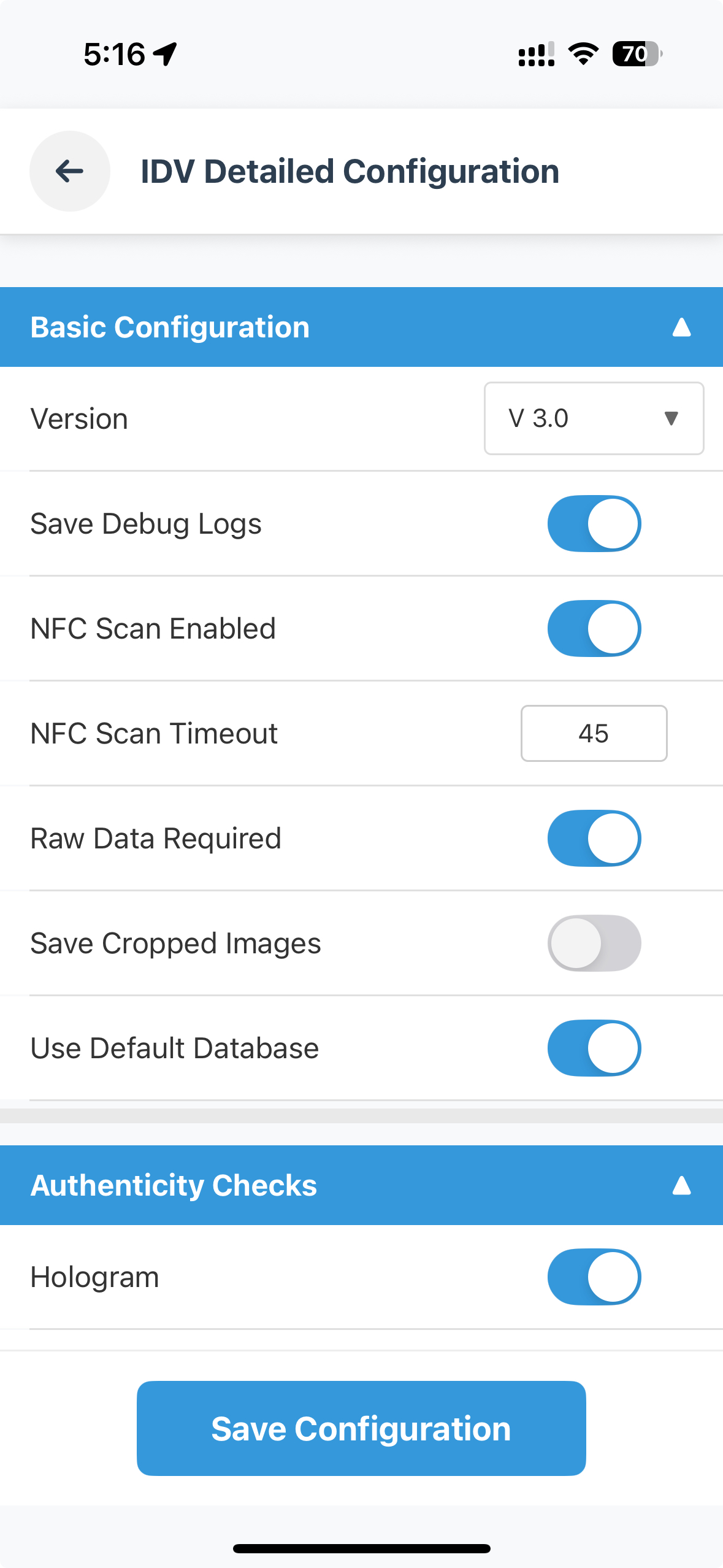
IDV Configuration management screen displaying server configuration including authenticity checks, image quality settings, and NFC capabilities. This screen and the setIDVConfig API are optional - the REL-ID SDK works with sensible defaults out of the box.
Document Scan Process Start Confirmation Screen
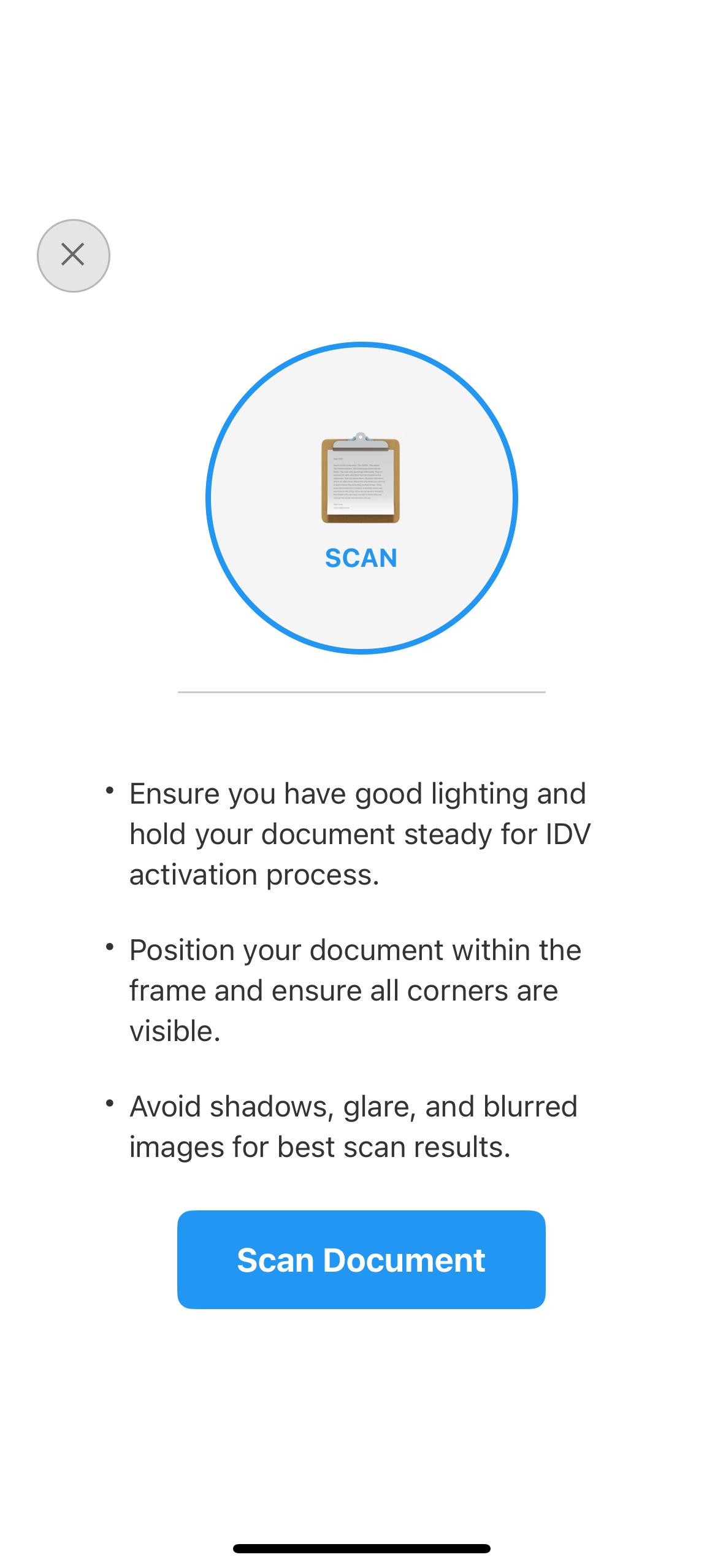
Users receive clear instructions for optimal document capture with lighting guidelines and workflow-specific messaging (IDV workflows: 0=activation, 6=KYC, 13=agent KYC).
Document Details Confirmation Screen
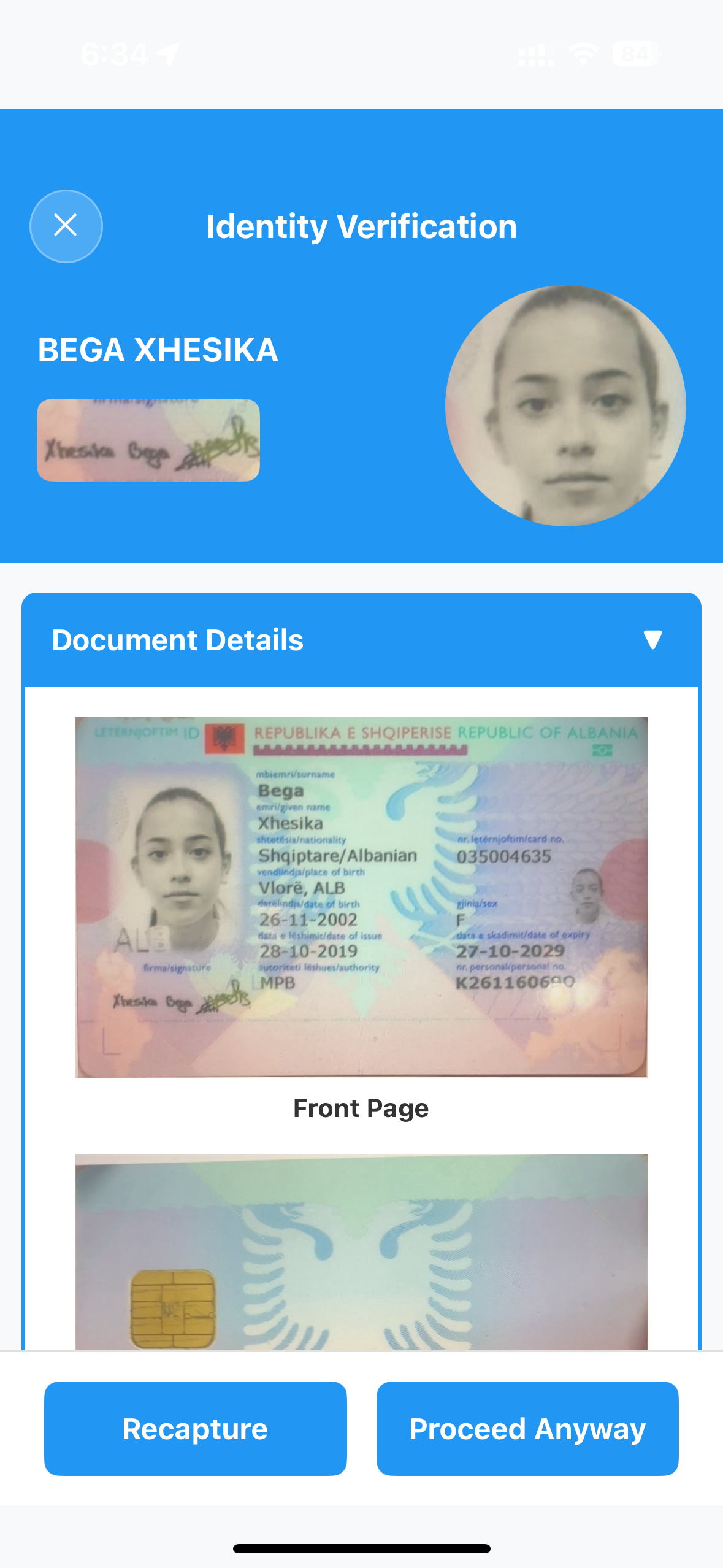
Interactive review of extracted document information with collapsible sections for identity data, validation results, and document images.
Selfie Process Start Confirmation Screen
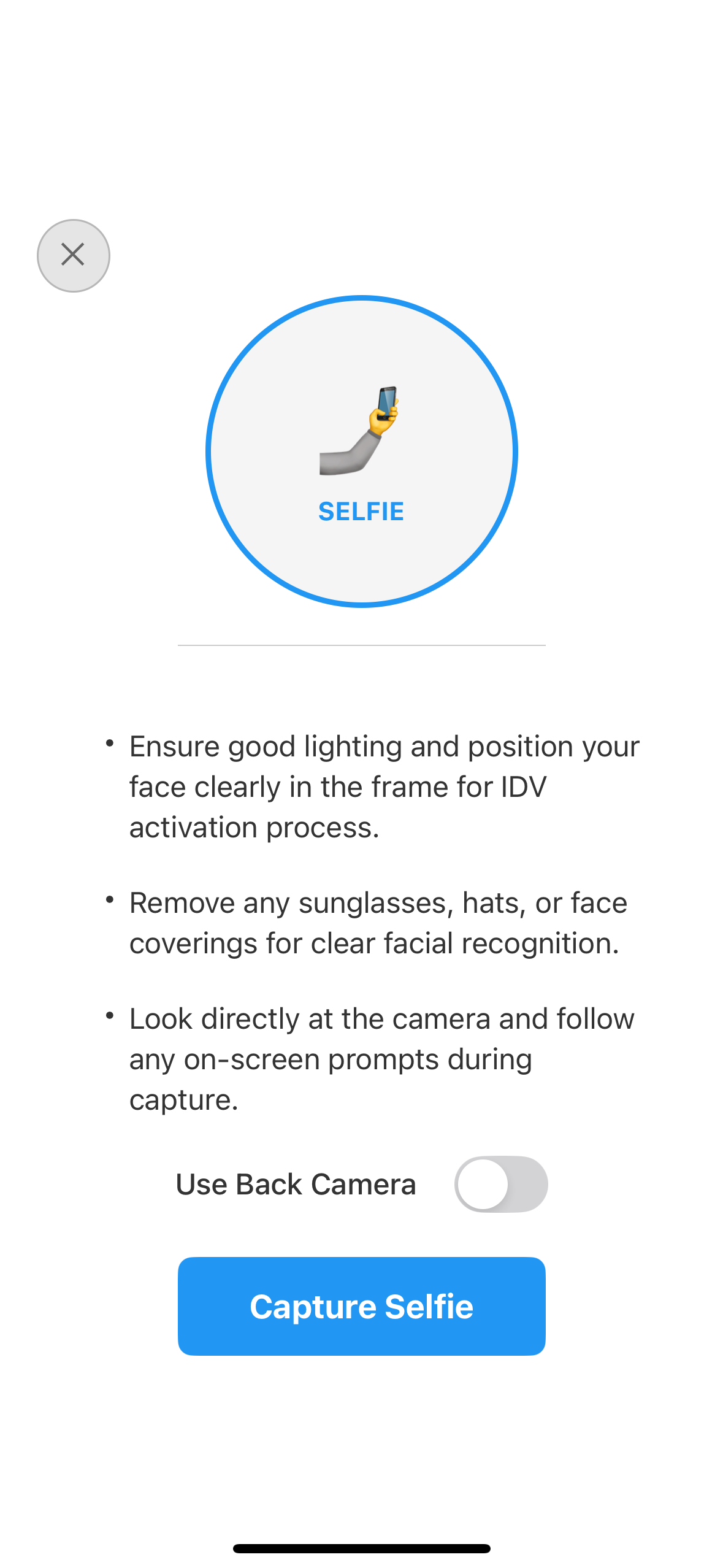
Users prepare for facial recognition capture with camera selection options and workflow-specific guidance for optimal selfie quality.
Selfie Confirmation Screen
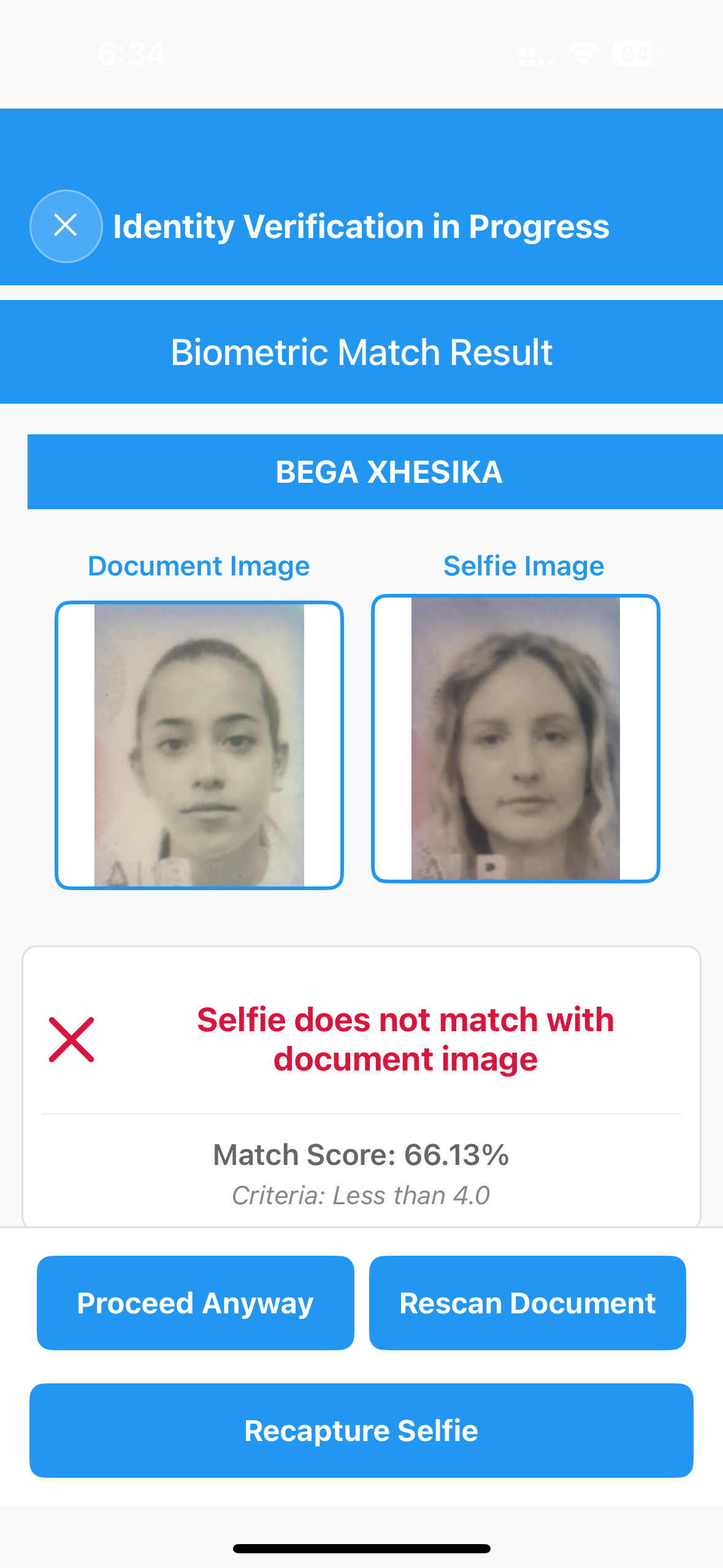
Review captured selfie with biometric matching results, quality metrics, and liveness detection scores before final confirmation.
Biometric Opt-in Consent Screen
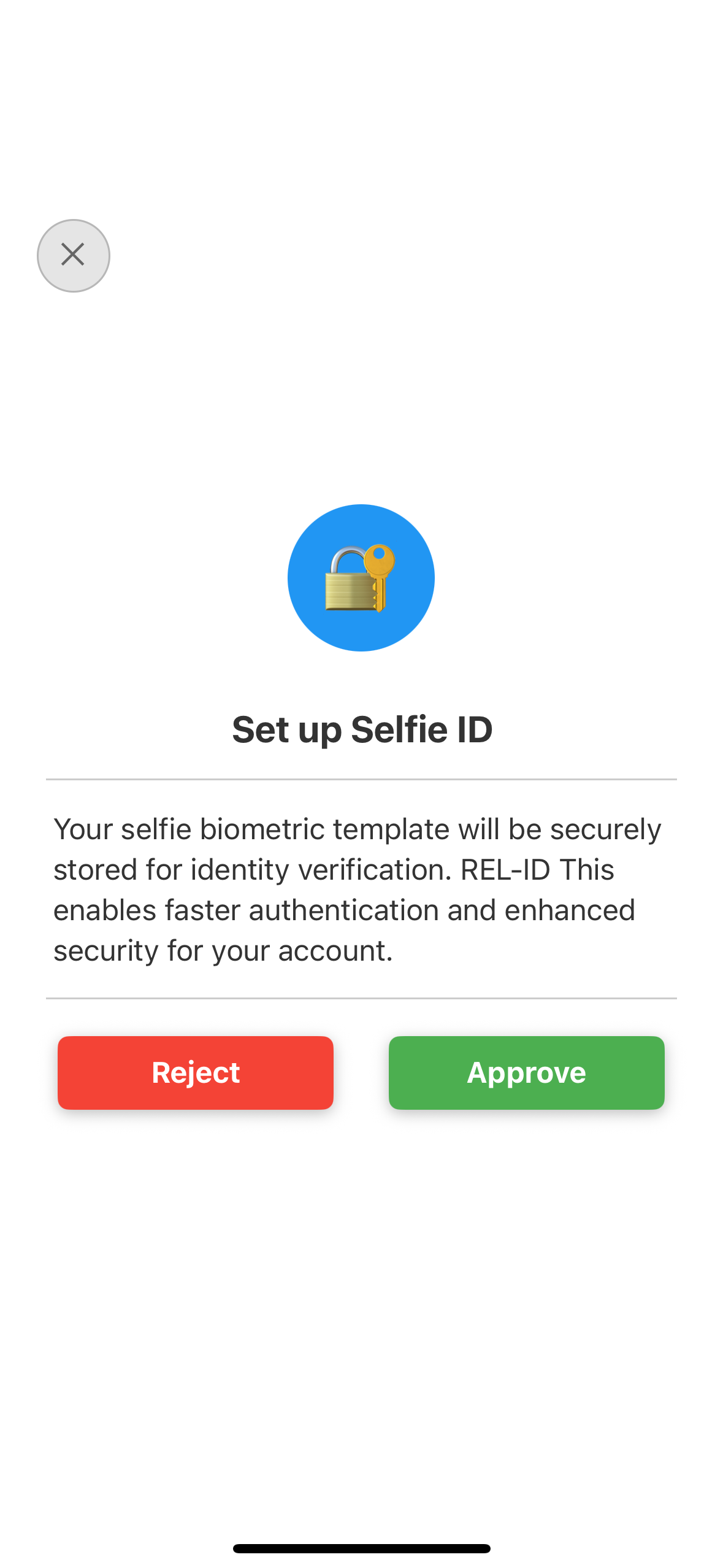
Users provide consent for biometric template storage with clear privacy information and opt-out options following compliance requirements.
Congratulations! You've successfully implemented comprehensive identity verification functionality with the REL-ID SDK.
🚀 What You've Accomplished
✅ Complete IDV Integration - Full document scanning and facial recognition workflow implementing all 5 IDV screens
✅ Event-Driven Architecture - Proper handling of complex IDV event chains with seamless navigation
✅ Security Best Practices - Production-ready implementation with comprehensive error handling and compliance features
✅ User Experience Excellence - Intuitive interfaces with clear guidance, real-time feedback, and accessibility support
✅ Production Readiness - Monitoring, compliance, regulatory considerations, and deployment best practices
📈 Advanced IDV Features to Explore
Consider implementing these advanced features to enhance your IDV capabilities:
- Multi-Document Verification: Support for multiple document types per user
- Document Comparison: Cross-reference multiple identity documents
- Enhanced Liveness Detection: Advanced anti-spoofing measures
- Real-time Validation: Instant document authenticity checking
- Continuous Authentication: Ongoing identity verification during app usage
📚 Additional Resources
- REL-ID IDV Developer Documentation - Complete IDV API reference
- Regula Document Reader SDK - Document recognition implementation guides
- React Native Camera Best Practices - Camera integration optimization
- Mobile Biometric Security Guidelines - NIST security standards
- Identity Verification Compliance Guide - Regulatory compliance requirements
🔄 Integration with Other Flows
Your IDV implementation seamlessly integrates with:
- User Registration: Verify identity during account creation
- Account Recovery: Use IDV for secure password reset
- High-Value Transactions: Step-up authentication for sensitive operations
- Compliance Reporting: Automated KYC/AML compliance workflows
🔐 You've mastered secure identity verification with REL-ID SDK!
Your implementation provides users with a comprehensive, secure identity verification experience while maintaining the highest security and compliance standards. Use this foundation to build trust and security into your applications with confidence.