🎯 Learning Path:
- Complete REL-ID Complete Activation & Login Flow Codelab
- You are here → Identity Verification Biometric Opt-In & Opt-Out Flow Implementation
- Optional: REL-ID Forgot Password Flow Codelab
Welcome to the REL-ID Identity Verification Biometric Opt-In & Opt-Out Flow codelab! This tutorial teaches you how to implement privacy-compliant biometric consent management including user enrollment, consent withdrawal, and transparent privacy controls.
What You'll Build
In this codelab, you'll enhance your existing REL-ID application with:
- 🔐 Biometric Opt-In Workflow: User-friendly biometric enrollment with clear guidance
- 🚪 Biometric Opt-Out Process: Consent withdrawal with multi-step confirmation
- 🤳 Selfie Capture Integration: Native selfie capture with liveness detection
- 📋 Consent Management: Transparent consent mechanisms with user control
- 🔄 State Persistence: Persistent tracking of biometric consent across sessions
- 🛡️ Privacy-First Design: Production-ready consent flows with comprehensive privacy protection
What You'll Learn
By completing this codelab, you'll master:
- Biometric Consent Management: Implementing REL-ID SDK's biometric opt-in and opt-out APIs
- Privacy-Compliant Workflows: Managing transparent consent processes with user control
- Selfie Capture Integration: Setting up native biometric capture with liveness detection
- Event-Driven Consent Architecture: Handling biometric consent events with proper navigation
- UI/UX Best Practices: Creating intuitive biometric consent user interfaces
- Privacy & Security Patterns: Implementing privacy-first biometric workflows with comprehensive data protection
Prerequisites
Before starting this codelab, ensure you have:
- ✅ Completed REL-ID MFA Codelab - All MFA screens and flows must be fully implemented
- ✅ React Native Development Environment - Android Studio, Xcode, and React Native CLI configured
- ✅ REL-ID SDK Integration - Latest SDK with biometric consent support configured
- ✅ TypeScript Knowledge - Understanding of TypeScript interfaces and type safety patterns
- ✅ Server Configuration - REL-ID server with biometric consent capabilities enabled
- ✅ Privacy Compliance Understanding - Basic knowledge of GDPR, CCPA, and biometric privacy requirements
- ✅ Camera Permissions - Proper iOS/Android camera permissions configured for selfie capture
Get the Code from GitHub
The code to get started can be found in a GitHub repository.
You can clone the repository using the following command:
git clone https://github.com/uniken-public/codelab-react-native.git
Navigate to the relid-IDV-Optin-OPtout folder in the repository you cloned earlier
Required Biometric Consent Plugins Installation
Mandatory Biometric Consent Plugins
The biometric consent implementation requires these mandatory native plugins:
# Navigate to the codelab folder
cd relid-IDV-Optin-OPtout

# Place the required native plugins at root folder of this project:
# - react-native-rdna-client (base REL-ID SDK)
# - react-native-relid-idv-selfie-capture (selfie capture & biometric consent plugin)

# Install dependencies
npm install

# iOS additional setup (required for CocoaPods and biometric plugins)
cd ios && pod install && cd ..

# Run the application
npx react-native run-android
# or
npx react-native run-ios
Required Biometric Consent Configuration:
Camera Permissions:
- Android: Camera and microphone permissions in
AndroidManifest.xml - iOS: Camera and microphone usage descriptions in
Info.plist - Privacy: Clear privacy policy explaining biometric data usage
Plugin Configuration:
The biometric consent plugin requires specific configuration:
- Android: Native plugin integration for selfie capture functionality
- iOS: CocoaPods integration via
pod installfor biometric processing - Permissions: Proper camera access permissions for biometric capture
Codelab Architecture Overview
This codelab extends your MFA application with core biometric consent components:
- Biometric Opt-In Screen: User-friendly interface for biometric enrollment with clear benefits
- Biometric Opt-Out Process: Consent withdrawal with transparent privacy explanations
- Selfie Process Start Confirmation Screen: Prepares user for biometric capture with guidance
- Captured Frame Confirmation Screen: Reviews captured biometric data before processing
- Biometric Consent Management Screen: Final consent confirmation with privacy controls
The biometric consent implementation adds the following files to your existing React Native project structure:
Component | Purpose | File Location |
Biometric Service Methods | Enhanced service with consent API methods |
|
Consent Event Handlers | Event manager with biometric consent callbacks |
|
Event Provider Integration | Global biometric consent event handling |
|
Navigation Integration | Biometric consent screen navigation |
|
Biometric Opt-In Screen | Primary opt-in interface with benefits |
|
Selfie Start Screen | Selfie capture initiation with guidance |
|
Frame Confirmation Screen | Captured biometric data review |
|
Consent Management Screen | Final consent with privacy controls |
|
Complete Project Directory Structure
After implementing biometric consent functionality, your project structure will include:
src/
├── uniken/
│   ├── services/
│   │   ├── rdnaEventManager.ts          # Enhanced with biometric consent event handlers
│   │   └── rdnaService.ts               # Enhanced with biometric consent API methods
│   ├── providers/
│   │   └── SDKEventProvider.tsx         # Enhanced with biometric consent event integration
│   └── types/
│       └── rdnaEvents.ts                # Enhanced with biometric consent event interfaces
├── tutorial/
│   ├── navigation/
│   │   └── AppNavigator.tsx             # Enhanced with biometric consent screen registration
│   └── screens/
│       ├── idv/                         # NEW: Biometric consent screen components
│       │   ├── IDVSelfieProcessStartConfirmationScreen.tsx
│       │   ├── IDVOptInCapturedFrameConfirmationScreen.tsx
│       │   ├── IDVBiometricOptInConsentScreen.tsx
│       │   └── index.ts
│       ├── mfa/                         # Existing MFA authentication screens
│       └── components/                  # Shared UI components
├── assets/
└── react-native-plugins/               # Required for biometric consent functionality
    └── react-native-relid-idv-selfie-capture/
Required Camera Permissions Configuration
# Android Permissions (android/app/src/main/AndroidManifest.xml)
<uses-permission android:name="android.permission.CAMERA" />
<uses-permission android:name="android.permission.RECORD_AUDIO" />

# iOS Permissions (ios/relidCodelab/Info.plist)
<key>NSCameraUsageDescription</key>
<string>This app needs camera access for biometric enrollment and verification</string>
<key>NSMicrophoneUsageDescription</key>
<string>This app needs microphone access for biometric liveness detection</string>
The Biometric Consent Challenge
In today's digital landscape, applications increasingly rely on biometric authentication for enhanced security, but managing user consent for biometric data collection and processing presents significant challenges. Organizations must balance security benefits with privacy requirements while maintaining user trust and regulatory compliance.
Legacy Biometric Consent Limitations
📋 Unclear Consent Processes
- Ambiguous biometric data usage explanations
- Lack of transparent opt-out mechanisms
- Confusing privacy policies and consent forms
- No clear understanding of data retention policies
- Insufficient user control over biometric data
🔒 Privacy and Security Concerns
- Users unaware of biometric data collection scope
- Lack of consent withdrawal mechanisms
- Biometric data stored without explicit user consent
- No transparency about biometric template usage
- Security risks from unclear consent boundaries
⚖️ Regulatory Compliance Gaps
- Difficulty meeting GDPR, CCPA, and BIPA requirements
- Inconsistent biometric privacy law compliance
- Manual consent tracking prone to gaps and errors
- Challenge adapting to evolving biometric privacy regulations
- Risk of regulatory penalties due to inadequate consent management
📱 Poor Biometric User Experience
- Complex biometric enrollment processes with unclear benefits
- Lack of user guidance during biometric capture
- No clear opt-out mechanisms once enrolled
- High abandonment rates during biometric consent flows
- Insufficient feedback on biometric capture quality
How REL-ID Biometric Consent Module Addresses These Challenges
The REL-ID Biometric Consent module provides a comprehensive solution that transforms biometric consent management from a compliance burden into a competitive advantage:
🔐 Transparent Consent Management
Privacy-First Biometric Enrollment
// Clear biometric consent workflow
  biometricOptIn: {
    transparentConsent: true,      // Clear explanation of data usage
    userControl: true,             // Easy opt-in/opt-out mechanisms
    privacyFirst: true,            // Privacy-by-design principles
    consentTracking: true,         // Comprehensive consent audit trail
    dataRetention: "controlled"    // Clear data retention policies
  }
- Clear Consent Explanations: Transparent information about biometric data collection and usage
- User-Controlled Enrollment: Users maintain complete control over biometric consent decisions
- Privacy-by-Design: Built-in privacy protection throughout the biometric consent process
- Comprehensive Audit Trails: Complete tracking of consent decisions for compliance reporting
🎯 User-Friendly Biometric Experience
Intuitive Consent Workflows
- Guided Biometric Capture: Real-time guidance for optimal selfie capture positioning
- Clear Benefits Communication: Transparent explanation of biometric authentication advantages
- Quality-Driven Feedback: Instant feedback on biometric capture quality and success
- Flexible Opt-Out Options: Easy consent withdrawal with clear data deletion processes
⚡ Seamless Integration Experience
SDK-Native Consent Flow
- Native Camera Integration: Seamless biometric capture without leaving your app
- Progressive Consent Journey: Step-by-step consent process with clear decision points
- Accessibility Support: Screen reader support and alternative consent methods
- Cross-Platform Consistency: Consistent experience across iOS and Android platforms
📊 Privacy-Compliant Architecture
Regulatory Framework Alignment
- Multi-Jurisdiction Privacy Support: Adapts to GDPR, CCPA, BIPA, and other privacy regulations
- Automated Consent Reporting: Generates compliance reports for biometric consent management
- Data Minimization: Collects only required identity data following privacy regulations
- Secure Data Processing: End-to-end encryption with zero-knowledge architecture
🔄 Seamless Integration Architecture
Event-Driven IDV Workflow
// Complete IDV event chain
const idvWorkflow = [
  'getIDVDocumentScanProcessStartConfirmation',  // Document capture initiation
  'getIDVConfirmDocumentDetails',                // Document data validation
  'getIDVSelfieProcessStartConfirmation',        // Selfie capture initiation
  'getIDVSelfieConfirmation',                    // Selfie validation
  'getIDVBiometricOptInConsent'                  // Template storage consent
];
- REL-ID SDK Integration: Native iOS/Android SDKs with React Native bridging
- Event-Driven Architecture: Asynchronous processing with comprehensive error handling
- Flexible Deployment: Cloud, on-premise, or hybrid deployment options
- Scalable Performance: Handles enterprise-scale verification volumes
Business Impact & ROI
Operational Efficiency Gains
- 95% Reduction in manual document review time
- 80% Decrease in false positive identity rejections
- 70% Improvement in user onboarding completion rates
- 60% Reduction in customer support tickets related to identity verification
Security & Compliance Benefits
- 99.9% Fraud Prevention accuracy with advanced anti-spoofing
- 100% Audit Trail coverage for regulatory compliance
- Real-time Risk Assessment with comprehensive identity validation
- Zero-Knowledge Architecture ensuring maximum privacy protection
Enhanced User Experience
- Under 60 Seconds average verification completion time
- Multi-language Support for global user bases
- Cross-platform Consistency across iOS, Android, and web
- Accessibility Compliance following WCAG guidelines
Before implementing IDV functionality, let's understand the key SDK events and APIs that power the identity verification workflow.
IDV Event Flow Sequence
The biometric consent process follows this privacy-focused event-driven pattern:
User Login → Biometric Consent Trigger → getBiometricOptInStatus → User Decision →
Selfie Capture (if opt-in) → getIDVSelfieProcessStartConfirmation → Captured Frame Review →
getIDVBiometricOptInConsent → Consent Completion → Authentication Available
Core Biometric Consent Event Types
The REL-ID SDK triggers these main events during the biometric consent flow:
Event Type | Description | User Action Required |
Biometric enrollment initiation | User decides to enable biometric authentication | |
Biometric consent withdrawal | User decides to disable biometric authentication | |
Selfie capture process initiation | User confirms readiness for biometric capture | |
Final biometric consent confirmation | User provides final consent for biometric storage |
Biometric Consent Process Requirements
Biometric consent functionality requires specific setup conditions:
Requirement | Description | Status Check |
| Server-side biometric consent feature flag | ✅ Required configuration |
| iOS/Android camera access | ✅ Must be granted before biometric capture |
| Clear biometric data usage policy | ✅ Must be accessible to users |
IDV API Integration Pattern
The IDV Biometric Opt-In/Opt-Out module implements these key API methods:
// src/uniken/services/rdnaService.ts (Actual IDV API methods)

/**
 * Initiates IDV biometric opt-in process for post-login users
 */
async initiateIDVBiometricOptIn(reason: string): Promise<RDNASyncResponse>

/**
 * Initiates IDV biometric opt-out process for post-login users
 */
async initiateIDVBiometricOptOut(reason: string): Promise<RDNASyncResponse>

/**
 * Sets IDV selfie process start confirmation
 */
async setIDVSelfieProcessStartConfirmation(
  isConfirm: boolean,
  useDeviceBackCamera: boolean,
  idvWorkflow: number
): Promise<RDNASyncResponse>

/**
 * Sets IDV biometric opt-in consent response
 */
async setIDVBiometricOptInConsent(
  isOptIn: boolean,
  challengeMode: number
): Promise<RDNASyncResponse>

/**
 * Sets IDV biometric opt-in confirmation status
 */
async setIDVBiometricOptInConfirmation(status: number): Promise<RDNASyncResponse>
Let's implement the complete biometric consent API methods in your service layer following established REL-ID SDK patterns.
Enhance rdnaService.ts with Biometric Consent Methods
The rdnaService.ts already includes the essential IDV biometric consent methods. Here are the key methods implemented:
// src/uniken/services/rdnaService.ts (IDV methods already implemented)

/**
 * Initiates IDV biometric opt-in process for post-login users
 */
async initiateIDVBiometricOptIn(reason: string): Promise<RDNASyncResponse> {
  return new Promise((resolve, reject) => {
    console.log('RdnaService - Initiating IDV biometric opt-in with reason:', reason);

    RdnaClient.initiateIDVBiometricOptIn((response: any) => {
      console.log('RdnaService - InitiateIDVBiometricOptIn sync callback received');
      const result: RDNASyncResponse = response as any;

      if (result.error && result.error.longErrorCode === 0) {
        console.log('RdnaService - InitiateIDVBiometricOptIn sync response success, waiting for IDV events');
        resolve(result);
      } else {
        console.error('RdnaService - InitiateIDVBiometricOptIn sync response error:', result);
        reject(result);
      }
    });
  });
}

/**
 * Initiates IDV biometric opt-out process for post-login users
 */
async initiateIDVBiometricOptOut(reason: string): Promise<RDNASyncResponse> {
  return new Promise((resolve, reject) => {
    console.log('RdnaService - Initiating IDV biometric opt-out with reason:', reason);

    RdnaClient.initiateIDVBiometricOptOut((response: any) => {
      console.log('RdnaService - InitiateIDVBiometricOptOut sync callback received');
      const result: RDNASyncResponse = response as any;

      if (result.error && result.error.longErrorCode === 0) {
        console.log('RdnaService - InitiateIDVBiometricOptOut sync response success, waiting for IDV events');
        resolve(result);
      } else {
        console.error('RdnaService - InitiateIDVBiometricOptOut sync response error:', result);
        reject(result);
      }
    });
  });
}

/**
 * Sets IDV selfie process start confirmation
 */
async setIDVSelfieProcessStartConfirmation(
  isConfirm: boolean,
  useDeviceBackCamera: boolean = false,
  idvWorkflow: number
): Promise<RDNASyncResponse> {
  return new Promise((resolve, reject) => {
    console.log('RdnaService - Setting IDV selfie process start confirmation:', {
      isConfirm, useDeviceBackCamera, idvWorkflow
    });

    RdnaClient.setIDVSelfieProcessStartConfirmation(isConfirm, useDeviceBackCamera, idvWorkflow, response => {
      console.log('RdnaService - SetIDVSelfieProcessStartConfirmation sync callback received');
      const result: RDNASyncResponse = response as any;

      if (result.error && result.error.longErrorCode === 0) {
        console.log('RdnaService - SetIDVSelfieProcessStartConfirmation sync response success, waiting for getIDVSelfieProcessStartConfirmation event');
        resolve(result);
      } else {
        console.error('RdnaService - SetIDVSelfieProcessStartConfirmation sync response error:', result);
        reject(result);
      }
    });
  });
}

/**
 * Sets IDV biometric opt-in consent
 */
async setIDVBiometricOptInConsent(isOptIn: boolean, challengeMode: number): Promise<RDNASyncResponse> {
  return new Promise((resolve, reject) => {
    console.log('RdnaService - Setting IDV biometric opt-in consent:', { isOptIn, challengeMode });

    RdnaClient.setIDVBiometricOptInConsent(isOptIn, challengeMode, response => {
      console.log('RdnaService - SetIDVBiometricOptInConsent sync callback received');
      const result: RDNASyncResponse = response as any;

      if (result.error && result.error.longErrorCode === 0) {
        console.log('RdnaService - SetIDVBiometricOptInConsent sync response success');
        resolve(result);
      } else {
        console.error('RdnaService - SetIDVBiometricOptInConsent sync response error:', result);
        reject(result);
      }
    });
  });
}

/**
 * Sets IDV biometric opt-in confirmation status
 */
async setIDVBiometricOptInConfirmation(status: number): Promise<RDNASyncResponse> {
  console.log('RdnaService - Setting IDV biometric opt-in confirmation with status:', status);

  return new Promise((resolve, reject) => {
    RdnaClient.setIDVBiometricOptInConfirmation(status, (response: any) => {
      console.log('RdnaService - SetIDVBiometricOptInConfirmation sync callback received');
      const result: RDNASyncResponse = response as any;

      if (result.error && result.error.longErrorCode === 0) {
        console.log('RdnaService - SetIDVBiometricOptInConfirmation sync response success, waiting for status events');
        resolve(result);
      } else {
        console.error('RdnaService - SetIDVBiometricOptInConfirmation sync response error:', result);
        reject(result);
      }
    });
  });
}
Service Pattern Consistency
Notice how these implementations follow the exact pattern established by other service methods:
Pattern Element | Implementation Detail |
Promise Wrapper | Wraps native sync SDK callback in Promise for async/await usage |
Parameter Validation | Validates |
Comprehensive Logging | Detailed console logging for debugging IDV flows |
Error Handling | Proper reject/resolve based on sync response patterns |
Configure your event manager to handle the complete IDV event chain with proper navigation coordination.
Update rdnaEventManager.ts with IDV Handlers
The IDV event handlers are already implemented in the project. Here are the actual implemented handlers:
// src/uniken/services/rdnaEventManager.ts (Actual IDV event handlers implemented)

/**
 * Handles IDV selfie process start confirmation request events
 */
private onGetIDVSelfieProcessStartConfirmation(response: RDNAJsonResponse) {
  console.log("RdnaEventManager - Get IDV selfie process start confirmation event received");

  try {
    const idvSelfieData: RDNAGetIDVSelfieProcessStartConfirmationData = JSON.parse(response.response);
    console.log("RdnaEventManager - Get IDV selfie confirmation status:", idvSelfieData);
    console.log("RdnaEventManager - UserID:", idvSelfieData.userID, "IDV Workflow:", idvSelfieData.idvWorkflow);
    console.log("RdnaEventManager - Use back camera:", idvSelfieData.useDeviceBackCamera);

    if (this.getIDVSelfieProcessStartConfirmationHandler) {
      this.dispatchToMainThread(() => {
        this.getIDVSelfieProcessStartConfirmationHandler?.(idvSelfieData);
      });
    }
  } catch (error) {
    console.error("RdnaEventManager - Failed to parse get IDV selfie process start confirmation:", error);
  }
}

/**
 * Handles IDV biometric opt-in consent events
 */
private onGetIDVBiometricOptInConsent(response: RDNAJsonResponse) {
  console.log("RdnaEventManager - Get IDV biometric opt-in consent event received");

  try {
    const idvBiometricOptInData: RDNAGetIDVBiometricOptInConsentData = JSON.parse(response.response);
    console.log("RdnaEventManager - IDV biometric opt-in consent status:", idvBiometricOptInData?.challengeResponse?.status?.statusCode);
    console.log("RdnaEventManager - Challenge mode:", idvBiometricOptInData?.challengeMode);
    console.log("RdnaEventManager - UserID:", idvBiometricOptInData?.userID);

    if (this.getIDVBiometricOptInConsentHandler) {
      this.dispatchToMainThread(() => {
        this.getIDVBiometricOptInConsentHandler?.(idvBiometricOptInData);
      });
    }
  } catch (error) {
    console.error("RdnaEventManager - Failed to parse get IDV biometric opt-in consent:", error);
  }
}

/**
 * Handles IDV biometric opt-in status events
 */
private onIDVBiometricOptInStatus(response: RDNAJsonResponse) {
  console.log("RdnaEventManager - IDV biometric opt-in status event received");

  try {
    const idvBiometricOptInStatusData: RDNAIDVBiometricOptInStatusData = JSON.parse(response.response);
    console.log("RdnaEventManager - IDV biometric opt-in status:", idvBiometricOptInStatusData?.status?.statusCode);
    console.log("RdnaEventManager - Error code:", idvBiometricOptInStatusData?.error?.shortErrorCode);
    console.log("RdnaEventManager - UserID:", idvBiometricOptInStatusData?.userID);

    if (this.idvBiometricOptInStatusHandler) {
      this.dispatchToMainThread(() => {
        this.idvBiometricOptInStatusHandler?.(idvBiometricOptInStatusData);
      });
    }
  } catch (error) {
    console.error("RdnaEventManager - Failed to parse IDV biometric opt-in status:", error);
  }
}

/**
 * Handles IDV biometric opt-out status events
 */
private onIDVBiometricOptOutStatus(response: RDNAJsonResponse) {
  console.log("RdnaEventManager - IDV biometric opt-out status event received");

  try {
    const idvBiometricOptOutStatusData: RDNAIDVBiometricOptOutStatusData = JSON.parse(response.response);
    console.log("RdnaEventManager - IDV biometric opt-out status:", idvBiometricOptOutStatusData?.status?.statusCode);
    console.log("RdnaEventManager - Error code:", idvBiometricOptOutStatusData?.error?.shortErrorCode);
    console.log("RdnaEventManager - UserID:", idvBiometricOptOutStatusData?.userID);

    if (this.idvBiometricOptOutStatusHandler) {
      this.dispatchToMainThread(() => {
        this.idvBiometricOptOutStatusHandler?.(idvBiometricOptOutStatusData);
      });
    }
  } catch (error) {
    console.error("RdnaEventManager - Failed to parse IDV biometric opt-out status:", error);
  }
}

/**
 * Handles IDV opt-in captured frame confirmation events
 */
private onIDVOptInCapturedFrameConfirmation(response: RDNAJsonResponse | any) {
  console.log("RdnaEventManager - IDV opt-in captured frame confirmation event received");

  try {
    let idvOptInCapturedFrameData: RDNAIDVOptInCapturedFrameConfirmationData;

    // Handle different response formats
    if (typeof response === 'string') {
      idvOptInCapturedFrameData = JSON.parse(response);
    } else if (response?.response) {
      idvOptInCapturedFrameData = response.response;
    } else {
      idvOptInCapturedFrameData = response;
    }

    console.log("RdnaEventManager - IDV opt-in captured frame data:", idvOptInCapturedFrameData);

    if (this.idvOptInCapturedFrameConfirmationHandler) {
      this.dispatchToMainThread(() => {
        this.idvOptInCapturedFrameConfirmationHandler?.(idvOptInCapturedFrameData);
      });
    }
  } catch (error) {
    console.error("RdnaEventManager - Failed to parse IDV opt-in captured frame confirmation:", error);
  }
}
Register IDV Event Handlers
The event handlers are automatically registered in the event manager initialization. Here are the public handler setter methods available:
// src/uniken/services/rdnaEventManager.ts (Available handler setters)

/**
 * IDV Event Handler Setters - Available public methods
 */

// IDV selfie process start confirmation handler
public setGetIDVSelfieProcessStartConfirmationHandler(callback?: RDNAGetIDVSelfieProcessStartConfirmationCallback): void {
  this.getIDVSelfieProcessStartConfirmationHandler = callback;
}

// IDV biometric opt-in consent handler
public setGetIDVBiometricOptInConsentHandler(callback?: RDNAGetIDVBiometricOptInConsentCallback): void {
  this.getIDVBiometricOptInConsentHandler = callback;
}

// IDV biometric opt-in status handler
public setIDVBiometricOptInStatusHandler(callback?: RDNAIDVBiometricOptInStatusCallback): void {
  this.idvBiometricOptInStatusHandler = callback;
}

// IDV biometric opt-out status handler
public setIDVBiometricOptOutStatusHandler(callback?: RDNAIDVBiometricOptOutStatusCallback): void {
  this.idvBiometricOptOutStatusHandler = callback;
}

// IDV opt-in captured frame confirmation handler
public setIDVOptInCapturedFrameConfirmationHandler(callback?: RDNAIDVOptInCapturedFrameConfirmationCallback): void {
  this.idvOptInCapturedFrameConfirmationHandler = callback;
}
Native Event Listeners Registration
The native event listeners are automatically registered in the constructor. Here are the IDV events that are listened for:
// src/uniken/services/rdnaEventManager.ts (Native event listeners)

private registerEventListeners() {
  console.log('RdnaEventManager - Registering native event listeners');

  this.listeners.push(
    // ... other event listeners ...

    // IDV event listeners
    this.rdnaEmitter.addListener('getIDVSelfieProcessStartConfirmation', this.onGetIDVSelfieProcessStartConfirmation.bind(this)),
    this.rdnaEmitter.addListener('getIDVBiometricOptInConsent', this.onGetIDVBiometricOptInConsent.bind(this)),

    // IDV biometric status event listeners
    this.rdnaEmitter.addListener('onIDVBiometricOptInStatus', this.onIDVBiometricOptInStatus.bind(this)),
    this.rdnaEmitter.addListener('onIDVBiometricOptOutStatus', this.onIDVBiometricOptOutStatus.bind(this)),
    this.rdnaEmitter.addListener('onIDVOptInCapturedFrameConfirmation', this.onIDVOptInCapturedFrameConfirmation.bind(this)),
  );

  console.log('RdnaEventManager - Native event listeners registered');
}

### IDV Event Flow Summary

The actual implemented IDV event flow follows this sequence:

**Biometric Opt-In Flow:**
1. Call `RdnaService.initiateIDVBiometricOptIn(reason)`
2. SDK triggers `getIDVSelfieProcessStartConfirmation` event
3. Navigate to `IDVSelfieProcessStartConfirmationScreen`
4. User confirms and calls `setIDVSelfieProcessStartConfirmation`
5. SDK launches native selfie capture
6. SDK triggers `onIDVOptInCapturedFrameConfirmation` event
7. Navigate to `IDVOptInCapturedFrameConfirmationScreen`
8. User reviews frame and calls `setIDVBiometricOptInConfirmation`
9. SDK triggers `getIDVBiometricOptInConsent` event
10. Navigate to `IDVBiometricOptInConsentScreen`
11. User makes consent decision and calls `setIDVBiometricOptInConsent`
12. SDK triggers `onIDVBiometricOptInStatus` event with final status

**Biometric Opt-Out Flow:**
1. Call `RdnaService.initiateIDVBiometricOptOut(reason)`
2. SDK triggers `onIDVBiometricOptOutStatus` event with completion status

### Event Chain Flow Validation

All IDV events are properly logged and can be monitored for debugging:

```typescript
// src/uniken/services/rdnaEventManager.ts (debugging utility)

const debugIDVEventChain = () => {
  console.log('=== IDV Event Chain Debug ===');
  console.log('IDV Handler Registration Status:', {
    documentScanStart: !!eventManager.onGetIDVDocumentScanProcessStartConfirmationCallback,
    documentConfirm: !!eventManager.onGetIDVConfirmDocumentDetailsCallback,
    selfieStart: !!eventManager.onGetIDVSelfieProcessStartConfirmationCallback,
    selfieConfirm: !!eventManager.onGetIDVSelfieConfirmationCallback,
    biometricConsent: !!eventManager.onGetIDVBiometricOptInConsentCallback
  });
  console.log('Expected IDV Flow:');
  console.log('1. Document Scan Start → 2. Document Confirm → 3. Selfie Start → 4. Selfie Confirm → 5. Biometric Consent');
};
Now let's implement the three core biometric consent screen components following established patterns and best practices.
Complete Biometric Consent Screen Implementation Overview
The biometric opt-in & opt-out flow requires these three screens:
- IDVSelfieProcessStartConfirmationScreen - Selfie capture process initiation with guidance
- IDVOptInCapturedFrameConfirmationScreen - Captured biometric frame review and confirmation
- IDVBiometricOptInConsentScreen - Final biometric consent and privacy agreement
All three screens are already implemented in the project and follow the established UI patterns.
1. IDVSelfieProcessStartConfirmationScreen
This screen guides users through the selfie capture initiation process. The implementation is located at:
// src/tutorial/screens/idv/IDVSelfieProcessStartConfirmationScreen.tsx
Key Features:
- User-friendly guidance for selfie capture process
- Camera permission handling
- Integration with selfie capture plugin
- Proper event handling with
setIDVSelfieProcessStartConfirmation
2. IDVOptInCapturedFrameConfirmationScreen
This screen allows users to review their captured biometric frame. The implementation is located at:
// src/tutorial/screens/idv/IDVOptInCapturedFrameConfirmationScreen.tsx
Key Features:
- Display captured biometric frame
- Approve/Retake functionality
- Integration with
setIDVBiometricOptInConfirmationAPI
3. IDVBiometricOptInConsentScreen
This is the core consent screen where users make biometric template storage decisions. The implementation is located at:
// src/tutorial/screens/idv/IDVBiometricOptInConsentScreen.tsx
Key Features:
- Clear consent presentation with privacy explanations
- Approve/Reject biometric template storage
- Challenge mode handling for different consent scenarios
- Integration with
setIDVBiometricOptInConsentAPI - Proper error handling and user feedback
The IDV biometric opt-in/opt-out flows are designed for post-login users who want to manage their biometric consent preferences.
From DrawerContent/Post-Login Screen
// Initiate Biometric Opt-In Flow
// This allows users to enroll in biometric authentication
await RdnaService.initiateIDVBiometricOptIn("User Biometric Enrollment");

// Initiate Biometric Opt-Out Flow
// This allows users to remove their biometric templates and withdraw consent
await RdnaService.initiateIDVBiometricOptOut("User Biometric Removal");
Example Integration in DrawerContent
// src/tutorial/screens/components/DrawerContent.tsx (Example implementation)

const handleBiometricOptIn = async () => {
  try {
    console.log('Dashboard - Starting biometric opt-in flow');
    await RdnaService.initiateIDVBiometricOptIn("User requested biometric enrollment");
    // SDK will automatically trigger getIDVSelfieProcessStartConfirmation event
    // and navigate to IDVSelfieProcessStartConfirmationScreen
  } catch (error) {
    console.error('Dashboard - Failed to initiate biometric opt-in:', error);
    Alert.alert('Error', 'Failed to start biometric enrollment. Please try again.');
  }
};

const handleBiometricOptOut = async () => {
  try {
    console.log('Dashboard - Starting biometric opt-out flow');
    await RdnaService.initiateIDVBiometricOptOut("User requested biometric removal");
    // SDK will automatically trigger onIDVBiometricOptOutStatus event
    // with the opt-out completion status
  } catch (error) {
    console.error('Dashboard - Failed to initiate biometric opt-out:', error);
    Alert.alert('Error', 'Failed to start biometric removal. Please try again.');
  }
};
Key Features
- Automatic Navigation: The SDK handles navigation between screens automatically
- Event-Driven: Each step triggers appropriate SDK events that navigate to the correct screens
- Error Handling: Proper error handling for failed API calls
- User Consent: Clear consent flows with approve/reject options
Now let's integrate all IDV screens into your existing navigation structure following the established patterns.
Update AppNavigator with IDV Screens
The AppNavigator is already configured with the IDV screens. Here's the actual implementation:
// src/tutorial/navigation/AppNavigator.tsx (Actual IDV screen registration)

// Import IDV screens (already imported)
import IDVSelfieProcessStartConfirmationScreen from '../screens/idv/IDVSelfieProcessStartConfirmationScreen';
import IDVBiometricOptInConsentScreen from '../screens/idv/IDVBiometricOptInConsentScreen';
import IDVOptInCapturedFrameConfirmationScreen from '../screens/idv/IDVOptInCapturedFrameConfirmationScreen';

// Import RDNA types (already imported)
import type {
  RDNAGetIDVSelfieProcessStartConfirmationData,
  RDNAGetIDVBiometricOptInConsentData,
  RDNAIDVOptInCapturedFrameConfirmationData
} from '../../uniken/types/rdnaEvents';

// IDV Screen Parameter Interfaces (already defined)
interface IDVSelfieProcessStartConfirmationScreenParams {
  eventName: string;
  eventData: RDNAGetIDVSelfieProcessStartConfirmationData;
  title: string;
  subtitle: string;
  responseData?: RDNAGetIDVSelfieProcessStartConfirmationData;
}

interface IDVBiometricOptInConsentScreenParams {
  title: string;
  userDetails: RDNAGetIDVBiometricOptInConsentData;
}

interface IDVOptInCapturedFrameConfirmationScreenParams {
  title: string;
  capturedFrameData: RDNAIDVOptInCapturedFrameConfirmationData;
}

// RootStackParamList includes IDV screens (already configured)
export type RootStackParamList = {
  // ... existing screens ...

  // IDV Screens
  IDVSelfieProcessStartConfirmationScreen: IDVSelfieProcessStartConfirmationScreenParams;
  IDVBiometricOptInConsentScreen: IDVBiometricOptInConsentScreenParams;
  IDVOptInCapturedFrameConfirmationScreen: IDVOptInCapturedFrameConfirmationScreenParams;
};

// Stack Screen Registration (already configured)
{/* IDV Screens */}
<Stack.Screen
  name="IDVSelfieProcessStartConfirmationScreen"
  component={IDVSelfieProcessStartConfirmationScreen}
  options={{
    title: 'Selfie Process Confirmation',
    headerShown: false,
  }}
/>

<Stack.Screen
  name="IDVBiometricOptInConsentScreen"
  component={IDVBiometricOptInConsentScreen}
  options={{
    title: 'IDV Biometric Opt-In Consent',
    headerShown: false,
  }}
/>

<Stack.Screen
  name="IDVOptInCapturedFrameConfirmationScreen"
  component={IDVOptInCapturedFrameConfirmationScreen}
  options={{
    title: 'IDV Captured Frame Confirmation',
    headerShown: false,
  }}
/>
Update SDKEventProvider Integration
The SDKEventProvider is already configured with IDV event handlers. Here's the actual implementation:
// src/uniken/providers/SDKEventProvider.tsx (Actual IDV handler implementation)

/**
 * Event handler for IDV selfie process start confirmation requests
 */
const handleGetIDVSelfieProcessStartConfirmation = useCallback((data: RDNAGetIDVSelfieProcessStartConfirmationData) => {
  console.log('SDKEventProvider - Get IDV selfie process start confirmation event received');
  console.log('SDKEventProvider - UserID:', data.userID);
  console.log('SDKEventProvider - IDV Workflow:', data.idvWorkflow);
  console.log('SDKEventProvider - Use back camera:', data.useDeviceBackCamera);

  // Navigate to the IDV selfie process start confirmation screen
  NavigationService.navigateOrUpdate('IDVSelfieProcessStartConfirmationScreen', {
    eventName: 'getIDVSelfieProcessStartConfirmation',
    eventData: data,
    title: 'Selfie Capture Information',
    subtitle: `Prepare to capture your selfie for user: ${data.userID}`,
    responseData: data,
  });
}, []);

/**
 * Event handler for IDV biometric opt-in consent requests
 */
const handleGetIDVBiometricOptInConsent = useCallback((data: RDNAGetIDVBiometricOptInConsentData) => {
  console.log('SDKEventProvider - Get IDV biometric opt-in consent event received');
  console.log('SDKEventProvider - UserID:', data?.userID);
  console.log('SDKEventProvider - Challenge mode:', data?.challengeMode);

  // Navigate to the IDV biometric opt-in consent screen
  NavigationService.navigateOrUpdate('IDVBiometricOptInConsentScreen', {
    title: 'Save Template',
    userDetails: data,
  });
}, []);

/**
 * Event handler for IDV opt-in captured frame confirmation
 */
const handleIDVOptInCapturedFrameConfirmation = useCallback((data: RDNAIDVOptInCapturedFrameConfirmationData) => {
  console.log('SDKEventProvider - IDV opt-in captured frame confirmation event received');
  console.log('SDKEventProvider - UserID:', data?.userID);
  console.log('SDKEventProvider - Challenge mode:', data?.challengeMode);
  console.log('SDKEventProvider - Has captured image:', !!data?.capturedImage);

  // Navigate to confirmation screen when we receive capturedImage data
  if (data) {
    console.log('SDKEventProvider - Captured image received, navigating to IDVOptInCapturedFrameConfirmationScreen');

    NavigationService.navigateOrUpdate('IDVOptInCapturedFrameConfirmationScreen', {
      title: 'Confirm Captured Frame',
      capturedFrameData: data,
    });
  }
}, []);

/**
 * Event handler for biometric opt-in status events
 */
const handleBiometricOptInStatus = useCallback((data: RDNAIDVBiometricOptInStatusData) => {
  console.log('SDKEventProvider - Biometric opt-in status received:', data);

  if (data?.error.shortErrorCode === 0 && data?.status.statusCode === 100) {
    // Success - show success message and return to dashboard
    Alert.alert('Success', data?.status.statusMessage, [
      {
        text: "OK",
        onPress: () => {
          NavigationService.navigate('DrawerNavigator', {
            screen: 'Dashboard',
            params: ''
          });
        }
      }
    ], { cancelable: false });
  } else {
    // Handle error or other status codes
    Alert.alert('Error', data?.error?.errorString, [
      {
        text: "OK",
        onPress: () => {
          NavigationService.navigate('DrawerNavigator', {
            screen: 'Dashboard',
            params: ''
          });
        }
      }
    ], { cancelable: false });
  }
}, []);

/**
 * Event handler for biometric opt-out status events
 */
const handleBiometricOptOutStatus = useCallback((data: RDNAIDVBiometricOptOutStatusData) => {
  console.log('SDKEventProvider - Biometric opt-out status received:', data);

  Alert.alert('Success', data?.status.statusMessage, [
    {
      text: "OK",
      onPress: () => {
        NavigationService.navigate('DrawerNavigator', {
          screen: 'Dashboard',
          params: ''
        });
      }
    }
  ], { cancelable: false });
}, []);

// Register IDV Event Handlers (in useEffect)
useEffect(() => {
  const eventManager = rdnaService.getEventManager();

  // ... existing MFA event handler registrations ...

  // IDV event handlers (already registered)
  eventManager.setGetIDVSelfieProcessStartConfirmationHandler(handleGetIDVSelfieProcessStartConfirmation);
  eventManager.setGetIDVBiometricOptInConsentHandler(handleGetIDVBiometricOptInConsent);
  eventManager.setIDVOptInCapturedFrameConfirmationHandler(handleIDVOptInCapturedFrameConfirmation);
  eventManager.setIDVBiometricOptInStatusHandler(handleBiometricOptInStatus);
  eventManager.setIDVBiometricOptOutStatusHandler(handleBiometricOptOutStatus);

  console.log('SDKEventProvider - All IDV event handlers registered');

  return () => {
    console.log('SDKEventProvider - Component unmounting, cleaning up event handlers');
    eventManager.cleanup();
  };
}, []);
Type Safety and Navigation Service
Ensure proper type safety across the IDV navigation flow:
// src/tutorial/navigation/NavigationService.ts (IDV navigation support)

export const NavigationService = {
  navigationRef,

  navigate: (name: keyof RootStackParamList, params?: any) => {
    if (navigationRef.isReady()) {
      navigationRef.navigate(name as never, params as never);
    }
  },

  navigateOrUpdate: (name: keyof RootStackParamList, params?: any) => {
    if (navigationRef.isReady()) {
      // Check if already on the target screen to prevent duplicate navigation
      const currentRoute = navigationRef.getCurrentRoute();
      if (currentRoute?.name === name) {
        console.log(`NavigationService - Already on ${name}, updating params`);
        navigationRef.setParams(params);
      } else {
        console.log(`NavigationService - Navigating to ${name}`);
        navigationRef.navigate(name as never, params as never);
      }
    }
  }
};
Let's test your IDV implementation with comprehensive scenarios to ensure proper functionality across the entire identity verification flow.
Test Scenario 1: Complete Biometric Opt-In Flow
Setup Requirements:
- Server configuration with IDV biometric consent enabled
- Camera permissions granted
- User must be logged in (post-login IDV flow)
- react-native-relid-idv-selfie-capture plugin installed
Test Steps:
- Biometric Opt-In Initiation
- Ensure user is logged in to dashboard
- Call
RdnaService.initiateIDVBiometricOptIn("User Biometric Enrollment") - Wait for
getIDVSelfieProcessStartConfirmationevent
- Selfie Process Start
- Verify
IDVSelfieProcessStartConfirmationScreenappears - Review selfie capture instructions
- Tap "Start Selfie Capture"
- Verify API call to
setIDVSelfieProcessStartConfirmation
- Verify
- Selfie Capture (Plugin Handled)
- SDK opens native selfie capture interface
- Complete facial recognition with liveness detection
- Verify selfie capture completes successfully
- Captured Frame Confirmation
- Verify
IDVOptInCapturedFrameConfirmationScreenappears - Review captured biometric frame
- Choose "Approve" or "Retake" option
- Verify API call to
setIDVBiometricOptInConfirmation
- Verify
- Biometric Consent Decision
- Verify
IDVBiometricOptInConsentScreenappears - Review biometric template storage consent
- Choose "Approve" or "Reject" biometric storage
- Verify API call to
setIDVBiometricOptInConsent
- Verify
- Flow Completion
- Verify success status events are received
- User returns to dashboard with biometric consent recorded
Test Scenario 2: Biometric Opt-Out Flow
Test Steps:
- Biometric Opt-Out Initiation
- From dashboard, call
RdnaService.initiateIDVBiometricOptOut("User Biometric Removal") - Wait for appropriate IDV events
- From dashboard, call
- Opt-Out Confirmation
- Verify opt-out confirmation screen appears
- Review consent withdrawal information
- Confirm biometric template removal
- Verify flow completes successfully
- Tap "Confirm Selfie"
- Biometric Consent
- Verify
IDVBiometricOptInConsentScreenappears - Review biometric authentication options
- Choose consent option (Enable/Skip)
- Verify
Expected Results:
- ✅ All screens appear in correct sequence
- ✅ Navigation flows seamlessly between screens
- ✅ Document and selfie data display correctly
- ✅ User actions trigger appropriate SDK responses
- ✅ Complete flow leads to successful authentication
Test Scenario 2: IDV Flow with Document Rescan
Test Steps:
- Follow steps 1-3 from Complete IDV Flow
- In Document Details Confirmation screen:
- Review extracted data
- Tap "Scan Different Document"
- Verify additional scan workflow
- Complete remaining flow with new document
- Verify final authentication success
Expected Results:
- ✅ Additional document scan option works correctly
- ✅ New document data replaces previous data
- ✅ Flow continues normally after rescan
Test Scenario 3: IDV Flow Cancellation Points
Test Steps:
- Cancel at Document Start
- Navigate to
IDVDocumentProcessStartConfirmationScreen - Tap "Cancel" button
- Verify appropriate error handling
- Navigate to
- Cancel at Document Confirmation
- Complete document scan
- In
IDVConfirmDocumentDetailsScreen - Tap "Cancel Verification"
- Verify flow termination
- Cancel at Selfie Start
- Complete document flow
- In
IDVSelfieProcessStartConfirmationScreen - Tap "Cancel" button
- Verify appropriate handling
Expected Results:
- ✅ Cancellation handled gracefully at all points
- ✅ Appropriate user feedback provided
- ✅ No app crashes or hanging states
- ✅ Proper cleanup of IDV session
Test Scenario 4: Error Handling and Edge Cases
Test Steps:
- Poor Document Quality
- Attempt scan with blurry/poor quality document
- Verify error handling and user guidance
- Unsupported Document Type
- Attempt scan with unsupported document
- Verify appropriate error messages
- Network Connectivity Issues
- Disable network during IDV flow
- Verify graceful error handling
- Camera Permission Denied
- Revoke camera permissions
- Attempt to start IDV flow
- Verify permission request handling
Expected Results:
- ✅ Clear error messages for all failure scenarios
- ✅ Graceful degradation with network issues
- ✅ Proper permission request handling
- ✅ User guidance for resolution steps
Performance and Integration Testing
Test Requirements:
- Memory Usage: Monitor app memory during IDV flow
- Camera Performance: Test on various device configurations
- Background Handling: Verify app state management during camera usage
- Concurrent Operations: Test IDV with other app features
Prepare your IDV implementation for production deployment with these essential security, performance, and user experience considerations.
Security Implementation Checklist
Data Handling and Privacy
- [ ] No Document Images Stored Locally: Verify captured images are processed immediately and not cached
- [ ] Minimal Logging: Ensure no PII, document numbers, or biometric data in logs
- [ ] Secure Data Transmission: All IDV data encrypted in transit with TLS 1.3
- [ ] Session Management: Proper cleanup of IDV sessions on completion/cancellation
- [ ] Biometric Data Protection: Comply with local biometric privacy regulations
Authentication and Authorization
- [ ] Document Authenticity Validation: Verify server-side document validation logic
- [ ] Liveness Detection: Confirm facial liveness detection is properly implemented
- [ ] Multi-Factor Verification: IDV combined with additional authentication factors
- [ ] Session Timeout Handling: Proper IDV session timeout management
Performance Optimization
Resource Management
- [ ] Memory Optimization: Efficient handling of camera and image processing
- [ ] Battery Usage: Minimize impact during document/selfie capture
- [ ] Network Efficiency: Optimize data transmission for mobile networks
- [ ] Background Processing: Proper app state handling during camera usage
User Experience Optimization
- [ ] Loading States: Clear feedback during all IDV processing steps
- [ ] Error Recovery: Intuitive error messages with actionable solutions
- [ ] Accessibility: Screen reader support and keyboard navigation
- [ ] Offline Handling: Graceful degradation when network unavailable
- [ ] Device Compatibility: Testing across various device configurations
Privacy and Data Protection
- [ ] GDPR Compliance: User consent and data processing transparency
- [ ] CCPA Compliance: California privacy regulation compliance
- [ ] Local Regulations: Compliance with regional identity verification laws
- [ ] Data Minimization: Only collect required identity verification data
- [ ] User Rights: Implement data deletion and access request handling
Launch Readiness Checklist
Pre-Production Verification
- [ ] End-to-End Testing: Complete biometric consent flows tested in staging environment
- [ ] Privacy Audit: Third-party privacy review of biometric consent implementation
- [ ] Performance Testing: Load testing under expected production traffic for biometric workflows
- [ ] Regulatory Review: Legal review of GDPR, CCPA, BIPA compliance requirements
- [ ] User Acceptance Testing: Real user testing with various biometric consent scenarios
Go-Live Requirements
- [ ] Privacy Policy Updated: Clear biometric data usage explanations for users
- [ ] Consent Management: Proper opt-out mechanisms and data deletion procedures
- [ ] Support Documentation: User guides for biometric authentication and consent withdrawal
- [ ] Privacy Incident Response: Procedures for biometric data-related privacy incidents
- [ ] Rollback Plan: Ability to disable biometric features if privacy issues arise
Here's your complete reference implementation combining all the patterns and best practices covered in this codelab.
Biometric Opt-In/Opt-Out Screen Implementation Showcase
The following screens are implemented in this project demonstrating the complete biometric consent workflow:
IDVSelfieProcessStartConfirmationScreen
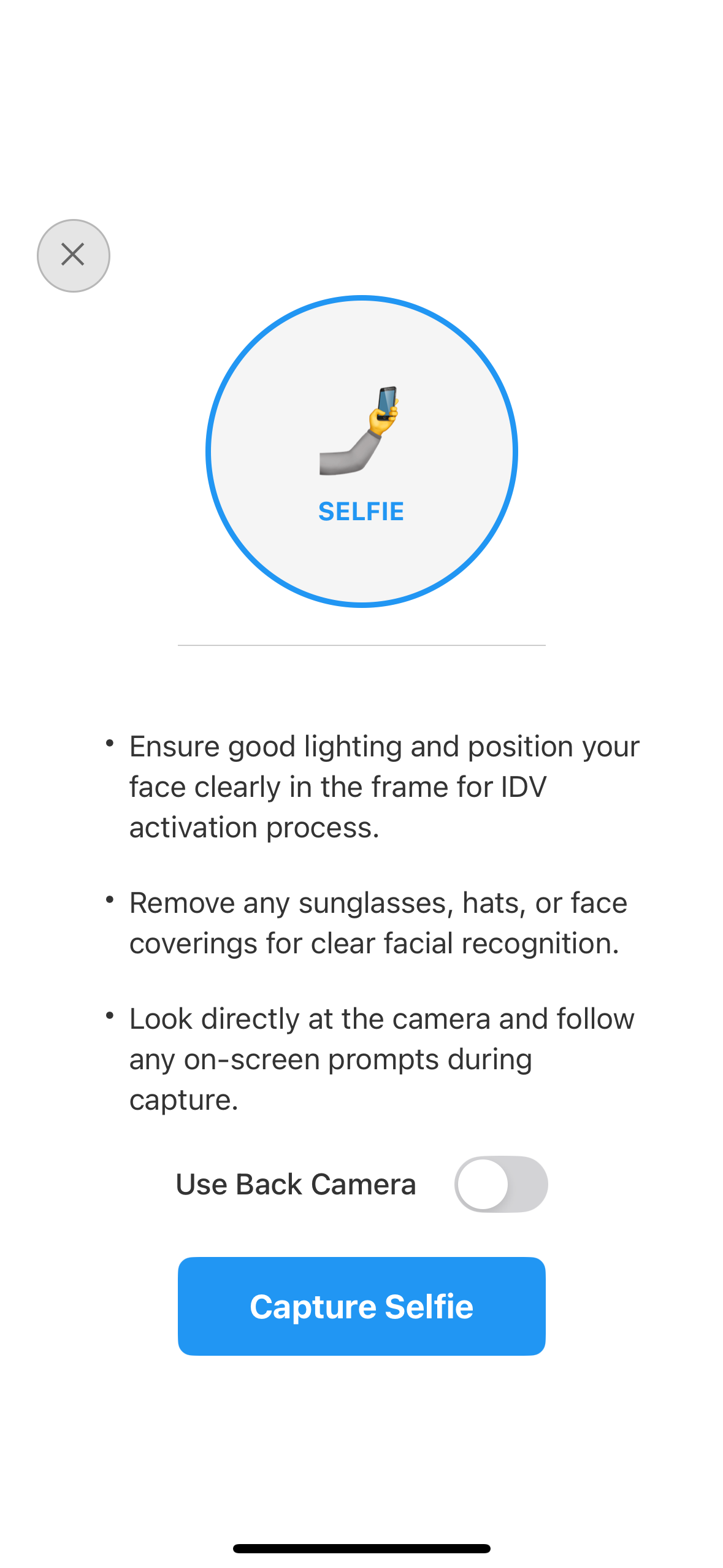
Users prepare for facial recognition capture with camera selection options and workflow-specific guidance for optimal selfie quality. Located at:
src/tutorial/screens/idv/IDVSelfieProcessStartConfirmationScreen.tsx
IDVOptInCapturedFrameConfirmationScreen
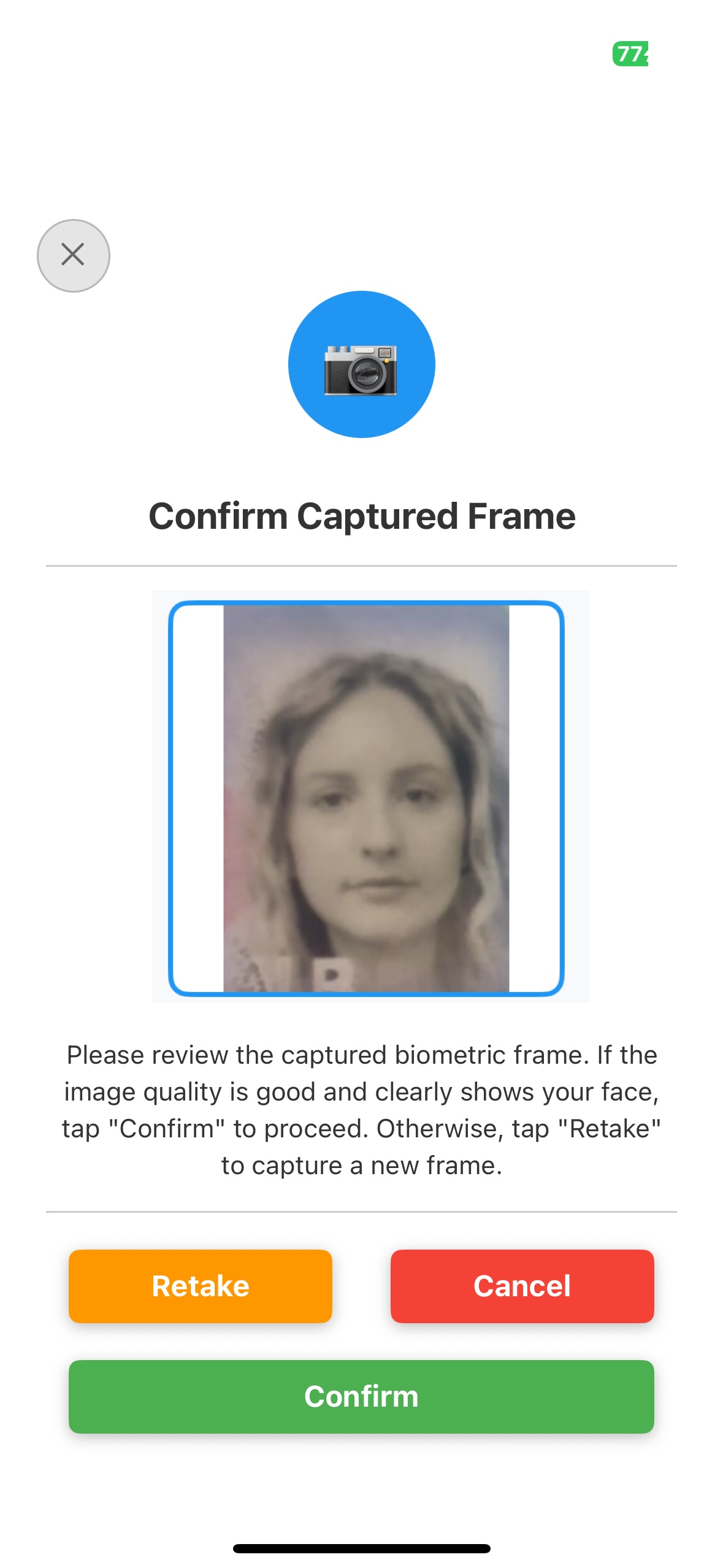
Review captured biometric frame with approve/retake options before proceeding to consent. Located at:
src/tutorial/screens/idv/IDVOptInCapturedFrameConfirmationScreen.tsx
IDVBiometricOptInConsentScreen
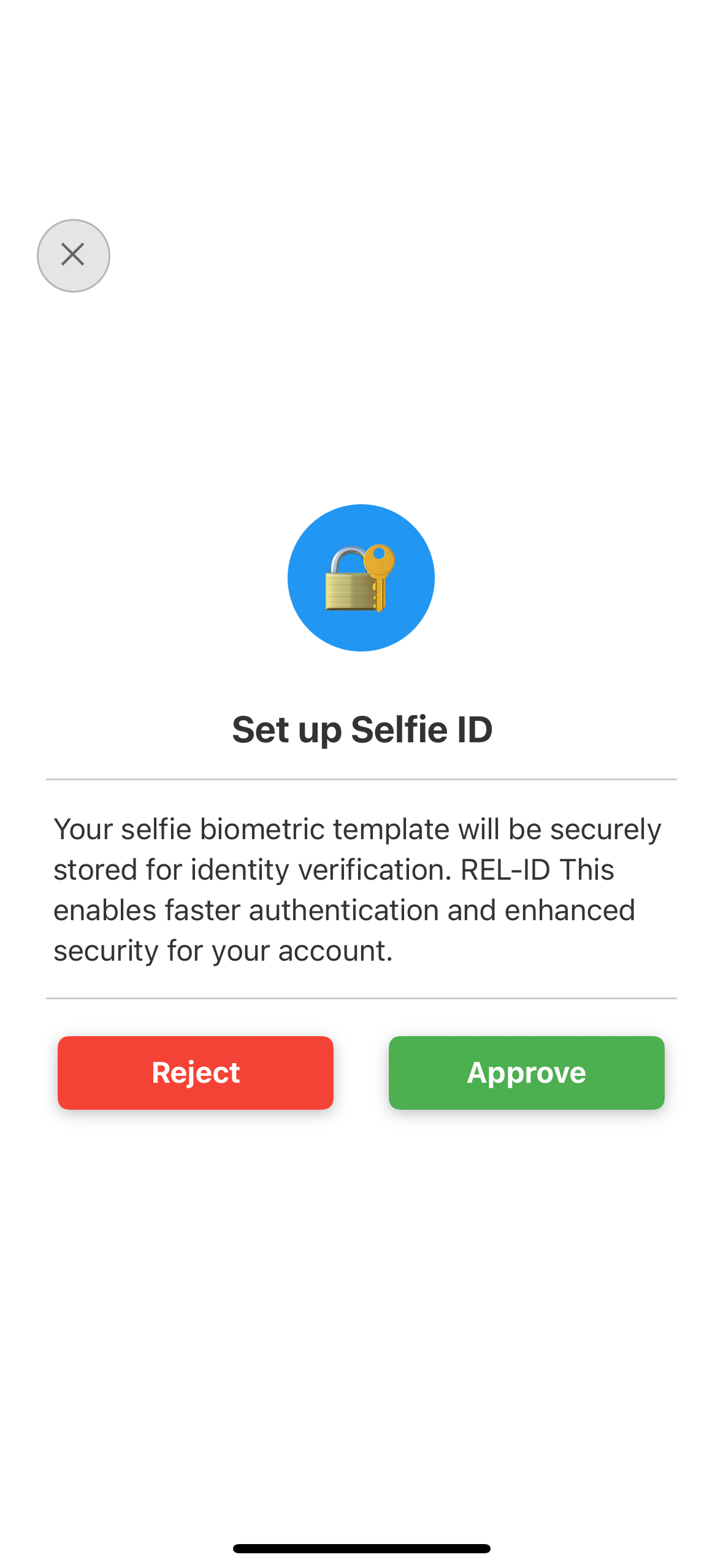
Users provide consent for biometric template storage with clear privacy information and opt-out options following compliance requirements. Located at:
src/tutorial/screens/idv/IDVBiometricOptInConsentScreen.tsx
Key Implementation Features
🔐 API Methods Implemented:
RdnaService.initiateIDVBiometricOptIn(reason)- Start biometric enrollment flowRdnaService.initiateIDVBiometricOptOut(reason)- Start biometric removal flowRdnaService.setIDVSelfieProcessStartConfirmation()- Confirm selfie capture startRdnaService.setIDVBiometricOptInConsent()- Submit consent decisionRdnaService.setIDVBiometricOptInConfirmation()- Confirm captured frame
📱 Event Handlers Implemented:
getIDVSelfieProcessStartConfirmation→ Navigate to selfie start screenonIDVOptInCapturedFrameConfirmation→ Navigate to frame confirmation screengetIDVBiometricOptInConsent→ Navigate to consent screenonIDVBiometricOptInStatus→ Handle opt-in completiononIDVBiometricOptOutStatus→ Handle opt-out completion
🎯 Navigation Integration:
- Automatic screen navigation based on SDK events
- Proper parameter passing between screens
- Error handling and success callbacks
- Return to dashboard after completion
Congratulations! You've successfully implemented comprehensive biometric consent management functionality with the REL-ID SDK.
🚀 What You've Accomplished
✅ Complete Biometric Consent Integration - Full biometric opt-in/opt-out workflow implementing 3 core screens
✅ Event-Driven Architecture - Proper handling of biometric consent event chains with seamless navigation
✅ Privacy-First Implementation - Production-ready biometric consent with comprehensive privacy protection
✅ User Experience Excellence - Intuitive biometric enrollment with clear guidance and transparent consent options
✅ Regulatory Compliance - GDPR/CCPA compliant consent management with proper opt-out mechanisms
📈 Advanced Biometric Consent Features to Explore
Consider implementing these advanced features to enhance your biometric consent capabilities:
- Multi-Modal Biometrics: Support for fingerprint, voice, and facial recognition consent
- Consent Analytics: Track consent rates and user preferences for optimization
- Enhanced Privacy Controls: Granular biometric data usage permissions
- Automated Consent Renewal: Periodic consent reconfirmation workflows
- Cross-Platform Consent Sync: Sync biometric consent across multiple user devices
📚 Additional Resources
- REL-ID Biometric Consent Documentation - Complete biometric consent API reference
- React Native Camera Best Practices - Camera integration optimization
- Mobile Biometric Security Guidelines - NIST security standards
- Biometric Privacy Compliance Guide - GDPR, CCPA, BIPA compliance requirements
- Selfie Capture Best Practices - Optimal biometric capture implementation
🔄 Integration with Other Flows
Your biometric consent implementation seamlessly integrates with:
- User Dashboard: Add biometric management options to user settings
- Account Security: Enhance account protection with biometric authentication
- Privacy Center: Include biometric consent in comprehensive privacy controls
- Security Settings: Integrate with multi-factor authentication preferences
🔐 You've mastered secure biometric consent management with REL-ID SDK!
Your implementation provides users with transparent, privacy-first biometric consent management while maintaining the highest security and compliance standards. Use this foundation to build trust and enhance security in your applications with confidence.