This codelab demonstrates how to implement Mobile Threat Detection (MTD) flow using the RELID iOS SDK. MTD now performs a synchronous check during the RELID SDK initialization to ensure critical threats are detected early. Once the SDK is successfully initialized, MTD continues monitoring asynchronously in the background to detect and respond to any emerging threats during runtime.
What You'll Learn
- How to handle MTD threat detection events
- Implementing user consent workflows for security threats
- Creating threat detection UI components
- Managing threat responses and actions
- Understanding different threat types and severities
Get the Code from GitHub
The code to get started is stored in a GitHub repository.
You can clone the repository using the following command:
git clone https://github.com/uniken-public/codelab-ios.git
Navigate to the relid-MTD folder in the repository you cloned earlier
What You'll Need
- Completed RELID Initialization codelab
- RELID iOS SDK installed and configured
- Basic understanding of UIKit and view controllers
- Understanding of iOS delegate patterns and closures
- Xcode 13.0 or later
- Access to the sample app source code for reference
The sample app provides a complete MTD implementation. Let's examine the key components:
Component | Purpose | Sample App Reference |
MTD Manager | Global threat state management |
|
Threat Modal | UI for displaying threats |
|
Event Handling | Delegate callback manager |
|
Threat Types | SDK threat objects |
|
Permissions
Platform-Specific Permissions
The SDK requires specific permissions for optimal MTD functionality:
iOS Configuration: Refer to the iOS Permissions Documentation for complete Info.plist configuration including:
- NSLocationWhenInUseUsageDescription (network threat detection)
- NSLocalNetworkUsageDescription (network threat detection)
MTD Callback Types
The RELID SDK triggers two main MTD events during initialization:
Event Type | Description | User Action Required |
Non-terminating threats | User can choose to proceed or exit using takeActionOnThreats API | |
Critical threats | Application must exit immediately |
The RELID iOS SDK provides threat structures through its framework. The SDK uses Objective-C classes that are automatically bridged to Swift:
// From RELID.xcframework SDK headers
// RDNAThreat class provides all threat information

// Key properties available:
// - threatName: String - Human-readable threat identifier
// - threatMsg: String - User-facing message
// - threatId: Int32 - Unique identifier
// - threatCategory: String - "SYSTEM", "APP", "NETWORK"
// - threatSeverity: String - "LOW", "MEDIUM", "HIGH"
// - threatReason: String - Detailed reason
// - networkInfo: RDNANetworkInfo - Network-specific details
// - appInfo: RDNAAppInfo - App-specific details (Android only)
// - shouldProceedWithThreats: Bool - User decision
// - rememberActionForSession: Bool - Persist decision
Threat Categories and Severities
Understanding threat classification helps in implementing appropriate responses:
Category | Examples | Platform |
SYSTEM | Jailbroken Device, Debugger Detected | iOS |
NETWORK | Network MITM, Unsecured Access Point | iOS |
APP | Malware App, Repacked App | Android only |
Extend your existing delegate manager to handle MTD events:
// Sources/Uniken/Services/RDNADelegateManager.swift (additions)
import Foundation
import RELID

class RDNADelegateManager: NSObject, RDNACallbacks {

    // MARK: - Singleton

    static let shared = RDNADelegateManager()

    private override init() {
        super.init()
    }

    // MARK: - MTD Callback Closures

    /// Closure invoked when non-critical threats detected (user consent required)
    var onUserConsentThreats: (([RDNAThreat]) -> Void)?

    /// Closure invoked when critical threats detected (immediate termination required)
    var onTerminateWithThreats: (([RDNAThreat]) -> Void)?

    // MARK: - RDNACallbacks Protocol Implementation

    /// Handle non-critical threats requiring user consent
    func onUserConsentThreats(_ threats: [RDNAThreat]) {
        DispatchQueue.main.async { [weak self] in
            self?.onUserConsentThreats?(threats)
        }
    }

    /// Handle critical threats requiring immediate app termination
    func onTerminate(with threats: [RDNAThreat]) {
        DispatchQueue.main.async { [weak self] in
            self?.onTerminateWithThreats?(threats)
        }
    }
}
Key features of MTD event handling:
- Delegate pattern: SDK callbacks implemented via
RDNACallbacksprotocol - Main thread dispatch: All callbacks dispatched to main thread for UI safety
- Closure callbacks: Clean API for registering threat handlers
- Memory safety: Weak self references prevent retain cycles
The takeActionOnThreats API is only required for handling threats received through the onUserConsentThreats event. This allows the application to take appropriate action based on user consent.
The onTerminateWithThreats event is triggered only when critical threats are detected. In such cases, the SDK automatically terminates internally, and no further actions can be performed through the SDK until it is reinitialized.
Add threat response capability to your RELID service:
// Sources/Uniken/Services/RDNAService.swift (addition)
import Foundation
import RELID

class RDNAService {

    // MARK: - Singleton

    static let shared = RDNAService()

    private let rdna = RDNA.sharedInstance()

    private init() {}

    /**
     * Takes action on detected security threats
     * - Parameter threats: Array of RDNAThreat objects with modified shouldProceedWithThreats values
     * - Returns: RDNAError indicating success or failure
     */
    func takeActionOnThreats(_ threats: [RDNAThreat]) -> RDNAError {
        // Call SDK method directly - synchronous API
        let error = rdna.takeAction(on: threats)

        if error.longErrorCode == 0 {
            print("RDNAService - Successfully took action on threats")
        } else {
            print("RDNAService - Take action on threats failed: \(error.errorString)")
        }

        return error
    }
}
Important Response Parameters
When responding to threats, two key properties control the behavior:
Parameter | Purpose | Swift Type | Values |
| Whether to continue despite threats |
|
|
| Cache decision for session |
|
|
Create a singleton manager to handle MTD state across your application:
// Sources/Uniken/MTD/MTDThreatManager.swift
import Foundation
import UIKit

/// MTDThreatManager - Singleton for managing security threats
class MTDThreatManager {

    // MARK: - Singleton

    static let shared = MTDThreatManager()

    private init() {}

    // MARK: - Properties

    /// Currently detected threats
    private var currentThreats: [RDNAThreat] = []

    /// Is this a consent mode (user choice) or terminate mode (forced exit)?
    private var isConsentMode: Bool = false

    /// Track threat IDs for self-triggered exits to avoid duplicate dialogs
    private var pendingExitThreatIds: Set<Int32> = []

    /// Is the threat modal currently visible?
    private var isModalVisible: Bool = false

    /// Is processing user action (shows loading state)?
    private(set) var isProcessing: Bool = false

    /// Weak reference to the threat modal view controller
    private weak var threatModalVC: ThreatDetectionViewController?

    /// Initialize MTD threat handlers
    /// Must be called early in app lifecycle (e.g., SceneDelegate)
    func setupThreatHandlers() {
        // Register for consent threats (user choice)
        RDNADelegateManager.shared.onUserConsentThreats = { [weak self] threats in
            self?.handleUserConsentThreats(threats)
        }

        // Register for terminate threats (forced exit)
        RDNADelegateManager.shared.onTerminateWithThreats = { [weak self] threats in
            self?.handleTerminateWithThreats(threats)
        }
    }

    /// Handle non-critical threats requiring user consent
    private func handleUserConsentThreats(_ threats: [RDNAThreat]) {
        print("MTDThreatManager - User consent threats detected: \(threats.count)")
        currentThreats = threats
        isConsentMode = true
        showThreatModal()
    }

    /// Handle critical threats requiring immediate termination
    private func handleTerminateWithThreats(_ threats: [RDNAThreat]) {
        print("MTDThreatManager - Terminate with threats detected: \(threats.count)")

        // Check if these are self-triggered (user chose to exit in consent mode)
        let threatIds = Set(threats.map { $0.threatId })
        if !pendingExitThreatIds.isEmpty && threatIds == pendingExitThreatIds {
            // Self-triggered exit - go directly to exit screen without showing dialog
            print("MTDThreatManager - Self-triggered exit, proceeding directly")
            pendingExitThreatIds.removeAll()
            showSecurityExitScreen()
            return
        }

        // Genuinely new critical threats - show dialog
        currentThreats = threats
        isConsentMode = false
        showThreatModal()
    }
}
Threat Response Logic
The manager handles user decisions by modifying threat objects:
// MTDThreatManager.swift (continued)

/// User chose to proceed despite threats (consent mode only)
func handleProceed() {
    guard isConsentMode else {
        print("MTDThreatManager - ERROR: Proceed called in terminate mode")
        return
    }

    print("MTDThreatManager - User chose to proceed")
    isProcessing = true

    // Modify threats: shouldProceedWithThreats = true
    let modifiedThreats = currentThreats.map { threat -> RDNAThreat in
        threat.shouldProceedWithThreats = true
        threat.rememberActionForSession = true
        return threat
    }

    // Call SDK API
    let error = RDNAService.shared.takeActionOnThreats(modifiedThreats)

    if error.longErrorCode == 0 {
        print("MTDThreatManager - takeActionOnThreats SUCCESS")
        // Hide modal and continue
        hideModal {
            self.isProcessing = false
            self.currentThreats = []
            // Continue initialization flow - SDK will fire onInitialized
        }
    } else {
        print("MTDThreatManager - takeActionOnThreats ERROR: \(error.errorString)")
        isProcessing = false
        // Show error alert
        showErrorAlert(message: "Failed to process threat decision: \(error.errorString)")
    }
}

/// User chose to exit the application
func handleExit() {
    print("MTDThreatManager - User chose to exit")
    isProcessing = true

    if isConsentMode {
        // Consent mode: Report decision to SDK first
        let modifiedThreats = currentThreats.map { threat -> RDNAThreat in
            threat.shouldProceedWithThreats = false
            threat.rememberActionForSession = true
            return threat
        }

        // Track threat IDs to detect self-triggered terminateWithThreats
        pendingExitThreatIds = Set(modifiedThreats.map { $0.threatId })

        // Call SDK API
        let error = RDNAService.shared.takeActionOnThreats(modifiedThreats)

        if error.longErrorCode == 0 {
            print("MTDThreatManager - takeActionOnThreats (exit) SUCCESS")
            // SDK will likely fire onTerminateWithThreats - we'll handle it there
            hideModal {
                self.showSecurityExitScreen()
            }
        } else {
            print("MTDThreatManager - takeActionOnThreats (exit) ERROR: \(error.errorString)")
            isProcessing = false
            showErrorAlert(message: "Failed to process exit: \(error.errorString)")
        }
    } else {
        // Terminate mode: Exit immediately
        hideModal {
            self.showSecurityExitScreen()
        }
    }
}
Key features of the MTD manager:
- Global state management: Centralized threat handling across the app
- Event integration: Automatic registration with the delegate manager
- User decision handling: Processes user choices for threats
- API integration: Calls takeActionOnThreats with proper threat modifications
- Duplicate prevention: Tracks self-triggered exits to avoid duplicate dialogs
Create a view controller to display threat information to users:
// Sources/Uniken/MTD/ThreatDetectionViewController.swift
import UIKit

class ThreatDetectionViewController: UIViewController {

    // MARK: - IBOutlets

    @IBOutlet weak var titleLabel: UILabel!
    @IBOutlet weak var subtitleLabel: UILabel!
    @IBOutlet weak var threatsTableView: UITableView!
    @IBOutlet weak var proceedButton: UIButton!
    @IBOutlet weak var exitButton: UIButton!
    @IBOutlet weak var activityIndicator: UIActivityIndicatorView!

    // MARK: - Properties

    /// Detected threats to display
    var threats: [RDNAThreat] = [] {
        didSet {
            threatsTableView?.reloadData()
            print("ThreatDetectionViewController - Loaded \(threats.count) threats")
        }
    }

    /// Is this consent mode (show Proceed button) or terminate mode (Exit only)?
    var isConsentMode: Bool = false

    /// Closure called when user chooses to proceed (consent mode only)
    var onProceed: (() -> Void)?

    /// Closure called when user chooses to exit
    var onExit: (() -> Void)?

    // MARK: - Lifecycle

    override func viewDidLoad() {
        super.viewDidLoad()
        setupUI()
        setupTableView()
        updateButtons()
    }

    // MARK: - UI Setup

    private func setupUI() {
        view.backgroundColor = UIColor.black.withAlphaComponent(0.5)

        // Title and subtitle
        titleLabel.text = "Security Threat Detected"
        titleLabel.textColor = UIColor(hex: "#dc2626")  // Red
        titleLabel.font = UIFont.boldSystemFont(ofSize: 24)

        if isConsentMode {
            subtitleLabel.text = "The following security threats were detected. You can choose to proceed anyway or exit the application."
        } else {
            subtitleLabel.text = "Critical security threats were detected. The application must exit for your safety."
        }
        subtitleLabel.textColor = UIColor(hex: "#1f2937")
        subtitleLabel.font = UIFont.systemFont(ofSize: 16)

        // Buttons
        proceedButton.backgroundColor = UIColor(hex: "#f59e0b")  // Yellow/Amber
        proceedButton.setTitleColor(.white, for: .normal)
        proceedButton.titleLabel?.font = UIFont.systemFont(ofSize: 18, weight: .semibold)
        proceedButton.layer.cornerRadius = 8
        proceedButton.setTitle("Proceed Anyway", for: .normal)

        exitButton.backgroundColor = UIColor(hex: "#dc2626")  // Red
        exitButton.setTitleColor(.white, for: .normal)
        exitButton.titleLabel?.font = UIFont.systemFont(ofSize: 18, weight: .semibold)
        exitButton.layer.cornerRadius = 8
        exitButton.setTitle("Exit Application", for: .normal)

        // Activity indicator
        activityIndicator.hidesWhenStopped = true
        activityIndicator.stopAnimating()
    }

    private func setupTableView() {
        threatsTableView.dataSource = self
        threatsTableView.delegate = self
        threatsTableView.register(ThreatCell.self, forCellReuseIdentifier: "ThreatCell")
        threatsTableView.rowHeight = UITableView.automaticDimension
        threatsTableView.estimatedRowHeight = 100
        threatsTableView.separatorStyle = .none
        threatsTableView.backgroundColor = UIColor(hex: "#f8fafc")
    }

    private func updateButtons() {
        // Show/hide Proceed button based on mode
        proceedButton.isHidden = !isConsentMode
    }

    // MARK: - Actions

    @IBAction func proceedButtonTapped(_ sender: UIButton) {
        guard isConsentMode else { return }

        // Show confirmation alert
        let alert = UIAlertController(
            title: "Proceed Despite Threats?",
            message: "Are you sure you want to continue despite the security threats?",
            preferredStyle: .alert
        )

        alert.addAction(UIAlertAction(title: "Cancel", style: .cancel))
        alert.addAction(UIAlertAction(title: "Proceed", style: .destructive) { [weak self] _ in
            self?.showLoading()
            self?.onProceed?()
        })

        present(alert, animated: true)
    }

    @IBAction func exitButtonTapped(_ sender: UIButton) {
        let alert = UIAlertController(
            title: "Exit Application?",
            message: "Are you sure you want to exit the application?",
            preferredStyle: .alert
        )

        alert.addAction(UIAlertAction(title: "Cancel", style: .cancel))
        alert.addAction(UIAlertAction(title: "Exit", style: .destructive) { [weak self] _ in
            self?.showLoading()
            self?.onExit?()
        })

        present(alert, animated: true)
    }

    private func showLoading() {
        proceedButton.isEnabled = false
        exitButton.isEnabled = false
        activityIndicator.startAnimating()
    }
}

// MARK: - UITableViewDataSource

extension ThreatDetectionViewController: UITableViewDataSource {
    func tableView(_ tableView: UITableView, numberOfRowsInSection section: Int) -> Int {
        return threats.count
    }

    func tableView(_ tableView: UITableView, cellForRowAt indexPath: IndexPath) -> UITableViewCell {
        let cell = tableView.dequeueReusableCell(withIdentifier: "ThreatCell", for: indexPath) as! ThreatCell
        cell.configure(with: threats[indexPath.row])
        return cell
    }
}

// MARK: - UITableViewDelegate

extension ThreatDetectionViewController: UITableViewDelegate {
    func tableView(_ tableView: UITableView, didSelectRowAt indexPath: IndexPath) {
        tableView.deselectRow(at: indexPath, animated: true)
    }
}
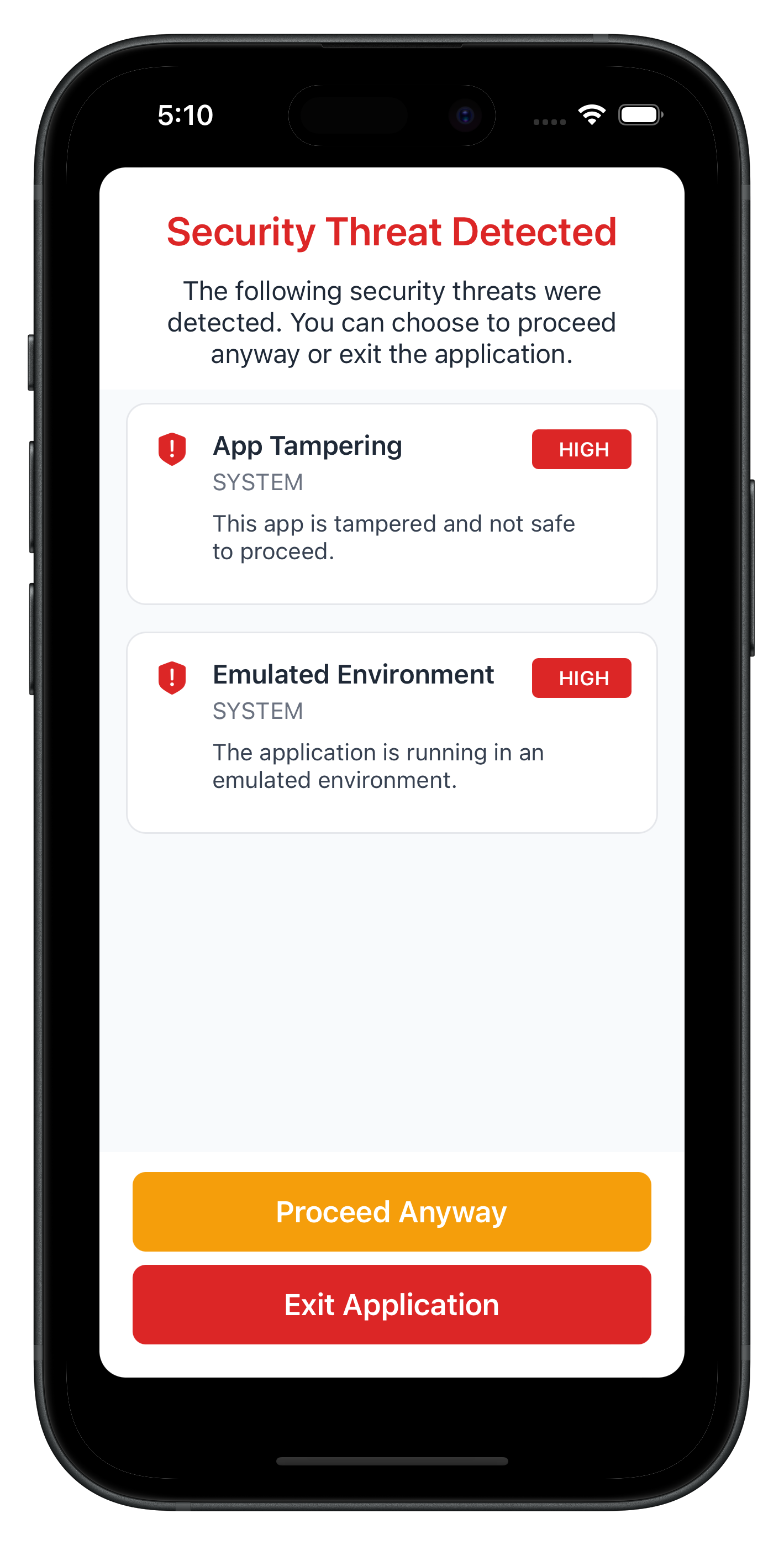
Key features of the threat detection view controller:
- Threat display: Shows threat name, message, and severity level
- Color-coded severity: Visual indication of threat levels (HIGH=red, MEDIUM=orange, LOW=green)
- Conditional buttons: Different actions based on threat type (consent vs terminate)
- Loading states: Processing indicators during API calls
- Confirmation alerts: UIAlertController for user confirmation
- Closure callbacks: Clean callback pattern for user actions
The following image showcases screen from the sample application:
Set up MTD early in your app lifecycle:
// SceneDelegate.swift
import UIKit

class SceneDelegate: UIResponder, UIWindowSceneDelegate {

    var window: UIWindow?

    func scene(_ scene: UIScene, willConnectTo session: UISceneSession,
               options connectionOptions: UIScene.ConnectionOptions) {

        guard let windowScene = (scene as? UIWindowScene) else { return }

        // Create window
        let window = UIWindow(windowScene: windowScene)

        // Create navigation controller
        let navigationController = UINavigationController()
        navigationController.setNavigationBarHidden(true, animated: false)

        // Configure AppCoordinator
        AppCoordinator.shared.configure(with: navigationController)
        AppCoordinator.shared.start()  // Show initial screen

        // MTD-SPECIFIC: Setup threat detection handlers early
        MTDThreatManager.shared.setupThreatHandlers()

        // Set window
        window.rootViewController = navigationController
        self.window = window
        window.makeKeyAndVisible()
    }
}
The early setup approach offers several advantages:
- Early detection: MTD handlers ready before SDK initialization
- Global management: Centralized threat handling throughout app lifecycle
- Consistent UI: Single modal handles all threat scenarios
- Memory efficiency: Singleton pattern prevents memory leaks
- iOS-compliant: SecurityExitViewController provides HIG-compliant exit guidance
Test Scenarios
- User Consent Threats: Test with low-medium severity threats
- Terminate Threats: Test with high severity threats requiring app exit
- Mixed Threat Types: Test scenarios with multiple threat categories
- User Interactions: Test both "Proceed" and "Exit" flows
Common MTD Test Scenarios
Threat Category | Examples | Typical Severity | Expected Response |
SYSTEM | Debugger Detected, Jailbroken Device | LOW-HIGH | User consent or termination |
NETWORK | Network MITM, Unsecured Access Point | LOW-MEDIUM | User consent or termination |
Debugging MTD Callbacks
Use these debugging techniques to verify MTD functionality:
// Verify callback registration
print("MTD callbacks registered:",
      RDNADelegateManager.shared.onUserConsentThreats != nil,
      RDNADelegateManager.shared.onTerminateWithThreats != nil)

// Log threat data
for threat in threats {
    print("Threat: \(threat.threatName)")
    print("Severity: \(threat.threatSeverity)")
    print("Category: \(threat.threatCategory)")
}
Modal Not Appearing
Cause: MTD callbacks not properly registered Solution: Verify MTDThreatManager.setupThreatHandlers() is called in SceneDelegate
// Verify in SceneDelegate.swift
func scene(_ scene: UIScene, willConnectTo session: UISceneSession,
           options connectionOptions: UIScene.ConnectionOptions) {
    // ...
    MTDThreatManager.shared.setupThreatHandlers()
}
Cause: Callback closures not set Solution: Check that closure properties are not nil
Threats Not Processed
Cause: Incorrect threat object modification Solution: Ensure threat properties are properly set
// Correct format
let modifiedThreats = threats.map { threat -> RDNAThreat in
    threat.shouldProceedWithThreats = true
    threat.rememberActionForSession = true
    return threat
}
let error = RDNAService.shared.takeActionOnThreats(modifiedThreats)
Cause: Missing required threat properties Solution: Verify all required properties are present in threat objects
App Not Exiting
Cause: iOS apps cannot programmatically self-terminate (App Store policy)
Solution: Use SecurityExitViewController to guide users
// Navigate to SecurityExitViewController
func showSecurityExitScreen() {
    let storyboard = UIStoryboard(name: "Main", bundle: nil)
    if let vc = storyboard.instantiateViewController(
        withIdentifier: "SecurityExitViewController"
    ) as? SecurityExitViewController {
        navigationController?.setViewControllers([vc], animated: true)
    }
}
Best Practice: Provide clear instructions for manual app closure
Build Errors
"No such module ‘RELID'"
- Framework not properly linked
- Solution: Clean build folder (Cmd+Shift+K), rebuild, or re-run
pod install
"Resource not found in bundle"
- Resource not included in target
- Solution: Select file in Xcode, check "Target Membership" in File Inspector
Code signing errors
- Provisioning profile or certificate issues
- Solution: Check Signing & Capabilities in Xcode project settings
CocoaPods errors
- Pod installation or version conflicts
- Solution:
pod repo update && pod install --repo-update
Important Security Guidelines
- Never ignore terminate threats - Always guide users to exit the app when required
- Log threat details securely - Use
os_logfor analysis without exposing sensitive data - Educate users appropriately - Provide clear but not alarming explanations
- Keep SDK updated - Regular updates include latest threat detection
- Test thoroughly - Verify MTD behavior across different device states
Threat Response Guidelines
Threat Severity | Recommended Action | User Choice |
LOW | Usually proceed with warning | User decides |
MEDIUM | Proceed with caution | User decides with strong warning |
HIGH | Consider termination | Limited or no user choice |
Memory and Performance
- Clean up closures in deinit to prevent retain cycles
- Use
[weak self]in closure captures - Handle background/foreground app states appropriately
- Implement proper error boundaries
- Test on various device configurations
- Monitor for memory leaks in threat handling
iOS-Specific Considerations
// Use os_log for production logging
import os.log

let logger = OSLog(subsystem: "com.yourapp.mtd", category: "threats")
os_log("Threat detected: %{public}@", log: logger, type: .error, threat.threatName)

// Memory management
deinit {
    // Clean up observers and closures
    RDNADelegateManager.shared.onUserConsentThreats = nil
    RDNADelegateManager.shared.onTerminateWithThreats = nil
}

// Threading
DispatchQueue.main.async {
    // Always update UI on main thread
}
Congratulations! You've successfully learned how to implement comprehensive MTD functionality with:
- ✅ Real-time threat detection and handling
- ✅ User-friendly threat information display
- ✅ Secure threat response mechanisms
- ✅ Global state management using singleton pattern
- ✅ iOS-compliant exit guidance for critical threats
Key iOS Patterns Learned
Your MTD implementation now uses:
- Delegate protocols with the SDK's
RDNACallbacksprotocol - Closure-based callbacks for event handling
- Main thread dispatch for UI updates
- UIViewController lifecycle for view management
- Singleton pattern for global state management
- UIAlertController for user confirmations
- Property observers for reactive UI updates
Next Steps
- Implement additional RELID SDK features
- Customize threat UI to match your app's design
- Add analytics for threat detection patterns
- Implement advanced error recovery